XML sitemap locator 

Extension key

sitemap_locator

Package name

eliashaeussler/typo3-sitemap-locator

Version

1.3

Language

en

Author

Elias Häußler & contributors

License

This extension documentation is published under the CC BY-NC-SA 4.0 (Creative Commons) license.


An extension for TYPO3 CMS that provides a service to locate XML sitemaps of a configured site. It supports various sitemap providers, e.g. by configured page type or robots.txt, and provides an interface to implement custom sitemap providers.

Introduction 

A quick overview about the main features provided by this extension.

Installation 

Instructions on how to install this extension and which TYPO3 and PHP versions are currently supported.

Configuration 

Learn how to configure the extension for extended usage. By default, no special configuration is required.

Usage 

This section describes how to use this extension in your application to locate XML sitemaps.

Developer corner 

A quick overview about all relevant classes provided by this extension.

Introduction 

What does it do? 

The extension provides a service to locate XML sitemaps of configured sites. This can be done by using one of the following two ways:

Features 

Support 

There are several ways to get support for this extension:

Security Policy 

Please read our security policy if you discover a security vulnerability in this extension.

License 

This extension is licensed under GNU General Public License 2.0 (or later).

Installation 

Requirements 

  • PHP 8.2 - 8.5
  • TYPO3 13.4 LTS - 14.3 LTS

Installation 

Require the extension via Composer (recommended):

composer require eliashaeussler/typo3-sitemap-locator
Copied!

Or download it from the TYPO3 extension repository.

Version matrix 

Extension versions TYPO3 versions PHP versions
since 1.3.0 13.4 LTS - 14.3 LTS 8.2 - 8.5
1.2.0 13.4 LTS - 14.2 8.2 - 8.5
1.1.0 13.4 LTS - 14.1 8.2 - 8.5
1.0.0 - 1.0.2 13.4 LTS - 14.0 8.2 - 8.5
0.1.9 - 0.2.0 11.5 LTS - 13.4 LTS 8.1 - 8.4
0.1.7 - 0.1.8 11.5 LTS - 13.4 LTS 8.1 - 8.3
0.1.6 11.5 LTS - 13.3 8.1 - 8.3
0.1.5 11.5 LTS - 13.2 8.1 - 8.3
0.1.4 11.5 LTS - 13.1 8.1 - 8.3
0.1.3 11.5 LTS - 13.0 8.1 - 8.3
0.1.0 - 0.1.2 11.5 LTS - 12.4 LTS 8.1 - 8.3

Configuration 

In normal installations, no special configuration is required. However, the extension provides some possibilities to explicitly configure the path to XML sitemaps.

Learn what configuration options are available on the following pages:

Site configuration 

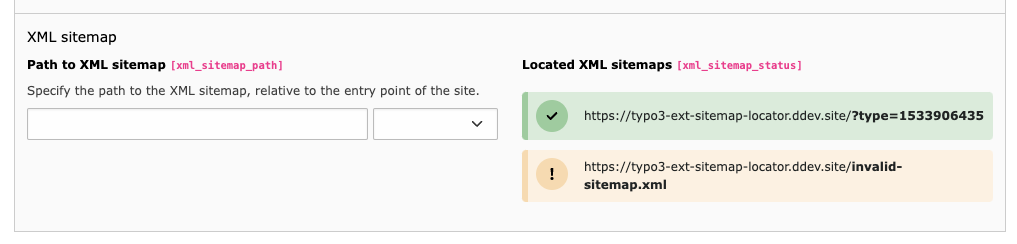
Within the site configuration of each site, it is possible to explicitly configure the path to a related XML sitemap. The following configuration options are available for this purpose:

xml_sitemap_path (site)

xml_sitemap_path (site)
Type
string
Path
xml_sitemap_path

Path to the XML sitemap of the configured site's base language. It must be relative to the entry point of the site.

Configuration of XML sitemap path within the Sites module

xml_sitemap_path (site_language)

xml_sitemap_path (site_language)
Type
string
Path
languages > (site language) > xml_sitemap_path

Path to the XML sitemap of an additional site language. It must be relative to the entry point of the site language.

Usage 

This section describes how to properly use the extension in various ways. The main functionality is provided by a PHP API which allows to locate XML sitemaps of a given site. In addition, the extension provides a console command to allow XML sitemap location from console.

Using the API 

The main functionality of this extension is to provide a PHP API which allows to locate XML sitemaps for a given site and optional site language. Read more about how to use this API on this page.

class SitemapLocator
Fully qualified name
\EliasHaeussler\Typo3SitemapLocator\Sitemap\SitemapLocator

Service to locate XML sitemaps of a given site.

locateBySite ( $site, $siteLanguage = null)

Locate XML sitemaps of the given site and site language.

param TYPO3\CMS\Core\Site\Entity\Site $site

The site whose XML sitemap path should be located.

param TYPO3\CMS\Core\Site\Entity\SiteLanguage $siteLanguage

An optional site language to include while locating the XML sitemap path.

Returns

An array of instances of \EliasHaeussler\Typo3SitemapLocator\Domain\Model\Sitemap.

locateAllBySite ( $site)

Locate XML sitemaps of the given site and all their available languages.

param TYPO3\CMS\Core\Site\Entity\Site $site

The site whose XML sitemap path should be located.

Returns

An array of instances of \EliasHaeussler\Typo3SitemapLocator\Domain\Model\Sitemap, indexed by the site language id.

isValidSitemap ( $sitemap)

Check whether the given sitemap actually exists.

param EliasHaeussler\Typo3SitemapLocator\Domain\Model\Sitemap $sitemap

The XML sitemap to check for existence

returntype

bool

Example 

use EliasHaeussler\Typo3SitemapLocator;
use TYPO3\CMS\Core;

$sitemapLocator = Core\Utility\GeneralUtility::makeInstance(Typo3SitemapLocator\Sitemap\SitemapLocator::class);
$siteFinder = Core\Utility\GeneralUtility::makeInstance(Core\Site\SiteFinder::class);
$sitemaps = [];

// Fetch all available sites
$sites = $siteFinder->getAllSites();

// Locate XML sitemaps of each site
foreach ($sites as $site) {
    $sitemaps[$site->getIdentifier()] = $sitemapLocator->locateBySite($site);
}
Copied!

Console commands 

The extension provides the following console commands:

sitemap-locator:locate 

A command to locate XML sitemaps of a given site and optional site language.

vendor/bin/typo3 sitemap-locator:locate <site> [<options>]
Copied!
typo3/sysext/core/bin/typo3 sitemap-locator:locate <site> [<options>]
Copied!

The following command options are available:

site

site
Type
integer (root page ID) or string (site identifier)
Required
true
Default
none
Multiple allowed
false

Use this mandatory command argument to pass a site identifier or root page ID of the site for which to locate XML sitemaps.

Example:

vendor/bin/typo3 sitemap-locator:locate 47
vendor/bin/typo3 sitemap-locator:locate main
Copied!
typo3/sysext/core/bin/typo3 sitemap-locator:locate 47
typo3/sysext/core/bin/typo3 sitemap-locator:locate main
Copied!

-l|--language

-l|--language
Type
integer
Required
false
Default
none (= default language)
Multiple allowed
false

You can explicitly define a site language for which to locate an XML sitemap. If omitted, the XML sitemap of the default site language is located. This option is mutually exclusive with the --all option.

Example:

vendor/bin/typo3 sitemap-locator:locate --language 1
Copied!
typo3/sysext/core/bin/typo3 sitemap-locator:locate --language 1
Copied!

-a|--all

-a|--all
Type
boolean
Required
false
Default
false
Multiple allowed
false

Use this option to locate XML sitemaps of all available site languages of the given site. This option is mutually exclusive with the --language option.

Example:

vendor/bin/typo3 sitemap-locator:locate --all
Copied!
typo3/sysext/core/bin/typo3 sitemap-locator:locate --all
Copied!

--validate

--validate
Type
boolean
Required
false
Default
false
Multiple allowed
false

Validate if located XML sitemaps actually exist and are properly accessible By passing this option, the located sitemaps are additionally validated for existence. If at least one XML sitemap does not exist, the command fails with exit code 0.

Example:

vendor/bin/typo3 sitemap-locator:locate --validate
Copied!
typo3/sysext/core/bin/typo3 sitemap-locator:locate --validate
Copied!

-j|--json

-j|--json
Type
boolean
Required
false
Default
false
Multiple allowed
false

Located XML sitemaps are displayed as list by default. By using this option, you can switch to JSON output instead. This may come in handy when using the command to automate processes which require easy parsable result data.

Example:

vendor/bin/typo3 sitemap-locator:locate --json
Copied!
typo3/sysext/core/bin/typo3 sitemap-locator:locate --json
Copied!

Sitemap providers 

To locate the sitemap of a site, so-called "sitemap providers" are available. These are executed one after the other (depending on priority) to localize XML sitemaps according to certain criteria.

interface Provider
Fully qualified name
\EliasHaeussler\Typo3SitemapLocator\Sitemap\Provider\Provider

Interface for sitemap providers used to locate the path to an XML sitemap of a given site.

get ( $site, $siteLanguage = null)

Locate XML sitemaps of the given site.

param TYPO3\CMS\Core\Site\Entity\Site $site

The site whose XML sitemap path should be located.

param TYPO3\CMS\Core\Site\Entity\SiteLanguage $siteLanguage

An optional site language to include while locating the XML sitemap path.

Returns

An array of instances of \EliasHaeussler\Typo3SitemapLocator\Domain\Model\Sitemap.

static getPriority ( )

Get the provider's priority. The higher the returned value, the earlier the provider will be executed in the sitemap location process.

returntype

int

Default providers 

By default, the path to an XML sitemap is determined in three steps:

  1. Page type

    When using the XML sitemap from TYPO3's SEO extension, the configured path to the XML sitemap can be determined by the appropriate page type.

  2. Site configuration

    Within the Sites module, one can explicitly define the path to the XML sitemap of a site.

    Configuration of XML sitemap path within the Sites module
  3. robots.txt

    If no path is defined in the site configuration, a possible robots.txt file is parsed for valid Sitemap specifications. Read more at sitemaps.org.

  4. Default path

    If none of the above methods are successful, the default path sitemap.xml is used.

Implement a custom provider 

To develop your own sitemap provider, it is only necessary to implement the \EliasHaeussler\Typo3SitemapLocator\Sitemap\Provider\Provider interface. In addition, the getPriority() method must be used to define when the provider is executed.

The order of the providers provided by default is as follows:

Sitemap provider Priority
\EliasHaeussler\Typo3SitemapLocator\Sitemap\Provider\PageTypeProvider 300
\EliasHaeussler\Typo3SitemapLocator\Sitemap\Provider\SiteProvider 200
\EliasHaeussler\Typo3SitemapLocator\Sitemap\Provider\RobotsTxtProvider 100
\EliasHaeussler\Typo3SitemapLocator\Sitemap\Provider\DefaultProvider PHP_INT_MIN

Once your custom provider is ready, make sure to clear the DI caches in order to rebuild the service container properly.

Caching 

Once a sitemap is located by a sitemap provider, the path to the XML sitemap is cached. Caching happens with a custom sitemap_locator cache which defaults to a filesystem cache located at var/cache/code/sitemap_locator.

class SitemapsCache
Fully qualified name
\EliasHaeussler\Typo3SitemapLocator\Cache\SitemapsCache

Read and write sitemap cache entries from custom sitemap_locator cache.

get ( $site, $siteLanguage = null)

Get the located sitemaps of a given site.

param TYPO3\CMS\Core\Site\Entity\Site $site

The sitemap's site object.

param TYPO3\CMS\Core\Site\Entity\SiteLanguage $siteLanguage

An optional site language.

Returns

Located sitemaps of a given site.

set ( $sitemaps)

Add the located sitemaps to the sitemap_locator cache.

param array $sitemaps

The located sitemaps to be cached.

Events 

The extension dispatches some PSR-14 events to provide end users the ability to step in to the sitemap location and validation process.

The following events are currently dispatched:

BeforeClientConfiguredEvent 

Once the Guzzle client is used for external HTTP requests, this event is dispatched to allow modification of the HTTP client configuration. All available Guzzle client config options can be used.

SitemapsLocatedEvent 

This event is dispatched right after an XML sitemap is located via \EliasHaeussler\Typo3SitemapLocator\Sitemap\SitemapLocator::locateBySite. It allows to modify the list of located XML sitemaps and also provides the used site and site language.

SitemapValidatedEvent 

When \EliasHaeussler\Typo3SitemapLocator\Sitemap\SitemapLocator::isValidSitemap is called, a request to the given sitemap URL is dispatched. If this request fails or returns a status code of 400 or higher, the sitemap is considered invalid. Right after the validity check, this event is dispatched. It contains the located XML sitemap and the URL response as well as the final validity result, which can be modified by an event listener.

Contribution guide 

Thanks for considering contributing to this extension! Since it is an open source product, its successful further development depends largely on improving and optimizing it together.

The development of this extension follows the official TYPO3 coding standards. To ensure the stability and cleanliness of the code, various code quality tools are used and most components are covered with test cases. In addition, we use DDEV for local development. Make sure to set it up as described below. For continuous integration, we use GitHub Actions.

Preparation 

# Clone repository
git clone https://github.com/eliashaeussler/typo3-sitemap-locator.git
cd typo3-sitemap-locator

# Install dependencies
composer install
Copied!

Development workflow 

A typical contribution workflow looks like this:

  1. Apply automatic fixes

    Use the following commands to normalize and format the code base:

    # Apply all automatic fixes
    composer fix
    
    # Apply specific fixes
    composer fix:composer
    composer fix:editorconfig
    composer fix:php
    Copied!
  2. Run checks

    Use composer check to run the full code quality pipeline locally. This command bundles dependency analysis, static analysis, coding style checks, and Rector in dry-run mode so that potential refactorings can be reviewed without changing files.

    # Run all checks
    composer check
    
    # Run specific checks
    composer check:deps
    composer check:refactor
    composer check:static
    composer check:style
    
    # Run specific style checks
    composer check:style:composer
    composer check:style:editorconfig
    composer check:style:php
    Copied!
  3. Run refactorings

    Refactorings are intentionally separated from regular checks because they may change the code base.

    # Run all configured refactorings
    composer refactor
    
    # Run specific refactorings
    composer refactor:php
    Copied!
  4. Run tests

    Run the full test suite before opening a pull request:

    # Run all tests
    composer test
    composer test:coverage
    
    # Run functional tests
    composer test:functional
    composer test:functional:coverage
    
    # Run unit tests
    composer test:unit
    composer test:unit:coverage
    
    # Merge coverage reports
    composer test:merge-coverage
    Copied!

Coverage reports 

Code coverage reports are written to Build/tests/coverage. Open the latest merge HTML report with:

open Build/tests/coverage/html/_merged/index.html
Copied!

Pull requests 

Once the changes are ready, please submit a pull request and describe what was changed and why. Ideally, the pull request references an issue that describes the problem being solved.

All documented code quality tools are executed automatically for pull requests across the currently supported PHP versions. For details, refer to the GitHub Actions workflows.

Sitemap
