Enhance robots.txt with located XML sitemaps 

Extension key

sitemap_robots

Package name

eliashaeussler/typo3-sitemap-robots

Version

1.3

Language

en

Author

Elias Häußler & contributors

License

This extension documentation is published under the CC BY-NC-SA 4.0 (Creative Commons) license.


An extension for TYPO3 CMS that enhances robots.txt from site configuration with located XML sitemaps. Injection of sitemap configuration can be managed on a per-site basis and is done by an additional frontend middleware. The extension supports static routes as well as injection into local files.

Introduction 

A quick overview about the main features provided by this extension.

Installation 

Instructions on how to install this extension and which TYPO3 and PHP versions are currently supported.

Configuration 

Learn how to configure the extension in order to enable the provided features.

Usage 

This section describes how to use this extension in your application to enhance robots.txt.

Migration 

Required migration steps when upgrading the extension to a new major version.

Introduction 

What does it do? 

The extension provides a middleware to enhance robots.txt with located XML sitemaps. This is done by appending sitemap configurations to the response body when requesting robots.txt. Injection of sitemap configurations can be managed on a per-site basis and is disabled by default.

Under the hood, EXT:sitemap_locator is used to locate XML sitemaps.

Features 

Support 

There are several ways to get support for this extension:

Security Policy 

Please read our security policy if you discover a security vulnerability in this extension.

License 

This extension is licensed under GNU General Public License 2.0 (or later).

Installation 

Requirements 

  • PHP 8.2 - 8.5
  • TYPO3 13.4 LTS and 14.3 LTS

Installation 

Require the extension via Composer (recommended):

composer require eliashaeussler/typo3-sitemap-robots
Copied!

Or download it from the TYPO3 extension repository.

Version matrix 

Extension versions TYPO3 versions PHP versions
since 1.3.0 13.4 LTS - 14.3 LTS 8.2 - 8.5
1.2.0 13.4 LTS - 14.2 8.2 - 8.5
1.1.0 13.4 LTS - 14.1 8.2 - 8.5
1.0.0 13.4 LTS - 14.0 8.2 - 8.5
0.2.0 - 0.2.1 12.4 LTS - 13.4 LTS 8.1 - 8.4
0.1.7 11.5 LTS - 13.4 LTS 8.1 - 8.4
0.1.6 11.5 LTS - 13.4 LTS 8.1 - 8.3
0.1.5 11.5 LTS - 13.3 8.1 - 8.3
0.1.4 11.5 LTS - 13.2 8.1 - 8.3
0.1.3 11.5 LTS - 13.1 8.1 - 8.3
0.1.2 11.5 LTS - 13.0 8.1 - 8.3
0.1.0 - 0.1.1 11.5 LTS - 12.4 LTS 8.1 - 8.3

Configuration 

By default, no XML sitemaps are injected into robots.txt. You need to explicitly enable this feature in site configuration of each site you want it to use.

Site configuration 

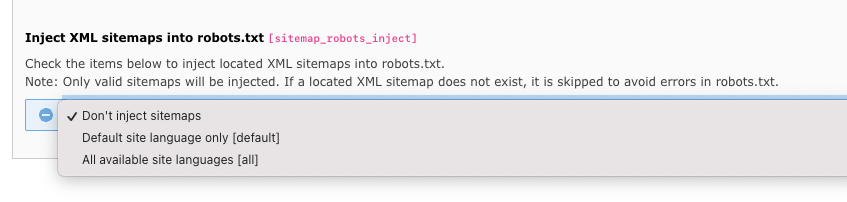
Within the site configuration, it is possible to enable or disable injection of located XML sitemaps. The appropriate setting is provided by the following configuration:

sitemap_robots_inject (site)

sitemap_robots_inject (site)
Type
string (empty, default or all)
Path
sitemap_robots_inject

Configure injection of located XML sitemaps into the robots.txt of the current site.

Changed in version 0.2.0

Configuration of sitemap injection within the Sites module

Usage 

At the moment, the extension provides two possible ways to inject located XML sitemaps in a requested robots.txt file. This section describes how to properly use each of them and what steps are necessary to enable all provided features.

Example 

The following example describes what processes happen when a robots.txt file is requested and XML sitemaps get injected.

  1. Base URL

    The base URL of your site is https://www.example.com/.

  2. XML sitemaps

    Currently, the following XML sitemaps are available for your site:

    • https://www.example.com/sitemap.xml
    • https://www.example.com/sitemap-news.xml
  3. robots.txt

    Given the following content of your robots.txt route:

    User-agent: *
    Allow: /
    Disallow: /forbidden/
    Copied!
  4. Sitemap injection

    If you have injection of XML sitemaps enabled in your site configuration and each configured XML sitemap actually exists, the robots.txt will be enhanced like follows:

    User-agent: *
    Allow: /
    Disallow: /forbidden/
    
    Sitemap: https://www.example.com/sitemap.xml
    Sitemap: https://www.example.com/sitemap-news.xml
    
    Copied!

Static route 

The contents of your robots.txt can be configured as static route in your site configuration. If configured, the extension tries to inject XML sitemaps during the request process. A custom middleware reacts on requests to robots.txt and tries to locate XML sitemaps for the current site, which will then be injected into the response body.

In order to use this feature, injection of XML sitemaps must be explicitly enabled for each site in the appropriate site configuration.

Local file 

It is also possible to provide the contents of your robots.txt in a local robots.txt file in the web root of your TYPO3 installation. If configured, the extension tries to inject XML sitemaps during the request process the same way as in the usage of static routes.

As with static routes, the injection of XML sitemaps must be explicitly enabled in the appropriate site configuration.

Web server configuration 

In order to route requests to an existing robots.txt file to TYPO3's main entrypoint, your web server configuration must be modified. This depends on which server type you're actually using.

Apache 

Add the following to the .htaccess in the web root of your TYPO3 installation:

RewriteEngine on
RewriteRule ^robots.txt /index.php [L]
Copied!

Nginx 

Add the following to the configuration file of your Nginx server:

location = /robots.txt {
    rewrite ^ /index.php;
}
Copied!

Migration 

This page lists all notable changes and required migrations when upgrading to a new major version of this extension.

Version 1.0.0 

Removal of legacy behavior 

  • Support for legacy site configuration parameter type has been removed (see deprecation notice).
  • Execute upgrade wizards before migrating to this new major version.

Version 0.2.0 

Site configuration parameter type changed 

  • Type of site configuration parameter sitemap_robots_inject changed from check to select.
  • The following migration applies:

    • Value true/1 should be migrated to default or all.
    • Value false/0 should be migrated to an empty string.
  • Use the dedicated upgrade wizard to automatically perform the required migrations.

Contribution guide 

Thanks for considering contributing to this extension! Since it is an open source product, its successful further development depends largely on improving and optimizing it together.

The development of this extension follows the official TYPO3 coding standards. To ensure the stability and cleanliness of the code, various code quality tools are used and most components are covered with test cases. In addition, we use DDEV for local development. Make sure to set it up as described below. For continuous integration, we use GitHub Actions.

Preparation 

# Clone repository
git clone https://github.com/eliashaeussler/typo3-sitemap-robots.git
cd typo3-sitemap-robots

# Install dependencies
composer install
Copied!

Development workflow 

A typical contribution workflow looks like this:

  1. Apply automatic fixes

    Use the following commands to normalize and format the code base:

    # Apply all automatic fixes
    composer fix
    
    # Apply specific fixes
    composer fix:composer
    composer fix:editorconfig
    composer fix:php
    Copied!
  2. Run checks

    Use composer check to run the full code quality pipeline locally. This command bundles dependency analysis, static analysis, coding style checks, and Rector in dry-run mode so that potential refactorings can be reviewed without changing files.

    # Run all checks
    composer check
    
    # Run specific checks
    composer check:deps
    composer check:refactor
    composer check:static
    composer check:style
    
    # Run specific style checks
    composer check:style:composer
    composer check:style:editorconfig
    composer check:style:php
    Copied!
  3. Run refactorings

    Refactorings are intentionally separated from regular checks because they may change the code base.

    # Run all configured refactorings
    composer refactor
    
    # Run specific refactorings
    composer refactor:php
    Copied!
  4. Run tests

    Run the full test suite before opening a pull request:

    # Run all tests
    composer test
    composer test:coverage
    
    # Run functional tests
    composer test:functional
    composer test:functional:coverage
    
    # Run unit tests
    composer test:unit
    composer test:unit:coverage
    
    # Merge coverage reports
    composer test:merge-coverage
    Copied!

Coverage reports 

Code coverage reports are written to Build/tests/coverage. Open the latest merge HTML report with:

open Build/tests/coverage/html/_merged/index.html
Copied!

Pull requests 

Once the changes are ready, please submit a pull request and describe what was changed and why. Ideally, the pull request references an issue that describes the problem being solved.

All documented code quality tools are executed automatically for pull requests across the currently supported PHP versions. For details, refer to the GitHub Actions workflows.

Sitemap
