Exception handling with AI generated solutions 

Extension key

solver

Package name

eliashaeussler/typo3-solver

Version

main

Language

en

Author

Elias Häußler & contributors

License

This extension documentation is published under the CC BY-NC-SA 4.0 (Creative Commons) license.


An extension for TYPO3 CMS to solve exceptions with AI generated solutions. It uses the OpenAI PHP client to send a prompt to a configured model and uses the responded completion as solution. Several completion attributes (model, tokens, temperature, number of completions) are configurable. It also provides a console command to solve problems from command line.

Introduction 

A quick overview about the main features provided by this extension.

Installation 

Instructions on how to install this extension and which TYPO3 and PHP versions are currently supported.

Configuration 

Learn how to configure the extension in order to enable the provided features.

Usage 

This section describes all possible usages of this extension. Learn how to use the exception handler, the various console commands, and discover the PHP API.

Developer corner 

A quick overview about all relevant classes provided by this extension.

Migration 

Required migration steps when upgrading the extension to a new major version.

Introduction 

What does it do? 

The extension provides an exception handling to solve problems using artificial intelligence (AI). Problem solving can be triggered in various ways:

Problems are solved by so called solution providers. The extension already ships a default \EliasHaeussler\Typo3Solver\ProblemSolving\Solution\Provider\OpenAISolutionProvider, but can also be extended by custom solution providers. Already solved problems can be cached to avoid cost-intensive requests to OpenAI.

Features 

  • Extended exception handler with AI generated solutions
  • Configurable AI completion attributes
  • Caching integration for solves problems
  • Console command to solve problems from command line
  • Customizable solution providers and prompts
  • Compatible with TYPO3 13.4 LTS and 14.2

Support 

There are several ways to get support for this extension:

Security Policy 

Please read our security policy if you discover a security vulnerability in this extension.

License 

This extension is licensed under GNU General Public License 2.0 (or later).

Installation 

Requirements 

  • PHP 8.2 - 8.5
  • TYPO3 13.4 LTS and 14.2

Installation 

Require the extension via Composer (recommended):

composer require eliashaeussler/typo3-solver
Copied!

Or download it from the TYPO3 extension repository.

Version matrix 

Extension versions TYPO3 versions PHP versions
since 3.2.0 13.4 LTS - 14.2 8.2 - 8.5
3.1.0 13.4 LTS - 14.1 8.2 - 8.5
3.0.0 - 3.0.4 13.4 LTS - 14.0 8.2 - 8.5
0.2.17 - 2.0.2 11.5 LTS - 13.4 LTS 8.1 - 8.4
0.2.15 - 0.2.16 11.5 LTS - 13.4 LTS 8.1 - 8.3
0.2.14 11.5 LTS - 13.3 8.1 - 8.3
0.2.12 - 0.2.13 11.5 LTS - 13.2 8.1 - 8.3
0.2.11 11.5 LTS - 13.1 8.1 - 8.3
0.2.10 11.5 LTS - 13.0 8.1 - 8.3
0.2.8 - 0.2.9 11.5 LTS - 12.4 LTS 8.1 - 8.3
0.1.0 - 0.2.7 11.5 LTS - 12.4 LTS 8.1 - 8.2

Configuration 

For the extension to work, it must be configured in some ways. The most important configuration is the OpenAI API key, otherwise requests to OpenAI won't be possible.

Learn what configuration options are generally available on the following pages:

API key 

You need an API key to perform requests at OpenAI. Once generated, the key must be configured in the extension configuration.

Follow these steps to create and use an OpenAI API key:

  1. Log in with your OpenAI account

    Head over to https://platform.openai.com/account/ and log in with your OpenAI account. If you don't have an account yet, you can sign up on this page as well.

  2. Create API key

    Head over to the API Keys section. You should see all your API keys listed, if you already generated ones.

    Click on the Create new secret key button to create a new API key. Copy the key to your clipboard or safe it elsewhere.

  3. Add extension configuration

    Paste the generated API key in the extension configuration Extension configuration. This can either be done in the TYPO3 backend or directly in your config/system/settings.php (formerly typo3conf/ext/LocalConfiguration.php) file.

  4. Keep the key secret!

    Don't share this key with anyone else! Keep in mind that everyone with access to this key will be able to perform requests with your OpenAI account. This can be very cost intensive as request are not free.

Extension configuration 

The extension currently provides the following configuration options:

provider

provider
Type
string (FQCN)
Default
\EliasHaeussler\Typo3Solver\ProblemSolving\Solution\Provider\OpenAISolutionProvider

Default solution provider to be used for problem solving.

prompt

prompt
Type
string (FQCN)
Default
\EliasHaeussler\Typo3Solver\ProblemSolving\Solution\Prompt\DefaultPrompt

Default prompt to be used for problem solving.

ignoredCodes

ignoredCodes
Type
string (comma-separated list)

Comma-separated list of exception codes to ignore during problem solving. Once a raised exception matches with the configured exception codes, the solution provider won't provide a solution and is simply ignored.

api.key

api.key
Type
string

API key for OpenAI requests.

attributes.model

attributes.model
Type
string
Default
gpt-4o-mini

OpenAI model to use (see List available models to show a list of available models).

attributes.maxTokens

attributes.maxTokens
Type
integer
Default
300

Maximum number of tokens to use per request to OpenAI.

attributes.temperature

attributes.temperature
Type
float
Default
0.5

Temperature to use for OpenAI completion requests (must be a value between 0 and 1).

attributes.numberOfCompletions

attributes.numberOfCompletions
Type
integer
Default
1

Number of completions to generate for each problem.

cache.lifetime

cache.lifetime
Type
integer
Default
86400 (= 1 day)

Lifetime in seconds of the solutions cache.

Exception handler 

The core component of this extension is to modify the default debug exception handler from TYPO3 core. For this, the \EliasHaeussler\Typo3Solver\Error\AiSolverExceptionHandler class is shipped with the extension.

Configuration 

In order to active the modified exception handler, it must be explicitly configured at $GLOBALS['TYPO3_CONF_VARS']['SYS']['debugExceptionHandler'] . This can be done in the system configuration file config/system/settings.php (formerly public/typo3conf/LocalConfiguration.php):

config/system/settings.php
return [
    'SYS' => [
        'debugExceptionHandler' => 'EliasHaeussler\\Typo3Solver\\Error\\AiSolverExceptionHandler',
    ],
];
Copied!

Once configured, the exception handler tries to provide a solution for the current exception and shows it on the exception page. Depending on the handled exception, there are various types of problem solving.

Types of problem solving 

Streamed solution 

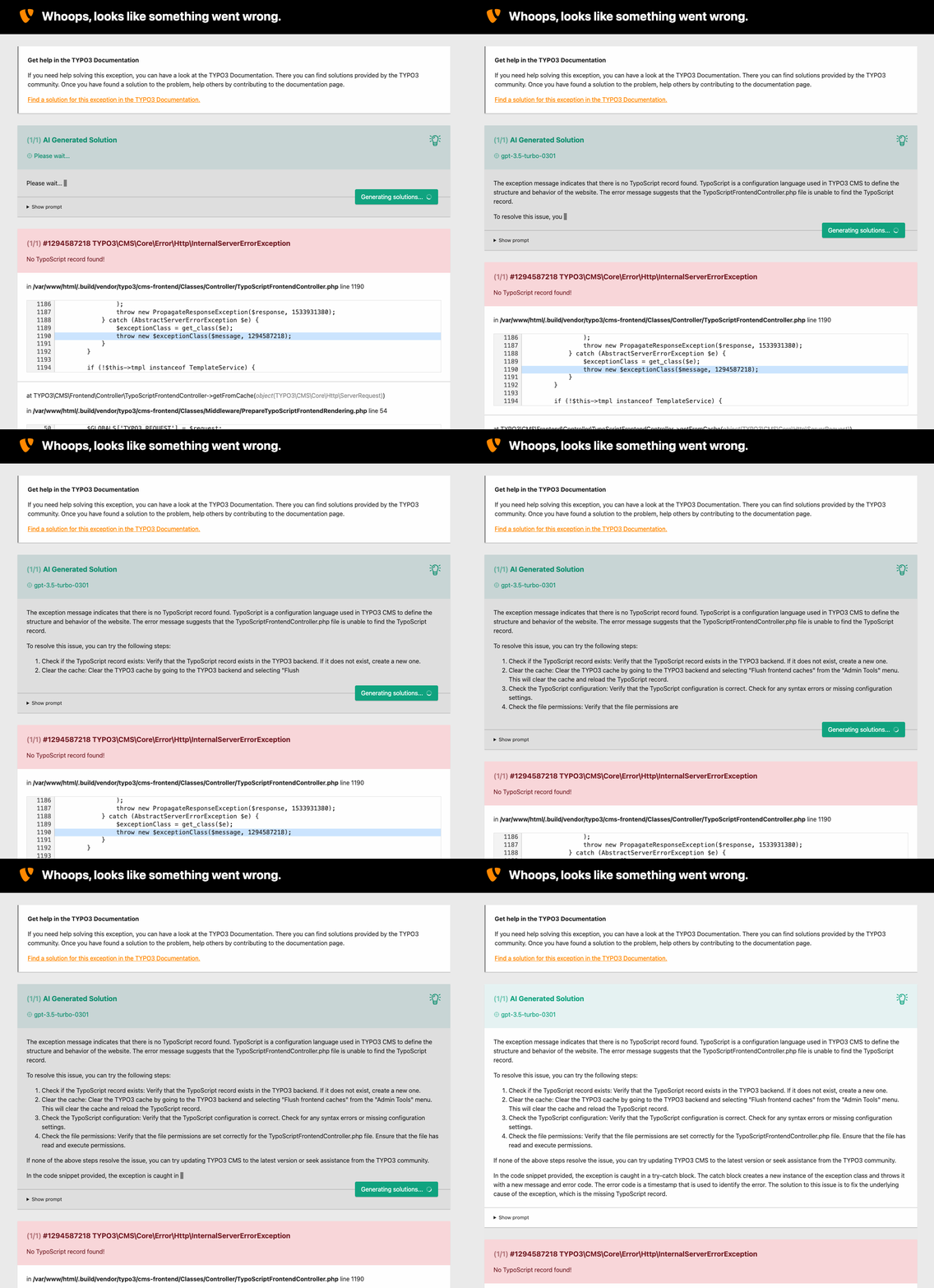
This variant is automatically used if an exception is triggered in a stage where TYPO3 bootstrapping is already done and therefore a service container exists. In this case, the solution is provided asynchronous from an event stream by a custom middleware /tx_solver/solution.

Video showing a solution stream on an error page

Solution stream on error page

Default solution 

There are cases where solution streaming is not possible. For example, if the exception to handle was triggered very early in the bootstrapping process. Those cases prevent solution streaming as it requires a functioning bootstrapping and a successfully built service container.

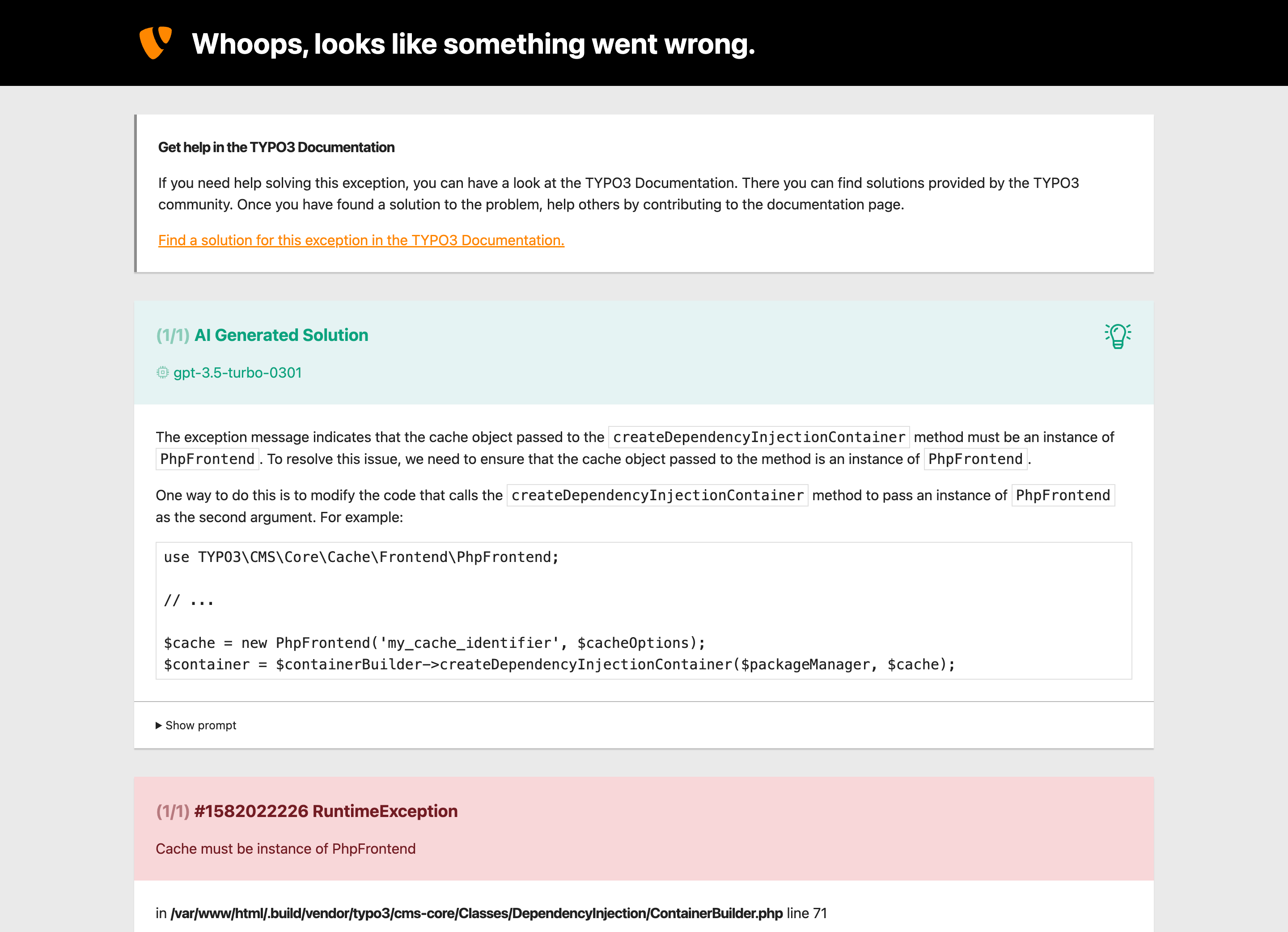
If solution streaming is not possible, the solution is provided synchronous. This way is less convenient because – depending on the configured attributes – requests to OpenAI may take relatively long, up to several minutes. During the request, no actions can be done as it would interrupt the request and therefore abort problem solving.

Error page with a synchronously provided solution

Default solution on error page

Console commands 

The extension provides the following console commands:

solver:solve 

Next to the exception handler integration, one can also explicitly solve problems using the provided console command solver:solve.

vendor/bin/typo3 solver:solve [<problem>] [options]
Copied!
typo3/sysext/core/bin/typo3 solver:solve [<problem>] [options]
Copied!

Problems can be solved in two ways on the command line:

  1. Pass the problem (= exception message) and additional metadata such as exception code, file and line. By using this way, EXT:solver will create a dummy exception and pass it to the solution provider.
  2. Pass an exception cache identifier to solve a cached exception. This way is more accurate as it restores the original exception and passes it to the solution provider.

The following input parameters are available:

problem

problem
Type
string
Required
false
Default
none

The exception message to solve.

Example:

vendor/bin/typo3 solver:solve "No TypoScript record found!"
Copied!
typo3/sysext/core/bin/typo3 solver:solve "No TypoScript record found!"
Copied!

-i|--identifier

-i|--identifier
Type
string
Required
false
Default
none

An alternative cache identifier to load an exception from cache.

Example:

vendor/bin/typo3 solver:solve -i c98d277467ab5da857483dff2b1d267d36c0c24a
Copied!
typo3/sysext/core/bin/typo3 solver:solve -i c98d277467ab5da857483dff2b1d267d36c0c24a
Copied!

-c|--code

-c|--code
Type
integer
Required
false
Default
none

Optional exception code.

Example:

vendor/bin/typo3 solver:solve "No TypoScript record found!" -c 1294587218
Copied!
typo3/sysext/core/bin/typo3 solver:solve "No TypoScript record found!" -c 1294587218
Copied!

-f|--file

-f|--file
Type
string
Required
false
Default
none

Optional file where the exception occurs.

Example:

vendor/bin/typo3 solver:solve "No TypoScript record found!" -f /var/www/html/vendor/typo3/cms-frontend/Classes/Controller/TypoScriptFrontendController.php
Copied!
typo3/sysext/core/bin/typo3 solver:solve "No TypoScript record found!" -f /var/www/html/vendor/typo3/cms-frontend/Classes/Controller/TypoScriptFrontendController.php
Copied!

-l|--line

-l|--line
Type
integer
Required
false
Default
none

Optional line number within the given file.

Example:

vendor/bin/typo3 solver:solve "No TypoScript record found!" -l 1190
Copied!
typo3/sysext/core/bin/typo3 solver:solve "No TypoScript record found!" -l 1190
Copied!

-r|--refresh

-r|--refresh
Type
boolean
Required
false
Default
false

Refresh a cached solution (removes the cached solution and requests a new solution).

Example:

vendor/bin/typo3 solver:solve "No TypoScript record found!" --refresh
Copied!
typo3/sysext/core/bin/typo3 solver:solve "No TypoScript record found!" --refresh
Copied!

-j|--json

-j|--json
Type
boolean
Required
false
Default
false

Print solution as JSON.

Example:

vendor/bin/typo3 solver:solve "No TypoScript record found!" --json
Copied!
typo3/sysext/core/bin/typo3 solver:solve "No TypoScript record found!" --json
Copied!

solver:list-models 

The command solver:list-models can be used to list available OpenAI models for the configured OpenAI API key. By default, the command lists only GPT models since all other models cannot be used with the extension.

vendor/bin/typo3 solver:list-models [options]
Copied!
typo3/sysext/core/bin/typo3 solver:list-models [options]
Copied!

The following input parameters are available:

-a|--all

-a|--all
Type
boolean
Required
false
Default
false

List all available models rather than only GPT models.

Example:

vendor/bin/typo3 solver:list-models --all
Copied!
typo3/sysext/core/bin/typo3 solver:list-models --all
Copied!

solver:cache:flush 

Every solution is cached to reduce the amount of requests sent by the OpenAI client. In order to flush the solution cache or remove single cache entries, the command solver:cache:flush can be used.

vendor/bin/typo3 solver:cache:flush [<identifier>]
Copied!
typo3/sysext/core/bin/typo3 solver:cache:flush [<identifier>]
Copied!

The following input parameters are available:

identifier

identifier
Type
string
Required
false
Default
none

An optional cache identifier to remove only a single cached solution. This is especially helpful to require a new solution for a specific problem while keeping other solutions cached.

Example:

vendor/bin/typo3 solver:cache:flush 65e89b311899aa4728a4c1bced1d6f6335674422
Copied!
typo3/sysext/core/bin/typo3 solver:cache:flush 65e89b311899aa4728a4c1bced1d6f6335674422
Copied!

Using the API 

Besides the usage via the modified debug exception handler and the console commands, there is also a public PHP API. It can be used to solve problems directly in PHP code.

class Solver
Fully qualified name
\EliasHaeussler\Typo3Solver\ProblemSolving\Solver

Core component to solve problems by a given exception.

solve ( $exception)

Provide solution for given exception and format it according to the configured formatter. If a cached solution exists, the provider does not request a new solution.

param Throwable $exception

Exception for which a solution is to provide.

returntype

string|null

solveStreamed ( $exception)

Provide formatted solution for given exception, but use a solution stream for each solution delta. This basically mimics the behavior of ChatGPT, where the solution is provided asynchronous.

param Throwable $exception

Exception for which a solution is to provide.

returntype

Traversable<string>

Example 

Create a new \EliasHaeussler\Typo3Solver\ProblemSolving\Solver:

use EliasHaeussler\Typo3Solver;
use TYPO3\CMS\Core;

$configuration = Core\Utility\GeneralUtility::makeInstance(
    Typo3Solver\Configuration\Configuration::class,
);

// Use any supported formatter and provider
$formatter = Core\Utility\GeneralUtility::makeInstance(
    Typo3Solver\Formatter\WebFormatter::class,
);
$solutionProvider = Core\Utility\GeneralUtility::makeInstance(
    Typo3Solver\ProblemSolving\Solution\Provider\OpenAISolutionProvider::class,
);

$solver = new Typo3Solver\ProblemSolving\Solver(
    $configuration,
    $formatter,
    $solutionProvider,
);
Copied!

Solve synchronously:

$formattedSolution = $solver->solve($exception);
Copied!

Solve asynchronously:

foreach ($solver->solveStreamed($exception) as $solutionDelta) {
    echo $solutionDelta;
}
Copied!

Solution providers 

The most relevant components when it comes to the actual problem solving are solution providers. Each solution provider describes a way to solve a given problem.

interface SolutionProvider
Fully qualified name
\EliasHaeussler\Typo3Solver\ProblemSolving\Solution\Provider\SolutionProvider

Interface for solution providers used to provide a solution for a given problem. Solution providers can be combined with \EliasHaeussler\Typo3Solver\ProblemSolving\Solution\Provider\CacheSolutionProvider if they are cacheable.

static create ( )

Create a new instance of the solution provider. This is mainly used on a low level basis where dependency injection is not available.

returns

An instance of the current solution provider.

getSolution ( $problem)

Provide a solution for the given problem.

param EliasHaeussler\Typo3Solver\ProblemSolving\Problem\Problem $problem

The problem to be solved

returntype

EliasHaeussler\Typo3Solver\ProblemSolving\Solution\Solution

throws

EliasHaeussler\Typo3Solver\Exception\UnableToSolveException

canBeUsed ( $exception)

Define whether the solution provider can handle the given exception. This is especially useful to skip problem solving for some exceptions whose solution is already known or is too specific to solve.

param Throwable $exception

The exception to test for compatibility

returntype

bool

isCacheable ( )

Define whether solutions provided by this solution provider should be cached when using the solution provider in combination with \EliasHaeussler\Typo3Solver\ProblemSolving\Solution\Provider\CacheSolutionProvider.

returntype

bool

listModels ( $includeUnsupported = false)

List all AI models by the underlying AI provider. By default, only supported models are returned.

param bool $includeUnsupported

Define whether to return unsupported models as well

returntype

list<EliasHaeussler\Typo3Solver\ProblemSolving\Solution\Provider\Model\AiModel>

interface StreamedSolutionProvider
Fully qualified name
\EliasHaeussler\Typo3Solver\ProblemSolving\Solution\Provider\StreamedSolutionProvider

Extended interface for solution providers that are able to stream solutions. Read more about a practical use case of this interface at Streamed solution.

getStreamedSolution ( $problem)

Provide a solution stream for the given problem. The stream is returned as an instance of \Traversable, while each traversed item is an instance of \EliasHaeussler\Typo3Solver\ProblemSolving\Solution\Solution.

param EliasHaeussler\Typo3Solver\ProblemSolving\Problem\Problem $problem

The problem to be solved

returntype

Traversable<EliasHaeussler\Typo3Solver\ProblemSolving\Solution\Solution>

throws

EliasHaeussler\Typo3Solver\Exception\UnableToSolveException

Default providers 

The extension ships with a default provider:

class OpenAISolutionProvider
Fully qualified name
\EliasHaeussler\Typo3Solver\ProblemSolving\Solution\Provider\OpenAISolutionProvider

Default provider used to generate solutions using the configured OpenAI model. It uses the chat completion endpoint and is therefore streamable.

In addition, there's also a cached provider. It decorates a concrete solution provider with an additional cache layer. This avoids too many requests to the OpenAI endpoint.

class CacheSolutionProvider
Fully qualified name
\EliasHaeussler\Typo3Solver\ProblemSolving\Solution\Provider\CacheSolutionProvider

This provider decorates a concrete solution provider with an additional cache layer. The concrete solution provider must be provided in the \EliasHaeussler\Typo3Solver\ProblemSolving\Solution\Provider\SolutionProvider::create method.

Prompts 

AI models must be prompted to provide a solution for a given problem. For this, the extension provides a basic abstraction to implement such prompts.

interface Prompt
Fully qualified name
\EliasHaeussler\Typo3Solver\ProblemSolving\Solution\Prompt\Prompt

Basic abstraction to generate prompts for a given problem. Ideally, prompts are developed to match a specific model.

static create ( )

Create a new instance of the prompt generator. This is mainly used on a low level basis where dependency injection is not available.

returns

An instance of the current prompt generator.

generate ( $exception)

Generate a prompt to provide a solution for the given exception.

param Throwable $exception

The exception to generate a prompt for

returntype

string

Default prompt 

The extension already ships a default prompt, targeting the GPT-3.5 model.

class DefaultPrompt
Fully qualified name
\EliasHaeussler\Typo3Solver\ProblemSolving\Solution\Prompt\DefaultPrompt

Default prompt generator, mainly developed for the GPT-3.5 model, but can be used for other models as well. It passes the following information to the OpenAI model:

  • Exception class
  • Exception message
  • File where the exception was triggered
  • Line where the exception was triggered
  • Code snippet of the line that triggered the exception
  • Installation mode (composer or legacy)
  • Installed TYPO3 version
  • Installed PHP version

Formatters 

Formatters are used to make a generated solution visible to the user.

interface Formatter
Fully qualified name
\EliasHaeussler\Typo3Solver\Formatter\Formatter

Interface for formatters that convert a given problem and its solution into a readable format.

format ( $problem, $solution)

Format given problem and solution to string.

param EliasHaeussler\Typo3Solver\ProblemSolving\Problem\Problem $problem

The problem to be formatted

param EliasHaeussler\Typo3Solver\ProblemSolving\Solution\Solution $solution

The solution to be formatted

returntype

string

Default formatters 

Since exceptions are handled in various places, the extension already ships with some default formatters:

class CliFormatter
Fully qualified name
\EliasHaeussler\Typo3Solver\Formatter\CliFormatter

Formatter used on the command line. It displays all provided solutions. On verbose output, the original prompt is also displayed. In addition, if a solution comes from the solutions cache, the original date and cache identifier are displayed as well.

class JsonFormatter
Fully qualified name
\EliasHaeussler\Typo3Solver\Formatter\JsonFormatter

This formatter is used within the solver:solve command if the solver:solve option is given. It displays the solution as JSON string, allowing further processing, especially in CI.

class WebFormatter
Fully qualified name
\EliasHaeussler\Typo3Solver\Formatter\WebFormatter

This formatter is used for the modified debug exception handler. It adds an additional section to the error page which displays all solutions. In addition, the used model, generated prompt and cache metadata are shown.

class WebStreamFormatter
Fully qualified name
\EliasHaeussler\Typo3Solver\Formatter\WebStreamFormatter

On solution streaming, this formatter is used to only print the list of solutions, streaming it to the error page where it replaces the current solution list.

Template rendering 

Since exception handling may happen on a very low level where TYPO3 bootstrapping is not completed yet, this extension ships with a very generic template renderer.

class TemplateRenderer
Fully qualified name
\EliasHaeussler\Typo3Solver\View\TemplateRenderer

Generic low-level renderer for Fluid templates shipped with EXT:solver. This class is not intended for use anywhere else than in the extension itself.

render ( $templatePath, $variables = [])

Render a given template with optional variables. The template path must be relative to EXT:solver/Resources/Private/Templates.

param string $exception

Path to the template to be rendered

param array $variables

Optional template variables

returntype

string

View helpers 

The extension provides two additional view helpers.

class DateViewHelper
Fully qualified name
\EliasHaeussler\Typo3Solver\ViewHelpers\DateViewHelper

View helper to format a given date, either by a fixed format ( d.m.Y H:i:s) or as human readable relative date.

Examples:

<solver:date date="{date}" /> <!-- 12.04.2023 19:51:02 -->
Copied!
<solver:date date="{date}" readable="1" /> <!-- 2 hours ago -->
Copied!
class MarkdownToHtmlViewHelper
Fully qualified name
\EliasHaeussler\Typo3Solver\ViewHelpers\MarkdownToHtmlViewHelper

View helper to convert a given Markdown string to HTML. It uses the fastvolt/markdown library internally. In addition, resolved HTML can also be modified by replacing line numbers in code snippets to match the expected structure of code examples on error pages.

Examples:

<solver:markdownToHtml markdown="{markdown}" />
Copied!
<solver:markdownToHtml markdown="{markdown}" replaceLineNumbersInCodeSnippets="1" />
Copied!

Caching 

Generated solutions can be cached if the solution provider in use is cacheable (see \EliasHaeussler\Typo3Solver\ProblemSolving\Solution\Provider\SolutionProvider::isCacheable). For this, a filesystem-based solution cache is implemented. In addition, an exception cache is provided which stores exceptions when solution streaming is active.

class ExceptionsCache
Fully qualified name
\EliasHaeussler\Typo3Solver\Cache\ExceptionsCache

Low-level cache manager for exceptions. This class is only used in combination with solution streaming.

get ( $entryIdentifier)

Get exception by cache identifier. If no cache with the given identifier exists, null is returned.

param string $entryIdentifier

Cache identifier of the exception to look up

returntype

Throwable|null

getIdentifier ( $exception)

Get calculated exception identifier of the given exception.

param Throwable $exception

Exception to calculate a cache identifier

returntype

string

set ( $exception)

Add the given exception to the exceptions cache and return the associated cache identifier.

param Throwable $exception

The exception to be cached

returntype

string

flush ( )

Remove all cached exceptions.

class SolutionsCache
Fully qualified name
\EliasHaeussler\Typo3Solver\Cache\SolutionsCache

Low-level cache manager for solutions. This class is used in combination with \EliasHaeussler\Typo3Solver\ProblemSolving\Solution\Provider\CacheSolutionProvider.

get ( $problem)

Get cached solution for the given problem. If no solution exists in cache, null is returned.

param EliasHaeussler\Typo3Solver\ProblemSolving\Problem\Problem $problem

Problem to get a cached solution for

returntype

EliasHaeussler\Typo3Solver\ProblemSolving\Solution\Solution|null

set ( $problem, $solution)

Add the given solution to the solutions cache and use the given problem to generate the cache identifier.

param EliasHaeussler\Typo3Solver\ProblemSolving\Problem\Problem $problem

The problem of the solution to be cached

param EliasHaeussler\Typo3Solver\ProblemSolving\Solution\Solution $solution

The solution to be cached

flush ( )

Remove all cached solutions.

Configuration API 

In order to access the extension configuration, a slim PHP API exists. Each configuration option is accessible by an appropriate class method.

class Configuration
Fully qualified name
\EliasHaeussler\Typo3Solver\Configuration\Configuration

API to access all available extension configuration options.

getAPIKey ( )

Get the configured OpenAI API key.

returntype

string|null

getModel ( )

Get the configured OpenAI model.

returntype

string

getMaxTokens ( )

Get the configured maximum number of tokens.

returntype

int

getTemperature ( )

Get the configured temperature.

returntype

float

getNumberOfCompletions ( )

Get the configured number of completions.

returntype

int

getCacheLifetime ( )

Get the configured cache lifetime.

returntype

int

isCacheEnabled ( )

Check whether solution caching is currently enabled. The cache is enabled if the configured cache lifetime is greater than 0.

returntype

bool

getProvider ( )

Get the configured solution provider.

returntype

\EliasHaeussler\Typo3Solver\ProblemSolving\Solution\Provider\SolutionProvider

getPrompt ( )

Get the configured prompt.

returntype

\EliasHaeussler\Typo3Solver\ProblemSolving\Solution\Prompt\Prompt

getIgnoredCodes ( )

Get the configured list of exception codes to ignore.

returntype

array

Middlewares 

The extension provides two middlewares to achieve solution streaming. Both middlewares are registered for execution prior to all other middlewares. This allows to keep execution times during exception handling as low as possible.

Ping middleware 

This middleware is used to determine whether solution streaming is generally available. It is requested on error pages to decide about the used type of problem solving.

  • Route path: /tx_solver/ping
  • Content type: text/event-stream

This middleware returns an event stream response. The following events are emitted:

close 

Closes the response. This event does not send any data.

Solution middleware 

If solution streaming is possible, this middlewares provides the solution stream. As this can trigger expensive requests to OpenAI, the middleware is protected by a basic authentication layer.

  • Route path: /tx_solver/solution
  • Content type: text/event-stream
  • Required parameters:

    exception

    exception
    Type
    string
    Required
    true

    Cache identifier of the exception for which a solution is to provide. This identifier is returned when calling \EliasHaeussler\Typo3Solver\Cache\ExceptionsCache::set or \EliasHaeussler\Typo3Solver\Cache\ExceptionsCache::getIdentifier.

    hash

    hash
    Type
    string
    Required
    true

    One-time stream hash used to authenticate the current request against a previously registered hash. Read more at Stream authentication to learn about how this parameter is generated.

This middleware returns an event stream response. The following events are emitted:

solutionDelta 

Sends the current solution delta. Data for this event is generated by the \EliasHaeussler\Typo3Solver\Formatter\WebStreamFormatter. It is passed as JSON string and contains the following properties:

data

data
Type
object

Contains solution metadata.

model

model
Type
string

The used OpenAI model. This normally matches the configured model.

numberOfResponses

numberOfResponses
Type
int

The number of responses provided by the current solution. This normally matches the configured number of completions.

numberOfPendingResponses

numberOfPendingResponses
Type
int

The number of responses whose generation is not finished yet. As soon as this value is 0, the solution stream is finished.

prompt

prompt
Type
string

The prompt used to generate the solution.

content

content
Type
string

The current solution delta as formatted string.

solutionError 

This event is emitted once an exception is thrown during solution generation. Event data is passed as JSON string and contains the following properties:

data

data
Type
object

Contains exception metadata.

message

message
Type
string

The exception message.

code

code
Type
int

The exception code.

content

content
Type
string

The formatted exception, ready to replace the solution container on error pages.

solutionFinished 

Reports the successfully finished solution stream. This event does not send any data.

Stream authentication 

When using the solution middleware, a basic authentication layer is processed. This is to avoid that requests to OpenAI are triggered deliberately.

The authentication layer basically checks if a stream hash is given as query parameter and validates it against a list of previously registered hashes. If the parameter is omitted, authentication fails.

A stream hash can be registered by calling \EliasHaeussler\Typo3Solver\Formatter\Authentication\StreamAuthentication::register. It generates a unique hash and writes it to a transient file. This file is then looked up on request by calling \EliasHaeussler\Typo3Solver\Formatter\Authentication\StreamAuthentication::authenticate. If the hash is registered, it is removed from the transient file and authentication is passed successfully.

Migration 

This section lists required migration steps for upgrades between major versions.

0.1.x → 0.2.x 

Chat completion component 

The used OpenAI component changed from text completion to chat completion.

Solution stream 

Solutions are now streamed to exception pages.

Dependency injection 

Several classes are now ready for dependency injection.

  • Migrate custom classes to use dependency injection.
  • Implement new static factory method create() within custom solution providers and prompts.
  • Make sure custom classes can be used without dependency injection as well, since exception handling may happen on a very low level where DI is not available (yet).

Contributing 

Thanks for considering contributing to this extension! Since it is an open source product, its successful further development depends largely on improving and optimizing it together.

The development of this extension follows the official TYPO3 coding standards. To ensure the stability and cleanliness of the code, various code quality tools are used and most components are covered with test cases. In addition, we use DDEV for local development. Make sure to set it up as described below. For continuous integration, we use GitHub Actions.

Create an issue first 

Before you start working on the extension, please create an issue on GitHub: https://github.com/eliashaeussler/typo3-solver/issues

Also, please check if there is already an issue on the topic you want to address.

Contribution workflow 

Preparation 

Clone the repository first:

git clone https://github.com/eliashaeussler/typo3-solver.git
cd typo3-solver
Copied!

Now start DDEV:

ddev start
Copied!

Next, install all dependencies:

ddev composer install
ddev frontend install
Copied!

You can access the DDEV site at https://typo3-ext-solver.ddev.site/.

Analyze code 

# All analyzers
ddev cgl analyze

# Specific analyzers
ddev cgl analyze:dependencies
Copied!

Check code quality 

TYPO3 

# All linters
ddev cgl lint

# Specific linters
ddev cgl lint:composer
ddev cgl lint:editorconfig
ddev cgl lint:php

# Fix all CGL issues
ddev cgl fix

# Fix specific CGL issues
ddev cgl fix:composer
ddev cgl fix:editorconfig
ddev cgl fix:php

# All static code analyzers
ddev cgl sca

# Specific static code analyzers
ddev cgl sca:php
Copied!

Frontend 

# All linters
ddev frontend run lint

# Specific linters
ddev frontend run lint:scss
ddev frontend run lint:ts

# Fix all CGL issues
ddev frontend run fix

# Fix specific CGL issues
ddev frontend run fix:scss
ddev frontend run fix:ts
Copied!

Run tests 

# All tests
ddev test

# Specific tests
ddev test functional
ddev test unit

# All tests with code coverage
ddev test coverage

# Specific tests with code coverage
ddev test coverage:functional
ddev test coverage:unit

# Merge code coverage of all test suites
ddev test coverage:merge
Copied!

Code coverage reports are written to .build/coverage. You can open the last merged HTML report like follows:

open .build/coverage/html/_merged/index.html
Copied!

Build documentation 

# Rebuild and open documentation
composer docs

# Build documentation (from cache)
composer docs:build

# Open rendered documentation
composer docs:open
Copied!

The built docs will be stored in .build/docs.

Pull Request 

Once you have finished your work, please submit a pull request and describe what you've done: https://github.com/eliashaeussler/typo3-solver/pulls

Ideally, your PR references an issue describing the problem you're trying to solve. All described code quality tools are automatically executed on each pull request for all currently supported PHP versions and TYPO3 versions.

Sitemap