This TYPO3 extension provides a functionally complete, flexible TYPO3 integration of Klaro! Consent Management by KIProtect GmbH, a powerful tool that protects your visitors' privacy and data and helps you run a GDPR compliant website.
This TYPO3 extension provides a functionally complete and feature rich, flexible TYPO3 integration of Klaro! Consent Management (hereinafter referred to as "Klaro") by KIProtect GmbH, a powerful tool that protects your visitors' privacy and data and helps you run a GDPR compliant website.
Klaro itself is fully self-hosted and does not rely on the use of resources from external sources. It gives you full control over services requiring consent, including the cookies associated with them and the purposes they belong to. The styling can be influenced either via supplied (also colour-neutral) schemes or your own CSS.
If you have already worked with Klaro in TYPO3, you will love this extension because it is much more intuitive to use due to the use of the backend GUI. If not, this extension will make it particularly easy for you to familiarise yourself with Klaro's range of functions.
Video
Warning
Please note that the content of this video represents an older version. I will re-record it in due course. See the screenshots below for a current image of the status.
Screenshots
Frontend
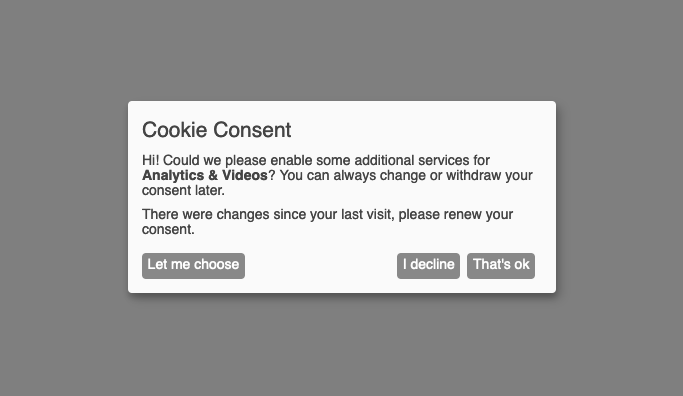
Front-end view of the initial modal
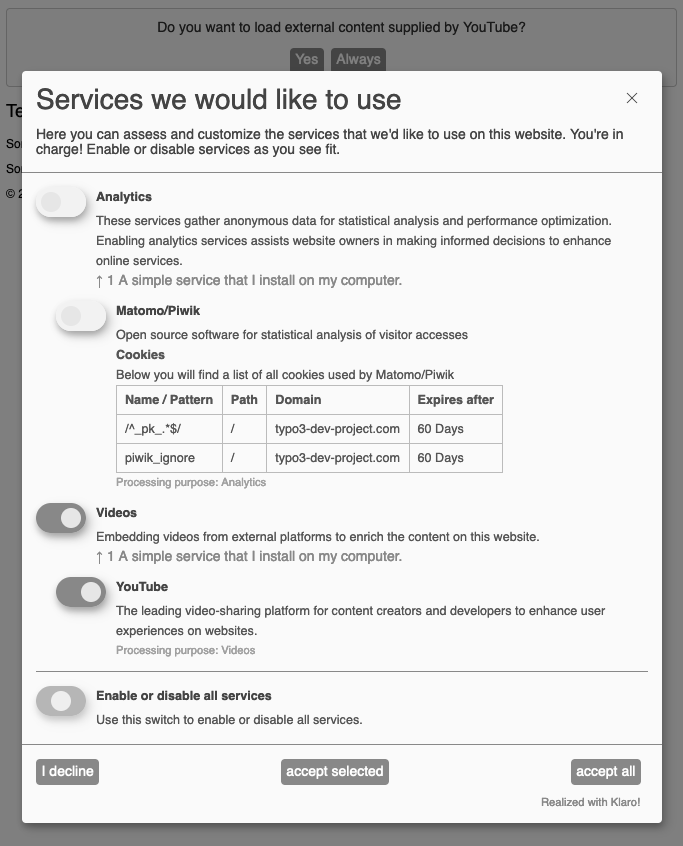
Front-end view of the "Let me choose" dialog
Backend
Site Configuration
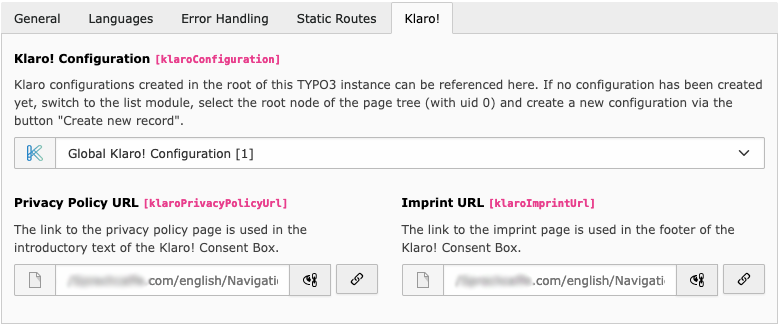
Reference of the Klaro setting as well as the linking of the pages for the data protection declaration and the imprint
General Klaro Configuration
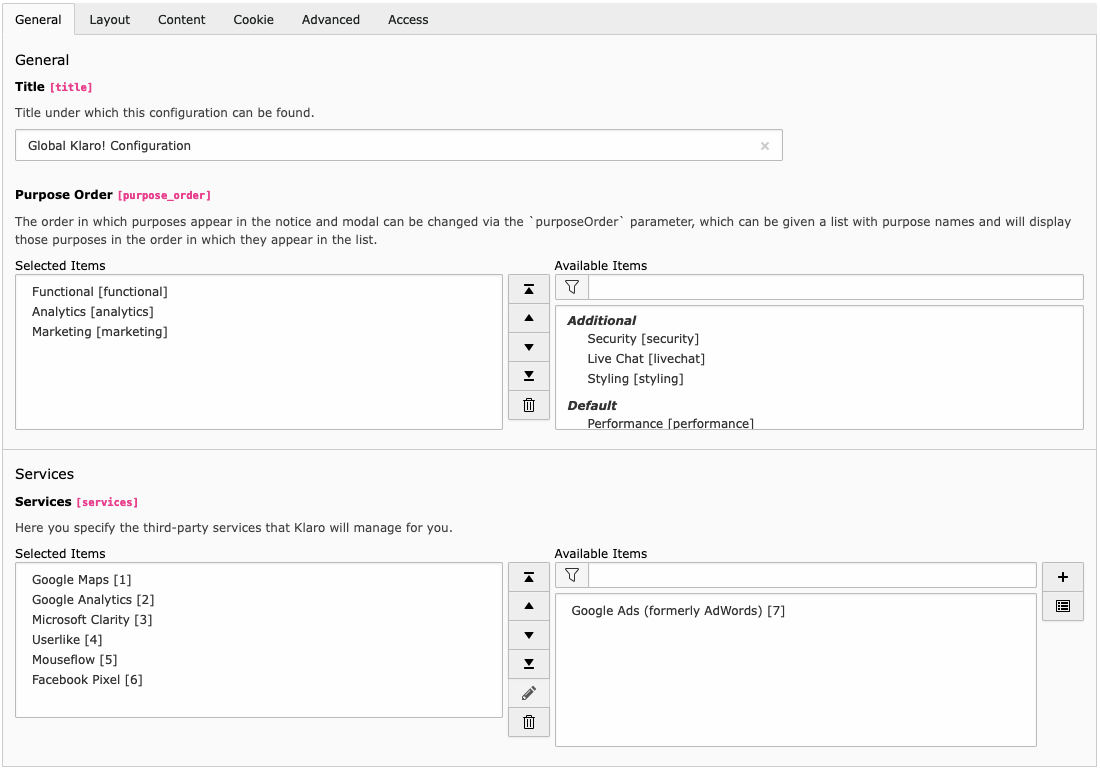
Klaro Configuration - General Tab
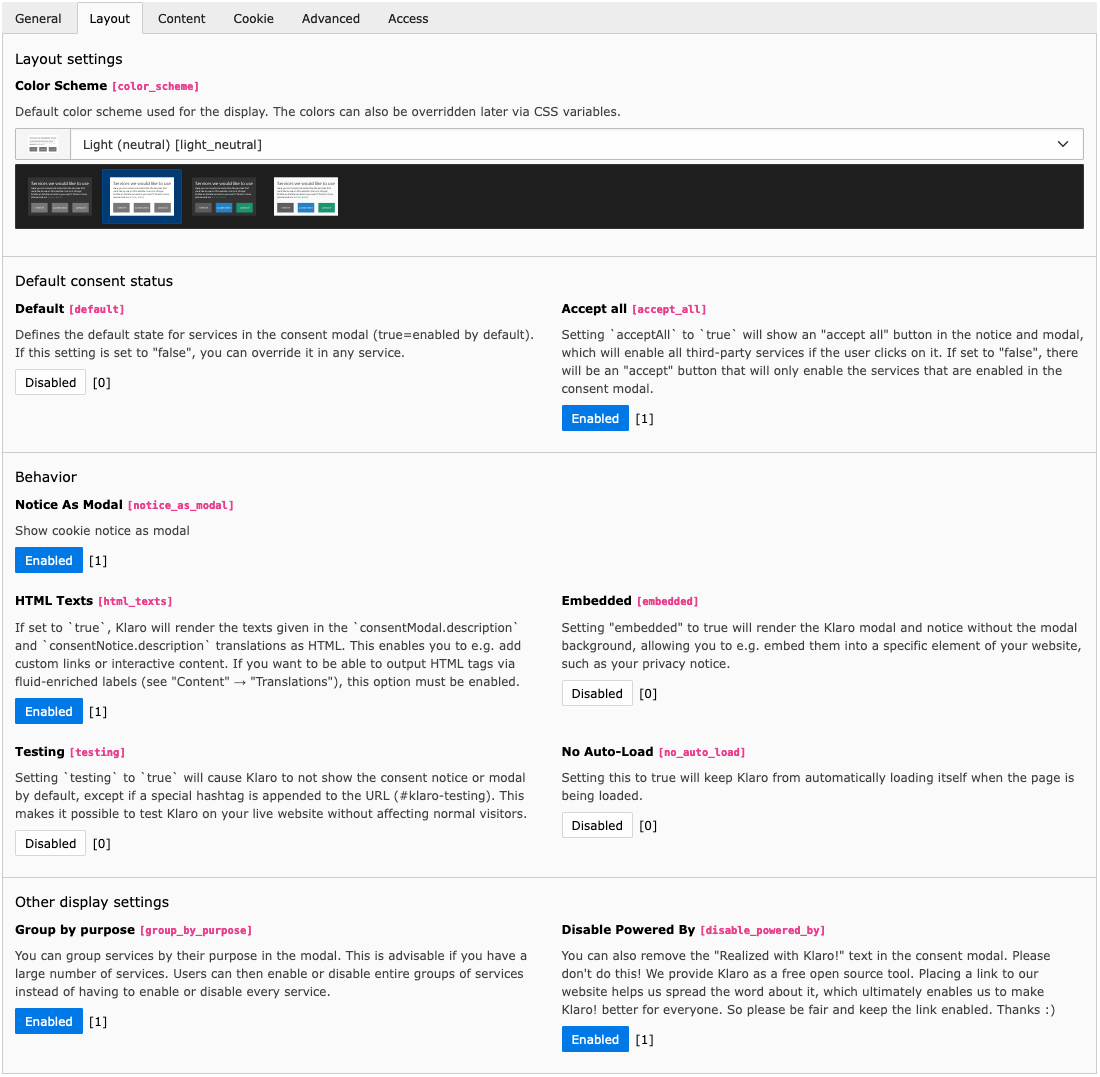
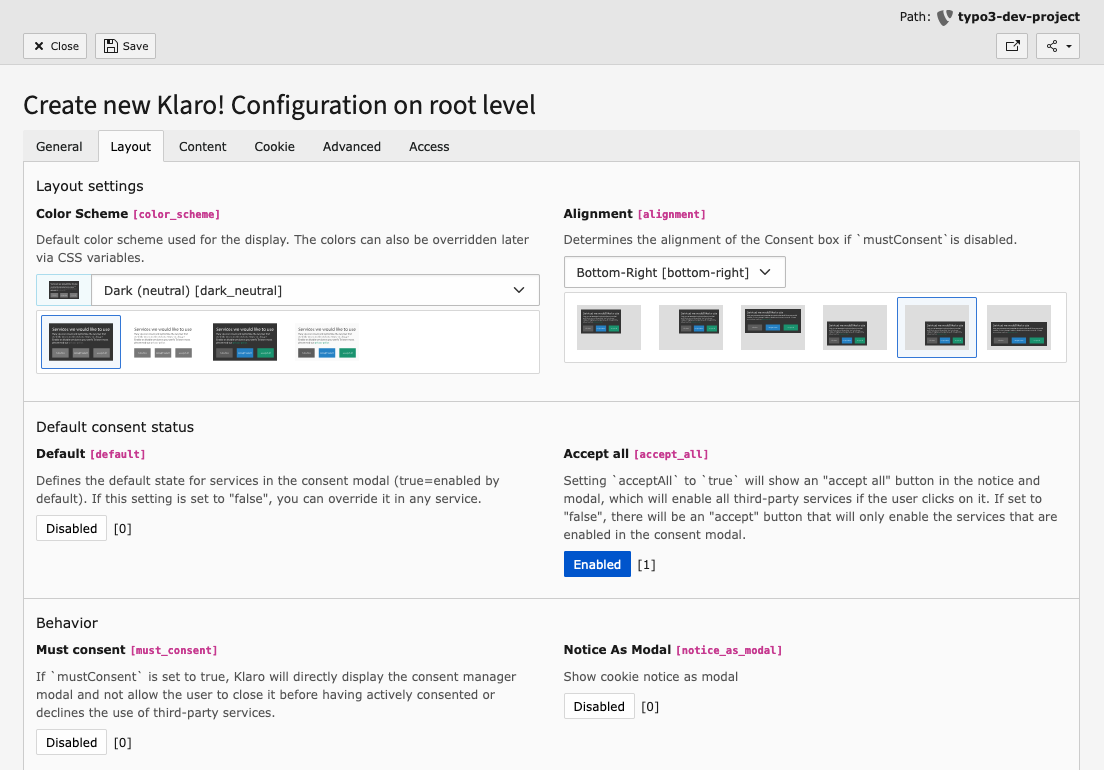
Klaro Configuration - Layout Tab
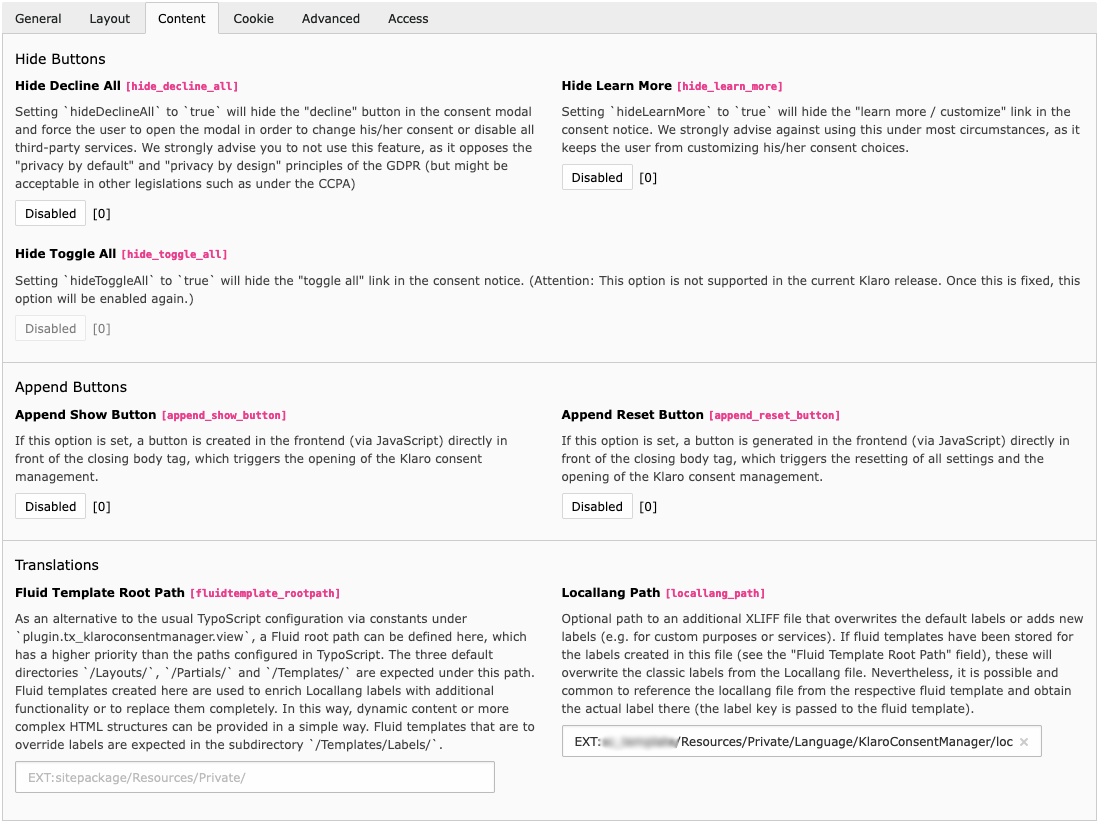
Klaro Configuration - Content Tab
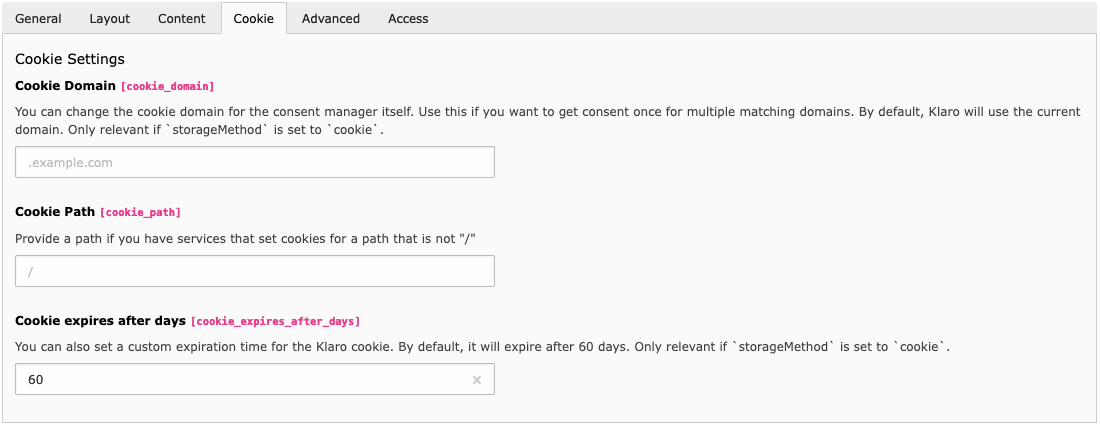
Klaro Configuration - Cookie Tab
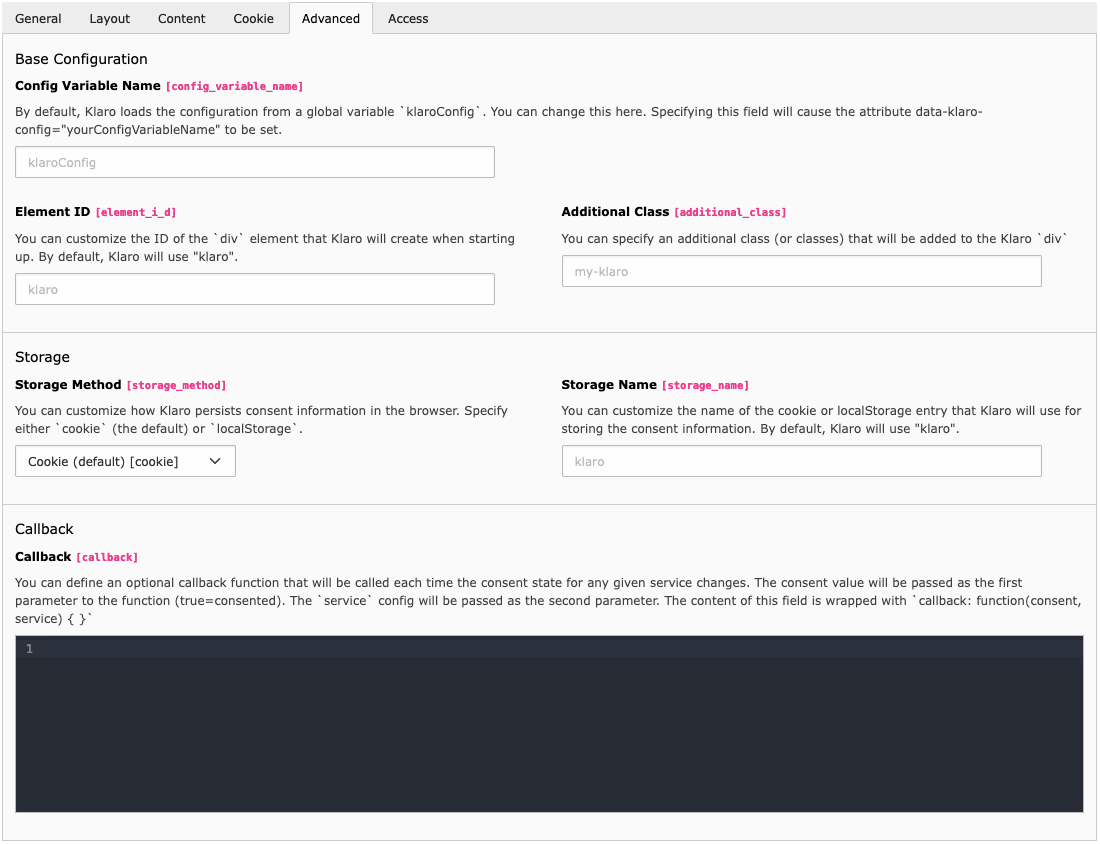
Klaro Configuration - Advanced Tab
Klaro Service Configuration
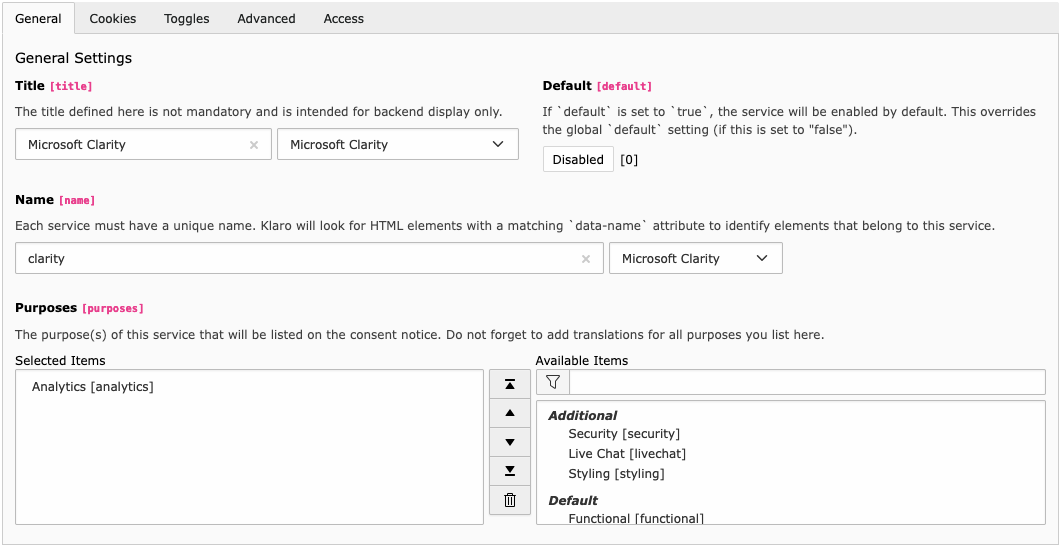
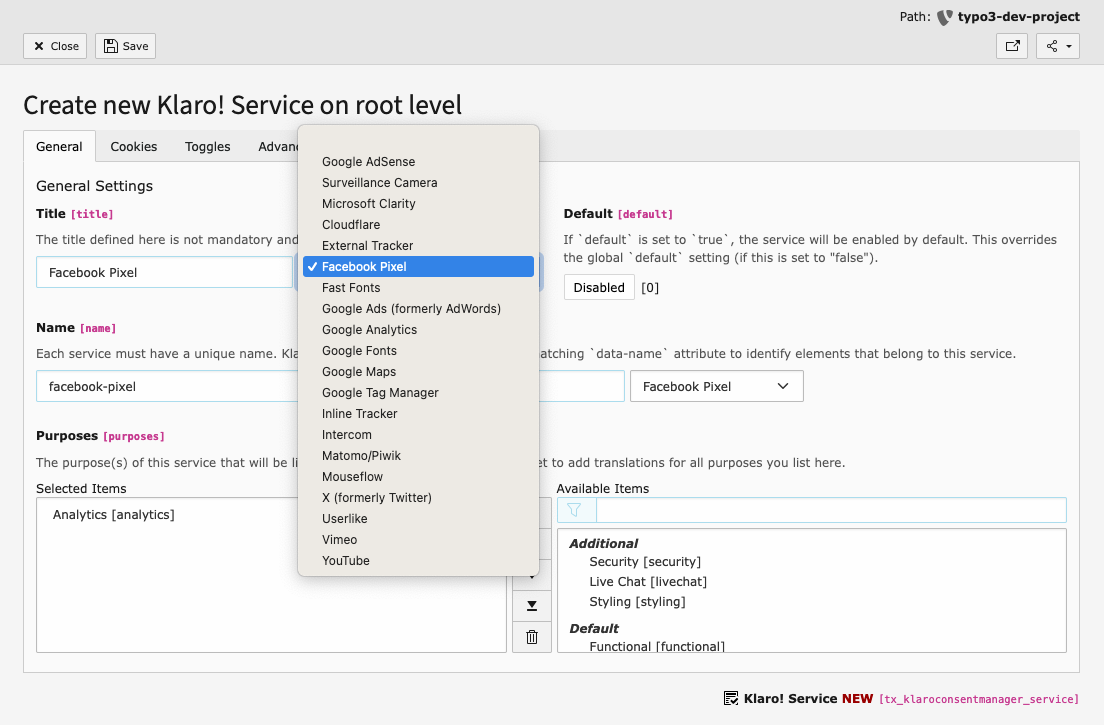
Service Configuration - General Tab
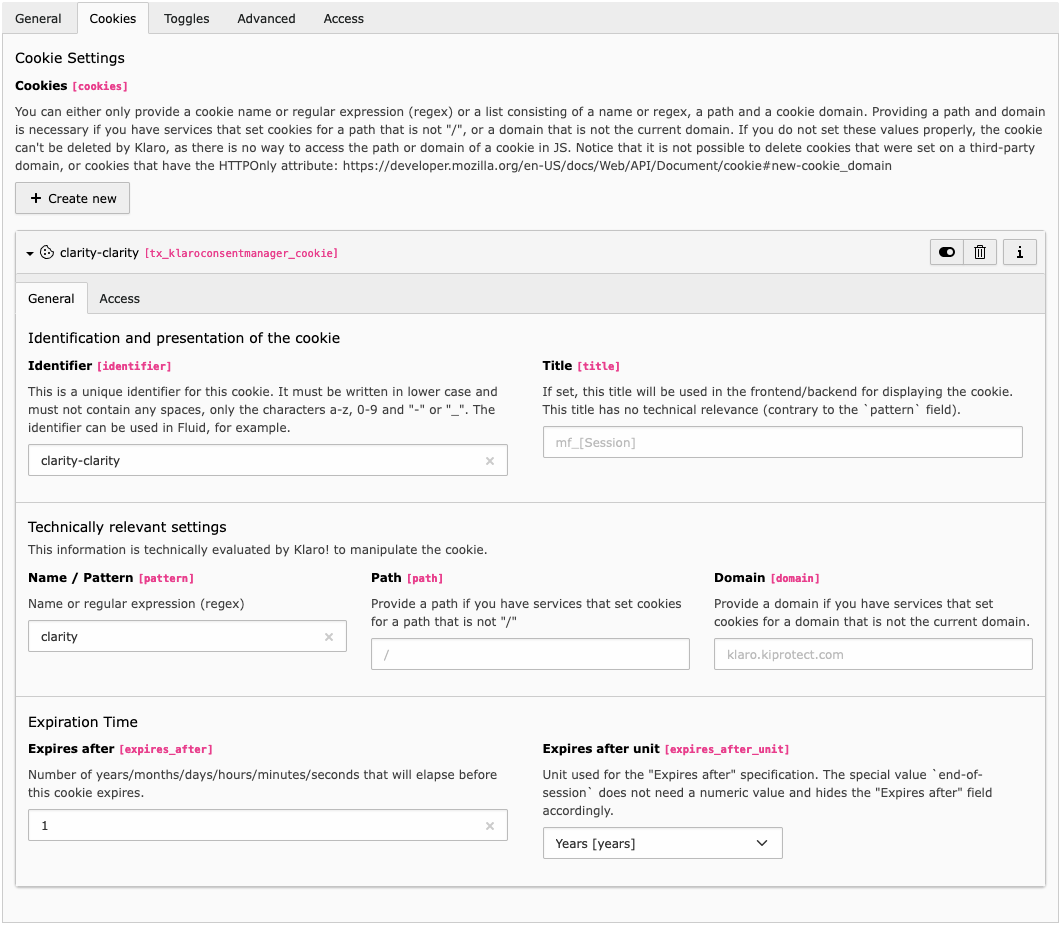
Service Configuration - Cookie Tab
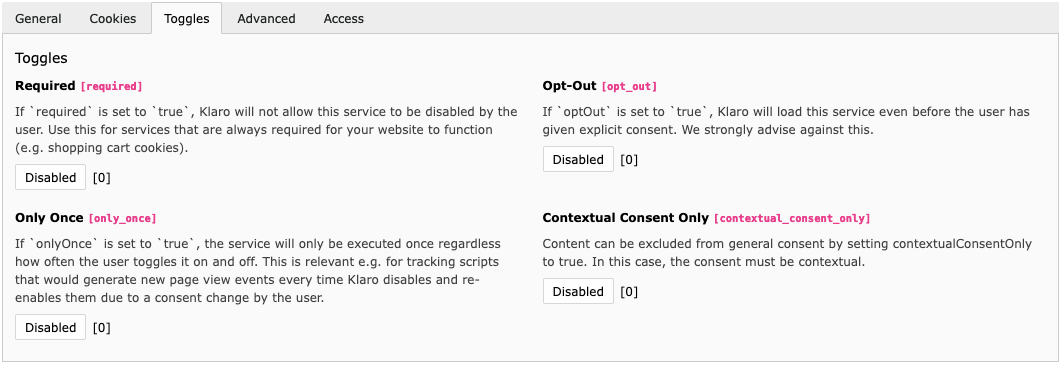
Service Configuration - Toggles Tab
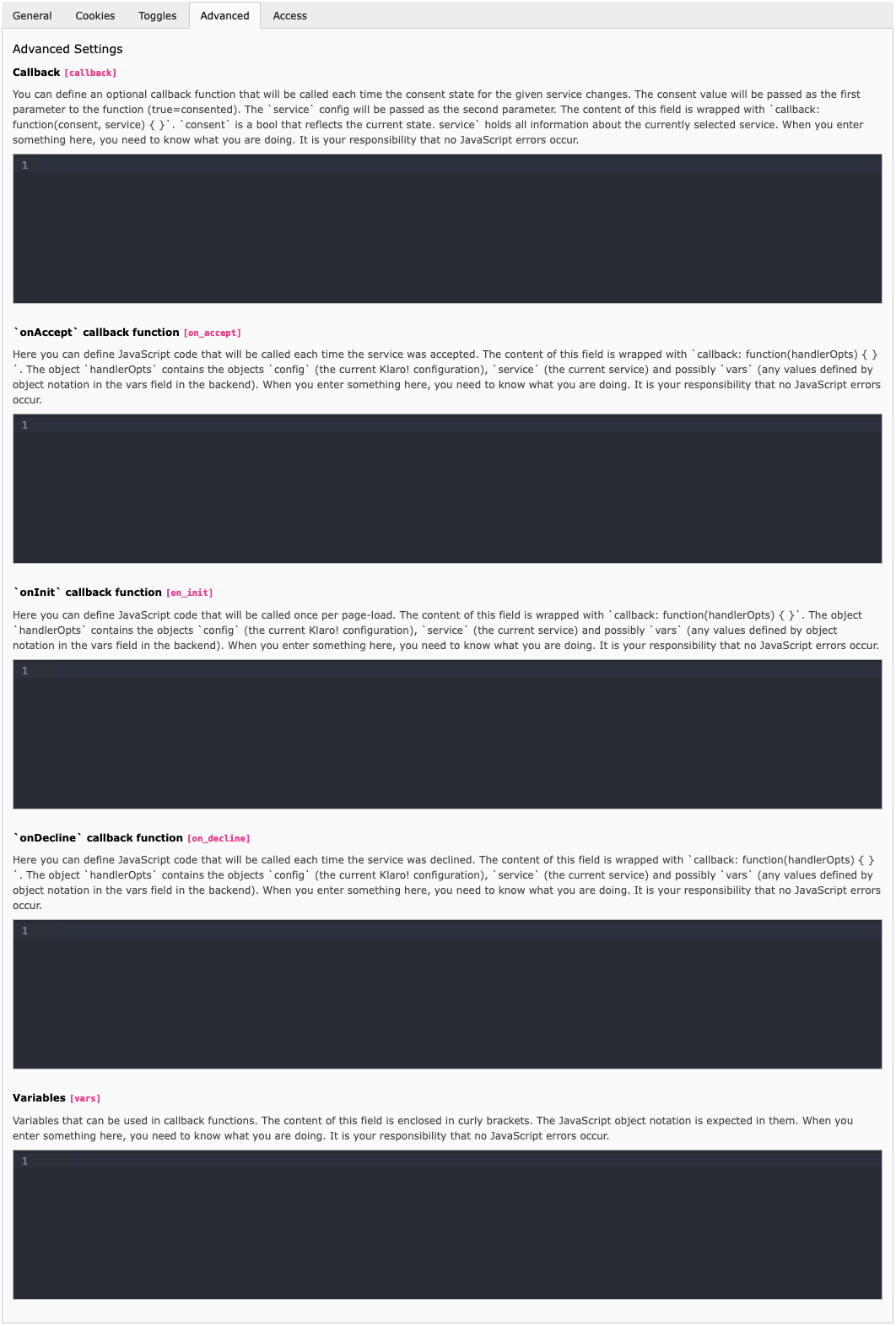
Service Configuration - Advanced Tab
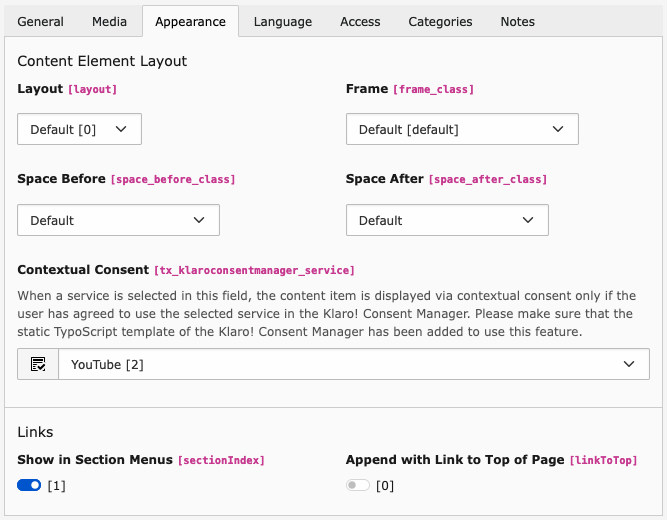
Contextual Consent
Backend configuration of the content element
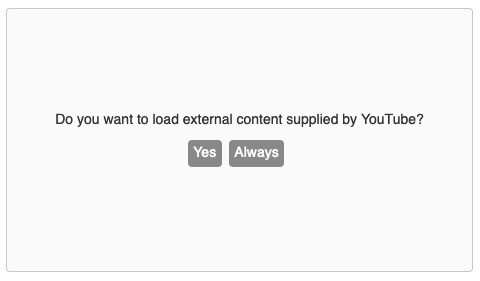
Frontend display
Features
This extension impresses with a variety of features that improve normal use of Klaro and stand out from other Klaro integrations. See for yourself on this page.
Klaro is normally configured via a separate JavaScript file, which is usually included in a web project alongside the actual Klaro JavaScript of the application. This form of integration is also frequently found in TYPO3 projects. Even some TYPO3 extensions that are based on Klaro only provide a placeholder for a config.js file.
Example of a default config.js file from the Klaro repository
This extension now takes a new approach by making all parameters without exceptions provided by the Klaro configuration file editable via the TYPO3 backend based on the TYPO3 FormEngine in a beautiful GUI with nice titles and comprehensible descriptive texts.
In this way, even editors without JavaScript syntax knowledge can get the best out of Klaro. It also ensures that there are no syntax errors and that the output is reduced to the essentials in terms of performance.
In the end, the Klaro configuration is generated dynamically based on the backend settings and automatically integrated in the desired JavaScript format at the right place in the front end of the website.
Mutually exclusive parameters
In the context of the backend GUI, the extension automatically checks whether the relevant parameters are mutually exclusive. The backend interface is customised depending on the current setting. This means you no longer have to deal with the context and can configure Klaro more intuitively.
Note
Example
Activating the "Must consent" setting [mustConsent], for example, means that "Notice As Modal" [noticeAsModal] is no longer displayed as an option in the backend interface. The reason for this is that Klaro inevitably uses a modal in such a case → A dependency that is not normally clear in config.js.
Neutral color scheme
Apart from the default styling of Klaro, a color-neutral scheme is offered for selection. According to current case law, this is required, a point that has not yet been taken into account in Klaro's default CSS. In addition to this preset selection, the SCSS files supplied with this extension naturally also give you full freedom to customise the styling to suit your requirements.
XLIFF-based translations
The code of the Klaro application normally contains labels for a variety of languages, which are used depending on the language of the output via JavaScript. Klaro also provides the option of overwriting labels of defined languages via configuration.
Example for the configuration of labels in config.js
translations: {
    zz: {
        privacyPolicyUrl: "/#privacy"
    },
    de: {
        privacyPolicyUrl: "/#datenschutz",
        consentModal: {
            description: 'Hier k\xf6nnen Sie einsehen und anpassen, welche Information wir \xfcber Sie sammeln. Eintr\xe4ge die als "Beispiel" gekennzeichnet sind dienen lediglich zu Demonstrationszwecken und werden nicht wirklich verwendet.'
        },
        ...
    },
    en: {
        consentModal: {
            title: "<u>test</u>",
            description: 'Here you can see and customize the information that we collect about you. Entries marked as "Example" are just for demonstration purposes and are not really used on this website.'
        },
        ...
    }
}
Copied!
This has the disadvantage that considerably more translation code is loaded than is required at the time of the request in a particular language.
Fortunately, TYPO3 has already integrated a successful principle with XLIFF files with which labels can be integrated depending on the currently selected language. This is used here by the Klaro Extension. No labels are loaded from languages that are not currently needed.
All labels that Klaro otherwise supplies on the JavaScript side were transferred to this format and uploaded to the Crowdin translation server so that they can be maintained and expanded there by our active community.
Note
From a technical perspective, these labels are ultimately delivered in the Klaro configuration under the global fallback index zz. The Klaro JavaScript knows no other source for labels than the one we provide through TYPO3. A more efficient way that combines the best of both worlds.
Fluid enriched labels
This extension offers the possibility of enriching or replacing any label with the help of fluid if necessary. Sometimes you want to enrich labels based on fluid functionality to add more dynamics. For example, in a multi-site installation it would be possible to output a site-specific consent modal title.
This also simplifies the use of HTML in labels. Not only can you use the full range of functions of Fluid to achieve dynamic HTML output for description texts, but the necessary character encoding of the texts in JavaScript is also taken care of for you.
After setting the template paths, the labels as a whole can be replaced/modified with Fluid Content or Fluid Content service/purpose can be prepended/appended.
The full description of this feature can be found in the "How To" guide.
Service presets
Most common services that require consent, such as Google Analytics, Matomo, Facebook Pixel or YouTube, are already covered via preconfigured presets. In these cases, you only have to select the preset and you can use the description texts that have already been prepared.
Cookie info table
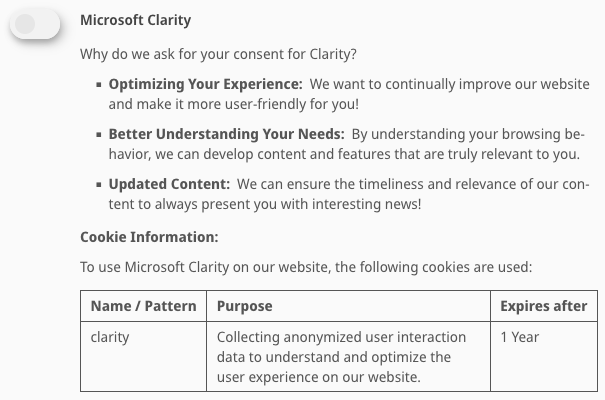
In addition to the description text of a service, all relevant cookie information is automatically displayed in a table. This is achieved by Klaro automatically enriching the description label of the service via the Fluid file EXT:Resources/Private/Templates/Append/Service/Description.html.
Trigger Links
Certain link targets can be used to create links that open the Klaro Consent Management settings (https://KLARO_CONSENT.com) and reset the settings (https://KLARO_RESET.com). The link targets are replaced with CSP-compliant JavaScript functionality in the final HTML output. The links are also configurable via the extension settings. The middleware ErHaWeb\KlaroConsentManager\Middleware\ReplaceBeforeOutput is responsible for this.
Note
Thanks to Georg Ringer and Studio Mitte Digital Media GmbH for this feature idea and the permission to use it from their Klaro integration.
Contextual Consent
The Klaro Extension makes it possible to hide any content elements behind a consent requirement. Klaro’s contextual consent feature is used for this purpose. By default, the Fluid Styled Content Layout (EXT:fluid_styled_content/Resources/Private/Layouts/Default.html) is overwritten for this purpose.
Using TypoScript Settings mainSectionOnly you can also decide whether the entire content element including header and footer should be enclosed in the consent box or just the main content.
Note
If you have already overwritten this layout file through your site package, you will need to enter the required code into your version of the layout file yourself.
A special feature in this context is that using a string-based low-level replacement in the final HTML code, any occurrence of actively loaded resources within contextual content elements (via the src or href attribute) is automatically prevented. The external resources of Contextual Content will only be loaded after consent. You no longer need to worry about adjusting these attributes by adding data- as usual in Klaro. The middleware ErHaWeb\KlaroConsentManager\Middleware\ReplaceBeforeOutput is responsible for this.
Backend configuration of the content element
Frontend display
TypoScript condition to check if Klaro is used
The variable klaroIsActive can be used in TypoScript conditions to check whether Klaro is active. Various conditions form the prerequisite for Klaro to be used:
It is a frontend call
A configuration record has been referenced in the site configuration
At least one service has been referenced in the Klaro configuration
The TypoScript constant plugin.tx_klaroconsentmanager.settings.configuration.disabled is FALSE.
Sometimes it is desired that sites or certain translations do not use Consent Management. This is the case, for example, if the website is outside the scope of the GDPR. In these cases, Klaro should not be loaded. In addition, script adjustments (e.g. the Klaro-typical change of the attribute src to data-src) must not be carried out. The variable klaroIsActive helps with the differentiation at TypoScript level.
Example
[!klaroIsActive]page.headerData.100 = TEXTpage.headerData.100 { value (<script async src="https://www.googletagmanager.com/gtag/js?id={$tagId}"></script><script> window.dataLayer = window.dataLayer || []; function gtag(){dataLayer.push(arguments)}; gtag('js', new Date()); gtag('config', '{$tagId}', {'anonymize_ip':true});</script> )}[END][klaroIsActive] page.headerData.100 = TEXT page.headerData.100 { value (<script async data-src="https://www.googletagmanager.com/gtag/js?id={$tagId}" type="text/plain" data-type="application/javascript" data-name="google-analytics"></script><script type="text/plain" data-type="application/javascript" data-name="google-analytics"> window.dataLayer = window.dataLayer || []; function gtag(){dataLayer.push(arguments)}; gtag('js', new Date()); gtag('config', '{$tagId}', {'anonymize_ip':true});</script> ) }[END]
Copied!
Service Filtering
With this feature you can enable or disable individual services via TypoScript.
This is useful for conditions such as language, site identifier, or application context.
plugin.tx_klaroconsentmanager.settings.services.whitelist
Comma-separated list of service names. If defined, only these services are active.
Any blacklist is ignored.
plugin.tx_klaroconsentmanager.settings.services.blacklist
Comma-separated list of service names. If no whitelist is defined, all services are active except those listed.
# Restrict the services exclusively to Google Analytics and Matomo if this is the default language[siteLanguage("languageId") === 0]
plugin.tx_klaroconsentmanager.settings.services.whitelist = google-analytics, matomo
[end]# Remove the Facebook Pixel services if the current language has the UID 1[siteLanguage("languageId") === 1]
plugin.tx_klaroconsentmanager.settings.services.blacklist = facebook-pixel
[end]
Copied!
Standalone configuration
If you run another website on the same server (otherwise the loading would require consent) that should use the same Klaro configuration (e.g. as part of a WordPress instance, for the blog) you can also have the Klaro configuration returned as a standalone output by TYPO3. To do this, simply call /klaro-config.js. A MiddleWare (ErHaWeb\KlaroConsentManager\Middleware\KlaroConfiguration) that has been reduced to the essentials will take care of returning the necessary JavaScript code.
CSP compliance
All resources that are integrated via the extension observe the content security policy if necessary. So there is no problem for this extension if the CSP feature Toggle is enabled (whether for the backend or frontend).
TYPO3 v13 compatibility
Any deprecations that appeared in v13 have been modernized. The entire code was optimized for PHP 8 and underwent various quality checks.
The TypoScript of this extension can already be integrated TYPO3 v13-compliant via SiteSet. Alternatively, it is still possible to integrate the TypoScript using the old method via static include of the sys_template record.
Vanilla JavaScript
This integration is based exclusively on vanilla/plain JavaScript. No library such as jQuery is required. This way, only the code that is really needed is loaded, and you retain the freedom to decide whether and which library you want to use to run your site, completely independent of this Klaro integration.
Installation
There are different ways an extension in TYPO3 can be installed. This also applies to this extension.
Composer
If your TYPO3 instance was installed with Composer (recommended), then this extension must also be installed via Composer. In this case, follow the chapter:
Otherwise, you can take the classic route and choose whether to download the extension as a zip archive from the TYPO3 Extension Repository (TER) and import it into the Extension Manager or whether to search for and install it directly in the Extension Manager. In this case, follow the chapter:
To install this extension with Composer, you must first define the package as a composer requirement and then perform a database update.
Install the extension
In your command line interface, change to the root directory of your project (where the composer.json of your project is located) and enter the following command:
This extension uses the database and the TYPO3 FormEngine to let you create the Klaro configuration in a nice GUI in the backend.
For this purpose, the tables tx_klaroconsentmanager_configuration, tx_klaroconsentmanager_service and tx_klaroconsentmanager_cookie must be created. In addition, a field must be added to the tt_content table in order to be able to implement the contextual consent feature at content level.
Classic
There are two different ways to install extensions via the Extension Manager in the TYPO3 backend.
or it is downloaded from the TYPO3 Extension Repository (TER) as a zip file and uploaded in the backend.
Both ways are described here.
Tip
With the classic installation (both ways), you do not have to worry about database updates as with a Composer installation. These are carried out automatically for you in the background during the installation process.
Extension Manager
Regardless of which of the two ways you have chosen, you must enter the Extension Manager in the backend. To do this, follow the steps below.
Open the TYPO3 backend.
Go to the Extension Manager Module under Admin Tools → Extensions.
Search and install
Proceed as follows to install the extension based on a TER search in the backend:
Select Get Extensions in the module header.
Enter the extension key klaro_consent_manager in the search field.
In the result list click Import & Install ⇓ under Actions
Finished!
The following pop-up will be displayed in the backend.
The modern and recommended way to reference the configuration of this extension since TYPO3 v13 is via its Site Set. Alternatively, it is still possible to use the Static TypoScript Include in the template record.
Go to the Sites module under Site Management → Sites
Click Edit site configuration at the relevant Site
Select Klaro! Consent Manager [erhaweb/klaro-consent-manager] under Sets for this Site
Move it in the list above the entry for your sitepackage so that you can overwrite it later
Click Save and Close
Tip
You will notice that the constant editor can no longer be opened if the configuration
was referenced via Site Set. To overwrite the default setting values of
EXT:klaro_consent_manager/Configuration/Sets/KlaroConsentManager/settings.definitions.yaml,
use a file config/sites/<site-identifier>/settings.yaml.
Example: Configuration of the extension of the Contextual Consent Box to the entire content element instead of just the main content
Click Create new record in the module header of Web → List
Select Klaro! Consent Manager → Klaro! Service to create new service
Select a Title under which the service will later be identified in the backend. If it is a service that is represented in the list of presets, select it from the list. Otherwise, you must select your own title
Select a unique Name under which the service will later be identified by Klaro. If it is a service that is represented in the list of presets, select it from the list. Otherwise, you must select your own name
Tip
The advantage of using a name from this list is that the associated supplied title and description texts for the frontend are used automatically. Of course, these can still be customised later
Under Purposes choose a purpose that best suits this service
Click Save
For each cookie associated with the service proceed with the following steps ...
In the editing mask of the service click Tab Cookies
Under Cookie Settings → Cookies click + Create new
Scroll to palette Identification and presentation of the cookie
Define an Identifier for later usage in Fluid
Define a Title for frontend display
Scroll to palette Technically relevant settings
Define a Name / Pattern to technically enable Klaro to manipulate this cookie
Provide a Path if the cookies path is not "/"
Provide a Domain if the cookies domain is not the current one
Scroll to palette Expiration Time
Enter the number of years/months/days/hours/minutes/seconds that will elapse before this cookie expires under Expiration Time if the cookies domain is not the current one
Enter the expiration unit to be used under Expires after unit
Click Save
When all cookies have been created in the service click Close
When all services have been created continue with the next steps
Note
Prerequisite for the output in the frontend is that at least one service has been assigned.
This also works for other tags such as images or tracking pixels. Just remember to always add a data-name attribute that matches the name of the app in your config so that Klaro knows which element belongs to which service.
Tip
If the script is integrated via TypoScript and is to be used in the context of both a page requiring consent and a page not requiring consent, take a look at the klaroIsActive feature.
Finished!
Congratulations, the Klaro configuration has been successfully completed
The next frontend call of the configured Site will show you a brand new Klaro Consent Management Box. You have probably noticed that there are a few more tabs (especially in the context of the main configuration). Click through here to find out more. Each field is described in detail in the backend.
Constants (or in the Site Sets context called Site Settings) that influence the behaviour of the Klaro extension are described below.
View
The following options are located under the following path:
plugin.tx_klaroconsentmanager.view
Template root path
templateRootPath
templateRootPath
type
string
Default
empty
Path
plugin.tx_klaroconsentmanager.view
In addition to the default path EXT:klaro_consent_manager/Resources/Private/Templates/,
this constant can be used to define a custom template root path to overwrite
individual fluid files as needed.
Partial root path
partialRootPath
partialRootPath
type
string
Default
empty
Path
plugin.tx_klaroconsentmanager.view
In addition to the default path EXT:klaro_consent_manager/Resources/Private/Partials/,
this constant can be used to define a custom partial root path to overwrite
individual fluid files as needed.
Layout root path
layoutRootPath
layoutRootPath
type
string
Default
empty
Path
plugin.tx_klaroconsentmanager.view
In addition to the default path EXT:klaro_consent_manager/Resources/Private/Layouts/,
this constant can be used to define a custom layout root path to overwrite
individual fluid files as needed.
Settings
The following options are located under the following path:
plugin.tx_klaroconsentmanager.settings
Comma-separated list of attributes that should be automatically replaced within the content element of the contextual consent
Main section only
contextualconsent.mainSectionOnly
contextualconsent.mainSectionOnly
type
boolean
Default
true
Path
plugin.tx_klaroconsentmanager.settings
Activate this option if the contextual consent box should only be limited to the main content (without heading and footer).
Disable Klaro Consent Management
configuration.disabled
configuration.disabled
type
boolean
Default
false
Path
plugin.tx_klaroconsentmanager.settings
Setup
Service Filtering
services.whitelist
services.whitelist
type
string (comma-separated list)
Default
''
Restrict the available services to the given list of service names.
If a whitelist is defined, only the listed services are active.
Any configured services.blacklist is ignored when a whitelist is present.
If a whitelist is set (non-empty), only its entries are active; a blacklist is ignored.
If no whitelist is set, the blacklist excludes its entries.
If neither is set, all services are active.
This mechanism is especially useful in combination with TypoScript
conditions, for example to enable or disable specific services depending
on the current language, site identifier, or application context.
Example:
# Restrict the services exclusively to Google Analytics and Matomo if this is the default language[siteLanguage("languageId") === 0]
plugin.tx_klaroconsentmanager.settings.services.whitelist = google-analytics, matomo
[end]# Remove the Facebook Pixel services if the current language has the UID 1[siteLanguage("languageId") === 1]
plugin.tx_klaroconsentmanager.settings.services.blacklist = facebook-pixel
[end]
Copied!
Configuration
configuration.[...]
configuration.[...]
type
Array
Default
[]
Path
plugin.tx_klaroconsentmanager.settings
Warning
Experimental feature!
The entries made here from TypoScript are merged into the configuration array shortly before the transformation into the JavaScript configuration. Accordingly, make sure that the lowerCamelCase notation is used to match the final keys.
Please note that nesting in the TypoScript override cannot currently be mapped well in the context of elements such as services without an associative index. In addition, there is (still) no plausibility check of the keys used.
In addition, there is currently no type conversion according to the properties, which can lead to problems on the Klaro JavaScript side with non-string types. At the moment, I recommend using only known keys without nesting and with string type.
After installing this extension, you are able to create a Klaro configuration that is later referenced via the Site Configuration of the site for which Consent Management is to be set up.
Services are referenced via the Klaro configuration. Services can also be created independently of editing the Klaro configuration. In the context of editing services, information on the cookies used by the service in question can be specified inline.
General setup
You can set up Consent Management in the following way:
Here you will find detailed information on all fields that can be configured in the site configuration, the klaro configuration, the services and their cookies.
Klaro configurations created in the root of this TYPO3 instance can be referenced here. If no configuration has been created yet, switch to the list module, select the root node of the page tree (with uid 0) and create a new configuration via the button "Create new record".
The link to the imprint page is used in the footer of the Klaro! Consent Box.
Configuration
The Klaro configuration forms the basis. It contains all the information regarding the display and behaviour of Consent Management. The individual services are referenced via this configuration.
The points in the following navigation correspond to the tabs that are available in the backend form of a Klaro configuration of the respective records and the subpages correspond to the palettes that are used to group related fields within a tab.
Title under which this configuration can be found.
Purpose Order
purpose_order
purpose_order
type
string/select
Default
''
The order in which purposes appear in the notice and modal can be changed via the purposeOrder parameter, which can be given a list with purpose names and will display those purposes in the order in which they appear in the list.
Determines the alignment of the Consent box if mustConsent and noticeAsModal are disabled.
Default consent status
Default
default
default
type
boolean
Default
false
Defines the default state for services in the consent modal (true=enabled by default). If this setting is set to "false", you can override it in any service.
Accept all
accept_all
accept_all
type
boolean
Default
true
Setting acceptAll to true will show an "accept all" button in the notice and modal, which will enable all third-party services if the user clicks on it. If set to "false", there will be an "accept" button that will only enable the services that are enabled in the consent modal.
Behavior
Must consent
must_consent
must_consent
type
boolean
Default
false
Condition:notice_as_modal == FALSE
If mustConsent is set to true, Klaro will directly display the consent manager modal and not allow the user to close it before having actively consented or declines the use of third-party services.
Notice As Modal
notice_as_modal
notice_as_modal
type
boolean
Default
false
Condition:must_consent == FALSE
Show cookie notice as modal
Hide Initial Notice
no_notice
no_notice
type
boolean
Default
false
Do not show the initial consent notice dialog. The manager can still be
opened manually or via contextual consent overlays.
Show title in consent notice
show_notice_title
show_notice_title
type
boolean
Default
false
Condition:must_consent == FALSE
When this option is enabled, Klaro displays the title in the notice modal.
Auto Focus
auto_focus
auto_focus
type
boolean
Default
false
Automatically focus the Klaro consent notice/modal container when it opens to improve keyboard navigation and accessibility.
Show Description (Empty Store)
show_description_empty_store
show_description_empty_store
type
boolean
Default
false
type
boolean
Default
false
Show an explanatory text in contextual consent placeholders when no consent storage exists yet (first visit / empty store). This informs users that a permanent decision ("Always") requires allowing Klaro to store consent first.
Note
Only has an effect in contextual consent widgets/overlays (e.g. for embedded media) and only if the consent store (cookie/localStorage) is empty.
HTML Texts
html_texts
html_texts
type
boolean
Default
true
If set to true, Klaro will render the texts given in the consentModal.description and consentNotice.description translations as HTML. This enables you to e.g. add custom links or interactive content. If you want to be able to output HTML tags via fluid-enriched labels (see "Content" → "Translations"), this option must be enabled.
Embedded
embedded
embedded
type
boolean
Default
false
Setting "embedded" to true will render the Klaro modal and notice without the modal background, allowing you to e.g. embed them into a specific element of your website, such as your privacy notice.
Testing
testing
testing
type
boolean
Default
false
Setting testing to true will cause Klaro to not show the consent notice or modal by default, except if a special hashtag is appended to the URL (#klaro-testing). This makes it possible to test Klaro on your live website without affecting normal visitors.
No Auto-Load
no_auto_load
no_auto_load
type
boolean
Default
false
Setting this to true will keep Klaro from automatically loading itself when the page is being loaded.
Other display settings
Group by purpose
group_by_purpose
group_by_purpose
type
boolean
Default
true
You can group services by their purpose in the modal. This is advisable if you have a large number of services. Users can then enable or disable entire groups of services instead of having to enable or disable every service.
Disable Powered By
disable_powered_by
disable_powered_by
type
boolean
Default
false
You can also remove the "Realized with Klaro!" text in the consent modal. Please don't do this! We provide Klaro as a free open source tool. Placing a link to our website helps us spread the word about it, which ultimately enables us to make Klaro! better for everyone. So please be fair and keep the link enabled. Thanks :)
Powered By URL
powered_by
powered_by
type
string (URL)
Default
(empty)
Override the “powered by” link URL in the consent modal.
Leave empty to use Klaro’s default.
Setting hideDeclineAll to true will hide the "decline" button in the consent modal and force the user to open the modal in order to change his/her consent or disable all third-party services. We strongly advise you to not use this feature, as it opposes the "privacy by default" and "privacy by design" principles of the GDPR (but might be acceptable in other legislations such as under the CCPA)
Hide Learn More
hide_learn_more
hide_learn_more
type
boolean
Default
false
Setting hideLearnMore to true will hide the "learn more / customize" link in the consent notice. We strongly advise against using this under most circumstances, as it keeps the user from customizing his/her consent choices.
Hide Toggle All
hide_toggle_all
hide_toggle_all
type
boolean
Default
false
Setting hideToggleAll to true will hide the "toggle all" link in the consent notice.
Append Buttons
Append Show Button
append_show_button
append_show_button
type
boolean
Default
false
If this option is set, a button is created in the frontend (via JavaScript) directly in front of the closing body tag, which triggers the opening of the Klaro consent management.
Append Reset Button
append_reset_button
append_reset_button
type
boolean
Default
false
If this option is set, a button is generated in the frontend (via JavaScript) directly in front of the closing body tag, which triggers the resetting of all settings and the opening of the Klaro consent management.
Translations
Fluid Template Root Path
fluidtemplate_rootpath
fluidtemplate_rootpath
type
string
Default
''
As an alternative to the usual TypoScript configuration via constants under plugin.tx_klaroconsentmanager.view, a Fluid root path can be defined here, which has a higher priority than the paths configured in TypoScript. The three default directories /Layouts/, /Partials/ and /Templates/ are expected under this path. Fluid templates created here are used to enrich Locallang labels with additional functionality or to replace them completely. In this way, dynamic content or more complex HTML structures can be provided in a simple way. Fluid templates that are to override labels are expected in the subdirectory /Templates/Labels/.
Locallang Path
locallang_path
locallang_path
type
string
Default
''
Optional path to an additional XLIFF file that overwrites the default labels or adds new labels (e.g. for custom purposes or services). If fluid templates have been stored for the labels created in this file (see the "Fluid Template Root Path" field), these will overwrite the classic labels from the Locallang file. Nevertheless, it is possible and common to reference the locallang file from the respective fluid template and obtain the actual label there (the label key is passed to the fluid template).
You can change the cookie domain for the consent manager itself. Use this if you want to get consent once for multiple matching domains. By default, Klaro will use the current domain. Only relevant if storageMethod is set to cookie.
Cookie Path
cookie_path
cookie_path
type
string
Default
''
Condition:storage_method == 'cookie'
Provide a path if you have services that set cookies for a path that is not "/"
Cookie expires after days
cookie_expires_after_days
cookie_expires_after_days
type
integer
Default
Condition:storage_method == 'cookie'
You can also set a custom expiration time for the Klaro cookie. By default, it will expire after 60 days. Only relevant if storageMethod is set to cookie.
By default, Klaro loads the configuration from a global variable klaroConfig. You can change this here. Specifying this field will cause the attribute data-klaro-config="yourConfigVariableName" to be set.
Element ID
element_i_d
element_i_d
type
string
Default
''
You can customize the ID of the div element that Klaro will create when starting up. By default, Klaro will use "klaro".
Style Prefix
style_prefix
style_prefix
type
string
Default
(empty)
Prefix for CSS classes/container to namespace Klaro styles.
Additional Class
additional_class
additional_class
type
string
Default
''
You can specify an additional class (or classes) that will be added to the Klaro div
Storage
Storage Method
storage_method
storage_method
type
select
Default
'cookie'
You can customize how Klaro persists consent information in the browser. Specify either cookie (the default) or localStorage.
Options:
None [none]
Cookie (default) [cookie]
Local Storage [localStorage]
Storage Name
storage_name
storage_name
type
string
Default
''
You can customize the name of the cookie or localStorage entry that Klaro will use for storing the consent information. By default, Klaro will use "klaro".
Callback
Callback
callback
callback
type
string
Default
''
You can define an optional callback function that will be called each time the consent state for any given service changes. The consent value will be passed as the first parameter to the function (true=consented). The service config will be passed as the second parameter. The content of this field is wrapped with callback: function(consent, service) { }
Service
A Klaro service contains all information on a specific area of application of the website that requires consent and is assigned to a configuration. Services are usually listed in the Consent Management Modal. However, there are also services that are only used in the context of contextual consent and do not appear in the modal. This section explains all the functions that can be selected in the context of these services in Klaro.
It often happens that a service has to set cookies in the browser. These are recorded in the service configuration as dedicated inline records.
The points in the following navigation correspond to the tabs that are available in the backend form of a Klaro service of the respective records and the subpages correspond to the palettes that are used to group related fields within a tab.
The title defined here is not mandatory and is intended for backend display only.
Options:
Google AdSense
Surveillance Camera
Microsoft Clarity
Cloudflare
External Tracker
Facebook Pixel
Fast Fonts
Google Ads
Google Analytics
Google Fonts
Google Maps
Google Tag Manager
Inline Tracker
Instagram
Intercom
Matomo/Piwik
Mouseflow
TikTok
X (formerly Twitter)
Userlike
Vimeo
YouTube
Default
default
default
type
boolean
Default
false
If default is set to true, the service will be enabled by default. This overrides the global default setting (if this is set to "false").
Name
name
name
type
string/select
Default
''
Each service must have a unique name. Klaro will look for HTML elements with a matching data-name attribute to identify elements that belong to this service.
Options:
Google AdSense [adsense]
Surveillance Camera [camera]
Microsoft Clarity [clarity]
Cloudflare [cloudflare]
External Tracker [external-tracker]
Facebook Pixel [facebook-pixel]
Fast Fonts [fast-fonts]
Google Ads [google-ads]
Google Analytics [google-analytics]
Google Fonts [google-fonts]
Google Maps [google-maps]
Google Tag Manager [google-tag-manager]
Inline Tracker [inline-tracker]
Instagram [instagram]
Intercom [intercom]
Matomo/Piwik [matomo]
Mouseflow [mouseflow]
TikTok [tiktok]
X (formerly Twitter) [twitter]
Userlike [userlike]
Vimeo [vimeo]
YouTube [youtube]
Purposes
purposes
purposes
type
select
Default
''
The purpose(s) of this service that will be listed on the consent notice. Do not forget to add translations for all purposes you list here.
You can either only provide a cookie name or regular expression (regex) or a list consisting of a name or regex, a path and a cookie domain. Providing a path and domain is necessary if you have services that set cookies for a path that is not "/", or a domain that is not the current domain. If you do not set these values properly, the cookie can't be deleted by Klaro, as there is no way to access the path or domain of a cookie in JS. Notice that it is not possible to delete cookies that were set on a third-party domain, or cookies that have the HTTPOnly attribute: https://developer.mozilla.org/en-US/docs/Web/API/Document/cookie#new-cookie_domain
If required is set to true, Klaro will not allow this service to be disabled by the user. Use this for services that are always required for your website to function (e.g. shopping cart cookies).
Opt-Out
opt_out
opt_out
type
boolean
Default
false
If optOut is set to true, Klaro will load this service even before the user has given explicit consent. We strongly advise against this.
Only Once
only_once
only_once
type
boolean
Default
false
If onlyOnce is set to true, the service will only be executed once regardless how often the user toggles it on and off. This is relevant e.g. for tracking scripts that would generate new page view events every time Klaro disables and re-enables them due to a consent change by the user.
Contextual Consent Only
contextual_consent_only
contextual_consent_only
type
boolean
Default
false
Content can be excluded from general consent by setting contextualConsentOnly to true. In this case, the consent must be contextual.
You can define an optional callback function that will be called each time the consent state for the given service changes. The consent value will be passed as the first parameter to the function (true=consented). The service config will be passed as the second parameter. The content of this field is wrapped with callback: function(consent, service) { }. consent is a bool that reflects the current state. service` holds all information about the currently selected service. When you enter something here, you need to know what you are doing. It is your responsibility that no JavaScript errors occur.
onAccept callback function
on_accept
on_accept
type
string
Default
''
Here you can define JavaScript code that will be called each time the service was accepted. The content of this field is wrapped with callback: function(handlerOpts) { }. The object handlerOpts contains the objects config (the current Klaro! configuration), service (the current service) and possibly vars (any values defined by object notation in the vars field in the backend). When you enter something here, you need to know what you are doing. It is your responsibility that no JavaScript errors occur.
Example: Google Tag Manager
// we notify the tag manager about all services that were accepted. You can define// a custom event in GTM to load the service if consent was given.for(let k ofObject.keys(handlerOpts.consents)){if (handlerOpts.consents[k]){let eventName = 'klaro-'+k+'-accepted' dataLayer.push({'event': eventName}) }}
Copied!
Example: Google Analytics
// we grant analytics storagegtag('consent', 'update', {'analytics_storage': 'granted',})
Copied!
Example: Google Ads
// we grant ad storage and personalizationgtag('consent', 'update', {'ad_storage': 'granted','ad_user_data': 'granted','ad_personalization': 'granted'})
Copied!
onInit callback function
on_init
on_init
type
string
Default
''
Here you can define JavaScript code that will be called once per page-load. The content of this field is wrapped with callback: function(handlerOpts) { }. The object handlerOpts contains the objects config (the current Klaro! configuration), service (the current service) and possibly vars (any values defined by object notation in the vars field in the backend). When you enter something here, you need to know what you are doing. It is your responsibility that no JavaScript errors occur.
Example: Google Tag Manager
// initialization code here (will be executed only once per page-load)window.dataLayer = window.dataLayer || [];window.gtag = function(){dataLayer.push(arguments)}gtag('consent', 'default', {'ad_storage': 'denied', 'analytics_storage': 'denied', 'ad_user_data': 'denied', 'ad_personalization': 'denied'})gtag('set', 'ads_data_redaction', true)
Copied!
onDecline callback function
on_decline
on_decline
type
string
Default
''
Here you can define JavaScript code that will be called each time the service was declined. The content of this field is wrapped with callback: function(handlerOpts) { }. The object handlerOpts contains the objects config (the current Klaro! configuration), service (the current service) and possibly vars (any values defined by object notation in the vars field in the backend). When you enter something here, you need to know what you are doing. It is your responsibility that no JavaScript errors occur.
Example: Google Analytics
// we deny analytics storagegtag('consent', 'update', {'analytics_storage': 'denied',})
Copied!
Example: Google Ads
// we decline ad storage and personalizationgtag('consent', 'update', {'ad_storage': 'denied','ad_user_data': 'denied','ad_personalization': 'denied'})
Copied!
Variables
vars
vars
type
string
Default
''
Variables that can be used in callback functions. The content of this field is enclosed in curly brackets. The JavaScript object notation is expected in them. When you enter something here, you need to know what you are doing. It is your responsibility that no JavaScript errors occur.
Cookie
For a cookie, various specifications can be made regarding designation, area of validity and the period of use. Although cookies, like the configuration and services, are independent records in the database, they are recorded directly in the editing screen of services that are dependent on the service.
The points in the following navigation correspond to the tabs that are available in the backend form of a Klaro service of the respective records and the subpages correspond to the palettes that are used to group related fields within a tab.
This is a unique identifier for this cookie. It must be written in lower case and must not contain any spaces, only the characters a-z, 0-9 and "-" or "_". The identifier can be used in Fluid, for example.
Title
title
title
type
string
Default
''
If set, this title will be used in the frontend/backend for displaying the cookie. This title has no technical relevance (contrary to the pattern field).
Technically relevant settings
This information is technically evaluated by Klaro! to manipulate the cookie.
Name / Pattern
pattern
pattern
type
string
Default
''
Name or regular expression (regex)
Example:/^_pk_.*$/
Path
path
path
type
string
Default
''
Provide a path if you have services that set cookies for a path that is not "/"
Domain
domain
domain
type
string
Default
''
Provide a domain if you have services that set cookies for a domain that is not the current domain.
Expiration Time
Expires after
expires_after
expires_after
type
string
Default
''
Condition:expires_after_unit != 'end-of-session' AND expires_after_unit != 'persistent'
Number of years/months/days/hours/minutes/seconds that will elapse before this cookie expires.
Expires after unit
expires_after_unit
expires_after_unit
type
string
Default
''
Unit used for the "Expires after" specification. The special value end-of-session does not need a numeric value and hides the "Expires after" field accordingly.
Options:
Years [years]
Months [months]
Days [days]
Hours [hours]
Minutes [minutes]
Seconds [seconds]
End of session [end-of-session]
Persistent [persistent]
Note
The option persistent should be used only if external sources
(e.g. cookie scanners or provider documentation) list the cookie
simply as persistent without specifying an exact expiry period.
From a GDPR perspective, it is recommended to provide a concrete
storage duration whenever possible.
For Integrators
As an integrator, you have the option of extending available purposes and/or services. You also have a wide range of options for influencing the texts used in the Consent Management Modal. Take a look at the topics in the "How To" section. If you have any questions about the integration, these may be answered in the FAQ section.
A reference to the Fluid Root Directory can be configured via the Fluid Template Root Path field of the Klaro configuration.
Example
EXT:sitepackage/Resources/Private/
Copied!
The directories /Layouts/, /Partials/ and /Templates/ are automatically expected under the path specified here. Fluid enriched labels are expected in the /Templates/Labels/ directory. For further information about fluid enriched labels see here.
EXT:sitepackage
Resources
Private
Layouts
Partials
Templates
Labels
Reference to your own XLIFF file
A reference to a Locallang file can be created via the Locallang Path field of the Klaro configuration.
This overwrites the default labels of the extension. Labels can also be added to this file that are required for individually defined purposes or services, for example.
Create your new purpose (for example with the key mycoolpurpose) via TSconfig in the following form:
TCEFORM { tx_klaroconsentmanager_service.purposes.addItems { mycoolpurpose = LLL:EXT:sitepackage/Resources/Private/Language/Klaro/locallang.xlf:purposes.mycoolpurpose.title mycoolpurpose.group = custom }# Also copy this configuration to the `purpose_order` field of the klaro configuration tx_klaroconsentmanager_configuration.purpose_order.addItems < .tx_klaroconsentmanager_service.purposes.addItems}
Copied!
XLIFF
In you custom XLIFF file now you have to create new labels for your custom key:
<trans-unitid="purposes.mycoolpurpose.title"resname="purposes.mycoolpurpose.title"><source>My Cool Purpose</source></trans-unit><trans-unitid="purposes.mycoolpurpose.description"resname="purposes.mycoolpurpose.description"><source>This is the description of the new purpose.</source></trans-unit>
Copied!
Backend
In the backend, the new purpose is now visible for services and as part of the sorting in the Klaro configuration under the defined title.
Frontend
If the purpose of a service referenced in the Klaro configuration has been assigned, it also appears in the Consent Management modal in the frontend.
Create your new service (for example with the name mycoolservice) as a new service record in the backend:
XLIFF
In you custom XLIFF file now you have to create new labels for your custom key:
<trans-unitid="services.mycoolservice.title"resname="services.mycoolservice.title"><source>My Cool Service</source></trans-unit><trans-unitid="services.mycoolservice.description"resname="services.mycoolservice.description"><source>This is the description of the new service.</source></trans-unit>
Copied!
Frontend
If the service was referenced in the Klaro configuration, it also appears in the Consent Management modal in the frontend.
Once you have created a reference to your own Fluid base path <howto-reference-fluid>, you can extend or overwrite labels by adding new Fluid HTML files under /Templates/Labels/ according to the XLIFF label key of the label to be changed.
When creating the files, please note that each . symbolises a directory and each segment is created in UpperCamelCase format. The last segment of the label key is the *.html file in which the modification can be made.
File Structure
For example the following label with key purposes.analytics.description
<trans-unitid="purposes.analytics.description"resname="purposes.analytics.description"><source>These services gather anonymous data for statistical analysis and performance optimization. Enabling analytics services assists website owners in making informed decisions to enhance online services.</source></trans-unit>
Copied!
can be create under the following file structure if the configured base path is EXT:sitepackage/Resources/Private/
If you use the DebugViewHelper to display the available variables in the newly created template file, you will notice that all information can be used in the context of the current label.
Now you are free to decide what you want to use in place of the label. Please note that the extensionName="KlaroConsentManager" attribute is required in the context of using the Translate ViewHelper, as we are not working in the Extbase context here.
<htmlxmlns:f="http://typo3.org/ns/TYPO3/CMS/Fluid/ViewHelpers"data-namespace-typo3-fluid="true"lang="en"><f:comment><!-- Output of the label --></f:comment><f:translatekey="{locallang.key}"extensionName="KlaroConsentManager"/><f:comment><!-- Or any dynamic content --></f:comment><f:format.dateformat="Y">now</f:format.date></html>
Copied!
Note
In multi-language instances, please use the label partial instead of the translate ViewHelper (contrary to the video). This ensures (outside the Extbase context) that the correct language key is used.
If you want to use HTML tags in the label in addition to the pure text output, you must activate the HTML Texts option.
Warning
Please note that Klaro itself does not support HTML code in every label. In such cases, the HTML characters may be encoded.
Full Structure
Based on the currently used labels, the expected structure in the Labels directory is as follows. Depending on your requirements, you can create one or more files for modifying the label under this structure.
In addition to the manipulation of labels, it is also possible to display additional content before and/or afteralltitles and/or descriptions of purposes and/or services.
The following files can be used for this purpose as required:
EXT:sitepackage/Resources/Private/Templates/
Append
Purpose
Description.html
Title.html
Service
Description.html
Title.html
Prepend
Purpose
Description.html
Title.html
Service
Description.html
Title.html
FAQ
Questions that have reached me and for which a complete solution could be worked out are listed here:
When I call up the page in the frontend, the title and description are shown as missing. What can I do?
Answer
The "missing translation" output always occurs when Klaro expects a label that it cannot find in the given Locallang files.
Only the services predefined in the backend select boxes are provided in advance as a label in the locallang file, unknown custom services are of course not initially provided.
In this case, according to the screenshot, you are using a self-defined service with the identifier be_typo_user. You now have to store your own labels for this custom service under the expected label keys services.<IDENTIFIER>.title and services.<IDENTIFIER>.description.
This will look like this in your locallang file:
<trans-unitid="services.be_typo_user.title"resname="services.be_typo_user.title"><source>Title of the custom service "be_typo_user"</source></trans-unit><trans-unitid="services.be_typo_user.description"resname="services.be_typo_user.description"><source>Description of the custom service "be_typo_user"</source></trans-unit>
Copied!
The easiest way is to reference your own locallang file directly via the Klaro configuration in the backend:
This allows you to customise existing labels or add new labels.
ChangeLog
Please follow this link to know which bugs have been fixed in which version.
This list has been created by using git log $(git describe --tags --abbrev=0)..HEAD --abbrev-commit --pretty='%ad %s (Commit %h by %an)' --date=short.
2.2.3 - October 17, 2025
Breaking changes
No breaking changes!
All Changes
This is a list of all changes in this release:
2025-10-17 [TASK] Filter built-in styling keys for neutral color schemes (Commit c01b3c7 by Eric Harrer)
2025-10-17 [BUGFIX] Quote invalid JavaScript object keys (Commit 2a72195 by Eric Harrer)
2025-10-17 [DOCS] Fix changelog (Commit 9e8ff48 by Eric Harrer)
Copied!
This list has been created by using git log $(git describe --tags --abbrev=0)..HEAD --abbrev-commit --pretty='%ad %s (Commit %h by %an)' --date=short.
2.2.2 - October 16, 2025
Breaking changes
The dataProcessing key lib.contentElement.dataProcessing.100 has been changed to lib.contentElement.dataProcessing.1720091199 to avoid conflicts with existing configurations.
Please adjust your configuration if you relied on the former key.
All Changes
This is a list of all changes in this release:
2025-10-16 [BUGFIX] Avoid dataProcessing index overriding existing config (Commit cc88635 by Eric Harrer)
2025-10-16 [BUGFIX] Remove unnecessary line breaks from source strings (Commit 096ae60 by Eric Harrer)
Copied!
This list has been created by using git log $(git describe --tags --abbrev=0)..HEAD --abbrev-commit --pretty='%ad %s (Commit %h by %an)' --date=short.
2.2.1 - October 14, 2025
Breaking changes
No breaking changes!
All Changes
This is a list of all changes in this release:
2025-10-14 [BUGFIX] Fix JavaScript Object conversion for translation labels starting with "{" (Commit 46fda6c by Eric Harrer)
Copied!
This list has been created by using git log $(git describe --tags --abbrev=0)..HEAD --abbrev-commit --pretty='%ad %s (Commit %h by %an)' --date=short.
2.2.0 - October 14, 2025
Breaking changes
Please make a DB compare to enable sorting for klaro cookies
If you have inherited the SCSS files from the extension, you must change the source path from EXT:klaro_consent_manager/Resources/Public/Scss/ to EXT:klaro_consent_manager/Resources/Private/Scss/.
All Changes
This is a list of all changes in this release:
2025-10-13 [BUGFIX] Remove overriding sorting configuration (Commit e498862 by Eric Harrer)
2025-10-13 [FEATURE] Make cookies sortable (Commit 5484265 by Eric Harrer)
2025-10-13 [BUGFIX] Fix cookie table styles if not grouped by purpose (Commit 074ae04 by Eric Harrer)
2025-10-13 [TASK] Move SCSS files to Private directory (Commit 851ab0b by Eric Harrer)
2025-10-13 [TASK] Update base SCSS files (Commit 4c10f46 by Eric Harrer)
2025-10-13 [BUGFIX] Update template for „expires_after“-option "persistent" (Commit 1f4ac02 by Eric Harrer)
2025-10-13 [TASK] Add "persistent" option to cookie expiry units (Commit 452535b by Eric Harrer)
2025-10-13 [DOCS] Update replaceAttributes type definition (Commit 0e4f91c by Eric Harrer)
2025-10-13 [FEATURE] TypoScript-based service filtering (whitelist/blacklist) (Commit 95c6ddc by Eric Harrer)
2025-10-13 [BUGFIX] Fix backend labels for field "hidden" (Commit 0ab0fd1 by Eric Harrer)
2025-10-13 [BUGFIX] Fix hideToggleAll if groupByPurpose is true (Commit 16bda52 by Eric Harrer)
Copied!
This list has been created by using git log $(git describe --tags --abbrev=0)..HEAD --abbrev-commit --pretty='%ad %s (Commit %h by %an)' --date=short.
2.1
Please follow this link to know which bugs have been fixed in which version.
Please make a DB compare to add missing fields for klaro configuration
All Changes
This is a list of all changes in this release:
2025-10-06 [BUGFIX] Add missing options "stylePrefix", "noNotice"and"poweredBy" (Commit 5d14355 by Eric Harrer)
2025-10-06 [BUGFIX] Add missing option "showDescriptionEmptyStore" (Commit 3494dfc by Eric Harrer)
2025-10-06 [BUGFIX] Add missing option "autoFocus" (Commit 957afa6 by Eric Harrer)
2025-10-06 [TASK] Improve description for option "showNoticeTitle" (Commit 03f6552 by Eric Harrer)
2025-10-06 [DOCS] Add documentation for option "showNoticeTitle" (Commit a86b4cd by Eric Harrer)
2025-10-06 [BUGFIX] Add missing option "showNoticeTitle" (Commit ae2bc08 by Eric Harrer)
Copied!
This list has been created by using git log $(git describe --tags --abbrev=0)..HEAD --abbrev-commit --pretty='%ad %s (Commit %h by %an)' --date=short.
2.1.0 - October 06, 2025
Breaking changes
No breaking changes!
All Changes
This is a list of all changes in this release:
2025-10-06 [TASK] Enable option "hideToggleAll" (Commit 802702a by Eric Harrer)
2025-10-06 [TASK] Update klaro base script (Commit d8d01ea by Eric Harrer)
2025-10-06 [FEATURE] Add command to convert Klaro YAML translations into XLIFF (Commit ddf91aa by Eric Harrer)
2025-10-06 [TASK] Update locallang labels (Commit 4deec9d by Eric Harrer)
2025-10-06 [TASK] Reformat XLIFF files (Commit 47721da by Eric Harrer)
Copied!
This list has been created by using git log $(git describe --tags --abbrev=0)..HEAD --abbrev-commit --pretty='%ad %s (Commit %h by %an)' --date=short.
2.0
Please follow this link to know which bugs have been fixed in which version.
2025-08-04 [BUGFIX] Fix detection of trigger buttons if element id is customized (Commit d7ab6dd by Eric Bode)
2025-08-04 [BUGFIX] Add missing service property `contextualConsentOnly` (Commit 7d795ae by Eric Bode)
Copied!
This list has been created by using git log $(git describe --tags --abbrev=0)..HEAD --abbrev-commit --pretty='%ad %s (Commit %h by %an)' --date=short.
2.0.11 - August 01, 2025
Breaking changes
No breaking changes!
All Changes
This is a list of all changes in this release:
2025-08-01 [DOCS] Fix heading markup (Commit c3fe380 by Eric Bode)
2025-08-01 [BUGFIX] Fix frontend call detection (Commit c2c85d0 by Eric Bode)
Copied!
This list has been created by using git log $(git describe --tags --abbrev=0)..HEAD --abbrev-commit --pretty='%ad %s (Commit %h by %an)' --date=short.
2.0.10 - July 10, 2025
Breaking changes
No breaking changes!
All Changes
This is a list of all changes in this release:
2025-07-10 [TASK] Add missing service "TikTok" (Commit 15f33c8 by Eric Harrer)
2025-07-10 [TASK] Add missing service "Instagram" (Commit 7894863 by Eric Harrer)
2025-07-10 [TASK] Remove deprecated resname attribute in XLIFF files (Commit 882635d by Eric Harrer)
2025-05-15 [DOCS] Fix variable name in GTM consent callback example (Commit d65a453 by Henrik Ziegenhain)
Copied!
This list has been created by using git log $(git describe --tags --abbrev=0)..HEAD --abbrev-commit --pretty='%ad %s (Commit %h by %an)' --date=short.
2.0.9 - January 22, 2025
Breaking changes
No breaking changes!
All Changes
This is a list of all changes in this release:
2025-01-22 [BUGFIX] Avoid quotes around regex patterns (Commit 7011f59 by ghermens)
Copied!
This list has been created by using git log $(git describe --tags --abbrev=0)..HEAD --abbrev-commit --pretty='%ad %s (Commit %h by %an)' --date=short.
2.0.8 - October 26, 2024
Breaking changes
No breaking changes!
All Changes
This is a list of all changes in this release:
2024-10-26 [TASK] Refactor site set settings labels (Commit deeb3a2 by Eric Harrer)
2024-09-09 [TASK] Simplify Klaro trigger JavaScript (Commit fe18daf by Eric Harrer)
2024-09-05 [TASK] Run TYPO3 Fractor (Commit 0ab8f3f by Eric Harrer)
2024-09-05 [TASK] Run PHP CS Fixer (Commit 04cf56a by Eric Harrer)
Copied!
This list has been created by using git log $(git describe --tags --abbrev=0)..HEAD --abbrev-commit --pretty='%ad %s (Commit %h by %an)' --date=short.
This list has been created by using git log $(git describe --tags --abbrev=0)..HEAD --abbrev-commit --pretty='%ad %s (Commit %h by %an)' --date=short.
2.0.6 - July 19, 2024
Breaking changes
No breaking changes!
All Changes
This is a list of all changes in this release:
2024-07-19 [DOCS] Add "For Integrators" section with HowTo and FAQ (Commit 3f53d6f by Eric Harrer)
2024-07-19 [DOCS] Add tip in quickstart guide (Commit 05b51df by Eric Harrer)
2024-07-19 [DOCS] Update documentation of `klaroIsActive` (Commit b47c657 by Eric Harrer)
2024-07-19 [DOCS] Add documentation for `klaroIsActive` in TypoScript conditions (Commit 7c1aa3a by Eric Harrer)
2024-07-18 [DOCS] Add TypoScript reference (Commit e839f38 by Eric Harrer)
2024-07-15 [TASK] Switch to icon API use (Commit 5101c80byEricHarrer)
Copied!
This list has been created by using git log $(git describe --tags --abbrev=0)..HEAD --abbrev-commit --pretty='%ad %s (Commit %h by %an)' --date=short.
2.0.5 - July 15, 2024
Breaking changes
No breaking changes!
All Changes
This is a list of all changes in this release:
2024-07-15 [DOCS] Add more links to editor main page (Commit 5932c25 by Eric Harrer)
2024-07-15 [DOCS] Update installation guides (Commit 790de2d by Eric Harrer)
2024-07-15 [DOCS] Update feature documentation (Commit 5e41efd by Eric Harrer)
2024-07-15 [DOCS] Add callback code examples (Commit 8c70346 by Eric Harrer)
2024-07-15 [DOCS] Fix klaroPrivacyPolicyUrl field description (Commit a46ad5f by Eric Harrer)
2024-07-15 [DOCS] Add contextual consent screenshots (Commit 669469d by Eric Harrer)
2024-07-15 [DOCS] Update Quick Start Guide (Commit 6bd8653 by Eric Harrer)
2024-07-15 [DOCS] Fix purpose display (Commit 2266d7c by Eric Harrer)
2024-07-15 [DOCS] Update README file (Commit 8325da9 by Eric Harrer)
2024-07-12 [DOCS] Fix typo (Commit 79c980a by Eric Harrer)
Copied!
This list has been created by using git log $(git describe --tags --abbrev=0)..HEAD --abbrev-commit --pretty='%ad %s (Commit %h by %an)' --date=short.
2.0.4 - July 12, 2024
Breaking changes
No breaking changes!
All Changes
This is a list of all changes in this release:
2024-07-12 [DOCS] Add Site Configuration settings (Commit af80416 by Eric Harrer)
2024-07-12 [DOCS] Add internal links (Commit 25fb8c7 by Eric Harrer)
2024-07-12 [DOCS] Finalize documentation DB records (Commit 0753ed7 by Eric Harrer)
Copied!
This list has been created by using git log $(git describe --tags --abbrev=0)..HEAD --abbrev-commit --pretty='%ad %s (Commit %h by %an)' --date=short.
2.0.3 - July 12, 2024
Breaking changes
No breaking changes!
All Changes
This is a list of all changes in this release:
2024-07-12 [DOCS] Add basic documentation (Commit be510f4 by Eric Harrer)
2024-07-12 [TASK] Remove unnecessary version check forstatic TypoScript include (Commit e6b390f by Eric Harrer)
2024-07-12 [TASK] Update extension description (Commit 3e7e159 by Eric Harrer)
2024-07-12 [TASK] Remove deprecated tab configuration (Commit e1d6ae4 by Eric Harrer)
2024-07-12 [TASK] Add new purposes "videos", "social"and"misc" (Commit 48df389 by Eric Harrer)
2024-07-04 [DOCS] Update ChangeLog (Commit 7705bf0 by Eric Harrer)
Copied!
This list has been created by using git log $(git describe --tags --abbrev=0)..HEAD --abbrev-commit --pretty='%ad %s (Commit %h by %an)' --date=short.
2.0.2 - July 04, 2024
Breaking changes
No breaking changes!
All Changes
This is a list of all changes in this release:
2024-07-04 [TASK] Get code editor render type by TYPO3 version (Commit 4f4d7f5 by Eric Harrer)
Copied!
This list has been created by using git log $(git describe --tags --abbrev=0)..HEAD --abbrev-commit --pretty='%ad %s (Commit %h by %an)' --date=short.
2.0.1 - July 04, 2024
Breaking changes
No breaking changes!
All Changes
This is a list of all changes in this release:
2024-07-04 [TASK] Reformat TypoScript files (Commit b1e618d by Eric Harrer)
2024-07-04 [TASK] Change content layout root path key to unique timestamp (Commit 4ff2458 by Eric Harrer
Copied!
This list has been created by using git log $(git describe --tags --abbrev=0)..HEAD --abbrev-commit --pretty='%ad %s (Commit %h by %an)' --date=short.
2.0.0 - July 04, 2024
Breaking changes
Instead of the dedicated TypoScript PAGE type klaroConfiguration with typeNum = 1699541845. If middleware is now used to transfer a standalone configuration to third-party systems. The URL entry point is now uniformly /klaro-config.js.
The fluid styled content layout EXT:cms_fluid_styled_content/Resources/Private/Layouts/Default.html is now overwritten via lib.contentElement.layoutRootPaths.1720091199. If you want to make the necessary additions in your own layout file, you must empty the contents of this key via lib.contentElement.layoutRootPaths.1720091199 >.
All Changes
This is a list of all changes in this release:
2024-07-04 [TASK] Don't add any assets if no settings are found (Commit 11a0b40 by Eric Harrer)
2024-07-04 [BUGFIX] Fix paths in legacy TypoScript files (Commit 0f0706e by Eric Harrer)
2024-07-04 [TASK] Add TypoScript files to support deprecated include paths (Commit 05fd01d by Eric Harrer)
2024-07-04 [TASK] Add missing html attribute (Commit 1bd7973 by Eric Harrer)
2024-07-04 [TASK] Optimize method getUrlFromTypoLink (Commit 869f753 by Eric Harrer)
2024-07-04 [TASK] Replace method marked as internal (Commit 35cc854 by Eric Harrer)
2024-07-04 [TASK] Optimize automatic attribute replacement (Commit 1e3cc32 by Eric Harrer)
2024-07-04 [TASK] Modernize frontend condition (Commit 91683d2 by Eric Harrer)
2024-07-04 [BUGFIX] Fix automatic attribute replacement in contextual consent content (Commit 59b975c by Eric Harrer)
2024-07-04 [TASK] Run PHP CS Fixer (Commit 3387948 by Eric Harrer)
2024-07-04 [TASK] Move TypoScript files to Site Set directory (Commit 310e1ef by Eric Harrer)
2024-06-27 [TASK] Optimize javascript attribute assignment (Commit 6546eec by Eric Harrer)
2024-06-27 !!![TASK] Modernize retrieval of standalone klaro configuration (Commit f205ab7 by Eric Harrer)
2024-06-26 [TASK] Update PHP Prologue (Commit 0eb8d73 by Eric Harrer)
2024-06-26 [FEATURE] Add configuration as Site Set (Commit 3f3f1f8 by Eric Harrer)
2024-06-26 [TASK] Run extended PHP CS Fixer rules (Commit d4d6ded by Eric Harrer)
2024-06-26 [TASK] Remove superfluous type information in PHPDoc comments (Commit 304e1c5 by Eric Harrer)
2024-06-26 Establishing compatibility with v13 (Commit fd071d9 by Eric Harrer)
Copied!
This list has been created by using git log $(git describe --tags --abbrev=0)..HEAD --abbrev-commit --pretty='%ad %s (Commit %h by %an)' --date=short.
1.8
Please follow this link to know which bugs have been fixed in which version.
This list has been created by using git log $(git describe --tags --abbrev=0)..HEAD --abbrev-commit --pretty='%ad %s (Commit %h by %an)' --date=short.
1.8.2 - May 02, 2024
Breaking changes
No breaking changes!
All Changes
This is a list of all changes in this release:
2024-05-02 [BUGFIX] Ensure all request attribute return values are defined object instances (Commit 86eec75 by Eric Harrer)
2024-05-02 [BUGFIX] Ensure request attribute 'language' is instance of SiteLanguage (Commit dd14822 by Eric Harrer)
Copied!
This list has been created by using git log $(git describe --tags --abbrev=0)..HEAD --abbrev-commit --pretty='%ad %s (Commit %h by %an)' --date=short.
1.8.1 - April 30, 2024
Breaking changes
No breaking changes!
All Changes
This is a list of all changes in this release:
2024-04-30 [BUGFIX] Fix warning undefined global variable $TYPO3_REQUEST (Commit 1e9f32e by Eric Harrer)
Copied!
This list has been created by using git log $(git describe --tags --abbrev=0)..HEAD --abbrev-commit --pretty='%ad %s (Commit %h by %an)' --date=short.
1.8.0 - April 30, 2024
Breaking changes
No breaking changes!
All Changes
This is a list of all changes in this release:
2024-04-30 [FEATURE] Add new variable "klaroIsActive"for symfony conditions (Commit 0ed626c by Eric Harrer)
2024-04-30 [FEATURE] Consider siteLanguage based klaro configuration (Commit c0b34df by Eric Harrer)
Copied!
This list has been created by using git log $(git describe --tags --abbrev=0)..HEAD --abbrev-commit --pretty='%ad %s (Commit %h by %an)' --date=short.
1.7
Please follow this link to know which bugs have been fixed in which version.
2024-04-24 [BUGFIX] Fix unescaped single quotes in labels (Commit 27c4815 by Eric Harrer)
Copied!
This list has been created by using git log $(git describe --tags --abbrev=0)..HEAD --abbrev-commit --pretty='%ad %s (Commit %h by %an)' --date=short.
1.7.3 - March 05, 2024
Breaking changes
No breaking changes!
All Changes
This is a list of all changes in this release:
2024-03-05 [BUGFIX] Set request for StandaloneView in TYPO3 >= 12 (Commit a6d3e5e by Eric Harrer)
Copied!
This list has been created by using git log $(git describe --tags --abbrev=0)..HEAD --abbrev-commit --pretty='%ad %s (Commit %h by %an)' --date=short.
1.7.2 - February 23, 2024
Breaking changes
No breaking changes!
All Changes
This is a list of all changes in this release:
2024-02-23 [BUGFIX] Fix link generation in TYPO3 v11 (Commit bfaeac6 by Eric Harrer)
2024-02-23 [TASK] Update PHP version requirement (Commit 3b76970 by Eric Harrer)
2024-02-05 [TASK] Additions to ext_emconf.php (Commit 7a9b66d by Eric Harrer)
2024-02-02 [TASK] Fix typo in label (Commit 42bbd15 by Eric Harrer)
Copied!
This list has been created by using git log $(git describe --tags --abbrev=0)..HEAD --abbrev-commit --pretty='%ad %s (Commit %h by %an)' --date=short.
1.7.1 - February 02, 2024
Breaking changes
No breaking changes!
All Changes
This is a list of all changes in this release:
2024-02-02 [TASK] Improve constant editor configuration (Commit c1fdfe6 by Eric Harrer)
2024-02-02 [TASK] Add missing service "Fast Fonts" (Commit b986c68 by Eric Harrer)
Copied!
This list has been created by using git log $(git describe --tags --abbrev=0)..HEAD --abbrev-commit --pretty='%ad %s (Commit %h by %an)' --date=short.
1.7.0 - December 05, 2023
Breaking changes
No breaking changes!
All Changes
This is a list of all changes in this release:
2023-12-05 [FEATURE] Add possibility to disable consent management by TypoScript (Commit 4f4c974 by Eric Harrer)
Copied!
This list has been created by using git log $(git describe --tags --abbrev=0)..HEAD --abbrev-commit --pretty='%ad %s (Commit %h by %an)' --date=short.
1.6
Please follow this link to know which bugs have been fixed in which version.
2023-12-04 [BUGFIX] Move service title/description to tanslations section (Commit 596a557 by Eric Harrer)
2023-11-09 [BUGFIX] Fix determination of request object in TYPO3 10.4 (Commit be0f6ee by Eric Harrer)
2023-11-09 [FEATURE] Possibility to render plain Klaro configuration (Commit 1469b71 by Eric Harrer)
2023-11-09 [TASK] Useutilityclassforextensionconfigurationcalls (Commitade1ee8byEricHarrer)
2023-11-02 [TASK] Addmissingservice "GoogleAds" (Commit 5491d9abyEricHarrer)
Copied!
This list has been created by using git log $(git describe --tags --abbrev=0)..HEAD --abbrev-commit --pretty='%ad %s (Commit %h by %an)' --date=short.
1.5
Please follow this link to know which bugs have been fixed in which version.
2023-10-31 [TASK] Update dark color scheme colors (Commit a5b8858 by Eric Harrer)
2023-10-31 [BUGFIX] Fix default color scheme configuration (Commit 505a78d by Eric Harrer)
2023-10-31 [FEATURE] Add neutral color schemes (Commit 1facdaa by Eric Harrer)
2023-10-31 [TASK] Keep missing fluid template directories (Commit bef7cd8 by Eric Harrer)
2023-10-31 [TASK] Enable option "htmlText" by default (Commit 3e36aa9 by Eric Harrer)
2023-10-31 [BUGFIX] Fix undefined array key warning (Commit 9110491 by Eric Harrer)
2023-10-29 [BUGFIX] Fix unexpected "private" error in PHP 7.4 (Commit 334dd5f by Eric Harrer)
2023-10-29 [FEATURE] Automated attribute substitution in contextual consent (Commit 991dd74 by Eric Harrer)
2023-10-29 [FEATURE] Possibility to include only main section in contextual consent (Commit 545ec17 by Eric Harrer)
2023-10-29 [TASK] Unify determination of TypoScript settings (Commit 410ff00 by Eric Harrer)
2023-10-29 [FEATURE] Add configurable replace URLs (Commit 65c191f by Eric Harrer)
2023-10-26 [TASK] Improve locallang source labels (Commit 9110ec6 by Eric Harrer)
Copied!
This list has been created by using git log $(git describe --tags --abbrev=0)..HEAD --abbrev-commit --pretty='%ad %s (Commit %h by %an)' --date=short.
1.4
Please follow this link to know which bugs have been fixed in which version.
Please make a DB compare to add a new field for cookies and services
All Changes
This is a list of all changes in this release:
2023-10-26 [TASK] Update custom styles (Commit be08984 by Eric Harrer)
2023-10-25 [TASK] SCSS and compiled version of custom styles (Commit 4faf2b2 by Eric Harrer)
2023-10-25 [TASK] Add "white-space: nowrap"for table headings (Commit 904bf8f by Eric Harrer)
2023-10-25 [TASK] Add special cookie expiration unit "end-of-session" (Commit cc04da7 by Eric Harrer)
2023-10-25 [FEATURE] Add Fluid root path field in Klaro configuration (Commit 5c35dc4 by Eric Harrer)
2023-10-25 [TASK] Update TCA to improve FormEngine forms (Commit 01add15 by Eric Harrer)
2023-10-25 [FEATURE] Add unique identifier for cookies (Commit e55019c by Eric Harrer)
2023-10-25 [TASK] Assign more vars to appended/prepended fluid content (Commit 143911c by Eric Harrer)
2023-10-24 [TASK] Remove p tag around modal description if label is empty (Commit a9982e6 by Eric Harrer)
2023-10-24 [TASK] Assign framework data to label StandaloneView (Commit b91e1d8 by Eric Harrer)
2023-10-24 [TASK] Allow removing default assets by empty value (Commit 2da77a2 by Eric Harrer)
2023-10-24 [TASK] Add default SCSS files (Commit 8364344 by Eric Harrer)
2023-10-24 [FEATURE] Add title and expiration time for cookies (Commit 9ca0e16 by Eric Harrer)
2023-10-24 [TASK] Remove excess spaces between words (Commit f9056fc by Eric Harrer)
2023-10-24 [TASK] Eval num input on field „cookie_expires_after_days" (Commit c22bca2 by Eric Harrer)
2023-10-24 [FEATURE] Advanced callback functions for services (Commit facbbaf by Eric Harrer)
2023-10-24 [TASK] Stabilize personalized error message (Commit 42d5c45 by Eric Harrer)
2023-10-24 [TASK] Add license information (Commit fb699f3 by Eric Harrer)
2023-10-24 [BUGFIX] Fix service description append if "htmlTexts" is false (Commit 71488aa by Eric Harrer)
2023-10-24 [TASK] Add personalized JavaScript warning if no service is assigned (Commit 7c2a704 by Eric Harrer)
2023-10-24 [TASK] Add JavaScript warning in console if no service is assigned (Commit 2c8198d by Eric Harrer)
2023-10-24 [BUGFIX] Consider Language Key in Fluid (Commit bdbae84 by Eric Harrer)
Copied!
This list has been created by using git log $(git describe --tags --abbrev=0)..HEAD --abbrev-commit --pretty='%ad %s (Commit %h by %an)' --date=short.
1.3
Please follow this link to know which bugs have been fixed in which version.
2023-10-24 [BUGFIX] Fixes based on tests in TYPO3 10.4 (Commit 8f083a6 by Eric Harrer)
2023-10-24 [TASK] Add PoweredBy styles (Commit e32c245 by Eric Harrer)
2023-10-24 [TASK] Always include TypoScript fornamespace "plugin.tx_klaroconsentmanager" (Commit 2f813e3byEricHarrer)
2023-10-24 [BUGFIX] FixPoweredBytemplateif "htmlTexts" isfalse (Commit 0b7313ebyEricHarrer)
Copied!
This list has been created by using git log $(git describe --tags --abbrev=0)..HEAD --abbrev-commit --pretty='%ad %s (Commit %h by %an)' --date=short.
1.3.0 - October 24, 2023
Breaking changes
Please make a DB compare to add a new field to tt_content for contextual consent
All Changes
This is a list of all changes in this release:
2023-10-23 [FEATURE] Add Fluid enriched labels (Commit 3cb9bbd by Eric Harrer)
2023-10-23 [FEATURE] Add contextual consent for content elements (Commit d2e5ace by Eric Harrer)
Copied!
This list has been created by using git log $(git describe --tags --abbrev=0)..HEAD --abbrev-commit --pretty='%ad %s (Commit %h by %an)' --date=short.
1.2
Please follow this link to know which bugs have been fixed in which version.
2023-10-23 [BUGFIX] Fix klaroConfig declaration (var instead of const) (Commit 935068b by Eric Harrer)
Copied!
This list has been created by using git log $(git describe --tags --abbrev=0)..HEAD --abbrev-commit --pretty='%ad %s (Commit %h by %an)' --date=short.
1.2.1 - October 23, 2023
Breaking changes
No breaking changes!
All Changes
This is a list of all changes in this release:
2023-10-23 [BUGFIX] Fix error strict_types declaration error in TYPO3 10.4 (Commit ac7e3d6 by Eric Harrer)
2023-10-23 [DOCS] Add YouTube videos for demonstration (Commit a7552fc by Eric Harrer)
2023-10-20 [TASK] Add automatically generated locallang.xlf (Commit 30a3b3e by Eric Harrer)
Copied!
This list has been created by using git log $(git describe --tags --abbrev=0)..HEAD --abbrev-commit --pretty='%ad %s (Commit %h by %an)' --date=short.
1.2.0 - October 20, 2023
Breaking changes
No breaking changes!
All Changes
This is a list of all changes in this release:
2023-10-20 [BUGFIX] Avoid CSP issues by moving onClick functionality to inlineJS (Commit 7f8c68a by Eric Harrer)
2023-10-20 [FEATURE] Add dynamic Replace-URLs "https://KLARO_CONSENT.com"and"https://KLARO_RESET.com" to trigger Klaro from any link (Thanks to Georg Ringer) (Commit ed2c240 by Eric Harrer)
Copied!
This list has been created by using git log $(git describe --tags --abbrev=0)..HEAD --abbrev-commit --pretty='%ad %s (Commit %h by %an)' --date=short.
1.1
Please follow this link to know which bugs have been fixed in which version.
2023-10-20 [BUGFIX] Fix content security policy (CSP) errors (Commit db97b13 by Eric Harrer)
2023-10-19 [BUGFIX] Fix label text for option "mustConsent" (Commit 0d09ed5 by Eric Harrer)
Copied!
This list has been created by using git log $(git describe --tags --abbrev=0)..HEAD --abbrev-commit --pretty='%ad %s (Commit %h by %an)' --date=short.
1.1.2 - October 19, 2023
Breaking changes
No breaking changes!
All Changes
This is a list of all changes in this release:
2023-10-19 [BUGFIX] Remove deprecated IRRE field definitions (Commit f1951c5 by Eric Harrer)
Copied!
This list has been created by using git log $(git describe --tags --abbrev=0)..HEAD --abbrev-commit --pretty='%ad %s (Commit %h by %an)' --date=short.
1.1.1 - October 19, 2023
Breaking changes
No breaking changes!
All Changes
This is a list of all changes in this release:
2023-10-19 [BUGFIX] Unknown column in order error (Commit df14503 by Eric Harrer)
Copied!
This list has been created by using git log $(git describe --tags --abbrev=0)..HEAD --abbrev-commit --pretty='%ad %s (Commit %h by %an)' --date=short.
1.1.0 - October 19, 2023
Breaking changes
Services are not IRRE records anymore. Please make a DB compare and reassign the services to the configuration.
All Changes
This is a list of all changes in this release:
2023-10-19 [FEATURE] Replace service IRRE relation by standalone records (Commit 76a98ec by Eric Harrer)
2023-10-19 [TASK] Allow tables on page tree, root and standard pages (Commit aadf777 by Eric Harrer)
2023-10-19 [TASK] Add more service presets (Commit 9d74448 by Eric Harrer)
2023-10-19 [TASK] Add show/reset buttons and"klaro configuration name" options (Commit a95f04b by Eric Harrer)
2023-10-19 [BUGFIX] Fix null pointer error in klaro script (Commit b14d786 by Eric Harrer)
2023-10-19 [TASK] Add more service presets (Commit 5030593 by Eric Harrer)
2023-10-19 [TASK] Update label for"cookie" item (Commit 06b6dc4 by Eric Harrer)
2023-10-19 [TASK] Remove unnecessary "resname" attributes from XLIFF files (Commit e3a8bf9 by Eric Harrer)
2023-10-19 [TASK] Add missing option "noAutoLoad" (Commit 811b7e7 by Eric Harrer)
Copied!
This list has been created by using git log $(git describe --tags --abbrev=0)..HEAD --abbrev-commit --pretty='%ad %s (Commit %h by %an)' --date=short.
1.0
Please follow this link to know which bugs have been fixed in which version.
2023-10-05 Initial commit (Commit 4dbfafb by Eric Harrer)
Copied!
This list has been created by using git log $(git describe --tags --abbrev=0)..HEAD --abbrev-commit --pretty='%ad %s (Commit %h by %an)' --date=short.
Sitemap
Developer corner
Use this section to provide examples of code or detail any information that would be deemed relevant to a developer.
For example explain how a certain feature was implemented.
API
How to use the API...
Interfaces
The following list provides information for all necessary interfaces that are
used inside of this documentation. For up to date information, please check
the source code.
Widgets implementing this interface will add the provided RequireJS modules.
Those modules will be loaded in dashboard view if the widget is added at least once.
getRequireJsModules()
Returns a list of RequireJS modules that should be loaded, e.g.: