dpn_glossary 

Classification

dpn_glossary

Version

main

Language

en

Description

Glossar extension for TYPO3 with a parser for terms

Keywords

glossary,glossar,dreipunktnull,dpn,parser,term

Copyright

2025

Author

Daniel Dorndorf

Email

dorndorf@featdd.de

License

This document is published under the Open Content License available from https://www.opencontent.org/openpub/

The content of this document is related to TYPO3, a GNU/GPL CMS/Framework available from www.typo3.org.

Table of Contents

Introduction 

What does it do? 

This extension lets you integrate a simple glossar for your website. In addition, created terms can be automatically linked with a configurable parser.

Advantages of dpn_glossary 

  • Simple configuration
  • Automatic parsing of terms on pages

Screenshots 

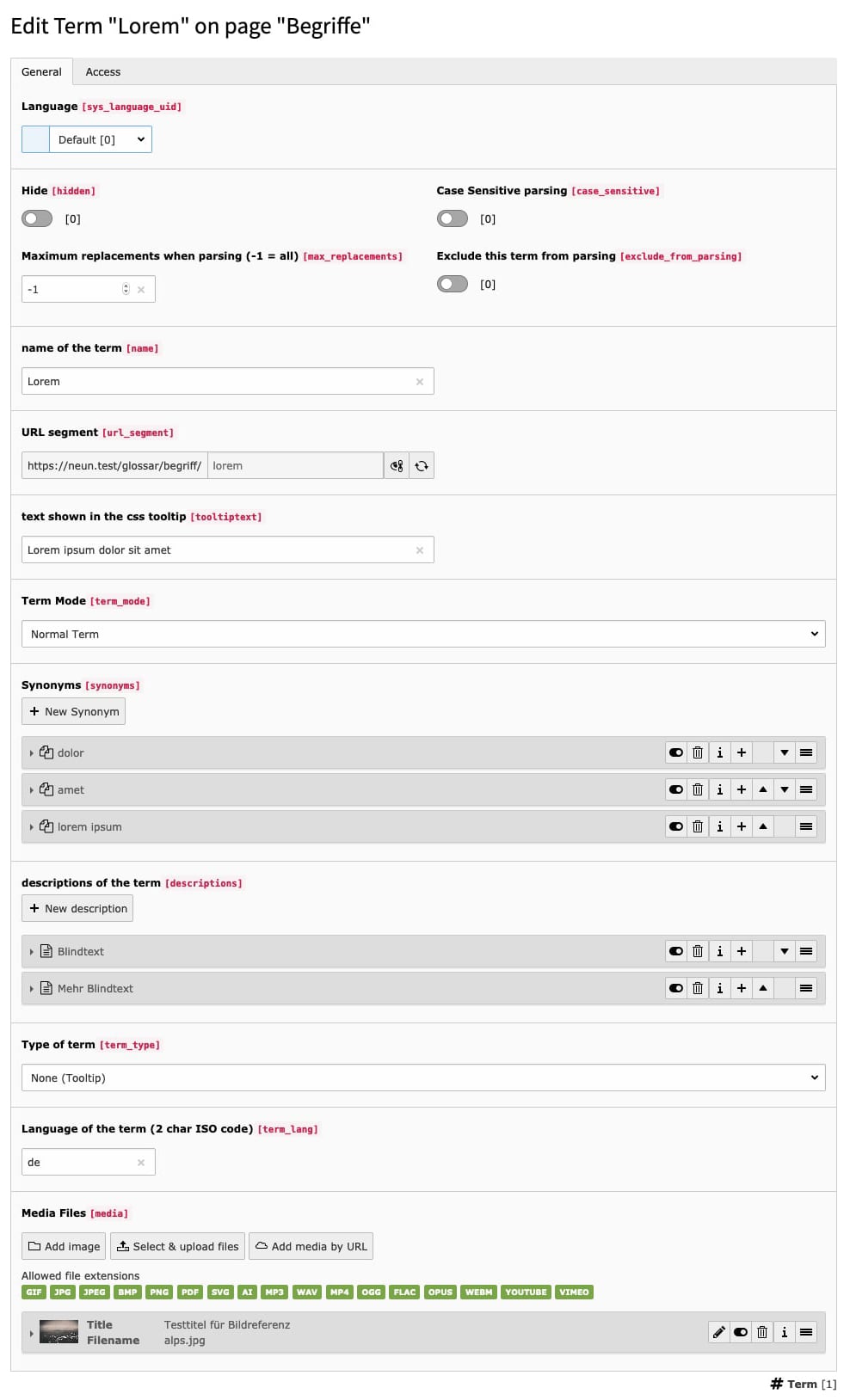
Term editing

The editing of a term record

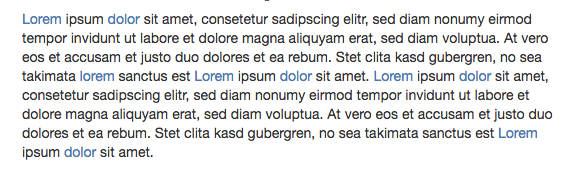
Parsing

The automatic parser finds terms you created and links them to your detailpage

Administrator Manual 

Target group: Administrators

Installation 

  1. Install the extension in the extension manager or composer (composer req featdd/dpn-glossary)
  2. Add the static TypoScript to your Site template:

    1. Go to "Template" Module in your TYPO3 Backend
    2. Edit your template record
    3. Add the entry "dreipunktnull glossary" below the "Includes" tab in the "Include static (from extensions)" field.
  3. Create a..

    • ..page and add the glossary plugin

      • Alternatively you can add a second glossary plugin on a separate page. Use this page UID as your detailpage and split your routing configuration for the list and detailpage.
    • ..storage and add your terms
  4. Configure the TypoScript constants of the extension..

    • set the storage page uid
      • plugin.tx_dpnglossary.persistence.storagePid = [Your storage page uid]
    • set the detailpage uid (where you placed the glossary plugin)
      • plugin.tx_dpnglossary.settings.detailPage = [Your detailpage uid]

Configuration 

The whole linking of terms can be configured over TypoScript. The Parsing itself can also be defined as precise as you wish.

There are also example styles for the views and a tiny CSS3 Tooltip

  • CSS: EXT:dpn_glossary/Resources/Public/css/styles.min.css

Special: Umlauts 

If you want to add umlauts to the pagination you have to check the terms table collation.

  • Normal utf8 will not differ between Ä and A, you have to use "utf8_german2_ci" which would make a difference
  • You could change the 'name' column collation and add Ä,Ö,Ü to the comma list over typoscript
  • See MySQL reference for more info

Table of Contents

Reference 

Extension Settings 

Key
termSlugEvaluation
Data Type
string
Description
Set the evaluation type for the term slug.
Default
uniqueInSite

TypoScript 

Constant
settings.detailPage
Data Type
integer
Description
Page ID of the detailpage plugin (parser will link to this)
Constant
settings.parsingPids
Data Type
string
Description
Comma list of pages which should be parsed (0 for all)
Default
0
Constant
settings.parsingExcludePidList
Data Type
string
Description
Comma list of pages which should not be parsed. Can be used to exclude pages from being pages
Constant
settings.maxReplacementPerPage
Data Type
integer
Description
Maximum replacements for each term (-1 = any)
Default
-1
Constant
settings.maxReplacementPerPageRespectSynonyms
Data Type
boolean
Description
Respect replacement counter when parsing synonyms
Default
0
Constant
settings.limitParsingId
Data Type
string
Description
Limits parsing for terms to the one node/tag having this ID (e.g. 'content' for a <div id="content">)
Constant
settings.parsingTags
Data Type
string
Description
Comma list of Tags which content will be parsed for terms
Default
p
Constant
settings.forbiddenParentTags
Data Type
string
Description
Comma list of Tags which are not allowed as parents for a parsing tag
Default
a,script
Constant
settings.forbiddenParsingTagClasses
Data Type
string
Description
Comma list of classes which are not allowed for the parsing tag
Constant
settings.forbiddenParentClasses
Data Type
string
Default
tx_dpn_glossary_exclude
Description
Comma list of classes which are not allowed on any parent of the parsing tag. can be used to exclude content from being parsed
Constant
settings.listmode
Data Type
options
Description
Listmode of the listpage (normal, character, pagination)
Default
normal
Constant
settings.previewmode
Data Type
options
Description
Previewmode for the preview plugin (newest or random)
Default
newest
Constant
settings.previewlimit
Data Type
integer
Description
Limit for preview list
Default
5
Constant
settings.disableParser
Data Type
boolean
Description
Disable the parser
Default
0
Constant
settings.parseSynonyms
Data Type
boolean
Description
Enable the parsing of terms synonyms
Default
1
Constant
settings.priorisedSynonymParsing
Data Type
boolean
Description
Parse for synonyms before the actual term
Default
1
Constant
settings.parsingSpecialWrapCharacters
Data Type
string
Description
Comma list of special characters allowed to wrap the term
Constant
settings.parserRepositoryClass
Data Type
string
Description
The repository class the parser service should use, for example the normal TermRepository instead of the ParserTermRepository.
This can be useful for advanced scenarios like using the first description meaning as a tooltip text.
Example:
plugin.tx_dpnglossary.settings {
  termWraps {
    default.typolink.ATagParams.dataWrap = title="{field:descriptions|0|meaning}" class="dpnglossary link"
  }
}
Copied!
Constant
settings.overrideFluidStyledContentLayout
Data Type
boolean
Description
If set the default layout of FluidStyledContent is overriden by this extension. Can be used to exclude content from being parsed
Default
0
Constant
settings.excludeTermLinksTargetPages
Data Type
boolean
Description
Don't parse terms when current page is the term links target
Default
0

Example TypoScript Setup 

The following example shows all usable settings for the extension:

plugin.tx_dpnglossary {
    settings {
        pagination {
            characters = A,B,C,D,E,F,G,H,I,J,K,L,M,N,O,P,Q,R,S,T,U,V,W,X,Y,Z
            insertAbove = 1
            insertBelow = 0
        }

        termWraps = CASE
        termWraps {
            key.field = term_type
            default = TEXT
            default {
                field = name
                dataWrap = |
                typolink {
                    ATagParams.dataWrap = title="{field:tooltiptext}" class="dpnglossary link"
                    ATagParams.dataWrap {
                        override = title="{field:name}" class="dpnglossary link"
                        override.if.isFalse.data = field:tooltiptext
                    }
                    useCacheHash = 1
                }
            }

            abbreviation {
                dataWrap = <abbr title="{field:tooltiptext}" lang="{field:term_lang}">|</abbr>
                dataWrap {
                    override = <abbr title="{field:name}" lang="{field:term_lang}">|</abbr>
                    override.if.isFalse.data = field:tooltiptext
                }
            }

            acronym {
                dataWrap = <acronym title="{field:tooltiptext}" lang="{field:term_lang}">|</acronym>
                dataWrap {
                    override = <acronym title="{field:name}" lang="{field:term_lang}">|</acronym>
                    override.if.isFalse.data = field:tooltiptext
                }
            }

            definition {
                dataWrap = <dfn title="{field:tooltiptext}" lang="{field:term_lang}">|</dfn>
                dataWrap {
                    override = <dfn title="{field:name}" lang="{field:term_lang}">|</dfn>
                    override.if.isFalse.data = field:tooltiptext
                }
            }
        }
    }
}
Copied!

Add terms to your breadcrumb 

You can add terms to your breadcrumb using the data processor in your TypoScript configuration.

Example:

dataProcessing {
  10 = TYPO3\CMS\Frontend\DataProcessing\MenuProcessor
  10 {
    special = rootline
    special.range = 0|-1
    includeNotInMenu = 1
    as = menuBreadcrumb
  }

  20 = Featdd\DpnGlossary\DataProcessing\AddTermToMenuProcessor
  20.menus = menuBreadcrumb
}
Copied!

Render terms with a Fluid template 

While for most cases a simple dataWrap in TypoScript is enough, it is also possible to render terms with a Fluid template. You may only have to take care of unnecessary whitespace with stdWrap.trim = 1 and the <f:spaceless> ViewHelper.

See this GitHub Issue for detailed information.

Example:

Your TypoScript template
plugin.tx_dpnglossary.settings {
  termWraps {
      default >
      default = FLUIDTEMPLATE
      default {
          stdWrap.trim = 1

          templateRootPaths {
              10 = EXT:your_site_package/Resources/Private/Templates/
          }

          templateName = TermWraps/Default

          settings < plugin.tx_dpnglossary.settings

          dataProcessing {
              10 = TYPO3\CMS\Frontend\DataProcessing\DatabaseQueryProcessor
              10 {
                  table = pages
                  pidInList = 0
                  uidInList = this
                  as = currentPage
              }
          }
      }
  }
}
Copied!
EXT:your_site_package/Resources/Templates/TermWraps/Default.html
<html data-namespace-typo3-fluid="true"
        xmlns:f="http://typo3.org/ns/TYPO3/CMS/Fluid/ViewHelpers">

  <f:spaceless>
    <f:link.action
        action="show"
        controller="Term"
        pluginName="Glossary"
        extensionName="DpnGlossary"
        arguments="{term: data.uid}"
        pageUid="{settings.detailPage}"
        class="dpn-glossary link"
    >{data.name}</f:link.action>
  </f:spaceless>

</html>
Copied!

Configure Routing for terms and pagination 

This is a working example routing configuration. | The "special: [ Ä,Ö,Ü ]" part for the pagination is only needed if you want to use umlauts or other special characters.

DpnGlossary:
  type: Extbase
  limitToPages: [YOUR_PLUGINPAGE_UID]
  extension: DpnGlossary
  plugin: glossary
  routes:
    - routePath: '/{character}'
      _controller: 'Term::list'
      _arguments:
        character: currentCharacter
    - routePath: '/{localized_term}/{term_name}'
      _controller: 'Term::show'
      _arguments:
        term_name: term
  defaultController: 'Term::list'
  defaults:
    character: ''
  aspects:
    term_name:
      type: PersistedAliasMapper
      tableName: 'tx_dpnglossary_domain_model_term'
      routeFieldName: 'url_segment'
    character:
      type: StaticMultiRangeMapper
      ranges:
        - start: 'A'
          end: 'Z'
          special: [ Ä,Ö,Ü ]
    localized_term:
      type: LocaleModifier
      default: 'term'
      localeMap:
        - locale: 'de_DE.*'
          value: 'begriff'
Copied!

Create XML Sitemap for Terms 

Requirements: System extension "SEO" installed (and setup.typoscript added)

Add the following code to you setup:

plugin.tx_seo.config {
    xmlSitemap {
        sitemaps {
            glossar {
                provider = TYPO3\CMS\Seo\XmlSitemap\RecordsXmlSitemapDataProvider
                config {
                    table = tx_dpnglossary_domain_model_term
                    sortField = name
                    lastModifiedField = tstamp
                    pid = 123 #uid of the sysfolder where your term are stored
                    url {
                        pageId = 456 #uid of the page where the glossary plugin is placed

                        fieldToParameterMap {
                            uid = tx_dpnglossary_glossary[term]
                        }

                        additionalGetParameters {
                            tx_dpnglossary_glossary.controller = Term
                            tx_dpnglossary_glossary.action = show
                        }

                        useCacheHash = 1
                    }
                }
            }
        }
    }
}
Copied!

Official documentaton: https://docs.typo3.org/m/typo3/reference-coreapi/11.5/en-us/ApiOverview/Seo/XmlSitemap.html

Exclude contents from the parser 

Exclude whole pages from being parsed 

Pages can be statically excluded from parsing via TypoScript:

plugin.tx_dpnglossary {
    settings.parsingExcludePidList = 42, 185, 365
}
Copied!

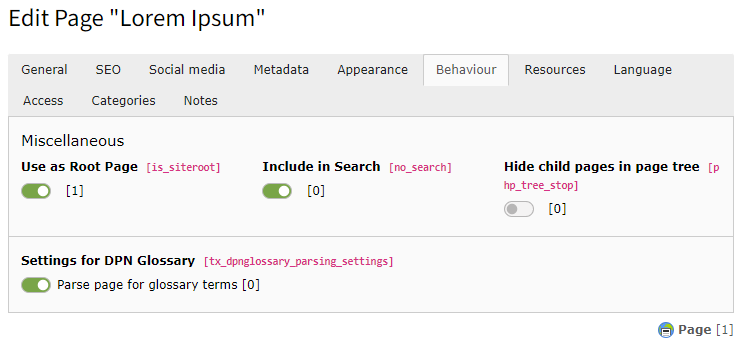
Pages can also dynamically excluded from parsing by page properties Page Properties > Behaviour > Settings for dreipunktnull Glossary:

Exclude page from parsing

Exclude page from parsing

By making field tx_dpnglossary_parsing_settings of table pages available for your editors, it is also possible to let (power) editors decide, which pages should be parsed.

Exclude content elements from being parsed 

The following TypoScript constant defines HTML classes whose content will be excluded from parsing:

plugin.tx_dpnglossary {
    settings.forbiddenParsingTagClasses = tx_dpn_glossary_exclude, my_search_results
}
Copied!

Content wrapped with one of these classes will be excluded from parsing.

Content can also dynamically excluded from parsing by content properties Content Properties > Appearance > Settings for DPN Glossary.

This only works if the default Fluid layout has been overriden to wrap the content with the HTML class tx_dpn_glossary_exclude and this class is still found in the settings.forbiddenParsingTagClasses.

You can set the following TypoScript constant to let this extension override the Fluid Styled Content default layout:

plugin.tx_dpnglossary {
    settings.overrideFluidStyledContentLayout = 1
}
Copied!

If you need to override the layout yourself make sure to add the following to the surrounding tags class:

<div class="... {f:if(condition: data.tx_dpnglossary_disable_parser, then: ' tx_dpn_glossary_exclude')}">
Copied!

Just like with the pages this property can be used to enable editors to exclude content elements from parsing.

ChangeLog 

v6.1.3
  • Prevent TypeErrors and handle missing StoragePids properly
v6.1.2
  • Remove "TCEforms" tag from FlexForm XML
  • Use real slug value instead of dummy due to restrictions
  • Code optimizations
  • Add hook to auto clear terms cache if term in storage was edited
  • Don't use range array for trim function if characters are empty
v6.1.1
  • Add missing upgrade wizard registration via PHP attributes
  • Add documentation updates
v6.1.0
  • Add support for PHP 8.4
  • Remove deprecated function calls and other optimizations
  • Add storagePid check for term detail page
v6.0.0
  • Add support for TYPO3 v13
  • Drop support for TYPO3 v11
v5.3.2
  • Use proper icon registry configuration file (thanks to Achim Fritz)
v5.3.1
  • Add safety check for accidentally empty created synonyms
v5.3.0
  • Add transliteration for character grouped term list
v5.2.4
  • Prevent parser href/src protection from redundant base64 encoding
v5.2.3
  • Prevent nested ObjectStorage iterations on synonyms
v5.2.2
  • Use proper version constraint to allow all PHP 8.3.X versions
v5.2.1
  • Update required PHP version
v5.2.0
  • Make the repository used in the parser configurable
  • Add hidden palette for language fields to prevent errors for editors
v5.1.0
  • Add option to exclude parsing for term links target pages
v5.0.4
  • Add missing term link to parsing term
  • Prevent array key warnings
  • Add URL segment to term model
  • Simplify term anchor links and adjust slug preview prefix
v5.0.3
  • Use umlaut count to update matching group index
v5.0.2
  • Use custom replacement function for umlaut matching groups
  • Move ExtensionManagementUtility::addPageTSConfig() to ext_localconf.php
v5.0.1
  • Add missing switchable controller actions migration for preview plugin
v5.0.0
  • Add support for TYPO3 v12 (dropped for TYPO3 v10)

    • The extension TypoScript file extensions have been changed from .txt to .typoscript
  • Add canonical URL for character pagination index
v4.2.0
  • Limit parsing of DOM to configurable node/tag (ID) (thanks to Julian Hofmann)
  • Optimize parser performance with separate simplified term parser object (thanks to Julian Hofmann)
  • Dynamic page based and content based exclusion from parsing (thanks to Lina Wolf)
  • Add menu processor for terms
  • Case sensitivity workaround for umlauts
  • Add page title provider for character pagination and term detailpage
  • Documentation updates
  • Add special option for range routing mapper, for adding special chars
v4.1.0
  • Add SEO title & description for terms
  • Optimize slug preview (no extra configuration needed anymore)
v4.0.0
  • Add support for TYPO3 v11 (dropped for TYPO3 v9)
  • Use of symfony dependency injection
  • Added custom character pagination API to replace widget based pagination
v3.2.4
  • Prevent term parser from self referencing on detail pages
v3.2.3
  • Use correct ordering for newest terms query
  • Use proper title/alt attribute property in file reference
v3.2.2
  • Use multibyte functions to properly process non ascii characters for pagination
v3.2.1
  • Fix TCA sorting for synonyms & descriptions in term inline fields
  • Add option to keep the origin term for data wrap when parsing synonyms
v3.2.0
  • Change parsing order to parse the whole content for each term
  • Add special wrap character option for term regular expression
v3.1.6
  • Add missing renderType for preview FlexForm
v3.1.5
  • Fix broken TypoScript due to an auto indent issue
v3.1.4
  • Add hook to also run parser when config.no_cache is true
  • Add "forbidden parent classes" new parsing exclude feature
v3.1.3
  • Add option to priories synonym parsing before the main term
  • Fixed parsing priority issue with synonyms
v3.1.2
  • Use "unique" as default evaluation for slug to prevent initial errors
v3.1.1
  • Add better evaluation for the term slug
v3.1.0
  • Add compatibility for TYPO3 10 LTS
v3.0.5
  • Update typoscript syntax to prevent deprecation warnings
  • Parser optimizations
  • add slash replacement for slug field
  • Add preview option for the slug field, see: documentation
  • Bugfix for dom picture repair function due to backtrack limit issues
v3.0.4
  • Add page title provider
  • Bugfix for html5 picture issues
  • Bugfix for cache identifier
  • Max replacement option for each term
  • TCA optimizations
  • Code refactorings
v3.0.3
  • Update composer.json
v3.0.2
  • Bugfix for upgrade wizard
v3.0.1
  • Fix upgrade wizard for TYPO3 9.5.1 due to broken slug helper method
v3.0.0
  • Compatibility to 9.5 LTS
  • Add slug field for routing (migration comes with the install wizard)
  • IMPORTANT!: Removed seperat detailpage plugin
  • Remove backpage param and always use http referer or history.back(1) for backlink
v2.7.5
  • Fix terms cache for translations
  • Use better hook for parsing terms
v2.7.4
  • Add case sensitive option for terms
  • Realurl configuration as hook
  • Link mode for terms
  • small optimizations
v2.7.3
  • Fix issue with the terms maximum replacement per page
v2.7.2
  • Add term mode feature and term link instead of glossary detailpage
v2.7.1
  • Increase missed TYPO3 verison depenedency in composer.json
v2.7.0
  • TYPO3 compatibility
v2.6.13
  • Add option to disable parsing for terms
v2.6.12
  • Fix 6.2 Compability
  • Small cleanup and refactorings
  • Fix problem with html special chars
v2.6.11
  • Use deep import to keep wraps around replaced terms
v2.6.10
  • Removed unwanted warning caused by null param
v2.6.9
  • Fixed compability issue with 6.2
v2.6.8
  • Updated fluid namespaces
  • refactoring of the update script
  • fixed multiple languages in tcaform
v2.6.7
  • Cleanup and optimizing templates
v2.6.6
  • Bugfix in regex properly escaping slashes
v2.6.5
  • Added conformer documentation for the extension