beautyOfCode 

Classification

beautyofcode

Version

8.0

Language

en

Description

Manual covering TYPO3 extension beautyofcode

Keywords

syntax highlighting, jquery, javascript, prism, syntaxhighlighter

Copyright

2026

Author

Felix Nagel, Thomas Juhnke

Email

info@felixnagel.com, typo3@van-tomas.de

License

This document is published under the Open Content License available from http://www.opencontent.org/opl.shtml

Rendered

Wed, 22 Apr 2026 07:41:29 +0000

The content of this document is related to TYPO3, a GNU/GPL CMS/Framework available from www.typo3.org.

Table of Contents
Introduction 

What does it do? 

This plugin provides state-of-the-art syntax highlighting by using JavaScript by using SyntaxHighlighting 3.x by Alex Gorbatchev or the prism syntax highlighter written by Lea Verou.

Use the constant editor or TS to define needed programming languages. These will be available in the FE plugin which needs to be added as a generic FE plugin (“insert plugin”). Each of this languages is a lazy-loaded (after the page has finished loading) Java-Script file. You can define different css styles (so called themes) and HTML templates to match your page design.

The following programming languages are available:

SyntaxHighlighter 

Actionscript 3, Bash, Shell, ColdFusion, C, C++, C#, CSS, Delphi, Pas, Pascal, Diff, Patch, Erlang, Groovy, Java, Java FX, Java-Script, Perl, PHP, Power-Shell, Python, Ruby on Rails, Sass, Scala, SQL, Typoscript, MySQL, Virtual Basic, .Net, XML, XSLT, XHTML and HTML.

The newly added TypoScript brush is based upon a user language for Notepad++.

Prism 

ActionScript 3, AppleScript, ApacheConf, Bash, C, C-Like, Coffeescript, C++, C#, CSS, Diff, Erlang, Gherkin, Git, Go, Groovy, HTTP, Java, JavaScript, Less, Markdown, Markup (HTML/XML, etc.), PHP, Power-Shell, Python, Ruby, Sass, Scala, SCSS, SQL, Twig, TypoScript and Yaml.

Features 

  • Highlight specific lines
  • Show Gutter
  • Customizable tab size *
  • Configurable label
  • Collapse code *
  • Wrap lines *
  • Preview and t3editor support in BE
  • Use HTML templating
  • Different visual styles
  • Show sourcecode from a local file or an external URL

* unavailable if using prism

Live Demo 

ext:beautyofcode Live Demo

Please help me to add more sites here: contact me!

SyntaxHighlighter 

SyntaxHighlighter 3.0 by Alex Gorbatchev, which does the actually highlighting, is the nicest syntax highlighter I've seen so far and it's also used by Freshbooks, ASP .Net Forums, wordpress.com, Aptana, Mozilla Developer Center, SitePoint and Yahoo Developer Network. It is coded in native JavaScript and is no longer under active development.

Please see https://github.com/syntaxhighlighter/syntaxhighlighter for more information.

Prism 

Prism is a lightweight, extensible syntax highlighter, built with modern web standards in mind. It's a spin-off from Dabblet and is tested there daily by thousands.

See http://prismjs.com/ for more information.

Screenshots 

See highlighter project website for possible frontend look.

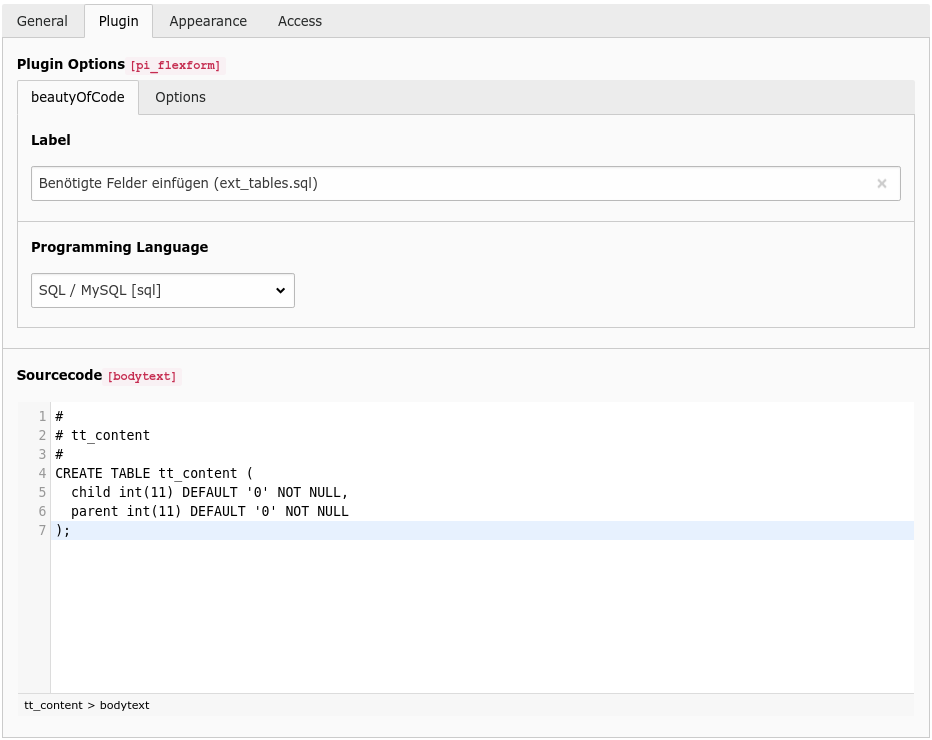
Content element screenshot

Content element

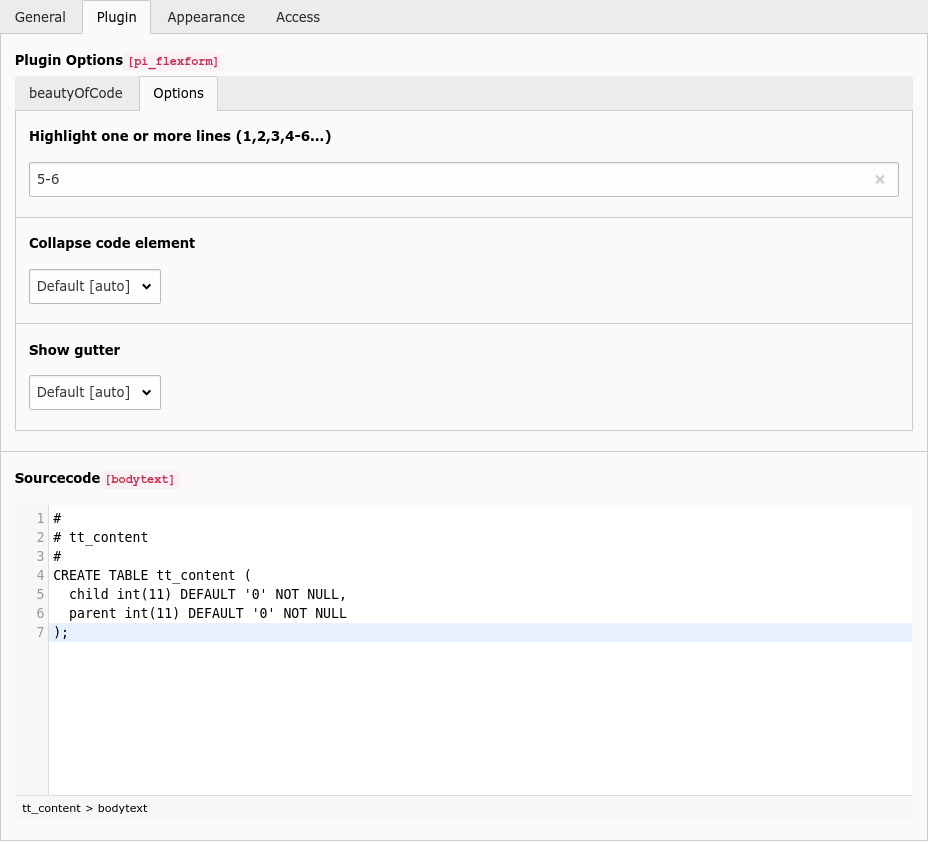
Content element options tab screenshot

Content element options tab

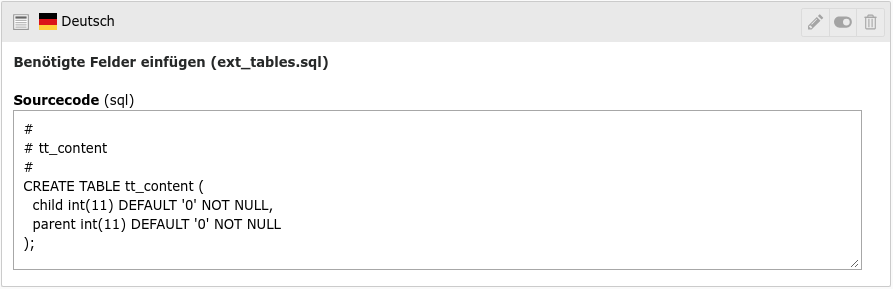
Backend layout screenshot

Backend layout

Users Manual 

Target group: Editors

Add the beautyofcode frontend plugin via the FCE wizard or manually via a generic plugin. After adding the plugin there are 2 tabs available.

Tab: beautyOfCode 

These fields should be self explanatory.

  • Description (not necessary, if empty no description is displayed)
  • Programming language (available languages configured by your admin)
  • URL / File (use a local file or external URL with sourcecode) OR
  • Sourcecode

Tab: Options 

Within this tab its possible:

  • Highlight specific lines. Use a syntax like: 1,2,3,4,5 or 1-5
  • Overwrite the default settings configured by your admin
  • Gutter (show line numbers)
  • Collapse (displays code element collapsed)

Please note: Configuration overwrite via the Option tab could be disabled by your admin.

Administrator Manual 

Installation 

  • Install the extension via extension manager.
  • Add the static template in your main typoscript (go to: list module, edit your TS template, tab: includes, add one of the static templates named “beautyOfCode”).
  • Depending on your configuration you must add the jQuery core file yourself.

Configuration 

Enable syntax highlighting (install EXT: t3editor) in BE by using enable_t3editor option.

FAQ 

Which version to choose? 

This extension ships with two syntax highlighting libraries.

Choose either SyntaxHighlighter which supports lazyloading of the necessary CSS and JS files after the DOM ready event has fired. It runs standalone using an autoloading feature.

Prism is also a standalone library without any dependencies. There are some benefits and disadvantages by using each version:

SyntaxHighlighter 

  • runs without using a JavaScript framework
  • uses latest version of SyntaxHighlighter
  • slim and less feature rich (but with almost the same functionality)

Prism 

  • runs without using a JavaScript framework
  • based on regular expressions for syntax parsing
  • syntax files has dependencies with each other (php → clike)
  • lightweight

Input is encoded and saved without “<”, “>”, etc. 

This is a server side problem within PHP 5 respective in the libxml module (1.6.32 and higher) with an existing work around.

_Please note: this issue is no longer relevant in version 3.x_

Solution:

Add this line in your localconf.php in typo3conf directory.

$TYPO3_CONF_VARS['BE']['flexformForceCDATA']  = '1';
Copied!

This fix is non breaking and works only for new added elements. Older flexform values should / could be fixed manually. This is a recommended default setting for every TYPO3 installation (see mailing list why).

Bug:

http://bugs.typo3.org/view.php?id=9359

Mailingslist Post:

[TYPO3-dev] A ticking ticking timebomb with libxml update to 2.7.1?

I don't like my users to overwrite my default TS configuration 

Take a look at the extension sp_betterflex: “Exclude static flexform fields made by extensions like normal table fields in backend group configuration or via TSConfig.”

http://typo3.org/extensions/repository/view/sp_betterflex/current/

Install the extension and add these lines to your TSconfig:

TCEFORM.tt_content.beautyofcode_cGutter.disabled = 1
TCEFORM.tt_content.beautyofcode_cCollapse.disabled = 1
Copied!

“Missing Ext. Manager configuration” error in FE 

You forgot to save the extension manager configuration. Please go to Extension Manager → beautyOfCode → click Update

“t3lib_div::array_merge_recursive_overrule()” error in BE 

This error could look like this:

PHP Catchable Fatal Error: Argument 1 passed to t3lib_div::array_merge_recursive_overrule() must be an array, null given, called in /html/typo3/typo3_src-4.4.2/typo3/sysext/rtehtmlarea/class.tx_rtehtmlareaapi.php on line 80 and defined in /html/typo3/typo3_src-4.4.2/t3lib/class.t3lib_div.php line 2059

This issue was already patched but seems to be introduced again in specific TYPO3 version. Some kind of regression I guess. Sadly Im not able to reproduce the issue and it even seems to be an Core / RTE problem, so please take a look at these bugtracker issues which should help you to solve the problem:

Enable t3editor in BE 

You need to enable the enable_t3editor option in Extension Manager and check your user settings.

"TypeError: lang is undefined" when using PRISM 

This JavaScript console error is caused by wrong order or missing language component files. Some Prism languages depend on each other and need to be added in correct order. Please check your TypoScript. Take a look in the Prism component JS files to check language dependencies.

No highlighting in FE 

If you're using the SyntaxHighlighter library, and decided to make usage of the includeAsDomReady setting set to "jquery", you must ensure to either install the extension t3jquery and compile a suitable jQuery libary on your own or include a jQuery core file by yourself. You need to add the jQuery Core file manually.

I get a Java-Script error in FE 

See above.

Do you use other JavaScript frameworks? Please see down below.

I'm using MooTools, ExtJS or similar 

No problem, the generated inline javascript code uses the module pattern and therefore doesn't need the noConflict option to be set.

Please note and keep in mind if jQuery must be loaded (minified about 56KB) this will lead to more traffic and less performance for your users.

How to change language strings 

Adjust the templates according to your needs. Please follow the Fluid templating guides for how to use your own templates for a specific extension.

Also have a look at the following article:

http://xavier.perseguers.ch/tutoriels/typo3/articles/managing-localization-files.html

Where to post improvements or bugs 

Please feel free add questions, bugs and improvements at https://github.com/fnagel/beautyofcode/issues

Problems with line numbering and line highlighting in Prism 

There was a bug in Prism which prevented proper line numbering and line highlighting. This issue should be fixed in beautyofcode v 3.0.0 as we updated PrimsJS. For more information please head over to the corresponding github issue entry. To ensure proper functionality, you must provide the markup brush after the php Prism component/brush (like in the default configuration).

SyntaxHighlighter 4.x 

SyntaxHighlighter is available as 4.x now, but it seems the new version is no longer dynamic when it comes to brushes, themes, etc and needs a built process using Gulp.

Configuration Reference 

Feel free to use the constant editor (go to: module template, root page, constant editor, beautyofcode) to edit this settings. Add a Typoscript template to overwrite these settings at any point in your sitetree(s).

TypoScript Reference 

Properties 

Property Data type stdWrap Default
baseUrl string no EXT:beautyofcode/Resources/Public/Javascript/vendor/syntax_highlighter/v2/
scripts string no scripts/
styles string no styles/
includeAsDomReady boolean   false
brushes string no Xml,JScript,CSharp,Plain
theme string no Default
showLabel boolean   1
defaults.tab-size_ integer   4
defaults.gutter_ boolean   1
defaults.collapse_ boolean   0

Property details 

baseUrl 

plugin.tx_beautyofcode.settings.baseUrl = string

Enter path to the resources directory by using EXT: or FILE: or absolute path (http://your.domain.de/fileadmin/.../some-path/). Make sure the relative paths scripts/ and styles/ exists.

Use https://cdnjs.cloudflare.com/ajax/libs/SyntaxHighlighter/3.0.83/ as online repository. If you use online (CDN) repository you should not edit settings styles and scripts.

More info about online hosting see: https://cdnjs.com/libraries/SyntaxHighlighter

scripts 

plugin.tx_beautyofcode.settings.scripts = string

Path to syntax highlighter core file and to the brushes (Java-Script files), relative to the baseUrl. Leave empty or default when using online repository.

styles 

plugin.tx_beautyofcode.settings.styles = string

Path to syntax highlighter css files (css themes), relative to the baseUrl. Leave empty or default when using online repository.

includeAsDomReady 

plugin.tx_beautyofcode.settings.includeAsDomReady = boolean

If using standalone version it's possible to add a JS domReady instead of injecting the code at the bottom of the body. Useful when using minification scripts. Possible options: false, jquery or standalone

brushes 

plugin.tx_beautyofcode.settings.brushes = string

Loaded programming languages: Define which programming languages should be available. Less is more: every brush is lazy loaded a single js file.

SyntaxHighlighter: Add a separated list out of: AS3, Bash, ColdFusion, Cpp, CSharp, Css, Delphi, Diff, Erlang, Groovy, Java, JavaFX, JScript, Perl, Php, PowerShell, Python, Ruby, Sass, Scala, Typoscript, Sql, Vb, Xml, Yaml.

Prism: Add a separated list out of: actionscript, applescript, bash, c, clike, coffeescript, cpp, csharp, css, css-extras, diff, erlang, gherkin, git, go, groovy, http, java, javascript, less, markdown, markup, powershell, php, php-extras, plain, python, ruby, sass, scala, scss, sql, twig, typoscript, yaml.

There are much more brushed available for Prism. You might want to extend the brushes files bundled with this extension.

Prism Note: Prism uses its brushes in a dependency manner. For example the clike brush is necessary to load before php(and therefore must be defined before php in the brushes configuration.

theme 

plugin.tx_beautyofcode.settings.theme = string

Define a theme (which is basically a CSS file). Following themes are avaiable:

SyntaxHighlighter: Default, Django, Eclipse, Emacs, FadeToGrey, FelixNagelv3 (which is dark minimal), MDUltra, Midnight, RDark.

Prism: coy, okaidia, dark, funky, okaidia, solarizedlight, tomorrow, twilight.

showLabel 

plugin.tx_beautyofcode.settings.showLabel = boolean

If set to false the label is hidden.

defaults.tab-size 

plugin.tx_beautyofcode.settings.defaults.tab-size = integer

Specify a tabulator size. Tabulator chars will be changed to spaces.

defaults.gutter 

plugin.tx_beautyofcode.settings.defaults.gutter = boolean

Show or hide gutter. Helps user to recognize correct line.

defaults.collapse 

plugin.tx_beautyofcode.settings.defaults.collapse = boolean

Allows you to force highlighted elements on the page to be collapsed. A link "show source" is displayed instead (not customizable yet). Not available in Prism.

Upgrade Guide 

If there's no upgrade guide, there' s no need to change anything. This guide does not covering extending via PHP – you need to check changes for yourself.

7.x to 8.0 

What you need to know:

  • Added support for TYPO3 14
  • Remove support for TYPO3 13.x
  • Fix some deprecations

How to upgrade 

  • Clear all caches

7.0 to 7.2 

What you need to know:

  • Added PHP 8.4 support
  • Fixed BE preview in TYPO3 v13 when CSP is enabled
  • Deprecation free (in TYPO3 v13)
  • Migrated docs to PHP rendering
  • Minor fixes and improvements
  • Improved code quality / CGL

How to upgrade 

  • Clear all caches

6.x to 7.0 

What you need to know:

  • Added support for TYPO3 13 LTS
  • Added PHP 8.3 support
  • Removed support for TYPO3 11.x and 12.x
  • Support for site sets
  • Lots of fixed deprecations
  • Improved code quality / CGL

How to upgrade 

  • Clear all caches

5.x to 6.0 

What you need to know:

  • Added support for TYPO3 12 LTS
  • Added PHP 8.2 support
  • Removed support for TYPO3 10.x
  • Support for composer installer v4 (/_assets folder)
  • Removed custom asset view helpers (now using core VHs instead)
  • Removed obsolete ext_update class
  • Replaced BE preview hook
  • Improved code quality / CGL

How to upgrade 

  • Update your templates (if overridden)
  • Clear all caches

5.1 to 5.2 

What you need to know:

  • Added PHP 8.1 support
  • Removed PHP < 7.4 support
  • Improved code quality / CGL

How to upgrade 

  • Clear all caches

5.0 to 5.1 

What you need to know:

  • Updated Prism to 1.25.0

How to upgrade 

  • Clear all caches

4.x to 5.0 

What you need to know:

  • Added support for TYPO3 10.5 LTS
  • Support for PHP 8.0
  • Removed support for TYPO3 9.x
  • Code clean up and code improvements

How to upgrade 

  • Clear all caches

4.2 to 4.3 

What you need to know:

  • Add YAML support for SyntaxHighlighter
  • Removed support for PHP < 7.2
  • Code clean up and improvements
  • Bugfix for TCA issue when deleting a page
  • Minor bugfixes

How to upgrade 

  • Clear all caches

4.1 to 4.2 

What you need to know:

  • Added support for TYPO3 10.4 LTS
  • Support for PHP 7.3 and 7.4
  • Automated CGL and unit tests using Github Actions
  • Fix TSconfig inclusion (thanks to @tritum and @tritumBj)
  • Rename TS and TSconfig files to newer file extensions
  • Move TSconfig file to correct folder
  • Minor fixes and clean up

How to upgrade 

  • Adjust your TS / TSconfig file includes if needed
  • Clear all caches

4.x to 4.1 

What you need to know:

  • Added support for TYPO3 10.2
  • New extension icon
  • Minor fixes and clean up

How to upgrade 

  • Clear all caches

3.x to 4.0 

_Thanks to Sebastian Fischer for all the work on this release!_

What you need to know:

  • Additional input field for URLs or reference files
  • Added support for TYPO3 9.x
  • Removed support for TYPO3 8.x
  • Removed support for PHP 5.x
  • Updated Prism to 1.17.1
  • Changed namespace to FelixNagel
  • Extension is now available on Packagist

How to upgrade 

  • Adjust your class auto loading or class overwrites to new namespace / composer package name (if needed for your setup)
  • Use "Clear all caches including PHP opcode cache" and "Dump Autoload Information" in the install tool (if needed for your setup)
  • Adjust VH namespace in your overwrite templates
  • Clear all caches

3.2 to 3.3 

What you need to know:

  • Now compatible with PHP 7.2
  • Improved TS generation in backend context
    • it's now possible to use TS templates on sub pages
    • No more usage of module.tx_beautyofcode < plugin.tx_beautyofcode
  • Update Prism to 1.11.0
  • Bugfix for TYPO3 >= 8.5

3.1 to 3.2 

What you need to know:

  • Now compatible with TYPO3 8.7
  • Show default header in BE preview
  • Use FormEngine NodeFactory API instead if XCLASS
  • Update Prism to 1.6.0

3.0 to 3.1 

What you need to know:

  • Now compatible with TYPO3 8.4 (please make sure to use root template for adding static TS when using 8.x)
  • Bugfix for t3editor EM configuration (thanks to Thomas Kieslich!)
  • Bugfix for new content element wizard configuration
  • Code is now PSR-2 standard compliant

2.x to 3.0 

In order to make this extension work best possible in TYPO3 7.x and to make maintaining more easier (especially the t3editor implementation) this version introduces usage of the default tt_content bodytext field.

What you need to know:

  • Removed TYPO3 6.x support
  • There is an update wizard available through Extension Manager to migrate your existing records
  • Almost no visible changes in backend user interface
  • Make sure to adopt your TypoScript (assigning your settings to module. for backend context)
  • Updated PrimJs vendor to version 1.3.0
  • Add some new PrimsJs languages (Actionscript, Applescript, Diff, Erlang, Git, Sass, Scala, Twig, Less, MarkDown, Powershell, Yaml)
  • Use core icon for plugin and wizard
  • Added a composer.json and a bower.json file
  • Improved code style

1.0 to 2.0 

Rewritten for Extbase/Fluid.

What you need to know:

  • Execute update script within extension manager to update adjusted plugin names in database
  • You'll need to change your TypoScript code

    • SyntaxHighlighter v2 + beautyofcode (jQuery) abstraction layer was removed
    • include the correct static template
    • removed TypoScript constants / setup paths:

      • jquery.scriptUrl (adapt template if you need to adjust)
      • jQueryNoConflict (inline JS is wrapped in module pattern style code)
      • config.strings (<f:translate /> vhs in templates)
      • addjQuery (please make sure to include jQuery by yourself if you want to use the includeAsDomReady / onReadyCallback configuration settings
      • selector

Please see the changelog for all changes in detail.

0.6 to 0.7 

Big update: finally its possible to use this extension without jQuery. Massive remanufacturing and code changes. Please consider this release as a beta version as I did test every feature the best I can but not sure if everything will work out on every TYPO3 installation.

What you need to know:

  • You'll need to change your TypoScript code

    • paths for base, scripts and styles
    • addjQuery and selector have been moved to the jquery. Array
    • some variables have been slightly renamed
  • Extension Manager settings has been removed, use TS configuration instead
  • SyntaxHighlighter v3 changed some features (learn more: “Which version to choose”)

Please see the changelog for all changes in detail.

0.5 to 0.6 

This version introduces HTML templating. That's why some TS options are not longer available or renamed:

  • plugin.tx_beautyofcode_pi1.label.wrap is removed as it's now configured via template
  • plugin.tx_beautyofcode_pi1.label.show is renamed to showLabel
  • plugin.tx_beautyofcode_pi1.wrap is removed as it's now configured via template

Developer Corner 

Generated markup 

Syntax Highligther 

<pre class="php">
   CODE GOES HERE
</pre>
Copied!

Prism 

<pre class="language-php">
   <code>
      CODE GOES HERE
   </code>
</pre>
Copied!

FAQ 

Howto install JS vendors 

  1. Download amd install node.js from http://nodejs.org/download/
  2. Install bower

    npm install bower
    Copied!
  3. Install vendors from CLI

    node_modules/.bin/bower install
    Copied!
  4. Remove unneeded files in Resources/Public/Javascript/vendor:

    • qunit folder
    • xregexp folder
    • prism/gulpfile.js folder
    • all *.min.js files in prism/components/
    • all untracked files in prism/

Run unit tests 

cd packages/beautyofcode
composer install
cd .Build
bash ./run_tests.sh
Copied!

Known Problems 

Please see FAQ and check https://github.com/fnagel/beautyofcode/issues

PHP5 and libxml module cause problems in some Installations. This is a server side problem with an existing work around. See the FAQ of this manual.

ChangeLog 

Please see ChangeLog file in extension directory: typo3conf/ext/beautyofcode/