fp-fileprotector 

Extension key

fp_fileprotector

Package name

fixpunkt/fp-fileprotector

Version

main

Language

en

Author

fixpunkt für digitales GmbH

License

This document is published under the Creative Commons BY 4.0 license.

Rendered

Mon, 29 Jun 2026 14:27:42 +0000


The extension fp-fileprotector allows you to restrict access to file storages in TYPO3 and define granular access rules for individual files and folders

Introduction 

What is fp-fileprotector and how does it work?

Configuration 

How to protect a file storage.

Usage 

How to define access rules for folders.

Troubleshooting 

Common issues and solutions.

Introduction 

The extension fp-fileprotector allows you to restrict access to file storages in TYPO3 and define granular access rules for individual files and folders.

Access can be restricted based on the following conditions:

  • Frontend status: Is a user logged in on the frontend?

    • Check for membership in specific user groups.
    • Check for specific individual users.
  • Backend status: Is a user logged in to the backend?

Usage 

The fp-fileprotector extension is managed from the File Protection backend module under Files.

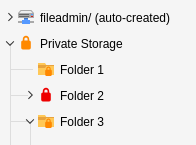
After configuring a storage to be protected, the folder tree displays the protection status of each folder within that storage.

Every folder within a protected storage can have access rules that control which users may access the files within that folder.

Folder tree of a protected file storage

Folder tree of a protected file storage. Lock icons on folders indicate their protection status.

Folder icons are color-coded based on their accessibility:

Green Lock
Everyone can access the folder.
Orange Lock
Access is restricted by an access rule.
Red Lock
No one can access the folder (e.g. when the storage denies access by default and no access rule has been created).

You can also see whether a protection rule is defined directly on a folder or inherited from a parent folder:

Folder icon is a lock symbol
A specific access rule is defined for this folder.
Folder icon has a small lock badge
The access rule was inherited from a parent folder.

Storage Configuration 

Setting the storage behaviour 

In the backend module File Protection you can edit the Storage Settings of the currently selected folder via the dropdown menu on the top right of the window. Select "Edit storage settings" to edit the configuration.

Use the dropdown on the top right to edit the storage configuration

Use the dropdown on the top right to edit the storage configuration

After opening the configuration you have the following options. After saving, the configuration is immediately applied to the storage and the respective .htaccess file is updated automatically.

Storage settings

Storage settings

Protected File Storage

Protected File Storage

Enables protection for this storage in general. Defined access rules are only applied when this option is enabled. Otherwise the storage remains publicly accessible.

Deny access if no protection rule exists

Deny access if no protection rule exists

Controls the default behaviour of the storage.

Disabled (whitelist mode)
The storage is accessible by default. Only folders with an explicit protection rule (and their children) are protected. Files in folders without a rule can always be accessed.
Enabled (blacklist mode)
The storage is inaccessible by default. Access must be explicitly granted via protection rule for every folder (which then also applies to the children of this folder). Files in folders without a rule cannot be viewed.

Updating / Repairing .htaccess 

In very rare cases it might be necessary to update the .htaccess file, if the file protection does not work. To do this you can just open the configuration of the respective storage and save it. The .htaccess will be updated automatically. Otherwise you can select "Update .htaccess" in the upper right dropdown in every folder of the storage.

Protection Configuration 

Status of Folders 

To view the protection status of a folder, select it in the page tree on the left.

You will see an overview of the folder where you can create a new access rule or edit an existing one. Existing rules can also be deleted here.

Current status of a single folder

Current status of a single folder. In this case users must be members of the frontend usergroups "Group A" or "Group D" OR might be logged into the Backend.

  • Click Create access protection to add a protection rule (only available if no rule exists yet)
  • Click Edit access protection to edit an existing protection rule
  • Click Delete access protection to delete an existing protection rule

Access rules are inherited by subfolders — unless those folders have their own access rules. Access rules of subfolders do not supplement the existing rules but replace them completely.

Creating or Editing a Protection Rule 

Settings to protect the folder

Settings to protect the folder

Select who is allowed to access the contents of the respective folder (including subfolders).

Must be logged in to the frontend

Must be logged in to the frontend

If enabled, all users logged into a frontend account can access the folder. To restrict access to specific users or groups, use the Frontend Users and Frontend User Groups options below.

Frontend Users

Frontend Users

Select users, which are allowed to access the folder. This selection is an OR conjunction.

This option only applies, if Must be logged in to the frontend is enabled!

Frontend User Groups

Frontend User Groups

Select user groups, which are allowed to access the folder. This selection is an OR conjunction.

This option only applies, if Must be logged in to the frontend is enabled!

Must be logged in to the backend

Must be logged in to the backend

If enabled, all users, that are logged into an backend account can access the folder.

Troubleshooting 

Despite protection, all files are publicly accessible 

Check whether a .htaccess file exists in the root directory of the storage and redirects requests to fp_fileprotector.

In general the extension updates those .htaccess file automatically. Try to open the storage settings in the fp_fileprotector Backend Modul and save the storage settings once, to update the .htaccess.

If nothing helps you can update the .htaccess on your own: A template can be found at Resources/Private/htaccess.txt.

Also verify that the web server is configured to process .htaccess files (AllowOverride All).

User groups and/or users are being ignored 

Check whether the option Must be logged in on the frontend is enabled in the access rule. Without this checkbox, group and user restrictions have no effect.

A user has access even though they are not in any selected group 

The selection of groups and individual users is an OR conjunction. All members of the selected groups as well as all individually selected users can access the files.

How do I lift an inherited access rule? 

This depends on the settings of the storage. If the storage is set to disallow all access by default, this is not possible right now unfortunately. This is a known limitation — see Future Plans for planned improvements.

If the storage is set to allow all access by default, just create an empty protection rule at the folder, where you want to lift all restrictions and leave all conditions unset. Access will then be open for everyone for that folder and its subfolders.

If you want to be safe and deny all access that has not been explicitly granted, you can choose to set the storage to "allow access by default" and create a protection rule on the root of the storage, which allows only backend users to access the storage. That given, all folders are restricted for frontend access, but you can use empty protection rules to allow access for designated folders.

I have another problem 

Please feel free to open a GitHub Issue! :)

Future Plans 

  • Removing the Backend Access rule and get the access rights directly from the logged in backend user
  • Making it possible to easily extend the extension by own protection rule classes.
  • Making it possible to create more detailed protection rules with conjunctions other than OR.
  • Allow protection rules to override inherited rules, so that a subfolder can be made accessible again despite a restrictive parent rule (solve problem of "disallow by default" storages)

Sitemap