A modern extension that offers Quiz, Polls and Tests. You can configure, which results should be shown.
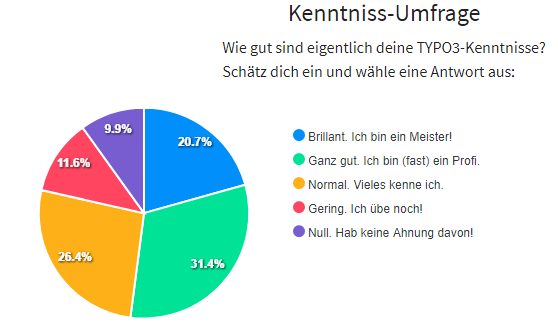
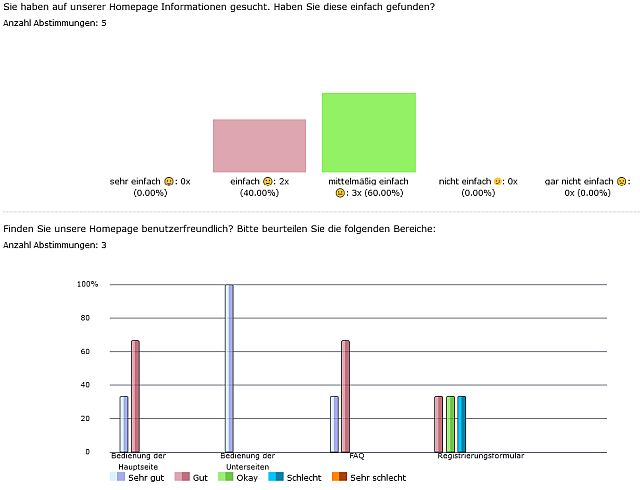
The results can be displayed as a chart too. An evaluation is possible too.
Automatic deletion of quiz takers via task possible. Supporting of Ajax.
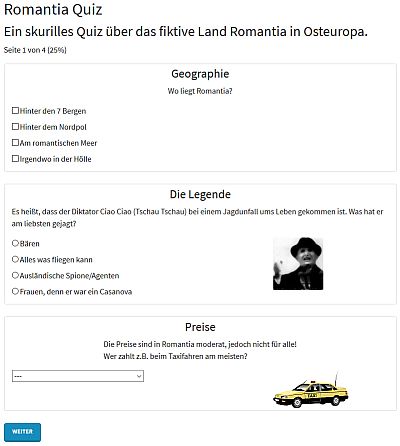
Question types/modes: radio-box, checkbox, select-box, yes/no, text-field, textarea, star-rating, matrix
(only for polls and no detail evaluation available).
Tags can be used to group the questions by cards or pages.
jQuery is required. Optimized for Bootstrap 4. 2 widgets for the dashboard available.
Available languages: english and german/deutsch.
It is the official successor extension of myquizpoll. It is not backward compatible, but there is a simple import-task in old versions.
You will find some examples on my homepage: quizpalme.de
Screenshots
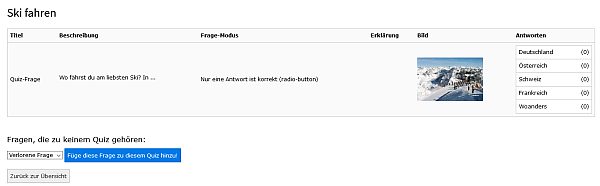
Here you find 4 examples and 2 more screenshots are in the user manual.
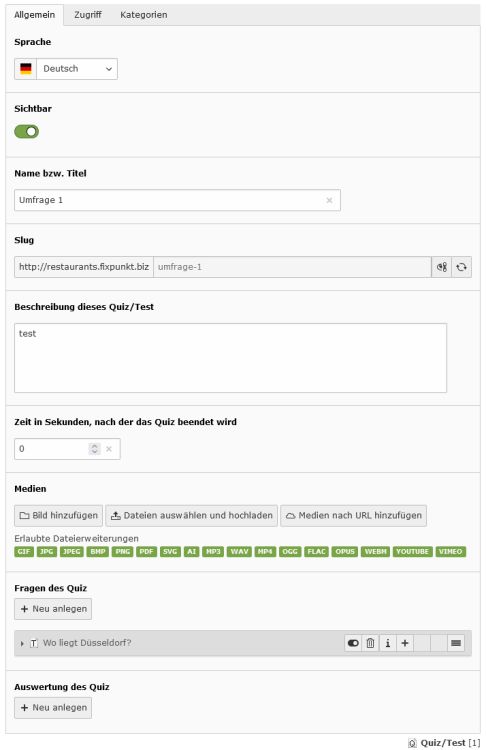
Editors can create a quiz/poll/test on a folder. First you must create a quiz in the list view. Click at the quiz and add some questions and answers to the quiz.
Optionally you can add some evaluations.
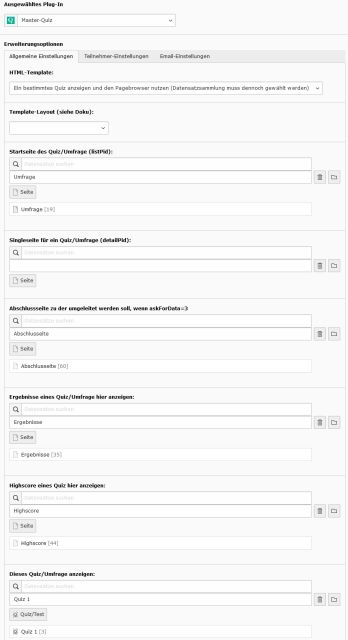
After you have created a quiz with some questions you can add the plugin at a page and there you must select the folder with the quiz.
Note:
Not every setting can be done by FlexForms. There are more TypoScript-settings.
When you enable the AJAX-version, the FlexForms will be ignored, because the AJAX-call does not know the plugin.
Configure the quiz only by TypoScript, if you use the AJAX-version.
The AJAX-call calls an normal action and not an eID-script. The cHash-check must be disabled (this is set by default) if you use AJAX.
The AJAX-solution is currently not working then using the action "show by tag".
Tip
Tip for fp_masterquiz version < 3.6.0:
If you have a quiz with more than 10 questions, the backend will be very slow. To avoid this, create a quiz with nearly empty questions.
Finally edit every question individually.
Second possibility: go to the backend module and click on "Show quiz properties".
There you could add questions to a quiz after you have created questions first.
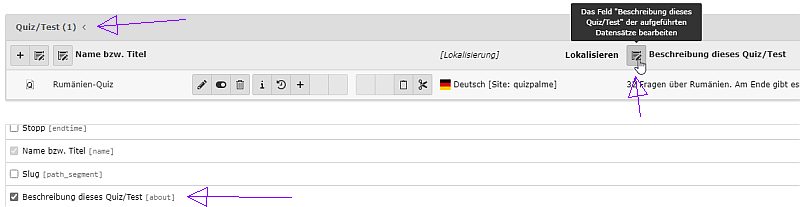
Third possibility: you can use the "Extended view" ("Erweitere Ansicht") in the list view. There you could edit every field of a quiz
after you have created the whole quiz/poll. See screenshot below.
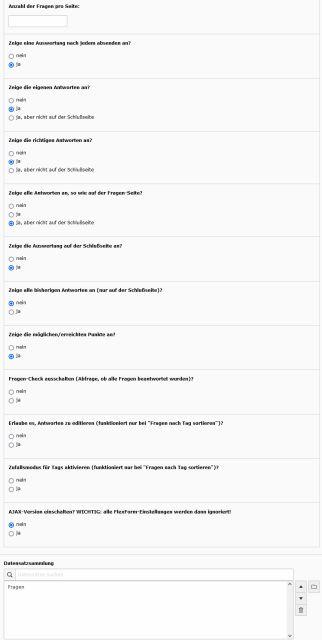
This screenshots shows you a quiz in the list view and some FlexForm-settings of the plugin.
Actions
You can use one of this plugins:
list: list of all quiz/poll/test of one folder with links to the single view
show: show a selected quiz/poll/test and use a pagebrowser
showByTag: show a selected quiz/poll/test and order the questions by tag: on each page will be shown questions of one tag
(Ajax-version is not working yet)
intro: show an intro page and then a quiz
closure: show a closure page after finishing a quiz; this page is only shown when user.askForData=3
result: show a result of a quiz/poll/test
highscore: show a highscore of a quiz
Question modes
You can choose between the following question modes:
Multiple answers possible (check-box), Choose one answer (radio-button), Select one answer (select-options),
Enter an answer (text-field), Yes/no-boxes (2 radio-buttons), Enter a comment (textarea), Show a comment, Star rating
and a matrix of categories of one question for every answer (suitable only for polls; no detail evaluation implemented
yet).
Time period
A time period can be defined at a quiz and at a tag. When the time is up, the form will be send to the next page or to the final page.
Points
There is no checkbox for correct answers in the backend!
To check a answer as correct, you need to set a value greater than 0 at the points-field.
You can set 0 or a negative value for wrong answers.
You don´t need to set points for polls.
Text-Answers
There are 2 possible text answers: input-field or textarea.
Note: this feature works only, if you add one answer to such a question too! Your added answer is not shown in the frontend, but it is needed to show
a input-field or textarea in the frontend.
Star-Rating
A special case is the star rating feature. For that feature a CSS-file is included by default. If you do not need this
feature, you can remove the CSS-file like this for versions until 3.1.2:
page.includeCSS.fpMasterQuizRatingStar >
Copied!
Since version 3.1.3 you can remove the css file via TypoScript (or in the template itself):
Otherwise you should know this: the star rating may not work correct with old browsers. It is a CSS only solution.
It looks like this:
You can use it this way: because it uses radio-boxes in the background, you must configure it like radio-boxes.
Select the question mode "star rating" and than add as many answers as you like to have stars. If you want 5 stars, add 5 answers.
The first answer is the highest rating (e.g. 5 stars) and and last answer is the lowest answer (1 star).
That is the opposite logic of the star rating in the extension myquizpoll.
Do not set the points. In the user-answer, the points shows how many stars were selected.
With the setting checkAllStars you can define if one or all stars should be checked by default.
Important
For every question you need to add at least one answer, even for some types the answer is not displayed!
FAQ
What about user data like name and email? Where can we ask for them?
There is a special intro-page possible, where you can ask for the user-name, email and homepage.
Or you can ask for the user data at the first page of a quiz. And: you can ask for user data at the final page.
Then you would need a closure page too.
If the user is logged in, this data will be taken from fe_users.
What is the difference between the final page and the closure page?
The final page is the page you get when the quiz was completed. When "user.askForData = 3" then that form will
redirect from the final page to the closure page. Only in that case you will need a closure page.
There are some errors or I get a blank page. What can I do?
If you use AJAX: disable it or read the Administration-manual. You can try this TypoScript too: config.contentObjectExceptionHandler = 0
Administrator Manual
Note 1: the main templates are: Quiz/List.html, Quiz/Show.html, Quiz/ShowByTag.html and Quiz/ShowAjax.html.
Note 2: don´t remove classes or IDs that begin with quiz, because some of them are used to validate the form!
Installation
The extension can be installed via Extension Manager or Composer.
For a list of configuration options, go to the chapter Configuration.
Variables of a quiz
If you want to change some templates, you should know, which variables of a quiz are available.
There are this sections: quiz, question, answer, evaluation, tag. That are variables, filled in the backend.
And there are this user-related sections: participant and selection (answers of a participant).
A quiz has this variables:
name, about, timeperiod (in seconds), media, questions, questionsSortByTag, categories, evaluations,
maximum2 (maximum points for a quiz), qtype (for quiz, poll or test) and closed.
A question has this variables:
title, qmode (question-mode), image, bodytext, explanation, sorting, tag, answers, selectOptions, numberOfAnswers,
arrayOfAnswers, categories, categoriesArray, sortedCategoriesArray and closed.
And furthermore:
maximum1 (maximum points for a question),
allAnswers (no. of all answers/votes - checkboxes counted once),
totalAnswers (no. of all answers/votes - all checkboxes counted),
textAnswers (array with entered text answers, only in the BE available).
An answer has this variables:
title, titleJS, points, jokerAnswer, onwAnswer (yes/no), ownCategoryAnswer (has 2 keys: 0 the uid and 1 the title),
allAnswers (total answers of all users),
allPercent (total percent of all users - checkbox counted ounce),
totalPercent (total percent of all users - all checkboxes counted) and
categories.
An evaluation has this variables:
evaluate (evaluate points (unchecked) or percentage (checked)), minimum and maximum, image, bodytext,
ce (content element ID), page (page ID) and categories.
Note: if a category is marked, the evaluation will seek for categories instead. The category of answers will be validated.
The category which was used most be the participant will be taken.
A tag has this variables:
name, timeperiod (in seconds).
A participant has this variables:
name, email, homepage, user (FE-user UID), username (FE-user username), ip, session, sessionstart, quiz, points,
maximum1 (maximum points for the answered questions), maximum2 (maximum points for a quiz),
startdate, crdate, tstamp, datesNotEqual, timePassed, page (reached page), completed (quiz completed?),
selections (all answered questions), selectionsByTag (answered questions of a tag) and
sortedSelections (answered questions, well sorted).
A selection has this variables:
question, answers, sorting, points, maximumPoints (maximum points for this question), entered (entered text to this question)
and categories.
User results
Currently all user results will be saved in the database. There is a session-token (not in the Ajax-version), but it would be a nice feature to use only that one instead of the database.
User results can be deleted automatically. There is a task which can delete old user/quiz-taker results. You find the task in the Scheduler.
Tip
If you want to change the layout of a quiz, you do not need to change the templates necessarily.
Take a look at the TypoScript configuration. You can change the layout with the settings.template.*
Final page
There are several more variables at the final page available. You find them in the FinalPage.html partial.
Furthermore there is an array filled only when you use categories at the evaluation: {finalCategories}.
This array contains this variables: uid, title, count and all. all is an array again and contains: title and count.
Importing myquizpoll entries
There is a scheduler task which whom you can import simple question from the old extension myquizpoll.
Important
You will need TYPO3 8 or 9 if you use this import task. This task was removed in version 3.0.0 of this extension!
If you are using TYPO3 9 and you want to import myquizpoll-questions, then you will need the extension typo3db_legacy too!
Exporting participant entries
There is a scheduler task which whom you can export participants from a single folder (pid). The csv-file will be written to fileadmin.
Security fix in version 3.5.2
Since version 3.5.2 a session-key is always required and this session-key will be checked against a participant.
If you use the Ajax-version AND if you use an own HTML-template, then you must add some code to your templates!
In the Show.html template you need to add this line to the hidden-fields of the first form:
and this one after "$('#quiz-form-parti').val('0');":
$('#quiz-form-session').val('');
Copied!
That will set a session-key for every participant.
Another change was made in the settings. The default quiz-UID 1 was removed. If you use that default setting,
you must set settings.defaultQuizUid again to 1.
How can I rename or hide some fields in the Backend?
See chapter “Configuration / Page TSConfig”.
How can I use routing / speaking urls?
See chapter “Configuration / Routing”.
Does the extension uses cookies?
Only if you enable them via settings.user.useCookie. See chapter “Configuration”.
Is there a widget for the TYPO3 dashboard?
Yes, of course, there are 2. They were added in version 3.2.4.
Only the list view is shown or the quiz was not found. Whats wrong?
There are different actions and plugins, therefore you may probably change a link.
Example: you want to link from a list view to a single view where you use tags.
Then you need to change the link in the list view. Instead of
pluginName="show" you must set pluginName="showbytag".
Furthermore you need to set the Startingpoint at every single page.
Configuration Reference
Configuration is possible via TypoScript, FlexForms and some points can be configured at the quiz in the list view.
Here I will describe the TypoScript settings only.
TypoScript Reference
The TypoScript settings can be changed via the TypoScript-Object-Browser. tx_fpmasterquiz.view, tx_fpmasterquiz.persistence
and persistence.features are like in other extensions. Here is only a list of the tx_fpmasterquiz.settings.
If values 0, 1 and 2 are possible, 1 means: enable this feature, 2 means: enable this feature, but not on the final page.
Properties
Property
Data type
Description
Default
startPageUid
integer
UID of the page where to restart (listPid).
showPageUid
integer
UID of the single-page of a quiz (detailPid).
closurePageUid
integer
UID of a closure-page of a quiz.
resultPageUid
integer
UID of the page where to show quiz results.
highscorePageUid
integer
UID of the page where to show a highscore.
defaultQuizUid
integer
UID of the quiz to show.
introContentUid
integer
Content element for the intro page.
introNextAction
string
Action after the intro page: show or showByTag.
show
showAnswerPage
boolean
Show an answer page after every submit?
1
showOwnAnswers
integer
Show the answers of the quiz taker? 0,1 or 2.
2
showCorrectAnswers
integer
Show the correct answers? 0, 1 or 2.
1
showEveryAnswer
integer
Show every answer? 0, 1 or 2 (see below).
0
showAnswersAtFinalPage
boolean
Show answers with solutions at the final page?
1
showAllAnswers
boolean
Show finally all answers (no. of choices)?
1
showPoints
boolean
Show the possible/reached points if maximum>0?
1
showPageNo
boolean
Show the page number / number of pages?
1
showQuestionNo
boolean
Show the question no. / no. of questions?
0
showDetailedCategoryEval
boolean
Show detailed category evaluation if available?
0
groupByTag
boolean
Group a normal quiz/poll by used tags?
0
redirectToResultPageAtFinal
boolean
Redirect to the result page at the end?
0
checkAllStars
boolean
Check all stars on star rating by default?
0
highscoreLimit
integer
Number of entries in the highscore
10
resultLimit
integer
Number of entries in the result list (layout=2)
20
pointsMode
integer
Points per answered question: 0, 1, 2, 3 or 4.
0
noFormCheck
boolean
Don´t check for answered questions at all?
0
phpFormCheck
boolean
Enable check for answered questions with PHP?
0
allowEdit
boolean
Show links to pages and allow to edit answers?
0
allowHtml
boolean
Allow HTML at question-answers from the BE?
0
closed
boolean
Quiz is closed (participation not possible)?
0
random
boolean
Enable a random mode? Works only with tags.
0
joker
boolean
Enable a joker-button? Works only with AJAX.
0
ajax
boolean
Enable the AJAX-version* of the quiz?
0
ajaxType
string
POST or GET
GET
setMetatags
boolean
Set some metatags and change the title?
0
includeRatingCSS
boolean
Include the RatingStar.css via f:asset?
1
user.ipSave
boolean
Save the IP-address of a user?
1
user.ipAnonymous
boolean
Anonymize the IP-address?
1
user.useCookie
integer
Save the session in a cookie too? See below.
0
user.useQuizPid
boolean
Use automatically the pid from the quiz?
0
user.checkFEuser
integer
Check if a FEuser has already participated?°
0
user.askForData
integer
Ask for user data? 0, 1, 2 or 3 (see below).
0
user.defaultName
string
Default user name ({TIME} will be replaced).
default {TIME}
user.defaultEmail
string
Default user email.
user.defaultHomepage
string
Default user homepage.
email.fromEmail
string
Your email-address.
email.fromName
string
Your name.
email.adminEmail
string
One or more admin email-address separated by ,
email.adminName
string
Admin name.
email.adminSubject
string
Subject of the admin-email.
New poll/quiz-result
email.userSubject
string
Subject of the email to the user.
Your poll/quiz-result
email.sendToAdmin
boolean
Send an email to the admin at the final page?
0
email.sendToUser
boolean
Send an email to the user at the final page?
0
email.specific
string
Send email to specific admins (see below)?
email.likeFinalPage
boolean
Handle the email like a final page?
0
pagebrowser.itemsPerPage
integer
Number of questions on a page.
1
pagebrowser.insertAbove
boolean
You don´t need this.
0
pagebrowser.insertBelow
boolean
You don´t need this.
0
pagebrowser.maximumNum...
integer
You don´t need this.
50
template.colText
string
Class for a question with answers.
col-md-8
template.colImage
string
Class for the image of a question.
col-md-4
template.col12
string
Class for the text of a question; if no image.
col-12
template.wrapQuizTitle1
string
Wrap for the quiz title.
<h2>
template.wrapQuizTitle2
string
Wrap for the quiz title.
</h2>
template.wrapQuizDesc1
string
Wrap for the quiz description.
<h3>
template.wrapQuizDesc2
string
Wrap for the quiz description.
</h3>
template.wrapTagName1
string
Wrap for the tag name.
<h4>
template.wrapTagName2
string
Wrap for the tag name.
</h4>
template.wrapQuestionTitle1
string
Wrap for the question title.
<legend><div class="mx-auto">
template.wrapQuestionTitle2
string
Wrap for the question title.
</div></legend>
template.wrapQuestionDesc1
string
Wrap for the question description.
<div class="mx-auto">
template.wrapQuestionDesc2
string
Wrap for the question description.
</div>
template.wrapDone1
string
Wrap for the done-msg at the final page.
<h4>
template.wrapDone2
string
Wrap for the done-msg at the final page.
</h4>
template.optionalMark
string
You can define a string for optional questions.
chart.type
string
You can choose between: pie, donut or bar.
pie
chart.width
integer
Width of the chart.
492
templateLayout
integer
See in chapter PageTSconfig**.
overrideFlexformSettings...
string
Fields that should be overwritten if empty.
startPageUid,...
debug
integer
Show debug data? 0: no; 1: in HTML; 2: in file.
0
typeNum
integer
Type of the AJAX-call. Don´t change it.
190675
AJAX*) If you enable AJAX, you should know this:
The FlexForms will be ignored, because the AJAX-call does not know the plugin.
Configure the quiz only by TypoScript.
You need to set the persistence.storagePid too!
Only one question per page is possible.
The AJAX-solution is not supported for the action "show by tag".
Important: the Ajax-version doesn´t work with version 7.0.0.
Important: the AJAX-call calls an normal action and not an eID-script.
The problem is, that the form contains no cHash.
Therefore you must disable the cHash requirement in the install tool via:
[FE][cacheHash][enforceValidation] = false
If it is still not working, you can disable the cHash-check in the install tool:
[FE][pageNotFoundOnCHashError] = false
Conclusion: use the Ajax-version only if you really need it.
Important: if you don´t use the plugin
"Show a selected quiz and use a pagebrowser (you need to select the storage folder too)" /
"Ein bestimmtes Quiz anzeigen und den Pagebrowser nutzen (Datensatzsammlung muss dennoch gewählt werden)",
you must change this TypoScript value of: "ajaxfpmasterquiz_page.10.pluginName".
Set it to "List" or "Intro" (depending on the selected plugin).
Saving of user-data (at the final page) does not work.
You have still problems? Then read the chapter "Known problems".
Layout**) If you use template layout 1, you should know this:
The charts settings will be ignored if you use another layout.
feusers°) If you use a value greater than 1 for user.checkFEuser, then a participant can participate more than one time.
If you set the value to 4, 4 participations are allowed (not tested in the Ajax mode).
Note: if you enable a cookie or FEuser check, then an user cannot vote again, if he had already voted/participated.
The participant will see his result of a poll/quiz instead of the checkboxes/radio buttons.
Note: read the chapter "User manual" for more informations about this properties/settings.
Note: the pagebrowser-settings will be ignored if you use the "show by tag" action.
plugin.tx_fpmasterquiz.settings.user.defaultName = User {TIME}
Every quiz-taker gets a name in the database. If "user.askForData=0" then this name will be used. {TIME} will
be replaced by date and time. If "user.checkFEuser=1" then the name of the FE-user will be used.
At an answers-page (after every submit) all answers are shown like on the page before.
Additionally the correct answers are marked green and wrong answered answers are marked red.
If set to 2, this answers are not shown at the final page.
Otherwise they are displayed at the final page too if showAnswersAtFinalPage is set to 1.
Note: this is tested only with checkboxes and radio buttons!
allowEdit
plugin.tx_fpmasterquiz.settings.allowEdit = 1
If you enable this feature, links to all pages of a quiz are shown, so an user can edit their answers.
Note: this works only for the action "show by tag" and questions of type radio, checkbox or text.
Note: this feature disables the answer-page!
Note: set allowEdit = 2, if participants should be able to edit even a completed quiz/poll.
random
plugin.tx_fpmasterquiz.settings.random = 1
If you enable this feature, the tags will be shuffled. The changed order will be saved in the DB too.
Note: this works only for the action "show by tag", because tags and not questions are randomized.
noFormCheck
plugin.tx_fpmasterquiz.settings.noFormCheck = 1
Normally every question needs to be answered before the page can be send. You can disable this check generally.
Since version 3.2.0 you can define at each question if it should be optional or not.
Note: only question of type radio, checkbox, select-box, input-field and textarea are checked. All answers to other type of
questions are optional (they will not be checked).
pointsMode
plugin.tx_fpmasterquiz.settings.pointsMode = 1
In the default mode, negative points are possible at e.g. checkboxes when not all correct answers are checked.
pointsMode=1: negative points will be set to 0 points.
pointsMode=3: like pointsMode=1, but when not all correct answers are selected, the participant will get 0 points for
the whole question instead of x/y points.
pointsMode=4: like pointsMode=3, but when all answers are answered correct, only 1 point will be given, else 0.
joker
plugin.tx_fpmasterquiz.settings.joker = 1
A 50:50 joker can be enabled with this setting. This works only, if you set "ajax = 1" too.
The joker will use all answers with points greater than 0. The rest of the answers will be selected randomly by the joker.
You can not set in the backend, which answers the joker should show. If the number of answers is odd, than it works like this:
with 5 answers 3 answers will be disabled by the joker / the joker will hide 2 wrong answers randomly.
The disabled answers will be hidden by setting the class "d-none". You could change "d-none" to something else in the Partial Question/Properties.html.
This works only with radio-buttons and check-boxes!
When a joker is used, the user gets only half of the points.
The half points will be rounded up, therefore you should not set points to 1. 2 or 10 is a better value if you use this joker.
setMetatags
plugin.tx_fpmasterquiz.settings.setMetatags = -1
This will set at least the metatags description, og:description, og:title and it will change the title of the page.
Used values: name and description of a quiz. This works only in a single view of a quiz.
A session can be stored in a cookie, so a user can continue later with a quiz.
This even means, that a user can not make a quiz or poll twice!
-1 means: the cookie will be stored until the browser is closed.
1 and greater means: a cookie will be stored for X days.
Please note: sessions and cookies are not working if you enable Ajax. They are currently not supported in the Ajax-version.
Note furthermore: if enabling the cookies, these cookies will be saved: qsessionXX. XX is the quiz-ID.
This cookies are not bad! You don´t need a cookie bar for it, but you need to tell about it at your GDPR-site.
4 options are available: 0, 1, 2 or 3. 0 means: don´t ask for user data like name oder email.
The other values enables a form, that ask the user for this data: name, email and homepage.
1: the form will appear at the first page of a quiz.
2: the form will appear at the intro page.
3: the form will appear at the final page of a quiz. Note: in this case you will need to define a closure page too!
Setting: closurePageUid. The form from the final page will redirect to this page. Note: this does not work in the AJAX version.
email.specific
plugin.tx_fpmasterquiz.settings.email.specific = {"116":{"415":{"email":"green@test.de","name":"Grün","subject":"Lieblingsfarbe ist grün!"},"416":{"email":"red@test.de","name":"Rot","subject":"Lieblingsfarbe ist rot!"}}}
Send an email on specific answer? Can be set as an JSON-object:
All values are mandatory. Take care to use correct quotes (")!
Example question: "Frage 1: Lieblingsfarbe" (question_id in the DB: 116), Answer 1: blau (answer_id in the DB: 414), Answer 2 (answer_id in the DB: 415): grün, Answer 3: rot (answer_id in the DB: 416)
Example JSON-object: {"116":{"415":{"email":"green@test.de","name":"Grün","subject":"Lieblingsfarbe ist grün!"},"416":{"email":"red@test.de","name":"Rot","subject":"Lieblingsfarbe ist rot!"}}}
You can extend the object for every answer: {"12":{"2":{…},"3":{…}},13:{"1":{…},"5":{…}}}
Note: this works only if "email.sendToAdmin = 1". If you set email.adminEmail too, then an additional admins gets the email too.
Poll
With this TypoScript you can configure a simple poll with a pie chart as result:
If debug = 1, a debug output will be shown under the quiz/poll-output in the FE.
If debug = 2, the debug output will be written in a log file called var/log/typo3_fpmasterquiz_*.log
FAQ
What about the evaluation of a quiz?
This can be configured at every quiz.
Optional questions are not marked. Why not?
You need to define the mark-symbol by yourself via the TypoScript-setting. E.g. settings.template.optionalMark = *.
Closed is a checkbox at a quiz-entry (tab Access). Why is it a setting too?
Because with this 2 possibilities you can easy define if one or more quizzes shall be closed.
The text changes to english when I activate Ajax. Whats wrong?
You need to add some more TypoScript to your page. See chapter "Known problems".
You can use the Page TSconfig to define some template layouts. Currently the templates handle 3 different layouts by default.
Example
Here an example with 3 layouts, that are already handled in the templates:
tx_fpmasterquiz.templateLayouts {
  0 = Standard-Layout
  1 = Layout for a poll with a pie chart
  2 = Detailed quiz/poll-results at a result-page
}
Copied!
You can use every number and description for the layouts.
Now you can select a layout in the FlexForm of every page.
Finally you can use now different layouts in your templates (0-2 are already in use by default).
Example
Here an example for a template (extract) with 2 layouts:
<f:if condition="{settings.templateLayout} == 1">
	<f:then>
		show a pie chart
	</f:then>
	<f:else>
		show only text
	</f:else>
</f:if>
Copied!
Note: by default, the template will load JavaScript from cdn.jsdelivr.net, if you use templateLayout 1.
Then the results will be displayed as a chart. Apexcharts will be used then. Here you find more informations about Apexcharts:
https://apexcharts.com/
Furthermore you can use TSconfig to rename or hide quiz-fields in the BE. Here two examples:
TCEFORM.tx_fpmasterquiz_domain_model_question.explanation.disabled = 1
TCEFORM.tx_fpmasterquiz_domain_model_quiz.about.label = Description for the list view
Copied!
You find the TSconfig when you edit a page. Go to the tab Resources.
Frontend Routing Setup
The extension provides a frontend route enhancer configuration that you can include
in your site configuration config/sites/mysite/config.yaml.
There might be some problems, if you enable Ajax!
User-data and cookies are currently not supported if you enable Ajax.
The default language will be english in TYPO3 9 (and 10?) if you enable Ajax. You can solve this problem this way:
you need to add some TypoScript like this to your TypoScript-setup:
the AJAX-version of the quiz/poll works only if the cHash-check is disabled in the install tool.
See chapter "Configuration".
the AJAX-version ignores FlexForm-settings during the AJAX-call but not during the initialization.
Therefore you should not set any FlexForms if you use AJAX or they should be equal.
To-Do list
The to-do list is short:
using of more cookie-sessions.
detail evaluation for the matrix mode.
ChangeLog
0.2.0:
First release for the TER.
0.3.0:
Now optimized for Bootstrap 4.
New settings: showAnswersAtFinalPage and template.
0.4.0:
Now polls possible, because all submited results are avaiable.
New settings: showOwnAnswers, showAllAnswers, templateLayout...
0.5.0:
Now for TYPO3 8 and 9. Backend module added. Charts added.
Deletion-task changed: delete-flag and real deletion now possible.
Lazy loading removed, because delete cascade does not work with lazy loading.
New settings: showPageNo and showQuestionNo.
0.6.0:
Donut chart added.
Session-token added to prevent reload-manipulations.
New settings: user.useCookie.
0.7.0:
Text-answer now possible. Thanks to Gerald Loss.
New settings: user.checkFEuser.
Bug fixed: anonymous IP address.
1.0.0:
Question mode "Show a comment" and "Star rating" implemented.
1.1.0:
Question mode "Enter a comment (textarea)" implemented.
New settings: checkAllStars.
Sending of emails now possible.
Using of FE-user-data, if user.checkFEuser is set.
Dropped support for TYPO3 8. Now for TYPO3 9 and 10.
1.2.0:
New feature: 50:50 joker.
Page layout view / preview in the backend.
Bugfix: summation of points works now with negative points too.
Bugfix: FlexForms in TYPO3 10.
Bugfix: hidden-fields in the backend.
1.3.0:
New setting: ajaxType.
New setting: email.likeFinalPage.
New settings: showEveryAnswer and option 2 for showOwnAnswers and showCorrectAnswers.
Bugfix: sending of emails.
1.4.0:
New setting: resultPageUid and new action: result for a result page.
Possibility added to add a question to a quiz via backend module.
Question mode "Yes/no-boxes (2 radio-buttons)" implemented.
Important bugfix for PHP 7.3 and other bugfixes points related.
1.5.0:
Bodytext and image added to the evaluation.
Routing/slug/path segment added to a quiz.
Categories added to a quiz.
Layout of yes/no-questions changed.
New settings: setMetatags.
Sorting of selected answers of a participant: using now an array instead of an object.
Another bugfix points related.
See issues #12 - #18.
2.0.0:
The ajax-action gets now the quiz-object.
Media-field added to a quiz.
Default value of the setting showAnswersAtFinalPage and showAllAnswers changed from 0 to 1.
Default value of the setting showOwnAnswers changed from 1 to 2.
Default value of startPageUid removed! Setting showPageUid added.
Shows now the points only if the maximum points are greater than 0.
jQuery can now be loaded in the footer.
Important: probably you need to flush all caches.
2.1.0:
Highscore action added.
Explanation added to the result action/view.
Completed-field added: final page reached?
Deutsche Übersetzungen.
Bugfix for TYPO3 10.
Important: probably you need to flush all caches.
2.2.0:
showByTag action added. Tag for a question added.
intro action and settings introContentUid, introNextAction added.
Showing all answers of a text-answer in the chart in the backend.
Showing the start and end time in the backend.
A time period can be defined for a quiz and/or a tag.
TCA-Bugfix for TYPO3 10.
Refactoring.
3.0.0/2:
Version for TYPO3 10 and 11.
closure action and setting closurePageUid added.
Default-value for setting ajaxType changed from POST to GET.
Language of a participant and his answers changed from 0 to -1.
Breaking: myquizpoll-import-task removed.
3.1.1:
Setting user.useQuizPid, noFormCheck, random and allowEdit added.
Possibility added to move questions from one quiz to another quiz.
More Flexforms.
3.1.2:
Bugfix for breaking change in TYPO3 11.5.0.
3.2.0:
Every question can now be set to be optional. Setting template.optionalMark added.
The answer of text-fields is now checked too (it is no longer optional, but can be set to optional).
The RatingStar.css will now be included by the viewhelper f:asset in the template itself. Use includeRatingCSS=0 to disable it.
Setting template.col12 added for questions without an image.
Div with class card-body added to all cards.
Variable participant.username added.
3.3.0/1:
Backend-Layout adapted for TYPO3 11.5.
Evaluation of the most used category is now possible too. Setting showDetailedCategoryEvaluation added.
TYPO3 categories are now available at a quiz, question, answer, selected and evaluation.
Mandatory questions are now marked when an error appears. The error message is now not a JavaScript-alert-message.
2 widgets for the TYPO3 dashboard added (the extension dashboard is required in TYPO3 11).
Supports now PHP 8; thanks to Gerald Loss.
Bugfix: moving participant data to another folder.
Bugfix: check of checkboxes fixed.
3.4.0:
The answer of textarea-fields is now checked too (it is no longer optional, but can be set to optional).
CSV-export added as scheduler task.
Dashboard no longer required in TYPO3 11.
Layout optimizations.
3.4.4:
Bugfix: persist data before evaluation.
Bugfix: category evaluation.
Bugfix: wrong Namespace in TemplateLayout corrected.
3.5.0/1:
Mandatory check with PHP too, if setting phpFormCheck=1.
New question mode: matrix with categories of a question.
3.5.2:
Security fix: checking participant against a session-key. Please read the section Administrator / Security fix in version 3.5.2.
Security fix: check if a quiz/poll is allowed on a page. Therefore, the defaultQuizUid was removed in the settings!
3.5.5:
Replaced invocation of PersistenceManager with DI #46.
Reformatting source code and PHP 8 bugfix.
Bugfix: optional checkbox was not clickable.
3.6.0:
Tabs introduced to a quiz entry in the backend. Questions and evaluations are now collapsed.
Setting closed added: participation is than not possible.
Type added to a quiz-entry.
Bugfix sending emails and adminEmail can now contain more email-addresses and in debug mode the email-content will be prompted.
Bugfix for other languages than 0 and PHP 8 bugfix.
3.7.0:
Closed-checkbox added to a quiz too.
Using a target-action at the list-view.
New FE-layout for results: detailed table-list.
allowEdit = 2 is new (allow edit even the status is completed).
Bugfix: delete old selections when they are replaced in the edit mode.
Bugfix: do not ignore changed user-data in edit mode.
3.7.1:
Absolute path to images in emails.
debug-echo removed.
PHP 8 bugfix.
4.0:
Breaking: all plugins must be changed via an update-script (in the install-tool)!
TypoScript module.tx_fpmasterquiz_web_fpmasterquizmod1 changed to module.tx_fpmasterquiz.
Note for the Ajax-version: maybe you need to change the value of "ajaxfpmasterquiz_page.10.pluginName".
4.1:
TypoScript-files renamed from .ts to .typoscript.
Prevent PHP and JavaScript errors from missing settings.
Upgrade Wizard for old file references.
4.2:
Questions can now be closed too.
Bugfix for: prevent PHP and JavaScript errors from missing settings.
4.3:
Setting redirectToResultPageAtFinal added: redirect to the result page when the final page is reached?
Setting pointsMode added: 0 points if not all answers are correct now possible.
5.0:
Refactoring with the rector-tool.
settings.debug=2 is new. If 2 instead of 1, the debug output will be written into a log file.
settings.user.checkFEuser allows now values greater than 1.
Bugfix for settings.pointsMode 4.
5.0.3:
Bugfix: prevent multiple ajax calls.
Bugfix: Matrix-Display.
5.1:
More layout possibilities: group a normal quiz/poll by tags; show answers inline (span instead of div).
5.1.4:
More support for group by tags.
More support for matrix-questions.
5.1.6:
Bugfix: backend preview.
Remove of deprecated methods and sql-fields.
5.1.7:
Bugfix: sorting-error of selected-table.
5.1.8:
Bugfix: translations in Ajax-mode.
5.1.9:
Bugfix: points calculation for modes 3 and 4.
5.1.10/1:
Bugfix: allow backend-module for users.
5.2.0:
Refactoring with the rector-project.
Preparations for TYPO3 13. Attention: the path to the backend templates is now defined in Configuration/page.tsconfig.
6.0.0:
First version for TYPO3 13, but emails are not working with TYPO3 13!
Upgrade Wizards for old file references and Switchable-Controller-Action-Plugins removed!
6.0.1:
Upgrade Wizards for Switchable-Controller-Action-Plugins added again, so it can be used with TYPO3 13 too.
6.1.0:
Support for TYPO3 12 dropped!
The emails work now with TYPO3 13 too, and they are now localized too.
6.1.1:
Bugfix: tasks fixed.
7.0.0:
Breaking: PlugIns changed from list_type to CType. You need to execute the Upgrade Wizard to change your PlugIns.
Breaking: due to a TYPO3 bug (issues/105135), the Ajax-Version is not working anymore!
Breaking: layout changed: fieldset added to questions and user data in the form and settings.wrapQuestionTitle1 changed to legend.
Documentation translated to german.
7.0.1:
Bugfix: the Ajax-version is now working again.
7.0.4/5:
Bugfix: get FE-users entry + get foreign entries.
Layout: added class text-end where text-right is used.
7.0.6:
Startingpoint added again to a plugin.
pluginName in the list-view changed to show, if a target page is defined.
Bugfix: documentation.
7.1.0:
Refactoring with the Rector-tool. You need to use "Flush TYPO3 and PHP Cache".
PageTitleProvider added.
Documentation again.
Sitemap
Reference to the headline
Copy and freely share the link
This link target has no permanent anchor assigned.The link below can be used, but is prone to change if the page gets moved.