fp_social 

Extension key

fp_social

Package name

fixpunkt/fp-social

Version

17.4

Language

en

Author

fixpunkt werbeagentur

License

This document is published under the Creative Commons BY 4.0 license.


Easily manage and output media from social media in TYPO3.

With fp_social you can easily synchronize and output posts from many social media networks with your TYPO3 instance, without much prior knowledge.

  • All-rounder: Import posts from Facebook, Instagram, Youtube and Wordpress.
  • Easy to manage: Manage your accounts and posts without programming knowledge through an easy-to-understand interface directly in the TYPO3 backend.
  • Always up to date: The extension takes care of automatically updating your accounts. You don't have to worry about anything.
  • No setup required: Use our Social Media Connector for Facebook and Instagram and import your posts without your own API access. [#f1]
  • Extensible: Developers can also output their own local records (for example news or events) in the Social Wall. See Local records in the Social Wall.
[1]
To use our Social Media Connector you need an account on our homepage. Costs may apply for this service.

Table of contents:
Introduction 

Supported networks 

Currently, fp_social supports the following social networks out of the box:

  • Facebook

    • Import of posts from pages of which you are an administrator.
  • Instagram

    • Your own profile
    • Recent posts as well as top posts of a hashtag
  • Wordpress

    • All entries of a blog.
    • All entries that are tagged with a certain tag.
    • All entries of a specific author.
  • Youtube

    • Latest entries of a profile.
  • LinkedIn

    • Import of posts from pages of which you are an administrator.
  • Bluesky

    • Import of posts from a profile.

Data protection 

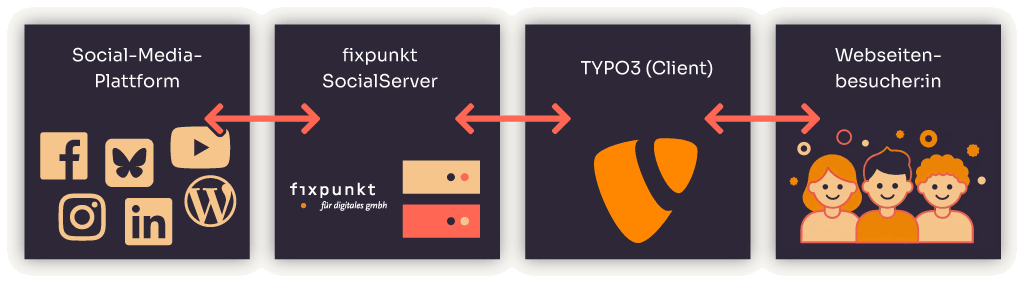
In order to protect the visitors of your website from tracking by social networks, fp_social does not output the posts directly via the social networks.

Diagram on data protection

Diagram showing that no communication takes place between the website visitor and the social network.

The output of the posts works as follows:

  • Posts are synchronized into the database of your TYPO3 instance according to the configured accounts.
  • Data that is made available to the user is read from the TYPO3 instance and output.

This ensures that the social networks cannot store any cookies on the visitors' computers and that no tracking is possible either.

Installation 

Requirements 

  • TYPO3 v12.4, v13.4 or v14.4
  • PHP 8.1 or higher (TYPO3 v14 requires PHP 8.3 or higher)

Setup 

Follow the steps below to set up the fp_social extension correctly.

  1. Install the extension in your TYPO3 instance:

    • Composer (recommended): Require the extension via Composer:

      composer require fixpunkt/fp-social
      Copied!
    • Classic: Install the extension fp_social from the TYPO3 Extension Repository (TER) via the Extensions backend module.
  2. Load the TypoScript configuration:

    • TYPO3 v13 and v14 (recommended): Assign the site set Social Wall (fixpunkt/fp-social) to your site. In the backend open Site Management > Sites, edit your site and add the set on the Sets tab, or declare it as a dependency in your site configuration:

      config/sites/<my-site>/config.yaml
      dependencies:
        - fixpunkt/fp-social
      Copied!
    • TYPO3 v12 (classic): Add the static template Social Wall (fp_social) to your TypoScript template record.
  3. Set the TypoScript constants plugin.tx_fpsocial.persistence.storagePid and module.tx_fpsocial.persistence.storagePid.
  4. Create your first access and social media account.
  5. Create a Scheduler Task so that the stored social media accounts are synchronized automatically.

Backend management 

Creating accesses and accounts 

In order to access the social networks, you must define which access you want to use to reach which accounts.

Unfortunately, this is currently not yet possible via a backend module and must instead be done via the list module.

You can find the individual steps here.

Synchronizing accounts, managing and searching posts 

The backend module lets you conveniently perform various tasks:

Managing accesses and accounts 

Unfortunately, it is not yet possible to manage accesses and accounts via the backend module.

To import posts from a social media profile, you must first specify how you want to access the social network and then provide your account details.

Establishing a connection with the SocialServer 

Communication with the respective social networks is handled through a bridge - the SocialServer.

To set up an access:

  1. Create an account at http://social.fixpunkt.com and create an access token there. You may need to set up a subscription.
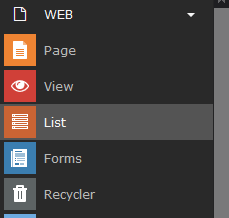
  2. In your TYPO3 instance, switch to the List module and navigate to the folder in which you want to store the posts from the network.

    List module
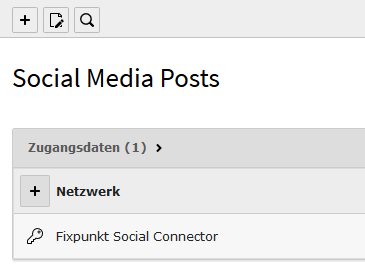
  3. Click "Create new record" and select fp_social > Credentials.

    Add credentials
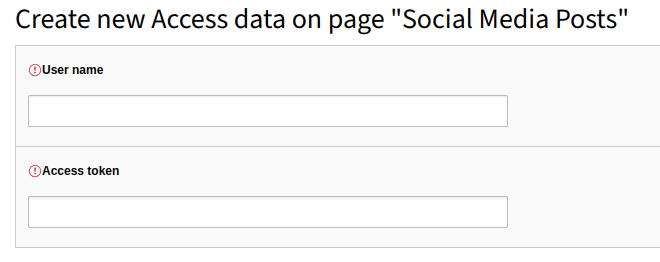
  4. Enter your SocialServer username as well as the access token created in the first step.

    Fill in credentials
  5. Save your changes.

Setting up an account 

Once you have created an access, you can now create the account for which you want to use these access credentials.

To do so, proceed as follows:

  1. Switch to the List module and navigate to the folder in which you want to store the posts from the network.

    List module
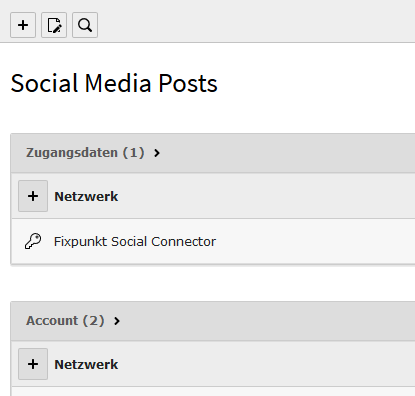
  2. Click "Create new record" and select fp_social > Account.

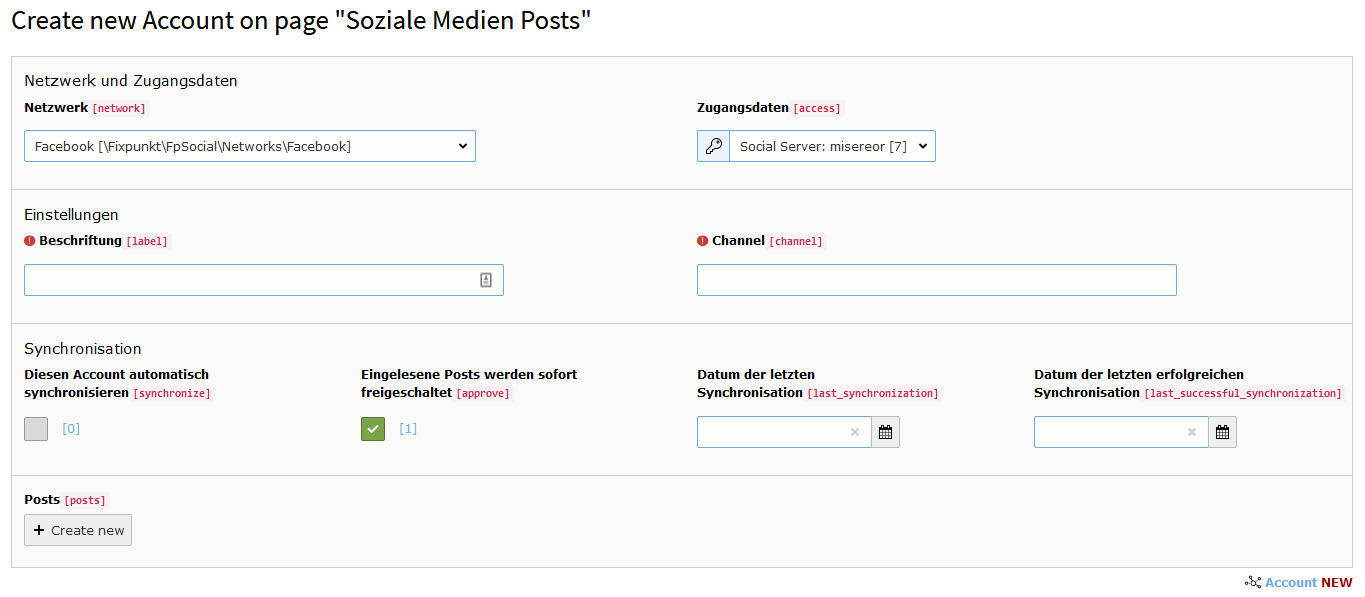
    Add account
  3. Now fill in the fields as follows:

    • Basic data:

      • Network: The network from which you want to synchronize the account.
      • Credentials: The credentials created earlier.
      • Label: The display name of the account.
      • Additional fields: Depending on the selected network, further details must be provided. Click the label to get more guidance.
    • Synchronization:

      • Synchronize this account automatically: If this option is selected, the account is synchronized automatically (to learn how to set up automatic synchronization, see here).
      • Imported posts are published immediately: If this option is selected, all imported posts are published automatically (and thus visible in the frontend). Otherwise they must be published manually.
      • Date of the last synchronization: The point in time of the last synchronization attempt. Leave this field empty.
      • Date of the last successful synchronization: The point in time of the last successful synchronization. Leave this field empty.
    • Posts: Leave this field empty.
    Fill in account
  4. Save your changes.

Managing posts 

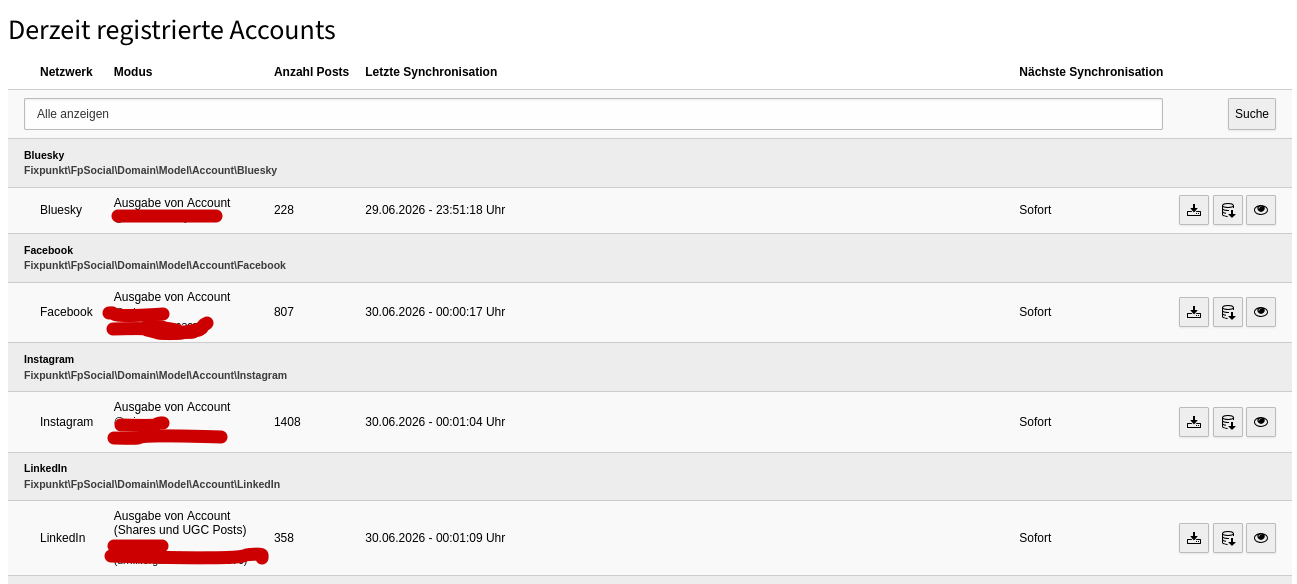
List of all accounts 

Here you will find a list of all created accounts.

You can filter this list by type in the upper area of the table.

List of all accounts

The following information is provided here:

  • Network: The network from which the data is to be pulled.
  • Mode: The account from which, and the mode in which, the data is read.
  • Number of posts: The number of posts imported so far.
  • Last synchronization: This shows you when the last attempt to synchronize the account was made. If this was not successful, the point in time of the last successful synchronization is also displayed, along with an error message.
  • Next synchronization: This shows you the synchronization interval.

The following actions are possible:

  • Synchronize: Synchronizes - depending on the social network - a certain number of the newest posts.
  • Deep synchronization: Synchronizes the entire account. With the help of a wizard, all available posts are imported one after another.
  • Show posts: Click here if you want to display all posts that have already been imported.

Account view 

In the account view you can see all posts imported with the account.

Here you have the following options:

  • Preview images: If several preview images are available, you can select the current image as the preview image by clicking the respective image and the "Select this image as preview image" button.
  • Show posts: By clicking "Open post" you can display the post in the relevant network.
  • Show & hide: By clicking "Hide / show this post" you can hide or show the post in the frontend.
  • Synchronize: By clicking "Re-synchronize post" you can re-import the post.

If you have deleted a post in the network, you can apply this deletion by re-synchronizing the post.

Searching posts 

Searching posts

You can search through imported posts easily and quickly in the backend module Social Media Management under the Web tab. You can filter by the following criteria:

  • Search term: Enter a search term here that the posts should be searched for. You can also search for just a partial word.
  • Accounts: You can also restrict the search to individual accounts. If no account is explicitly selected, all accounts are searched.

Managing synchronization 

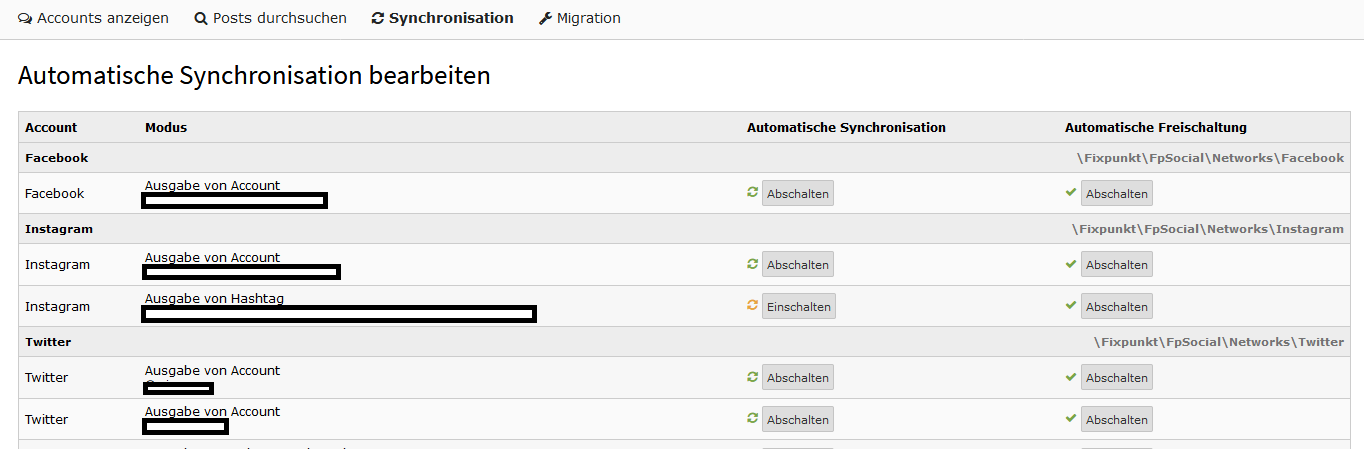
You can edit the settings for synchronizing the accounts easily and quickly in the backend module Social Media Management under the Web tab.

Managing synchronization

Here you can define, for each account, the synchronization as well as the behavior when new posts are added.

Automatic synchronization 

If this option is enabled, this account is taken into account during synchronization via the scheduler task. If this option is disabled, the account must be synchronized manually via the backend module.

Automatic publishing 

If this option is enabled, all imported posts are published automatically and displayed in the frontend. This option applies both to posts imported manually and to those imported with the help of the scheduler.

Frontend Output 

To output the imported posts in the frontend, fp_social provides two of its own plugins (content elements). Choose the plugin that suits your use case:

  • Plugin "Output Post" – outputs a single, fixed selected post.
  • Plugin "Social Wall" – outputs multiple posts as a social wall, which automatically loads new posts and optionally allows older posts to be loaded manually.

The display of the individual posts (e.g. truncating the description or showing images) can be adjusted in the same way for both plugins. These settings are described centrally under Display of Posts.

Plugin "Output Post" 

The [FpSocial] Output Post plugin outputs a single, fixed selected post. It is suitable for embedding a specific post on a page in a targeted way.

Placeholder: an example screenshot of the "Output Post" plugin goes here.

Settings 

Post
The post to be output. You can search by the Post Id.

Display of the Posts 

How the selected post is displayed can be adjusted via the settings described under Display of Posts.

Plugin "Social Wall" 

The [FpSocial] Social Wall plugin outputs multiple posts as a social wall. The wall automatically loads new posts and can optionally show a button for manually loading older posts.

Placeholder: an example screenshot of the "Social Wall" plugin goes here.

Selection of the Posts 

Social Media Accounts
The accounts whose posts should be output.
Fixed Records
Individual posts that are always shown in the wall, independently of the selected accounts.
Restrict output to the following hashtags...
Filters the posts imported via the accounts by hashtags. Only posts that have at least one of the selected hashtags are shown. The filter is only taken into account if at least one hashtag is selected.

Number of Posts to Display 

The number of posts shown initially is the product of rows and columns.

Columns

Default: 1

The number of columns.

Rows

Default: 1

The number of rows.

Loading More 

Automatically load new records

Default: False

If this setting is enabled, posts that were created after the page was loaded are loaded automatically.

Replace older records with newer ones

Default: False

If this option is enabled, the oldest displayed post is removed when a new post is loaded automatically. This keeps the number of displayed posts the same and prevents the page from "jumping".

Allow manual loading of older records

Default: False

If this setting is enabled, a button is shown below the social wall that can be used to load additional, older posts. These increase the number of displayed posts and do not replace existing posts.

Label of the load button
The label of the button used to load additional, older posts.

Display of the Posts 

How the individual posts are displayed can be adjusted via the settings described under Display of Posts.

Display of Posts 

The following settings are available in both the Plugin "Output Post" plugin and the Plugin "Social Wall" plugin and control how the individual posts are displayed.

The behavior described here refers to the default templates that are shipped with this extension.

Post Display > Truncate description

Default: True

If this setting is selected, the text of the post is truncated to a certain number of characters and then cut off with "…".

Post Display > Truncate description to …

Default: 200

This setting is only available if the Truncate description option is true. The number of characters after which the text of the post should be cut off.

Post Display > Compact display

Default: False

If this setting is selected, the text is shown over the image by means of a hover effect.

Post Display > Show image

Default: True

If this setting is selected, an image of the post, if present, is displayed.

Post Display > Show image in 1:1 format

Default: False

This setting is only available if the Show image option is true. If this setting is selected, an image, if present, is shown in 1:1 format.

Scheduler Task 

To keep the configured accounts up to date, you can set up Scheduler Tasks.

Available Tasks 

The following tasks are available to you:

  • fp_social:synchronize: Synchronizes the created accounts if they are selected for automatic synchronization.

    • amount (optional): Number of social networks to synchronize. A value of 0 means no limit.
  • fp_social:download: Downloads all post images that have not yet been downloaded. Otherwise this happens when the respective post is displayed for the first time.

    • amount (optional): Number of images to download. If no value is given, up to 40 images are downloaded.
  • fp_social:remove: Deletes old posts that are older than the specified number of days and are not currently in use. Images that are no longer referenced (including the associated files) and hashtags are also removed in the process.

    • days (required): Number of days after which posts are deleted.

Setting up a Task 

  1. Switch to the Scheduler module.
  2. Click the button to add a new task.
  3. Fill in the fields as follows:

    • Class: Execute console commands
    • Frequency: We recommend */15 * * * * here. This means that the task is executed every 15 minutes.
    • CommandController Command: Select one of the tasks listed above here.
  4. Save the task and check it by running it manually once.

For more information about the Scheduler, see the official documentation.

Setting the Social Server URL 

You can set the URL of the Social Server in use in the extension settings under apiUrl. Please make absolutely sure to include the trailing slash at the end of the URL!

The default value is https://social.fixpunkt.com/.

You can find the dev server at https://dev.social.fixpunkt.com/.

Custom templates 

Custom templates can be defined via TypoScript as usual.

# Plugin configuration
plugin.tx_fpsocial {
    view {
        templateRootPaths {
            0 = {$plugin.tx_fpsocial.view.templateRootPath}
            1 = EXT:fpsocial_extended/Resources/Private/Templates
        }
        partialRootPaths {
            0 = {$plugin.tx_fpsocial.view.partialRootPath}
            1 = EXT:fpsocial_extended/Resources/Private/Partials
        }
        layoutRootPaths {
            0 = {$plugin.tx_fpsocial.view.layoutRootPath}
            1 = EXT:fpsocial_extended/Resources/Private/Layouts
        }
    }
}
Copied!

Outputting information about the social network 

In the partials used to render a post (e. g. Post/Show, Post/Compact, Post/Extended as well as their components under Post/Parts), the associated account is available as the variable {account} alongside the post ({post}). This object can be used to output information about the social network – for example in the footer of a post (Post/Parts/Bottom).

The following properties are available on {account}:

Property Description
{account.description} Display name of the network, e. g. Facebook, Instagram, Youtube, Wordpress, Bluesky or LinkedIn.
{account.network} Internal identifier of the network.
{account.icon} Font Awesome icon class of the network, e. g. fa-facebook-f. Usually used together with the base class fab.
{account.label} Label of the account stored in the backend (e. g. the displayed name of the profile).
{account.channel} Identifier of the channel or profile (e. g. the username).
{account.channelUri} Full URL to the profile or channel in the respective network.
{account.channelLink} Ready-made HTML link (<a> tag) to the profile. Since HTML is returned here, the output must be rendered with <f:format.raw>.
{account.partialFolder} Name of the network-specific partial folder. In the default templates it is also output as a CSS class on the post.

Example 

The following example shows how the footer of a post can be extended with the name of the network, its icon and a link to the profile (analogous to the bundled partial Post/Parts/Bottom):

<div class="socialhint">
    <i class="fab fa-fw {account.icon}"></i>
    <span>via {account.description}</span>
    <f:format.raw>{account.channelLink}</f:format.raw>
</div>
Copied!

If you would like to build the link yourself instead of using the ready-made {account.channelLink}, you can access the individual properties:

<a href="{account.channelUri}" target="_blank">@{account.label}</a>
Copied!

Local records in the Social Wall 

The Plugin "Social Wall" can output not only synchronized social media posts, but also arbitrary local records from your own (or third-party) extensions – for example news, events or products. Such records are merged with the social media posts, sorted by date, and they take part in the automatic and manual loading of the wall. Individual records can additionally be output with the Plugin "Output Post" plugin.

To achieve this, your extension registers a record source with fp_social. This chapter describes the required building blocks.

How it works 

fp_social dispatches the PSR-14 event \Fixpunkt\FpSocial\Events\RecordCollectionEvent. An event listener in your extension registers a source by calling addSource() on the event:

$event->addSource(
    'myrecords',   // unique source identifier
    'myrecords',   // prefix used for collections (see "Identifier convention")
    'myrecords',   // prefix used for single records (see "Identifier convention")
    \Vendor\Extension\Social\RecordRepository::class
);
Copied!

A source consists of three classes you provide:

  • a repository implementing RecordRepositoryInterface that returns the selectable items for the backend and the actual records for the frontend,
  • a record proxy implementing RecordInterface that adapts each of your records to the structure fp_social expects, and
  • an account proxy extending \Fixpunkt\FpSocial\Domain\Model\Account that provides the meta information (label, icon, …) shown for the records.

Identifier convention 

Records and collections are referenced as strings of the form <prefix>:<uid>, e.g. myrecords:42. The second and third argument of addSource() define the prefixes fp_social uses to recognize which entries belong to your source. fp_social strips the prefix and passes the bare uids to your repository.

  • Collections are the entries shown in the Social media accounts field of the Wall plugin. Use them to let editors choose which set of records is output (for example a category).
  • Records are individual entries shown in the Fixed records field of the Wall plugin and in the single Post field of the Plugin "Output Post" plugin.

Step 1: The record proxy 

Implement \Fixpunkt\FpSocial\Domain\Interfaces\RecordInterface to wrap a single record of your extension:

<?php
namespace Vendor\Extension\Social;

use Fixpunkt\FpSocial\Domain\Interfaces\RecordInterface;
use Fixpunkt\FpSocial\Domain\Model\Account;
use Fixpunkt\FpSocial\Domain\Model\Picture;
use TYPO3\CMS\Core\Utility\GeneralUtility;
use TYPO3\CMS\Extbase\Persistence\ObjectStorage;

class RecordProxy implements RecordInterface
{
    public function __construct(private readonly MyRecord $record) {}

    public function getIdentifier(): string { return 'myrecords:' . $this->record->getUid(); }
    public function getId(): string { return (string)$this->record->getUid(); }
    public function getNetwork(): string { return 'My records'; }
    public function getAccount(): Account { return GeneralUtility::makeInstance(AccountProxy::class); }
    public function getUrl(): string { return $this->buildDetailUri(); }
    public function getLink(): string { return $this->getUrl(); }
    public function getUpdatedTime() { return $this->record->getDatetime(); } // must be a \DateTime
    public function getHeadline(): string { return $this->record->getTitle(); }
    public function getMessage(): string { return $this->record->getText(); }
    public function getPicture(): string { return ''; } // URL of the preview image

    public function getPictures()
    {
        $pictures = new ObjectStorage();
        if ($this->record->getImage()) {
            $picture = new Picture();
            $picture->setFileReference($this->record->getImage());
            $pictures->attach($picture);
        }
        return $pictures;
    }

    public function getSelectedOrFirstPicture() { return $this->getPictures()->current(); }
    public function asJson(): array { return []; }
}
Copied!

A few notes:

  • getUpdatedTime() must return a \DateTime. It is used to sort the records across all sources and to drive the pagination of the wall.
  • getPictures() returns an ObjectStorage of \Fixpunkt\FpSocial\Domain\Model\Picture objects; attach a sys_file_reference to each via setFileReference().
  • asJson() is only used for the AJAX output and may return an empty array.

Step 2: The account proxy 

The post templates render meta information (source name, icon, link, partial folder) through the record's account. Provide an account proxy by extending the abstract Account model:

<?php
namespace Vendor\Extension\Social;

use Fixpunkt\FpSocial\Domain\Model\Account;
use TYPO3\CMS\Core\SingletonInterface;

class AccountProxy extends Account implements SingletonInterface
{
    public static function getDescription(): string { return 'My records'; }
    public static function getPartialFolder(): string { return 'MyRecords'; }

    public function getChannelUri(): string { return ''; }
    public function getChannelLink(): string { return ''; }
    public static function getPictureIdentifier(string $uri): string { return $uri; }
    public static function getTCALabelAccount(int $uid): string { return ''; }
}
Copied!

getDescription() is shown as the source label (for example in the post footer), and getPartialFolder() controls the CSS class and template variant used when rendering the record. The remaining abstract methods can return empty values if they are not relevant for your records.

Step 3: The record repository 

Implement \Fixpunkt\FpSocial\Domain\Interfaces\RecordRepositoryInterface with four methods – two for the backend selection and two for the frontend output:

<?php
namespace Vendor\Extension\Social;

use Fixpunkt\FpSocial\Domain\Interfaces\RecordInterface;
use Fixpunkt\FpSocial\Domain\Interfaces\RecordRepositoryInterface;

class RecordRepository implements RecordRepositoryInterface
{
    // Backend: entries for the "Social media accounts" field.
    public function getCollectionsForTca(): array
    {
        return [
            ['label' => 'My records', 'value' => 'myrecords:1'],
        ];
    }

    // Backend: entries for the "Fixed records" and single "Post" fields.
    public function getAllRecordsForTca(): array
    {
        $items = [];
        foreach ($this->findAll() as $record) {
            $items[] = [
                'label' => 'My record: ' . $record->getTitle(),
                'value' => 'myrecords:' . $record->getUid(),
            ];
        }
        return $items;
    }

    // Frontend: load specific records by their (prefix-stripped) uids.
    public function getRecordsByIdentifiers(array $identifiers): array
    {
        $records = [];
        foreach ($this->findByUids($identifiers) as $record) {
            $records[] = new RecordProxy($record);
        }
        return $records;
    }

    // Frontend: load records for the wall, honoring filter, limit and pagination.
    public function getRecordsByFilter(array $filter, int $limit, ?RecordInterface $referenceRecord): array
    {
        // $filter['collectionIdentifiers']        selected collection ids of this source
        // $filter['preselectedRecordIdentifiers'] uids already shown as fixed records (exclude them)
        // $filter['hashtags']                     selected hashtag uids (ignore if not applicable)
        // $filter['order']                        QueryInterface::ORDER_DESCENDING | ORDER_ASCENDING
        // $referenceRecord                        load records older/newer than this one (pagination)
        $records = [];
        foreach ($this->query($filter, $limit, $referenceRecord) as $record) {
            $records[] = new RecordProxy($record);
        }
        return $records;
    }
}
Copied!

In getRecordsByFilter() you should:

  • exclude the uids in $filter['preselectedRecordIdentifiers'] (they are already output as fixed records),
  • order the records by date according to $filter['order'],
  • respect $limit, and
  • when $referenceRecord is given, only return records that are older (for ORDER_DESCENDING) or newer than $referenceRecord->getUpdatedTime() – this drives the "load more" and "load newer" functionality.

fp_social merges and re-sorts the records of all sources by getUpdatedTime() afterwards.

Step 4: Register the source 

Create an event listener for the RecordCollectionEvent and register it as a service.

<?php
namespace Vendor\Extension\EventListener;

use Fixpunkt\FpSocial\Events\RecordCollectionEvent;
use Vendor\Extension\Social\RecordRepository;

final class RegisterRecordSource
{
    public function __invoke(RecordCollectionEvent $event): void
    {
        $event->addSource('myrecords', 'myrecords', 'myrecords', RecordRepository::class);
    }
}
Copied!
# Configuration/Services.yaml
services:
  _defaults:
    autowire: true
    autoconfigure: true
    public: true

  Vendor\Extension\:
    resource: '../Classes/*'
    exclude: '../Classes/Social/*'

  Vendor\Extension\EventListener\RegisterRecordSource:
    tags:
      - name: event.listener
        identifier: 'myextension-fpsocial-recordsource'
Copied!

Result 

Once the source is registered, your records become selectable in the Wall plugin: as a collection under Social media accounts and individually under Fixed records. Single records can also be output with the Plugin "Output Post" plugin. In the frontend they are rendered with the standard post templates, merged with the social media posts and sorted by date.

Operating your own Social Server 

Access to the social networks is performed exclusively through a Social Server. The extension itself never communicates directly with the individual networks, but only sends requests to the Social Server configured in the extension settings.

By default, the SaaS service operated by fixpunkt is used. Costs may apply for its use.

If you do not want to use this service, you can develop and operate your own Social Server. Afterwards, enter its URL as apiUrl in the extension settings. This chapter describes which interface such a server must provide.

Authentication 

All requests to the Social Server are POST requests to the respective endpoint URL. This URL is composed of the configured apiUrl and the path of the endpoint, e. g.:

https://my-server.example.com/api/ + networks/facebook/posts
Copied!

The parameters are passed as form_params (application/x-www-form-urlencoded). In addition to the endpoint-specific parameters, every request contains the following fields:

Parameter Description
version Version of the interface. Currently always 2. This corresponds to the namespace v2 of the classes mentioned further below.
auth[username] The username stored in the access credentials.
auth[accesstoken] The access token stored in the access credentials.

The server is responsible for verifying auth[username] and auth[accesstoken]. With your own server, you assign these credentials yourself.

Expected response format 

The server's response must be a JSON that can be deserialized by the extension, with the help of the extension fixpunkt/fp-social-bridge, into one of the following response objects:

Class Usage
Fixpunkt\FpSocialBridge\v2\Response\SocialServerPostsResponse Response for a list endpoint (multiple posts).
Fixpunkt\FpSocialBridge\v2\Response\SocialServerPostResponse Response for an endpoint for a single post.
Fixpunkt\FpSocialBridge\v2\Response\SocialServerErrorResponse Response in case of an error.

The individual posts are expected as objects of type Fixpunkt\FpSocialBridge\v2\Data\Post.

Endpoints 

For each network, endpoints are needed for reading a list of posts as well as for reading a single post. Each endpoint is described individually below.

The JSON examples each show the complete POST body including the version and auth fields described under Authentication, so they can be copied directly. Depending on the endpoint, the response is expected to be either a list of posts (SocialServerPostsResponse) or a single post (SocialServerPostResponse); the exact format is described in the section Expected response format.

Facebook 

networks/facebook/posts 

Reads the posts of a Facebook page.

POST request to networks/facebook/posts. The body is transmitted as form_params (application/x-www-form-urlencoded):

{
    "version": 2,
    "auth": {
        "username": "Your username",
        "accesstoken": "Your access token"
    },
    "pageId": "Facebook page ID"
}
Copied!
  • pageId – ID of the Facebook page from which the posts are read. Corresponds to the channel stored in the account.

Response: List of posts (SocialServerPostsResponse).

networks/facebook/post 

Reads a single Facebook post.

POST request to networks/facebook/post. The body is transmitted as form_params (application/x-www-form-urlencoded):

{
    "version": 2,
    "auth": {
        "username": "Your username",
        "accesstoken": "Your access token"
    },
    "postId": "Post ID"
}
Copied!
  • postId – ID of the post. Corresponds to the ID under which the post was stored when it was read.

Response: Single post (SocialServerPostResponse).

Instagram 

Depending on whether the account is operated in Profile or Hashtag mode, either networks/instagram/posts or networks/instagram/hashtag is requested to read the list.

networks/instagram/posts 

Reads the posts of an Instagram profile (Profile mode).

POST request to networks/instagram/posts. The body is transmitted as form_params (application/x-www-form-urlencoded):

{
    "version": 2,
    "auth": {
        "username": "Your username",
        "accesstoken": "Your access token"
    },
    "pageId": "Instagram profile ID"
}
Copied!
  • pageId – ID of the Instagram profile from which the posts are read. Corresponds to the channel stored in the account.

Response: List of posts (SocialServerPostsResponse).

networks/instagram/hashtag 

Reads posts for a hashtag (Hashtag mode).

POST request to networks/instagram/hashtag. The body is transmitted as form_params (application/x-www-form-urlencoded):

{
    "version": 2,
    "auth": {
        "username": "Your username",
        "accesstoken": "Your access token"
    },
    "pageId": "Instagram profile ID",
    "hashtag": "fixpunkt",
    "mode": "recent_media"
}
Copied!
  • pageId – ID of the Instagram profile through which the search is performed. Corresponds to the channel stored in the account.
  • hashtag – The hashtag to search for (without #).
  • mode – Search mode for the hashtag. Possible values:

    • recent_media – the most recent posts for the hashtag.
    • top_media – the top posts for the hashtag.

Response: List of posts (SocialServerPostsResponse).

networks/instagram/post 

Reads a single Instagram post.

POST request to networks/instagram/post. The body is transmitted as form_params (application/x-www-form-urlencoded):

{
    "version": 2,
    "auth": {
        "username": "Your username",
        "accesstoken": "Your access token"
    },
    "postId": "Post ID"
}
Copied!
  • postId – ID of the post. Corresponds to the ID under which the post was stored when it was read.

Response: Single post (SocialServerPostResponse).

LinkedIn 

Depending on whether the account is operated in Shares or UGC Posts mode, either networks/linkedin/posts or networks/linkedin/ugcPosts is requested to read the list.

networks/linkedin/posts 

Reads the posts of a LinkedIn page (Shares mode).

POST request to networks/linkedin/posts. The body is transmitted as form_params (application/x-www-form-urlencoded):

{
    "version": 2,
    "auth": {
        "username": "Your username",
        "accesstoken": "Your access token"
    },
    "pageId": "LinkedIn page ID"
}
Copied!
  • pageId – ID of the LinkedIn page from which the posts are read. Corresponds to the channel stored in the account.

Response: List of posts (SocialServerPostsResponse).

networks/linkedin/ugcPosts 

Reads the user-generated-content posts of a LinkedIn page (UGC Posts mode).

POST request to networks/linkedin/ugcPosts. The body is transmitted as form_params (application/x-www-form-urlencoded):

{
    "version": 2,
    "auth": {
        "username": "Your username",
        "accesstoken": "Your access token"
    },
    "pageId": "LinkedIn page ID"
}
Copied!
  • pageId – ID of the LinkedIn page from which the posts are read. Corresponds to the channel stored in the account.

Response: List of posts (SocialServerPostsResponse).

networks/linkedin/post 

Reads a single LinkedIn post.

POST request to networks/linkedin/post. The body is transmitted as form_params (application/x-www-form-urlencoded):

{
    "version": 2,
    "auth": {
        "username": "Your username",
        "accesstoken": "Your access token"
    },
    "postId": "Post ID"
}
Copied!
  • postId – ID of the post. Corresponds to the ID under which the post was stored when it was read.

Response: Single post (SocialServerPostResponse).

Youtube 

networks/youtube/videos 

Reads the videos of a YouTube channel.

POST request to networks/youtube/videos. The body is transmitted as form_params (application/x-www-form-urlencoded):

{
    "version": 2,
    "auth": {
        "username": "Your username",
        "accesstoken": "Your access token"
    },
    "channel": "YouTube channel ID"
}
Copied!
  • channel – ID of the YouTube channel from which the videos are read. Corresponds to the channel stored in the account.

Response: List of posts (SocialServerPostsResponse).

networks/youtube/video 

Reads a single YouTube video.

POST request to networks/youtube/video. The body is transmitted as form_params (application/x-www-form-urlencoded):

{
    "version": 2,
    "auth": {
        "username": "Your username",
        "accesstoken": "Your access token"
    },
    "videoId": "Video ID"
}
Copied!
  • videoId – ID of the video. Corresponds to the ID under which the video was stored when it was read.

Response: Single post (SocialServerPostResponse).

Wordpress 

Depending on the selected mode of the account, one of the following three endpoints is requested to read the list.

networks/wordpress/posts 

Reads all posts of a Wordpress blog.

POST request to networks/wordpress/posts. The body is transmitted as form_params (application/x-www-form-urlencoded):

{
    "version": 2,
    "auth": {
        "username": "Your username",
        "accesstoken": "Your access token"
    },
    "baseUrl": "https://my-blog.example.com"
}
Copied!
  • baseUrl – Base URL of the Wordpress blog from which the posts are read.

Response: List of posts (SocialServerPostsResponse).

networks/wordpress/postsWithTag 

Reads the posts of a Wordpress blog that are tagged with a specific tag.

POST request to networks/wordpress/postsWithTag. The body is transmitted as form_params (application/x-www-form-urlencoded):

{
    "version": 2,
    "auth": {
        "username": "Your username",
        "accesstoken": "Your access token"
    },
    "baseUrl": "https://my-blog.example.com",
    "tag": "Tag"
}
Copied!
  • baseUrl – Base URL of the Wordpress blog.
  • tag – Tag by which the posts are filtered.

Response: List of posts (SocialServerPostsResponse).

networks/wordpress/postsFromAuthor 

Reads the posts of a specific author of a Wordpress blog.

POST request to networks/wordpress/postsFromAuthor. The body is transmitted as form_params (application/x-www-form-urlencoded):

{
    "version": 2,
    "auth": {
        "username": "Your username",
        "accesstoken": "Your access token"
    },
    "baseUrl": "https://my-blog.example.com",
    "author": "Author"
}
Copied!
  • baseUrl – Base URL of the Wordpress blog.
  • author – Author by which the posts are filtered.

Response: List of posts (SocialServerPostsResponse).

networks/wordpress/post 

Reads a single Wordpress post.

POST request to networks/wordpress/post. The body is transmitted as form_params (application/x-www-form-urlencoded):

{
    "version": 2,
    "auth": {
        "username": "Your username",
        "accesstoken": "Your access token"
    },
    "postId": "Post ID",
    "baseUrl": "https://my-blog.example.com"
}
Copied!
  • postId – ID of the post. Corresponds to the ID under which the post was stored when it was read.
  • baseUrl – Base URL of the Wordpress blog to which the post belongs.

Response: Single post (SocialServerPostResponse).

Bluesky 

networks/bluesky/posts 

Reads the posts of a Bluesky profile.

POST request to networks/bluesky/posts. The body is transmitted as form_params (application/x-www-form-urlencoded):

{
    "version": 2,
    "auth": {
        "username": "Your username",
        "accesstoken": "Your access token"
    },
    "clientHandle": "profil.bsky.social"
}
Copied!
  • clientHandle – Handle of the Bluesky profile from which the posts are read. Corresponds to the channel stored in the account.

Response: List of posts (SocialServerPostsResponse).

networks/bluesky/post 

Reads a single Bluesky post.

POST request to networks/bluesky/post. The body is transmitted as form_params (application/x-www-form-urlencoded):

{
    "version": 2,
    "auth": {
        "username": "Your username",
        "accesstoken": "Your access token"
    },
    "uri": "at://…"
}
Copied!
  • uri – AT URI of the post. Corresponds to the ID under which the post was stored when it was read.

Response: Single post (SocialServerPostResponse).

Error handling 

If an error occurs on the server, you have two options:

  • You respond with a JSON that can be deserialized into a SocialServerErrorResponse.
  • You respond with an HTTP error status (4xx) and a body in the following form:

    {
        "error": {
            "message": "Error description",
            "code": 1652117377
        }
    }
    Copied!

In both cases, message and code are evaluated by the extension and displayed in the backend as a synchronization error.

Changelog 

Unreleased 

  • Added compatibility with TYPO3 v14. The extension now supports TYPO3 v12.4, v13.4 and v14.4.
  • For TYPO3 v13 and v14 the TypoScript can now be loaded via the site set Social Wall (fixpunkt/fp-social). The static template remains available for TYPO3 v12. See Installation.
  • Removed usage of APIs that were deprecated or removed in TYPO3 v14.