
Site Sets
New in version 2.3
Site sets are a feature introduced with TYPO3 v13. They allow to manage dependencies on a per site basis. These dependencies may contain site settings, TypoScript or page TSconfig.
Content Blocks adds an integration into this dependency management system by adding each loaded Content Block as a Site Set. By doing so, it is now possible to require different Content Blocks for each site in your installation. On top of this, auto-loading for TypoScript and page TSconfig is added, just like for normal Site Set definitions.
Adding a Content Block as Site Set
Navigate to the Sites / Setup module and click the edit button of the site set you want to configure. In the general tab at the very end you will find the "Sets for this Site" field. In "Available items" you will find an entry for each Content Block.
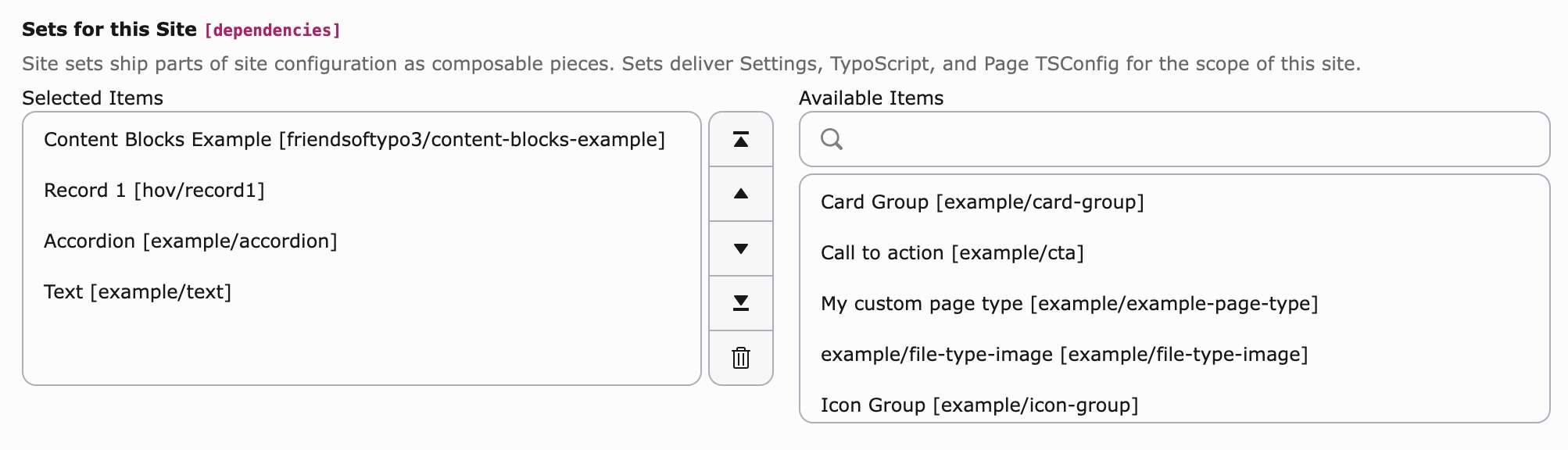
If you want to manage your dependencies without a GUI, you can of course set your needed sets manually.
name: my-vendor/my-set
label: My Set
dependencies:
  - example/card-group
- example/ctaSite Set Extension Bundles
Adding each Content Block individually would be a tedious task. Therefore, Content Blocks ships Site Set bundles, which contain all Content Blocks defined within an extension. Those have a defined naming schema.
Extension name: my_ ->
myextension/
For the vendor part the extension name is taken and has its underscores removed. The name is always "content-blocks-bundle".
TypoScript / page TSconfig autoloading
This works the same, as for normal Site Sets. If you place a setup.
or a page. file within your Content Blocks folder, those will be
automatically included whenever the Site Set is loaded for the current Site.
Note
The autoloading is not global. It is a scoped include for the site, which depends on the Content Block. If your Content Block is not included in any site, no TypoScript will be loaded (except the base rendering definition).
Backend visibility
If no Content Block is included in a Site, all Content Blocks are visible in the backend. But if there is at least one included, only the included ones are displayed in various areas of the backend. Those are:
- New Content Element Wizard
- Record Type Selector (Edit view)
- New Record view
Page Types can not be hidden this way, as they are not bound to a site.