OpenID Authentication

Extension key

openid

Package name

friendsoftypo3/openid

Version

12.0

Language

en

Author

Dmitry Dulepov, Markus Klein & contributors

License

This document is published under the Open Content License.

Rendered

Wed, 07 May 2025 11:29:49 +0000


This extension provides OpenID authentication for the TYPO3 backend, which facilitates SSO across multiple websites.


Table of Contents:
Introduction

What does it do?

This extension provides OpenID authentication for the Backend. OpenID allows to authenticate on many web sites using a single registration at the OpenID provider. There are several OpenID providers on the Internet. Such major companies and sites as AOL, Blogger, Flickr, LiveJournal, Technoratti and Yahoo provide OpenID services (the full list can be found here ). Once registered with one OpenID provider, user can use his OpenID on any OpenID–enabled web site.

Screenshots

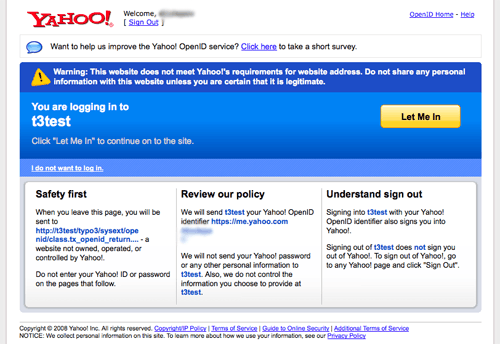
TYPO3 uses the same login forms for standard and OpenID authentication. When user enters his OpenID, he is transferred to the OpenID provider web site, where he should confirm his intention to authenticate with TYPO3 web site. OpenID provider can ask for the password. After conforming user is transferred back to the TYPO3 web site. Here is how Yahoo OpenID screen looks like:

Yahoo! OpenID screen

OpenID authentication via Yahoo!

This screenshot was taken on the developer's computer. Here Yahoo warns that the site possibly is not trustworthy.

Users manual

There are no user–configurable options for this extension. Once installed OpenID authentication becomes available to users automatically.

When using OpenID for authentication, user needs only to write his OpenID in the "User name" field. The password box is ignored when using OpenID. If login form requires a password, user can type any random sequence of characters there. These characters will not affect OpenID authentication.

Normal authentication works in parallel with OpenID authentication: user can use OpenID or their normal TYPO3 login. Administrators can force users to use OpenID only by generating random long passwords for users.

Administration

The extension should be installed using composer:

composer require "friendsoftypo3/openid"
Copied!

After installation OpenID identifiers should be added to the Backend user records who need to authenticate themselves using OpenID. See the "Configuration" section later in this manual for more information.

Configuration

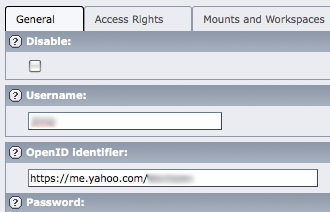
Backend users can login using OpenID only and only if they have OpenID configured in their records. Backend users have their OpenID below the regular user identifier:

Backend User configuration

Setting the OpenID identifier for a backend user

User identifiers must follow certain rules.

Identifiers for Backend users must be unique in the whole database. If identifier is not unique, TYPO3 will silently add a number to the newly added OpenID thus ensuring that only one user has that OpenID. The duplicate OpenID will become invalid.

Identifiers for Frontend users are unique within page. Two users on the same page may not have the same OpenID. But two users on different pages can have the same OpenID.

Troubleshooting

Login fails since TYPO3 8.7.31 and 9.5.14

These versions of TYPO3 introduced a SameSite cookies support, which broke OpenID authentication. The fix is to make sure that you have the following in your web/typo3conf/LocalConfiguration.php:

return [
    'BE' => [
        'cookieSameSite' => 'lax',
        ...
Copied!

Sitemap

Index