|
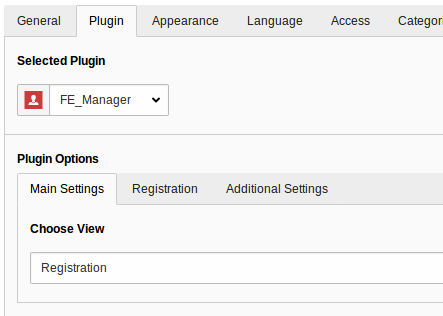
Main Settings
|
Choose View
|
Choose between Registration, Edit, List and Detail. This is the main setting for the output in Frontend.
|
[empty]
|
|
Registration
|
Select Fields for New-Form (empty = all fields)
|
Define which fields should be shown in the registration form in Frontend. Empty shows all fields.
|
[empty]
|
|
Registration
|
Select Usergroups for new Users
|
Define the usergroup(s) for the new registered user. Alternative define it via TypoScript or let the User decide which group is the right one.
|
[empty]
|
|
Registration
|
Registration must be confirmed from sender
|
If you check this field, the user has to confirm his registration with a link in a mail. This Double-Opt-In ensures that the email is correct.
|
|
|
Registration
|
Registration must be confirmed from an admin (add one ore more emails)
|
Add one ore more emails (one per line) if the admin should confirm the registration. This can be combined with the “User Confirmation” field.
|
[empty]
|
|
Registration
|
Notify admin on registration (add one or more emails)
|
Notify one or more email receivers (one per line) if a new user was completely registered
|
[empty]
|
|
Edit
|
Select Fields for Edit-Form (empty = all fields)
|
Define which fields should be shown in the profile-update-form in Frontend. Empty shows all fields.
|
[empty]
|
|
Edit
|
Show Delete Button in Edit Form
|
Renders a delete-Profile-Button in Edit view if checked.
|
|
|
Edit
|
Profile update must be confirmed from an admin (add one ore more emails)
|
Add one ore more emails (one per line) if the admin should confirm the profile-update.
|
[empty]
|
|
Edit
|
Notify admin on Profile update (add one ore more emails)
|
Add one ore more emails (one per line) if the admin should be informed on a profile-update.
|
[empty]
|
|
Listview
|
Show Searchfield
|
Displays a Search in Frontend
|
|
|
Listview
|
Limit
|
Set a maximum limit for the FE-List
|
[empty]
|
|
Listview
|
Order by
|
Order by a fe_users field
|
Lastname
|
|
Listview
|
Sorting
|
Order Ascending or Descending
|
Ascending
|
|
Listview
|
Show from usergroup (empty = show all)
|
Filter List by one or more Usergroups
|
[empty]
|
|
Detailview
|
User to show
|
Select one user for the Detailview. This can be left empty if this view is only visited from listview.
|
[empty]
|
|
Invitation
|
Restrict "Add Invitation" to one or more Usergroups (empty = No Restriction)
|
Restrict invitation form to a usergroup. Only users of this groups can invite new users (maybe an admin usergroup).
|
[empty]
|
|
Invitation
|
Select Fields for invitation-Form (empty = all fields)
|
Define which fields should be shown in the invitation form in Frontend. Empty shows all fields.
|
[empty]
|
|
Invitation
|
Select Usergroups for new Users
|
Define the usergroup(s) for the new registered user. Alternative define it via TypoScript or let the User decide which group is the right one.
|
[empty]
|
|
Invitation
|
Notify admin on step 1 (add one ore more emails)
|
Add one ore more emails (one per line) if the admin should be informed on a user creation in step 1.
|
[empty]
|
|
Invitation
|
Notify admin if user sets a password (add one ore more emails)
|
Add one ore more emails (one per line) if the admin should be informed on a user creation in step 2 (password set by user).
|
[empty]
|
|
Additional Settings
|
Add an internal link to a page with terms and conditions
|
Will be used for rendering the checkbox that asks the visitor to check that he/she accepted the terms for the registration
|
[empty]
|