femanager 

Extension key

femanager

Package name

in2code/femanager

Version

8.2.0

Language

en,de

Author

Alex Kellner, Stefan Busemann, Daniel Hoffmann

Repository

https://github.com/in2code-de/femanager

Community-Support

https://typo3.slack.com/messages/C0NAHDRJB/

Rendered

Tue, 03 Mar 2026 17:37:08 +0000


Femanager offers an extensive frontend user registration including management functions. It is based on a modern TYPO3 version as well as Extbase and Fluid and offers a variety of extension options.


Table of Contents:

Introduction 

What does it do? | Requirements | Suggestions |

What does it do? 

Femanager is an extension for a TYPO3 Frontend-User Registration. Maybe you know sr_feuser_register but you want to use a more modern extension, give femanager a try.

This extension basicly brings an easy-to-use frontend-user-registration with a profile manager to your system. In addition femanager was developed to be very flexible and to bring a lot of features out of the box.

Note: Login and a I forgot my password function is part of the core and not part of femanager.

Requirements 

  • TYPO3 12.4
  • Extbase / Fluid
  • Best use with jQuery and bootstrap

Suggestions 

  • static_info_tables (to show localized countryselection)
  • sr_freecap (captcha for a spam prevention)

Installation and Configuration 

Quick Guide | Step by Step |

Quick Guide 

  1. Get it via composer composer require in2code/femanager OR
  2. Import extension from TYPO3 Extension Repository (TER)
  3. Make your extension configuration in the Backend Module "Settings"
  4. Include static template to your main TypoScript template
  5. Make your configuration in the Constants Editor (e.g. include jQuery or Twitter Bootstrap)
  6. Add a new page with the Frontend Plugin and make your settings (e.g. for Registration)
  7. Don't forget to set the startpage in the Content Element (the page where the fe_users should be stored)
  8. Setup the hashing algorithm in the TypoScript Setup (see settings passwordSave)
  9. It's recommended to use https on the page with registration form, to secure registration and validation via AJAX
  10. Done

Step by Step 

Extension Configuration 

Settings 


Property

Data Type

Description

Default Value

disableModule

boolean

Disable Backend Module: You can deactivate the Backend Module if you don't need it

enableConfirmationModule

boolean

Enable confirmation view: Enable a special confirmation view in Backend Module

disableLog

boolean

Disable Log: If you don't want to save each change of an fe_user, you can disable the logfile

Plugin Configuration 

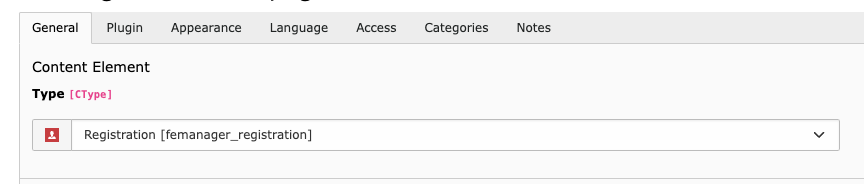
Since v12 there are now different frontend plugins for the different views. You can choose between: - Registration (femanager_registration) - Edit (femanager_edit) - List (femanager_list) - Detail (femanager_detail) - Invitation (femanager_invitation) - Resend Confirmation Mail (femanager_resendconfirmationmail)

Images 

Plugin Configuration

Explanation Plugin Settings - Registration 

Tab

Field Name

Description

Default Value

Registration

Select Fields for New-Form (empty = all fields)

Define which fields should be shown in the registration form in Frontend. Empty shows all fields.

[empty]

Registration

Select Usergroups for new Users

Define the usergroup(s) for the new registered user. Alternative define it via TypoScript or let the User decide which group is the right one.

[empty]

Registration

Registration must be confirmed from sender

If you check this field, the user has to confirm his registration with a link in a mail. This Double-Opt-In ensures that the email is correct.

Registration

Registration must be confirmed from an admin (add one ore more emails)

Add one ore more emails (one per line) if the admin should confirm the registration. This can be combined with the “User Confirmation” field.

[empty]

Registration

Notify admin on registration (add one or more emails)

Notify one or more email receivers (one per line) if a new user was completely registered

[empty]

Additional Settings

Page with terms and conditions

Choose the page where your terms and conditions are stored.

[empty]

Explanation Plugin Settings - Edit 

Field Name

Description

Default Value

Select Fields for Edit-Form (empty = all fields)

Define which fields should be shown in the profile-update-form in Frontend. Empty shows all fields.

[empty]

Show Delete Button in Edit Form

Renders a delete-Profile-Button in Edit view if checked.

Profile update must be confirmed from an admin (add one ore more emails)

Add one ore more emails (one per line) if the admin should confirm the profile-update.

[empty]

Notify admin on Profile update (add one ore more emails)

Add one ore more emails (one per line) if the admin should be informed on a profile-update.

[empty]

Explanation Plugin Settings - List 

Field Name

Description

Default Value

Show Searchfield

Displays a Search in Frontend

Limit

Set a maximum limit for the FE-List

[empty]

Order by

Order by a fe_users field

Lastname

Sorting

Order Ascending or Descending

Ascending

Show from usergroup (empty = show all)

Filter List by one or more Usergroups

[empty]

Explanation Plugin Settings - Detail 

Field Name

Description

Default Value

User to show

Select one user for the detail view. This can be left empty if this view is only visited from list view.

[empty]

Explanation Plugin Settings - Invitation 

Tab

Field Name

Description

Default Value

Invitation

Restrict "Add Invitation" to one or more Usergroups (empty = No Restriction)

Restrict invitation form to a usergroup. Only users of this groups can invite new users (maybe an admin usergroup).

[empty]

Invitation

Select Fields for invitation-Form (empty = all fields)

Define which fields should be shown in the invitation form in Frontend. Empty shows all fields.

[empty]

Invitation

Select Usergroups for new Users

Define the usergroup(s) for the new registered user. Alternative define it via TypoScript or let the User decide which group is the right one.

[empty]

Invitation

Notify admin on step 1 (add one ore more emails)

Add one ore more emails (one per line) if the admin should be informed on a user creation in step 1.

[empty]

Invitation

Notify admin if user sets a password (add one ore more emails)

Add one ore more emails (one per line) if the admin should be informed on a user creation in step 2 (password set by user).

[empty]

Additional Settings

Add an internal link to a page with terms and conditions

Will be used for rendering the checkbox that asks the visitor to check that he/she accepted the terms for the registration

[empty]

FE Users Record 

Images 

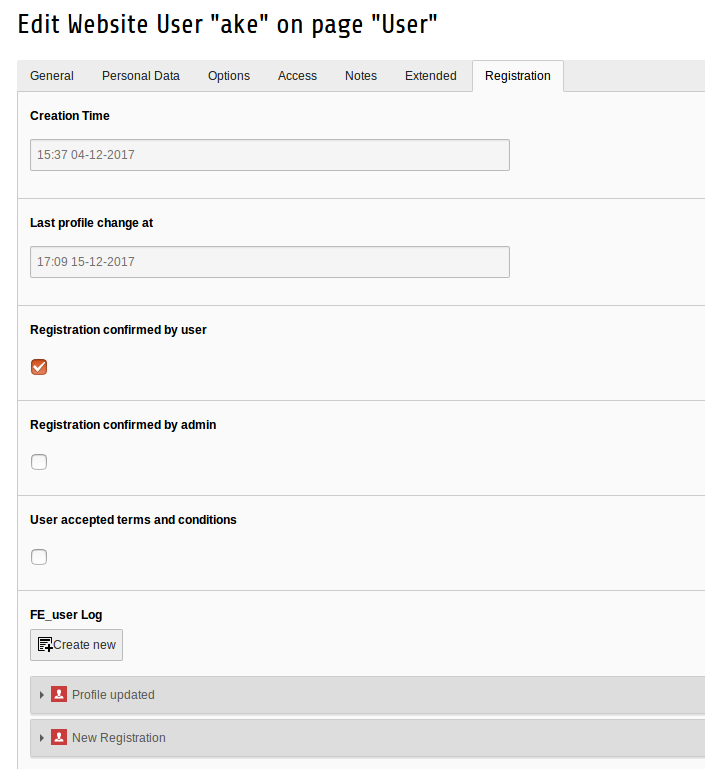
fe_users Record

New Fields in FE-Users Records 

Tab

Field Name

Description

Default Value

Registration

Creation Time

Date and Time when this profile was created.

Registration

Last profile change at

Date and Time when this profile was changed at the last time.

Registration

Registration confirmed by user

Was this profile confirmed by the user?

Registration

Registration confirmed by admin

Was this profile confirmed by the admin?

Registration

FE_user Log

Logs every femanager-change on this profile

[empty]

Registration

Change Request

This field is needed, if the admin has to confirm a profile update. All fields that should be updated will be stored with an XML in this field.

[empty]

TypoScript Configuration 

Images 

Constants Editor

Constants 

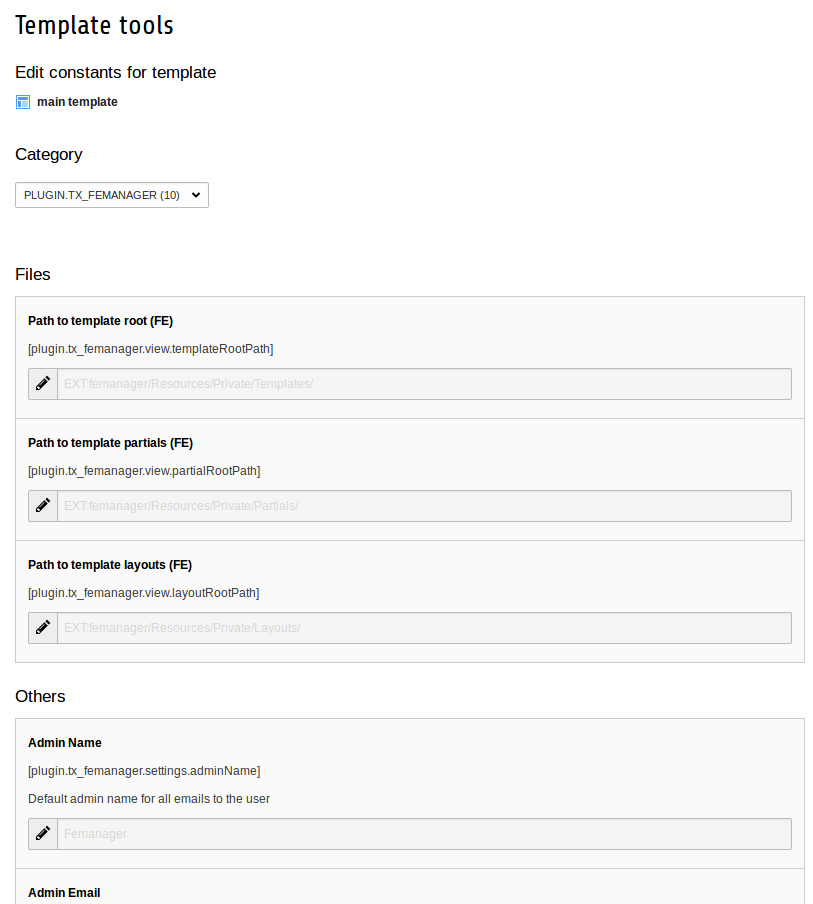
You always find this constants in the file EXT:femanager/Configuration/TypoScript/Main/constants.txt

Constants can be easily changed with the Template Backend-Module (Constants Editor)

There are only a couple of constants in femanager. This is only for the main settings. Please have a look into the TypoScript Setup, if you want to configure more stuff.

TypoScript 

plugin.tx_femanager {
    view {
        # cat=plugin.tx_femanager/file; type=string; label= Path to template root (FE)
        templateRootPath = EXT:femanager/Resources/Private/Templates/

        # cat=plugin.tx_femanager/file; type=string; label= Path to template partials (FE)
        partialRootPath = EXT:femanager/Resources/Private/Partials/

        # cat=plugin.tx_femanager/file; type=string; label= Path to template layouts (FE)
        layoutRootPath = EXT:femanager/Resources/Private/Layouts/
    }
    persistence {
        # cat=plugin.tx_femanager//a; type=int+; label= Default storage PID
        storagePid =
    }
    settings {
        # cat=plugin.tx_femanager//0100; type=text; label= Admin Name: Default admin name for all emails to the user
        adminName = Femanager

        # cat=plugin.tx_femanager//0101; type=text; label= Admin Email: Default admin email for all emails to the user
        adminEmail = Femanager@domain.org

        # cat=plugin.tx_femanager//0200; type=text; label= Upload folder: Define where to save images of the users
        uploadFolder = fileadmin/users/

        # cat=plugin.tx_femanager//0900; type=boolean; label= Include jQuery: Load and implement jQuery from external source (googleapis.com)
        jQuery = 0

        # cat=plugin.tx_femanager//0910; type=boolean; label= Include Twitter Bootstrap JS: Load and implement Twitter Bootstrap JavaScript from external source (bootstrapcdn.com)
        bootstrap = 0

        # cat=plugin.tx_femanager//0920; type=boolean; label= Include Twitter Bootstrap CSS: Load and implement Twitter Bootstrap CSS from external source (bootstrapcdn.com)
        bootstrapCSS = 0
    }
}
Copied!

Setup 

You always find this TypoScript in the file EXT:femanager/Configuration/TypoScript/Main/setup.txt

With TypoScript, you are able to:

  • Configure Clientside and Serverside Validation
  • Overwrite any Mail setting
  • Prefill Formfields
  • Save the values to another table (e.g. tt_address)
  • Send values to a third-party-software (e.g. a CRM like salesforce)
  • And much more...

All settings can be configured directly with TypoScript Setup. Please see all possibilities below:

TypoScript 

plugin.tx_femanager {
    view {
        templateRootPaths {
            0 = EXT:femanager/Resources/Private/Templates/
            1 = {$plugin.tx_femanager.view.templateRootPath}
        }
        partialRootPaths {
            0 = EXT:femanager/Resources/Private/Partials/
            1 = {$plugin.tx_femanager.view.partialRootPath}
        }
        layoutRootPaths {
            0 = EXT:femanager/Resources/Private/Layouts/
            1 = {$plugin.tx_femanager.view.layoutRootPath}
        }
    }
    persistence {
        storagePid = {$plugin.tx_femanager.persistence.storagePid}
    }
    features {
        #skipDefaultArguments = 1
        requireCHashArgumentForActionArguments = 0
    }

    settings {

        ###################################
        # Settings for CREATE user profiles
        ###################################
        new {
            # take username and copy it to the email field (so email field is not necessary in FE)
#			fillEmailWithUsername = 1

            # login after profile creation (don't work if admin confirmation is turned on)
            login = 1

            # prefilling (empty) input fields with values from TypoScript
            prefill {
#				username = TEXT
#				username.value = ExampleUsername

#				email = TEXT
#				email.value = test@in2code.de
            }

            # redirect user (or admin if adminconfirmation) after profile creation (could be a PID, URL or fileadmin-Link)
#			redirect = TEXT
#			redirect {
#				typolink {
#					parameter = 1
#					returnLast = url
#					#linkAccessRestrictedPages = 1
#				}
#			}

            # redirect user after profile creation request (only if user confirmation is activated) (could be a PID, URL or fileadmin-Link)
#			requestRedirect = TEXT
#			requestRedirect {
#				typolink {
#					parameter = 1
#					returnLast = url
#					#linkAccessRestrictedPages = 1
#				}
#			}

            # redirect user after user clicks confirmation link in email (only if user confirmation is activated) (could be a PID, URL or fileadmin-Link)
#			userConfirmationRedirect = TEXT
#			userConfirmationRedirect {
#				typolink {
#					parameter = 1
#					returnLast = url
#					#linkAccessRestrictedPages = 1
#				}
#			}

            # redirect user after user clicks refuse link in confirmation email (only if user confirmation is activated) (could be a PID, URL or fileadmin-Link)
#			userConfirmationRefusedRedirect = TEXT
#			userConfirmationRefusedRedirect {
#				typolink {
#					parameter = 1
#					returnLast = url
#					#linkAccessRestrictedPages = 1
#				}
#			}

            # redirect admin after admin clicks confirmation link in email (only if admin confirmation is activated) (could be a PID, URL or fileadmin-Link)
#			adminConfirmationRedirect = TEXT
#			adminConfirmationRedirect {
#				typolink {
#					parameter = 1
#					returnLast = url
#					#linkAccessRestrictedPages = 1
#				}
#			}

            # redirect admin after admin clicks refuse link in email (only if admin confirmation is activated) (could be a PID, URL or fileadmin-Link)
#			adminConfirmationRefusedRedirect = TEXT
#			adminConfirmationRefusedRedirect {
#				typolink {
#					parameter = 1
#					returnLast = url
#					#linkAccessRestrictedPages = 1
#				}
#			}

            # redirect admin after admin clicks silent-refuse link in email (only if admin confirmation is activated) (could be a PID, URL or fileadmin-Link)
#			adminConfirmationRefusedSilentRedirect = TEXT
#			adminConfirmationRefusedSilentRedirect {
#				typolink {
#					parameter = 1
#					returnLast = url
#					#linkAccessRestrictedPages = 1
#				}
#			}

            # validation of user input values
            # possible validations for each field are: required, email, min, max, intOnly, lettersOnly, unicodeLettersOnly, uniqueInPage, uniqueInDb, date, mustInclude(number,letter,special,space,uppercase), mustNotInclude(number,letter,uppercase,special,space), inList(1,2,3), captcha, sameAs(password)
            # see manual for an example how to add custom serverside and clientside validation
            validation {
                # Enable clientside Formvalidation (JavaScript)
                _enable.client = 1

                # Enable serverside Formvalidation (PHP)
                _enable.server = 1

                username {
                    required = 1
                    uniqueInDb = 1
                    mustNotInclude = space
                }
                email {
                    required = 1
                    email = 1
                    #uniqueInPage = 1
                }
                password {
                    required = 1
                    #min = 10
                    #mustInclude = number,letter,special
                }
                password_repeat {
                    required = 1
                    sameAs = password
                }
                usergroup {
                    #inList = 1,2,3
                }
                captcha {
                    # requires installation of sr_freecap
#					captcha = 1
                }
            }


            # All email settings within the creation process
            email {

                # Email for User confirmation (User must confirm his Email address)
                createUserConfirmation {
                    ##########################
                    # Set values (overwrite)
                    ##########################

                    # (de)activate email completely
                    _enable = TEXT
                    _enable.value = 1

                    # Overwrite Receivers (please fill both)
                    receiver {
                        email = TEXT
                        email.value =
                        name = TEXT
                        name.value =
                    }

                    # Overwrite Senders (please fill both)
                    sender {
                        email = TEXT
                        email.value = {$plugin.tx_femanager.settings.adminEmail}
                        name = TEXT
                        name.value = {$plugin.tx_femanager.settings.adminName}
                    }

                    # Overwrite Subject
                    subject = TEXT
                    subject.data = LLL:EXT:femanager/Resources/Private/Language/locallang.xlf:emailCreateUserConfirmationSubject

                    # Set CC receivers (comma separated list for multiple CC receivers)
                    cc = TEXT
                    cc.value =

                    # Set reply to receivers (comma separated list for multiple reply to receivers)
                    replyTo = TEXT
                    replyTo.value =

                    # Set mail priority from 1 to 5
                    priority = TEXT
                    priority.value =

                    # Add Attachment (separate each with comma)
#					attachments = COA
#					attachments {
#						10 = TEXT
#						10.value = fileadmin/file.pdf
#						10.wrap = |,

#						20 = TEXT
#						20.value = fileadmin/file2.pdf
#						20.wrap = |,
#					}

                    # Add Embed Images (separate each with comma) - can be used in mail with <img src="{embedImages.0}" /> and so on...
#					embedImage = COA
#					embedImage {
#						10 = FILES
#						10 {
#							references {
#								table = fe_users
#								fieldName = image
#								uid.field = uid
#							}

#							begin = 0
#							maxItems = 1

#							renderObj = IMG_RESOURCE
#							renderObj {
#								file.import.dataWrap = {file:current:storage}:{file:current:identifier}
#								file.maxW = 120
#								file.maxH = 120
#							}
#						}

#						20 = TEXT
#						20.wrap = ,|
#						20.value = fileadmin/image.jpg
#					}
                }

                # Email for Admin confirmation (Admin must confirm registration in an email)
                createAdminConfirmation {
                    ##########################
                    # Set values (overwrite)
                    ##########################

                    # (de)activate email completely
                    _enable = TEXT
                    _enable.value = 1

                    # Overwrite Receivers (please fill both)
                    receiver {
                        email = TEXT
                        email.value =
                        name = TEXT
                        name.value = {$plugin.tx_femanager.settings.adminName}
                    }

                    # Overwrite Senders (please fill both)
                    sender {
                        email = TEXT
                        email.value =
                        name = TEXT
                        name.value =
                    }

                    # Overwrite Subject
                    subject = TEXT
                    subject.data = LLL:EXT:femanager/Resources/Private/Language/locallang.xlf:emailCreateAdminConfirmationSubject

                    # Set CC receivers (comma separated list for multiple CC receivers)
                    cc = TEXT
                    cc.value =

                    # Set reply to receivers (comma separated list for multiple reply to receivers)
                    replyTo = TEXT
                    replyTo.value =

                    # Set mail priority from 1 to 5
                    priority = TEXT
                    priority.value =

                    # Add Attachment (separate each with comma)
#					attachments = COA
#					attachments {
#						10 = TEXT
#						10.value = fileadmin/file.pdf
#						10.wrap = |,

#						20 = TEXT
#						20.value = fileadmin/file2.pdf
#						20.wrap = |,
#					}

                    # Add Embed Images (separate each with comma) - can be used in mail with <img src="{embedImages.0}" /> and so on...
                    embedImage = COA
                    embedImage {
                        10 = FILES
                        10 {
                            references {
                                table = fe_users
                                fieldName = image
                                uid.field = uid
                            }

                            begin = 0
                            maxItems = 1

                            renderObj = IMG_RESOURCE
                            renderObj {
                                file.import.dataWrap = {file:current:storage}:{file:current:identifier}
                                file.maxW = 120
                                file.maxH = 120
                            }
                        }

#						20 = TEXT
#						20.wrap = ,|
#						20.value = fileadmin/image.jpg
                    }
                }

                # Email to user to confirm his new profile (with and without admin confirmation)
                createUserNotify {
                    ##########################
                    # Set values (overwrite)
                    ##########################

                    # (de)activate email completely
                    _enable = TEXT
                    _enable.value = 0

                    # Overwrite Receivers (please fill both)
                    receiver {
                        email = TEXT
                        email.value =
                        name = TEXT
                        name.value =
                    }

                    # Overwrite Senders (please fill both)
                    sender {
                        email = TEXT
                        email.value = {$plugin.tx_femanager.settings.adminEmail}
                        name = TEXT
                        name.value = {$plugin.tx_femanager.settings.adminName}
                    }

                    # Overwrite Subject
                    subject = TEXT
                    subject.data = LLL:EXT:femanager/Resources/Private/Language/locallang.xlf:emailCreateUserNotifySubject

                    # Set CC receivers (comma separated list for multiple CC receivers)
                    cc = TEXT
                    cc.value =

                    # Set reply to receivers (comma separated list for multiple reply to receivers)
                    replyTo = TEXT
                    replyTo.value =

                    # Set mail priority from 1 to 5
                    priority = TEXT
                    priority.value =

                    # Add Attachment (separate each with comma)
#					attachments = COA
#					attachments {
#						10 = TEXT
#						10.value = fileadmin/file.pdf
#						10.wrap = |,

#						20 = TEXT
#						20.value = fileadmin/file2.pdf
#						20.wrap = |,
#					}

                    # Add Embed Images (separate each with comma) - can be used in mail with <img src="{embedImages.0}" /> and so on...
#					embedImage = COA
#					embedImage {
#						10 = FILES
#						10 {
#							references {
#								table = fe_users
#								fieldName = image
#								uid.field = uid
#							}

#							begin = 0
#							maxItems = 1

#							renderObj = IMG_RESOURCE
#							renderObj {
#								file.import.dataWrap = {file:current:storage}:{file:current:identifier}
#								file.maxW = 120
#								file.maxH = 120
#							}
#						}

#						20 = TEXT
#						20.wrap = ,|
#						20.value = fileadmin/image.jpg
#					}
                }

                # Email for User notify, if admin refused profile registration
                createUserNotifyRefused {
                    ##########################
                    # Set values (overwrite)
                    ##########################

                    # (de)activate email completely
                    _enable = TEXT
                    _enable.value = 1

                    # Overwrite Receivers (please fill both)
                    receiver {
                        email = TEXT
                        email.value =
                        name = TEXT
                        name.value =
                    }

                    # Overwrite Senders (please fill both)
                    sender {
                        email = TEXT
                        email.value = {$plugin.tx_femanager.settings.adminEmail}
                        name = TEXT
                        name.value = {$plugin.tx_femanager.settings.adminName}
                    }

                    # Overwrite Subject
                    subject = TEXT
                    subject.data = LLL:EXT:femanager/Resources/Private/Language/locallang.xlf:emailCreateUserNotifyRefusedSubject

                    # Set CC receivers (comma separated list for multiple CC receivers)
                    cc = TEXT
                    cc.value =

                    # Set reply to receivers (comma separated list for multiple reply to receivers)
                    replyTo = TEXT
                    replyTo.value =

                    # Set mail priority from 1 to 5
                    priority = TEXT
                    priority.value =

                    # Add Attachment (separate each with comma)
#					attachments = COA
#					attachments {
#						10 = TEXT
#						10.value = fileadmin/file.pdf
#						10.wrap = |,

#						20 = TEXT
#						20.value = fileadmin/file2.pdf
#						20.wrap = |,
#					}

                    # Add Embed Images (separate each with comma) - can be used in mail with <img src="{embedImages.0}" /> and so on...
#					embedImage = COA
#					embedImage {
#						10 = FILES
#						10 {
#							references {
#								table = fe_users
#								fieldName = image
#								uid.field = uid
#							}

#							begin = 0
#							maxItems = 1

#							renderObj = IMG_RESOURCE
#							renderObj {
#								file.import.dataWrap = {file:current:storage}:{file:current:identifier}
#								file.maxW = 120
#								file.maxH = 120
#							}
#						}

#						20 = TEXT
#						20.wrap = ,|
#						20.value = fileadmin/image.jpg
#					}
                }

                # Email for Admin notify, if profile registration
                createAdminNotify {
                    ##########################
                    # Set values (overwrite)
                    ##########################

                    # (de)activate email completely
                    _enable = TEXT
                    _enable.value = 1

                    # Overwrite Receivers (please fill both)
                    receiver {
                        email = TEXT
                        email.value =
                        name = TEXT
                        name.value = {$plugin.tx_femanager.settings.adminName}
                    }

                    # Overwrite Senders (please fill both)
                    sender {
                        email = TEXT
                        email.value =
                        name = TEXT
                        name.value =
                    }

                    # Overwrite Subject
                    subject = TEXT
                    subject.data = LLL:EXT:femanager/Resources/Private/Language/locallang.xlf:emailCreateNotifySubject

                    # Set CC receivers (comma separated list for multiple CC receivers)
                    cc = TEXT
                    cc.value =

                    # Set reply to receivers (comma separated list for multiple reply to receivers)
                    replyTo = TEXT
                    replyTo.value =

                    # Set mail priority from 1 to 5
                    priority = TEXT
                    priority.value =

                    # Add Attachment (separate each with comma)
#					attachments = COA
#					attachments {
#						10 = TEXT
#						10.value = fileadmin/file.pdf
#						10.wrap = |,

#						20 = TEXT
#						20.value = fileadmin/file2.pdf
#						20.wrap = |,
#					}

                    # Add Embed Images (separate each with comma) - can be used in mail with <img src="{embedImages.0}" /> and so on...
                    embedImage = COA
                    embedImage {
                        10 = FILES
                        10 {
                            references {
                                table = fe_users
                                fieldName = image
                                uid.field = uid
                            }

                            begin = 0
                            maxItems = 1

                            renderObj = IMG_RESOURCE
                            renderObj {
                                file.import.dataWrap = {file:current:storage}:{file:current:identifier}
                                file.maxW = 120
                                file.maxH = 120
                            }
                        }

#						20 = TEXT
#						20.wrap = ,|
#						20.value = fileadmin/image.jpg
                    }
                }
            }

            # overwrite any user values with TypoScript
            forceValues {
                # Overwrite initally (default)
                beforeAnyConfirmation {
                    # Usergroups can be set with a commaseparated list
#					usergroup = TEXT
#					usergroup.value = 2

                    # Set a fix value
#					email = TEXT
#					email.value = service@in2code.de
                }

                # Overwrite on user confirmation (only if user confirmation was activated)
                onUserConfirmation {
                    # Usergroups can be set with a commaseparated list
#					usergroup = TEXT
#					usergroup.value = 3

                    # Set a fix value
#					company = TEXT
#					company.value = in2code.de
                }

                # Overwrite on admin confirmation (only if admin confirmation was activated)
                onAdminConfirmation {
                    # Usergroups can be set with a commaseparated list
#					usergroup = TEXT
#					usergroup.value = 4

                    # Set a fix value
#					www = TEXT
#					www.value = http://www.in2code.de
                }
            }

            # Send Form values via POST to another system (e.g. CRM like salesforce or eloqua)
            sendPost {
                # Activate sendPost (0/1)
#				_enable = TEXT
#				_enable.value = 0

                # Target URL for POST values (like http://www.target.com/target.php)
#				targetUrl = https://www.salesforce.com/servlet/servlet.WebToLead?encoding=UTF-8

                # build your post datas like &param1=value1&param2=value2
#				data = COA
#				data {
#					10 = TEXT
#					10 {
#						# value from field {username}
#						field = username
#						wrap = &username=|
#                stdWrap.rawUrlEncode = 1
#					}

#					20 = TEXT
#					20 {
#						# value from field {email}
#						field = email
#						wrap = &email=|
#                stdWrap.rawUrlEncode = 1
#					}

#					30 = TEXT
#					30 {
#						# value from field {title}
#						field = title
#						wrap = &title=|
#                stdWrap.rawUrlEncode = 1
#					}
#				}

                # activate debug mode - shows all configuration from curl settings (needs extension devlog)
#				debug = 0
            }

            # Save user values to one or more other tables (e.g. tt_address or something else)
            #       With .field=[fieldname] you have access to the user object
            #       Possible values are: uid, username, address, city, company, country, email, fax, firstName, lastName, middleName, name, password, telephone, fax, title, www, zip and uid_[tablename] (to have access to the uid of one of the last loop)
            storeInDatabase {
#				tt_address {
#					_enable = TEXT
#					_enable.value = 0

#					pid = TEXT
#					pid.value = 21

#					name = TEXT
#					name.field = username

#					email = TEXT
#					email.field = email

#					first_name = TEXT
#					first_name.field = firstName

#					last_name = TEXT
#					last_name.field = lastName
#				}
            }

            misc {
                # Remove Usergroups from Usergroup Selection in Frontend
#				removeFromUserGroupSelection = 2,3

                # initially save password as hash ("Argon2i", "Bcrypt", "Pbkdf2", "Phpass", "Blowfish", "md5", "none" ("sha1" for TYPO3 V8) or empty for extension saltedpasswords - if installed
#				passwordSave = md5

                # Configuration for autogenerated Username and Password
                autogenerate {
                    username {
                        # Length
                        length = 6

                        # Allow uppercase Characters
                        addUpperCase = 0

                        # Allow special Characters
                        addSpecialCharacters = 0
                    }
                    password {
                        # Length
                        length = 10

                        # Allow uppercase Characters
                        addUpperCase = 1

                        # Allow special Characters
                        addSpecialCharacters = 1
                    }
                }
            }
        }


        ###################################
        # Settings for UPDATE user profiles
        ###################################
        edit {
            # take username and copy it to the email field (so email field is not nessesary in FE)
            #fillEmailWithUsername = 1

            # redirect user (or admin if adminconfirmation) after profile update
#			redirect = TEXT
#			redirect {
#				typolink {
#					parameter = 1
#					returnLast = url
#					#linkAccessRestrictedPages = 1
#				}
#			}

            # redirect user after profile update request (only if admin confirmation is activated)
#			requestRedirect = TEXT
#			requestRedirect {
#				typolink {
#					parameter = 1
#					returnLast = url
#					#linkAccessRestrictedPages = 1
#				}
#			}

            # prefilling (empty) input fields with values from TypoScript
            prefill {
#				username = TEXT
#				username.value = ExampleUsername

#				email = TEXT
#				email.value = test@in2code.de
            }

            # validation of user input values
            # possible validations for each field are: required, email, min, max, intOnly, lettersOnly, unicodeLettersOnly, uniqueInPage, uniqueInDb, date, mustInclude(number,letter,special,space), mustNotInclude(number,letter,special,space), inList(1,2,3), captcha, sameAs(password)
            validation {
                # Enable clientside Formvalidation (JavaScript)
                _enable.client = 1

                # Enable serverside Formvalidation (PHP)
                _enable.server = 1

                username {
                    required = 1
                    mustNotInclude = space
                }
                email {
                    required = 1
                    email = 1
                }
                password {
                    required = 1
                    #min = 10
                    #mustInclude = number,letter,special
                }
                password_repeat {
                    required = 1
                    sameAs = password
                }
                usergroup {
                    #inList = 1,2,3
                }
                captcha {
                    # requires installation of sr_freecap
#					captcha = 1
                }
            }

            # All email settings within the update process
            email {

                # Email for admin if user requests update (only if confirmation by admin is activated)
                updateRequest {
                    ##########################
                    # Set values (overwrite)
                    ##########################

                    # (de)activate email completely
                    _enable = TEXT
                    _enable.value = 1

                    # Overwrite Receivers (please fill both)
                    receiver {
                        email = TEXT
                        email.value =
                        name = TEXT
                        name.value =
                    }

                    # Overwrite Senders (please fill both)
                    sender {
                        email = TEXT
                        email.value =
                        name = TEXT
                        name.value = {$plugin.tx_femanager.settings.adminName}
                    }

                    # Overwrite Subject
                    subject = TEXT
                    subject.data = LLL:EXT:femanager/Resources/Private/Language/locallang.xlf:emailUpdateRequestSubject

                    # Set CC receivers (comma separated list for multiple CC receivers)
                    cc = TEXT
                    cc.value =

                    # Set reply to receivers (comma separated list for multiple reply to receivers)
                    replyTo = TEXT
                    replyTo.value =

                    # Set mail priority from 1 to 5
                    priority = TEXT
                    priority.value =

                    # Add Attachment (separate each with comma)
#					attachments = COA
#					attachments {
#						10 = TEXT
#						10.value = fileadmin/file.pdf
#						10.wrap = |,

#						20 = TEXT
#						20.value = fileadmin/file2.pdf
#						20.wrap = |,
#					}

                    # Add Embed Images (separate each with comma) - can be used in mail with <img src="{embedImages.0}" /> and so on...
#					embedImage = COA
#					embedImage {
#						10 = FILES
#						10 {
#							references {
#								table = fe_users
#								fieldName = image
#								uid.field = uid
#							}

#							begin = 0
#							maxItems = 1

#							renderObj = IMG_RESOURCE
#							renderObj {
#								file.import.dataWrap = {file:current:storage}:{file:current:identifier}
#								file.maxW = 120
#								file.maxH = 120
#							}
#						}

#						20 = TEXT
#						20.wrap = ,|
#						20.value = fileadmin/image.jpg
#					}
                }

                # Email to user if update request was refused by admin
                updateRequestRefused {
                    ##########################
                    # Set values (overwrite)
                    ##########################

                    # (de)activate email completely
                    _enable = TEXT
                    _enable.value = 1

                    # Overwrite Receiver (please fill both)
                    receiver {
                        email = TEXT
                        email.value =
                        name = TEXT
                        name.value =
                    }

                    # Overwrite Senders (please fill both)
                    sender {
                        email = TEXT
                        email.value = {$plugin.tx_femanager.settings.adminEmail}
                        name = TEXT
                        name.value = {$plugin.tx_femanager.settings.adminName}
                    }

                    # Overwrite Subject
                    subject = TEXT
                    subject.data = LLL:EXT:femanager/Resources/Private/Language/locallang.xlf:emailUpdateRequestRefusedSubject

                    # Set CC receivers (comma separated list for multiple CC receivers)
                    cc = TEXT
                    cc.value =

                    # Set reply to receivers (comma separated list for multiple reply to receivers)
                    replyTo = TEXT
                    replyTo.value =

                    # Set mail priority from 1 to 5 (from important to not important)
                    priority = TEXT
                    priority.value =

                    # Add Attachment (separate each with comma)
#					attachments = COA
#					attachments {
#						10 = TEXT
#						10.value = fileadmin/file.pdf
#						10.wrap = |,

#						20 = TEXT
#						20.value = fileadmin/file2.pdf
#						20.wrap = |,
#					}

                    # Add Embed Images (separate each with comma) - can be used in mail with <img src="{embedImages.0}" /> and so on...
#					embedImage = COA
#					embedImage {
#						10 = FILES
#						10 {
#							references {
#								table = fe_users
#								fieldName = image
#								uid.field = uid
#							}

#							begin = 0
#							maxItems = 1

#							renderObj = IMG_RESOURCE
#							renderObj {
#								file.import.dataWrap = {file:current:storage}:{file:current:identifier}
#								file.maxW = 120
#								file.maxH = 120
#							}
#						}

#						20 = TEXT
#						20.wrap = ,|
#						20.value = fileadmin/image.jpg
#					}
                }

                # Email for if update request was refused by admin
                notifyAdmin {
                    ##########################
                    # Set values (overwrite)
                    ##########################

                    # (de)activate email completely
                    _enable = TEXT
                    _enable.value = 1

                    # Overwrite Receiver (please fill both)
                    receiver {
                        email = TEXT
                        email.value =
                        name = TEXT
                        name.value = {$plugin.tx_femanager.settings.adminName}
                    }

                    # Overwrite Senders (please fill both)
                    sender {
                        email = TEXT
                        email.value =
                        name = TEXT
                        name.value =
                    }

                    # Overwrite Subject
                    subject = TEXT
                    subject.data = LLL:EXT:femanager/Resources/Private/Language/locallang.xlf:emailUpdateNotifySubject

                    # Set CC receivers (comma separated list for multiple CC receivers)
                    cc = TEXT
                    cc.value =

                    # Set reply to receivers (comma separated list for multiple reply to receivers)
                    replyTo = TEXT
                    replyTo.value =

                    # Set mail priority from 1 to 5 (from important to not important)
                    priority = TEXT
                    priority.value =

                    # Add Attachment (separate each with comma)
#					attachments = COA
#					attachments {
#						10 = TEXT
#						10.value = fileadmin/file.pdf
#						10.wrap = |,

#						20 = TEXT
#						20.value = fileadmin/file2.pdf
#						20.wrap = |,
#					}

                    # Add Embed Images (separate each with comma) - can be used in mail with <img src="{embedImages.0}" /> and so on...
#					embedImage = COA
#					embedImage {
#						10 = FILES
#						10 {
#							references {
#								table = fe_users
#								fieldName = image
#								uid.field = uid
#							}

#							begin = 0
#							maxItems = 1

#							renderObj = IMG_RESOURCE
#							renderObj {
#								file.import.dataWrap = {file:current:storage}:{file:current:identifier}
#								file.maxW = 120
#								file.maxH = 120
#							}
#						}

#						20 = TEXT
#						20.wrap = ,|
#						20.value = fileadmin/image.jpg
#					}
                }
            }

            # overwrite any user values with TypoScript
            forceValues {
                # Overwrite initally (default) - Note: This values will be updated as soon as the admin confirms the request (if admin confirm is activated)
                beforeAnyConfirmation {
                    # Usergroups can be set with a commaseparated list
#					usergroup = TEXT
#					usergroup.value = 2

                    # Set a fix value
#					email = TEXT
#					email.value = service@in2code.de
                }

                # Overwrite on admin confirmation (only if admin confirmation was activated)
                onAdminConfirmation {
                    # Usergroups can be set with a commaseparated list
#					usergroup = TEXT
#					usergroup.value = 3

                    # Set a fix value
#					www = TEXT
#					www.value = http://www.in2code.de
                }
            }

            misc {
                # Don't change password if it is empty
                keepPasswordIfEmpty = 1

                # Remove Usergroups from Usergroup Selection in Frontend
#				removeFromUserGroupSelection = 2,3

                # initially save password as hash ("Argon2i", "Bcrypt", "Pbkdf2", "Phpass", "Blowfish", "md5", "none" ("sha1" for TYPO3 V8) or empty for extension saltedpasswords - if installed
#				passwordSave = md5
            }
        }


        ###################################
        # Settings for INVITATION View
        ###################################
        invitation {
            # take username and copy it to the email field (so email field is not nessesary in FE)
            #fillEmailWithUsername = 1

            # redirect admin after step 1
#			redirectStep1 = TEXT
#			redirectStep1 {
#				typolink {
#					parameter = 1
#					returnLast = url
#					#linkAccessRestrictedPages = 1
#				}
#			}

            # redirect user after profile delete (from email)
#			redirectDelete = TEXT
#			redirectDelete {
#				typolink {
#					parameter = 1
#					returnLast = url
#					#linkAccessRestrictedPages = 1
#				}
#			}

            # redirect user after he changed his password
#			redirectPasswordChanged = TEXT
#			redirectPasswordChanged {
#				typolink {
#					parameter = 1
#					returnLast = url
#					#linkAccessRestrictedPages = 1
#				}
#			}

            # validation of user input values
            # possible validations for each field are: required, email, min, max, intOnly, lettersOnly, unicodeLettersOnly, uniqueInPage, uniqueInDb, date, mustInclude(number,letter,special,space), mustNotInclude(number,letter,special,space), inList(1,2,3), captcha, sameAs(password)
            # Validation for first Step (Create)
            validation {
                # Enable clientside Formvalidation (JavaScript)
                _enable.client = 1

                # Enable serverside Formvalidation (PHP)
                _enable.server = 1

                username {
                    required = 1
                    uniqueInDb = 1
                    mustNotInclude = space
                }
                email {
                    required = 1
                    email = 1
                }
                usergroup {
                    #inList = 1,2,3
                }
                captcha {
                    # requires installation of sr_freecap
#					captcha = 1
                }
            }
            # Validation for second Step (Edit)
            validationEdit {
                # Enable clientside Formvalidation (JavaScript)
                _enable.client = 1

                # Enable serverside Formvalidation (PHP)
                _enable.server = 1

                password {
                    required = 1
                    #min = 10
                    #mustInclude = number,letter,special
                }
                password_repeat {
                    required = 1
                    sameAs = password
                }
            }

            # All email settings within the update process
            email {

                # Email to user for confirmation
                invitation {
                    ##########################
                    # Set values (overwrite)
                    ##########################

                    # (de)activate email completely
                    _enable = TEXT
                    _enable.value = 1

                    # Overwrite Receivers (please fill both)
                    receiver {
                        email = TEXT
                        email.value =
                        name = TEXT
                        name.value =
                    }

                    # Overwrite Senders (please fill both)
                    sender {
                        email = TEXT
                        email.value = {$plugin.tx_femanager.settings.adminEmail}
                        name = TEXT
                        name.value = {$plugin.tx_femanager.settings.adminName}
                    }

                    # Overwrite Subject
                    subject = TEXT
                    subject.data = LLL:EXT:femanager/Resources/Private/Language/locallang.xlf:emailInvitationSubject

                    # Set CC receivers (comma separated list for multiple CC receivers)
                    cc = TEXT
                    cc.value =

                    # Set reply to receivers (comma separated list for multiple reply to receivers)
                    replyTo = TEXT
                    replyTo.value =

                    # Set mail priority from 1 to 5
                    priority = TEXT
                    priority.value =

                    # Add Attachment (separate each with comma)
#					attachments = COA
#					attachments {
#						10 = TEXT
#						10.value = fileadmin/file.pdf
#						10.wrap = |,

#						20 = TEXT
#						20.value = fileadmin/file2.pdf
#						20.wrap = |,
#					}

                    # Add Embed Images (separate each with comma) - can be used in mail with <img src="{embedImages.0}" /> and so on...
#					embedImage = COA
#					embedImage {
#						10 = FILES
#						10 {
#							references {
#								table = fe_users
#								fieldName = image
#								uid.field = uid
#							}

#							begin = 0
#							maxItems = 1

#							renderObj = IMG_RESOURCE
#							renderObj {
#								file.import.dataWrap = {file:current:storage}:{file:current:identifier}
#								file.maxW = 120
#								file.maxH = 120
#							}
#						}

#						20 = TEXT
#						20.wrap = ,|
#						20.value = fileadmin/image.jpg
#					}
                }

                # Email for admin if profile added (only if admin notify is activated)
                invitationAdminNotifyStep1 {
                    ##########################
                    # Set values (overwrite)
                    ##########################

                    # (de)activate email completely
                    _enable = TEXT
                    _enable.value = 1

                    # Overwrite Receivers (please fill both)
                    receiver {
                        email = TEXT
                        email.value =
                        name = TEXT
                        name.value = {$plugin.tx_femanager.settings.adminName}
                    }

                    # Overwrite Senders (please fill both)
                    sender {
                        email = TEXT
                        email.value =
                        name = TEXT
                        name.value =
                    }

                    # Overwrite Subject
                    subject = TEXT
                    subject.data = LLL:EXT:femanager/Resources/Private/Language/locallang.xlf:emailInvitationAdminNotifiyStep1Subject

                    # Set CC receivers (comma separated list for multiple CC receivers)
                    cc = TEXT
                    cc.value =

                    # Set reply to receivers (comma separated list for multiple reply to receivers)
                    replyTo = TEXT
                    replyTo.value =

                    # Set mail priority from 1 to 5
                    priority = TEXT
                    priority.value =

                    # Add Attachment (separate each with comma)
#					attachments = COA
#					attachments {
#						10 = TEXT
#						10.value = fileadmin/file.pdf
#						10.wrap = |,

#						20 = TEXT
#						20.value = fileadmin/file2.pdf
#						20.wrap = |,
#					}

                    # Add Embed Images (separate each with comma) - can be used in mail with <img src="{embedImages.0}" /> and so on...
#					embedImage = COA
#					embedImage {
#						10 = FILES
#						10 {
#							references {
#								table = fe_users
#								fieldName = image
#								uid.field = uid
#							}

#							begin = 0
#							maxItems = 1

#							renderObj = IMG_RESOURCE
#							renderObj {
#								file.import.dataWrap = {file:current:storage}:{file:current:identifier}
#								file.maxW = 120
#								file.maxH = 120
#							}
#						}

#						20 = TEXT
#						20.wrap = ,|
#						20.value = fileadmin/image.jpg
#					}
                }

                # Email for admin if profile added (only if admin notify is activated)
                invitationAdminNotify {
                    ##########################
                    # Set values (overwrite)
                    ##########################

                    # (de)activate email completely
                    _enable = TEXT
                    _enable.value = 1

                    # Overwrite Receivers (please fill both)
                    receiver {
                        email = TEXT
                        email.value =
                        name = TEXT
                        name.value = {$plugin.tx_femanager.settings.adminName}
                    }

                    # Overwrite Senders (please fill both)
                    sender {
                        email = TEXT
                        email.value =
                        name = TEXT
                        name.value =
                    }

                    # Overwrite Subject
                    subject = TEXT
                    subject.data = LLL:EXT:femanager/Resources/Private/Language/locallang.xlf:emailInvitationAdminNotifiySubject

                    # Set CC receivers (comma separated list for multiple CC receivers)
                    cc = TEXT
                    cc.value =

                    # Set reply to receivers (comma separated list for multiple reply to receivers)
                    replyTo = TEXT
                    replyTo.value =

                    # Set mail priority from 1 to 5
                    priority = TEXT
                    priority.value =

                    # Add Attachment (separate each with comma)
#					attachments = COA
#					attachments {
#						10 = TEXT
#						10.value = fileadmin/file.pdf
#						10.wrap = |,

#						20 = TEXT
#						20.value = fileadmin/file2.pdf
#						20.wrap = |,
#					}

                    # Add Embed Images (separate each with comma) - can be used in mail with <img src="{embedImages.0}" /> and so on...
#					embedImage = COA
#					embedImage {
#						10 = FILES
#						10 {
#							references {
#								table = fe_users
#								fieldName = image
#								uid.field = uid
#							}

#							begin = 0
#							maxItems = 1

#							renderObj = IMG_RESOURCE
#							renderObj {
#								file.import.dataWrap = {file:current:storage}:{file:current:identifier}
#								file.maxW = 120
#								file.maxH = 120
#							}
#						}

#						20 = TEXT
#						20.wrap = ,|
#						20.value = fileadmin/image.jpg
#					}
                }

                # Email for admin if user refused profile invitation (only if admin notify on step 1 is activated)
                invitationRefused {
                    ##########################
                    # Set values (overwrite)
                    ##########################

                    # (de)activate email completely
                    _enable = TEXT
                    _enable.value = 1

                    # Overwrite Receivers (please fill both)
                    receiver {
                        email = TEXT
                        email.value =
                        name = TEXT
                        name.value = {$plugin.tx_femanager.settings.adminName}
                    }

                    # Overwrite Senders (please fill both)
                    sender {
                        email = TEXT
                        email.value =
                        name = TEXT
                        name.value =
                    }

                    # Overwrite Subject
                    subject = TEXT
                    subject.data = LLL:EXT:femanager/Resources/Private/Language/locallang.xlf:emailInvitationUserRefusedAdminNotifiyStep1Subject

                    # Set CC receivers (comma separated list for multiple CC receivers)
                    cc = TEXT
                    cc.value =

                    # Set reply to receivers (comma separated list for multiple reply to receivers)
                    replyTo = TEXT
                    replyTo.value =

                    # Set mail priority from 1 to 5
                    priority = TEXT
                    priority.value =

                    # Add Attachment (separate each with comma)
#					attachments = COA
#					attachments {
#						10 = TEXT
#						10.value = fileadmin/file.pdf
#						10.wrap = |,

#						20 = TEXT
#						20.value = fileadmin/file2.pdf
#						20.wrap = |,
#					}

                    # Add Embed Images (separate each with comma) - can be used in mail with <img src="{embedImages.0}" /> and so on...
#					embedImage = COA
#					embedImage {
#						10 = FILES
#						10 {
#							references {
#								table = fe_users
#								fieldName = image
#								uid.field = uid
#							}

#							begin = 0
#							maxItems = 1

#							renderObj = IMG_RESOURCE
#							renderObj {
#								file.import.dataWrap = {file:current:storage}:{file:current:identifier}
#								file.maxW = 120
#								file.maxH = 120
#							}
#						}

#						20 = TEXT
#						20.wrap = ,|
#						20.value = fileadmin/image.jpg
#					}
                }
            }

            # overwrite any user values with TypoScript
            forceValues {
                # Overwrite initally (default)
                beforeAnyConfirmation {
                    # Usergroups can be set with a commaseparated list
#					usergroup = TEXT
#					usergroup.value = 2

                    # Set a fix value
#					email = TEXT
#					email.value = service@in2code.de
                }

                # Overwrite on admin confirmation (only if admin confirmation was activated)
                onAdminConfirmation {
                    # Usergroups can be set with a commaseparated list
#					usergroup = TEXT
#					usergroup.value = 4

                    # Set a fix value
#					www = TEXT
#					www.value = http://www.in2code.de
                }
            }

            misc {
                # Remove Usergroups from Usergroup Selection in Frontend
#				removeFromUserGroupSelection = 2,3

                # initially save password as hash ("Argon2i", "Bcrypt", "Pbkdf2", "Phpass", "Blowfish", "md5", "none" ("sha1" for TYPO3 V8) or empty for extension saltedpasswords - if installed
#				passwordSave = md5
            }
        }


        delete {
            # redirect after profile delete
#			redirect = TEXT
#			redirect {
#				typolink {
#					parameter = 1
#					returnLast = url
#					#linkAccessRestrictedPages = 1
#				}
#			}
        }

        list {
            filter {
                searchword {
                    fieldsToSearch = address, city, company, country, email, fax, first_name, image, last_name, middle_name, name, telephone, title, usergroup.title, username, www, zip
                }
            }
        }

        loginAs {
            # redirect when simulate a frontenduser login from administrator
#			redirect = TEXT
#			redirect {
#				typolink {
#					parameter = 1
#					returnLast = url
#					#linkAccessRestrictedPages = 1
#				}
#			}
        }

        misc {
            # Where to save new image files
            uploadFolder = {$plugin.tx_femanager.settings.uploadFolder}

            # Number of allowed images to upload
            uploadAmount = 3

            # Maximum size for image upload in bytes
            uploadSize = 25000000

            # Number of allowed images to upload
            uploadFileExtension = jpeg, jpg, gif, png, bmp, svg, tif, tiff

            # Width of the rendered image in FE
            renderImageWidth = 250
        }

        # Add own finisher classes that will be called after registration, profile update, invitation or deletion (e.g. if you want to do something with form values by your own: Save into tables, call an API, etc...)
        finishers {
            # Femanager finishers
            10.class = In2code\Femanager\Finisher\SaveToAnyTableFinisher
            20.class = In2code\Femanager\Finisher\SendParametersFinisher

#			100 {
                # Classname that should be called with method *Finisher()
#				class = Vendor\Ext\Finisher\DoSomethingFinisher

                # optional: Add configuration for your PHP
#				config {
#					foo = bar

#					fooCObject = TEXT
#					fooCObject.value = do something with this text
#				}

                # optional: If file will not be loaded from autoloader, add path and it will be called with require_once
#				require = fileadmin/femanager/finisher/DoSomethingFinisher.php
#			}
        }

        # Add any dataProcessor classes that will be called just before the action will be rendered
        dataProcessors {
            # Birthdate converter
            30 {
                class = In2code\Femanager\DataProcessor\DateConverter

                config {
                    fieldNames = dateOfBirth
                }

                events {
                    New = create
                    Edit = update
                }
            }

#			100 {
                # Classname that should be called with an existing method process()
#				class = Vendor\Ext\DataProcessor\DoSomethingDataProcessor

                # optional: Add configuration for your PHP
#				config {
#					foo = bar

#					fooCObject = TEXT
#					fooCObject.value = do something with this text
#				}

                # call this class just before this actions will be opened
#				events {
#					New = create,createStatus
#				}
#			}
        }

        # Add own autoAdminConfirmation classes that can decide if confirmation by admin (only if activated) can be skipped. E.g. if an Email domain fits to a given list.
        autoAdminConfirmation {
            # Femanager autoAdminConfirmation classes
#			10 {
#				class = In2code\Femanager\Domain\Service\AutoAdminConfirmation\EmailDomainConfirmation
#				config {
                    # Just look at the domains of the given Email-Addresses
#					confirmByEmailDomains = .de, .it, .ch, .at
#					confirmByEmailDomainsExceptions = gmail.de, gmx.de
#				}
#			}

#			100 {
                # Classname that should be called with method isAutoAdminConfirmationFullfilled()
#				class = In2code\FemanagerExtended\Domain\Service\AutoAdminConfirmation\IpAddressConfirmation

                # optional: Add configuration for your PHP
#				config {
#					foo = bar

#					fooCObject = TEXT
#					fooCObject.value = do something with this text
#				}
#			}
        }

        # Don't touch this - this is needed to let the plugin know if the main typoscript is included - otherwise an errormessage will be shown in the frontend
        _TypoScriptIncluded = 1
    }
}


#########################
# Inlude JavaScript files
#########################
# add jQuery if it was turned on in the constants
[globalVar = LIT:0 < {$plugin.tx_femanager.settings.jQuery}]
page.includeJSFooterlibs.femanagerJQuery = //ajax.googleapis.com/ajax/libs/jquery/3.2.1/jquery.min.js
page.includeJSFooterlibs.femanagerJQuery.external = 1
[end]

# add twitter bootstrap JS if it was turned on in the constants
[globalVar = LIT:0 < {$plugin.tx_femanager.settings.bootstrap}]
page.includeJSFooterlibs.femanangerBootstrap = EXT:femanager/Resources/Public/JavaScript/Vendor/bootstrap.min.js
[end]

#########################
# Inlude CSS files
#########################
# add twitter bootstrap CSS if it was turned on in the constants
[globalVar = LIT:0 < {$plugin.tx_femanager.settings.bootstrapCSS}]
page.includeCSS.femanangerBootstrap = EXT:femanager/Resources/Public/JavaScript/Vendor/bootstrap.min.css
[end]

page {
    includeCSS {
        femanagerMain = EXT:femanager/Resources/Public/Css/Main.min.css
    }
    includeJSFooter {
        femanagerValidation = EXT:femanager/Resources/Public/JavaScript/Validation.min.js
        femanager = EXT:femanager/Resources/Public/JavaScript/Femanager.min.js
    }
}
Copied!

Backend Module 

Images 

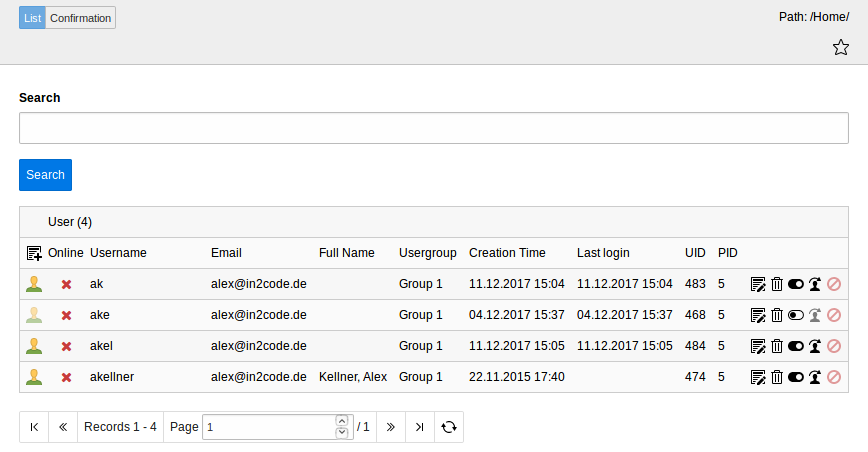
Backend Module (List)

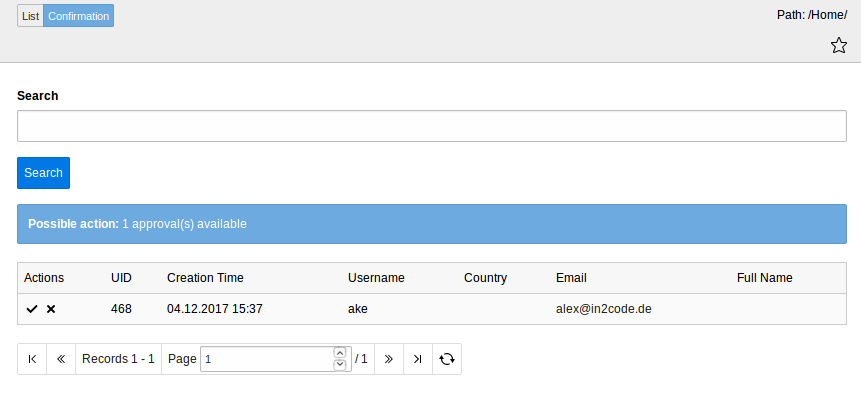
Backend Module (Confirmation)

Explanation 

List Module

The Femanager-Backend-Module List is only a small module to search and list some frontend users.

Some AJAX-requests will help you and your editors to delete or hide and unhide users very fast. The edit icons works in the same way as in the list module.

In addition you can see who's only in this moment (If fe_users session exists and is not older than 2h) and you can logout your fe-users with just one click.

A new feature called log in as allows you to open a new window where your frontend is shown and you are already logged in as the chosen user (admin only feature)

Confirmation Module

The confirmation module can be activated via Extension Manager because it's still in the beta phase. Nevertheless you will see a list of not-yet-confirmed fe-users that can be confirmed (or refused) by just one click.

Per default only disabled users are listed that have a user confirmation. If all disabled users should be shown, even if they have no user confirmation (because your plugin is configured, that only admins should confirm the requests), User TSConfig can be used like (to list those users): tx_femanager.UserBackend.confirmation.filter.userConfirmation=0

Configuration 

Nearly all settings for the backend module are done in ext_typoscript_setup.txt in the key module.tx_femanager. One setting must be done in your TypoScript Template, the setting module.tx_femanager.settings.configPID should be set in your TypoScript, the default is 1.

You can overwrite these settings in your page TS.

Tab

Field Name

Description

Default Value

settings.configPID

typoscript main template storage

You need to specify the pid, where your main typoscript settings (frontend) is stored. You should take a page, where a plugin (regristration / invitation) is available.. This is needed to perform actions like confirm users via Backend or resend
confirmation mails. If you have a multidomain system, you can overwrite config in your typoScript Tempplate for each domain. If this setting is not applied by the root typoscript template, try to define your setting in a ext_typoscript_setup.txt in your template / sitepackage extension.

1

Upgrade 

to version 13.0.0 | to version 8.0.0 | to version 7.1.0 | to version 6.0.0 | to version 5.2.0 | to version 5 | to version 4.2.3 / 4.2.4 / 4.2.5 |

to version 13.0.0 

Deprecations

to version 8.0.0 

Upgrade Plugins 

All Plugins used in your pages must be updated. The Updater is located in Admin Tools > Upgrade > Run Upgrade Wizard > "EXT:femanager: Migrate plugins"

TypoScript Changes 

If you use the uploading feature for avatar images, the configuration has to be changed to the combined identifier

Constants:

plugin.tx_femanager {
   settings {
      uploadFolder = 1:users/
   }
}
Copied!

DataProcessors 

The DataProcessors configured under plugin.tx_femanager.settings.dataProcessors are now without a return value, if you need to change data in the request use PSR-15 Middlewares

Autologin 

Currently the AutoLogin feature does not work. When we have found a solution the feature will be enabled again, until then a link to the login page could be inserted.

to version 7.1.0 

Invitation Template

If you are using customized templates for the invitation function, please check the Resources/Private/Templates/Invitation/Edit.html

You need to add

<f:form.hidden name="hash" value="{hash}"/>
Copied!

in order,that the function is working.

to version 6.0.0 

Version 6.0 support TYPO3 9 LTS and 10 LTS. The support for TYPO3 8 was dropped. No changes on Templates are needed.

Backend Module "Frontend User" - View User Confirmation

If you want to use the Backend Module to confirm or refuse Frontend User, you need to setup the configPID. The extension uses now a frontend call out of the backend, to organise these actions.

module.tx_femanager {
    settings {
        configPID = 1
    }
}
Copied!

to version 5.2.0 

The edit template has to be adjusted, as there is a new parameter 'token' is introduced.

Please update these partials:

/Partials/Misc/DeleteLink.html

The argument token was introduced.

old:

<f:link.action
   action="delete"
   arguments="{user:user}"
   class="btn btn-warning btn-large"
   additionalAttributes="{data-confirm:'{f:translate(key:\'UserDeleteConfirmation\')}'}">
   <i class="icon-trash icon-white"></i>
   <f:translate key="deleteProfile" />
</f:link.action>
Copied!

new:

<f:link.action
   action="delete"
   arguments="{user:user, token:token}"
   class="btn btn-warning btn-large"
   additionalAttributes="{data-confirm:'{f:translate(key:\'UserDeleteConfirmation\')}'}">
   <i class="icon-trash icon-white"></i>
   <f:translate key="deleteProfile" />
</f:link.action>
Copied!

/Templates/Edit/Edit.html

You need to add: <f:form.hidden name="token" value="{token}" /> between the form tag.

Example:

<f:form
	name="user"
	object="{user}"
	action="update"
	enctype="multipart/form-data"
	additionalAttributes="{data-femanager-plugin:data.uid}"
	class="form-horizontal {f:if(condition:'{settings.edit.validation._enable.client}',then:'feManagerValidation',else:'')}">
<fieldset>
	<legend>
		<f:translate key="titleUpdateProfile" />
	</legend>

	<f:form.hidden name="token" value="{token}" />

	more stuff here in the template file…

</f:form>
Copied!

to version 5 

There are minor breaking changes include. Main change is, that all eid scripts were replace, by a page num approach.

In order that the js validation works, you need to take care, that you these page typenums are available:

  1. Backend Module: Login as User feature
feManagerLoginAs.typeNum = 1548943013
Copied!

see the complete config in file ext_typoscript_setup.txt

  1. Frontend Validation via JS
feManagerLoginAs.typeNum = 1548935210
Copied!

see the complete config in file Configuration/TypoScript/setup.ext

to version 4.2.3 / 4.2.4 / 4.2.5 

If you use your own HTML templates of new/edit/invitation-templates you should compare them with the one from EXT:femanager. There is a new additional attribute inside the form viewhelper: data-femanager-plugin, which contains the content element id.

If you use a modified version of the Validation.js, there are also changes: plugin and action parameter is send to the eID-Script now

Features 

Best Practices & HowTos | All Features

Best Practices & HowTos 

See some features or best practice parts of the extension femanager.

All Features 

Frontend-User Registration 

  • One step registration with autologin
  • Main configuration with Flexform
  • User confirmation (Double-Opt In) (optional)
  • Administration confirmation (optional)
  • Refuse and Silent Refuse
  • Fill email field with username (optional)
  • Redirect with TypoScript standardWrap (optional)
  • Prefill Formfields via TypoScript standardWrap (optional)
  • Multiple Validation Possibilities (JavaScript and PHP) (required, email, min, max, intOnly, lettersOnly, unicodeLettersOnly, uniqueInPage, uniqueInDb, mustInclude(number,letter,special), inList(1,2,3))
  • Same PHP Methods for JavaScript and PHP Validation
  • Simply extend validation methods with your extension
  • Override a lot of Email settings with TypoScript if needed
  • Set mail attachments or embeded images
  • Override field values on every single step (e.g. push user to usergroup1 and if he is ready confimed push him to usergroup2)
  • Send user values to a third party software (e.g. a CRM like salesforce)
  • Store values in other database tables (e.g. tt_address)
  • Add Captcha (sr_freecap) for spam prevention

Edit Profile 

  • Main configuration with Flexform
  • Administration confirmation for change request (optional)
  • Refuse and Silent Refuse
  • Fill email field with username (optional)
  • Prefill Formfields via TypoScript standardWrap (optional)
  • Multiple Validation Possibilities (JavaScript and PHP) (required, email, min, max, intOnly, lettersOnly, unicodeLettersOnly, uniqueInPage, uniqueInDb, mustInclude(number,letter,special), inList(1,2,3))
  • Same PHP Methods for JavaScript and PHP Validation
  • Simply extend validation methods with your extension
  • Override a lot of Email settings with TypoScript if needed
  • Set mail attachments or embeded images
  • Delete profile with TypoScript redirect

Invitation 

  • Admin could create a new User in Frontend
  • The new user receives a mail with a secured link, which leads to a password generation form
  • Same validations as in edit and new
  • A lot of configuration possibilities with TypoScript

Backend Module 

  • Fulltext search for fe_users
  • Hide and delete of fe_users via AJAX
  • Shows Login status
  • Logout of a frontend user
  • Login as frontend user (impersonate) for administrators

General 

  • Logging of every change
  • Saltedpasswords support
  • List FE-Users in the frontend
  • Show a user profile in frontend
  • jQuery include must activate via constants (per default no extra jQuery inclusion)
  • Show fe_user crdate and tstamp for editors
  • Store values in other database tables (e.g. tt_address)
  • Save password as md5 or sha1 per default
  • HTML with twitter bootstrap classes to reduce integration time
  • Supports static_info_tables
  • Extend this extension with new validators or new fields in fe_users (see example in best practice section) or use some SignalSlots
  • Extension uses namespaces (so TYPO3 version 6.0 or higher is needed)

Use own HTML Templates 

Basics 

If you want to modify a HTML-File of femanager, you should not overwrite them directly in the extension folder. Think about upcoming versions with important bugfixes or security-patches.

There are two ways to use own HTML-Templates (and Partials / Layouts) instead of the original Templates.

Replace all HTML Templates from Femanager with own Templates 

You can copy all Files from - EXT:femanager/Resources/Private/Templates/ - EXT:femanager/Resources/Private/Partials/ - EXT:femanager/Resources/Private/Layouts/

to a new folder in fileadmin - e.g. fileadmin/templates/femanager/ and modify them as you want. After that, you should say femanager to use the new Templates with some lines of TypoScript setup:

plugin.tx_femanager {
	view {
		templateRootPath = fileadmin/templates/femanager/Templates/
		partialRootPath = fileadmin/templates/femanager/Partials/
		layoutRootPath = fileadmin/templates/femanager/Layouts/
	}
}
Copied!

Replace single HTML Template-Files 

You can copy only the Files that you want to modify from - EXT:femanager/Resources/Private/Templates/ - EXT:femanager/Resources/Private/Partials/ - EXT:femanager/Resources/Private/Layouts/

to a new folder in fileadmin - e.g. fileadmin/templates/femanager/ and modify them as you want. After that, you should say femanager to use the old folders and merge them with the new folders

plugin.tx_femanager {
	view {
		templateRootPath >
		templateRootPaths {
			10 = EXT:femanager/Resources/Private/Templates/
			20 = fileadmin/templates/femanager/Templates/
		}
		partialRootPath >
		partialRootPaths {
			10 = EXT:femanager/Resources/Private/Partials/
			20 = fileadmin/templates/femanager/Partials/
		}
		layoutRootPath >
		layoutRootPaths {
			10 = EXT:femanager/Resources/Private/Layouts/
			20 = fileadmin/templates/femanager/Layouts/
		}
	}
}
Copied!

Show and List Frontend Users 

This Feature allows you to display the data of the current user, a selected user by an editor or list users and provide a detail page.

Caution: Please take care that you do not disclose information in public environments and be careful which data you show in the detail view.

Show the current user 

Useful, if you want to show a "read only view" for the currently logged in frontend user.

Configuration:

  1. Add a femanager_detail plugin to your page
  2. in the field "User to show" choose "Logged in FE User"

Show a given user 

You can provide a detail view of a given frontend user

  1. Add a femanager_detail plugin to your page
  2. select the user to be shown in the field "User to show"

List Users 

  1. Add a a femanager_list plugin to your page
  2. set the plugin options to show the users you want to display

Plugin Options:

  • Show Searchfield: You can provide a searchfield, to filter the users
  • Limit: Define how many users are listed per page
  • Order by: Choose which field should be used to order the list
  • Sorting: Define sort ordering
  • Show from usergroup (empty = show all): Select one or more usergroups. If you don't select a group, all frontend users are displayed

Using static_info_tables for country selection 

Basics 

  • Install Extension static_info_tables
  • Install Extension static_info_tables(_de)(_fr)(_pl) etc... for localized country names
  • Import Records of the extensions via Extension Manager (see manual of static_info_tables)
  • Clear Cache
  • Copy all Partials from femanager to a fileadmin folder
  • Set the new Partial Path via Constants: plugin.tx_femanager.view.partialRootPath = fileadmin/femanager/Partials/
  • Open Partial Fields/Country.html and activate static_info_tables (see notes in HTML-File)

Details for Partial Country.html 

The idea is very simple. You can change the “options Attribute” of the form.select ViewHelper:

<femanager:form.select
	id="femanager_field_country"
	property="country"
	options="{femanager:Form.GetCountriesFromStaticInfoTables()}"
	defaultOption="{f:translate(key:'pleaseChoose')}"
	class="input-block-level"
	additionalAttributes="{femanager:Validation.FormValidationData(settings:'{settings}',fieldName:'country')}" />
Copied!

The GetCountriesFromStaticInfoTables-ViewHelper

Possible options for this ViewHelper are:

Name

Description

Default Value

Example Value

key

Define the Record Column of static_countries table which should be used for storing to fe_users country

Note: Please use lowerCamelCase Writing for Fieldnames

isoCodeA3

isoCodeA2

value

Define the Record Column of static_countries table which should be visible in selection in femanager

Note: Please use lowerCamelCase Writing for Fieldnames

officialNameLocal

shortNameFr

sortbyField

Define the Record Column of static_countries which should be used for a sorting

Note: Please use lowerCamelCase Writing for Fieldnames

isoCodeA3

shortNameDe

sorting

Could be 'asc' or 'desc' for Ascending or Descending Sorting

asc

desc

Some Examples are:

{femanager:Form.GetCountriesFromStaticInfoTables(key:'isoCodeA2',value:'shortNameDe')}
{femanager:Form.GetCountriesFromStaticInfoTables(key:'isoCodeA2',value:'shortNameFr',sortbyField:'shortNameFr')}
{femanager:Form.GetCountriesFromStaticInfoTables(key:'isoCodeA3',value:'isoCodeA3',sortbyField:'isoCodeA3',sorting:'asc')}
Copied!

Fill Email as Username during registraion 

Introduction 

Available since 2.0

If this setting is enabled, the mail address is taken as username. The setting can be applied in three situations:
  • During registration (new)
  • During edit process of an existing user (edit)
  • During Invitation process (invite)

Configuration 

Enable the "fillEmailWithUsername" option for the area (new, edit, invite), where you like to apply it.

Example for "new" area:

plugin.tx_femanager.settings.new.fillEmailWithUsername = 1

Please take care, that the username is not set to required, otherwise it will not work

plugin.tx_femanager.settings.new.validation.username.required = 0

Example 

TypoScript:

plugin.tx_femanager.settings {
    new {
         fillEmailWithUsername = 1
         validation.username.required = 0
    }
}
Copied!

Remarks 

Please mind, if you use this setting in the edit view, a user is able to change his username. Therefor you should always take care, via validation settings, that a username (and also the mail address) stays unique for your users.

Adding new fields to fe_users with your own extension 

Picture 

Add new Fields to the Registration-/Editform

Basics 

  • Create a new extension for the new fields
  • Create ext_tables.sql and Configuration/TCA/Overrides/fe_users.php for adding one or more new fields to fe_users
  • Add TSConfig file to add one or more fields to the field selection in femanager flexform and include it
  • Use TypoScript to add your own partials folder and add the templates for your new fields
  • Create your own user model with getter/setter for your new fields that extends the user model from femanager
  • Override the user model in your ext_localconf.php

See https://github.com/in2code-de/femanagerextended for an example extension how to extend femanager with new fields and validation methods

Step by Step 

Add new fields to the flexform 

Extend Fieldselection in Flexform

Add some Page-TSConfig to extend the selection:

tx_femanager {
   flexForm {
      new {
         addFieldOptions {
            twitterId = Twitter ID
            skypeId = Skype ID
            somethingElse = LLL:EXT:yourextension/Resources/Private/Language/locallang_be.xlf:custom
         }
      }
      edit < tx_femanager.flexForm.new
   }
}
Copied!

Modify the partial folder 

“twitterId” (see TSConfig) means that femanager searches for a partial TwitterId.html to render the field in the form. So you have to copy the folder EXT:femanager/Resources/Private/Partials (e.g.) to fileadmin/Partials and set the new partial path via TypoScript Constants (see exmple below). In addition you have to add the new Partials files.

plugin.tx_femanager.view.partialRootPaths.100 = EXT:yourextension/Resources/Private/Partials/
Copied!

Example file fileadmin/Partials/Fields/TwitterId.html:

  <html xmlns:femanager="http://typo3.org/ns/In2code/Femanager/ViewHelpers" data-namespace-typo3-fluid="true">
<div class="femanager_fieldset femanager_twitterid form-group">
	<label for="femanager_field_twitterid" class="col-sm-2 control-label">
		<f:translate key="tx_femanagerextended_domain_model_user.twitter_id" extensionName="femanagerextended" />
		<f:if condition="{femanager:Validation.IsRequiredField(fieldName:'twitterId')}">
			<span>*</span>
		</f:if>
	</label>
	<div class="col-sm-10">
		<femanager:form.textfield
				id="femanager_field_twitterid"
				property="twitterId"
				class="form-control"
				additionalAttributes="{femanager:Validation.FormValidationData(settings:settings,fieldName:'twitterId')}" />
	</div>
</div>
  </html>
Copied!

ext_tables.sql 

Example SQL file in your extension which extends fe_users with your new fields:

CREATE TABLE fe_users (
   twitter_id varchar(255) DEFAULT '' NOT NULL,
   skype_id varchar(255) DEFAULT '' NOT NULL
);
Copied!

Configuration/TCA/Overrides/fe_users.php 

Example Configuration/TCA/Overrides/fe_users.php file:

$GLOBALS['TCA']['fe_users']['ctrl']['type'] = 'tx_extbase_type';
$tmpFeUsersColumns = [
   'twitter_id' => [
      'exclude' => 1,
      'label' => 'LLL:EXT:yourextension/Resources/Private/Language/locallang_db.xlf:' .
         'tx_yourextension_domain_model_user.twitter_id',
      'config' => [
         'type' => 'input',
         'size' => 30,
         'eval' => 'trim',
      ],
   ],
   'skype_id' => [
      'exclude' => 1,
      'label' => 'LLL:EXT:yourextension/Resources/Private/Language/locallang_db.xlf:' .
         'tx_yourextension_domain_model_user.skype_id',
      'config' => [
         'type' => 'input',
         'size' => 30,
         'eval' => 'trim',
      ],
   ],
   'tx_extbase_type' => [
      'config' => [
         'type' => 'input',
         'default' => '0',
      ],
   ],
];

\TYPO3\CMS\Core\Utility\ExtensionManagementUtility::addTCAcolumns('fe_users', $tmpFeUsersColumns);
\TYPO3\CMS\Core\Utility\ExtensionManagementUtility::addToAllTCAtypes('fe_users', 'twitter_id, skype_id');
Copied!

Own User Model 

Example Model User.php which extends to the default femanager Model:

namespace YourVendor\YourExtension\Domain\Model;

use TYPO3\CMS\Extbase\Domain\Model\Category;
use TYPO3\CMS\Extbase\Persistence\ObjectStorage;
use In2code\Femanager\Domain\Model\User as FemanagerUser;

class User extends FemanagerUser
{

   /**
    * twitterId
    */
   protected string $twitterId;

   /**
    * skypeId
    */
   protected string $skypeId;

   /**
    * Returns the twitterId
    */
   public function getTwitterId(): string
   {
         return $this->twitterId;
   }

   /**
    * Sets the twitterId
    */
   public function setTwitterId(string $twitterId): void
   {
         $this->twitterId = $twitterId;
   }

   /**
    * Returns the skypeId
    */
   public function getSkypeId(): string
   {
         return $this->skypeId;
   }

   /**
    * Sets the skypeId
    */
   public function setSkypeId(string $skypeId): void
   {
         $this->skypeId = $skypeId;
   }
}
Copied!

Include model with TYPO3 12.4.x 

Configuration/Extbase/Persistence/Classes.php:

return [
    \YourVendor\YourExtension\Domain\Model\User::class => [
        'tableName' => 'fe_users',
        'recordType' => 0,
    ],
];
Copied!

ext_localconf.php:

$GLOBALS['TYPO3_CONF_VARS']['SYS']['Objects'][\In2code\Femanager\Domain\Model\User::class] = [
    'className' => \YourVendor\YourExtension\Domain\Model\User::class,
];
Copied!

Include own controllers with TYPO3 12.4.x (with XCLASS) 

You can override the whole controller with XCLASS. This is not the best solution but it works. XCLASS Limitations: https://docs.typo3.org/m/typo3/reference-coreapi/main/en-us/ApiOverview/Xclasses/Index.html#xclasses-limitations

ext_localconf.php:

$GLOBALS['TYPO3_CONF_VARS']['SYS']['Objects'][\In2code\Femanager\Controller\NewController::class] = [
   'className' => \YourVendor\YourExtension\Controller\NewController::class,
];
Copied!

Adding own serverside and clientside validation to femanager forms 

Picture 

Add own clientside (JavaScript) Validation

Add own serverside (PHP) Validation

Basics 

  • Use TypoScript to override ValidationClass of femanager with own classes – this enables your validation methods
  • Config the new validation methods via TypoScript
  • Add translation labels via TypoScript

See https://github.com/in2code-de/femanagerextended for an example extension how to extend femanager with new fields and validation methods

Step by Step 

New validation classes 

CustomClientsideValidator.php:

namespace YourVendor\YourExtension\Domain\Validator;

class CustomClientsideValidator extends \In2code\Femanager\Domain\Validator\ClientsideValidator
{

   /**
    * Custom Validator
    *              Activate via TypoScript - e.g. plugin.tx_femanager.settings.new.validation.username.custom = validationSetting
    *
    * @param string $value Given value from input field
    * @param string $validationSetting TypoScript Setting for this field
    * @return bool
    */
   protected function validateCustom($value, $validationSetting): bool
   {
      // check if string has string inside
      if (stristr($value, $validationSetting)) {
         return true;
      }
      return false;
   }
}
Copied!

CustomServersideValidator.php:

namespace YourVendor\YourExtension\Domain\Validator;

class CustomServersideValidator extends \In2code\Femanager\Domain\Validator\ServersideValidator
{

   /**
    * Custom Validator
    *              Activate via TypoScript - e.g. plugin.tx_femanager.settings.new.validation.username.custom = validationSetting
    *
    * @param string $value Given value from input field
    * @param string $validationSetting TypoScript Setting for this field
    * @return bool
    */
   protected function validateCustom($value, $validationSetting): bool
   {
      // check if string has string inside
      if (stristr($value, $validationSetting)) {
         return true;
      }
      return false;
   }
}
Copied!

Configure override of ServersideValidator and ClientsideValidator 

ext_localconf.php

$GLOBALS['TYPO3_CONF_VARS']['SYS']['Objects'][\In2code\Femanager\Domain\Validator\ServersideValidator::class] = [
   'className' => \YourVendor\YourExtension\Domain\Validator\CustomServersideValidator::class,
];
$GLOBALS['TYPO3_CONF_VARS']['SYS']['Objects'][\In2code\Femanager\Domain\Validator\ClientsideValidator::class] = [
   'className' => \YourVendor\YourExtension\Domain\Validator\CustomClientsideValidator::class,
];
Copied!

TypoScript to enable new validation and set labels 

plugin.tx_femanager {
   settings.new.validation {
      _enable.client = 1
      _enable.server = 1
      username {
         # Custom Validator - check if value includes "abc"
         custom = abc
      }
   }
   _LOCAL_LANG {
      default.validationErrorCustom = "abc" is missing
      de.validationErrorCustom = "abc" wird erwartet
   }
}
Copied!

Auto admin confirmation 

Introduction 

Available since 4.0.0

If you turn on an adminconfirmation by adding an email address in the FlexForm field, admins normally have to confirm new requests from users. But it's possible to implement some own magic to make a confirmation happen automatically. You can add own AutoAdminConfirmation classes to bring in own magic (auto confirmation for an IP-Range, etc...). At the moment, femanager offers only one AutoAdminConfirmation class, which decides which users are auto-confirmed by the top-level-domain of the email-address.

EmailDomainConfirmation 

Small example 

Accept every user profile from domains de, it, ch and at:

plugin.tx_femanager.settings {
    autoAdminConfirmation {
         # Femanager autoAdminConfirmation classes
         10 {
             class = In2code\Femanager\Domain\Service\AutoAdminConfirmation\EmailDomainConfirmation
             config {
                 # Just look at the domains of the given Email-Addresses
                 confirmByEmailDomains = .de, .it, .ch, .at
             }
         }
    }
}
Copied!

Extended example 

Accept every user profile from domains de, it, ch and at but not if they are using gmail.de or gmx.de:

plugin.tx_femanager.settings {
    autoAdminConfirmation {
         # Femanager autoAdminConfirmation classes
         10 {
             class = In2code\Femanager\Domain\Service\AutoAdminConfirmation\EmailDomainConfirmation
             config {
                 # Just look at the domains of the given Email-Addresses
                 confirmByEmailDomains = .de, .it, .ch, .at
                 confirmByEmailDomainsExceptions = gmail.de, gmx.de
             }
         }
    }
}
Copied!

YourAutoConfirmation 

Of course you can add your own classes to bring in some own magic.

Example 

TypoScript:

plugin.tx_femanager.settings {
    autoAdminConfirmation {
         # Femanager autoAdminConfirmation classes
         100 {
             # Classname that should be called with method isAutoAdminConfirmationFullfilled()
             class = In2code\FemanagerExtended\Domain\Service\AutoAdminConfirmation\IpAddressConfirmation
             # optional: Add configuration for your PHP
             config {
                 ip = 127.0.0.1

                 foo = bar

                 fooCObject = TEXT
                 fooCObject.value = do something with this text
             }
         }
    }
}
Copied!

PHP:

<?php
declare(strict_types=1);
namespace In2code\FemanagerExtended\Domain\Service\AutoAdminConfirmation;

use In2code\Femanager\Domain\Service\AutoAdminConfirmation\AbstractConfirmation;
use TYPO3\CMS\Core\Utility\GeneralUtility;

/**
 * Class IpAddressConfirmation
 */
class IpAddressConfirmation extends AbstractConfirmation
{

    /**
     * @return bool
     */
    public function isAutoConfirmed(): bool
    {
        return GeneralUtility::getIndpEnv('REMOTE_ADDR') === $this->config['ip']);
    }
}
Copied!

Some notices 

  • Called method in Confirmation class is always isAutoConfirmed()
  • Confirmation classes must implement In2codeFemanagerDomainServiceAutoAdminConfirmationConfirmationInterface or extend In2codeFemanagerDomainServiceAutoAdminConfirmationAbstractConfirmation
  • You have to take care, that your class is included from TYPO3 autoloader otherwise it's not included
  • Per default femanager offers only EmailDomainConfirmation class at the momment

ConfirmUser Confirmation Refused 

Introduction 

Available since 6.4.0

Some virus scanners are preloading all links in an email. If this happens in an user confirmation mail, the user is deleted automatically. This feature can prevent this behavior.

Configuration 

This feature can be enabled via typoscript.automatically

The default value is 0, so this feature has to be enabled.

plugin.tx_femanager.settings {
new {
   email.createUserConfirmation.confirmUserConfirmationRefused = 1
   }
}
Copied!

Add own Finisher classes 

Introduction 

Let's say you want to easily add some own php functions, that should be called after a user registered. Maybe you want to handle the user input with:

  • Send it to an API
  • Store it in a logfile
  • Save it into a table
  • Something else...

Small example 

Just define which classes should be used. Every method like *Finisher() will be called - e.g. myFinisher():

plugin.tx_femanager.settings {
    finishers {
        1 {
            class = Vendor\Ext\Finisher\DoSomethingFinisher
        }
    }
}
Copied!

Add a php-file and extend your class with the AbstractFinisher from femanager:

<?php
namespace Vendor\Ext\Finisher;

use In2code\Femanager\Finisher\AbstractFinisher;

/**
 * Class DoSomethingFinisher
 *
 * @package Vendor\Ext\Finisher
 */
class DoSomethingFinisher extends AbstractFinisher
{

    /**
     * MyFinisher
     *
     * @return void
     */
    public function myFinisher()
    {
        // ...
    }
}
Copied!

Extended example 

See the advanced example with some configuration in TypoScript and with the possibility to load the file (useful if file could not be loaded from autoloader because it's stored in fileadmin or elsewhere)

plugin.tx_femanager.settings {
    finishers {
        1 {
            # Classname that should be called with method *Finisher()
            class = Vendor\Ext\Finisher\DoSomethingFinisher

            # optional: Add configuration for your PHP
            config {
                foo = bar

                fooCObject = TEXT
                fooCObject.value = do something with this text
            }

            # optional: If file will not be loaded from autoloader, add path and it will be called with require_once
            require = fileadmin/femanager/finisher/DoSomethingFinisher.php
        }
    }
}
Copied!

Add your php-file again and extend your class with the AbstractFinisher from femanager:

<?php
namespace Vendor\Ext\Finisher;

use In2code\Femanager\Domain\Model\User;
use In2code\Femanager\Finisher\AbstractFinisher;

/**
 * Class DoSomethingFinisher
 *
 * @package Vendor\Ext\Finisher
 */
class DoSomethingFinisher extends AbstractFinisher
{

    /**
     * @var User
     */
    protected $user;

    /**
     * @var array
     */
    protected $configuration;

    /**
     * @var array
     */
    protected $settings;

    /**
     * Will be called always at first
     *
     * @return void
     */
    public function initializeFinisher()
    {
    }

    /**
     * Will be called before myFinisher()
     *
     * @return void
     */
    public function initializeMyFinisher()
    {
    }

    /**
     * MyFinisher
     *
     * @return void
     */
    public function myFinisher()
    {
        // get value from configuration
        $foo = $this->configuration['foo'];

        // get subject
        $subject = $this->getMail()->getSubject();

        // ...
    }
}
Copied!

Some notices 

  • All methods which are ending with "finisher" will be called - e.g. saveFinisher()
  • The method initializeFinisher() will always be called at first
  • Every finisher method could have its own initialize method, which will be called before. Like initializeMyFinisher() before myFinisher()
  • Classes in extensions (if namespace and filename fits) will be automaticly included from TYPO3 autoloader. If you place a single file in fileadmin, use "require" in TypoScript
  • Per default 10 and 20 is already in use from femanager itself (SaveToAnyTableFinisher, SendParametersFinisher) since version 2.0

Use Events to extend femanager 

Introduction 

Events can be used for developers to extend femanager processes with their own code. Previously, signals or hooks had been used for this purpose. But since TYPO3 v10 PSR-14 Events should be used for signalling.

Please refer to the official TYPO3 documentation for an explanation of EventDispatcher (PSR-14 Events)

https://docs.typo3.org/m/typo3/reference-coreapi/main/en-us/ApiOverview/Events/EventDispatcher/Index.html

This blog article describes how to use PSR-14 Events in TYPO3.

https://usetypo3.com/psr-14-events.html

Events List 

Event

Where

Replaces signal

Parameters

Description

AdminConfirmationUserEvent

UserBackendController->confirmUserAction()

confirmUserAction

$user

Use this event if you would like to trigger an action after a user confirmation has been initiated by an admin in the backend

AfterMailSendEvent

SendMailService->send()

AfterSend

$email, $variables

Use this event if you would like to trigger an action after an email has been sent

AfterUserUpdateEvent

EditController->confirmUpdateRequestAction()

confirmUpdateRequestActionAfterPersist

$user, $hash, $status

Use this event if you would like to trigger an action after a changed user profile has been persisted

BeforeMailSendEvent

SendMailService->send()

BeforeSend

$email, $variables

Use this event if you would like to trigger an action before an email is sent

BeforeUpdateUserEvent

EditController->updateAction()

updateActionBeforePersist

$user

Use this event if you would like to trigger an action before changes to a user profile are persisted

BeforeUserConfirmEvent

NewController->confirmCreateRequestAction()

??

$user, $hash, $status

Use this event if you would like to trigger an action after a new user has registered but not confirmed his account

BeforeUserCreateEvent

NewController->createAction()

createActionBeforePersist

$user

Use this event if you would like to trigger an action before a newly registered user is created

CreateConfirmationRequestEvent

NewController->createAdminConfirmationRequest()

createAdminConfirmationRequestAutoConfirm createAdminConfirmationRequestManualConfirmation

$user, $mode

Use this event if you would like to trigger an action after an admin confirmation has been requested for a new user

DeleteUserEvent

EditController->deleteAction()

deleteAction

$user

Use this event if you would like to trigger an action when the deletion of a user is started

FinalCreateEvent

AbstractController->finalCreateAction()

finalCreateAfterPersist

$user, $action

Use this event if you would like to trigger an action after a new user has been created and persisted

FinalUpdateEvent

AbstractController->updateAllConfirmed()

updateAllConfirmedAfterPersist

$user

Use this event if you would like to trigger an action after changes to a user profile that do not require admin confirmation have been persisted

ImpersonateEvent

UserController->loginAsAction()

loginAsAction

$user

Use this event if you would like to trigger an action after a backend user has logged in as a fronted user

InviteUserConfirmedEvent

InvitationController->createAllConfirmed()

createAllConfirmedAfterPersist

$user

Use this event if you would like to trigger an action after a new user has been created and no more confirmations are required

InviteUserCreateEvent

InvitationController->createAction()

??

$user

Use this event if you would like to trigger an action after a new user has been created by invitation

InviteUserEditEvent

InvitationController->editAction()

editActionAfterPersist

$user, $hash

Use this event if you would like to trigger an action when a newly invited user changes his profile

InviteUserUpdateEvent

InvitationController->updateAction()

updateActionBeforePersist

$user

Use this event if you would like to trigger an action after a newly invited user has changed his profile

RefuseUserEvent

UserBackendController->refuseAction()

refuseUserAction

$user

Use this event if you would like to trigger an action when a user is refused by an admin in the backend

UniqueUserEvent

AbstractValidator->validateUniqueDb()

??

$value, $field, $user, $uniqueDb

Use this event if you would like to trigger an action if a check is made if the user is unique in the database

UserLogEvent

LogUitility->log()

??

$additionalProperties, $state, $user

Use this event if you would like to trigger an action if user changes are logged

UserWasConfirmedByAdminEvent

NewController->confirmCreateRequestAction()

??

$additionalProperties, $state, $user

Use this event if you would like to trigger an action after a new user has been confirmed by an admin in the backend


Do you need a new Event in femanager? Just request one on https://github.com/in2code-de/femanager

Resend User Confirmation Request 

Introduction 

Available since 4.2.0

This feature adds a new view in the backend module to list user, which did not confirm their user accounts. An frontend user admin is now able to resend the confirmation mail or decline (and delete) the user via backend.

Frontend View 

An editor can setup a new view "resend confirmation mail". Frontend users, who started their registration process and did not confirm their email so far, can resend a confirmation mail.

Configuration. Add the plugin "Femanager" to a page and select "resend confirmation mail".

IMPORTANT: If you want to use these new views and you did use femanager version 4.1 or older, you need open existing plugins and save them again, in order to allow the usage of this views.

Sometimes unconfirmed users are trying to trigger the confirmation mail again by registering again with the same email or username. They get an error "username / email already existing". Since 4.2, an additional message with a "resend confirmation mail" link is displayed in those cases where the existing user has not yet confirmed his registration.

For this message to be displayed, you need to have the following typoscript setting configured:

settings.showResendUserConfirmationRequestView = {your pid}
Copied!

The pid is the page uid where your "resend confirmation mail" plugin resides.

Backend View 

Lists all frontend users, which did not confirm their email so far. An admin is able to decline (delete) users or resend an email with a confirmation link.

To activate the feature add the userTSConfig:

tx_femanager.UserBackend.confirmation.ResendUserConfirmationRequest = 1
Copied!

Backend Configuration 

Take care, that the setting "module.tx_femanager.settings.configPID" is set up for any site (see Configuration in Confirmation Module)

Rate Limiter 

Basics 

If you want prevent, that your registration forms, you can enable the rate limiter.

Note: The limiter is enabled by default.

TypoScript Settings 

plugin.tx_femanager {
	settings {
		ratelimiter {
		# Number of seconds for the sliding window rate limiter
		timeframe = {$plugin.tx_femanager.settings.ratelimiter.timeframe}
		# Request count. How many requests are allowed in the last <timeframe> seconds. Set to 0 to disable rate limiter.
		limit = {$plugin.tx_femanager.settings.ratelimiter.limit}
	}
	}
}
Copied!

Login as Frontend User (Impersonate) 

Introduction 

The "Login as" feature allows backend administrators to impersonate a frontend user directly from the femanager backend module. Clicking the "Login as" button opens a new browser tab where the administrator is logged in as the selected frontend user. This is useful for debugging, testing or supporting users without knowing their password.

The button is only available for users who are offline and not disabled. For users who are currently online or disabled, the button is shown in a disabled state.

Configuration 

The feature is disabled by default and must be enabled via UserTSConfig:

tx_femanager.UserBackend.enableLoginAs = 1
Copied!

A default configuration file is shipped with the extension at Configuration/UserTsConfig/BackendModule.typoscript which can be included in your site configuration or UserTSConfig.

Redirect Page 

By default, the administrator is redirected to the page configured in module.tx_femanager.settings.configPID after the impersonation login. You can customize the redirect target via TypoScript:

plugin.tx_femanager.settings.loginAs {
    redirect = TEXT
    redirect {
        typolink {
            parameter = 42
            returnLast = url
        }
    }
}
Copied!

Events 

The ImpersonateEvent is dispatched when a backend administrator logs in as a frontend user. This can be used to log or audit impersonation actions.

See Events for more details.

Frequently Asked Questions (FAQ) 

Q: How to use static_info_tables for countryselection? 

A: See code in best practice section

Q: How to add new fields to fe_users? 

A: See code in best practice section

Q: How to add my own field validation? 

A: See code in best practice section

Q: Class 'In2codeFemanagerDomainModelLog' not found - what can I do? 

A: This problem normally occurs only if you have installed femanager without composer (btw: it's time for composer :), so your instance is running in classic mode. It's possible that you have added femanager via Extension Manager. Please go into the install tool by opening the URL www.yourdomain.org/typo3/install (of course you have to add a file named ENABLE_INSTALL_TOOL to typo3conf/ folder first) and click on Create autoload information for extensions in section Dump Autoload Information. That will create a new autoload file.

Q: An exception occurred while executing SELECT uid FROM tx_femanager_domain_model_log WHERE ... doesn't exist 

A: There are some tables missing in your database. Please compare databases with Admin Tools > Maintenance > Database Compare.

Q: How can I disable the clientside/serverside validation? 

A: Enable/Disable Validation via TypoScript – disable example:

plugin.tx_femanager {
	settings.new.validation {
		_enable.client = 0
		_enable.server = 0
	}
}
Copied!

Q: How can I configure the validation of my fields? 

A: Have a look into TypoScript:

plugin.tx_femanager {
	settings.new {

		# validation of user input values
		# possible validations for each field are: required, email, min, max, intOnly, lettersOnly, unicodeLettersOnly, uniqueInPage, uniqueInDb, date, mustInclude(number,letter,special,space), mustNotInclude(number,letter,special,space), inList(1,2,3), captcha, sameAs(password)
		# see manual for an example how to add custom serverside and clientside validation
		validation {
			# Enable clientside Formvalidation (JavaScript)
			_enable.client = 1

			# Enable serverside Formvalidation (PHP)
			_enable.server = 1

			username {
				required = 1
				uniqueInDb = 1
				mustNotInclude = special,space
			}
			email {
				required = 1
				email = 1
				#uniqueInPage = 1
			}
			password {
				required = 1
				#min = 10
				#mustInclude = number,letter,special
			}
			usergroup {
				#inList = 1,2,3
			}
		}
	}
}
Copied!

Note: If you use validation for passwords, values will be send via AJAX to server to check if all is right. It's recommended to use https connections for the registration form.

Q: System should generate random passwords – possible? 

Since version 1.0.10 femanager is able to create passwords and username per random if there is no input. If you want to use this, please disable required settings of password (and username)

  • If no username given, try to get email (if set)
  • If no username and no email given, create a username by random
  • If no password given, create a password by random
  • It's possible to create a new user without filling out any field – this could be used as “onetimeaccount”

Q: How can I prefill form fields? 

A: You can use TypoScript cObj to fill form fields in registration- or edit-form:

plugin.tx_femanager {
	settings {
		new {
			prefill {
				username = TEXT
				username.value = ExampleUsername

				email = TEXT
				email.value = test@in2code.de
			}
		}
		edit {
			prefill {
				# fill from GET or POST param like &username=Alex
				username = TEXT
				username.data = GP:username

				# fill from GET or POST param like &email=info@test.de
				email = TEXT
				email.data = GP:email
			}
		}
	}
}
Copied!

Q: JavaScript Validation won't work – what can I do? 

A: Check if all needed JavaScript files are loaded (see frontend html- source). Add some JavaScript with constant editor or directly:

plugin.tx_femanager.settings.jQuery = 1
plugin.tx_femanager.settings.bootstrap = 1
plugin.tx_femanager.settings.bootstrapCSS = 1
Copied!

Example ordering and needed JavaScripts:

<script src="//ajax.googleapis.com/ajax/libs/jquery/3.2.1/jquery.min.js" type="text/javascript"></script>
<script src="/typo3conf/ext/femanager/Resources/Public/JavaScript/Vendor/bootstrap.min.js?1502824793" type="text/javascript"></script>
<script src="/typo3conf/ext/femanager/Resources/Public/JavaScript/Validation.min.js?1502824793" type="text/javascript"></script>
<script src="/typo3conf/ext/femanager/Resources/Public/JavaScript/Femanager.min.js?1502824793" type="text/javascript"></script>
Copied!

Q: How can I send user values to a third-party-software like a CRM? 

A: Use some lines of TypoScript to send values after a registration to a tool like a CRM. Test it with a simple php file on your server which sends an email to you with the $_REQUEST Array.

!!! take care to validate the incomming data in your receiver script !!!

TypoScript:

plugin.tx_femanager {
	settings {
		new {
			# Send Form values via POST to another system (e.g. CRM like salesforce or eloqua)
			sendPost {
				# Activate sendPost (0/1)
				_enable = TEXT
				_enable.value = 1

				# Target URL for POST values (like http://www.target.com/target.php)
				targetUrl = https://www.salesforce.com/servlet/servlet.WebToLead?encoding=UTF-8
				#targetUrl = http://eloqua.com/e/f.aspx

				# build your post datas like &param1=value1&param2=value2
				data = COA
				data {
					10 = TEXT
					10 {
						# value from field {username}
						field = username
						wrap = &username=|
                    stdWrap.rawUrlEncode = 1
					}

					20 = TEXT
					20 {
						# value from field {email}
						field = email
						wrap = &email=|
                    stdWrap.rawUrlEncode = 1
					}

					30 = TEXT
					30 {
						# value from field {title}
						field = title
						wrap = &title=|
                    stdWrap.rawUrlEncode = 1
					}
				}

				# activate debug mode - shows all configuration from curl settings (needs extension devlog)
				debug = 0
			}
		}
	}
}
Copied!

Q: How can I store values in another table? 

A: With some lines of TypoScript it's possible to store values to any table in the TYPO3 database:

plugin.tx_femanager {
	settings {
		new {
			# Save user values to one or more other tables (e.g. tt_address or something else)
			#       With .field=[fieldname] you have access to the user object
			#       Possible values are: uid, username, address, city, company, country, email, fax, firstName, lastName, middleName, name, password, telephone, fax, title, www, zip and lastGeneratedUid (to have access to the uid of the last loop in the next loop)
			storeInDatabase {
				tt_address {
					_enable = TEXT
					_enable.value = 0

					pid = TEXT
					pid.value = 21

					name = TEXT
					name.field = username

					email = TEXT
					email.field = email

					first_name = TEXT
					first_name.field = firstName

					last_name = TEXT
					last_name.field = lastName
				}
			}
		}
	}
}
Copied!

Q: How can I overwrite labels and errormessages with my own text? 

A: Every TYPO3 extension can be extended with own labels in any language. You have to search for the key, that you want to overwrite – have a look into the file EXT:femanager/Resources/Private/Language/locallang.xlf – example:

plugin.tx_femanager {
	_LOCAL_LANG {
		# Field Labels
		default.tx_femanager_domain_model_user\.username = Email
		de.tx_femanager_domain_model_user\.username = E-Mail
		fr.tx_femanager_domain_model_user\.username = E-mail

		# Errormessages
		default.validationErrorRequired = This is a mandatory field
		de.validationErrorRequired = Hierbei handelt es sich um ein Pflichtfeld
		fr.validationErrorRequired = Ce champ est obligatoire
	}
}
Copied!

Q: How to add a captcha for spam prevention 

A: Since version 1.1.0 femanager allows sr_freecap as captcha extension. Import sr_freecap to your TYPO3. From this moment on, you can add a new fieldtype in your flexform “captcha”. In addition you have to enable captcha with TypoScript:

plugin.tx_femanager.settings.new.validation.captcha.captcha = 1
plugin.tx_femanager.settings.edit.validation.captcha.captcha = 1
Copied!

Q: How to change the dateformat of the birthday field? 

A: Per default “m/d/Y” (for EN) and “d.m.Y “ (for DE) will be used. If you want to overwrite this, you can use some lines of TypoScript

plugin.tx_femanager {
	_LOCAL_LANG {
		# Default Language
		default.tx_femanager_domain_model_user.dateFormat = Y-m-d
		default.tx_femanager_domain_model_user.dateOfBirth.placeholder = Y-m-d

		# For DE
		de.tx_femanager_domain_model_user.dateFormat = Y-m-d
		de.tx_femanager_domain_model_user.dateOfBirth.placeholder = Y-m-d
	}
}
Copied!

Q: Flashmessage from other plugins are shown in femanager! 

A: If you want to hide flashmessages in other extbase plugins, use following TypoScript setup:

config.tx_extbase.legacy.enableLegacyFlashMessageHandling = 0
Copied!

Q: “Please log in before” but I'm already logged in? 

A: Check if the logged in user is really logged in (e.g. add a content-element which should not be viewed if the FE-User is not yet logged in). Check if the FE-Users have an empty value or 0 for column tx_extbase_type in your database.

Q: How to change the extbase_type of new Users? 

A: You can change this via TypoScript:

config.tx_extbase.persistence.classes {
	In2code\Femanager\Domain\Model\User {
		mapping {
			tableName = fe_users
			recordType = anyExtbaseType
		}
	}
}
Copied!

Q: What else can I do with femanager? 

A: Have a look into the TypoScript of femanager (see EXT:femanager/Configuration/TypoScript/Main/setup.txt) – here you see how to configure your mails, forceValues, redirect, autologin and much more...

Changelog 

  • Version

    13.3.1

    Date

    2025-12-18

    Changes
     
  • Version

    13.3.0

    Date

    2026-03-03

    Changes
     
    • [FEATURE] Add logging for loginAs impersonation attempts
    • [BUGFIX] add missing status "confirmAdminRefusedSilent" to statusAdminConfirmationRefused - thx Sebastian Stein (in2code)
    • []BUGFIX] Compatibility with PostgreSQL - thx to https://github.com/sgrossberndt
    • [BUGFIX] Support multiple values in SelectViewHelper - thx to Devid Messner
    • [BUGFIX] Prefer explicit name over property in SelectViewHelper - thx Sebastian Stein (in2code)
    • [BUGFIX] prevent exception if getValueAttribute() of SelectViewHelper is null - thx Sebastian Stein (in2code)
    • [BUGFIX] add missing property to usergroup select - thx Sebastian Stein (in2code)
    • [BUGFIX] execute serversideValidator user after modifications - thx Sebastian Stein (in2code)
    • [BUGFIX] remove feature check from isAdminAuthentication() - thx Sebastian Stein (in2code)
    • [BUGFIX] prevent captcha bypass if captcha is used in combination with sr_freecap - thx Sebastian Stein (in2code)
    • [BUGFIX] respect "includeHiddenContent" for plugin validation - thx Sebastian Stein (in2code)
    • [TASK] add deprecation annotations - thx Sebastian Stein (in2code)
    • [REFACTOR] Backend.js to use TYPO3 v13 ES module APIs - thx Sebastian Stein (in2code)
    • [REFACTOR] Optimize dirty property detection for Users - thx Sebastian Stein (in2code)
    • [CLEANUP] Remove unused and outdated code - thx Sebastian Stein (in2code)
  • Version

    13.2.1

    Date

    2025-12-18

    Changes
     
    • [BUGFIX] Use correct mail template for updateNotify mail - thx Sebastian Stein (in2code)
  • Version

    13.2.0

    Date

    2025-10-24

    Changes
     
    • [FEATURE] add "Profile update not authorized" error message - thx to Sebastian Stein (in2code)
    • [TASK] Convert Femanager JavaScript from jQuery to Vanilla - thx Andreas Nedbal (in2code) - sponsored by Digitalwerkstatt Luechow
    • [BUGFIX] Fix createAdminNotify email action links not working - thx Andreas Nedbal (in2code)
    • [BUGFIX] Usage of FlexForm value settings.edit.notifyAdmin - thx to Aletschhorn
    • [BUGFIX] Fix admin confirm/refuse backend actions- thx Andreas Nedbal (in2code)
  • Version

    13.1.0

    Date

    2025-09-25

    Changes
     
    • [FEATURE] introduce new mail configuration option for replyTo - thx Sebastian Stein (in2code)
    • [BUGFIX] fix sjbr/sr-freecap integration - thx Sebastian Stein (in2code)
    • [BUGFIX] Pass Request to sr_freecap in ClientsideValidator - thx Andreas Nedbal (in2code)
    • [BUGFIX] fix broken phpunit tests - thx Sebastian Stein (in2code)
    • [BUGFIX] Resolve country select list without EXT:static:info_tables - thx to Alexander Nitsche
    • [TASK] Keep development-only files out of Composer installations - thx to Oliver Klee
    • [TASK] fix php 8.4 explicit nullable type deprecations - thx Sebastian Stein (in2code)
    • [TASK] fetch logged-in user id from user context - thx Sebastian Stein (in2code)
    • [TASK] add note to country testpag- thx Sebastian Stein (in2code)
    • [TASK] mark getStatesOptions and getCountryOptions argument as passed by reference- thx Sebastian Stein (in2code)
    • [DOCUMENTATION] add documentation why "enforceNewSessionId" is used in UserUtility::login(...)
    Version

    13.0.0

    Date

    2024-11-11

    Changes
     
    • [FEATURE] Support TYPO3 V13 - thx to Sebastian Stein (in2code), Andreas Nedbal (in2code), Stefan Busemann (in2code)
    • [FEATURE] Additional confirmation step for admin confirm/refuse of users - Stefan Busemann (in2code)
    • [SECURITY] Don't pass User to newAction - Andreas Nedbal (in2code)
    • [SECURITY] Avoid unintended persistence - Andreas Nedbal (in2code)
    • [LANG] Adjust label for resendConfirmationMailSend - Christine Zoglmeier (in2code)
    • [BUGFIX] Failing resend frontend view - Stefan Busemann (in2code)
    • [BUGFIX] Load data processor only in frontend context - thx to Johannes Böttcher
    • [BUGFIX] Load TypoScript configuration in backend context - thx to Johannes Böttcher
    • [BUGFIX] Migrate RequireJS backend script to ES6 - thx to Johannes Böttcher
    • [BUGFIX] Pass request object to mail service in controller context - thx to DaRealFrea
    • [BUGFIX] Missing resend confirmation dialogue - Stefan Busemann (in2code)
    • [BUGFIX] wrong default action for resend plugin - Stefan Busemann (in2code)
    • [REFACTOR] (controller): enhance file handling and readability - thx to Gregor
    • [BUGFIX] Retain user-entered searchword after submit - thx to Simon Praetorius
  • Version

    8.3.1

    Date

    2025-07-22

    Changes
     

    You can disable logging function of femanager or update to the latest version.

    https://projekte.in2code.de/issues/72776

  • Version

    8.3.0

    Date

    2025-06-10

    Changes
     
  • Version

    8.2.2

    Date

    2025-05-20

    Changes
     
  • Version

    8.2.1

    Date

    2024-11-11

    Changes
     
    • [BUGFIX] auto login - thx to Christine Zoglmeier (in2code)
    • [BUGFIX] configuration fetching for admin edit notify mails - thx to Andreas Nedbal (in2code)
    • [BUGFIX] Remove side-effect in User crdate getter - thx to Andreas Nedbal (in2code)
    • [BUGFIX] Add max size validations for default fe_user fields - thx to Andreas Nedbal (in2code)
    • [BUGFIX] Use configured receiver name in createAdminNotify - thx to Andreas Nedbal (in2code)
    • [BUGFIX] file required validation - thx to Andreas Nedbal (in2code)
    • [BUGFIX] changing image only - thx to Stefan Busemann (in2code)
    • [BUGFIX] CreateUserConfirmation.html refers to non-existing labe - thx to Stefan Busemann (in2code)
    • [BUGFIX] Resend confirmation - thx to Stefan Busemann (in2code)
    • [BUGFIX] Make upload work again - thx to Stefan Busemann (in2code)
    • [BUGFIX] TypoScript setting removeFromUserGroupSelection - thx to Stefan Busemann (in2code)
    • [BUGFIX] Exception by selecting wrong hashing integration - thx to Stefan Busemann (in2code)
    • [TASK] Change text of createRequestWaitingForAdminConfirm localization - thx to Andreas Nedbal (in2code)
    • [TASK] GitHub Actions - thx to Andreas Nedbal (in2code)
    • [TASK] Disable autocomplete for the CAPTCHA field - thx to Oliver Klee
    • [TASK] Clean up RemovePasswordIfEmptyMiddleware - thx to Andreas Nedbal (in2code)
    • [TASK] Remove unused code - thx to Stefan Busemann (in2code)
    • [REFACTOR] unify checkPageAndUserAccess - thx to Stefan Busemann (in2code)
  • Version

    8.2.0

    Date

    2024-10-04

    Changes
     
    • [TASK] Docs - add simple render command - thx to Stefan Busemann (in2code)
    • [TASK] Update Symfony dependency - thx to Julian Hofmann (in2code)
    • [TASK] Switch to PHP-based Documentation Rendering (port from 7.4 by in2code)
    • [TASK] Add autocomplete attribute to password fields (port from 7.4 by in2code)
    • [TASK] Mitigate browser "spell jacking" in form elements (port from 7.4 by in2code)
    • [TASK] Improve the code formatting of additional input attributes (port from 7.4 by in2code)
    • [TASK] Use semantic HTML for tables in the emails (port from 7.4 by in2code)
    • [BUGFIX] Update composer.json - thx to Oliver Klee
    • [BUGFIX] Pass proper object name to form error partial - thx to Pierrick Caillon
    • [BUGFIX] Improve coding style - thx to Stefan Busemann (in2code)
    • [BUGFIX] Add missing if clause in UserProperties.html (port from 7.4 by in2code)
    • [BUGFIX] Remove type url to improve user experience - thx to Stefan Busemann (in2code)
    • [BUGFIX] Add missing make command to generate docs - thx to Stefan Busemann (in2code)
    • [BUGFIX] fix response object usage - thx Hannes Bochmann
    • [DOCS] Add header row to Features/Events/Index.rst - thx to haegelixatwork
    • [DOCS] Update EAP note - thx to Stefan Busemann (in2code)
  • Version

    8.1.0

    Date

    2024-05-09

    Changes
     
    • [FEATURE] Add confirmation form to delete profile during registration - thx to Stefan Busemann (in2code)
    • [FEATURE] Add BeforeMailBodyRenderEvent - thx to Michael Bakonyi
    • [FEATURE] Include bootstrap directly from repository instead of maxcdn.bootstrapcdn.com - thx to Felix Ranesberger (in2code)
    • [FEATURE] Allow multiple CC recipients With this change more than one CC recipient for emails can be configured - thx to Marco Huber
    • [BUGFIX] Fix a typo in the labels - thx to Oliver Klee
    • [BUGFIX] Open the "terms & conditions" page in a new tab - thx to Oliver Klee
    • [BUGFIX] errorClass attribute not working - thx to Stig Nørgaard Færch
    • [BUGFIX] Use mixed return type for ServersideValidator::getValu - thx to Andreas Nedbal (in2code)
    • [BUGFIX] Replace incorrect response in AdminConfirmation - thx Thomas Anders
    • [BUGFIX] Restore email notification to admin after registration - thx Patrick Lenk
    • [DOC] Update documenation - thx to Daniel Hoffman (in2code)
  • Version

    8.0.1

    Date

    2023-12-19

    Changes
     
    • [FEATURE] Integrate Static Info tables via Service - thx to Daniel Hoffmann (in2code)
    • [TASK] Upport all fixes from 7.1-7.2 - thx to Daniel Hoffmann (in2code)
    • [TASK] Upport from scroll-fix - thx to Daniel Hoffmann (in2code)
    • [BUGFIX] Bugfix wrong colspan - thx to Luis Thaler (in2code)
    • [BUGFIX] Make backend module accessible for editors - thx to Luis Thaler (in2code)
    • [BUGFIX] Fix image URLs in README.md - thx to Daniel Haupt
    • [BUGFIX] Shows the labels in New Content Wizard again - thx to Daniel Hoffmann (in2code)
    • [BUGFIX] Make captcha parameter optional - thx to Daniel Hoffmann (in2code)
    • [BUGFIX] Add missing use statement for ObjectAccess - thx to Stefan Busemann (in2code)
    • [BUGFIX] Add full object support in getDirtyPropertiesFromUser() - thx Torben Hansen
    • [BUGFIX] Do not re-evaluate object values in ServersideValidator - thx to Torben Hansen
    • [BUGFIX] Add missing pluginName in FrontendUtility - thx to Daniel Hoffmann (in2code) / bpaulsen
    • [BUGFIX] Exception when accessing a fe_user record in the TYPO3 Backend - thx to Daniel Hoffmann (in2code)
  • Version

    8.0.0

    Date

    2023-06-01

    Changes
     
    • [FEATURE] Add support for TYPO3 12 - please use the Upgrade wizzard to get your plugins to work!
    • [TASK] Remove dependencies of generic Extbase domain classes - Thx to https://github.com/theLine
    • [REFACTOR] Use Country API from TYPO3
    • [REFACTOR] Dataprocessor for CleanUserGroup is transferred to a Middleware
    • [REFACTOR] Because of new handling for uploaded files the Dataprocessor for Imagemanipulation is removed
    • [DOCUMENTATION] Replace outdated signal documentation with event description
    • [TASK] Update unit tests & behaviour tests
    • [BUGFIX] Fix validation for allowed usergroups
  • Version

    7.4.1

    Date

    2024-11-11

    Changes
     
    • [DOCS] Update Roadmap
  • Version

    7.4.0

    Date

    2024-10-04

    Changes
     
    • [TASK] Use semantic HTML for tables in the emails - thx to Oliver Klee
    • [TASK] Improve the code formatting of additional input attributes - thx to Oliver Klee
    • [TASK] Apply the latest Rector fixes for TYPO3 11LTS - thx to Oliver Klee
    • [TASK] Mitigate browser "spell jacking" in form elements- thx to Patrick Lenk
    • [TASK] Add autocomplete attribute to password fields - thx to Patrick Lenk
    • [TASK] Switch to PHP-based Documentation Rendering - thx to Sandra Erbel
    • [BUGFIX] Avoid deprecated PHP function utf8_decode - thx to Oliver Klee
    • [BUGFIX] Add missing scope - thx to Stefan Busemann (in2code)
    • [BUGFIX] Add missing if clause in UserProperties.html - thx to Sandra Erbel
    • [BUGFIX] Use specific seleniarm image for behat tests - thx to Stefan Busemann (in2code)
    • [BUGFIX] Restore email notification to admin after registration - thx to Patrick Lenk
    • [BUGFIX] Fix composer script calls in the test:rector:fix script - thx to Oliver Klee
    • [BUGFIX] Fix the Rector PHP target version - thx to Oliver Klee
    • [BUGFIX] Allow the PHPStan extension installer for Composer - thx to Oliver Klee
  • Version

    7.3.0

    Date

    2024-05-08

    Changes
     
    • [FEATURE] Add confirmation form to delete profile during registration - thx to Stefan Busemann (in2code)
    • [FEATURE] Add BeforeMailBodyRenderEvent - thx to Michael Bakonyi
    • [FEATURE] Include bootstrap directly from repository instead of maxcdn.bootstrapcdn.com - thx to Felix Ranesberger (in2code)
    • [BUGFIX] Fix a typo in the labels - thx to Oliver Klee
    • [BUGFIX] Open the "terms & conditions" page in a new tab - thx to Oliver Klee
    • [BUGFIX] errorClass attribute not working - thx to Stig Nørgaard Færch
    • [DOC] Update documenation - thx to Daniel Hoffman (in2code)
  • Version

    7.2.3

    Date

    2023-12-13

    Changes
     
    • [SECURITY] This update is needed for version for 7.0.0 to 7.2.2 older versions are not affected
    • BUGFIX] Dont use initilize actions for granting access - thx to Daniel Hofmann (in2code)
  • Version

    7.2.2

    Date

    2023-10-04

    Changes
     
    • [SECURITY] This update is needed for version for 7.0.0 to 7.2.1 older versions are not affected
    • [BUGFIX] Add missing permission check for invitation controller - thx to Daniel Hofmann (in2code)
  • Version

    7.2.1

    Date

    2023-08-08

    Changes
     
    • [TASK] Adds documentation for extended - thx to Daniel Hofmann (in2code)
    • [TASK] Update Image used for Github Actions
    • [BUGFIX] Fixes reaction when no typoscript configuration is set for redirect - thx to Daniel Hofmann (in2code)
    • [BUGFIX] Fixed Object Support for getDirtyPropertiesFromUser() - thx to Daniel Hofmann (in2code)
  • Version

    7.2.0

    Date

    2023-07-17

    Changes
     
    • [FEATURE] Add column "inactive since" to backend list - thx to Thomas Löffler
    • [BUGFIX] missing email AdminNotify after editing of user profile - thx to Christian Ludwig
    • [BUGFIX] Do not re-evaluate object values in ServersideValidator - thx to Torben Hansen
    • [BUGFIX] Add full object support in getDirtyPropertiesFromUser() - thx to Daniel Haupt
    • [BUGFIX] Prevent undefined array key for empty configPID - thx to Daniel Haupt
    • [BUGFIX] Migrate usage of GU::lcfirst with Rector - thx to Torben Hansen
    • [TASK] Corrects Documenation Rendering Configuration - thx to Daniel Hoffmann
    • [TASK] [TASK] Replace jQuery scrollTop with vanilla scrollIntoView - thx to Felix Ranesberger
  • Version

    7.1.1

    Date

    2023-03-16

    Changes
     
    • [BUGFIX] Notification email to admin now sends changes again
    • [BUGFIX] Notification email to admin is also sent when adding recipient's address to flex form only
  • Version

    7.1.0

    Date

    2023-01-19

    Changes
     
    • [FEATURE] Add support for PHP 8 and 8.1 - thx to Stefan Busemann, Bastien Lutz, Mathias Bolt Lesniak, Thomas Löffler, Johannes Seipelt
    • [BUGFIX] Re-fetch session from database to update 'userSession' property of TSFE. Thx to Thomas Off <thomas.off@retiolum.de>
    • [BUGFIX] Add hash check for invitation action - thx to Max Schäfer & Dennis Schober-Wenger
    • [REFACTOR] Remove deprecated code and introduce rector - thx to Thomas Löffler
  • Version

    7.0.1

    Date

    2022-10-31

    Changes
     
    • [BUGFIX] (!!!) Security Fix - Broken Access Control in Usergroup Validation (Andreas Nedbal - in2code) - thx to TYPO3 Security Team
    • [BUGFIX] login after registration (Re-fetch session from database to update 'userSession' property of TSFE) - thx to Thomas Off
    • [BUGFIX] CleanUserGroup DataProcessor - thx to Daniel Hoffmann (in2code)
  • Version

    7.0.0

    Date

    2022-07-11

    Changes
     
    • [FEATURE] Add column "inactive since" to backend list - thx to SpoonerWeb
    • [TASK] Add support for TYPO3 11
    • [TASK] Update Test enviroment and add addtitional tests
    • [TASK] Add missing translation key for "createStatus"
    • [TASK] Bump jquery from 3.2.1 to 3.6.0 and migrate deprecated shorthand event .blur and .submit - thx to Patrick Lenk
    • [BUGFIX] replace is_array with isset - hx to AlexVossBu
    • [BUGFIX] no custom controller needed in TYPO3 10
    • [BUGFIX] Remove "endtime" for check of unique in db
    • [DOCS] Add note for configpid setting
    • [BUGFIX] updated sjbr/static-info-tables version
  • Version

    6.4.0

    Date

    2024-05-08

    Changes
     
    • [FEATURE] Add confirmation form to delete profile during registration
    • [TASK] Remove unnecessary scrollIntoView property - thx to Felix Ranesberger (in2code)
    • [TASK] Replace jQuery scrollTop with vanilla scrollIntoView - thx to Felix Ranesberger (in2code)
    • [TASK] Build new JS distribution file - thx to Felix Ranesberger (in2code)
  • Version

    6.3.2

    Date

    2021-10-13

    Changes
     
    • [TASK] Add setter to allow modification of email object inside event listeners - thx to https://github.com/mediaessenz
    • [TASK] Refactor forceValues to FrontendUtility and add a test - thx to https://github.com/ute-arbeit
    • [TASK] Remove TCA configuration showRecordFieldList - thx to https://github.com/Patta
    • [BUGFIX] Make forceValues work for field names with underscores - thx to https://github.com/ute-arbeit
    • [BUGFIX] Allow frontend user login via EXT:femanager - thx to https://github.com/webian
    • [BUGFIX] repairs confirmation view due to missing state column - thx to in2code / Bastien Lutz
    • [BUGFIX] refusing users from the admin confirmation backend list - Thx to https://github.com/fwg
    • [BUGFIX] correct v10 Extbase persistence config - thx to jonaseberle
    • [BUGFIX] add missing field mapping for custom properties for TYPO3v10+ - thx to jonaseberle
    • [BUGFIX] embedded images in emails - thx to https://github.com/fwg
    • [BUGFIX] Email subject for sendCreateUserConfirmationMail - thx to Pixelant
  • Version

    6.3.1

    Date

    2021-07-19

    Changes
     
    • [BUGFIX] Security: Disallow SVG as Filetype
  • Version

    6.3.0

    Date

    2021-07-02

    Changes
     
    • [FEATURE] Add divers as gender - thx to spoonerWeb
    • [FEATURE] Add possibility to set preferred or limited countries to selector - thx to spoonerWeb
    • [TASK] Use USER_INT instead of no_cache for better performance - thx to
    • [TASK] Update Behat Tests and Test Environment - thx to in2code
    • [TASK] Add option to run single behat test - thx to in2code
    • [TASK] Add terupload via Github Action - thx to in2code
    • [BUGIFX] subject translation for createUserConfirmationMail - thx to https://github.com/martinschoene
    • [BUGFIX] Fix field validation messages - thx to https://github.com/dahaupt
    • [BUGFIX] Fix link generation in general redirect method - thx to Andre Spindler
    • [BUGFIX] If user confirmation sent, do not send admin confirmation - thx to SpoonerWeb
    • [BUGFIX] Use exact email to check for resending confirmation mail - thx to SpoonerWeb
    Version

    6.2.1

    Date

    2021-14-06

    Changes
     
    • [BUGFIX] Use ratelimiter service only in FE context - thx to Thomas Löffler
  • Version

    6.2.0

    Date

    2021-06-06

    Changes
     
  • Version

    6.1.2

    Date

    2020-12-03

    Changes
     
  • Version

    6.1.1

    Date

    2020-10-26

    Changes
     
  • Version

    6.1.0

    Date

    2020-08-13

    Changes
     
  • Version

    6.0.1 (!!!)

    Date

    2020-07-15

    Changes
     
    • [TASK] Remove falsly declarated support for TYPO3 V9 in femanager 6 branch
  • Version

    6.0.0 (!!!)

    Date

    2020-07-06

    Changes
     
    • [FEATURE] Add Support for TYPO3 10 LTS - Sponsored by inixmedia and in2code, Thanks to Markus Bachmann, Filar
    • [FEATURE] Add support for PageTS and UserTS configuration for femanager backend module - Sponsored by in2code
    • [FEATURE] Change user confirmation process to frontend requests - Sponsored by in2code
    • [TASK] (!!!) Remove Support for TYPO3 8.7 and PHP < 7.2
    • [TASK] Add docker based development env - Sponsored by in2code
    • [TASK] Update Unit and Behaviour Tests - Sponsored by inixmedia and in2code
    • [TASK] Remove legacy password hashing code - Sponsored by in2code
  • Version

    5.4.2

    Date

    2020-12-03

    Changes
     
  • Version

    5.4.1

    Date

    2020-10-26

    Changes
     
  • Version

    5.4.0

    Date

    2020-08-30

    Changes
     
    • [FEATURE] Add support for country selection options (for TYPO3 V8 / V9) - see documentation- Sponsored by Resultify.se
  • Version

    5.3.1

    Date

    2020-08-06

    Changes
     
  • Version

    5.3.0

    Date

    2020-07-06

    Changes
     
  • Version

    5.2.0 (!!!)

    Date

    2019-11-26

    Changes
     
    • !!![BUGFIX] Allow password hashing none for TYPO3 V9
-
Version

5.1.1

Date

2019-05-26

Changes
 
  • [BUGFIX] Allow password hashing none for TYPO3 V9
-
Version

5.1.0

Date

2019-05-21

Changes
 
  • [FEATURE] Allow TYPO3 Version 8, allow PHP 7.3
  • [BUGFIX] Allow password hashing none for TYPO3 V9
  • [BUGFIX] Invitation: Peform expected redirect (thanks to Footrotflat)
  • [BUGFIX] Use HashFactory of V9 and fallback for V8
  • [BUGFIX] use hash password methods (thanks to Lex Frolenko)
  • [BUGFIX] Fix JS validation URL (thanks to Daniel Haupt)
  • [BUGFIX] Use doctrine contraints on pluginRespository (thanks to netcoop)
  • [BUGFIX] use doctrine for UserUtility queries
  • [BUGFIX] Update russian lang label
  • [BUGFIX] Update GetFirstViewHelper (thanks to Oliver Beck)
  • [BUGFIX] Fix translation of field names in form errors (thanks to Daniel Haupt)
  • [TASK] Add signal beforeSend (thanks to Michael Bakonyi)
  • [TASK] Updated 5.0.0 release date (thanks to Stephan Großberndt)
  • [TASK] Consistent naming for ConnectionPool method (thanks to Stephan Großberndt)
  • [TASK] Fix a small typo in FAQ (thanks to Thomas Deuling)
  • [DOCS] Add migration notes
  • [DOCS] Fix multiple errors and warnings (thanks to Daniel Haupt)
  • [DOCS] Add detailed changelog
-
Version

5.0.0 (!!!)

Date

2019-02-01

Changes
 
  • Feature: Support for TYPO3 version 9
  • Bugfix: Change feManagerLoginAs Feature to typeNum
  • Bugfix: Change Frontend Validation from eid script to typeNum

Pls look at https://github.com/in2code-de/femanager for a changelog for older versions

Older versions of femanager, even those which are probably not downloadable through TER, are available on github: https://github.com/in2code-de/femanager/releases

Sitemap