JAR Dataflow 

Version

3.0

Language

en

Description

Add dataflow to any content element to get all items of any table with constraints of your choosing.

Authors

ulian Lichte, Maurice Möllmer

Email

info@invokable.gmbh

License

Creative Commons BY 4.0 <https://creativecommons.org/licenses/by/4.0/>`__

TYPO3

The content of this document is related to TYPO3 CMS, a GNU/GPL CMS/Framework available from typo3.org .

Extension Manual

This documentation is for the TYPO3 extension JAR Dataflow.
If you find an error or something is missing, please: Report a Problem

Table of Contents


Author 

This extension has been created by JAR Media, a brand of invokable.

JAR Media - be creative. and relax invokable GmbH

Installation 

Installation 

Install the extension jar_dataflow via extension manager or via composer (recommended):

composer require jar/jar_dataflow
Copied!

You can find the current version (and older ones) at

TBA

TCA Override 

Basic 

Each Content Element type has to be registered for dataflow via TCA Overrides .
This is done with the function addDataflowFieldsToContentElement from

class DataflowUtility
Fully qualified name
\Jar\Dataflow\Utilities\DataflowUtility

addDataflowFieldsToContentElement ( $cType, $foreignTable, $configuration)
param string $cType

CType of the content element.

param string $foreignTable

Table name of the foreign table.

param bool $enablePagination

Activates pagination options in Backend and outputs paginated elements.

param array $configuration

Advanced configuration.

param array $configuration['foreignSortableColumns']

Whitelist of columns which are selectable for sorting.

param array $configuration['foreignConstraints']

For developers

\Jar\Dataflow\Utilities\DataflowUtility::addDataflowFieldsToContentElement('html', 'tx_j77template_utility_jobs', [
    'enablePagination' => true,
    // you could write contraints directly as string, be careful when using dynamic values! No Escaping will be used here!
    'foreignConstraints' => [
         '`tx_j77template_utility_jobs`.`jobtype` = 12345'        
    ]
]);
Copied!

For developers 

array $foreignConstraints

array $foreignConstraints
param bool $userFunc

userFunc

param bool $parameters

Parameters for the userFunc.

\Jar\Dataflow\Utilities\DataflowUtility::addDataflowFieldsToContentElement('html', 'tx_j77template_utility_jobs', [
    'foreignConstraints' => [
        [
            'userFunc' => \EXT\CustomNamespace\Constraints\CustomConstraints::class . '->getListConstraints',
            'parameters' => [
                'hello' => 'world'
            ]
        ]
    ]
]);
Copied!

| | The userFunc can be used to add custom contraints for the crawled items. | E.g. all items with the uid greater 1330 and less than 1432. |

/**
* @param ExpressionBuilder $expressionBuilder
* @param array $params 
* @return array 
*/
public function getListConstraints(ExpressionBuilder $expressionBuilder, array $params = []): array {
    $table = $params['table'];
    $result = [
        $expressionBuilder->gte($table . '.uid', 1331),
        $expressionBuilder->lte($table . '.uid', 1431)
    ];
    return $result;
}
Copied!

Typoscript 

The registered content element has to implement the DataflowProcessor.
Example for the CType html

Jar\Dataflow\DataProcessing\DataflowProcessor

Parameters **as** (string)*: Index of the processed data.
tt_content.html.DataProcessing {
   10 = Jar\Dataflow\DataProcessing\DataflowProcessor
   10 {
      as = items
   }
}
Copied!

Content Element 

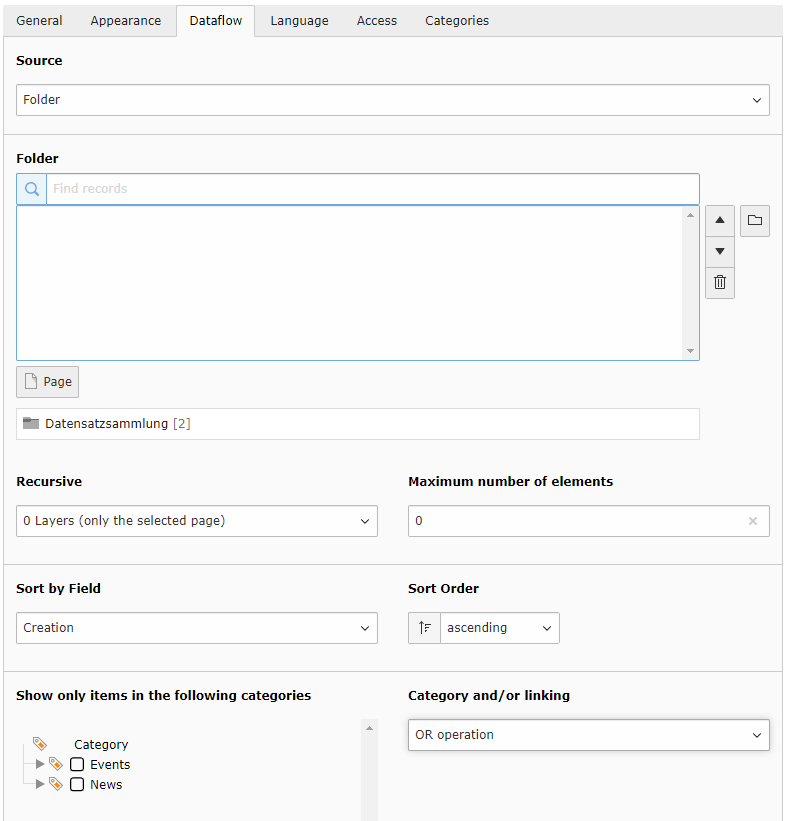
With the TCA Override each registered content element gets a new tab called 'Dataflow'.
This contains the main configuration (constraints) on how to fetch the data of the desired table.

Fields **Source**: Source of your records. Choose a folder or select manually. Recursive: Include nested folders. **Maximum number of elements**: Return a fixed amount of items. Sort by Field: Select a column to sort by. **Sort Order**: ascending / descending. Categories: Show only items in the selected categories. **Category and/or linking**: Choose and / or - operator for the categoryies query. Recursive: Include nested folders.

Pagination 

To activate automatic pagination see TCA Override first.
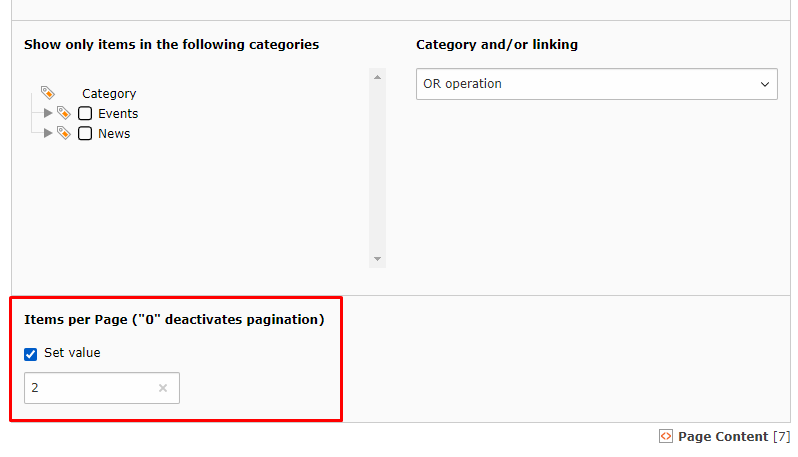
With ['enablePagination' => true] there is an additional field 'Items per Page' in the dataflow tab at the bottom.
It represents the amount of items of each paginated page.


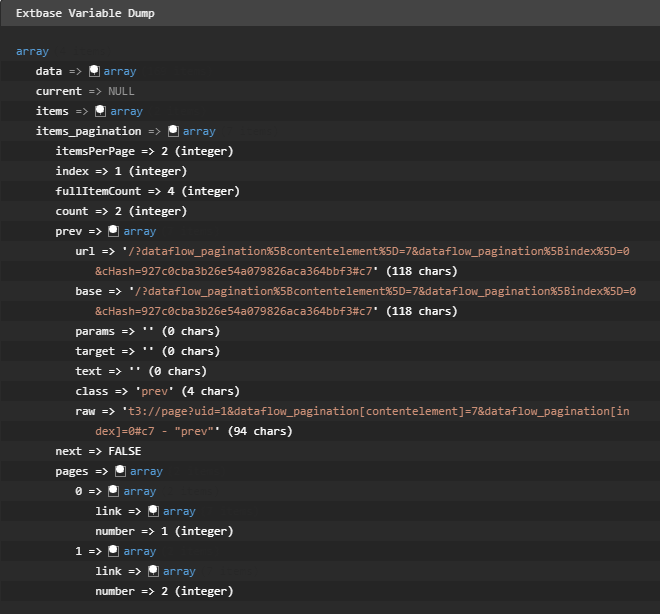
Output (items_pagination) **itemsPerPage**: Items per page. index: Current page (starting at 0). **fullItemCount**: Amount of all items cross all pages. count: Amount of items on this page. **prev** (array): Link to previous page (or to self if first page). next (array): Link to next page (or to self if last page). **pages** (array)*: List of all pages with links but without items.

Example output of the prepared data for the pagination (itemsPerPage = 2).