TYPO3 JobRouter Connector 

Extension key

jobrouter_connector

Package name

jobrouter/typo3-connector

Version

5.0

Language

en

Author

Chris Müller, JobRouter GmbH

License

This document is published under the Creative Commons BY 4.0 license.

Rendered

Wed, 22 Apr 2026 06:22:43 +0000


Connect TYPO3 with the JobRouter® digitalisation platform


Table of Contents:
Introduction 

JobRouter® is a scalable digitalisation platform which links processes, data and documents. The TYPO3 extension "TYPO3 JobRouter Connector" links TYPO3 with the JobRouter® platform.

What does it do? 

The TYPO3 JobRouter Connector is a base extension for defining connections from TYPO3 to JobRouter®. Other extensions rely on this extension to add further functionality:

This extension uses the JobRouter REST Client library.

Release management 

This extension uses semantic versioning which basically means for you, that

  • Bugfix updates (for example, 1.0.0 => 1.0.1) just includes small bug fixes or security relevant stuff without breaking changes.
  • Minor updates (for example, 1.0.0 => 1.1.0) includes new features and smaller tasks without breaking changes.
  • Major updates (for example, 1.0.0 => 2.0.0) includes breaking changes which can be refactorings, features or bug fixes.

The changes between the different versions can be found in the changelog.

Installation 

Target group: Administrators

Requirements 

In addition to the TYPO3 requirements this extension needs the following PHP extensions: curl and sodium.

Version matrix 

JobRouter Connector PHP TYPO3
5.0 8.2 - 8.5 13.4 / 14.3
4.0 8.1 - 8.4 12.4 / 13.4
3.0 8.1 - 8.3 11.5 / 12.4
2.0 8.1 - 8.3 11.5 / 12.4
1.2 7.4 - 8.2 10.4 / 11.5
1.1 7.3 - 8.1 10.4 / 11.5
1.0 7.2 - 7.4 10.4

Installation via Composer 

The recommended way to install this extension is by using Composer. In your Composer-based TYPO3 project root, just type:

composer req jobrouter/typo3-connector
Copied!

and the recent version will be installed.

The extension offers some configuration which is explained in the Configuration chapter.

Installation in Extension Manager 

In a classic installation, you can also install the extension from the TYPO3 Extension Repository (TER).

Configuration 

Target group: Administrators

Extension configuration 

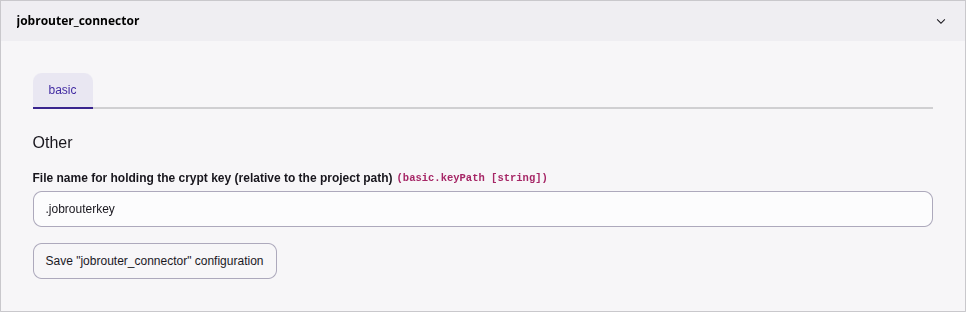
To configure the extension, go to System > Settings > Extension Configuration and click on the Configure extensions ... button. Open the jobrouter_connector configuration:

Extension configuration of jobrouter_connector

Extension configuration

basic.keyPath 

The extension stores credentials in the database, the password will be encrypted. With this configuration setting you define the path and name of the key file relative to the project directory.

Key Generation 

An encryption key is required to encrypt and decrypt the password. The extension provides a console command for creating a key. So log on to your server and go to the project path. To generate the key, you need write permissions for this path. Run the following command in the project directory for a composer installation:

vendor/bin/typo3 jobrouter:connector:generatekey
Copied!

In a non-Composer (legacy) installation execute:

php typo3/sysext/core/bin/typo3 jobrouter:connector:generatekey
Copied!

Hopefully you will receive a successful response:

[OK] Key was generated and stored into "/your/project/path/.jobrouterkey"
Copied!

Usage 

Target group: Integrators, Administrators

Module 

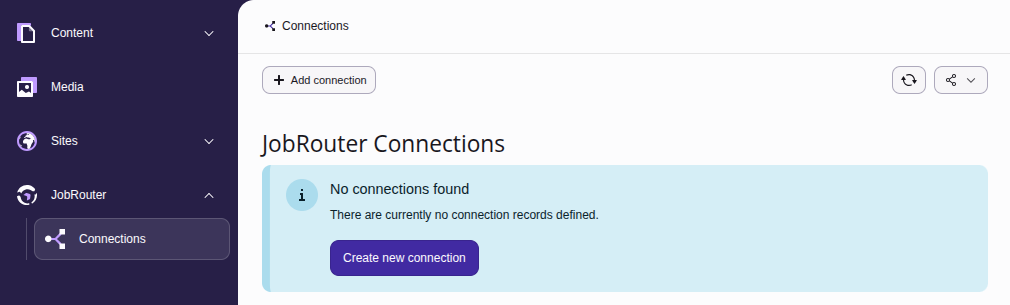
The connections to JobRouter® installations are managed in the backend module JobRouter > Connections.

On your first visit after installing the extension and generating the key you should see the following screen:

Initial Connections module screen

Initial Connections module screen

Create a connection 

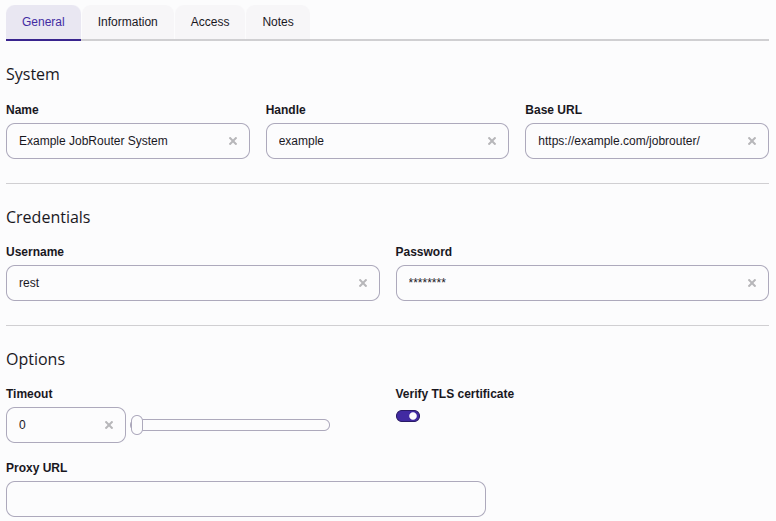
To create a new connection, click on the + Add connection button in the upper menu bar, which displays a form:

Create a connection

Create a connection

The following fields are available:

General 

Name
Use a name you recognise. This can be the name of the JobRouter® installation or the purpose for which it is used. It is only descriptive.
Handle
Enter a unique short handle. It can be used to create a connection programmatically and independent of the internal uid.
Base URL

The base URL of the JobRouter® installation.

Username

The username to sign in over the REST API.

Password
The password to be used. It will be stored encrypted in the database.
Timeout

The maximum number of seconds to execute a request.

Default: 0

Verify TLS certificate

The TLS certificate of the JobRouter® installation is checked when connecting.

Default: activated

Proxy URL

Enter the URL when connecting through a proxy to the JobRouter® installation.

Default: (empty)

Information 

JobRouter Version
The version of the JobRouter® installation. The version is automatically detected when a connection is established and is therefore read-only.

Access 

Enabled
In the Access tab you can enable or disable the connection. Disabled connections cannot be used.

Notes 

Description
This is a descriptive field only. You can enter additional remarks for a connection.

Connection list 

After creating one or more connections, you will see a list of connections when calling the module:

Connection list

Connection list

If a connection is not enabled, this is indicated by the addition "(disabled)" in the name.

There are three buttons available for each connection:

  • You can edit a connection with the pencil.
  • Click on the bug icon to test a connection. This will also update the JobRouter® version if necessary.
  • The last icon is a link to the JobRouter® installation.

Delete a connection 

To delete a connection, open the editing page of the connection. In the upper menu bar you will find the Delete button.

Developer corner 

Target group: Developers

Create own logic 

You can use the TYPO3 JobRouter Connector as a starting point for your own logic, for example, to synchronise JobData tables or retrieve archive documents. Since this extension relies on the JobRouter REST Client library, you can get a RestClient object to call the JobRouter® REST API.

Example 

To simplify the creation of this client object, a factory method is available. Let's have a look at an example in the TYPO3 context:

EXT:my_extension/Classes/Controller/MyController.php
<?php

declare(strict_types=1);

use JobRouter\AddOn\RestClient\Exception\ExceptionInterface;
use JobRouter\AddOn\Typo3Connector\Domain\Entity\Connection;
use JobRouter\AddOn\Typo3Connector\Domain\Repository\ConnectionRepository;
use JobRouter\AddOn\Typo3Connector\Exception\ConnectionNotFoundException;
use JobRouter\AddOn\Typo3Connector\RestClient\RestClientFactory;
use Psr\Http\Message\ResponseInterface;

final readonly class MyController
{
    public function __construct(
        private ConnectionRepository $connectionRepository,
        private RestClientFactory $restClientFactory,
    ) {}

    public function myAction(): ResponseInterface
    {
        try {
            /** @var Connection $connection */
            $connection = $this->connectionRepository->findByHandle('example');
        } catch (ConnectionNotFoundException) {
            // The connection is not found or disabled
        }

        try {
            $client = $this->restClientFactory->create($connection, 60);
        } catch (ExceptionInterface) {
            // Maybe authentication failure or HTTP error
        }

        // Now you can call the request() method of the $client
    }
}
Copied!

Explanation:

  1. Line 23: Retrieve the Connection entity class with handle example, which holds the base URL of the JobRouter® installation and the credentials. Of course, the connection must be registered first in the Connections module.
  2. Lines 24-26: It can be the case that there is no connection entity available: There is no connection with handle example or the connection is disabled. So you have to consider this case.
  3. Line 29: Create the REST client with the create() method of the RestClientFactory. The first argument is the Connection model, the second argument the optional lifetime of the authentication token. With the call the authentication is done immediately, so an exception can be thrown if a HTTP error occurs or the authentication failed. With the client object you can make the calls to the REST API. Have a look at the JobRouter REST Client examples.

Changelog 

All notable changes to this project will be documented in this file.

The format is based on Keep a Changelog, and this project adheres to Semantic Versioning.

Unreleased 

5.0.0 - 2026-04-22 

Added 

  • Compatibility with TYPO3 v14

Removed 

  • Compatibility with TYPO3 v12 (#12)

4.0.1 - 2025-02-13 

Fixed 

  • Wrong/missing label for palettes in backend form

4.0.0 - 2024-10-01 

Added 

  • Compatibility with TYPO3 v13

Removed 

  • Compatibility with TYPO3 v11 (#9)

3.0.1 - 2024-06-06 

Fixed 

  • Wrong namespace in upgrade section of documentation

3.0.0 - 2024-02-21 

Changed 

  • JobRouter REST Client in version 3 is required
  • Namespace from Brotkrueml\JobRouterConnector to JobRouter\AddOn\Typo3Connector

2.0.0 - 2023-05-31 

Added 

  • Compatibility with TYPO3 v12

Changed 

  • JobRouter Client in version 2 is required
  • Connection model is no longer Extbase-based and is moved to the Domain/Entity namespace
  • ConnectionRepository is no longer Extbase-based

Removed 

  • Compatibility with TYPO3 v10 (#6)
  • Compatibility with PHP 7.4 and 8.0

1.2.0 - 2022-05-27 

Added 

  • Configuration of connection options (#8)

Removed 

  • Compatibility with PHP 7.3

1.1.0 - 2021-11-21 

Added 

  • Compatibility with TYPO3 v11 LTS

Removed 

  • Compatibility with PHP 7.2

1.0.0 - 2021-03-14 

Added 

  • Extension usable in non-composer installations

0.12.3 - 2021-02-06 

Added 

  • Version information of used JobRouter Client in backend module

Changed 

  • Raise minimum required version to TYPO3 10.4.11

0.12.2 - 2020-11-25 

Changed 

  • Make ConnectionRepository extendable and mockable

0.12.1 - 2020-11-01 

Added 

  • Acceptance tests

0.12.0 - 2020-10-18 

Changed 

  • Hide connection table in list view

Removed 

  • Log table (is now part of the new base extension)

0.11.0 - 2020-07-23 

Added 

  • Add description field to connection record

Updated 

  • JobRouter Client to version 1.0

0.10.1 - 2020-07-03 

Fixed 

  • Adjust size of module group icon

Changed 

  • Relax PHP requirements (>= PHP 7.2)
  • Use JS API from TYPO3 for connection check

0.10.0 - 2020-04-21 

Added 

  • Handle to connection record

Changed 

  • Rename command to jobrouter:connector:generatekey

Removed 

  • Support for TYPO3 v9 LTS

0.9.0 - 2020-02-22 

Added 

  • JobRouter version to connection for informational purposes
  • Possibility to define a user agent addition

Updated 

  • JobRouter Client to version 0.9

0.8.0 - 2020-02-09 

Added 

  • Log table for usage in dependent extensions

0.7.0 - 2020-01-27 

Added 

  • Documentation

Updated 

  • JobRouter Client to version 0.8

0.6.0 - 2020-01-11 

Updated 

  • JobRouter Client to version 0.7

0.5.0 - 2020-01-02 

Changed 

  • Rename Rest service to RestClientFactory

Updated 

  • JobRouter Client to version 0.6

0.4.0 - 2019-11-24 

Added 

  • Suffix to user agent

Updated 

  • JobRouter Client to version 0.5

0.3.0 - 2019-10-25 

Updated 

  • JobRouter Client to version 0.4

0.2.0 - 2019-08-27 

Changed 

  • Pass connection model to Rest service
  • Move Connections module from tools to own JobRouter module group

0.1.0 - 2019-08-22 

Initial preview release

Upgrade 

From version 2.0 to 3.0 

The namespace of the JobRouter TYPO3 Connector classes have changed from

\Brotkrueml\JobRouterConnector
Copied!

to

\JobRouter\AddOn\Typo3Connector
Copied!

The easiest way to update your code to the new namespace is to use search/replace in your project.

The package name (used in composer.json) has changed from brotkrueml/jobrouter-typo3-connector to jobrouter/typo3-connector.