jpFAQ 

Classification

jpfaq

:Version:

main

Language

en

:Description:

Frequently Asked Questions (FAQ) plugin. With categories, on-the-fly search, customer helpfulness feedback, comments and more.

Keywords
 

FAQ, frequently, asked, questions, help, glossary, feedback, definitions, customer

Copyright
 

2013

Author

Jacco van der Post

:Email:

jacco@id-webdesign.nl

License
 
This document is published under the Open Content License

available from http://www.opencontent.org/opl.shtml

Rendered

Tue, 03 Feb 2026 08:46:47 +0000

The content of this document is related to TYPO3, a GNU/GPL CMS/Framework available from www.typo3.org.

Table of Contents

Introduction 

What does it do? 

Frequently Asked Questions (FAQ) or definitions list with rich text answers and / or tt_content IRRE answers. Optional: categories, helpfulness feedback, inline question and categories Ajax comment forms with database storage and email function, Google Analytics event tracking and a find as you type searchform.

Find out what your customers do find helpful, and what they miss in the information you present in Frequently Asked Questions.

Note that we are working on a premium version with very nice features for corporate implementation, see https://github.com/Zillion01/jpfaq/issues/64

License and contribution 

This extension is published with the GNU General Public License. So you are allowed to use this plugin for free.

However, building, testing and maintaining this extension costs a lot of unpaid time and effort. That's why a contribution is requested.

Small organization : €100 Medium organization : €250 - €500 Large organization : €500 - €1000

This extension allows you to serve your customers better! And besides providing support for maintenance, new futures and new TYPO3 versions compatibility, contributers will get free technical support on bugs.

Please use https://www.paypal.me/JaccoVanderPost or contact jacco@id-webdesign.nl for IBAN and a receipt, thank you.

Screenshots 

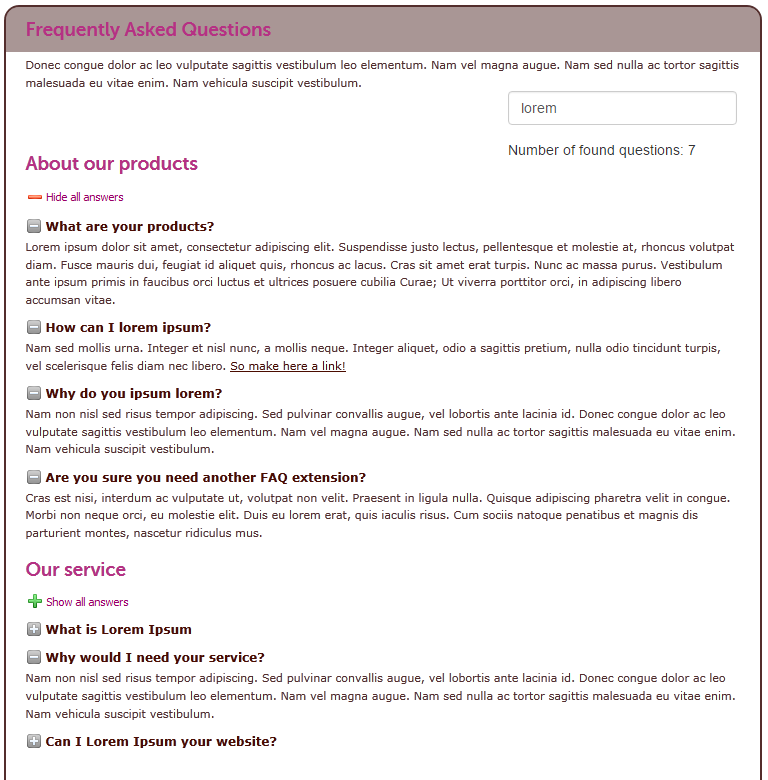
Style not included

Example looks jpFAQ, style not included

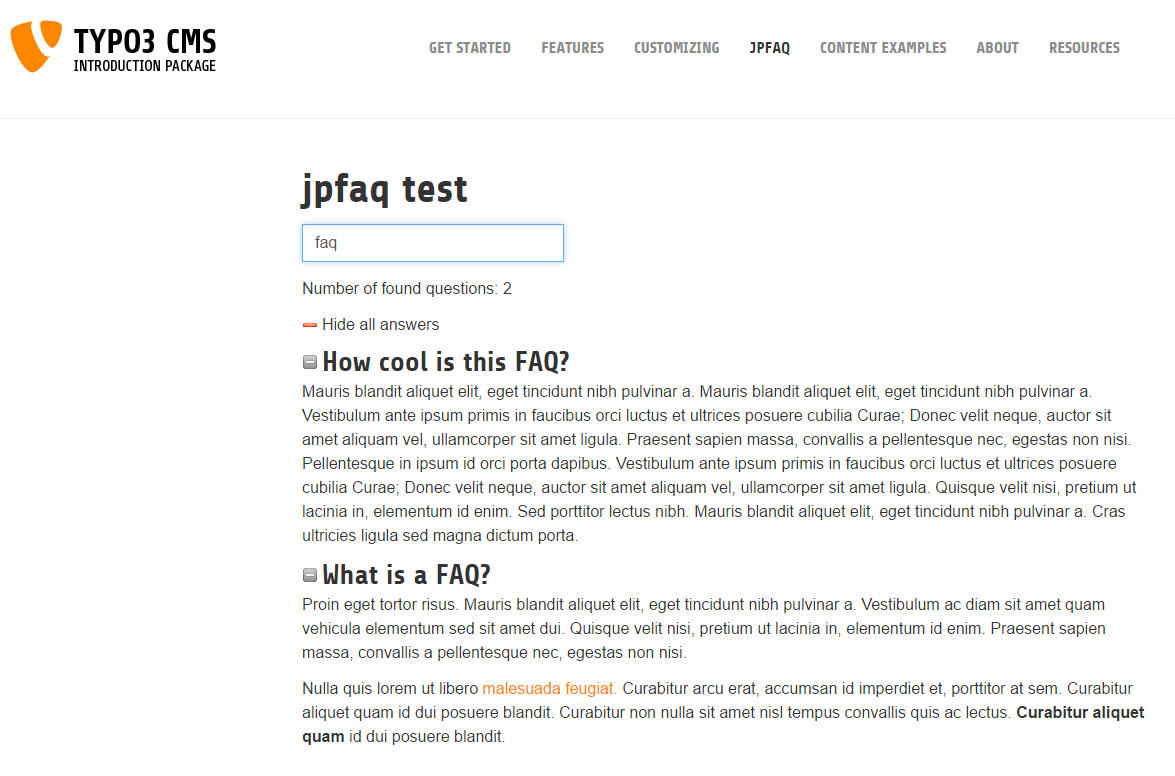
Introduction Package

Default looks jpFAQ in Bootstrap Introduction Package

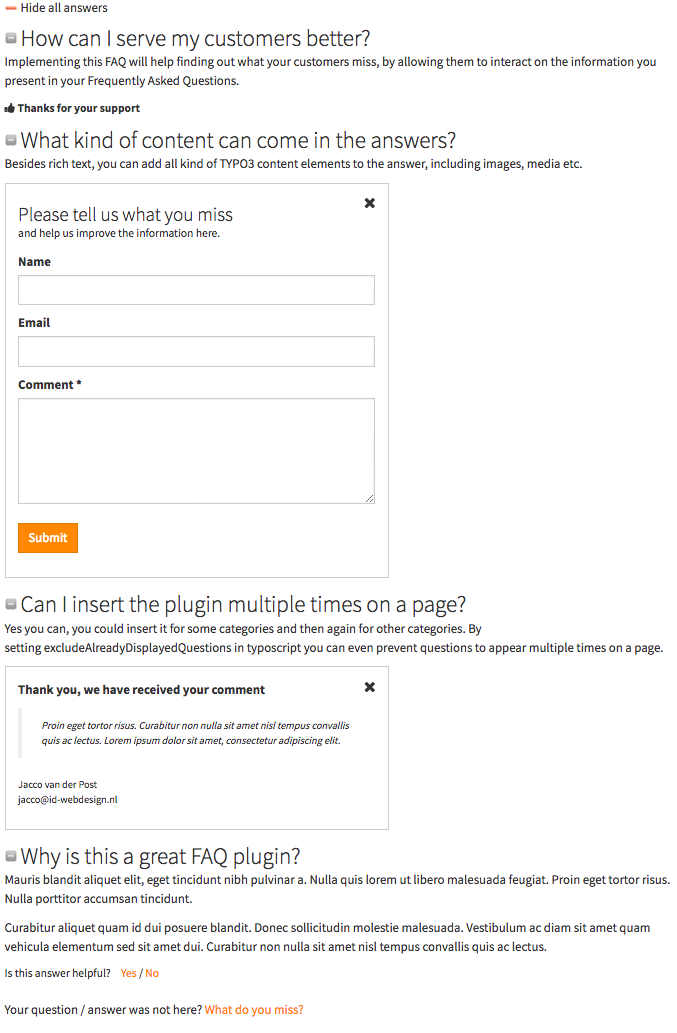
Helpfulness interaction and comment forms

Helpfulness interaction and comment forms

Users Manual 

  1. Create a folder in the page tree for example 'FAQ records'.
  2. In the page properties of the folder, under tab 'Behaviour' select 'jpFAQ' at 'Contains Plugin', this gives an own folder icon in the page tree (optional).
  3. Create records of categories (optional).
  4. Create records of questions, choose categories in question record (optional).
  5. Insert jpFAQ plugin on a page. Save and then under Plugin tab choose page or folder with question records at the 'Record Storage Page'. Choose categories if you want. If no categories are selected, all will be shown.
  6. Insert plugin again if needed to show other categories seperate.
  7. If you want the on the fly quicksearch, check checkbox. This searchform searches all questions and answers of the whole page, so I would include this only once in a page. The searchform hides immediately all questions (and answers) which do not contain the terms you type in the searchbox.
  8. You can also check the 'Show number of search results' if wanted.
  9. If would like to track helpfulness of questions, which shows a comment form when visitors click 'not helpful', check 'Show a comment form under each question'
  10. If the email and comment fields in the flexform are not filled in, the corresponding typoscript settings will be used.
  11. You can also present a feedback form under each plugin. Check 'Show a (categories) comment form under this list of questions'.
  12. On upgrade from older major version, make sure the plugin is saved again with the correct flexform values and recheck included typoscript settings.

11.6 

If you upgrade to version 11.6.x please consult the changelog. Comments now need to be enabled in the flexform.

13.4 

If you upgrade to version 13.4.x please consult the changelog. The plugin is now a content element.

Administrator Manual 

  1. Remove jQuery and FontAwesome in typoscript if you have your own libraries included.
  2. In the page properties of the records folder, under tab 'Behaviour' select 'jpFAQ' at 'Contains Plugin', this gives an own folder icon in the page tree and loads some tsconfig, like hiding tt_content records.
  3. In the page properties of the folder, under tab 'Resources' enter 'TCEMAIN.clearCacheCmd = 12,45,78'. Where the numbers represent the page id's of the page(s) with a jpFAQ plugin from which you want the cache get auto cleared when adding or editing FAQ records (optional)
  4. If you like to restrict at the answers the additional IRRE tt_content types (for example allow only textmedia), check out Configuration/TsConfig/Page/pageTSconfig.tsconfig
  5. Check out Configuration/TypoScript/setup.typoscript for settings to exclude already displayed questions, configuring comment emails and Google Analytics tracking
  6. In the extension manager you can go to 'Configure' at jpFAQ to anonymize comment IP addresses. This is needed in for example Germany.
  7. Required fields the comment forms (there is a simple JS frontend validation), are determined by the class jpfaqRequired in the FormFields.html files.

Installation 

To install the extension, perform the following steps:

  1. Go to the Extension Manager
  2. Install the extension
  3. Include static template jpFAQ
  4. Then... see Users manual

Since 9.5.1. the extension can be installed via composer require jvdp/jpfaq

Configuration Reference 

TypoScript / Flexform Reference 

Prefix TypoScript view and settings with plugin.tx_jpfaq_faq.

Property details 

view.templateRootPaths 

Property
view.templateRootPaths
Data type
string
Description
The path to the template. templateRootPaths.0 points to the extension. Use templateRootPaths.1 to override.

view.partialRootPaths 

Property
view.partialRootPaths
Data type
string
Description
The path to the partial (the search form, which has some Bootstrap markup). partialRootPaths.0 points to the extension. Use partialRootPaths.1 to override.

view.layoutRootPaths 

Property
view.layoutRootPaths
Data type
string
Description
The path to the layoutRootPaths. layoutRootPaths.0 points to the extension. Use layoutRootPaths.1 to override.

persistence.storagePid 

Property
persistence.storagePid
Data type
int
Description
Disabled, to be able to use the Record Storage Page at the plugin properties.

settings.overrideFlexformSettingsIfEmpty 

Property
settings.overrideFlexformSettingsIfEmpty
Data type
string
Description
The default behaviour of extbase is to override settings from TypoScript by the one of the flexforms. This is even valid if the setting is left empty in the flexforms. Therefore you can define those settings which’s value should be taken from TypoScript if nothing is set in the plugin.
Default
question.comment.email.subject,question.comment.email.sender.name,question.comment.email.sender.email,question.comment.email.receivers.email,question.comment.email.introText,question.comment.email.closeText,question.comment.email.commenter.introText,question.comment.email.commenter.closeText,category.comment.email.subject,category.comment.email.sender.name,category.comment.email.sender.email,category.comment.email.receivers.email,category.comment.email.introText,category.comment.email.closeText,category.comment.email.commenter.introText,category.comment.email.commenter.closeText

settings.excludeAlreadyDisplayedQuestions 

Property
settings.excludeAlreadyDisplayedQuestions
Data type
int
Description
Exclude already displayed questions when multiple plugins are inserted on a page.

settings.gtag.enable 

Property
settings.gtag.enable
Data type
int
Description
Enable Google Analytics Event tracking for helpful / unhelpfulresponse. First install gtag.js snippet https://developers.google.com/analytics/devguides/collection/gtagjs/

settings.gtag.event 

Property
settings.gtag.event
Data type
string
Description
Event for Gtag. Note that that the label will be the question title.

settings.gtag.category 

Property
settings.gtag.category
Data type
string
Description
Category for Gtag.

settings.gtag.valueHelpful 

Property
settings.gtag.valueHelpful
Data type
string
Description
Value for Gtag when clicked helpful.

settings.gtag.valueUnhelpful 

Property
settings.gtag.valueUnhelpful
Data type
string
Description
Value for Gtag when clicked unhelpful.

settings.question.comment.email.enable 

Property
settings.question.comment.email.enable
Data type
int
Description
Send an email when visitors fill in the question comment form.

settings.includeJsAndCssGlobal 

Property
settings.includeJsAndCssGlobal
Data type
boolean
Description
Load JS and CSS globally instead of only on plugin page. This might be more efficient in some cases.

settings.setSchemaOrgOnHtmlTag 

Property
settings.setSchemaOrgOnHtmlTag
Data type
boolean
Description
Set Schema.org/FAQPage as HTML attribute instead of at the FAQ plugin. This will produce a Google Schema.org validated FAQ page, like developers.google.com/search/docs/appearance/structured-data/faqpage

settings.setSchemaOrgOnHtmlTagPages 

Property
settings.setSchemaOrgOnHtmlTagPages (constant!)
Data type
string
Description
Set Schema.org/FAQPage as HTML tag attribute at these pages. Commaseperated list of page IDs. Used for condition in typoscript.

settings.bots 

Property
settings.bots
Data type
string
Description
List of well known bots, spiders and crawlers, to prevent them clicking helpfullness actions

settings.question.comment.email.subject 

Property
settings.question.comment.email.subject
Data type
string
Description
Subject for question comment email.

settings.question.comment.email.sender.name 

Property
settings.question.comment.email.sender.name
Data type
string
Description
Sender name for question comment email.

settings.question.comment.email.sender.email 

Property
settings.question.comment.email.sender.email
Data type
string
Description
Sender email address for question comment email.

settings.question.comment.email.receivers.email 

Property
settings.question.comment.email.receivers.email
Data type
string
Description
Receiver email address or comma seperated list of email addresses without spaces of receivers for question comment email.

settings.question.comment.email.introText 

Property
settings.question.comment.email.introText
Data type
string
Description
Simple HTML introtext in the question comment email.

settings.question.comment.email.closeText 

Property
settings.question.comment.email.closeText
Data type
string
Description
Simple HTML text at the bottom of the question comment email.

settings.question.comment.email.sendCommenterNotification 

Property
settings.question.comment.email.sendCommenterNotification
Data type
int
Description
Send the commenter a confirmation email.

settings.question.comment.email.commenter.introText 

Property
settings.question.comment.email.commenter.introText
Data type
string
Description
Confirmation email introtext.

settings.question.comment.email.commenter.closeText 

Property
settings.question.comment.email.commenter.closeText
Data type
string
Description
Simple HTML text at the bottom of the question comment email.

settings.category.comment.email.enable 

Property
settings.category.comment.email.enable
Data type
int
Description
Send an email when visitors fill in the 'categories' form (at the bottom) of the plugin.

settings.category.comment.email.subject 

Property
settings.category.comment.email.subject
Data type
string
Description
Subject for categories comment email.

settings.category.comment.email.sender.name 

Property
settings.category.comment.email.sender.name
Data type
string
Description
Sender name for categories comment email.

settings.category.comment.email.sender.email 

Property
settings.category.comment.email.sender.email
Data type
string
Description
Sender email address for categories comment email.

settings.category.comment.email.receivers.email 

Property
settings.category.comment.email.receivers.email
Data type
string
Description
Receiver email address or comma seperated list of email addresses without spaces of receivers for categories comment email.

settings.category.comment.email.introText 

Property
settings.category.comment.email.introText
Data type
string
Description
Simple HTML introtext in the categories comment email.

settings.category.comment.email.closeText 

Property
settings.category.comment.email.closeText
Data type
string
Description
Simple HTML text at the bottom of the categories comment email.

settings.category.comment.email.sendCommenterNotification 

Property
settings.category.comment.email.sendCommenterNotification
Data type
int
Description
Send the commenter a confirmation email.

settings.category.comment.email.commenter.introText 

Property
settings.category.comment.email.commenter.introText
Data type
string
Description
Confirmation email introtext.

settings.category.comment.email.commenter.closeText 

Property
settings.category.comment.email.commenter.closeText
Data type
string
Description
Simple HTML text at the bottom of the question comment email.

page.includeJSFooter.tx_jpfaq_jquery 

Property
page.includeJSFooter.tx_jpfaq_jquery
Data type
string
Description
The path to the jQuery lib. Unset if you already have your owen jQuery library.

page.includeJSFooter.tx_jpfaq 

Property
page.includeJSFooter.tx_jpfaq
Data type
string
Description
The path to the jQuery for opening and closing questions and the search form. If this does not work, you need to recheck if jQuery is loaded before this. Also make sure to not double load jQuery lib.

page.includeCSS.tx_jpfaq 

Property
page.includeCSS.tx_jpfaq
Data type
string
Description
The path to some basic CSS.

page.includeCSS.tx_jpfaq_fontAwesome 

Property
page.includeCSS.tx_jpfaq_fontAwesome
Data type
string
Description
The path to some FontAwesome CSS. Disable if you don't want to use it in the templates or if you already load this.

ChangeLog 

13.4.3 

  1. fix: change plugin group to lowercase - thanks to Florian Leimer
  2. fix: use associative keys for select items - thanks to Florian Leimer
  3. feat: add index to tt_content - thanks to Stephan Lucas

13.4.2 

  1. Bug fix. Added setSchemaOrgOnHtmlTagPages constant see documentation. This allows to choose the page uid's where the Schema.org/FAQPage is set as an HTML attribute. This was a bug because it set on all pages before the HTML tag. It is not ideal, but unfortunately there is no easy way to set the html tag attributes based on the content of the page.
  2. Fixed casing of the word fontAwesome in typoscript, verify your settings!
  3. Update jQuery to 3.7.1

13.4.1 

  1. For TYPO3 v13. Removed unfinished upgrade wizard. Since the flexform is changed, I would suggest reinserting the plugin as a content element manually and saving the flexform again.

13.4.0 

  1. For TYPO3 v13. Notice that with the changes needed for TYPO3 v13, the plugin needs to be reinserted as a content element and the flexform needs to be saved again.

12.5.0 

  1. Use null coalescence for undefined array indices, for if not all settings are set. (Michiel Roos)
  2. Improved bot detection for helpfullness and comment actions

12.4.2 

  1. Small bugfix in isBot function

12.4.1 

  1. Prevent well known bots to click on helpfullness actions

12.4.0 

  1. For TYPO3 v12 (also thx to Christian-Hackl)
  2. Improved Schema.org validation
  3. Improved inclusion of JS and CSS
  4. Answer field is no longer required
  5. jQuery and FontAwesome now locally loaded

11.6.2 

  1. Possible fix for bug excludeAlreadyDisplayedQuestions #43

11.6.1 

  1. PHP 7.4 compatibility #41 (thx to Tobias Bünter)

11.6.0 

  1. Constants for libs, CSS
  2. Comment settings now available in the flexform
  3. Empty flexform fields for the comments will default to the typoscript settings
  4. New feature, confirmation email to the commenter
  5. Additional security in the form handling
  6. Fixed a bug with excludeAlreadyDisplayedQuestions
  7. excludeAlreadyDisplayedQuestions is moved to the flexform
  8. Sponsored by h_da - Hochschule Darmstadt

11.5.1 

  1. Condition uses traverse() to avoid errors
  2. Replace old import with @import syntax (thx toMathias Bolt Lesniak)

11.5.0 

Update to TYPO3 11 LTS

10.4.1 

  1. TCA fixes for TYPO3 10.4. (thx to Sven Wappler)
  2. Add extension key to composer.json (thx to Klaus Hörmann-Engl)

10.4.0 

For TYPO3 CMS versions 9.5 and 10.4. (thx to Cristian Fries)

9.5.3 

Prevent search engine indexing of helpful links and comment form (thx to Nemo64)

9.5.2 

Some code improvements, added settings for manual

9.5.1 

Added to packagist, updated schema.org (thx to Cristian Fries and Starkmann)

9.5.0 

For TYPO3 9.5

8.8.2 

  1. Make compatible with Linux case-sensitivity and MySQL Strict Mode (thx to Ferdinand Kasper)
  2. Improved German translation (thx to Ferdinand Kasper)

8.8.1 

Bugfix TCA sorting of comments. This produced an error when copying a page with jpFAQ. (Thx to Michael Ecker).

8.8.0 

  1. Added optional helpfulness with optional Google Analytics event tracking under each question with a comment form
  2. Added optional commentform under each plugin
  3. Commentforms are stored in the database and can be emailed
  4. TYPO3 7.6 and 8.7 compatibility
  5. Exclude already displayed questions
  6. Thanks to Fenster24.de for sponsoring

8.7.1 

Added default constants for paths and prevent submit search form

8.7.0 

For TYPO3 8.7

8.5.2 

Fixed mm relations question - category

8.5.1 

Fixed typos

8.5.0 

Changed requirements to TYPO3 version <= 8.5.99. Changed version number to max. supported TYPO3 version. Added tt_content IRRE field for custom content at answers.

8.4.0 

Changed requirements to TYPO3 version <= 8.4.99. Changed version number to max. supported TYPO3 version.

4.0.4 

Moved globals and plugin registering to overrides tt_content.php for caching.

4.0.3 

Small bugfix ext_emconf.php

4.0.2 

Fix for documentation

4.0.1 

Fix for documentation

4.0.0 

TYPO3 7.6+ compatibility. Totally rewritten.

3.0.0 

TYPO3 6.2 compatibility. Do not use for older TYPO3 versions. Removed support for t3jQuery

2.1.5 

Re-added dependencies. TYPO3 6.0 compatibility: changed name of default.hml to Default.hml

2.1.4 

Changed $ in jQuery in QuestionController.php and quicksearch.js to avoid javascript conflicts.

2.1.3 

Fixed a bug which inserted an empty js file when using own jQuery library. Thx to André Spindler.

2.1.2 

TYPO3 4.7 compatibility: replaced deprecated f:form.textbox for f:form:textfield in Fluid templates. Thx to Tim Hengeveld.

2.1.1 

Fixed rendering of richtext answers in template. Paragraph tags were not parsed.

2.1.0 

Improved toggling further. If all answers of a category are unfolded, the link “Hide all Answers” will be shown, else “Show all Answers”. (Also thanks to Pascal Uhlmann)

2.0.2 

Added dependencies for Extbase and Fluid. Some people seem to install jpFAQ without Extbase and get problems.

2.0.1 

Fixed a bug which prevented realurl links in answers. (Thanks to Klaus Hörmann)

2.0.0 

Added quicksearch All javascript to footer Fixed toggling all answers

1.1.2 

Re-uploaded, cause of error on uploading in repository of 1.1.1

1.1.1 

Added French translation Added Russian translation (Thanks to Antony A. Antonenko)

1.1.0 

Added German translation Setting status to stable

1.0.0 

Initial release

Developer Manual 

  1. If you want more fields in comment form you can should extend in your own extension the TCA of for example tx_jpfaq_domain_model_questioncomment.php, also put the field in ext_tables.sql and extend the model of for example Questioncomment.php. Define the corresponding fields in the FormFields.html files.