checkfaluploads adds a checkbox to the File List module and the
ElementBrowser that editors must confirm before a file upload is accepted,
granting the configured owner unrestricted rights to that file.
----
checkfaluploads adds a checkbox to the File List module and the
ElementBrowser that editors must confirm before a file upload is accepted,
granting the configured owner unrestricted rights to that file. It also
stores the uploading editor's user UID on the sys_file record, so
administrators can trace back who uploaded a given file.
This only covers what TYPO3 core itself handles. Extensions with their own
upload logic need a developer to wire in our FalUploadService /
CheckFalUploadValidator API by hand, and frontend forms without a login
have no user to assign at all, see Known Problems.
Screenshots
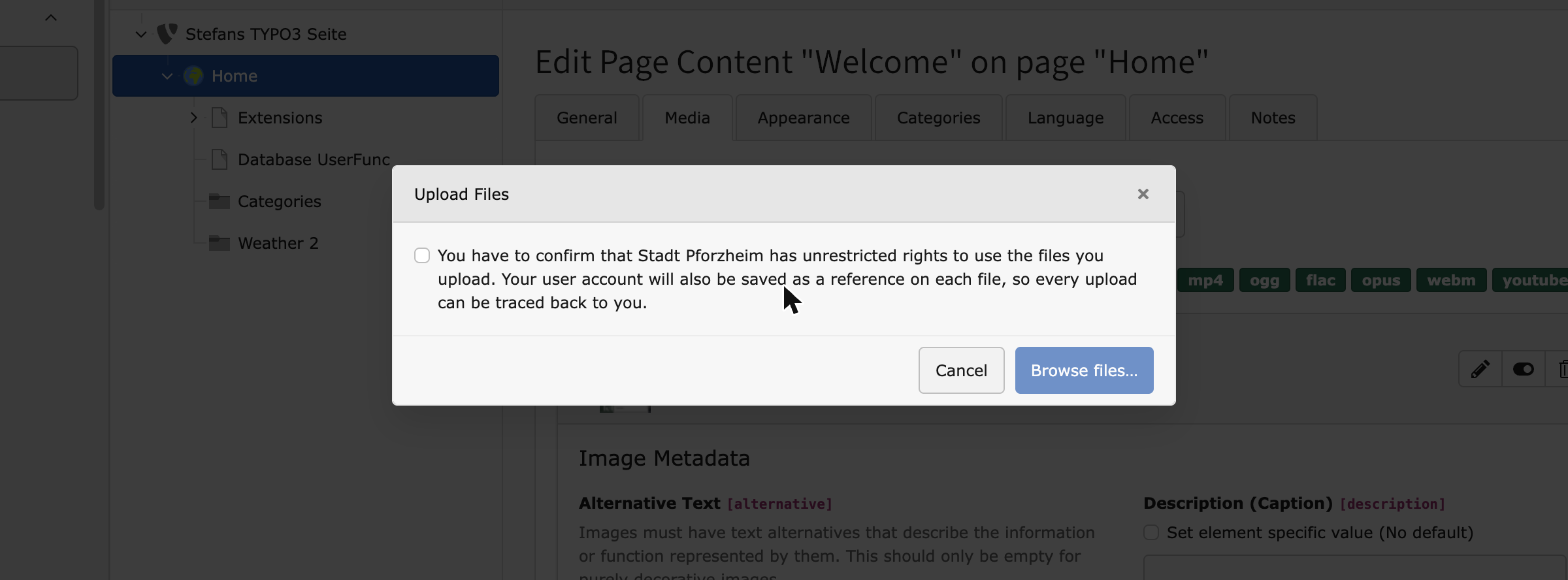
The rights confirmation dialog shown before an inline file/media
upload in FormEngine is accepted.
Users Manual
Uploading a file always requires you to confirm a checkbox that grants
the configured owner unrestricted rights to it. Leaving it unchecked
makes the upload fail. Depending on where you upload from, that checkbox
is either shown directly or behind a short confirmation dialog first.
File List module
Click Upload files... in the File List module, or drop files onto it,
and a dialog opens asking you to confirm the checkbox before the actual
upload starts.
Inline file and media fields
Fields with a Select & upload files... button, for example an image or
media field on a content element, show the same confirmation dialog
before the upload starts.
ElementBrowser
The classic upload form inside the ElementBrowser popup, opened for
example via Add media file, shows the checkbox directly next to the
file selector, without an extra dialog.
After a successful upload
Once a file has been uploaded successfully, your user UID is assigned to
it.
Installation
Composer
If your TYPO3 installation runs in Composer mode, execute the following
command:
When you upload a file, you must confirm a checkbox that grants the
configured owner unrestricted rights to it. The owner named in the checkbox
label is a placeholder you can set in the extension settings.
Upload rights checks
The confirmation checkbox is shown in two places, each with its own
extension setting: drag & drop uploads (the File List module and
FormEngine's inline "Select & upload files" fields, which both use TYPO3
core's DragUploader) and uploads through the ElementBrowser popup.
File List and the inline fields cannot be switched off individually: they
both submit through the very same upload mechanism internally, and TYPO3
core gives us no way to tell them apart on the server side. Disabling the
drag & drop setting therefore turns off the check for both at once.
Store uploader on file
Alongside the checkbox, checkfaluploads stores the uploading user as a
reference on the sys_file record. Backend and frontend uploads have their
own setting, so you can switch either one off independently.
All settings on this page are enabled by default.
Developer manual
Additional columns
checkfaluploads adds two columns to the sys_file table:
cruser_id
checkfaluploads fills this column automatically in TYPO3 backend
context.
fe_cruser_id
This column is filled automatically with the current frontend user, as
long as you use TYPO3's official API for FAL files. In any other case,
you have to fill it yourself.
FalUploadService
checkfaluploads ships a small API you can use in your own extension to
check whether an uploaded file's user rights checkbox was marked in
frontend context. Add the checkbox to your Fluid template:
-label:'Example image upload'type:ImageUploadidentifier:image-1properties:saveToFileMount:'1:/Extensions/[myExt]'allowedMimeTypes:-image/jpg-image/jpeg-image/pngelementDescription:'Select an image'-type:Checkboxidentifier:image-1-userrightslabel:'Upload Rights'properties:# non-official property. Needed by DynamicUploadValidatorHook. Helps to identify the checkboxcheckboxType:uploadRights# non-official property. Enter the identifier of the image/file uploadreferenceUploadIdentifier:image-1validators:# Do not add NotEmpty validator. It will be added dynamically in DynamicUploadValidatorHook
Copied!
CheckFalUploadValidator
Since TYPO3 13.3, Extbase provides a native API for file upload handling via
the #[FileUpload] attribute (see TYPO3 Changelog
Feature-103511-IntroduceExtbaseFileUploadHandling). This attribute does
not support custom validators though, so checkfaluploads ships a
ready-to-use JWeilandCheckfaluploadsValidationValidatorCheckFalUploadValidator
which must be added manually to a property's
TYPO3CMSExtbaseMvcControllerFileUploadConfiguration. Like any
other file upload validator, it is only ever called by Extbase with an
TYPO3CMSCoreHttpUploadedFile instance as the validated value.
As described in the TYPO3 Changelog under "Modifying existing configuration",
this is done in the controller's initialize*Action():
How and where exactly the validator is registered is up to the consuming
extension. initialize*Action() is the way shown by the TYPO3 Changelog and
requires no further wiring, but nothing stops you from doing this in a PSR-14
event listener instead, if you prefer to keep your controllers slim.
The $request argument of ValidatorResolver::createValidator() is
mandatory. It is the only way CheckFalUploadValidator gets access to
the current request, which it needs to resolve the rights configuration -
and the current plugin namespace.
Where "propertyPath" points to, and why it does NOT need the plugin namespace
This is the part most people get wrong on first try, because
$request->getParsedBody() does not return an already-resolved
Extbase argument (as $request->getArgument('topic') would). It returns
the raw, unfiltered HTTP POST body, i.e. exactly what PHP's $_POST
superglobal would contain. Extbase's f:form ViewHelper wraps every
field name in the current plugin's namespace (tx_<extension>_<plugin>):
1)  Fluid form field, rendered inside <f:form name="topic" ...>:

        <f:form.checkbox name="{object}[images][rights]" value="1"/>

2)  Extbase prefixes every field name with the plugin namespace
    ("tx_pforum_forum"), so it ends up here, in the raw and unfiltered
    HTTP POST body == $request->getParsedBody():

        [
            'tx_pforum_forum' => [   // plugin namespace
                'topic' => [          // Extbase argument name
                    'images' => [     // <- "propertyPath" points here,
                        'rights' => '1',    // NOT to "...images.rights"
                    ],
                ],
            ],
        ]
Copied!
CheckFalUploadValidator resolves the plugin namespace itself, via
TYPO3CMSExtbaseServiceExtensionService::getPluginNamespace()
(built as 'tx_' . strtolower($extensionName . '_' . $pluginName)), and
prepends it to "propertyPath" before resolving the value:
3)  CheckFalUploadValidator reads it back out via:

        $propertyPath = str_replace(
            '.',
            '/',
            $pluginNamespace . '.' . $this->options['propertyPath'],
            // 'tx_pforum_forum'   .   'topic.images'
        );
        // === 'tx_pforum_forum/topic/images'

        ArrayUtility::getValueByPath($parsedBody, $propertyPath)
        === ['rights' => '1']

4)  ['rights' => '1'] is passed as $rightsConfiguration into
    FalUploadService::checkFile(), which reads
    $rightsConfiguration[$fieldName] internally. Pointing "propertyPath"
    at "...images.rights" instead would hand over the plain string '1'
    rather than an array, and fatal with a TypeError.
Copied!
Extension developers therefore only ever configure the simple, plugin-agnostic
part of the path ("topic.images", "post.images", ...) - the plugin namespace
differs per extension/plugin and would otherwise have to be duplicated,
error-prone, in every extension using this validator.
Available options
All of the following options are passed as the second argument of
ValidatorResolver::createValidator(). fieldName, langKey and
extensionName are forwarded 1:1 to the matching parameters of
FalUploadService::checkFile().
propertyPath
Required. Path in Extbase notation (divided by "."), without the plugin
namespace, pointing to the array that holds the rights key, e.g.
topic.images or post.images (see above).
fieldName
Optional, default rights. Key within that array that must be set and
not empty for the upload to be allowed. Configurable on purpose: another
extension's form might already use rights for something unrelated at
that same array level, so a different name avoids a collision, e.g.
['propertyPath' => 'topic.images', 'fieldName' => 'uploadRights'].
langKey
Optional, default error.uploadFile.missingRights. Language key (LLL) of
the validation error message shown when fieldName is missing or empty.
extensionName
Optional, default checkfaluploads. Extension key used to resolve the
language file for langKey and the other error messages of
FalUploadService::checkFile().
TYPO3's native file upload handling already strips the actual uploaded file
content from the parsed body, so in practice only the small rights array
shown above remains there. Since Extbase supports uploading multiple files
for a single property with <f:form.upload property="images"
multiple="1" />, one checkbox is enough to confirm the rights for all
uploaded files at once - no per-file checkbox / index is needed. If rights
is set and not empty, the upload is allowed; otherwise
FalUploadService::checkFile() returns an
TYPO3CMSExtbaseErrorError, which CheckFalUploadValidator
turns into a validation error via $this->addError(), so Extbase
actually rejects the upload.
ViewHelpers
ImageRightsMessageViewHelper
This ViewHelper reads the owner property from checkfaluploads extension
settings and inserts it into a localized string. That way you can build a
text like "I give all image rights to jweiland.net".
Declare the ViewHelper namespace in your template first:
We only assign an FE or BE user in frontend or backend context. CLI mode
always runs as the same single, generic user, so assigning it as a file's
creator or editor would not be meaningful.
No frontend user without a login
A contact or job application form usually has no frontend user login at
all, so there is no session to read a user ID from. checkfaluploads
still requires the rights checkbox to be confirmed before such an
upload is accepted, but fe_cruser_id on sys_file stays empty in
that case. There is no user to assign, so this is expected behavior,
not a bug.
Third-party extensions are not covered automatically
checkfaluploads only protects what TYPO3 core itself handles: the
File List module, the ElementBrowser, and inline file/media fields in
FormEngine. Extensions that implement their own upload logic on top of
Extbase or EXT:form, powermail's file upload field being one example,
are not covered just by installing checkfaluploads. Their developers
have to wire in FalUploadService or CheckFalUploadValidator by hand.
ChangeLog
Version 6.0.0
Add CheckFalUploadValidator to support the native Extbase file upload API (FileUpload attribute) of TYPO3 >= 13.3
[BREAKING] Remove the FileListController XClass and re-enable the File List module's native DragUploader; a JS-based confirmation dialog now gates it instead of navigating to the classic upload page
[BREAKING] Remove the FolderUtilityRenderer XClass; add the same checkbox to the classic ElementBrowser upload form via JS instead
Add the same rights confirmation to FormEngine's inline upload button (e.g. "Select & upload files"), which was previously unprotected and silently rejected every upload
Fix a dead Services.yaml entry that could push the DI container into failsafe mode after a cache flush, breaking constructor injection for unrelated classes
Version 5.0.2
Migrate old getScriptUlr() method
Version 5.0.1
Update testing directory
Version 5.0.0
[TASK] TYPO3 Compatibility fix for 13 LTS
[TASK] Removed / Replaced deprecated functions
[TASK] Removed TYPO3 12 Compatibility
Version 4.0.3
[BUGFIX] Do not try to add user information to images in CLI mode.
Version 4.0.2
Use correct var in annotation of DynamicUploadValidatorHookTest
Version 4.0.1
Exclude .crowdin.yml while packaging
Version 4.0.0
Add TYPO3 12 compatibility
Remove TYPO3 10 compatibility
Remove TYPO3 11 compatibility
Change ext icon
BUGFIX: Do not upload files on validation error in EXT:form
Version 3.0.4
Test for existing user record before accessing user record array
Version 3.0.3
Add image rights checkbox in replace file form
Version 3.0.2
Check also for image rights while replacing a file (API only)
Version 3.0.1
Update func tests
Update Readme.md
Move labelForUserRights to ExtConf object
Add userHasRights checkbox to FileBrowser PopUp
Add further description to EventListerner in Services.yaml
Version 3.0.0
Remove TYPO3 9 compatibility
Add TYPO3 11 compatibility
Set hook classes as public in Services.yaml
Prevent GU::makeInstance where possible
Add tests for TYPO3 11
Migrate from SignalSlots to EventListeners
Use ExtensionConfiguration as constructor argument
Remove clearcacheonload from ext_emconf.php
Version 2.2.1
Update .gitattributes
Update .gitignore
Update .editorconfig
Update structure of documentation
Version 2.2.0
Update documentation for upload rights checkbox
Add hook to add dynamic validator for upload rights checkbox
Version 2.1.1
Do not load inline language file on AJAX requests based on pageType
Version 2.1.0
Add new ViewHelper to generate an image user rights message for checkboxes in Fluid templates
Add Unit- and FunctionalTest
Version 2.0.0
Remove TYPO3 8.7 compatibility
Add TYPO3 10.4 compatibility
Make owner in label configurable
Merge Hooks into one file
Use TYPO3 Messages for better visibility in filelist
Add little API to check uploads against marked user rights checkbox
Sitemap
Reference to the headline
Copy and freely share the link
This link target has no permanent anchor assigned.The link below can be used, but is prone to change if the page gets moved.