daycarecenters 

Extension key

daycarecenters

Package name

jweiland/daycarecenters

Version

main

Language

en

Author

Stefan Froemken, Hoja Mustaffa Abdul Latheef

License

This document is published under the Creative Commons BY 4.0 license.

Rendered

Wed, 01 Apr 2026 10:13:56 +0000


This extension allows you to create a list of daycare centers including some filter options and maps integration.


Table of Contents:
Introduction 

Welcome to the Daycare Center Management Extension!

This TYPO3 extension provides a user-friendly solution for showcasing and managing daycare center information directly in the frontend. Designed with parents and guardians in mind, it simplifies the process of finding suitable daycare options by offering advanced filtering capabilities.

Users can easily search for daycare centers based on multiple criteria, including:

  • District: Locate centers in a specific geographic area.
  • Age of Admission: Find centers that accept children of a certain age group.
  • Opening Hours: Filter based on operating times that suit your schedule.
  • Meal Availability: Check whether meals are offered by the center.

Whether you're a parent looking for the best childcare option or an admin managing a growing list of centers, this extension ensures a seamless and intuitive experience.

For Editors 

Managing Daycare Data in TYPO3 

This section is intended for TYPO3 backend editors. It explains the steps needed to populate and maintain the daycare center (Kita) records so they appear correctly in the frontend.

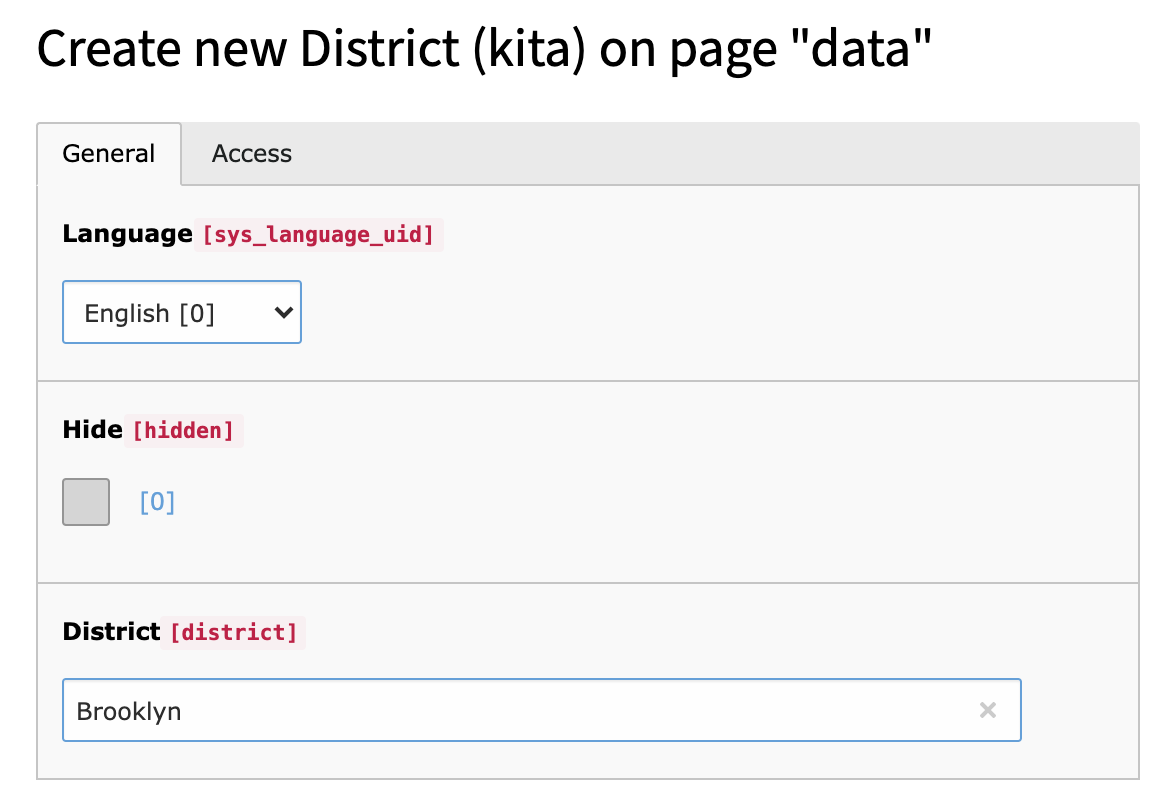
Step 1: Add District Records 

Before adding any daycare centers, you must create at least one district. Districts help organize and categorize daycare centers geographically, making it easier for users to filter results on the website.

Add a district

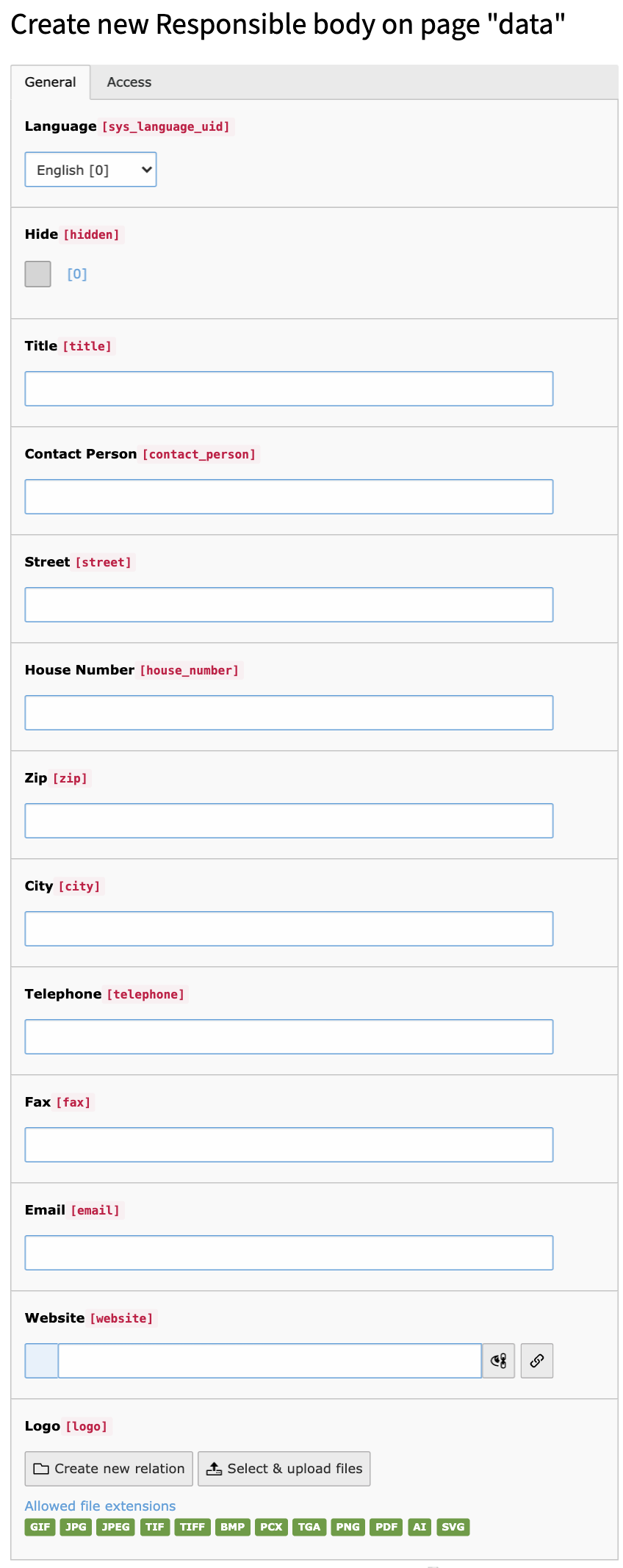
Step 2: Create Responsible Bodies 

Each Kita should be assigned to a responsible body — typically an organization like a city administration, a church, or a private provider. These records represent who operates or oversees the daycare.

Add a responsible body

Step 3: Add Kita Records 

Once you’ve set up at least one district and one responsible body, you can begin adding actual Kita records. Be sure to provide all relevant information, such as name, address, age range, opening hours, and whether meals are provided. Don’t forget to link each Kita to its associated district and responsible body.

Installation 

Composer 

If your TYPO3 installation works in composer mode, please execute following command:

composer req jweiland/daycarecenters
vendor/bin/typo3 extension:setup --extension=daycarecenters
Copied!

If you work with DDEV please execute this command:

ddev composer req jweiland/daycarecenters
ddev exec vendor/bin/typo3 extension:setup --extension=daycarecenters
Copied!

ExtensionManager 

On non composer based TYPO3 installations you can install daycarecenters still over the ExtensionManager:

  1. Login

    Login to backend of your TYPO3 installation as an administrator or system maintainer.

  2. Open ExtensionManager

    Click on Extensions from the left menu to open the ExtensionManager.

  3. Update Extensions

    Choose Get Extensions from the upper selectbox and click on the Update now button at the upper right.

  4. Install daycarecenters

    Use the search field to find daycarecenters. Choose the daycarecenters line from the search result and click on the cloud icon to install daycarecenters.

Next step 

Configure daycarecenters.

Extension Settings 

Open the Extension Configuration inside the Configuration module and set a default page (or storage folder) for all poi collection records (created using a maps2 hook) and a default maps2 category. This category will be used for all maps2 record that has been generated using a maps2 hook while saving a kita record.

Tab: Basic 

poiCollectionPid 

Default: 0

Only valid, if you have installed EXT:maps2, too.

While creating location records we catch the address and automatically create a maps2 record for you. Define a storage PID where we should store these records.

defaultMaps2Category 

Default: 0

When creating new location records a maps2 POI record will automatically be created. Here you can define a category UID which should be automatically added to the POI record.

TypoScript 

daycarecenters needs some basic TypoScript configuration. To do so you have to add an +ext template to either the root page of your website or to a specific page which contains the daycarecenters plugin.

  1. Locate page

    You have to decide where you want to insert the TypoScript template. Either root page or page with daycarecenters plugin is OK.

  2. Create TypoScript template

    Switch to template module and choose the specific page from above in the pagetree. Choose Click here to create an extension template from the right frame. In the TYPO3 community it is also known as "+ext template".

  3. Add static template

    Choose Info/Modify from the upper selectbox and then click on Edit the whole template record button below the little table. On tab Includes locate the section Include static (from extension). Use the search below Available items to search for daycarecenters. Hopefully just one record is visible below. Choose it, to move that record to the left.

  4. Save

    If you want you can give that template a name on tab "General", save and close it.

  5. Constants Editor

    Choose Constant Editor from the upper selectbox.

  6. daycarecenters constants

    Choose PLUGIN.TX_DAYCARECENTERS from the category selectbox to show just daycarecenters related constants.

  7. Configure constants

    Adapt the constants to your needs.

  8. Configure TypoScript

    As constants will only allow modifiying a fixed selection of TypoScript you also switch to Info/Modify again and click on Setup. Here you have the possibility to configure all daycarecenters related configuration.

View 

view.templateRootPaths 

Default: Value from Constants EXT:daycarecenters/Resources/Private/Templates/

You can override our Templates with your own SitePackage extension. We prefer to change this value in TS Constants.

view.partialRootPaths 

Default: Value from Constants EXT:daycarecenters/Resources/Private/Partials/

You can override our Partials with your own SitePackage extension. We prefer to change this value in TS Constants.

view.layoutsRootPaths 

Default: Value from Constants EXT:daycarecenters/Resources/Layouts/Templates/

You can override our Layouts with your own SitePackage extension. We prefer to change this value in TS Constants.

Persistence 

persistence.storagePid 

Set this value to a Storage Folder (PID) where you have stored the records.

Example: plugin.tx_daycarecenters.settings.storagePid = 21,45,3234

Settings 

settings.pidOfMaps2Plugin 

Default: empty

Example: plugin.tx_daycarecenters.settings.pidOfMaps2Plugin = 325

Define the page UID, where you have inserted the maps2 plugin

settings.pidOfDetailPage 

Default: empty

Example: plugin.tx_daycarecenters.settings.pidOfDetailPage = 843

For design reasons it can make sense to define a detail page UID here for daycarecenter records.

settings.search.earliestAge 

Default: 0

Example: plugin.tx_daycarecenters.settings.search.earliestAge = 2

In search form we have a slider for age. Here you can set the left anker of the slider to another default value.

settings.search.latestAge 

Default: 6

Example: plugin.tx_daycarecenters.settings.search.latestAge = 5

In search form we have a slider for age. Here you can set the right anker of the slider to another default value.

settings.search.earliestOpeningTime 

Default: 7.00

Example: plugin.tx_daycarecenters.settings.search.earliestOpeningTime = 8.50

In search form we have a slider for opening times. Here you can set the left anker of the slider to another default value.

settings.search.latestOpeningTime 

Default: 18.00

Example: plugin.tx_daycarecenters.settings.search.latestOpeningTime = 16,75

In search form we have a slider for opening times. Here you can set the right anker of the slider to another default value.

settings.pageBrowser.itemsPerPage 

Default: 15

Example: plugin.tx_daycarecenters.settings.pageBrowser.itemsPerPage = 7

If there are too many records in frontend visible we add a page browser to navigate throw the records. Here you can define how many records should be visible for each page.

Changing & editing templates 

The EXT:daycarecenters extension uses Fluid as its template engine. If you are already familiar with Fluid, you might skip this section.

This documentation will not cover all aspects of Fluid but will highlight the most important things you need to use it effectively. For more comprehensive information, you can refer to resources such as:

Many other sites also provide valuable information about Fluid.

Changing paths of the template 

You should never edit the original templates of an extension, as those changes will disappear if you upgrade the extension. As with any Extbase-based extension, you can find the templates in the Resources/Private/ directory.

If you want to change a template, copy the desired files to the directory where you store your templates. This can be a directory in a sitepackage extension. Multiple fallbacks can be defined, making it much easier to customize the templates.

plugin.tx_daycarecenters {
  view {
    templateRootPaths >
    templateRootPaths {
      0 = EXT:daycarecenters/Resources/Private/Templates/
      1 = EXT:sitepackage/Resources/Private/EXT/daycarecenters/Templates/
    }
    partialRootPaths >
    partialRootPaths {
      0 = EXT:daycarecenters/Resources/Private/Partials/
      1 = EXT:sitepackage/Resources/Private/EXT/daycarecenters/Partials/
    }
    layoutRootPaths >
    layoutRootPaths {
      0 = EXT:daycarecenters/Resources/Private/Layouts/
      1 = EXT:sitepackage/Resources/Private/EXT/daycarecenters/Layouts/
    }
  }
}
Copied!

Change the templates using TypoScript constants 

You can use the following TypoScript in the constants to change the paths

plugin.tx_daycarecenters {
  view {
    templateRootPath = EXT:sitepackage/Resources/Private/EXT/daycarecenters/Templates/
    partialRootPath = EXT:sitepackage/Resources/Private/EXT/daycarecenters/Partials/
    layoutRootPath = EXT:sitepackage/Resources/Private/EXT/daycarecenters/Layouts/
  }
}
Copied!

This configuration allows you to specify custom paths for your templates, partials, and layouts, ensuring your customizations are maintained independently of the extension's updates.

Best Practice 

This chapter describes some best practice concepts.

Upgrade 

If you upgrade/update EXT:daycarecenters to a newer version, please read this section carefully!

Upgrade to Version 6.0.0 

Version 6.0.0 has some changes in column name renaming. So please be careful while comparing database with TCA definition after upgrading.

Database Column Renaming Notice 

In this new version, we have renamed the database column logo to logos in the tables tx_daycarecenters_domain_model_kita and tx_daycarecenters_domain_model_holder for better management. As a result, you will need to adjust your extended Fluid templates and partials accordingly.

Update to Version 5.0.0 

This version is no longer compatible with TYPO3 9. We have completely removed jQuery and jQuery UI, replacing the jQuery UI slider with a Vanilla JS solution.

There are two update wizards available in this extension.

  • HolderLogoUpdateWizard
  • SlugUpdateWizard

Change Log 

Version 7.0.8 

  • [BUGFIX] Add typo3/cms-install dependency for new functionality
  • [BUGFIX] Remove unused table_local field from HolderLogoUpdate

Version 7.0.7 

  • [BUGFIX] Fixed Extension namespace in template files
  • [BUGFIX] Fixed Prefixes for upgrade wizards as per the standards
  • [BUGFIX] Changed title of wizards with extension key

Version 7.0.6 

  • [BUGFIX] DateFormat of opening and closing time in TCA change to time.

Version 7.0.5 

  • [BUGFIX] Remove deprecated usage of SoftRef parser: images from kita table

Version 7.0.4 

  • [BUGFIX] Remove deprecated usage of SoftRef parser: images

Version 7.0.3 

  • [BUGFIX] TCA Migrations for tables done
  • [BUGFIX] ViewHelper TimeViewHelper upgraded for v13.

Version 7.0.2 

  • SiteSet renamed removing default

Version 7.0.1 

  • Migrate PDO to TYPO3 Connection in UpgradeWizards

Version 7.0.0 

  • Added Version 13 Compatibility
  • Site configuration (site sets) integration for cleaner setup
  • Removed deprecated functions
  • Removed obsolete functions
  • Cleaned up TCA, FlexForm, and backend form setups
  • Code formatting and PSR-12 cleanup
  • Custom CType plugins replacing deprecated list_type

Version 6.0.0 

  • Added Version 12 compatibility
  • Changed logo column to logos
  • Removed TYPO3 11 and old version compatibility
  • Removed deprecated functions
  • Removed obsolete functions
  • BUGFIX: Holder image issue fixed

Version 5.0.0 

  • Remove TYPO3 9 compatibility
  • Add TYPO3 11 compatibility
  • Remove jquery and jquery UI
  • Replace jquery UI slider with a VanillaJS solution

Version 4.0.3 

  • Move SlugHelper from constructor argument into getSlugHelper()

Sitemap