Our events2 is a timeframe based event management system. That means, that only events within a predefined timeframe (e.g. all future events for the next 3 years)
are visible in Frontend. All newer/older events are still accessible, but there is no date calculated for them anymore.
Other than EXT:cal we have only one event record with a many flexible settings to dynamically calculate the day
records. If you change a description, only one event record needs to be updated.
You can create different types of events:
Single: An event for just one day
Duration: An event like 17.07.2025-20.07.2025
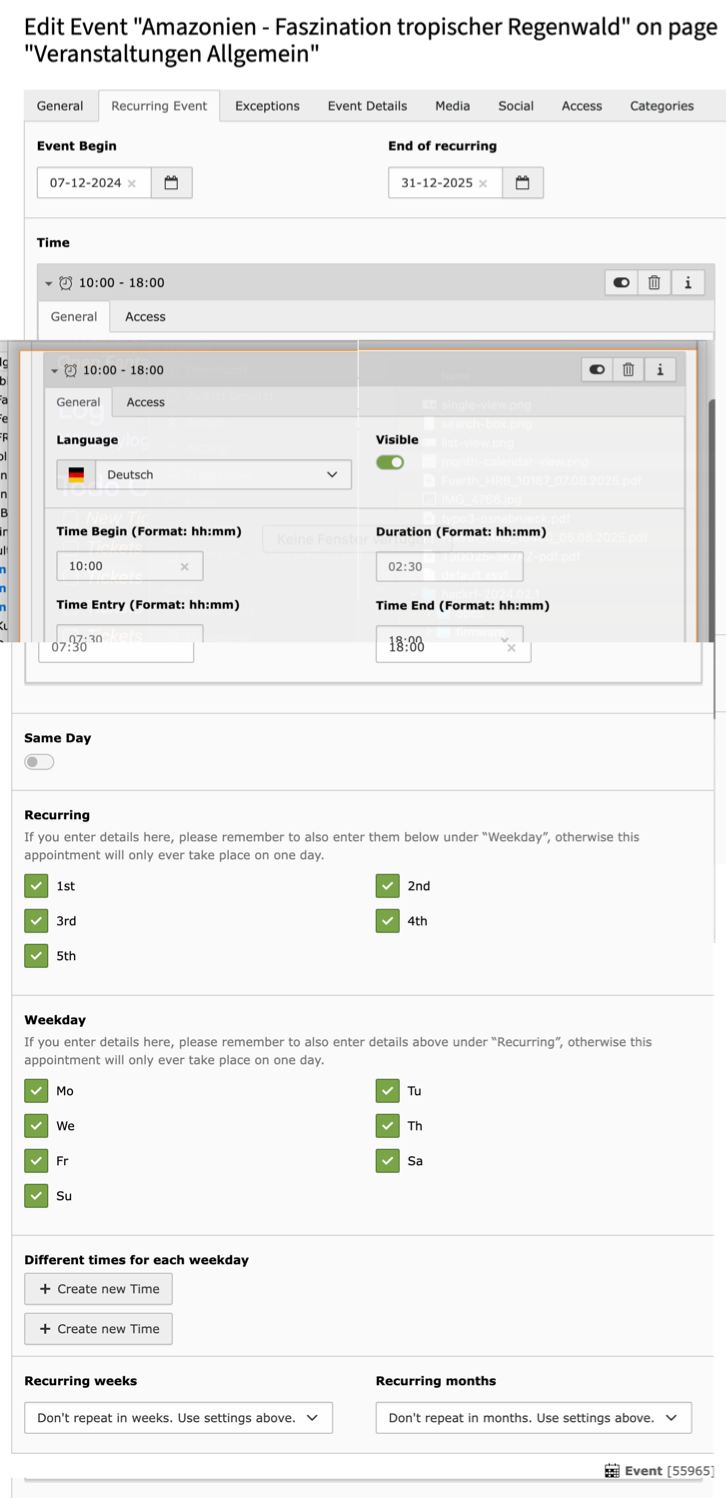
Recurring: An event that takes place more than one time. Examples are weekly food markets, theater performances, yearly recurring festivals, etc. For those recurring events you can specify dates like: "every Friday" or "3rd Monday of each month". You can also create exceptions for this rule, for example "every 4th Friday of the month, but not on December 24 (because it might conflict with christmas). Also for recurring events you could set an exception for the start/end time on a specific day, for example a theater play may be on Tuesday and Friday at 20:00, but on the date of the premier it will start on 20:30.
Events that have been cancelled can still be visible in the listing, but using a text with strike-through, so that visitors can see that it has been cancelled (and not just disappeared).
On non composer based TYPO3 installations you can install events2 still over the ExtensionManager:
Login
Login to backend of your TYPO3 installation as an administrator or system maintainer.
Open ExtensionManager
Click on Extensions from the left menu to open the ExtensionManager.
Update Extensions
Choose Get Extensions from the upper selectbox and click on the Update now button at the upper right.
Install events2
Use the search field to find events2. Choose the events2 line from the search result and click on the cloud
icon to install events2.
Scheduler Task
You have to add the Scheduler Task Re-Create day records which will be executed each day.
As events2 works within a timeframe, each day the oldest day-record have to be removed and the future day-record
have to be created.
If you do not install this task it may happen that you will not see any event record on your website after 6 months.
Some general settings for events2 can be configured in Admin Tools -> Settings.
The settings are divided into several tabs and described here in detail:
Tab: Basic
poiCollectionPid
Default: 0
Only valid, if you have installed EXT:maps2.
While creating location records events2 catches the address and automatically creates a maps2 record
for you. Use this option to define a storage PID, where these records should be stored.
rootUid
Default: 0
If you have many sys_category records with huge trees in your TYPO3 project, it may make sense to
reduce the category trees in events2 plugins to a parent category UID (root UID).
Tip
Using TCA option rootUid for trees is deprecated since TYPO3 11. events2 will take care
of that and updates the new option startingPoints automatically for you, if you set this
option here.
recurringPast
Default: 3
Our events2 works within a timeframe. This means, that you have to set an earliest start (in months) for generated
day records in past. A value of 3 means 3 months in past. Older events will not be shown in frontend anymore, but are
still visible by Google Search.
recurringFuture
Default: 6
Our events2 works within a timeframe. This means, that you have to set a latest end (in months) for generated
day records in future. A value of 6 means 6 months in future. Events above 6 month in future will not be shown
in frontend.
defaultCountry
Default: empty
While creating location records we also create a record for EXT:maps2 while saving.
If you're only working for one specific country while creating/editing locations
in backend, it may be helpful to set country property with this default country. So you only need
to add street and city to find a POI. If you need POIs from all over the world, please keep this field empty.
If you use our XML importer we will validate your XML structure against a XSD file. So, if you use name-Tag for
categories the import will fail, because XSD knows that only a title-Tag is valid.
By default organizer, location and categories are mandatory while import. If you set organizer and/or
location as non-mandatory in Extension Setting this has no effect to the importer. Please make a copy of
our XSD file and add the modifications you need and set new file path into this variable.
You can prefix the path with EXT:
organizerIsRequired
Default: false
If you want, you can set column Organizers as required. That way an editor has to fill this column.
locationIsRequired
Default: false
If you want, you can set column Location as required. That way an editor has to fill this column.
categoryIsRequired
Default: false
If you want, you can set column Categories as required. That way an editor has to fill this column.
pathSegmentType
Default: Do nothing (Internal: empty)
events2 works with path segments to help you building much more readable URLs with new RouteEnhancers. But what should
happen, if there are duplicates while executing the PathSegmentUpdateWizard or a frontend user creates a new event?
Info: This setting does not effect new events generated within TYPO3 Backend, as we do not have any UID while storing
the event!
Do nothing (default)
The column path_segment will not be touched by events2. Use the SignalSlot in createAction and implement
generation of path_segment on your own. But if you return an empty value events2 will throw an exception.
RealUrlpath_segment will be filled with an incremented value of event title. If there are 3 events called swimming it
will result in swimming, swimming-1, swimming-2
Incl. UID
Column path_segment will be filled with a combination of event title and uid like: star-wars-77
Tab: Email
emailFromAddress
Default: empty (use value from INSTALL_TOOL)
With events2 you can give your website visitors the possibility to create new
events. These created records will be hidden by default. Add an email address
of the sender, if a new record was created over the frontend.
emailFromName
Default: empty (use value from INSTALL_TOOL)
With events2 you can give your website visitors the possibility to create new
events. These created records will be hidden by default. Add a name
of the sender, if a new record was created over the frontend.
emailToAddress
Default: empty
With events2 you can give your website visitors the possibility to create new
events. These created records will be hidden by default. Add an email address
of the receiver, if a new record was created over the frontend.
emailToName
Default: empty
With events2 you can give your website visitors the possibility to create new
events. These created records will be hidden by default. Add a name
of the receiver, if a new record was created over the frontend.
Plugins
List all events
Choose view
Deprecated, as switchableControllerActions are deprecated in TYPO3 core since TYPO3 11.
Please use List type instead.
List type
You can choose between following list types:
List events: Shows a list of events incl. a PageBrowser
List latest events: Just the next x events without PageBrowser
List events of today: Shows only events of today
List events of this week (Mo-Su). On tuesday (Tu-Su). On friday (Fr-Su)
List events next 4 weeks: Show events from today until 4 weeks
Page UID of detail page
Default: 0
Often it is useful to move the detail view onto a separate page for design/layout reasons.
Page UID of list page
Default: 0
If you have configured a detail page, this option will help you to link back to the list page.
Page UID for the event location
Default: 0
Often it is useful to move the location view onto a separate page for design/layout reasons.
PID of search page
Removed with events2 8.0.0.
Please use one of the search plugins instead or re-add that settings with TypoScript.
Categories
Default: empty
Reduce the set of events in Frontend to the selected categories.
It's an OR combination.
List amount of records
Default: 0 (means use default from TypoScript which is 7)
Only valid for latest view
Reduce the set of events in Frontend to X records.
Merge events with multiple times
Default: false
By default a created event with multiple time records for one day will be shown in list view with
multiple entries, too. Activating this feature will merge an events with multiple time records
to just one entry in Frontend.
Example: 17.07.2020 with 08:00, 12:00 and 16:00 will create 1 visible entry in Frontend list.
By default we add an additional link to detail view for further information.
Merge recurring events
Default: false
By default recurring events performed on multiple days, will be shown in list view with
multiple entries, too. Activating this feature will merge an event with multiple day records
to just one entry in Frontend. If this property was activated the property
Merge events with multiple times has no effect anymore.
Example: 17.07.2020, 18.07.2020 and 20.07.2020 will be merged to 17.07.-20.07.2020.
As you see in example there is no information about missing 19.07.2020. That's why we
add an additional link to detail view to show the exact dates.
We prefer using this property only for latest view, as it may confuse website visitors
with durational events.
Pre filter by organizer
Default: empty
You can reduce the list of events in Frontend to a specific Organizer.
Show organizer filter selection
Default: empty
You can activate an Organizer Selector in Frontend where the website visitor can
reduce the events to its preferred Organizer.
Important
The Selector is only visible as long as there are at least 2 Organizers available.
Display
Default: Show both
Splits the event output. That way it's possible to show event images as f.e. Flexslider
in header and somewhere below (in an additional Events Plugin) the event with setting
only events
Show both
One plugin shows images and event.
Show images only
One plugin shows the images of an event only. Useful to slide images in header.
Show Event only
One plugin shows the event data (no images).
Selectable categories for new Events
Removed with events2 version 8.0.0.
All options to create new events was moved into Management plugin.
Show single event
Page UID of list page
Default: 0
If you have configured a detail page, this option will help you to link back to the list page.
Page UID for the event location
Default: 0
Often it is useful to move the location view onto a separate page for design/layout reasons.
Display
Default: Show both
Splits the event output. That way it's possible to show event images as f.e. Flexslider
in header and somewhere below (in an additional Events Plugin) the event with setting
only events
Show both
One plugin shows images and event.
Show images only
One plugin shows the images of an event only. Useful to slide images in header.
Show Event only
One plugin shows the event data (no images).
Events2: Calendar
Categories
Default: empty (Show all events)
You can reduce the set of events shown in calendar to a list of given categories.
This is an OR-Query.
Search Form
Use this plugin, to show a search form. Please consider to also add and configure the search results plugin.
PID of search results
Default: 0
Please set the page UID where you have added the events2 plugin for search results.
Main categories
Default: empty
Select all categories which should be selectable as main categories in search form template.
All selected categories will be checked by events2 if they are direct child categories
of a given root category defined in TypoScript rootCategory. So, if an editor selects sub-sub-categories
of configured rootCategory these will NOT be shown in Selector of search form.
If you want search form to not use Category Selectors in Frontend you have to remove
this part from Fluid-Template within your own SitePackage.
Search Results
Add this plugin to show the search results, coming from search form plugin.
Manage Events
With this plugin registered FE users can create and manage their own events in frontend.
Selectable categories for new Events
Default: empty
Here you can select the categories, which a website visitor can choose from while
creating new Events in Frontend.
Hint for Integrators: As an editor can select all categories from each layer of the
category tree, we have implemented a further restriction in TS rootCategory. That way
only chosen categories as direct child categories of rootCategory (Parent Category)
will be selectable in Frontend form.
TypoScript
All following TypoScript configuration consists in plugin.tx_events2
Set this value to a Storage Folder where you have stored the event records.
Important
If you have stored Organizers and Locations in another Storage Folder, you have to add theses
PIDs here, too.
Tip
If you use creation of events over frontend plugin, new records will be stored in first PID found
in storagePid. To store record in other storage PIDs you need following configuration
As a TYPO3 Backend User can choose nearly every category from each category tree layer we have added rootCategory
as a further restriction to show only direct child categories of rootCategory. All selected categories in deeper
category tree will not be visible in Frontend. Else it would break our Search Plugin, where you can select
a category first and afterwards a sub-category.
The rootCategory has nothing to do with rootUid of ExtensionSettings. rootUid reduces the category tree
for users in the TYPO3 backend.
If you set this value to an UID of a frontend usergroup we will show a link in list view, where all
users of this usergroup can edit and create events. This will only work, if a user record was assigned to
an events2 organizer.
Only valid wile creating new event record in frontend. Management plugin.
To prevent inserting a lot of text into various text fields like teaser in frontend plugin,
you can reducr the amount of allowed letters here. With help of a little JavaScript events2 will show
a little countdown how many remaining letters are allowed to enter.
This walkthrough will help you to implement the extension events2 at your
TYPO3 site. The installation is covered here.
Create the records
Before any events2 record can be shown in the frontend, those need to be
created.
Create a new storage folder. Of course you can also use an existing storage folder.
Switch to List module
Use the icon in the topbar "Create new record" and search for "Events2" and its
record "Event".
Click on "Event" to create a new event record. Choose an event type and
fill as many fields you want.
Add a plugin to a page
A plugin is used to render a defined selection of records in the frontend.
Follow this steps to add a plugin to a page:
Events
Create a new page with a title like "Events" which will be used to show
your created events records.
Add a new content element and select the entry Insert Plugin
Switch to the tab "Plugin" where you can define the plugin settings and
set selected plugin to "Events".
Save the plugin.
Events: Calendar
Create a new page with a title like "Events" which will be used to show
your created events records.
Add a new content element and select the entry Insert Plugin
Switch to the tab "Plugin" where you can define the plugin settings and
set selected plugin to "Events: Calendar".
Save the plugin.
Events: Search
Create a new page with a title like "Events" which will be used to show
your created events records.
Add a new content element and select the entry Insert Plugin
Switch to the tab "Plugin" where you can define the plugin settings and
set selected plugin to "Events: Search".
Save the plugin.
Event record
Columns
Top of List
Default: false
If activated this event will always be on top of list. If you have multiple events marked top_of_list
events2 will order them by title DESC.
Hint
If you mark a recurring event with a lot of dates as top of list, this record with ALL of its
dates will move to top. So it may happen, that the next event will be shown on page 2 or 3 in PageBrowser.
In such cases we prefer to set on of the merge Features in plugin configuration.
Title
Default: empty
The title of the event.
Event Type
Default: single
There are currently three different kinds of event types available. Choose one
single
This event will be visible for just one day. It is not possible to add or remove any days
duration
Think at holidays. You're away from 17.07.2020 - 21.07.2020. So it is not possible for others to take part on
your holidays at 20.07.2020. This is the main difference to recurring events where you can create different time
records for each day.
recurring
Think at a meeting two times a week. With recurring events you can create events like 1st and 3rd monday and friday
a week, beginning at 08:00 and 16:00 o'clock except 24.12. because of X-Mas but additional at 17.07.2020, because
of a special guest and please use a different time slot, if event matches friday.
Path Segment
Default: An URL interpretable string of column title
Path segment for speaking URLs
Event Begin
Default: today
For single event: Date of Event
For duration event: First date of Event
For recurring event: First date to start day generation
Event End
Default: empty
For duration event: Last date of Event
End of recurring
Default: empty
For recurring event: Last date of day generation
Time
Add a time record, to define times for:
Begin, Entry, Duration and End. This record is a default for all
recurring days, but can be overwritten by other time records.
Same Day
Default: false
After activating this checkbox the form will be reloaded and you have the
possibility to assign multiple time records for one day. But be careful, if
you define other time records for a special weekday below, it will overwrite
this setting completely.
Multiple Times
Default: empty
See description for column same_day
Recurring
How often should this event repeated.
Example: Each 1st and 3rd monday a month
Weekday
How often should this event be repeated.
Example: Each 1st monday and wednesday a month
Different times each weekday
You can set another time for a specified weekday. Be careful: This setting will
overwrite the setting of multiple times above completely, if it matches.
Recurring weeks
If you change that value the complete form will reload and you can set a recurring over weeks.
Recurring months
If you change that value the complete form will reload and you can set a recurring over months.
Exceptions
With this records you can define some specials for your recurring event.
You can add or remove a special date for your recurring. Further you can define some
additional information or change the times for a special date.
Teaser
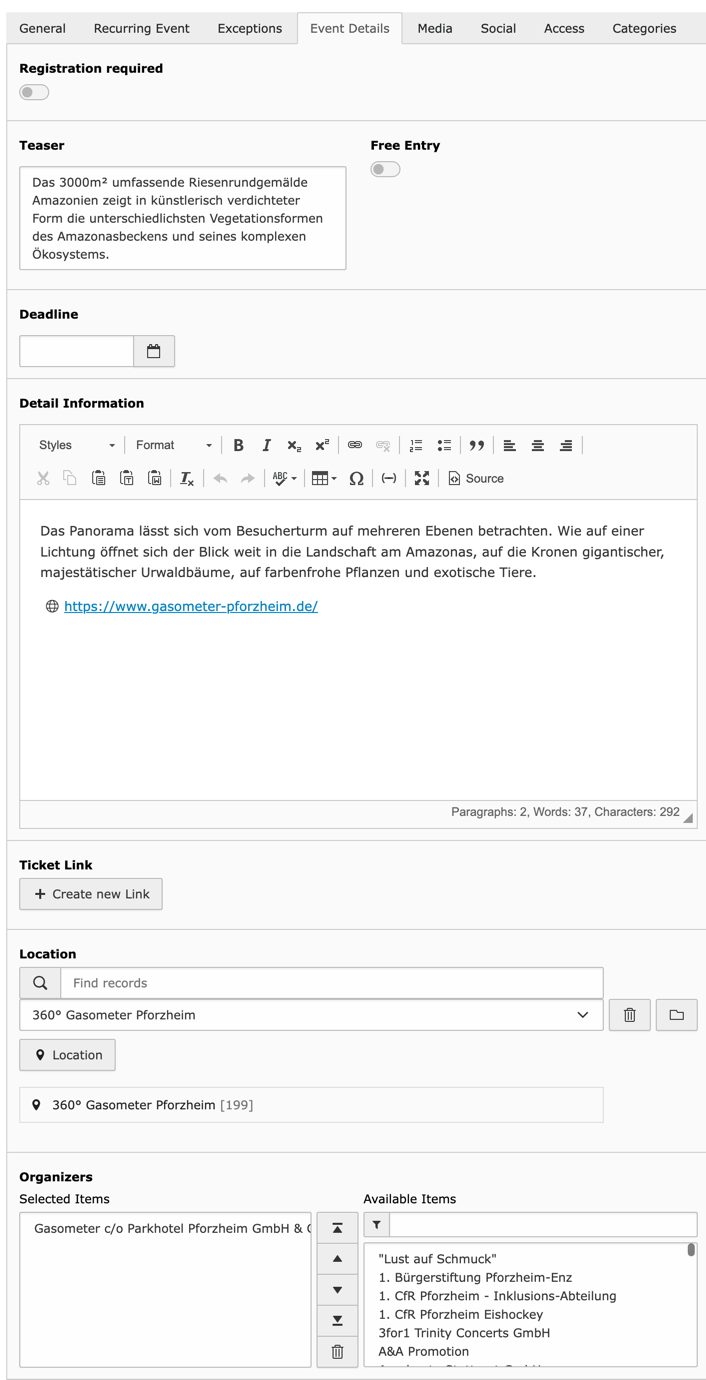
This is a short version (1 or 2 sentences) of your detail information.
It will be displayed in listings. If not given the first 100 letters of
detail information will be displayed
Detail information
This detail text will be displayed at the detail page of the event record.
Free entry
If a visitor can access this event for free activate this checkbox.
Ticket Link
A link to the organizer, where you can buy tickets.
Location
Where will this event take place?
This is a required field, if it was set as required in Extension Settings.
Organizer
Who will organize this event?
This is a required field, if it was set as required in Extension Settings.
Images
Add one or more images to your event. You can resize them by TS-Settings
Link to YouTube
If you have created a little presentation video for this event, you
can assign the link to YouTube here. Hint: Only YouTube-Links are valid.
Download Links
Add some brochures with more information as PDF or similar here.
Administrator manual
This chapter describes how to manage the extension from a superuser point of view.
EXT:events2 is using fluid as template engine. If you are using fluid
already, you might skip this section.
This documentation won't bring you all information about fluid but only the
most important things you need for using it. You can get
more information in books like the one of Jochen Rau und Sebastian Kurfürst or online, e.g. at
http://wiki.typo3.org/Fluid or many
other sites.
Changing paths of the template
You should never edit the original templates of an extension as those changes will vanish if you upgrade the extension.
As any extbase based extension, you can find the templates in the directory Resources/Private/.
If you want to change a template, copy the desired files to the directory where you store the templates.
This can be a directory in fileadmin or a custom extension. Multiple fallbacks can be defined which makes it far easier to customize the templates.
ViewHelpers are used to add logic inside the view.
There basic things like if/else conditions, loops and so on. The system extension fluid has the most important ViewHelpers already included.
To be able to use a ViewHelper in your template, you need to follow always the same structure which is:
<f:fo>bar</f:fo>
Copied!
This would call the ViewHelper fo of the namespace f which stands for fluid.
If you want to use ViewHelpers from other extensions you need to add the namespace
declaration at the beginning of the template. The namespace declaration for the events2 extension is:
{namespace e2=JWeiland\Events2\ViewHelpers}
Copied!
Now you can use a ViewHelper of events2 with a code like:
<e2:trimExplode><!-- some comment --></e2:trimExplode>
Copied!
If you want to know what a ViewHelper does, it is very easy to find the related PHP class by looking at the namespace and the name of the ViewHelper.
Having e.g. JWeiland\Events2\ViewHelpers and convertToJson you will find the class at events2\\Classes\ViewHelpers\\ConvertToJsonViewHelper.php.
The most of awesome thing is that you can use ViewHelpers of any extension in any other template by just adding another namespace declaration like:
We have some JS in events2 to search for Sub-Categories and other various Ajax-Calls. To handle
them we add some environment specific variables to template like host name, current storage PIDs and
TS settings.
You can use this VH to convert an array into JSON format to have variables in a better
accessible format for JavaScript.
Ok, following scenario: You have an events2 Plugin where you have selected the categories
house and tree. Further you have an event which is assigned to the categories performance,
cinema and tree. Of cause this event will be shown in Frontend, because category tree matches.
BUT: If you want to show the first possible category in Frontend, it is possible that performance
will be shown, which is not allowed by the Plugin.
This ViewHelper creates an intersection of both category selections which contains
the allowed categories only.
In case of recurring events you can have multiple exception types like add, remove, info and time.
Each of these exceptions are related to a specific date.
With this ViewHelper you can get all exceptions for a specific date. Further you can select, if you want
all exceptions or only exceptions of a specific exception type.
For each event you can create a general time record, multiple time records for same day, different
time records for each weekday and you can create a different time records for a specific date as
exception.
As you see it's hard to see with time record is valid, which has priority and which time record
has which sorting.
With this ViewHelper you only set an event and a date (DateTime) and you will get
the correct time record(s) as array.
Instead of looping all exceptions for a specific day in Fluid Template and check if there is
an exception of type remove we have created this ViewHelper. Just give it an event and a
date (DateTime) and you will know, if this event was canceled for specifix date.
In earlier versions of events2 some day records are wrong because of problems with daylight saving times. In the
meantime we have solved that problem and created a repair command whose name is now rebuild.
If you expect still some problems in day generation, it may make sense to execute this command or, if you
want to cleanup day table in general.
If your day table is very big, it may make sense to exclude this table from SQL export/migration. On target
project/server you just need to execute this command to re-build all missing day records again.
Since events2 version 8.0.0 this CLI command is also schedulable (can be configured in scheduler module).
Tip
Instead of the scheduler task Re-Create day records this command will additionally TRUNCATE the complete day table!
Important
As day table will be TRUNCATED it is possible that there are temporarily no events in frontend visible!
Pagination
events2 uses the SimplePagination from TYPO3 Core to navigate through
your records with first, previous, next and last buttons. If
you need something more complex like 1, 2 ... 56, 57, 58 ... 123, 124 you
should use another pagination library or build your own one. In the next steps
I explain you how to implement the numbered_pagination solution
of Georg Ringers.
Install numbered_pagination
Install and activate numbered_pagination extension from Georg
Ringer. Please check in your SitePackage extension that
numbered_pagination is set as a dependency and will be loaded
before events2 and your SitePackage.
Events2 has a built-in mechanism that takes care of clearing the cache after manipulation of Event records.
When a list or detail view is rendered on a page, a cache tag in format tx_events2_pid_PID (where PID is
the uid of the events storage folder) is added. Each time an event record is edited, deleted or created, this
cache entry is flushed. No additional cache configuration is needed if only the Event plugins are used.
If you use other ways of displaying event records, the cache is not flushed automatically.
This can be done automatically by using this command in the PageTsConfig:
TCEMAIN.clearCacheCmd = 123,124,125
Copied!
The code needs to be added to the sys folder where the event records are edited. Change the example page ids to
the ones which should be cleared.
Dynamic Page Title
In normal case you only will see something like "detail view" in title of detail page.
If you want to change that title to current events title incl. its date you can make use
of the new TYPO3 page-title providers (since TYPO3 9.4). Luckily events2 comes with its own provider to
realize a pretty nice detail page-title for you with following TypoScript:
config.pageTitleProviders {
  events2 {
    provider = JWeiland\Events2\PageTitleProvider\Events2PageTitleProvider
    # Please add these providers, to be safe loading events2 provider before these two.
    before = record, seo
  }
}
Copied!
Upgrade
If you upgrade/update EXT:events2 to a newer version, please read this
section carefully!
Update to Version 10.2.4
Due to an issue in the DayRecordService, records in the day table that use
enable fields, such as hidden, starttime, or endtime, were not removed
when new day records were generated for a given event. As a result, the day
table grows significantly with each execution of the Re-Create day records
scheduler task.
After updating to version 10.2.4, please run the
TYPO3 command events2:rebuild.
If you are not familiar with the CLI, you can alternatively truncate
the tx_events2_domain_model_day table and then run
the Re-Create day records scheduler task again.
Update to Version 10.0.0
Because of the new column def_lang_event_uid in tx_events2_domain_model_day
you will get various duplicate event records in your list views. Please
execute the command events2:rebuild after the update to fix this issue!
Update to Version 9.1.9
We have moved TypoScript setting settings.selectableCategoriesForNewEvents
into settings.new.selectableCategoriesForNewEvents. If you have defined
that setting in management plugin please execute the events2 upgrade wizard.
Update to Version 9.0.8
Because of missing uniqueness while generating path segments for imported
event records we had to update the constructor arguments of
GeneratePathSegmentEvent. First argument has be be array of
parameters we get from SlugHelper->generate and second argument
is the SlugHelper itself.
Update to Version 9.0.4
We have marked the FeUser ViewHelper as deprecated. As a replacement for
access restrictions there is a new AccessRightsEventListener catching
invalid requests. You should update your own templates accordingly.
Because of an "edit" and "activate" linking problem in information mail, we
had to store the event non-hidden in database first and had to hide the event
after the mailing in a second step. Else the event slug can not be added to
route enhancer. Please make sure that your own modifications
to plugin.tx_events.settings.overrideForm.finishers.* configuration is still
working.
There is a new PersistedHiddenAliasMapper available to allow generating
slugs to hidden event records. Needed for info mails.
We render our own template for errorAction which results in much nicer
flash messages output. Please be prepared to override them accordingly.
Update to Version 9.0.0
This version is NOT compatible with TYPO3 10 and TYPO3 11 anymore.
We have upper case first char of all fluid sections <f:section name="Date">.
Please make sure to adopt that in your extending templates.
Update to Version 8.3.2
There is an UpgradeWizard to convert sDEFAULT in FlexForms to sDEF, but
with each update of an events2 plugin sDEFAULT was written to DB again. We
have updated that page name to sDEF in our FlexForms, now. Please execute the
UpgradeWizard again.
Upgrade to Version 8.0.0
This version is NOT compatible with PHP versions lower than 7.4!
We have updated over 10.000 lines of code. Please click the flush cache button in installtool.
New Plugins
As switchableControllerActions are deprecated since TYPO3 11 we have migrated them to individual plugins.
Please execute UpgradeWizard events2MoveFlexFormFields to migrate existing plugins. Please backup your project
before executing this Wizard!
With this change we have migrated all list*Actions into one listAction. Please have a look into our templates
and add the missing conditions to your templates.
We have renamed EventController to ManagementController. So please rename the templates accordingly.
We have split the SearchController into SearchForm- and SearchResultController. So please rename the templates
accordingly.
We have removed the use of jquery and migrated all code to VanillaJS. So please check
page.includeJSFooter and page.includeCSS if they are matching the needs of your project.
Update to Version 7.1.0
As f:widget.paginate is deprecated and POST requests are not allowed anymore in this widget, we have migrated
the f:widget.paginate widget to new TYPO3 Pagination API.
Please remove the f:widget.paginate from Templates and insert this code:
Nearly all Controller Actions contains a call to the new TYPO3 EventDispatcher now. That way we have moved a lot of
logic of the event controllers into EventListeners. All Extbase SignalSlot have been removed.
The Action listSearchResults was moved from event controller into day controller. Please move
your own ListSearchResults template from Event into Day folder and update controller name
in Search/Show.html:
All deprecated methods and version_compare lines have been removed.
edit action is defined as uncached in ext_localconf.php now.
You have to remove existing Re-Generate tasks from scheduler and create them again. That's because of changed
contructor arguments.
Update to Version 6.3.0
It is now possible to assign multiple organizers to an event record. That's why we have added a new MM table
and a new column organizers which has to be created by Analyze database button in Installtool. Please
execute events2 upgrade wizard to migrate all current relations into this new table. If UpgradeWizard was
executed successfully you can remove the old organizer column.
We have changed the column detail_informations of event table to detail_information. Please execute
UpgradeWizard to move all data into this new column. Old calls to getDetailInformations are still possible but
deprecated and removed with events2 7.0.0.
In XSD file for XML import we have changed organizer to organizers. Please update your XML file generation
or load an old XSD file in Extension Settings of Installtool. But with 7.0.0 we will not support the old
organizer property while XML import anymore.
Update to Version 6.2.6
We have changed the keys for various used hooks from incremented numbered to string based keys in ext_localconf.php.
As a developer you should check, if your own implementation is still working.
Update to Version 6.2.4
We have changed some method arguments, please flush cache in InstallTool
Update to Version 6.1.1
We have changed data type of country to INT in DB. Please start compare database in INstalltool.
Upgrade to Version 6.0.0
With events2 6.0.0 we have removed TYPO3 8 compatibility and add TYPO3 10 compatibility.
We have not added any new features.
Because of incompatibility we have created a new pageTitleProvider as replacement for pageTitleUserfunc.
Upgrade to Version 5.0.0
With this release we have implemented a better multilingual support. We are not done, but as long as DayGenerator
still has problems with languages we have marked a lot of fields in translated events as readonly.
If you use events2 with one language only, there is no problem to upgrade to 5.0.0.
Update to Version 4.1.1
With version 4.1.0 we have added the path_segment for slugs in event records, but first with version 4.1.1 we
have added the Updater for this field.
Please visit InstallTool and execute the updater for Slugs in event records.
Upgrade to Version 4.0.0
If you don't use the event2 API or you don't use your own XmlImporter an Update shouldn't be a problem
for you.
We have modified findHiddenEntryByUid to findHiddenEntry in AbstractController. With the new argument
you can now select hidden records by any property you want.
We have added a lot of strict_types. Please check your extension code accordingly, if you have modified events2.
We have added Task object as second argument to constructor of AbstractImporter. Therefor we have removed
all arguments of importer method of XmlImporter.
Method initialize is not required by ImporterInterface and will not be called anymore. Please move initialization
process into Constructor directly.
Update to Version 3.7.0
New Feature:
We have added 3 new getters to Time object:
getTimeEntryAsDateTime
getTimeBeginAsDateTime
getTimeEndAsDateTime
These are very helpful as you now can format them with f:format.date() VH
Update to Version 3.3.1
With version 3.3.1 we have added a new column same_day_time to day table. It helps us to GROUP BY days with
multiple time records for one day, if mergeEventsAtSameDate is set in plugin.
Please update DB in Installtool and start scheduler task to re-generate all day records.
Update to Version 3.2.0
With version 3.2.0 we have completely rewritten DayRepository to work with
Doctrine/Core QueryBuilder now. We have added functional tests to be sure
to have same results as in previous versions.
We have renamed mergeEvents checkbox in FlexForm to mergeRecurringEvents. Maybe you
have to reactivate that checkbox.
In previous versions we have grouped events in ListLatest view automatically for you. Now you
have to manual activate mergeRecurringEvents to group them.
We have moved static TypoScript to another location. Please use update wizard in ExtensionManager to update paths.
We have removed mergeEvents option from ExtensionManager. If you have set this option please
re-create your records with CLI or scheduler task.
Update to Version 3.1.0
With version 3.1.0 we have made a little but breaking change:
Use data-id to relate it to a textarea id-attribute.
Upgrade to Version 3.0.0
We have removed GetEventDates VH and implemented a completely new way to get future event dates.
We have removed MicroStart VH
We have removed MicroStop VH
We have removed Sort VH, as sorting in VH is always a bad idea.
In previous versions we had the problem, that an added day as exception will never be of type Day. It is of
type Exception with different properties then a Day, which made us many headaches in Fluid-Templates. In
GetDateTime VH we had streamlined Day and Exception records into an array which contains all needed
information. You can't control and you may not understand how this array was build. With version 2.4.0 we have
solved this problem and simplified Fluid template a lot. Instead of modifying the DB tables and models we have
reduced some method-calls down to the DateTime representation of Day and Exception records:
Renamed EventService::getSortedTimesForDay to EventService::getSortedTimesForDate
* Property $day changed from type Day to DateTime
Renamed EventService::getDifferentTimesForDay to EventService::getDifferentTimesForDate
* Property $day changed from type Day to DateTime
Renamed EventService::getTimesForDay to EventService::getTimesForDate
* Property $day changed from type Day to DateTime
Renamed EventService::getExceptionsForDay to EventService::getExceptionsForDate
* Property $day changed from type Day to DateTime
So, please check your own extensions, if you make use of these methods. To solve the problem from above, we have
implemented two new ViewHelpers. Please have a look into our new templates and update your own templates
to the new structure:
New VH: GetExceptionsFromEventForSpecificDate
New VH: IsDateMarkedAsCanceled
Event property download_links can now collect more then one link. Please update DB in Installtool and clear
system caches.
Now you can create events with a recurring of one or more months.
We have removed all methods to get time records for an event from DayRelationService as we have all these
methods in EventService already.
Update to Version 2.4.0
Version 2.4.0 is now TYPO3 9 compatible. We also have removed compatibility to TYPO3 6 and 7.
Update to Version 2.3.0
With version 2.3.0 we have rewritten the frontend Events2.js completely. Now it it much more readable and
it prevents executing JavaScript, if it is not valid for current view. That's why we have some changes in our
templates:
Remove all siteId variables. Please use {data.pid} instead
Remove all jsSearchVariables. They are now all available in just jsVariables
All jsVariables are removed from Templates and Partials and has to be in all Layout file now
The <div> for remainingChars has been removed as it will be created dynamically with JS now
CSS class addRemainingCharsCheck activates max chars feature for textareas automatically
The <span> for locationStatus has been removed as it will be created dynamically with JS now
Change CSS class powermail_input to form-control in Event/FormFields Partial
Move records for selectboxes in search plugin from {data} to {selectorData}
Make data with current tt_content record available in jsVariables, too.
We have added two more Layouts. Please adjust the new path in your templates.
We have removed TypoLinkCodecService as it was only needed by our own TypoLink VH and is part of TYPO3
since TYPO3 7.*.
Organizer and Location are not required anymore by default. If you still need them required
go into ExtensionManager and set them as required. This change results into some further changes
to our templates:
Add if to render section "location" only if a location is available
Add if to render section "googleRoute" only if a location is available
Add if to render section "organizer" only if a organizer is available
Add if to location to prevent rendering footer for each event in list
Move <p>-Tag, for editing your own records in FE, inside of the if
Add if to organizer and location in Create.html
Add if to organizer and location in Update.html
We have moved all email settings in ExtConf to new tab "Email"
EXT maps2 is not a hard-coded dependency to events2 anymore, but we still suggest it in ext_emconf.php.
Upgrade to Version 2.0.0
Version 2.0.0 will come with some new cols and we have removed some cols. So please be careful while comparing
database with TCA definition after upgrading.
Important
Please do not delete cols in InstallTool after installing the new version! Only add the new fields,
than go into Extensionmanager, select events2 and start the upgrade script. Delete the old cols in InstallTool
only, if the upgrade script symbol will not appear in Extensionmanager anymore.
We have removed ShowEventDatesViewHelper, because it was sometimes too hard to change that template. So we have
moved that widget into a normal ViewHelper. Please use GetEventDatesViewHelper instead, you can find an example in
Partials/Event/Properties.html.
In case of our new database structure we have removed our e2:widget.paginate ViewHelper.
Please update all templates to use the original f:widget.paginate ViewHelper of fluid and maybe remove
the maxRecords attribute.
The labels of the show action selectbox in Plugin (switchableControllerActions) has changed. We
have added the new action showByDate for DayController. So you have to open each plugin
and set show action again.
After all these changes you have to re-create all day records. The easiest way to do so is:
Create scheduler task of type "Create/Update Days" if not already exists.
Execute that task.
We have removed our own TypoLink ViewHelper as it is not needed anymore since
TYPO3 7.6. Please change all e2:link.typolink VHs of your templates into f:link.typolink.
FAQ
Translations
If you translate an event into a new language, events2 will not create day records for this language. That's because
you may have changed the event_type of an event. In that case events2 can not associate a day record of
default language to day records of the translated record. As a solution we have disabled the translation feature
for day table completely.
This approach has one disadvantage:
You currently can't search for translated events in frontend search.
Where are the day records build?
We build the day records while saving an event record in backend. Further we re-build them while executing
the scheduler task Re-Create day records and while executing the command events2:rebuild.
Can I export events?
No. Currently you have to create your own export mechanism. But as we have implemented such a solution already for one
of our customers you can ask us at: projects@jweiland.net
We will validate the imported file against configuration in EXT:events2/Resources/Public/XmlImportValidator.xsd.
All errors will be logged in a Messages.txt in same directory of imported XML file.
Namespace change of search plugin
In Extbase a link will be created by its Plugin Namespace like tx_events2_calendar or tx_events2_list. As we have
designed plugin Search form as its own Plugin it will only react and build links based on plugin
namespace tx_events2_searchform. But this is a problem. To build correct links within the search results plugin
which should be compatible with our events2 list Plugin we have to change its plugin namespace to tx_events2_list.
That's why we set the plugin namespace of search results plugin back to namespace of events2 list plugin:
If you need the image rights from the uploader for uploaded images you should install EXT:checkfaluploads and
add following line into FormFields template:
[BUGFIX] Resolve selectable categories in editAction like newAction
Version 10.2.7
[BUGFIX] Fix organizer select id to match JavaScript filter
[BUGFIX] Keep filter and search arguments during pagination
[TASK] Turn plugin namespaces into a class constant in GetPostPagination
Version 10.2.6
[BUGFIX] Prevent copied event records from reusing day relations of the
original event
Version 10.2.5
[BUGFIX] Replace hardcoded tab labels with localized labels in tt_content
Version 10.2.4
[BUGFIX] Prevent duplicate day records when rebuilding event days
Version 10.2.3
[TASK] Add additional database indexes for events table
Version 10.2.2
[TASK] Respect search form values in paginator of search results
Version 10.2.1
[TASK] Migrate attendance mode to TCA type "radio"
Version 10.2.0
[FEATURE] PSR-14 event: allow early QueryBuilder modification in DayRepository
Version 10.1.3
[TASK] Do not collect hidden time records from exceptions
[BUGFIX] Show time from event exception record in frontend
Version 10.1.2
[TASK] Add functional test for CreateYoutubeUri class
[TASK] Update createYouTubeVH to allow further YouTube URLs
[TASK] Add setSettings to ICalController and SearchController, too
[DOCS] It is the events2:rebuild command. Update upgrade instruction.
[DOCS] Add info for events2 10.0 to upgrade section
Version 10.1.1
[BUGFIX] Skip imported image, if not exits on remote host (XML Importer)
Version 10.1.0
[FEATURE] Add property "attendance mode" to event
Version 10.0.11
[BUGFIX] Correct day_time_sort column entry while processing duration events
Version 10.0.10
[TASK] Prefix all upgrade wizards with [events2]
Version 10.0.9
[BUGFIX] Wrap doctrine lastInsertId in try/catch
Version 10.0.8
[BUGFIX] Register UpgradeWizards via DI
[TASK] Remove Upgrade of SwitchableControllerActions
Version 10.0.7
[BUGFIX] Fixed Property Mapper with CheckFal validation issues
Version 10.0.6
Upgrade removed TYPO3 core method in JSON importer
Version 10.0.5
Create fake TYPO3_REQUEST in CLI mode
Version 10.0.4
Set search form results to POST request
Repair sub-category, location and get-days AJAX calls
Repair JS to show/click on events in calendar
Repair GetLocations middleware
Do not mark RestrictAccessEventListener as readonly
Repair warning icon in form templates
Use findAll from LocationRepo in ManagementController
Version 10.0.3
Never let DataHandler create day records in any case
Add startingpoint to events2 plugins
Version 10.0.2
Do not respect BE_USER workspace in CLI environment
Improve performance a lot while re-creating day-records (CLI)
Prevent usage of Extbase UriBuilder in events2 middleware
Version 10.0.1
Add plugin to ContentElement UpgradeWizard
Allow comma seperated list of storage PIDs
Version 10.0.0
This version adds TYPO3 13 compatibility with various improvements
and modernizations.
Breaking Changes
[!!!] Remove TYPO3 12 LTS compatibility
[!!!] Raise minimum PHP version to match TYPO3 13 requirements
Features and Improvements
[FEATURE] Add TYPO3 13 LTS compatibility
[TASK] Improve testing suite with workspace and versioning tests
[TASK] Add various functional tests for improved stability
[TASK] Optimize timezone handling in tests using TYPO3 configuration
[TASK] Improve code quality with early returns and better class documentation
Note: This version requires TYPO3 13 LTS and drops support for previous TYPO3 versions.
If you need TYPO3 12 LTS compatibility, please use events2 version 9.x
Version 9.2.1
[BUGFIX] Use category UID from sys_category_record_mm instead of sys_reaction
Version 9.2.0
[FEATURE] Accessibility: Add aria-label to calendar button next/previous
[BUGFIX] Import: Keep category UID of importing server, if found
[FEATURE] You can now define a parent category for imported categories
[FEATURE] Allow filtering exported events by category UIDs
Version 9.1.10
[BUGFIX] Add management PID to userEditLinks partial when using EXT:form
[BUGFIX] Declare sys_language_uid editable for everyone
Version 9.1.9
[BUGFIX] Correct overwriting partial template of UserEditLinks
[BUGFIX] Allow creation of path segment also for hidden event records