Infinite Scrolling 

The EXT:infinitescrolling replaces the page browser at the bottom with an endless scrolling feature. This functionality is popular in applications like TikTok, LinkedIn, X and Facebook. As users scroll down, additional records are automatically loaded from the server.

This improves the user experience by allowing more (or all) records to be viewed without requiring navigation to a new page or clicking a link.

The Infinite Scrolling extension can be integrated into existing TYPO3 projects without modifying the extension plugin or HTML template. The page browser is only hidden, not removed. This ensures it remains accessible, for example, to screen readers.

This extension utilizes the jQuery plugin jquery-ias.js by Jeroen Fiege.

What does it do? 

Many TYPO3 extension plugins provide a list view to display records. Typically, 5 to 20 records are shown at a time, each linking to a single-view page. When the number of records exceeds a predefined limit, a page browser is normally used to navigate between pages.

With Infinite Scrolling, the page browser is hidden, and additional records are automatically loaded via AJAX when the user reaches the end of the currently visible list. This creates a seamless browsing experience without the need for manual pagination.

A working example can be found at jweiland.net.

Installation 

Explains how to install this extension in Composer-based and Classic TYPO3 installations.

Configuration 

Learn how to configure this extension.
Installation 

Composer 

If your TYPO3 installation works in composer mode, please execute following command:

composer req jweiland/infinitescrolling
vendor/bin/typo3 extension:setup --extension=infinitescrolling
Copied!

If you work with DDEV please execute this command:

ddev composer req jweiland/infinitescrolling
ddev exec vendor/bin/typo3 extension:setup --extension=infinitescrolling
Copied!

Extension Manager 

On non composer based TYPO3 installations you can install EXT:infinitescrolling still over the Extension Manager:

  1. Login

    Login to backend of your TYPO3 installation as an administrator or system maintainer.

  2. Open ExtensionManager

    Click on Extensions from the left menu to open the Extension Manager.

  3. Update Extensions

    Choose Get Extensions from the upper selectbox and click on the Update now button at the upper right.

  4. Install EXT:infinitescrolling

    Use the search field to find "infinitescrolling". Choose the "infinitescrolling" line from the search result and click on the cloud icon to install "infinitescrolling".

Next step 

Configure infinitescrolling.

Configuration 

Add Site Settings 

Infinite Scrolling is a frontend extension that does not require a plugin.

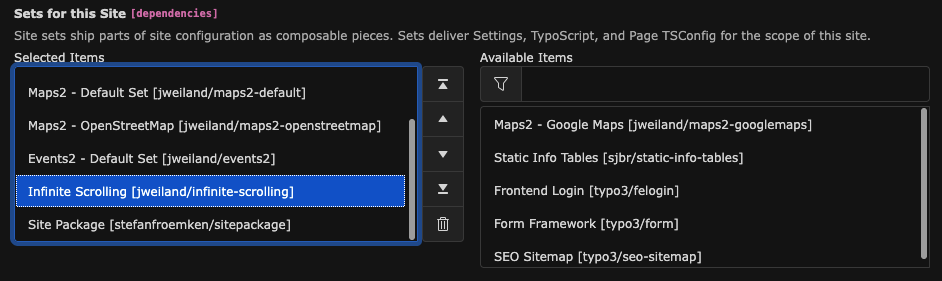
To configure the extension, navigate to Site Management -> Sites and add the Infinite Scrolling Site Set to your Site configuration.

Adding the Infinite Scrolling Site Set

Adding the Infinite Scrolling Site Set

Site Settings 

Go to Site Management -> Settings, select your Site configuration, and scroll down to Infinite Scrolling.

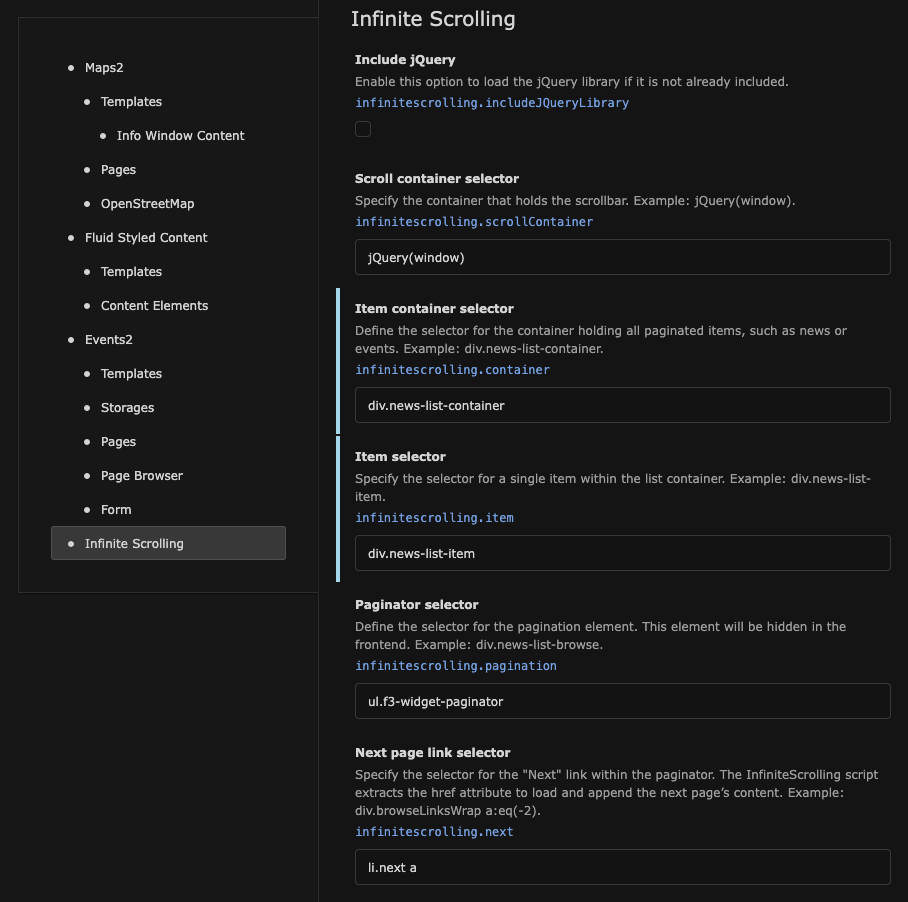
Configure the first section of Site Settings

Configure the first section of Site Settings

Include jQuery

Include jQuery
Type
boolean
Default
false
Path
infinitescrolling.includeJQueryLibrary

Enable this option to include the jQuery JavaScript library.

Scroll container selector

Scroll container selector
Type
string
Default
jQuery(window)
Path
infinitescrolling.scrollContainer

Define the jQuery selector for the scroll container.

Sample: jQuery(window)

Item container selector

Item container selector
Type
string
Default
(none)
Path
infinitescrolling.container

Specify the jQuery selector for the container holding all items (e.g., news or events) to paginate.

Sample: div.news-list-container

Item selector

Item selector
Type
string
Default
(none)
Path
infinitescrolling.item

Specify the jQuery selector for a single item within the list container.

Sample: div.news-list-item

Pagination selector

Pagination selector
Type
string
Default
ul.f3-widget-paginator
Path
infinitescrolling.pagination

Define the jQuery selector for the paginator. This selector will hide the paginator in the frontend.

Sample: div.news-list-browse

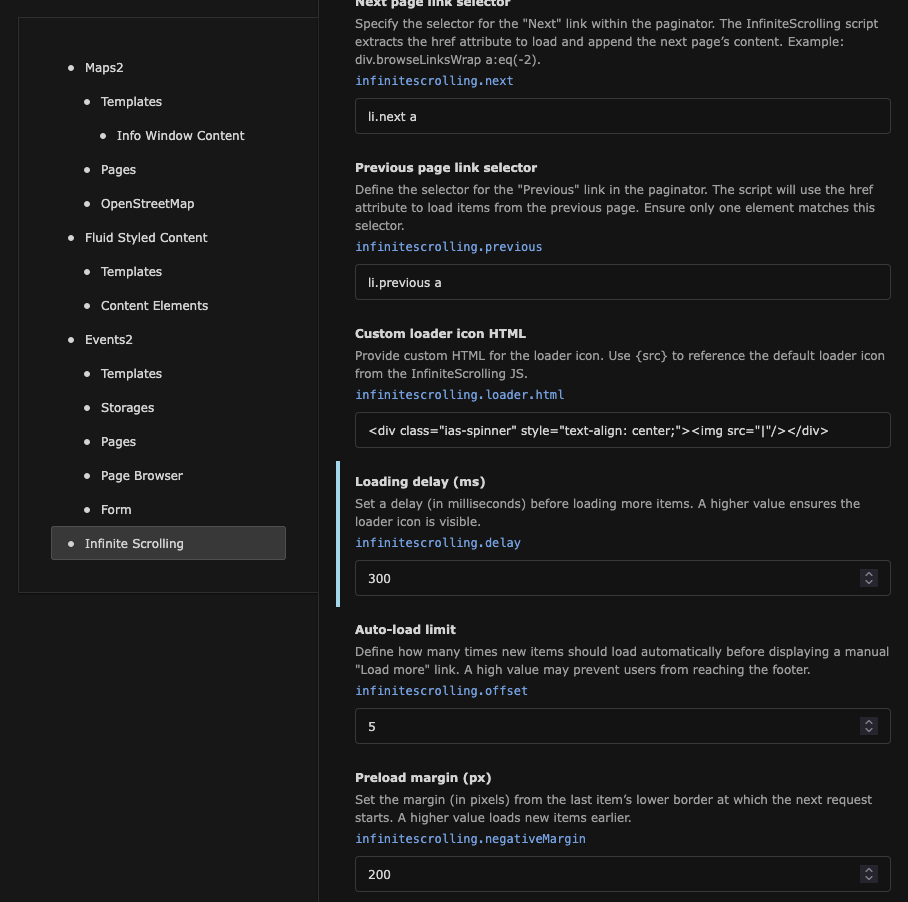
Configure the second section of Site Settings

Configure the second section of Site Settings

Custom loader icon HTML

Custom loader icon HTML
Type
string
Default
<div class="ias-spinner" style="text-align: center;"><img src="|"/></div>
Path
infinitescrolling.loader.html

Customize the loader icon by specifying your own HTML. Use {src} to include the original loader icon from Infinite Scrolling JS.

Sample: <div class="ias-spinner" style="text-align: center;"><img src="|"/></div>

Loading delay (ms)

Loading delay (ms)
Type
int
Default
0
Path
infinitescrolling.delay

Set a delay (in milliseconds) before loading additional items. Increase this value to ensure the loader icon is visible longer.

Sample: 5

Auto-load limit

Auto-load limit
Type
int
Default
5
Path
infinitescrolling.offset

Define how many times new items should be automatically loaded before displaying a manual "Load More" button. Avoid setting this too high to keep the footer accessible.

Sample: 7

Preload margin (px)

Preload margin (px)
Type
int
Default
200
Path
infinitescrolling.negativeMargin

Set the margin (in pixels) from the last item's bottom edge before the next request starts. A higher value loads items earlier.

Sample: 130

ChangeLog 

Version 4.0.1 

  • BUGFIX: Add missing locallang files

Version 4.0.0 

  • FEATURE: Add TYPO3 13 compatibility
  • TASK: Remove TYPO3 9, 10, 11, 12 compatibility
  • TASK: Use Site Settings for configuration
  • TASK: Disable jquery implementation by default.
  • TASK: Load jquery locally. Not external, because of DSGVO
  • TASK: Update documentation

Version 3.3.0 

  • FEATURE: Add TYPO3 12 compatibility
  • BUGFIX: Use EXT: for JavaScript file references
  • DOCS: Update configuration section
  • DOCS: Update installation section

Version 3.2.0 

  • Add TYPO3 11 compatibility

Version 3.1.1 

  • Remove title from SVG icons

Version 3.1.0 

  • Remove TYPO3 7.6 and 8.7 compatibility
  • Add TYPO3 10.4 compatibility
  • Add better Ext Icon

Version 3.0.0 

  • Update infinitescrolling JS library to 2.3.1
  • Update Documentation. Add ChangeLog.
  • Better TS implementation. Solve side-effects of JS in TS.
  • Update various translations
  • Add Trigger JS. Needed for History functionality

Version 2.2.0 

  • Add compatibility for TYPO3 9.5

Version 2.1.1 

  • Replace $_EXTKEY with "infinitescrolling"

Version 2.1.0 

  • Add possibility to load previous items after back-button of browser

Version 2.0.0 

  • Update infinitescrolling JS library to 2.2.3
  • Remove invalid TS constants

Version 1.2.0 

  • Update documentation, Compatibility for TYPO3 8. Remove unneeded files

Version 1.1.1 

  • Update version in ext_emconf.php

Version 1.1.0 

  • Compatibility for TYPO3 6.2 and 7.6

Version 1.0.5 

  • Update email addresses

Version 1.0.3 

  • Removed default doc/manual.sxw file (no code changes)

Version 1.0.2 

  • Changed manual format (no code changes)

Version 1.0.1 

  • Initial release