Introduction 

What does it do? 

This extension adds a new authentication service that logs a visitor into the TYPO3 frontend automatically if the IP address of their client matches one of the IP addresses configured on a fe_users record. A fe_users record can have any number of IP addresses - the visitor is logged in if ANY of them matches (OR logic).

Since jwauth re-checks the IP addresses on every single request instead of relying on a persisting login session, deactivating the extension or removing all matching IP addresses from a fe_users record immediately revokes access again.

Screenshot 

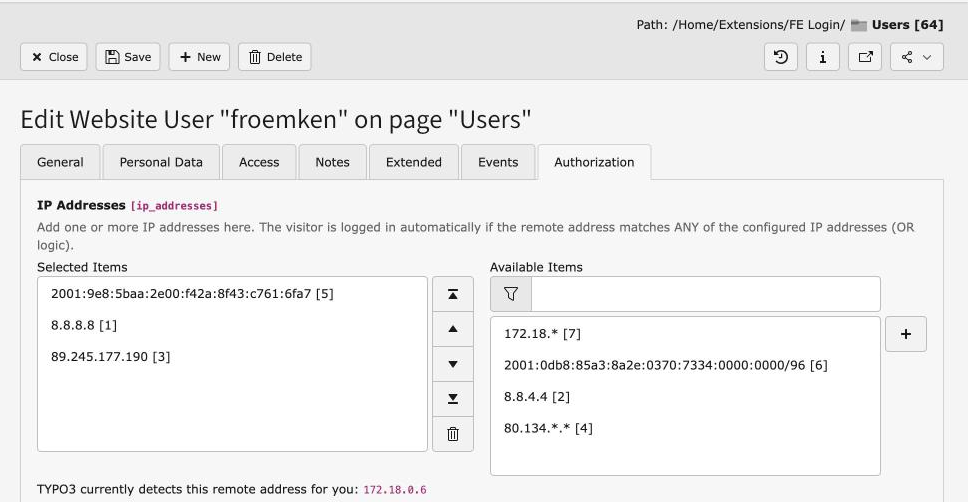
Here you see the new IP addresses relation field in the fe_users record. Each entry is its own small record holding one IP address or pattern.

New IP addresses field in fe_users record

The IP addresses field on the fe_users edit form

Installation 

Composer 

If your TYPO3 installation works in composer mode, please execute following command:

composer req jweiland/jwauth
vendor/bin/typo3 extension:setup --extension=jwauth
Copied!

If you work with DDEV please execute this command:

ddev composer req jweiland/jwauth
ddev exec vendor/bin/typo3 extension:setup --extension=jwauth
Copied!

Extension manager 

On non composer based TYPO3 installations you can install jwauth still over the extension manager:

  1. Login

    Login to backend of your TYPO3 installation as an administrator or system maintainer.

  2. Open extension manager

    Click on Extensions from the left menu to open the extension manager.

  3. Update extensions

    Choose Get Extensions from the upper selectbox and click on the Update now button at the upper right.

  4. Install jwauth

    Use the search field to find jwauth. Choose the jwauth line from the search result and click on the cloud icon to install jwauth.

Next step 

Configure jwauth.

Configuration 

The extension jwauth adds a new relation field called IP addresses to fe_users records. No dedicated tab was created for this field, so you will find it on the last tab of the fe_users record.

Each entry in this field is its own small record holding a single IP address or pattern. Use the + control next to the field to create a new entry without leaving the fe_users form, or pick an already existing one from the list. A fe_users record can reference any number of these entries - the visitor is logged in automatically as soon as their remote address matches any one of them (OR logic).

We recommend entering the full IP address, but, if needed, you can also enter just parts of it. jwauth also supports IPv6 addresses.

Upgrade 

Upgrading from a version before 5.0.0 

Versions before 5.0.0 stored a single IP address per fe_users record in the column ip_address. jwauth 5.0.0 replaces this with the IP addresses relation described in Configuration. An upgrade wizard, Classes/Upgrade/MigrateIpAddressToMMUpgrade.php (identifier jwauth_migrateIpAddress), migrates every existing value into the new relation automatically - run it once via the Install Tool's "Upgrade Wizards" module, or on the command line:

ddev exec vendor/bin/typo3 upgrade:run jwauth_migrateIpAddress
Copied!

The wizard can safely be run more than once; it only migrates values that have not been migrated yet.

Developer corner 

Structure 

Classes/Service/IpAuthService.php is registered as a TYPO3 authentication service (subtype getUserFE,authUserFE) in ext_localconf.php, with a priority and quality of 70 each. These values are higher than the services of felogin and rsaauth (50/60), but lower than OpenID (75). So, if none of the visitor's IP addresses match, the other configured services still get a chance to authenticate the visitor.

Example: Visitor A is logged into the frontend automatically if their IP address matches one of the addresses configured on a fe_users record. When visitor A is online from home, none of the addresses will match, but visitor A can still log in via felogin or a similar authentication method.

ext_localconf.php also forces $GLOBALS['TYPO3_CONF_VARS']['SVCONF']['auth']['setup']['FE_alwaysFetchUser'] = true;, so the whole authentication chain - and therefore the IP check - runs on every single request instead of relying on the PHP session.

Each fe_users record can be linked to any number of tx_jwauth_domain_model_ipaddress records through the MM table tx_jwauth_fe_users_ipaddress_mm (field ip_addresses). The actual matching against GeneralUtility::cmpIP() - which alone understands the * wildcard and /nn CIDR mask syntax - is done by the shared Classes/Service/IpAddressMatcher.php, used both by IpAuthService::authUser() and by the middleware described below.

Because matching is now evaluated per address instead of via the exact/prefix SQL search jwauth used before this feature, an edge case changed deliberately: if two different fe_users records could both be logged in by the same remote address (one via an exact address, another via a wildcard or CIDR pattern), the record with the lowest uid now wins. Earlier versions always preferred an exact match over a wildcard/CIDR match, but this was never a documented guarantee - just a side effect of the old two-step search algorithm - and is not preserved.

Security 

If a visitor is logged in via jwauth, their frontend user session is terminated again right after the response has been built, using the PSR-15 middleware Classes/Middleware/ClearIpAuthenticatedSessionMiddleware.php (registered in Configuration/RequestMiddlewares.php). It asks the same IpAddressMatcher whether any of the fe_user's configured IP addresses still matches the current remote address, and logs the user off if not one of them does. So with every request the visitor is logged in again and again.

This is done for security reasons: without it, an administrator could deactivate jwauth in the extension manager, but visitors who are already logged in could still browse the website using their existing session. In our opinion, an administrator must always have the opportunity to revoke such a feature immediately - deactivating the extension or removing all matching IP addresses from a fe_users record takes effect on the very next request.

It could be that browsing with jwauth activated slows down your website by a few milliseconds, since matching the visitor's IP addresses means the full user authentication - including one extra database lookup by the middleware - has to be processed on every request.

FAQ 

Is this extension IPv6 compatible? 

Yes, it is. It uses the GeneralUtility::cmpIP() method, which can validate both IPv4 and IPv6 addresses.

What about "Logout"? 

Ah yeah, that is funny. Visitors with a matching IP address are authenticated on every single request. You cannot log out: if you press "Logout" the page reloads, a new request is made, and you are logged in again right away.

Can I configure more than one IP address per fe_user? 

Yes. Add as many entries as you like to the IP addresses field of a fe_users record. The visitor is logged in automatically if their remote address matches any one of them.

Sitemap