KK Downloader

Extension key

kk_downloader

Package name

jweiland/kk-downloader

Version

main

Language

en

Author

Stefan Froemken

License

This document is published under the Creative Commons BY 4.0 license.

Rendered

Wed, 10 Sep 2025 12:07:49 +0000


Download system with counter, simple category management, sorting criteria and page browsing in the LIST-view. Configuration via FlexForms and HTML template.


Table of Contents:

Introduction

What does it do?

Download system with many features. Displays downloads with short description, click counter, file size and image preview. It is possible to create a detail site for each download record.

Credits

From Sebastian: Thanks to Kurt Kunig ( www.kupix.de ) for several add-ons and manual revision.

From Kurt: Thanks to Sebastian Baumann for the initial idea and the source base of version 0.1.2

Screenshots

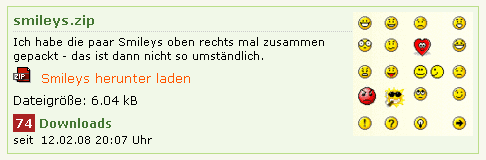
Standard without image preview:

Screenshot without image preview

Standard with image preview:

Screenshot with image preview

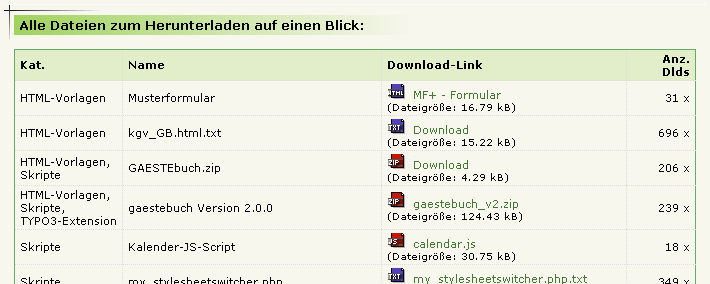
Complete list of all downloads (no "starting point" selected and "plugin.tx_kkdownloader_pi1.defaultDownloadPid = " and a separate html-template selected in the TypoScript Setup):

Screenshot with all Downloads

Installation

Composer

If your TYPO3 installation works in composer mode, please execute following command:

composer req jweiland/kk-downloader
vendor/bin/typo3 extension:setup --extension=kk_downloader
Copied!

If you work with DDEV please execute this command:

ddev composer req jweiland/kk-downloader
ddev exec vendor/bin/typo3 extension:setup --extension=kk_downloader
Copied!

ExtensionManager

On non composer based TYPO3 installations you can install kk_downloader still over the ExtensionManager:

  1. Login

    Login to backend of your TYPO3 installation as an administrator or system maintainer.

  2. Open ExtensionManager

    Click on Extensions from the left menu to open the ExtensionManager.

  3. Update Extensions

    Choose Get Extensions from the upper selectbox and click on the Update now button at the upper right.

  4. Install kk_downloader

    Use the search field to find kk_downloader. Choose the kk_downloader line from the search result and click on the cloud icon to install kk_downloader.

Next step

Configure kk_downloader.

Configuration

plugin_tx_kkdownloader_pi1.

TypoScript Setup Reference

Property Data type Default
linkdescription Integer 1
downloadIcon String 1
missingDownloadIcon String EXT:kk_downloader/Resources/Public/Icons/MissingDownload.gif
templateFile String EXT:kk_downloader/Resources/Private/Templates/MainTemplate.html
defaultDownloadPid CSV INT values empty
singlePID Integer empty
displayCreationDate Removed Removed
dateformat String d.m.Y
datetimeformat String d.m.Y H:i
imageDistance String 5
image ->imgResource/->stdWrap  
results_at_a_time_ Integer 25
pageBrowser Array  

Property details

linkdescription

If no linktitle set:

1 = filename.fileextension, 2 = filename 3 = fileextension

downloadIcon

Path to download icon (complete – e.g.

downloadIcon = EXT:kk_downloader/pi1/images/downLoad.gif)

or

Path to the folder, where the fileicons are: (e.g. downloadIcon = typo3/gfx/fileicons/) This path must end with a Slash! Result: the corrosponding icons to the fileextension will be shown, just like “pdf.gif” e.g. - Kurt Kunig

missingDownloadIcon

If the path is set typo3/gfx/fileicons/ you can set a default download icon if a icon is missing (e.g. for rar files)

templateFile

Path to template file

defaultDownloadPid

# PID of the general download folder (if no page-"starting-point" is set)

Comma seperated list of storage PIDs

singlePID

Pid of the detail page

displayCreationDate

Property removed. Please use showCRDate in FlexForm.

dateformat

Here you can set the date formatting for the template-marker: ###DATE###.

Example:

plugin.tx_kkdownloader_pi1 {
dateformat= l, d.m.Y

}

This will display the date in content elements like this: "Monday, 31.03.2008".

datetimeformat

e.g. used for formatting the date-output of the download-file

datetimeformat = d.m.Y H:i

imageDistance

Distance between Image and text

image

Configures the image(s) in download items.

Example:

image {
file.maxW = 140 imageLinkWrap = 0 imageLinkWrap { enable = 1 bodyTag = <BODY bgColor=white> wrap = | width = 400m height = 400 JSwindow = 1 JSwindow.newWindow = 1 JSwindow.expand = 17,20 }

}

results_at_a_time

limit of single items on one list-page used with LIST for page-browsing. Can be overwritten in flexform.

pageBrowser

pageBrowser.maxPages

Default: 10

Maximum x pages will be shown

pageBrowser.showPBrowserText

Default: true

should pagebrowser-text be shown

pageBrowser.showResultCount

Default: true

Should the list result (Item 1 to 5 of 23) be shown?

pageBrowser.activepage_stdWrap.wrap

Default: <strong>|</strong>

Wrapping the active page

pageBrowser.page_stdWrap.wrap

Default: |

Wrapping the active page

pageBrowser.previous_stdWrap.wrap

Default: |

Wrapping the active page

pageBrowser.next_stdWrap.wrap

Default: |

Wrapping the active page

Users Manual

To setup and use the extension, you should do the following:

  • Install The Extension
  • Create or set a Data Folder (Sysfolder, named "download-container" e.g.) and point on himself in the field "General Record Storage page"! This is important for finding the categories later on! You can also put a download object into a normal page instead of a sysfolder; the sysfolder then is only for the general categories. Don’t forget to point to that sysfolder from this page in the "General Record Storage Page".
  • Add Categories and Downloads into this data sysfolder or the downloads into the page where he should be visible.
  • Create a new page and add the plugin (and add download items if they are not in a sysfolder)
  • Configure the options

Create the sites (data folder, …)

You have to create several pages. The usual way is to create one sysfolder where the records and categories are saved in.It´s possible to create the extension records in normal sites but we recommend to use a new Storage Folder because there can be many records and you can keep everything in one place.

  • Create a page where the LIST view appears
  • Create a page where the SINGLE view appears (not absolutely needed)
  • Create a SYSFOLDER named download-container e.g. beyond your site with LIST view.
  • On each page you have to set the General record store page to your (category-) sysfolder.
  • Put the plugin into your page(s) template with Include static (from extensions) = kk_downloader and put the desired parameters in.
  • Set the plugin-configuration into the template setup box. You can copy and paste it from this manual if you want (see below)

Configure the options: LIST View

After you create a page and add the plugin, you have to edit the Flexform to get the right settings.

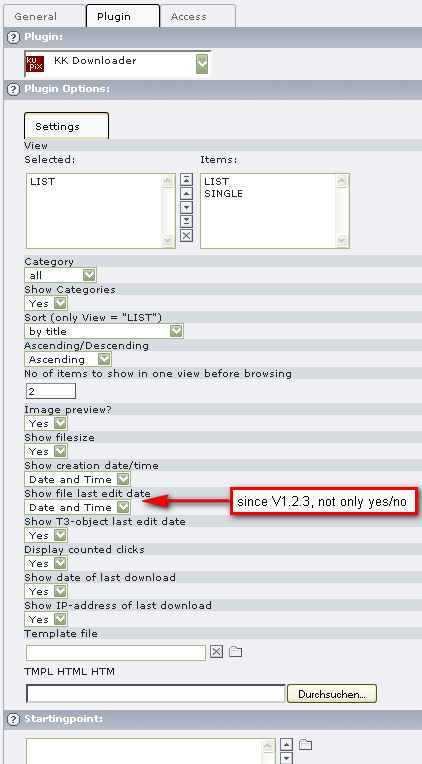
Configure Options for LIST View

Flexform options

New since version 1.2.0: browse max. X items per page

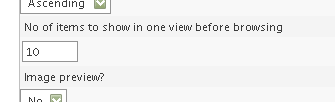
New FlexForm Feature: Browse next X items per page

Configure the options: SINGLE View

The same as above, but choose SINGLE instead of LIST!

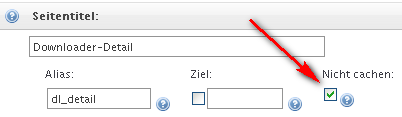
Do not Cache Page for SINGLE View

What you have to look for!

Tell the plugin the ID of the page with the single view:

You have the possibility to edit the following plugin properties via setup:plugin.tx_kkdownloader_pi1.singlePID = 28 (e.g.) Put the marker ###MORE### into your HTML-template. This link will be inactive if

  1. the singlePID is not given or has a wrong UID or
  2. the correct singlePID-page has the hidden status.

TYPO3 LiveSearch

LiveSearch is the search form in the TYPO3 backend at the upper right corner. kk_downloader comes with an additional configuration to find download records much faster. In the world of LiveSearch it is called a "command". The command for kk_downloader records is download. Start your search with #download: and then add your search value. Example: #download:map.

Administrator manual

This chapter describes how to manage the extension from a superuser point of view.

Updating

If you update kk_downloader to a newer version, please read this section carefully!

Update to Version 7.0.0

We have removed TYPO3 9.6 compatibility. TYPO3 11.5 compatibility added.

The selectbox side-by-side for what_to_display in plugin settings has never ever worked as this plugin can only display one view at once. We have migrated that box to a single selectbox. Please open your plugins, check and correct the value and store the plugin.

We have removed the ext_typoscript_setup.typoscript. Please use a TypoScript +ext Template to add kk_downloader TypoScript where needed.

It is not allowed to create download records on default pages anymore. Please mark page record as storage folder and store download records there.

We have removed the default UserTSConfig: options.saveDocNew.tx_kkdownloader_images. In newer TYPO3 versions a "new" button will already be shown in list-module.

Update to Version 6.0.0

We have removed TYPO3 8.7 compatibility. TYPO3 10.4 compatibility added.

Please click Flush caches in Installtool as we have added some more PHP classes and changed TCA structure.

We have removed the possibility to reduce category items in selector of FlexForm with help of TCEFORM.pages._STORAGE_PID. Please use following PageTSConfig instead: TCEFORM.tt_content.pi_flexform.kkdownloader_pi1.sDEF.category.PAGE_TSCONFIG_IDLIST = 23,24,25

We have renamed the field dynField in FlexForm to category. Please execute the according UpgradeWizard.

Update to Version 5.2.0

With TYPO3 9.5 the compatibility for files and file references in TCA group fields was deprecated and will be removed in TYPO3 10.0. See here: Deprecation: #86406 - TCA type group internal_type file and file_reference

As kk_downloader uses this system a lot we have added two new UpdateWizards:

  • UpdateWizard to migrate your downloadable files from /uploads/kk_downloader/ to fileadmin/_migrated/kk_downloader.
  • UpdateWizard to migrate imagepreview files from /uploads/kk_downloader/ to fileadmin/_migrated/kk_downloader.

As all values from column downloaddescription were migrated into the file reference of your downloaded files, we have removed this column from table tx_kkdownloader_images.

Update to Version 5.1.0

With TYPO3 6.0 we got a new possibility to manage categories. So there is no need to keep our own system for kk_downloader categories.

Please execute UpdateWizard [kk_downloader] Migrate KK categories to TYPO3 sys_categories to migrate the categories. This Wizard also updates the category relations to your download records and updates the selected categories in all of your FlexForms.

Update to Version 5.0.0

This version is not TYPO3 7.6 compatible anymore! We have added TYPO3 9.6 compatibility.

We have moved TS template from styles/css to Configuration/TypoScript. As there is no UpdateWizard available you have to re-add the TS template of kk_downloader to your system.

You will find the new default fluid template here: EXT:kk_downloader/Resources/Private/Templates/MainTemplate.html. If you have overwritten this file, please adopt changes into your own template. All marker based variables have been replaced with fluid variables!

A lot of TCA was moved to more accepted folders. Please clear system cache after upgrading.

Update to Version 4.0.0

Was never released

PHP classes of plugin were moved from /pi directory to Classes/Plugin.

Update to Version 3.0.1

jweiland.net has taken over the extension key.

FAQ

I can´t insert categories in a new partner record

You have to put your SysFolder into the “ General Record Storage page” resp. "starting point" of your page. Sometimes it is better to create a general storage page (sysfolder) for the categories and then put this one into the above mentioned field of the sysfolder that takes the download files in.

When I upload a file I got the message that the filesize should be too large?

Upload file size is limited by a variable in the base configuration.

ChangeLog

Version 7.0.0

  • Add TYPO3 11 compatibility
  • Remove TYPO3 9 compatibility
  • Migrate what_to_display from select side-by-side to select single
  • Use strict types where possible
  • Add trait to access values from context API
  • Add trait to get TSFE
  • Use DI where possible
  • Remove ext_typoscript_setup.typoscript file
  • Records can only be created on pages configures as storage folder
  • Remove ext_tables.php
  • Remove UserTSConfig: options.saveDocNew.tx_kkdownloader_images
  • Add livesearch command to find download records much faster

Version 6.1.1

  • Remove ".image img" CSS as it is not used anywhere

Version 6.1.0

  • Add limit and offset to getDownloads query. This reduces the amount of records a lot.
  • Display pagebrowser is now activated by default
  • Add some more explanation to FlexForm fields

Version 6.0.1

  • Update foreign_table_where to allow categories of all pages in FlexForm

Version 6.0.0

  • Remove TYPO3 8.7 compatibility
  • Add TYPO3 10 compatibility
  • Replace extension icons from EXT:frontend
  • Restructure TCA fields
  • Repair record overlay
  • Remove TYPO3 columns from ext_tables.sql
  • Use FileCollection to get referenced file relations

Version 5.2.2

  • Change group type of template file in FlexForm to input type

Version 5.2.1

  • Add renderType to FlexForm
  • add method getFlexFormValue to prevent return of NULL values

Version 5.2.0

  • Migrate previewimage to FAL (Please execute UpdateWizard)
  • Migrate download files to FAL (Please execute UpdateWizard)
  • Repair date of last download in view
  • Rename a lot of variables/methods for better understanding
  • Repair workspace for category records

Version 5.1.0

  • Use categories of sys_category instead of our own cat table. Please use UpgradeWizard for migration

Version 5.0.1

  • Typo in orderBy of DownloadRepository
  • Convert Documentation to RST format only. No Update!

Version 5.0.0

  • Extension key kk_downloader was transferred to jweiland.net
  • Update version number to 5.0.0
  • Change Template to Fluid
  • Move marker based logic to Fluid-Template
  • Change default template to EXT:kk_downloader/Resources/Private/Templates/MainTemplate.html
  • Collect all FlexForm configuration in $this->settings
  • Assign downloads variable to ListView
  • Assign download variable to SingleView
  • $this->settings is available in Fluid, too
  • Removed all PHP code for translation handling and rebuild it with TYPO3 API
  • Moved all TCA from tca.php into Configuration/TCA
  • Moved all TCA changing PHP into Configuration/TCA/Overrides/*
  • Moved pi-class to Classes/Plugin
  • Moved additional fields UserFunc class to Classes/UserFunc
  • Changed yes/no selectboxes in FlexForm to Checkboxes
  • Change PHP code to be PSR-2 compatible
  • Add strict_types where possible
  • Add composer.json. So it's now available over packagist, too.
  • Set TYPO3 compatibility to 8.7 and 9.5. Yes, we have removed compatibility to TYPO3 7.6
  • Changed column "clicks" from tinytext to int(10)
  • Moved all DB Queries to non-extbase-based Repositories
  • Changed all DB-Queries to Doctrine
  • Add Namespacing and correct PHP DocHeaders
  • Simplify many if-conditions (don't test on empty() and empty string)
  • Removed all Debugging-Output. Please use xdebug or f:debug or Admin-Panel or...
  • Change pi_getLL to LocalizationUtility to use new path of language files
  • Change language files to XLF
  • Divide Languagefile to locallang, locallang_db and FlexForm
  • Change IMAGE() call to cObjGetSingle()
  • Remove or change many deprecated code
  • Create date with f:format.date in template directly
  • Moved all Icons to Resources/Public/Icons
  • Moved TS-Template from styles/css to Configuration/TypoScript
  • Remove imageDistance, as the result "$imagewidth" was not used
  • Change downloadIcon handling. If not set, use Icons of Core, else use Icon of DownloadIcon

Sitemap

Index

Contribute

Contribution to kk_downloader is very welcome.

If you wish to contribute, please follow these conventions:

Writing Issues

  • If you find a problem in the extension, please write an issue.
  • If you can fix the problem yourself, please submit a pull request. In this case, it is not necessary to create an issue first.

Submitting a Pull Request

Please see the general GitHub documentation for more information, for example Creating a pull request