Introduction 

What it does? 

This extension allows you to integrate a like button functionality for nearly any frontend plugin (Text, events, news, ...).

Screenshots 

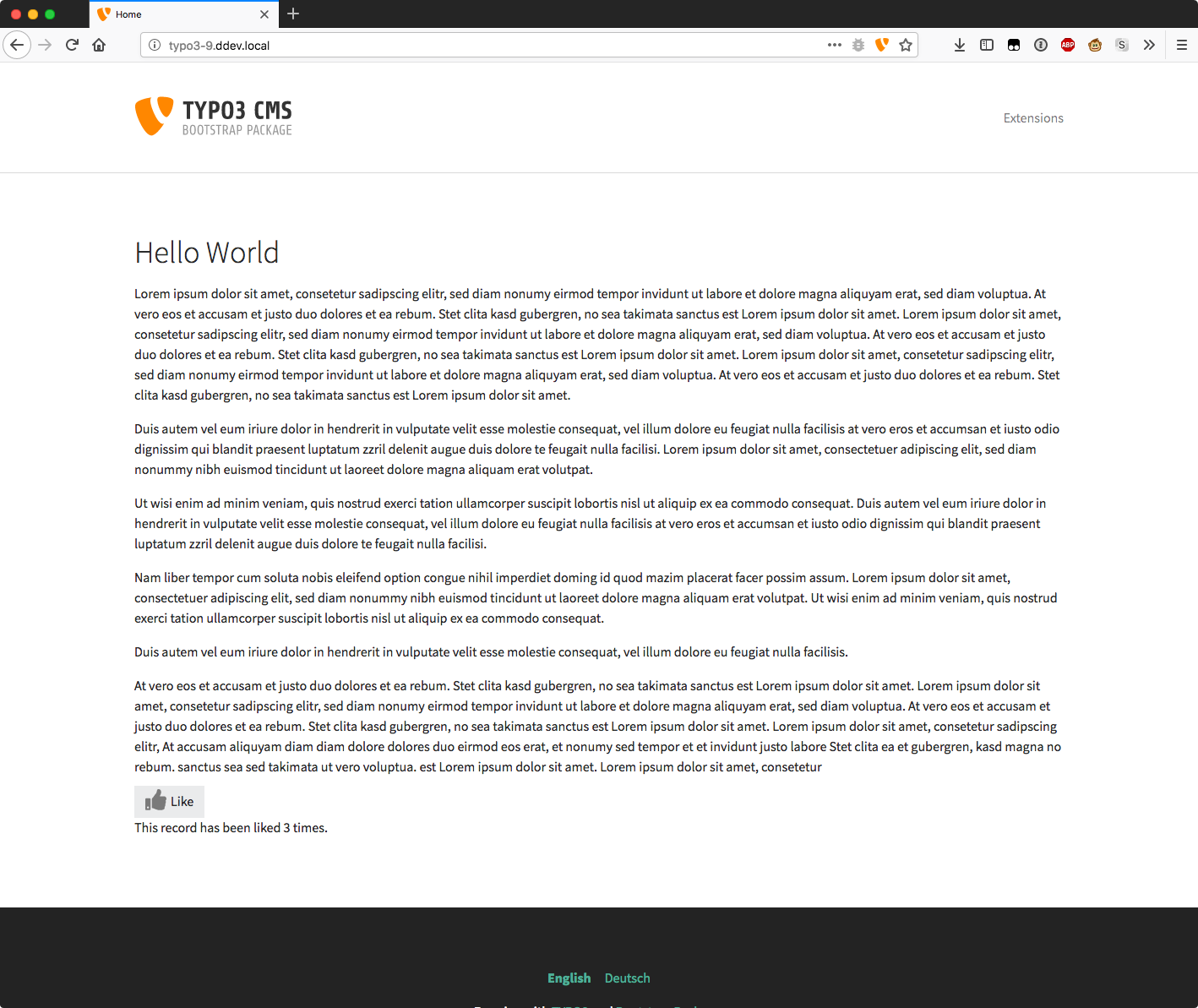
Text Element with like button
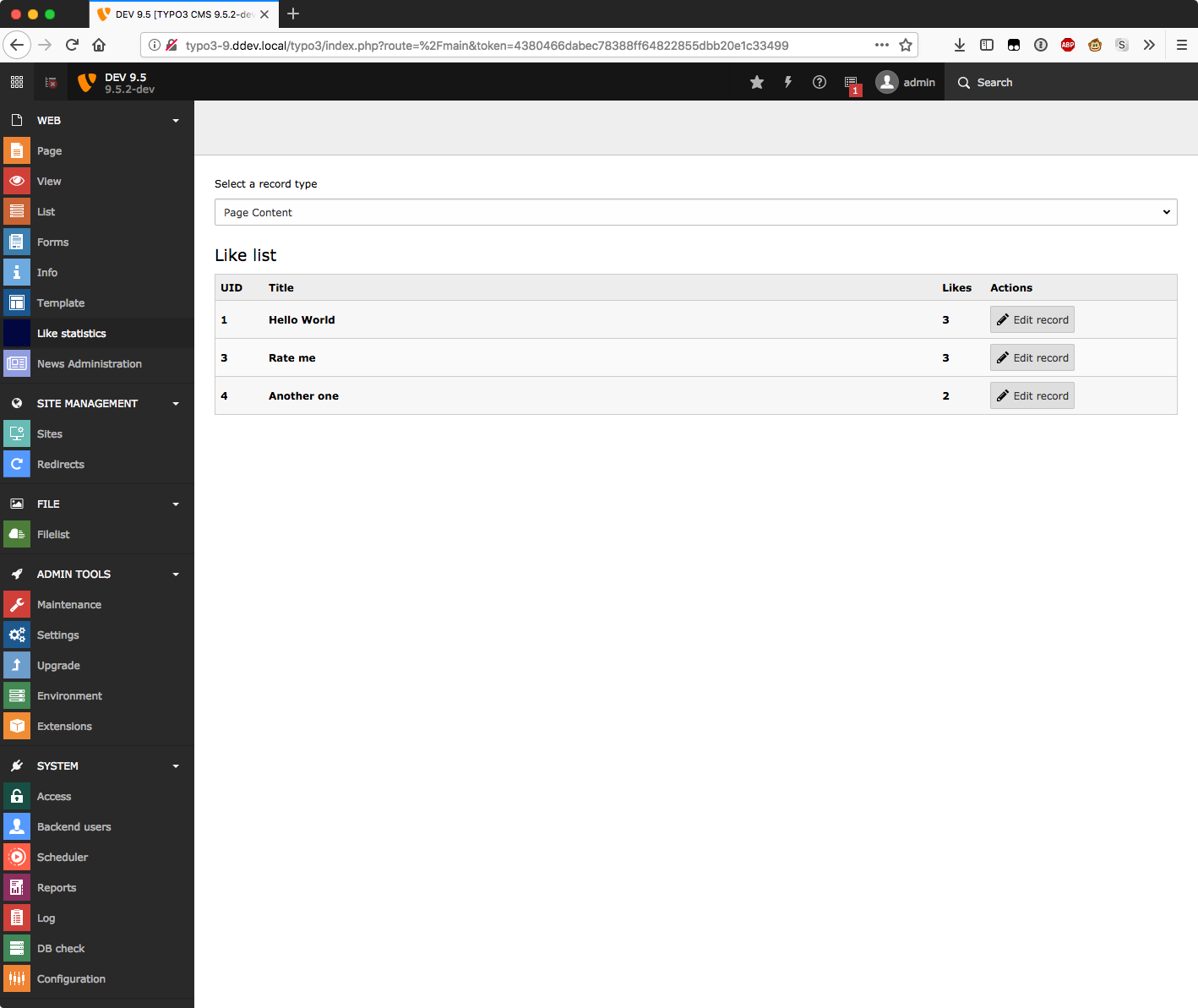
Backend module for like statistics

Installation 

Composer 

If your TYPO3 installation works in composer mode, please execute following command:

composer req jweiland/like-it
vendor/bin/typo3 extension:setup --extension=like_it
Copied!

If you work with DDEV please execute this command:

ddev composer req jweiland/like-it
ddev exec vendor/bin/typo3 extension:setup --extension=like_it
Copied!

ExtensionManager 

On non composer based TYPO3 installations you can install like_it still over the ExtensionManager:

  1. Login

    Login to backend of your TYPO3 installation as an administrator or system maintainer.

  2. Open ExtensionManager

    Click on Extensions from the left menu to open the ExtensionManager.

  3. Update Extensions

    Choose Get Extensions from the upper selectbox and click on the Update now button at the upper right.

  4. Install like_it

    Use the search field to find like_it. Choose the like_it line from the search result and click on the cloud icon to install like_it.

Next step 

Configure like_it.

TypoScript 

First of all: do you want to implement like_it in your own extension or do you need like_it for a foreign extension?

Own Extension 

We need to add some lines of TypoScript

  1. Locate File

    Open the setup.typoscript file of your extension. In most cases you should find it in [yourExt]/Configuration/TypoScript/setup.typoscript.

  2. Locate view Part

    Find the part, where you define the template paths for fluid. In most cases you should find it here plugin.tx_[yourExt].view. See example based on maps2:

    plugin.tx_maps2 {
      view {
        templateRootPaths {
          0 = EXT:maps2/Resources/Private/Templates/
          10 = {$plugin.tx_maps2.view.templateRootPath}
        }
        partialRootPaths {
          0 = EXT:maps2/Resources/Private/Partials/
          10 = {$plugin.tx_maps2.view.partialRootPath}
        }
        layoutRootPaths {
          0 = EXT:maps2/Resources/Private/Layouts/
          10 = {$plugin.tx_maps2.view.layoutRootPath}
        }
      }
    }
    Copied!
  3. Register Partial

    like_it comes with a special fluid partial containing all the stuff it needs. You have to add that partial path to your TypoScript configuration. Please replace extkey with the extension key of your extension. If your extension key contains underscores: remove them before pasting your extension key here.

    plugin.tx_extkey {
      view {
        templateRootPaths {
          0 = EXT:extkey/Resources/Private/Templates/
          10 = {$plugin.tx_extkey.view.templateRootPath}
        }
        partialRootPaths {
          0 = EXT:extkey/Resources/Private/Partials/
          10 = {$plugin.tx_extkey.view.partialRootPath}
          20 = EXT:like_it/Resources/Private/Partials/
        }
        layoutRootPaths {
          0 = EXT:extkey/Resources/Private/Layouts/
          10 = {$plugin.tx_extkey.view.layoutRootPath}
        }
      }
    }
    Copied!
  4. Add Partial to Your Template

    With like_it you can just like ONE record. It's not possible to like a collection of records. So, please locate and open the template file for single or detail view of a record. Path [yourExt]/Resources/Private/Templates/ is a good start to find the templates for detail view. Could be Detail.html, Single.html or Properties.html. Search a good place to call the like_it partial:

    <f:render partial="Rating" arguments="{table: 'tablename_of_your_record', uid: object.uid}"/>
    Copied!
  5. Add Dependency

    As your extension now needs like_it as dependency you should add it into your ext_emconf.php:

    ...
    'constraints' => [
        'depends' => [
            'typo3' => '10.4.36-11.5.99',
            'like_it' => '2.0.0-2.99.99',
        ],
        'conflicts' => [
        ],
        'suggests' => [
        ],
    ],
    ...
    Copied!

    And please update your composer.json:

    ...
    "require": {
        "typo3/cms-core": "^10.4.36 || ^11.5.23",
        "jweiland/like-it": "^2.0"
    },
    ...
    Copied!
  6. Done

    Now you're ready. Please test the integration, check the database entries of tx_likeit_like and check browser development console for any warnings and/or errors.

Foreign Extension 

We need to add some lines of TypoScript into your site-package extension to overwrite the TypoScript of the foreign extension. We prefer using a site-package extension, but of cause, you can add these lines of TypoScript also into TypoScript template records (sys_template).

  1. Overwrite Foreign Fluid Template

    Search for a detail view template file in the foreign extension and paste it into a directory somewhere in Resources/Private/... of your site-package extension.

  2. Overwrite Template Path

    You have to inform Fluid to search for templates in path of your site-package extension first. Here an example how it can looks like for extension events2:

    plugin.tx_events2 {
      view {
        templateRootPaths {
          # Choose a value higher than the value of foreign extension.
          # In most cases 100 is enough.
          # If you're unsure check value in foreign extension or with
          # TypoScript Object Browser
          100 = EXT:site_package/Resources/Private/Extensions/Events2/Templates/
        }
      }
    }
    Copied!
  3. Register Partial

    like_it comes with a special fluid partial containing all the stuff it needs. You have to add that partial path to your TypoScript configuration.

    plugin.tx_events2 {
      view {
        templateRootPaths {
          # see code from above
        }
        partialRootPaths {
          # Choose a value higher than the value of foreign extension.
          # In most cases 100 is enough.
          # If you're unsure check value in foreign extension or with
          # TypoScript Object Browser
          100 = EXT:like_it/Resources/Private/Partials/
        }
      }
    }
    Copied!
  4. Add Partial to Overwritten Template

    With like_it you can just like ONE record. It's not possible to like a collection of records. Search a good place to call the like_it partial in your overwritten detail view template:

    <f:render partial="Rating" arguments="{table: 'tablename_of_foreign_record', uid: object.uid}"/>
    Copied!

    For news it could look like:

    <f:render partial="Rating" arguments="{table: 'tx_news_domain_model_news', uid: newsItem.uid}"/>
    Copied!
  5. Add dependency

    As your site-package now needs like_it as dependency you should add it into your ext_emconf.php:

    ...
    'constraints' => [
        'depends' => [
            'typo3' => '10.4.36-11.5.99',
            'like_it' => '2.0.0-2.99.99',
        ],
        'conflicts' => [
        ],
        'suggests' => [
        ],
    ],
    ...
    Copied!

    And please update your composer.json:

    ...
    "require": {
        "typo3/cms-core": "^10.4.36 || ^11.5.23",
        "jweiland/like-it": "^2.0"
    },
    ...
    Copied!
  6. Done

    Now you're ready. Please test the integration, check the database entries of tx_likeit_like and check browser development console for any warnings and/or errors.

Administrator manual 

This chapter describes how to manage the extension from a superuser point of view.

Upgrade 

If you update EXT:like_it to a newer version, please read this section carefully!

Update to Version 4.0.0 

We have removed TYPO3 12 compatibility.

No active items to track.

Update to Version 3.0.0 

We have removed TYPO3 10 and 11 compatibility.

ViewHelper AmountOfLikes has beed removed. All numbers of likes are collected via an AJAX call. Please try to keep the CSS classes in sync with templates of EXT:like_it.

Update to Version 2.0.0 

With TYPO3 v10 the fluid widget integration was deprecated and will be remove. That's why we have to completely restructure our like_it extension.

Please remove this namespace from template:

{namespace jw=JWeiland\LikeIt\ViewHelpers}
Copied!

Please remove following line:

<jw:widget.rating uid="{data.uid}" table="tt_content" />
Copied!

and replace it with our new partial integration:

<f:render partial="Rating" arguments="{table: 'tablename_of_foreign_record', uid: object.uid}"/>
Copied!

Read the Configure like-it how to register loading the new partial.

ChangeLog 

Version 4.1.0 

  • [TASK] Simplify access restriction in Backend Module configuration

Version 4.0.0 

  • [TASK] TYPO3 13 Compatibility

Version 2.0.2 

  • Repair view of like_it backend module
  • Rename like-it to like_it in documentation
  • [TASK] typo in language label
  • [DOC] Update Installation index.rst
  • Use spaces as indents in fluid templates

Version 2.0.1 

  • Add extension key to composer.json

Version 2.0.0 

  • Add TYPO3 11 compatibility
  • Migrate fluid widget to a partial
  • Update documentation

Version 1.0.0 

  • Remove TYPO3 8 compatibility
  • Add TYPO3 10 compatibility

Sitemap