Introduction 

What it does? 

Embed your favorite YouTube Videos and Playlists. Import description, title and more by just pasting the YouTube link.

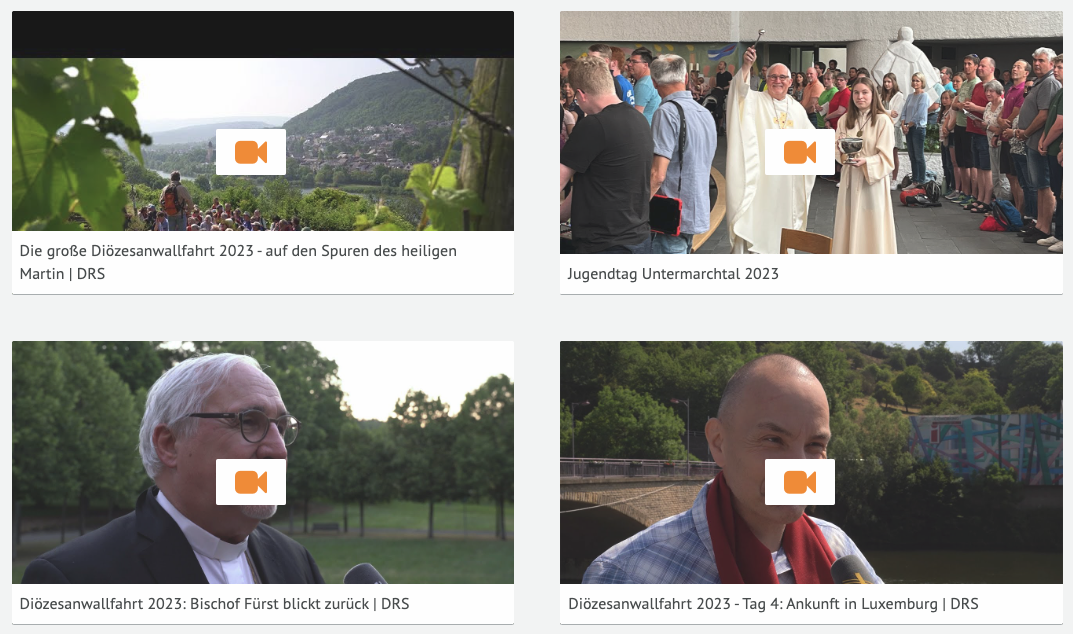
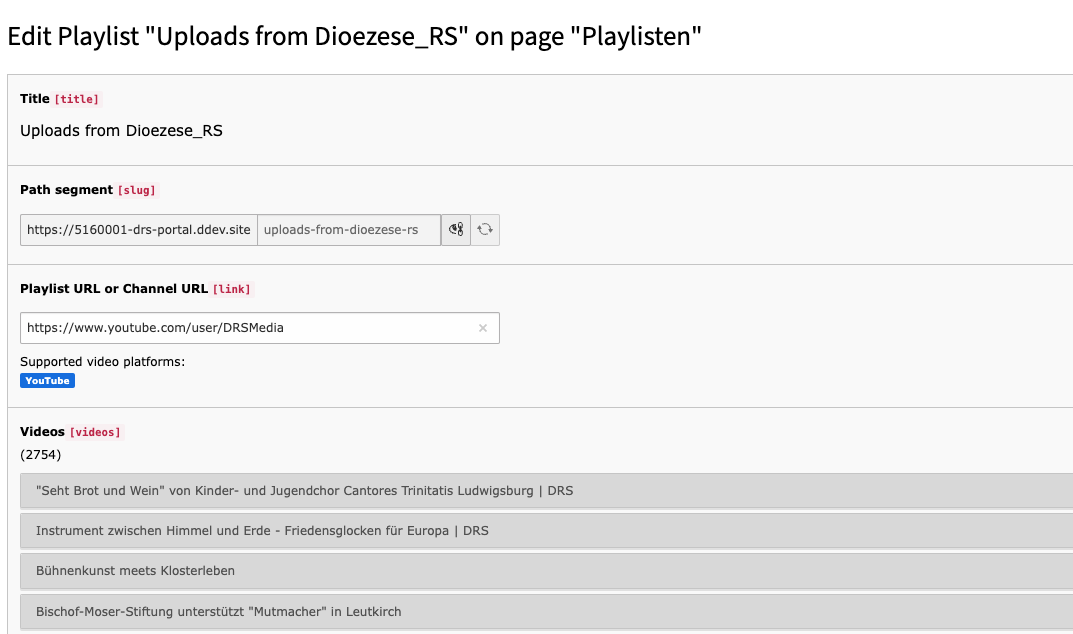
Screenshots 

Show YouTube playlist in frontend
Show creation of playlist record in backend

Installation 

Composer 

If your TYPO3 installation works in composer mode, please execute following command:

composer req jweiland/mediapool
vendor/bin/typo3 extension:setup --extension=mediapool
Copied!

If you work with DDEV please execute this command:

ddev composer req jweiland/mediapool
ddev exec vendor/bin/typo3 extension:setup --extension=mediapool
Copied!

ExtensionManager 

On non composer based TYPO3 installations you can install mediapool still over the ExtensionManager:

  1. Login

    Login to backend of your TYPO3 installation as an administrator or system maintainer.

  2. Open ExtensionManager

    Click on Extensions from the left menu to open the ExtensionManager.

  3. Update Extensions

    Choose Get Extensions from the upper selectbox and click on the Update now button at the upper right.

  4. Install mediapool

    Use the search field to find mediapool. Choose the mediapool line from the search result and click on the cloud icon to install mediapool.

Next step 

Configure mediapool.

Configuration 

Please see following sections on how to configure mediapool. To keep the playlist and video information up2date, we prefer creating our 2 scheduler task.

TypoScript 

mediapool needs some basic TypoScript configuration. To do so you have to add an +ext template to either the root page of your website or to a specific page which contains the mediapool plugin.

  1. Locate page

    You have to decide where you want to insert the TypoScript template. Either root page or page with mediapool plugin is OK.

  2. Create TypoScript template

    Switch to template module and choose the specific page from above in the pagetree. Choose Click here to create an extension template from the right frame. In the TYPO3 community it is also known as "+ext template".

  3. Add static template

    Choose Info/Modify from the upper selectbox and then click on Edit the whole template record button below the little table. On tab Includes locate the section Include static (from extension). Use the search above Available items to search for mediapool. Hopefully just one record is visible below. Choose it, to move that record to the left.

  4. Save

    If you want you can give that template a name on tab "General", save and close it.

  5. Constants Editor

    Choose Constant Editor from the upper selectbox.

  6. mediapool constants

    Choose PLUGIN.TX_MEDIAPOOL from the category selectbox to show just mediapool related constants

  7. Configure constants

    Adapt the constants to your needs. We prefer to set all these detailUid and listUid constants. That prevents you from setting all these PIDs in each plugin individual.

  8. Configure TypoScript

    As constants will only allow modifying a fixed selection of TypoScript you also switch to Info/Modify again and click on Setup. Here you have the possibility to configure all mediapool related configuration.

View 

templateRootPaths

templateRootPaths
type

array

Default

EXT:mediapool/Resources/Private/Templates/

Path

plugin.tx_mediapool.view.*

You can override our Templates with your own SitePackage extension. We prefer to change this value in TS Constants.

partialRootPaths

partialRootPaths
type

array

Default

EXT:mediapool/Resources/Private/Partials/

Path

plugin.tx_mediapool.view.*

You can override our Partials with your own SitePackage extension. We prefer to change this value in TS Constants.

layoutsRootPaths

layoutsRootPaths
type

array

Default

EXT:mediapool/Resources/Layouts/Templates/

Path

plugin.tx_mediapool.view.*

You can override our Layouts with your own SitePackage extension. We prefer to change this value in TS Constants.

YouTube API Key 

mediapool needs a YouTube API key to be allowed to retrieve the playlist and video information. Please configure that key in extension settings of mediapool.

  1. Visit Google Cloud Console

    Open following link in a browser, where you are already registered with your Google Email address: https://console.cloud.google.com

  2. Choose Project

    At the upper left, you can switch to the desired project or you can can create a new project

  3. Activate YouTube API

    Open the main menu on the left (burger menu) and choose "APIs and Services". Choose "Activate API and Services" button from the upper right. On new page I prefer to use the search. Search for "YouTube Data API v3". Select the result and click on "activate".

  4. Create API Key

    After activation open the main menu "APIs and Services" (don't click) and choose "registration data" from sub-menu. Choose "Create new registration data" from the upper border.

  5. Security

    We prefer to secure your new API key by a protection rule like server IP address.

  6. Configure mediapool

    Open extension settings of mediapool and apply the API key.

Administrator manual 

This chapter describes how to manage the extension from a superuser point of view.

Upgrade 

If you update EXT:mediapool to a newer version, please read this section carefully!

Update to Version 5.0.1 

Important Database Schema Change 

In version 5.0.1 of the MediaPool extension, a new uid column has been added to the table tx_mediapool_playlist_video_mm. This change ensures better integration with TYPO3's data handling mechanisms and improves future extensibility.

However, this schema change cannot be handled automatically by TYPO3's Install Tool or Database Compare utility. The reason is that MySQL and MariaDB require the AUTO_INCREMENT attribute and the PRIMARY KEY definition to be applied in a single SQL statement. TYPO3's default approach executes these operations separately, which leads to SQL errors on these platforms.

To address this, an Upgrade Wizard has been included that performs this change safely and correctly across supported database systems:

  • On MySQL and MariaDB, the uid column is added as the first column in the table using the FIRST clause.
  • On PostgreSQL and SQLite, the column is added at the end of the table, as those systems do not support column positioning.

Update to Version 3.0.0 

We have removed some properties from Scheduler Task classes. Please test, if your tasks are still running. If not, you have to remove the task and create it again.

We have migrated the file ending ts to typoscript. Please update your references, if you make use of the old file endings.

ChangeLog 

Version 5.0.10 

  • Fixed error related to accessing invalid settings if it is not set

Version 5.0.9 

  • Add missing TABLE const to VideoRecordService

Version 5.0.8 

  • Add func tests for YouTubeVideoImporter

Version 5.0.7 

  • Replace FlashMessageService with MessageHelper

Version 5.0.6 

  • Test data array before array_merge

Version 5.0.5 

  • Add missing FlashMessageService

Version 5.0.4 

  • Use static instead of self in AbstractImport"

Version 5.0.3 

  • Add UpgradeWizard to migrate from switchableControllerActions to CType

Version 5.0.2 

  • Add UpgradeWizard to apply uid column to tx_mediapool_playlist_video_mm

Version 5.0.1 

  • Do not mark PlaylistService as readonly

Version 5.0.0 

  • Add TYPO3 13 compatibility
  • Remove TYPO3 11/12 compatibility
  • Declare PHP classes readonly where possible
  • Replace StandaloneView with ViewFactory
  • Add PHP 8.4 to runScript.sh and test also with PHP 8.4
  • Migrate to Site Sets

Version 4.0.1 

  • Prevent checking API key on any kind of datahandler process

Version 4.0.0 

  • Remove TYPO3 10 compatibility
  • Solve deprecations with TYPO3 11
  • Add TYPO3 12 compatibility

Version 3.0.0 

  • Remove TYPO3 9 compatibility
  • Add TYPO3 11 compatibility
  • Add LICENSE, .editorconfig, .gitignore, .gitattributes files
  • Update README.md
  • Remove ObjectManager where possible
  • Remove annotations where possible
  • Add Category model and CategoryRepository
  • Use TYPO3 RequestFactory instead of Guzzle Client directly
  • Update VideoPlatformUtility. It returns the target classes now.
  • Use Dependency Injection where possible. Services.yaml
  • Implement better error handling. Missing YouTube API key

Sitemap