
Extension Name

Classification

rlmp_tmplselector

Version

main

Language

en

Description

Manual covering TYPO3 extension rlmp_tmplselector

Keywords

typo3,TYPO3 CMS,rlmp_tmplselector,template

Copyright

2013-2019

Author

Stefan Froemken

Email

projects@jweiland.net

License

This document is published under the Open Publication License available from http://www.opencontent.org/openpub/

Rendered

Wed, 10 Sep 2025 10:47:12 +0000

The content of this document is related to TYPO3, a GNU/GPL CMS/Framework available from www.typo3.org.

Table of Contents
Introduction

What does it do?

This extension was created by Kasper Skårhøj for the tutorial Modern Template Building Part 1+2. It allows backend users to choose a different external HTML-template for each page. This especially makes sense when users are not allowed to touch the real template record but need the ability to change the layout of their page.

I added some new features to the original extension which also allows you to use pure TypoScript templates instead of external HTML files. You should read the section in the tutorial to get a better idea of how this extension works, since everything will be explained there right from the start. Nevertheless you can also use this extension without reading the tutorial, since the most important steps will be explained here, too.

Installation

The extension needs to be installed like any other extension of TYPO3 CMS:

  1. Visit ExtensionManager
  2. Switch over to Get Extensions
  3. Search for rlmp_tmplselector
  4. Install extension

Alternative you can install this extension by composer: composer require jweiland/rlmp_tmplselector

Configuration

Basically you have two options to work with the template selector, you can either put static HTML files into a certain directory and use them as a template or work with pure TypoScript which means you create cObjects of the type TEMPLATE.

You have to decide which option you prefer, choosing any of them will be fine, but you can only work with either files or TypoScript.

The external file way

If you prefer working with external HTML files, this is the section you have to read. First thing you have to do is define the paths which will hold your templates of both the main and the sub content. Just create some lines like these in the setup field of your TypoScript template:

tt_content.list.20.rlmptmplselector_templateselector.settings.templatePathMain = EXT:your_ext_key/Resources/Private/Templates/Main/
tt_content.list.20.rlmptmplselector_templateselector.settings.templatePathSub = EXT:your_ext_key/Resources/Private/Templates/Sub/
Copied!

You can add new templates just by putting them into the Main/ and Sub/ directory. All files with extension like ".htm" or ".html" will be recognized as a template file. Each template may be accompanied by an icon which will be shown in the template selector. It must have the same filename as the template file, with the extension ".gif" though. See the reference for configuration details. You can change the default values by using the template object browser.

The 100% pure TypoScript way

You don't like external HTML files? Prefer working with COAs, wraps and pure TypoScript templates? Then this is the way you use the template selector:

First you have to create your TS templates like you would normally without the template selector. Then copy the template objects into the template selector's configuration:

temp.myFirstTemplate = TEMPLATE
temp.myFirstTemplate.tx_rlmptmplselector.title = My first template
temp.myFirstTemplate.tx_rlmptmplselector.imagefile = EXT:site_package/Resources/Public/Icons/First.svg
temp.myFirstTemplate.template = TEXT
temp.myFirstTemplate.template.value = <div>###CONTENT###</div>

temp.mySecondTemplate = FLUIDTEMPLATE
temp.mySecondTemplate.tx_rlmptmplselector.title = My second template
temp.mySecondTemplate.tx_rlmptmplselector.imagefile = EXT:site_package/Resources/Public/Icons/Second.svg
temp.mySecondTemplate.template = TEXT
temp.mySecondTemplate.template.value = <div>{content}</div>

tt_content.list.20.rlmptmplselector_templateselector.settings.templateObjects.main {
  10 < temp.myFirstTemplate
  20 < temp.mySecondTemplate
}
Copied!

Got the idea? The templates you copy (or link) into templateObjects.main and templateObjects.sub will appear in the backend's template selector. You can also define a title and an icon path for each template (and you should).

Now the template selector appears in the backend and you easily can select templates. But how do you include the template selector into your website's TypoScript? Well, you just forward the template selector's output to your favourite page object.

Example

page = PAGE
page.typeNum = 0

tt_content.list.20.rlmptmplselector_templateselector.settings.templatePathMain = EXT:site_package/Resources/Private/RlmpTmplSelector/Main/
tt_content.list.20.rlmptmplselector_templateselector.settings.templatePathSub = EXT:site_package/Resources/Private/RlmpTmplSelector/Sub/

# No dynamic content. Just print content to page
page.10 < tt_content.list.20.rlmptmplselector_templateselector

# Template with dynamic content based on old TEMPLATE Content Object
page.20 = TEMPLATE
page.20.template < tt_content.list.20.rlmptmplselector_templateselector
page.20.marks.CONTENT = TEXT
page.20.marks.CONTENT.value = Good morning

# Template with dynamic content based on new FLUIDTEMPLATE Content Object
page.30 = FLUIDTEMPLATE
page.30.template < tt_content.list.20.rlmptmplselector_templateselector
page.30.variables.content = TEXT
page.30.variables.content.value = Good evening
Copied!

Reference

Property Data type Default
templateType String main
templatePathMain String fileadmin/template/main
templatePathSub String fileadmin/template/sub
defaultTemplateFileNameMain String  
defaultTemplateFileNameSub String  
defaultTemplateObjectMain String 10
defaultTemplateObjectSub String 10
templateObjects.main_ cObj  
templateObjects.sub_ cObj  
tx_rlmptmplselector.title_ String  
tx_rlmptmplselector.imagefile_ String  
inheritMainTemplates Boolean 0
inheritSubTemplates Boolean 0

templateType

Switches between main and sub templates. Possible values: main, sub

templatePathMain

Paths leading to the directory containing HTML template files. Only makes sense when working in file mode.

templatePathSub

Paths leading to the directory containing HTML template files. Only makes sense when working in file mode.

defaultTemplateFileNameMain

This filename will be used if no template is selected.

By setting this property to different values in different sections of your website you can vary the default template which will be used.

defaultTemplateFileNameMain

This filename will be used if no template is selected.

By setting this property to different values in different sections of your website you can vary the default template which will be used.

defaultTemplateObjectMain

Defines the default template object which will be used if no template is selected. Only makes sense in TS mode.

Fx. if you created a TEMPLATE cObject like this:

templateObjects.sub.10 = TEMPLATE
Copied!

Then it will automatically be selected if you set defaultTemplateObject to 10

defaultTemplateObjectSub

Defines the default template object which will be used if no template is selected. Only makes sense in TS mode.

Fx. if you created a TEMPLATE cObject like this:

templateObjects.main.10 = TEMPLATE
Copied!

Then it will automatically be selected if you set defaultTemplateObject to 10

templateObjects.main

Contains your Template Objects if you work in the TS mode (vs. file mode)

templateObjects.sub

Contains your Template Objects if you work in the TS mode (vs. file mode)

tx_rlmptmplselector.title

Add this properties to your TEMPLATE cObject. title will define your template's title which appears in the backend's template selector. .. _tx_rlmptmplselector.imagefile:

tx_rlmptmplselector.imagefile

Add this properties to your TEMPLATE cObject. imagefile is the filename of a .gif picture located in the uploads/tf/ folder.

inheritMainTemplates

If set to 1 a page which has no template selected (selector showing 'default') will try to find a template selection above in the rootline, it inherits the template selection. If there is no selection anywhere in the rootline, the defaultTemplateXXX settings take effect.

inheritSubTemplates

If set to 1 a page which has no template selected (selector showing 'default') will try to find a template selection above in the rootline, it inherits the template selection. If there is no selection anywhere in the rootline, the defaultTemplateXXX settings take effect.

User manual

If the webdesigner and the administrator of your TYPO3 site have configured everything properly, it's really easy to choose a different template for your page. Just create a new page (or use an existing one) and switch to tab Extended in page-properties.

Scroll down the entire form and on the bottom you'll find the template selector. It will show all templates that are available for your website (of course your webdesigner or TYPO3-Admin will have to create them first). Depending on your website you may choose between a main template and a template for the content area.

Just make your choice and save the modified page. Depending on the template you have chosen, you now might have more or less columns available for filling with content. Please ask your webdesigner for your website's layout details.

Administrator manual

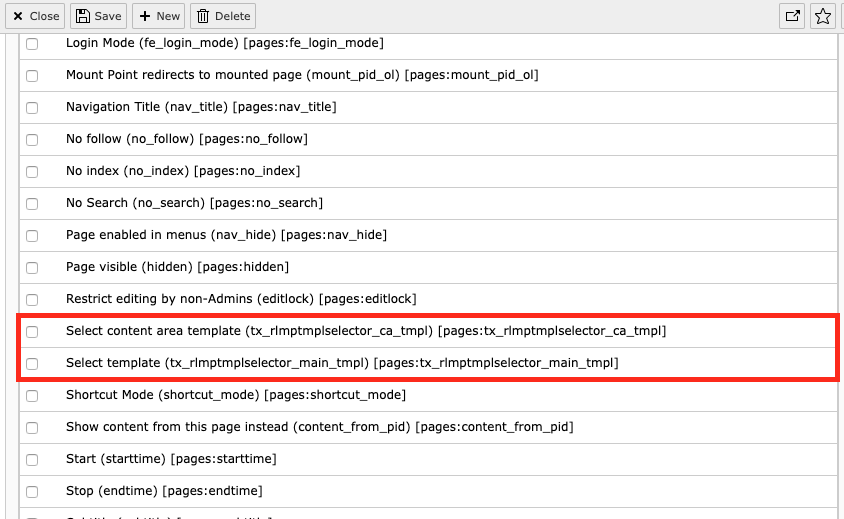
Like any other field which appears in the page content form, you also can restrict access for the template selector by using the access lists of the backend user groups. Just enable the main template selector and the content area selector for those BE usergroups who need to work with them:

How to allow TYPO3 BE usergroups to control templates of this extension

ChangeLog

Version 3.0.3

  • With TYPO3 8.7.43 a new SimpleParser was introduced. As it needs strict types we have to update our code.

Version 3.0.1

  • Check result of removeFirstAndLastTag to be string

Version 3.0.0

  • Added TYPO3 9.5 compatibility
  • Add new Extension Icon as SVG
  • Move content of ext_tables.php to TCA/Overrides
  • Convert array() to []
  • Use EXT: instead of relative paths with siteRelPath (deprecated)
  • Update documentation
  • Convert sxw documentation to new RST based documentation
  • Add configuration for Travis CI integration
  • You now can use GIF,JPG,JPEG,PNG,SVG as icon file for selector. Only TS configuration (EXT:...)
  • You can use FLUIDTEMPLATE as template configuration

Version 2.2.0

  • Added TYPO3 8.7 compatibility, trimming some paths

Version 2.1.0

  • Added TYPO3 7.6 compatibility

Verison 2.0.0

  • Added TYPO3 6.2 compatibility

Version 1.2.3

  • Bugfix: When creating a new page, the templates can't be selected because no page uid exists yet. Thanks to Michael Fritz for the fix.
  • Added Changelog

Some versions in between

  • not documented. Sorry.

Version 1.1.7

  • Added the long awaited new minor features: You may now define the default filename / object number for main and subtemplates independently. Template selections may be inherited by pages deeper in the page tree (must be enabled, see reference). Provided two example sys_templates (see samples/ folder).

Version 1.1.5

  • Bugfix: Weird that nobody sent me a complaint about this: In HTML-file mode the setting for the default template file didn't have any effect! Because I used the TS mode, I didn't realize that ... Fixed now.

Version 1.1.3 - 1.1.4

  • Merged new languages

Version 1.1.2

  • Bugfix: Setting templatePathMain and templatePathSub remained without any effect. Fixed that. Included the recent translations into this package.

Version 1.1.0

  • now supports TS-only templates. The path configuration has been moved from the ExtensionManager to TypoScript.

Version 1.0.3

  • bug fix: automatic detection of html templates didn't work at all!

Version 1.0.2

  • published as a public extension with some minor changes

Version 0.0.0

  • first published by Kasper Skårhøj as part of the Modern Template Building tutorial

Contribute

Contribution to rlmp_tmplselector is very welcome.

If you wish to contribute, please follow these conventions:

Writing Issues

  • If you find a problem in the extension, please write an issue.
  • If you can fix the problem yourself, please submit a pull request. In this case, it is not necessary to create an issue first.

Submitting a Pull Request

Please see the general GitHub documentation for more information, for example Creating a pull request