Please follow these steps to configure service_bw2:
Extension Settings
Login to TYPO3 backend as an admin or system maintainer and chose
Settings from the left menu. Click on Configure Extensions and chose
service_bw2. Fill in the needed values as described here:
Extension Settings
Scheduler Tasks
service_bw2 does not work with LIVE data from Service BW API. It only
works with cached data. That prevents TYPO3 to show error messages in
frontend, if Service BW API is temporary not available.
Please head over to the scheduler module in TYPO3 backend and create
a new task:
Class Execute console commands
Type: recurring
Frequency: We recommend 86400
Scheduleable Command: servicebw:cachewarmup
Click Save to reload and show the further options:
Activate option: include-lebenslagen
Activate option: include-leistungen
Activate option: include-organisationseinheiten
Option locales: leave empty, to collect records for all
allowed languages
Save and close the task to return to the task overview
Execute the task manually the first time.
Warning
If there are a lot of records to synchronize, it may happen that you
will get an error after 90-240 seconds (PHP:max_execution_time).
Don't worry, the task will still run in background. Click on
Scheduler again and you will see that task is still running. Reload
the Scheduler page until the task has finished synchronizing all
records.
Create Pages
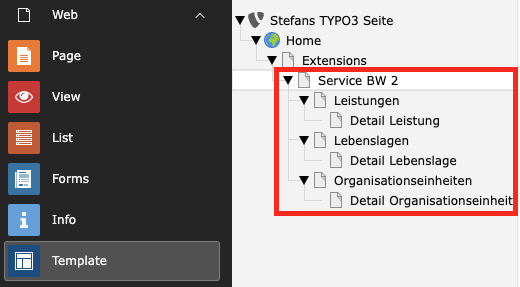
Now you need to create some pages for list and detail view for
all services (Organisationseinheiten, Lebenslagen, Leistungen) you
want to show:
Configure TypoScript
We prefer to set at least all the PIDs in TS settings. That will prevent
you to set all these PIDs in each plugins individually.
See TypoScript how to set defaults for all plugins.
Add Plugins
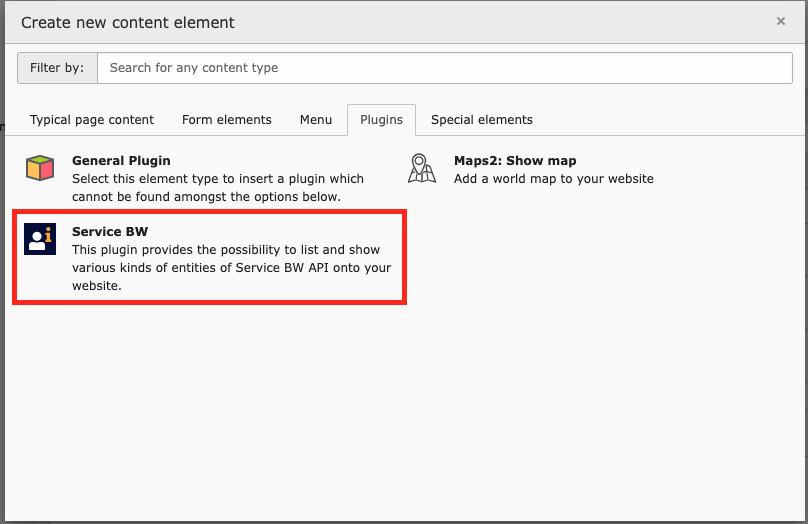
For all created pages you need to add the Service BW plugin.
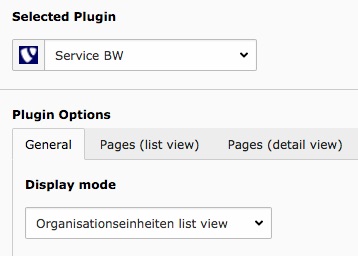
The plugin contains a selectbox to choose the Display mode. Select
the desired display mode for your page.
In case of Organisationseinheiten list view there is an additional
field you should fill Choose items to display. We prefer choosing the
first item from the left list element to show all available items in
frontend.
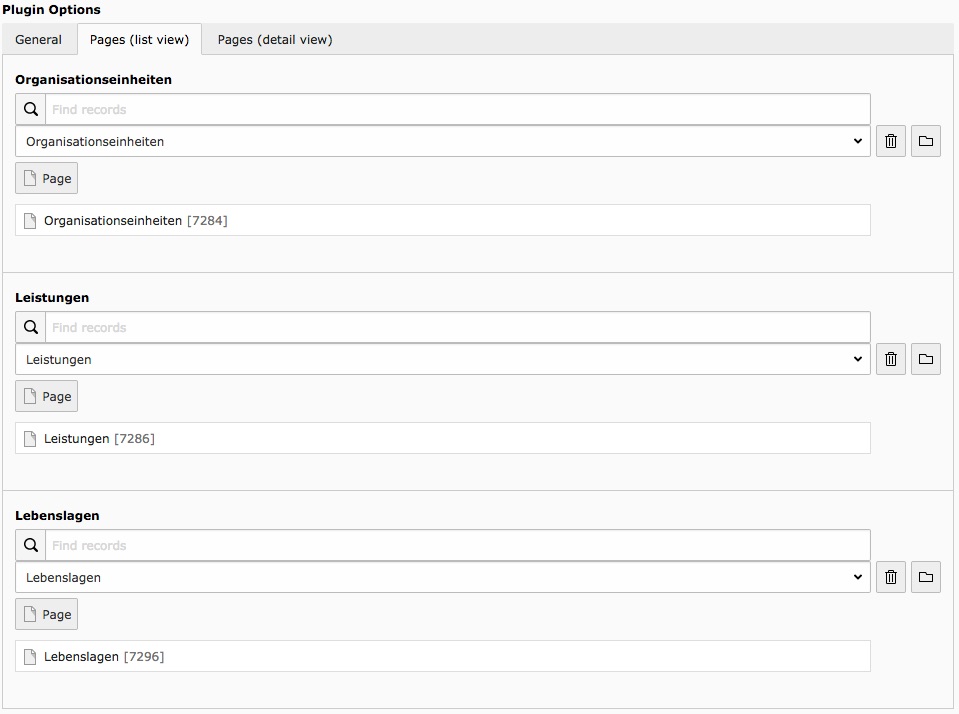
If you have configured the PIDs with help of TypoScript you can save
the plugin now. Else you have to set all these PIDs for list and detail
view individually.
Extension Settings
After the installation you need to configure the extension settings. Login
to TYPO3 backend as an administrator or system maintainer and chose
Settings from the left main menu. Click Configure Extensions from the
first panel and chose service_bw2 from the extension list.
Tab: Basic
Username for Service BW API
Default: <empty>
The username provided by Service BW for API usage. (Mostly starts with ws_)
Password for Service BW API
Default: <empty>
The password provided by Service BW for API usage.
Mandant
Default: <empty>
The mandant number of the city.
Base URL
Default: https://sgw.service-bw.de:443/
The URL where we can access the API of Service BW. In most cases there is no
need to change that value.
It's just [scheme:domain:port]. Do not enter a path to a specific API version,
as service_bw2 does that for you automatically in ServiceBwClient
class. service_bw2 will use the API V2 endpoint internally.
Allowed languages
Default: de=0;en=0;fr=0
This is important if your website is multi language.
Format: [2 letters language ISO code]=[sys_language_uid].
Assign multiple languages with ";".
Example: de=2;en=5.
First value will be used as default language.
AGS
Default: <empty>
German description of Service BW API:
Optional parameter for API requests. Leave empty to not use this filter option.
Gebiet ID
Default: <empty>
German description of Service BW API:
Optional parameter for API requests. Leave empty to not use this filter option.
TypoScript
service_bw2 needs some basic TypoScript configuration. To do so you have
to add an +ext template to either the root page of your website or to a
specific page which contains the service_bw2 plugin.
Locate page
You have to decide where you want to insert the TypoScript template. Either
root page or page with service_bw2 plugin is OK.
Create TypoScript template
Switch to template module and choose the specific page from above in the
pagetree. Choose Click here to create an extension template from the
right frame. In the TYPO3 community it is also known as "+ext template".
Add static template
Choose Info/Modify from the upper selectbox and then click
on Edit the whole template record button below the little table. On
tab Includes locate the section Include static (from extension). Use
the search above Available items to search for service_bw2. Hopefully
just one record is visible below. Choose it, to move that record to
the left.
Save
If you want you can give that template a name on tab "General", save
and close it.
Constants Editor
Choose Constant Editor from the upper selectbox.
service_bw2 constants
Choose PLUGIN.TX_SERVICEBW2 from the category selectbox to show
just service_bw2 related constants
Configure constants
Adapt the constants to your needs. We prefer to set all
these pidOfListPage and pidOfDetailPage constants. That prevents you
from setting all these PIDs in each plugin individual.
Configure TypoScript
As constants will only allow modifying a fixed selection of TypoScript
you also switch to Info/Modify again and click on Setup. Here you have
the possibility to configure all service_bw2 related configuration.
View
templateRootPaths
templateRootPaths
type
array
Default
EXT:service_bw2/Resources/Private/Templates/
Path
plugin.tx_servicebw2.view.*
You can override our Templates with your own SitePackage extension. We
prefer to change this value in TS Constants.
partialRootPaths
partialRootPaths
type
array
Default
EXT:service_bw2/Resources/Private/Partials/
Path
plugin.tx_servicebw2.view.*
You can override our Partials with your own SitePackage extension. We
prefer to change this value in TS Constants.
layoutsRootPaths
layoutsRootPaths
type
array
Default
EXT:service_bw2/Resources/Layouts/Templates/
Path
plugin.tx_servicebw2.view.*
You can override our Layouts with your own SitePackage extension. We
prefer to change this value in TS Constants.
Settings
overridePageTitle
overridePageTitle
type
boolean
Default
0 (false)
Path
plugin.tx_servicebw2.settings
Set to 1 (true) to override the page title in show actions with item name.
organisationseinheiten.pidOfListPage
organisationseinheiten.pidOfListPage
type
int
Default
(none)
Path
plugin.tx_servicebw2.settings
If you need a link in a detail view to go back into list view please fill
that value with a page UID where the plugin
for Organisationseinheiten resides.
organisationseinheiten.pidOfDetailPage
organisationseinheiten.pidOfDetailPage
type
int
Default
(none)
Path
plugin.tx_servicebw2.settings
For design resons it may make sense to link an Organisationseinheit onto
its own page UID.
leistungen.pidOfListPage
leistungen.pidOfListPage
type
int
Default
(none)
Path
plugin.tx_servicebw2.settings
If you need a link in a detail view to go back into list view please fill
that value with a page UID where the plugin for Leistungen resides.
leistungen.pidOfDetailPage
leistungen.pidOfDetailPage
type
int
Default
(none)
Path
plugin.tx_servicebw2.settings
For design resons it may make sense to link a Leistung onto its
own page UID.
lebenslagen.pidOfListPage
lebenslagen.pidOfListPage
type
int
Default
(none)
Path
plugin.tx_servicebw2.settings
If you need a link in a detail view to go back into list view please fill
that value with a page UID where the plugin for Lebenslagen resides.
lebenslagen.pidOfDetailPage
lebenslagen.pidOfDetailPage
type
int
Default
(none)
Path
plugin.tx_servicebw2.settings
For design reasons it may make sense to link a Lebenslage onto its
own page UID.
Maps2
If not already done, then you need to configure maps2, because service_bw2
has a maps2 integration for departments. Take a look into
the maps2 documentation for that.
Solr Configuration
The Solr integration in the ServiceBW extension allows indexing and searching
of service portal content. It covers indexer configuration and logging
configuration related to Solr.
The extension supports the integration of the following content into a Solr
search:
Organizational Units (Organisationseinheiten)
Life Situations (Lebenslagen)
Services (Leistungen)
Here are the steps to include default configuration to your TypoScript
configuration.
Root page where solr is configured
You have to insert the TypoScript template where the solr is configured.
Create TypoScript template
Switch to template module and choose the specific page from above in the
pagetree. Choose Click here to create an extension template from the
right frame. In the TYPO3 community it is also known as "+ext template".
Add static template
Choose Info/Modify from the upper selectbox and then click
on Edit the whole template record button below the little table. On
tab Includes locate the section Include static (from extension). Use
the search above Available items to search for service_bw2. Hopefully
there will be a record Service BW2 - Search available. Choose it,
to move that record to the left.
Save
If you want you can give that template a name on tab "General", save
and close it.
Constant Editor
Choose Constant Editor from the upper selectbox.
service_bw2 constants
Choose PLUGIN.TX_SERVICEBW2 from the category selectbox to show
just service_bw2 related constants
Configure constants
Adapt the constants to your needs. We prefer to set all
these detail page constants for solr indexing.
Configure TypoScript
As constants will only allow modifying a fixed selection of TypoScript
you also switch to Info/Modify again and click on Setup. Here you have
the possibility to configure all service_bw2 related configuration.
Indexing Configuration
Here are the included solr indexing configuration included with the extension.
The above configuration is related to the TYPO3 extension Solr, which is used
for integrating Solr search functionality into a TYPO3 website. Let's break
down the configuration:
Indexing Configuration
Three distinct Solr index queues are defined:
tx_servicebw2_organisationsEinheiten
tx_servicebw2_lebenslagen
tx_servicebw2_leistungen
Each index queue includes specific settings under the indexer section,
notably the detailPage setting, which specifies the detail page for the
corresponding content type.
Field Mapping
For each index queue, the fields section dictates the mapping of fields
from TYPO3 content to Solr fields. Key mappings include:
title and content: Mapping to standard Solr fields.
organisationseinheit_textM: A custom field for organizational units.
url: Dynamically generated URLs for linking to content in the Solr index.
URL Generation
The url field for each index queue is configured using TypoScript's TEXT
object. This allows for the dynamic generation of URLs based on specified
typolink parameters. These URLs are included in the Solr index for enhanced
navigation.
Logging Configuration
Logging settings are configured for each index queue to facilitate monitoring
during the Solr indexing process. The logging is activated for the following
index queues:
tx_servicebw2_organisationsEinheiten
tx_servicebw2_lebenslagen
tx_servicebw2_leistungen
Content Types Covered
This configuration is tailored for the ServiceBW extension and covers the
following content types for Solr indexing:
tx_servicebw2_organisationsEinheiten: Organizationalal Units
tx_servicebw2_lebenslagen: Life Situations
tx_servicebw2_leistungen: Services
By following this configuration, the Solr extension ensures that relevant
content fields are accurately mapped, URLs are dynamically generated, and
indexing actions are logged for monitoring purposes.
Users Manual
The extension adds a plugin called "Service BW". This plugin is well
configurable thanks to flex forms.
There are three types of items right now. The important thing is that some of
them are connected to other types. For example a
department (Organisationseinheit) can have some Services (Leistungen). Because
of that behaviour you have to set the detail and list pages in every
Service BW plugin.
Type specific configuration
There may be some additional configuration for a type. In this section you can
take a look at those settings.
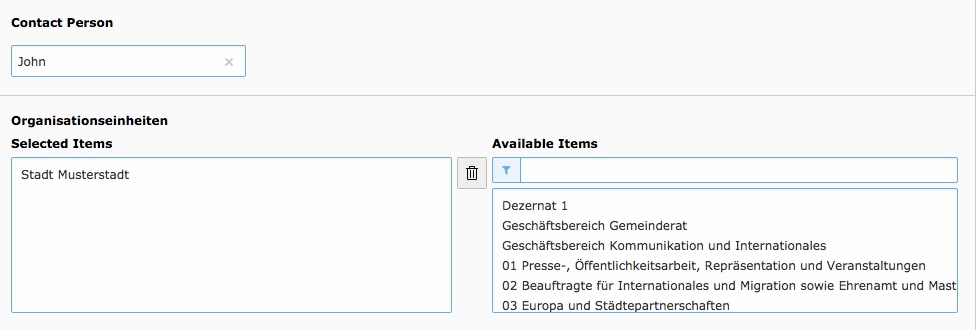
Departments (Organisationseinheiten)
List view
Choose items to display (recursive)
Most time it´s not necessary to display all departments with all children
in one list. You can define one or more start points with this setting.
For example: Your city is a department and all city related departments
are children of the city department. In this case you select the city
department as starting point to get a cleaner list.
Detail view
This extension has a ext:maps2 integration for departments. The address
provided by the Service BW API will be used to create maps2 records for
a department.
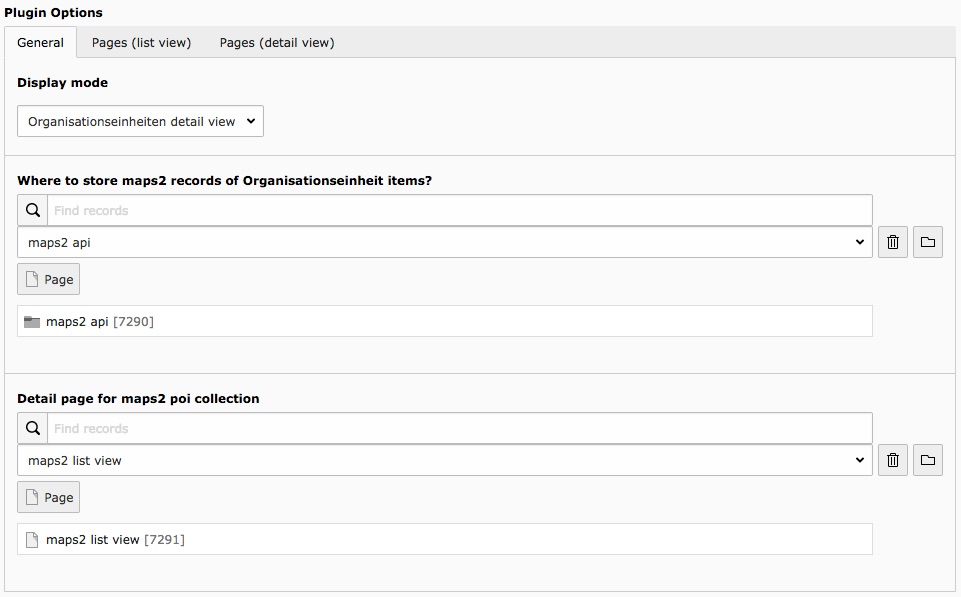
Where to store maps2 records of Organisationseinheit items?
The folder where maps2 records for service_bw2 have to stay.
Detail page for maps2 poi collection
The detail page to display maps2 records coming from a department detail
view.
Services (Leistungen)
Detail view
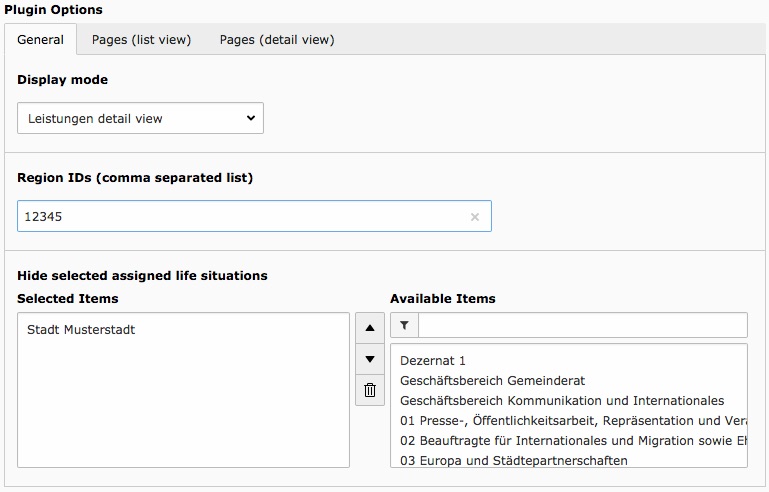
Region IDs (comma separated list)
The region id will be used to display forms (API name: Externe Formulare)
by region and service (Leistung)
Hide selected assigned life situations
In this case assigned life situations are
departments (Organisationseinheiten). Maybe you don´t want that your cities
"main" department will be listed on every page. Then you can add those
department(s) to the list.
All endpoints of the Service BW API are in German. Every method, every
property, every explanation, every thing is in German. We have
tried our best, but as we have a request class for each API endpoint,
we had trouble finding the right request class for the German
API endpoint. That's why we have adapted the German API endpoint to our
request classes. That's why you will find German PHP classes in our
extension. We are not happy with this situation, but it does
reduces our support and simplifies the extensibility of service_bw2 a lot.
Service BW API
Service BW REST API comes with two API versions: V1 and V2.
V1 contains a note, that you should use V2, if possible.
V2 contains a note, that it is still in active development.
Currently, service_bw2 uses the Service BW REST API in version 2.
Here are the official links to the API documentation:
If you're interested you can authorize there and test the API endpoints.
Upgrade
Version 8.0.0
In this release, we've addressed compatibility issues with TYPO3 13 LTS and
have streamlined compatibility by removing support for lower versions.
Version 7.0.0
In this release, we've addressed compatibility issues with TYPO3 12 LTS and
have streamlined compatibility by removing support for lower versions.
A crucial step in this version upgrade is to execute the upgrade wizard,
ensuring a smooth transition of all switchable controller actions to separate
plugins.
Version 6.0.0
We have migrated the Solr Indexer Task into a command. Please copy the values
of the old tasks, delete the tasks, create new scheduler tasks of
type Execute console command, choose servicebw2::preparesolrindex and save
the task. After the reload new fields for the chosen command will be visible.
Fill in the values from above and save again.
Version 5.0.0
We updated the whole extension because of the Service BW API Version 2. There
is a new much simpler ServiceBwClient which can be used for all API
requests (even for version 1).
We removed the post processors and post processor hook of ServiceBwClient. If
you added a custom or extended an existing one then keep in mind that these
no longer work.
If you added your own requests, you have to update them.
Use JWeiland\\ServiceBw2\\Request\\AbstractRequest as base and take a look
at the other request classes to build your own one. The newer ServiceBwClient
is much easier to understand so it should not take very long to migrate your
old request classes.
Custom fluid templates must also be updated due to the new object structure
from API v2. To do this, use the existing templates and go through
the templates piece by piece.
Third party extensions that use JWeiland\\ServiceBw2\\Utility\\TCAUtility
and JWeiland\\ServiceBw2\\Utility\\ModelUtility should not be affected.
We updated those classes but kept the public methods and properties.
Version 3.0.0
We have simplified the Plugin Configuration. That's why you have to change
your TS Setup and TS Constants from
plugin.tx_servicebw2_servicebw
to
plugin.tx_servicebw2
Version 2.1.1
Bugfix Release for TYPO3 9.
As there is no StringFrontend in Caching System of TYPO3 9 anymore we had to
switch over to VariableFrontend. Now the cache data itself will be stored in
another format, that's why you have to Clear all Caches.
Developer Corner
Important notes
We are using the german method names of the Service BW API in our extension
to make it easier to extend/understand the extension.
API
This extension provides APIs to use departments (Organisationseinheiten) in
other extensions.
Use departments in TCA
Departments inside a non service_bw2 extension TCA
The TCAUtility makes the usage of departments in TCA very easy. You just need
to use the static method getOrganisationseinheitenFieldTCAConfig in your TCA
like shown below.
The ModelUtility provides two public static methods to request either a single
or multiple departments.
Get a single department
Use the method getOrganisationseinheit for that. The first parameter must be
either the (int|string) id of the department to request or an array (this is
very useful if you´re using the method inside a getter method).
Model example:
/**
* Department (API name: Organisationseinheit)
* Initially a string but will be converted to an array when
* calling getter the first time!
*
* @var string
*/protected $organisationseinheit = '';
/**
* Returns Organisationseinheit
*
* @return array
*/publicfunctiongetOrganisationseinheit(): array{
return$this->organisationseinheit = ModelUtility::getOrganisationseinheit($this->organisationseinheit);
}
Copied!
Get multiple departments
Use the method getOrganisationseinheiten for that. The first parameter must be
either a single id (int|string), multiple ids separated by comma (e.g. 12,45)
or an array (this is very useful if you´re using the method inside
a getter method).
Model example
/**
* Departments (API name: Organisationseinheiten)
* Initially a string but will be converted to an array with records when
* calling getter the first time!
*
* @var string
*/protected $organisationseinheiten = '';
/**
* Returns Organisationseinheiten
*
* @return array
*/publicfunctiongetOrganisationseinheiten(): array{
return$this->organisationseinheiten = ModelUtility::getOrganisationseinheiten($this->organisationseinheiten);
}
Copied!
Tip
If you pass an array then both methods will return this array back without
any modification. That makes it possible to call the methods in the getter
without adding logic around it.
Hooks / Events
Modify response object
Use the ModifyServiceBwResponseEvent event to modify the response object of
the Service BW API before it gets cached. The event dispatches before paginated
requests are merged together.
Add an event listener class that uses the event to modify the request.
Example: Modify the URL of Service BW online forms (called: Prozesse):
We are using the GitHub issue tracker
for bug reports / feature requests. Please navigate to our
GitHub repository, if
you found an issue or wanna request a feature.
ChangeLog
Version 8.0.6
[Task] Implement an indexer, aligned with the approach used in the "solr" extension.
Version 8.0.5
[TASK] Do not execute unit/func tests on push (main)
[TASK] Mark OrganisationseinheitenItems as public
[TASK] Make ServiceBwClient stateless
Version 8.0.4
[TASK] Repair Solr implementation for indexing service bw records
[TASK] Update version to 8.0.4 and require typo3/cms-install
[TASK] Prevent Solr class loading in Command constructors
[TASK] Refactor commands to use local variables instead of class properties
[TASK] Modernize code using readonly classes and constructor promotion
[TASK] Register LeistungenListener via PHP attributes and rename to EventListener
[TASK] Improve SolrIndexService visibility and manual instantiation
[TASK] Remove CompileableRenderStatic trait from ViewHelpers
[TASK] Clean up TokenHelper (remove Singleton) and update logger injection
[TASK] Repair warmup command and functional tests
[TASK] Remove indexItem from Indexer (alignment with EXT:solr)
[TASK] Apply Coding Guidelines (CGL) and clean up test messages
Version 8.0.3
[TASK] Updated wizard title with [extension] name format
Version 8.0.2
[BUGFIX] Fixed DB Call with invalid PDO argument
Version 8.0.1
[BUGFIX] Removed internal_type from FlexForm configuration
[BUGFIX] Removed enableMultiSelectFilterTextfield from FlexForm configuration
[TASK] Documentation updated migration from Settings to guides.xml
Version 8.0.0
[TASK] Compatibility for TYPO3 13 LTS
[TASK] Removed Compatibility for lower versions from 12 LTS
Version 7.0.2
[BUGFIX] Activate default configuration for solr index queue
Version 7.0.1
[BUGFIX] Cast maps2Uid in ViewHelper to INT
Version 7.0.0
[TASK] Compatibility for TYPO3 12 LTS
[TASK] Migrated Test Cases to TYPO3 Testing Framework
[TASK] Replaced all the deprecated internal API calls to core
[TASK] Implemented new Test Suite for git actions
[TASK] Added new upgrade wizard for migrating old switchable controller
actions to separate plugins
[TASK] Removed TYPO3 Compatibility for lower versions from 11 LTS
Version 6.0.3
[DOCU] Update section how to configure service_bw2
[TASK] Set TYPO3 scheduler as dependency
[TASK] Update .gitignore and .editorconfig
Version 6.0.2
Do not try to index (EXT:solr) empty records
Create own TYPO3 log file (var/log/typo3_servicebw2_[hash])
Add flash messages to show actions, if a record could not be found
Version 6.0.1
Convert all parent IDs for filtering to int
Version 6.0.0
Add TYPO3 11 compatibility
Remove TYPO3 9 compatibility
We keep PHP 7.3 compatibility for better migration
Check TS path in OrganisationseinheitPoiCollectionUidViewHelper before
using it
Migrate scheduler task to Symfony command
Remove old repo2model mapping
Rename TSConfig files to *.tsconfig
Better structure for WarmUpCommand
Set indent size in docs to 4 spaces
Rename DataHandler Hook class
Version 5.0.7
Add .gitattributes
Use correct structure for headlines in documentation
Version 5.0.6
Implement new structure to documentation
Check value for string before calling setPageTitle()
Version 5.0.5
Catch and log exceptions while requesting Service BW API
Version 5.0.4
Add exclude argument for textbloecke
Version 5.0.3
Add lang attribute to all fluid templates
Use full set of method arguments to build cache identifier
Show textbloacke of type preamble in frontend again
Delete solr documents for all other languages, too
Version 5.0.0
Hint
Updated Service BW API calls to the lot improved Version 2!
There are a lot of changes but the public API classes
JWeiland\\ServiceBw2\\Utility\\TCAUtility and
JWeiland\\ServiceBw2\\Utility\\ModelUtility are compatible with earlier
versions, so third party extensions that use service_bw2 should continue
to work.
Text in quotation marks are original terms from Service BW and therefore in
German language.
Rewrite ServiceBwClient to be easier to understand and easier to use
Remove ServiceBwClient PostProcessors and ServiceBwClient PostProcessor hook
Remove all repositories that has been used for API requests
Remove all API v1 request classes
Replace all repository usages by the new request classes
Update fluid templates to work with latest jweiland musterprojekt template
Update fluid templates to work with API v2
Add contact persons to "Organisationseinheiten" detail view
Add electronic forms "Prozesse" to "Leistung" detail view
Update "Lebenslagen" list view from glossar to a tree
Remove TYPO3 v9 compatibility
Add event to modify Service BW API responses before they get cached (Hook)
Version 4.0.1
Add missing Aspect Mapper for RouteEnhancer
Version 4.0.0
Remove TYPO3 8 compatibility
Add TYPO3 10 compatibility
Version 3.0.1
Region IDs will internally be used as arrays instead of comma separated
values
If Region IDs are not known you can add AGS or ZIP to help finding
Region IDs.
Update Documentation
Version 3.0.0
Breaking: Switched Plugin Namespace in TS from
plugin.tx_servicebw2_servicebw to plugin.tx_servicebw2
Add TypoScriptService to merge filled TS settings into empty
FlexForm settings.
Add Fluid Namespace to all Fluid Templates
Use AbstractViewHelper of Typo3Fluid package
Add FlexForm overview to Page->show module
Add configuration for newContentElementWizard
Move tt_content changing TCA into TCA/Overrides
Version 2.1.1
Remove strict type from processRequest in ServiceBwClient, as this method
can also return null, array and string
Switch over from StringFrontend to VariableFrontend. You have to clear
Cache completely.