Introduction 

What does it do? 

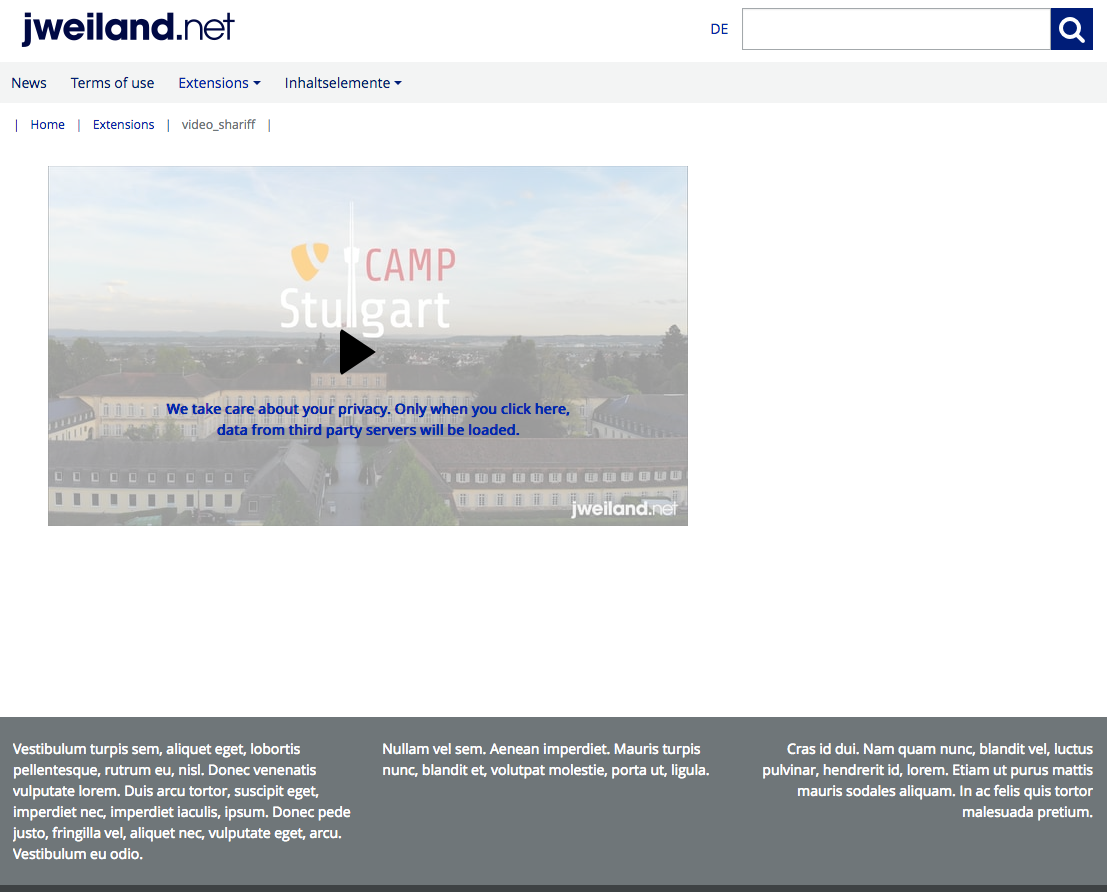
This extensions adds a video local hosted preview to videos that has been embedded with fluid_styled_content (e.g. Text & Media content element) to the frontend. All the third party stuff will only be loaded/embedded if the user clicks on the preview image to view the video which helps in case of performance and providing more privacy for your website users.

Screenshots 

Preview image

Preview image

Example player after user clicked on the preview image

Example player after user clicked on the preview image

Installation 

Composer 

If your TYPO3 installation works in composer mode, please execute following command:

composer req jweiland/video-shariff
vendor/bin/typo3 extension:setup --extension=video_shariff
Copied!

If you work with DDEV please execute this command:

ddev composer req jweiland/video-shariff
ddev exec vendor/bin/typo3 extension:setup --extension=video_shariff
Copied!

ExtensionManager 

On non composer based TYPO3 installations you can install video_shariff still over the ExtensionManager:

  1. Login

    Login to backend of your TYPO3 installation as an administrator or system maintainer.

  2. Open ExtensionManager

    Click on Extensions from the left menu to open the ExtensionManager.

  3. Update Extensions

    Choose Get Extensions from the upper selectbox and click on the Update now button at the upper right.

  4. Install video_shariff

    Use the search field to find video_shariff. Choose the video_shariff line from the search result and click on the cloud icon to install video_shariff.

Next step 

Configure video_shariff.

Site Sets 

Starting with TYPO3 v13, TYPO3 introduced Site Sets as the modern replacement for the classic "Include static (from extensions)" mechanism. video_shariff ships its own Site Set which bundles the TypoScript, TSconfig and settings the extension needs at runtime. Registering this Site Set with your site configuration is the recommended way to enable video_shariff on TYPO3 v13 and later.

Why the Site Set must be added 

Adding the Site Set is mandatory for video_shariff to work correctly on TYPO3 v13+ sites. Without it, none of the extension's TypoScript is loaded, which has the following consequences:

  • The Shariff-wrapped video output (two-click privacy layer) is not rendered - videos from YouTube and Vimeo would be embedded directly, defeating the entire purpose of video_shariff.
  • The preview image rendering (thumbnail + overlay text) is not initialized, so the VideoPublicUrlViewHelper and VideoPreviewImageViewHelper have no configuration to fall back to.
  • Constants such as lib.video_shariff.defaultThumbnail and the language overrides for the preview text are not available.
  • The plugin's frontend assets (JavaScript, CSS) are not included.

In short: if the Site Set is not added, the extension is installed but silently inactive on the frontend. Adding the Site Set is therefore a required step, not an optional one.

Adding the Site Set via the backend 

  1. Open Site Management

    In the TYPO3 backend, navigate to the Site Management module on the left and choose Sites.

  2. Edit the site configuration

    Select the site for which video_shariff should be activated and open it for editing.

  3. Switch to the "Sets for this Site" tab

    Within the site configuration, switch to the tab Sets for this Site (in some installations labelled Site Sets).

  4. Select Video Shariff

    From the list of available Site Sets, activate Video Shariff (internal key jweiland/video-shariff). The label is defined by the extension in Configuration/Sets/video-shariff/config.yaml.

    Adding the video_shariff Site Set in the TYPO3 site configuration

    Enabling the Video Shariff Site Set for a site in the TYPO3 Site Management module.

  5. Save

    Save the site configuration. TYPO3 will flush the relevant caches so the Site Set takes effect immediately on the next frontend request.

Adding the Site Set via YAML 

If you manage your site configuration in version control, you can add video_shariff as a dependency directly in the site's config.yaml:

dependencies:
  - jweiland/video-shariff
Copied!

This is equivalent to selecting the Site Set in the backend and is the preferred approach for site packages that are deployed via Composer.

Available settings 

The Site Set exposes its configuration through Configuration/Sets/video-shariff/settings.definitions.yaml. The settings are grouped under the videoShariff category and can be edited from the TYPO3 backend via Site ManagementSettings, or overridden per-site in the site's config.yaml / settings.yaml.

videoShariff.defaultThumbnail

videoShariff.defaultThumbnail
type

string

Default

EXT:video_shariff/Resources/Public/Images/DefaultThumbnail.png

Fallback thumbnail that is rendered in the Shariff preview overlay whenever no video-specific thumbnail can be fetched from the provider (for example when YouTube or Vimeo does not return a preview image, or when the upstream request fails). The value is an t3coreapi:typoscript-syntax-file-includes resolved at render time by VideoPreviewImageViewHelper via its fallbackThumbnailFile argument.

The setting is consumed by the TypoScript constant lib.contentElement.settings.video_shariff.defaultThumbnail for fluid_styled_content and by plugin.tx_news.settings.video_shariff.defaultThumbnail for the news partial, both wired up in Configuration/TypoScript/setup.typoscript.

Overriding it

Either adjust the value in the backend Settings editor, or set it in your site package's config.yaml:

settings:
  videoShariff:
    defaultThumbnail: 'EXT:my_sitepackage/Resources/Public/Images/VideoFallback.jpg'
Copied!

Relationship to the legacy TypoScript include 

On TYPO3 v12 and earlier, video_shariff was activated by adding the static template Video shariff (video_shariff) to a TypoScript template record - see TypoScript. On TYPO3 v13+ the Site Set replaces that include; you should not add both, as the Site Set already imports the same TypoScript via:

@import 'EXT:video_shariff/Configuration/TypoScript/setup.typoscript'
Copied!

Verifying the Site Set is active 

After saving the site configuration you can verify that the Site Set is active by:

  • Opening the Template module, selecting a page within the site and checking that lib.video_shariff constants appear in the Constant Editor.
  • Rendering a page that contains a YouTube or Vimeo video - the video must now be wrapped by the Shariff preview image instead of being embedded directly.

TypoScript 

video_shariff needs some basic TypoScript configuration. To do so you have to add an +ext template to either the root page of your website or to a specific page where you want to use the video_shariff functionality.

  1. Locate page

    You have to decide where you want to insert the TypoScript template. Either root page or page with the video output.

  2. Create TypoScript template

    Switch to template module and choose the specific page from above in the pagetree. Choose Click here to create an extension template from the right frame. In the TYPO3 community it is also known as "+ext template".

  3. Add static template

    Choose Info/Modify from the upper selectbox and then click on Edit the whole template record button below the little table. On tab Includes locate the section Include static (from extension). Use the search below Available items to search for video_shariff. Hopefully just one record is visible below. Choose it, to move that record to the left.

    Configuration
  4. Save

    If you want you can give that template a name on tab "General", save and close it.

  5. Constants Editor

    Choose Constant Editor from the upper selectbox.

    Constant editor
  6. video_shariff constants

    Choose lib.video_shariff from the category selectbox to show just video_shariff related constants

  7. Configure constants

    Adapt the constants to your needs.

  8. Configure TypoScript

    As constants will only allow modifiying a fixed selection of TypoScript you also switch to Info/Modify again and click on Setup. Here you have the possibility to configure all video_shariff related configuration.

Lib 

video_shariff.defaultThumbnail 

Default: Value from Constants EXT:video_shariff/Resources/Public/Images/DefaultThumbnail.png

The default thumbnail is rendered when no video specific thumbnail can be fetched.

Example:

lib.video_shariff.defaultThumbnail = EXT:site_package/Resources/Public/Images/FunnySunnyThumbnail.png*
Copied!

Language 

Override preview image text 

You can override the default preview image text and adding new languages via TypoScript setup.

plugin.tx_videoshariff._LOCAL_LANG.default.preview\.text = I am a custom preview text...
plugin.tx_videoshariff._LOCAL_LANG.de.preview\.text = Ich bin ein angepasster Vorschautext...
Copied!

Update 

Update to version 4.0.0 

Version 4.0.0 is mainly focussed on TYPO3 13 LTS related fixes.

Update to version 3.1.0 

With version 3.1.0 we have removed the TypoScript access (TSFE) from VideoPreviewImageViewHelper. In our opineon all needed data should be transferred as ViewHelper arguments. That's why we have added a new argument fallbackThumbnailFile with following default value:

EXT:video_shariff/Resources/Public/Images/DefaultThumbnail.png
Copied!

If you want to use your fallback thumbnail in your own fluid templates use VH as following:

<jw:videoPreviewImage fileReference="{mediaElement}" fallbackThumbnailFile="EXT:site_package/Resources/Public/Icons/FallbackIcon.png"/>
Copied!

We have kept the TypoScript constant to be more compatible with earlier video_shariff versions. So, it's still possible to define a fallback thumbnail globally or on a page base:

lib.video_shariff.defaultThumbnail = EXT:video_shariff/Resources/Public/Images/DefaultThumbnail.png
Copied!

The only difference is, that we made the constant available as setting in FLUIDTEMPLATE of fluid_styled_content and news:

lib.contentElement {
  settings.video_shariff.defaultThumbnail = {$lib.video_shariff.defaultThumbnail}
}

plugin.tx_news {
  settings.video_shariff.defaultThumbnail = {$lib.video_shariff.defaultThumbnail}
}
Copied!

We have updated fluid templates of video_shariff already to set that new setting as argument for VideoPreviewImageViewHelper. Please make sure to also update your own fluid templates to get the new implementation working.

ChangeLog 

Version 5.0.0 

  • [FEATURE] Added Site Set setting videoShariff.defaultThumbnail (category videoShariff) so the fallback thumbnail used when no provider-specific preview image can be fetched is now configurable per-site from the backend Settings editor or from a site package's config.yaml, replacing the previous hard-coded lib.video_shariff.defaultThumbnail constant lookup.
  • [TASK] Compatibility fixes for TYPO3 14.
  • [TASK] Replaced deprecated renderStatic() with instance render() method in all ViewHelpers.
  • [TASK] Constructor injection of OnlineMediaHelperRegistry in VideoPreviewImageViewHelper and VideoPublicUrlViewHelper.
  • [TASK] Replaced deprecated StandaloneView with RenderingContextFactory + TemplateView in functional tests.
  • [TASK] Updated GetOnlineMediaHelperTrait — deprecated in favour of direct constructor injection.
  • [TASK] Bumped phpstan/phpstan requirement to ^2.0.
  • [TASK] Bumped typo3/coding-standards requirement to ^0.9.
  • [TASK] Updated PHPUnit XML schema reference to version 11.5.
  • [TASK] Added PHP 8.4 to CI matrix.

Version 4.0.0 

  • [TASK] Compatibiliy fixes for TYPO3 13 LTS.
  • [TASK] Documentation settings changed from settings.cfg to guides.xml

Version 3.2.0 

  • [TASK] Fixed Broken badge url
  • [TASK] Documentation ChangeLog page added
  • [BUGFIX] Prevent TypeError when returning public

Version 3.1.0 

  • [FEATURE] Add VH argument fallbackThumbnailFile
  • [TASK] Remove TypoScript access from VH
  • [BUGFIX] Prevent duplicate EXT: parsing
  • [DOCS] Please read update instructions before updating. Maybe you have to update your templates!!!

Sitemap