Weather 2 

Extension key

weather2

Package name

jweiland/weather2

Version

5.1

Language

en

Author

Stefan Froemken, Hoja Mustaffa Abdul Latheef

License

This document is published under the Creative Commons BY 4.0 license.

Rendered

Thu, 02 Oct 2025 12:35:47 +0000


Extension to display weather data and weather alerts using various Weather APIs. Default APIs: OpenWeatherMap and Deutscher Wetterdienst


Table of Contents:
Introduction 

Releases 

Currently the source code is available at Github

What does it do? 

This extension is mainly used to display weather data received from openweathermap.org and weather alerts received from Deutscher Wetterdienst. The extension however is designed to work with every weather api by creating your own scheduler and map values to the existing database structure. Moreover it is possible to organize records using storage pages and a custom identifier for each record.

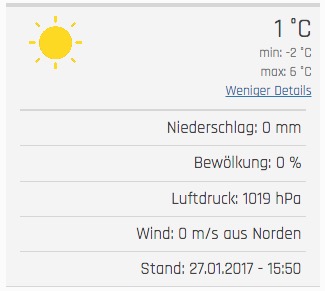
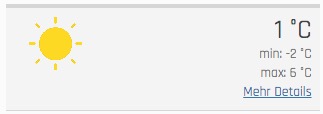
Screenshots current weather 

Displaying basic information 

Frontend view

Displaying more information 

Expanded frontend view

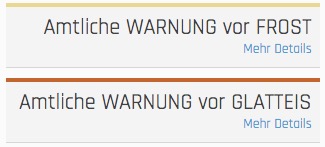
Screenshots weather alert 

Display basic information 

Frontend view

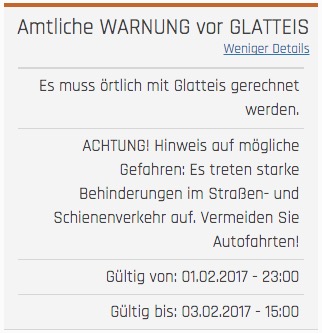
Display more information 

Expanded frontend view

Users Manual 

Adding a new plugin to display weather reports 

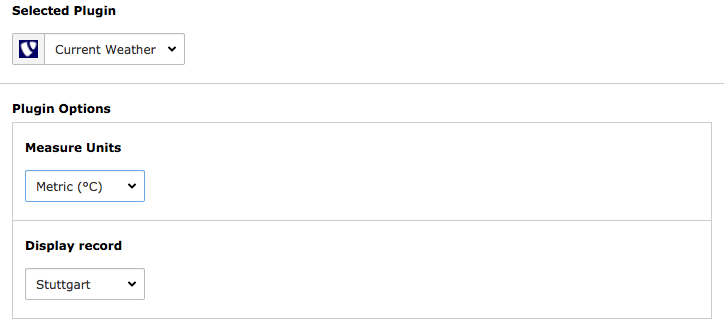
To add a new plugin just create a new content element, choose insert plugin and select Current Weather under plugin. Now you can select the desired measure unit and record identifier to display records.

Backend plugin content element

Adding a new plugin to display weather alerts 

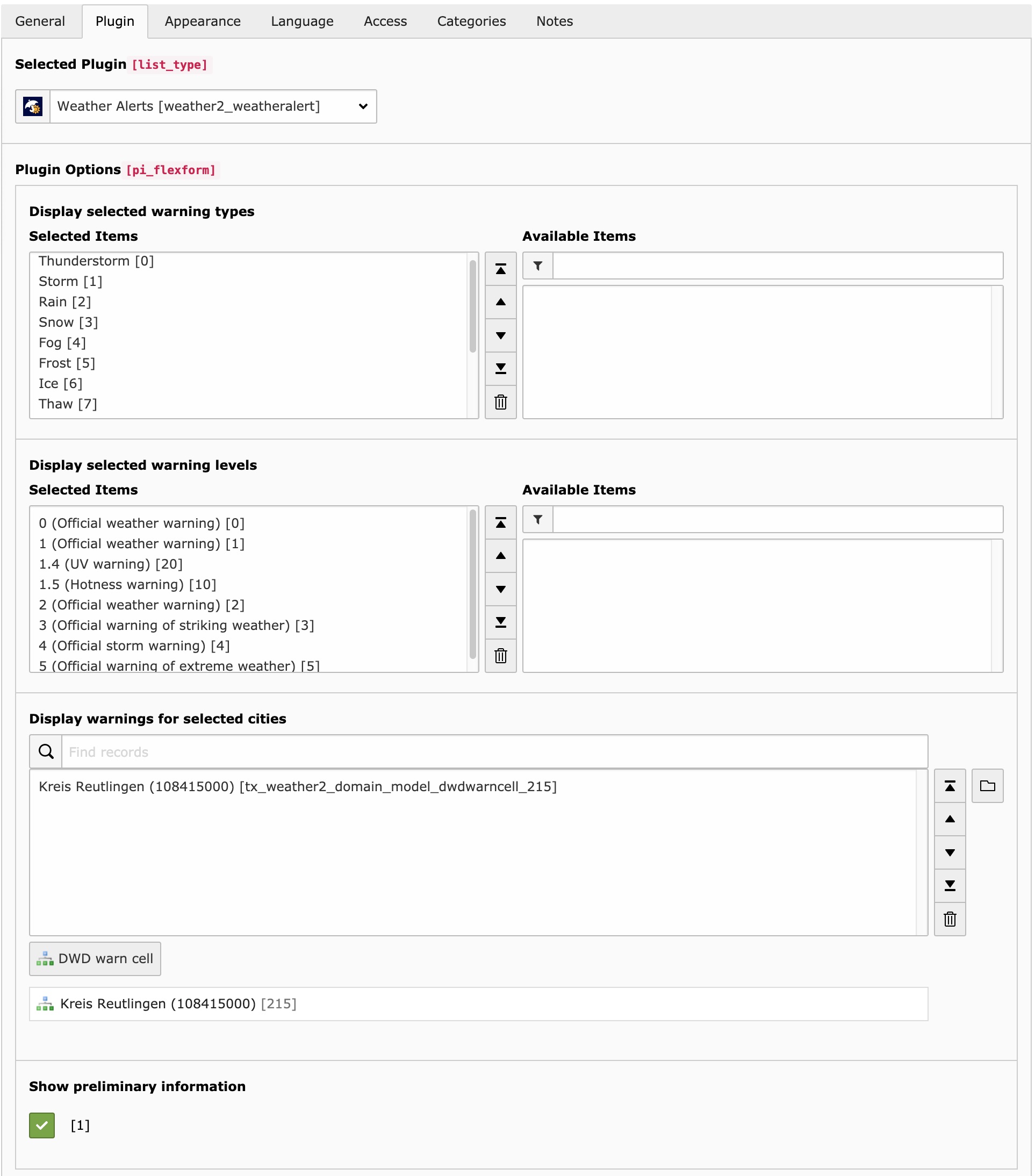
To add a new plugin just create a new content element, choose insert plugin and select Weather Alerts as plugin. Now you can select which regions, alarm level and alarm types should be displayed. Additionally you can select the record storage page.

Backend plugin content element

Render weather reports and alerts inside a fluid template 

Maybe you want to include the plugins inside a fluid template without a plugin. Important: Include the static template of weather2 inside the root page.

Render weather reports inside a fluid template 

Add the following TypoScript to your setup:

# weather reports
lib.weather2_currentweather = USER
lib.weather2_currentweather {
  userFunc = TYPO3\CMS\Extbase\Core\Bootstrap->run
  extensionName = Weather2
  pluginName = Currentweather
  vendorName = JWeiland

  settings =< plugin.tx_weather2.settings
  persistence =< plugin.tx_weather2.persistence
  view =< plugin.tx_weather2.view

  # override the settings in here or change them in plugin.tx_weather2
  settings {
    # possible values: Metric | Imperial | Isou
    measureUnits = Metric
    # possible values: The "name" of your report records defined in scheduler task
    selection = Reutlingen
  }
}
Copied!

Use the following snippet in your Fluid template:

<f:cObject typoscriptObjectPath="lib.weather2_currentweather" />
Copied!

Render weather alerts inside a fluid template 

Add the following TypoScript to your setup:

# weather alerts
lib.weather2_weatheralert = USER
lib.weather2_weatheralert {
  userFunc = TYPO3\CMS\Extbase\Core\Bootstrap->run
  extensionName = Weather2
  pluginName = Weatheralert
  vendorName = JWeiland

  settings =< plugin.tx_weather2.settings
  persistence =< plugin.tx_weather2.persistence
  view =< plugin.tx_weather2.view

  # override the settings in here or change them in plugin.tx_weather2
  settings {
    warningTypes = 0,1,2,3,4,5,6,7,8,9,10,11,12
    warningLevels = 0,1,2,3,4,5,10,20
    # warnCells = <uid of your warn cell record> (multiple comma separated)
    warnCells = 215
    showPreliminaryInformation = 1
  }
}
Copied!
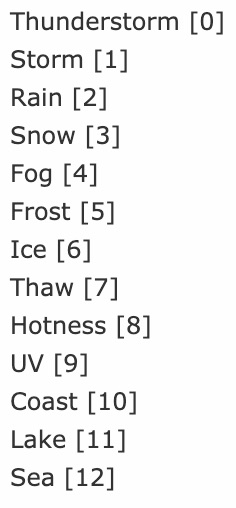
Warning types

Warning types

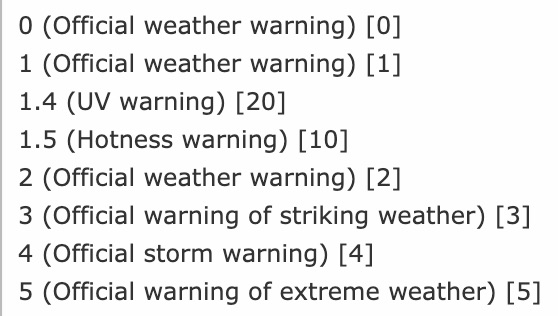
Warning levels

Warning levels

Use the following snippet in your Fluid template:

<f:cObject typoscriptObjectPath="lib.weather2_weatheralert" />
Copied!

Administrator manual 

This chapter describes how to manage the extension from a superuser point of view.

Configuration 

Storage Page 

  1. Create a storage page
  2. Refer to it in the scheduler task
  3. Also refer to it in the plugin

Multi plugin use 

You can configure your scheduler task to save data to a specific storage page that you can later use in the plugin to access data.

Change timezone 

Go into your TYPO3-Install tool and change the timezone under All configuration -> System -> phpTimeZone. This will change the timezone

Current Weather (Weather Report) 

How do I get set up? 

  1. Create a new http://openweathermap.org account and copy your api key
  2. Download the extension from the TYPO3 extension repository
  3. Enable the scheduler extension in your TYPO3 installation if not already done
  4. Create a new scheduler task from type (class) Call openweathermap.org api (weather2)
  5. Configure the scheduler by filling out the required fields. Please Note that the field "name" is later used to only display specific records
  6. Create a new content element with the weather extension plugin selected
  7. Select the measure units and city to display
  8. Add extension template file to your template
  9. Enjoy! ;)
Backend plugin content element

This is how the content element plugin looks like

Weather Alerts 

Get warn cells from Deutscher Wetterdienst 

  1. Go to the scheduler module.
  2. Add a new task and select Get warn cells from Deutscher Wetterdienst.
  3. Set this task as single because you have to execute this only once.
  4. Save and exit
  5. Execute the task
  6. If the execution was successful you will see all the region records in your root page.

    List of warn cell records
  7. Done

Take a look into Get Weather Alerts from Deutscher Wetterdienst

Create warn cells manually 

  1. Download the warn cell ids csv from DWD and search for your city/location.
  2. Go into the page or list module.
  3. Select your root page (the one with the TYPO3 logo) on the page tree.
  4. Click on Create new record and select DWD warn cell.

    Create new Weather Alert Region record
  5. Now you can enter the City name and additionally the district of your city.
  6. Done

    Create a DWD warn cell record

Take a look into Get Weather Alerts from Deutscher Wetterdienst

Get Weather Alerts from Deutscher Wetterdienst 

  1. Go to the scheduler module.
  2. Add a new task and select Get weather alerts from Deutscher Wetterdienst.
  3. You should set recurring as type and e.g. 3600 as frequency to get each hour the latest alerts.
  4. Now you can search for your regions. Please make sure you added the warn cell records (cities/locations) or got them from Deutscher Wetterdienst. Don´t know? Take a look into Get warn cells from Deutscher Wetterdienst and/or Create warn cells manually.
  5. You can add multiple cities to your selection.

    List of selected cities (warn cell records)
  6. If you have a record storage page you can select it additionally. This can be useful for Multi plugin use. Otherwise the records will be saved on root page.

    Record storage page
  7. Now you´re done and ready to execute the scheduler.

Read the user manual to get an output on your website.

Upgrade 

If you upgrade EXT:weather2 to a newer version, please read this section carefully!

Update from 4.x to 5.0 

Add TYPO3 12 Compatibility Removed older version compatibility Removed dependency with EXT:static_info_tables Removed ObjectManager usage from scheduler tasks so after upgrading the extension its better to remove the old tasks and recreate the tasks. Because the old serialized version saved in the database.

Update from 3.x to 4.0.0 

Add TYPO3 11 compatibility Remove TYPO3 9 compatibility

We have removed all TYPO3 columns from ext_tables.sql. Please execute DB compare to update the database columns.

Execute Flush Cache in Maintenance section of TYPO3 to update dependency injection cache.

We require recordStoragePid as INT in weather2 scheduler task. It may happen that a call to setPid will fail, because it is not an INT. That happens because all scheduler tasks including their earlier variable types are stored serialized in scheduler. While unserializing the old type (STRING) will not match the current type (INT) anymore. So please delete that task and create that task again. Sorry, no UpgradeWizard available for that operation.

Update from 2.x to 3.0.0 

Add TYPO3 10 compatibility Remove TYPO3 8 compatibility

Nothing to do.

Update from 2.x to 2.0.4 

Because of a security patch of TYPO3 all of our weather2 scheduler tasks can not be unserialized anymore. For you it is not possible anymore to delete, modify or start any task as you can not open scheduler module. Further no task will be executed anymore by Cronjob. Please visit Upgrade module of TYPO3 and execute our UpgradeWizard to update our tasks in DB.

Update from 1.x to 2.x 

There are breaking changes if you´re updating weather2 from 1.x to 2.x. This chapter is about how to fix those breaking changes.

  1. Update weather2 using composer or the extension manager.
  2. If you´re using composer you may need to disable and enable the extension using the extension manager or using the database analyzer to get the new database structure.
  3. Clear all caches.
  4. Open the scheduler module
  5. Edit all tasks from type Call openweathermap.org api. Directly save them after the click on edit. You don´t need to change any fields inside here.
  6. Remove all tasks from type Get regions from Deutscher Wetterdienst. They should have a red background because they no longer exist.
  7. Either create a dwd weather cell record manually OR create a task from type Get warn cell records from Deutscher Wetterdienst set it as single and execute it one time.
  8. Edit all tasks from type Get weather alerts from Deutscher Wetterdienst and select the cities/locations you want to fetch. Then save those tasks.
  9. Edit all Plugins from list_type weather2_weatheralert (Weather Alerts) and select the cities/locations you want to display. Also check out the new setting Show preliminary information.
  10. Clear frontend caches.

Developer Corner 

Target group: Developers

The developer part of this documentation

Add customer providers 

Feel free to add custom api providers for weather reports or weather alerts. You can add them using your own extension. Write your own task or command and use the Models JWeiland\Weather2\Domain\Model\CurrentWeather for weather reports and JWeiland\Weather2\Domain\Model\WeatherAlert for weather alerts. Add new records using the extbase PersistenceManager or the TYPO3 DataHandler.

Known Problems 

If you found a bug, you can notify us using the Bug Tracker of Github.

ChangeLog 

Version 5.1.1 

  • [BUGFIX] TypoScript file renamed to typoscript from txt

Version 5.1.0 

  • [BUGFIX] Backported Fixed DB Analyser Issues

Version 5.0.0 

  • Full TYPO3 12 compatibility
  • Dropped support for TYPO3 10 and below
  • Removed dependency on EXT:static_info_tables
  • Refactored all scheduler tasks to remove ObjectManager usage
  • Important: Old scheduler tasks must be deleted and recreated manually

Version 4.0.0 

  • TYPO3 11 LTS support
  • Dropped support for TYPO3 9
  • Removed TYPO3-specific SQL columns from ext_tables.sql
  • Important: Clear DI cache using Maintenance module in backend
  • Fix: Only numeric PIDs are now allowed in scheduler tasks – delete old ones

Version 3.0.0 

  • TYPO3 10 support introduced
  • TYPO3 8 support removed
  • Smooth upgrade – no manual changes needed

Version 2.0.4 

  • TYPO3 core change fix: unserializing scheduler tasks failed
  • Required manual fix via Upgrade Wizard in TYPO3 backend

Version 2.0.0 

  • Major extension refactoring
  • Scheduler task and TypoScript plugin handling improved
  • Upgrade steps are in the documentation

Version 1.0.0 

  • Initial stable release with basic support for openweathermap.org API
  • Support for weather alerts via Deutscher Wetterdienst (DWD)
  • Includes TypoScript configuration for widgets and plugin rendering

Sitemap