Weather 2 

Extension key

weather2

Package name

jweiland/weather2

Version

7.0

Language

en

Author

Stefan Froemken

License

This document is published under the Creative Commons BY 4.0 license.

Rendered

Mon, 27 Jul 2026 10:16:50 +0000


Extension to display weather data and weather alerts using various Weather APIs. Default APIs: OpenWeatherMap and Deutscher Wetterdienst


Table of Contents:
Introduction 

Releases 

Currently the source code is available at Github.

What does it do? 

This extension is mainly used to display weather data received from openweathermap.org and weather alerts received from Deutscher Wetterdienst. The extension however is designed to work with every weather API by creating your own Symfony console command (the pattern used by weather2 itself since version 6) and mapping the returned values to the existing database structure. Moreover it is possible to organize records using storage pages and a custom identifier for each record.

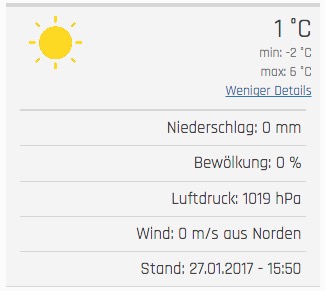
Screenshots current weather 

Displaying basic information 

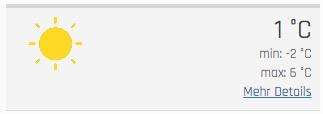
Frontend view

Displaying more information 

Expanded frontend view

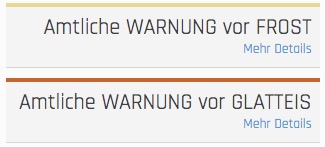
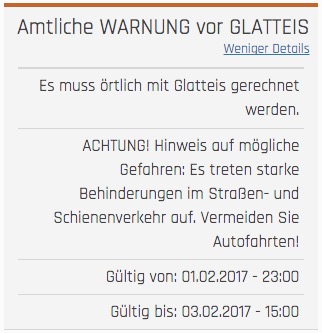
Screenshots weather alert 

Display basic information 

Frontend view

Display more information 

Expanded frontend view

Users manual 

Adding a new plugin to display weather reports 

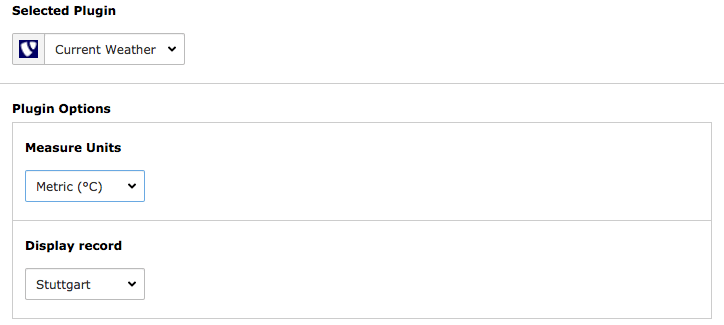
To add a new plugin just create a new content element, choose insert plugin and select Current Weather under plugin. Now you can select the desired measure unit and record identifier to display records.

Backend plugin content element

Adding a new plugin to display weather alerts 

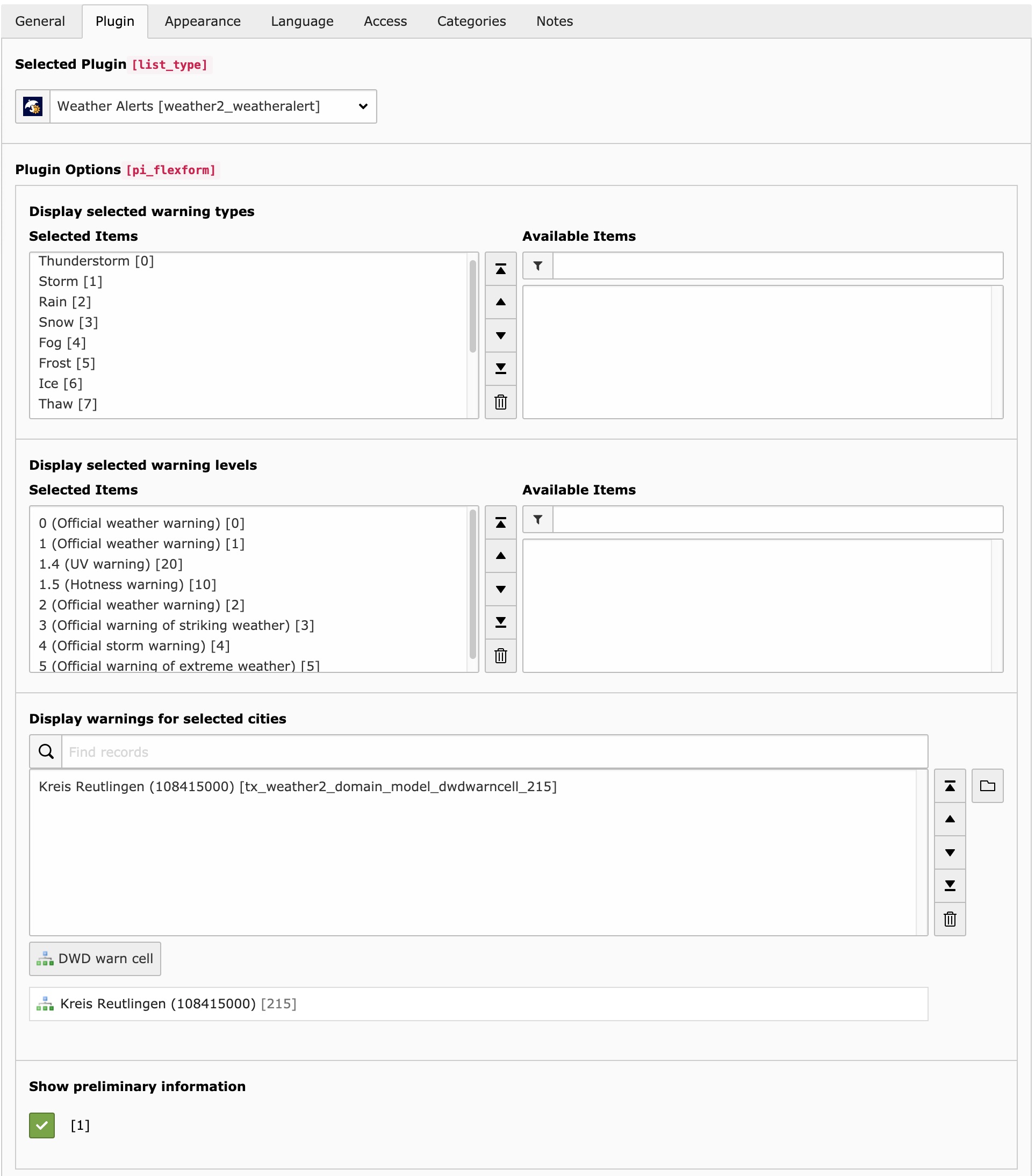
To add a new plugin just create a new content element, choose insert plugin and select Weather Alerts as plugin. Now you can select which regions, alarm level and alarm types should be displayed. Additionally you can select the record storage page.

Backend plugin content element

Render weather reports and alerts inside a fluid template 

Maybe you want to include the plugins inside a Fluid template without a plugin. Important: include the static template of weather2 inside the root page.

Render weather reports inside a fluid template 

Add the following TypoScript to your setup:

EXT:site_package/Configuration/TypoScript/setup.typoscript
# weather reports
lib.weather2_currentweather = USER
lib.weather2_currentweather {
  userFunc = TYPO3\CMS\Extbase\Core\Bootstrap->run
  extensionName = Weather2
  pluginName = Currentweather
  vendorName = JWeiland

  settings =< plugin.tx_weather2.settings
  persistence =< plugin.tx_weather2.persistence
  view =< plugin.tx_weather2.view

  # override the settings in here or change them in plugin.tx_weather2
  settings {
    # possible values: Metric | Imperial | Isou
    measureUnits = Metric
    # possible values: The "name" argument you set for the "weather2:fetch:openWeatherMap" command
    selection = Reutlingen
  }
}
Copied!

Use the following snippet in your Fluid template:

EXT:site_package/Resources/Private/Templates/Page/Default.html
<f:cObject typoscriptObjectPath="lib.weather2_currentweather" />
Copied!

Render weather alerts inside a fluid template 

Add the following TypoScript to your setup:

EXT:site_package/Configuration/TypoScript/setup.typoscript
# weather alerts
lib.weather2_weatheralert = USER
lib.weather2_weatheralert {
  userFunc = TYPO3\CMS\Extbase\Core\Bootstrap->run
  extensionName = Weather2
  pluginName = Weatheralert
  vendorName = JWeiland

  settings =< plugin.tx_weather2.settings
  persistence =< plugin.tx_weather2.persistence
  view =< plugin.tx_weather2.view

  # override the settings in here or change them in plugin.tx_weather2
  settings {
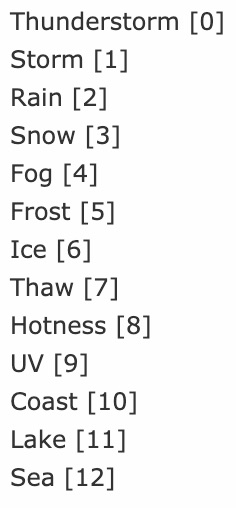
    warningTypes = 0,1,2,3,4,5,6,7,8,9,10,11,12
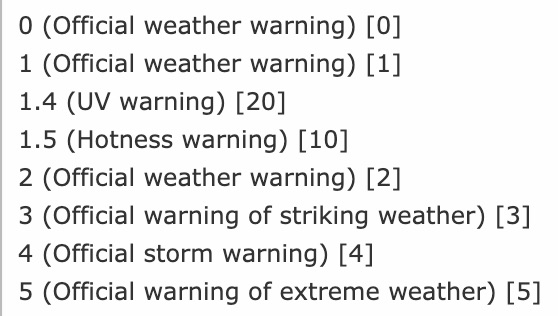
    warningLevels = 0,1,2,3,4,5,10,20
    # warnCells = <uid of your warn cell record> (multiple comma separated)
    warnCells = 215
    showPreliminaryInformation = 1
  }
}
Copied!
Warning types

Warning types

Warning levels

Warning levels

Use the following snippet in your Fluid template:

EXT:site_package/Resources/Private/Templates/Page/Default.html
<f:cObject typoscriptObjectPath="lib.weather2_weatheralert" />
Copied!

Installation 

Target group: Administrators

The extension needs to be installed like any other extension of TYPO3 CMS:

  1. Visit the Extension Manager
  2. Switch over to Get Extensions
  3. Search for jweiland/weather2
  4. Install the extension

Next step 

Configure extension.

TypoScript 

View 

templateRootPaths

templateRootPaths
Type
array
Default
EXT:weather2/Resources/Private/Templates/
Path
plugin.tx_weather2.view.templateRootPaths

You can override our templates with your own site package extension. We prefer to change this value in TypoScript constants.

partialRootPaths

partialRootPaths
Type
array
Default
EXT:weather2/Resources/Private/Partials/
Path
plugin.tx_weather2.view.partialRootPaths

You can override our partials with your own site package extension. We prefer to change this value in TypoScript constants.

layoutsRootPaths

layoutsRootPaths
Type
array
Default
EXT:weather2/Resources/Layouts/Templates/
Path
plugin.tx_weather2.view.layoutsRootPaths

You can override our layouts with your own site package extension. We prefer to change this value in TypoScript constants.

Persistence 

storagePid

storagePid
Type
integer list
Path
plugin.tx_weather2.persistence.storagePid

Set this value to one or more storage folders (PIDs) where you have stored the records.

Example: plugin.tx_weather2.persistence.storagePid = 21,45,3234

Settings 

iconsPath

iconsPath
Type
string
Path
plugin.tx_weather2.settings.iconsPath

Set this value to a path, relative to the public web root, where your custom weather icons are stored, if you want to override the bundled icon set.

Example: plugin.tx_weather2.settings.iconsPath = path/to/icons

Administrator manual 

This chapter describes how to manage the extension from a superuser point of view.

Configuration 

Storage page 

  1. Create a storage page
  2. Refer to it in the recordStoragePage argument when you set up the Scheduler task for the relevant console command (see Console commands overview)
  3. Also refer to it in the plugin

Multi plugin use 

You can configure the recordStoragePage argument of a console command's Scheduler task to save data to a specific storage page that you can later use in the plugin to access data.

Change timezone 

Go into your TYPO3 install tool and change the timezone under All configuration > System > phpTimeZone. This will change the timezone.

Console commands overview 

Since version 7.0.0, weather2 no longer ships its own Scheduler task types. All data fetching is implemented as Symfony console commands instead. To run one regularly (or once), go to the scheduler module, add a new task, choose the task type Execute console commands (TYPO3CMSSchedulerTaskExecuteSchedulableCommandTask), select the desired weather2 command from the list, and fill in its arguments in the form fields that appear below.

The following three commands are available. They are listed in the order in which they should be set up.

weather2:fetch:dwdWarnCells 

Purpose

Downloads the official DWD warn cell reference list (place name to warn cell ID mapping) and stores it in weather2. It does not fetch any weather warnings itself.

Arguments

None.

Depends on

Nothing. Run this command first, before the other two.

Recommended scheduling

Set the Scheduler task type to Single execution and run it once. Re-run it manually from time to time, since Deutscher Wetterdienst occasionally revises warn cell boundaries and IDs. Alternatively, configure it as a low-frequency recurring task, e.g. once a month.

weather2:fetch:dwdAlerts 

Purpose

Fetches the currently active weather warnings from Deutscher Wetterdienst for the configured place names and stores them in weather2.

Arguments
  1. selectedWarnCells (required) - comma separated list of place names, matched against your local warn cell records, e.g. Pforzheim,Karlsruhe.
  2. recordStoragePage (required) - the storage page (PID) the fetched records should be saved to.
  3. pageIdsToClear (optional) - comma separated list of page IDs whose cache should be cleared after the run.
Depends on

weather2:fetch:dwdWarnCells must have been executed at least once beforehand, so the place names can be resolved to warn cell IDs.

Recommended scheduling

Configure it as a Recurring task, e.g. every hour, to keep the displayed alerts up to date.

weather2:fetch:openWeatherMap 

Purpose

Fetches current weather conditions (temperature, wind, humidity, ...) for one city from OpenWeatherMap. It is unrelated to the two Deutscher Wetterdienst commands above.

Arguments
  1. name (required) - a freely chosen identifier for this report. It is used later as the selection TypoScript setting to pick which report to display, see Render weather reports inside a fluid template.
  2. city (required) - city name, e.g. Munich.
  3. country (required) - country code, e.g. DE.
  4. apiKey (required) - your OpenWeatherMap API key.
  5. pageIdsToClear (optional) - comma separated list of page IDs whose cache should be cleared after the run.
  6. recordStoragePage (optional) - the storage page (PID) the fetched record should be saved to.
Depends on

Nothing. Independent from the other two commands - set up one task per city.

Recommended scheduling

Configure it as a Recurring task, e.g. every 30 to 60 minutes.

Current weather (weather report) 

How do I get set up? 

  1. Create a new openweathermap.org account and copy your API key
  2. Download the extension from the TYPO3 Extension Repository
  3. Enable the scheduler extension in your TYPO3 installation if not already done
  4. Go to the scheduler module and add a new task of type Execute console commands, then select the command weather2:fetch:openWeatherMap (see Console commands overview)
  5. Fill in the command's arguments. Please note that the name argument is later used to only display this specific record
  6. Create a new content element with the weather extension plugin selected
  7. Select the measure units and city to display
  8. Add the extension template file to your template
  9. Enjoy! ;)
Backend plugin content element

This is how the content element plugin looks like

Weather alerts 

Get warn cells from Deutscher Wetterdienst 

  1. Go to the scheduler module.
  2. Add a new task of type Execute console commands and select the command weather2:fetch:dwdWarnCells.
  3. Set this task as single execution because you have to execute this only once.
  4. Save and exit
  5. Execute the task
  6. If the execution was successful you will see all the region records in your root page.

    List of warn cell records
  7. Done

Take a look into Get weather alerts from Deutscher Wetterdienst

Create warn cells manually 

  1. Download the warn cell IDs CSV from DWD and search for your city/location.
  2. Go into the page or list module.
  3. Select your root page (the one with the TYPO3 logo) on the page tree.
  4. Click on Create new record and select DWD warn cell.

    Create new weather alert region record
  5. Now you can enter the city name and additionally the district of your city.
  6. Done

    Create a DWD warn cell record

Take a look into Get weather alerts from Deutscher Wetterdienst

Get weather alerts from Deutscher Wetterdienst 

  1. Go to the scheduler module.
  2. Add a new task of type Execute console commands and select the command weather2:fetch:dwdAlerts.
  3. You should set recurring as type and e.g. 3600 as frequency to get the latest alerts every hour.
  4. Fill in the selectedWarnCells argument with a comma separated list of place names. Please make sure you added the warn cell records (cities/locations) or got them from Deutscher Wetterdienst. Don't know? Take a look into Get warn cells from Deutscher Wetterdienst and/or Create warn cells manually.
  5. You can add multiple place names to the selectedWarnCells argument, comma separated.

    List of selected cities (warn cell records)
  6. If you have a record storage page you can fill in its PID in the recordStoragePage argument additionally. This can be useful for Multi plugin use. Otherwise the records will be saved on the root page.

    Record storage page
  7. Now you're done and ready to execute the scheduler.

Read the user manual to get an output on your website.

Upgrade 

If you upgrade EXT:weather2 to a newer version, please read this section carefully!

Update from 6.x to 7.0 

The three console commands were renamed to be shorter and to make it clear which one fetches warnings and which one only fetches the region reference data:

  • weather2:fetch:deutscherWetterdienstAPI is now weather2:fetch:dwdAlerts
  • weather2:fetch:warnCellsFromDeutscherWetterdienstAPI is now weather2:fetch:dwdWarnCells
  • weather2:fetch:fromOpenWeatherAPI is now weather2:fetch:openWeatherMap

If you already have Scheduler tasks of type Execute console commands referencing one of the old command identifiers, edit each task and re-select the command under its new name - the old identifier no longer exists and the task will fail otherwise. See Console commands overview for the arguments of each command and whether it should be single or recurring.

Update from 5.x to 6.0 

Added TYPO3 13 compatibility. Removed all weather2 Scheduler task types and replaced them with Symfony console commands. Your existing weather2 Scheduler tasks will no longer run and should be deleted. For each one, create a new task of type Execute console commands instead, and select the matching weather2 command (weather2:fetch:fromOpenWeatherAPI, weather2:fetch:warnCellsFromDeutscherWetterdienstAPI or weather2:fetch:deutscherWetterdienstAPI - renamed again in version 7.0, see above). There is an upgrade wizard available with this extension to convert the older list type plugins to custom CType.

Update from 4.x to 5.0 

Added TYPO3 12 compatibility. Removed older version compatibility. Removed dependency with static_info_tables. Removed ObjectManager usage from scheduler tasks, so after upgrading the extension it is better to remove the old tasks and recreate the tasks, because the old serialized version is saved in the database.

Update from 3.x to 4.0.0 

Added TYPO3 11 compatibility. Removed TYPO3 9 compatibility.

We have removed all TYPO3 columns from ext_tables.sql. Please execute the database compare to update the database columns.

Execute Flush Cache in the maintenance section of TYPO3 to update the dependency injection cache.

We require recordStoragePid as int in the weather2 scheduler task. It may happen that a call to setPid() will fail, because it is not an int. That happens because all scheduler tasks, including their earlier variable types, are stored serialized in the scheduler. While unserializing, the old type (string) will not match the current type (int) anymore. So please delete that task and create that task again. Sorry, no upgrade wizard is available for that operation.

Update from 2.x to 3.0.0 

Added TYPO3 10 compatibility. Removed TYPO3 8 compatibility.

Nothing to do.

Update from 2.x to 2.0.4 

Because of a security patch of TYPO3, all of our weather2 scheduler tasks can no longer be unserialized. For you it is not possible anymore to delete, modify or start any task, as you can not open the scheduler module. Furthermore no task will be executed anymore by cronjob. Please visit the Upgrade module of TYPO3 and execute our upgrade wizard to update our tasks in the database.

Update from 1.x to 2.x 

There are breaking changes if you're updating weather2 from 1.x to 2.x. This chapter is about how to fix those breaking changes.

  1. Update weather2 using Composer or the Extension Manager.
  2. If you're using Composer you may need to disable and enable the extension using the Extension Manager or using the database analyzer to get the new database structure.
  3. Clear all caches.
  4. Open the scheduler module.
  5. Edit all tasks of type Call openweathermap.org api. Directly save them after clicking edit. You don't need to change any fields inside here.
  6. Remove all tasks of type Get regions from Deutscher Wetterdienst. They should have a red background because they no longer exist.
  7. Either create a warn cell record manually OR create a task of type Get warn cell records from Deutscher Wetterdienst, set it as single and execute it one time.
  8. Edit all tasks of type Get weather alerts from Deutscher Wetterdienst and select the cities/locations you want to fetch. Then save those tasks.
  9. Edit all plugins with list type weather2_weatheralert (Weather Alerts) and select the cities/locations you want to display. Also check out the new setting Show preliminary information.
  10. Clear frontend caches.

Developer Corner 

Target group: Developers

The developer part of this documentation

Add custom providers 

Feel free to add custom API providers for weather reports or weather alerts. You can add them using your own extension. Write your own Symfony console command, following the pattern of weather2's own commands (see Console commands overview), and use the models JWeilandWeather2DomainModelCurrentWeather for weather reports and JWeilandWeather2DomainModelWeatherAlert for weather alerts. Add new records using the Extbase PersistenceManager or the TYPO3 DataHandler. Register your command as a console.command service so it can be scheduled through TYPO3's Execute console commands Scheduler task, the same way as weather2's own commands.

Known Problems 

If you found a bug, you can notify us using the Bug Tracker of Github.

ChangeLog 

Version 7.0.1 

  • [BUGFIX] Add missing "target-language" attribute to German translation files
  • [TASK] Update XLIFF files to version 1.2 for improved compatibility

Version 7.0.0 

  • [TASK] Fetch a localized weather description from OpenWeatherMap
  • [TASK] Add TYPO3 14 compatibility
  • [TASK] Remove TYPO3 13 compatibility

Version 6.1.4 

  • [BUGFIX] Replace hardcoded tab labels with localized labels in tt_content

Version 6.1.3 

  • [BUGFIX] Assign wind direction to correct array key

Version 6.1.2 

  • [TASK] Updated wizard title with [extension] name format

Version 6.1.1 

  • [BUGFIX] Update testing directory

Version 6.1.0 

  • [TASK] Fixed TCA configuration issues
  • [BUGFIX] Fixed DB Analyser issue

Version 6.0.0 

  • Full TYPO3 13 compatibility
  • Dropped older version support
  • Removed all scheduler tasks, replaced with Symfony console commands
  • Updated test suite and removed old test suite configuration files

Version 5.0.0 

  • [BUGFIX] Backported fixed DB Analyser issues

Version 5.0.0 

  • Full TYPO3 12 compatibility
  • Dropped support for TYPO3 10 and below
  • Removed dependency on static_info_tables
  • Refactored all scheduler tasks to remove ObjectManager usage
  • Important: old scheduler tasks must be deleted and recreated manually

Version 4.0.0 

  • TYPO3 11 LTS support
  • Dropped support for TYPO3 9
  • Removed TYPO3-specific SQL columns from ext_tables.sql
  • Important: clear the DI cache using the maintenance module in the backend
  • Fix: only numeric PIDs are now allowed in scheduler tasks - delete old ones

Version 3.0.0 

  • TYPO3 10 support introduced
  • TYPO3 8 support removed
  • Smooth upgrade - no manual changes needed

Version 2.0.4 

  • TYPO3 core change fix: unserializing scheduler tasks failed
  • Required manual fix via upgrade wizard in the TYPO3 backend

Version 2.0.0 

  • Major extension refactoring
  • Scheduler task and TypoScript plugin handling improved
  • Upgrade steps are in the documentation

Version 1.0.0 

  • Initial stable release with basic support for the openweathermap.org API
  • Support for weather alerts via Deutscher Wetterdienst (DWD)
  • Includes TypoScript configuration for widgets and plugin rendering

Sitemap