Kitodo.Presentation

Classification

dlf

Version

5.1

Language

en

Description

Kitodo.Presentation is a powerful framework for building a METS-based digital library. It is highly customizable through a user-friendly backend and flexible design templates.

Keywords

kitodo,presentation,digitization,viewer,library,METS,OAI-PMH

Copyright

since 2017

Author

Kitodo Release Management Team

Email

contact@kitodo.org

License

This document is published under the Open Content License available from http://www.opencontent.org/opl.shtml

Rendered

Fri, 20 Jun 2025 08:34:51 +0000

The content of this document is related to TYPO3, a GNU/GPL CMS/Framework available from www.typo3.org.

Table of Contents

Introduction

About Kitodo.Presentation

Kitodo.Presentation is a powerful framework for building a METS-based digital library. It is highly customizable through an user-friendly backend and flexible design templates.

Since it is based on the great free and open source Content Management System TYPO3, it can be integrated seamlessly into your website and can easily be managed by editors.

Kitodo.Presentation provides a comprehensive toolset covering all basic requirements for presenting digitized media: books, archivalia, digital depositary copies, manuscripts and letters, prints, newspapers and magazines.

Download of current version is available on GitHub.

Libraries using Kitodo.Presentation

Amongst others Kitodo.Presentation is known to be used on the following digital presentations:

In Kitodo.Presentation, the METS/MODS formats are flexible. Digital collections can be configured for any METS-based format, e.g. METS/TEI for manuscripts.

Unrestricted access to TYPO3 functions, such as user authentication, session handling, language localization, caching, etc., is possible within the Kitodo.Presentation functional modules. The entire system is multi-client capable, i.e. any number of instances of Kitodo.Presentation can be run within a single TYPO3 installation, each with its own configuration, search index, backend pages, access permissions, visual design, etc.

Kitodo.Presentation offers a standard OAI-PMH2-compliant interface for international search capability and digital metadata legibility. We recommend registering your Kitodo installation with the appropriate public OAI registry.

Software Components

The software primarily consists of three modules:

Commons

is a group of classes that build upon the TYPO3 API, adding Kitodo-specific functions, such as handling METS structures and library metadata in various formats, or linking external resources, such as OAI-PMH interfaces or Solr search engines. The API extensions are available to all TYPO3 extensions, which means that they can be used not only by Kitodo.Presentation, but by other extensions as well. Thus, commercial or other very specific functions, which are only necessary in single installations, don't need to be part of the official Kitodo.Presentation release, but can be created as separate extensions.

Modules

is a group of components that are integrated into the TYPO3 backend and manage the configuration of extensions as well as of digital resources, clients and collections. Currently, there is a module for client management as well as integrations with the basic TYPO3 list module to manage the digital resources. In addition, they enable a highly granular configuration of structure and metadata handling as well as database management. Furthermore, a command line interface is provided, which allows automation of procedures, such as importing digital resources.

Plugins

are components that build the frontend output and provide various functions. All plugins can be precisely configured via GUI and freely dropped into TYPO3-managed web pages. All frontend outputs are based on design templates and are thus fully customizable.

Screenshots

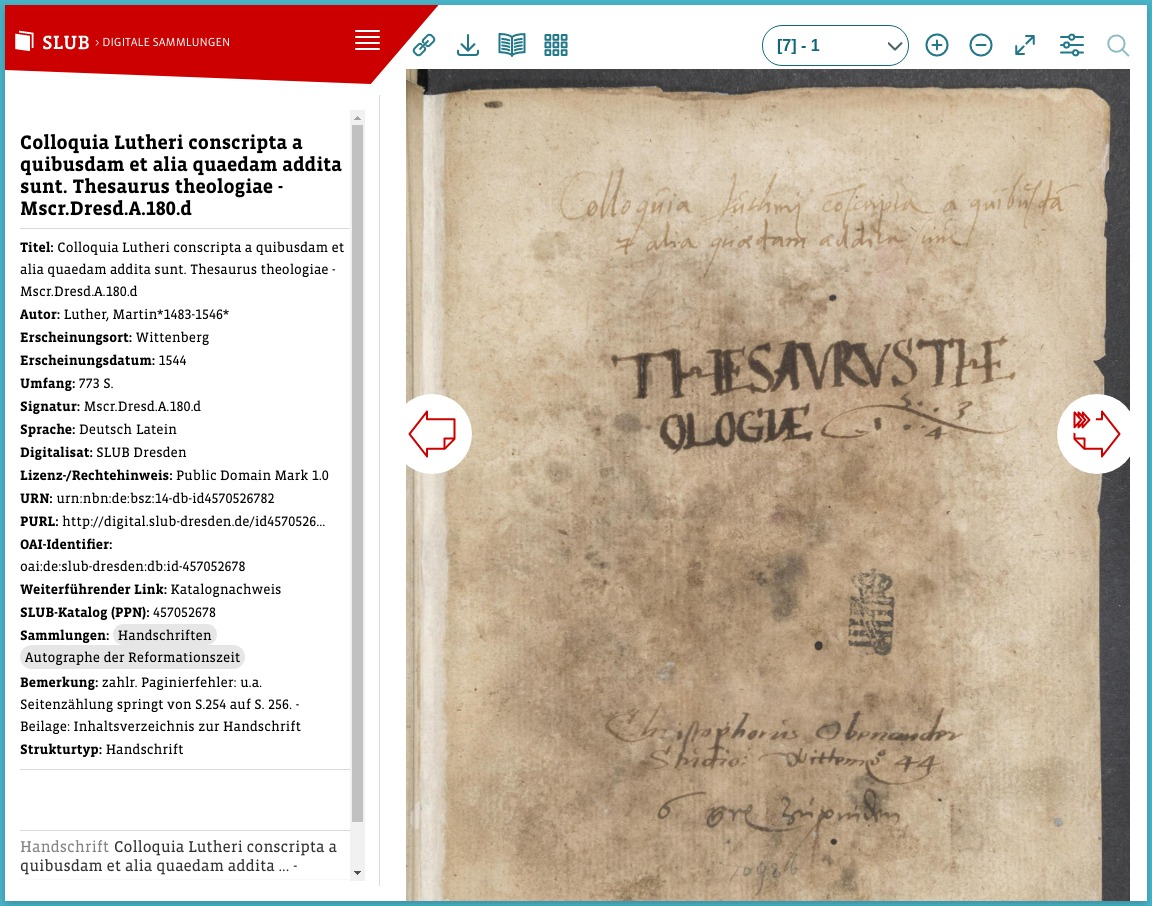
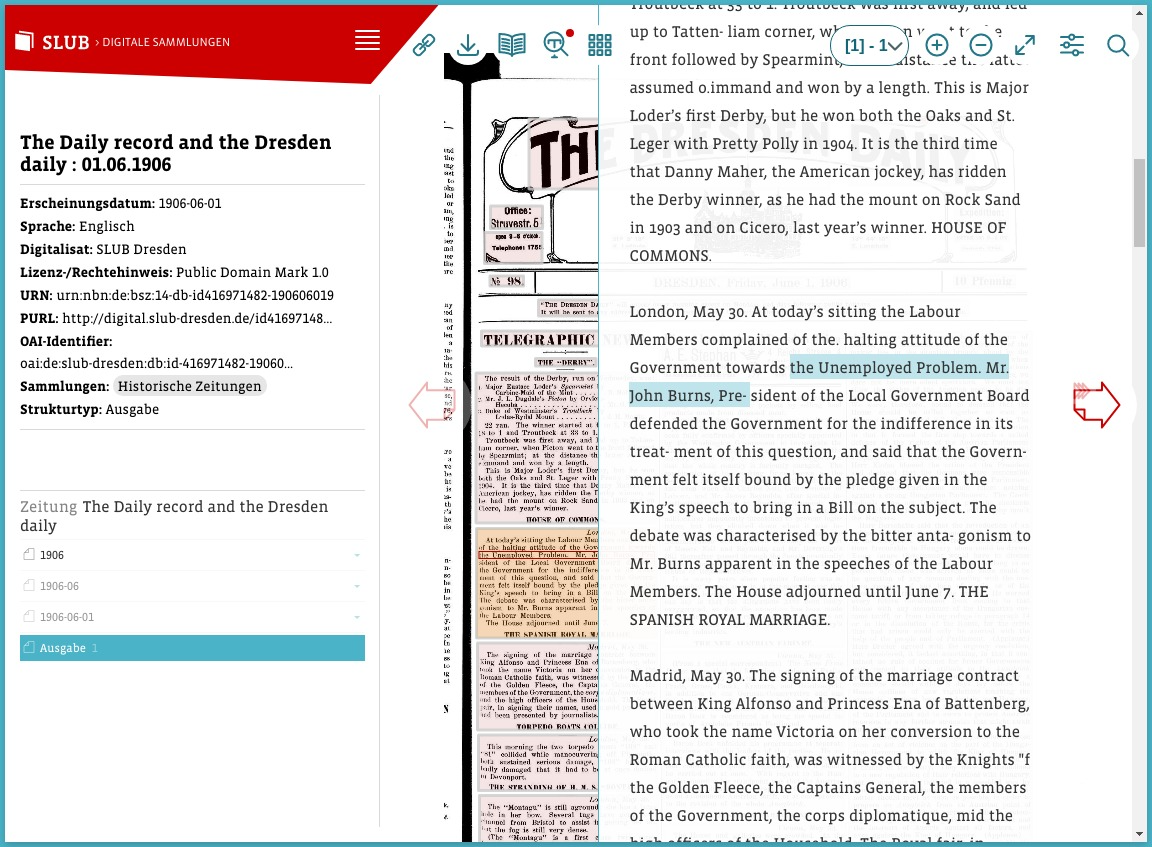
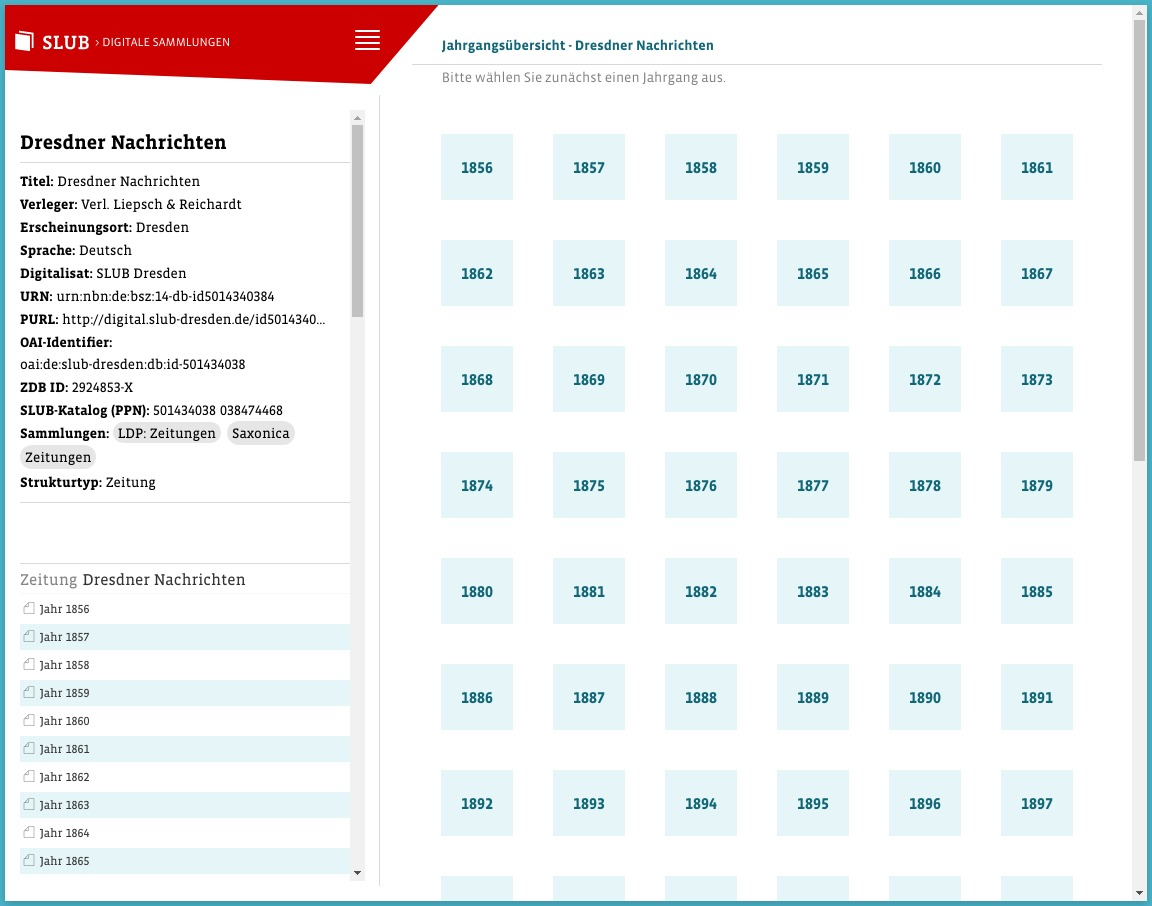
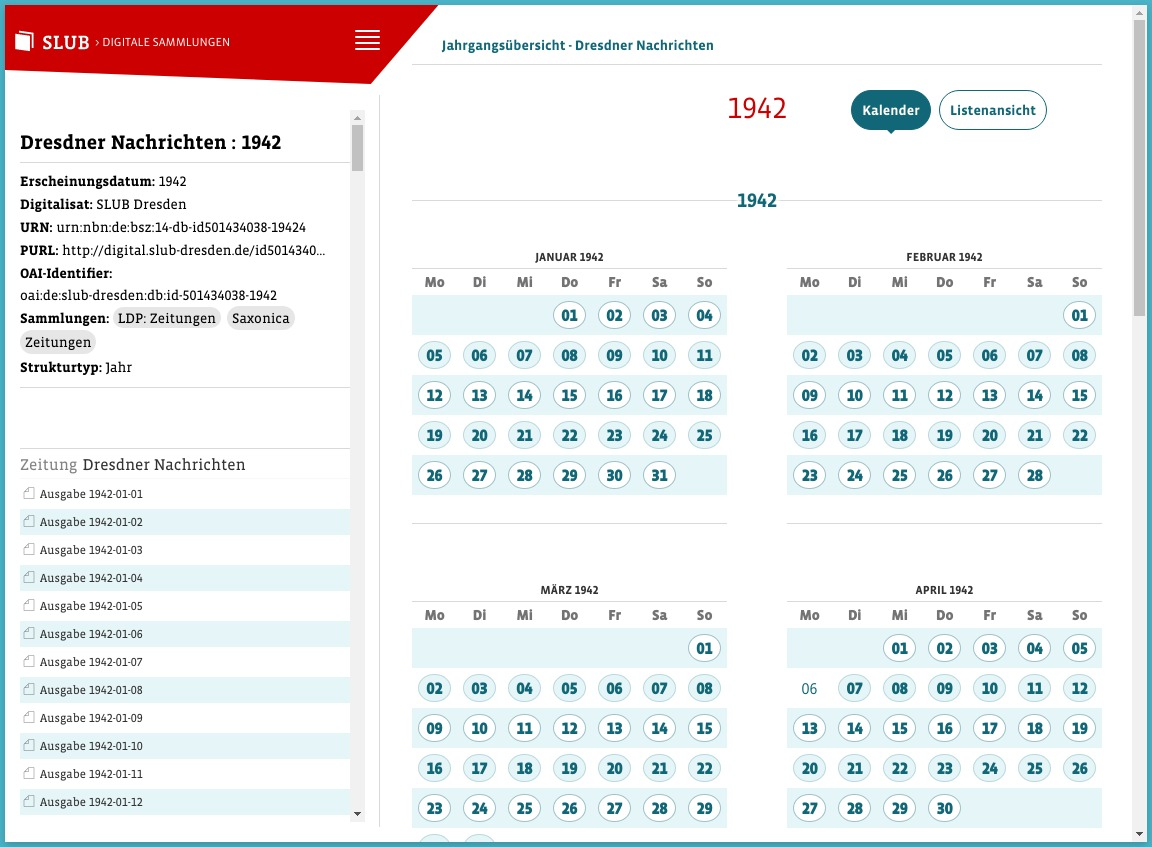
Some examples of Kitodo.Presentation in action on the Digital Collection of SLUB Dresden:

http://digital.slub-dresden.de/id457052678

Mscr.Dresd.A.180.d

Mscr.Dresd.A.180.d

http://digital.slub-dresden.de/id416971482-19060601

Newspaper issue with full-text switched on

Newspaper Issue with Full-text Switched on

http://digital.slub-dresden.de/id501434038

All Years Overview of a Newspaper Title

All Years Overview of a Newspaper Title

http://digital.slub-dresden.de/id501434038-1942

Calendar View of a Newspaper Year

Calendar View of a Newspaper Year

Administrator Manual

Installation

Make sure you have TYPO3 and Apache Solr already running.

a. Get the latest release ("jar"-file) from https://github.com/dbmdz/solr-ocrhighlighting/releases. Version 0.9.1 is the minimum version number. Make sure to pick the right file for Solr 8 or 9 respectively. b. Copy the jar-file (e.g. "solr-ocrhighlighting-0.9.1.jar") to the modules/ocrsearch/lib/ directory of your Apache Solr. c. Copy the schema.xml and solrconfig.xml from Configuration/ApacheSolr/configsets/dlf/conf/ to $SOLR_HOME/configsets/dlf/ d. Restart Solr.

Composer Mode

It is highly recommended to install this extension by using composer. This is the only supported way.

Please run the following commands in your webroot where the TYPO3 composer.json is located:

  1. Fetch Kitodo.Presentation with Composer

    composer require kitodo/presentation
    Copied!
  2. Install and Activate the Extension

    ./vendor/typo3 extension:activate dlf
    Copied!

Upgrade

This section contains version specific instructions on upgrading an existing Kitodo.Presentation installation.

Version 3.3 -> 4.0

Upgrade-Wizards

There are two upgrade wizards available. If you upgrade an existing installation, you should use them. Without, you have to configure all plugins from scratch and the collection record images won't be visible.

Database Upgrade

Run the database upgrade (Maintenance > Analyze Database Structure) and delete the columns metadata and metadata_sorting. (These columns are not used anymore by Kitodo.Presentation 4. If they are not removed, indexing new documents may fail.)

Set the Storage Pid

The Kitodo.Presentation configuration folder must be set by TypoScript constant plugin.tx_dlf.persistence.storagePid now. This setting is available for all plugins in the page tree. The plugin specific pages has been removed.

Migrate Plugin Settings

When plugins are configured in TypoScript, the values must now be wrapped in a settings key.

// Before
plugin.tx_dlf_pageview {
  features = OverviewMap
}

// After
plugin.tx_dlf_pageview {
  settings {
    features = OverviewMap
  }
}
Copied!

Fluid Rendering

All plugins now use the Fluid Template Engine instead of marker templates for outputting HTML.

  • If you override a .tmpl file, it needs to be migrated to an HTML/Fluid template.
  • The TypoScript setting templateFile has been removed.

See the Plugin Reference for more information.

Plugin Feeds

The plugin feeds uses the fluid template engine to render XML now. To enable this output format, you must create a TypoScript extension template on the page with the feed plugin and include the template "RSS Feed Plugin Configuration".

Plugin OAI-PMH

The plugin oai-pmh uses the fluid template engine to render XML now. To enable this output format, you must create a TypoScript extension template on the page with the oai-pmh plugin and include the template "OAI-PMH Plugin Configuration".

Plugin Page Grid

The plugin use the fluid widget.paginate viewhelper now. The markup has changed. You need to check and adopt your design.

The pagination can be configured by TypoScript. The flexform setting limit is changed to default paginate.itemsPerPage.

Plugin ListView

The ListView plugin works in a different manner now. It still can be used to render results from the Search plugin or the Collection plugin. Both plugins have their own "listview" which basically uses the same Fluid partials.

With the ListView plugin, you still achieve the following situation:

page 1: Search Plugin (main column)
   |
   v
   +--> page 2: ListView Plugin (main column) | Search Plugin (sidebar) e.g with forceAbsoluteUrlHttps
   ^
   |
page 3: Collection Plugin (main column)
Copied!

The setting targetPid has been renamed to targetPidPageView.

Toolbox Plugins

Previously, the toolbox plugins (located in namespace Kitodo\Dlf\Plugin\Tools) could be used directly. This is not possible anymore, but instead they must be included via the overarching Toolbox plugin.

// Before
lib.imagemanipulation < tt_content.list.20.dlf_imagemanipulationtool

// After
lib.imagemanipulation < tt_content.list.20.dlf_toolbox {
  settings {
    tool = imagemanipulationtool
  }
}
Copied!

Update CSP

In Kitodo.Presentation 4.0, the way how static images are loaded has changed. Please make sure that blob: URLs are not forbidden by your Content Security Policy.

Other Changes

  • jQuery and OpenLayers have been updated. If you manually include them, update the paths.

Version 3.2 -> 3.3

Version 3.3 introduce the usage of the OCR Highlighting Plugin for Solr. The plugin can be found at GitHub: https://github.com/dbmdz/solr-ocrhighlighting. This plugin is now mandatory if you are using the full text feature.

Please note: The full text is stored in Solr index in a XML format (MiniOCR). This will rise the demand for storage space. You should therefore monitor the disc usage during reindexing.

Steps to Upgrade

a. Get the latest release ("jar"-file) from https://github.com/dbmdz/solr-ocrhighlighting/releases. Version 0.8.0 is the minimum version number. Make sure to pick the right file for Solr 7/8. b. Copy the jar-file (e.g. "solr-ocrhighlighting-0.8.0-solr78.jar") to the contrib/ocrsearch/lib/ directory of your Solr. c. Copy the updated schema.xml to your Solr configsets in $SOLR_HOME/configsets/dlf/ d. Copy the schema.xml from EXT:dlf/Configuration/ApacheSolr/configsets/dlf/conf/ to all of your Solr cores. E.g. $SOLR_HOME/data/dlfCore0/conf/ e. Restart Solr. f. Reindex all documents. This can be done by the kitodo:reindex CLI command with the '-a' (all) flag. See: Reindex collections.

Version 5.0 -> 5.1

Version 5.1 supports Apache Solr 9 (9.4+) now, a revised configuration for Apache Solr 8 (8.11+) is included and support for Apache Solr 7 and earlier is dropped.

Steps to Upgrade to Solr 9.4+

a. Get the latest release ("jar"-file) from https://github.com/dbmdz/solr-ocrhighlighting/releases. Version 0.9.1 is the minimum version number. Make sure to pick the right file for Solr 9. b. Copy the jar-file (e.g. "solr-ocrhighlighting-0.9.1.jar") to the modules/ocrsearch/lib/ directory of your Solr. c. Copy the updated schema.xml and solrconfig.xml to your Solr configsets in $SOLR_HOME/configsets/dlf/ d. Restart Solr. e. Reindex all documents. This can be done by the kitodo:reindex CLI command with the '-a' (all) flag. See: Reindex collections.

Steps to Upgrade to Solr 8.11+

a. Copy the updated schema.xml and solrconfig_8.11.2.xml to your Solr configsets in $SOLR_HOME/configsets/dlf/ b. Rename solrconfig_8.11.2.xml in $SOLR_HOME/configsets/dlf/ to solrconfig.xml c. Restart Solr. d. Reindex all documents. This can be done by the kitodo:reindex CLI command with the '-a' (all) flag. See: Reindex collections.

Furthermore version 5.1 supports the use of Solr Managed Schemas to update the schemas automatically during the update of the extension. To use this feature you have to change the schemaFactory within solrconfig.xml from "ClassicIndexSchemaFactory" to "ManagedIndexSchemaFactory".

Logging

The application uses default TYPO3 logging framework. It writes logs to the typo3_xyz.log file placed in <project-root>/var/log/ (Composer based installation).

You influence the Loglevel by overwriting the writerConfiguration in $GLOBALS['TYPO3_CONF_VARS']['LOG']['writerConfiguration']. Have a look at the documentation: https://docs.typo3.org/m/typo3/reference-coreapi/9.5/en-us/ApiOverview/Logging/Configuration/Index.html#writer-configuration

System Setup

Web Server

Content Security Policy

In case a Content Security Policy is set on the Kitodo.Presentation instance, make sure that blob: URLs are allowed as img-src. Otherwise, the page view may remain blank.

TYPO3 Setup

Extension Configuration

You should check the extension configuration!

  • go to the Extension Configuration (ADMIN TOOLS -> Settings -> Extension Configuration).
  • open dlf
  • check and save the configuration

Tenant Configuration

You must create a data folder for some Kitodo.Presentation configuration records like metadata, structures, solrCore and formats (namespaces). This can be achieved easily with the 'New Tenant' backend module on the left side in section 'Tools'.

Make sure, all fields are green. Then all necessary records are created.

TYPO3 Configuration

Disable caching in certain situations

Avoid empty Workview

You may notice from time to time, the viewer page stays empty even though you pass the tx_dlf[id] parameter.

This happens, if someone called the viewer page without any parameters or with parameters without a valid cHash. In this case, TYPO3 saves the page to its cache. If you call the viewer page again with any parameter and without a cHash, the cached page is delivered.

With the search plugin or the searchInDocument tool this may disable the search functionality.

To avoid this, you must configure tx_dlf[id] to require a cHash. Of course this is impossible to achieve so the system will process the page uncached.

Add this setting to your typo3conf/LocalConfiguration.php:

'FE' => [
    'cacheHash' => [
        'requireCacheHashPresenceParameters' => [
            'tx_dlf[id]',
        ],
    ],
]
Copied!

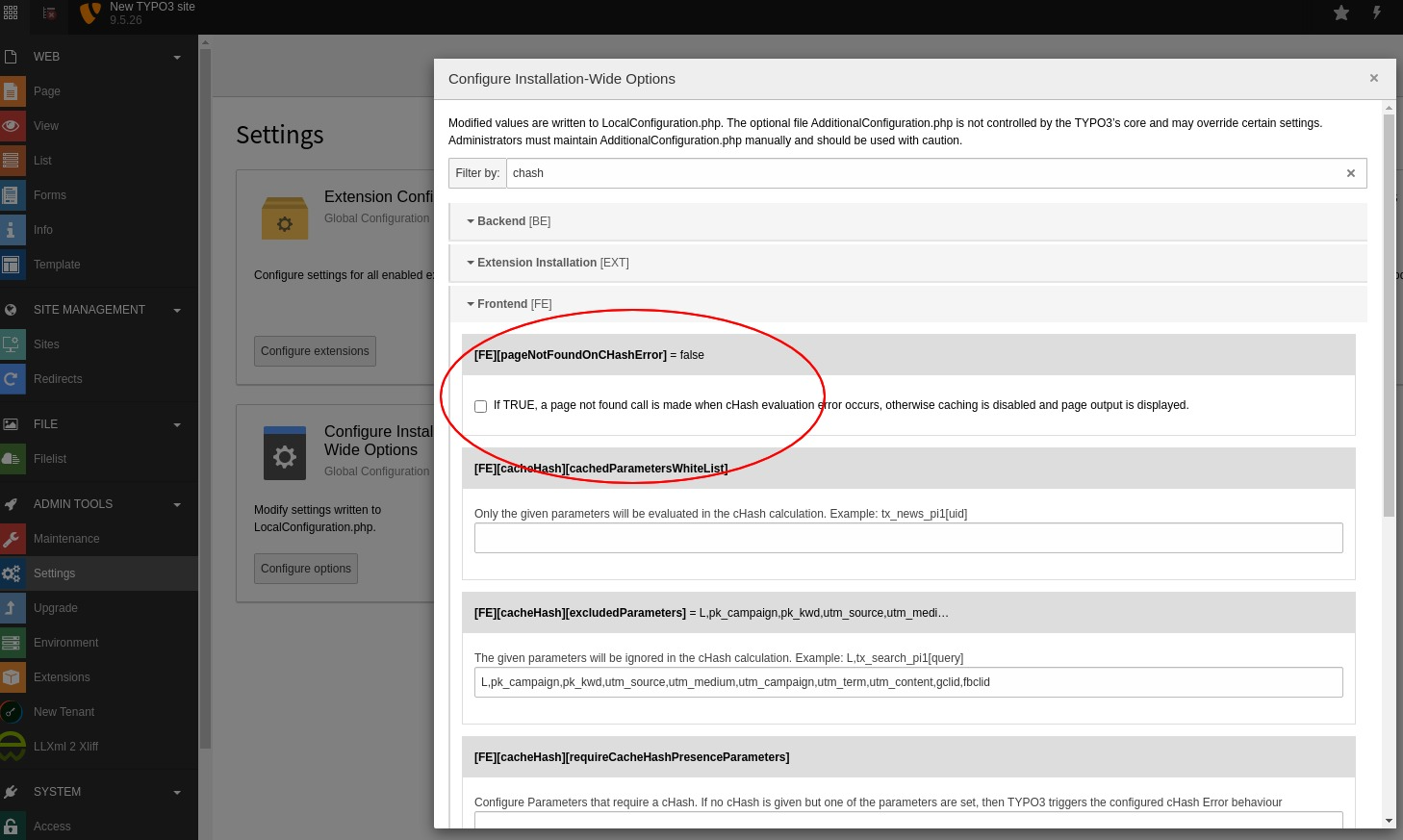
Tip: Use the admin backend module: Settings -> Configure Installation-Wide Options

TypoScript Basic Configuration

Please include the Template "Basic Configuration (dlf)". This template adds jQuery to your page by setting the following typoscript:

page.includeJSlibs.jQuery

Slug Configuration

With TYPO3 9.5 it is possible to make speaking urls with the builtin advanced routing feature ("Slug"). This may be used for extensions too.

TYPO3 documentation about Advanced Routing Configuration.

The following code is an example of an routeEnhancer for the workview page on uid=14.

routeEnhancers:
  KitodoWorkview:
    type: Plugin
    namespace: tx_dlf
    limitToPages:
      - 14
    routePath: '/{id}/{page}'
    requirements:
      id: '(\d+)|(http.*xml)'
      page: \d+
  KitodoWorkviewDouble:
    type: Plugin
    namespace: tx_dlf
    limitToPages:
      - 14
    routePath: '/{id}/{page}/{double}'
    requirements:
      id: '(\d+)|(http.*xml)'
      page: \d+
      double: '[0-1]'
Copied!

Solr Installation

This extension doesn't include Solr, but just a prepared configuration set. To setup Apache Solr, perform the following steps:

  1. Make sure you have Apache Solr 8.11 and running.

    Download Solr from https://solr.apache.org/downloads.html. Other versions may work but are not tested.

  2. Copy the config set to your solr home
cp -r dlf/Configuration/ApacheSolr/configsets/dlf to $SOLR_HOME/configsets/
Copied!
  1. Get the Solr OCR Highlighting plugin and put it into contrib-directory.

    The plugin is available on GitHub: https://github.com/dbmdz/solr-ocrhighlighting/releases. The documentation can be found here: https://dbmdz.github.io/solr-ocrhighlighting/.

    The Solr OCR Highlighting plugin is required for full text search as of Kitodo.Presentation 3.3.

cp solr-ocrhighlighting-0.7.1.jar to contrib/ocrsearch/lib/
Copied!
  1. Using basic authentication is optional but recommended.

    The documentation is available here: https://solr.apache.org/guide/8_8/basic-authentication-plugin.html

Plugin Reference

Kitodo Plugin Reference

Common Settings

Fluid Template Configuration

As of Kitodo.Presentation 4.0 the Fluid rendering engine is used. The former marker templates for plugins are not supported anymore.

Now, all HTML markup is done in Fluid. To use different templates, you have to overload the templates by the common TYPO3 way.

The following TypoScript defines additional paths inside an "example" extension:

plugin.tx_dlf {
   view {
      templateRootPaths {
         10 = EXT:example/Resources/Private/Plugins/Kitodo/Templates
      }
      partialRootPaths {
         10 = EXT:example/Resources/Private/Plugins/Kitodo/Partials
      }
   }
}
Copied!

In this example, you place the customized fluid template into this file:

EXT:example/Resources/Private/Plugins/Kitodo/Partials/Navigation/Main.html

Copied!

Audioplayer

The audioplayer plugin is only active if the selected document has a valid audio filegroup (fileGrpAudio).

Properties

plugin.tx_dlf_audioplayer.

Property

Data type

Default

excludeOther

boolean

1

elementId

string

tx-dlf-audio

excludeOther

Show only documents from the selected page.

elementId

ID value of the HTML element for the audio player.

Basket

plugin.tx_dlf_basket.

Property

Data type

Default

pregeneration

boolean

pdfgenerate

string


pdfdownload

string


pdfprint

string


pdfparams

string

##docId##,##startpage##,##endpage##,##startx##,##starty##,##endx##,##endy##,##rotation##

pdfparamseparator

string

*

basketGoToButton

boolean

targetBasket

t3tsref:data-type-page-id


Calendar

The calendar plugin may be used with newspaper and ephemeras (periodical published media). The plugin shows itself an overview of all available years or all issues in a calendar view of a selected year.

You can't place the plugin together with the pageview plugin on one page. But you can use TypoScript conditions on this page to select the proper plugin e.g by setting some specific FLUID variables.

This is an example usage of the TypoScript condition ("getDocumentType"):

[getDocumentType({$config.storagePid}) === 'ephemera' or getDocumentType({$config.storagePid}) === 'newspaper']
page.10.variables {
    isNewspaper = TEXT
    isNewspaper.value = newspaper_anchor
}
[END]

[getDocumentType({$config.storagePid}) === 'year']
page.10.variables {
    isNewspaper = TEXT
    isNewspaper.value = newspaper_year
}
[END]

[getDocumentType({$config.storagePid}) === 'issue']
page.10.variables {
    isNewspaper = TEXT
    isNewspaper.value = newspaper_issue
}
[END]
Copied!

The {$config.storagePid} is a TypoScript constant holding the Kitodo.Presentation storage pid.

This way, the FLUID variable "isNewspaper" is set according to the given value. Inside the FLUID template it's possible to switch to the right plugin now.

plugin.tx_dlf_calendar.

Property

Data type

Default

initialDocument

integer


showEmptyYears

boolean

showEmptyMonths

boolean

1

Collection

The collection plugin shows one collection, all collections or selected collections.

plugin.tx_dlf_collection.

Property

Data type

Default

Description

collections

t3tsref:data-type-list


show_userdefined

integer


showSingle

boolean

randomize

boolean

targetPid

t3tsref:data-type-page-id


targetFeed

t3tsref:data-type-page-id


Embedded 3D Viewer

The embedded3dviewer plugin renders an iFrame in which the configured 3D viewer displays the model.

plugin.tx_dlf_embedded3dviewer.

Property

Data type

Description

document

string

The URL of the XML document which contains the model.

model

string

The URL of the 3D model.

viewer

string

Override the default viewer from the extension configuration (see Configuration) with a supported viewer (from the "dlf_3d_viewers" directory).

Feeds

The feeds plugin renders a RSS 2.0 feed of last updated documents of all or a specific collection.

The following steps are necessary to activate the plugin:

a. Create a new page "Feed" with slug "feed". b. Create an extension template on this page and include the TypoScript template of the feeds plugin. c. Place the "Kitodo Feeds" plugin on it and configure it for your needs.

The TypoScript part is necessary to switch the page rendering to a different page object.

plugin.tx_dlf_feeds.

Property

Data type

Default

collections

t3tsref:data-type-list


excludeOtherCollections

boolean

library

integer


limit

integer

50

prependSuperiorTitle

boolean

targetPid

t3tsref:data-type-page-id


title

string


description

string


List View

plugin.tx_dlf_listview.

Property

Data type

Default

limit

integer

25

targetPid

t3tsref:data-type-page-id


getTitle

boolean

basketButton

boolean

targetBasket

t3tsref:data-type-page-id


Metadata

plugin.tx_dlf_metadata.

Property

Data type

Default

excludeOther

boolean

1

linkTitle

boolean

1

targetPid

t3tsref:data-type-page-id


getTitle

boolean

1

showFull

boolean

1

rootline

integer

separator

string

#

OAI-PMH

plugin.tx_dlf_oaipmh.

Property

Data type

Default

library

integer


limit

integer

5

expired

integer

1800

show_userdefined

boolean

stylesheet

resource

Page Grid

plugin.tx_dlf_pagegrid.

Property

Data type

Default

paginate.itemsPerPage

integer

24

placeholder

resource

Navigation.tmpl

targetPid

t3tsref:data-type-page-id


Page View

plugin.tx_dlf_pageview.

Property

Data type

Default

excludeOther

boolean

1

features

t3tsref:data-type-list

1

elementId

string

tx-dlf-map

progressElementId

string

tx-dlf-page-progress

crop

boolean

useInternalProxy

boolean

magnifier

boolean

basketButton

boolean

targetBasket

t3tsref:data-type-page-id


Statistics

plugin.tx_dlf_statistics.

Property

Data type

Default

collections

t3tsref:data-type-list


description

string


Table Of Contents

plugin.tx_dlf_tableofcontents.

Property

Data type

Default

Description

excludeOther

boolean

1

basketButton

boolean

targetBasket

t3tsref:data-type-page-id


targetPid

t3tsref:data-type-page-id


titleReplacement

t3tsref:data-type-list


List containing types for which title should be replaced when the label is empty. The defined fields are used for replacement. Example data: 0 { type = issue fields = type,year } 1 { type = volume fields = type,volume }

Toolbox

plugin.tx_dlf_toolbox.

Property

Data type

Default

Values

tools

t3tsref:data-type-list

 
  • tx_dlf_annotationtool
  • tx_dlf_fulltexttool
  • tx_dlf_imagedownloadtool
  • tx_dlf_imagemanipulationtool
  • tx_dlf_pdfdownloadtool
  • tx_dlf_fulltextdownloadtool
  • tx_dlf_searchindocumenttool

solrcore

integer


fileGrpsImageDownload

t3tsref:data-type-list

MIN,DEFAULT,MAX

Fulltext Tool

This plugin adds an activation link for fulltext to the toolbox. If no fulltext is available for the current page, a span-tag is rendered instead.

The default behavior is to show the fulltext after click on the toggle link. There is a TypoScript configuration to show the fulltext initially.

plugin.tx_dlf_fulltexttool.

Property

Data type

Default

Values

activateFullTextInitially

boolean

0: show fulltext after click on toggle link

1: show fulltext on document load

fullTextScrollElement

string

html, body

The fulltext is fetched and rendered by JavaScript into the <div id="tx-dlf-fulltextselection"> of the pageview plugin.

Please note: To allow JavaScript fetching the fulltext, the CORS headers must be configured appropriate on the providing webserver.

Search in Document Tool

This plugin adds an possibility to search all appearances of the phrase in currently displayed document

plugin.tx_dlf_searchindocumenttool.

Property

Data type

Default

Values

searchUrl

string


documentIdUrlSchema

string

empty

https://host.de/items/id/record - example value

idInputName

string

tx_dlf[id]

queryInputName

string

tx_dlf[query]

startInputName

string

tx_dlf[start]

pageInputName

string

tx_dlf[page]

highlightWordInputName

string

tx_dlf[highlight_word]

encryptedInputName

string

tx_dlf[encrypted]

User Manual

Indexing Documents

New documents may be indexed via the TYPO3 command line interface (CLI).

Index single document

The command kitodo:index is used for indexing a single document:

./vendor/bin/typo3 kitodo:index -d http://example.com/path/mets.xml -p 123 -s dlfCore1

Copied!

Option

Required

Description

Example

-d|--doc

yes

This may be an UID of an existing document in tx_dlf_documents or the URL of a METS XML file. If the URL is already known as location in tx_dlf_documents, the file is processed anyway and the records in database and solr index are updated.

Hint: Do not encode the URL! If you have spaces in path, use quotation marks.

123 or http://example.com/path/mets.xml

-p|--pid

yes

The page UID of the Kitodo.Presentation data folder. This keeps all records of documents, metadata, structures, solrcores etc.

123

-s|--solr

yes

This may be the UID of the solrcore record in tx_dlf_solrcores. Alternatively you may write the index name of the solr core.

The solr core must exist in table tx_dlf_solrcores on page "pid". Otherwise an error is shown and the processing won't start.

123 or 'dlfCore1'

-o|--owner

no

This may be the UID of the library record in tx_dlf_libraries which should be set as the owner of the document. If omitted, the default is to try to read the ownership from the metadata field "owner".

123

--dry-run

no

Nothing will be written to database or index. The solr-setting will be checked and the documents location URL will be shown.


-q|--quite

no

Do not output any message. Useful when using a wrapper script. The script may check the return value of the CLI job. This is always 0 on success and 1 on failure.


-v|--verbose

no

Show processed documents uid and location with indexing parameters.


Reindex collections

With the command kitodo:reindex it is possible to reindex one or more collections or even to reindex all documents on the given page.:

# reindex collection with uid 1 on page 123 with solr core 'dlfCore1'
# short notation
./vendor/bin/typo3 kitodo:reindex -c 1 -p 123 -s dlfCore1
# long notation
./vendor/bin/typo3 kitodo:reindex --coll 1 --pid 123 --solr dlfCore1

# reindex collection with uid 1 on page 123 with solr core 'dlfCore1' in given range
# short notation
./vendor/bin/typo3 kitodo:reindex -c 1 -l 1000 -b 0 -p 123 -s dlfCore1
./vendor/bin/typo3 kitodo:reindex -c 1 -l 1000 -b 1000 -p 123 -s dlfCore1
# long notation
./vendor/bin/typo3 kitodo:reindex --coll 1 --index-limit=1000 --index-begin=0 --pid 123 ---solr dlfCore1
./vendor/bin/typo3 kitodo:reindex --coll 1 --index-limit=1000 --index-begin=1000 --pid 123 --solr dlfCore1

# reindex collection with uid 1 and 4 on page 123 with solr core 'dlfCore1'
# short notation
./vendor/bin/typo3 kitodo:reindex -c 1,4 -p 123 -s dlfCore1
# long notation
./vendor/bin/typo3 kitodo:reindex --coll 1,4 --pid 123 --solr dlfCore1

# reindex collection with uid 1 and 4 on page 123 with solr core 'dlfCore1' in given range
# short notation
./vendor/bin/typo3 kitodo:reindex -c 1,4 -l 1000 -b 0 -p 123 -s dlfCore1
./vendor/bin/typo3 kitodo:reindex -c 1,4 -l 1000 -b 1000 -p 123 -s dlfCore1
# long notation
./vendor/bin/typo3 kitodo:reindex --coll 1,4 --index-limit=1000 --index-begin=0 --pid 123 ---solr dlfCore1
./vendor/bin/typo3 kitodo:reindex --coll 1,4 --index-limit=1000 --index-begin=1000 --pid 123 --solr dlfCore1

# reindex all documents on page 123 with solr core 'dlfCore1' (caution can result in memory problems for big amount of documents)
# short notation
./vendor/bin/typo3 kitodo:reindex -a -p 123 -s dlfCore1
# long notation
./vendor/bin/typo3 kitodo:reindex --all --pid 123 --solr dlfCore1

# reindex all documents on page 123 with solr core 'dlfCore1' in given range
# short notation
./vendor/bin/typo3 kitodo:reindex -a -l 1000 -b 0 -p 123 -s dlfCore1
./vendor/bin/typo3 kitodo:reindex -a -l 1000 -b 1000 -p 123 -s dlfCore1
# long notation
./vendor/bin/typo3 kitodo:reindex --all --index-limit=1000 --index-begin=0 --pid 123 ---solr dlfCore1
./vendor/bin/typo3 kitodo:reindex --all --index-limit=1000 --index-begin=1000 --pid 123 --solr dlfCore1

Copied!

Option

Required

Description

Example

-a|--all

no

With this option, all documents from the given page will be reindex.


-c|--coll

no

This may be a single collection UID or a list of UIDs to reindex.

1 or 1,2,3

-p|--pid

yes

The page UID of the Kitodo.Presentation data folder. This keeps all records of documents, metadata, structures, solrcores etc.

123

-s|--solr

yes

This may be the UID of the solrcore record in tx_dlf_solrcores. Alternatively you may write the index name of the solr core.

The solr core must exist in table tx_dlf_solrcores on page "pid". Otherwise an error is shown and the processing won't start.

123 or 'dlfCore1'

-o|--owner

no

This may be the UID of the library record in tx_dlf_libraries which should be set as the owner of the documents. If omitted, the default is to try to read the ownership from the metadata field "owner".

123

-l|--index-limit

no

With this option, all documents in given limit for the given page will be reindex.

Used when it is expected that memory problems can appear due to the high amount of documents.

1000

-b|--index-begin

no

With this option, all documents beginning from given value for the given page will be reindex.

Used when it is expected that memory problems can appear due to the high amount of documents.

--dry-run

no

Nothing will be written to database or index. All documents will be listed which would be processed on a real run.


-q|--quite

no

Do not output any message. Useful when using a wrapper script. The script may check the return value of the CLI job. This is always 0 on success and 1 on failure.


-v|--verbose

no

Show each processed documents uid and location with timestamp and amount of processed/all documents.


Harvest OAI-PMH interface

With the command kitodo:harvest it is possible to harvest an OAI-PMH interface and index all fetched records.:

# example
./vendor/bin/typo3 kitodo:harvest --lib=<UID> --pid=<PID> --solr=<CORE> --from=<timestamp> --until=<timestamp> --set=<set>
Copied!

In order to use the command, you first have to configure a library in the backend, setting at least a label and oai_base. The latter should be a valid OAI-PMH base URL (e.g. https://digital.slub-dresden.de/oai/).

Option

Required

Description

Example

-l|--lib

yes

This is the UID of the library record with the OAI interface that should be harvested. This library is also automatically set as the documents' owner.

123

-p|--pid

yes

This is the page UID of the library record and therefore the page the documents are added to.

123

-s|--solr

yes

This may be the UID of the solrcore record in tx_dlf_solrcores. Alternatively you may write the index name of the solr core.

The solr core must exist in table tx_dlf_solrcores on page "pid". Otherwise an error is shown and the processing won't start.

123 or 'dlfCore1'

--from

no

This is a timestamp in the format YYYY-MM-DD. The parameters from and until limit harvesting to the given period, e.g. for incremental updates.

2021-01-01

--until

no

This is a timestamp in the format YYYY-MM-DD. The parameters from and until limit harvesting to the given period, e.g. for incremental updates.

2021-06-30

--set

no

This is the name of an OAI set. The parameter limits harvesting to the given set.

'vd18'

--dry-run

no

Nothing will be written to database or index. All documents will be listed which would be processed on a real run.


-q|--quite

no

Do not output any message. Useful when using a wrapper script. The script may check the return value of the CLI job. This is always 0 on success and 1 on failure.


-v|--verbose

no

Show each processed documents uid and location with timestamp and amount of processed/all documents.


Delete single document

The command kitodo:delete is used for deleting a single document:

./vendor/bin/typo3 kitodo:delete -d http://example.com/path/mets.xml -p 123 -s dlfCore1

Copied!

Option

Required

Description

Example

-d|--doc

yes

This may be an UID of an existing document in tx_dlf_documents or the URL of a METS XML file.

Hint: Do not encode the URL! If you have spaces in path, use quotation marks.

123 or http://example.com/path/mets.xml

-p|--pid

yes

The page UID of the Kitodo.Presentation data folder. This keeps all records of documents, metadata, structures, solrcores etc.

123

-s|--solr

yes

This may be the UID of the solrcore record in tx_dlf_solrcores. Alternatively you may write the index name of the solr core.

The solr core must exist in table tx_dlf_solrcores on page "pid". Otherwise an error is shown and the processing won't start.

123 or 'dlfCore1'

-v|--verbose

no

Show processed documents uid and location with deleting parameters.


Commit and/or optimize index

With the command kitodo:optimize it is possible to hard commit documents to and/or optimize the index.:

# example
./vendor/bin/typo3 kitodo:optimize --solr=<CORE> --commit --optimize
Copied!

Option

Required

Description

Example

-s|--solr

yes

This may be the UID of the solrcore record in tx_dlf_solrcores. Alternatively you may write the index name of the solr core.

The solr core must exist in table tx_dlf_solrcores on page "pid". Otherwise an error is shown and the processing won't start.

123 or 'dlfCore1'

--commit

no

Hard commit documents to the index.


--optimize

no

Optimize the index.


--dry-run

no

Nothing will be written to database or index. All documents will be listed which would be processed on a real run.


-q|--quite

no

Do not output any message. Useful when using a wrapper script. The script may check the return value of the CLI job. This is always 0 on success and 1 on failure.


-v|--verbose

no

Show each processed documents uid and location with timestamp and amount of processed/all documents.


Features and Testing

This is a list of features and how to do some functional tests.

F-10 Basket

In the ListView it is possible to place an "Add-To-Basket" button. The list entry will be put in a basket. The basket itself must be configures on the same or a separate page.

Page View

This document describes features of the pageview plugin and how to test them.

Some of the sample URLs rely on the Kitodo.Presentation DDEV system.

Image Sources

The viewer supports various image formats. Each of them should work in single page and double page mode.

For Zoomify and IIPImage, the sample METS files may be used via a local file server (e.g., by copying them to the public/ folder of the DDEV system).

Features

Basic Features

  • Zoom and rotate

    • Buttons from Digital Collections template
    • Stepless: Drag the image while pressing Shift.
    • Zoom via mouse wheel
    • Zoom via + and - keys
  • Pan the image

    • Pan by mouse dragging
    • Pan via arrow keys

Image Manipulation

In the Digital Collections template, activate the tool by clicking the slider button.

Full Text

In the Digital Collections template, the following full text features are available:

  • Click the reading-glass icon on the left to toggle the fulltext overlay. When hovering a text line on the image, the corresponding part should be highlighted in the overlay.
  • When showing an indexed document, click the search icon on the right to toggle in-document search. Search results should be highlighted on the page.
  • In single page mode, click the download link and select "Fulltext page (TXT)" to download the raw text.

Overview Map and Zoom Buttons

Additional OpenLayers controls may be configured in TypoScript:

plugin.tx_dlf_pageview {
  settings {
    features = OverviewMap,ZoomPanel
  }
}
Copied!

These are created in dlfViewer::createControls_().

Loading Indicator

A progress element may be configured to be used as loading indicator for static images. This requires CORS and possibly a non-mixed context, and the server must send a Content-Length header.

In TypoScript, set progressElementId to the ID of the <progress> element:

plugin.tx_dlf_pageview {
    settings {
        progressElementId = tx-dlf-page-progress
    }
}
Copied!

The element may be placed anywhere on the page.

<progress id="tx-dlf-page-progress"></progress>
Copied!

For styling, the CSS class loading is added whenever the loading indicator is in use:

#tx-dlf-page-progress {
    visibility: hidden;
}

#tx-dlf-page-progress.loading {
    visibility: visible;
}
Copied!

Tools for Basket Plugin

There are additional tools for the basket plugin:

  • Magnifier: Show zoomed page at mouse location in a separate panel.
  • Cropping Tool: Select a region that should be added to the baseket.

To insert links for activating these tools into the default PageView template, the following settings may be used:

plugin.tx_dlf_pageview {
  settings {
    basket {
      magnifier = 1
      crop = 1
    }

    // The basket must be configured for these settings to take effect
    basketButton = 1
    targetBasket = 123
  }
}
Copied!

Magnifier

  • To use the magnifier, the page must contain an element with the id ov_map. It is included in the default PageView template.

    <div id="ov_map" style="height: 200px;"></div>
    Copied!
  • The magnifier can be activated manually via JavaScript:

    tx_dlf_viewer.activateMagnifier();
    Copied!

Cropping Tool

  • Activate and reset manually:

    tx_dlf_viewer.activateSelection();
    tx_dlf_viewer.resetCropSelection();
    Copied!

Community

GitHub Repository

All sources of Kitodo.Presentation and other Kitodo software are hosted at GitHub.

If you find a bug, please report it to the Kitodo.Presentation issue tracker on GitHub.

Pull Requests are greatly appreciated! ;-)

Mailing Lists

If you have questions about this extensions or about other Kitodo components you may check the mailing lists of Kitodo:

Please write to the lists in English or German.

Kitodo Consulting

For all other questions about Kitodo, please check the website of Kitodo or contact the Kitodo office by mail to contact@kitodo.org.

Developers

These pages are aimed at developers working on Kitodo.Presentation.

Metadata

Kitodo.Presentation allows a per-tenant configuration of which metadata is extracted from documents, and how it is indexed and displayed.

Formats

A METS document may embed or reference resources in many formats:

  • Within the <mdWrap> tag, it may embed sections of metadata in formats such as MODS or TEIHDR (TEI Header).
  • Via the <FLocat> tag, it may reference fulltext in formats such as ALTO.

Data format records, which are stored on the root page (PID = 0), tell Kitodo how to extract and process these formats, and may be used to define the entries shown in the metadata plugin. A record contains the following fields:

Field

Description

Format Name

Name of the type that is used to reference it.

For metadata embedded via <mdWrap>, this corresponds to its MDTYPE or OTHERMDTYPE attribute.

For XML fulltext files, this corresponds to the capitalized root tag of the file.

Root Element

The XML root element used by this format. In METS, this is used to locate the sub-root within an <mdWrap>.

Namespace URI

The XML namespace URI used by this format. It is registered within the parser and may be used to declare namespace prefixes.

Class Name

(Optional) Fully qualified name of the PHP class that handles the format. Some formats are pre-defined in the Kitodo\Dlf\Format namespace.

For metadata, this is used to programmatically extract values by implementing MetadataInterface. This may be useful, for example, when the value is needed universally, is difficult to extract via XPath, or requires post-processing.

For fulltext, this is used to parse the fulltext file by implementing the FulltextInterface.

TypoScript Wrap

The TypoScript wrap controls how the metadata plugin displays the entries. There are three objects that may be set, each of which is passed to stdWrap with a different aspect of the metadata table.

  • key: First, the (localized) label of the metadata entry, such as "Title" or "Year", is transformed using the key object.
  • value: Each value of the entry is transformed using the value object.
  • all: The combined output (label and values) is processed using the all object and appended to the output (unless there is no value or all processed values are blank).

Finally, all entries are wrapped in a definition list (<dl> tag). If one of the objects is not specified, the unprocessed output is taken as-is.

Displaying Multiple Values

To allow TypoScript wrap to reference metadata values, all configured entries of the current metadata section are set as data before calling stdWrap. The index names are used as key. Whenever there are multiple values, they are joined by the separator that is configured in the metadata plugin.

To see where this is useful, consider the following MODS access condition.

<mods:accessCondition
   xmlns:xlink="http://www.w3.org/1999/xlink"
   type="use and reproduction"
   xlink:href="http://creativecommons.org/licenses/by-sa/4.0/"
>
    CC BY-SA 4.0
</mods:accessCondition>
Copied!

In the metadata table, we may want to render an <a> tag that links to the license summary page and displays the license name as link text. To achieve this, we may create two metadata entries:

  • Create a hidden entry called useandreproduction_link that has xpath set to ./mods:accessCondition[@type="use and reproduction"]/@xlink:href. This entry is used purely to extract the license URL.
  • The main entry sets xpath to ./mods:accessCondition[@type="use and reproduction"] (so it extracts the license name) and uses a wrap along the lines of

    key.wrap = <dt>|</dt>
    value.required = 1
    value.typolink.parameter.field = useandreproduction_link
    value.wrap = <dd>|</dd>
    Copied!

Database Tables

This is a reference of all database tables defined by Kitodo.Presentation.

tx_dlf_actionlog: Action protocol

Extbase domain model: Kitodo\Dlf\Domain\Model\ActionLog

(Basket Plugin) Action log for mails and printouts.

Field

Description

uid integer


pid integer


crdate integer


deleted smallint


user_id integer

User ID

file_name string

Filename

count_pages integer

Page count

name string

Name

label string

Action protocol

tx_dlf_basket: Basket

Extbase domain model: Kitodo\Dlf\Domain\Model\Basket

(Basket Plugin) A basket that is bound to a frontend session.

Field

Description

uid integer


pid integer


tstamp integer


fe_user_id integer

FE user ID

deleted smallint


sys_language_uid integer


l18n_parent integer


l18n_diffsource blob


label string

Basket

session_id string

Session ID

doc_ids string

Document ID

tx_dlf_collections: Collections

Extbase domain model: Kitodo\Dlf\Domain\Model\Collection

Domain model of the 'Collection'.

Field

Description

uid integer


pid integer


tstamp integer


crdate integer


cruser_id integer


fe_cruser_id integer

Frontend User

fe_admin_lock smallint

Disallow frontend editing?

deleted smallint


sys_language_uid integer

Language

l18n_parent integer

Transl.Orig

l18n_diffsource blob


hidden smallint

Hide

fe_group string

Access

label string

Display Label

index_name string

Index Name

index_search text

Define (virtual) collection via Solr Query

oai_name string

OAI-PMH Mapping

description text

Description

thumbnail string

Thumbnail

thumbnail

priority smallint

Priority

documents integer

Documents

owner integer

Owner

status smallint

Status

tx_dlf_documents: Documents

Extbase domain model: Kitodo\Dlf\Domain\Model\Document

Domain model of the 'Document'.

Field

Description

uid integer


pid integer


tstamp integer

Last Modified

crdate integer

Created At

cruser_id integer


deleted smallint


hidden smallint

Hide

starttime integer

Start

endtime integer

Stop

fe_group string

Access

prod_id string

Production Identifier

location string

Location of METS file / IIIF manifest (URI)

record_id string

Record Identifier

opac_id string

OPAC/Local Identifier

union_id string

Union Catalog/Foreign Identifier

urn string

Uniform Resource Name (URN)

purl string

Persistent Uniform Resource Locator (PURL)

title text

Title

title_sorting text

Title (Sorting)

author string

Author

year string

Year of Publication

place string

Place of Publication

thumbnail string

Thumbnail

structure integer

Typ of Document

partof integer

Part of ...

volume string

Number of Volume

volume_sorting string

Number of Volume (Sorting)

license string

License

terms string

Terms of Use

restrictions string

Restrictions on Access

out_of_print text

Out Of Print Works

rights_info text

Rights Information

collections integer

Collections

mets_label text

METS @LABEL

mets_orderlabel text

METS @ORDERLABEL

owner integer

Owner

solrcore integer


status smallint

Status

document_format string

METS or IIIF

tx_dlf_formats: Data Formats

Extbase domain model: Kitodo\Dlf\Domain\Model\Format

Configured data formats and namespaces like MODS, ALTO, IIIF etc. They are referenced by tx_dlf_metadataformat.encoded. The formats OAI, METS and XLINK are pre-defined.

Data formats are modeled after XML, though JSON may be used with a pseudo root and namespace.

For more information, see the documentation page on metadata.

Field

Description

uid integer


pid integer


tstamp integer


crdate integer


cruser_id integer


deleted smallint


type string

Format Name (e.g. in METS)

Name of the type that is used to reference it.

root string

Root Element

The XML root element used by this format.

namespace string

Namespace URI

The XML namespace URI used by this format.

class string

Class Name

Fully qualified name of the PHP class that handles the format, or the empty string if no such class is configured.

tx_dlf_libraries: Libraries

Extbase domain model: Kitodo\Dlf\Domain\Model\Library

A library institution with the following use cases:

  • Each tx_dlf_document is owned by exactly one tx_dlf_library. The owner is set on indexing, and it is shown in the metadata plugin. If no library is configured, the fallback library is named 'default'.
  • The OAI-PMH plugin has a configuration option library that is used to identify the OAI repository.

Field

Description

uid integer


pid integer


tstamp integer


crdate integer


cruser_id integer


deleted smallint


sys_language_uid integer

Language

l18n_parent integer

Transl.Orig

l18n_diffsource blob


label string

Name

index_name string

Index Name

website string

Website

contact string

Contact

Contact email address of the library (used as adminEmail in responses to OAI Identify requests).

image string

Logo

image

oai_label string

Open Archives Interface (OAI) Label

The label that is used as repositoryName in responses to OAI Identify requests.

oai_base string

Open Archives Interface (OAI) Base URL

OAI base URL used when harvesting the library via kitodo:harvest.

opac_label string

Online Public Access Catalog (OPAC) Label

opac_base string

Online Public Access Catalog (OPAC) Base URL

union_label string

Union Catalog Label

union_base string

Union Catalog Base URL

tx_dlf_mail: Email

Extbase domain model: Kitodo\Dlf\Domain\Model\Mail

(Basket Plugin) Recipient mail addresses for sending documents.

Field

Description

uid integer


pid integer


deleted smallint


sorting integer


mail string

Address

name string

Name

label string

Email

tx_dlf_metadata: Metadata

Extbase domain model: Kitodo\Dlf\Domain\Model\Metadata

A metadata kind (title, year, ...) and its configuration for display and indexing.

Field

Description

uid integer


pid integer


tstamp integer


crdate integer


cruser_id integer


deleted smallint


sys_language_uid integer

Language

l18n_parent integer

Transl.Orig

l18n_diffsource blob


hidden smallint

Hide

sorting integer

Order (relative position) of this entry in metadata plugin and backend list.

label string

Display Label

index_name string

Index Name

format integer

Data Format

The formats that encode this metadatum (local IRRE field to tx_dlf_metadataformat).

default_value string

Default Value

wrap text

TypoScript-Wrap

index_tokenized smallint

Tokenize in Search Index?

index_stored smallint

Store in Search Index?

index_indexed smallint

Index in Search Index?

index_boost float

Field boost

is_sortable smallint

Prepare for sorting?

is_facet smallint

Prepare for faceting?

is_listed smallint

Show in titledata/listview?

index_autocomplete smallint

Use for search suggestion?

status smallint

Status

tx_dlf_metadataformat: Metadata Format

Extbase domain model: Kitodo\Dlf\Domain\Model\MetadataFormat

This specifies a way how a metadatum (tx_dlf_metadata) may be encoded in a specific data format (tx_dlf_format).

For instance, the title of a document may be obtained from either the MODS title field, or from the TEIHDR caption. This is modeled as two tx_dlf_metadaformat that refer to the same tx_dlf_metadata but different tx_dlf_format.

This contains the xpath expressions on the model 'Metadata'.

Field

Description

uid integer


pid integer


tstamp integer


crdate integer


cruser_id integer


deleted smallint


sys_language_uid integer

Language

l18n_parent integer

Transl.Orig

parent_id integer

UID of the tx_dlf_metadata that is encoded by this metadata entry.

encoded integer

Encoding

UID of the tx_dlf_format in which this metadata entry is encoded.

xpath string

XPath (relative to //dmdSec/mdWrap/xmlData/root and with namespace) or JSONPath (relative to resource JSON object)

XPath/JSONPath expression to extract the metadatum (relative to the data format root).

xpath_sorting string

XPath / JSONPath for sorting (optional)

XPath/JSONPath expression to extract sorting variant (suffixed _sorting) of the metadatum.

mandatory smallint

Mandatory field?

Whether or not the field is mandatory. Not used at the moment (originally planned to be used in METS validator).

tx_dlf_printer: Printer

Extbase domain model: Kitodo\Dlf\Domain\Model\Printer

(Basket Plugin) External printers for sending documents.

Field

Description

uid integer


pid integer


deleted smallint


print string

CLI command(##fileName##)

label string

Label

tx_dlf_relations

Pivot table for many-to-many relations between tables. In particular, this is used to match documents and collections by using ident=docs_colls.

Field

Description

uid integer


uid_local integer


uid_foreign integer


tablenames string


sorting integer


sorting_foreign integer


ident string

An identifier to describe which tables are matched.

tx_dlf_solrcores: Solr Cores

Extbase domain model: Kitodo\Dlf\Domain\Model\SolrCore

Cores on the application-wide Solr instance that are available for indexing. They may be used, for example, as a parameter to the CLI indexing commands, and are referenced by tx_dlf_document.solrcore. In particular, this holds the index name of the used Solr core.

Field

Description

uid integer


pid integer


tstamp integer


crdate integer


cruser_id integer


deleted smallint


label string

Display Label

Label of the core that is displayed in the backend.

index_name string

Solr Core

The actual name of the Solr core.

tx_dlf_structures: Structures

Extbase domain model: Kitodo\Dlf\Domain\Model\Structure

Domain model of 'Structure'.

Field

Description

uid integer


pid integer


tstamp integer


crdate integer


cruser_id integer


deleted smallint


sys_language_uid integer

Language

l18n_parent integer

Transl.Orig

l18n_diffsource blob


hidden smallint

Hide

toplevel smallint

Toplevel Unit?

label string

Display Label

index_name string

Index Name

oai_name string

OAI-PMH Mapping

thumbnail integer

Get thumbnail from...

status smallint

Status

tx_dlf_tokens

Extbase domain model: Kitodo\Dlf\Domain\Model\Token

Resumption tokens for OAI-PMH interface.

Field

Description

uid integer


pid integer


tstamp integer

Timestamp of the token used to determine if it has expired.

token string

The resumption token string.

options text

Data that is used to resume the previous request.

ident string

Originally an identifier for the kind of token ('oai'). Not used at the moment.

Validation

Validators

DOMDocumentValidationStack

Kitodo\Dlf\Validation\DOMDocumentValidationStack implementation of Kitodo\Dlf\Validation\AbstractDlfValidationStack for validating DOMDocument against the configurable validators.

The configuration is an array validator configurations each with following entries:

Key

Description

title

Title of the validator

className

Fully qualified class name of validator class derived from Kitodo\Dlf\Validation\AbstractDlfValidator

breakOnError

Indicates whether the validation of the validation stack should be interrupted in case of errors.

configuration

Specific configuration of validator

XmlSchemesValidator

Kitodo\Dlf\Validation\XmlSchemesValidator combines the configured schemes into one schema and validates the provided DOMDocument against this.

The configuration is an array validator configurations each with following entries:

Key

Description

namespace

Specifies the URI of the namespace to import

schemaLocation

Specifies the URI to the schema for the imported namespace

SaxonXslToSvrlValidator

Kitodo\Dlf\Validation\SaxonXslToSvrlValidator validates the DOMDocument against an XSL Schematron and converts error output to validation errors.

To use the validator, the XSL Schematron must be available alongside the XSL processor as a JAR file, and the required Java version of the processor must be installed.

Key

Description

jar

Absolute path to the Saxon JAR file

xsl

Absolute path to the XSL Schematron

DOMDocumentValidation Middleware

Kitodo\Dlf\Validation\DOMDocumentValidation middleware can be used via the parameter middleware with the value dlf/domDocumentValidation and the parameter url with the URL to the DOMDocument content to validate.

Configuration

The validation middleware can be configured through the plugin settings in TypoScript with the block called domDocumentValidationValidators.

plugin.tx_dlf {
    settings {
        domDocumentValidationValidators {
            validator {
               ...
            },
            validatorStack {
               ...
            },
            ...
Copied!

Validators derived from Kitodo\Dlf\Validation\AbstractDlfValidator can be configured here. This also includes the use of validation stack implementations derived from Kitodo\Dlf\Validation\AbstractDlfValidationStack, which use DOMDocument as the valueClassName for validation. This allows for multiple levels of nesting.

In the background of the middleware, the Kitodo\Dlf\Validation\DOMDocumentValidationStack is used, to which the configured validators are assigned.

TypoScript Example

plugin.tx_dlf {
    settings {
        storagePid = {$config.storagePid}
        domDocumentValidationValidators {
           10 {
               title = XML-Schemes Validator
               className = Kitodo\Dlf\Validation\XmlSchemesValidator
               breakOnError = false
               configuration {
                   oai {
                       namespace = http://www.openarchives.org/OAI/2.0/
                       schemaLocation = https://www.openarchives.org/OAI/2.0/OAI-PMH.xsd
                   }
                   mets {
                       namespace = http://www.loc.gov/METS/
                       schemaLocation = http://www.loc.gov/standards/mets/mets.xsd
                   }
                   mods {
                       namespace = http://www.loc.gov/mods/v3
                       schemaLocation = http://www.loc.gov/standards/mods/mods.xsd
                   }
               }
           },
           ...
Copied!

Embedded 3D Viewer

The model-viewer is installed as the build-in standard viewer and supports ‘glTF/GLB 3D models’ as the model file format. Alternatively you can use one or multiple custom viewer implementations or our reference implementations from the GitHub repository slub/dlf-3d-viewers. On this page, you will find all the information needed to configure and embed any 3D Viewer implementation for Kitodo.Presentation.

Setup

  • Add folder with name dlf_3d_viewers in your default storage
  • Add a subfolder with name of your custom 3D viewer (see Custom Viewer) e.g. 3dviewer or use one or more viewer folders of our reference implementation in GitHub Repository slub/dlf-3d-viewers.

Configuration

By default, the viewers from the folder dlf_3d_viewers are all active and can be accessed and tested via URL.

For this, only the parameter tx_dlf[viewer] with the name of the viewer and the encoded URL to the model via the parameter tx_dlf[model] need to be passed to the URL under which the plugin plugin.tx_dlf_embedded3dViewer is rendered.

Automatic selection of the viewer

Under the configuration of the dlf extension, you will find a tab to configure embedded 3D viewer implementation for automatic selection of 3D viewer.

With the configuration field "Viewer model format mapping," you can define a list of considered viewers from the dlf_3d_viewers folder along with their associated model formats. If there are multiple viewers that support the same model format, you can decide here which one is responsible for the specific format.

Additionally, a default viewer can be set, which serves as a fallback for all model formats that have not been mapped.

Custom Viewer

Viewers can be added and customized depending on the use case. A viewer is a folder with the name of the viewer that contains a dlf-3d-viewer.yml file and at least one HTML file. A reference implementation of various 3D viewers for integration into Kitodo.Presentation can be found on GitHub in Repository slub/dlf-3d-viewers.

dlf-3d-viewer.yml

To configure the 3D viewer for Kitodo.Presentation, a dlf-3d-viewer.yml file must be present in the viewer directory.

Key

Description

base

Specify the name of the HTML file in which the viewer will be displayed. (Default is index.html)

supportedModelFormats (required)

Specify single or multiple supported model formats of the viewer.

Example

defaultStorage/dlf_3d_viewers/3dviewer/dlf-3d-viewer.yml
viewer:
 base: main.html
 supportedModelFormats:
   - glf
   - ply
Copied!

Placeholders

Placeholders can be used within the file which is define under the base key of dlf-3d-viewer.yml. The notation for placeholders is {{placeholderName}}. The following placeholders are available:

Name

Description

viewerPath

Path to the viewer directory located inside the dlf_3d_viewers folder. For example "fileadmin/dlf_3d_viewers/3dviewer/".

modelUrl

The fileserver where your resource is hosted. For example "https://example.com/my-model.glb".

modelPath

Part of the modelUrl where your resource is hosted. For example, if your resource is hosted at "https://example.com/my-model.glb", the value would be "https://example.com/static/models/".

modelResource

Resource part of the modelUrl with the filename to be loaded from the endpoint. For example, if your resource is hosted at "https://example.com/my-model.glb", the value would be "my-model.glb".