This extension documentation is published under the
CC BY-NC-SA 4.0
(Creative Commons) license.
This extension provides several features to show an environment indicator in the TYPO3 frontend and backend.
Introduction
A quick overview about the main features provided by this extension.
Installation
Instructions on how to install this extension and which TYPO3 and PHP versions are currently supported.
Configuration
Learn how to configure the extension in various ways. This includes extension configuration and the usage of the configuration utility.
Developer corner
A quick overview of the possibilities for extending the extension
Introduction
What does it do?
This extension provides several features to show an environment indicator in the TYPO3 frontend and backend.
Note
These environment indicators are mainly for development purposes (e.g. distinguishing between different test systems) and will not show in production environments.
Features
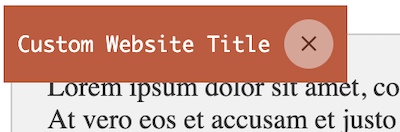
Frontend Hint: Adds an informative hint to the frontend showing the website title and the current application context.
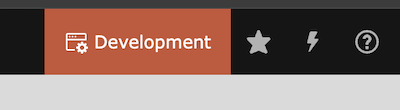
Backend toolbar: item: Adds an informative item with the current application context to the backend toolbar.
Modified favicon: Modify the favicon for frontend and backend based on the original favicon, the current application context and your configuration.
Support
There are several ways to get support for this extension:
Go to Admin Tools > Settings > Extension Configuration
Choose typo3_environment_indicator
The extension currently provides the following configuration options:
General
general.imageDriver
general.imageDriver
Type
option
Default
"gd"
Intervention Image supports "GD Library", "Imagick" and "libvips" to process images internally. You may choose one of them according to your PHP configuration. Options are "gd", "imagick" and "vips".
Frontend
frontend.favicon
frontend.favicon
Type
boolean
Default
1
Enable the favicon generation in frontend context
frontend.context
frontend.context
Type
boolean
Default
1
Enable the context frontend hint
Backend
backend.favicon
backend.favicon
Type
boolean
Default
1
Enable the favicon generation in backend context
backend.context
backend.context
Type
boolean
Default
1
Enable the context item within the backend toolbar
backend.contextProduction
backend.contextProduction
Type
boolean
Default
1
Enable the backend toolbar item also in production context
backend.contextProductionUserGroups
backend.contextProductionUserGroups
Type
string
Default
1
Restrict the backend user groups that are shown the toolbar item in the production context (comma separated list of group ids)
Frontend Hint
The frontend hint will show the current application context information and the website title as clickable note in the upper right corner.
Frontend hint
You can adjust the color of the hint in your ext_localconf.php:
text (string): The text of the toolbar item. Default is the application context.
icon (string): The icon of the toolbar item. Default is information-application-context.
index (int): The positioning index of the toolbar item. Default is 0.
Note
The backend toolbar item is the only feature, which can also be shown in production environments. Use the extension settings to enable, disable or restrict it.
Favicon
The favicon of the frontend or backend context will be modified regarding the application context and the associated
configuration.
For the frontend, the original favicon will either be fetched from the typoscript configuration
page.shortcutIcon (see typoscript reference)
or can be handled by your own fluid template via the FaviconViewHelper:
The modifiers will be executed one after the other. You can combine them if you want.
Note
If you want to specify the frontend or backend favicon separately, you can add the another parameter for the request context faviconModifierFrontendConfiguration or faviconModifierBackendConfiguration to the configByContext() method.
The following modifier classes are available:
TextModifier
This is the default modifier if no own configuration is set.
font (string): The font file path for the text. Default is
EXT:typo3_environment_indicator/Resources/Public/Fonts/OpenSans-Bold.ttf.
- position (string): The position of the text. Default is bottom. Possible values are bottom, top.
If you want to modify the image to your own need, implement a custom modifier class and add it to the configuration.
Developer corner
Some kinds of the environment indicators are configurable or can be extended
with custom implementations. This section provides an insight into
which development options are available and how these can be integrated
into the generation process.
Having fun with colorful favicons? Use the ColorUtility::getColoredString()
function as color entry in your modifier configuration to generate a color based on a string (default is the
$GLOBALS['TYPO3_CONF_VARS']['SYS']['sitename']).
Configuration Utility
Generally the whole configuration can be found in
$GLOBALS['TYPO3_CONF_VARS']['EXTCONF']['typo3_environment_indicator'].
You can/should use the ConfigurationUtility::configByContext() to easily add
necessary configuration for the environment indicator.
ext_localconf.php
// Add a colorized favicon modifier, add a colorful backend toolbar item and unset the frontend hint for the Development context
\KonradMichalik\Typo3EnvironmentIndicator\Utility\ConfigurationUtility::configByContext(
applicationContext: 'Development',
faviconModifierConfiguration: [
\KonradMichalik\Typo3EnvironmentIndicator\Image\ColorizeModifier::class =>
[
'color' => '#039BE5',
]
],
faviconModifierFrontendConfiguration: [
\KonradMichalik\Typo3EnvironmentIndicator\Image\ColorizeModifier::class =>
[
'opacity' => 0.5// Change just the opacity for the frontend favicon configuration
]
],
frontendHintConfiguration: null, // Unset frontend hint for Development context
backendToolbarConfiguration: [
'color' => '#039BE5',
]
);