Environment Indicator 

Extension key

typo3_environment_indicator

Package name

konradmichalik/typo3-environment-indicator

Version

2.2

Language

en

Author

Konrad Michalik & contributors

License

This extension documentation is published under the CC BY-NC-SA 4.0 (Creative Commons) license.


This extension provides several features to show an environment indicator in the TYPO3 frontend and backend.


Introduction 

A quick overview about the main features provided by this extension.

Installation 

Instructions on how to install this extension and which TYPO3 and PHP versions are currently supported.

Configuration 

Learn how to configure the extension in various ways. This includes extension configuration and the usage of the configuration utility.

Indicators 

Indicators are the main feature of this extension. They are used to show e.g. the current application context in the frontend and backend.

Triggers 

Triggers are conditions that can be used to show or hide the environment indicator in the frontend and backend.

Developer corner 

A quick overview of the possibilities for extending the extension

Introduction 

What does it do? 

This extension provides several features to show an environment indicator in the TYPO3 frontend and backend.

Features 

Combine trigger and indicator classes to show the environment in the TYPO3 frontend and backend. The extension provides several trigger and indicator classes out of the box. You can also create your own trigger and indicator classes.

Example

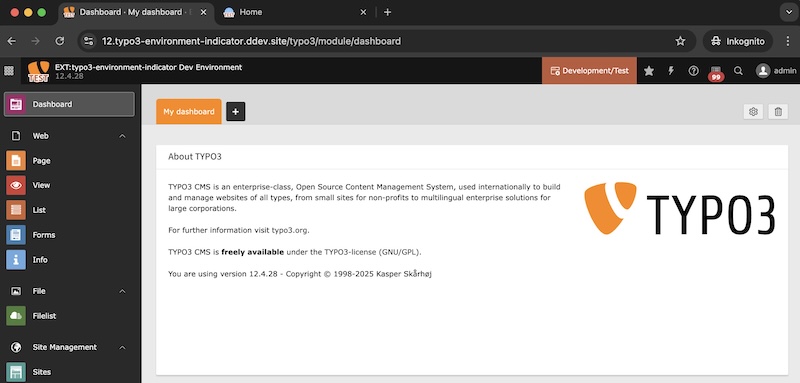
Backend with several environment indicators

Image Description Frontend Backend
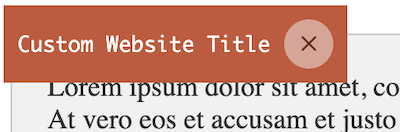
Frontend Hint Preview
Frontend Hint: Adds an informative hint to the frontend showing the website title and current environment. ✔️  
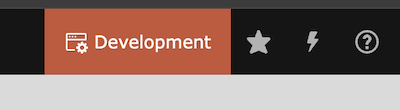
Backend Toolbar Item Preview
Backend toolbar item: Adds an informative item to the backend toolbar showing the current environment.   ✔️
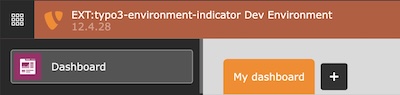
Backend Topbar Preview
Backend topbar: Colors the backend header topbar according to the environment.   ✔️
Favicon Preview
Modified favicon: Modifies the favicon for frontend and backend based on the original favicon, current environment and your configuration. ✔️ ✔️
Backend Logo Preview
Modified backend logo: Modifies the backend logo based on the original logo, current environment and your configuration.   ✔️
Dashboard Widget Preview
Dashboard widget: Render a dashboard widget according to the environment.   ✔️
Frontend Image Preview
Modified frontend image: Modifies the frontend image based on the original image, current environment and your configuration. ✔️  

Support 

There are several ways to get support for this extension:

License 

This extension is licensed under GNU General Public License 2.0 (or later).

Installation 

Requirements 

  • PHP 8.1 - 8.4
  • TYPO3 11.5 LTS - 13.4 LTS
  • ImageDriver: GD, Imagick or libvips

Installation 

Require the extension via Composer (recommended):

composer require konradmichalik/typo3-environment-indicator
Copied!

Or download it from the TYPO3 extension repository.

Configuration 

Include the static TypoScript template "Environment Indicator" or directly import it in your sitepackage:

Configuration/TypoScript/setup.typoscript
@import 'EXT:typo3_environment_indicator/Configuration/TypoScript/setup.typoscript'
Copied!

Image Support 

Only the following favicon image formats are supported: https://image.intervention.io/v3/introduction/formats

  • Due to the wide distribution of .ico and .svg files, these images are also supported.

Configuration 

The extension is ready to use without any further setup.

By default the following environment are preset:

  • Production/Standby
  • Production/Staging
  • Production/Stage
  • Testing*
  • Development*

You can adapt the extension to your needs, switch single features on and off and influence the presentation of the indicators.

If you want to add your own indicators, you should disable the default configuration within the extension configuration.

Extension configuration 

  1. Go to Admin Tools > Settings > Extension Configuration
  2. Choose typo3_environment_indicator

The extension currently provides the following configuration options:

General 

general.imageDriver

general.imageDriver
Type
option
Default
"gd"

Intervention Image supports "GD Library", "Imagick" and "libvips" to process images internally. You may choose one of them according to your PHP configuration. Options are "gd", "imagick" and "vips".

general.defaultConfiguration

general.defaultConfiguration
Type
boolean
Default
1

Enable the default configuration for the environment indicators. If you want to configure the environment indicators by yourself, set this to false. See Configuration.

Frontend 

frontend.favicon

frontend.favicon
Type
boolean
Default
1

Enable the favicon generation in frontend context

frontend.context

frontend.context
Type
boolean
Default
1

Enable the context frontend hint

Backend 

backend.favicon

backend.favicon
Type
boolean
Default
1

Enable the favicon generation in backend context

backend.context

backend.context
Type
boolean
Default
1

Enable the context item within the backend toolbar

backend.contextProduction

backend.contextProduction
Type
boolean
Default
1

Enable the backend toolbar item / backend topbar also in production context

Handler 

The Handler class is used to register the indicators and triggers in the TYPO3 backend. The class provides a static method addIndicator() to add the indicators and triggers to the system.

See the configuration for triggers and indicators.

ext_localconf.php
\KonradMichalik\Typo3EnvironmentIndicator\Configuration\Handler::addIndicator(
    triggers: [
        new \KonradMichalik\Typo3EnvironmentIndicator\Configuration\Trigger\FrontendUserGroup(1,2)
    ],
    indicators: [
        new \KonradMichalik\Typo3EnvironmentIndicator\Configuration\Indicator\Backend\Topbar([
            'color' => '#00ACC1',
        ]),
    ]
);
Copied!

Indicators 

Indicators are hints about the current environment that are shown discreetly in the frontend and/or backend.

Example

Backend with several environment indicators

You can combine multiple indicators.

ext_localconf.php
\KonradMichalik\Typo3EnvironmentIndicator\Configuration\Handler::addIndicator(
    triggers: [
        new \KonradMichalik\Typo3EnvironmentIndicator\Configuration\Trigger\ApplicationContext('Development'),
    ],
    indicators: [
        new \KonradMichalik\Typo3EnvironmentIndicator\Configuration\Indicator\Favicon([
            new \KonradMichalik\Typo3EnvironmentIndicator\Image\Modifier\TextModifier([
                'text' => 'TEST',
                'color' => '#f39c12',
                'stroke' => [
                    'color' => '#ffffff',
                    'width' => 3,
                ],
            ])
        ]),
        new \KonradMichalik\Typo3EnvironmentIndicator\Configuration\Indicator\Frontend\Hint([
            'color' => '#FFF176',
        ]),
        new \KonradMichalik\Typo3EnvironmentIndicator\Configuration\Indicator\Backend\Topbar([
            'color' => '#00ACC1',
        ]),
    ]
);
Copied!

The following indicators are available:

Frontend Hint 

The frontend hint will show the current environment information and the website title as clickable note in the upper right corner.

Frontend hint

Frontend hint

You can adjust the color of the hint in your ext_localconf.php:

ext_localconf.php
use KonradMichalik\Typo3EnvironmentIndicator\Configuration\Handler;
use KonradMichalik\Typo3EnvironmentIndicator\Configuration\Indicator;
use KonradMichalik\Typo3EnvironmentIndicator\Configuration\Trigger;

Configuration\Handler::addIndicator(
    triggers: [
        new Trigger\ApplicationContext('Testing')
    ],
    indicators: [
        new Indicator\Frontend\Hint([
            'color' => '#bd593a',
        ])
    ]
);
Copied!

Additional optional configuration keys:

  • text (string): The text of the hint. Default is the website title.
  • position (string): The position of the frontend hint. Default is top left. Possible values are bottom left,bottom right, top left, top right.

Frontend Image 

The frontend image will be modified regarding the environment and the associated configuration.

Frontend Image Example

Frontend Image Example

The image path can be adjusted via the ImageViewHelper:

Custom fluid template
<html xmlns:env="http://typo3.org/ns/KonradMichalik/Typo3EnvironmentIndicator/ViewHelpers"
    data-namespace-typo3-fluid="true">

{f:uri.resource(path:'EXT:your_extension/Resources/Public/Image/Default.png') -> env:image()}
{env:image(path:'EXT:your_extension/Resources/Public/Image/Default.png')}
Copied!

Modifiers 

The frontend image modification is identical to the favicon modification. You can use the same modifiers and configuration.

ext_localconf.php
use KonradMichalik\Typo3EnvironmentIndicator\Configuration\Handler;
use KonradMichalik\Typo3EnvironmentIndicator\Configuration\Indicator;
use KonradMichalik\Typo3EnvironmentIndicator\Configuration\Trigger;
use KonradMichalik\Typo3EnvironmentIndicator\Image;

Configuration\Handler::addIndicator(
    triggers: [
        new Trigger\ApplicationContext('Testing')
    ],
    indicators: [
        new Indicator\Frontend\Image([
            new Image\Modifier\TextModifier([
                'text' => 'TEST',
                'color' => '#f39c12',
                'stroke' => [
                    'color' => '#ffffff',
                    'width' => 3,
                ],
            ])
        ])
    ]
);
Copied!
Frontend Image Modifier Example

Backend toolbar item 

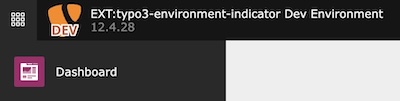
The backend toolbar item will show the current project version and environment.

Backend toolbar item

Backend toolbar item

You can adjust the color of the toolbar item in your ext_localconf.php:

ext_localconf.php
use KonradMichalik\Typo3EnvironmentIndicator\Configuration\Handler;
use KonradMichalik\Typo3EnvironmentIndicator\Configuration\Indicator;
use KonradMichalik\Typo3EnvironmentIndicator\Configuration\Trigger;

Configuration\Handler::addIndicator(
    triggers: [
        new Trigger\ApplicationContext('Testing')
    ],
    indicators: [
        new Indicator\Backend\Toolbar([
            'color' => '#bd593a',
        ])
    ]
);
Copied!

Additional optional configuration keys:

  • text (string): The text of the toolbar item. Default is the application context.
  • icon (string): The icon of the toolbar item. Default is information-application-context.
  • index (int): The positioning index of the toolbar item. Default is 0.

Backend topbar 

The backend toolbar item will show the current project version and environment.

Backend topbar

Backend topbar

You can adjust the color of the topbar in your ext_localconf.php:

ext_localconf.php
use KonradMichalik\Typo3EnvironmentIndicator\Configuration\Handler;
use KonradMichalik\Typo3EnvironmentIndicator\Configuration\Indicator;
use KonradMichalik\Typo3EnvironmentIndicator\Configuration\Trigger;

Configuration\Handler::addIndicator(
    triggers: [
        new Trigger\ApplicationContext('Testing')
    ],
    indicators: [
        new Indicator\Backend\Topbar([
            'color' => '#bd593a',
        ])
    ]
);
Copied!

Additional optional configuration keys:

  • removeTransition (bool): With this option you can remove the color to black transition on the right side of the topbar (not relevant for v13). Default is false.

Favicon 

The favicon of the frontend or backend context will be modified regarding the environment and the associated configuration.

Favicon Example

Favicon Example

local
 
depth

2

Frontend 

For the frontend, the original favicon will either be fetched from the typoscript configuration page.shortcutIcon (see typoscript reference) or can be handled by your own fluid template via the FaviconViewHelper:

Custom fluid template
<html xmlns:env="http://typo3.org/ns/KonradMichalik/Typo3EnvironmentIndicator/ViewHelpers"
    data-namespace-typo3-fluid="true">

{f:uri.resource(path:'EXT:your_extension/Resources/Public/Favicon/favicon.png') -> env:favicon()}
{env:favicon(favicon:'EXT:your_extension/Resources/Public/Favicon/favicon.png')}
Copied!

Backend 

For the backend, the favicon will be fetched by the extension configuration of $GLOBALS['TYPO3_CONF_VARS']['EXTENSIONS']['backend']['backendFavicon'].

Favicon Examples

Favicon Examples

Modifiers 

The favicon modification configuration can be found in $GLOBALS['TYPO3_CONF_VARS']['EXTENSIONS']['typo3_environment_indicator'].

Add a configured favicon modifier to the desired environment (e.g. Testing) in your ext_localconf.php:

ext_localconf.php
use KonradMichalik\Typo3EnvironmentIndicator\Configuration\Handler;
use KonradMichalik\Typo3EnvironmentIndicator\Configuration\Indicator;
use KonradMichalik\Typo3EnvironmentIndicator\Configuration\Trigger;
use KonradMichalik\Typo3EnvironmentIndicator\Image;

Configuration\Handler::addIndicator(
    triggers: [
        new Trigger\ApplicationContext('Testing')
    ],
    indicators: [
        new Indicator\Favicon([
            new Image\Modifier\TextModifier([
                'text' => 'TEST',
                'color' => '#f39c12',
                'stroke' => [
                    'color' => '#ffffff',
                    'width' => 3,
                ],
            ])
        ])
    ]
);
Copied!
Favicon Modifier Example

The modifiers will be executed one after the other. You can combine them if you want.

The following modifier classes are available:

TextModifier 

This is the default modifier if no own configuration is set.

ext_localconf.php
use KonradMichalik\Typo3EnvironmentIndicator\Configuration\Handler;
use KonradMichalik\Typo3EnvironmentIndicator\Configuration\Indicator;
use KonradMichalik\Typo3EnvironmentIndicator\Configuration\Trigger;
use KonradMichalik\Typo3EnvironmentIndicator\Image;

Configuration\Handler::addIndicator(
    triggers: [
        new Trigger\ApplicationContext('Development')
    ],
    indicators: [
        new Indicator\Favicon([
            new Image\Modifier\TextModifier([
                'text' => 'DEV',
                'color' => '#bd593a',
                'stroke' => [
                    'color' => '#ffffff',
                    'width' => 3,
                ],
            ])
        ])
    ]
);
Copied!
Favicon TextModifier Example

Additional optional configuration keys:

  • font (string): The font file path for the text. Default is EXT:typo3_environment_indicator/Resources/Public/Fonts/OpenSans-Bold.ttf.
  • position (string): The position of the text. Default is bottom. Possible values are bottom, top.

TriangleModifier 

Adds a triangle indicator to the favicon.

ext_localconf.php
use KonradMichalik\Typo3EnvironmentIndicator\Configuration\Handler;
use KonradMichalik\Typo3EnvironmentIndicator\Configuration\Indicator;
use KonradMichalik\Typo3EnvironmentIndicator\Configuration\Trigger;
use KonradMichalik\Typo3EnvironmentIndicator\Image;

Configuration\Handler::addIndicator(
    triggers: [
        new Trigger\ApplicationContext('Development')
    ],
    indicators: [
        new Indicator\Favicon([
            new Image\Modifier\TriangleModifier([
                'color' => '#bd593a',
            ])
        ])
    ]
);
Copied!
Favicon TriangleModifier Example

Additional optional configuration keys:

  • size (float): The percentage size of the triangle. Default is 0.7.
  • position (string): The position of the triangle. Default is bottom right. Possible values are bottom left, bottom right, top left, top right.

CircleModifier 

Adds a circle indicator to the favicon.

ext_localconf.php
use KonradMichalik\Typo3EnvironmentIndicator\Configuration\Handler;
use KonradMichalik\Typo3EnvironmentIndicator\Configuration\Indicator;
use KonradMichalik\Typo3EnvironmentIndicator\Configuration\Trigger;
use KonradMichalik\Typo3EnvironmentIndicator\Image;

Configuration\Handler::addIndicator(
    triggers: [
        new Trigger\ApplicationContext('Development')
    ],
    indicators: [
        new Indicator\Favicon([
            new Image\Modifier\CircleModifier([
                'color' => '#bd593a',
            ])
        ])
    ]
);
Copied!
Favicon CircleModifier Example

Additional optional configuration keys:

  • size (float): The percentage size of the circle. Default is 0.4.
  • position (string): The position of the circle. Default is bottom right. Possible values are bottom left, bottom right, top left, top right.
  • padding (float): The percentage padding of the circle. Default is 0.1.

FrameModifier 

Adds a frame around the favicon.

ext_localconf.php
use KonradMichalik\Typo3EnvironmentIndicator\Configuration\Handler;
use KonradMichalik\Typo3EnvironmentIndicator\Configuration\Indicator;
use KonradMichalik\Typo3EnvironmentIndicator\Configuration\Trigger;
use KonradMichalik\Typo3EnvironmentIndicator\Image;

Configuration\Handler::addIndicator(
    triggers: [
        new Trigger\ApplicationContext('Development')
    ],
    indicators: [
        new Indicator\Favicon([
            new Image\Modifier\FrameModifier([
                'color' => '#bd593a',
            ])
        ])
    ]
);
Copied!
Favicon FrameModifier Example

Additional optional configuration keys:

  • borderSize (float): The border size of the frame. Default is 5.

ReplaceModifier 

Replace the original favicon with a custom one regarding the environment.

ext_localconf.php
use KonradMichalik\Typo3EnvironmentIndicator\Configuration\Handler;
use KonradMichalik\Typo3EnvironmentIndicator\Configuration\Indicator;
use KonradMichalik\Typo3EnvironmentIndicator\Configuration\Trigger;
use KonradMichalik\Typo3EnvironmentIndicator\Image;

Configuration\Handler::addIndicator(
    triggers: [
        new Trigger\ApplicationContext('Development')
    ],
    indicators: [
        new Indicator\Favicon([
            new Image\Modifier\ReplaceModifier([
                'path' => 'EXT:sitepackage/Resources/Public/Icons/favicon.png',
            ])
        ])
    ]
);
Copied!
Favicon ReplaceModifier Example

OverlayModifier 

Overlay an additional image to the original favicon regarding the environment.

ext_localconf.php
use KonradMichalik\Typo3EnvironmentIndicator\Configuration\Handler;
use KonradMichalik\Typo3EnvironmentIndicator\Configuration\Indicator;
use KonradMichalik\Typo3EnvironmentIndicator\Configuration\Trigger;
use KonradMichalik\Typo3EnvironmentIndicator\Image;

Configuration\Handler::addIndicator(
    triggers: [
        new Trigger\ApplicationContext('Development')
    ],
    indicators: [
        new Indicator\Favicon([
            new Image\Modifier\OverlayModifier([
                'path' => 'EXT:sitepackage/Resources/Public/Icons/favicon.png',
            ])
        ])
    ]
);
Copied!
Favicon OverlayModifier Example

Additional optional configuration keys:

  • size (float): The percentage size of the overlay. Default is 0.5.
  • position (string): The position of the overlay. Default is bottom right. Possible values are bottom left, bottom right, top left, top right.
  • padding (float): The percentage padding of the overlay. Default is 0.1.

ColorizeModifier 

Overlay an additional image to the original favicon regarding the environment.

ext_localconf.php
use KonradMichalik\Typo3EnvironmentIndicator\Configuration\Handler;
use KonradMichalik\Typo3EnvironmentIndicator\Configuration\Indicator;
use KonradMichalik\Typo3EnvironmentIndicator\Configuration\Trigger;
use KonradMichalik\Typo3EnvironmentIndicator\Image;

Configuration\Handler::addIndicator(
    triggers: [
        new Trigger\ApplicationContext('Development')
    ],
    indicators: [
        new Indicator\Favicon([
            new Image\Modifier\ColorizeModifier([
                'color' => '#039BE5',
            ])
        ])
    ]
);
Copied!
Favicon ColorizeModifier Example

Additional optional configuration keys:

  • opacity (float): Controls the opacity of the colorization. Default is 1.
  • brightness (integer): Controls the brightness of the colorization. Possible values are from -100 to 100.
  • contrast (integer): Controls the contrast of the colorization. Possible values are from -100 to 100.

Backend Logo 

The backend logo will be modified regarding the environment and the associated configuration. This can be used to e.g. show the current environment in the website logo.

Backend Logo Example

Backend Logo Example

The backend logo will be fetched by the extension configuration of $GLOBALS['TYPO3_CONF_VARS']['EXTENSIONS']['backend']['backendLogo'].

Modifiers 

The backend logo modification is identical to the favicon modification. You can use the same modifiers and configuration.

ext_localconf.php
use KonradMichalik\Typo3EnvironmentIndicator\Configuration\Handler;
use KonradMichalik\Typo3EnvironmentIndicator\Configuration\Indicator;
use KonradMichalik\Typo3EnvironmentIndicator\Configuration\Trigger;
use KonradMichalik\Typo3EnvironmentIndicator\Image;

Configuration\Handler::addIndicator(
    triggers: [
        new Trigger\ApplicationContext('Testing')
    ],
    indicators: [
        new Indicator\Backend\Logo([
            new Image\Modifier\TextModifier([
                'text' => 'TEST',
                'color' => '#f39c12',
                'stroke' => [
                    'color' => '#ffffff',
                    'width' => 3,
                ],
            ])
        ])
    ]
);
Copied!
Backend Logo Modifier Example

Dashboard Widget 

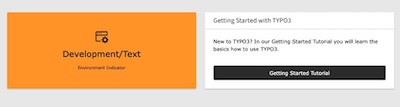
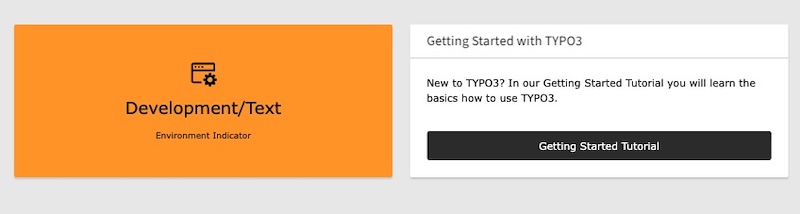
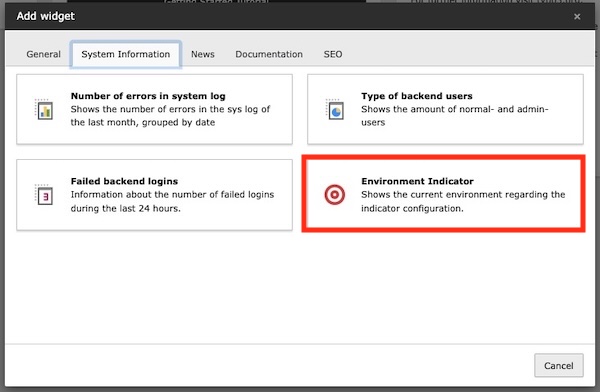
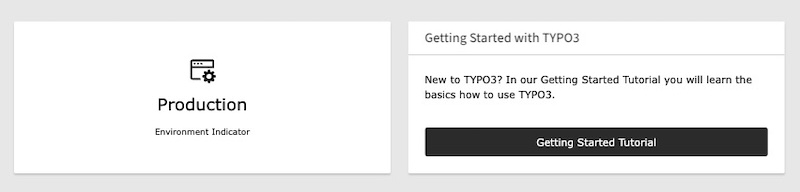
The dashboard widget can be placed to the TYPO3 backend dashboard. It shows the current environment regarding the configuration.

Dashboard Widget Example

Dashboard Widget Example

Dashboard Widget Selection

Dashboard Widget Selection

You can adjust the widget configuration in your ext_localconf.php:

ext_localconf.php
use KonradMichalik\Typo3EnvironmentIndicator\Configuration\Handler;
use KonradMichalik\Typo3EnvironmentIndicator\Configuration\Indicator;
use KonradMichalik\Typo3EnvironmentIndicator\Configuration\Trigger;

Configuration\Handler::addIndicator(
    triggers: [
        new Trigger\ApplicationContext('Development/Text')
    ],
    indicators: [
        new Indicator\Backend\Widget([
            'color' => '#bd593a',
        ])
    ]
);
Copied!

Additional optional configuration keys:

  • text (string): The text of the widget. Default is the application context.
  • icon (string): The icon of the widget. Default is information-application-context.
  • textSize (string): The text size of the widget. Default is 20px.

The dashboard widget can not disappear, if no configuration is set. It is always shown in the backend dashboard.

Dashboard Widget Production Example

Dashboard Widget Production Example

Triggers 

Triggers acts like conditions and are used to define when environment indicators should be shown.

You can combine multiple different triggers to build up flexible conditions.

ext_localconf.php
\KonradMichalik\Typo3EnvironmentIndicator\Configuration\Handler::addIndicator(
    triggers: [
        new \KonradMichalik\Typo3EnvironmentIndicator\Configuration\Trigger\ApplicationContext('Development'),
        new \KonradMichalik\Typo3EnvironmentIndicator\Configuration\Trigger\Admin()
    ],
    indicators: [
        new \KonradMichalik\Typo3EnvironmentIndicator\Configuration\Indicator\Backend\Topbar([
            'color' => '#00ACC1',
        ]),
    ]
);
Copied!

There are several triggers available, which can be used to show the indicators in different contexts.

Admin 

The Admin trigger is used to show the indicators in the TYPO3 backend for admin users.

ext_localconf.php
\KonradMichalik\Typo3EnvironmentIndicator\Configuration\Handler::addIndicator(
    triggers: [
        new \KonradMichalik\Typo3EnvironmentIndicator\Configuration\Trigger\Admin()
    ],
    indicators: [
        new \KonradMichalik\Typo3EnvironmentIndicator\Configuration\Indicator\Backend\Topbar([
            'color' => '#00ACC1',
        ]),
    ]
);
Copied!

Application Context 

The ApplicationContext trigger is used to show the indicators in the TYPO3 backend for a specific application context.

ext_localconf.php
\KonradMichalik\Typo3EnvironmentIndicator\Configuration\Handler::addIndicator(
    triggers: [
        new \KonradMichalik\Typo3EnvironmentIndicator\Configuration\Trigger\ApplicationContext('Development*', 'Testing')
    ],
    indicators: [
        new \KonradMichalik\Typo3EnvironmentIndicator\Configuration\Indicator\Backend\Topbar([
            'color' => '#00ACC1',
        ]),
    ]
);
Copied!

The configuration supports multiple context names, which are separated by a comma. The context names can be prefixed with a wildcard * to match all contexts that start with the given name. For example, Development* will match all contexts that start with Development, such as Development, Development/Local, Development/DDEV, etc.

Backend User Group 

The BackendUserGroup trigger is used to show the indicators in the TYPO3 backend for specific backend user groups.

ext_localconf.php
\KonradMichalik\Typo3EnvironmentIndicator\Configuration\Handler::addIndicator(
    triggers: [
        new \KonradMichalik\Typo3EnvironmentIndicator\Configuration\Trigger\BackendUserGroup(1,2)
    ],
    indicators: [
        new \KonradMichalik\Typo3EnvironmentIndicator\Configuration\Indicator\Backend\Topbar([
            'color' => '#00ACC1',
        ]),
    ]
);
Copied!

The configuration supports multiple group IDs, which are separated by a comma.

Custom 

The Custom trigger is used to show the indicators in the TYPO3 backend for custom conditions.

ext_localconf.php
\KonradMichalik\Typo3EnvironmentIndicator\Configuration\Handler::addIndicator(
    triggers: [
        new \KonradMichalik\Typo3EnvironmentIndicator\Configuration\Trigger\Custom(
            function () {
                return true;
            }
        ),
        new \KonradMichalik\Typo3EnvironmentIndicator\Configuration\Trigger\Custom('\YourExtension\YourClass::yourMethod()'),
    ],
    indicators: [
        new \KonradMichalik\Typo3EnvironmentIndicator\Configuration\Indicator\Backend\Topbar([
            'color' => '#00ACC1',
        ]),
    ]
);
Copied!

The configuration supports a callable function, which is executed to determine if the indicator should be shown. The function should return a boolean value. The function can also be a closure or an anonymous function.

Frontend User Group 

The FrontendUserGroup trigger is used to show the indicators in the TYPO3 Frontend for specific frontend user groups.

ext_localconf.php
\KonradMichalik\Typo3EnvironmentIndicator\Configuration\Handler::addIndicator(
    triggers: [
        new \KonradMichalik\Typo3EnvironmentIndicator\Configuration\Trigger\FrontendUserGroup(1,2)
    ],
    indicators: [
        new \KonradMichalik\Typo3EnvironmentIndicator\Configuration\Indicator\Backend\Topbar([
            'color' => '#00ACC1',
        ]),
    ]
);
Copied!

The configuration supports multiple group IDs, which are separated by a comma.

IP Address 

The IP trigger is used to show the indicators in the TYPO3 backend for specific IP addresses.

ext_localconf.php
\KonradMichalik\Typo3EnvironmentIndicator\Configuration\Handler::addIndicator(
    triggers: [
        new \KonradMichalik\Typo3EnvironmentIndicator\Configuration\Trigger\Ip('127.0.0.1', '192.168.0.0/24')
    ],
    indicators: [
        new \KonradMichalik\Typo3EnvironmentIndicator\Configuration\Indicator\Backend\Topbar([
            'color' => '#00ACC1',
        ]),
    ]
);
Copied!

The configuration supports multiple ip addresses, which are separated by a comma. Ip ranges are also supported, e.g. 0/24.

Developer corner 

Some kinds of the environment indicators are configurable or can be extended with custom implementations. This section provides an insight into which development options are available and how these can be integrated into the generation process.

Custom modifiers 

The predefined modifiers are not enough for your use case? No problem! You can easily write your own.

Implement your own image modifier by extending the AbstractModifier class and implementing the ModifierInterface method.

Classes/Image/CustomModifier.php
<?php

namespace Vendor\YourExt\Image\Modifier;

use Intervention\Image\Geometry\Factories\RectangleFactory;
use Intervention\Image\Interfaces\ImageInterface;
use KonradMichalik\Typo3EnvironmentIndicator\Image\Modifier\AbstractModifier;
use KonradMichalik\Typo3EnvironmentIndicator\Image\Modifier\ModifierInterface;

class CustomModifier extends AbstractModifier implements ModifierInterface {

    public function modify(ImageInterface &$image): void
    {
        // Modify the image
    }

    public function getRequiredConfigurationKeys(): array
    {
        // Return the required configuration keys
    }
}
Copied!

See the Intervention Image documentation for more information about image manipulation.

Example 

The following configuration is also the default configuration. This shall show the usage of the extension.

ext_localconf.php
use KonradMichalik\Typo3EnvironmentIndicator\Configuration\Handler;
use KonradMichalik\Typo3EnvironmentIndicator\Configuration\Indicator;
use KonradMichalik\Typo3EnvironmentIndicator\Configuration\Trigger;
use KonradMichalik\Typo3EnvironmentIndicator\Image;

Handler::addIndicator(
    triggers: [
        new Trigger\ApplicationContext('Development*')
    ],
    indicators: [
        new Indicator\Favicon([
            new Image\Modifier\TextModifier([
                'text' => 'DEV',
                'color' => '#bd593a',
                'stroke' => [
                    'color' => '#ffffff',
                    'width' => 3,
                ],
            ])
        ]),
        new Indicator\Frontend\Hint([
            'color' => '#bd593a',
        ]),
        new Indicator\Backend\Toolbar([
            'color' => '#bd593a',
        ])
    ]
);

Handler::addIndicator(
    triggers: [
        new Trigger\ApplicationContext('Testing*')
    ],
    indicators: [
        new Indicator\Favicon([
            new Image\Modifier\TextModifier([
                'text' => 'TEST',
                'color' => '#f39c12',
                'stroke' => [
                    'color' => '#ffffff',
                    'width' => 3,
                ],
            ])
        ]),
        new Indicator\Frontend\Hint([
            'color' => '#f39c12',
        ]),
        new Indicator\Backend\Toolbar([
            'color' => '#f39c12',
        ])
    ]
);

Handler::addIndicator(
    triggers: [
        new Trigger\ApplicationContext('Production/Staging', 'Production/Stage')
    ],
    indicators: [
        new Indicator\Favicon([
            new Image\Modifier\TextModifier([
                'text' => 'STG',
                'color' => '#2f9c91',
                'stroke' => [
                    'color' => '#ffffff',
                    'width' => 3,
                ],
            ])
        ]),
        new Indicator\Frontend\Hint([
            'color' => '#2f9c91',
        ]),
        new Indicator\Backend\Toolbar([
            'color' => '#2f9c91',
        ])
    ]
);

Handler::addIndicator(
    triggers: [
        new Trigger\ApplicationContext('Production/Standby')
    ],
    indicators: [
        new Indicator\Backend\Toolbar([
            'color' => '#2f9c91',
        ])
    ]
);
Copied!