This extension documentation is published under the
CC BY-NC-SA 4.0
(Creative Commons) license.
This extension provides several features to show an environment indicator in the TYPO3 frontend and backend.
Introduction
A quick overview about the main features provided by this extension.
Installation
Instructions on how to install this extension and which TYPO3 and PHP versions are currently supported.
Configuration
Learn how to configure the extension in various ways. This includes extension configuration and the usage of the configuration utility.
Indicators
Indicators are the main feature of this extension. They are used to show e.g. the current application context in the frontend and backend.
Triggers
Triggers are conditions that can be used to show or hide the environment indicator in the frontend and backend.
Developer corner
A quick overview of the possibilities for extending the extension
Introduction
What does it do?
This extension provides several features to show an environment indicator in the TYPO3 frontend and backend.
Note
These environment indicators are mainly for development purposes (e.g. distinguishing between different test systems) and will not show in production environments.
Features
Combine trigger and indicator classes to show the environment in the TYPO3 frontend and backend. The extension provides several trigger and indicator classes out of the box. You can also create your own trigger and indicator classes.
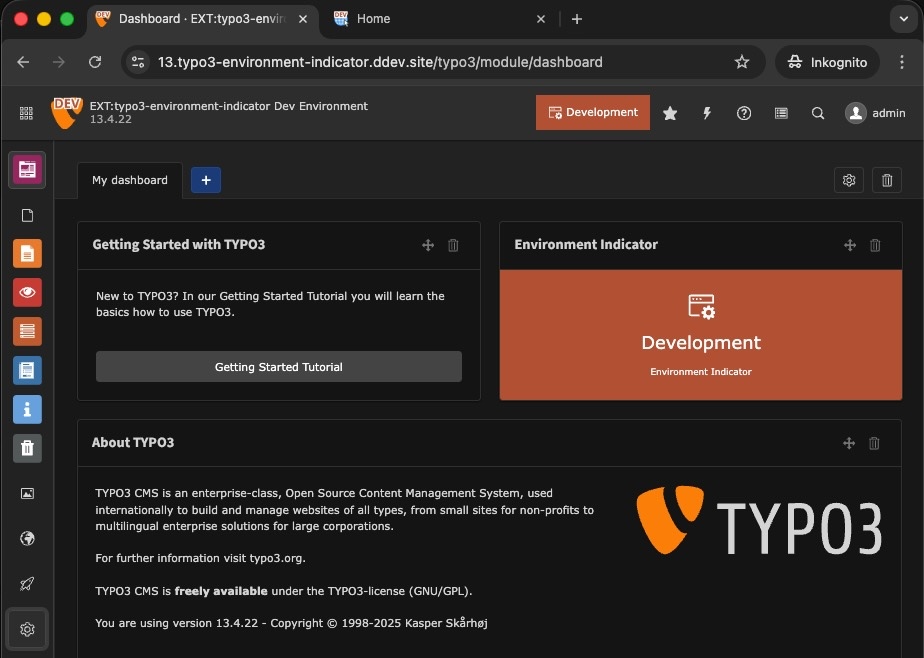
Backend with several environment indicators
Frontend + Backend
Icon
Preview
Description
Modified favicon: Modifies the favicon for frontend and backend based on the original favicon, current environment and your configuration.
Frontend
Icon
Preview
Description
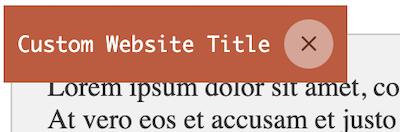
Frontend Hint: Adds an informative hint to the frontend showing the website title and current environment.
Modified frontend image: Modifies the frontend image based on the original image, current environment and your configuration.
Backend
Icon
Preview
Description
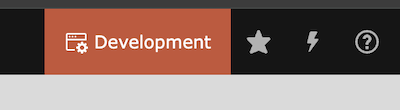
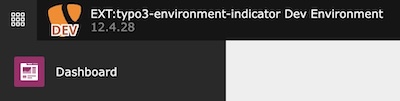
Backend toolbar item: Adds an informative item to the backend toolbar showing the current environment.
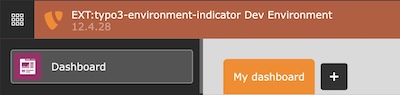
Backend topbar: Colors the backend header topbar according to the environment.
Modified backend logo: Modifies the backend logo based on the original logo, current environment and your configuration.
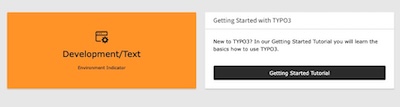
Dashboard widget: Render a dashboard widget according to the environment.
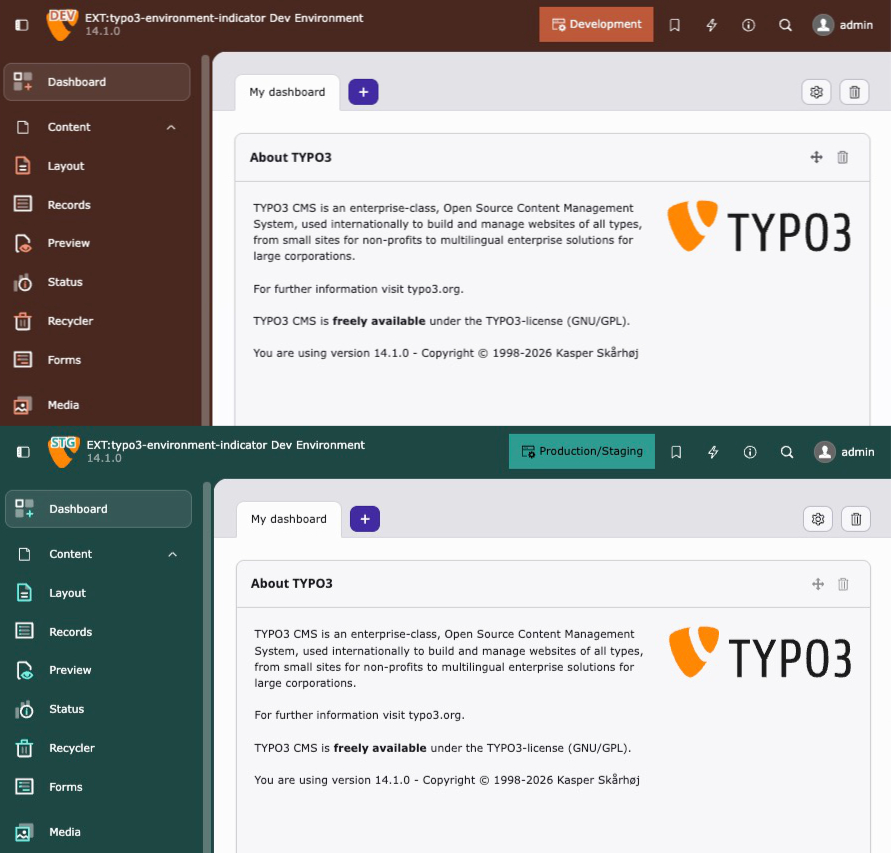
Backend theme(experimental): Colors the entire TYPO3 v14+ backend (primary color, header, sidebar) based on the environment.
Support
There are several ways to get support for this extension:
TypoScript configuration is only necessary if you want to use the frontend hint.
Site Set (Recommended)
Important
Starting with version 3.0, Site Sets are required for the frontend TypoScript configuration.
The legacy static TypoScript include is no longer supported.
Add the site set as a dependency in your site configuration:
The static TypoScript include is deprecated and removed in version 3.0.
Please use Site Sets instead.
Alternatively, include the static TypoScript template via the Template module
by adding "Environment Indicator" under Include static (from extensions).
Go to Admin Tools > Settings > Extension Configuration
Choose typo3_environment_indicator
The extension currently provides the following configuration options:
General
general.imageDriver
general.imageDriver
Type
option
Default
"gd"
Intervention Image supports "GD Library", "Imagick" and "libvips" to process images internally. You may choose one of them according to your PHP configuration. Options are "gd", "imagick" and "vips".
general.defaultConfiguration
general.defaultConfiguration
Type
boolean
Default
1
Enable the default configuration for the environment indicators. If you want to configure the environment indicators by yourself, set this to false. See Configuration.
Frontend
frontend.favicon
frontend.favicon
Type
boolean
Default
1
Enable the favicon generation in frontend context
frontend.context
frontend.context
Type
boolean
Default
1
Enable the context frontend hint
frontend.image
frontend.image
Type
boolean
Default
1
Enable the image generation in frontend context
Backend
backend.favicon
backend.favicon
Type
boolean
Default
1
Enable the favicon generation in backend context
backend.logo
backend.logo
Type
boolean
Default
1
Enable the logo generation in backend context
backend.context
backend.context
Type
boolean
Default
1
Enable the context item within the backend toolbar
backend.contextProduction
backend.contextProduction
Type
boolean
Default
1
Enable the backend toolbar item / backend topbar also in production context
Handler
The Handler class is used to register the indicators and triggers in the TYPO3 backend. The class provides a static method addIndicator() to add the indicators and triggers to the system.
For the frontend, the original favicon will either be fetched from the typoscript configuration
page.shortcutIcon (see typoscript reference)
or can be handled by your own fluid template via the FaviconViewHelper:
For the backend, the favicon will be fetched by the extension configuration of
$GLOBALS['TYPO3_CONF_VARS']['EXTENSIONS']['backend']['backendFavicon'].
Favicon Examples
Scope
By default, the Favicon indicator applies modifications to both frontend and backend. You can restrict it to a specific application type using the Scope enum:
ext_localconf.php
useKonradMichalik\Typo3EnvironmentIndicator\Configuration\Handler;
useKonradMichalik\Typo3EnvironmentIndicator\Configuration\Indicator;
useKonradMichalik\Typo3EnvironmentIndicator\Configuration\Trigger;
useKonradMichalik\Typo3EnvironmentIndicator\Enum\Scope;
useKonradMichalik\Typo3EnvironmentIndicator\Image;
Handler::addIndicator(
triggers: [
new Trigger\ApplicationContext('Development*'),
],
indicators: [
// Only modify the frontend faviconnew Indicator\Favicon(
configuration: [
new Image\Modifier\TextModifier([
'text' => 'DEV',
'color' => '#bd593a',
]),
],
scope: Scope::Frontend,
),
],
);
Copied!
Available scope values:
Scope::Global (default): Apply to both frontend and backend.
Scope::Frontend: Apply only to the frontend.
Scope::Backend: Apply only to the backend.
Modifiers
The favicon modification configuration can be found in
$GLOBALS['TYPO3_CONF_VARS']['EXTENSIONS']['typo3_environment_indicator'].
Add a configured favicon modifier to the desired environment (e.g. Testing) in your ext_localconf.php:
useKonradMichalik\Typo3EnvironmentIndicator\Configuration\Handler;
useKonradMichalik\Typo3EnvironmentIndicator\Configuration\Indicator;
useKonradMichalik\Typo3EnvironmentIndicator\Configuration\Trigger;
useKonradMichalik\Typo3EnvironmentIndicator\Image;
Handler::addIndicator(
triggers: [
new Trigger\ApplicationContext('Development')
],
indicators: [
new Indicator\Favicon([
new Image\Modifier\CircleModifier([
'color' => '#bd593a',
])
])
]
);
Copied!
Additional optional configuration keys:
size (float): The percentage size of the circle. Default is 0.4.
position (string): The position of the circle. Default is bottom right. Possible values are top left, top center, top right, center left, center, center right, bottom left, bottom center, bottom right.
padding (float): The percentage padding of the circle. Default is 0.1.
Overlay an additional image to the original favicon regarding the environment.
ext_localconf.php
useKonradMichalik\Typo3EnvironmentIndicator\Configuration\Handler;
useKonradMichalik\Typo3EnvironmentIndicator\Configuration\Indicator;
useKonradMichalik\Typo3EnvironmentIndicator\Configuration\Trigger;
useKonradMichalik\Typo3EnvironmentIndicator\Image;
Handler::addIndicator(
triggers: [
new Trigger\ApplicationContext('Development')
],
indicators: [
new Indicator\Favicon([
new Image\Modifier\OverlayModifier([
'path' => 'EXT:sitepackage/Resources/Public/Icons/favicon.png',
])
])
]
);
Copied!
Additional configuration keys (required by the modifier, but provided via default configuration):
size (float): The percentage size of the overlay. Default is 0.5.
position (string): The position of the overlay. Default is bottom right. Possible values are top left, top center, top right, center left, center, center right, bottom left, bottom center, bottom right.
padding (float): The percentage padding of the overlay. Default is 0.1.
The backend toolbar item will show the current project version and environment.
Backend toolbar item
You can adjust the color of the toolbar item in your ext_localconf.php:
ext_localconf.php
useKonradMichalik\Typo3EnvironmentIndicator\Configuration\Handler;
useKonradMichalik\Typo3EnvironmentIndicator\Configuration\Indicator;
useKonradMichalik\Typo3EnvironmentIndicator\Configuration\Trigger;
Handler::addIndicator(
triggers: [
new Trigger\ApplicationContext('Testing')
],
indicators: [
new Indicator\Backend\Toolbar([
'color' => '#bd593a',
])
]
);
Copied!
Additional optional configuration keys:
text (string): The text of the toolbar item. Default is the application context.
icon (array): The icon configuration of the toolbar item. Expects a nested array with a context key. Default is ['context' => 'information-application-context'].
index (int): The positioning index of the toolbar item. Default is 0.
Note
The backend toolbar item is a feature, which can also be shown in production context. Use the extension settings to enable, disable or restrict it.
Backend topbar
The backend toolbar item will show the current project version and environment.
Backend topbar
You can adjust the color of the topbar in your ext_localconf.php:
ext_localconf.php
useKonradMichalik\Typo3EnvironmentIndicator\Configuration\Handler;
useKonradMichalik\Typo3EnvironmentIndicator\Configuration\Indicator;
useKonradMichalik\Typo3EnvironmentIndicator\Configuration\Trigger;
Handler::addIndicator(
triggers: [
new Trigger\ApplicationContext('Testing')
],
indicators: [
new Indicator\Backend\Topbar([
'color' => '#bd593a',
])
]
);
Copied!
Note
The backend topbar is a feature, which can also be shown in production environments. Use the extension settings to enable, disable or restrict it.
Backend Logo
The backend logo will be modified regarding the environment and the associated
configuration. This can be used to e.g. show the current environment in the website logo.
Backend Logo Example
The backend logo will be fetched by the extension configuration of
$GLOBALS['TYPO3_CONF_VARS']['EXTENSIONS']['backend']['backendLogo'].
Modifiers
The backend logo modification is identical to the favicon modification. You can use the same modifiers and configuration.
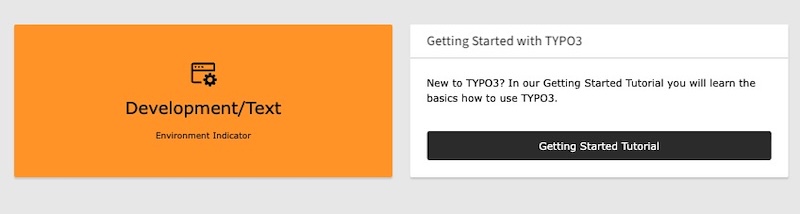
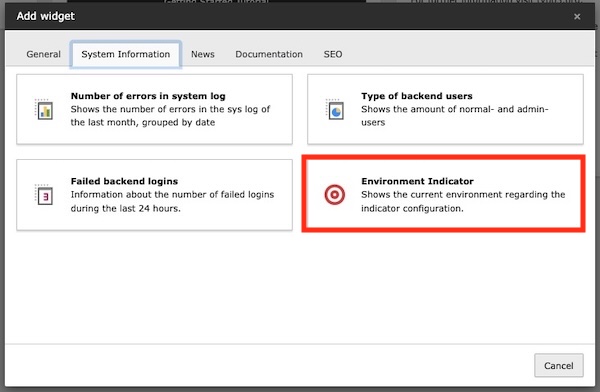
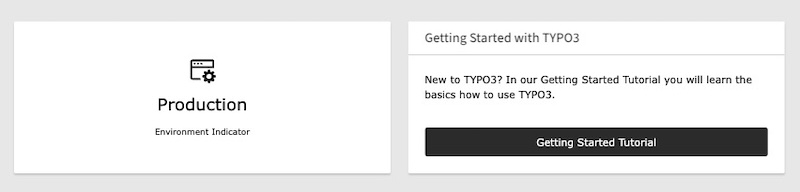
The dashboard widget can be placed to the TYPO3 backend dashboard. It shows the current environment regarding the configuration.
Dashboard Widget Example
Dashboard Widget Selection
The widget is registered with its own icon (identifier environment-indicator-widget), which is shown in the widget selection dialog:
You can adjust the widget configuration in your ext_localconf.php:
ext_localconf.php
useKonradMichalik\Typo3EnvironmentIndicator\Configuration\Handler;
useKonradMichalik\Typo3EnvironmentIndicator\Configuration\Indicator;
useKonradMichalik\Typo3EnvironmentIndicator\Configuration\Trigger;
Handler::addIndicator(
triggers: [
new Trigger\ApplicationContext('Development/Text')
],
indicators: [
new Indicator\Backend\Widget([
'color' => '#bd593a',
])
]
);
Copied!
Additional optional configuration keys:
text (string): The text of the widget. Default is the application context.
icon (string): The icon of the widget. Default is information-application-context.
textSize (string): The text size of the widget. Default is 20px.
The dashboard widget can not disappear, if no configuration is set. It is always shown in the backend dashboard.
Dashboard Widget Production Example
Backend theme
New in version 3.1
This indicator requires TYPO3 v14 or later.
Warning
This feature is experimental. The TYPO3 backend CSS framework is
currently considered internal API. While the overridden CSS custom properties
are stable within TYPO3 v14, they may change in future major versions.
The backend theme indicator colors the entire TYPO3 backend by overriding
CSS custom properties introduced with the
TYPO3 v14 Fresh theme.
Instead of modifying individual elements, it sets the primary accent color and
scaffold variables, which automatically cascade through the backend UI -
including the topbar, sidebar, buttons, active states, and focus rings.
This works with all TYPO3 backend themes (Fresh, Modern, Classic) and supports
both light and dark mode.
You can adjust the theme in your ext_localconf.php:
ext_localconf.php
useKonradMichalik\Typo3EnvironmentIndicator\Configuration\Handler;
useKonradMichalik\Typo3EnvironmentIndicator\Configuration\Indicator;
useKonradMichalik\Typo3EnvironmentIndicator\Configuration\Trigger;
Handler::addIndicator(
triggers: [
new Trigger\ApplicationContext('Development*'),
],
indicators: [
new Indicator\Backend\Theme([
'color' => '#bd593a',
]),
],
);
Copied!
Configuration keys:
color (string): The primary accent color as hex value. Required.
scaffoldHeader (bool): Whether to color the backend header. Default is true.
scaffoldSidebar (bool): Whether to color the backend sidebar. Default is true.
neutralMix (string): The neutral tinting strength as CSS percentage value. Default is '15%'.
This indicator requires TYPO3 v14 or later. On TYPO3 v13 and below, the
indicator is silently ignored.
Important
When this indicator is active, the user's theme selection in
User Settings > Theme is overridden by the environment color.
An info box is displayed in the User Settings to inform the user.
Note
The backend theme indicator can be combined with other backend indicators
like Backend toolbar or
Backend topbar for maximum visual distinction
between environments.
Triggers
Triggers act as conditions and are used to define when environment indicators should be shown.
You can combine multiple different triggers within a single Handler::addIndicator() call. All triggers must return true (AND logic) for the associated indicators to activate.
ext_localconf.php
\KonradMichalik\Typo3EnvironmentIndicator\Configuration\Handler::addIndicator(
triggers: [
new \KonradMichalik\Typo3EnvironmentIndicator\Configuration\Trigger\ApplicationContext('Development'),
new \KonradMichalik\Typo3EnvironmentIndicator\Configuration\Trigger\Admin()
],
indicators: [
new \KonradMichalik\Typo3EnvironmentIndicator\Configuration\Indicator\Backend\Topbar([
'color' => '#00ACC1',
]),
]
);
Copied!
There are several triggers available, which can be used to show the indicators in different contexts.
The Admin trigger is used to show the indicators in the TYPO3 backend for admin users.
ext_localconf.php
\KonradMichalik\Typo3EnvironmentIndicator\Configuration\Handler::addIndicator(
triggers: [
new \KonradMichalik\Typo3EnvironmentIndicator\Configuration\Trigger\Admin()
],
indicators: [
new \KonradMichalik\Typo3EnvironmentIndicator\Configuration\Indicator\Backend\Topbar([
'color' => '#00ACC1',
]),
]
);
Copied!
Application Context
The ApplicationContext trigger is used to show the indicators in the TYPO3 backend for a specific application context.
ext_localconf.php
\KonradMichalik\Typo3EnvironmentIndicator\Configuration\Handler::addIndicator(
triggers: [
new \KonradMichalik\Typo3EnvironmentIndicator\Configuration\Trigger\ApplicationContext('Development*', 'Testing')
],
indicators: [
new \KonradMichalik\Typo3EnvironmentIndicator\Configuration\Indicator\Backend\Topbar([
'color' => '#00ACC1',
]),
]
);
Copied!
The configuration supports multiple context names as separate arguments. The context names support glob-style wildcard patterns (using PHP's fnmatch()). The * wildcard matches any number of characters and the ? wildcard matches a single character. For example, Development* will match all contexts that start with Development, such as Development, Development/Local, Development/DDEV, etc.
Backend User Group
The BackendUserGroup trigger is used to show the indicators in the TYPO3 backend for specific backend user groups.
ext_localconf.php
\KonradMichalik\Typo3EnvironmentIndicator\Configuration\Handler::addIndicator(
triggers: [
new \KonradMichalik\Typo3EnvironmentIndicator\Configuration\Trigger\BackendUserGroup(1,2)
],
indicators: [
new \KonradMichalik\Typo3EnvironmentIndicator\Configuration\Indicator\Backend\Topbar([
'color' => '#00ACC1',
]),
]
);
Copied!
The configuration supports multiple group IDs as separate arguments. The trigger passes if the current backend user is a member of any of the specified groups (OR logic).
Custom
The Custom trigger is used to show the indicators in the TYPO3 backend for custom conditions.
ext_localconf.php
\KonradMichalik\Typo3EnvironmentIndicator\Configuration\Handler::addIndicator(
triggers: [
new \KonradMichalik\Typo3EnvironmentIndicator\Configuration\Trigger\Custom(
function(){
returntrue;
}
),
new \KonradMichalik\Typo3EnvironmentIndicator\Configuration\Trigger\Custom('\YourExtension\YourClass::yourMethod'),
],
indicators: [
new \KonradMichalik\Typo3EnvironmentIndicator\Configuration\Indicator\Backend\Topbar([
'color' => '#00ACC1',
]),
]
);
Copied!
The configuration supports a callable function, which is executed to determine if the indicator should be shown. The function should return a boolean value. The function can also be a closure or an anonymous function.
When using a string reference, it must follow the format ClassName::methodName (without parentheses). The referenced method must be public and static. If the method throws an exception during execution, the trigger will return false.
Frontend User Group
The FrontendUserGroup trigger is used to show the indicators in the TYPO3 Frontend for specific frontend user groups.
ext_localconf.php
\KonradMichalik\Typo3EnvironmentIndicator\Configuration\Handler::addIndicator(
    triggers: [
        new \KonradMichalik\Typo3EnvironmentIndicator\Configuration\Trigger\FrontendUserGroup(1,2)
    ],
    indicators: [
        new \KonradMichalik\Typo3EnvironmentIndicator\Configuration\Indicator\Backend\Topbar([
            'color' => '#00ACC1',
        ]),
    ]
);
Copied!
The configuration supports multiple group IDs as separate arguments. The trigger passes if the current frontend user is a member of any of the specified groups (OR logic). If no frontend user session is available, the trigger returns false.
IP Address
The IP trigger is used to show the indicators in the TYPO3 backend for specific IP addresses.
ext_localconf.php
\KonradMichalik\Typo3EnvironmentIndicator\Configuration\Handler::addIndicator(
    triggers: [
        new \KonradMichalik\Typo3EnvironmentIndicator\Configuration\Trigger\Ip('127.0.0.1', '192.168.0.0/24')
    ],
    indicators: [
        new \KonradMichalik\Typo3EnvironmentIndicator\Configuration\Indicator\Backend\Topbar([
            'color' => '#00ACC1',
        ]),
    ]
);
Copied!
The configuration supports multiple IP addresses as separate arguments. Both IPv4 and IPv6 addresses are supported. CIDR range notation is also supported for both address families (e.g. 192.168.0.0/24 or 2001:db8::/32). Invalid IP formats will throw an InvalidArgumentException during construction.
Developer corner
Some kinds of the environment indicators are configurable or can be extended
with custom implementations. This section provides an insight into
which development options are available and how these can be integrated
into the generation process.
A trigger determines whether a set of indicators should be activated. Implement the TriggerInterface with a single check() method that returns a boolean value.
useKonradMichalik\Typo3EnvironmentIndicator\Configuration\Handler;
useKonradMichalik\Typo3EnvironmentIndicator\Configuration\Indicator;
useVendor\YourExt\Configuration\Trigger\MyCustomTrigger;
Handler::addIndicator(
triggers: [
new MyCustomTrigger('production-cluster-a'),
],
indicators: [
new Indicator\Backend\Topbar([
'color' => '#e74c3c',
]),
],
);
Copied!
Note
When multiple triggers are passed to a single Handler::addIndicator() call, all triggers must return true (AND logic) for the indicators to activate. If any trigger throws an exception, it is treated as false.
The AbstractIndicator base class automatically merges global default configuration from
$GLOBALS['TYPO3_CONF_VARS']['EXTCONF']['typo3_environment_indicator']['defaults'] if a matching entry for the indicator class exists.
Having fun with colorful favicons? Use the ColorUtility::getColoredString()
function as color entry in your modifier configuration to generate a color based on a string (default is the
$GLOBALS['TYPO3_CONF_VARS']['SYS']['sitename']).
ViewHelpers
The extension provides two Fluid ViewHelpers for use in custom templates.
Processes a favicon path through the configured environment indicator modifiers. If no Favicon indicator is active for the current context, the original path is returned unchanged.
Arguments:
Argument
Type
Description
favicon
string
The favicon path. Can also be passed as tag content (inline notation).
Usage:
<!-- As argument -->
{env:favicon(favicon:'EXT:your_extension/Resources/Public/Favicon/favicon.png')}

<!-- As inline pipe -->
{f:uri.resource(path:'EXT:your_extension/Resources/Public/Favicon/favicon.png') -> env:favicon()}
Processes a frontend image path through the configured environment indicator modifiers. If no Frontend Image indicator is active for the current context, the original path is returned unchanged.
Arguments:
Argument
Type
Description
_path
string
The image path. Can also be passed as tag content (inline notation).
Usage:
<!-- As inline pipe -->
{f:uri.resource(path:'EXT:your_extension/Resources/Public/Images/logo.png') -> env:image()}
The enableTechnicalContext() condition function evaluates whether the frontend hint indicator is active for the current environment. It returns true when the frontend context feature is enabled in the extension configuration and a FrontendHint indicator is configured for the current application context.
[enableTechnicalContext()]
page.10 = TEXT
page.10.value = Environment indicator is active
[GLOBAL]
Copied!
TypoScript objects
The following lib.* objects are registered within the [enableTechnicalContext()] condition block via the included Site Set. They can be used or overridden in your own TypoScript.
Object
Description
lib.applicationContextTitle
Returns the current TYPO3 application context (e.g. Development/DDEV).
lib.applicationContextColor
Returns the configured color of the Frontend Hint indicator.
lib.applicationContextTextColor
Returns the optimal text color (black or white) for the configured hint color.
lib.websiteTitle
Returns the website title from the site configuration. Falls back to the text option of the Frontend Hint if set.
lib.applicationContextPositionX
Returns the horizontal position (e.g. left:0).
lib.applicationContextPositionY
Returns the vertical position (e.g. top:0).
lib.technicalContext
A FLUIDTEMPLATE that renders the complete frontend hint element. This object is automatically added to page output.
Overriding objects
You can override any of these objects in your own TypoScript setup:
[enableTechnicalContext()]
lib.applicationContextTitle = TEXT
lib.applicationContextTitle.value = My Custom Title
[GLOBAL]
Copied!
Example
The following configuration is also the default configuration. This shall show the usage of the extension.
ext_localconf.php
useKonradMichalik\Typo3EnvironmentIndicator\Configuration\Handler;
useKonradMichalik\Typo3EnvironmentIndicator\Configuration\Indicator;
useKonradMichalik\Typo3EnvironmentIndicator\Configuration\Trigger;
useKonradMichalik\Typo3EnvironmentIndicator\Image;
Handler::addIndicator(
triggers: [
new Trigger\ApplicationContext('Development*'),
],
indicators: [
new Indicator\Favicon([
new Image\Modifier\TextModifier([
'text' => 'DEV',
'color' => '#bd593a',
'stroke' => [
'color' => '#ffffff',
'width' => 3,
],
]),
]),
new Indicator\Backend\Logo([
new Image\Modifier\TextModifier([
'text' => 'DEV',
'color' => '#bd593a',
'stroke' => [
'color' => '#ffffff',
'width' => 3,
],
]),
]),
new Indicator\Frontend\Hint([
'color' => '#bd593a',
]),
new Indicator\Backend\Toolbar([
'color' => '#bd593a',
]),
new Indicator\Backend\Widget([
'color' => '#bd593a',
]),
],
);
Handler::addIndicator(
triggers: [
new Trigger\ApplicationContext('Testing*'),
],
indicators: [
new Indicator\Favicon([
new Image\Modifier\TextModifier([
'text' => 'TEST',
'color' => '#f39c12',
'stroke' => [
'color' => '#ffffff',
'width' => 3,
],
]),
]),
new Indicator\Backend\Logo([
new Image\Modifier\TextModifier([
'text' => 'TEST',
'color' => '#f39c12',
'stroke' => [
'color' => '#ffffff',
'width' => 3,
],
]),
]),
new Indicator\Frontend\Hint([
'color' => '#f39c12',
]),
new Indicator\Backend\Toolbar([
'color' => '#f39c12',
]),
],
);
Handler::addIndicator(
triggers: [
new Trigger\ApplicationContext('Production/Staging', 'Production/Stage'),
],
indicators: [
new Indicator\Favicon([
new Image\Modifier\TextModifier([
'text' => 'STG',
'color' => '#2f9c91',
'stroke' => [
'color' => '#ffffff',
'width' => 3,
],
]),
]),
new Indicator\Backend\Logo([
new Image\Modifier\TextModifier([
'text' => 'STG',
'color' => '#2f9c91',
'stroke' => [
'color' => '#ffffff',
'width' => 3,
],
]),
]),
new Indicator\Frontend\Hint([
'color' => '#2f9c91',
]),
new Indicator\Backend\Toolbar([
'color' => '#2f9c91',
]),
],
);
Handler::addIndicator(
triggers: [
new Trigger\ApplicationContext('Production/Standby'),
],
indicators: [
new Indicator\Backend\Toolbar([
'color' => '#2f9c91',
]),
],
);
Copied!
Reference to the headline
Copy and freely share the link
This link target has no permanent anchor assigned.The link below can be used, but is prone to change if the page gets moved.