This extension documentation is published under the
CC BY-NC-SA 4.0
(Creative Commons) license.
This extension provides several features to show an environment indicator in the TYPO3 frontend and backend.
Introduction
A quick overview about the main features provided by this extension.
Installation
Instructions on how to install this extension and which TYPO3 and PHP versions are currently supported.
Configuration
Learn how to configure the extension in various ways. This includes extension configuration and the usage of the configuration utility.
Indicators
Indicators are the main feature of this extension. They are used to show e.g. the current application context in the frontend and backend.
Triggers
Triggers are conditions that can be used to show or hide the environment indicator in the frontend and backend.
Developer corner
A quick overview of the possibilities for extending the extension
Introduction
What does it do?
This extension provides several features to show an environment indicator in the TYPO3 frontend and backend.
Note
These environment indicators are mainly for development purposes (e.g. distinguishing between different test systems) and will not show on the live production site. They do show in Production/Staging and Production/Standby application contexts, where they help distinguish those systems from the live site.
Features
Combine trigger and indicator classes to show the environment in the TYPO3 frontend and backend. The extension provides several trigger and indicator classes out of the box. You can also create your own trigger and indicator classes.
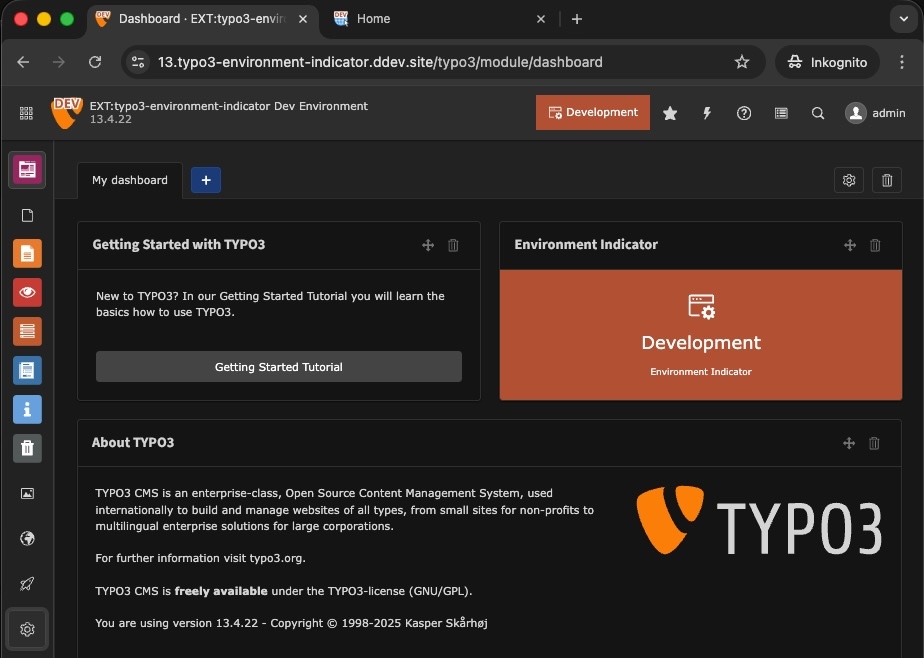
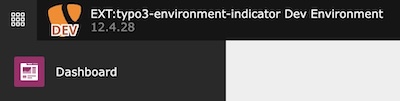
Backend with several environment indicators
Frontend + Backend
Icon
Preview
Description
Modified favicon: Modifies the favicon for frontend and backend based on the original favicon, current environment and your configuration.
Page title: Prefix or suffix the page title in frontend and backend with the current application context.
Frontend
Icon
Preview
Description
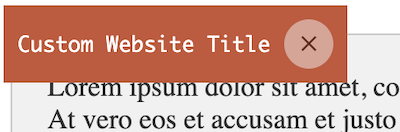
Frontend Hint: Adds an informative hint to the frontend showing the website title and current environment.
Modified frontend image: Modifies the frontend image based on the original image, current environment and your configuration.
Backend
Icon
Preview
Description
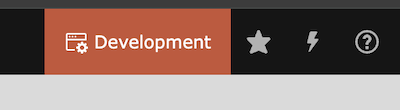
Backend toolbar item: Adds an informative item to the backend toolbar showing the current environment.
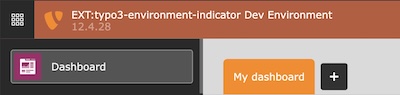
Backend topbar: Colors the backend header topbar according to the environment.
Modified backend logo: Modifies the backend logo based on the original logo, current environment and your configuration.
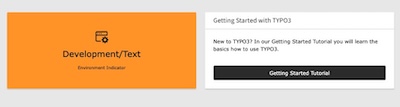
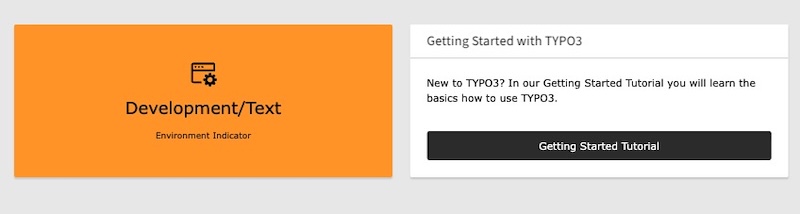
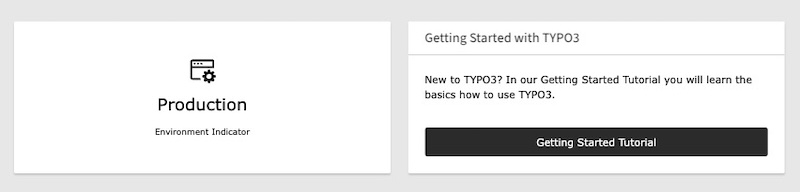
Dashboard widget: Render a dashboard widget according to the environment.
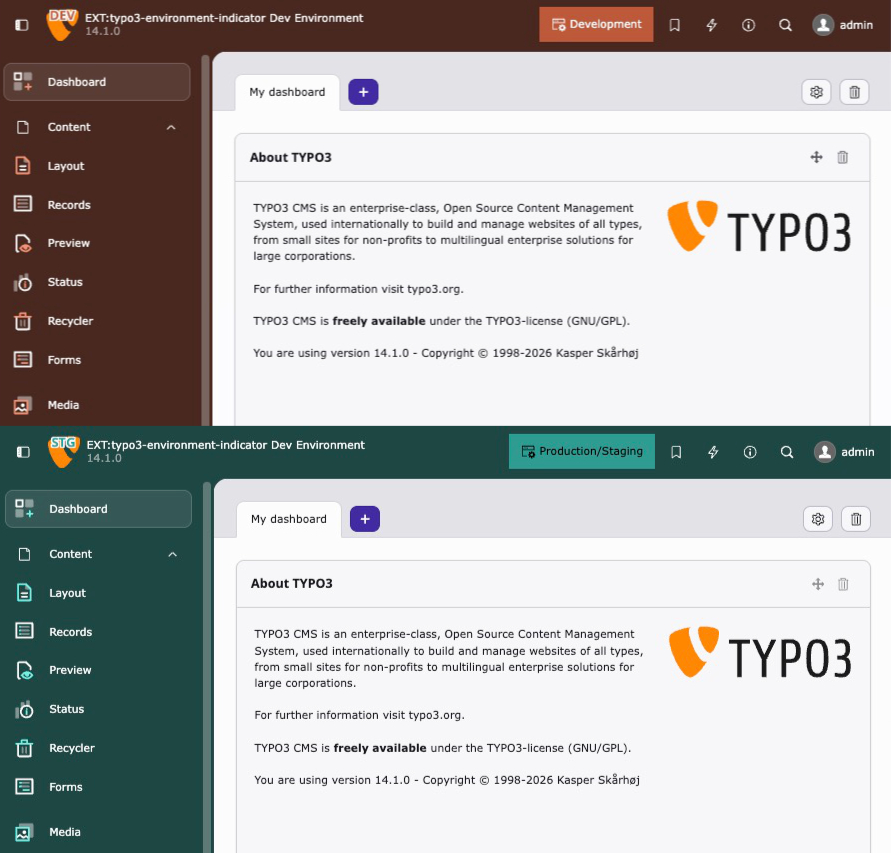
Backend theme(experimental): Colors the entire TYPO3 v14+ backend (primary color, header, sidebar) based on the environment.
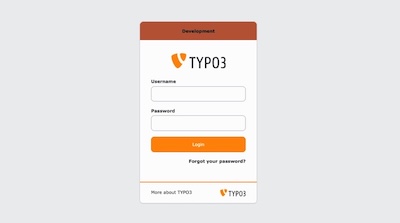
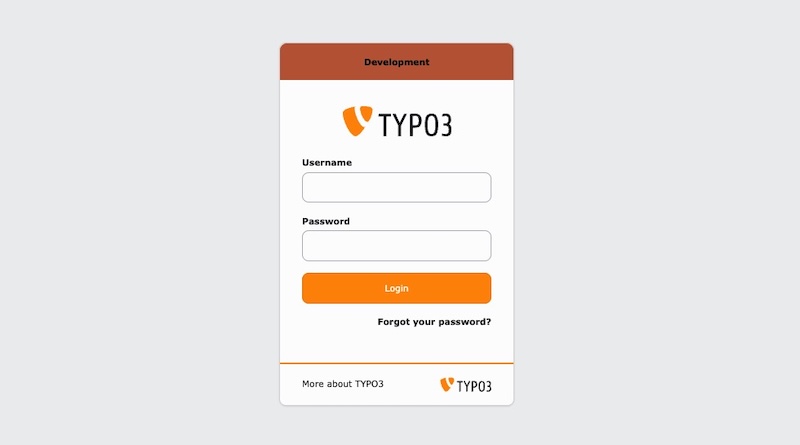
Backend login: Shows a colored environment badge directly on the backend login screen.
Misc
Icon
Preview
Description
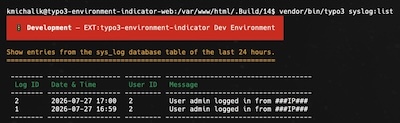
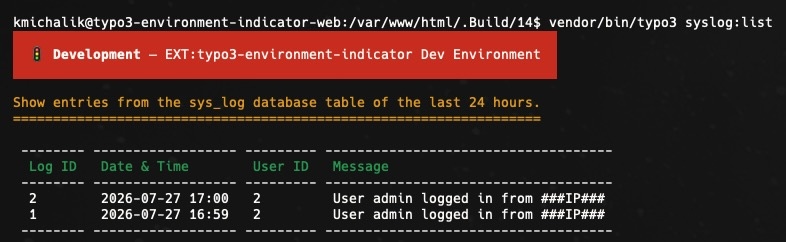
CLI banner: Prints a colored environment banner to the console before a command runs.
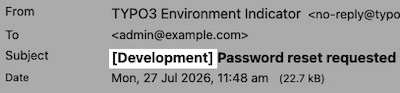
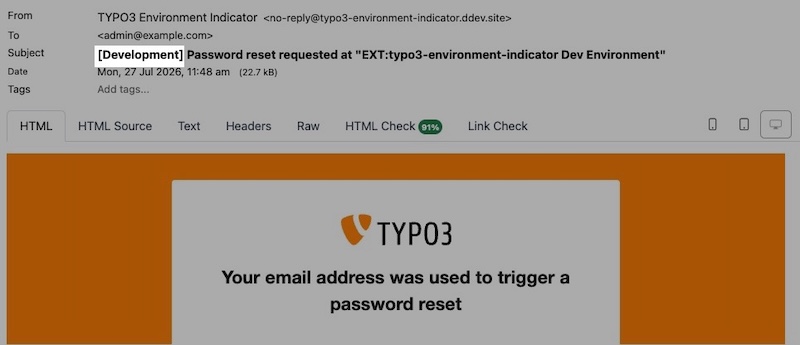
Mail subject prefix: Prepends the environment to the subject of every mail sent through the TYPO3 Mailer API.
Support
There are several ways to get support for this extension:
Since version 2.x, the extension uses the new
Handler::addIndicator()
method to add the
environment indicator configuration instead of the old
ConfigurationUtility::configByContext()
method.
Configuration
Note
TypoScript configuration is only necessary if you want to use the frontend hint.
Site Set (Recommended)
Important
Starting with version 3.0, Site Sets are required for the frontend TypoScript configuration.
The legacy static TypoScript include is no longer supported.
Add the site set as a dependency in your site configuration:
The static TypoScript include is deprecated and removed in version 3.0.
Please use Site Sets instead.
Alternatively, include the static TypoScript template via the Template module
by adding "Environment Indicator" under Include static (from extensions).
Go to Admin Tools > Settings > Extension Configuration
Choose typo3_environment_indicator
The extension currently provides the following configuration options:
General
general.imageDriver
general.imageDriver
Type
option
Default
"gd"
Intervention Image supports "GD Library", "Imagick" and "libvips" to process images internally. You may choose one of them according to your PHP configuration. Options are "gd", "imagick" and "vips".
general.defaultConfiguration
general.defaultConfiguration
Type
boolean
Default
1
Enable the default configuration for the environment indicators. If you want to configure the environment indicators by yourself, set this to false. See Configuration.
Frontend
frontend.favicon
frontend.favicon
Type
boolean
Default
1
Enable the favicon generation in frontend context
frontend.context
frontend.context
Type
boolean
Default
1
Enable the context frontend hint
frontend.image
frontend.image
Type
boolean
Default
1
Enable the image generation in frontend context
frontend.pageTitle
frontend.pageTitle
Type
boolean
Default
1
Enable the page title prefix/suffix in frontend context. When the
Page Title indicator is active, the final rendered <title>
is decorated.
Backend
backend.favicon
backend.favicon
Type
boolean
Default
1
Enable the favicon generation in backend context
backend.logo
backend.logo
Type
boolean
Default
1
Enable the logo generation in backend context
backend.context
backend.context
Type
boolean
Default
1
Enable the context item within the backend toolbar
backend.contextProduction
backend.contextProduction
Type
boolean
Default
1
Enable the backend toolbar item / backend topbar also in production context
backend.theme
backend.theme
Type
boolean
Default
0
Enable the backend theme modification (TYPO3 v14+ only, experimental).
When the Backend theme indicator is active, this colors the entire
backend based on the environment. Disabled by default because the
underlying TYPO3 backend CSS framework is currently considered internal
API.
backend.login
backend.login
Type
boolean
Default
1
Enable the environment badge on the backend login screen. When the
Backend Login indicator is active, a colored badge is shown on the
login screen.
backend.pageTitle
backend.pageTitle
Type
boolean
Default
1
Enable the page title prefix/suffix in backend context. When the
Page Title indicator is active, the backend document title is
decorated client-side.
CLI
cli.banner
cli.banner
Type
boolean
Default
0
Enable the CLI banner (opt-in, disabled by default). When the
CLI Banner indicator is active, a colored environment banner is
printed to stderr before console commands run in an interactive
terminal.
Mail
mail.subject
mail.subject
Type
boolean
Default
1
Enable the mail subject prefix for outgoing mails. When the
Mail Subject Prefix indicator is active, the environment prefix is
prepended to the subject of every mail sent via the TYPO3 Mailer API.
Instance
The instance settings allow overriding the appearance of all active
indicators for a single installation — directly from the backend, without any
PHP configuration. They are stored in the extension configuration of the
respective installation, so two systems sharing the same code base and
application context (e.g. two testing systems) can be distinguished from each
other.
Instance settings take precedence over the built-in presets and any
programmatically registered configuration. Which indicators are active remains
trigger-driven: on a system where no indicator resolves (e.g. production with
default configuration), the instance settings have no effect.
instance.label
instance.label
Type
string
Default
(empty)
Overrides the indicator text of all active indicators for this
installation (e.g. "TEST 1"). Replaces the text of the backend toolbar
item and dashboard widget and renders the label onto the favicon and
backend logo. Leave empty to use the context defaults.
instance.color
instance.color
Type
color
Default
(empty)
Overrides the indicator color of all active indicators for this
installation (frontend hint, backend toolbar, topbar, dashboard widget,
backend theme and — combined with a label — favicon/logo). Leave empty to
use the context defaults.
Handler
The Handler class is used to register the indicators and triggers in the TYPO3 backend. The class provides a static method addIndicator() to add the indicators and triggers to the system.
For the frontend, the original favicon will either be fetched from the typoscript configuration
page.shortcutIcon (see typoscript reference)
or can be handled by your own fluid template via the FaviconViewHelper:
For the backend, the favicon will be fetched by the extension configuration of
$GLOBALS['TYPO3_CONF_VARS']['EXTENSIONS']['backend']['backendFavicon'].
Favicon Examples
Warning
SVG favicons (and backend logos) are rasterized to PNG before modification.
During rasterization, embedded <image> references inside the SVG are
resolved and loaded. Only use SVG source files from trusted locations as
indicator base images — an untrusted SVG could reference arbitrary local or
remote resources.
Scope
By default, the Favicon indicator applies modifications to both frontend and backend. You can restrict it to a specific application type using the Scope enum:
ext_localconf.php
useKonradMichalik\Typo3EnvironmentIndicator\Configuration\Handler;
useKonradMichalik\Typo3EnvironmentIndicator\Configuration\Indicator;
useKonradMichalik\Typo3EnvironmentIndicator\Configuration\Trigger;
useKonradMichalik\Typo3EnvironmentIndicator\Enum\Scope;
useKonradMichalik\Typo3EnvironmentIndicator\Image;
Handler::addIndicator(
triggers: [
new Trigger\ApplicationContext('Development*'),
],
indicators: [
// Only modify the frontend faviconnew Indicator\Favicon(
configuration: [
new Image\Modifier\TextModifier([
'text' => 'DEV',
'color' => '#bd593a',
]),
],
scope: Scope::Frontend,
),
],
);
Copied!
Available scope values:
Scope::Global (default): Apply to both frontend and backend.
Scope::Frontend: Apply only to the frontend.
Scope::Backend: Apply only to the backend.
Modifiers
The favicon modification configuration can be found in
$GLOBALS['TYPO3_CONF_VARS']['EXTENSIONS']['typo3_environment_indicator'].
Add a configured favicon modifier to the desired environment (e.g. Testing) in your ext_localconf.php:
useKonradMichalik\Typo3EnvironmentIndicator\Configuration\Handler;
useKonradMichalik\Typo3EnvironmentIndicator\Configuration\Indicator;
useKonradMichalik\Typo3EnvironmentIndicator\Configuration\Trigger;
useKonradMichalik\Typo3EnvironmentIndicator\Image;
Handler::addIndicator(
triggers: [
new Trigger\ApplicationContext('Development')
],
indicators: [
new Indicator\Favicon([
new Image\Modifier\CircleModifier([
'color' => '#bd593a',
])
])
]
);
Copied!
Additional optional configuration keys:
size (float): The percentage size of the circle. Default is 0.4.
position (string): The position of the circle. Default is bottom right. Possible values are top left, top center, top right, center left, center, center right, bottom left, bottom center, bottom right.
padding (float): The percentage padding of the circle. Default is 0.1.
Overlay an additional image to the original favicon regarding the environment.
ext_localconf.php
useKonradMichalik\Typo3EnvironmentIndicator\Configuration\Handler;
useKonradMichalik\Typo3EnvironmentIndicator\Configuration\Indicator;
useKonradMichalik\Typo3EnvironmentIndicator\Configuration\Trigger;
useKonradMichalik\Typo3EnvironmentIndicator\Image;
Handler::addIndicator(
triggers: [
new Trigger\ApplicationContext('Development')
],
indicators: [
new Indicator\Favicon([
new Image\Modifier\OverlayModifier([
'path' => 'EXT:sitepackage/Resources/Public/Icons/favicon.png',
])
])
]
);
Copied!
Additional configuration keys (required by the modifier, but provided via default configuration):
size (float): The percentage size of the overlay. Default is 0.5.
position (string): The position of the overlay. Default is bottom right. Possible values are top left, top center, top right, center left, center, center right, bottom left, bottom center, bottom right.
padding (float): The percentage padding of the overlay. Default is 0.1.
The backend toolbar item will show the current project version and environment.
Backend toolbar item
You can adjust the color of the toolbar item in your ext_localconf.php:
ext_localconf.php
useKonradMichalik\Typo3EnvironmentIndicator\Configuration\Handler;
useKonradMichalik\Typo3EnvironmentIndicator\Configuration\Indicator;
useKonradMichalik\Typo3EnvironmentIndicator\Configuration\Trigger;
Handler::addIndicator(
triggers: [
new Trigger\ApplicationContext('Testing')
],
indicators: [
new Indicator\Backend\Toolbar([
'color' => '#bd593a',
])
]
);
Copied!
Additional optional configuration keys:
text (string): The text of the toolbar item. Default is the application context.
icon (array): The icon configuration of the toolbar item. Expects a nested array with a context key. Default is ['context' => 'information-application-context'].
index (int): The positioning index of the toolbar item. Default is 0.
description (string): An optional description. When set, it is appended to the toolbar item's tooltip (title attribute). Default is empty.
Note
The backend toolbar item is a feature, which can also be shown in production context. Use the extension settings to enable, disable or restrict it.
Backend topbar
The backend toolbar item will show the current project version and environment.
Backend topbar
You can adjust the color of the topbar in your ext_localconf.php:
ext_localconf.php
useKonradMichalik\Typo3EnvironmentIndicator\Configuration\Handler;
useKonradMichalik\Typo3EnvironmentIndicator\Configuration\Indicator;
useKonradMichalik\Typo3EnvironmentIndicator\Configuration\Trigger;
Handler::addIndicator(
triggers: [
new Trigger\ApplicationContext('Testing')
],
indicators: [
new Indicator\Backend\Topbar([
'color' => '#bd593a',
])
]
);
Copied!
Additional optional configuration keys:
description (string): An optional description. When set, it is shown as a tooltip (title attribute) on the colored topbar. Plain text only. Default is empty.
Note
The backend topbar is a feature, which can also be shown in production environments. Use the extension settings to enable, disable or restrict it.
Backend Logo
The backend logo will be modified regarding the environment and the associated
configuration. This can be used to e.g. show the current environment in the website logo.
Backend Logo Example
The backend logo will be fetched by the extension configuration of
$GLOBALS['TYPO3_CONF_VARS']['EXTENSIONS']['backend']['backendLogo'].
Modifiers
The backend logo modification is identical to the favicon modification. You can use the same modifiers and configuration.
The dashboard widget can be placed to the TYPO3 backend dashboard. It shows the current environment regarding the configuration.
Dashboard Widget Example
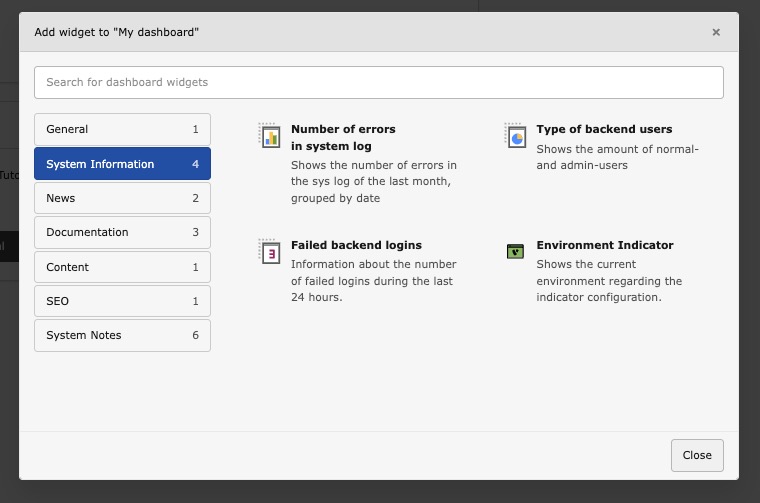
Dashboard Widget Selection
The widget is registered with its own icon (identifier environment-indicator-widget), which is shown in the widget selection dialog:
You can adjust the widget configuration in your ext_localconf.php:
ext_localconf.php
useKonradMichalik\Typo3EnvironmentIndicator\Configuration\Handler;
useKonradMichalik\Typo3EnvironmentIndicator\Configuration\Indicator;
useKonradMichalik\Typo3EnvironmentIndicator\Configuration\Trigger;
Handler::addIndicator(
triggers: [
new Trigger\ApplicationContext('Development/Text')
],
indicators: [
new Indicator\Backend\Widget([
'color' => '#bd593a',
])
]
);
Copied!
Additional optional configuration keys:
text (string): The text of the widget. Default is the application context.
icon (string): The icon of the widget. Default is information-application-context.
textSize (string): The text size of the widget. Default is 20px.
description (string): An optional description shown as an additional paragraph in the widget body. Plain text only (HTML is escaped). Default is empty.
The dashboard widget can not disappear, if no configuration is set. It is always shown in the backend dashboard.
Dashboard Widget Production Example
Backend theme
New in version 3.1
This indicator requires TYPO3 v14 or later.
Warning
This feature is experimental. The TYPO3 backend CSS framework is
currently considered internal API. While the overridden CSS custom properties
are stable within TYPO3 v14, they may change in future major versions.
Note
Because it is experimental, the backend theme is disabled by default.
Enable it via the extension configuration setting backend.theme
(Admin Tools > Settings > Extension Configuration). Even with the
default configuration active, the backend stays uncolored until this flag is
turned on.
The backend theme indicator colors the entire TYPO3 backend by overriding
CSS custom properties introduced with the
TYPO3 v14 Fresh theme.
Instead of modifying individual elements, it sets the primary accent color and
scaffold variables, which automatically cascade through the backend UI -
including the topbar, sidebar, buttons, active states, and focus rings.
This works with all TYPO3 backend themes (Fresh, Modern, Classic) and supports
both light and dark mode.
You can adjust the theme in your ext_localconf.php:
ext_localconf.php
useKonradMichalik\Typo3EnvironmentIndicator\Configuration\Handler;
useKonradMichalik\Typo3EnvironmentIndicator\Configuration\Indicator;
useKonradMichalik\Typo3EnvironmentIndicator\Configuration\Trigger;
Handler::addIndicator(
triggers: [
new Trigger\ApplicationContext('Development*'),
],
indicators: [
new Indicator\Backend\Theme([
'color' => '#bd593a',
]),
],
);
Copied!
Configuration keys:
color (string): The primary accent color as hex value. Required.
scaffoldHeader (bool): Whether to color the backend header. Default is true.
scaffoldSidebar (bool): Whether to color the backend sidebar. Default is true.
neutralMix (string): The neutral tinting strength as CSS percentage value. Default is '15%'.
This indicator requires TYPO3 v14 or later. On TYPO3 v13 and below, the
indicator is silently ignored.
Important
When this indicator is active, the user's theme selection in
User Settings > Theme is overridden by the environment color.
An info box is displayed in the User Settings to inform the user.
Note
The backend theme indicator can be combined with other backend indicators
like Backend toolbar or
Backend topbar for maximum visual distinction
between environments.
Backend Login
All other backend indicators only take effect after login (topbar, toolbar,
logo, theme). Yet the moment with the highest risk of confusion is the login
itself — anyone who accidentally logs into live instead of staging only notices
afterwards. The backend login indicator closes this gap by showing a colored
environment badge directly on the backend login screen.
Backend Login Example
The badge is injected via a listener on the
ModifyPageLayoutOnLoginProviderSelectionEvent
. It is attached directly to
the login card (above the logo, or below the card footer), matching the card's
rounded corners and font. If the login card markup is not found — e.g. with an
alternative login provider (OIDC/SSO extensions) — it falls back to a
full-width banner at the top or bottom of the page.
You can register the indicator in your ext_localconf.php:
text (string): The badge text. Default is the current application
context.
color (string): The badge background color as a hex value. Default is
#bd593a. The text color is calculated automatically for optimal
contrast.
position (string): The badge position, top or bottom.
Default is top.
description (string): An optional descriptive line shown below the
badge text (e.g. "Data is overwritten nightly from live").
Note
There is no backend user yet on the login screen, so the Admin
and Backend User Group triggers cannot resolve and are
treated as "not fulfilled" — a configuration gated by them will not activate
on the login screen. Application Context, IP Address
and Custom work as usual.
The favicon indicator fails exactly where editors and developers work a lot:
pinned tabs (favicon too small or hidden), bookmarks, browser history and task
switchers. A prefix or suffix in the <title> — e.g.
[STAGING] Page title — makes the environment instantly recognizable in
all of these contexts. It is a perfect complement to the favicon indicator.
Page Title Prefix Example
The indicator works in both frontend and backend:
Frontend: a middleware decorates the final <title> after the
PageTitle API has resolved, so all existing page title providers (including
SEO extensions) remain untouched.
Backend: the document title is prefixed/suffixed client-side. A
MutationObserver re-applies the decoration on backend SPA navigation
(module switches), so the prefix persists.
You can register the indicator in your ext_localconf.php:
ext_localconf.php
useKonradMichalik\Typo3EnvironmentIndicator\Configuration\Handler;
useKonradMichalik\Typo3EnvironmentIndicator\Configuration\Indicator;
useKonradMichalik\Typo3EnvironmentIndicator\Configuration\Trigger;
Handler::addIndicator(
triggers: [
new Trigger\ApplicationContext('Production/Staging')
],
indicators: [
new Indicator\General\PageTitle([
'prefix' => '[%context%] ',
])
]
);
Copied!
Additional optional configuration keys:
prefix (string): Prepended to the page title (e.g. [STAGING] ).
Default is [%context%] . The placeholder %context% is replaced
with the current application context.
suffix (string): Appended to the page title. Also supports the
%context% placeholder. Default is empty.
Note
The title is only decorated once. A title that already starts with the
prefix (or ends with the suffix) is left untouched — safe for a shared
full-page cache.
Note
SEO extensions that also manipulate the title are unaffected: the frontend
decoration runs on the final rendered title, after the PageTitle API. If
you deliberately enable the indicator in production (see above), this
still applies there.
The page title indicator can be disabled per context via the
extension configuration
(frontend.pageTitle and backend.pageTitle).
CLI Banner
The classic "wrong SSH terminal" scenario is the CLI counterpart to the original
motivation of this extension: running an import, a custom deployment command or
impexp:import on the live system instead of staging. The CLI banner
prints an environment banner with a colored background to stderr before
a console command runs, e.g. a cyan bar reading 🚦 STAGING — project.example.dev.
CLI banner
The banner is printed via a listener on the Symfony Console
ConsoleCommandEvent
, so it appears before the command is executed. It is
written to stderr, so parsed stdout output (JSON, CSV) stays
untouched.
You can register the indicator in your ext_localconf.php:
text (string): The banner text. Default is the current application
context.
color (string): The banner background color. Accepts a named ANSI
color (e.g. cyan, red, yellow) or a hex value
(e.g. #00ACC1, rendered on truecolor terminals) and is combined with
bold white text. Default is no color (plain text, no background).
icon (string): A leading glyph. Default is 🚦.
commands (array): A whitelist of command name patterns (fnmatch
syntax, e.g. ['site:*', 'impexp:*']). If set, the banner is only
printed for matching commands. Default is empty (the banner is printed for all
commands).
Note
The banner is only printed for interactive terminals. Cron jobs, CI
pipelines and scheduler runs (as well as --no-interaction) are left
untouched to avoid log noise. Non-decorated output (piped stdout,
the NO_COLOR convention) automatically drops the ANSI color codes.
This indicator is deliberately indicator only (a banner). It does not add
confirmation prompts ("Really execute on live? [y/N]") — that would be guard
functionality and out of scope.
Note
A small set of low-level TYPO3 core commands (cache:flush,
cache:warmup, cache:flushtags, list, help,
upgrade:*, among others) always run in TYPO3's failsafe CLI
bootstrap, which uses a no-op event dispatcher for resilience — so this and
any other third-party listener never fires for them, regardless of
configuration. Some community packages register additional commands the
same way (e.g. helhum/typo3-console's database:updateschema,
database:import, install:*). The banner works normally for
everything else, including custom extension commands, site:* and
impexp:*.
The CLI banner is opt-in and disabled by default — enable it globally via the
extension configuration.
Mail Subject Prefix
Test and staging systems regularly send real emails — form submissions,
workflow notifications, scheduler reports. Recipients often cannot tell whether
a mail originates from the live system or a test system. The mail subject prefix
indicator prepends the environment to the subject of every mail sent through the
TYPO3 Mailer API (e.g. [Staging] Your registration), so the origin is
visible at first glance in every inbox.
Mail Subject Prefix Example
The prefix is applied via a listener on the
BeforeMailerSentMessageEvent
,
covering all mails sent via TYPO3's Mailer API (frontend forms, backend
notifications, scheduler tasks).
You can register the indicator in your ext_localconf.php:
ext_localconf.php
useKonradMichalik\Typo3EnvironmentIndicator\Configuration\Handler;
useKonradMichalik\Typo3EnvironmentIndicator\Configuration\Indicator;
useKonradMichalik\Typo3EnvironmentIndicator\Configuration\Trigger;
Handler::addIndicator(
triggers: [
new Trigger\ApplicationContext('Testing')
],
indicators: [
new Indicator\Mail\SubjectPrefix([
'prefix' => '[%context%] ',
])
]
);
Copied!
Additional optional configuration keys:
prefix (string): The prefix prepended to the mail subject. Default is
[%context%] . The placeholder %context% is replaced with the
current application context.
header (string): If set, an additional mail header with this name and
the application context as value is added (e.g. X-Environment: Testing)
for filtering/tooling. Default is empty (no header is added).
Note
The prefix is only applied once. When a message is processed multiple times
(e.g. queued or retried), a subject that already starts with the resolved
prefix is left untouched.
This indicator is deliberately indicator only. It does not redirect or
intercept mails ("catch-all to a developer inbox") — that is guard
functionality well covered by other tools (Mailpit, transport_spool).
Note
The Install Tool's "Test Mail Setup" (Admin Tools > Environment) does not
apply this prefix. Direct Install Tool access (?__typo3_install)
runs TYPO3's failsafe bootstrap, which only loads packages marked as part
of the minimal usable system — third-party extensions, including this one,
are skipped entirely, so the listener never registers for that request. The
prefix still applies normally to mails sent through the regular bootstrap
(frontend forms, backend notifications, scheduler tasks). To verify the
feature locally, trigger an actual application mail (e.g. a password reset)
or run the extension's functional test suite instead.
Triggers act as conditions and are used to define when environment indicators should be shown.
You can combine multiple different triggers within a single Handler::addIndicator() call. All triggers must return true (AND logic) for the associated indicators to activate.
ext_localconf.php
\KonradMichalik\Typo3EnvironmentIndicator\Configuration\Handler::addIndicator(
triggers: [
new \KonradMichalik\Typo3EnvironmentIndicator\Configuration\Trigger\ApplicationContext('Development'),
new \KonradMichalik\Typo3EnvironmentIndicator\Configuration\Trigger\Admin()
],
indicators: [
new \KonradMichalik\Typo3EnvironmentIndicator\Configuration\Indicator\Backend\Topbar([
'color' => '#00ACC1',
]),
]
);
Copied!
There are several triggers available, which can be used to show the indicators in different contexts.
The Admin trigger is used to show the indicators in the TYPO3 backend for admin users.
ext_localconf.php
\KonradMichalik\Typo3EnvironmentIndicator\Configuration\Handler::addIndicator(
triggers: [
new \KonradMichalik\Typo3EnvironmentIndicator\Configuration\Trigger\Admin()
],
indicators: [
new \KonradMichalik\Typo3EnvironmentIndicator\Configuration\Indicator\Backend\Topbar([
'color' => '#00ACC1',
]),
]
);
Copied!
Application Context
The ApplicationContext trigger is used to show the indicators in the TYPO3 backend for a specific application context.
ext_localconf.php
\KonradMichalik\Typo3EnvironmentIndicator\Configuration\Handler::addIndicator(
triggers: [
new \KonradMichalik\Typo3EnvironmentIndicator\Configuration\Trigger\ApplicationContext('Development*', 'Testing')
],
indicators: [
new \KonradMichalik\Typo3EnvironmentIndicator\Configuration\Indicator\Backend\Topbar([
'color' => '#00ACC1',
]),
]
);
Copied!
The configuration supports multiple context names as separate arguments. The context names support glob-style wildcard patterns (using PHP's fnmatch()). The * wildcard matches any number of characters and the ? wildcard matches a single character. For example, Development* will match all contexts that start with Development, such as Development, Development/Local, Development/DDEV, etc.
Backend User Group
The BackendUserGroup trigger is used to show the indicators in the TYPO3 backend for specific backend user groups.
ext_localconf.php
\KonradMichalik\Typo3EnvironmentIndicator\Configuration\Handler::addIndicator(
triggers: [
new \KonradMichalik\Typo3EnvironmentIndicator\Configuration\Trigger\BackendUserGroup(1,2)
],
indicators: [
new \KonradMichalik\Typo3EnvironmentIndicator\Configuration\Indicator\Backend\Topbar([
'color' => '#00ACC1',
]),
]
);
Copied!
The configuration supports multiple group IDs as separate arguments. The trigger passes if the current backend user is a member of any of the specified groups (OR logic).
Custom
The Custom trigger is used to show the indicators in the TYPO3 backend for custom conditions.
ext_localconf.php
\KonradMichalik\Typo3EnvironmentIndicator\Configuration\Handler::addIndicator(
triggers: [
new \KonradMichalik\Typo3EnvironmentIndicator\Configuration\Trigger\Custom(
function(){
returntrue;
}
),
new \KonradMichalik\Typo3EnvironmentIndicator\Configuration\Trigger\Custom('\YourExtension\YourClass::yourMethod'),
],
indicators: [
new \KonradMichalik\Typo3EnvironmentIndicator\Configuration\Indicator\Backend\Topbar([
'color' => '#00ACC1',
]),
]
);
Copied!
The configuration supports a callable function, which is executed to determine if the indicator should be shown. The function should return a boolean value. The function can also be a closure or an anonymous function.
When using a string reference, it must follow the format ClassName::methodName (without parentheses). The referenced method must be public and static. If the method throws an exception during execution, the trigger will return false.
Frontend User Group
The FrontendUserGroup trigger is used to show the indicators in the TYPO3 Frontend for specific frontend user groups.
ext_localconf.php
\KonradMichalik\Typo3EnvironmentIndicator\Configuration\Handler::addIndicator(
    triggers: [
        new \KonradMichalik\Typo3EnvironmentIndicator\Configuration\Trigger\FrontendUserGroup(1,2)
    ],
    indicators: [
        new \KonradMichalik\Typo3EnvironmentIndicator\Configuration\Indicator\Backend\Topbar([
            'color' => '#00ACC1',
        ]),
    ]
);
Copied!
The configuration supports multiple group IDs as separate arguments. The trigger passes if the current frontend user is a member of any of the specified groups (OR logic). If no frontend user session is available, the trigger returns false.
IP Address
The IP trigger is used to show the indicators in the TYPO3 backend for specific IP addresses.
ext_localconf.php
\KonradMichalik\Typo3EnvironmentIndicator\Configuration\Handler::addIndicator(
    triggers: [
        new \KonradMichalik\Typo3EnvironmentIndicator\Configuration\Trigger\Ip('127.0.0.1', '192.168.0.0/24')
    ],
    indicators: [
        new \KonradMichalik\Typo3EnvironmentIndicator\Configuration\Indicator\Backend\Topbar([
            'color' => '#00ACC1',
        ]),
    ]
);
Copied!
The configuration supports multiple IP addresses as separate arguments. Both IPv4 and IPv6 addresses are supported. CIDR range notation is also supported for both address families (e.g. 192.168.0.0/24 or 2001:db8::/32). Invalid IP formats will throw an InvalidArgumentException during construction.
Developer corner
Some kinds of the environment indicators are configurable or can be extended
with custom implementations. This section provides an insight into
which development options are available and how these can be integrated
into the generation process.
A trigger determines whether a set of indicators should be activated. Implement the TriggerInterface with a single check() method that returns a boolean value.
useKonradMichalik\Typo3EnvironmentIndicator\Configuration\Handler;
useKonradMichalik\Typo3EnvironmentIndicator\Configuration\Indicator;
useVendor\YourExt\Configuration\Trigger\MyCustomTrigger;
Handler::addIndicator(
triggers: [
new MyCustomTrigger('production-cluster-a'),
],
indicators: [
new Indicator\Backend\Topbar([
'color' => '#e74c3c',
]),
],
);
Copied!
Note
When multiple triggers are passed to a single Handler::addIndicator() call, all triggers must return true (AND logic) for the indicators to activate. If any trigger throws an exception, it is treated as false.
The AbstractIndicator base class automatically merges global default configuration from
$GLOBALS['TYPO3_CONF_VARS']['EXTCONF']['typo3_environment_indicator']['defaults'] if a matching entry for the indicator class exists.
Having fun with colorful favicons? Use the ColorUtility::getColoredString()
function as color entry in your modifier configuration to generate a color based on a string (default is the
$GLOBALS['TYPO3_CONF_VARS']['SYS']['sitename']).
ViewHelpers
The extension provides two Fluid ViewHelpers for use in custom templates.
Processes a favicon path through the configured environment indicator modifiers. If no Favicon indicator is active for the current context, the original path is returned unchanged.
Arguments:
Argument
Type
Description
favicon
string
The favicon path. Can also be passed as tag content (inline notation).
Usage:
<!-- As argument -->
{env:favicon(favicon:'EXT:your_extension/Resources/Public/Favicon/favicon.png')}

<!-- As inline pipe -->
{f:uri.resource(path:'EXT:your_extension/Resources/Public/Favicon/favicon.png') -> env:favicon()}
Processes a frontend image path through the configured environment indicator modifiers. If no Frontend Image indicator is active for the current context, the original path is returned unchanged.
Arguments:
Argument
Type
Description
_path
string
The image path. Can also be passed as tag content (inline notation).
Usage:
<!-- As inline pipe -->
{f:uri.resource(path:'EXT:your_extension/Resources/Public/Images/logo.png') -> env:image()}
The enableTechnicalContext() condition function evaluates whether the frontend hint indicator is active for the current environment. It returns true when the frontend context feature is enabled in the extension configuration and a FrontendHint indicator is configured for the current application context.
[enableTechnicalContext()]
page.10 = TEXT
page.10.value = Environment indicator is active
[GLOBAL]
Copied!
TypoScript objects
The following lib.* objects are registered within the [enableTechnicalContext()] condition block via the included Site Set. They can be used or overridden in your own TypoScript.
Object
Description
lib.applicationContextTitle
Returns the current TYPO3 application context (e.g. Development/DDEV).
lib.applicationContextColor
Returns the configured color of the Frontend Hint indicator.
lib.applicationContextTextColor
Returns the optimal text color (black or white) for the configured hint color.
lib.websiteTitle
Returns the website title from the site configuration. Falls back to the text option of the Frontend Hint if set.
lib.applicationContextPositionX
Returns the horizontal position (e.g. left:0).
lib.applicationContextPositionY
Returns the vertical position (e.g. top:0).
lib.technicalContext
A FLUIDTEMPLATE that renders the complete frontend hint element. This object is automatically added to page output.
Overriding objects
You can override any of these objects in your own TypoScript setup:
[enableTechnicalContext()]
lib.applicationContextTitle = TEXT
lib.applicationContextTitle.value = My Custom Title
[GLOBAL]
Copied!
Example
The following configuration is also the default configuration. This shall show the usage of the extension.
ext_localconf.php
useKonradMichalik\Typo3EnvironmentIndicator\Configuration\Handler;
useKonradMichalik\Typo3EnvironmentIndicator\Configuration\Indicator;
useKonradMichalik\Typo3EnvironmentIndicator\Configuration\Trigger;
useKonradMichalik\Typo3EnvironmentIndicator\Image;
Handler::addIndicator(
triggers: [
new Trigger\ApplicationContext('Development*'),
],
indicators: [
new Indicator\Favicon([
new Image\Modifier\TextModifier([
'text' => 'DEV',
'color' => '#bd593a',
'stroke' => [
'color' => '#ffffff',
'width' => 3,
],
]),
]),
new Indicator\Backend\Logo([
new Image\Modifier\TextModifier([
'text' => 'DEV',
'color' => '#bd593a',
'stroke' => [
'color' => '#ffffff',
'width' => 3,
],
]),
]),
new Indicator\Frontend\Hint([
'color' => '#bd593a',
]),
new Indicator\Backend\Toolbar([
'color' => '#bd593a',
]),
new Indicator\Backend\Widget([
'color' => '#bd593a',
]),
],
);
Handler::addIndicator(
triggers: [
new Trigger\ApplicationContext('Testing*'),
],
indicators: [
new Indicator\Favicon([
new Image\Modifier\TextModifier([
'text' => 'TEST',
'color' => '#f39c12',
'stroke' => [
'color' => '#ffffff',
'width' => 3,
],
]),
]),
new Indicator\Backend\Logo([
new Image\Modifier\TextModifier([
'text' => 'TEST',
'color' => '#f39c12',
'stroke' => [
'color' => '#ffffff',
'width' => 3,
],
]),
]),
new Indicator\Frontend\Hint([
'color' => '#f39c12',
]),
new Indicator\Backend\Toolbar([
'color' => '#f39c12',
]),
],
);
Handler::addIndicator(
triggers: [
new Trigger\ApplicationContext('Production/Staging', 'Production/Stage'),
],
indicators: [
new Indicator\Favicon([
new Image\Modifier\TextModifier([
'text' => 'STG',
'color' => '#2f9c91',
'stroke' => [
'color' => '#ffffff',
'width' => 3,
],
]),
]),
new Indicator\Backend\Logo([
new Image\Modifier\TextModifier([
'text' => 'STG',
'color' => '#2f9c91',
'stroke' => [
'color' => '#ffffff',
'width' => 3,
],
]),
]),
new Indicator\Frontend\Hint([
'color' => '#2f9c91',
]),
new Indicator\Backend\Toolbar([
'color' => '#2f9c91',
]),
],
);
Handler::addIndicator(
triggers: [
new Trigger\ApplicationContext('Production/Standby'),
],
indicators: [
new Indicator\Backend\Toolbar([
'color' => '#2f9c91',
]),
],
);
Copied!
Reference to the headline
Copy and freely share the link
This link target has no permanent anchor assigned.The link below can be used, but is prone to change if the page gets moved.