This extension documentation is published under the
CC BY-NC-SA 4.0 (Creative Commons)
license
Calendar widget with holidays
Important
Don't forget to set extension's version number in Settings.cfg file,
in the release property.
It will be automatically picked up on the cover page by the |release| substitution.
TYPO3
The content of this document is related to TYPO3 CMS,
a GNU/GPL CMS/Framework available from typo3.org .
Community Documentation
This documentation is community documentation for the TYPO3 extension LesPf Calendar.
It is maintained as part of this third party extension.
If you find an error or something is missing, please:
Report a Problem
Extension Manual
This documentation is for the TYPO3 extension lespf_calendar.
LesPf Calendar displays a simple month calendar in a table. Common holidays
are properly marked, you can also have markings for events you have entered
into your Typo3 installation. The calendar can cope with one of several
distinct event extensions. You may also configure a list of recurring days
to be marked.
This extension's only purpose is a quick overview, it is not and shall not
become a full calendar with all the bells and whistles.
The calendar can be styled by CSS.
Screenshots
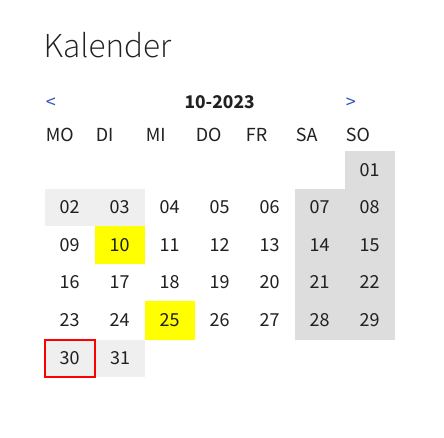
Dependent on your CSS, the calendar might look like this.
Calendar widget with holidays and events.
For Editors
Choosing a Region
The calendar plugin gets included like any other plugin. You have to enter a region
for proper display of holidays. Normally, region names consist of a country name
and an (optional) region name, separated by a hyphen. Please use uppercase,
according to ISO 3166.
If a region does not work, it may be not yet contained in the region database.
If your admin has configured a special file with additional dates, you have to
enter the file name with extension .yaml instead of a region code.
So instead oy typing something like 'GB-SCT' or 'FR', you enter 'custom.yaml'
or something like that.
Configuring the calendar widget.
List of supported Regions
This list is due to version 0.8.1 of the calendar extension.
Please visit the change log Change log for eventual further additions.
If you got events that should not be visible to website users, you have to do
something more:
If you have distinct folders for public and private events, choose a folder
(or several folders) in which you have entered the public events.
If you do not choose at least one folder, any folder will be considered.
You may give a special category to any event that shall be displayed or hidden.
Your administrator can configure the categories to display.
Using distinct folders is probably the better way, as it is more obvious to choose
a folder to store an event than to think of setting categories anytime you create
an event.
How to find out category numbers
The easy way without any database privileges is to tag an event with some
categories and to view the calendar output source code in your browser.
Including Changed Events
The calendar gets redrawn with Typo3's cache cycle (probably once a day). If you
have changed or created an event within the current month, you should clear the
cache for the page on which the calendar is shown, so that it gets immediately
visible.
Installation
LesPf calendar can be installed like other extensions, by TER,
by ZIP file, or by Composer. See also t3install:start.
For composer users, the command line is
composer require lespf/lespf-calendar
Copied!
LesPf calendar comes with extra data to be inserted into the
database. This data is contained within the file
ext_tables_static+adt.sql in the extension's root directory.
Unfortunately, Typo3 does import this file only on the first
install of the extension. As by now there is no update mechanism
for this, please load this data with an external tool (e.g. the
import module of PHPmyadmin), when doing a repeated install.
Dependencies
LesPf calendar needs the PHP datetime extension. This extension
is in typically incuded in hosted environments. If you run your
own server, you may perhaps have to install it.
As long as you are happy with weeks and holidays, there are no
further dependencies. If you want to display events, you have to
use an extension that supports this. LesPf Calendar can read data
from the following extensions:
SfEventMagement,
Eventnews,
or from News.
You may install one of them after LesPf Calendar, if you have not
done so before.
Configuration
Please include the LesPF Calendar extension template on the root page or on
the page where you want to use the plugin.
You will probably also include some CSS. Either the sample CSS that comes
with the extension, or you write your own, which is probably more appropriate.
The general configuration is handled within Typo3's extension configuration
module.
As the week starts on Monday in some countries and on Sunday in others,
you may choose the appropriate day.
You also decide, which (if any) event provider is to be used and which
categories shall be referenced.
By now, the following event providers are supported:
Eventnews
Sfeventmgt
News
The support for News is incomplete, as the News extension does not support
the end of an event, so events entered in news we'll always appear as events
spanning only one day.
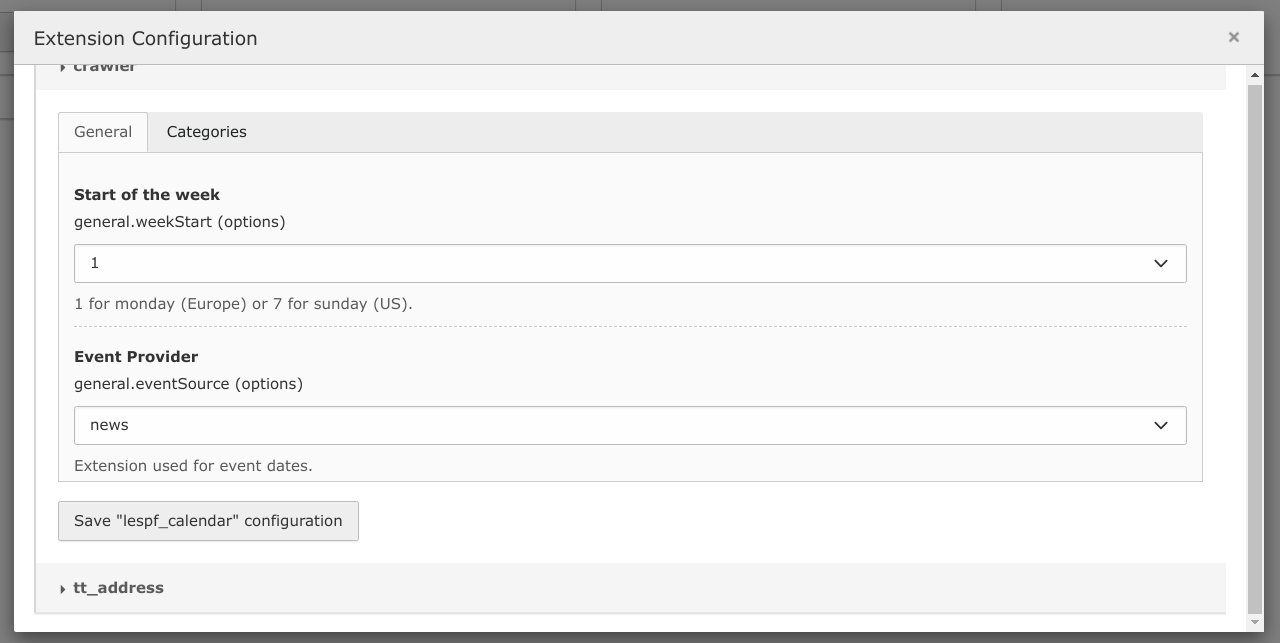
Configuring start of the week (1 for Europe, 7 for US) and event source.
Choose your event extension (or none, if none).
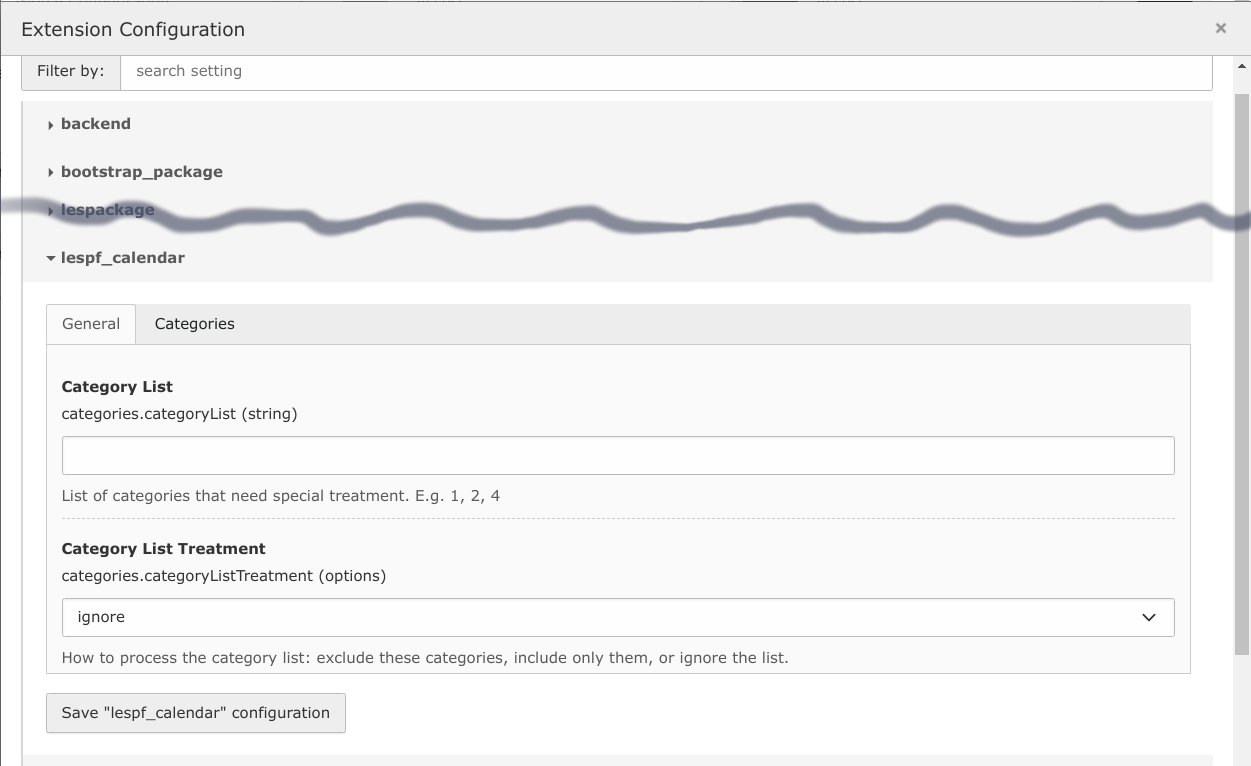
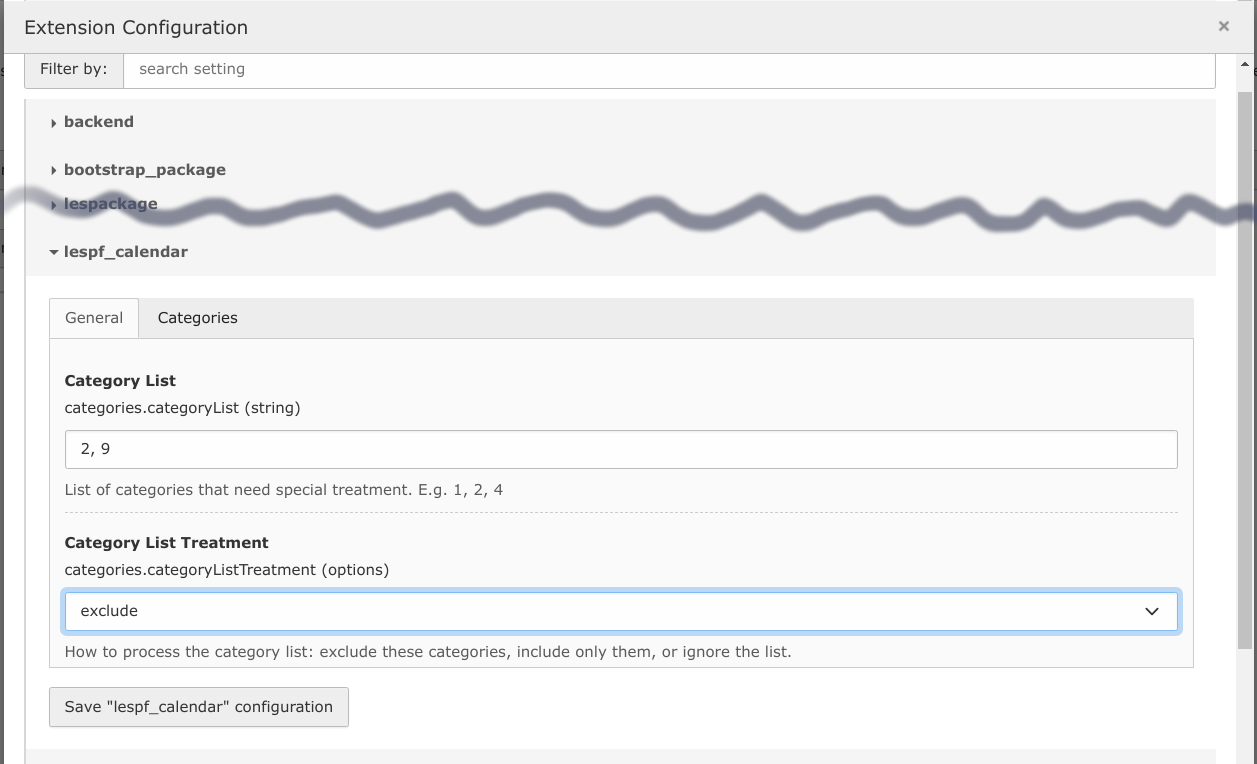
For the categories, you type in a comma-separated list of category numbers
and choose how to handle them. You got the following options:
include: Only the listed categories will be taken into account.
exclude: Events belonging to the listed categories will not appear
in the HTML output, but if they belong to other categories too, they will.
exclude (strict): Events belonging to the listed will not appear in the
HTML output, even if they also belong to other categories.
ignore: All events will be listed, your category list (if any)
does not matter.
Configuring categories: Here anything is allowed.
In the backend, where a calendar widget is used, you choose the month to
display (leave year and month empty to show the current month) and you choose
the region to display holidays. You can also choose a starting page for events
to be considered. If you leave it empty, all events will be parsed.
The region has to be entered as the two digit ISO country code, followed by a
hyphen and the ISO region code. If you only enter the country code, only
holidays that are valid in the complete country will be displayed.
Examples are DE-BY (Bavaria), GB-SCT (Scotland) of FR (France in general).
Unfortunately, the list of regions is far from complete. I will happily
include more countries and regions.
Extending data
You may adopt further countries or regions in the form of YAML files.
Sample files are provided in the Resources/Private/Regions subdirectory
of the extension. You can also add other kinds of recurring events than
holidays to your YAML file. You will find more information in the
Developer Corner developer section of this manual.
To make the extension use your YAML file, you have to set the TypoScript
variable ext.lespf_calendar.settings.customeventpath to an appropriate value,
e.g. fileadmin and you have to add .yaml to the region code in the plugin
configuration, e.g. "custom.yaml" if your file happens to be named so. Please
cosult the4 next section for security concenrs.
Privacy and Security Concerns
Events
Displaying events in the calendar may circumvent restrictions on the
visibility of these events in the frontend of your site. This can be
mitigated by excluding several categories from the calendar or by having
your events within distinct folders and restricting the calendar's access
to some of them.
To be clear: general restrictions (publishing date, deletion, etc.) are
respected and there is not more to see than that there is an event with some
category number on some day.
Categories
Categories on the other hand are a feature of Typo3 that is only accessible in
the backend. The calendar uses (and thereby leaks) category numbers within its
CSS classes. You have to decide if this is acceptable to you. As the choice of
event provider and categories to include is handled within the extension
configuration, editors can not tamper with restrictions given by the
administrator.
YAML files
Malformed YAML files may leed to error messages during calendar generation.
You may want to restrict the path to YAML files to a location where not
every backend user has write access. The best place my be inside of your site
package or in a subfolder of fileadmin with access restrictions.
Typical Example
Typoscript Template
Configure the calendar within the extension configuration menu.
Include the Lespf Calendar Template.
Include CSS within the setup section (mandatory) and configure the path
to custom calendars (optional, only if you need them).
When writing CSS, you need category numbers. You may retrieve them from HTML output,
but you can just as easily query the database (if you got an appropriate tool and
the necessary privileges).
SELECT uid, title FROM`sys_category`WHERE deleted = 0;
Copied!
If you got categories with start time or end time, you perhaps have to do
some more work to get an accurate list.
Developer Corner
Calendar Formatting
About CSS
All HTML elements produced by the calendar are labeled with classes
starting with 'cal-'. You can style a calendar cell in different
ways:
change background color
change font color
change font style
change border
This should be enough dimensions.To prevent that the quick overview
the calendar should provide changes to a riddle, you probably
have to stick to a few distinct cases in general and to only one
or two of these dimensions. Also you should keep accessibility in
mind. As calendar entries may belong to several classes, you have to
take CSS precedence rules into account to get the desired effect.
There is a sample CSS in the folder Resources/Public/CSS. This should
hopefully be sufficient as a starting point.
Week Start
Support for start of the week on Monday (default, Europe) or Sunday (US)
is complete. If the week starts on Friday (middle east), the fluid
template for week display has to be patched, in particular the title
row.
Calendar Week
You can access the ISO 8601 calendar week from your fluid template.
There is a sample fluid template WeeksLarge.html that shows how you can
use it within your custom template. Please note that ISO 8601 calendar
weeks only are useful if Monday is the start of the week.
Adding Additional Calendars
Basically, there are two ways to enter calendar data:
YAML files
Entries in the table tx_lespfcalendar_domain_model_calendar
Your preferred way to enter data is to use a YAML file.
See below for the database.
You will find sample YAML files within the extension's
Resources/Private/Regions directory.
YAML files can be built completely from scratch,
they can include other YAML files or they can be based on the
database.
Please read the Configuration section for the way to configure
the extension to find your YAML file. Please read
the For Editors section to find out how to select a YAML
file for the calendar widget.
The abbreviations of weekdays in calendar headings come from the
translation files. If your language is not supported yet and you do
not want to translate language files, you can configure the extension
to use your own fluid template with headings you have entered.
How date entries are built
Please inspect the YAMl files. They are commented and the common
cases should be obvious. The meanings of fields are the same in
database entries. Just a few remarks:
When a day is specified, this date is fixed, so no rules apply.
When an offset is specified, the day will get calculated
according to rules you may define. While a positive offset is
identical to the day number, a negative offset counts from the
end of the month, e.g. -1 is the last day. Specifying a weekday
(two letters, English) leeds to the day being moved, so offset
8 and weekday TU means the second Tuesday in the month given.
Apart from months, offsets can be based on Easter, on solstices,
or on equinoxes. In YAML files, the keyword 'month' has to be
replaced by 'base' for this. Negative offsets count from the
date given. Easter, e.g. is in fact Easter Saturday, so
an offset of -1 results in Good Friday and an offset of 2 in
Easter Monday.
Shifting rules
Sometimes the day calculated is not appropriate, e.g. if it
falls onto a Sunday or on a holidays. For this purpose shifting
rules exist.
There are two kinds of shifting:
Dates can be shifted if they happen to fall onto some unwanted
weekday. Shifting rules are specified by the weekday name (two
letters, English), a colon, and the amount to shift. If more than
one rules is specified, they have to be separated by commas.
In YAML, the rules have to be quoted, as colons are special for
the YAML parser. Here is an example:
shifting: 'SA: 2, SU: 1'
Copied!
When the day specified happens to fall on a Saturday, it will be
moved to the following Monday. The same happens if it falls on a
Sunday.
These shifting rules are only considered if you have used an
offset (instead of a day) and you have not defined a weekday for
the offset given.
Dates can be shifted if they happen to fall onto some unwanted
month day. These rules only get applied if you have used an
offset (instead of a day) and you have defined a weekday. They
consist of the day number, a colon and the amount to shift.
shifting: '3: 7, 28: -7'
Copied!
This example will shift an event from the third day of the given
month to the tenth and from the 28th day to the 21st.
For each entry (holiday, event, what ever), there will only be one
shifting rule applied and it will only be applied once.
There are two reasons:
the rules have to be easily understood, and
accidental endless loops have to be prevented. It would be too
easy to say something 'SU: 7' without thinking of the
consequences.
Configuring recurring events
The extension can process a YAML file instead or additional
to the internal database table. This gives you the chance to
enter recurring events. There are sample YAML files in the
extension's Resources/Private/Regions directory.
Important: You have to get your YAML right, or Typo3 might
raise exceptions. Please check twice, especially when in doubt.
Memorial Days
Besides holidays and partials you can also enter memorial days.
There is, however, not much use to it, as long as the name of
the special day is not shown.
About the Table tx_lespfcalendar_domain_model_calendar
The table contains official calendar data. It is intended that
the table gets rebuilt from scratch whenever you reinstall or
update the calendar extension. So please don't enter any data
there.
Extending the database table
The database table will probably be overwritten when you install
the next version of the calendar, so do not extend it.
Please use YAML files instead.
I will happily include additional records. If you intend to supply
calendar data to the extension, I prefer CSV data, but YAML is OK,
also.
The Data Model
The data model assumes a country that may contain a region.
It is not intended to deal with sub regions or with constructs that
bundle several countries or several regions. This might save a few
lines of data, but overviews (and, by the way, programming) would
become more complicated.
Some Examples:
Germany has about 17 regions. If a holiday occurs in
ten of these regions, it has to be entered ten times (once for
each region).
- France has regions and sub regions. If you decide to use sub regions
(as I did), regions are not considered as parents to these
sub regions, but as separate entities.
Limitations and Known Problems
Updating
Automatic reimport of calendar base data does not happen, when the
extension gets reinstalled. With traditional installations, you just
can reimport data with the extension manager.
Calendars
The calendar plugin is based on the Gregorian Calendar, so it fits
European countries well, but probably nothing else. It defaults to
Sunday being the last day of the week, but it can be tweaked to
accept Sunday as the first weekday.
There is no provision or intention to handle other calendar systems,
e.g. the lunar calendar of Islam or the lunisolar Jewish calendar.
Holidays
I have little understanding of holidays outside my cultural bubble.
Beside a lack of time, this lack of expertise keeps me from adding
all the holiday lists I can find.
Just some examples for difficulties:
In Denmark there are two holidays that always happen
on Sunday. In Germany, I would not include such days into a calendar.
In Bavaria, there is a holiday that is only valid in communities with
a majority of catholic people. This can not be properly shown.
In cases like this, you should add it to your site as an event or
within a YAML file.
In Austria, not nation-wide holidays appear to be only valid for
the public sector, but not for businesses. I tried to map this by
calling these days partial instead of holiday.
In Germany, Dec. 24 and Dec. 31 have special rules for opening
hours of stores, but these days are not holidays. I have not included
them, though they might also be partials.
In the UK, holidays get shifted to the next Monday if they happen
to fall on a weekend. I tried to map this by the shifting...
field.
In the Czech Republic, there exist two kinds of holidays that
apparently differ by the categories of stores that are allowed to
open. I have flagged both kinds as holiday.
Also in the Czech Republic, there are official remarkable days that
are apparently no holidays. I have not entered them.
In Belgium, there exist holidays for the Flemish part of the country,
for the Walloon part, and for the German part. Unfortunately, the
ISO 3166-2 region codes know only about the Flemish part, the Walloon
part and the Brussels region. So for me, there is one region missing
and one region that I do not know how to handle.
In Switzerland, there are at least four distinct levels of holidays,
the level varying from region to region, and there are a lot of local
holidays. Also it has to be taken into account, if a majority of the
population is catholic. Oh, and some holidays should get canceled if
it leads to Monday and Tuesday being a holiday, but this cancelling
is not respected everywhere[1].
As a consequence, I feel not qualified
to enter Swiss holidays correctly.
[1]
There is no special command for deleting a date. You can handle
this if you build a shifting rule that changes the year
(e.g. shifting: 'TU: 365').
Events
Recurring events within YAML files that span from the end of one year to
the next will not show up in December and January. Please split them up.
There is no rule for shifting recurring events away from holidays.
Invisible Events
You will probably define Typo3 access rules for events. The calendar
respects these rules according to the current date. So, if you have an
event that is not visible any more (as it happened in the past or as you
have deleted it), it will not be visible in the calendar, too. Of course,
this applies also to future events.
YAML Trouble
I decided to use YAMl for user-generated events and holidays, because
there is a YAML parser built into Typo3. Personally, I do not like YAML.
But writing JSON or XML by hand is also not great fun.
You have to get your YAML right, or Typo3 might raise exceptions.
Please check twice when in doubt. If you don't trust your editors for
being able to write correct YAML, you can restrict the custom event path
to a folder where they can not write.
Implementation
The calendar extension uses raw database queries to determine events.
This is not generally considered as good practice, but it is way faster
than to load complete events, just to find out when they start and end.
Change log
Version 0.9.1
Easter dependent dates were not correct in some timezones.
This is hopefully fixed.
Version 0.9.0
Fixed ext_tables_static+adt.sql to contain only insert statements,
so loading tyble contents from Typo3 will work as intended.
Version 0.8.3
Added compatibility to Typo3 13.
Version 0.8.2
Extension manual is now on docs.typo3.org, accessible
via Typo3 extension repository.
Version 0.8.1
Region entries containing paths will be truncated to
their basename.
A wrong template for calendars had been shipped with the
releases 0.7.6 and 0.8.0. This is corrected.
Added Iceland.
Version 0.8.0
Improved documentation.
Repared plugin title visibilty in backend.
Version 0.7.6
Added some further European countries (IT, SP, PT, LT, LI, EE).
Added 12-24 and 12-31 as partials for Germany.
Took provisions for displaying ISO 8601 week number.
Took provisions for memorial days.
Improved documentation for developers.
Version 0.7.5
Changed TCA to prevent accidental editing of holidays table.
Added shifting rule for events with fixed weekdays.
Version 0.7.4
First publishing to Typo3 Extension Repository
Version 0.7.3
Improved documentation.
Added support for monthly repeated events.
Version 0.7.2
Added choice of week start (Monday or Sunday).
Updated documentation.
Fixed database record display in backend.
Version 0.7.1
Initial public release.
Sitemap
Reference to the headline
Copy and freely share the link
This link target has no permanent anchor assigned.The link below can be used, but is prone to change if the page gets moved.