
Extension Configuration
All configuration is made in the "Extension Configuration" section of the "Settings" module beneath the "Admin Tools".
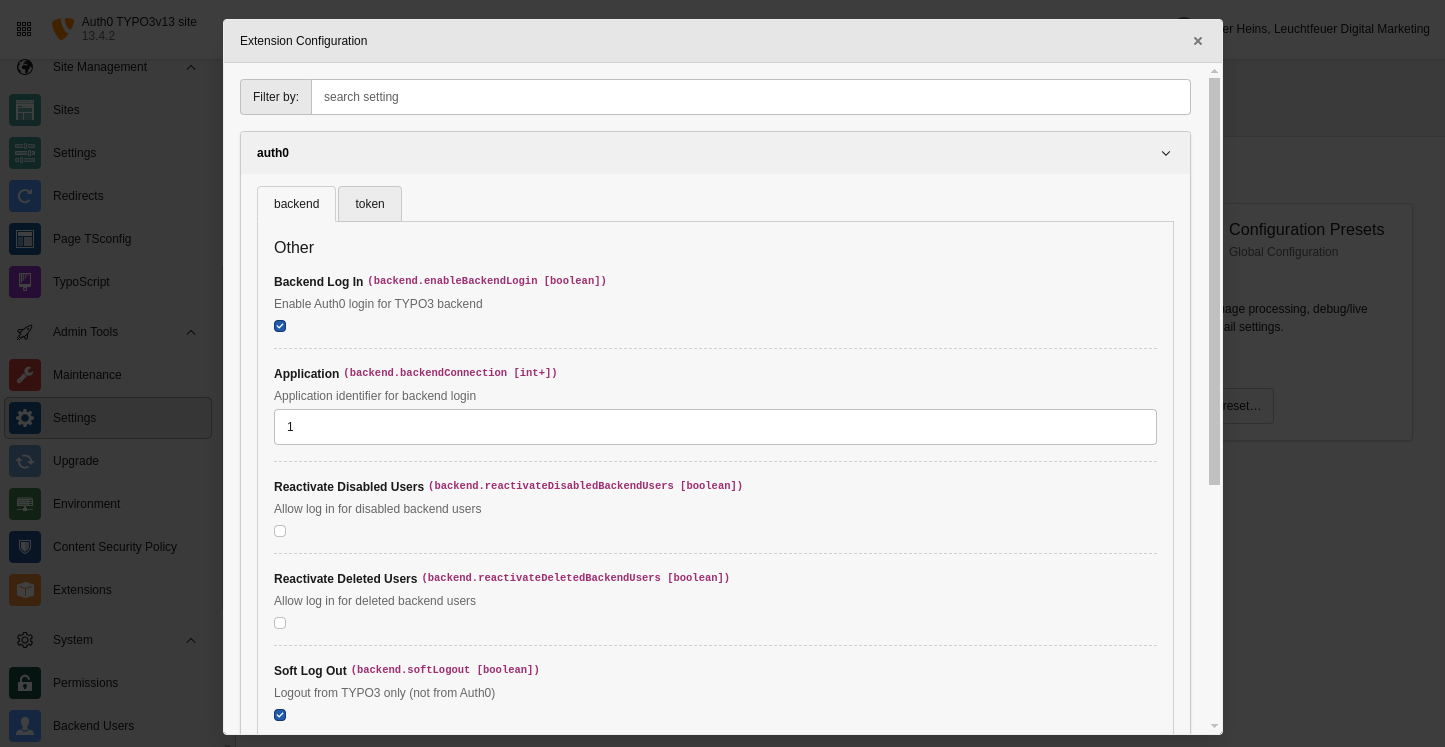
The extension configuration can be found in the admin tools.
Properties
| Property | Tab | Type |
|---|---|---|
| enableBackendLogin | Backend | boolean |
| backendConnection | Backend | positive integer |
| reactivateDisabledBackendUsers | Backend | boolean |
| reactivateDeletedBackendUsers | Backend | boolean |
| softLogout | Backend | boolean |
| additionalAuthorizeParameters | Backend | string |
| disableSudoModeBypass | Backend | boolean |
| mergeUsersByEmailAndUsername | Backend | boolean |
| genericCallback | Token | boolean |
| privateKeyFile | Token | string |
| publicKeyFile | Token | string |
| userIdentifier | Token | string |
enableBackendLogin
- Property
- enableBackendLogin
- Data type
- boolean
- Default
false- Description
- Enable Auth0 login for TYPO3 backend.
backendConnection
- Property
- backendConnection
- Data type
- positive integer
- Default
1- Description
- Application identifier for backend login.
reactivateDisabledBackendUsers
- Property
- reactivateDisabledBackendUsers
- Data type
- boolean
- Default
false- Description
- Allow log in for disabled backend users.
reactivateDeletedBackendUsers
- Property
- reactivateDeletedBackendUsers
- Data type
- boolean
- Default
false- Description
- Allow log in for deleted backend users.
softLogout
- Property
- softLogout
- Data type
- boolean
- Default
false- Description
- Log off from TYPO3 only (not from Auth0).
additionalAuthorizeParameters
- Property
- additionalAuthorizeParameters
- Data type
- string
- Default
- unset
- Description
- Additional query parameters for backend authentication (e.g.
access_).type=offline&connection=google- oauth2
disableSudoModeBypass
- Property
- disableSudoModeBypass
- Data type
- boolean
- Default
false- Description
-
Controls whether Auth0-authenticated users with a valid session can bypass TYPO3's sudo mode password confirmation dialog when accessing Admin Tools modules.
When disabled (default), Auth0 users with a valid session will not be prompted for password confirmation when accessing protected Admin Tools modules, providing a smoother user experience for externally authenticated users.
When enabled, the standard TYPO3 sudo mode behavior is enforced, requiring password confirmation regardless of Auth0 session status.
Note
This setting only applies to TYPO3 13.4.13 and higher (including TYPO3 14), where sudo mode bypassing is available.
mergeUsersByEmailAndUsername
- Property
- mergeUsersByEmailAndUsername
- Data type
- boolean
- Default
false- Description
-
When enabled and no backend user with a matching
auth0_user_idis found, the extension attempts to locate an existing user by email address and username. If a match is found, the storedauth0_user_idis updated to the new value so subsequent logins use the standard lookup path.This is useful when a user switches their login method within Auth0 — for example from a Google social connection to an email/password account. Even within the same Auth0 tenant, each connection type produces a different
subclaim (e.g.google-oauth2|…vs.auth0|…). Without this option, TYPO3 would create a second backend user record, severing the original user's edit history and permissions.The username is resolved via the YAML property mapping (
databaseField: username). If no such mapping is configured, Auth0'snicknameclaim is used as a fallback.Note
Disable this option again once all affected users have logged in at least once, to avoid unintended account merges. The option has no effect if either the email or the username cannot be determined from the Auth0 token.
privateKeyFile
- Property
- privateKeyFile
- Data type
- string
- Default
- unset
- Description
- The absolute path to your private key file on your server. If set, this key will be used for signing the generated tokens. Otherwise, TYPO3's encryption key will be used. Only RSA keys are supported for now.
publicKeyFile
- Property
- publicKeyFile
- Data type
- string
- Default
- unset
- Description
- The absolute path to your public key file on your server.
userIdentifier
- Property
- userIdentifier
- Data type
- string
- Default
sub- Description
- The property of the ID token containing the unique user ID.