lex_notifications brings a Laravel-style notification system to TYPO3 13.4+.
Any PHP class — a controller, a plugin, a service, or a domain model — can send
a notification to any object that uses the Notifiable trait, through any
combination of channels (email, database, Slack, …). The recipient can be a
frontend user, a backend user, an email address, or even an anonymous inline
class: if it uses Notifiable, it can receive notifications.
A ready-to-use backend module is included. It lets editors send messages to
frontend users and serves as a practical code sample for dispatching batch
notifications.
Use the table of contents in the left panel to navigate.
Introduction
What Does It Do?
lex_notifications is a Laravel-style notification system for TYPO3 13.4+.
The core idea is simple: any PHP object that uses the Notifiable trait can
receive a notification. Any PHP code — a controller, an Extbase plugin, a
domain service, a Scheduler task, a middleware — can send one. The two sides
are decoupled through a Notification class that describes what to send
and how to format it for each delivery channel.
There is no constraint on the direction of communication:
A frontend user can receive a notification when they place an order.
A backend user can be alerted when a content workflow step requires
their approval.
An email address (represented by a lightweight inline class) can receive
a transactional email without any database record.
Any custom domain model becomes a notification recipient with a single
use Notifiable; declaration.
Built-in delivery channels:
Email channel — sends styled HTML/plain-text emails using TYPO3's mail
system and Fluid templates.
Database channel — persists notifications in a database table so they
can be retrieved and displayed as an in-app notification centre.
Both channels are extensible. Implement ChannelInterface to add Slack,
push notifications, SMS, webhooks, or any other transport.
The included backend module (Web > Notifications) is a ready-to-use tool
for editors who need to compose and send messages to frontend users. It also
acts as a reference implementation showing how to dispatch batch notifications
to a resolved list of Notifiable recipients.
When Should You Use It?
Use lex_notifications whenever you need to decouple the act of triggering
a notification from the act of delivering it. Typical scenarios:
E-commerce — order confirmed, shipment dispatched, invoice available.
Workflow / approval — content submitted for review, approved, rejected.
Account events — registration, password reset, login from new device.
System alerts — an extension notifies a backend user when a background
job fails.
Cross-user messaging — a frontend user triggers a notification to
another frontend user (e.g. a collaboration platform).
Editorial broadcasts — backend editors send announcements to groups of
frontend users via the included module.
Any programmatic trigger — if something happens in your TYPO3
application and someone needs to know about it, this extension handles the
delivery.
Core Concepts
Notifiable
Any PHP object that uses the Notifiable trait. It gains notify()
and notifyNow() methods and can be passed as the recipient of any
notification.
Notification
A PHP class extending Lex\Notifications\Notification. It declares
which channels to use (via()) and how to format the payload for each
channel (toMail(), toDatabase(), toSlack(), …).
Channel
A delivery mechanism implementing ChannelInterface. A channel receives
a notifiable and a notification, extracts the relevant payload, and delivers
it (sends an email, writes a DB row, calls a webhook, …).
NotificationDispatcherInterface
The central dispatcher. Inject it anywhere in your TYPO3 code to send
notifications without depending on concrete implementations.
ShouldQueue
A marker interface. When a notification class implements it, dispatching
goes through Symfony Messenger so delivery happens asynchronously in a
CLI worker — keeping your HTTP responses fast.
Notifications flow from any caller through the NotificationManager,
which delegates to the channels declared in the notification's via()
method. Each channel knows how to format and deliver the payload for its
transport. The recipients can be any combination of objects using the
Notifiable trait.
Screenshots
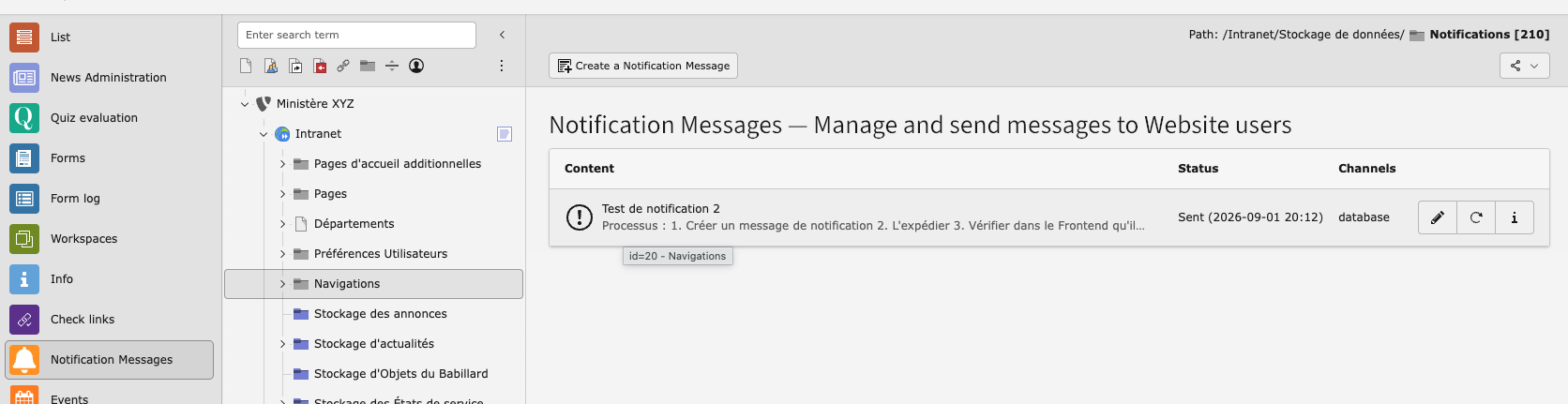
The included backend module lists all composed messages with their send
status, level indicator and action buttons.
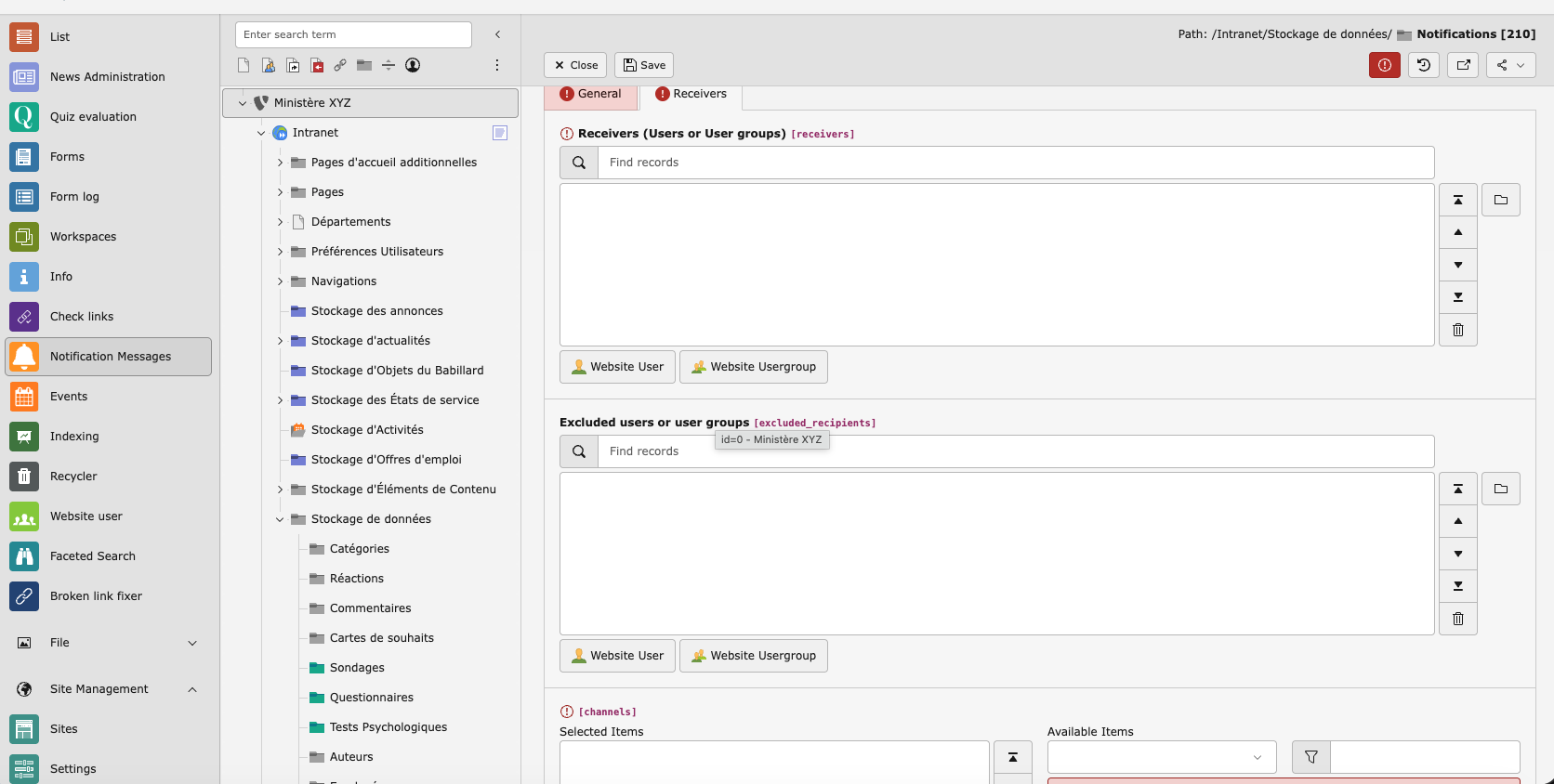
The create form lets editors write a message, select severity level,
target recipients (individual frontend users or groups) and pick delivery
channels.
Tip
Use the table of contents in the left panel to navigate.
# via CLI
vendor/bin/typo3 extension:activate lex_notifications

# or via Admin Tools > Extensions in the TYPO3 backend
Copied!
Run the database analyser to create the required tables:
vendor/bin/typo3 database:updateschema
Copied!
Installation via TER (non-Composer)
Note
Non-Composer installations are supported but not recommended for new
projects. Ensure the third-party packages listed above are available via
your autoloader.
Upload and install it via Admin Tools > Extensions.
Run Admin Tools > Maintenance > Analyze Database Structure to
create the required tables.
Post-Installation Steps
After installation:
Include TypoScript (if you need the frontend plugin):
Go to your root page's TypoScript template record and add the static
template "Lex Notifications (lex_notifications)" under
Includes > Include static (from extensions).
Clear all caches via Admin Tools > Maintenance.
The backend module Web > Notifications is now available for backend
users with the required permissions.
Database Tables
The extension creates two tables:
Table
Purpose
tx_lexnotifications_domain_model_notification
Stores in-app (database-channel) notifications for frontend
users. Each row represents one unread or archived notification.
tx_lexnotifications_domain_model_message
Stores messages composed in the backend module, including
recipient lists, delivery channels and send status.
Tip
Use the table of contents in the left panel to navigate.
Configuration
Extension Configuration
The extension does not currently expose options in the TYPO3 Extension
Configuration panel (Admin Tools > Settings > Extension Configuration).
All behaviour is controlled through TypoScript or PHP configuration.
TypoScript
The extension ships with empty constants.typoscript and
setup.typoscript templates. These are reserved for future frontend plugin
configuration. No TypoScript is required for the backend module or the
developer API.
Symfony Messenger (Queue Configuration)
The BackendUserSentMessageToFrontendUser notification implements the
ShouldQueue interface, which means it is dispatched via the Symfony
Messenger component by default.
To process the queue, configure a transport and run the messenger worker:
Custom channels can be registered by implementing
Lex\Notifications\Channel\ChannelInterface — see Adding Custom Channels.
Tip
Use the table of contents in the left panel to navigate.
Backend Module: Web > Notifications
Note
The backend module is one built-in application of the notification
system, not the primary feature. For sending notifications from PHP code,
see Developer Reference. The module source code
(Classes/Controller/Backend/NotificationController.php) is also a
useful reference implementation of how to dispatch batch notifications
to a resolved list of Notifiable recipients.
After installation, navigate to Web > Notifications in the TYPO3 backend.
The module lets editors compose messages and deliver them to frontend users
(individuals or groups) via email and/or database notifications.
Listing Messages
The module overview displays all composed messages in a paginated list
(50 per page). Each row shows:
Sent at — timestamp of last send, or "Not sent" if pending
Actions — Send / Resend buttons
Use the filter bar at the top to narrow results by level.
Composing a Message
Click the Create button (pencil icon) in the module button bar.
Field
Required
Description
Level
Yes
Severity of the notification (Info, Notice, Warning, …).
Displayed as a badge in both the backend list and the
notification email.
Subject
Yes
Short title of the message (max 255 characters).
Message
Yes
Full message body. Supports basic HTML.
Link
No
Optional URL or internal TYPO3 page link displayed as a
call-to-action button in the notification.
Recipients
Yes
Select one or more frontend users or frontend user
groups. All members of selected groups will receive the
notification.
Excluded recipients
No
Frontend users to exclude from delivery (useful to target a
group but skip specific members).
Channels
No
Select one or more delivery channels: Mail and/or
Database. If left empty, both channels are used.
Click Save to store the message without sending it.
Sending Messages
After saving (or from the list view), click the Send button. The module
will:
Resolve all recipient UIDs from the selected users and groups, minus any
excluded recipients.
Remove duplicates.
Load NotifiableFrontendUser objects for each resolved UID.
Instantiate a BackendUserSentMessageToFrontendUser notification.
Call $dispatcher->send($recipients, $notification) — the same call you
would make from your own PHP code.
Record the sent_at timestamp on the message record.
Display a flash message confirming how many recipients were notified.
Note
BackendUserSentMessageToFrontendUser implements ShouldQueue, so
actual delivery is handled by the Symfony Messenger worker. If no worker is
running, messages sit in the queue until it is started. To bypass the queue,
call sendNow() — see Developer Reference.
Resending Messages
Click Resend to dispatch a message again to the same recipients and
channels. The sent_at timestamp is updated. Useful when delivery failed
or you want to send a reminder.
Using the Module as a Code Sample
The backend module is deliberately simple so that its source code is easy
to read. If you need to send batch notifications from your own extension,
study NotificationController::sendAction() — it shows the full pattern:
// Simplified version of what the module does:

$recipients = $this->resolveRecipients($message);   // returns Notifiable[]

$notification = new BackendUserSentMessageToFrontendUser(
    subject:  $message->getSubject(),
    message:  $message->getMessage(),
    level:    $message->getLevel(),
    link:     $message->getLink(),
    channels: $this->parseChannels($message),
);

$this->notificationDispatcher->send($recipients, $notification);
Copied!
Replace BackendUserSentMessageToFrontendUser with your own
Notification subclass and $recipients with any collection of
Notifiable objects to adapt this pattern to your use case.
Tip
Use the table of contents in the left panel to navigate.
The Notifiable trait is the only requirement for a class to receive
notifications. Add it to any PHP object — Extbase entity, plain PHP class,
anonymous class — and that object immediately becomes a valid notification
recipient.
useLex\Notifications\Domain\Model\Ability\Notifiable;
classMyModel{
useNotifiable;
}
// That's it. Now you can do:
$instance = new MyModel();
$instance->notify(new SomeNotification());
Copied!
There is no registry, no database table for recipients, no configuration.
Any object with the trait can be passed to the dispatcher.
Making a Model Notifiable
For email delivery, also add HasRouteNotificationForMail. This trait
provides the routeNotificationForMail() method, which the email channel
calls to resolve the recipient's email address. It expects an $email
property on the class:
Multiple recipients of different types in one call
The dispatcher accepts an array of notifiables — they do not need to be the
same class:
$this->notificationDispatcher->send(
    [$frontendUser, $backendAdmin, $externalEmail],
    new ImportantAnnouncement($text),
);
Copied!
Each recipient's via() result can differ, so the notification class can
adapt channels based on the notifiable type:
publicfunctionvia(object $notifiable): array{
// Only store in-DB for actual frontend user recordsif ($notifiable instanceof NotifiableFrontendUser) {
return [NotificationChannel::CHANNEL_MAIL, NotificationChannel::CHANNEL_DATABASE];
}
return [NotificationChannel::CHANNEL_MAIL];
}
Copied!
Creating a Notification
Extend the abstract Notification class and implement the methods for each
channel your notification uses:
namespaceMyVendor\MyExtension\Notification;
useLex\Notifications\Notification;
useLex\Notifications\NotificationChannel;
useLex\Notifications\NotificationLevel;
useTYPO3\CMS\Core\Mail\MailMessage;
finalclassOrderConfirmedextendsNotification{
publicfunction__construct(
private readonly Order $order,
){}
/**
* RFC 5424 severity level for this notification.
*/publicfunctiongetLevel(): int{
return NotificationLevel::LEVEL_INFO;
}
/**
* Which channels to use. Receives the notifiable so you can adapt
* the channel list per recipient type.
*
* @return string[]
*/publicfunctionvia(object $notifiable): array{
return [
NotificationChannel::CHANNEL_MAIL,
NotificationChannel::CHANNEL_DATABASE,
];
}
/**
* Payload for the email channel.
*/publicfunctiontoMail(object $notifiable): MailMessage{
return (new MailMessage())
->subject('Order #' . $this->order->getNumber() . ' confirmed')
->html('<p>Thank you! Your order is being processed.</p>')
->to($notifiable->getEmail());
}
/**
* Payload for the database channel.
* Returned array is JSON-encoded and stored as-is.
*
* @return array<string, mixed>
*/publicfunctiontoDatabase(object $notifiable): array{
return [
'level' => $this->getLevel(),
'subject' => 'Order #' . $this->order->getNumber() . ' confirmed',
'message' => 'Your order has been received and is being processed.',
'order_id' => $this->order->getUid(),
];
}
}
Copied!
Only implement the channel methods you actually use. If your notification only
sends email, there is no need for toDatabase().
Queuing Notifications
Implement the ShouldQueue marker interface to have your notification
dispatched asynchronously via Symfony Messenger:
useTYPO3\CMS\Core\Messaging\ShouldQueue;
finalclassOrderConfirmedextendsNotificationimplementsShouldQueue{
// No extra methods needed — the interface is a marker only.
}
Copied!
When ShouldQueue is implemented, calling notify() wraps the
notification in a NotificationQueued Messenger message. A CLI worker must
be running to process the queue:
Call notifyNow() or sendNow() to bypass the queue and deliver
immediately regardless of ShouldQueue.
Using the Dispatcher Directly
Inject NotificationDispatcherInterface into any service, controller, or
plugin. This is the recommended approach when you do not have a direct
reference to a notifiable object, or when you need to send to multiple
recipients:
useLex\Notifications\NotificationDispatcherInterface;
finalclassOrderService{
publicfunction__construct(
private readonly NotificationDispatcherInterface $notifications,
private readonly FrontendUserRepository $userRepository,
){}
publicfunctioncompleteOrder(Order $order): void{
$buyer = $this->userRepository->findByUid($order->getBuyerUid());
// Dispatches via Messenger queue if ShouldQueue is implemented$this->notifications->send($buyer, new OrderConfirmed($order));
// Forces immediate delivery$this->notifications->sendNow($buyer, new OrderConfirmed($order));
}
}
Copied!
Send to a batch of recipients in one call:
$subscribers = $this->frontendUserRepository->findByNewsletterGroup($groupId);

$this->notifications->send(
    $subscribers->toArray(),
    new MonthlyNewsletter($content),
);
Copied!
The dispatcher iterates each notifiable independently, so a failed delivery
for one recipient does not block the others.
Practical Use Cases
Workflow approval alert to a backend user
// In a DataHandler hook or custom service
$responsible = new BackendNotifiableUser(email: 'editor@example.com');
$this->notifications->sendNow(
    $responsible,
    new ContentPendingReview($pageUid, $submitter),
);
Copied!
Frontend user triggers a notification to another frontend user
// In a frontend plugin action (e.g. a messaging feature)
$sender   = $this->frontendUserRepository->findByUid($senderUid);
$receiver = $this->frontendUserRepository->findByUid($receiverUid);

$receiver->notify(new NewMessageReceived($sender, $messageText));
Copied!
Extension notifies multiple channels for different severity levels
finalclassPaymentFailedextendsNotification{
publicfunctionvia(object $notifiable): array{
// Critical failures go to mail + database + Slackreturn [
NotificationChannel::CHANNEL_MAIL,
NotificationChannel::CHANNEL_DATABASE,
'slack',
];
}
}
Copied!
Sending to a plain email without any domain model
$contact = newclass('customer@example.com') {
use \Lex\Notifications\Domain\Model\Ability\Notifiable;
use \Lex\Notifications\Domain\Model\Ability\HasRouteNotificationForMail;
publicfunction__construct(public readonly string $email){}
};
$contact->notifyNow(new OrderReceiptEmail($order));
Copied!
Reading Database Notifications
Inject DatabaseNotificationRepository to query stored notifications
for the currently logged-in frontend user:
Register the channel as a service in Services.yaml and return its string
key (e.g. 'slack') from your notification's via() method. The
NotificationManager will resolve it from the container automatically.
Override them in your site package by adjusting the Fluid template paths.
The built-in templates receive these variables:
Variable
Type
Description
{level}
int
Notification severity level.
{subject}
string
Message subject/title.
{message}
string
Message body (may contain HTML).
{link}
string|null
Optional call-to-action URL or typolink string.
For your own Notification subclasses you can use a completely different
template — simply return the rendered HTML from your toMail() method using
whatever rendering approach fits your extension.
Tip
Use the table of contents in the left panel to navigate.
Changelog
1.1.0 — 2024-01-01
[FEATURE] Added Symfony Messenger queue integration via
ShouldQueue marker interface.