This extension includes the jQuery Plugin FullCalendar , which generates a skinable
Calendar with different views (month, week, day, week list, day list)
from Google Calendar XML Feed(s).
It uses Extbase and Fluid and needs at least TYPO3 8.7.8 (<= v4.9.1) or 9.5.0 (>= v4.10.0)
The extension is localized in english and german. Contact me, if you
would like to add your language.
Helge Sascha Anders Koziele for sponsoring Google API 3 Update
Fred Hartmann und Tobias Döring GbR for sponsoring Google API 3 Update
m|r|o|net - Internetsolutions for sponsoring Google API 3 Update
Evang.-Luth. Pfarramt St. Johannes Gilching-Weßling for sponsoring Google API 3 Update
Users manual
Install the extension from the TYPO3 Extension Repository or composer (package name: mediaessenz/me-google-calendar)
Go to your root or add an extended template and include the static template "Google Calendar (me_google_calendar)"
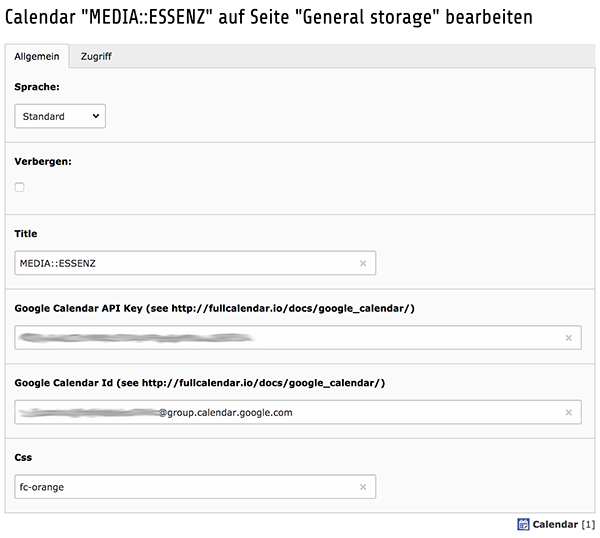
Generate a google calendar record in a sysfolder of our choice (e.g. general storage) and fill in the fields.
Set restrictions of a feed to a specific feuser group using the access tab.
Be aware: since the google calender feed needs to be public, this is not really save!
Anyone who knows the public google calendar url (starts with https://calendar.google.com/calendar/embed?src=)
can see your datas.
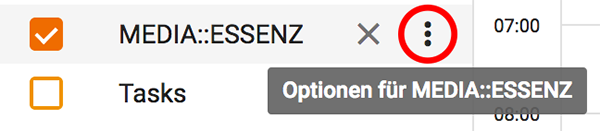
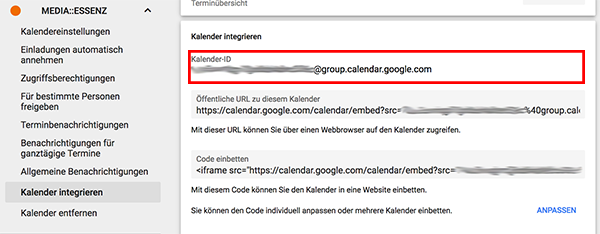
Get the needed google calendar api key
To enable the plugin to read the calendar data from google a Google Calendar API key is required.
The following description can be slightly differ from the actual procedure.
Depending of the restrictToPredefinedCssClasses-setting (see Configuration > Extension Manager) you can enter a css
class name (without dot) or select from a list of predefined styles (see Configuration > Examples for how to add more
items).
The predefined stylesheet definitions are:
fc-red
fc-green
fc-blue
fc-grey
fc-orange
fc-purple
If you like to show all events from a calendar e.g. in red, just enter the predefined CSS Class “fc-red” to the
"Css" field.
If restrictToPredefinedCssClasses (available over the extension manager settings of me_google_calendar) is set
to 1 (true), the "Css" input field changes to a "Style" select field.
In this case you can only select from a specific list of styles (Red, Green, Blue, Grey, Orange and Purple).
This list is also expandable using page typoscript.
For more info about extending css/styles go to "Configuration > Examples" of this manual.
Add a Google Calendar plugin to a page
Finally add a “General Plugin” on a page of your choice and select “Calendar” under the “Plugin” tab
Configure the output as you need
More configuration can be done globally by using the constant editor.
See section "Configuration > TypoScript Constants" for more info.
Support my work
This plugin was created mostly in my free time, which is becoming more and more precious since I have a family.
To keep it up for future TYPO3 and fullcalendar versions I really need your help!
If you like and use my extension, I'd appreciate a small donation: Flattr or PayPal
For a small monthly contribution, visit my PATREON page
plugin.tx_megooglecalendar {
   settings {

      # change included jquery to a cdn version
      jQueryPath = //ajax.googleapis.com/ajax/libs/jquery/3.1.1/jquery.min.js
      jQueryExternal = 1

      # switch from jquery-ui theme/dialog to bootstrap 3:
      themeSystem = bootstrap3
      jQueryUiPath =
      cssThemePath =

      # change min and max time
      minTime = 08:00:00
      maxTime = 18:00:00

      # set first day to monday
      firstDay = 1

   }
}
Copied!
CSS / Style Examples
If you want to show all events from a calendar in red, just add the
predefined CSS Class “fc-red” to the google calendar feed record field "Css".
There are six already predefined style definitions in the included main.css file:
If you want to restrict backend user to only selectable styles, you can set the flag "restrictToPredefinedCssClasses",
which is available in the extension manager settings of me_google_calendar.
If activated, the css input field inside the google calendar record changes to a select field containing only the predefined
css styles.
If you want to extend the list or remove some items please use page typoscript.
The following example code removes all predefined styles and adds the above css example:
TCEFORM {
    tx_megooglecalendar_domain_model_calendar {
        css {
            removeItems = fc-red,fc-green,fc-blue,fc-grey,fc-orange,fc-purple
            addItems {
                my-color-1 = My Color 1
            }
        }
    }
}
Copied!
Known problems
Sometimes, if you update from an earlier version, old flexform settings could result in unexpected results.
Have a look at the famose extension "typo3_console" from helmut hummel to fix this problems by using the
cli command "vendor/bin/typo3cms cleanup:flexforms".
Another way is to open the plugin over the backend, clear the content of the database field pi_flexform of the
corresponding tt_content record using e.g. PhpMyAdmin and press save inside the backend.
For other things please contact me
To-Do list
Contact me :)
I'll work on the extension, as my time allows me...
ChangeLog
v.0.1.0: Initial Upload
v.0.2.0: changed js configuration output generation from TS to PHP.
Added flexforms for configuration possibility to show more than one
google calendar by using db entries.
v.1.0.0: Made some improvements of the flexforms configuration. Added
support for T3 jQuery extension. Added this manual.
v.1.0.1: Set status to stable
v.1.0.2: Update currupt manual. Added default timezone to new calendar
feed entries. Some small bugfixes.
v.1.0.4: Bugfix to work with CSS Styled Content <4.3. Manual
Correction.
v.1.0.5: Update to newest version of fullCalendar script (1.4.4) and
jQuery (1.4.1). Manual Correction.
v.1.0.6: Update to newest version of fullCalendar script (1.4.5) and
jQuery (1.4.2).
v.1.0.7: Small bugfix for jQuery no conflict mode.
v.1.0.8: Update to newest version of fullCalendar script (1.4.6).
Added jsMinify and jsToFooter option. Constants will grouped and
ordered correctly now (Thanks to Jürgen Furrer!).Attention: Change
Constants-Pre-var from plugin.megooglecalendar to
plugin.tx_megooglecalendar_pi1. Please update your constants
configuration!
v.1.0.9: Update to newest version of fullCalendar script (1.4.7) and
jQuery UI (1.8.5). Small changes in configuration (jQueryUiPath
replaces jQueryUICorePath, jQueryUiDraggablePath and
jQueryUiResizablePath; Added jQueryPluginPath and gcalPath)
v.1.1.0: Added jQueryUI popup dialog for event details. Makes use of
jQueryUI.dialog and jQueryUI.buttons now - so please check your
jquery-ui-custom-theme-css-files for needed parts!
v.1.1.1: Added Buttons for iCal-File (.ics) Download and “Add to
Google Calendar” in Event-Details. Added Link to Google Maps in Event-
Details. Updated to newest version of fullCalendar script (1.4.8) and
jQuery (1.4.3).
v.1.2.0: Update to newest version of fullCalendar script (1.4.9),
jQuery (1.4.4) and jQuery UI (1.8.6). Added event detail tab in
frontend plugin + option to switch off link to google maps. Bugfix for
IE-problem in dynamic generated js-code (Thanks to Jesper Goos!).
v.1.3.0: Update to newest version of fullCalendar script (1.5.2),
jQuery (1.6.2) and jQuery UI (1.8.16).
v.3.0.0: Completely rewritten in Extbase and Fluid. Uses fullCalendar
script 1.5.4, jQuery 1.8.3, jQuery-UI 1.9.2
v.3.1.0: Update to newest version of fullCalendar script (2.0.2) and
all needed libraries and stylesheets. Add constant “useCurl” (and
function of course) to prevent google feeds (especially private one)
are visible in source code.It is also now possible to restrict the
access to a calendar feed only for logged in fe_users. Attention:
Because of the update to fullCalendar 2, some time and date formats
were changed! Especially the minTime, maxTime and scrollTime needs
your attentions (e.g. a value “8” must be changed to “08:00:00”).
Additionally the broken “Download iCal-File”-function has been fixed.
Unfortunately google switched off there (undocumented) REST-service to
generate them by adding some parameters to the single event url. The
file is now generated by the extension itself.
v.3.2.0: Update to newest version of fullCalendar script (2.2.3),
all needed libraries and stylesheets. Since Google switched off API V1
and V2 on Nov 17th 2014 a Google Calendar API key is now required.
See manual for more info. Removed curl feature, since feeds can now be
protected by google api settings. Add constant “eventLimit” to switch
on/off a more events link, if number of events do not fit into a time
slot. New Feed Icon.
v.3.3.0: Update to newest version of fullCalendar script (2.3.2),
all needed libraries and stylesheets. Add time format constants for
month, week, day view. Add timezone constant to set the timezone.
Remove timezone from feed records, because it does not work since
fullcalendar 2.2.x anymore. Timezone from Google UI is used instead.
v.3.4.0: TYPO3 7 LTS Compatibility Update. Changed vendor name from
TYPO3 to MEDIAESSENZ.
v.4.0.0: Update to newest version of fullCalendar script (3.1.0), with
several new list views (day, week, month, year). Add footer menu, week
numbers and aspect ratio. Add bootstrap modal support.
Add TYPO3 8 compatibility.
Breaking changes: remove timeFormat.axis setting; new calendar record
selection under general settings tab!
v.4.0.1: Fix version and requirements in composer.json
v.4.0.2: Fix Documentation
v.4.0.3: Fix missing images in documentation
v.4.0.4: Improve code example formating
v.4.0.5: Show event description only if available; use icon factory for calendar tca; small cleanups
v.4.1.0: Update fullcalendar plugin to version 3.2.0
v.4.2.0: Update fullcalendar plugin to version 3.3.1; Small adjustments for TYPO3 8.7
v.4.2.1: Add possibility to change label of list button
v.4.3.0: Update fullcalendar plugin to version 3.6.1;
Add new "themeSystem" constant to switch between "standard" (default), "bootstrap3" and "jquery-ui" theme.
Add and use minimized css/js versions by default;
Remove old odt and pdf manual and compass stuff;
v.4.4.0: Update fullcalendar plugin to version 3.9.0 + jQuery to 3.3.1;
Add bootstrap4 theme coming with fullcalendar (untested);
Remove several not needed fields from plugin settings (code,layout,select_key,pages,recursive);
Change storage page handling:
If calendar records selected in plugin, storage page is ignored completely;
If no calendar records selected and no storage page is defined over constants property
plugin.tx_megooglecalendar.persistence.storagePid all calendar records will be considered;
If storagePid constant is set, only records from the defined pages (separated by comma) will be considered;
With the additional constant plugin.tx_megooglecalendar.persistence.recursive this happens recursive by the
given depth;
If you update from an older version of this extension, be sure to cleanup your flexform settings.
Have a look at the famose extension "typo3_console" from helmut hummel to fix this problems by using the
cli command "vendor/bin/typo3cms cleanup:flexforms"
v.4.5.0: Add TypoScript constants to change list view rows header and date format (listDayFormat, listDayAltFormat,
timeFormat.list); Improve documentation;
v.4.6.0: Add extension manager setting restrictToPredefinedCssClasses to change the css text field inside calendars
record to a selectable list of styles; Update manual and add code examples how to do this;
v.4.6.1: Fix typoscript example in manual;
v.4.6.2: Update this changelog
v.4.6.3: Add location and description in ical files only if defined; Improve format of ical description.
v.4.6.4: Fix problem with full day events
v.4.7.0: Update fullcalendar plugin to version 3.10.0 + jQuery to 3.4.1; Improve handling of all day(s) events;
Move ical-link generation from gcal.js to eventDataTransform method defined inside settings partial;
v.4.7.1: Fix general labels under TYPO3 >= 8
v.4.8.0: Restructure manual to fit new documentation workflow; Drop TYPO3 6 and 7 support.
v.4.8.1: Add missing webhook to render manual
v.4.8.2: Add some more requirements to composer.json
v.4.8.3: Fix wrong version number in manual
v.4.8.4: Fix wrong extension key in composer.json
v.4.9.0: Fix wrong path to loading gif; Accessibility optimizations; Small changes in markup of modal to
better work with bootstrap 4; Make code TYPO3 10 compatible, but not really tested yet;
v.4.9.1: Add missing renderType definitions in flexform;
v.4.10.0: Drop TYPO3 8.7 support, because of changed new domain model validation annotation format, required
since v10; Move icon, inline help definition to there right place; Fix deprecated language label paths in TCA
v.4.11.0: Increase compatibility range to TYPO3 9-11; Cleanup composer.json
v.4.12.0: Update fullcalendar plugin to version 3.10.2 + jQuery to 3.5.1 which fixes a problem in agendaDay and
agendaWeek view under jQuery 3.5.1
v.4.13.0: Make TYPO3 11 compatible + Cleanups
v.4.14.0: Add a workaround to make the calendar working with bootstrap 5 modals. To use it under bootstrap 5, it is
recommended to set the TypoScript constant plugin.tx_megooglecalendar.settings.themeSystem to "standard", otherwise
the generated calendar looks a bit ugly, because of the no more fitting css selectors.
v.5.0.0: Change namespace to MEDIAESSENZMeGoogleCalendar. Remove TYPO3 10 compatibility. Add TYPO3 12 compatibility.
Replace ics eID script by middleware.
v.5.1.0: Change javascript embedding from TypoScript to asset viewhelpers inside Layouts/Default.html, due to massive
changes in TypoScript parser. Configuration how to embbed the needed js code (also jQuery), its loading piority, using
minified version or not and so on has to be done by overriding the extensions layout file!
v.5.2.0: Switch to phpDocumentor
Reference to the headline
Copy and freely share the link
This link target has no permanent anchor assigned.The link below can be used, but is prone to change if the page gets moved.