FAL Quota Extension for TYPO3 

Version

main

Author

FAL Quota Team <typo3@mehrwert.de>

Description

Apply quota limits to FAL storages (Local driver) where the underlying filesystem does not support individual quotas or all storages reside on the same filesystem.

Keywords

FAL, File Abstraction Layer, Quota, Diskquota, Disk-quota, Diskspace, Filesystem, Storage

Copyright

2019-2025 by mehrwert intermediale kommunikation GmbH

Language

en

License

This extension documentation is published under the CC BY-NC-SA 4.0 (Creative Commons) license

Rendered

Tue, 31 Mar 2026 07:40:02 +0000

Extension Manual

This documentation is for the TYPO3 extension fal_quota.

For Contributors

You are welcome to help improve this guide. Just click on "Edit me on GitHub" on the top right to submit your change request.

Installation 

The recommended way to install FAL Quota is by using Composer:

composer require mehrwert/fal-quota

You also can install FAL Quota as extension from TYPO3 Extension Repository (TER). Just download and install the extension within ADMIN TOOLS > Extensions.

Backend Module 

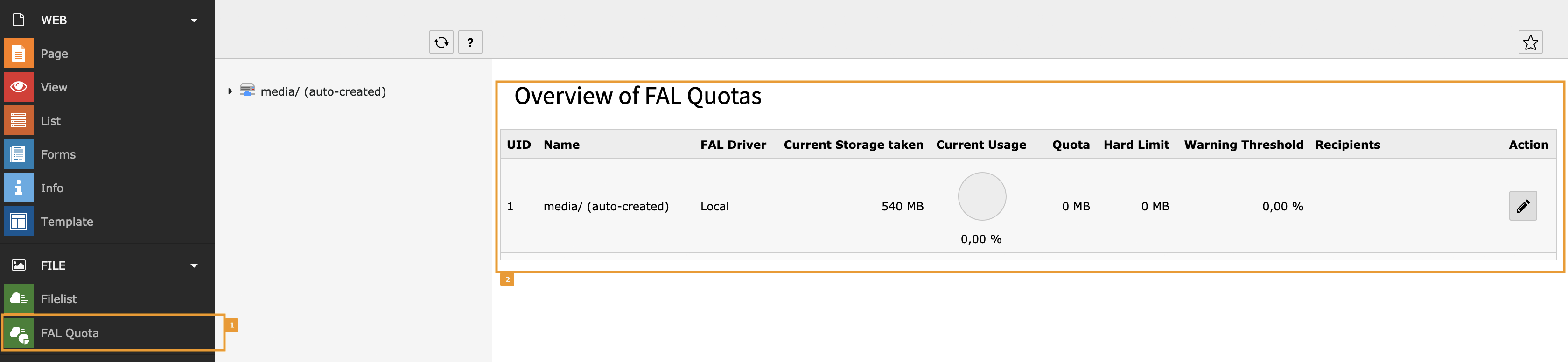
The extension adds some fields to the sys_file_storage database table to store quota configuration per storage. After the extension has been successfully installed, access to a new backend module FAL Quota in the FILE section [1] may be enabled for Backend Users and Groups via TYPO3 module configuration:

Backend module

Default backend module

The module provides an overview for all storages currently sorted by UID and their configured quota settings [2].

Configuration 

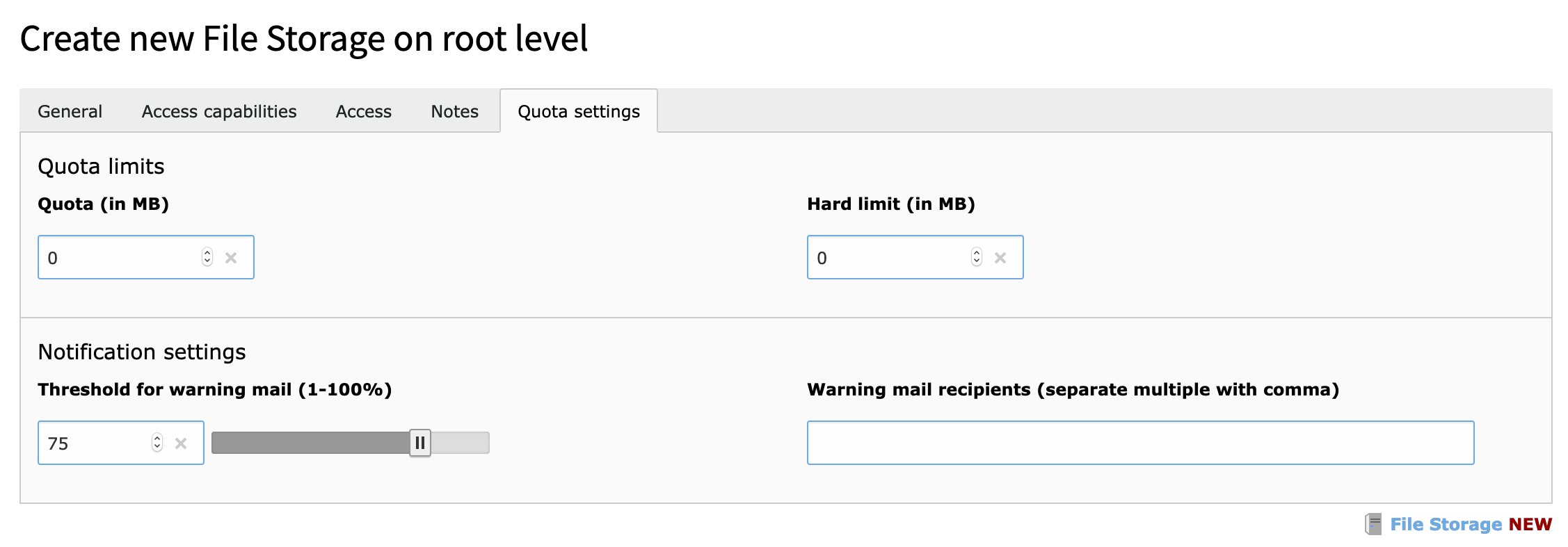
The extension groups all quota related fields in a tab Quota settings in the File Storage records. Quota configuration is done per storage.

Example storage with Quota Settings tab

Example storage with »Quota Settings« tab active

Enabling Quota for a Storage 

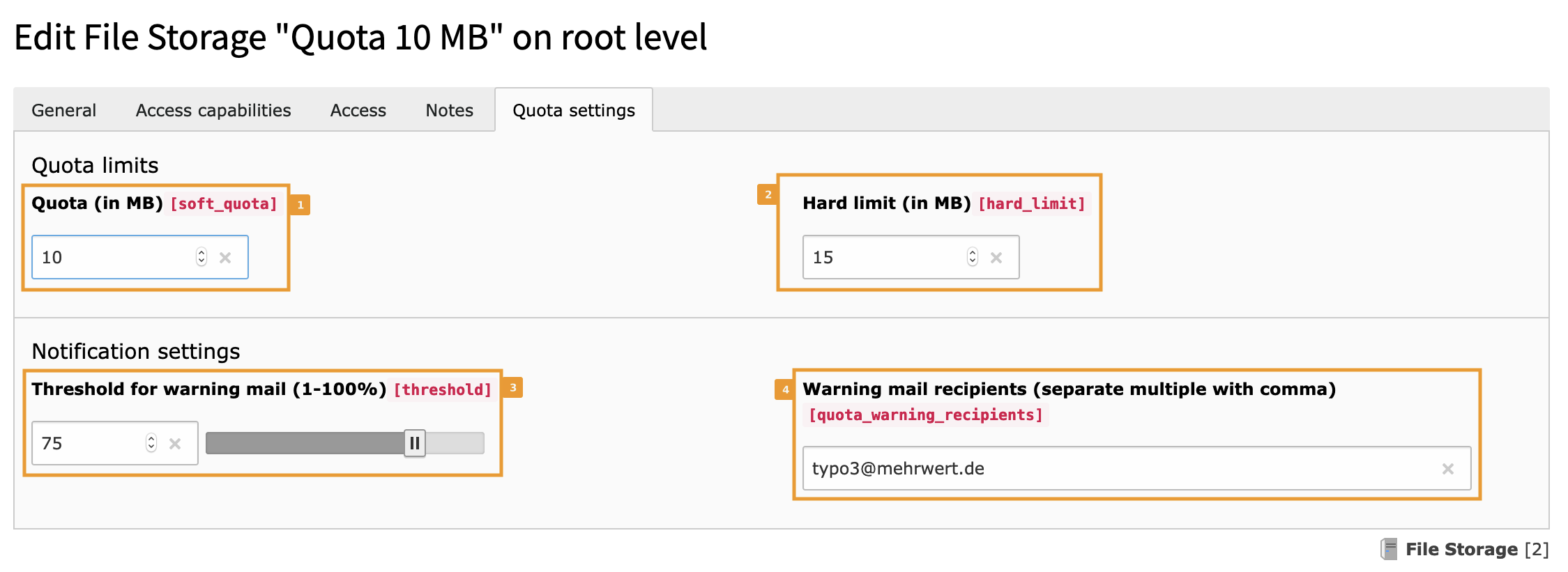
To enable Quotas for a storage, you must set up a quota [1], a hard limit [2] and optionally a threshold (defaults to 75 %) [3] and email recipient(s). Multiple recipient addresses are separated by comma (,) [4].

Example quota configuration for storage

Example quota configuration for storage with 10 MB quota, hard limit of 15 MB and a warning threshold of 75% (of the 10 MB quota, sending notifications after reaching 7.5 MB).

The example above defines a soft quota of 10 MB [1] and a hard limit of 15 MB [2]. Hard limit values must be equal to or greater than the soft quota values. The notification threshold value [3] defines the limit where the utilization check starts sending email notifications (if recipients have been specified and the Scheduler task has been configured. See Configuration for details).

Additional recipients can optionally provided by a PSR event listener.

Example Configuration/Services.yaml:

services:
  MyVendor\MyProject\EventListener\AddAdditionalRecipients:
    public: true
    tags:
      - name: event.listener
        identifier: 'MyVendor-MyProject-AddAdditionalRecipients'
        event: MyVendor\MyProject\Event\AddAdditionalRecipientsEvent
Copied!

Example Classes/EventListener/AddAdditionalRecipients.php:

<?php

namespace MyVendor\MyProject\EventListener;

use Mehrwert\FalQuota\Event\AddAdditionalRecipientsEvent;

readonly class AddAdditionalRecipients
{
    private const array ADDITIONAL_RECIPIENTS = [
        1 => [
          'person-for-storage-1@example.org',
        ],
        2 => [
          'person-for-storage-2@example.org',
          'another-person-for-storage-2@example.org',
        ],
    ];

    public function __invoke(AddAdditionalRecipientsEvent $event): void
    {
        $storageId = $event->getStorage()->getUid();
        $event->setAdditionalRecipients(
            self::ADDITIONAL_RECIPIENTS[$storageId] ?? []
        );
    }
}
Copied!

Administrator 

The extensions provides a backend module to get an overview of the quotas for the storages as well as a Symfony command that may be used as Scheduler task to update quota statistics also.

Overview of Storage with Quota 

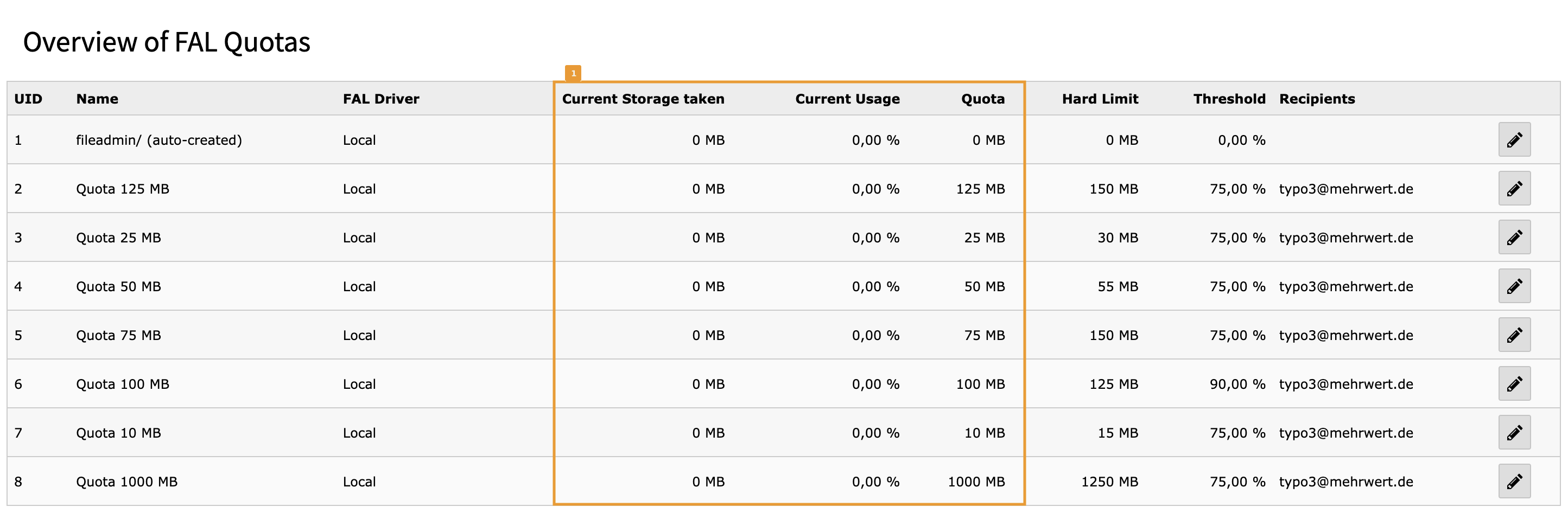
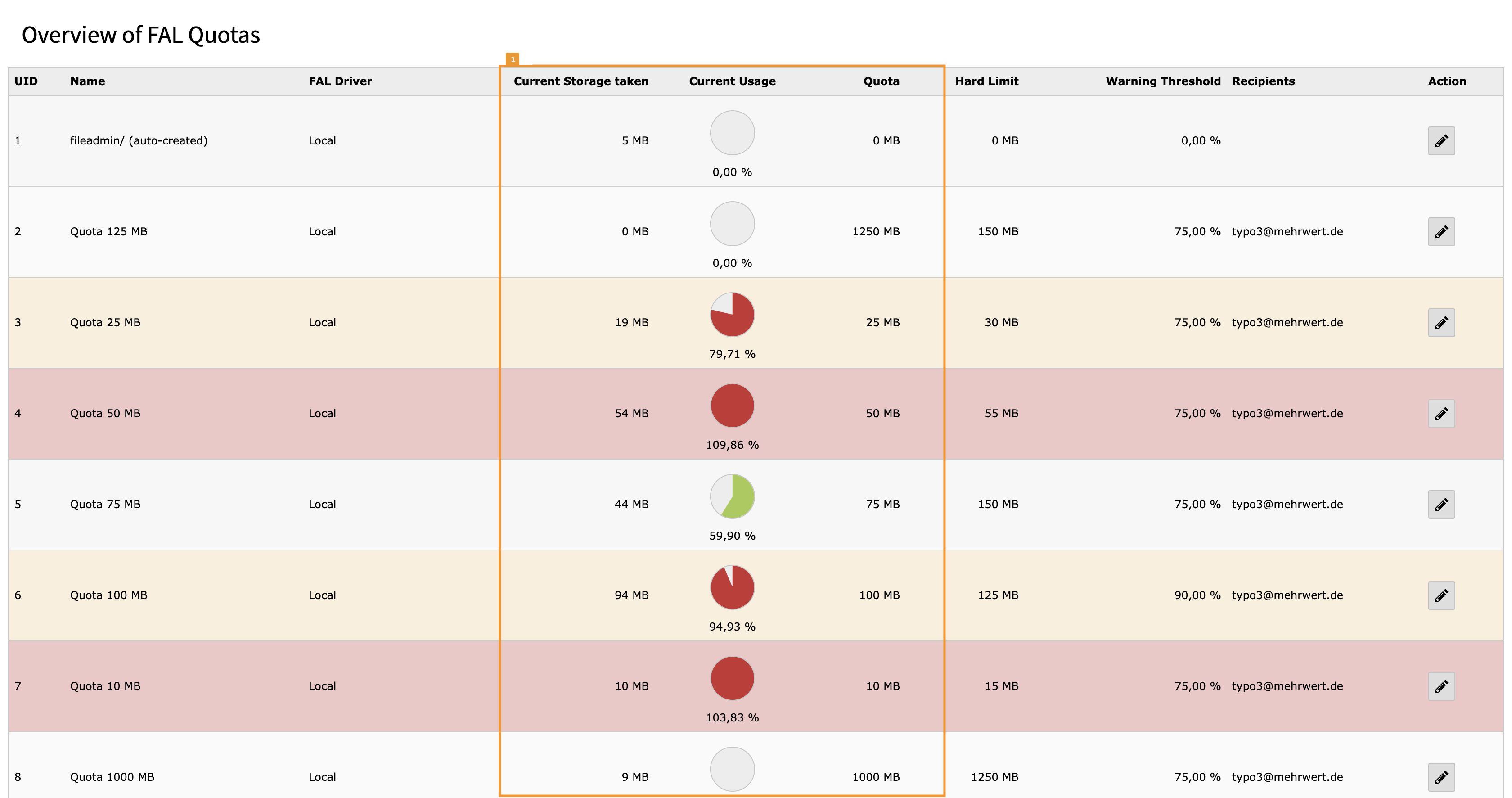
If quota limits have been configured for some of your storages, the backend module of FAL Quota shows those quota settings in the list view but without the Scheduler task (or a manual update via CLI) without the current storage utilization [1]:

Quota settings for storage in list view

Quota settings for storage in list view

As soon as you run the CLI task/Scheduler task the utilization will be updated and Current Storage taken [1] will show the space in use. Storage record rows ar marked with a yellow background if the threshold is reached or with a red background if the quota limit has been reached/exceeded.

Quota settings for storage in list view with warnings

Quota settings for storage in list view with warnings

Scheduler Tasks for FAL Quota 

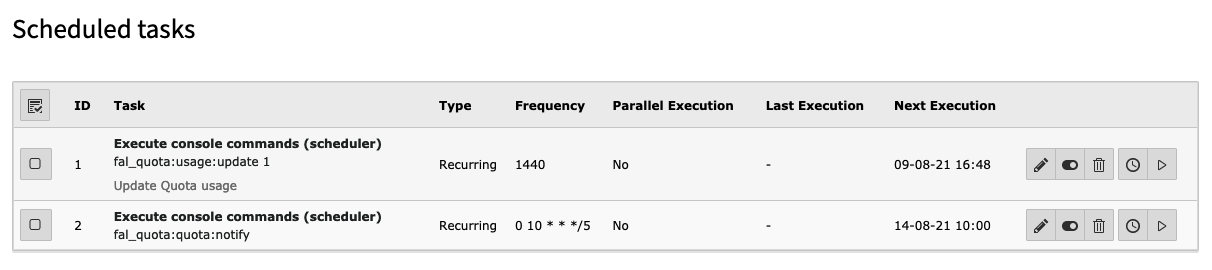
As of 1.7.0 workflows for statictics update and email notification have been split in two tasks. Since 1.7.0 it is possible to perform frequent updates of usage statictis and send notifications only once in a while.

FAL Quota scheduler tasks

Example of FAL Quota scheduler tasks

Scheduler Task to update Quota Statistics 

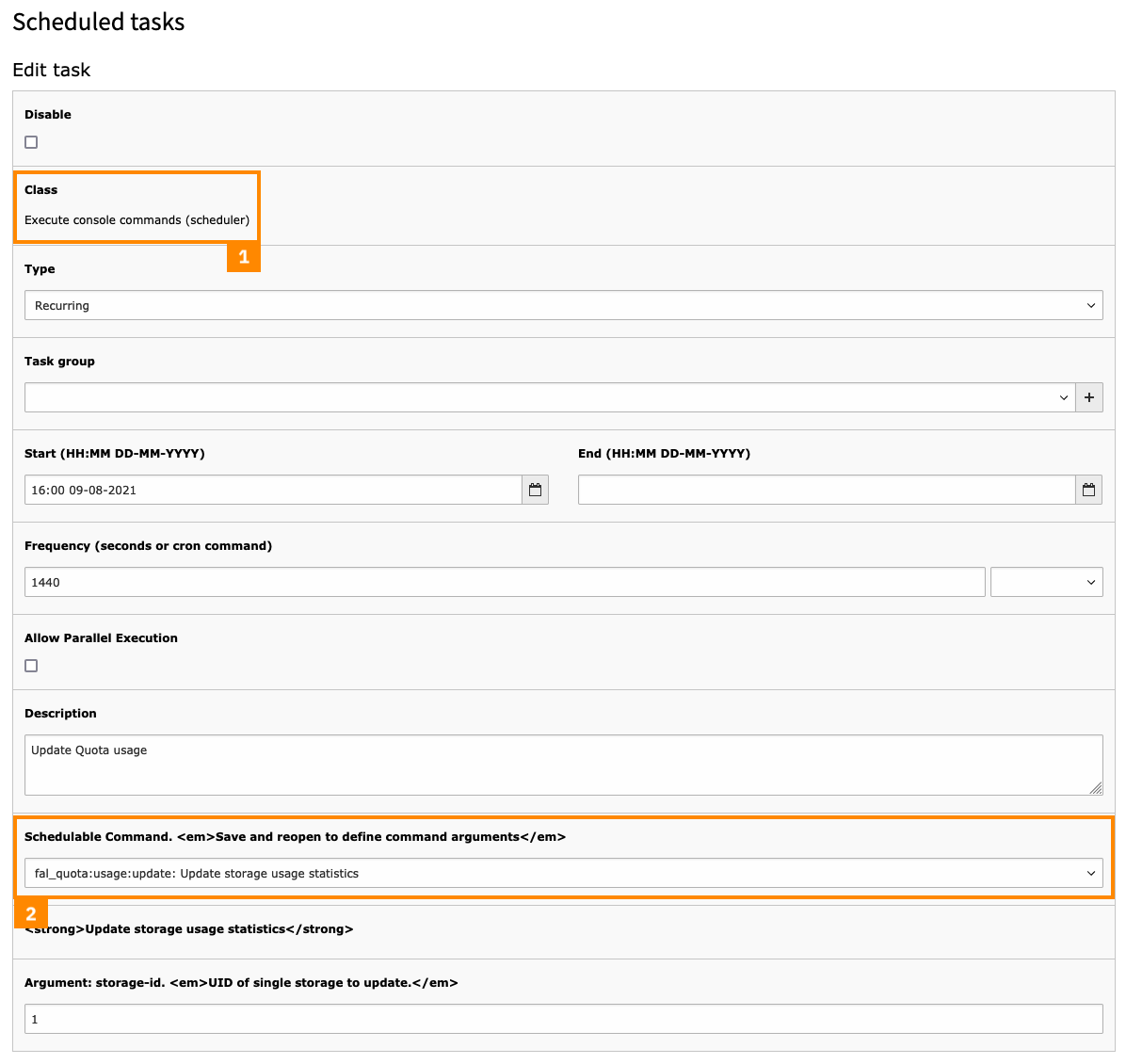
To create a task for a recurring update of the quota statistics and to automatically send notification mails go to SYSTEM > Scheduler > Scheduled tasks and click on the plus sign to add a task. Choose Execute console commands from the Class list [1]. Click on the option list for Schedulable Command. Save and reopen to define command arguments and select the Symfony command fal_quota:quota:update: Update Quota Statistics for storages from the list [2].

Scheduler Task for Quota settings

Quota settings for storage in list view with warnings

Manually update Quota Statistics 

The task can also be manually executed on the command line using the TYPO3 CLI:

./public/typo3/sysext/core/bin/typo3 fal_quota:quota:update
Copied!

You can optionally specify the UID of a storage to update a single storage record:

./public/typo3/sysext/core/bin/typo3 fal_quota:quota:update 1
Copied!

Scheduler Task for Email Notifications 

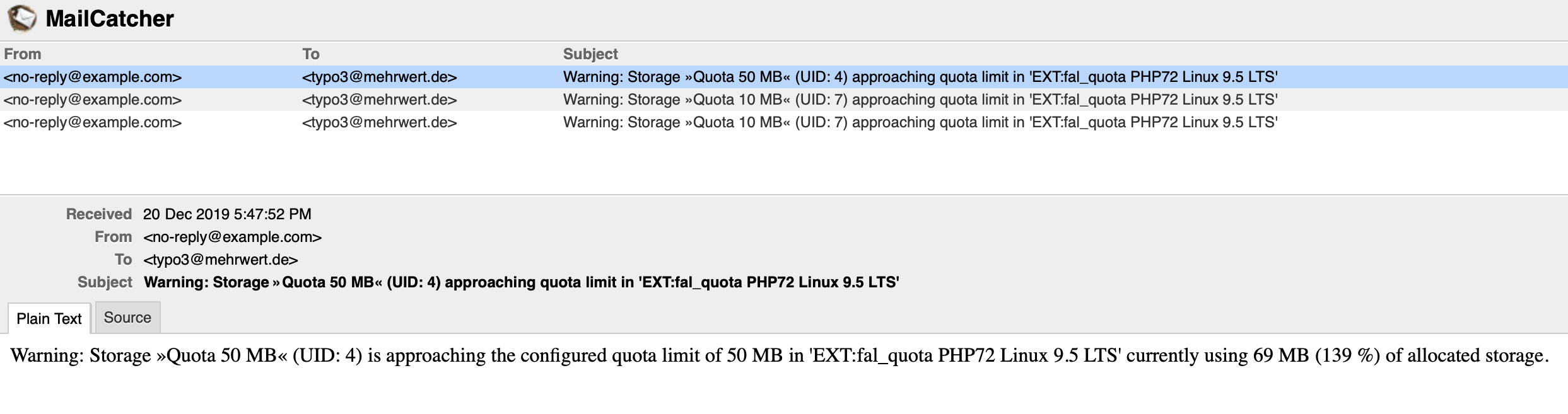
The email notifications is currently very basic and just sends an informal mail about the storage reaching quota limits.

Example quota warning mails

Example quota warning mails

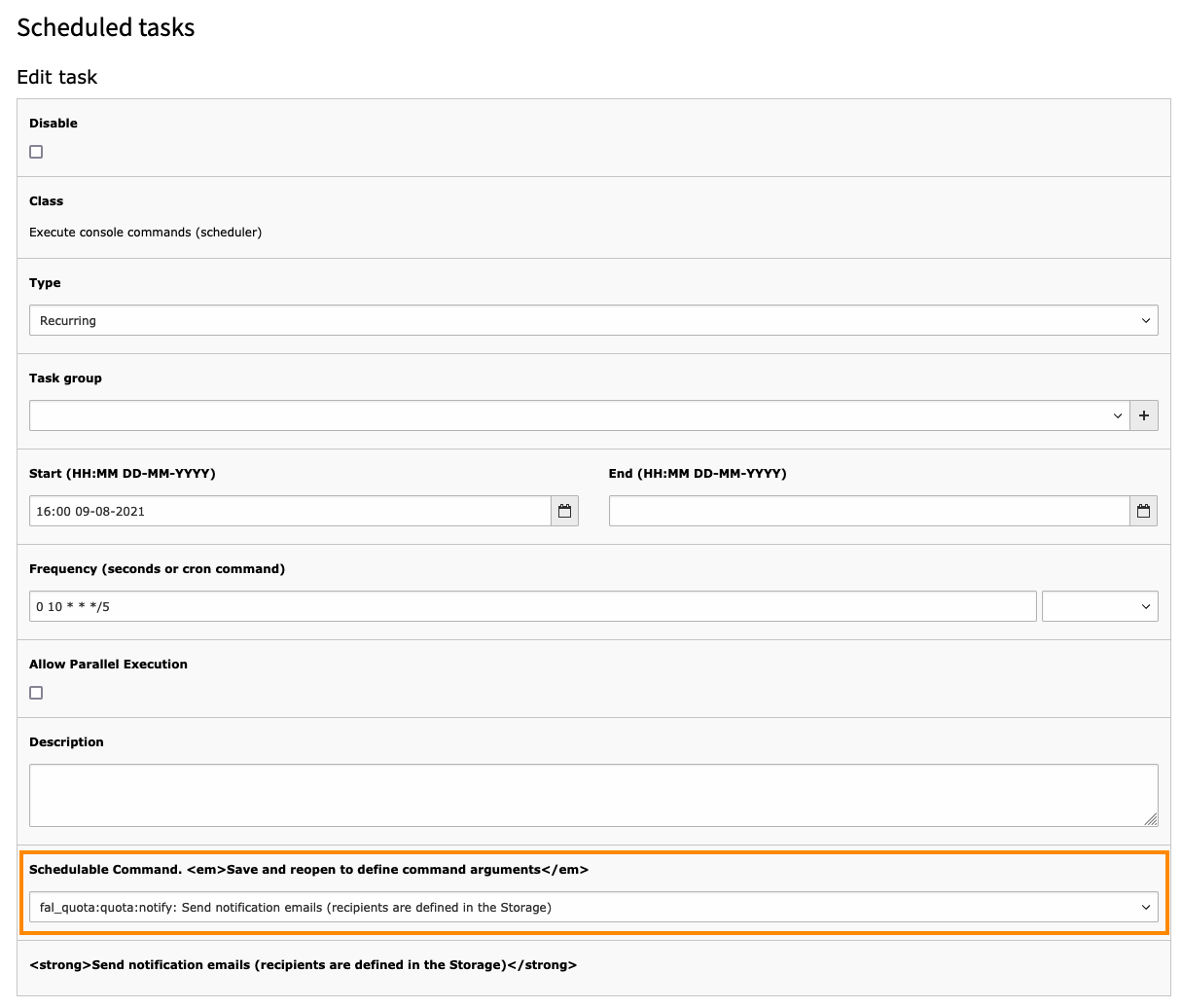
The scheduler task for notifications can be configured in cron style (in this example (0 10 * * */5): Every friday at 10 a.m.).

Example quota warning scheduler task

Example quota warning scheduler task

Editor 

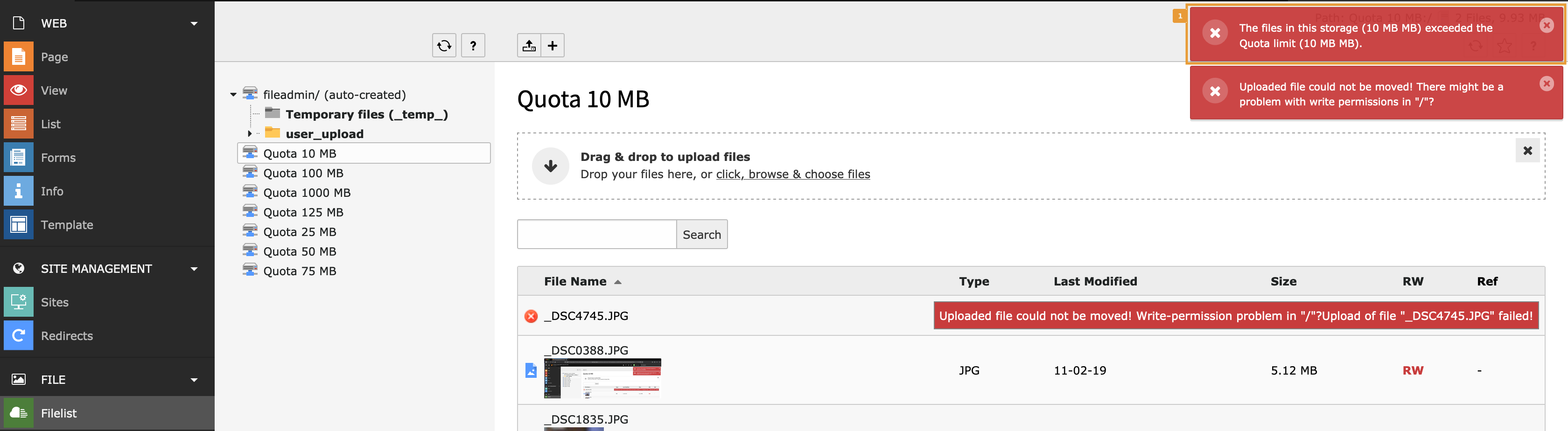
If quotas have been enabled for a storage, they will immediately take effect on most of the actions in the storage. Any upload, copy, create, cross-storage-move or replace action will be monitored and checked whether the result will result in exceeding the quota limits. If this happens, editors get a verbose error message.

Backend Integration and Warnings 

Warnings are issued as flash messages and shown in the FILE > Filelist module [1]:

Quota warning in the File List Backend module

Quota warning in the File List Backend module

Known Problems 

  • Quota limits are stored in Bytes internally and transformed to MB through TCA evaluation. Currently they will not be properly re-calculated when copying storages.

Supported Platforms 

FAL Quota uses TYPO3 standard Hooks and Singals/Slots to do the checks and thus should run on all supported platforms with storages using a Local driver. However it has not yet been tested on Windows installations where the disk_free_space() method could have issues. Feedback welcome!

Changelog 

The following is an overview of the changes in this extension. For more details read the online log.

Version

Release Date

Release Description

13.1.0

2026-03-30

  • Fix PHP constraints and align w/ TYPO3 13.4 - GH #51

13.0.1

2026-01-27

  • Bugfix for Backend module not selectable in be_users.userMod and be_groups.groupMods - GH #49

13.0.0

2025-10-16

  • Compatibility with TYPO3 CMS v13.4 - GH #42

12.0.0

2025-10-09

  • Compatibility with TYPO3 CMS v12.4 - GH #33
  • Adaptation of the version numbering scheme to the major versions of TYPO3

1.9.2

2024-07-04

  • Remove deprecated/dropped property in Datamap / DataHandler Hook

1.9.1

2024-05-29

  • Fix PHP version constraint to allow PHP all versions from 7.4 to 8.3

1.9.0

2024-05-29

  • Bump PHP version constraint to allow PHP 7.4 - 8.3
  • [!!!] Dropped support for TYPO3 v10.4

1.8.0

2023-10-10

  • Compatibility with TYPO3 CMS v11.5 - GH #31 (thanks to someplace53 and tstahn for supporting this task)
  • [!!!] Dropped support for TYPO3 v9.5
  • Switch from signals and slots to EventDispatcher (PSR-14 Events) - thanks to someplace53
  • Multiple bugfixes - thanks to someplace53 for reporting and fixing them

1.7.2

2021-09-03

Bugfix to support multiple recipients w/ notifications mails

1.7.1

2021-08-24

Bump PHP version constraint to allow PHP 7.4

1.7.0

2021-08-09

  • [!!!] Split workflows and provide an additional task for statistics update and notification. You may use the migrator to update all existing tasks ./vendor/bin/typo3 upgrade:run falQuota_commandIdentifierUpdate
  • Update documentation

1.6.0

2021-07-22

  • Use localization for notification emails
  • Provide DDEV environment
  • Ensure TYPO3 10 compatibility of DatamapDataHandlerHook
  • Provide signal to extend warning email recipient list
  • Add extension-key to composer.json

1.5.2

2021-01-15

Resolve a logical flaw in email notification in QuotaCommand::checkThreshold()

1.5.1

2020-07-09

Add missing Slot postFolderRename()

1.5.0

2020-06-07

[!!!] Make FAL Quota module available in FILE section and allow access for users and groups

1.4.0

2020-05-30

Check if a quota has been set when calculating size after copy command

1.3.1

2020-04-03

Remove duplicate 'MB' from FlashMessage texts and resolve improper quota evaluation

1.3.0

2020-03-15

Compatibility with TYPO3 CMS v10.4

1.2.3

2020-02-21

Use proper TCEmain log parameters and extract logging into a separate method

1.2.2

2020-01-22

Use raw quota values for quota calculation

1.2.1

2020-01-21

Do not use flash messages in CLI mode

1.2.0

2020-01-02

Add quota utilization with pie charts in storage list view

1.1.0

2019-12-29

Compatibility with TYPO3 CMS v10

1.0.0

2019-12-27

Initial release of the FAL Quota extension