WebMCP tool for TYPO3 

Extension key

neoblack_webmcp

Package name

neoblack/webmcp

Version

main

Language

en

Author

Frank NΓ€gler & contributors

License

This document is published under the Creative Commons BY 4.0 license.


A declarative WebMCP tool framework for TYPO3. Define agent tools server-side as small PHP providers; the extension collects them into a per-page manifest and a generic JavaScript runtime registers each tool against document.modelContext / navigator.modelContext. Optional, privacy-preserving first-party analytics are included.


Getting started 

✨ Introduction 

What WebMCP is, what this extension adds, and how everything degrades gracefully for regular visitors.

πŸš€ Quickstart 

From a fresh install to a working tool an agent can call β€” in three steps, no JavaScript required.

⬇️ Installation 

Composer and requirements. What the extension does β€” and does not β€” do out of the box.

πŸ› οΈ Writing tools 

The provider interface, the four behaviour primitives and the ES-module escape hatch.

βš™οΈ Configuration 

Extension settings and how to wire the manifest, JSON block and runtime into your site.

🧭 Architecture 

The two request flows β€” emitting tools and ingesting usage events β€” and the classes behind them.

πŸ“Š Analytics 

What the first-party usage log records, how long it is kept and how the public endpoint is protected.

πŸ”§ Troubleshooting 

Why tools might not register, providers not fire, or events not land β€” and how to check each.

Introduction 

What is WebMCP? 

WebMCP exposes page-scoped tools to AI agents through the browser's ModelContext interface ( document.modelContext, with a fallback to navigator.modelContext used by Chrome's origin trial). An agent operating the page can discover these tools and call them – for example to search content, navigate to a section, or open a pre-filled contact e-mail.

BrowserTYPO3 siteModelContextwebmcp.jsruntimeRegisteredpage toolsTool providers(PHP)Manifest(JSON in page)AI agentdiscover & callregisterdeclare (server-side)delivered in page HTML
Where WebMCP sits β€” agent, browser and your TYPO3 site

What this extension does 

The extension turns tool definitions into a declarative concern:

  • A tool is a small PHP class implementing \Neoblack\Webmcp\Tool\ToolProviderInterface. It returns a \Neoblack\Webmcp\Tool\Manifest describing the tool's name, JSON schema and behaviour.
  • Behaviour is expressed through one of four primitives whose generic interpreters live in a single JavaScript runtime (webmcp.js). No per-tool JavaScript is required.
  • A \Neoblack\Webmcp\DataProcessing\ToolManifestProcessor (a TYPO3 data processor) collects every registered provider into one JSON block per page; the runtime reads it and registers the tools.

The four primitives at a glance:

Primitive Behaviour
navigate Navigate the browser to a URL chosen from a fixed set of options.
search Fetch a same-origin JSON index, filter it client-side, return the hits.
mailto Build a pre-filled mailto: link and open it (no server storage).
static Return a curated, static list of items verbatim.

Because tools are pure server-side configuration, other extensions and site packages can add their own without touching JavaScript. For behaviour that no primitive covers, a tool may point at its own ES module (escape hatch).

Privacy-preserving analytics 

An optional first-party ingest endpoint (/webmcp-event) logs one row per tool call – only the tool name and a coarse, self-reported client hint, never free text, cookies or IP. A backend module visualises the usage. Analytics can be disabled in the extension configuration.

Feature detection & progressive enhancement 

Everything degrades gracefully: without a ModelContext implementation, without configuration, or with a malformed manifest, nothing is registered and regular visitors are unaffected.

nothing registerednoconfig block present and valid?yesdocument.modelContext available?use document.modelContextyesnavigator.modelContext available?neitheruse navigator.modelContext(Chrome origin trial)nothing registeredregister each tool
Feature detection β€” nothing is registered without a ModelContext

Installation 

Requirements 

Requirement Version
TYPO3 14.3 or newer
PHP 8.2, 8.3 or 8.4

Install the extension 

Require the package
composer require neoblack/webmcp
Copied!

Download and install neoblack_webmcp from the TYPO3 Extension Repository via the Admin Tools > Extensions backend module.

Set up the extension 

Run the setup command to create the analytics table tx_neoblackwebmcp_event:

Set up the extension
vendor/bin/typo3 extension:setup --extension neoblack_webmcp
Copied!

Quickstart 

This walkthrough takes you from a freshly installed extension to a working tool that an AI agent can call on the page. It uses the static primitive, so no JavaScript and no external index are required.

Prerequisites 

  • The extension is installed and set up (see Installation).
  • You have a site package where you can add PHP classes and TypoScript.

Step 1 – Write a tool provider 

Create a small PHP class in your site package (or any extension). Because the \Neoblack\Webmcp\Tool\ToolProviderInterface carries the #[AutoconfigureTag('webmcp.tool')] attribute, an autoconfigured service implementing it is picked up automatically β€” no Services.yaml entry is needed as long as your extension enables autoconfiguration.

EXT:my_sitepackage/Classes/Tool/ServicesToolProvider.php
<?php

declare(strict_types=1);

namespace Vendor\SitePackage\Tool;

use Neoblack\Webmcp\Tool\Manifest;
use Neoblack\Webmcp\Tool\Primitive;
use Neoblack\Webmcp\Tool\ToolProviderInterface;
use TYPO3\CMS\Frontend\ContentObject\ContentObjectRenderer;

final class ServicesToolProvider implements ToolProviderInterface
{
    public function name(): string
    {
        return 'list_services';
    }

    public function manifest(ContentObjectRenderer $cObj, array $processedData): ?Manifest
    {
        return new Manifest(
            name: 'list_services',
            description: 'List the services this company offers.',
            inputSchema: ['type' => 'object', 'properties' => new \stdClass()],
            primitive: Primitive::StaticList,
            data: [
                'items' => [
                    ['title' => 'Consulting', 'url' => 'https://example.org/consulting'],
                    ['title' => 'Development', 'url' => 'https://example.org/development'],
                ],
                'resultKey' => 'services',
                'text' => [
                    'heading' => 'Our services:',
                    'line' => '{n}. {title} – {url}',
                ],
            ],
        );
    }
}
Copied!

Step 2 – Wire the manifest into the page 

Add the three pieces described in Configuration to your site package. In short:

TypoScript setup β€” data processor and runtime
page.10.dataProcessing {
    40 = Neoblack\Webmcp\DataProcessing\ToolManifestProcessor
    40 {
        endpoint = /webmcp-event
        as = webmcpConfigJson
    }
}

page.includeJSFooter {
    webmcp = EXT:neoblack_webmcp/Resources/Public/JavaScript/webmcp.js
    webmcp.defer = 1
}
Copied!

Render the JSON block once in your page template:

Fluid page template β€” emit the manifest
<f:if condition="{webmcpConfigJson}">
    <script type="application/json" id="webmcp-config"><f:format.raw>{webmcpConfigJson}</f:format.raw></script>
</f:if>
Copied!

Step 3 – Verify it in the browser 

Reload a frontend page and open the browser's developer console.

  1. Confirm the manifest is on the page:

    Console β€” inspect the manifest
    JSON.parse(document.getElementById('webmcp-config').textContent).tools
    Copied!

    You should see your list_services tool in the returned array.

    Browser console showing the list_services tool in the parsed manifest

    The parsed manifest in the browser console, listing the list_services tool.

  2. Confirm the runtime registered it against the ModelContext:

    Console β€” check for an agent surface
    document.modelContext || navigator.modelContext
    Copied!

    A ModelContext implementation is only present in agent-capable browsers (or Chrome with the origin trial enabled). If document.modelContext and navigator.modelContext are both undefined, the page is fine β€” there is simply no agent surface to register against.

Next steps 

  • Swap static for another primitive β€” search, navigate or mailto β€” see Writing tools.
  • Return null from manifest() to hide a tool on pages where it does not apply.

Configuration 

Extension configuration 

Set these in the TYPO3 backend under Admin Tools > Settings > Extension Configuration > neoblack_webmcp (the defaults live in ext_conf_template.txt).

analyticsEnabled

analyticsEnabled
Type
boolean
Default
1

Log each WebMCP tool call (tool name + coarse client hint, no PII) to tx_neoblackwebmcp_event and expose the backend module. Turn off to disable the ingest endpoint (/webmcp-event is then passed through).

analyticsRateLimit

analyticsRateLimit
Type
integer
Default
60

Maximum accepted ingest calls per client IP per minute (0 = unlimited). Protects the public endpoint against flooding and statistics pollution; excess calls are answered with 429 Too Many Requests. The limiter uses the extension's own cache and only stores a hashed, short-lived counter β€” no plaintext IP.

Wiring the manifest into your site 

Three pieces connect the tools to the page. All of them live in your site package / TypoScript, so you stay in control of where the tools are exposed.

1. Emit the manifest 

Add the data processor to the page's FLUIDTEMPLATE (or PAGEVIEW).

Page TypoScript β€” register the data processor
page.10.dataProcessing {
    # optional: a menu a navigate tool can build on
    35 = menu
    35 {
        entryLevel = 0
        levels = 1
        as = webmcpTopics
    }
    40 = Neoblack\Webmcp\DataProcessing\ToolManifestProcessor
    40 {
        endpoint = /webmcp-event
        as = webmcpConfigJson
    }
}
Copied!

endpoint

endpoint
Type
string
Default
/webmcp-event

Analytics beacon target written into the manifest.

as

as
Type
string
Default
webmcpConfigJson

Variable the JSON manifest is assigned to.

2. Render the JSON block 

Output the manifest once per page inside a <script> tag with the id webmcp-config (the id the runtime looks for):

Fluid page template β€” render the JSON block
<f:if condition="{webmcpConfigJson}">
    <script type="application/json" id="webmcp-config"><f:format.raw>{webmcpConfigJson}</f:format.raw></script>
</f:if>
Copied!

3. Include the runtime 

Page TypoScript β€” include the runtime
page.includeJSFooter {
    webmcp = EXT:neoblack_webmcp/Resources/Public/JavaScript/webmcp.js
    webmcp.defer = 1
}
Copied!

Backend module 

When analytics is enabled, the System > WebMCP module visualises tool usage.

Writing tools 

A tool is a PHP class implementing \Neoblack\Webmcp\Tool\ToolProviderInterface. Thanks to the #[AutoconfigureTag('webmcp.tool')] attribute on the interface, any autoconfigured service implementing it is picked up automatically – in this extension, a site package, or any third-party extension. No manual Services.yaml wiring is needed.

The interface 

interface ToolProviderInterface
Fully qualified name
\Neoblack\Webmcp\Tool\ToolProviderInterface

Implemented by every tool and tagged webmcp.tool via the interface's #[AutoconfigureTag] attribute.

name ( )

Context-free, stable tool name. Used for the analytics whitelist before the frontend is resolved, so it must equal the Manifest name.

Returns

string – the stable tool name

manifest ( $cObj, $processedData)

Build the tool's manifest for the current request.

param ContentObjectRenderer $cObj

the current content object renderer

param array $processedData

results of data processors that ran earlier in the same content object, so you can build on them (e.g. a menu)

Returns

a Manifest, or null to omit the tool for this request (e.g. a blog tool on a site without a blog)

The manifest 

class Manifest
Fully qualified name
\Neoblack\Webmcp\Tool\Manifest

The serialisable description of a single tool. A provider returns one of these; the data processor collects them into the page's JSON block.

Construct it with named arguments:

Building a Manifest
new Manifest(
    name: 'search_articles',
    description: 'Search all articles …',
    inputSchema: [ /* JSON schema for the arguments */ ],
    primitive: Primitive::Search,
    data: [ /* primitive-specific payload, see below */ ],
    moduleUrl: null, // optional escape hatch, see below
);
Copied!
Argument Type Purpose
name string Tool name; must equal ToolProviderInterface::name().
description string Human-readable description shown to the agent.
inputSchema array JSON schema for the tool arguments.
primitive Primitive One of the four behaviour primitives.
data array Primitive-specific payload (see below).
moduleUrl ?string Optional ES-module URL for the escape hatch.
readOnly ?bool Override the read-only hint. null (default) derives it from the primitive; see below.
title ?string Optional human-readable label for UI display. The machine-stable name is used when omitted.
untrustedContent ?bool Override the untrusted-content hint. null (default) derives it from the primitive; see below.

Read-only hint 

Each manifest carries a WebMCP annotations.readOnlyHint flag telling the agent whether the tool merely reads state or changes it. Agents use it to decide whether a call may run without user confirmation.

The value is derived from the primitive: search and static are read-only, navigate (changes the browser location) and mailto (opens a mail client) are not. Pass readOnly: true/false explicitly to override the default β€” for example when an escape-hatch module built on the search primitive actually mutates state.

Untrusted-content hint 

The manifest also carries a WebMCP annotations.untrustedContentHint flag. It tells the agent that the tool's output may contain untrusted, third-party data that should be treated with caution β€” a prompt-injection defence.

It is derived from the primitive: only search is flagged, because its results come from a JSON index that can hold user-generated content. static is curated, and navigate / mailto only return messages the runtime built itself, so all three default to false. Pass untrustedContent: true/false to override β€” for instance when a static list is assembled from user-supplied data, or an escape-hatch module returns third-party content.

Primitives 

Every tool maps to exactly one primitive. The generic runtime interprets the data payload; you never write JavaScript.

Fetch a same-origin JSON index, filter it by the query terms, return structured hits.

search primitive
primitive: Primitive::Search,
data: [
    'indexUrl' => 'https://…/index.json',
    'queryParam' => 'query',
    'limitParam' => 'limit',
    'limitDefault' => 10,
    'queryRequired' => true,                      // false: list all when empty
    'searchFields' => ['title', 'teaser'],        // fields searched
    'resultKey' => 'results',
    'resultFields' => ['title' => 'title', 'cat' => 'categoryLabel'],
    'deepLinkTemplate' => 'https://…/blog#q={query}', // optional
    'text' => [                                   // optional output templates
        'heading' => '{count} hits for β€ž{query}β€œ:',
        'headingAll' => '{count} entries:',
        'line' => '{n}. {title} – {url}',
        'emptyQuery' => 'No hits for β€ž{query}β€œ.',
        'emptyAll' => 'No entries.',
    ],
]
Copied!
Agentwebmcp.jsJSON indexAgentwebmcp.jsJSON index(same-origin)Agentwebmcp.jsJSON index(same-origin)call with query + limitsend analytics beaconfetch indexUrl(cached per page)itemsfilter by searchFields(all query terms must match)slice to limit,project resultFieldstext + structuredContent (hits)
How the search primitive resolves a query

Build a pre-filled mailto: link and open it. No server storage.

mailto primitive
primitive: Primitive::Mailto,
data: [
    'to' => base64_encode('me@example.org'),      // base64, kept out of source
    'subjectTemplate' => 'Request – {anliegen}',
    'bodyLines' => [                              // "Label: value" lines
        ['label' => 'Name', 'param' => 'name'],
        ['label' => 'Organisation', 'param' => 'org', 'optional' => true],
    ],
    'messageParam' => 'message',                  // free text block at the end
    'confirm' => 'Send this e-mail to {to}?',      // optional; see below
    'successTemplate' => 'A pre-filled e-mail to {to} has been opened.',
]
Copied!

Return a curated list verbatim.

static primitive
primitive: Primitive::StaticList,
data: [
    'items' => [['title' => 'Software', 'url' => 'https://…']],
    'resultKey' => 'services',
    'text' => ['heading' => 'Services:', 'line' => '{n}. {title} – {url}'],
]
Copied!

Template placeholders 

The text templates use {field} placeholders filled from the item (or, for headings, from {count} / {query}). {n} yields the 1-based index of the current line.

Confirming side effects 

The navigate and mailto primitives change state β€” they move the browser or open a mail client. Set a confirm message on their data to require a human-in-the-loop confirmation before the side effect runs. The runtime prefers the WebMCP client's requestUserInteraction() (which lets the agent surface the page to the user first) and falls back to a plain confirm() when the client does not provide it. If the user declines, the tool returns an isError result (navigate uses the cancelled message when set) and the side effect never happens.

Omit confirm to keep the previous behaviour β€” the tool runs without asking. The confirm string is filled with the same {placeholders} as the other messages (navigate: the chosen option; mailto: {to} and {subject}).

Escape hatch 

If no primitive fits, leave primitive at any value, keep data minimal and set moduleUrl to the URL of an ES module exporting an execute function. The runtime imports the module lazily β€” on the tool's first call β€” and delegates to it. A moduleUrl is only used when no built-in primitive matches, so a custom module always wins the fallback, never overrides a primitive.

Agentwebmcp.jsyour-tool.jsAgentwebmcp.jsyour-tool.js(ES module)Agentwebmcp.jsyour-tool.js(ES module)first tool callsend analytics beaconimport(moduleUrl)(once, then cached){ execute }execute(args, ctx)MCP result(content, structuredContent)result
Escape hatch β€” a custom module loads lazily on first call

The contract 

your-tool.js β€” custom execute() implementation
// served same-origin, or CORS-enabled for dynamic import
export function execute(args, ctx) {
    // args: the tool arguments the agent passed, already normalised
    //       (the runtime unwraps an { arguments: {…} } envelope for you).
    //       Includes the optional `client` analytics hint if the agent set it.
    //
    // ctx:  { tool, config, client }
    //   ctx.tool   – this tool's manifest object
    //                { name, description, inputSchema, primitive, data, moduleUrl }
    //   ctx.config – the whole page manifest { endpoint, tools: [...] }
    //   ctx.client – the WebMCP ModelContextClient (may be undefined); call
    //                ctx.client.requestUserInteraction(cb) for confirmations

    // Return an MCP tool result. `content` is required; `structuredContent`
    // is optional machine-readable output. You may return a Promise.
    return {
        content: [{ type: 'text', text: 'Done.' }],
        structuredContent: { ok: true },
    };
}
Copied!

Analytics 

Every tool call sends a same-origin beacon to the configured endpoint. The \Neoblack\Webmcp\Registry\ToolRegistry::toolNames() list (all registered providers) is the whitelist the ingest middleware validates against – it follows your tools automatically.

Architecture 

The extension has two independent flows: emitting tools at page render time and ingesting usage events at call time. They share only the tool registry.

Emitting tools (frontend render) 

Tool providerToolRegistryToolManifestProcessorPage HTMLwebmcp.jsModelContextTool providerToolRegistryToolManifestProcessorPage HTMLwebmcp.jsModelContextTool providerToolRegistryToolManifestProcessorPage HTMLwebmcp.jsModelContextmanifest($cObj, $processedData)providers returningnull are droppedlist of ManifestJSON block(JSON_HEX_* escaped)read #webmcp-configper tool: primitiveinterpreter or moduleUrlprovideContext({ tools })(else registerTool per tool)tools discoverable & callable
Emitting tools β€” from PHP provider to registered agent tool
Class Responsibility
\Neoblack\Webmcp\Tool\ToolProviderInterface The contract each tool implements. Tagged webmcp.tool (autoconfigured).
\Neoblack\Webmcp\Tool\Manifest / \Neoblack\Webmcp\Tool\Primitive The serialisable tool description and its behaviour selector.
\Neoblack\Webmcp\Registry\ToolRegistry Collects manifests for the current request and exposes toolNames() for the analytics whitelist.
\Neoblack\Webmcp\DataProcessing\ToolManifestProcessor Serialises the manifests into the page's JSON block.
Resources/Public/JavaScript/webmcp.js The generic runtime holding all four primitive interpreters and the escape-hatch loader.

Ingesting usage events (call time) 

Agent on pagewebmcp.jsEventMiddlewareRateLimiterToolRegistrytx_neoblackwebmcp_eventEditorDashboardControllerStatisticsServiceEventRepositoryAgent on pagewebmcp.jsEventMiddlewareRateLimiterToolRegistrytx_neoblackwebmcp_eventEditorDashboardControllerStatisticsServiceEventRepositoryAgent on pagewebmcp.jsEventMiddlewareRateLimiterToolRegistrytx_neoblackwebmcp_eventEditorDashboardControllerStatisticsServiceEventRepositorytool callPOST /webmcp-eventsendBeacon { tool, client }same-origin guard(Sec-Fetch-Site)allow(ip, limit)?tool in toolNames()?log(tool, client, ts)Backend moduleopen System > WebMCPcollect(filter)aggregate by tool / client / daySELECT
Ingesting usage events β€” from tool call to backend dashboard
Class Responsibility
\Neoblack\Webmcp\Middleware\EventMiddleware The public ingest endpoint. Inert when analytics is disabled; passes unknown tools down the stack so it can coexist with other handlers.
\Neoblack\Webmcp\Security\RateLimiter Fixed-window limiter keyed on a hashed IP + window number (no plaintext IP stored).
\Neoblack\Webmcp\Domain\Repository\EventRepository The only class that writes/reads the event table.
\Neoblack\Webmcp\Service\StatisticsService Aggregates rows into the DTOs the backend module renders.
\Neoblack\Webmcp\Controller\DashboardController Thin backend controller; reads the filter, delegates, renders.

Why the two flows are decoupled 

The middleware runs early, before the frontend page is resolved, so it cannot rely on a rendered manifest. It therefore validates incoming events against \Neoblack\Webmcp\Registry\ToolRegistry::toolNames() β€” the context-free provider names β€” rather than against the per-page manifest.

Analytics 

The extension ships an optional, first-party usage log: one anonymous row per tool call, visualised in a backend module. It is enabled by default and can be switched off entirely (see Configuration).

What is recorded 

Every tool call fires a small same-origin beacon ( navigator.sendBeacon, with a fetch fallback) to the ingest endpoint. The \Neoblack\Webmcp\Middleware\EventMiddleware appends exactly two values per call:

  • the tool name – validated against the registered providers ( \Neoblack\Webmcp\Registry\ToolRegistry::toolNames()); events for unknown names are not stored.
  • a client hint – a short, self-reported or coarsely detected label of the calling agent.

The client hint 

The hint is best-effort and resolved client-side in this order:

  1. the agent's optional client argument, if it sets one (the runtime adds a client property to every tool's input schema automatically);
  2. otherwise a coarse match against known agent markers in the User-Agent (e.g. Claude, ChatGPT, GeminiBot);
  3. otherwise the literal unbekannt ("unknown").

Server-side the value is sanitised (letters, digits, space and ._-/() only) and capped at 64 characters before it is stored.

Data model 

Events live in a single append-only table, created by extension:setup:

Column Type Meaning
uid int Primary key.
crdate int Unix timestamp of the call.
tool varchar(64) Registered tool name.
client varchar(64) Sanitised client hint.

Retention and deletion 

The table is append-only; the extension does not prune it automatically. Because a row is fully anonymous, there is no per-subject deletion to perform, but you remain free to trim or clear the log at any time, for example:

Trim or clear the usage log
-- drop everything older than 90 days
DELETE FROM tx_neoblackwebmcp_event WHERE crdate < UNIX_TIMESTAMP() - 90*86400;

-- clear the log completely
TRUNCATE tx_neoblackwebmcp_event;
Copied!

If you schedule this, a simple periodic DELETE on crdate is enough; the crdate column is indexed.

The ingest endpoint 

POST /webmcp-event is public by design (agents call it without a backend session). It is protected by several deliberate constraints:

Constraint Behaviour
Feature-gated When analyticsEnabled is off the endpoint is inert and the request is passed through untouched.
Same-origin guard Requests whose Sec-Fetch-Site header is present and neither same-origin nor same-site are rejected with 204.
Rate limited At most analyticsRateLimit calls per client IP per minute (default 60; 0 disables). Excess calls receive 429. The limiter stores only a hashed IP + time-window counter that expires after two windows β€” the plaintext IP is never persisted.
Whitelisted Only registered tool names are logged; anything else is handed down the middleware stack.

Backend module 

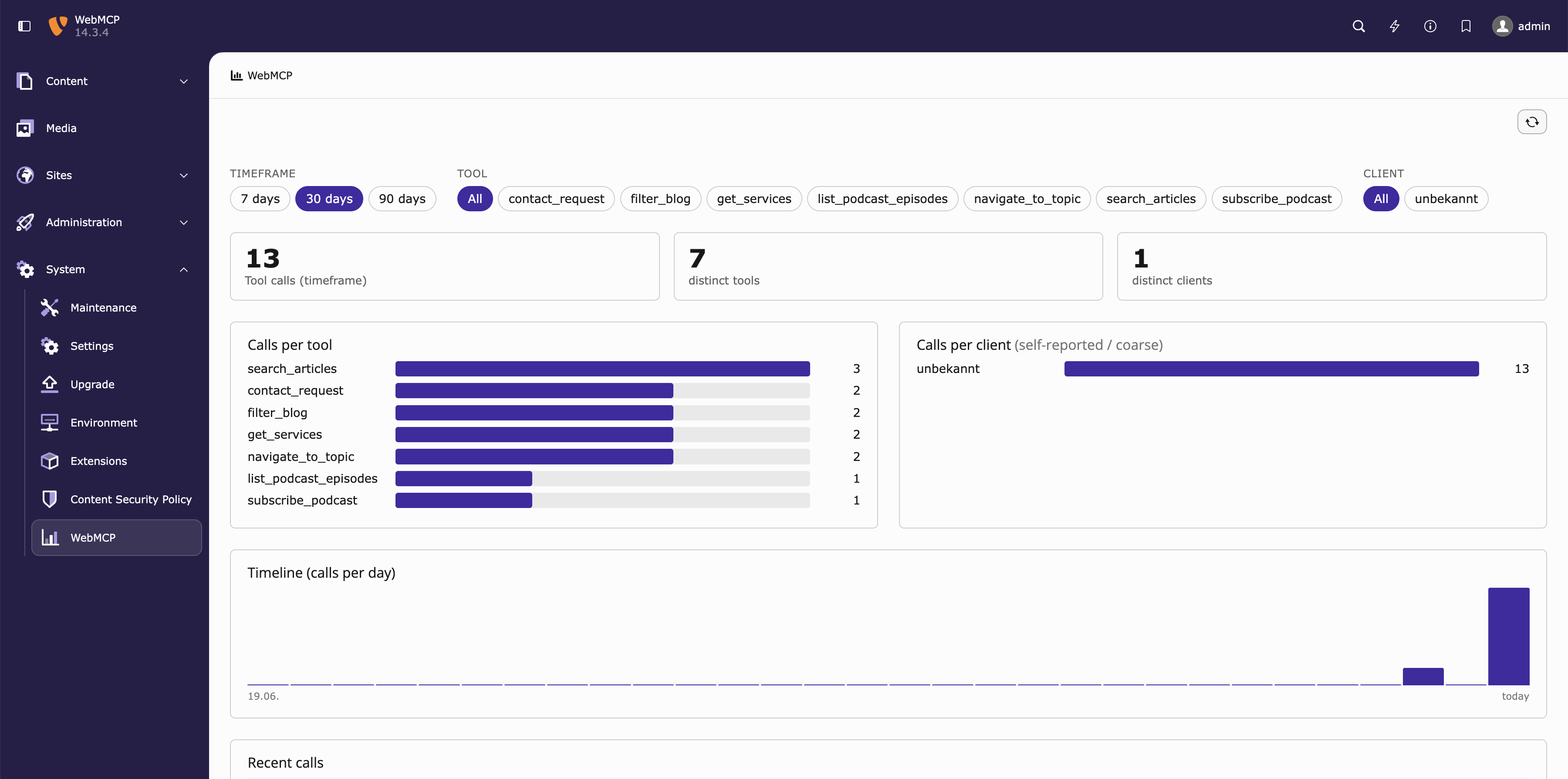
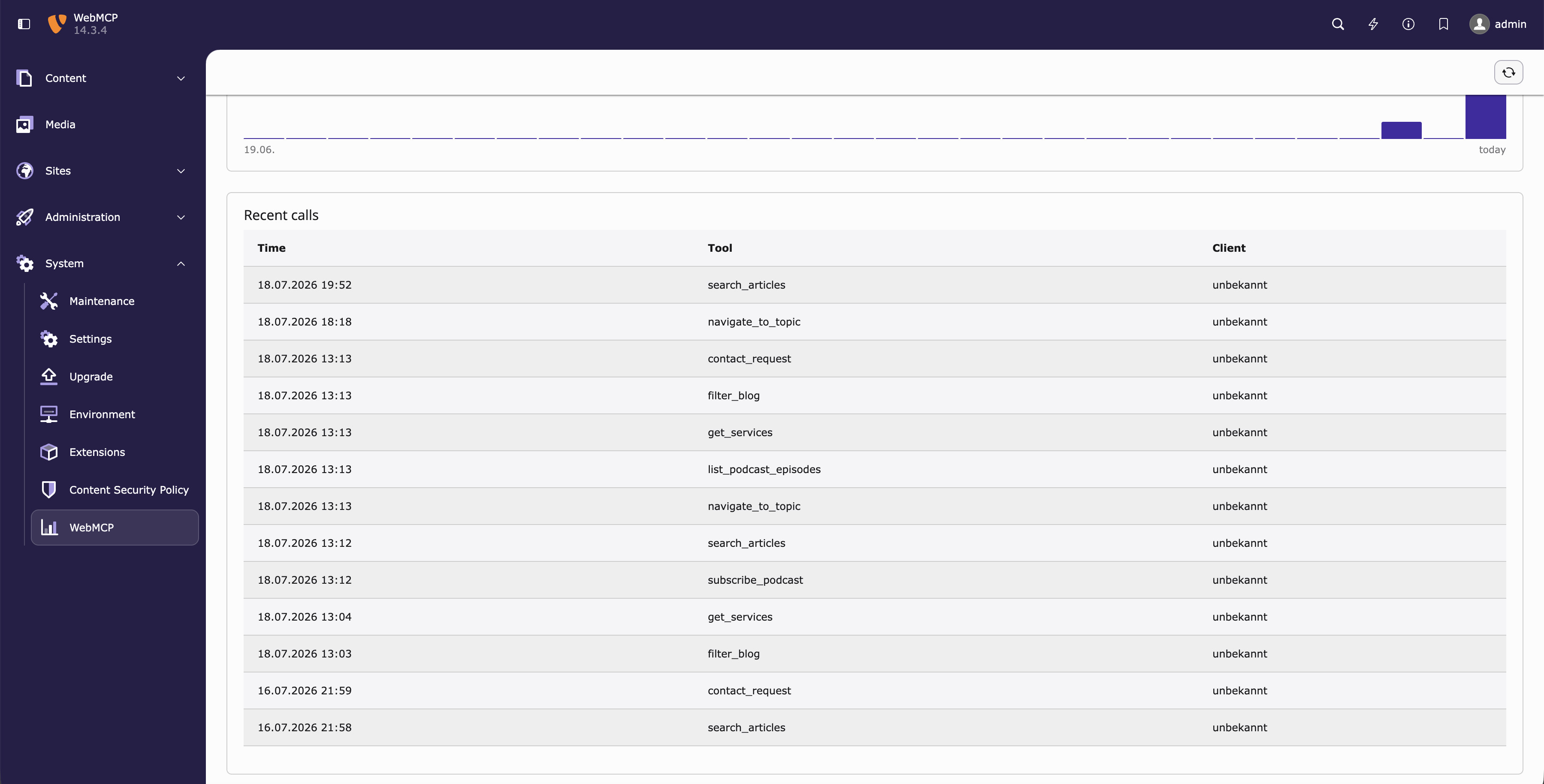
When analytics is enabled, the System > WebMCP module shows calls per tool and per client, a per-day timeline and the most recent events. The timeframe (7 / 30 / 90 days) and tool/client filters are selectable; the accepted tool names are derived automatically from the registered providers.

The WebMCP backend module showing calls per tool and a timeline

The WebMCP dashboard: calls per tool/client, and a per-day timeline.

The WebMCP backend module showing also the recent calls in a table

The WebMCP dashboard: the most recent events.

Troubleshooting 

Everything in the extension degrades silently on purpose β€” a missing manifest, an absent ModelContext or a malformed config simply registers nothing. That is good for visitors but means failures are quiet. Expand the symptom that matches and work through the checks in order.

Check, from the outside in:

  1. Is the JSON block on the page? View source and look for <script type="application/json" id="webmcp-config">. In the console:

    Console β€” read the config block
    document.getElementById('webmcp-config')?.textContent
    Copied!

    Empty or missing β†’ the manifest was not rendered. Verify the Fluid snippet (Step 2 in Quickstart) is in your template and that the variable name matches the data processor's as (default webmcpConfigJson).

  2. Does the block contain your tool?

    Console β€” list the registered tools
    JSON.parse(document.getElementById('webmcp-config').textContent).tools
    Copied!

    Empty array β†’ no provider yielded a manifest. Either the provider is not registered (see the next item) or its manifest() returned null for this request.

  3. Is the runtime loaded? Confirm webmcp.js is included in the page footer (the includeJSFooter TypoScript).
  4. Is there a ModelContext to register against?

    Console β€” check for an agent surface
    document.modelContext || navigator.modelContext
    Copied!

    undefined in both β†’ the browser has no agent surface. This is expected in a normal browser; the runtime intentionally does nothing. Test with an agent-capable client or Chrome with the WebMCP origin trial enabled.

The provider is a service tagged webmcp.tool. If it is not picked up:

  • Confirm your extension enables autoconfiguration in Configuration/Services.yaml (_defaults with autoconfigure: true). The tag is inherited from the interface's #[AutoconfigureTag('webmcp.tool')] only when autoconfiguration is on.
  • Otherwise tag the service manually (see the note in Quickstart).
  • Clear the TYPO3 caches after adding a new service.

Providers receive $processedData from data processors that ran before the \Neoblack\Webmcp\DataProcessing\ToolManifestProcessor in the same content object. If your provider builds on, say, a MenuProcessor output, that processor must have a lower key so it runs first (see the ordered example in Configuration).

  • Is analytics enabled? Check analyticsEnabled in the extension configuration. When off, /webmcp-event is passed through and nothing is stored.
  • Is the tool name whitelisted? Only names returned by a registered provider's name() are logged, and name() must equal the Manifest name. A mismatch silently drops the event.
  • Getting 429s? You are hitting the rate limit (analyticsRateLimit calls per IP per minute). Raise it or set 0 to disable β€” see Analytics.
  • Getting 204 but no row? A 204 is also returned for cross-site posts rejected by the Sec-Fetch-Site guard and for the normal success path. Confirm the beacon is a genuine same-origin POST to /webmcp-event.

Tool values are embedded verbatim inside a <script> block. The processor escapes < > & ' " as \uXXXX (JSON_HEX_*), so a </script> inside an editor-controlled value cannot break out.

Changelog 

This extension is experimental. Until a 1.0.0 release, the API described in this documentation may change or break between versions without notice.

Unreleased 

  • Added: each manifest now also carries the WebMCP annotations.untrustedContentHint flag, warning the agent that a tool's output may contain untrusted third-party data. It is derived from the primitive (only search is flagged) and overridable via the new untrustedContent argument on Manifest.
  • Added: Manifest gained an optional title argument β€” a human-readable label for UI display, distinct from the machine-stable name. It is emitted into the manifest and forwarded to the tool descriptor only when set.
  • Changed: the runtime now registers its tools atomically via provideContext({ tools }) (the WebMCP spec's primary entry point), falling back to per-tool registerTool only where provideContext is absent. Manifest entries that reuse a name already taken are dropped, so a duplicate tool name no longer aborts registration.
  • Added: the navigate and mailto primitives accept an optional confirm message that triggers a human-in-the-loop confirmation before the side effect runs, via the WebMCP client's requestUserInteraction() (with a confirm() fallback). Escape-hatch modules now receive the client as ctx.client. Without a confirm message the behaviour is unchanged.
  • Changed: the built-in primitives now flag genuine failure paths (navigate with an unknown option, mailto with no configured contact) with the WebMCP isError result flag, so agents can tell a failed call from a successful one. An empty but valid search result stays a success.
  • Added: each tool manifest now carries a WebMCP annotations.readOnlyHint flag, derived from the primitive (search and static are read-only; navigate and mailto are not) and overridable via the new readOnly argument on Manifest. The generic runtime forwards it to registerTool so agents can tell read-only tools from state-changing ones.

0.2.0 - 2026-07-19 

  • Breaking: the backend module moved from the Web group to System, and its route identifier changed from web_webmcp to system_webmcp. The module no longer carries a page tree β€” its statistics are site-wide. Update any backend user/group access rights and hardcoded module links accordingly.
  • Changed: the backend module icon was redrawn in the three-colour TYPO3 v14 icon style.
  • Added: an ext_emconf.php so the extension can be published to and installed from the TER.
  • Documentation: added a Quickstart, an Architecture overview, a dedicated Analytics chapter (data model, retention, endpoint hardening), a Troubleshooting guide and this changelog.

0.1.0 

Initial experimental release.

  • Declarative tool framework: define agent tools as server-side PHP providers ( ToolProviderInterface) collected into a per-page manifest.
  • Four behaviour primitives interpreted by a single generic runtime (webmcp.js): navigate, search, mailto, static.
  • Escape hatch: a tool may point at its own ES module for behaviour no primitive covers.
  • Optional, privacy-preserving first-party analytics: anonymous per-call logging via /webmcp-event, rate limiting, and a System > WebMCP backend module.
  • Requires TYPO3 v14.3+ and PHP 8.2+.