The
netresearch/nr-image-optimize
extension provides
on-demand image optimization for TYPO3. Page rendering only emits
image URLs; each variant is processed by a middleware when a browser
first requests it -- so a cold page cache no longer waits for image
processing (see Performance model) -- with support for
modern formats (WebP, AVIF), responsive srcset generation, and
automatic format negotiation.
Introduction
Learn what the extension does, its features, and
system requirements.
Installation
Install via Composer or the Extension Manager.
Configuration
Configure the SourceSetViewHelper, render modes,
responsive srcset, and lazy loading.
Usage
Integrate responsive images into your Fluid
templates with practical examples.
Maintenance
Manage processed images and check system
requirements in the backend module.
Developer reference
Architecture overview and PHP API reference.
Introduction
What does it do?
The Image Optimization for TYPO3 extension (nr_image_optimize)
compresses images in TYPO3 on three independent layers:
On upload
A PSR-14 event listener runs lossless optimization whenever a
file is added to or replaced in a FAL storage
(AfterFileAddedEvent / AfterFileReplacedEvent). The
listener delegates to the installed optipng / gifsicle
/ jpegoptim binaries.
On demand in the frontend
A PSR-15 middleware intercepts every request that starts with
/processed/ and delegates to the
\Netresearch\NrImageOptimize\Processor. The
processor parses the URL, loads the original via
Intervention Image,
produces a resized/recropped variant, optionally writes a
matching WebP and AVIF sidecar, and streams the best result
back to the client. Variants are cached on disk and served
with long-lived HTTP caching headers.
In bulk from the CLI
Two Symfony Console commands iterate the FAL index:
nr:image:optimize compresses every
eligible file, nr:image:analyze
reports optimization potential as a fast heuristic without
touching any file.
Every image on a page costs the server twice: once when the page is
rendered, and once when a browser fetches the image. What sets this
extension apart from TYPO3 core's f:image / ImageService
pipeline is when the expensive part -- decoding, resizing,
encoding -- happens.
TYPO3 core processes every referenced image while the page
renders, inside the request that produces the HTML. On a cold page
cache the visitor waits for all of it before the first byte of HTML
arrives, images below the fold and in hidden sliders included, and
one PHP process does the work for all of them, one after another.
This extension only builds a /processed/... URL string while
the page renders. Nothing is decoded or written at that point. The
work happens later, in a separate request per image, when -- and
only if -- the browser asks for that image. Those requests are
spread across all PHP-FPM workers, and once a variant exists the web
server serves it as a static file without touching TYPO3 at all.
What that is worth
The numbers below come from the benchmark that ships with this
extension (make benchmark, see Reproduce it).
Both pipelines render the same 24 photos (3000×2000 JPEG) as 800×600
crops on otherwise identical pages; every scenario is a state a real
site is in at some point. Medians of three visits, TYPO3 14.3.6,
PHP 8.4, ImageMagick 7, Apache + PHP-FPM in Docker on a developer
laptop -- absolute values will differ on your hardware, the ratios
will not.
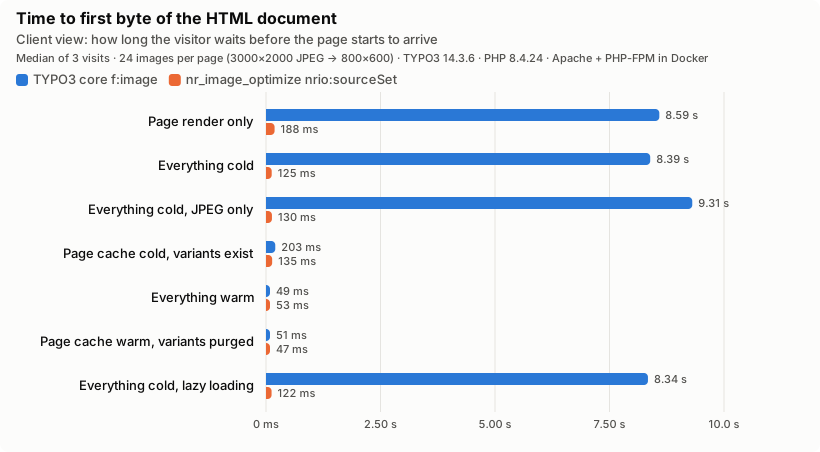
Client view -- the first byte of HTML. With a cold cache the
visitor waits 8.4 s for core, 0.12 s for the extension.
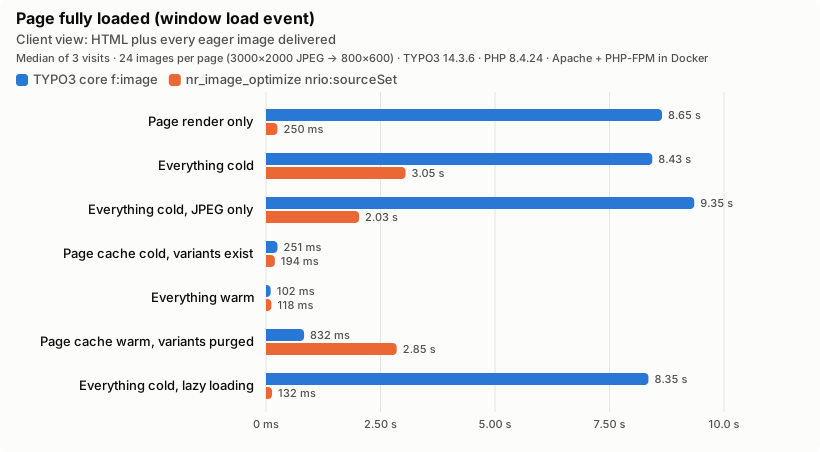
Client view -- the complete page. The 24 variant requests run in
parallel across PHP-FPM workers instead of serially inside one
render: 8.4 s become 3.0 s, and the largest contentful paint
moves from 8.4 s to 0.7 s. The "variants purged" row looks like a
regression at first glance (2.9 s for the extension against 0.8 s
for core) -- it is not: that page is rendered eager, so all 24
images are requested again regardless, and core's number is fast
because it serves 404s instead of doing the work (see below).
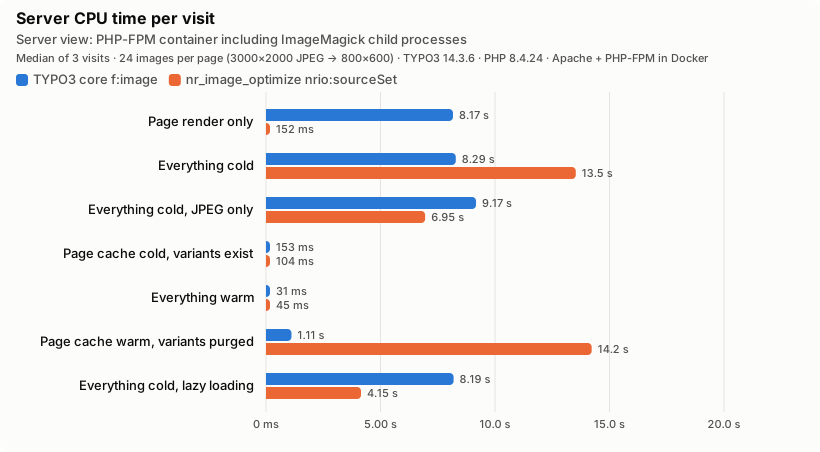
Server view -- CPU time of the PHP-FPM container, ImageMagick
included. Read this one carefully: on a fully viewed cold page
the extension spends more CPU (13.5 s vs 8.3 s), because the
first request for a variant writes three files -- JPEG, WebP and
AVIF -- and AVIF encoding is expensive. The "JPEG only" row
isolates that: with skipWebP=1&skipAvif=1 the same 24 images
cost 6.9 s against core's 9.2 s, so the pipeline itself is the
cheaper one and the extra formats are what the surplus buys. That
work is off the visitor's critical path, and it only happens for
images that are requested (lazy loading: 4.1 s vs 8.2 s for the
seven images the viewport needed). The same logic explains
"variants purged": that page is eager, so all 24 images are
requested again, and the extension pays close to the full
cold-cache cost a second time (14.2 s) -- core's 1.1 s is not a
faster regeneration, it is 24 cheap 404s instead of one.
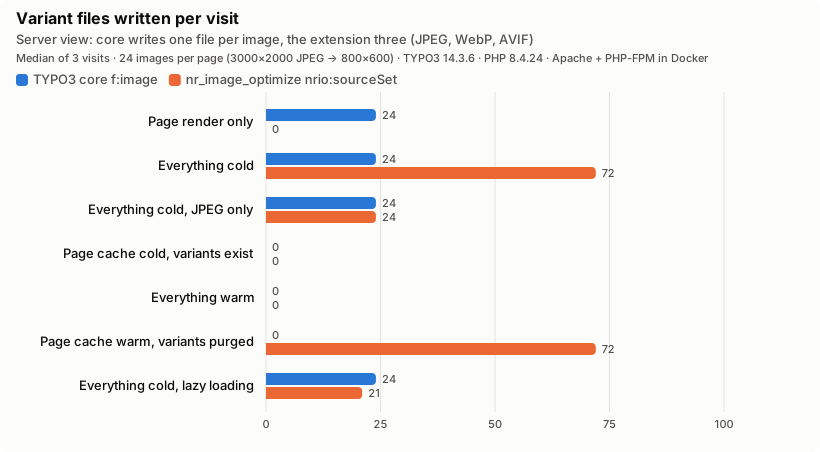
Server view -- files written. Rendering alone writes 24 files
with core and none with the extension. With lazy loading the
extension writes 21 files -- three formats (JPEG, WebP, AVIF)
for each of the 7 images the browser actually fetched -- while
core still writes 24, one per referenced image, regardless of
what the viewport needs.
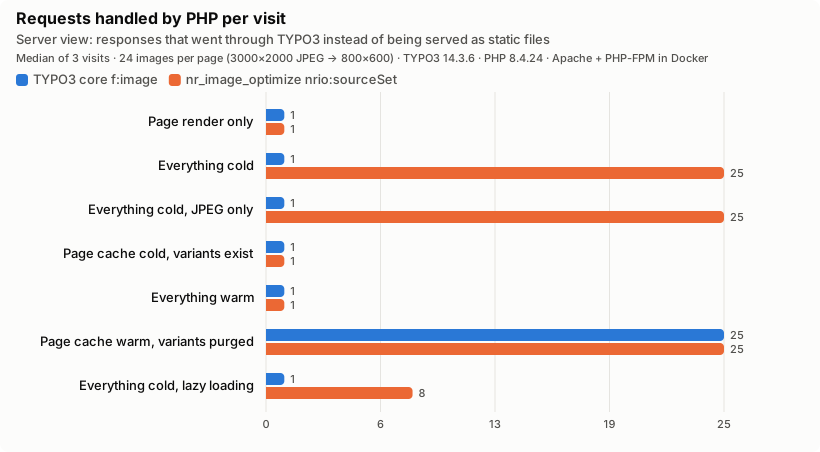
Server view -- requests that reached TYPO3. Steady state is one
PHP request for either pipeline; everything else is static
files. Note the "variants purged" row: when variant files are
deleted under a warm page cache, core's HTML points at files
nothing regenerates -- 24 broken images, each a PHP request for
an error page -- while the middleware simply regenerates them.
In short:
First visitor after a deployment or cache flush: HTML in
0.12 s instead of 8.4 s; complete page in 3.0 s instead of 8.4 s.
Lazy loading and hidden content actually save work: only
images the browser fetches are ever processed.
Render time is independent of image count and size. A page
with 200 images renders as fast as one with two; image-heavy
pages no longer risk max_execution_time during render.
Purged or lost variants are not an outage. They are
regenerated on the next request instead of serving 404s until
someone flushes the page cache.
Steady state is identical: a page-cache hit plus static files
in both cases.
Per image, the extension does more work by default -- three
formats, 13.5 s against 8.3 s of CPU for 24 images -- and less for
the same single format (6.9 s against 9.2 s); it delivers fewer
bytes where the browser accepts AVIF or WebP.
Reproduce it
The benchmark is part of the test suite, so the claims above are
re-measured rather than remembered:
make benchmark provisions TYPO3, the extension, Apache and
PHP-FPM in Docker, drives Chromium through the seven scenarios
with both pipelines and rewrites the charts in
Documentation/Images/Benchmark/ together with the raw
results.json (every iteration, not just the medians). Only
Docker is required; see Tests/E2E/README.md.
The suite asserts the architectural claims -- zero variants
written during render, lower cold-cache TTFB, no broken images
after a purge, fewer images processed under lazy loading -- and
fails when they stop holding. Absolute timings are reported,
never asserted.
Tests/Functional/Benchmark/RenderCostTest.php guards the
core claim (render writes nothing; core's ImageService
processes everything) in every CI run, without a browser.
Features
Automatic optimization on upload. In-place lossless
compression without re-encoding. Unsupported extensions,
offline storages, and missing binaries are handled
transparently -- the listener never raises.
Bulk CLI commands. Streaming iteration over sys_file
keeps memory usage flat on large installations. Progress bar
with cumulative savings.
No image processing during page render. Rendering only
emits /processed/ URLs; each variant is produced in its own
request, when a browser first asks for it, and served as a static
file from then on (see Performance model).
Next-gen format support. Automatic WebP and AVIF sidecar
generation with Accept-header-driven content negotiation and
skipWebP / skipAvif opt-outs.
Driver abstraction. Imagick is preferred when the
extension is loaded; GD is used as a fallback. The
ImageReaderInterface adapter (see
ImageManager abstraction) hides the Intervention
Image v3/v4 API difference.
Backend maintenance module. View statistics about
processed images, check prerequisites, and clear the cache
from the TYPO3 backend.
Security. Path traversal is blocked at URL parsing time,
quality and dimension values are clamped to safe ranges,
PSR-7 responses replace direct header() / exit calls.
Requirements
PHP 8.2, 8.3, 8.4, or 8.5.
TYPO3 13.4 or 14.
Imagick or GD PHP extension.
Intervention Image 3.11+ (installed automatically via
Composer).
Optional optimizer binaries
The on-upload listener and the CLI commands only compress files
when a matching binary is available in $PATH:
optipng
Lossless PNG compression.
gifsicle
Lossless GIF compression.
jpegoptim
Lossless (default) or lossy JPEG compression.
Paths can be pinned per binary via the OPTIPNG_BIN,
GIFSICLE_BIN, and JPEGOPTIM_BIN environment variables. A
set-but-invalid override is treated as authoritative: the tool
is reported unavailable rather than silently falling back to
$PATH. $PATH lookups also verify is_executable().
The extension works out of the box after installation:
The frontend middleware picks up any request to the
/processed/ path and produces a variant on demand.
The PSR-14 event listener for
AfterFileAddedEvent and AfterFileReplacedEvent
runs on every new or replaced image.
No additional configuration is required.
Tip
For best results, ensure that your server has the
Imagick or GD PHP extension installed. The
backend maintenance module can verify all prerequisites
for you (see System requirements check).
Optional: install optimizer binaries
The automatic on-upload compression and the
nr:image:optimize CLI command call
out to optipng, gifsicle, and jpegoptim. The
nr:image:analyze command is purely
heuristic and does not require these binaries.
Install whichever tools you need and make them available in
$PATH:
Debian/Ubuntu
sudo apt-get install optipng gifsicle jpegoptim
Copied!
macOS (Homebrew)
brew install optipng gifsicle jpegoptim
Copied!
To pin a specific path (useful in containerized environments)
set one or more of the following environment variables:
OPTIPNG_BIN
Absolute path to optipng.
GIFSICLE_BIN
Absolute path to gifsicle.
JPEGOPTIM_BIN
Absolute path to jpegoptim.
A set-but-invalid override is authoritative: the tool is
reported unavailable. There is no silent fallback to $PATH.
Tip
If no supported binary is installed, the on-upload
listener skips optimization silently. The
nr:image:optimize CLI command, by contrast, reports
the missing tools and exits with failure so an operator
running a bulk job gets immediate feedback.
nr:image:analyze works regardless because it never
invokes an external binary.
Configuration
The extension works out of the box with sensible defaults. All
three operating modes -- on-demand frontend processing, on-upload
compression, and bulk CLI -- activate automatically after
installation. This page documents the extension points that can
be tweaked.
SourceSetViewHelper
The SourceSetViewHelper generates responsive <img> tags
with srcset attributes.
Public path to the source image (for example
/fileadmin/foo.jpg), typically generated via
f:uri.image().
width
width
Type
int|float
Default
0
Base width in pixels for the rendered <img>. 0
resolves automatically from the source file.
Clamped by the processor to
1--8192 when baked into the variant URL.
Responsive set in the form
{maxWidth: {width: int, height: int}}. Each entry
becomes a <source media="(max-width: <maxWidth>px)">
tag.
alt
alt
Type
string
Default
empty string
Alternative text for the image. Always rendered (even
when empty) to keep assistive-tech compatibility.
title
title
Type
string
Default
empty string
HTML-escaped title attribute.
class
class
Type
string
Default
empty string
CSS classes for the <img> tag. Include
lazyload to switch from native to JS-based lazy
loading (see Lazy loading).
mode
mode
Type
string
Default
cover
Render mode. cover resizes images to fully cover
the given dimensions (crop/fill). fit resizes images
to fit within the given dimensions.
lazyload
lazyload
Type
boolean
Default
false
Add loading="lazy" (native lazy loading).
responsiveSrcset
responsiveSrcset
Type
boolean
Default
false
Enable width-based responsive srcset instead of the
density-based 2x output (preserved for backward
compatibility).
widthVariants
widthVariants
Type
string|array
Default
480, 576, 640, 768, 992, 1200, 1800
Width variants for responsive srcset
(comma-separated string or array). Only honored when
responsiveSrcset
is enabled.
sizes
sizes
Type
string
Default
auto, (min-width: 992px) 991px, 100vw
Responsive sizes attribute for the generated
<img> tag.
fetchpriority
fetchpriority
Type
string
Default
empty string
Native HTML fetchpriority attribute. Allowed
values: high, low, auto. Omitted when
empty.
attributes
attributes
Type
array
Default
[]
Extra HTML attributes merged into the rendered tag.
Note
Quality and output format are not exposed as ViewHelper
arguments. Quality defaults to 75 and is baked into the
generated /processed/...q<n>... URL; the variant's
file extension is inherited from the source image. Use
the URL format and
variant negotiation
to influence the served format.
Source set configuration
Define source sets per media breakpoint via the set
attribute:
Both modes support lazy loading via the native
loading="lazy" attribute. When using JS-based lazy
loading (class="lazyload"), the data-srcset
attribute is added automatically.
Backward compatibility
By default responsiveSrcset
is false, preserving the existing 2x density-based
srcset behavior. All existing templates continue to work
without modifications.
Variant URL format
Processed variants are served from a dedicated URL path. The
ViewHelper generates these URLs automatically, but any markup
that writes a URL of this form will be intercepted by the
ProcessingMiddleware:
Public path of the source image, including the
/fileadmin/ (or other storage) prefix. Path traversal
sequences (..) are rejected at URL-parsing time.
<mode-config>
Concatenation of one or more of:
w<n>
Target width in pixels.
h<n>
Target height in pixels.
q<n>
Quality (1--100).
m<n>
Processing mode (0 = cover, 1 = scale/fit).
<ext>
Source image extension. The processor decides at
response time whether to serve the original, the
.webp sidecar, or the .avif sidecar based on
the Accept header and the query flags below.
When the processor generates a variant, it writes the original
file to disk and additionally produces a .webp and an
.avif sidecar (same base name). On each request it inspects
the Accept header and returns the best match the client
supports, preferring AVIF over WebP over the original format.
Two query parameters let callers opt out of sidecar generation
for individual URLs:
skipWebP=1
Do not produce or serve a WebP variant for this URL. The
Content-Type always matches the source extension.
skipAvif=1
Do not produce or serve an AVIF variant for this URL. If
WebP is still allowed and the client supports it, WebP is
served.
These flags are useful when specific consumers (for example
e-mail clients or legacy RSS renderers) cannot handle modern
formats.
WebP/AVIF output quality
New in version 2.4.0
The qualityWebp and qualityAvif extension configuration
settings.
The primary variant's quality is controlled per-request via the
q<n> URL segment (see Variant URL format). The
.webp and .avif sidecars previously reused that same numeric
quality, but AVIF's quality scale is steeper than WebP's or JPEG's --
at matching numbers an AVIF file comes out larger than the WebP
sidecar, defeating the point of serving AVIF at all.
Two extension configuration settings control sidecar quality
independently of the primary variant:
qualityWebp (default 75)
Output quality for the generated WebP variant.
qualityAvif (default 60)
Output quality for the generated AVIF variant. The lower default
keeps AVIF variants genuinely smaller than WebP while staying
visually comparable.
The settings can also be edited via the backend:
Admin Tools > Settings > Extension Configuration >
nr_image_optimize.
Attention
Per-format quality is not part of the processed-variant cache
filename. Changing either setting only affects newly generated
variants -- clear already-processed images (see
Clear processed images) to apply the new quality to existing
ones.
Cache headers
Processed variant URLs are effectively content-addressed -- any
change to dimensions, quality, or format produces a different
URL. The processor therefore responds with an immutable,
long-lived cache header:
Imagick when the imagick PHP extension is loaded
(preferred -- supports AVIF natively if the underlying
ImageMagick build does).
GD when imagick is unavailable and the gd
extension is loaded.
If neither extension is present, the factory throws a
RuntimeException with a descriptive message. Use the
backend maintenance module
to verify driver availability on your host.
Middleware registration
Configuration/RequestMiddlewares.php registers the
ProcessingMiddleware on the frontend pipeline beforetypo3/cms-frontend/site. This ordering is required so the
middleware can intercept /processed/ URLs before
TYPO3's frontend routing claims them. The registration has no
user-configurable options.
Processor limits
The processor enforces the following bounds when parsing a URL:
MAX_DIMENSION
Width and height are clamped to 1--8192 pixels to prevent
denial-of-service via excessive memory allocation.
MIN_QUALITY / MAX_QUALITY
Quality is clamped to 1--100.
LOCK_MAX_RETRIES
Up to 10 attempts (at 100 ms intervals) to acquire the
per-variant processing lock before returning HTTP 503.
Prevents duplicate work when multiple clients hit the
same uncached variant simultaneously.
Trusted storage symlinks
New in version 2.3.0
The additionalTrustedStorageSymlinks extension configuration
setting.
The processor validates that both the source image and the
target variant resolve (via realpath()) to a location
inside an allowed root -- the public webroot, or a Local FAL
storage's own base path -- before reading or writing anything.
This rejects requests for images reached through a symlink that
escapes those roots (for example a symlink accidentally or
maliciously pointing at /etc).
Some deployments relocate TYPO3 core's own
_processed_ image cache -- a subdirectory inside a FAL
storage's own directory, e.g. fileadmin/_processed_ --
onto local/ephemeral storage, to keep frequently-rewritten
derivative images off shared/NFS storage. That leaves only a
symlink behind inside the storage, which the FAL-storage
basePath lookup above does not see (it only resolves the
storage's own base path, never looks inside it), so variant
requests for such images are rejected even though the original
file is legitimately part of the deployed application.
The additionalTrustedStorageSymlinks extension configuration
setting closes this gap on an explicit, per-instance, opt-in
basis: a comma-separated list of directory names that, when
found as a symlink directly inside a Local FAL storage's base
path, are resolved and added to the allow-list too.
The setting can also be edited via the backend:
Admin Tools > Settings > Extension Configuration >
nr_image_optimize.
Attention
This widens the set of filesystem locations the processor
will read from and publicly serve variants of. Only add
well-known, infrastructure-managed names here -- never a
name an untrusted party (e.g. an FTP-only content account)
could create on their own. The default is empty, which
keeps today's behavior unchanged for every installation that
does not configure it.
Additional trusted roots
New in version 2.4.0
The additionalTrustedRoots extension configuration setting.
Some deployments need to serve variants of images that live under
an absolute filesystem path that is neither the public webroot,
a Local FAL storage's own base path, nor one of the hardcoded
TYPO3-internal locations (var/, symlinked
processed/uploads, or extension-published
_assets/<hash> directories) -- for example a custom mount
managed outside of FAL.
The additionalTrustedRoots extension configuration setting
closes this gap on an explicit, per-instance, opt-in basis: a
comma-separated list of absolute filesystem paths that are
realpath-resolved and added to the allow-list directly.
The setting can also be edited via the backend:
Admin Tools > Settings > Extension Configuration >
nr_image_optimize.
Attention
This widens the set of filesystem locations the processor
will read from and publicly serve variants of. Only add paths
you fully trust. Relative paths are rejected outright (never
resolved against the PHP process's working directory). The
default is empty, which keeps today's behavior unchanged for
every installation that does not configure it.
Usage
This chapter shows practical examples for integrating
responsive images into your Fluid templates and for operating
the command-line tools that ship with the extension.
Register the namespace
Add the ViewHelper namespace at the top of your Fluid
template or register it globally:
Public images only: absolute URLs are passed through
New in version 2.2.4
Absolute URLs, data: URIs, and URLs with a query string are
passed through unchanged and rendered as a plain <img> tag.
The /processed/ endpoint is designed for public files only.
It resolves the given path below the public web root and writes the
generated variants as static files into public/processed/,
where the web server delivers them directly — without any access
check.
Files in non-public FAL storages (is_public = 0) can therefore
not be processed. Extensions such as
fal_securedownload
resolve such files to tokenized eID URLs
(/index.php?eID=dumpFile&...) whose delivery runs through TYPO3
and performs a permission check on every request.
The ViewHelper detects absolute URLs (http://, https://,
//), data: URIs, and URLs containing a query string and
passes them through unchanged, rendering a plain <img> tag with
the URL as src:
No srcset/sizes attributes and no per-breakpoint
<source> elements are generated — the browser always
loads the image in its original dimensions.
No WebP/AVIF variants and no quality optimization are
applied.
In return, the access control of the generating extension
(e.g. fal_securedownload) stays fully intact, because the
URL — including its access token — is emitted unchanged.
If you need optimized variants of images in protected storages,
generate them with TYPO3's own image processing (for example
f:image or the ImageService). Processed files are then
created inside the protected storage's processing folder and are
delivered through the same secure-download mechanism, keeping the
permission check intact.
Fetch priority for Core Web Vitals
Use the fetchpriority attribute to hint the browser
about resource prioritization, improving Largest Contentful
Paint (LCP) scores:
Both commands read the FAL index directly and process eligible
image files (image/jpeg, image/gif, image/png) on
online storages. Per-file storage permission evaluation is
temporarily disabled and restored in a finally block so
long-running CLI runs don't leak state across iterations or
require a BE user context.
Bulk optimize images
The nr:image:optimize command compresses every eligible
PNG, GIF, and JPEG file across all storages (or a restricted
subset) using the installed optimizer binaries. The original
file is replaced in place only when the tool produces a
smaller result.
Restrict to specific storage UIDs. Accepts repeated
occurrences or a comma-separated list.
--jpeg-quality
Lossy JPEG quality 0--100. Omit for lossless JPEG
optimization.
--strip-metadata
Remove EXIF and comments when the tool supports it.
Analyze optimization potential
The nr:image:analyze command estimates how much disk
space could be saved by running nr:image:optimize or by
downscaling oversized originals. It is purely heuristic --
no external binaries are invoked, so it runs quickly even on
large installations.
Report potential for storage 1
vendor/bin/typo3 nr:image:analyze --storages=1
Copied!
Options:
--storages
Restrict to specific storage UIDs.
--max-width / --max-height
Target display box (default 2560 x 1440). Images larger
than this box are assumed to be downscaled and the
estimate factors in the area reduction.
--min-size
Skip files smaller than this many bytes (default
512000). Prevents noise from already-tiny images.
Maintenance
The extension ships with both a backend module and two CLI
commands. The backend module is reachable via
Admin Tools > Processed Images Maintenance
(access restricted to users with the systemMaintainer
role). The CLI commands are documented in Command-line tools.
Access control
The backend module is registered under the Admin
Tools parent with access: systemMaintainer. Only TYPO3
users in the systemMaintainer group (configured in
LocalConfiguration.php) see it in the backend navigation.
Overview
The Overview tab (MaintenanceController::indexAction)
reports statistics about the processed-images directory:
File count and total disk usage.
Number of directories under /processed/.
The five largest files (name, size, last-modified timestamp).
The stats are computed on demand by recursively walking the
filesystem; no metadata is persisted to the database.
System requirements check
The System requirements tab
(MaintenanceController::systemRequirementsAction) verifies
all technical prerequisites needed for successful variant
generation:
PHP version and loaded extensions (imagick, gd,
fileinfo).
ImageMagick / GraphicsMagick capabilities reported by
Imagick, in particular the ability to decode/encode WebP
and AVIF. If Imagick is not installed, the page falls
back to GD capabilities.
Intervention Image installed version and the driver
selected at runtime.
TYPO3 version.
Availability of optional CLI helpers (magick,
convert, identify, gm) -- none are strictly
required but may be useful for debugging.
Each check is rendered as a pass/warning/fail row with a
short explanation so an administrator can fix a misconfigured
host in minutes.
Note
The page does not currently report on the optipng,
gifsicle, or jpegoptim binaries used by the
on-upload listener and nr:image:optimize. To verify
those, run nr:image:optimize --dry-run (see
Bulk optimize images) -- it resolves every tool up
front and exits with an error listing the missing ones --
or check the binaries manually on the host.
nr:image:analyze is heuristic and never invokes
external tools, so it cannot be used for this check.
Clear processed images
The Clear processed images tab
(MaintenanceController::clearProcessedImagesAction)
recursively deletes every file under the configured
processed-images directory. A flash message reports the
number of files removed and the disk space freed.
Warning
After clearing processed images, expect temporarily
increased frontend load -- each variant is re-created on
first request. Run the action during off-peak hours on
busy sites.
Tip
nr:image:optimize only touches original files in
FAL storages; it does not clear the
/processed/ directory. Use this action (or the
TYPO3 install tool's "Flush cache" entry) to discard
cached variants after an optimization run.
Command-line maintenance
Two console commands complement the backend module:
Fast heuristic report that estimates optimization
potential without touching files or running external
tools.
Tip
Run nr:image:analyze first to decide whether the
optimization run is worth the I/O. Then schedule
nr:image:optimize as a periodic task (for example
through the TYPO3 scheduler or a cron job).
Developer reference
Architecture
The extension has three entry points that share the same
optimization backend:
ProcessingMiddleware intercepts frontend requests
matching the /processed/ path and asks the
Processor to create a variant
on demand.
OptimizeOnUploadListener reacts to PSR-14 file events
(AfterFileAddedEvent and AfterFileReplacedEvent)
and delegates to the shared
ImageOptimizer service
for in-place lossless compression.
OptimizeImagesCommand and AnalyzeImagesCommand
iterate the FAL index from the CLI. Both extend
AbstractImageCommand, which
provides shared database iteration, progress rendering,
and option parsing.
The MaintenanceController provides the backend module for
statistics, cleanup, and system-requirement checks.
Frontend PSR-15 middleware registered beforetypo3/cms-frontend/site (see
Middleware registration). Intercepts every
request whose path starts with /processed/ and
delegates to the
\Netresearch\NrImageOptimize\ProcessorInterface
implementation. Any other request is passed to the next
handler unchanged.
Processor
classProcessorInterface
Fully qualified name
\Netresearch\NrImageOptimize\ProcessorInterface
Contract for the on-demand processor -- declares
generateAndSend(ServerRequestInterface): ResponseInterface.
The middleware depends on this interface, so integrators
can replace the implementation via a Services.yaml alias.
classProcessor
Fully qualified name
\Netresearch\NrImageOptimize\Processor
Default implementation. Parses the requested URL (see
Variant URL format) to extract path,
dimensions, quality, and mode. Loads the original via
the ImageReaderInterface adapter (see
ImageManager abstraction), generates the primary
variant plus optional
WebP / AVIF sidecars, and streams a PSR-7 response back
with long-lived cache headers.
Key behaviors:
Rejects path-traversal (..) sequences at URL
parse time, returning HTTP 400.
Clamps w / h to 1--8192 and q to 1--100.
Uses TYPO3's LockFactory to serialize concurrent
requests for the same variant; a 503 is returned if
the lock can't be acquired within 1 second.
Respects the Accept header plus the skipWebP
and skipAvif query parameters when choosing
which cached sidecar to serve.
PSR-14 listener registered for AfterFileAddedEvent
and AfterFileReplacedEvent. Normalizes the file
extension, short-circuits unsupported extensions and
offline storages, and delegates to
\Netresearch\NrImageOptimize\Service\ImageOptimizer.
Re-entrancy guard: keyed by
storageUid . ':' . identifier so two storages sharing
an identifier (/image.jpg in different driver roots)
don't block each other, while still catching the
replaceFile() loop that the optimizer's own write
would otherwise trigger.
Storage state: setEvaluatePermissions(false) is
applied before delegation and restored to its previous
value in a finally block so long-running CLI runs
don't leak permission state across iterations.
Shared backend used by both the event listener and the
CLI commands. Resolves optimizer binaries via $PATH,
with env overrides (OPTIPNG_BIN, GIFSICLE_BIN,
JPEGOPTIM_BIN). A set-but-invalid override is
authoritative -- the tool is reported unavailable rather
than silently falling back to $PATH. $PATH
lookups also verify is_executable().
Version-agnostic abstraction around Intervention Image's
loading API. v3 uses ImageManager::read(), v4 uses
ImageManager::decode(); this interface hides that
difference so consumers and static analysis see a single
stable contract.
Default implementation. Dispatches to whichever method is
present on the installed ImageManager, letting the
extension support Intervention Image ^3 || ^4
simultaneously without version-conditional code paths.
Base class for the image CLI commands. Exposes
parseStorageUidsOption, getIntOption,
extractUid, countImages, iterateViaIndex
(Generator over sys_file rows -- constant memory),
createProgress, buildLabel, shortenLabel,
and formatMbGb.
Fluid ViewHelper that generates <img> tags with
srcset attributes for responsive image delivery.
Supports both density-based (2x) and width-based
responsive srcset modes. See Usage for examples
and SourceSetViewHelper for the parameter
reference.
Build/Scripts/runTests.sh -s unit -p 8.4
Build/Scripts/runTests.sh -s phpstan -p 8.4
Copied!
Changelog
2.5.0
Added: image and cropVariant arguments on SourceSetViewHelper
-- when a FAL FileReference is passed via image, the ViewHelper
derives the effective height from that image's crop-variant area
(falling back to its original aspect ratio when the variant has no crop
data), instead of requiring callers to pre-compute a crop-aware height
themselves via a separate, site-specific ViewHelper. height remains
authoritative when image is omitted.
2.4.2
Fixed: source images under a folder with a non-ASCII character
(e.g. an umlaut) no longer return an empty-body HTTP 500 for
/processed/* requests. The regression was in
intervention/image v4: InputHandler::handle() checks
BinaryImageDecoder before FilePathImageDecoder, and
BinaryImageDecoder's heuristic treats any string containing a
byte outside printable ASCII as binary image data -- including a
legitimate absolute path whose only non-ASCII content is a UTF-8
umlaut. Wrapping the path in SplFileInfo before handing it to
ImageManager::read()/decode() makes decoder selection match
on input type rather than content, sidestepping the heuristic.
v3 (3.7.2, 3.11.1) was not affected -- no TYPO3_12 backport
needed. See
pull request #156.
2.4.1
Fixed: the TYPO3 version constraint now targets the v14 LTS.
typo3/cms-core was declared as ^13.4 || ^14.0 and
ext_emconf.php as 13.4.0-14.4.99, which also covered
the 14.0--14.2 sprint releases. Both now target 14.3
(^13.4 || ^14.3, 13.4.0-14.3.99). See
pull request #139.
Fixed: the version metadata published to Packagist matches the
release again. The v2.4.0 tag was first pushed against a commit
whose ext_emconf.php still read 2.3.1. Packagist
recorded that reference for 2.4.0 and, under its
immutable-version policy, kept it when the tag was moved -- so
2.4.0 installed via Composer reports 2.3.1 to the Extension
Manager. Installs from 2.4.1 on carry the matching version. The
2.4.0 release on TER is unaffected.
2.4.0
Added: Environment::getVarPath() (the composer-mode
var/ directory, a sibling of public/ rather than
nested under it) is now an allowed root for path validation, so
TYPO3-internal generated assets (cache, lock, transient, log) are
accepted.
Added: additionalTrustedRoots extension configuration --
per-instance, opt-in, comma-separated list of absolute filesystem
paths that are realpath-resolved and added directly to the
path-validation allow-list. Closes the gap for integrator-trusted
locations that are neither a FAL storage base path nor one of the
hardcoded TYPO3-internal locations. See
Additional trusted roots.
Added: configurable WebP/AVIF output quality via the new
qualityWebp (default 75) and qualityAvif (default 60)
extension-configuration settings. Previously both variants were
encoded at the same numeric quality as the primary image; AVIF's
steeper quality scale made AVIF variants larger than WebP at
matching numbers, so format negotiation ended up serving the
biggest file. The lower AVIF default keeps AVIF variants
genuinely smaller than WebP while staying visually comparable.
See WebP/AVIF output quality. Changing either setting
requires clearing processed images, since per-format quality is
not part of the cache filename. Reported in
issue #132.
Fixed: clear-processed-images (Maintenance module) failed on
symlinked deployments. The action validated the target path with
realpath(), which resolves a processed symlink
(shared-directory deployment layouts, e.g. Deployer) to its
target and never matched <public>/processed -- so
clearing failed on every symlinked deployment. The directory is
now emptied in place instead of rmdir() + mkdir(),
preserving the symlink. Reported in
issue #131.
2.3.1
Fixed: the backend module icon and Maintenance module templates
were not TYPO3 v14 theme-aware. The module icon
(module-image-optimize.svg) and extension icon
(Extension.svg) were flat, hard-coded tiles that did not
adapt to the v14 backend light/dark colour scheme. The
Maintenance module's Fluid templates also used Bootstrap utility
classes with fixed light values (bg-light, table-light,
text-dark), causing card headers, table heads, and code chips
to render as light boxes on a dark backend. The module icon is
now theme-aware via fill="currentColor" (TYPO3 v14+, with a
legacy full-colour tile kept for v13), and the templates use
adaptive bg-body-tertiary tokens instead.
2.3.0
Added: additionalTrustedStorageSymlinks extension
configuration -- per-instance, opt-in, comma-separated list of
directory names that, when found as a symlink directly inside a
Local FAL storage's own base path (e.g.
fileadmin/_processed_), are resolved and added to the
path-validation allow-list. Closes the gap where deployments
relocate TYPO3 core's own _processed_ image cache onto
local/ephemeral storage to keep it off shared/NFS storage,
leaving a symlink behind that the FAL-storage basePath lookup
cannot see. Default empty; keeps today's behaviour for every
installation that doesn't opt in. See Trusted storage symlinks.
Reported in
issue #120.
Fixed: images published via public/_assets/<hash>
symlinks (extension Resources/Public/ assets) were
rejected with HTTP 400. TYPO3 core publishes each extension's
Resources/Public/ directory by symlinking
public/_assets/<hash>/ to a location outside the public
webroot. getAllowedRoots() did not resolve these symlinks, so
variant requests for e.g. an extension's default/fallback image
failed even though the file is a legitimate part of the deployed
application. Every immediate child of _assets is now
resolved individually. Reported in
issue #117.
2.2.4
Fixed: the sourceSet ViewHelper passes absolute URLs
(http://, https://, //), data: URIs, and URLs
carrying a query string through unchanged and renders them as a
plain <img> tag. Previously such paths — e.g. the tokenized
eID=dumpFile URLs fal_securedownload
generates for files in non-public storages — were mangled into
broken /processed/... variant paths. The access control
of the generating extension stays intact; see
Public images only: absolute URLs are passed through for the trade-off.
Fixed: backend module labels are resolved via array format.
2.2.3
Fixed: processed image requests no longer return
HTTP 400 when fileadmin (or any other Local
FAL storage) is a symlink to an external location
such as an NFS/EFS mount. isPathWithinAllowedRoots
now accepts any realpath-resolved path that lies
within the TYPO3 public root or the realpath of any
configured Local storage's basePath. Symlinks
placed inside a storage that escape every allowed
root -- e.g. fileadmin/evil -> /etc
-- continue to be rejected. Reported in
issue #70.
Hardened: paths containing NUL bytes are rejected
outright, closing a minor realpath-bypass via the
not-yet-existing-path parent-walk branch.
Changed (BC for subclasses and manual instantiators):
Netresearch\\NrImageOptimize\\Processor
gains a
new required StorageRepository constructor
parameter. Consumers that autowire the service (the
default in TYPO3 12+) are unaffected; any code that
extends the class or constructs it by hand must
forward the new dependency.
2.2.2
Added OptimizeOnUploadListener -- PSR-14 listener
that runs optipng / gifsicle / jpegoptim on
AfterFileAddedEvent and AfterFileReplacedEvent.
Keyed by storageUid . ':' . identifier to avoid
cross-storage re-entrancy collisions; restores
setEvaluatePermissions in a finally block.
Added nr:image:optimize -- bulk optimization command
with --dry-run, --storages, --jpeg-quality,
and --strip-metadata options. Uses a streaming
Generator over sys_file so large installations
don't load the full index into memory.
Added nr:image:analyze -- heuristic analysis
command that estimates optimization potential without
invoking any binary. Fast even on large installations.
Added ImageOptimizer service -- shared backend used
by the listener and both CLI commands. Env overrides
(OPTIPNG_BIN, GIFSICLE_BIN, JPEGOPTIM_BIN)
are authoritative: a set-but-invalid override is
reported as unavailable rather than silently falling
back to $PATH. $PATH lookups also verify
is_executable().
2.2.1
Adjusted author information in ext_emconf.php.
2.2.0
Fixed: always render alt attribute on generated
<img> tags.
Expanded unit test coverage for Processor and
SourceSetViewHelper.
2.1.0
New in version 2.1.0
Width-based responsive srcset with sizes
attribute, configurable width variants, and
fetchpriority support.
Added responsive width-based srcset generation as
opt-in feature.
Added widthVariants parameter for custom breakpoints.
Added sizes parameter for responsive image sizing.
Added fetchpriority attribute for resource hints.
Optimized default sizes attribute values.
2.0.1
Fixed declare statement issue preventing TER
publishing via GitHub Actions.
2.0.0
New in version 2.0.0
TYPO3 13 compatibility with PHP 8.2--8.4 support.
Added TYPO3 13 compatibility.
Added PHP 8.2, 8.3, and 8.4 support.
Dropped support for older TYPO3 versions.
Switched to Intervention Image 3.x.
Removed obsolete system binary checks.
1.0.1
Added ext_emconf.php for classic installation.
1.0.0
Initial stable release.
GitHub Actions CI workflows.
0.1.5
Fixed strtolower() null argument error.
Fixed array offset access on boolean value.
Allowed numeric characters in file extensions.
Added extension icon.
Corrected crop variant examples.
Improved lazy loading behavior.
Reference to the headline
Copy and freely share the link
This link target has no permanent anchor assigned.The link below can be used, but is prone to change if the page gets moved.