
Usage analytics
The Analytics submodule turns the per-request data in
tx_ into an at-a-glance view of what your AI
spend and usage look like over time — cost and request trends,
breakdowns by provider, model, and service, and per-user consumption
against this month's budget.
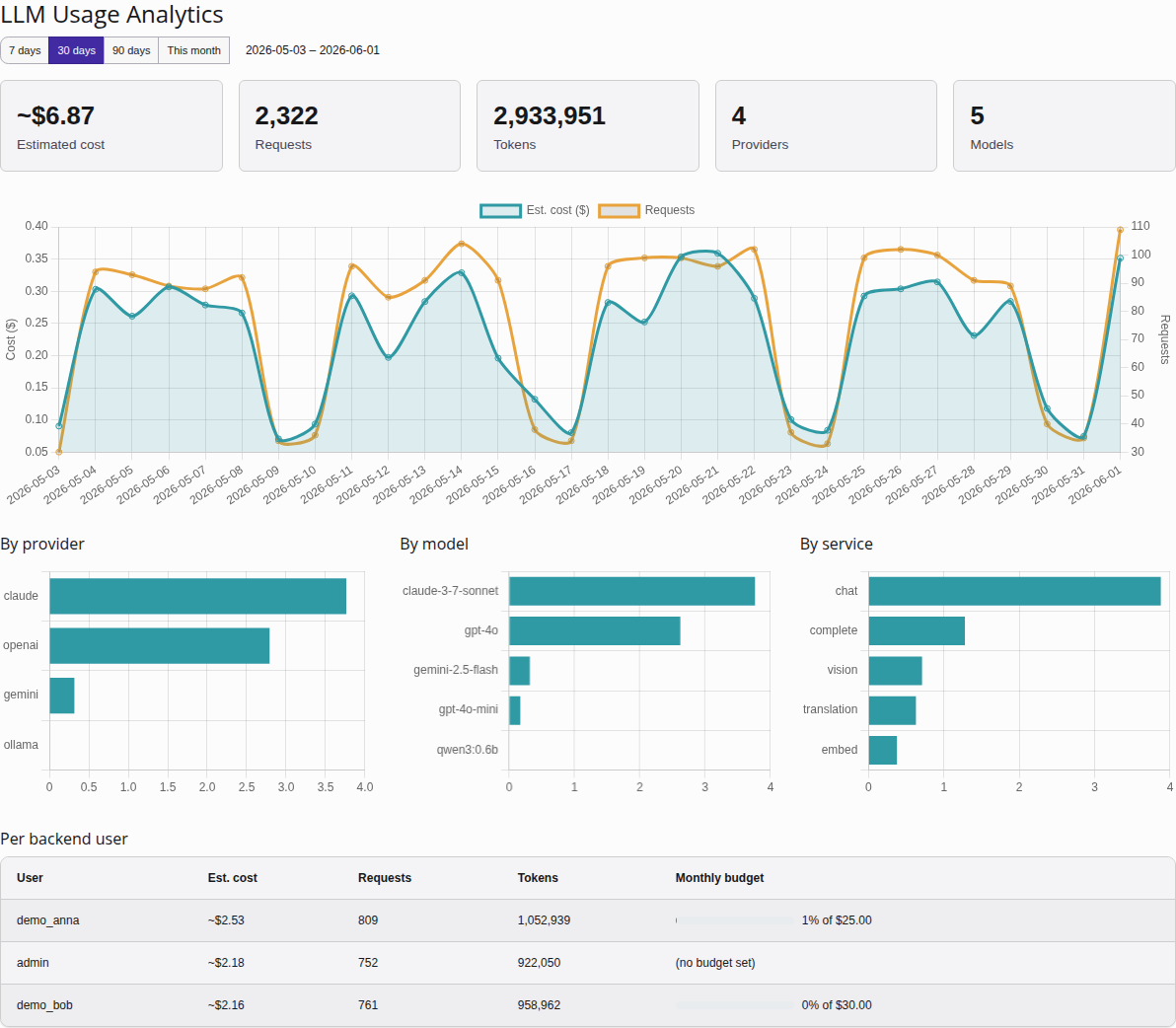
The Analytics dashboard: KPI summary tiles, the cost/request trend, the provider / model / service breakdowns, and per-user consumption against each user's monthly budget.
Opening the module
Open Admin Tools > LLM > Analytics. The submodule sits next to the other LLM sections in the left-hand navigation and is admin-only, like the rest of the module.
Choosing a date range
A range switcher at the top of the page selects the reporting window.
The range is a plain ?range= link, so changing it is an ordinary
page reload — there is no AJAX. Four presets are available:
| Preset | Window |
|---|---|
7d | The last 7 days (today and the six preceding days). |
30d | The last 30 days. This is the default — any unknown range
value falls back to 30d. |
90d | The last 90 days. |
month | From the first of the current calendar month to today. |
KPI tiles
A row of tiles summarises the selected range:
- Total cost — the summed estimated cost across the window.
- Total requests — the number of AI requests recorded.
- Total tokens — prompt plus completion tokens consumed.
- Providers — how many distinct providers were used.
- Models — how many distinct models were used.
These are totals for the chosen range, not all-time figures.
Cost and requests trend
A line chart plots daily estimated cost and daily request count across the range. Days with no usage are filled in as zero so the line is continuous rather than skipping gaps.
Breakdown charts
Three bar charts split the window's usage along different axes:
- By provider — cost and requests per
service_provider(OpenAI, Anthropic, Ollama, …). - By model — cost and requests per model. This dimension is new:
it relies on the
model_uid/model_idcolumns added to the usage table, so it only reflects usage recorded after that change. - By service — cost and requests per service type (chat, vision, translation, speech, image).
Per-user table
A table lists usage grouped by backend user, ordered by cost. Each row shows the user's request count, token total, and estimated cost for the selected range, plus a monthly-budget bar that visualises how much of their per-user budget (see Per-user AI budgets) they have consumed.
Note
The budget bar always reflects the current calendar month, regardless of the date range selected above. The other columns follow the selected range; the budget bar does not, because a budget is a monthly ceiling.
Requests made without an authenticated backend user (CLI, scheduler,
be_user = 0) are grouped under a system row.
A note on cost
All cost figures are estimated. They are computed from the model pricing you configured (cents per 1M tokens, applied to the recorded prompt/completion token split), not billed back from the provider. Treat them as a planning and trend signal, not as an invoice. Costs are captured at call time, so they reflect the pricing in effect when each request ran. See ADR-029: Usage Analytics Dashboard for the design rationale.
Specialized services (DALL·E, text-to-speech, Whisper, DeepL) still
record their requests and units, but their cost is currently shown as
0 — token-based pricing does not apply to them yet. Streaming
responses are not recorded at all, because chunked output has no single
terminal token count to price.
Usage columns in the list views
The Providers, Models, Configurations, and Tasks list views each carry three extra columns — Cost (30d), Requests (30d) and Tokens (30d) — summarising the last 30 days of usage for that row, so you can spot the heavy hitters without leaving the list.
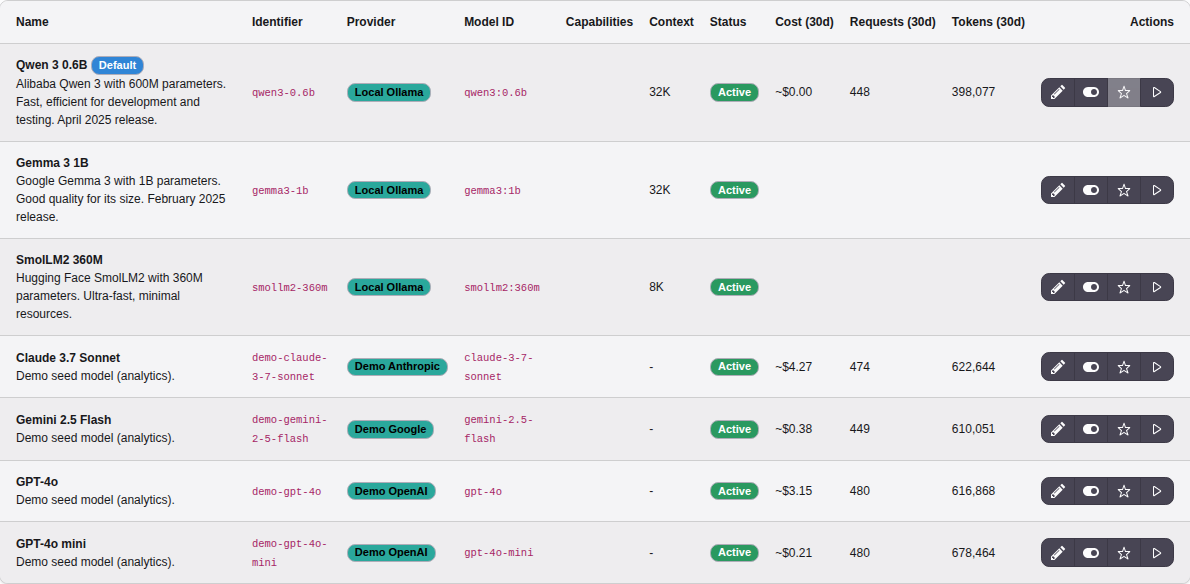
The Models list with the 30-day usage columns. Models with no usage
in the window show blank cells; free local models show ~$0.00.
Two attribution notes:
- The Providers column aggregates by adapter type (the value stored on each usage row), not by individual provider record — two providers that share an adapter therefore show the same figures.
- The Tasks column relies on per-task tracking: each task execution
records its
task_uidso usage rolls up to the task that triggered it. Calls made outside a task (direct API/service use) are not attributed to any task row.
Demo data for local development
To populate the module with something to look at during local development, run the dev-only DDEV command:
ddev seed-usageIt generates roughly 90 days of realistic historic usage across providers, models, services, and users so the trend line, breakdown charts, and per-user table all have content. This command is for local DDEV environments only — do not run it against production data.