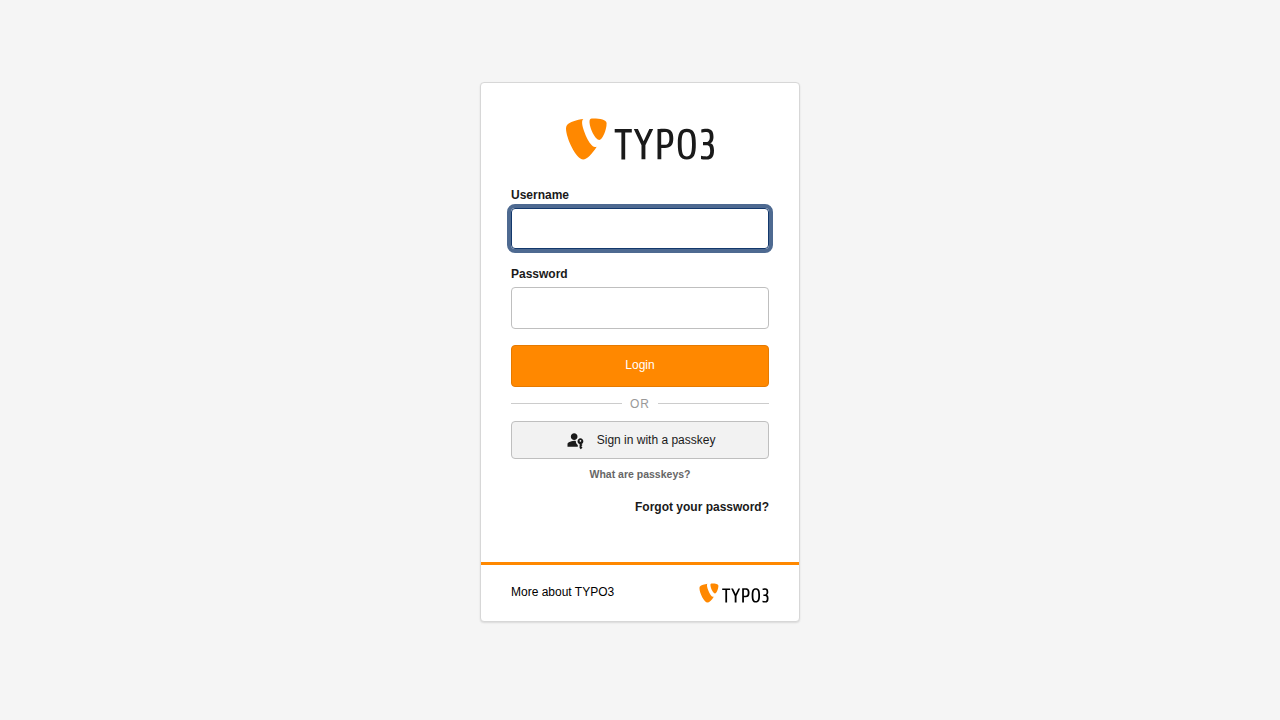
Passwordless TYPO3 backend authentication via WebAuthn/FIDO2 Passkeys.
Enables one-click login with TouchID, FaceID, YubiKey, and Windows
Hello -- directly on the standard TYPO3 login form.
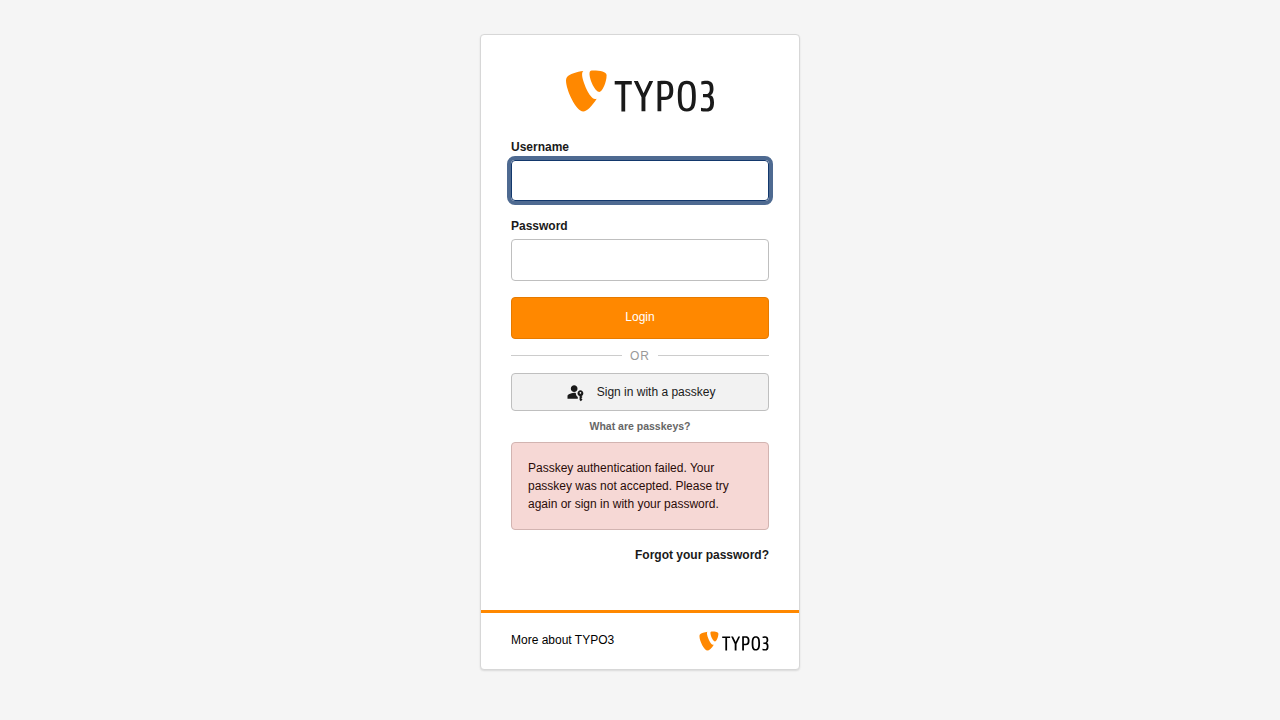
The passkey button appears below the Login button with an
"or" divider.
Passkeys Backend Authentication provides passwordless authentication
for the TYPO3 backend using the WebAuthn/FIDO2 standard (Passkeys).
Backend users can log in with a single touch or glance using biometric
authenticators such as TouchID, FaceID, Windows Hello, or hardware
security keys like YubiKey.
The passkey button is injected directly into the standard TYPO3 login
form via a PSR-14 event listener -- no login provider switching
needed. Users see the familiar login page with a
Sign in with a passkey button below the Login button.
Passkeys are a modern, phishing-resistant replacement for passwords.
They use public-key cryptography: the private key never leaves the
user's device, and the server only stores a public key. This eliminates
the risk of credential theft through phishing or database breaches.
Features
Passwordless login
Authenticate with TouchID, FaceID, YubiKey, or Windows Hello
instead of a password. Injected directly into the standard
TYPO3 login form.
Primary credential
Passkeys are a first-class authentication method (not MFA).
The extension registers at priority 80, above the standard
password service.
Credential management
Users can register, rename, and remove their own passkeys
through the TYPO3 User Settings module.
Admin panel
Administrators can list, revoke, and manage passkeys for any
backend user, and unlock locked-out accounts.
Discoverable login
Optional usernameless login (Conditional UI) where the browser
auto-suggests available passkeys. Controlled via extension
settings.
Security hardened
HMAC-signed challenges with nonce replay protection, rate
limiting by IP, account lockout, user enumeration prevention,
and audit logging.
Configurable algorithms
Supports ES256, ES384, ES512, and RS256 signing algorithms.
Configurable user verification requirement.
TYPO3 v12, v13, and v14
Compatible with TYPO3 12.4 LTS, 13.4 LTS, and 14.x.
PHP 8.2, 8.3, 8.4, and 8.5 supported.
Supported authenticators
Any FIDO2/WebAuthn-compliant authenticator works, including:
Apple TouchID and FaceID (macOS, iOS, iPadOS)
Windows Hello (fingerprint, face, PIN)
YubiKey 5 series and newer
Android fingerprint and face unlock
Any FIDO2-compliant hardware security key
Browser support
WebAuthn is supported by all modern browsers:
Browser
Version
Chrome / Edge
67+
Firefox
60+
Safari
14+
Chrome for Android
70+
Safari for iOS
14.5+
Installation
Prerequisites
TYPO3 12.4 LTS, TYPO3 13.4 LTS, or TYPO3 14.x
PHP 8.2, 8.3, 8.4, or 8.5
HTTPS is required for WebAuthn (except for localhost during
development)
A configured TYPO3 encryption key
($GLOBALS['TYPO3_CONF_VARS']['SYS']['encryptionKey'],
minimum 32 characters)
Installation via Composer
This is the recommended way to install the extension:
Install via Composer
composer require netresearch/nr-passkeys-be
Copied!
Activate the extension
After installation, activate the extension in the TYPO3 backend:
The extension adds a tx_nrpasskeysbe_credential table. After
activation, run the database schema update:
Go to Admin Tools > Maintenance > Analyze Database
Structure
Apply the suggested changes
Or use the CLI:
Update database schema via CLI
vendor/bin/typo3 database:updateschema
Copied!
Verify the installation
After activation:
The TYPO3 backend login page should show a
Sign in with a passkey button below the Login button.
The passkey button appears below the Login button, separated
by an "or" divider.
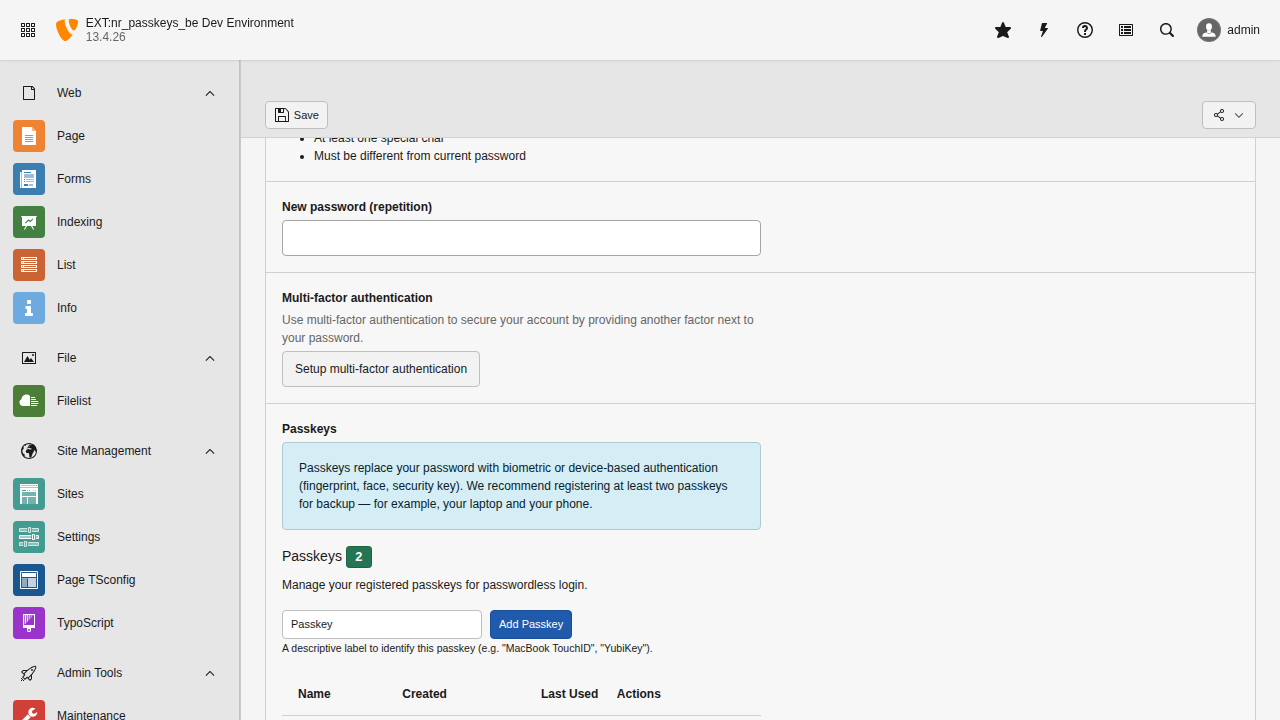
In User Settings, a "Passkeys" section should appear
where authenticated users can register their first passkey.
Note
HTTPS is mandatory for WebAuthn to function. The only exception is
localhost for local development. If you are running TYPO3
behind a reverse proxy, ensure that the TYPO3_SSL environment
variable or the [SYS][reverseProxySSL] configuration is set
correctly.
Configuration
All settings are managed through the TYPO3 Extension
Configuration module:
The extension configuration screen with all available
settings grouped by category.
Relying Party settings
rpId
rpId
type
string
Default
(auto-detected from HTTP_HOST)
The Relying Party identifier. This is typically the domain name of your
TYPO3 installation (e.g. example.com). If left empty, it is
auto-detected from the HTTP_HOST server variable.
Important
Once passkeys are registered against a specific rpId, changing it
will invalidate all existing registrations. Users would need to register
new passkeys.
rpName
rpName
type
string
Default
TYPO3 Backend
A human-readable name for the Relying Party. This is displayed to users
during passkey registration (e.g. in the browser's passkey creation dialog).
origin
origin
type
string
Default
(auto-detected)
The expected origin for WebAuthn operations (e.g.
https://example.com). If left empty, it is auto-detected from the
current request scheme and host.
Challenge settings
challengeTtlSeconds
challengeTtlSeconds
type
int
Default
120
The time-to-live for challenge tokens in seconds. After this period, the
challenge expires and the user must request a new one. The default of 120
seconds provides enough time for users to interact with their authenticator.
Discoverable login
discoverableLoginEnabled
discoverableLoginEnabled
type
bool
Default
true
Enable discoverable (identifierless) login. When enabled (default), the
browser can suggest available passkeys without the user entering a username
first (Conditional UI / Variant B). The user simply clicks a suggested
passkey from the browser's autofill dropdown.
When disabled, users must enter their username first, then authenticate
with their passkey (Variant A: username-first flow).
Password login control
disablePasswordLogin
disablePasswordLogin
type
bool
Default
false
Enforce passkey-only authentication on a per-user basis. When enabled,
password login is blocked only for users who have registered at least
one passkey. Users without passkeys can still log in with a password,
allowing gradual migration without lockouts.
This enables a smooth onboarding workflow:
Admin creates a new backend user with a password (as usual).
User logs in with password, registers a passkey in User Settings.
From that point on, the user must use their passkey -- password login
is no longer accepted for that account.
When this setting is active, users cannot remove their last passkey to
prevent locking themselves out.
See also
For more granular per-group enforcement with grace periods, see
Passkey Enforcement.
skipMfaOnPasskeyAuth
skipMfaOnPasskeyAuth
type
bool
Default
true
New in version 0.8.0
Added to resolve the MFA-policy dilemma: TYPO3's requireMfa flag
applies to every authentication path, so requiring MFA for password
users forced passkey users through a redundant TOTP step as well.
When enabled, the TYPO3 MFA challenge is skipped after a successful
passkey authentication. A passkey is already multi-factor -- possession
of the authenticator plus biometric or PIN user verification -- so an
additional TOTP prompt adds friction without increasing assurance.
Password-based logins are not affected: they continue to go through
the MFA challenge exactly as TYPO3 configures it. This setting only
short-circuits the MFA step on the passkey branch.
Keep TYPO3's $GLOBALS['TYPO3_CONF_VARS']['BE']['requireMfa']
enabled so password-based logins still require a second factor.
Leave skipMfaOnPasskeyAuth enabled so passkey users are not
double-prompted.
Use per-group enforcement to move users onto passkeys.
Once adoption is high enough, enable disablePasswordLogin
to close the password fallback.
Disable this setting only if your security policy explicitly mandates
defence-in-depth with independent factors regardless of the primary
factor's strength, or if a compliance standard you are bound to
prescribes a separate MFA step.
Rate limiting
rateLimitMaxAttempts
rateLimitMaxAttempts
type
int
Default
10
Maximum number of requests allowed per IP address per endpoint within the
rate limit window. Exceeding this limit returns HTTP 429 (Too Many
Requests).
rateLimitWindowSeconds
rateLimitWindowSeconds
type
int
Default
300
Duration of the rate limiting window in seconds. The attempt counter resets
after this period.
Account lockout
lockoutThreshold
lockoutThreshold
type
int
Default
5
Number of consecutive failed authentication attempts before the account is
temporarily locked. Applies per username/IP combination.
lockoutUserThreshold
lockoutUserThreshold
type
int
Default
15
Total number of failed authentication attempts across all
IP addresses before the account is locked. This threshold
should be higher than lockoutThreshold to catch
distributed brute force attacks where requests come from
many different IP addresses.
lockoutDurationSeconds
lockoutDurationSeconds
type
int
Default
900
Duration of the account lockout in seconds (default: 15 minutes). After
this period the lockout expires automatically. Administrators can also
manually unlock accounts via the admin API.
Cryptographic algorithms
allowedAlgorithms
allowedAlgorithms
type
string
Default
ES256
Comma-separated list of allowed signing algorithms for passkey
registration. Supported values:
ES256 -- ECDSA with SHA-256 (recommended, widely supported)
ES384 -- ECDSA with SHA-384
ES512 -- ECDSA with SHA-512
RS256 -- RSA with SHA-256
Example for multiple algorithms: ES256,RS256
User verification
userVerification
userVerification
type
string
Default
required
The user verification requirement for WebAuthn ceremonies. Valid values:
required -- The authenticator must verify the user (e.g. biometric or
PIN). This is the most secure option.
preferred -- The authenticator should verify the user if possible, but
authentication proceeds even without verification.
discouraged -- The authenticator should not verify the user. Use this
only if you want the fastest possible authentication.
Invalid values fall back to required.
Deployment scenarios
Passkeys are bound to a specific domain (the Relying Party
ID). This chapter explains how to configure the extension
across different environments and how to handle common
deployment patterns.
The simplest setup: one TYPO3 instance with one domain.
Leave rpId and origin empty (the
default). The extension auto-detects both values from the
incoming HTTP request. Each passkey is registered against
the domain it was created on.
This works for:
A single production instance (e.g. cms.example.com)
A local DDEV site (e.g. mysite.ddev.site)
No additional configuration is needed.
Multi-environment (local / staging / production)
A typical setup has three environments:
Local development: mysite.ddev.site
(or mysite.local)
Staging: staging.example.com
Production: www.example.com
Recommended: separate passkeys per environment
Leave rpId empty on all environments. Each
environment auto-detects its own domain, so passkeys are
environment-specific. Users register a separate passkey on
each environment they need access to.
Modern authenticators (iCloud Keychain, Windows Hello,
1Password, YubiKey) make registering on multiple
environments trivial -- it takes about 10 seconds per
environment.
Tip
This is the recommended approach. It avoids sharing
secrets across environments and keeps each environment
fully independent.
Environment-specific configuration
Use TYPO3_CONTEXT to apply different settings per
environment:
config/system/additional.php
// Production and Staging: enforce passkey-only loginif (str_starts_with(
(string)getenv('TYPO3_CONTEXT'),
'Production'
)) {
$GLOBALS['TYPO3_CONF_VARS']['EXTENSIONS']
['nr_passkeys_be']['disablePasswordLogin']
= '1';
}
// Development: keep password login available// (disablePasswordLogin defaults to '0')
Copied!
Because enforcement is per user (only users with
registered passkeys are affected), enabling
disablePasswordLogin on production is safe even
if not all users have passkeys yet -- they can still log in
with a password. Keeping the setting disabled on development
means all users (including those with passkeys) can use
password login for convenience.
Tip
Consider enabling on staging first to verify the
workflow, and communicate the change to backend users
who already have passkeys -- they will no longer be
able to fall back to password login.
Database synchronisation
When syncing the production database to staging or local (a
common workflow), the passkey credential table will contain
credentials bound to the production domain. These
credentials will not work on a different domain.
After importing a production database dump, users simply
register fresh passkeys on the local or staging environment.
Because enforcement is per user, users with no credentials
in the table can log in with a password regardless of the
disablePasswordLogin setting.
Important
Exclude the credential table from syncs when
disablePasswordLogin is enabled. The per-user
enforcement counts all non-deleted, non-revoked
credentials regardless of which domain they were
registered on (see ADR-0002).
If production credentials are imported into a different
environment, users appear to have passkeys (blocking
password login) even though those passkeys do not work
on the new domain.
Note
You do not need to exclude be_users or any
other table. Only tx_nrpasskeysbe_credential is
domain-specific. No security data is exposed by an
accidental sync because the public keys are useless
without the private keys stored on users'
authenticators.
Shared rpId across subdomains
WebAuthn allows the rpId to be set to a
registrable domain suffix. For example, setting rpId
to example.com allows passkeys registered on
staging.example.com to also work on
www.example.com.
Warning
Sharing passkeys across environments is not
recommended. It requires synchronising:
The TYPO3encryptionKey
($GLOBALS['TYPO3_CONF_VARS']['SYS']['encryptionKey']) -- the extension derives user
handles from it cryptographically. Different keys
produce different handles, making credentials
unresolvable.
The credential table
(tx_nrpasskeysbe_credential) -- the public key
material and metadata must be present on both
systems.
The backend user UIDs (be_users.uid) -- user
handles are derived from the UID.
Sharing the encryptionKey between environments
creates a cross-environment attack vector: if a
staging environment is compromised, the attacker can
forge CSRF tokens, session tokens, and passkey challenge
tokens that are valid on production. Staging
environments typically have weaker access controls and
debug mode enabled, making them a more attractive
target. The encryptionKey must be unique per
environment and treated as a production secret.
If you still need shared subdomains (e.g. staging and
www), set rpId only on those environments
and keep local development on auto-detect:
config/system/additional.php
if (str_starts_with(
(string)getenv('TYPO3_CONTEXT'),
'Production'
)) {
$GLOBALS['TYPO3_CONF_VARS']['EXTENSIONS']
['nr_passkeys_be']['rpId'] = 'example.com';
// Leave 'origin' empty -- auto-detected per// subdomain. Setting it explicitly would break// verification on other subdomains.
}
// Development: rpId stays empty// -> auto-detect -> mysite.ddev.site
Copied!
Important
Changing the rpId invalidates all existing
passkey registrations. Users must register new passkeys
after the change.
User onboarding
Onboarding workflow with disablePasswordLogin
When disablePasswordLogin is enabled, the
extension enforces passkey-only login per user: password
login is blocked only for users who have at least one
registered passkey. Users without passkeys can still log in
with a password.
This enables a smooth onboarding workflow:
Admin creates a new backend user with a password
(as usual in TYPO3).
User logs in with their password for the first time.
User registers a passkey in
User Settings > Passkeys.
From this point on, the user must use their passkey
-- password login is no longer accepted for this
account.
Note
An admin cannot register a passkey on behalf of
another user. The WebAuthn ceremony requires physical
interaction with the user's own authenticator (TouchID,
YubiKey, etc.).
Recovery scenarios
If a user loses access to their authenticator:
An admin revokes the user's passkeys via the
Admin API. Each revocation is
recorded with the admin's UID and timestamp for audit
purposes.
Once all passkeys are revoked, password login becomes
available again for that user (the per-user enforcement
lifts when no active credentials remain).
The user logs in with their password and registers a
new passkey.
Tip
Consider requiring users to register at least two
passkeys on different authenticators (e.g. laptop +
phone) for redundancy.
Containerized and multi-server deployments
When running TYPO3 in Docker containers or behind a load
balancer, the file-based cache backends lose state on
container restart and are not shared across servers. This
affects nonce replay protection and rate limiting.
DDEV sites (*.ddev.site) use HTTPS by default and are
treated as secure contexts by browsers. Passkeys work out
of the box.
Starting a DDEV environment
ddev start
# Open https://mysite.ddev.site/typo3# Passkeys work immediately
Copied!
For http://localhost (without HTTPS), most browsers also
treat this as a secure context, so passkeys will work.
However, custom local domains over plain HTTP (e.g.
http://mysite.local) will not work -- WebAuthn
requires a secure context.
The browser may automatically show available passkeys in an
autofill dropdown (Conditional UI).
Select your passkey.
Verify with your authenticator.
You are logged in without typing a username.
Note
Discoverable login requires that the passkey was registered as a
resident credential (stored on the authenticator). Most modern
authenticators do this by default.
Your browser will prompt you to verify with your authenticator.
Upon successful verification, you are logged in.
Enter your username, then click Sign in with a passkey.
Error handling
If a passkey login fails (for example, the server cannot verify the
assertion), a passkey-specific error message is shown on the login
page:
A clear error message tells you the passkey was not accepted.
Note
Passkeys work alongside TYPO3's built-in multi-factor authentication
(MFA). If MFA is enabled, you will complete MFA verification after
passkey authentication.
Managing your passkeys
In User Settings > Passkeys, you can:
View all your registered passkeys with their labels, creation
dates, and last-used timestamps.
Rename a passkey by clicking its label and entering a new name
(max 128 characters).
Remove a passkey you no longer need.
Important
If disablePasswordLogin is enabled, you cannot remove
your last remaining passkey. This prevents you from locking
yourself out of the system.
Fallback to password login
By default, password login remains available. If a user does not have
a passkey registered or their authenticator is unavailable, they can
still log in with their regular TYPO3 password.
Your administrator may configure passkey enforcement for your user group.
When this happens, you will see an interstitial page after logging in that
prompts you to register a passkey.
The interstitial page explains the benefits of passkeys and offers two options:
Set up now -- Takes you directly to
User Settings > Passkeys where you can register a passkey
(see Usage above).
Skip for now -- Dismisses the prompt for the current session.
This option is only available during the grace period.
Note
The grace period is a window (e.g. 14 days) set by your administrator.
During this time, you can skip the setup prompt and continue working.
A countdown shows how many days remain: "You have N days remaining to
set up your passkey."
Once the grace period expires, the Skip for now option disappears
and you must register a passkey before you can access the TYPO3 backend.
Tip
Register your passkey early, even during the grace period. Passkeys
provide stronger security than passwords and make logging in faster --
a single touch or glance replaces typing a password.
If your group's enforcement level is set to Enforced, there is no grace
period at all. The setup prompt appears immediately after login and cannot be
skipped.
Administration
This chapter covers administrator-specific functionality for
managing passkeys across all backend users.
The Passkey Management module provides adoption statistics
and per-group enforcement controls.
Passkey enforcement
The extension supports per-group enforcement of passkeys with
configurable grace periods. Administrators can gradually roll
out passkeys from gentle encouragement to mandatory adoption.
See Passkey Enforcement for the complete guide covering
enforcement levels, grace periods, the admin dashboard, and
recovery procedures.
Admin API endpoints
The extension provides admin-only AJAX endpoints for
credential and account management. All admin endpoints
require the requesting user to have TYPO3 admin privileges.
Write operations are protected by Sudo Mode (password
re-verification with a 15-minute grant lifetime).
List user credentials
List credentials for a backend user
GET /typo3/ajax/passkeys/admin/list?beUserUid=<uid>
Copied!
Returns all credentials (including revoked ones) for a
specific backend user.
Response fields per credential:
uid -- Credential record UID
label -- User-assigned label
createdAt -- Unix timestamp of registration
lastUsedAt -- Unix timestamp of last successful login
isRevoked -- Whether the credential has been revoked
revokedAt -- Unix timestamp of revocation (0 if not
revoked)
revokedBy -- UID of the admin who revoked the
credential
Revoke a credential
Revoke a specific credential
POST /typo3/ajax/passkeys/admin/remove
Content-Type: application/json

{"beUserUid": 123, "credentialUid": 456}
Copied!
Revokes a specific passkey for a backend user. The credential
is not deleted but marked as revoked with a timestamp and the
revoking admin's UID. Revoked credentials cannot be used for
authentication.
This endpoint requires Sudo Mode verification (HTTP 422 if
not verified).
Unlock a locked account
Unlock a locked-out user account
POST /typo3/ajax/passkeys/admin/unlock
Content-Type: application/json

{"beUserUid": 123, "username": "johndoe"}
Copied!
Resets the lockout counter for a specific backend user. Use
this when a user has been locked out due to too many failed
authentication attempts and cannot wait for the lockout to
expire automatically.
This endpoint requires Sudo Mode verification (HTTP 422 if
not verified).
Revoke all credentials
Revoke all passkeys for a user
POST /typo3/ajax/passkeys/admin/revoke-all
Content-Type: application/json

{"beUserUid": 123}
Copied!
Revokes all passkeys for a backend user at once. Useful for
device loss or account recovery scenarios.
This endpoint requires Sudo Mode verification (HTTP 422 if
not verified).
New in version 0.6.0
Update group enforcement
Change enforcement level for a group
POST /typo3/ajax/passkeys/admin/update-enforcement
Content-Type: application/json

{"groupUid": 1, "enforcement": "encourage"}
Copied!
Changes the passkey enforcement level for a backend user
group. Valid levels: off, encourage, required,
enforced.
This endpoint requires Sudo Mode verification (HTTP 422 if
not verified).
New in version 0.6.0
Send passkey setup reminder
Set a nudge flag for a user
POST /typo3/ajax/passkeys/admin/send-reminder
Content-Type: application/json

{"beUserUid": 123}
Copied!
Sets a nudge flag for a user, causing the encourage-stage
banner to reappear even if previously dismissed.
This endpoint requires Sudo Mode verification (HTTP 422 if
not verified).
New in version 0.6.0
Clear nudge
Remove an active nudge flag
POST /typo3/ajax/passkeys/admin/clear-nudge
Content-Type: application/json

{"beUserUid": 123}
Copied!
Removes the active nudge flag for a user.
This endpoint requires Sudo Mode verification (HTTP 422 if
not verified).
The extension supports per-group enforcement of passkey registration with
configurable grace periods. This allows administrators to gradually roll out
passkeys across their organisation -- from gentle encouragement to mandatory
adoption.
Enforcement levels
Each backend user group can be assigned one of four enforcement levels. The
level controls how aggressively the extension prompts users to register a
passkey.
Level
Severity
Behaviour
Off
0
No prompts. Passkeys are fully optional. This is the default for all
groups.
Encourage
1
A dismissible banner is shown to users who have not registered a
passkey. The banner explains what passkeys are, why to set them up,
links to the extension documentation, and provides administrator
contact guidance. Users can dismiss the banner and continue working.
Required
2
An interstitial page appears after login for users without passkeys.
During the grace period, users can click Skip for now to
dismiss the interstitial for the remainder of their session. After the
grace period expires, the interstitial becomes mandatory and cannot be
skipped.
Enforced
3
The strictest level. Password login is disabled for users who already
have passkeys. Users who have not yet registered a passkey see a
mandatory interstitial after login with no skip option.
Tip
Start with Encourage for all groups. Once adoption reaches a
comfortable level, move to Required with a generous grace period (e.g.
30 days). Only set Enforced after all users in the group have had time
to register their passkeys.
Configuring enforcement per group
The Passkeys tab on each backend user group record
controls enforcement level and grace period.
Enforcement is configured on each backend user group record:
Go to System > Backend Users and select the
Backend User Groups list.
Edit a group record.
Switch to the Passkeys tab.
Set the Passkey Enforcement dropdown to the desired level.
If the level is Required, configure the Grace Period (Days)
field (default: 14 days, range: 1--365).
Note
The Grace Period (Days) field is only visible when the
enforcement level is set to Required. The Enforced level has no
grace period -- the interstitial is always mandatory.
Grace period mechanics
The grace period gives users time to register a passkey before the requirement
becomes mandatory:
An administrator sets a group to Required with a grace period (e.g. 14
days).
The first time a user in that group logs in and the interstitial middleware
intercepts them, the grace period starts (a timestamp is recorded on the
be_users record).
During the grace period, the interstitial shows a countdown:
"You have N days remaining to set up your passkey."
The user can click Skip for now to dismiss the interstitial for
the current session.
When the grace period expires, the interstitial becomes mandatory. The skip
button is no longer available and the user must register a passkey to
continue.
Important
The grace period starts on the user's first login after their group
moves to Required, not when the administrator changes the setting. Users
who do not log in during the grace window will see the full grace period
when they eventually log in.
The grace period start timestamp is stored in the passkey_grace_period_start
column on the be_users table.
Multi-group resolution
When a backend user belongs to multiple groups with different enforcement
settings, the extension resolves the effective level using two rules:
Strictest level wins. If a user belongs to group A (Encourage) and
group B (Required), the effective level is Required.
Shortest grace period wins among same-level groups. If two groups are
both set to Required but with different grace periods (group A: 30 days,
group B: 14 days), the effective grace period is 14 days.
Users with no group assignments default to enforcement level Off.
Note
Enforcement considers only the groups directly assigned to a user
(the be_users.usergroup field). TYPO3 subgroups (configured via
be_groups.subgroup) are not resolved for enforcement evaluation.
If you configure enforcement on a subgroup, assign that group directly to
the affected users or configure enforcement on the parent group instead.
Admin dashboard
The interstitial page shown to users whose group
requires passkey registration.
The Admin Tools > Passkey Management module
provides a dashboard for monitoring and managing passkey
adoption across the organisation.
Dashboard tab
The dashboard tab shows:
Overall adoption statistics -- A progress bar with the total number of
backend users, how many have passkeys, and the adoption percentage.
Per-group enforcement table -- Each group is listed with its current
enforcement level, grace period, member count, passkey adoption count, and
adoption percentage. Administrators can change a group's enforcement level
directly from the dropdown in the table.
Users without passkeys -- A list of users who have not yet registered a
passkey, showing their username, real name, grace period start date, and
remaining days. Send reminder, Clear nudge, and
Unlock actions are available per user.
Help tab
The help tab provides:
Rollout guide -- Step-by-step instructions for rolling out passkeys
across the organisation.
Recovery procedures -- What to do when a user loses their authenticator
device.
MFA coexistence -- How passkey enforcement interacts with TYPO3's
built-in MFA.
FAQ -- Answers to common questions about passkey enforcement.
Monitoring adoption progress
Use the dashboard's adoption statistics to track rollout progress:
Navigate to Admin Tools > Passkey Management.
The progress bar at the top shows overall adoption (e.g. "12 of 25 users
have passkeys -- 48%").
Review the per-group table to identify groups with low adoption.
Use the Send reminder action for individual users who have not
yet registered.
Use the Unlock action to reset rate-limiting
for locked-out users.
Tip
Before moving a group from Required to Enforced, verify that the
group's adoption percentage is at or near 100% in the dashboard. Users
without passkeys in an Enforced group will see a mandatory interstitial
on every login until they register.
Recovery procedures
When a user loses access to their authenticator device (e.g. a lost phone or
broken YubiKey):
The user contacts an administrator.
The administrator opens Admin Tools > Passkey Management or uses
the admin API to revoke the affected credential:
Revoke a credential via admin API
POST /typo3/ajax/passkeys/admin/remove
Content-Type: application/json

{"beUserUid": 123, "credentialUid": 456}
Copied!
If the user is locked out, the administrator can
unlock the account:
Unlock a locked-out account
POST /typo3/ajax/passkeys/admin/unlock
Content-Type: application/json

{"beUserUid": 123, "username": "johndoe"}
Copied!
The user logs in with their password (if password login is still available)
and registers a new passkey.
Important
If the user's group is set to Enforced and the user has no remaining
passkeys, they can still log in with a password. The Enforced level
only blocks password login for users who have registered passkeys.
After revoking all credentials, the user can log in with a password and
register a replacement.
MFA coexistence
TYPO3 has built-in Multi-Factor Authentication (MFA) support since v11. The
passkey enforcement feature works alongside MFA:
Passkeys and MFA are independent systems. A user can have both enabled.
If MFA is required and passkey enforcement is active, both are evaluated.
The MFA redirect takes precedence during login, and the passkey interstitial
appears on subsequent requests.
Passkeys already provide strong authentication (possession + biometric). In
most scenarios, requiring both MFA and passkeys is unnecessary. Consider
accepting passkeys as a sufficient authentication factor and disabling MFA
requirements for groups that are at the Enforced level.
Note
The interstitial middleware exempts MFA-related routes, so users are never
blocked from completing their MFA challenge by the passkey setup page.
Database and monitoring
Credential lifecycle
Passkeys go through the following states:
Registered -- The credential is created via the
management API and stored in the
tx_nrpasskeysbe_credential table.
Active -- The credential is used for successful
logins. The last_used_at and sign_count fields
are updated on each use.
Revoked -- An administrator revokes the credential
via the admin API. The revoked_at timestamp and
revoked_by admin UID are recorded. Revoked
credentials remain in the database but are rejected
during authentication.
Deleted -- A user removes their own credential via
the management API. The record is soft-deleted
(deleted = 1).
Database table
The extension uses a single table
tx_nrpasskeysbe_credential with the following schema:
Column
Type
Description
uid
int
Primary key (auto-increment)
be_user
int
FK to be_users.uid
credential_id
varbinary
WebAuthn credential ID (unique)
public_key_cose
blob
COSE-encoded public key
sign_count
int
Signature counter (replay detection)
user_handle
varbinary
WebAuthn user handle (SHA-256 hash)
aaguid
char(36)
Authenticator attestation GUID
transports
text
JSON array of transport hints
label
varchar(128)
User-assigned label
created_at
int
Unix timestamp of creation
last_used_at
int
Unix timestamp of last use
revoked_at
int
Unix timestamp of revocation (0=active)
revoked_by
int
UID of revoking admin (0=not revoked)
deleted
tinyint
Soft delete flag
Monitoring
The extension logs all significant events using the PSR-3
logging interface:
Successful passkey registrations
Successful passkey logins
Failed authentication attempts (with hashed username
and IP)
Admin credential revocations
Admin account unlocks
Rate limit and lockout triggers
Configure TYPO3 logging writers to capture these events.
Example for file logging:
Running unit tests, fuzz tests, functional tests,
static analysis, code style, E2E, and mutation
testing.
Architecture
The extension consists of these core components:
Extension class structure
Classes/
  Authentication/     Auth service (TYPO3 auth chain)
  Configuration/      Extension configuration value object
  Controller/         REST API + backend module controllers
  Domain/Dto/         DTOs and value objects
  Domain/Enum/        EnforcementLevel enum
  Domain/Model/       Credential entity
  EventListener/      PSR-14 listeners (login form, banner)
  Form/Element/       PasskeyInfoElement (FormEngine)
  Middleware/          PSR-15 middleware (routes, interstitial)
  Service/            Business logic services
  UserSettings/       PasskeySettingsPanel (User Settings)
Copied!
Login form injection
The passkey button is injected into the standard TYPO3 login
form via the InjectPasskeyLoginFields PSR-14 event listener.
It listens to ModifyPageLayoutOnLoginProviderSelectionEvent
and:
Loads PasskeyLogin.js via
PageRenderer::addJsFile()
Injects an inline script with
window.NrPasskeysBeConfig that provides
loginOptionsUrl, rpId, origin, and
discoverableEnabled to the JavaScript
The JavaScript builds the passkey UI (button, error area,
hidden fields) dynamically via DOM manipulation and inserts it
into #typo3-login-form. No Fluid partial or separate
template is needed.
The passkey management panel in User Settings also uses
loadJavaScriptModule() to load
PasskeyManagement.js as an ES module, which imports
TYPO3 native APIs (AjaxRequest, Notification,
Modal, sudoModeInterceptor, DocumentService).
Banner injection
The InjectPasskeyBanner PSR-14 event listener listens to
AfterBackendPageRenderEvent and loads
PasskeyBanner.js on every backend page. The JavaScript
fetches enforcement status via AJAX, checks
sessionStorage for prior dismissal, and renders a rich
banner with title, passkey explanation, documentation link,
and administrator contact help text. The banner supports
TYPO3 v12/v13 (via .scaffold-content-module) and v14
(via typo3-backend-module-router parent fallback).
Interstitial middleware
PasskeySetupInterstitial is a PSR-15 middleware that
intercepts backend requests for users whose effective
enforcement level is Required or Enforced. If the
user has no registered passkeys, it renders a full-page
interstitial prompting them to register.
The middleware exempts login, logout, AJAX, MFA, and passkey
API routes. During the grace period the user can skip the
interstitial (protected by a CSRF nonce). Once the grace
period expires or the level is Enforced, skipping is
disabled.
Authentication data flow
Important
$GLOBALS['TYPO3_REQUEST'] is null during the
TYPO3 auth service chain. Custom POST fields are
inaccessible. The only data available is $this->login
with keys status, uname, uident, and
uident_text.
The passkey assertion and challenge token are packed into the
userident field as JSON:
The PasskeyAuthenticationService reads from
$this->login['uident'], detects the
_type: "passkey" marker, and extracts the assertion and
challenge token for verification.
Authentication service
PasskeyAuthenticationService extends TYPO3's
AbstractAuthenticationService and is registered at
priority 80 (higher than SaltedPasswordService
at 50).
The service implements two methods:
getUser() -- Checks if the login data contains a
passkey payload (JSON with _type: "passkey"). If it
does, the user is looked up by username. If no passkey
data is present, the request falls through to the next
auth service.
100 -- Not responsible (no passkey data, let next
service handle it)
0 -- Authentication failed
Because TYPO3 authentication services are instantiated by the
service manager (not the DI container), dependencies are
obtained via GeneralUtility::makeInstance().
Public route middleware
PublicRouteResolver is a PSR-15 middleware that allows
passkey login API endpoints
(/typo3/passkeys/login/*) to be accessed without an
authenticated backend session. Without it, TYPO3 would
redirect unauthenticated requests to the login page.
Domain model
The Credential class is a plain PHP value object (not
Extbase) with fromArray()/toArray() for database
serialization.
publicKeyCose -- COSE-encoded public key (binary blob)
signCount -- Counter incremented on each use (clone
detection)
userHandle -- SHA-256 hash of the user UID +
encryption key
aaguid -- Authenticator Attestation GUID
transports -- JSON array of transport hints
Controllers and services
Controllers
The extension registers backend routes for three controller
groups. All controllers use the JsonBodyTrait for parsing
JSON request bodies. Login routes use Routes.php
(public access). Management and admin routes use
AjaxRoutes.php (AJAX, with Sudo Mode on write
operations). All paths below are relative to /typo3/.
LoginController (public)
Handles the passkey login flow. Routes have
access: public (via Routes.php).
POST /passkeys/login/options
POST /passkeys/login/verify
ManagementController (AJAX)
Passkey lifecycle for the current user
(via AjaxRoutes.php). Write operations
require Sudo Mode re-authentication.
POST /ajax/passkeys/manage/registration/options
*
POST /ajax/passkeys/manage/registration/verify
*
GET /ajax/passkeys/manage/list
POST /ajax/passkeys/manage/rename *
POST /ajax/passkeys/manage/remove *
AdminController (AJAX, admin)
Administrative operations for any user
(via AjaxRoutes.php). Write operations
require Sudo Mode re-authentication.
GET /ajax/passkeys/admin/list
POST /ajax/passkeys/admin/remove *
POST /ajax/passkeys/admin/revoke-all *
POST /ajax/passkeys/admin/unlock *
POST /ajax/passkeys/admin/update-enforcement
*
POST /ajax/passkeys/admin/send-reminder *
POST /ajax/passkeys/admin/clear-nudge *
AdminModuleController (Backend module)
Renders the Admin Tools > Passkey Management
backend module with Dashboard and Help tabs
(via Modules.php).
Enforcement status (AJAX)
Provides enforcement status for the banner.
GET /ajax/passkeys/enforcement/status
Routes marked with * are protected by TYPO3's Sudo Mode.
When accessed without a recent password verification, they
return HTTP 422 with sudoModeInitialization data. The
JavaScript handles this transparently by showing a password
dialog and retrying the request.
Service classes
WebAuthnService
Orchestrates WebAuthn ceremonies using
web-auth/webauthn-lib v5.x. Handles registration
options, attestation verification, assertion options,
and assertion verification.
ChallengeService
Generates and verifies HMAC-signed challenge tokens
with nonce replay protection.
CredentialRepository
Database access layer for
tx_nrpasskeysbe_credential. Uses
ConnectionPool directly (no Extbase).
RateLimiterService
Per-endpoint rate limiting by IP and account lockout
after configurable failed attempts. Uses TYPO3
caching framework.
ExtensionConfigurationService
Reads extension configuration and computes effective
values for rpId and origin (auto-detection
from request).
EnforcementService
Determines the effective enforcement level for a
user by resolving their group memberships (strictest
level wins, shortest grace period wins).
AdoptionStatsService
Provides adoption statistics for the admin dashboard:
overall counts, per-group breakdowns, users without
passkeys, and grace period status.
JavaScript modules
PasskeyLogin.js -- Login form passkey button and
WebAuthn flow
PasskeyManagement.js -- User Settings passkey
management panel
PasskeyAdminInfo.js -- Admin passkey info in user
records
Testing
The extension includes a comprehensive test suite covering
unit tests, fuzz tests, functional tests, static analysis,
code style checks, JavaScript tests, end-to-end tests, and
mutation testing.
# JavaScript unit tests (Vitest)
npx vitest run
# E2E tests (Playwright, PHP built-in server + MySQL)# Set TYPO3_BASE_URL to override the default http://localhost:8080
Build/Scripts/runTests.sh e2e
Copied!
Security
This chapter documents the security model and countermeasures
implemented by the extension.
WebAuthn security model
WebAuthn (Web Authentication) is a W3C standard that uses
public-key cryptography for authentication:
During registration, the authenticator generates a key
pair. The private key stays on the device; the public key
is sent to the server.
During authentication, the server sends a random
challenge. The authenticator signs it with the private
key. The server verifies the signature with the stored
public key.
This provides inherent protection against:
Phishing -- The credential is bound to the origin
(domain). It cannot be used on a different domain, even
if the user is tricked into visiting one.
Credential theft -- The private key never leaves the
authenticator device. Even if the server database is
compromised, attackers cannot impersonate users.
Replay attacks -- Each authentication uses a unique
challenge, and the signature counter detects cloned
authenticators.
HMAC-signed challenge tokens
Challenge tokens are the core mechanism preventing
unauthorized authentication attempts. Each token contains:
A 32-byte random challenge generated by
random_bytes(32)
An expiration timestamp (configurable TTL, default
120 seconds)
A single-use nonce (32 hex characters from
random_bytes(16))
These components are concatenated and signed with
HMAC-SHA256 using the TYPO3 encryption key as the
signing secret. The final token is base64-encoded.
Security properties:
Integrity -- The HMAC ensures the token cannot be
tampered with. Verification uses hash_equals() for
constant-time comparison, preventing timing side-channel
attacks.
Freshness -- The expiration timestamp prevents use of
stale tokens.
Single-use -- The nonce is stored in a TYPO3 cache
and consumed on first use. Subsequent uses of the same
token are rejected.
Signing key requirements -- The TYPO3 encryption key
must be at least 32 characters. The extension throws a
clear error if this requirement is not met.
Nonce replay protection
Each challenge token contains a nonce that is stored in a
TYPO3 cache (SimpleFileBackend) upon creation. During
verification:
The nonce is looked up in the cache.
If found, it is immediately invalidated (removed from
cache).
If not found (already used or expired), the verification
fails.
This ensures each challenge token can only be used exactly
once, even if an attacker intercepts and replays it.
The nonce cache has a TTL slightly longer than the challenge
TTL (extra 60 seconds buffer) to handle clock skew.
Rate limiting
Per-endpoint rate limiting
Each API endpoint tracks request counts per IP address. When
the configured threshold (rateLimitMaxAttempts,
default: 10) is exceeded within the time window
(rateLimitWindowSeconds, default: 300 seconds),
the endpoint returns HTTP 429 (Too Many Requests).
This limits automated attacks against the login and
registration endpoints.
Account lockout
Failed authentication attempts are counted per username/IP
combination. When the failure count reaches the configured
threshold (lockoutThreshold, default: 5), the
account is locked for the configured duration
(lockoutDurationSeconds, default: 900 seconds /
15 minutes).
A separate per-username threshold
(lockoutUserThreshold, default: 15) counts
failures across all IPs. This prevents distributed brute
force attacks where requests come from many different IP
addresses.
Lockout entries are tagged with the username, enabling
administrators to unlock specific users via the admin API
without affecting other users.
On successful authentication, the lockout counter is reset.
User enumeration prevention
The login endpoints return identical error responses
regardless of whether a username exists. Additionally,
requests for non-existent users include a randomized delay
(50--150ms via usleep(random_int(50000, 150000))) to
normalize response timing and prevent timing-based
enumeration.
The authentication service logs only hashed usernames
(hash('sha256', $username)) for unknown user attempts.
Credential ownership verification
Before any credential mutation (rename, remove), the
extension verifies that the credential belongs to the
requesting user. This prevents unauthorized users from
modifying other users' credentials, even if they know the
credential UID.
Admin operations verify admin status via
BackendUserAuthentication::isAdmin() and record the
admin's UID in audit trails.
Last credential protection
When disablePasswordLogin is enabled, users
cannot remove their last remaining passkey. This prevents
users from accidentally locking themselves out of the system
when password login is disabled.
Signature counter validation
The WebAuthn signature counter (sign_count) is updated
after each successful authentication. The
web-auth/webauthn-lib validates that the counter is
strictly increasing, which helps detect cloned
authenticators.
Soft delete and revocation
The extension supports two credential removal mechanisms:
Soft delete (user-initiated): Sets deleted = 1.
The credential record is preserved in the database but
excluded from all queries.
Revocation (admin-initiated): Sets revoked_at and
revoked_by without setting the delete flag. Revoked
credentials are explicitly checked and rejected during
authentication, providing a clear audit trail of who
revoked the credential and when.
The extension's security mechanisms depend on certain TYPO3
and server configurations being set correctly. Review each
section below before deploying to production.
Trusted hosts pattern
When rpId and origin are left empty
(the default), the extension auto-detects them from the
HTTP_HOST server variable. An attacker who can inject an
arbitrary Host header could cause the extension to
generate challenge tokens bound to a malicious origin.
TYPO3 mitigates this with the trustedHostsPattern
setting, but the default value .* allows any host
header.
Warning
You must configure trustedHostsPattern in
production. Leaving it at the default .* disables
host header validation entirely.
Alternatively, set rpId and origin
explicitly in the extension configuration. This bypasses
auto-detection entirely and removes the dependency on host
header validation for passkey operations.
Reverse proxy and IP detection
Rate limiting and account lockout use the client's IP address
(via GeneralUtility::getIndpEnv('REMOTE_ADDR')). Behind
a reverse proxy, all requests appear to originate from the
proxy's IP address unless TYPO3 is configured to read the
real client IP from forwarded headers.
Without this configuration:
Rate limiting becomes ineffective -- all clients share
a single counter and hit the limit collectively.
Account lockout affects all users -- one locked account
blocks authentication for every user behind the same
proxy.
Configure TYPO3 to trust your reverse proxy:
config/system/settings.php
// IP address(es) of your reverse proxy (comma-separated)
$GLOBALS['TYPO3_CONF_VARS']['SYS']['reverseProxyIP']
    = '10.0.0.1,10.0.0.2';

// Use the last (rightmost) value in X-Forwarded-For
$GLOBALS['TYPO3_CONF_VARS']['SYS']
    ['reverseProxyHeaderMultiValue'] = 'last';
Copied!
Tip
If you use a CDN or cloud load balancer (e.g. AWS ALB,
Cloudflare), ensure the X-Forwarded-For header chain
is properly configured and that TYPO3's
reverseProxyIP matches the load balancer's egress IP
range.
File-based cache backends store data on the local filesystem.
In a multi-server deployment (multiple TYPO3 instances
behind a load balancer), each server maintains its own
independent cache. This has two consequences:
Nonce replay across servers -- A challenge token
consumed on server A still exists in server B's cache,
allowing a replayed token to pass verification on
server B.
Rate-limit bypass -- An attacker can distribute
requests across servers, with each server tracking only
a fraction of the total attempts.
For multi-server deployments, configure a shared cache
backend:
Single-server deployments (including DDEV and most
small-to-medium installations) work correctly with the
default file-based backends. This only applies when
multiple application servers share the same domain.
Troubleshooting
"Failed to generate options" / encryptionKey too short
Symptoms
The passkey settings panel shows:
"Passkey management is unavailable. The TYPO3 encryption key is missing
or too short."
The management API returns HTTP 500 with
`Failed to generate options: TYPO3 encryptionKey is missing or too short
(min 32 chars).`
Error codes
1700000040 (WebAuthnService)
1700000050 (ChallengeService)
Cause
Both HMAC-signed challenge tokens and the WebAuthn credential serialization
depend on $GLOBALS['TYPO3_CONF_VARS']['SYS']['encryptionKey'].
This key must be at least 32 characters long.
Fresh TYPO3 installations that skipped the Install Tool wizard may have
an empty or very short key.
Fix
Open Admin Tools > Settings > Configure Installation-Wide Options.
Set [SYS][encryptionKey] to a random string of at least 64 characters.
The Install Tool offers a "Generate" button for this.
Alternatively, set it in config/system/settings.php:
The login page shows "Passkeys require a secure connection (HTTPS)." and
the passkey button is disabled.
Cause
The WebAuthn specification requires a secure context.
Browsers block navigator.credentials.create() and
navigator.credentials.get() on plain HTTP origins.
Fix
Use HTTPS for your TYPO3 backend.
In local development https://localhost or https://*.ddev.site
satisfies the requirement.
http://localhost is also treated as a secure context by most browsers,
but other HTTP origins are not.
Extension log location
The extension logs passkey events (registration, authentication, errors) via
the PSR-3 LoggerInterface.
With the default TYPO3 logging configuration, messages are written to:
Default log file location
var/log/typo3_<hash>.log
Copied!
If you have configured a custom log file via
$GLOBALS['TYPO3_CONF_VARS']['LOG'], check the path set
for the Netresearch\NrPasskeysBe namespace.
To see full stack traces in error responses (development only):
Open Admin Tools > Settings > Configure Installation-Wide Options.
Set [SYS][displayErrors] to 1.
Set [SYS][devIPmask] to your IP address or *.
Warning
Never enable displayErrors on production systems.
Detailed error output may expose sensitive configuration details.
Changelog
0.8.2
Fixes
Documentation/CLAUDE.md converted from a symlink to a real file.
The TYPO3 render-guides pipeline aborts on symlinks with
League\Flysystem\SymbolicLinkEncountered, so the v0.8.1 docs
render failed and no /0.8/en-us/ tree was published. Other
symlinks in the repository are outside the render scope and are
untouched.
Internal
Release orchestrator now verifies the docs build by polling the
upstream TYPO3-Documentation/t3docs-ci-deploy workflow run
instead of the rendered URL. Failures are reported immediately
(previously we would time out after 45 minutes without being able
to distinguish "still rendering" from "render failed").
Release evidence block in the GitHub release body now uses the
correct /major.minor/en-us/ docs URL (Intercept maps tags to
major.minor branches).
0.8.1
Internal
Release pipeline consolidated into a single orchestrator workflow
(netresearch/typo3-ci-workflows/.github/workflows/release-typo3-extension.yml).
Tag push now runs build + TER publish + Packagist verification +
docs.typo3.org verification + atomic GitHub release creation in one
workflow run, replacing the previous split that relied on a
release: published chain-trigger (which broke silently under
workflow-created releases). New republish manual workflow allows
re-running any subset of {TER, docs, Packagist} verification against
an existing tag without mutating the release. No runtime behaviour
change; the extension code shipped in 0.8.1 is identical to 0.8.0.
E2E test triage: six pre-existing broken Playwright specs marked
.fixme() with root-cause TODOs. Unblocks the CI matrix after the
shared reusable workflow was repaired to actually execute specs
(netresearch/typo3-ci-workflows#60, netresearch/typo3-ci-workflows#61,
netresearch/typo3-ci-workflows#62).
0.8.0
Features
New skipMfaOnPasskeyAuth extension setting (default enabled): when
a user authenticates with a passkey, the TYPO3 MFA challenge is
skipped for that session. A passkey is already multi-factor, so
requiring TOTP on top is redundant. Password-based logins are
unaffected and still go through MFA as configured. This resolves the
MFA-policy dilemma where forcing MFA for password users also forced
passkey users through a second factor they had already provided.
Help tab "Passkeys & MFA" section rewritten to name the password-only
loophole (disabling requireMfa lets password-only logins through
without any second factor) and document the recommended production
combination of requireMfa + skipMfaOnPasskeyAuth +
disablePasswordLogin.
0.7.0
Features
Help icon button in DocHeader (question-mark icon via TYPO3 ButtonBar
API) so the Help tab is discoverable without the dropdown menu
Adoption rate gamification badges on Dashboard: Getting started,
Bronze (25%), Silver (50%), Gold (75%), Platinum (100%) with icons
Quick Start guide on Dashboard for new installations with step-by-step
setup instructions and auto-detected rpId display
MFA hint on Dashboard informing admins that passkeys are inherently
multi-factor and TOTP may be redundant
Configuration status hints when rpId and origin are both auto-detected
Enhanced Help page MFA section: renamed to "Passkeys & MFA", added
prominent infobox answering "Are passkeys secure enough without MFA?"
README: Quick Start section, Passkeys & MFA guidance, TER docs link,
rpId/rpName/origin in configuration table
Fixes
Use InfoboxViewHelper::STATE_* integer constants for cross-version
f:be.infobox compatibility (v12/v13/v14)
Use enum_exists(IconSize::class) runtime check for getIcon()
v12 compatibility (v12 uses string, v13+ uses IconSize enum)
Badge labels are translatable via TranslationTrait
0.6.0
Features
Per-group passkey enforcement with 4 levels: Off, Encourage, Required,
Enforced
Configurable grace periods for Required enforcement (1--365 days)
PSR-15 interstitial middleware prompting users to register passkeys
(skippable during grace period, mandatory after expiry)
Encourage-stage dismissible banner with passkey explanation, docs link,
and administrator contact guidance (supports TYPO3 v12/v13/v14)
Admin dashboard backend module (Admin Tools > Passkey Management) with
adoption statistics, per-group enforcement controls, and user list
Admin actions: Send Reminder (nudge), Clear Nudge, Revoke All
TCA fields passkey_enforcement and passkey_grace_period_days
on be_groups
5 new admin AJAX endpoints for enforcement and nudge management
153 i18n translation units across 4 XLF files
Context-sensitive help tab in admin module with rollout guide, recovery
procedures, MFA coexistence, and FAQ
0.5.0
Features
Per-user password login enforcement: disablePasswordLogin now blocks
passwords only for users who have registered passkeys, enabling gradual
onboarding without locking out new users
Deployment Scenarios documentation chapter covering multi-environment
setup, database sync, user onboarding, and local DDEV development
0.4.0
Features
TYPO3 12.4 LTS support (PHP 8.2+ required)
Event listener registered via Services.yaml tag for v12 compatibility
(#[AsEventListener] attribute retained for v13+)
PasskeyInfoElement DI-aware FormEngine node with setData()
for v12 NodeFactory compatibility
CI matrix expanded with TYPO3 v12.4 test jobs
DDEV development environment includes v12 installation
0.3.0
Features
Inline name input for passkey registration -- users can name their
passkey before registering (defaults to "Passkey")
Accessible aria-label on the name input field
Input is disabled during registration and reset after success
Refactoring
Rewrote PasskeyManagement.js from IIFE to ES module using TYPO3
native APIs: AjaxRequest, Notification, Modal,
SeverityEnum, sudoModeInterceptor, DocumentService
Replaced PageRenderer::addJsFile() with
loadJavaScriptModule()
Replaced inline style with CSS class
Fixes
Escape label in removal confirmation modal (XSS prevention)
Defer DOM initialization with DocumentService.ready()
Resolve AjaxRequest responses and check status before showing
success notifications
0.2.0
Features
Warn about short or missing TYPO3 encryption key in the passkey
settings panel (minimum 32 characters required)
Include exception details in management API error responses for
authenticated users