Manage secrets through the backend module, CLI commands, and PHP API.
🔒 Security
Understand the encryption architecture, audit logging, and security
best practices.
👨💻 Developer
API reference, TCA integration, extending nr-vault with custom adapters,
and events.
Introduction
The secret problem
Your TYPO3 site integrates with Stripe, SendGrid, Google Maps, and a dozen other
services. Where are those API keys right now?
Probably in one of these places:
Plain text in LocalConfiguration.php (committed to git?)
Unencrypted in a database field (visible in backups, exports, SQL injection)
Hardcoded in extension configuration (accessible to every backend user)
If your database leaks, your secrets leak. If an intern gets backend access,
they can see your payment credentials. If you need to rotate a compromised key,
you're editing config files and redeploying.
There has to be a better way.
How secrets are typically stored
Let's compare common approaches, from most to least secure:
Requires dedicated infrastructure, network connectivity, and
authentication to the service itself. Enterprise-grade, enterprise-priced.
Environment Variables
⭐⭐⭐
Requires deployment pipeline or host access to set. Container restart
needed to change values. No rotation UI, no audit trail, hard to manage.
Files outside webroot
⭐⭐⭐
Requires deployment or server access. Proper file permissions a must.
No management interface, rotation means redeployment.
nr-vault (encrypted in database)
⭐⭐⭐⭐
Runtime manageable via TYPO3 backend. Rotate anytime. Full audit trail.
No external infrastructure required.
Plain text in config/database
⭐
❌ No protection. Secrets visible to anyone with database or file access.
The trade-off nobody talks about
Notice something? All the "more secure" methods share the same operational pain:
External services: Infrastructure cost, complexity, another system to maintain
Environment variables: Need DevOps to change a value. Restart containers.
No audit trail. "Who changed the Stripe key last Tuesday?" Good luck.
Files outside webroot: Same deployment dance. No UI. No history.
And then there's plain text - which is what most TYPO3 extensions actually use.
Why nr-vault?
nr-vault is the sweet spot between "no security" and "enterprise complexity":
Challenge
Env Vars / Files
nr-vault
Rotate a compromised API key
Call DevOps, update config, redeploy, restart
Click in backend, done
See who accessed a secret
Check deploy logs (if they exist)
Full audit log with timestamps
Emergency credential revocation
Wait for deployment pipeline
Immediate via backend module
Non-technical editor needs to update SMTP password
Create support ticket
Self-service in backend
Compliance audit: prove access history
Manually correlate logs
Export tamper-evident audit trail
The pitch: Enterprise-grade secret management without enterprise-grade complexity.
What is nr-vault?
nr-vault is a TYPO3 extension providing:
Encryption at rest
Every secret is encrypted with its own key (envelope encryption - the same
pattern used by AWS KMS and Google Cloud KMS). Even if your database leaks,
secrets remain protected.
Runtime management
Create, update, rotate, and revoke secrets through the TYPO3 backend.
No deployments. No config file editing. No container restarts.
Access control
Fine-grained permissions based on backend user groups. The marketing team
can manage their Mailchimp key without seeing payment credentials.
Audit logging
Tamper-evident logs with hash chain verification. Know exactly who accessed
what, when - for compliance and incident response.
TYPO3-native integration
TCA field type, site configuration support, TypoScript integration, CLI
commands. Works the way TYPO3 developers expect.
The vault backend module provides an intuitive interface for managing secrets
Use cases
Payment gateway credentials - Stripe, PayPal, Adyen API keys
Email service authentication - SMTP passwords, Mailchimp, SendGrid tokens
Third-party API keys - Google Maps, analytics, CRM integrations
OAuth client secrets - with automatic token refresh via Vault HTTP Client
Database credentials - connection strings for external systems
Per-record credentials - different API keys per client in TCA records
Multi-site secrets - site-specific configuration in multi-domain setups
Requirements
TYPO3 v14.0 or higher
PHP 8.5 or higher
PHP sodium extension (bundled with PHP 8.5)
Composer-based TYPO3 installation
Installation
Requirements
Before installing nr-vault, ensure your system meets these requirements:
TYPO3 v14.0 or higher.
PHP 8.5 or higher.
PHP sodium extension (usually included in PHP 8.5).
Composer-based TYPO3 installation.
Installation via Composer
Install the extension using Composer:
Install via Composer
composer require netresearch/nr-vault
Copied!
Activate the extension
After installation, activate the extension in the TYPO3 backend:
Go to Admin Tools > Extensions.
Find "nr-vault" in the list.
Click the activation icon.
Or use the command line:
Activate extension via CLI
vendor/bin/typo3 extension:activate nr_vault
Copied!
Database schema
Update the database schema to create the required tables:
Update database schema
vendor/bin/typo3 database:updateschema
Copied!
This creates the following tables:
tx_nrvault_secret - Stores encrypted secrets with metadata.
tx_nrvault_audit_log - Stores audit log entries with hash chain.
Master key setup
nr-vault requires a master encryption key to protect your secrets. There are
three options, from simplest to most configurable:
Option 1: TYPO3 encryption key (default, zero configuration)
This is the recommended default. nr-vault automatically derives a master key
from TYPO3's built-in encryption key (
$GLOBALS['TYPO3_CONF_VARS']['SYS']['encryptionKey'] ).
No configuration required - nr-vault works immediately after installation.
Benefits:
Zero setup - works out of the box
Unique per TYPO3 installation
Already secured by TYPO3's configuration protection
Note
If you later rotate TYPO3's encryption key, use the
vault:rotate-master-key command first
to re-encrypt all secrets with the new key.
Option 2: Environment variable
For containerized deployments or when you need explicit control:
Generate a master key:
Generate master key
openssl rand -base64 32
Copied!
Set the environment variable:
Set environment variable
export NR_VAULT_MASTER_KEY="your-generated-key"
Copied!
Configure the extension in Admin Tools > Settings > Extension Configuration:
Verify the installation by listing secrets (should return empty if newly installed):
List vault secrets
vendor/bin/typo3 vault:list
Copied!
If the command executes without errors, the extension is properly configured.
You can also test by storing and retrieving a test secret:
Test vault functionality
# Store a test secret
vendor/bin/typo3 vault:store test_secret --value="test-value"# Retrieve it
vendor/bin/typo3 vault:retrieve test_secret
# Clean up
vendor/bin/typo3 vault:delete test_secret --force
Copied!
Configuration
Extension configuration
Configure nr-vault in Admin Tools > Settings > Extension Configuration.
storageAdapter
storageAdapter
Type
string
Default
local
Options
local
Where secrets are stored.
local
Store secrets in the TYPO3 database (default). Secrets are encrypted
with envelope encryption before storage.
Note
External vault adapters (HashiCorp Vault, AWS Secrets Manager) are
planned for future releases. The adapter architecture is designed to
support external backends, but currently only the local database adapter
is implemented. See Custom storage adapters for information on
implementing custom adapters.
masterKeyProvider
masterKeyProvider
Type
string
Default
typo3
Options
typo3, file, env
How to retrieve the master encryption key.
typo3
Derive from TYPO3's encryption key. This is the recommended default
as it requires no additional configuration and works out of the box.
file
Read from a file on the filesystem.
env
Read from an environment variable.
masterKeySource
masterKeySource
Type
string
Default
NR_VAULT_MASTER_KEY
Source location for the master key. Interpretation depends on the provider:
file: Path to the key file (e.g., /secure/path/vault.key).
env: Environment variable name (e.g., NR_VAULT_MASTER_KEY).
typo3: Not used (key derived from TYPO3's encryption key).
allowCliAccess
allowCliAccess
Type
boolean
Default
false
Allow CLI commands to access secrets without a backend user session.
cliAccessGroups
cliAccessGroups
Type
string
Default
empty
Comma-separated list of backend user group UIDs that CLI can access.
Empty means all secrets are accessible when CLI access is enabled.
auditLogRetention
auditLogRetention
Type
integer
Default
365
Number of days to retain audit log entries. Set to 0 for unlimited retention.
preferXChaCha20
preferXChaCha20
Type
boolean
Default
false
Prefer XChaCha20-Poly1305 over AES-256-GCM. XChaCha20 is recommended
when hardware AES acceleration is not available.
Master key providers
TYPO3 provider (default)
Uses TYPO3's built-in encryption key to derive the master key. This is the
recommended default because:
Zero configuration: Works immediately after installation.
No server access required: Ideal for users without shell access.
Unique per installation: Each TYPO3 instance has its own key.
Already secured: TYPO3's encryption key is already protected.
The master key is derived from the encryption key using HKDF-SHA256 with a
nr-vault-specific context, ensuring it cannot be used to compromise other
TYPO3 functionality.
Master key derivation (internal)
// How it works internally
$masterKey = hash_hkdf(
    'sha256',
    $GLOBALS['TYPO3_CONF_VARS']['SYS']['encryptionKey'],
    32,
    'nr-vault-master-key'
);
Copied!
Note
If you rotate TYPO3's encryption key, all secrets will need to be
re-encrypted. Use the key rotation command before changing the
encryption key.
File provider
Store the master key in a file with restrictive permissions:
Create master key file
# Generate a new key
openssl rand -base64 32 > /secure/path/vault-master.key
chmod 0400 /secure/path/vault-master.key
Secrets are resolved when the site configuration is loaded. This keeps
sensitive values out of version control while allowing configuration
through the standard TYPO3 site settings.
Frontend-accessible secrets
By default, secrets cannot be resolved in frontend context (TypoScript).
To allow a secret to be used in TypoScript:
Create the secret with
frontend_accessible metadata.
Frontend-accessible secrets may be exposed in rendered HTML output.
Only use this for secrets that are intended to be public (like
client-side API keys).
Usage
Backend module
Access the vault through the TYPO3 backend:
Go to Admin Tools > Vault.
The overview shows statistics and quick-start examples.
Navigate to Secrets to manage your secrets.
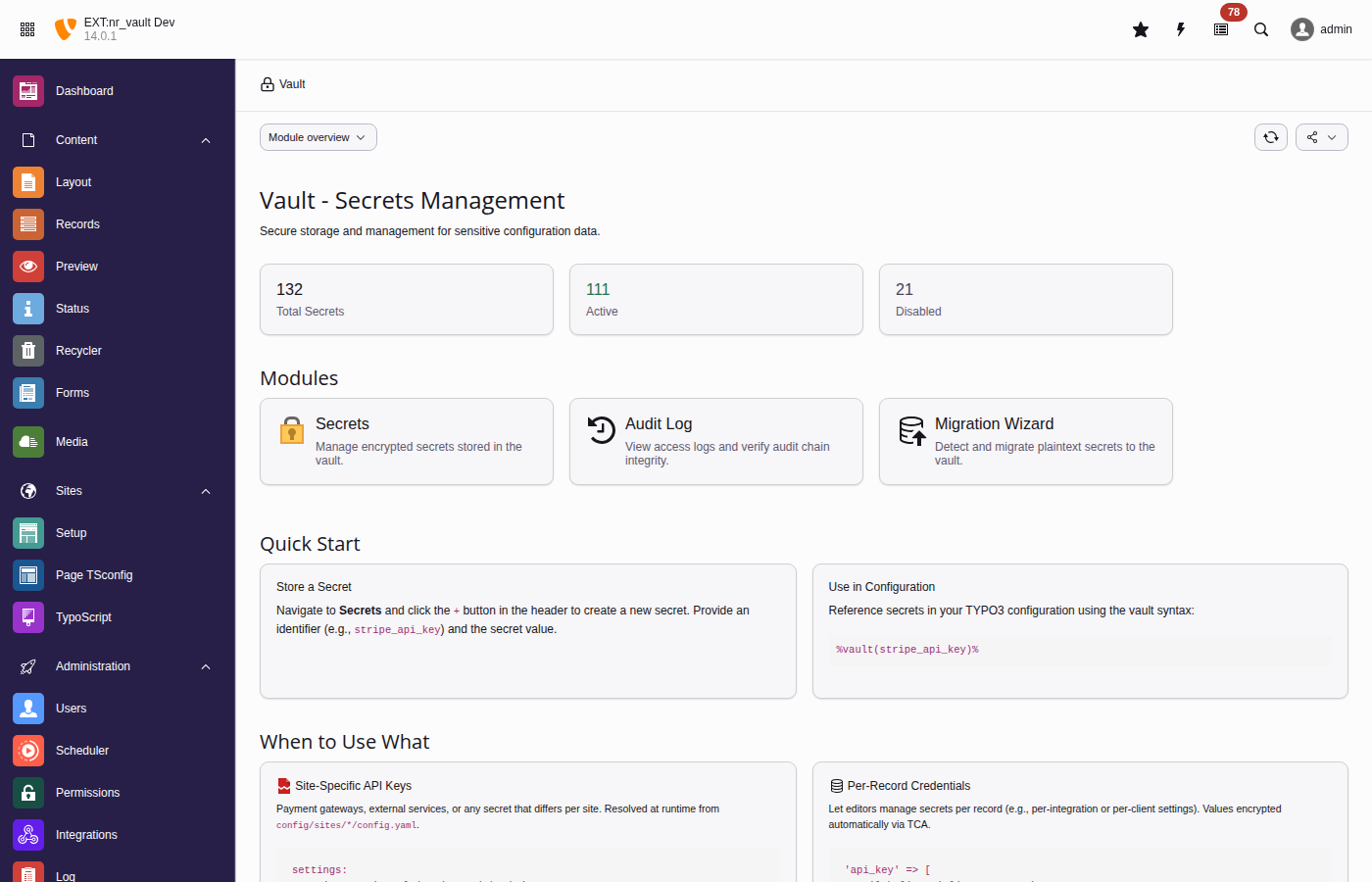
The vault overview displays key metrics and provides quick-start code examples
Creating secrets
Click Create Secret (+ button).
Fill in the form:
Identifier
Unique identifier for the secret (e.g., stripe_api_key).
Value
The secret value to encrypt.
Description
Optional description for documentation.
Context
Optional context for organization (e.g., payment).
Allowed groups
Backend user groups that can access this secret.
Expiration
Optional expiration date after which the secret becomes inaccessible.
Click Save.
Viewing and editing secrets
Secrets are displayed with their metadata but not their values.
Click Reveal to temporarily show a secret value.
Note
Revealing a secret creates an audit log entry.
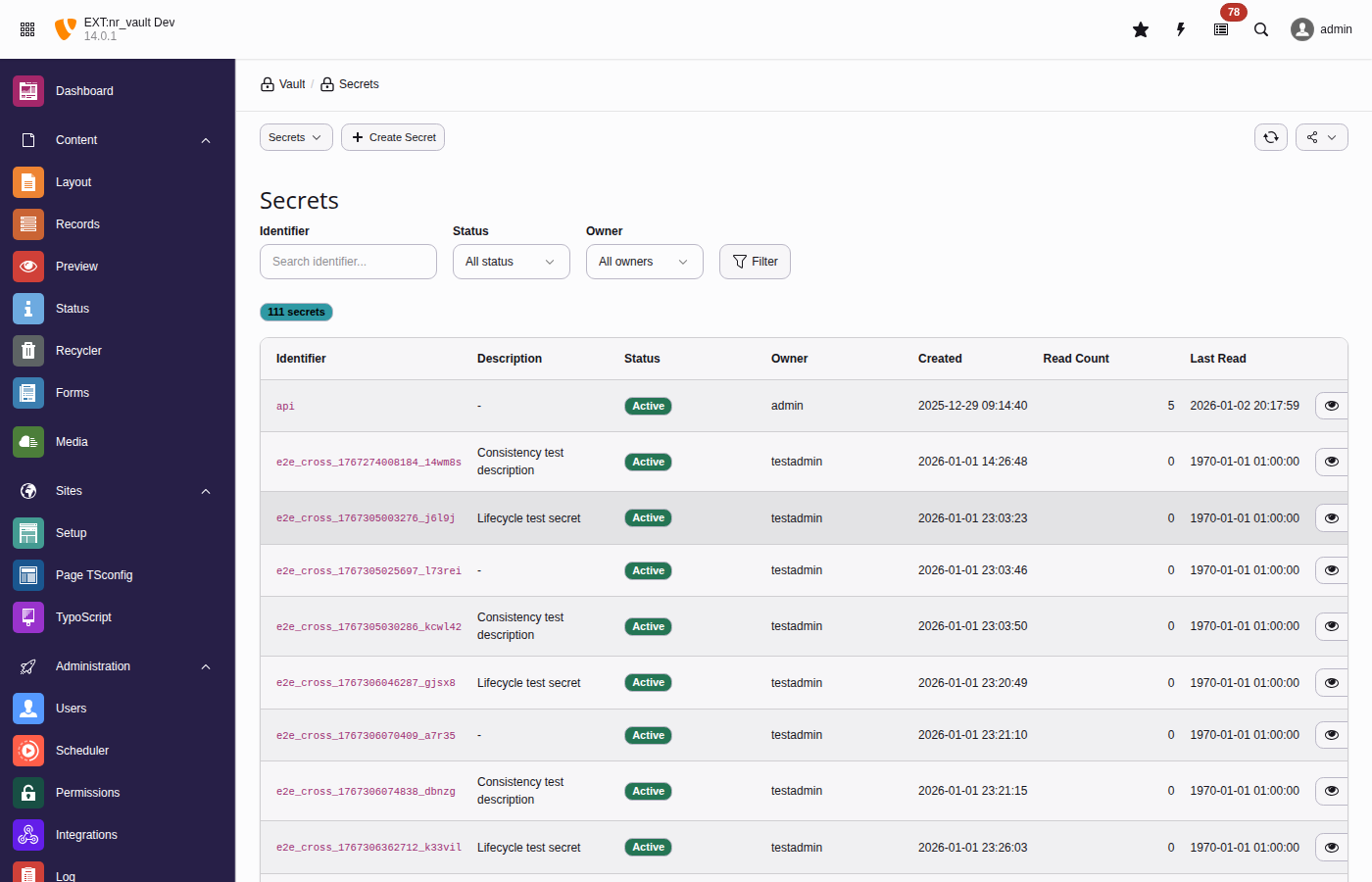
The secrets list provides filtering, bulk actions, and quick access to secret operations
Site configuration
Reference secrets in your site configuration files using the
%vault(identifier)% syntax:
Secrets are resolved at runtime when the site configuration is loaded.
This keeps sensitive values out of your version control while still
allowing you to configure them through the familiar site settings.
Important
Site configuration secrets are resolved on every request. Ensure
your vault storage is performant (the default local adapter caches
lookups).
TypoScript integration
Use vault references in TypoScript for frontend-accessible secrets:
TypoScript vault reference
lib.googleMapsKey = TEXT
lib.googleMapsKey.value = %vault(google_maps_api_key)%

page.headerData.10 = TEXT
page.headerData.10.value = <script>var API_KEY = '%vault(public_api_key)%';</script>
Copied!
Warning
Security considerations:
Only secrets marked as frontend_accessible can be resolved.
Resolved values may be cached - use cache.disable = 1 for
secrets that should not be cached.
Consider using USER_INT for content containing secrets.
Example with caching disabled:
Disable caching for secrets
lib.apiKey = TEXT
lib.apiKey {
  value = %vault(my_api_key)%
  stdWrap.cache.disable = 1
}
Copied!
CLI commands
vault:init
Initialize the vault and generate a master key:
Initialize vault
vendor/bin/typo3 vault:init

# Output as environment variable format
vendor/bin/typo3 vault:init --env

# Specify custom output location
vendor/bin/typo3 vault:init --output=/secure/path/vault.key
Copied!
vault:store
Create or update a secret:
Store a secret
# Interactive (prompts for value)
vendor/bin/typo3 vault:store stripe_api_key

# With all options
vendor/bin/typo3 vault:store payment_key \
  --value="sk_live_..." \
  --description="Stripe production key" \
  --context="payment" \
  --expires="+90 days" \
  --groups="1,2"
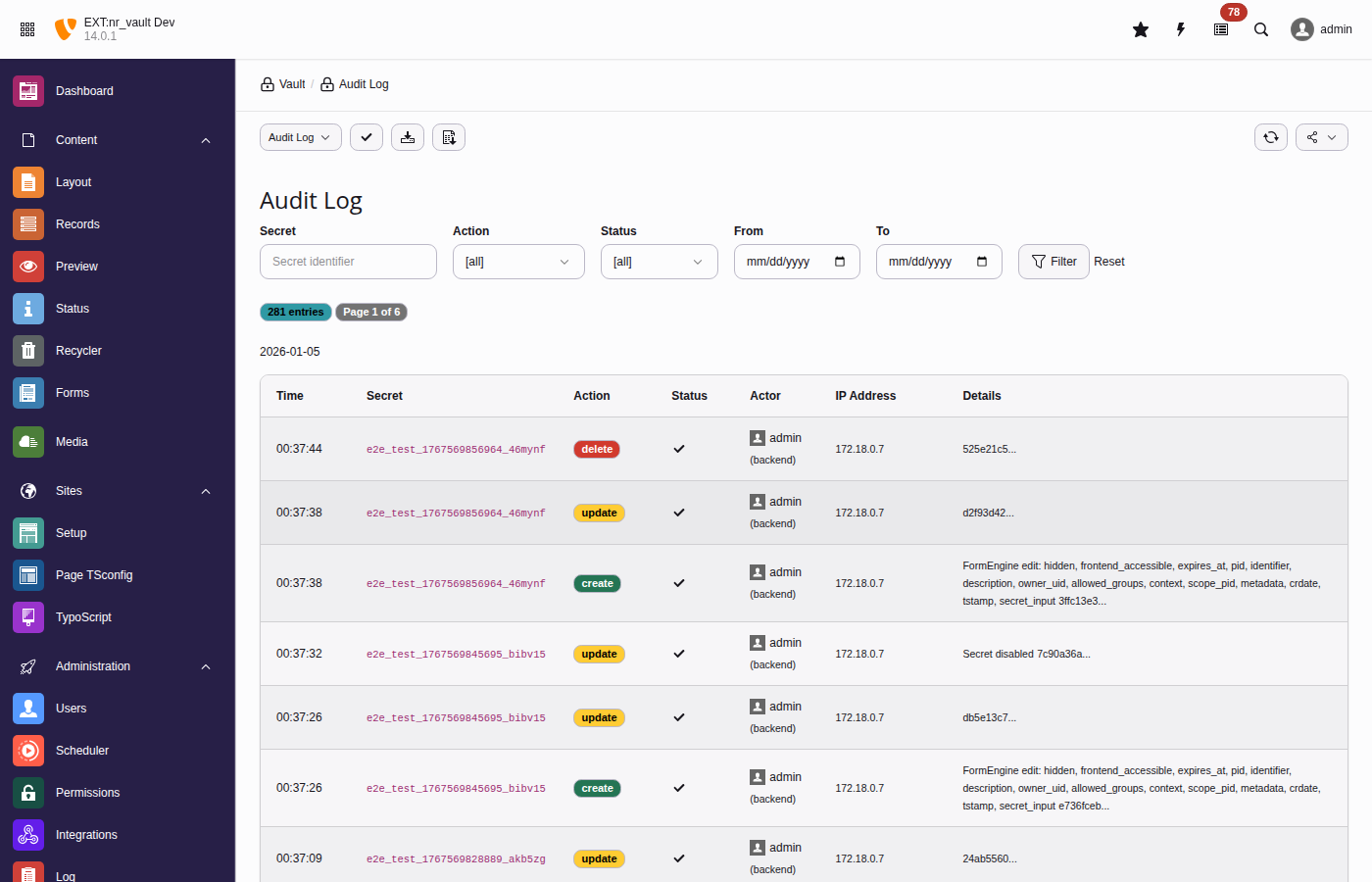
The audit log tracks all secret operations with tamper-evident hash chains
vault:rotate-master-key
Rotate the master encryption key (re-encrypts all DEKs):
Rotate master key
# Using old key from file, new key from current config
vendor/bin/typo3 vault:rotate-master-key \
  --old-key=/path/to/old.key \
  --confirm

# Dry run to simulate
vendor/bin/typo3 vault:rotate-master-key \
  --old-key=/path/to/old.key \
  --dry-run
Copied!
vault:scan
Scan for potential plaintext secrets in database:
Scan for plaintext secrets
vendor/bin/typo3 vault:scan

# Only critical issues
vendor/bin/typo3 vault:scan --severity=critical

# JSON for CI/CD
vendor/bin/typo3 vault:scan --format=json
$this->vaultService->store(
identifier: 'payment_api_key',
secret: 'sk_live_...',
options: [
'description' => 'Stripe production API key',
'context' => 'payment',
'groups' => [1, 2], // Backend user group UIDs'expiresAt' => time() + (86400 * 90), // 90 days
],
);
Copied!
Checking existence
Check if secret exists
if ($this->vaultService->exists('stripe_api_key')) {
    $value = $this->vaultService->retrieve('stripe_api_key');
}
Copied!
Listing secrets
List secrets programmatically
// Get all accessible secrets
$secrets = $this->vaultService->list();

// Filter by pattern
$paymentSecrets = $this->vaultService->list(pattern: 'payment_*');
Copied!
Vault HTTP client
Make authenticated API calls without exposing secrets to your code.
The HTTP client is PSR-18 compatible. Configure authentication with
withAuthentication(), then use standard
sendRequest().
A common pattern is storing API endpoints with their credentials in a database
table. This example shows how to combine TCA vault fields with the HTTP client.
<?phpdeclare(strict_types=1);
namespaceMyVendor\MyExtension\Service;
useMyVendor\MyExtension\Domain\Dto\ApiEndpoint;
useNetresearch\NrVault\Http\SecretPlacement;
useNetresearch\NrVault\Service\VaultServiceInterface;
usePsr\Http\Message\ResponseInterface;
useTYPO3\CMS\Core\Http\RequestFactory;
finalclassApiClientService{
publicfunction__construct(
private readonly VaultServiceInterface $vault,
private readonly RequestFactory $requestFactory,
){}
/**
* Call an API endpoint with vault-managed authentication.
*
* The token is retrieved from vault and injected at request time.
* It never appears in this code and is wiped from memory immediately.
*/publicfunctioncall(
ApiEndpoint $endpoint,
string $method,
string $path,
array $data = [],
): ResponseInterface{
// Create PSR-7 request using TYPO3's RequestFactory
$request = $this->requestFactory->createRequest(
$method,
rtrim($endpoint->url, '/') . '/' . ltrim($path, '/'),
);
if ($data !== [] && \in_array($method, ['POST', 'PUT', 'PATCH'], true)) {
$request = $request
->withHeader('Content-Type', 'application/json')
->withBody(
\GuzzleHttp\Psr7\Utils::streamFor(json_encode($data))
);
}
// Send via VaultHttpClient - token never exposed to applicationreturn$this->vault->http()
->withAuthentication($endpoint->token, SecretPlacement::Bearer)
->withReason('API call to ' . $endpoint->name . ': ' . $path)
->sendRequest($request);
}
/**
* Convenience method for GET requests.
*/publicfunctionget(ApiEndpoint $endpoint, string $path): array{
$response = $this->call($endpoint, 'GET', $path);
return json_decode(
$response->getBody()->getContents(),
true,
512,
JSON_THROW_ON_ERROR,
);
}
}
Copied!
Step 4: Use the service
Example controller or command
<?phpuseMyVendor\MyExtension\Domain\Dto\ApiEndpoint;
useMyVendor\MyExtension\Service\ApiClientService;
// Load endpoint from database
$row = $connection->select(['*'], 'tx_myext_apiendpoint', ['uid' => 1])
->fetchAssociative();
$endpoint = ApiEndpoint::fromDatabaseRow($row);
// Make authenticated API call
$customers = $this->apiClientService->get($endpoint, '/customers');
Copied!
What happens under the hood
The token field contains a UUID v7 like 01937b6e-4b6c-...
VaultHttpClient::sendRequest() retrieves the actual token from vault
Token is injected into the Authorization: Bearer ... header
sodium_memzero() immediately wipes the token from memory
The HTTP call is logged to the audit trail (without the secret)
Security benefits
This pattern provides several security advantages:
No secret exposure
Application code never sees the actual API token. The DTO contains only the
vault UUID, which is useless without vault access.
Memory safety
Secrets are cleared from memory immediately after injection using
sodium_memzero().
Audit trail
Every HTTP call is logged with the endpoint name, HTTP method, URL, and
status code - but never the secret itself.
Separation of concerns
Credential management is handled by the vault. Application code focuses on
business logic.
No CLI or file access required
Editors and admins can manage API endpoints entirely through the TYPO3
backend. The vault secret field provides a secure password input with
reveal and copy functionality - no command line needed.
Example: SaaS API keys in extension settings
Many TYPO3 extensions integrate with SaaS services (DeepL, Personio, Stepstone,
Stripe, etc.) and store API keys in extension settings. This page shows how to
secure these credentials with nr-vault.
Full vault UI with masked input, reveal, copy buttons
Proper access control (owner, groups)
Audit logging of configuration access
Multiple configurations possible (e.g., per site)
Comparison
Aspect
Approach 1 (Vault ID)
Approach 2 (Env var)
Approach 3 (TCA record)
Setup complexity
Low
Low
Medium
Security
High
Medium
High
Memory safety
Yes (sodium_memzero)
No
Yes (sodium_memzero)
Audit trail
Yes
No
Yes
Backend UI
Text field
Text field
Vault secret field
Multi-config
Manual
Manual
Native
Recommendation: Use Approach 1 for simple single-key integrations, Approach 3
for complex integrations requiring multiple configurations or strict access control.
Security
Encryption architecture
nr-vault uses envelope encryption, an industry-standard pattern for
protecting sensitive data.
Envelope encryption: Each secret has its own DEK encrypted by the master key.
How it works
Data Encryption Key (DEK): Each secret gets a unique 256-bit key
generated using cryptographically secure random bytes.
Value encryption: The secret value is encrypted with its DEK using
AES-256-GCM (or XChaCha20-Poly1305).
DEK encryption: The DEK is encrypted with the Master Key and stored
alongside the encrypted value.
Decryption: To read a secret, first decrypt the DEK with the Master Key,
then use the DEK to decrypt the value.
Benefits
Key rotation: Rotating the master key only requires re-encrypting DEKs,
not the actual secret values.
Blast radius: If a DEK is compromised, only one secret is affected.
Performance: Bulk operations on secrets don't require the master key
for each operation.
Algorithms
AES-256-GCM (default)
Advanced Encryption Standard with 256-bit keys in Galois/Counter Mode.
Provides authenticated encryption with hardware acceleration on modern CPUs.
XChaCha20-Poly1305 (optional)
ChaCha20 stream cipher with extended nonce and Poly1305 MAC.
Recommended when hardware AES is not available.
Both algorithms provide:
256-bit key strength.
Authenticated encryption (AEAD).
Protection against tampering.
Master key security
The master key is the root of trust for all secrets.
Provider security comparison
TYPO3 provider (default, recommended for most users)
Security depends on TYPO3's encryption key protection. Suitable for
environments where the encryption key is properly secured in settings.php.
No additional configuration required.
File provider (recommended for high-security environments)
Allows storing the key outside the database and web root with strict
permissions. Requires server access to configure.
Environment provider (recommended for containers)
Ideal for containerized deployments where secrets are injected at runtime.
Follows 12-factor app methodology.
File storage recommendations
When using the file provider:
Outside web root: Never store in publicly accessible directories.
Restrictive permissions: Use 0400 (read-only by owner).
Separate backup: Back up the master key separately from the database.
Access logging: Monitor access to the key file.
Key rotation: Rotate the master key periodically.
Warning
If the master key is compromised, all secrets must be considered compromised.
Rotate the master key and all secrets immediately.
Audit logging
All secret operations are logged with:
Timestamp.
Action (create, read, update, delete).
Actor (user ID, username, type).
Secret identifier.
IP address.
Result (success/failure).
Hash chain integrity
Audit log entries form a hash chain where each entry includes a hash of
the previous entry. This provides:
Tamper detection: Any modification to log entries breaks the chain.
Completeness: Deleted entries are detectable.
Non-repudiation: Actions cannot be denied after logging.
Access control
Secret access is controlled at multiple levels:
Authentication: Backend user must be logged in.
Ownership: Creator has full access.
Group membership: Shared access via backend groups.
Admin override: Administrators can access all secrets.
Note
CLI access requires explicit configuration and can be restricted
to specific groups.
Security best practices
Regular key rotation: Rotate the master key annually or after
security incidents.
Audit log review: Regularly review audit logs for suspicious access.
Minimal permissions: Grant access only to users who need it.
Secret rotation: Rotate secrets when personnel changes occur.
Monitoring: Set up alerts for access_denied events.
Backup security: Encrypt backups and store them securely.
Reporting vulnerabilities
If you discover a security vulnerability, please report it responsibly:
nr-vault currently includes only the local database adapter. External
vault adapters (HashiCorp Vault, AWS Secrets Manager, Azure Key Vault) are
planned for future releases. The adapter architecture below allows you to
implement your own custom adapters in the meantime.
Implement
VaultAdapterInterface to add new storage backends:
nr-vault includes three built-in master key providers: typo3 (derives
from TYPO3's encryption key), file (reads from filesystem), and env
(reads from environment variable). The example below shows how to implement
a custom provider for enterprise key management systems like HashiCorp Vault
Transit or AWS KMS.
Implement
MasterKeyProviderInterface for custom key sources:
The vault provides a PSR-18 compatible HTTP client that can inject secrets
into requests without exposing them to your code. Configure authentication
with
withAuthentication(), then use standard
sendRequest().
Direct injection (recommended)
Inject VaultHttpClientInterface
useGuzzleHttp\Psr7\Request;
useNetresearch\NrVault\Http\SecretPlacement;
useNetresearch\NrVault\Http\VaultHttpClientInterface;
finalclassExternalApiService{
publicfunction__construct(
private readonly VaultHttpClientInterface $httpClient,
){}
publicfunctionfetchData(): array{
// Configure authentication, then use standard PSR-18
$client = $this->httpClient->withAuthentication(
'api_token',
SecretPlacement::Bearer,
);
$request = new Request('GET', 'https://api.example.com/data');
$response = $client->sendRequest($request);
return json_decode($response->getBody()->getContents(), true);
}
}
# Display with metadata
vendor/bin/typo3 vault:retrieve stripe_api_key

# For use in scripts
API_KEY=$(vendor/bin/typo3 vault:retrieve -q stripe_api_key)
Copied!
vault:list
List all accessible secrets.
Command syntax
vendor/bin/typo3 vault:list [options]
Copied!
Options
--pattern=PATTERN
Filter by identifier pattern (supports * wildcard).
--format=FORMAT
Output format: table (default), json, csv.
Example
vault:list examples
# List all secrets
vendor/bin/typo3 vault:list
# Filter by pattern
vendor/bin/typo3 vault:list --pattern="payment_*"# JSON output for automation
vendor/bin/typo3 vault:list --format=json
Path to file containing the old master key (defaults to current configured key).
--new-key=PATH
Path to file containing the new master key (defaults to current configured key).
--dry-run
Simulate the rotation without making changes.
--confirm
Required for actual execution (safety measure).
Warning
Master key rotation re-encrypts all Data Encryption Keys (DEKs).
Ensure you have a backup of the old key before proceeding.
Example
vault:rotate-master-key examples
# Old key from file, new key from current config
vendor/bin/typo3 vault:rotate-master-key \
  --old-key=/secure/path/old-master.key \
  --confirm

# Both keys from files
vendor/bin/typo3 vault:rotate-master-key \
  --old-key=/path/to/old.key \
  --new-key=/path/to/new.key \
  --confirm

# Dry run to verify before actual rotation
vendor/bin/typo3 vault:rotate-master-key \
  --old-key=/path/to/old.key \
  --dry-run
Copied!
vault:scan
Scan for potential plaintext secrets in database and configuration.
Command syntax
vendor/bin/typo3 vault:scan [options]
Copied!
Options
--format, -f
Output format: table (default), json, or summary.
--exclude, -e
Comma-separated list of tables to exclude (supports wildcards).
--severity, -s
Minimum severity to report: critical, high, medium, low (default: low).
--database-only
Only scan database tables.
--config-only
Only scan configuration files.
The command detects:
Database columns with secret-like names (password, api_key, token, etc.).
Known API key patterns (Stripe, AWS, GitHub, Slack, etc.).
Extension configuration secrets.
LocalConfiguration secrets (SMTP password, etc.).
Severity levels
critical
Known API key pattern detected (Stripe, AWS, etc.).
high
Password or private key column with non-empty value.
medium
Token or API key column with suspicious value.
low
Secret-like column name detected.
Example
vault:scan examples
# Scan all sources
vendor/bin/typo3 vault:scan

# Output as JSON for CI/CD
vendor/bin/typo3 vault:scan --format=json

# Exclude cache tables
vendor/bin/typo3 vault:scan --exclude=cache_*,cf_*

# Only show critical issues
vendor/bin/typo3 vault:scan --severity=critical
Copied!
vault:migrate-field
Migrate existing plaintext database field values to vault storage.
Field name containing plaintext values to migrate.
Options
--dry-run
Show what would be migrated without making changes.
--batch-size, -b
Number of records to process per batch (default: 100).
--where, -w
Additional WHERE clause to filter records (e.g., pid=1).
--force, -f
Migrate even if field already contains vault identifiers.
--clear-source
Clear the source field after migration (set to empty string).
--uid-field
Name of the UID field (default: uid).
Attention
Always backup your database before running migrations.
Example
vault:migrate-field examples
# Preview migration
vendor/bin/typo3 vault:migrate-field tx_myext_settings api_key --dry-run
# Migrate with specific records
vendor/bin/typo3 vault:migrate-field tx_myext_settings api_key --where="pid=1"# Migrate and clear source field
vendor/bin/typo3 vault:migrate-field tx_myext_settings api_key --clear-source
Copied!
vault:cleanup-orphans
Clean up orphaned vault secrets from deleted TCA records.
When records with vault-backed fields are deleted, the corresponding vault
secrets may become orphaned. This command identifies and removes such orphaned
secrets.
Command syntax
vendor/bin/typo3 vault:cleanup-orphans [options]
Copied!
Options
--dry-run
Show what would be deleted without making changes.
--retention-days, -r
Only delete orphans older than this many days (default: 0).
--table, -t
Only check secrets for this specific table.
--batch-size, -b
Number of secrets to check per batch (default: 100).
Example
vault:cleanup-orphans examples
# Preview orphan cleanup
vendor/bin/typo3 vault:cleanup-orphans --dry-run

# Only clean up orphans older than 30 days
vendor/bin/typo3 vault:cleanup-orphans --retention-days=30

# Clean up orphans for specific table only
vendor/bin/typo3 vault:cleanup-orphans --table=tx_myext_settings
Copied!
TCA integration
nr-vault provides a custom TCA field type that allows any TYPO3 extension
to store sensitive data (API keys, credentials, tokens) securely in the vault
instead of plaintext in the database.
Always backup your database before running migrations.
Secure Outbound
Note
Secure Outbound is a planned feature for nr-vault. This documentation
describes the planned architecture and API. Implementation is in progress.
Secure Outbound extends nr-vault into a governed outbound integration platform
for TYPO3. It provides centralized credential management, policy enforcement,
and audit logging for all external API calls.
This section documents significant architectural decisions made during the
development of nr-vault, along with the context and consequences of each
decision.
Architecture Decision Records (ADRs) capture important decisions along with
their context and consequences. They provide a historical record of why
certain decisions were made, helping future maintainers understand the
codebase.
With envelope encryption, rotating the master key is efficient:
Re-encrypting DEKs only
publicfunctionreEncryptDek(
string $encryptedDek,
string $dekNonce,
string $identifier,
string $oldMasterKey,
string $newMasterKey,
): array{
// Decrypt DEK with old master key
$dek = $this->decryptDek($encryptedDek, $dekNonce, $identifier, $oldMasterKey);
// Re-encrypt DEK with new master key
$newNonce = random_bytes($this->getNonceLength());
$newEncryptedDek = $this->encryptWithKey($dek, $newMasterKey, $newNonce);
sodium_memzero($dek);
return ['encrypted_dek' => $newEncryptedDek, 'dek_nonce' => $newNonce];
}
Copied!
Database storage
Encrypted data columns
encrypted_value mediumblob,           -- AEAD ciphertext + auth tag
encrypted_dek text,                   -- Base64-encoded encrypted DEK
dek_nonce varchar(24) NOT NULL,       -- Base64-encoded DEK nonce
value_nonce varchar(24) NOT NULL,     -- Base64-encoded value nonce
encryption_version int unsigned,      -- For algorithm migrations
value_checksum char(64) NOT NULL,     -- SHA-256 for change detection
Copied!
Consequences
Positive
Fast key rotation: Only DEKs re-encrypted, O(n) simple operations
Unique keys per secret: Compromise of one DEK doesn't expose others
Hardware acceleration: AES-256-GCM uses AES-NI when available
Authenticated encryption: Tampering is detected and rejected
Memory safety: Sensitive data cleared immediately after use
Negative
More storage: Each secret requires DEK + two nonces
The envelope encryption system (see ADR-002: Envelope encryption) requires
a master key to encrypt Data Encryption Keys (DEKs). The master key management
approach must:
Work in various deployment environments (development, production, cloud)
Support key rotation without service interruption
Integrate with existing TYPO3 security infrastructure
Allow external secret management systems for enterprise deployments
Problem statement
How should the master key be stored, retrieved, and rotated across different
deployment scenarios?
Decision drivers
Flexibility: Support multiple key sources (file, environment, external)
Zero-config default: Work out-of-the-box using TYPO3's encryption key
Security: Keys should never be logged or exposed
Rotation: Support key rotation with atomic switchover
Extensibility: Allow custom providers for enterprise needs
Considered options
Option 1: Single hardcoded source
Always derive from TYPO3's encryption key.
Pros:
Zero configuration
Always available
Cons:
No separation between TYPO3 and vault security
Cannot use external key management
Option 2: Pluggable provider system
Interface-based providers with factory pattern for selection.
Pros:
Flexible deployment options
Enterprise integration (HashiCorp Vault, AWS KMS)
Testable with mock providers
Cons:
More complex configuration
Multiple code paths to maintain
Decision
We chose a pluggable provider system with three built-in providers:
typo3 (default): Derives key from TYPO3's encryption key using HKDF
file: Reads key from filesystem with strict permissions
env: Reads key from environment variable
This provides zero-config operation while enabling enterprise deployments.
TYPO3 extensions commonly store sensitive data (API keys, credentials, tokens)
in database fields configured via TCA. The nr-vault extension needs to provide
a seamless way to store these values securely without requiring extensions to
rewrite their data handling.
The integration must:
Work with existing TCA field configurations
Handle record operations (create, update, delete, copy)
Support both regular TCA fields and FlexForm fields
Maintain the TYPO3 backend user experience
Problem statement
How should nr-vault integrate with TYPO3's TCA system to transparently
encrypt sensitive fields while maintaining standard TYPO3 workflows?
Decision drivers
Transparency: Extensions should need minimal code changes
Compatibility: Must work with standard TYPO3 record operations
User experience: Backend users should see familiar interfaces
Flexibility: Support various field types and configurations
Auditability: All operations must be trackable
Considered options
Option 1: Custom field type
Create a completely new TCA field type.
Pros:
Full control over behavior
Cons:
Requires TCA rewrite for existing extensions
Different behavior from standard fields
Option 2: FormEngine override
Override the default input field rendering globally.
Pros:
No TCA changes needed
Cons:
Affects all input fields
Difficult to target specific fields
Potential conflicts
Option 3: Custom renderType with DataHandler hooks
Provide a renderType for FormEngine and intercept saves via hooks.
Pros:
Opt-in per field (add renderType: 'vaultSecret')
Uses standard TYPO3 hook system
Familiar pattern for TYPO3 developers
Cons:
Requires TCA modification (but minimal)
Two components to maintain (element + hook)
Decision
We chose custom renderType with DataHandler hooks because:
Explicit opt-in: Only fields marked with renderType: 'vaultSecret'
are encrypted
Standard patterns: Uses FormEngine elements and DataHandler hooks
Minimal changes: One line added to existing TCA configurations
Full lifecycle: Hooks handle create, update, delete, and copy operations
Implementation
FormEngine element
Classes/Form/Element/VaultSecretElement.php
finalclassVaultSecretElementextendsAbstractFormElement{
publicfunctionrender(): array{
// Render password field with:// - Masked display (dots)// - Reveal button (permission-based)// - Copy button (permission-based)// - Hidden field for vault identifier
}
}
finalclassDataHandlerHook{
// Before save: Extract secret, generate UUID, queue for storagepublicfunctionprocessDatamap_preProcessFieldArray(...): void{
foreach ($this->getVaultFields($table) as $field) {
if ($this->hasSecretValue($fieldArray, $field)) {
$uuid = $this->generateUuid();
$this->pendingSecrets[$table][$id][$field] = [
'uuid' => $uuid,
'value' => $fieldArray[$field]['value'],
];
$fieldArray[$field] = $uuid; // Store UUID in database
}
}
}
// After save: Store secrets with correct UIDpublicfunctionprocessDatamap_afterDatabaseOperations(...): void{
foreach ($this->pendingSecrets[$table][$id] as $field => $data) {
$this->vaultService->store($data['uuid'], $data['value'], [
'metadata' => [
'table' => $table,
'field' => $field,
'uid' => $recordUid,
'source' => 'tca_field',
],
]);
}
}
// Before delete: Remove associated secretspublicfunctionprocessCmdmap_preProcess(...): void;
// After copy: Create new secrets for copied recordpublicfunctionprocessCmdmap_postProcess(...): void;
}
Copied!
FlexForm hook
Separate hook for FlexForm fields due to different data structure:
Classes/Hook/FlexFormVaultHook.php
finalclassFlexFormVaultHook{
publicfunctionprocessDatamap_preProcessFieldArray(...): void{
// Recursively scan FlexForm XML for vaultSecret fields// Same UUID-based approach as TCA fields// Store metadata: flexField, sheet, fieldPath
}
}
Form Display:
1. VaultSecretElement renders password field
2. If UUID exists, shows masked value with reveal option
3. JavaScript handles reveal/copy interactions

Form Submit:
1. DataHandlerHook.preProcess extracts secret value
2. Generates UUID v7 identifier (see ADR-001)
3. Sets field value to UUID (for database)
4. DataHandlerHook.afterDatabaseOperations stores secret in vault

Record Delete:
1. DataHandlerHook.processCmdmap_preProcess finds vault fields
2. Retrieves UUIDs from record
3. Deletes corresponding vault secrets

Record Copy:
1. DataHandlerHook.processCmdmap_postProcess detects copy
2. Retrieves source secrets by UUID
3. Creates new secrets with new UUIDs for copied record
Copied!
Runtime resolution
Resolving secrets in application code
useNetresearch\NrVault\Utility\VaultFieldResolver;
// Resolve specific fields
$resolved = VaultFieldResolver::resolveFields($record, ['api_key']);
// Auto-detect vault fields from TCA
$resolved = VaultFieldResolver::resolveRecord('tx_myext_settings', $record);
Copied!
Consequences
Positive
Minimal migration: Add renderType to existing fields
Familiar patterns: Standard FormEngine and DataHandler usage
Full lifecycle: Handles all record operations automatically
Audit trail: All operations logged with context metadata
UUID portability: Secrets not tied to table structure
Negative
Two hooks required: Separate handling for TCA and FlexForm
Runtime resolution: Application code must resolve UUIDs to values
Learning curve: Developers must understand vault resolution
Risks
Hook execution order conflicts with other extensions
FlexForm structure changes could break field detection
Secrets in the vault may contain highly sensitive data (API keys, passwords,
certificates). Access to these secrets must be controlled to:
Prevent unauthorized access to sensitive data
Support collaborative workflows (teams, departments)
Integrate with TYPO3's existing permission system
Enable audit trails for compliance
Problem statement
How should access to vault secrets be controlled in a way that integrates
naturally with TYPO3's backend user system?
Decision drivers
TYPO3 integration: Use existing backend users and groups
Granularity: Per-secret permissions, not just global
Simplicity: Familiar model for TYPO3 administrators
Flexibility: Support owner, group, and admin access patterns
Auditability: All access attempts must be logged
Considered options
Option 1: TYPO3 page-based permissions
Inherit permissions from the page tree where secrets are stored.
Pros:
Familiar TYPO3 pattern
Works with existing mount points
Cons:
Secrets aren't naturally page-based
Complex for cross-page secrets
Inflexible for API-created secrets
Option 2: Custom ACL system
Build a separate permission system specific to vault.
Pros:
Maximum flexibility
Could model complex scenarios
Cons:
Learning curve for administrators
Doesn't leverage existing TYPO3 knowledge
More code to maintain
Option 3: Owner/Group model with TYPO3 integration
Each secret has an owner (backend user) and allowed groups (backend groups).
Pros:
Maps to TYPO3 concepts (users, groups)
Simple mental model: "who owns it, who can access it"
Familiar to Unix-style permissions
Cons:
Less granular than full ACL
No per-operation permissions (read vs write)
Decision
We chose Owner/Group model with TYPO3 integration because:
Familiarity: TYPO3 administrators understand users and groups
Simplicity: Easy to reason about access decisions
Sufficient granularity: Owner + groups covers most use cases
Admin override: TYPO3 admins can access all secrets (expected behavior)
Implementation
Permission model
Access decision tree
Access Decision Tree:

1. Is user a TYPO3 admin or system maintainer?
   → YES: ALLOW (full access)

2. Is user the secret's owner (owner_uid)?
   → YES: ALLOW (full access)

3. Is user a member of any allowed_groups?
   → YES: ALLOW (read/write access)

4. Is this a CLI/scheduler context with CLI access enabled?
   → YES: Check CLI access groups
   → Group matches: ALLOW

5. Is this frontend context with frontend_accessible=true?
   → YES: ALLOW (read only)

6. Default: DENY
Copied!
Database schema
Access control columns
-- Single owner
owner_uid int(11) unsigned DEFAULT 0 NOT NULL,
-- Multiple groups (many-to-many)
allowed_groups text,
-- Frontend access flag
frontend_accessible tinyint(1) unsigned DEFAULT 0 NOT NULL,
-- Permission scoping
context varchar(50) DEFAULT '' NOT NULL,
scope_pid int(11) unsigned DEFAULT 0 NOT NULL,
-- Many-to-many relation tableCREATETABLE tx_nrvault_secret_begroups_mm (
uid_local int(11) unsigned, -- Secret UID
uid_foreign int(11) unsigned, -- Backend group UID
);
Copied!
AccessControlService
Classes/Security/AccessControlService.php
final readonly classAccessControlServiceimplementsAccessControlServiceInterface{
publicfunctioncanRead(Secret $secret): bool{
return$this->checkAccess($secret);
}
publicfunctioncanWrite(Secret $secret): bool{
return$this->checkAccess($secret);
}
publicfunctioncanDelete(Secret $secret): bool{
return$this->checkAccess($secret);
}
privatefunctioncheckAccess(Secret $secret): bool{
$backendUser = $GLOBALS['BE_USER'] ?? null;
if ($backendUser === null) {
return$this->checkCliAccess($secret);
}
// Admins and system maintainers have full accessif ($backendUser->isAdmin() || $backendUser->isSystemMaintainer()) {
returntrue;
}
// Owner has full access
$userUid = (int) ($backendUser->user['uid'] ?? 0);
if ($userUid === $secret->getOwnerUid()) {
returntrue;
}
// Check group membership
$userGroups = $backendUser->userGroupsUID ?? [];
$allowedGroups = $secret->getAllowedGroups();
return count(array_intersect($userGroups, $allowedGroups)) > 0;
}
}
Extensible: PSR-14 events allow external system integration
Structured: Purpose-built schema for vault operations
Implementation
Audit log entry structure
Classes/Audit/AuditLogEntry.php
final readonly classAuditLogEntryimplementsJsonSerializable{
publicfunction__construct(
public ?int $uid,
public string $secretIdentifier,
public string $action, // create, read, update, delete, rotate
public bool $success,
public ?string $errorMessage,
public ?string $reason,
public int $actorUid,
public string $actorType, // backend, cli, api, scheduler
public string $actorUsername,
public string $actorRole,
public string $ipAddress,
public string $userAgent,
public string $requestId,
public string $previousHash, // Links to prior entry
public string $entryHash, // SHA-256 of this entry
public string $hashBefore, // Value checksum before
public string $hashAfter, // Value checksum after
public int $crdate,
public array $context, // Structured JSON metadata
){}
}
Copied!
Hash chain algorithm
Each entry's hash includes the previous entry's hash, creating an
unbroken chain:
// All vault operations:'create'// New secret stored'read'// Secret retrieved/decrypted'update'// Secret value changed'delete'// Secret removed'rotate'// Secret rotated with new value'access_denied'// Permission check failed'http_call'// VaultHttpClient API call
final readonly classHttpCallContextimplementsAuditContextInterface{
publicfunction__construct(
public string $method,
public string $host,
public string $path,
public int $statusCode,
){}
publicstaticfunctionfromRequest(
string $method,
string $url,
int $statusCode,
): self;
}
Copied!
Consequences
Positive
Tamper-evident: Hash chain detects any modifications
Complete trail: All operations logged with full context
Queryable: Efficient filtering by secret, action, actor, time
Extensible: PSR-14 events enable SIEM integration
Self-contained: No external dependencies required
Verifiable: Chain integrity can be validated on demand
Negative
Storage growth: Each operation creates a log entry
Applications often need to make authenticated HTTP requests to external APIs
using secrets stored in the vault. The typical pattern exposes secrets to
application code:
TYPO3 extensions commonly store API keys and credentials in extension settings
(defined in ext_conf_template.txt, managed via
Admin Tools > Settings > Extension Configuration).
These settings are stored in the database (
sys_registry table in v12+)
and loaded into
$GLOBALS['TYPO3_CONF_VARS']['EXTENSIONS'] at runtime.
Challenges
No PSR-14 events: TYPO3 provides no events for extension configuration
save/load operations. The old afterExtensionConfigurationWrite signal
was removed in v9.
Memory persistence: Values loaded into $GLOBALS persist for the
entire request lifecycle. Storing actual secrets there defeats vault's
security model (immediate memory cleanup via sodium_memzero).
No custom field types: While type=user[...] allows custom rendering,
there's no hook into the save/load lifecycle to intercept values.
Decision
Store vault identifiers (not secrets) in extension settings. The identifier
is resolved to the actual secret only at use time via
VaultHttpClient.
nr-vault currently stores atomic secrets (single values). Real integrations often
require a set of related fields (e.g. OAuth2 client credentials: client_id,
client_secret, token_url, scopes). Managing these as separate secrets is
error-prone and lacks semantic validation.
We need a "Credential Set" concept while preserving the existing tx_nrvault_secret
primitive and its encryption/audit semantics.
Decision
We will introduce a new table/concept tx_nrvault_credential_set and define:
tx_nrvault_secret remains the primitive encrypted storage unit (atomic, type-agnostic)
tx_nrvault_credential_set becomes a typed wrapper that references exactly
one secret row via secret_uid
The referenced secret contains an encrypted JSON payload holding all
credential fields for the set
Credential sets do not replace tx_nrvault_secret. They build on top of it.
PHP FFI is powerful but increases attack surface if enabled broadly. Dynamic
FFI::cdef() at runtime allows binding arbitrary native symbols, which is
risky in web contexts.
We need a production-safe operational model that reduces risk and keeps behavior
predictable.
Decision
If we ship/use a Rust FFI transport, we require:
Production deployments run with ffi.enable=preload (or an equivalent
hardened configuration)
FFI bindings are created in preload (e.g. opcache.preload) and not
dynamically in request handling
The PHP layer exposes only a limited wrapper API (no arbitrary symbol access)
We provide a non-FFI fallback transport and keep it as the default
Consequences
Positive
Smaller attack surface vs full runtime FFI
More predictable behavior and better operability
Easier to audit what native code is actually callable
Negative
Requires ops work (preload configuration)
Some hosting environments will still refuse FFI entirely → fallback must work
Alternatives considered
Enable full FFI at runtime
Use ffi.enable=true to allow dynamic FFI calls.
Rejected: unacceptable risk in typical web hosting setups.
Use ext-php-rs or custom PHP extension
Build a native PHP extension in Rust.
Deferred: could be considered later, but increases maintenance and build
complexity.
HTTP/3 support is uneven across ecosystems and can be experimental in client
libraries. For our target installations, correctness and operability matter
more than "having HTTP/3".
We want to benefit from HTTP/3 where it works, without destabilizing the
platform.
Decision
MVP requires stable HTTP/1.1 and HTTP/2 support
HTTP/3 is optional and controlled by:
feature flag per service or global
runtime capability detection
mandatory fallback to HTTP/2/1.1
No business-critical functionality depends on HTTP/3 availability
Consequences
Positive
Avoids shipping unstable transport as a dependency
Keeps rollout safe; reduces support burden
Negative
Some expected performance gains will not be guaranteed everywhere
Alternatives considered
Make HTTP/3 the default transport
Use HTTP/3 as the default transport mode.
Rejected: too risky, too unstable, too environment-dependent.
FFI does not provide true isolation. If the threat model includes "PHP process
compromise", a separate process (sidecar/daemon) running under different OS
permissions can provide stronger separation:
Master key not readable by PHP process user
Narrower filesystem and network capabilities
Independent hardening and observability
We don't want to block MVP with sidecar complexity, but we must not paint
ourselves into a corner.