
Usage
Backend module
Access the vault through the TYPO3 backend:
- Go to Admin Tools > Vault.
- The overview shows statistics and quick-start examples.
- Navigate to Secrets to manage your secrets.
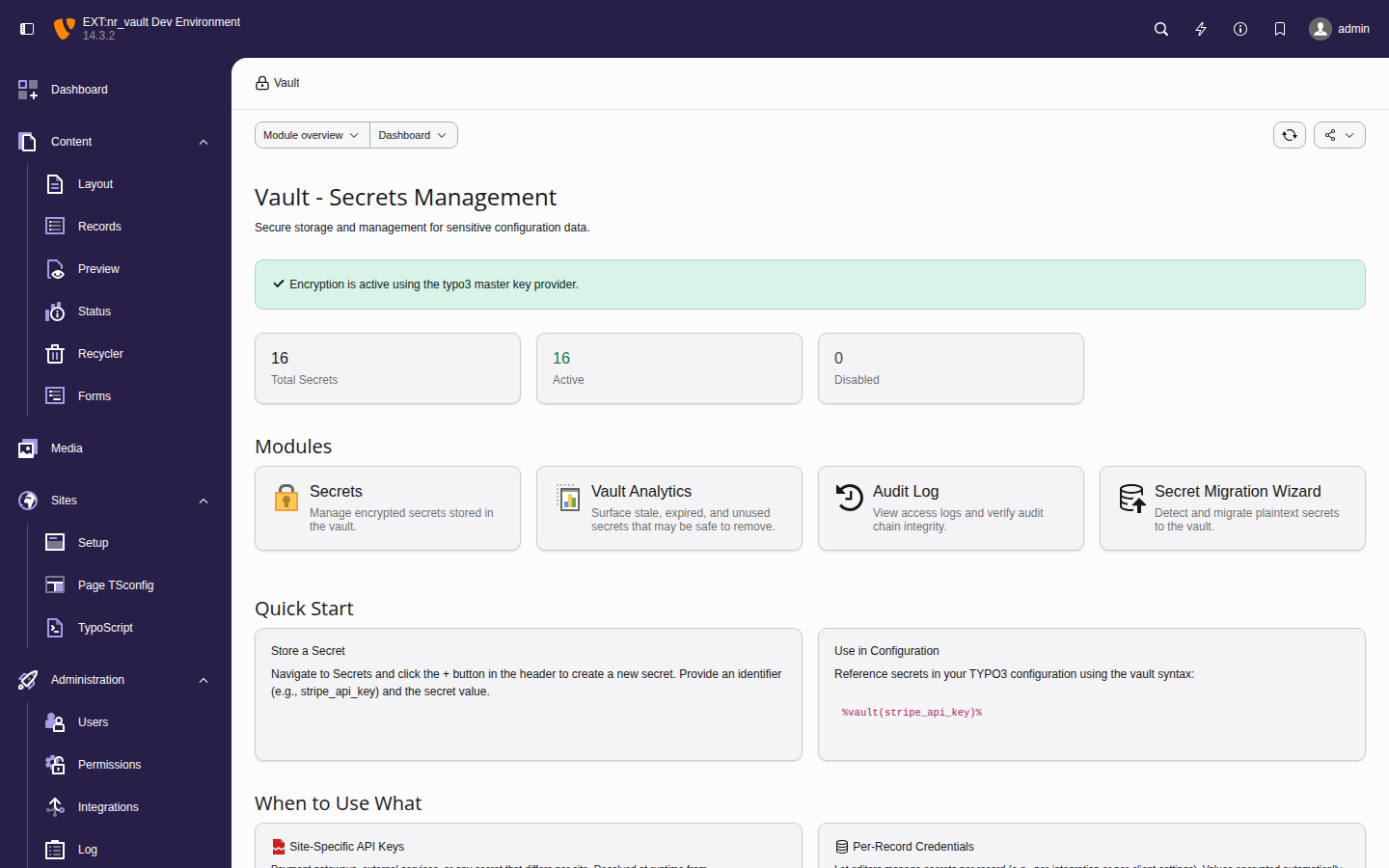
The vault overview displays key metrics and provides quick-start code examples
Creating secrets
- Click Create Secret (+ button).
-
Fill in the form:
- Identifier
- Unique identifier for the secret (e.g.,
stripe_api_key). - Value
- The secret value to encrypt.
- Description
- Optional description for documentation.
- Context
- Optional context for organization (e.g.,
payment). - Allowed groups
- Backend user groups that can access this secret.
- Expiration
- Optional expiration date after which the secret becomes inaccessible.
- Click Save.
Viewing and editing secrets
Secrets are displayed with their metadata but not their values. Click Reveal to temporarily show a secret value.
Note
Revealing a secret creates an audit log entry.
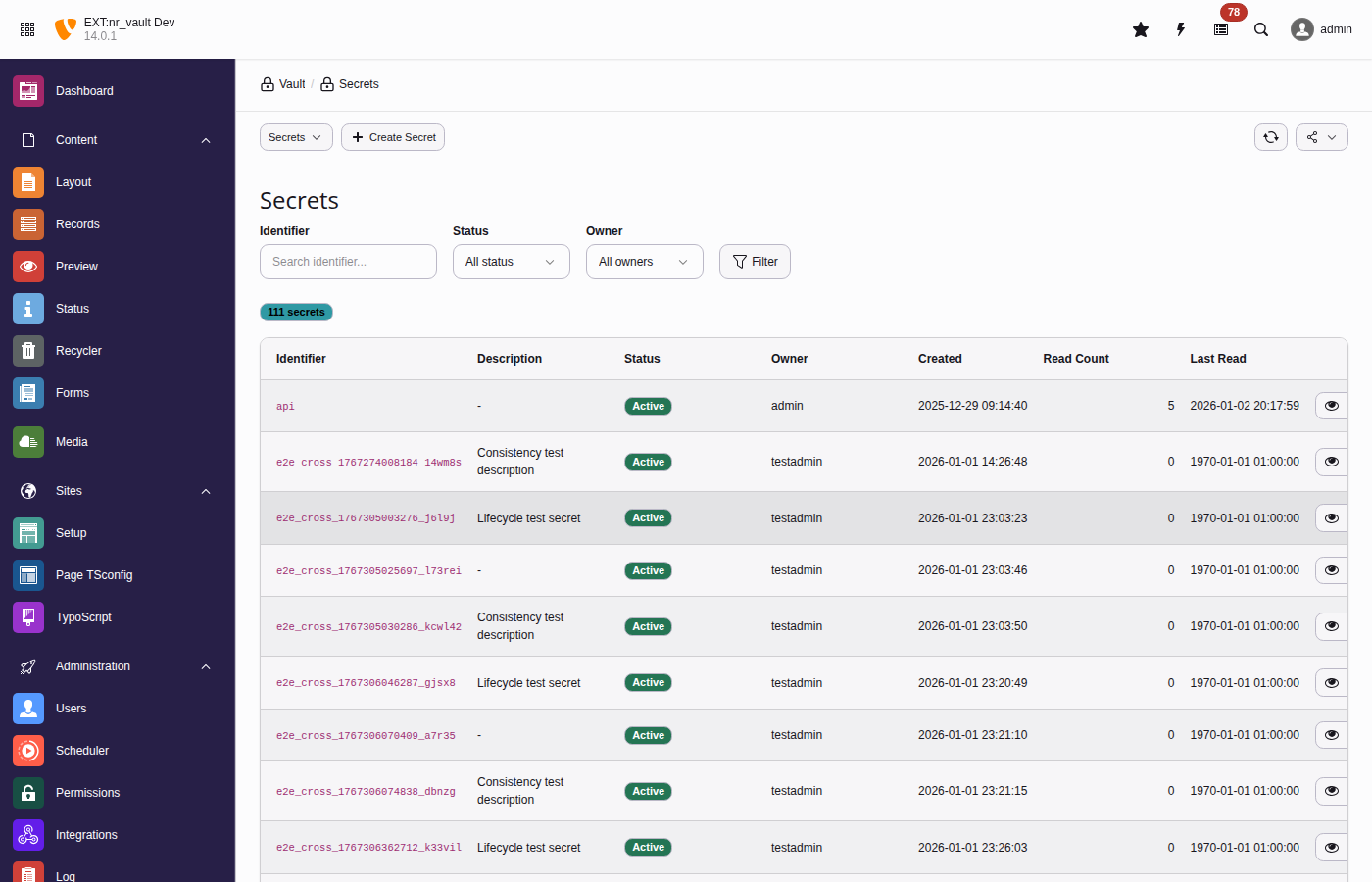
The secrets list provides filtering, bulk actions, and quick access to secret operations
Analytics
The Analytics submodule gives administrators an at-a-glance view of secret usage and highlights secrets that may be safe to remove. Choose the evaluation window with the 30d / 90d / 180d / 365d selector at the top.
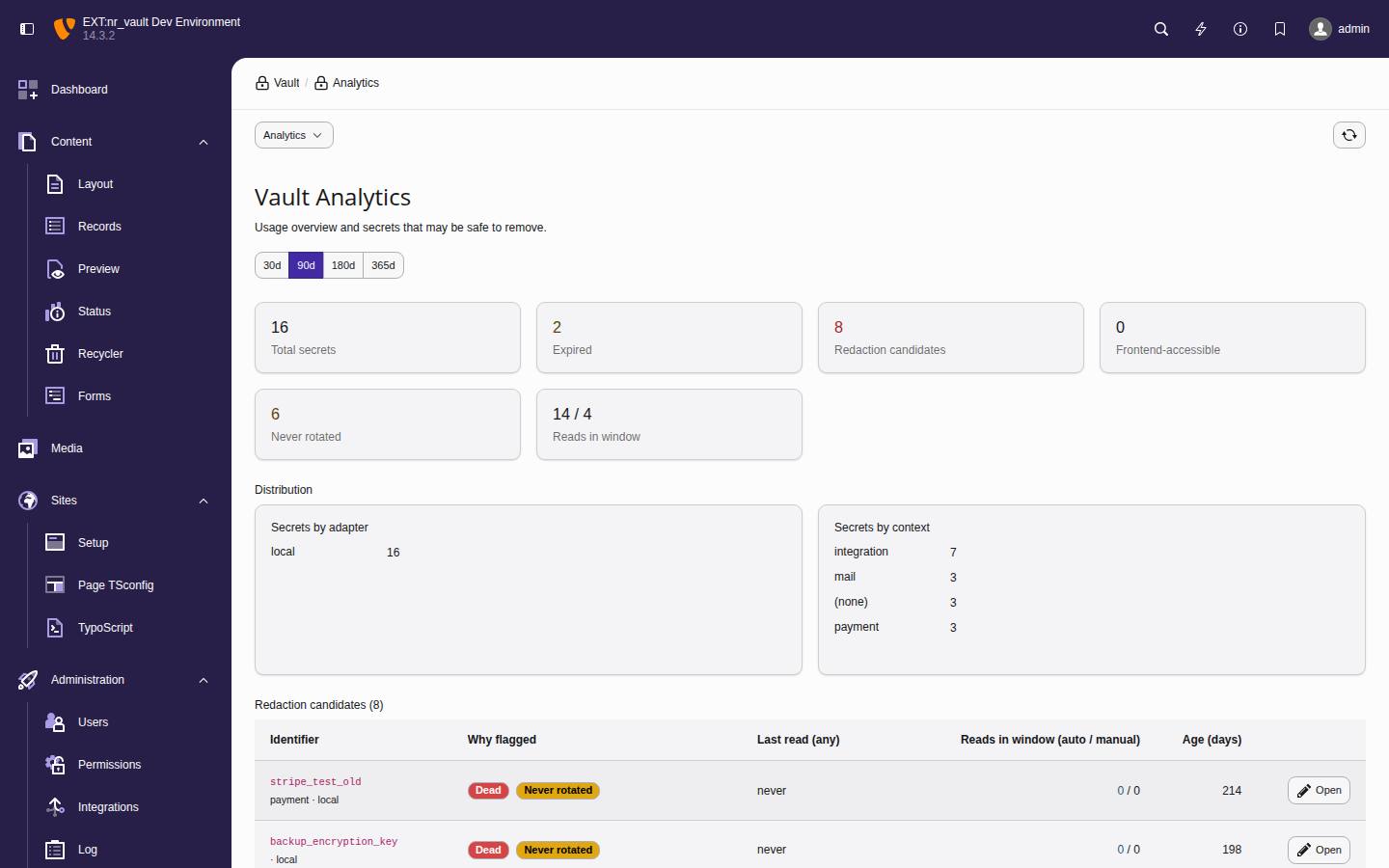
The analytics dashboard summarises usage and flags redaction candidates
Key metrics
- Total secrets
- Active (non-deleted) secrets in the vault.
- Expired
- Secrets whose expiration date has passed but that still exist.
- Redaction candidates
- Secrets flagged by at least one staleness rule (see below).
- Frontend-accessible
- Secrets marked
frontend_accessible- review these with extra care. - Never rotated
- Secrets that have never been rotated within the configured threshold.
- Reads in window (automated / manual)
- Read activity for the selected window, split into automated reads (CLI, scheduler, API) and manual reveals performed in the backend.
Redaction candidates
The table lists every flagged secret together with the rule(s) that flagged it, its last read of any kind, the automated / manual read split for the window, and its age in days. Open deep-links straight to the secret record so you can review or delete it.
Secrets are flagged by these rules:
- Dead
- Never read and older than the threshold, or not read for a long time - the primary deletion candidate.
- Expired
- Past its expiration date but still present in the vault.
- Never rotated
- Older than the rotation threshold without ever having been rotated.
- Automation-stale
- Revealed manually but never read by automation. This is a review signal rather than a deletion signal: the secret may legitimately be used only through manual workflows. It is therefore never combined with Dead.
Note
The automated-versus-manual split is derived from the audit log
(actor_type), so it reflects only reads recorded while audit logging was
active. The day thresholds are configurable - see
Example: SaaS API keys in extension settings.
Tip
To explore the dashboard with realistic, dated history on a development instance, seed demo secrets and audit events with the vault:seed-demo command (development context only).
Site configuration
Reference secrets in your site configuration files using the
%vault syntax:
settings:
  payment:
    stripePublicKey: 'pk_live_...'
    stripeSecretKey: '%vault(stripe_secret_key)%'
  email:
    mailchimpApiKey: '%vault(mailchimp_api_key)%'
sendgridToken: '%vault(sendgrid_token)%'Secrets are resolved at runtime when the site configuration is loaded. This keeps sensitive values out of your version control while still allowing you to configure them through the familiar site settings.
Important
Site configuration secrets are resolved on every request. Ensure your vault storage is performant (the default local adapter caches lookups).
TypoScript integration
Use vault references in TypoScript for frontend-accessible secrets:
lib.googleMapsKey = TEXT
lib.googleMapsKey.value = %vault(google_maps_api_key)%

page.headerData.10 = TEXT
page.headerData.10.value = <script>var API_KEY = '%vault(public_api_key)%';</script>Warning
Security considerations:
- Only secrets marked as
frontend_accessiblecan be resolved. - Resolved values may be cached - use
cache.disable = 1for secrets that should not be cached. - Consider using
USER_INTfor content containing secrets.
Example with caching disabled:
lib.apiKey = TEXT
lib.apiKey {
  value = %vault(my_api_key)%
  stdWrap.cache.disable = 1
}CLI commands
vault:init
Initialize the vault and generate a master key:
vendor/bin/typo3 vault:init

# Output as environment variable format
vendor/bin/typo3 vault:init --env

# Specify custom output location
vendor/bin/typo3 vault:init --output=/secure/path/vault.keyvault:store
Create or update a secret:
# Interactive (prompts for value)
vendor/bin/typo3 vault:store stripe_api_key

# With options (arbitrary metadata via repeatable --metadata key=value)
vendor/bin/typo3 vault:store payment_key \
  --value="sk_live_..." \
  --metadata="description=Stripe production key" \
  --metadata="context=payment" \
--groups="1,2"vault:retrieve
Retrieve a secret value:
vendor/bin/typo3 vault:retrieve stripe_api_key

# Quiet mode for scripting
API_KEY=$(vendor/bin/typo3 vault:retrieve -q stripe_api_key)vault:list
List all accessible secrets:
vendor/bin/typo3 vault:list

# Filter by pattern
vendor/bin/typo3 vault:list --pattern="payment_*"

# JSON output for automation
vendor/bin/typo3 vault:list --format=jsonvault:rotate
Rotate a secret with a new value:
vendor/bin/typo3 vault:rotate stripe_api_key \
--reason="Scheduled quarterly rotation"vault:delete
Delete a secret:
vendor/bin/typo3 vault:delete old_api_key \
  --reason="Service deprecated" \
--forcevault:audit
View the audit log:
# View entries since a given date
vendor/bin/typo3 vault:audit --since=2026-05-01

# Filter by secret
vendor/bin/typo3 vault:audit --identifier=stripe_api_key

# Export to JSON
vendor/bin/typo3 vault:audit --format=json > audit.json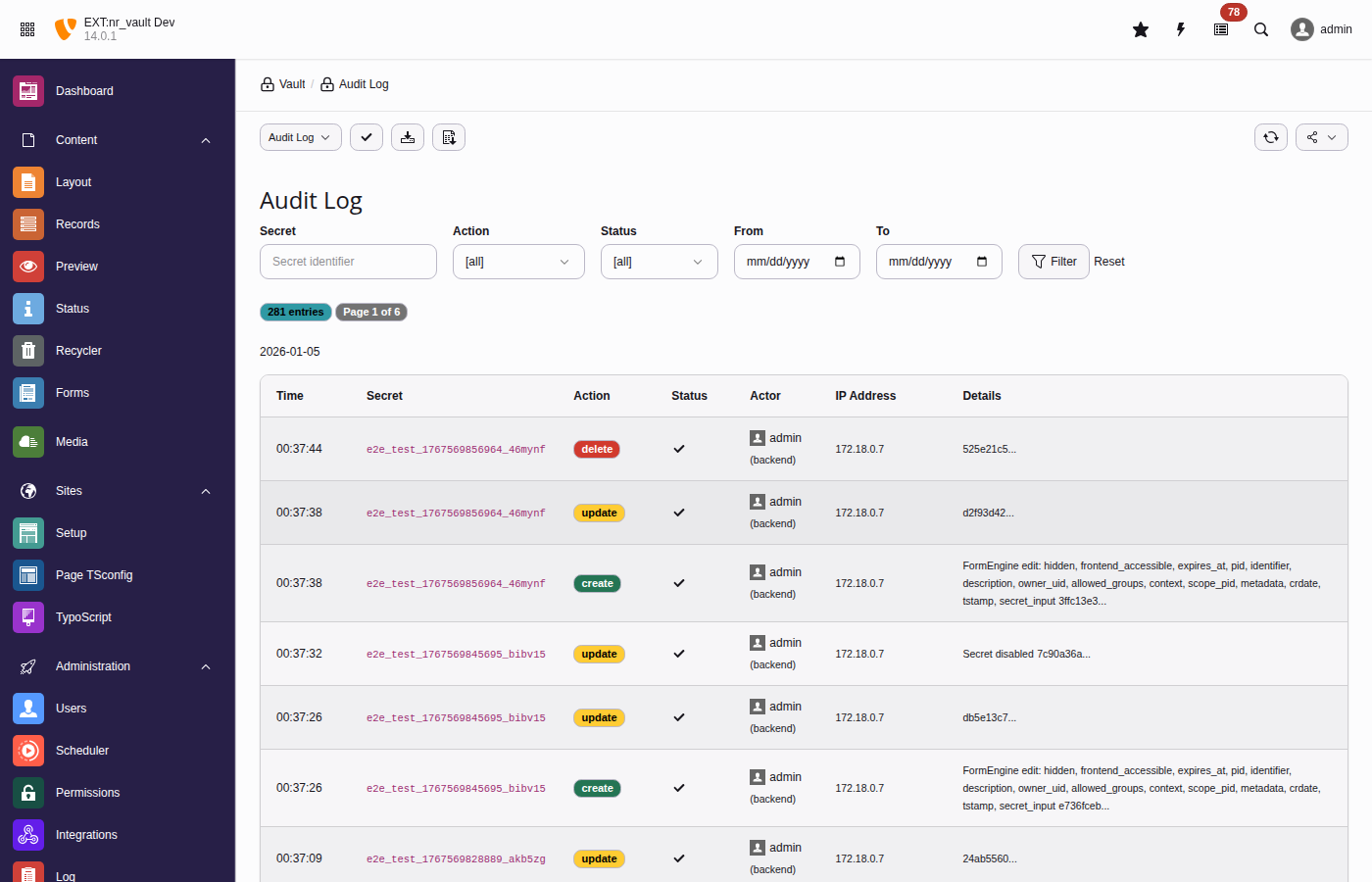
The audit log tracks all secret operations with tamper-evident hash chains
vault:rotate-master-key
Rotate the master encryption key (re-encrypts all DEKs):
# Using old key from file, new key from current config
vendor/bin/typo3 vault:rotate-master-key \
  --old-key=/path/to/old.key \
  --confirm

# Dry run to simulate
vendor/bin/typo3 vault:rotate-master-key \
  --old-key=/path/to/old.key \
--dry-runvault:scan
Scan for potential plaintext secrets in database:
vendor/bin/typo3 vault:scan

# Only critical issues
vendor/bin/typo3 vault:scan --severity=critical

# JSON for CI/CD
vendor/bin/typo3 vault:scan --format=jsonvault:migrate-field
Migrate existing plaintext field values to vault:
# Preview
vendor/bin/typo3 vault:migrate-field tx_myext_settings api_key --dry-run

# Execute
vendor/bin/typo3 vault:migrate-field tx_myext_settings api_keyvault:cleanup-orphans
Remove orphaned secrets from deleted records:
vendor/bin/typo3 vault:cleanup-orphans --dry-run
vendor/bin/typo3 vault:cleanup-orphans --retention-days=30PHP API
VaultService
Inject the VaultService to access secrets programmatically:
use Netresearch\NrVault\Service\VaultServiceInterface;

final class PaymentService
{
    public function __construct(
        private readonly VaultServiceInterface $vaultService,
    ) {}

    public function getApiKey(): ?string
    {
        return $this->vaultService->retrieve('stripe_api_key');
    }
}Storing secrets
$this->vaultService->store(
    identifier: 'payment_api_key',
    secret: 'sk_live_...',
    options: [
        'description' => 'Stripe production API key',
        'context' => 'payment',
        'groups' => [1, 2], // Backend user group UIDs
        'expiresAt' => time() + (86400 * 90), // 90 days
    ],
);Checking existence
if ($this->vaultService->exists('stripe_api_key')) {
    $value = $this->vaultService->retrieve('stripe_api_key');
}Listing secrets
// Get all accessible secrets
$secrets = $this->vaultService->list();

// Filter by pattern
$paymentSecrets = $this->vaultService->list(pattern: 'payment_*');Vault HTTP client
Make authenticated API calls without exposing secrets to your code.
The HTTP client is PSR-18 compatible. Configure authentication with
with, then use standard
send.
Inject
Vault directly:
use GuzzleHttp\Psr7\Request;
use Netresearch\NrVault\Http\SecretPlacement;
use Netresearch\NrVault\Http\VaultHttpClientInterface;

final class ExternalApiService
{
    public function __construct(
        private readonly VaultHttpClientInterface $httpClient,
    ) {}

    public function fetchData(): array
    {
        // Configure authentication, then use PSR-18
        $client = $this->httpClient->withAuthentication(
            'api_token',
            SecretPlacement::Bearer,
        );

        $request = new Request('GET', 'https://api.example.com/data');
        $response = $client->sendRequest($request);

        return json_decode($response->getBody()->getContents(), true);
    }
}Or access via VaultService:
use GuzzleHttp\Psr7\Request;
use Netresearch\NrVault\Http\SecretPlacement;

$client = $this->vaultService->http()
    ->withAuthentication('stripe_api_key', SecretPlacement::Bearer);

$request = new Request(
    'POST',
    'https://api.stripe.com/v1/charges',
    ['Content-Type' => 'application/json'],
    json_encode($payload),
);

$response = $client->sendRequest($request);Authentication options
use GuzzleHttp\Psr7\Request;
use Netresearch\NrVault\Http\SecretPlacement;

// Bearer token
$client = $vault->http()
    ->withAuthentication('api_token', SecretPlacement::Bearer);
$response = $client->sendRequest(new Request('GET', $url));

// API key header (X-API-Key)
$client = $vault->http()
    ->withAuthentication('api_key', SecretPlacement::ApiKey);
$response = $client->sendRequest(new Request('GET', $url));

// Custom header
$client = $vault->http()
    ->withAuthentication('api_key', SecretPlacement::Header, [
        'headerName' => 'X-Custom-Auth',
    ]);
$response = $client->sendRequest(new Request('GET', $url));

// Basic authentication with separate secrets
$client = $vault->http()
    ->withAuthentication('service_password', SecretPlacement::BasicAuth, [
        'usernameSecret' => 'service_user',
    ]);
$response = $client->sendRequest(new Request('GET', $url));

// Query parameter
$client = $vault->http()
    ->withAuthentication('api_key', SecretPlacement::QueryParam, [
        'queryParam' => 'key',
    ]);
$response = $client->sendRequest(new Request('GET', $url));For a complete real-world example combining TCA vault fields with the HTTP client, see Example: API endpoint management.