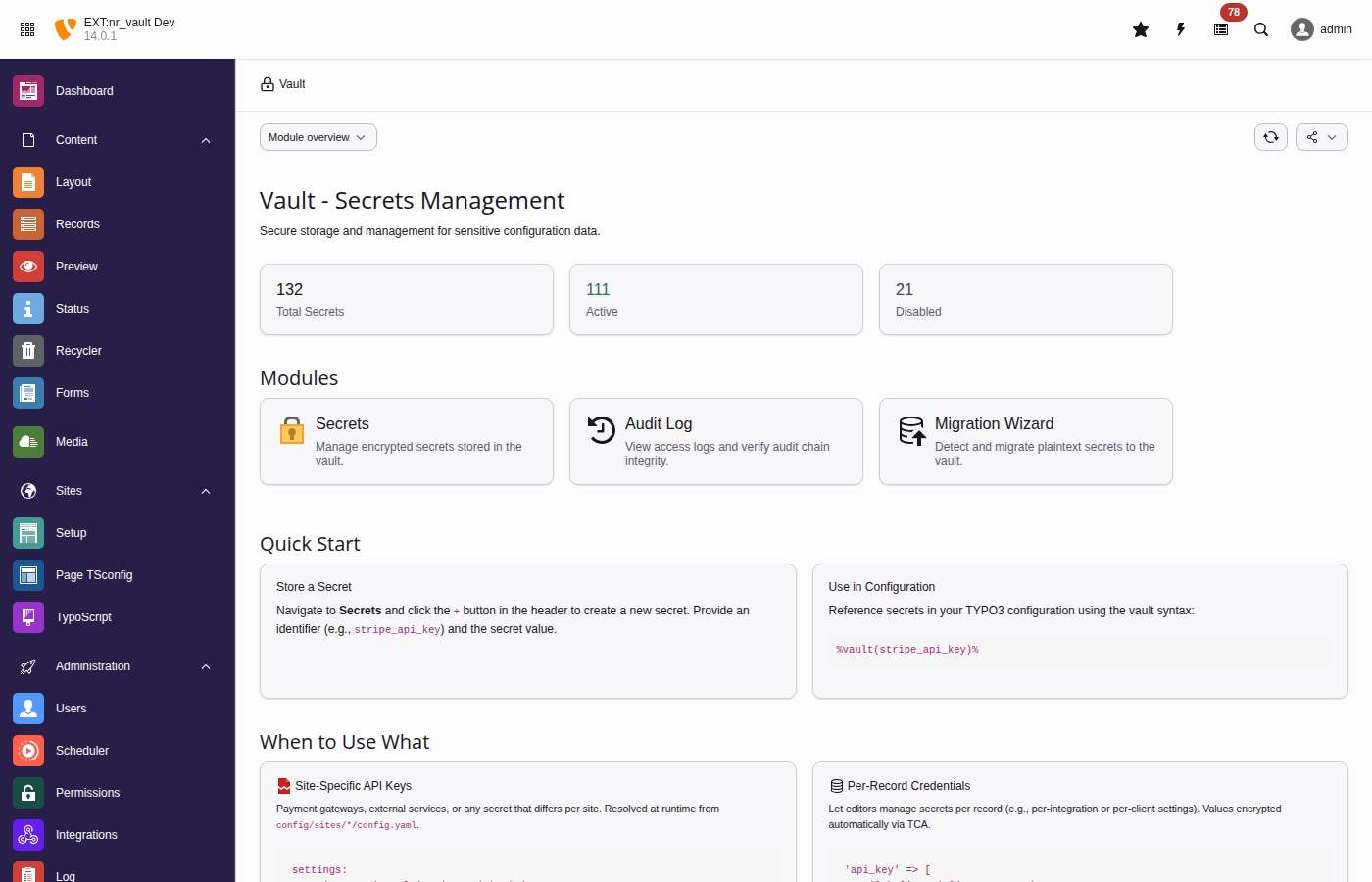
Manage secrets through the backend module, CLI commands, and PHP API.
🔒 Security
Encryption architecture, access control, audit logging, the threat model,
the two security profiles, and the known limitations.
🚀 Operations
Hardened deployment, key custody, backup and restore, key rotation,
monitoring, incident response, and decommissioning.
📋 Auditor
Target of evaluation, control mapping, evidence collection, and
reproducible verification procedures.
👨💻 Developer
API reference, TCA integration, extending nr-vault with custom adapters,
and events.
🛠️ Troubleshooting
Common issues, error resolution, and frequently asked questions.
Introduction
The secret problem
Your TYPO3 site integrates with Stripe, SendGrid, Google Maps, and a dozen other
services. Where are those API keys right now?
Probably in one of these places:
Plain text in LocalConfiguration.php (committed to git?)
Unencrypted in a database field (visible in backups, exports, SQL injection)
Hardcoded in extension configuration (accessible to every backend user)
If your database leaks, your secrets leak. If an intern gets backend access,
they can see your payment credentials. If you need to rotate a compromised key,
you're editing config files and redeploying.
There has to be a better way.
How secrets are typically stored
Let's compare common approaches, from most to least secure:
Requires dedicated infrastructure, network connectivity, and
authentication to the service itself. Enterprise-grade, enterprise-priced.
Environment Variables
⭐⭐⭐
Requires deployment pipeline or host access to set. Container restart
needed to change values. No rotation UI, no audit trail, hard to manage.
Files outside webroot
⭐⭐⭐
Requires deployment or server access. Proper file permissions a must.
No management interface, rotation means redeployment.
nr-vault (encrypted in database)
⭐⭐⭐⭐
Runtime manageable via TYPO3 backend. Rotate anytime. Full audit trail.
No external infrastructure required.
Plain text in config/database
⭐
❌ No protection. Secrets visible to anyone with database or file access.
The trade-off nobody talks about
Notice something? All the "more secure" methods share the same operational pain:
External services: Infrastructure cost, complexity, another system to maintain
Environment variables: Need DevOps to change a value. Restart containers.
No audit trail. "Who changed the Stripe key last Tuesday?" Good luck.
Files outside webroot: Same deployment dance. No UI. No history.
And then there's plain text - which is what most TYPO3 extensions actually use.
Why nr-vault?
nr-vault is the sweet spot between "no security" and "enterprise complexity":
Challenge
Env Vars / Files
nr-vault
Rotate a compromised API key
Call DevOps, update config, redeploy, restart
Click in backend, done
See who accessed a secret
Check deploy logs (if they exist)
Full audit log with timestamps
Emergency credential revocation
Wait for deployment pipeline
Immediate via backend module
Non-technical editor needs to update SMTP password
Create support ticket
Self-service in backend
Compliance audit: prove access history
Manually correlate logs
Export tamper-evident audit trail
The pitch: Enterprise-grade secret management without enterprise-grade complexity.
What is nr-vault?
nr-vault is a TYPO3 extension providing:
Encryption at rest
Every secret is encrypted with its own key (envelope encryption - the same
pattern used by AWS KMS and Google Cloud KMS). Even if your database leaks,
secrets remain protected.
Runtime management
Create, update, rotate, and revoke secrets through the TYPO3 backend.
No deployments. No config file editing. No container restarts.
Access control
Fine-grained permissions based on backend user groups. The marketing team
can manage their Mailchimp key without seeing payment credentials.
Audit logging
Tamper-evident logs with hash chain verification. Know exactly who accessed
what, when - for compliance and incident response.
Usage analytics
A backend dashboard surfaces stale, expired, never-rotated, and unused
secrets - redaction candidates you can safely remove. Automated and manual
reads are counted separately, so a secret revealed only by hand is not
mistaken for one a running integration still depends on.
TYPO3-native integration
TCA field type, site configuration support, TypoScript integration, CLI
commands. Works the way TYPO3 developers expect.
The vault backend module provides an intuitive interface for managing secrets
Use cases
Payment gateway credentials - Stripe, PayPal, Adyen API keys
Email service authentication - SMTP passwords, Mailchimp, SendGrid tokens
Third-party API keys - Google Maps, analytics, CRM integrations
OAuth client secrets - with automatic token refresh via Vault HTTP Client
Database credentials - connection strings for external systems
Per-record credentials - different API keys per client in TCA records
Multi-site secrets - site-specific configuration in multi-domain setups
Requirements
TYPO3 v13.4 LTS or v14.3 LTS
PHP 8.2 or higher
PHP sodium extension (bundled with PHP 8.2+)
Composer-based TYPO3 installation
Installation
Requirements
Before installing nr-vault, ensure your system meets these requirements:
TYPO3 v13.4 LTS or v14.3 LTS.
PHP 8.2 or higher.
PHP sodium extension (usually included in PHP 8.2+).
Composer-based TYPO3 installation.
Installation via Composer
Install the extension using Composer:
Install via Composer
composer require netresearch/nr-vault
Copied!
Activate the extension
After installation, activate the extension in the TYPO3 backend:
Go to Admin Tools > Extensions.
Find "nr-vault" in the list.
Click the activation icon.
Or use the command line:
Activate extension via CLI
vendor/bin/typo3 extension:activate nr_vault
Copied!
Database schema
Update the database schema to create the required tables:
Update database schema
vendor/bin/typo3 database:updateschema
Copied!
This creates the following tables:
tx_nrvault_secret
- Stores encrypted secrets with metadata.
tx_nrvault_secret_begroups_mm
- Read-tier group relations.
tx_nrvault_secret_writegroups_mm
- Write-tier group relations.
tx_nrvault_audit_log
- Stores audit log entries with hash chain.
The chain tip anchor, the break-glass session and the per-sink delivery state
live in core's
sys_registry
rather than in a table of their own.
Master key setup
nr-vault requires a master encryption key to protect your secrets. There are
four options, from simplest to most configurable:
Option 1: TYPO3 encryption key (default, zero configuration)
This is the recommended default. nr-vault automatically derives a master key
from TYPO3's built-in encryption key (
$GLOBALS['TYPO3_CONF_VARS']['SYS']['encryptionKey']
).
No configuration required - nr-vault works immediately after installation.
Benefits:
Zero setup - works out of the box
Unique per TYPO3 installation
Already secured by TYPO3's configuration protection
Note
If you later rotate TYPO3's encryption key, use the
vault:rotate-master-key command first
to re-encrypt all secrets with the new key.
Option 2: Environment variable
For containerized deployments or when you need explicit control:
Generate a master key:
Generate master key
openssl rand -base64 32
Copied!
Set the environment variable:
Set environment variable
export NR_VAULT_MASTER_KEY="your-generated-key"
Copied!
Configure the extension in Admin Tools > Settings > Extension Configuration:
For file and environment providers: never commit master keys to version
control. Store them securely outside the web root.
Option 4: HashiCorp Vault Transit
Where a Vault deployment already exists, the master key can be kept wrapped by
Vault's transit engine so only ciphertext is stored locally, and custody,
rotation and audit move into Vault. Setup (transit engine, policy, token) is
described in HashiCorp Vault Transit provider.
Verify the installation by listing secrets (should return empty if newly installed):
List vault secrets
vendor/bin/typo3 vault:list
Copied!
If the command executes without errors, the extension is properly configured.
You can also test by storing and retrieving a test secret. Note that this
probe needs CLI access that is off by default: allowCliAccess must be on, and secret.reveal and
secret.delete must be added to cliAllowedOperations, which excludes both. If you would rather
not widen that for a smoke test, create and reveal a secret in the backend
module instead — it exercises the same encrypt and decrypt path.
Test vault functionality
# Store a test secret (needs allowCliAccess; secret.create is in the default allowlist)
vendor/bin/typo3 vault:store test_secret --value="test-value"# Retrieve it (additionally needs secret.reveal in cliAllowedOperations)
vendor/bin/typo3 vault:retrieve test_secret
# Clean up (additionally needs secret.delete in cliAllowedOperations)
vendor/bin/typo3 vault:delete test_secret --force
Copied!
Configuration
Extension configuration
Configure nr-vault in Admin Tools > Settings > Extension Configuration.
storageAdapter
storageAdapter
Type
string
Default
local
Options
local
Where secrets are stored.
local
Store secrets in the TYPO3 database (default). Secrets are encrypted
with envelope encryption before storage.
Note
External vault adapters (HashiCorp Vault, AWS Secrets Manager) are
planned for future releases. The adapter architecture is designed to
support external backends, but currently only the local database adapter
is implemented. See Custom storage adapters for information on
implementing custom adapters.
securityProfile
securityProfile
Type
string
Default
standard
Options
standard, hardened
The vault's operating profile — a single, internally consistent policy
rather than a bag of independent toggles. Enforcement happens in code
(provider selection, access control, audit anchoring), never only in
documentation.
standard
Secure defaults with zero-configuration TYPO3 integration.
hardened
Fail-closed and audit-ready. Requires an explicit external
master-key provider (file or env), disables provider
auto-detection and any fallback to the TYPO3 encryption key, and
makes vault operations refuse to run on a misconfigured or
unavailable provider. It is also the prerequisite for
disableAdminOverride.
An unrecognised value throws rather than degrading to standard — a
typo in a hardened deployment must never weaken the effective policy.
masterKeyProvider
masterKeyProvider
Type
string
Default
typo3
Options
typo3, file, env, transit
How to retrieve the master encryption key.
typo3
Derive from TYPO3's encryption key. This is the recommended default
as it requires no additional configuration and works out of the box.
file
Read from a file on the filesystem.
env
Read from an environment variable.
transit
Unwrap through HashiCorp Vault's transit secrets engine. Only the
Vault-encrypted ciphertext is stored locally — see
HashiCorp Vault Transit provider.
masterKeySource
masterKeySource
Type
string
Default
NR_VAULT_MASTER_KEY
Source location for the master key. Interpretation depends on the provider:
file: Path to the key file (e.g., /secure/path/vault.key).
env: Environment variable name (e.g., NR_VAULT_MASTER_KEY).
typo3: Not used (key derived from TYPO3's encryption key).
transit: Not used (configured via the hashicorp.* settings below).
hashicorp.address
hashicorp.address
Type
string
Default
(empty)
Vault server base address, e.g. https://vault.example.com:8200.
Required by the transit master key provider.
hashicorp.authMethod
hashicorp.authMethod
Type
string
Default
token
Options
token, kubernetes, approle
Vault authentication method. The transit master key provider implements
token only and refuses to start on the other values rather than silently
downgrading. See HashiCorp Vault Transit provider.
hashicorp.tokenEnvVar
hashicorp.tokenEnvVar
Type
string
Default
VAULT_TOKEN
Name of the environment variable holding the Vault token. Read in preference
to hashicorp.token.
hashicorp.token
hashicorp.token
Type
string
Default
(empty)
Vault token stored in the extension configuration. Development fallback only
— a token stored here is readable in the Install Tool and ends up in
configuration exports. Prefer the environment variable.
hashicorp.transitMount
hashicorp.transitMount
Type
string
Default
transit
Mount path of the transit secrets engine, without the /v1/ prefix.
Nested mounts such as platform/transit are supported.
hashicorp.transitKeyName
hashicorp.transitKeyName
Type
string
Default
nr-vault-master
Name of the transit key that wraps the vault master key.
hashicorp.transitWrappedKeyPath
hashicorp.transitWrappedKeyPath
Type
string
Default
(empty)
File holding the Vault-wrapped master key. Empty resolves to
<var-path>/secrets/vault-master.key.transit. The file contains
ciphertext only, never key material.
hashicorp.path
hashicorp.path
Type
string
Default
secret/data/typo3
Path prefix for secrets in Vault. Reserved — it belongs to the
not-yet-implemented HashiCorp storage adapter and has no effect on the
transit master-key provider, which uses the transit* settings above.
AWS Secrets Manager
Note
The AWS Secrets Manager adapter is planned but not implemented. Both
settings below are reserved; setting them changes nothing today. They are
documented so an operator who finds them in the Settings module knows they
are inert rather than misconfigured.
aws.region
aws.region
Type
string
Default
(empty)
AWS region for Secrets Manager, for example eu-central-1.
aws.secretPrefix
aws.secretPrefix
Type
string
Default
typo3/
Prefix for secret names in AWS Secrets Manager.
CLI access
allowCliAccess
allowCliAccess
Type
boolean
Default
false
Allow CLI commands to access secrets without a backend user session.
cliAccessGroups
cliAccessGroups
Type
string
Default
empty
Comma-separated list of backend user group UIDs that CLI can access.
Empty means all secrets are accessible when CLI access is enabled.
cliAllowedOperations
cliAllowedOperations
Type
string
Default
secret.use,secret.create,secret.rotate
Operation permissions the unattributed CLI actor may hold while
allowCliAccess is on.
The default covers deployment automation (store, rotate, consume).
High-risk operations — secret.reveal (
vault:retrieve
printing plaintext), secret.delete, secret.manage_policy,
audit.view, audit.export, master_key.rotate
(
vault:rotate-master-key
), vault.configure — are
excluded by default and must be added explicitly where a workflow
genuinely needs them. Prefer a named
technical actor (TechnicalActorContext::runAs()) over widening
this list: the audit trail then names the responsible identity.
Note that the scheduled orphan cleanup deletes secrets and therefore
needs secret.delete when it runs as the bare CLI actor.
Five of the seven change what a CLI command can do: secret.reveal
(
vault:retrieve
), secret.delete (
vault:delete
),
master_key.rotate (
vault:rotate-master-key
), audit.export
(
vault:audit --export
) and vault.configure
(
vault:audit-anchor
and
vault:audit --reset-anchor
).
audit.view covers three more —
vault:audit
for plain
listing,
vault:audit --verify
and
vault:audit-verify
—
so reading or verifying the audit log from an unattributed shell needs
it added here. secret.manage_policy gates the backend policy
edit rather than a command, and it is listed because it is the widest
entry over time: it edits allowed_groups and write_groups, so a
shell holding it can widen its own per-secret reach and the widened
tiers read as ordinary configuration afterwards.
The scheduler is a different actor and is not affected by this allowlist:
scheduler:run
authenticates the _cli_ administrator, so the
AuditVerifyTask / AuditAnchorTask gates resolve through the admin
bypass instead. They bite only under disableAdminOverride, where that
identity needs the permissions on one of its groups — see
Step 6 — Withdraw the administrator override, and pin it.
frontendPlaceholderLegacyCli
frontendPlaceholderLegacyCli
Type
boolean
Default
false
Restore the pre-hardening command-line behaviour, in which every
frontend-accessible
%vault(id)%
placeholder resolves on
the CLI, whoever authored the string it appears in.
Off by default: the CLI enforces the same allow-set as a frontend
request, so an identifier has to be published through an admin-only
source — TypoScript setup, site configuration,
plugin.tx_nrvault.frontendResolvableIdentifiers
, or
FrontendPlaceholderPolicyInterface::allowIdentifier()
. See
ADR-035: Per-request allow-set of frontend-resolvable identifiers.
Warning
Turning this on re-opens a real path, not a theoretical one.
scheduler:run
authenticates the _cli_ administrator, so
the admin bypass grants the read and this allow-set is the only
remaining gate between an editor-authored tt_content field and
a secret in the output of a scheduled newsletter or export job.
Pin the value out of admin reach in
config/system/additional.php, or a compromised admin can
simply tick the box in the backend Settings module. The example pins
the flag off — the recommended state; a deployment that
deliberately runs with the legacy behaviour pins true instead,
which keeps the decision out of admin reach either way:
// Pin the strict default so no backend admin can enable the bypass.
$GLOBALS['TYPO3_CONF_VARS']['SYS']['nrVault']['frontendPlaceholderLegacyCli'] = false;
Copied!
Enable it only for a deployment whose internal render jobs genuinely
need the old behaviour and cannot publish their identifiers. The
narrower remedy is one
frontendResolvableIdentifiers
line, or one
allowIdentifier()
call in the job itself.
The flag is CLI-only: it never weakens a web request, and it never
changes which secrets exist — a secret without
frontend_accessible stays unreadable either way.
auditLogRetention
auditLogRetention
Type
integer
Default
365
Number of days to retain audit log entries. Set to 0 for unlimited retention.
auditReads
auditReads
Type
boolean
Default
true
Log every secret read to the audit log. Disable only for
high-throughput scenarios where read logging is not required.
Warning
Disabling read logging means secret retrievals leave no audit
trail. The toggle is configurable by design
(see ADR-019: Configurable audit read logging), but flipping
it does not itself emit a sentinel entry. For tamper-resistant
deployments, pin the value filesystem-only via
config/system/additional.php so it cannot be changed from
the backend Settings module:
Remove the unconditional "administrators and system maintainers may do
anything" bypass — both the operation permissions and the per-secret
read/write/delete tiers. Administrators then hold exactly what their
groups were granted and reach only the secrets they own or share a
group with.
Only effective whensecurityProfileishardened. In the standard
profile the flag is inert — a lockout guard, since setting it without
the rest of the hardened policy is more likely a misunderstanding than
a decision. vault:break-glass --status reports
adminOverrideDisabledEffective so the mismatch is visible.
Warning
Removing the override without an escape hatch turns the first
genuine incident into an outage. The hatch is
break-glass mode
(vault:break-glass) — a justified,
audited, time-boxed window that restores full admin power.
Pin the value out of admin reach in
config/system/additional.php, or a compromised admin can
simply untick it in the backend Settings module:
Hash-algorithm version marker for the audit log hash chain:
0
Legacy SHA-256 without HMAC.
1
HMAC-SHA256 over identity fields only.
2
HMAC-SHA256 over identity and forensic fields (success,
error_message, reason, ip_address, user_agent,
context).
3
Additionally binds the epoch selector hmac_key_epoch itself plus the
attribution fields actor_type, actor_username, actor_role
and request_id.
Epoch 2 binds the forensic surface into the chain, so a DB-write attacker
cannot flip success or rewrite error_message without breaking it.
The shipped default (3) additionally closes the algorithm-downgrade
forgery — with the epoch selector inside the hash, an attacker can no
longer relabel a row to epoch 0, re-sign it with keyless SHA-256 and keep
the chain consistent — and makes actor attribution tamper-evident.
vault:doctor
grades the three states apart under
audit.hmac_epoch: pass at 3 and above, warning at 1 and 2 naming the
columns that epoch leaves outside the MAC, and critical at 0. A stalled
or partially applied migration is the usual way an installation ends up at
1 or 2, so treat that warning as "the migration did not finish", not as a
pending nice-to-have.
The setting is not the evidence. It decides how the next row is signed and
says nothing about the rows already stored, so raising it to 3 without
running the migration leaves every historical row at its old epoch while the
configuration reads as fully protected. audit.hmac_epoch therefore also
warns when the oldest stored row is below the configured epoch, naming
both numbers and exposing the stored minimum as details.storedMinEpoch.
vault:audit-verify
reports the full per-epoch distribution, so the
migration can be confirmed rather than assumed.
auditAnchorRequired
auditAnchorRequired
Type
boolean
Default
false
Treat a missing audit chain tip anchor as an error instead of a
warning.
The anchor pins "audit row uid = A still exists with
entry_hash = H" in sys_registry, signed with a key that is not
in the database. It is what makes removal of the end of the audit
log detectable — a truncation leaves no UID gap and no broken link,
so the chain walk alone reports it as valid. See
ADR-034: Audit chain tip anchor.
The anchor arms itself on the next audit log write. Leave this
setting off until that has happened: before the first write after the
upgrade, an installation that never had an anchor is
indistinguishable from one whose anchor an attacker deleted, and
every chain would report invalid.
Once enabled, an attacker with database write access can no longer
silence the control by deleting the anchor row, because this setting
lives in a configuration file rather than the database. It does two
things, not one: verification reports a missing anchor as an error,
and ordinary audit writes stop arming an anchor that is not
there. Without the second half the error would clear itself within
seconds — one audited read is enough to mint a fresh anchor on a
truncated log.
The second half applies whatever the log contains, including an empty
one. "The log still holds an earlier entry" cannot stand in for "this
anchor was never armed": the audit write that would arm the anchor
has just inserted the only row the chain has, so a log emptied
outright is indistinguishable from a new installation.
Arming is therefore always explicit while this is on:
vault:audit --reset-anchor arms the anchor and
writes the reset into the chain. That includes the first arming — one
more reason to enable the setting only after the anchor exists.
Requires auditHmacEpoch >= 1; at epoch 0 the
chain is keyless and the anchor is disabled.
encryptionAlgorithm
encryptionAlgorithm
Type
string
Default
(empty)
AEAD algorithm recorded per secret at encrypt time. Empty selects
XChaCha20-Poly1305, which is the recommended value: it is available in
every libsodium build, and its 24-byte nonce makes random-nonce collisions
a non-concern, so vault contents stay portable across hosts with differing
CPU capabilities.
Set it to aes256gcm only on hosts with hardware AES support. An unknown
or host-unavailable value makes encryption fail loudly at the crypto
boundary rather than silently falling back.
preferXChaCha20
preferXChaCha20
Type
boolean
Default
false
Prefer XChaCha20-Poly1305 over AES-256-GCM for legacy secrets only —
those stored under encryption version 1, before the per-secret algorithm
marker existed. New secrets record their algorithm explicitly and take it
from encryptionAlgorithm; this setting has no effect
on them.
External audit sinks
The database table tx_nrvault_audit_log is the chain-authoritative audit
sink. External sinks are additional, best-effort copies whose purpose is to
put audit evidence somewhere a database-write attacker cannot reach.
Two properties are worth stating up front:
A sink failure never fails the audited vault operation. Fan-out happens
after the chain row has committed and after the audit lock has been released,
so a slow or broken destination cannot roll back a secret operation or
serialise every other vault call behind itself. Failures are logged, counted,
and reported by vault:audit-verify.
Only an external sink makes a full audit table reset detectable. See
vault:audit-anchor for why the in-database hash
chain structurally cannot catch a truncate-and-rebuild.
Under the hardened security profile (securityProfile = hardened), having no
usable external sink is reported as a NO_EXTERNAL_SINK finding.
auditSinkSyslogEnabled
auditSinkSyslogEnabled
Type
boolean
Default
false
Mirror every audit entry, chain-tip anchor and integrity alert to the local
syslog as an RFC 5424 structured-data message on facility local0. The
cheapest useful sink: on any host with a log shipper the audit trail leaves
the TYPO3 database with no extra infrastructure.
auditSinkSyslogIdent
auditSinkSyslogIdent
Type
string
Default
'nr-vault'
openlog() ident, which becomes RFC 5424's APP-NAME. Vary it when several
TYPO3 instances share a host. An empty value falls back to the default — an
unattributable syslog line would defeat the purpose of the sink.
auditSinkFileEnabled
auditSinkFileEnabled
Type
boolean
Default
false
Append audit evidence to newline-delimited JSON files (one JSON object per
line). This is also the sink that writes the chain-tip anchors
vault:audit-verify reads back, so enabling it is
the minimum for table-reset detection.
Files are created with mode 0600 and only ever appended to.
auditSinkFilePath
auditSinkFilePath
Type
string
Default
'' (resolves to var/log/nr-vault-audit.ndjson)
Absolute path of the append-only audit entry stream.
Warning
A path inside the public web root disables the sink rather than
writing there: the stream names every secret identifier, actor, IP address
and chain hash, so publishing it over HTTP would be worse than having no
external sink at all. The refusal is logged with the resolved path.
The default is outside the document root on every Composer-based
installation. A legacy (non-Composer) layout, where var/ lives under
typo3temp/, must configure an explicit path.
auditSinkAnchorPath
auditSinkAnchorPath
Type
string
Default
'' (resolves to var/log/nr-vault-audit-anchor.ndjson)
Absolute path of the append-only chain-tip anchor stream, written by
vault:audit-anchor and read back by
vault:audit-verify. Integrity alerts are
appended here too, so this one file tells the whole chain-health story.
Deliberately separate from auditSinkFilePath: this is the evidence that
survives a table reset, so point it at append-only or off-host storage.
Verification always takes the anchor with the highest sequence, never the
last line — appending a low-sequence anchor therefore cannot weaken the
baseline.
The public-web-root refusal described above applies to this path as well.
auditSinkWebhookEnabled
auditSinkWebhookEnabled
Type
boolean
Default
false
POST every audit entry, anchor and integrity alert as JSON to an HTTP
endpoint — typically a SIEM collector. Each payload carries a type
discriminator (entry, anchor, alert) so one endpoint can route all
three.
When enabled, the webhook also receives integrity alerts by default through
the built-in nr-vault/audit-integrity-alert-sinks event listener.
auditSinkWebhookUrl
auditSinkWebhookUrl
Type
string
Default
''
https:// (or http://) endpoint receiving the payloads. Only
http/https are accepted, so a file:// or php:// value cannot
turn audit fan-out into a local write.
auditSinkStaleDeliveryHours
auditSinkStaleDeliveryHours
Type
integer
Default
24
Hours after which the last successful external delivery of an enabled
sink counts as stale for
vault:doctor
(finding
audit.sink_state.<sink>: warning under the standard profile, critical
under hardened). The per-sink delivery state — last success, last
failure, consecutive failures — is persisted in sys_registry by the
sink registry, so a freshly started process still knows a collector has
been unreachable for days. Use
vault:doctor --active-probes
to verify delivery end-to-end.
Note
Outbound calls go through the hardened HTTP client, inheriting the
extension-wide SSRF and DNS-rebinding defences. A collector on a
private/RFC1918 address is therefore refused unless the host is
allow-listed literally in
$GLOBALS['TYPO3_CONF_VARS']['HTTP']['allowed_hosts']
.
That is intentional. This URL is settable from the backend Settings
module, so without the guard a compromised administrator could repoint it
at a cloud metadata service and use the vault as an SSRF pivot.
allowed_hosts is filesystem-bound and out of the backend's reach,
which keeps that pivot closed while leaving the legitimate on-premise path
available. A refusal is not silent — it is logged, counted, and reported
as a SINK_FAILURE finding.
Scheduling
Two scheduler tasks accompany the CLI commands:
Vault Audit Chain Anchoring
Publishes the current chain tip (vault:audit-anchor). The interval is the
blind window — entries written since the last anchor are what an attacker who
resets the table can still hide. Hourly is a reasonable starting point.
Asserts vault.configure, the same permission as the command.
Vault Audit Integrity Verification
Verifies the chain against the anchor (vault:audit-verify) and dispatches
an integrity alert event per finding. Set Fail on tamper evidence only
while sinks are still being rolled out, so a pending integration does not keep
the task permanently red and train operators to ignore it. Asserts
audit.view, the same permission as the command.
Note
Both tasks run under
scheduler:run
, which authenticates the
_cli_ administrator, so on a default installation the admin bypass
grants them and nothing needs configuring. Under
disableAdminOverride there is no bypass by design:
give the identity the scheduler runs as a group carrying
tx_nrvault:vault.configure and tx_nrvault:audit.view, or both tasks
fail — loudly, but they fail.
Master key providers
TYPO3 provider (default)
Uses TYPO3's built-in encryption key to derive the master key. This is the
recommended default because:
Zero configuration: Works immediately after installation.
No server access required: Ideal for users without shell access.
Unique per installation: Each TYPO3 instance has its own key.
Already secured: TYPO3's encryption key is already protected.
The master key is derived from the encryption key using HKDF-SHA256 with a
nr-vault-specific context, ensuring it cannot be used to compromise other
TYPO3 functionality.
Master key derivation (internal)
// How it works internally
$masterKey = hash_hkdf(
    'sha256',
    $GLOBALS['TYPO3_CONF_VARS']['SYS']['encryptionKey'],
    32,
    'nr-vault-master-key'
);
Copied!
Note
If you rotate TYPO3's encryption key, all secrets will need to be
re-encrypted. Use the key rotation command before changing the
encryption key.
File provider
Store the master key in a file with restrictive permissions:
Create master key file
# Generate a new key
openssl rand -base64 32 > /secure/path/vault-master.key
chmod 0400 /secure/path/vault-master.key
This is ideal for containerized deployments where secrets are injected
via environment variables.
HashiCorp Vault Transit provider
The master key is generated once, wrapped by Vault's transit secrets engine,
and only the resulting ciphertext (vault:v1:…) is stored on the local
filesystem. Every start-up unwraps it through a Vault API call, so no key
material sits at rest next to the database.
Initialize the vault with a Vault-wrapped master key
vendor/bin/typo3 vault:init
Copied!
The wrapped key is written to
hashicorp.transitWrappedKeyPath
with 0600 permissions. Back that file up together with the Vault key: the
blob is worthless without Vault, and Vault is worthless without the blob.
Rotating the transit key (vault write -f transit/keys/nr-vault-master/rotate)
re-wraps future ciphertexts without touching any secret in the TYPO3 database.
Rotating the vault master key itself is unchanged — the new key is wrapped
through Vault and the local blob replaced:
Rotate the vault master key
vendor/bin/typo3 vault:rotate-master-key
Copied!
Note
Only token authentication is implemented. approle and kubernetes
are rejected with a clear error instead of being treated as token auth;
AppRole login support is a planned follow-up.
Warning
What Transit does and does not protect.
It protects key custody: the master key can be rotated, centrally
audited and revoked in Vault, a stolen database plus a stolen webroot is
useless without Vault access, and there is no key file on disk to
exfiltrate.
It does not protect against a fully compromised PHP process. Such a
process holds the same Vault token the extension holds and can simply call
decrypt itself. Transit raises the cost of offline attacks and makes
access observable — it is not a sandbox around a live intruder.
Note
The provider talks to Vault through TYPO3's HTTP client, so
$GLOBALS['TYPO3_CONF_VARS']['HTTP']
settings (proxy, TLS verification,
timeouts) apply. Use an https address: the Vault token travels in the
X-Vault-Token request header.
Access control
Access to secrets is controlled by:
Ownership: The user who created the secret has full access.
Group membership: Secrets can be shared with backend user groups, in
two tiers — allowed_groups grants read, write_groups grants read
and write. Neither grants delete.
Admin access: Backend administrators have access to all secrets —
unless the hardened profile withdrew that bypass via
disableAdminOverride, after
which an administrator holds only what their own groups grant.
Operation permissions: independently of all of the above, every
privileged operation (secret.create, secret.rotate,
secret.delete, secret.manage_policy, …) is granted per backend user
group and asserted centrally. Passing the per-secret tiers never implies
holding the operation. See Operation permissions.
Analytics thresholds
These decide when the usage-analytics dashboard and the secrets.dead /
secrets.never_rotated readiness controls flag a secret. They are
reporting thresholds only — nothing expires or is deleted because of them.
staleNeverReadDays
staleNeverReadDays
Type
integer
Default
30
A secret that has never been read and is older than this many days is
flagged dead — a strong candidate for redaction, since nothing has ever
consumed it.
staleNotReadDays
staleNotReadDays
Type
integer
Default
90
A secret not read for this many days is flagged dead.
staleNeverRotatedDays
staleNeverRotatedDays
Type
integer
Default
180
A secret not rotated — or, if it never was, not created — within this many
days is flagged never rotated.
Context-based scoping
Organize secrets by context for easier management:
payment - Payment gateway credentials.
email - Email service API keys.
api - Third-party API tokens.
database - External database credentials.
Contexts are user-defined strings that help organize and filter secrets.
Site configuration integration
Use the
%vault(identifier)%
syntax in site configuration files:
References are resolved on demand, in the reading context, via
SiteConfigurationVaultProcessor
— not automatically when the site
configuration is loaded:
This keeps sensitive values out of version control while allowing configuration
through the standard TYPO3 site settings.
Note
Resolution is deliberately caller-driven. TYPO3 caches the loaded site
configuration to an on-disk file; resolving
%vault()%
references
eagerly at load time would persist the decrypted secrets there in cleartext
and would enforce access control only once, at cache-warm time. Read-time
resolution avoids both. See Site configuration
in the Usage chapter for the full example.
Frontend-accessible secrets
By default, secrets cannot be resolved in frontend context (TypoScript).
To allow a secret to be used in TypoScript:
Create the secret with
frontend_accessible
metadata.
Use the
%vault(identifier)%
syntax in TypoScript.
frontend_accessible says the secret may appear in a page; it does not say
which placeholders get expanded. In a frontend request — and on the command
line, unless frontendPlaceholderLegacyCli is on — the identifier must also
be published through an admin-only source — the TypoScript setup array, the site
configuration,
plugin.tx_nrvault.frontendResolvableIdentifiers
, or
FrontendPlaceholderPolicyInterface::allowIdentifier()
. Step 2 satisfies
that on its own; an identifier used only in a Fluid template file or an eID
handler needs one of the last two. See
Which placeholders resolve in the frontend.
Frontend-accessible secrets may be exposed in rendered HTML output.
Only use this for secrets that are intended to be public (like
client-side API keys).
Usage
Backend module
Access the vault through the TYPO3 backend:
Go to Admin Tools > Vault.
The overview shows statistics and quick-start examples.
Navigate to Secrets to manage your secrets.
The vault overview displays key metrics and provides quick-start code examples
The overview also carries a Security Readiness panel: the active security
profile, an "N of M controls passed" ratio, and the open findings with the risk
each one carries and the command that fixes it. The detailed finding list requires
the vault.configure permission, because it names this installation's concrete
weak points; everyone else sees the profile badge and the ratio.
The panel and vault:doctor evaluate the same controls, so the module and
a CI gate cannot disagree. Use the command for anything scheduled or automated —
see Deployment gate.
Creating secrets
Click Create Secret (+ button).
Fill in the form:
Identifier
Unique identifier for the secret (e.g., stripe_api_key).
Value
The secret value to encrypt.
Description
Optional description for documentation.
Context
Optional context for organization (e.g., payment).
Allowed groups
Backend user groups that can access this secret.
Expiration
Optional expiration date after which the secret becomes inaccessible.
Click Save.
Note
A refused save leaves nothing behind. If the vault declines the value
— a missing permission, an audit write that fails — the record row is
removed again, the field is rolled back and no success audit entry
survives. You will not find a half-created secret to clean up, and the
audit log will not later read as though the create succeeded.
The same holds for the other two lifecycle operations. Copying a record
clones its secrets under fresh identifiers; if any clone fails, the ones
already made are deleted and every vault field of the copy is blanked, so
a copy never quietly shares the original's secrets. Deleting a record
checks every vault field's delete permission before removing the first
secret, and cancels the record delete outright if the cleanup fails —
the vault will not give a deleted secret back, so the record is kept
rather than orphaning a secret.
What the backend will not do to a secret record
TYPO3's record commands are not all meaningful for a vault secret, and three
of them are refused outright. Each refusal cancels the command, tells you why
in the backend, and records an access_denied entry in the audit chain.
The refusals apply to everyone, administrators included: they express what the
product guarantees about a secret, not who is trusted with it.
Command
Why it is refused
Restore (undelete)
The vault has no restore operation. A delete is a soft delete —
the row keeps its ciphertext, its wrapped DEK,
frontend_accessible and both ACL tiers — so a restore would
hand the working secret straight back, and TYPO3's own restore
applies no vault check to do it. Recovering a deleted secret is a
deliberate database operation, not a button. See
Secret disposal.
Copy
A copied secret would carry no value: the encrypted columns are not
part of the record's editable fields, so the copy is created empty.
It would, however, claim the original's identifier and can shadow
it — breaking a secret that was never touched.
Move
Secrets live on the root level of the page tree. A secret moved
onto a page is deleted along with that page, through a code path
that applies no vault permission check and writes no audit entry.
The page a secret sits on grants nothing — the access scope is the
record's own Scope page field.
Note
"Deleted" means unreachable, not erased. The encrypted row is retained
in the database until it is removed there or the master key is destroyed.
That is deliberate — it keeps the delete auditable — but do not read a
deleted secret as a disposed one. Decommissioning covers
actual disposal.
Viewing and editing secrets
Secrets are displayed with their metadata but not their values.
Click Reveal to temporarily show a secret value.
Note
Revealing a secret creates an audit log entry.
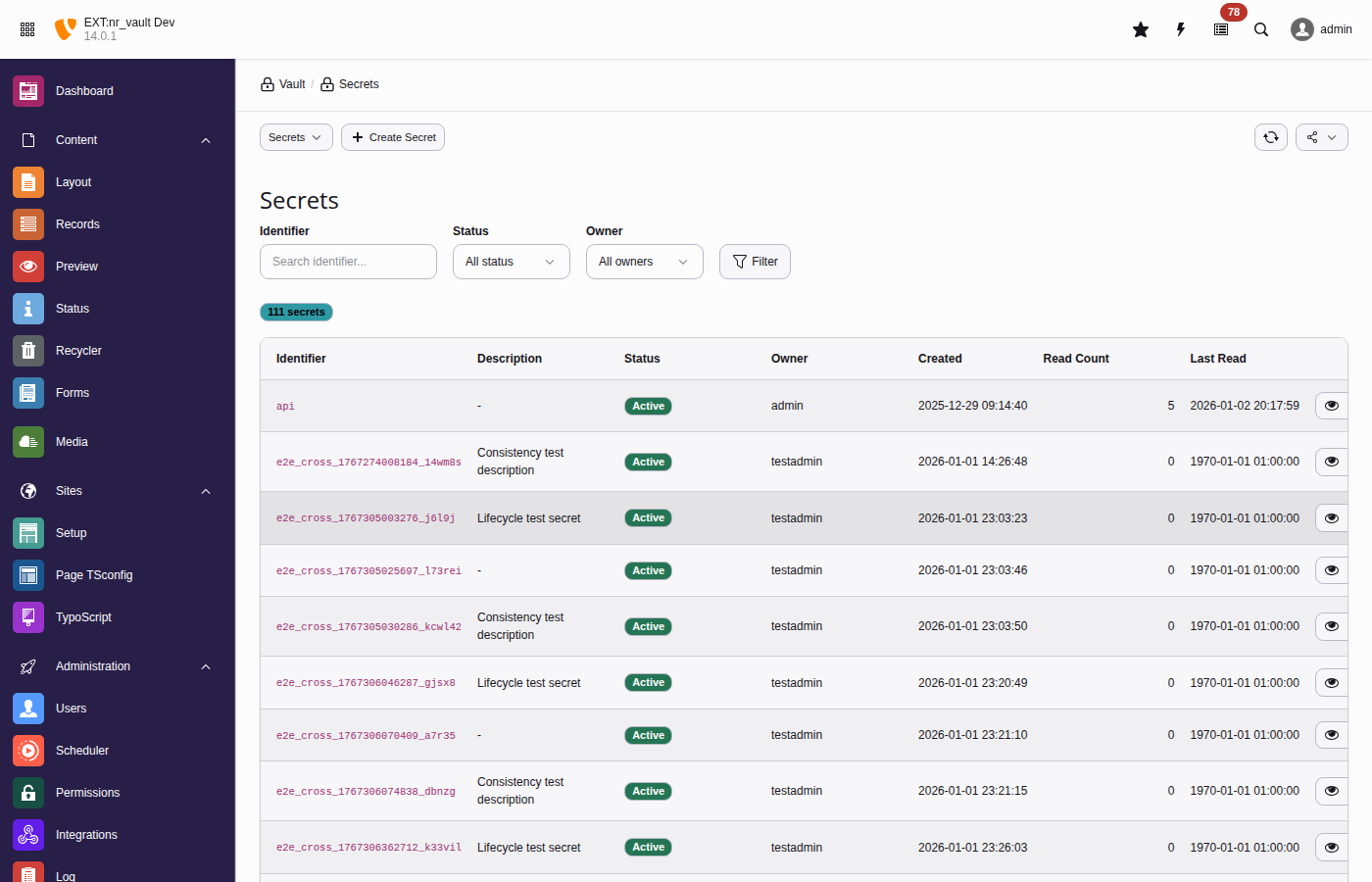
The secrets list provides filtering, bulk actions, and quick access to secret operations
Analytics
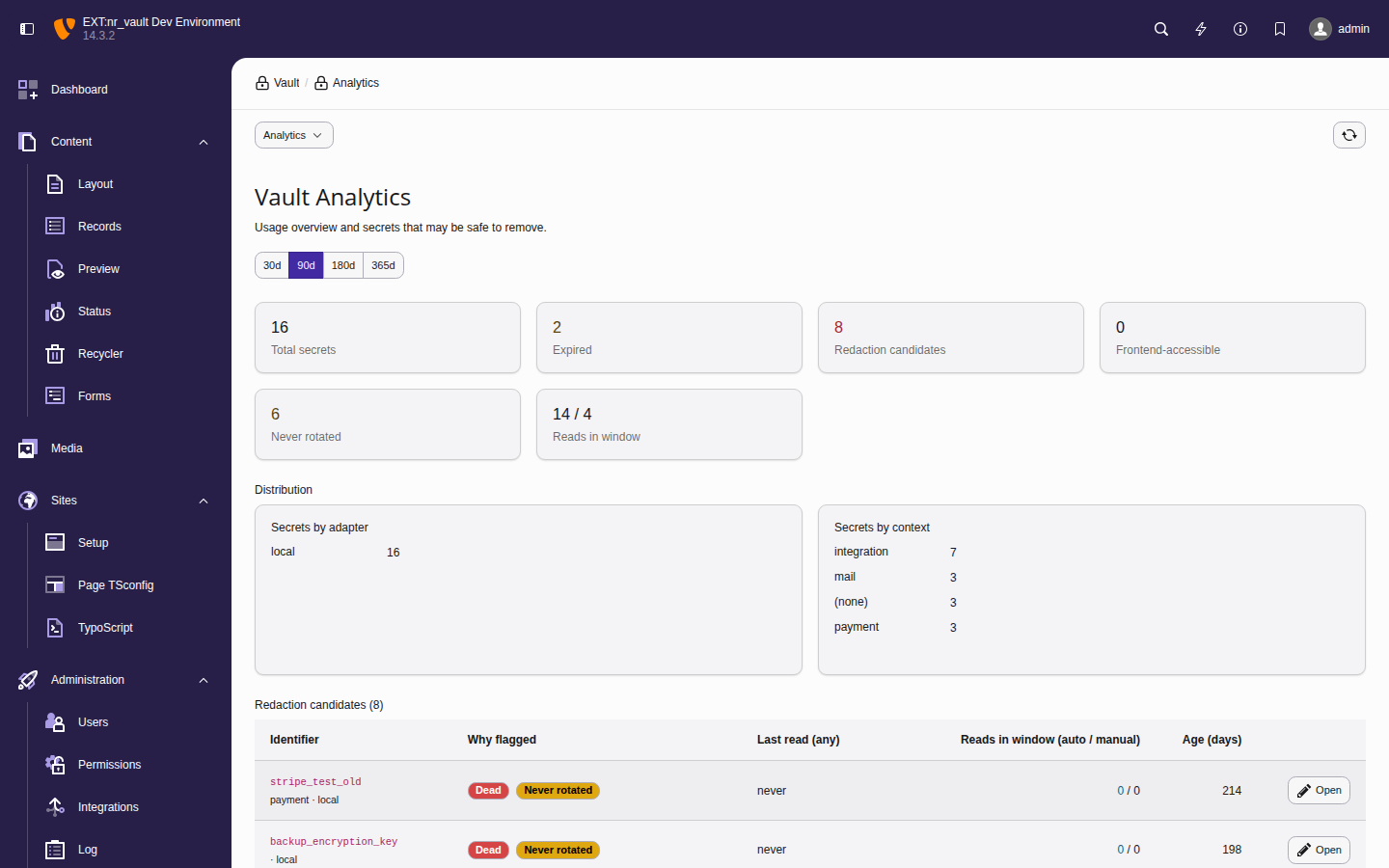
The Analytics submodule gives administrators an at-a-glance view of
secret usage and highlights secrets that may be safe to remove. Choose the
evaluation window with the 30d / 90d / 180d
/ 365d selector at the top.
The analytics dashboard summarises usage and flags redaction candidates
Key metrics
Total secrets
Active (non-deleted) secrets in the vault.
Expired
Secrets whose expiration date has passed but that still exist.
Redaction candidates
Secrets flagged by at least one staleness rule (see below).
Frontend-accessible
Secrets marked frontend_accessible - review these with extra care.
Never rotated
Secrets that have never been rotated within the configured threshold.
Reads in window (automated / manual)
Read activity for the selected window, split into automated reads (CLI,
scheduler, API) and manual reveals performed in the backend.
Redaction candidates
The table lists every flagged secret together with the rule(s) that flagged it,
its last read of any kind, the automated / manual read split for the window, and
its age in days. Open deep-links straight to the secret record so you
can review or delete it.
Secrets are flagged by these rules:
Dead
Never read and older than the threshold, or not read for a long time - the
primary deletion candidate.
Expired
Past its expiration date but still present in the vault.
Never rotated
Older than the rotation threshold without ever having been rotated.
Automation-stale
Revealed manually but never read by automation. This is a review
signal rather than a deletion signal: the secret may legitimately be used
only through manual workflows. It is therefore never combined with
Dead.
Note
The automated-versus-manual split is derived from the audit log
(actor_type), so it reflects only reads recorded while audit logging was
active. Reads in TYPO3 CLI context (console commands, scheduled jobs, queue
workers) are recorded with actor type cli and count as automated, even
though the CLI bootstrap authenticates the _cli_ backend user. The day
thresholds are configurable — see
staleNeverReadDays,
staleNotReadDays and
staleNeverRotatedDays.
Tip
To explore the dashboard with realistic, dated history on a development
instance, seed demo secrets and audit events with the
vault:seed-demo command (development context
only).
Site configuration
Reference secrets in your site configuration files using the
%vault(identifier)%
syntax:
References are not resolved automatically when TYPO3 loads the site
configuration. Resolve them explicitly, at the point of use, with
SiteConfigurationVaultProcessor
:
This keeps sensitive values out of your version control while still
allowing you to configure them through the familiar site settings.
Important
Resolution is caller-driven, not automatic. TYPO3 persists the loaded
site configuration into its shared, on-disk core cache; resolving
%vault(identifier)%
references eagerly at load time would write the
decrypted secrets into that cache file in cleartext and would run the
per-principal access check only once, when the cache is warmed. Resolving
at read time keeps the plaintext within the current request and re-checks
access for every reader. Passing the
$site
object also enables
site-scoped identifiers (site:<siteIdentifier>:<secret>).
TypoScript integration
Use vault references in TypoScript for frontend-accessible secrets:
TypoScript vault reference
lib.googleMapsKey = TEXT
lib.googleMapsKey {
  value = %vault(google_maps_api_key)%
  stdWrap.cache.disable = 1
}

page.headerData.10 = TEXT
page.headerData.10 {
  value = <script>var API_KEY = '%vault(public_api_key)%';</script>
  stdWrap.cache.disable = 1
}
Copied!
Note
The stdWrap. sub-array is required, not decoration. TEXT removes
value from its configuration before rendering, so a TEXT object whose
only property is value never calls stdWrap() at all — and the
placeholder is what reaches the page. Earlier releases of this documentation
showed the property-less form; it never resolved.
Warning
Security considerations:
Only secrets marked as frontend_accessible can be resolved.
Resolved values may be cached - use cache.disable = 1 for
secrets that should not be cached.
Consider using USER_INT for content containing secrets.
Which placeholders resolve in the frontend
The listener that expands
%vault(...)%
runs on the output of
everystdWrap call. That includes strings the integrator did not author:
an editor-written tt_content field rendered with `stdWrap.field =
bodytext``, or a request parameter rendered with ``data = GP:q`. Without a
restriction, anyone who can type into a content element — or append a query
string — could name any frontend-accessible secret and have it expanded into
the (cacheable) page.
In a frontend request — and on the command line — the extension therefore
resolves an identifier only when it was published through a source an editor
cannot write:
A1 — frontend TypoScript. The identifier appears in the setup array, i.e.
somewhere in the site's TypoScript. sys_template is admin-only and site
TypoScript lives on disk. This covers every documented example on this page:
writing lib.apiKey.value = %vault(my_api_key)% publishes my_api_key.
A2 — site configuration and site settings. An identifier used anywhere in
config/sites/<site>/config.yaml or in the site settings is published for
that site. This is what keeps site configuration
values usable in content.
A3 — the explicit list. For an identifier that is used only in a Fluid
template file, a userFunc or a DataProcessor — that is, nowhere in the setup
array — name it once per site:
Publish identifiers that appear nowhere else in TypoScript
A4 — integrator PHP. In an eID handler or any other entry point that has no
TypoScript and no site attribute, publish the identifier for the current request:
Publish an identifier from PHP
useNetresearch\NrVault\Security\FrontendPlaceholderPolicyInterface;
useTYPO3\CMS\Core\Utility\GeneralUtility;
// $request is the PSR-7 request your handler received.
GeneralUtility::makeInstance(FrontendPlaceholderPolicyInterface::class)
->allowIdentifier('my_api_key', $request);
Copied!
The request argument is not decoration, and it is not a freshness hint either:
it is the key. The policy is a shared service that lives for the whole PHP
process, so the grant is stored against that request object in a
\WeakMap
, and a later request — an anonymous frontend render in the same
worker process, possibly on another site — holds a different object and cannot
address it.
Important
Pass the request you are handling, and call
setRequest()
with the
same object on the content object renderer you render with. The grant is
matched by object identity against the request the renderer carries;
$GLOBALS['TYPO3_REQUEST']
is never consulted for it, because TYPO3
sets that global and never unsets it, so in a worker SAPI it outlives the
request that set it. A renderer carrying a different request — or none —
resolves nothing.
Warning
Never pass request-derived data as the identifier — that hands the
allow-set back to the caller and re-opens the hole. Where you can, prefer
VaultServiceInterface::retrieveForFrontend()
, which returns the value
instead of widening the allow-set.
Failure is loud, but quiet in production. An unpublished identifier leaves
the literal %vault(identifier)% in the output. In Development
context a single notice per request names the first rejected identifier; in
every other context the skip path writes nothing, so unauthenticated input
cannot drive log volume.
Warning
The flip side is that a rejected identifier leaves no trace outside
Development: no log record and — because the check runs before
the vault is touched — no AccessDenied audit row either. Probing for
which identifiers a site publishes is therefore free and invisible; the only
signal is whether the literal survives in the page. If you need that signal,
run the site in Development while investigating, or watch for
%vault( in rendered output. This is a deliberate trade: emitting a record
per rejection is exactly the amplification an anonymous visitor could drive.
Scope of the restriction. It applies to frontend requests, to any web
request whose type cannot be established (eID among them, where
$GLOBALS['TYPO3_REQUEST']
does not exist), and to the command line —
scheduler, Symfony Messenger, console commands. Backend requests are
unaffected, a backend request being recognised by the request the renderer
itself carries and never by what an earlier request left in
$GLOBALS['TYPO3_REQUEST']
. The check is on the identifier, not on where
the placeholder sits: an identifier this site already publishes stays resolvable
wherever it appears.
The command line is covered because
scheduler:run
authenticates the
_cli_ administrator: the admin bypass grants the read, so this allow-set is
the only gate left on editor-authored content that a scheduled newsletter or
export job renders. A deployment whose internal render jobs genuinely need the
old behaviour opts back into it with frontendPlaceholderLegacyCli; publishing the identifiers is the
narrower remedy.
One further case is worth naming: on a fully cached page hit with noUSER_INTorCOA_INTobject, core's frontend TypoScript factory
returns before the setup array is built, so A1 and A3 are empty for that request
and only A2 and A4 apply. No documented example is affected, and the direction is
fail-closed. See ADR-035.
CLI commands
vault:init
Initialize the vault and generate a master key:
Initialize vault
vendor/bin/typo3 vault:init

# Output as environment variable format
vendor/bin/typo3 vault:init --env

# Specify custom output location
vendor/bin/typo3 vault:init --output=/secure/path/vault.key
Copied!
vault:store
Create or update a secret:
Store a secret
# Interactive (prompts for value)
vendor/bin/typo3 vault:store stripe_api_key

# With options (arbitrary metadata via repeatable --metadata key=value)
vendor/bin/typo3 vault:store payment_key \
  --value="sk_live_..." \
  --metadata="description=Stripe production key" \
  --metadata="context=payment" \
  --groups="1,2"
# View entries since a given date
vendor/bin/typo3 vault:audit --since=2026-05-01

# Filter by secret
vendor/bin/typo3 vault:audit --identifier=stripe_api_key

# Export to JSON
vendor/bin/typo3 vault:audit --format=json > audit.json
Copied!
Important
Listing and --verify assert audit.view — verification recomputes and
compares, which is a read of the chain. --export asserts
audit.export, and --reset-anchor asserts vault.configure,
because it mutates tamper evidence. On the CLI all three additionally need
allowCliAccess plus the operation in
cliAllowedOperations, which excludes them by default
— see vault:audit.
Verify the tamper-evident chain:
Verify audit chain integrity
vendor/bin/typo3 vault:audit --verify
Copied!
The output ends with a Tip anchor: line. The anchor is what detects removal
of the end of the log — a truncation leaves no gap and no broken link, so the
chain walk alone cannot see it (see Tip anchor (truncation detection)).
ok
The anchored entry is still present and unchanged.
NOT ARMED
No anchor recorded yet. It arms itself on the next audit log write.
VIOLATED
The anchored entry is gone or was replaced — the log was truncated or wiped.
Snapshot the table before changing anything else.
UNREADABLE
The stored anchor is malformed or its MAC does not verify — a tampered
value, or a master key changed without a re-seal. Treated as critical
regardless of auditAnchorRequired, and never resolved by clearing the
anchor before you know which of the two it was.
Three further states appear in narrower situations: not checked (a
range-bounded verification, which does not evaluate the anchor at all),
disabled (auditHmacEpoch = 0, where the anchor does not run), and
inconclusive (a re-seal committed while verification was reading — re-run
it).
After a wipe or purge you performed deliberately, clear the anchor so it can
arm again. The reset is itself written into the chain:
Re-arm the anchor after a deliberate wipe
vendor/bin/typo3 vault:audit --reset-anchor
Copied!
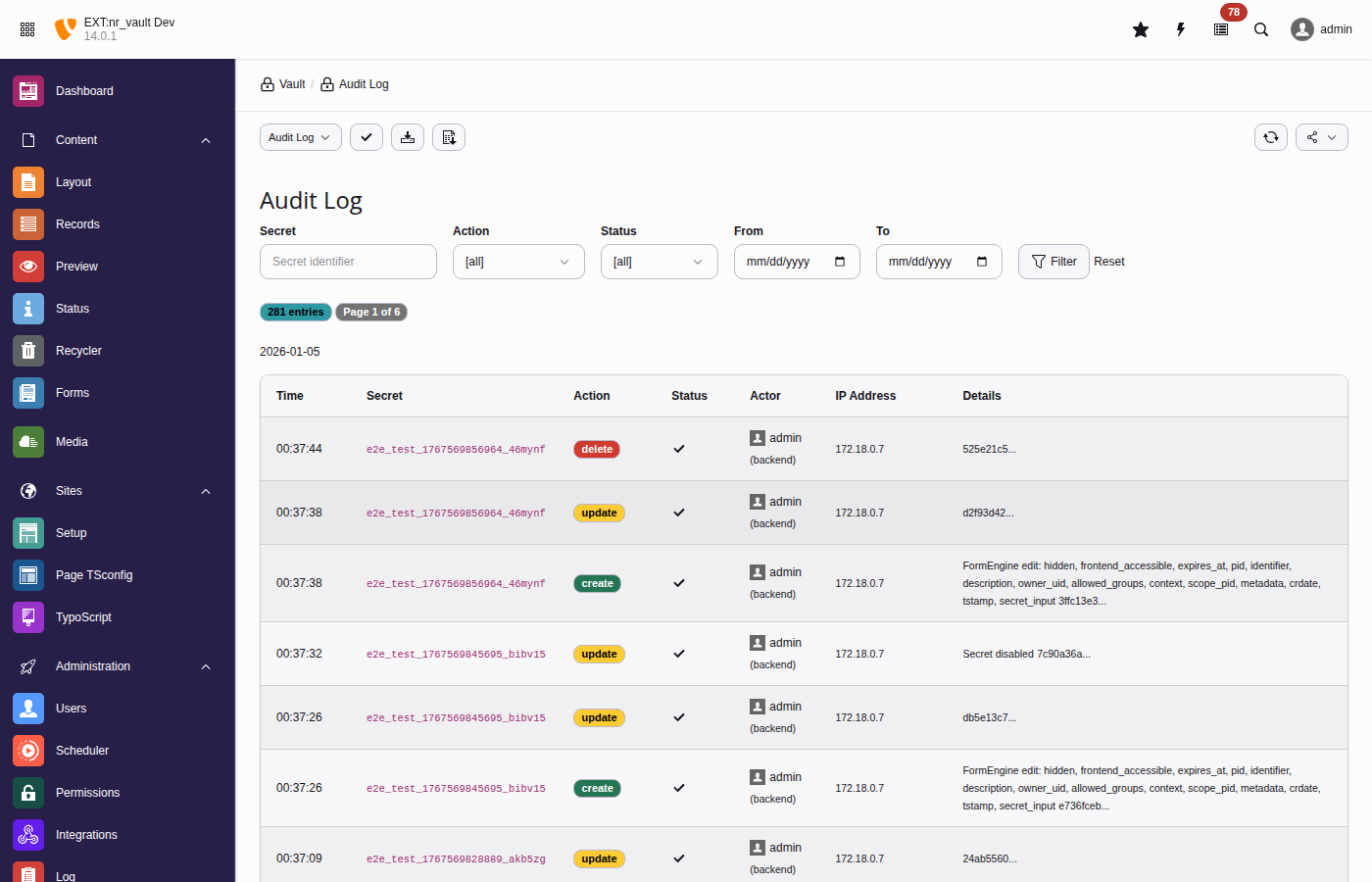
The audit log tracks all secret operations with tamper-evident hash chains
vault:rotate-master-key
Rotate the master encryption key (re-encrypts all DEKs):
Rotate master key
# Using old key from file, new key from current config
vendor/bin/typo3 vault:rotate-master-key \
  --old-key=/path/to/old.key \
  --confirm

# Dry run to simulate
vendor/bin/typo3 vault:rotate-master-key \
  --old-key=/path/to/old.key \
  --dry-run
Copied!
vault:scan
Scan for potential plaintext secrets in database:
Scan for plaintext secrets
vendor/bin/typo3 vault:scan

# Only critical issues
vendor/bin/typo3 vault:scan --severity=critical

# JSON for CI/CD
vendor/bin/typo3 vault:scan --format=json
$this->vaultService->store(
identifier: 'payment_api_key',
secret: 'sk_live_...',
options: [
'description' => 'Stripe production API key',
'context' => 'payment',
'groups' => [1, 2], // Backend user group UIDs'expiresAt' => time() + (86400 * 90), // 90 days
],
);
Copied!
Checking existence
Check if secret exists
if ($this->vaultService->exists('stripe_api_key')) {
    $value = $this->vaultService->retrieve('stripe_api_key');
}
Copied!
Listing secrets
List secrets programmatically
// Get all accessible secrets
$secrets = $this->vaultService->list();

// Filter by pattern
$paymentSecrets = $this->vaultService->list(pattern: 'payment_*');
Copied!
Vault HTTP client
Make authenticated API calls without exposing secrets to your code.
The HTTP client is PSR-18 compatible. Configure authentication with
withAuthentication()
, then use standard
sendRequest()
.
A common pattern is storing API endpoints with their credentials in a database
table. This example shows how to combine TCA vault fields with the HTTP client.
API Token: Paste your actual API key (stored securely in vault)
Click Save
The token field uses renderType: 'vaultSecret' which:
Shows a masked password field with a reveal button — and a copy button
outside the hardened profile, which disables copying because the clipboard
outlives the dialog
Automatically stores the secret in the vault on save
The token field contains a UUID v7 like 01937b6e-4b6c-...
VaultHttpClient::sendRequest()
retrieves the actual token from vault
Token is injected into the Authorization: Bearer ... header
sodium_memzero()
immediately wipes the token from memory
The HTTP call is logged to the audit trail (without the secret)
Security benefits
This pattern provides several security advantages:
No secret exposure
Application code never sees the actual API token. The DTO contains only the
vault UUID, which is useless without vault access.
Memory safety
Secrets are cleared from memory immediately after injection using
sodium_memzero()
.
Audit trail
Every HTTP call is logged with the endpoint name, HTTP method, URL, and
status code - but never the secret itself.
Separation of concerns
Credential management is handled by the vault. Application code focuses on
business logic.
No CLI or file access required
Editors and admins can manage API endpoints entirely through the TYPO3
backend. The vault secret field provides a secure password input with
reveal — and copy, outside the hardened profile — with no command line
needed.
Example: SaaS API keys in extension settings
Many TYPO3 extensions integrate with SaaS services (DeepL, Personio, Stepstone,
Stripe, etc.) and store API keys in extension settings. This page shows how to
secure these credentials with nr-vault.
Full vault UI with masked input and reveal — plus copy, outside the
hardened profile, which disables it deliberately
Proper access control (owner, groups)
Audit logging of configuration access
Multiple configurations possible (e.g., per site)
Comparison
Aspect
Approach 1 (Vault ID)
Approach 2 (Env var)
Approach 3 (TCA record)
Setup complexity
Low
Low
Medium
Security
High
Medium
High
Memory safety
Yes (sodium_memzero)
No
Yes (sodium_memzero)
Audit trail
Yes
No
Yes
Backend UI
Text field
Text field
Vault secret field
Multi-config
Manual
Manual
Native
Recommendation: Use Approach 1 for simple single-key integrations, Approach 3
for complex integrations requiring multiple configurations or strict access control.
Security
The sections on this page are the security overview. The pages listed below go
deeper on the parts an assessment or a hardened deployment needs.
Read Known limitations before relying on any control
described here. It states, honestly, where each defence stops — including
the ones that cannot be fixed inside a TYPO3 extension.
Encryption architecture
nr-vault uses envelope encryption, an industry-standard pattern for
protecting sensitive data.
Envelope encryption: Each secret has its own DEK encrypted by the master key.
+-------------------+
|    Master Key     |
+--------+----------+
         |
         | encrypts
         |
   +-----+------+--------+
   |            |         |
   v            v         v
+------+    +------+   +------+
| DEK1 |    | DEK2 |   | DEK3 |
+--+---+    +--+---+   +--+---+
   |           |          |
   | encrypts  | encrypts | encrypts
   v           v          v
+------+    +------+   +------+
|Value1|    |Value2|   |Value3|
+------+    +------+   +------+

Secret 1    Secret 2   Secret 3
Copied!
How it works
Data Encryption Key (DEK): Each secret gets a unique 256-bit key
generated using cryptographically secure random bytes.
Value encryption: The secret value is encrypted with its DEK using
AES-256-GCM (or XChaCha20-Poly1305).
DEK encryption: The DEK is encrypted with the Master Key and stored
alongside the encrypted value.
Decryption: To read a secret, first decrypt the DEK with the Master Key,
then use the DEK to decrypt the value.
Benefits
Key rotation: Rotating the master key only requires re-encrypting DEKs,
not the actual secret values.
Blast radius: If a DEK is compromised, only one secret is affected.
Performance: Bulk operations on secrets don't require the master key
for each operation.
Algorithms
XChaCha20-Poly1305 (default)
ChaCha20 stream cipher with extended nonce and Poly1305 MAC. The deliberate
default for new secrets: available in every libsodium build, and its
24-byte nonce makes random-nonce collisions a non-concern, so vault
contents stay portable across hosts with differing CPU capabilities.
AES-256-GCM (opt-in)
Advanced Encryption Standard with 256-bit keys in Galois/Counter Mode.
Selected per installation via encryptionAlgorithm,
and only worth choosing on hosts with hardware AES support.
Both algorithms provide:
256-bit key strength.
Authenticated encryption (AEAD).
Protection against tampering.
Master key security
The master key is the root of trust for all secrets.
Provider security comparison
TYPO3 provider (default, recommended for most users)
Security depends on TYPO3's encryption key protection. Suitable for
environments where the encryption key is properly secured in settings.php.
No additional configuration required.
File provider (recommended for high-security environments)
Allows storing the key outside the database and web root with strict
permissions. Requires server access to configure.
Environment provider (recommended for containers)
Ideal for containerized deployments where secrets are injected at runtime.
Follows 12-factor app methodology.
File storage recommendations
When using the file provider:
Outside web root: Never store in publicly accessible directories.
Restrictive permissions: Use 0400 (read-only by owner).
Separate backup: Back up the master key separately from the database.
Access logging: Monitor access to the key file.
Key rotation: Rotate the master key periodically.
Warning
If the master key is compromised, all secrets must be considered compromised.
Rotate the master key and all secrets immediately.
Audit logging
All secret operations are logged with:
Timestamp.
Action (create, read, update, delete).
Actor (user ID, username, type).
Secret identifier.
IP address.
Result (success/failure).
Hash chain integrity
Audit log entries form a hash chain where each entry includes a hash of
the previous entry. This provides:
Tamper detection: Any modification to log entries breaks the chain.
Completeness: An entry deleted from the middle of the log leaves a UID
gap, which the verifier reports as an error even if the surrounding
previous_hash values were patched to match.
Non-repudiation: Actions cannot be denied after logging.
Removing the tail of the log leaves no gap and no broken link, so the chain
walk alone cannot see it. That case is covered by the tip anchor below.
Tip anchor (truncation detection)
The chain proves that what is stored was not altered. It cannot, on its own,
prove how much should be stored — any counter kept inside
tx_nrvault_audit_log is deleted along with the rows.
nr_vault therefore records one signed assertion outside that table, in the core
table sys_registry:
Audit row uid = A still exists and its entry_hash is still H.
The assertion is authenticated with HMAC-SHA256 under a key derived from the
master key with its own HKDF context string ("nr-vault-audit-anchor-v1"),
which is not stored in the database. It advances on every audit write, inside
the same transaction as the audit row, and is re-recorded by master-key rotation
and by both HMAC re-seal paths. See ADR-034: Audit chain tip anchor.
What this adds: DELETE FROM tx_nrvault_audit_log WHERE uid > N, deletion of
the last row, TRUNCATE, and a truncate followed by refilling the same UIDs
with fresh entries are all reported as an invalid chain — by
vault:audit --verify, by the backend verification view, and by the gates
that guard master-key rotation and the HMAC migration.
What this does not add: an attacker with database write access who deletes the
sys_registry row before truncating returns the installation to
undetectable truncation. That is reported as a warning (`Tip anchor: NOT
ARMED`) rather than an error, because an installation that has not yet written
an audit entry since the upgrade is indistinguishable from one whose anchor was
deleted.
auditAnchorRequired
Setting auditAnchorRequired = 1 in the extension configuration is the
operator's assertion that this installation is already anchored. It is off by
default, and it changes two things:
verification reports a missing anchor as an error instead of a warning;
an ordinary audit write no longer creates an anchor that is not there — at
all, whatever the log currently contains.
The second half is what makes the first half worth anything. An attacker with
database write access can delete the anchor row — or merely blank its value —
and truncate the log; if the next audit write then armed a fresh anchor on the
shortened chain, the error would disappear within seconds and the installation
would report a valid chain permanently, now with a signed attestation that the
truncated tip is genuine.
The refusal has to be unconditional, and that is a deliberate change of
behaviour rather than a strictness for its own sake. "The log still holds an
earlier entry" is not a usable test for "this anchor was never armed": the audit
write that triggers the check has just inserted the only row the chain has, so a
log emptied outright looks exactly like a brand-new installation. Anything that
armed on an apparently-fresh chain would be bypassed by deleting every audit
row, which is easier than deleting some.
So with the setting on, arming is always an explicit operator action:
vault:audit --reset-anchor, which writes the reset into the chain. That
includes the very first arming — an installation that enables the setting before
its anchor exists reports Tip anchor: NOT ARMED as an error until the command
is run. This is why the setting is off by default and why the documented order
matters: enable it once, after the first audit write following the upgrade.
The setting is worth having because extension configuration lives in a settings
file: an attacker who only has database write access cannot turn it back off.
Blanking the anchor value (UPDATE sys_registry SET entry_value = NULL) is
not a way around this at any setting: a row that is present but unreadable is an
Unreadableerror, and it is never repaired by an audit write.
Restoring a legitimately wiped log
After a deliberate purge or wipe, the anchor stays behind and reports a
violation permanently. Clear it with:
vendor/bin/typo3 vault:audit --reset-anchor
Copied!
The command records the reset as an audit entry in the same transaction, so it
cannot be performed invisibly, and re-arms the anchor on that entry. It is the
only path that arms an anchor at all while auditAnchorRequired is enabled.
HMAC-keyed audit chain
The audit hash chain is authenticated with HMAC-SHA256, using a key derived
from the master key via HKDF (see ADR-023: Audit hash chain HMAC consideration).
This provides adversarial tamper resistance in addition to tamper detection:
Adversarial resistance: An attacker with database access but without
the master key cannot forge valid HMAC values or recompute the hash chain.
Cryptographic separation: The HMAC key is derived with a dedicated
context string ("nr-vault-audit-hmac-v1"), ensuring independence from
encryption key material.
Backward compatibility: Legacy entries (epoch 0) created before the
HMAC migration remain verifiable using the original SHA-256 algorithm.
New entries (epoch 1+) use HMAC-SHA256.
Use the vault:audit-migrate-hmac command to migrate existing legacy
entries to HMAC-SHA256. See vault:audit-migrate-hmac for details.
Access control
Access is decided by two independent gates. Both must pass.
Per-secret access answers "may this actor touch this secret?":
Authentication: Backend user must be logged in.
Ownership: Creator has full access.
Group membership: Shared access via backend groups.
Admin override: Administrators can access all secrets.
Operation permissions answer "may this actor perform this kind of
operation at all?" — see the next section.
Note
CLI access requires explicit configuration and can be restricted
to specific groups.
Operation permissions
Each vault operation has its own permission, granted per backend user
group in the Backend Users module (field Custom module options,
group Vault: operation permissions). They are registered as TYPO3
custom permission options under
$GLOBALS['TYPO3_CONF_VARS']['BE']['customPermOptions']['tx_nrvault']
and checked server-side via
AccessControlServiceInterface::isGranted().
Permission
Governs
tx_nrvault:secret.use
Programmatic consumption of a plaintext value (FormEngine
vault widgets, FlexForm/TCA placeholders, site config, HTTP
clients).
tx_nrvault:secret.reveal
Displaying a plaintext to a human (the vault_reveal
endpoint, vault:retrieve).
tx_nrvault:secret.create
Creating new secrets.
tx_nrvault:secret.rotate
Replacing the value of an existing secret.
tx_nrvault:secret.delete
Deleting secrets.
tx_nrvault:secret.manage_policy
Enabling/disabling secrets and editing their
allowed_groups / write_groups tiers.
tx_nrvault:audit.view
Reading the audit log and its usage analytics, and verifying
the hash chain — in the audit module, via vault:audit /
vault:audit --verify / vault:audit-verify, and in the
Vault Audit Integrity Verification scheduler task.
tx_nrvault:audit.export
Downloading the audit log (JSON / CSV), in the module and via
vault:audit --export.
tx_nrvault:master_key.rotate
Rotating the master key.
tx_nrvault:vault.configure
Running the migration wizard, seeing the detailed
vault:doctor finding list in the Overview module, and
mutating the audit chain-tip anchor — vault:audit-anchor,
the Vault Audit Chain Anchoring scheduler task, and
vault:audit --reset-anchor.
Notes on the model:
The permission follows the operation's effect, not the command it
happens to live in. The same operation answers to the same permission
through every entry point — interactive CLI, the scheduler-task wrapper
command, the scheduler task class, and the backend module — so a gate on
one entry point cannot be walked around by reaching for another. Verifying
the chain is a read (it recomputes and compares, it mutates nothing) and
therefore takes audit.view everywhere; publishing or resetting the tip
anchor mutates tamper evidence and therefore takes vault.configure
everywhere. Auditing an installation means checking the effect, not
enumerating commands.
``secret.use`` does not imply ``secret.reveal``, and neither
implies the other. A non-admin needs both for an end-to-end
reveal: the endpoint asserts secret.reveal (displaying plaintext),
and the shared read path asserts secret.use (obtaining it at all).
An integration account gets secret.use only.
Non-admin backend users need ``secret.use`` for every plaintext
read, including FormEngine vault field widgets and FlexForm /
TypoScript placeholder resolution. Grant it to the groups whose
editors work with vault-backed fields.
Mutations are enforced centrally in the service, not only in the
module controllers.VaultService::store() requires
secret.create (new identifier) or secret.rotate (existing
identifier, plus secret.manage_policy when the call also changes
owner, group tiers or frontend availability); rotate() requires
secret.rotate; delete() requires secret.delete. A direct
DataHandler/FormEngine request or a programmatic caller therefore
faces the same gates as the secrets module. Editors whose forms
write vault-backed TCA fields need secret.create /
secret.rotate in addition to secret.use.
Creating a tx_nrvault_secret record asserts secret.create
even when no value is submitted. That one case cannot go through
the service — no value means no store() call — so
SecretTcaHook
gates it in
processDatamap_preProcessFieldArray(), refusing the record
before DataHandler inserts it rather than deleting it afterwards.
Technical actors (TechnicalActorContext::runAs()) hold
secret.use implicitly — headless consumption is their purpose —
and every other operation permission only if one of their
provisioned backend groups grants it via the same
tx_nrvault:* custom permission options.
Admins and system maintainers hold every permission
unconditionally, and have full per-secret access to every secret.
That override lives in a single seam
(AccessControlService::adminBypassActive()) and can be removed —
see Disabling the admin override.
The backend modules are registered ``access => 'user'``. That is
deliberate: authorization is asserted by each controller action, not
by the module registration, so granular grants are usable by
non-admins. The same holds for the vault_reveal / vault_rotate
AJAX routes.
CLI: a trusted CLI operator has no backend user record and thus no
group grants. Operation permissions follow the vault's
allowCliAccess switch (off by default),
narrowed to the cliAllowedOperations allowlist (default:
secret.use,secret.create,secret.rotate). High-risk operations are
excluded by default: vault:retrieve (needs secret.reveal),
vault:delete / the scheduled orphan cleanup (secret.delete),
vault:rotate-master-key (master_key.rotate) and the audit
export require adding the respective operation to the allowlist — or,
preferably, a named technical actor via
TechnicalActorContext::runAs().
Frontend requests never hold operation permissions, regardless of
any backend session the visitor carries — frontend visibility remains
a property of the secret (frontend_accessible) alone. For
%vault(id)%
placeholder resolution there is a second
gate on top: the identifier must also be in the request's
FrontendPlaceholderPolicy allow-set
(ADR-035: Per-request allow-set of frontend-resolvable identifiers), which the CLI enforces
too unless frontendPlaceholderLegacyCli is set.
Disabling the admin override
By default a TYPO3 administrator holds every vault permission and full
read/write/delete access to every secret. For most installations that is
the right answer: an admin already controls settings.php, the
master-key provider and the extension configuration, so withholding
vault permissions from them would be theatre.
It stops being theatre in two situations: an installation where "TYPO3
administrator" and "may read production credentials" are genuinely
different roles, and an audit regime that requires every plaintext
access to be attributable to a granted permission rather than to a
role. For those, set
and administrators are treated like every other backend user: they hold
exactly the operation permissions their groups were granted, and reach
only the secrets they own or share a group with.
What is removed
Both gates, in one place. The override is a single private seam
(AccessControlService::adminBypassActive()) consulted by:
isGranted() — the operation permissions;
canRead() / canWrite() / canDelete() — the per-secret tiers;
isCurrentActorAdmin() — the privileged-column policy in the TCA
hook and the secret.use / owner_uid / frontend_accessible
exemptions in VaultService;
the technical-actor equivalents of all of the above, so a
runAs() snapshot carrying the admin flag does not keep what the
interactive admin lost.
An override that were removed from only some of these would be worse
than none, because the deployment would believe it is protected.
Note
Ownership still applies. An administrator keeps full access to the
secrets they own, exactly like any other user — which is what makes
the disabled state workable day to day.
Two deliberate constraints
The flag only takes effect in the hardened profile. In the standard
profile it is inert. Setting it alone, without the rest of the hardened
policy (an explicit external master-key provider, no fallback to the
TYPO3 encryption key), is far more likely to be a misunderstanding than
a decision — and its failure mode is locking every administrator out of
the vault. Choosing hardened is the explicit statement that the
fail-closed contract has been read. Run
vault:break-glass --status to see whether
the flag is effective; it reports adminOverrideDisabledEffective
alongside the raw setting, so a "flag set, profile standard" mismatch is
visible rather than silent.
Pin the value outside the backend. The setting is editable in
Admin Tools > Settings, which means a compromised admin
could untick it. Pin it in config/system/additional.php, where
only filesystem access can change it:
The pinned value wins in both directions and is the same mechanism
auditReads uses.
Break-glass mode
A disabled override needs an escape hatch, or the first genuine incident
becomes an outage. Break-glass mode is that hatch: a deliberate,
justified, time-boxed restoration of the admin override.
The full flow
# 1. Confirm the state
vendor/bin/typo3 vault:break-glass --status
# 2. Open a window with a justification
vendor/bin/typo3 vault:break-glass --activate --reason="INC-4711 rotate leaked deploy key" --minutes=30
# 3. Do the work in the backend or on the CLI# 4. Close it — do not wait for the expiry
vendor/bin/typo3 vault:break-glass --deactivate --reason="INC-4711 closed"
Copied!
Who may open a window
Only a real backend administrator or system maintainer — the actual
TYPO3 isAdmin() flag, checked independently of the disabled override
so the escape hatch is reachable in the very state it exists for — or an
operator in a real CLI context. Break-glass is deliberately not
gated on a VaultPermission: it exists to recover from a state where
the granular grants are what is missing, so gating it on one would make
it unreachable exactly when it is needed. CLI is likewise not gated on
allowCliAccess — a shell on the host
already reaches the master key.
A TechnicalActorContext::runAs() scope may never open a window,
even for an actor whose snapshot carries the admin flag. runAs() is
not an authentication boundary (any code with DI access can open a
scope), so accepting it would let arbitrary extension code mint its own
bypass with a synthetic justification.
Mandatory justification
--reason is required for both activation and deactivation, and an
empty or whitespace-only value is rejected. The reason is stored
verbatim in the audit row, carried in the PSR-14 event, and displayed in
the backend banner. Reference the incident, ticket or change record —
"testing" tells a later reviewer nothing.
Time boxing
The window defaults to 15 minutes and is clamped to 1..60. Out-of-range
values are clamped rather than rejected: a fat-fingered --minutes=600
during an incident should yield the one-hour ceiling, not an error to
re-read under pressure.
Expiry is evaluated at read time, on every access-control decision.
There is no scheduled task to close a window, and therefore no stalled
cron job that can silently extend one. A forgotten window stops granting
anything the moment it lapses.
Audit evidence
Activation and deactivation each write one row to the tamper-evident
audit log under the pseudo-identifier __break_glass__ (the same
convention vault:rotate-master-key uses for __master_key__):
Action
Written when
break_glass_activated
A window is opened. Context carries the
actor, the expiry and the TTL.
break_glass_deactivated
A window is closed early. Context also
carries the original activation reason.
Both rows are sealed into the HMAC hash chain like any other entry, so
the evidence cannot be edited away without breaking verification. The
activation row is written before the window opens: the two stores
cannot be updated atomically, and only that order makes "window open
without evidence" impossible.
A window that simply expires writes no row — nothing runs at the
moment it lapses. Reconstruct the closed interval from the activation
row's expiresAt context value.
For alerting, listen to
Netresearch\NrVault\Event\BreakGlassActivatedEvent and
BreakGlassDeactivatedEvent. The audit log proves what happened; a
listener is what makes someone look.
Visible warning
While a window is open, the vault Overview and Secrets modules show a
danger callout naming who opened it, the stated reason, and when it
expires. Visibility is half the control — a window nobody notices is
just the admin override with extra steps.
Warning
Break-glass restores full admin power. While a window is open, an
administrator has exactly what they had before the override was
disabled: every operation permission, and read/write/delete on every
secret. Break-glass prevents nothing.
Its value is evidence and time boxing — a named actor, a typed
justification, a hash-chained audit row, an event observers can alert
on, a banner every operator sees, and an expiry nobody has to
remember. Treat an activation as an incident to review, not as
routine maintenance.
Technical actors
Headless code (messenger workers, scheduler runs) can act as a named
technical backend user through the scoped
TechnicalActorContext::runAs() API instead of the global CLI switch.
Threat-model notes:
runAs() is not an authentication boundary: any PHP code with
DI access can act as any enabled backend user — the same power that
$GLOBALS['BE_USER'] mutation already grants every installed
extension.
Its security value is validation (deleted/disabled/time-restricted
users are refused), guaranteed scope restoration (also on
exceptions), and honest audit attribution.
$GLOBALS['BE_USER'] is never mutated, so a technical identity
cannot leak into other code sharing the PHP process.
Audit entries written inside a scope carry `actor_type =
'technical'` plus the actor's uid and username, sealed into the
HMAC hash chain — impersonation is always attributable and
tamper-evident.
Restrict the technical user like any backend account: no admin flag
unless required, minimal group membership, and monitor its
access_denied events.
Deployment gate
Every control described on this page is checkable from a shell.
vault:doctor evaluates them all and reduces the result to a process exit
code, which makes it usable as the last step of a deployment pipeline rather than
as a document somebody is supposed to have read.
Deployment gate — refuse the release on any critical finding
vendor/bin/typo3 vault:doctor --profile=hardened
Copied!
Exit-code contract
Code
Meaning
0
Every control passed — audit-ready for the checked profile.
1
Warnings only. Deployable; fix before an audit.
2
At least one critical finding, an unusable --profile
value, or the run could not complete.
The verdict is the worst severity present, never an average, so a long list
of passing controls cannot offset one critical finding. And 2 covers "could
not check" as well as "checked and found a problem" — a gate that cannot run must
never be readable as a gate that found nothing.
Two ways to wire it, and they answer different questions:
Fail the pipeline only on critical findings
vendor/bin/typo3 vault:doctor
test $? -le 1
Copied!
Require a fully clean report
vendor/bin/typo3 vault:doctor
Copied!
The stricter form is the one to aim for. Accepting exit 1 indefinitely means
a warning nobody ever removes, which is the state in which a new warning goes
unnoticed.
Checking a profile you have not adopted yet
--profile=hardened evaluates the live configuration against the hardened
policy without changing anything. That is how to plan the migration described
in Disabling the admin override — from the actual finding list, rather
than by switching the profile on production and finding out which service stops
booting.
The report always states both the profile it checked and the profile in force, so
a passing dry run cannot be mistaken for hardening already being live.
What the gate does not cover
vault:doctor bounds its own cost so it can run in a pipeline and on a backend
page load. Two limits matter, and both are stated in the findings themselves:
the hash-chain pass covers the newest 1000 audit entries, not the whole chain;
the anchor comparison detects a chain that has shrunk, not one whose
anchored row now hashes differently.
vault:audit-verify does both in full and is the authoritative integrity
verifier. Schedule it — the gate is a pre-flight check, not a substitute for
continuous verification.
Backend surface
The vault Overview module shows the same controls: the active profile, an
"N of M controls passed" ratio, and the open findings with their risk and
remediation. The detailed finding list requires the vault.configure
permission — it names this installation's concrete weak points and the files to
edit. Everyone else sees the profile badge and the ratio, which is enough to
escalate.
Security best practices
Regular key rotation: Rotate the master key annually or after
security incidents.
Audit log review: Regularly review audit logs for suspicious access.
Minimal permissions: Grant access only to users who need it.
Secret rotation: Rotate secrets when personnel changes occur.
Monitoring: Set up alerts for access_denied events.
Backup security: Encrypt backups and store them securely.
Reporting vulnerabilities
If you discover a security vulnerability, please report it responsibly:
This page states what nr-vault defends, who it defends against, and where a
defence stops. It is written to be falsifiable: every control names the class
or command that implements it, and every scenario ends in a residual risk
rather than in a reassurance.
For the limits that no configuration removes, read
Known limitations. For the two policy bundles that decide how
strictly the controls below are enforced, read Security profiles.
Assets
Asset
Where it lives
Why it matters
Master key
Outside the database: derived from
$GLOBALS['TYPO3_CONF_VARS']['SYS']['encryptionKey']
(typo3 provider), a key file (file), an environment
variable (env), or unwrapped on demand from a KMS
(transit). Cached for the duration of one request in
AbstractMasterKeyProvider
.
Root of trust. It unwraps every DEK and derives the audit HMAC
key. Its loss is data loss; its compromise is total compromise.
Data encryption keys (DEKs)
One per secret, stored wrapped in the envelope
(encrypted_dek + dek_nonce).
A DEK opens exactly one secret. That bounded blast radius is the
reason for the envelope scheme.
Plaintext secret values
Never at rest. Transient in PHP memory during
EncryptionService::decrypt()
, and on screen for at most
30 seconds during a reveal.
The thing being protected.
Audit chain
tx_nrvault_audit_log, HMAC-chained, mirrored to external
sinks and anchored outside the database.
The only evidence of who touched what. Its integrity is what
makes every other control auditable.
Audit HMAC key
Not stored. Derived per request from the master key with
hash_hkdf('sha256', $masterKey, 32, 'nr-vault-audit-hmac-v1')
.
Without it, a database-write attacker cannot forge chain hashes
from epoch 1 upwards.
Backend sessions
TYPO3 core (be_sessions), outside this extension.
A stolen session with secret.reveal reveals secrets. nr-vault
inherits TYPO3's session security wholesale.
KMS token
transit provider only: an environment variable, preferred over
the stored setting.
Holding it is equivalent to holding the master key while Vault is
reachable.
Chain-tip anchors
NDJSON lines written by the file sink, plus whatever the
syslog and webhook sinks shipped off-host.
The external facts that make a full table reset detectable.
Actors
Actor
Reach over the vault
Anonymous visitor
None. Every vault surface requires a backend context; frontend
requests hold no operation permission at all.
Frontend user
Reads only secrets flagged frontend_accessible, and only
through resolution code. A valid backend session carried by a
frontend visitor grants nothing extra:
AccessControlService::isGranted()
returns false for
any frontend request, because frontend output is shared with
anonymous visitors through the page cache. Placeholder
resolution additionally requires the identifier to be in the
request's allow-set
(ADR-035: Per-request allow-set of frontend-resolvable identifiers).
Backend editor
Whatever their groups were granted (see
Operation permissions), intersected with
per-secret ownership and group tiers. Typically secret.use
so vault-backed form fields resolve.
Backend administrator
By default every operation permission and every secret, through
the single bypass seam
AccessControlService::adminBypassActive()
. The hardened
profile can withdraw that — see
Disabling the admin override.
System maintainer
As an administrator, plus the Install Tool. Reaches the
extension configuration and therefore the provider choice, so a
system maintainer is inside the trust boundary of every setting
that is not pinned in config/system/additional.php.
DBA / hoster
Full read and write on the database, no PHP execution assumed.
Reads ciphertext and wrapped DEKs (useless without the master
key), and can rewrite audit rows — which the HMAC chain and the
anchors make evident, not impossible.
Technical actor
A named backend user impersonated by headless code through
TechnicalActorContext::runAs().
Not an authentication boundary: any code with DI access can open
a scope. Its value is validation, guaranteed scope restoration
and honest audit attribution.
CLI operator
A shell on the host. Reaches settings.php, the key file
and the environment, so CLI is treated as trusted where it is
trusted at all. Secret reads over CLI stay gated on
allowCliAccess (off by default); break-glass deliberately is
not, because a shell already reaches the master key.
Trust boundaries
Five boundaries; crossing each one requires something different.
┌────────────────────────────────────────────────────────────────┐
│ Browser (backend operator) │
│ · revealed plaintext, max 30 s, no-store, no copy in hardened │
└───────────────────────────┬────────────────────────────────────┘
│ (1) HTTPS + BE session + CSRF
│ + secret.reveal AND secret.use
┌───────────────────────────┴────────────────────────────────────┐
│ PHP process ── the trust anchor ── │
│ · master key cached for one request │
│ · plaintext exists here and only here │
│ · AccessControlService decides every access │
└──┬──────────────────┬───────────────────┬──────────────────────┘
│ (2) SQL │ (3) filesystem │ (4) HTTPS + token
│ │ │
┌──┴────────────┐ ┌──┴─────────────┐ ┌──┴────────────────┐
│ Database │ │ Filesystem │ │ KMS (Transit) │
│ ciphertext, │ │ key file, │ │ unwraps the │
│ wrapped DEKs,│ │ wrapped key, │ │ master key; │
│ audit chain │ │ anchor NDJSON │ │ audits each call │
└───────────────┘ └────────────────┘ └───────────────────┘
│
│ (5) syslog / NDJSON / webhook — one-way, after commit
┌──┴──────────────────────────────────────────────────────────┐
│ SIEM / log pipeline │
│ · holds evidence the database owner cannot reach │
└─────────────────────────────────────────────────────────────┘
Copied!
Trust boundaries describes what crossing each boundary
requires, and what each boundary does not stop.
STRIDE-lite
Category
Concern
Control
Spoofing
Acting as another operator, or as a technical identity that was
never authorised.
TYPO3 backend authentication; runAs() validates the target
user (deleted, disabled and time-restricted users are refused)
and never mutates
$GLOBALS['BE_USER']
; audit rows carry
actor_type, actor_uid and actor_username, bound into
the chain from epoch 3.
Tampering
Editing or deleting audit rows; downgrading the chain algorithm;
substituting ciphertext.
AEAD tags reject modified ciphertext; the HMAC chain plus
hash_equals() verification detects row edits; the epoch is
bound into the hash from epoch 3 and floored at the configured
epoch; anchors detect truncate-and-rebuild.
Repudiation
"I never read that credential."
Every read, write, rotation, deletion and denial writes a row
before the plaintext is returned; rows are chained and mirrored
to external sinks after commit.
Information disclosure
Plaintext reaching a log, a cache, a clipboard or a screen that
outlives the operator.
sodium_memzero()
after use; [REDACTED] in logs and
exceptions; Cache-Control: no-store on every reveal
response; 30-second auto-hide plus wipe on
visibilitychange/pagehide; copy disabled in the hardened
profile.
Denial of service
Losing access to secrets, or hanging vault operations.
Sink fan-out happens after commit and outside the audit advisory
lock, so a hanging collector cannot serialise vault operations;
sink failures are contained per sink and counted; break-glass
keeps a hardened installation recoverable.
Elevation of privilege
Turning secret.use into secret.reveal, or admin into
unlimited plaintext access.
Ten distinct operation permissions with no implication between
secret.use and secret.reveal; grant lookup deliberately
avoids
BackendUserAuthentication::check()
, which
short-circuits to true for admins; the admin bypass is one
seam and can be withdrawn.
Attack scenarios
Each scenario names the control that answers it and the risk that remains.
Stolen database dump
Attack. A backup, a replica or a SQL injection elsewhere on the host
yields the full contents of tx_nrvault_secret.
Control. Values are AEAD ciphertext; DEKs are wrapped by a master key that
is not in the database under any provider. The typo3 provider derives it
from encryptionKey in settings.php, the others from a file, an
environment variable or a KMS.
Residual risk. If the dump was taken together with the key material, the
secrets are readable. With the typo3 provider, "the key material" means a
file most backup jobs already include — see
Known limitations, and Backup and restore
for the separation that avoids it.
Audit-row deletion by a database writer
Attack. An actor with DELETE on the audit table removes the rows that
name them.
Control.vault:audit-verify reports UID_GAP from the uid sequence
and HASH_MISMATCH for every row whose recomputed hash no longer matches.
From epoch 1 the hash is an HMAC under a key derived from the master key, so
an attacker without the master key cannot re-sign the chain.
Residual risk. Detection, not prevention. The window between the deletion
and the next verification run is the exposure — which is why anchoring and
verification belong on a schedule (Monitoring and alerting).
Full audit-table reset
Attack.TRUNCATE TABLE tx_nrvault_audit_log, then let the service
build a fresh, internally consistent chain from uid 1. The chain itself
cannot distinguish that from a young installation.
Control. Chain-tip anchoring at two distances.
Inside the database, sys_registry holds a MACed anchor
(ADR-034: Audit chain tip anchor) under a key derived from the master
key, so an attacker limited to the audit table cannot forge or explain it
away: the anchored row is simply gone, reported as a violation.
Outside the database, an anchor records that sequence N once carried entry
hash H, plus the HMAC epoch in force. Verification then checks that the
chain did not shrink, that the row at N still hashes to H, and that its
epoch did not regress — reported as TABLE_RESET and EPOCH_DOWNGRADE.
Residual risk. Each anchor is only as trustworthy as its storage. An
attacker who also holds DELETE on sys_registry can drop the in-database
anchor, which then reads as "not armed" rather than as a violation —
auditAnchorRequired promotes that state to critical from
a configuration file the database cannot reach. An anchor file on the same host
that the attacker owns can be rewritten;
AnchorFileReader
takes the
highest anchored sequence rather than the last line, so appending a weaker
anchor is useless, but truncating the file is not. Ship anchors off-host
(syslog or webhook) for the property to hold. Under the hardened profile a
missing sink or missing anchor is itself reported, as NO_EXTERNAL_SINK.
Algorithm downgrade of the audit chain
Attack. Relabel rows to hmac_key_epoch = 0, whose hash is a keyless
SHA-256, then recompute a self-consistent chain without ever holding the HMAC
key.
Control. Three layers. A decrease between consecutive rows is an
EPOCH_DOWNGRADE finding; a uniform downgrade of the whole chain is caught
by the chain-level epoch floor, which defaults to the configured epoch; and
from epoch 3 the epoch column itself is bound into the hash payload, so
re-signing after flipping it needs the key anyway.
Residual risk. A chain that is genuinely still at epoch 0 carries no
keyed evidence at all. Migrate with vault:audit-migrate-hmac.
Compromised administrator account
Attack. An attacker reaches an account with the TYPO3 admin flag.
Control. By default: none worth claiming — an admin holds every vault
permission on purpose. In the hardened profile, disableAdminOverride
withdraws the bypass everywhere at once (operation permissions, per-secret
tiers, the privileged-column policy, and the technical-actor equivalents), and
pinning it in config/system/additional.php puts it out of the
backend's reach. Regaining full power then requires a break-glass window: a
named actor, a mandatory reason, a hash-chained audit row written before the
window opens, a PSR-14 event, a banner in the module, and an expiry between 1
and 60 minutes.
Residual risk. Break-glass restores full admin power while it is open —
it prevents nothing. Its value is evidence and time boxing. And an
administrator who also has filesystem access can unpin the flag.
Reveal left on screen
Attack. An operator reveals a credential and walks away, or a shoulder
surfer photographs the screen.
Control.startRevealLifecycle() wipes the value after 30 seconds and
immediately when the tab is hidden or the page goes away. Every reveal
re-hits the vault_reveal endpoint, so nothing is cached client-side and
each reveal writes its own audit row. The response carries
Cache-Control: no-store. In the hardened profile the reveal response
reports copyAllowed = false and no copy button is offered, because
clipboard contents outlive the dialog and cannot be cleared reliably.
Residual risk. JavaScript strings cannot be zeroized; the engine may
retain copies after the field is cleared. The guarantee is a short exposure
window, not cleared memory. A screenshot or a photograph defeats all of it.
Vault used as an SSRF pivot
Attack. A compromised administrator repoints the audit webhook at a cloud
metadata endpoint and reads the response through the sink's error reporting.
Control. The webhook sink is built on
SecureHttpClientFactory
, so it inherits the extension-wide SSRF and
DNS-rebinding defences (ADR-026: DNS-rebinding defence via CURLOPT_RESOLVE) and refuses
private, loopback and RFC1918 targets unless the host is allow-listed in
$GLOBALS['TYPO3_CONF_VARS']['HTTP']['allowed_hosts']
— which is
filesystem-bound and out of the backend's reach. The scheme is restricted to
http and https, so a file:// value cannot turn an audit fan-out
into a local write. Refusals are not silent: they surface as a
SINK_FAILURE.
Residual risk. An operator who allow-lists a host broadly re-opens the
pivot for that host. Keep allowed_hosts narrow.
Headless code impersonating a privileged user
Attack. An unrelated extension opens a runAs() scope for an
administrator and reads every secret.
Control. None at the impersonation step, and the code says so: runAs()
is not an authentication boundary, because any code with DI access already
reaches
$GLOBALS['BE_USER']
. What is enforced: a non-admin technical
actor holds only what the bypass seam allows, a runAs() scope may never
open a break-glass window even when its snapshot carries the admin flag, and
every row written inside a scope carries actor_type = 'technical' with the
actor's uid and username, sealed into the chain.
Residual risk. Any installed extension is inside the PHP trust boundary.
Auditing installed extensions is the control; the vault only makes the
resulting access attributable.
Fully compromised PHP process
Attack. Arbitrary PHP execution in the TYPO3 process (an RCE, a malicious
extension, a hostile Composer dependency).
Control. None. This is the boundary the design accepts.
Residual risk. Total, for every secret the process can legitimately
request. A KMS moves custody but not runtime protection: the process holds a
token it may legitimately use. What remains is attribution — reads still
write audit rows, and with a KMS every unwrap is centrally logged and
revocable. See Known limitations and
ADR-016: Sidecar daemon option for the boundary that would change this answer.
Security profiles
nr-vault has two operating profiles. A profile is one internally consistent
policy, not a bag of independent toggles — which is why some settings are
inert outside the profile they belong to, and why the profile is enforced in
code (provider selection, access control, audit anchoring) rather than in
prose.
Extension configuration
securityProfile = standard # or: hardened
Copied!
An unknown value is refused with exception code 1753900001 and the message
"Refusing to fall back to a weaker profile." There is no permissive default
for a typo.
Standard
Secure defaults with zero-configuration TYPO3 integration. Envelope
encryption, the full permission model, the tamper-evident audit chain and
the reveal lifecycle are all active — this is not a "off" setting.
What it deliberately allows: the typo3 master-key provider, provider
auto-detection when the configured provider is unavailable, copy-to-clipboard
on reveal, the unconditional administrator override, and external audit sinks
as opt-in.
Choose it when TYPO3 administrators are already trusted with production
credentials, and the vault's job is to stop plaintext sitting in database
columns and configuration files.
Hardened
Fail-closed and audit-ready. The premise is different: "TYPO3 administrator"
and "may read production credentials" are separate roles, and every plaintext
access must be attributable to a granted permission rather than to a role.
A misconfigured hardened vault stops. It never silently continues on weaker
key material — that is the contract, and choosing the profile is the explicit
statement that it has been read.
Exact technical differences
Aspect
standard
hardened
Master-key provider policy
typo3, file and env all permitted.
typo3 is rejected with exception code 1753900002. An
explicit external provider is required.
Provider fallback
getAvailableProvider()
auto-detects: configured provider
first, then typo3, then env, then file.
ConfigurationException
is swallowed to reach the fallback
chain.
No auto-detection and no fallback. The explicitly configured
provider is returned even when it is unavailable — its
getMasterKey() then fails loudly — and configuration errors
propagate.
Copy to clipboard on reveal
Allowed; the reveal response reports
copyAllowed = true.
Disabled; the response reports copyAllowed = false and no copy
button is offered. The clipboard outlives the dialog and cannot be
cleared reliably.
Administrator override
Always active. disableAdminOverride is inert — a lockout
guard, see below.
disableAdminOverride = 1 withdraws the bypass everywhere at
once. Full power is then reachable only inside a break-glass
window.
External audit sink
Opt-in. No sink is no finding.
Required. No enabled and usable sink, or no readable chain-tip
anchor, is reported as NO_EXTERNAL_SINK by
vault:audit-verify.
Deployment gate
vault:doctor is advisory.
vault:doctor --profile=hardened asserts the hardened policy and
is meant to gate the deploy — see
Hardened deployment.
Unchanged between the profiles: the cryptography, the ten operation
permissions, the per-secret ownership and group tiers, the audit chain and its
epochs, allowCliAccess (off by default in both), the reveal auto-hide and
wipe-on-leave lifecycle, and Cache-Control: no-store on reveal responses.
Hardening does not turn controls on that were previously off; it removes
escape hatches.
Why disableAdminOverride is inert in the standard profile
It looks like an inconsistency and is a deliberate guard. Setting that flag
alone, without the rest of the hardened policy — an explicit external
provider, no fallback to the TYPO3 encryption key — is far more likely to be a
misunderstanding than a decision, and its failure mode is locking every
administrator out of the vault.
So the bypass seam checks the flag and the profile: not privileged → no
bypass; flag off → bypass, without even resolving the profile (which throws on
an unknown value, and must stay off the hot path of every existing
installation); profile standard → bypass anyway; hardened and flag set
→ bypass only inside an open break-glass window.
The mismatch is visible rather than silent. vault:break-glass --status
reports adminOverrideDisabledEffective alongside the raw setting, and
vault:doctor pairs the two.
Migrating from standard to hardened
Do this in the order below. Steps 1 to 3 are prerequisites; switching the
profile before them is what produces an unreadable vault.
Tip
Plan the migration from a real finding list, not from guesswork. Run
this on the un-migrated system first:
vendor/bin/typo3 vault:doctor --profile=hardened
Copied!
--profile changes the question the command asks, never the
configuration: on a standard installation it answers "would this pass if
we hardened it?" and writes nothing. Every step below then corresponds to
a finding you can see up front, instead of flipping the switch on
production to discover what breaks.
Move off the ``typo3`` provider. Choose file, env or
transit (Key custody), then rotate the master key
onto it with vault:rotate-master-key. Verify that secrets still
decrypt before touching the profile — under hardened there is no
fallback that would mask a mistake.
Back up the new key material separately from the database, and
verify the backup. See Backup and restore.
Grant the operation permissions your groups actually need. With the
override withdrawn, administrators hold exactly what their groups were
granted. Editors working with vault-backed fields need secret.use;
whoever operates the vault needs the administrative permissions
explicitly. See Operation permissions.
Enable at least one external audit sink and schedule anchoring and
verification (Monitoring and alerting). Without this,
hardened verification reports NO_EXTERNAL_SINK.
Set the profile.
Extension configuration
securityProfile = hardened
Copied!
Withdraw the admin override, and pin it. Set
disableAdminOverride = 1, then pin the value where the backend cannot
reach it:
Gate the deployment.vault:doctor --profile=hardened must pass.
Smoke test the surfaces that changed: a reveal (no copy button, value
disappears after 30 seconds), a non-admin editor loading a form with a
vault-backed field, and an unprivileged administrator confirming they no
longer reach secrets they do not own.
Warning
Rolling back from hardened to standard re-enables the administrator
override and the copy button, and makes disableAdminOverride inert
again. It does not re-enable the typo3 provider as a source for
secrets already re-encrypted under the new master key — those envelopes
are bound to that key. Rolling the profile back is not the same as
rolling the key back.
Trust boundaries
A control is only meaningful at a boundary. This page names the five
boundaries nr-vault crosses, states what crossing each one costs an attacker,
and — more usefully — what each boundary does not stop.
Everything else on this page is relative to one fact: plaintext exists in the
PHP process and nowhere else. The master key is loaded there, cached there for
the duration of one request
(
AbstractMasterKeyProvider::getMasterKey()
, see
ADR-020: Master key request-lifetime caching), and wiped with
sodium_memzero()
when the provider's cache slot is cleared. DEKs are
unwrapped there and wiped on every path, including the error paths.
Consequently: a fully compromised PHP process defeats every control in this
extension. nr-vault raises the cost of a database compromise, a backup
leak, a misconfigured backend group and an insider with SQL access. It does
not defend the process against itself. See
Known limitations.
Boundary 1 — browser to PHP process
Crossing requires: a TYPO3 backend session, the CSRF protection built into
@typo3/core/ajax/ajax-request.js, a POST request, and — for a reveal —
bothsecret.reveal (displaying plaintext to a human) and
secret.use (obtaining the plaintext at all), plus per-secret read access.
The vault_reveal route is registered access => 'user' on purpose:
AjaxController::revealAction()
re-asserts the method and the permission
server-side, so authorization holds even if the route configuration is later
loosened.
What the boundary protects. Plaintext leaves the process only in a
response marked Cache-Control: no-store (and Pragma: no-cache), on
success and error alike, so no browser, proxy or service worker retains it.
Nothing is cached client-side: every reveal re-hits the endpoint, which is
what makes every reveal produce its own audit row.
What it does not protect. Once the plaintext is in the browser it is
outside anything PHP can enforce:
JavaScript strings cannot be zeroized. startRevealLifecycle() bounds
the exposure window — 30 seconds, or immediately on
visibilitychange (tab hidden) and pagehide — but the engine may
retain copies after the field is cleared.
The clipboard outlives the dialog and cannot be cleared reliably from
JavaScript. That is why the hardened profile reports
copyAllowed = false and offers no copy button.
Screenshots, screen sharing and cameras are outside scope entirely.
Boundary 2 — PHP process to database
Crossing requires: the database credentials in settings.php, or
any other path to SQL execution.
What the boundary protects. The database holds ciphertext, wrapped DEKs,
nonces, algorithm markers and the audit chain. It holds no master key under
any provider — the typo3 provider derives it from encryptionKey in
settings.php, the others read a file, an environment variable or a
KMS. A read-only database compromise therefore yields nothing directly
usable.
A database write compromise is the interesting case, and the audit chain is
designed for exactly it: from epoch 1 the entry hash is an HMAC under a key
derived from the master key, which the database does not contain. An attacker
who can rewrite rows cannot re-sign them.
What it does not protect.
Metadata is not encrypted. Identifiers, owners, group tiers, timestamps,
version counters and the full audit trail are readable plaintext. The
audit log in particular maps out the credential topology — which is why
reading it is its own permission (audit.view) rather than a side
effect of holding a secret permission.
The chain detects tampering; it does not prevent it, and it cannot by
itself detect a wholesale reset. That needs the external anchor
(Audit evidence).
value_checksum is a keyed change detector over the ciphertext, not an
integrity control — integrity comes from the AEAD tag.
Boundary 3 — PHP process to filesystem
Crossing requires: filesystem access as the web-server or CLI user.
What crosses it. Depending on configuration: the master-key file
(file provider), the wrapped master key (transit), the NDJSON audit
stream and the anchor file (file sink), and — always —
config/system/settings.php and additional.php.
What the boundary protects. Permissions, and only permissions. The
file provider writes its key with the umask tightened to 0o077 before
the write, then chmod to 0400, so there is no window in which the
freshly created file is world-readable. The transit provider writes the
wrapped key the same way but at 0600 (rotation must be able to overwrite
it) and via write-to-temp-then-rename, because a truncated wrapped key is an
unrecoverable vault rather than a failed write. The NDJSON sink creates files
0600 and directories 0700, and refuses paths under a public root.
What it does not protect. The web-server user can read what the
web-server user can read. A key file readable by the PHP process is readable
by anything running as that process — which is the whole point of
Known limitations on the typo3 provider, and the reason
Key custody treats "who else runs as this user" as the
question that matters.
Pinning matters here. Settings that are editable in
Admin Tools > Settings can be changed by a compromised
administrator; the same settings pinned in
config/system/additional.php require filesystem access to change.
disableAdminOverride is the canonical example
(Disabling the admin override).
Boundary 4 — PHP process to KMS
Applies to the transit master-key provider, which ships in the same
release train as this documentation.
Crossing requires: network reachability of the Vault address and a
valid token, read from the configured environment variable in preference to
the stored setting (the stored one is readable in the Install Tool and
appears in configuration exports).
What the boundary protects. Custody, rotation and auditability. Only the
wrapped ciphertext (vault:v1:…) sits on the local filesystem; unwrapping
is a live API call. Pulling the token or the policy locks the vault out
immediately, with no key file left behind to recover. Every unwrap is logged
centrally, by a system the TYPO3 administrator does not control. A stolen
database plus a stolen webroot is useless without Vault access.
Path safety is enforced before interpolation: mount segments and the key name
must match [A-Za-z0-9._-]+ and must not be . or .., so a
configured mount cannot traverse the API path. Token-shaped strings are
redacted from transport error messages before they reach a log.
What it does not protect. A live attacker inside the request. The process
holds a token it may legitimately use, so it can call decrypt and obtain
the master key. A KMS protects custody, not runtime. Stated plainly
because it is the most common misreading of what a KMS buys.
Availability also becomes a dependency: an unreachable Vault means an
unreadable vault. isAvailable() deliberately performs no network call so a
Vault outage does not become a per-request HTTP timeout on hot paths, but the
first real getMasterKey() will fail.
Boundary 5 — PHP process to SIEM
Crossing requires: nothing from the attacker's side — this boundary is
one-way and outbound. Its purpose is to put evidence where the database owner
cannot reach it.
What crosses it. Audit entries, chain-tip anchors and integrity alerts,
through any enabled sink: local syslog as RFC 5424 structured data at facility
LOG_LOCAL0, an append-only NDJSON file, or an HTTP POST to a collector.
Ordering matters. Fan-out happens after the transaction commits and
after the advisory audit lock is released. Two consequences, both
deliberate: a hanging collector cannot serialise every other vault operation
behind the audit lock, and a sink failure is a delivery problem that never
fails or rolls back the audited operation. Failures are contained per sink,
counted, logged, and raised as a SINK_FAILURE alert.
What it does not protect. The window between a write and its delivery. A
sink that has been failing since Tuesday is an availability problem with
integrity consequences, which is why the failure counters exist and why
SINK_FAILURE belongs in your alerting (see
Monitoring and alerting).
Frontend and page-cache caveats
The frontend is not a boundary nr-vault defends across — it is a context in
which the vault deliberately refuses to act.
Frontend requests hold no operation permission.
isGranted()
returns false for any frontend request regardless of what
$GLOBALS['BE_USER']
contains, because TYPO3 populates that global
for any visitor carrying a valid backend session, and frontend output is
shared with anonymous visitors through the page cache.
Frontend reads are a property of the secret, not of the visitor. Only
the secret's own frontend_accessible flag governs them — and for
%vault(id)%
placeholders, additionally the request's
FrontendPlaceholderPolicy allow-set
(ADR-035: Per-request allow-set of frontend-resolvable identifiers): being
frontend_accessible no longer makes an identifier resolvable from
editor-authored content.
Anything rendered into a cached page is public. A secret resolved into
frontend output is cached alongside it and served to everyone. Vault
values belong in server-side integrations — HTTP clients, API calls, and
site configuration resolved at read time
(ADR-030: Read-time resolution of site-configuration vault references) — not in rendered
markup.
Cryptography
The precise cryptographic contract, for reviewers who need more than
Encryption architecture. Every statement here is a property of
\Netresearch\NrVault\Crypto\EncryptionService
,
EnvelopeCodec
and the master-key providers on this branch.
libsodium only. There is no openssl_* fallback path anywhere in the
extension.
Purpose
Primitive
Notes
Value and DEK encryption
XChaCha20-Poly1305 (IETF) or AES-256-GCM
AEAD in both cases. 256-bit keys. The secret identifier is passed
as associated data, so an envelope cannot be moved to another
identifier without failing authentication.
Key derivation
HKDF-SHA256 (
hash_hkdf()
)
Three distinct, domain-separated uses — see
HKDF usages.
Audit chain authentication
HMAC-SHA256
Under a key derived from the master key. See
Audit evidence.
Change detection
HMAC-SHA256 over the ciphertext
A change detector, not an integrity control. Integrity is the
AEAD tag's job.
Randomness
random_bytes()
Every DEK and every nonce. No counters, no derived nonces.
Envelope scheme
Each secret carries its own DEK, wrapped by the master key:
A fresh DEK of the algorithm's key length is generated with
random_bytes()
.
Two independent nonces of the algorithm's nonce length are generated,
one for the DEK envelope and one for the value.
The DEK is encrypted under the master key, with the secret identifier
as associated data.
The value is encrypted under the DEK, with the same identifier as
associated data.
The DEK, the derived MAC key and the plaintext are wiped with
sodium_memzero()
.
Decryption reverses it: unwrap the DEK with the master key, then decrypt the
value with the DEK, then wipe the DEK. A failed AEAD tag surfaces as
Authentication failed - data may have been tampered with rather than as a
garbled plaintext.
The practical consequence is that rotating the master key never touches a
secret value: only the DEK layer is re-wrapped
(
EncryptionService::reEncryptDek()
), which is why
Key rotation is an operation on envelopes rather than a
re-encryption of the vault.
Algorithm agility
Which algorithm a given envelope uses is recorded, not re-derived. That
distinction is the whole point: an envelope written on a host with hardware
AES must still open on a host without it.
Version
Constant
Algorithm resolution
1
ENCRYPTION_VERSION_LEGACY
No marker exists. Derived from host capabilities plus the
preferXChaCha20 setting, byte-identical to the behaviour that
existed before markers, so legacy rows keep decrypting exactly as
before.
2
ENCRYPTION_VERSION_CURRENT
The stored encryption_algorithm marker is authoritative.
New envelopes are always version 2. The marker values —
xchacha20poly1305 and aes256gcm — are persisted per secret and are
byte-for-byte stable: changing one would make every secret carrying the old
string undecryptable.
The default for new secrets is XChaCha20-Poly1305, deliberately. It is
available in every libsodium build (AES-256-GCM requires hardware support),
and its 24-byte nonce makes random-nonce collisions a non-concern — so vault
contents stay portable across hosts with differing CPU capabilities. A site
can pin the other algorithm through the encryptionAlgorithm setting.
Unknown or unavailable values fail loudly. An unrecognised marker on a
version-2 row is a hard error, not a guess; an encryptionAlgorithm setting
naming an unknown or host-unavailable algorithm refuses to encrypt. For a
vault, refusing to encrypt beats encrypting with an algorithm the operator did
not choose, and refusing to decrypt beats silently trying the wrong primitive.
HKDF usages
Four derivations, each with its own info string so no two outputs can
collide even though three of them start from the same master key.
Derivation
Input
info
Output
Master key, typo3 provider
SYS/encryptionKey
nr-vault-master-key
32 bytes
Audit chain HMAC key
Master key
nr-vault-audit-hmac-v1
32 bytes
Chain-tip anchor MAC key
Master key
nr-vault-audit-anchor-v1
32 bytes
Per-secret checksum MAC key
That secret's DEK
nr-vault-checksum
32 bytes
The audit derivation is what gives the chain cryptographic separation from
encryption key material: an attacker who somehow obtained the audit HMAC key
could forge chain hashes but not decrypt anything, and vice versa.
The change-detection token
value_checksum is a keyed MAC over the ciphertext, never over the
plaintext, with a MAC key derived per secret from that secret's DEK. Two
properties follow, and both were the reason for the design:
The stored checksum is not an offline-computable function of the plaintext,
so it is no guess-confirmation oracle for someone holding the database.
Identical plaintexts in different secrets produce different checksums, so
the column leaks no equality relation between secrets.
It exists to answer "did this value change?" for the audit trail's
hash_before / hash_after fields. It is not an integrity control and is
not required to open an envelope.
Key and nonce lengths
Item
Length
Source
Master key
32 bytes
Every provider: derived (typo3), read and length-checked
(file, env), or unwrapped and length-checked
(transit). A wrong length is rejected, never padded or
truncated.
DEK
32 bytes
random_bytes() at the algorithm's key length; both supported
algorithms use 256-bit keys.
HKDF-SHA256 from the master key, under a distinct info string
Nonces are random per operation and never reused across the DEK envelope and
the value envelope — two independent nonces are drawn for every encrypt()
call, and re-wrapping a DEK during master-key rotation draws a fresh one.
Constant-time comparison
Every comparison of a secret or an integrity tag uses
hash_equals()
. The comparisons that matter:
audit chain verification — both previous_hash and entry_hash;
chain-tip anchor comparison — the anchored tip against the stored row;
the transit provider's check of whether a token copy is safe to wipe.
Plain !== is never used on that class of value. AEAD tag verification is
libsodium's own, and constant-time by construction.
Memory scrubbing policy
sodium_memzero()
is called on plaintexts, DEKs and derived MAC keys —
on the success path and in finally blocks, so the error paths reachable
through tampered ciphertext do not leak buffers.
Two deliberate exceptions, both documented at the call sites:
The master key is not wiped by the encryption service. What
getMasterKey() returns is the provider's shared request-lifetime cache
entry. Wiping the local reference would either be a no-op (PHP's
sodium_memzero() skips strings with a refcount above one) or corrupt
the cached key for every later vault operation in the request. The
provider owns that lifecycle and wipes its slot in
clearCachedKey()
. See
ADR-020: Master key request-lifetime caching.
A token that came from configuration is not wiped. It shares its
string buffer with the configuration singleton, so zeroing it would NUL
out the stored setting for the rest of the request. Only env-derived
copies — freshly allocated by getenv() — are wiped.
Note
Call this minimised exposure, not secure deletion. PHP offers no
guarantee that a string had no other copy before sodium_memzero()
reached it, and the process may have been swapped or dumped. The policy
shortens the window; it does not close it. Sensitive parameters are marked
#[SensitiveParameter]
so a stack trace does not print them, and
logs and exception messages carry [REDACTED] rather than values.
Algorithm agility policy
Adding an algorithm means adding an EncryptionAlgorithm case with a new
stable string value and bumping nothing else: existing rows keep their marker
and keep decrypting. Removing one is a breaking change that requires
re-encrypting every affected secret first, because the marker is what the
decrypt path dispatches on.
The same applies to the audit chain, where the analogous version marker is
hmac_key_epoch: epochs are additive, verification dispatches per row, and
a downgrade is treated as an attack (see
Epochs: what each one binds).
The envelope framing used for portable, off-table storage
(
EnvelopeCodec
) is deliberately tolerant in one direction only: it
ignores unknown fields when reading, and re-wrapping rewrites just the DEK
layer on top of the body as it was read. Rebuilding the body from known
fields would make rotation lossy for an envelope written by a newer version —
irreversibly, once the old key is gone.
A recorded access happened, by that actor, at that time
Anyone without database write access; and, from epoch 1, anyone
with database write access but without the master key.
Someone holding the master key. They can recompute the chain.
No recorded row was edited
A database writer: recomputing an HMAC needs the derived key.
Nothing further — this is the chain's core property.
No row was deleted
A database writer: gaps in the uid sequence are reported as
UID_GAP.
A writer who also rewrites uid values and holds the key.
The chain is the same chain as before
A writer limited to tx_nrvault_audit_log: the in-database tip
anchor in sys_registry still names a row that is gone. A
writer who reaches sys_registry too: only if an external
anchor exists.
A truncate-and-rebuild by a writer who deletes both anchors, with
no external anchor published. The rebuilt chain is perfectly
self-consistent.
The protection level was never lowered
A database writer relabelling hmac_key_epoch: caught per row,
at chain level by the epoch floor, and against the anchored epoch.
A chain that is genuinely still at epoch 0 and was never migrated.
Tamper-evident, not tamper-proof. Every row of that table is detection.
None of it is prevention.
Epochs: what each one binds
hmac_key_epoch is a per-row algorithm selector. Verification dispatches on
it row by row, so a chain may legitimately span epochs at a migration
boundary. The default for new installations is auditHmacEpoch = 3.
Epoch
Algorithm
Bound into the hash
0
SHA-256, keyless
uid, secret identifier, action, actor uid, crdate,
previous_hash. Verifiable by anyone — and therefore forgeable
by anyone who can write the table. Legacy only.
1
HMAC-SHA256
The same identity fields, now keyed. A database writer without the
master key can no longer re-sign a row.
2
HMAC-SHA256
Adds the forensic payload: success, error_message,
reason, ip_address, user_agent, hash_before,
hash_after, context. Before this, a row's outcome could
be flipped without breaking the chain.
3
HMAC-SHA256
Adds hmac_key_epoch itself — closing the downgrade path, since
flipping the selector now invalidates the hash — plus the
human-readable attribution fields actor_type,
actor_username, actor_role and request_id. Before
this, blame could be reassigned on any row without breaking the
chain.
The HMAC key is never stored. It is derived per request as
hash_hkdf('sha256', $masterKey, 32, 'nr-vault-audit-hmac-v1')
, giving
the chain cryptographic separation from encryption key material.
Epoch 0 chains carry no keyed evidence. Migrate them with
vault:audit-migrate-hmac (see vault:audit-migrate-hmac).
Chain verification
AuditLogService::verifyHashChain()
walks the chain and checks, per row,
that the stored previous_hash matches the predecessor's entry_hash and
that the stored entry_hash recomputes — both with
hash_equals()
. It reports missing uids as structured data alongside
the per-row errors.
Two epoch checks sit on top:
Per-row. A decrease between consecutive rows is a downgrade finding.
An increase is a legitimate migration boundary and is reported as a
warning, not an error.
Chain level. The chain's highest observed epoch must reach the
configured floor (auditHmacEpoch). This catches the uniform case — a
downgrade of every row to keyless epoch 0, which no per-row comparison
would notice. The floor is only applied to a full-chain verification; a
ranged verification may legitimately exclude the higher-epoch rows.
Anchoring
Two anchors record the chain tip, at different distances from an attacker.
They are complementary: the in-database one works with no sink configured at
all, the external one survives an attacker who owns the whole database.
In-database anchor
A MAC-signed assertion in the core table sys_registry, namespace
tx_nrvault_audit_anchor, under a key HKDF-derived from the master key —
which is not in the database. It advances inside the same transaction as the
audit row it anchors. Full design in
ADR-034: Audit chain tip anchor; the operator-facing summary is
Tip anchor (truncation detection).
vault:audit --verify reports its verdict on a Tip anchor: line, and
vault:doctor as audit.db_anchor:
ok
The anchored row exists and its hash still matches.
NOT ARMED
No anchor recorded yet. A warning by default — an installation that has
never written an audit entry is indistinguishable from one whose anchor was
deleted. auditAnchorRequired turns this into a
critical finding, and because that setting lives in the extension
configuration rather than in a table, a database-write attacker cannot
silence the control by deleting the row. A backend administrator still can,
from the Settings module.
VIOLATED
The anchored entry is gone or was replaced. This is the truncation case.
UNREADABLE
Malformed value or an invalid MAC — a tampered anchor, or a master key
changed without a re-seal. Critical regardless of auditAnchorRequired.
After a legitimate wipe of the audit log, vault:audit --reset-anchor
clears the anchor and records the reset inside the chain. Without it a
deliberately truncated log reports a violation forever.
External anchor
An anchor records, outside the database, that sequence N once carried entry
hash H under HMAC epoch E:
One anchor record, as written to the NDJSON stream
Verification then checks three things the database alone cannot answer:
Shrinkage. The chain is append-only, so its highest uid can never go
down. currentSequence < anchoredSequence is a TABLE_RESET.
Substitution. The row at the anchored sequence must still exist and
still hash to the anchored tip — also TABLE_RESET.
Epoch regression. That row's epoch must not be below the anchored one
— EPOCH_DOWNGRADE. The in-chain check only sees relabelling relative
to other rows; the anchor sees it relative to the level actually in force.
Two properties of the reader are load-bearing. It takes the highest
anchored sequence rather than the last line, so an attacker cannot weaken the
baseline by appending a low anchor — they must rewrite or truncate the file.
And a corrupt or truncated line is skipped rather than aborting the scan, so
one bad line does not cost the verification its whole baseline.
Warning
An anchor is only as trustworthy as its storage. An anchor file on a host
the attacker controls can be truncated. Ship anchors off-host — syslog to
a collector, or a webhook to a SIEM — for the reset-detection property to
actually hold.
Sinks
Sinks mirror three record kinds — entries, anchors and alerts — outside the
database. Fan-out happens after the transaction commits and after the advisory
audit lock is released, so a slow collector cannot serialise vault operations,
and a delivery failure never fails the audited operation.
Sink
Setting
Behaviour
syslog
auditSinkSyslogEnabled,
auditSinkSyslogIdent
RFC 5424 structured data at facility LOG_LOCAL0 (fixed —
the conventional slot for application audit streams). Severity:
LOG_INFO for a successful entry, LOG_WARNING for a failed
one, LOG_NOTICE for an anchor, LOG_CRIT for tamper
evidence, LOG_ERR for a delivery failure. The cheapest useful
sink: any host with a log shipper gets the chain off the database.
Append-only NDJSON, one JSON object per line, written under an
exclusive flock(). Files are created 0600 and directories
0700; a path under a public root makes the sink report itself
disabled rather than writing anyway. Entries go to the entry
path; anchors and alerts go to the anchor path, which is also
what
AnchorFileReader
reads.
webhook
auditSinkWebhookEnabled,
auditSinkWebhookUrl
One JSON POST per record with a type discriminator
(entry / anchor / alert) and a source marker, so a
single collector endpoint routes all three. Built on the hardened
HTTP client, so private and loopback targets need an entry in
$GLOBALS['TYPO3_CONF_VARS']['HTTP']['allowed_hosts']
— see
Monitoring and alerting.
Failure handling is uniform: each sink call is wrapped individually, so one
broken destination does not blind the others; failures are logged, counted per
sink, and raised as SINK_FAILURE. A sink whose own enablement probe throws
is treated as disabled rather than being allowed to take the audited operation
down. An enabled-but-unconfigured webhook reports itself disabled, because
claiming to be external evidence while delivering nothing is precisely the
false confidence the hardened check exists to catch.
Custom destinations are a tagged service: implement
AuditSinkInterface
and tag it nr_vault.audit_sink.
Alert reason codes
Per-code definitions are in the command reference:
Reason codes. What matters for evidence, rather
than for reading CLI output:
They are external contract. The strings appear in webhook payloads,
syslog structured data and the NDJSON stream, and vault:audit-verify
prints and exits on them. Treat them as stable API, not as labels — a SIEM
rule switching on TABLE_RESET must keep working across releases.
Four are tamper evidence, three are not.HASH_MISMATCH, UID_GAP, TABLE_RESET and EPOCH_DOWNGRADE
indicate manipulation; SINK_FAILURE and NO_EXTERNAL_SINK are
availability and configuration findings, and BREAK_GLASS is reserved
for the emergency-access flow.
AuditIntegrityReason::isTamperEvidence()
is the intended switch between "page someone now" and "log it" — see
What to page on.
One finding is raised per reason code, not per erroring row. A broken
chain commonly fails every row after the break, and ten thousand identical
alerts would bury the signal; the affected row count travels in the finding
context instead.
A delivery finding still has integrity consequences.SINK_FAILURE
is not tamper evidence, but while it holds you have no independent copy of
the entries written during the outage.
Findings are dispatched as
AuditIntegrityAlertEvent
, so listeners fire
even when nobody reads the CLI output. A throwing listener costs neither the
remaining findings nor the report.
What an auditor should export
The chain is only evidence if the tip can be tied to something outside the
installation. Export both:
The entry sequence — the audit rows themselves, over the period under
review, including uid, previous_hash, entry_hash and
hmac_key_epoch. Without the hash columns the export is a log, not
evidence.
The anchored tip — the anchor records covering the same period, taken
from the external store rather than from the installation, plus the output
of a verification run.
An export leaves the tamper-evident store behind: the downloaded copy has no
hash chain of its own, no retention policy and no further access control.
That is why audit.export is a separate permission from audit.view, and
why the export should itself be treated as sensitive material.
Read this page before deploying nr-vault, and read it again before
telling anyone what the vault guarantees. Every limitation below is a
property of the design, not a bug awaiting a fix. Several of them cannot
be fixed inside a TYPO3 extension at all.
Nothing on this page is hedging. A control whose boundary is undocumented
gets trusted past its boundary, and that is how a hardening feature turns
into a liability.
A compromised PHP process can request every secret
The limitation. Arbitrary code execution in the TYPO3 PHP process — an
RCE, a malicious extension, a hostile Composer dependency, a compromised
deployment — defeats every control in this extension. The attacker is inside
the trust anchor: they can call
VaultService::retrieve()
, or load the
master key provider directly, and take whatever the process may legitimately
take.
Why it cannot be fixed here. nr-vault runs in that process. A control
implemented in the same address space as its attacker is not a control.
What actually helps. Moving decryption out of the process, so that a
compromise yields a request-rate-limited oracle instead of the key. That is a
different architecture, evaluated in ADR-016: Sidecar daemon option, and it is
not what this extension is today.
What still holds. Attribution. A read performed by compromised code still
writes an audit row, and with a KMS every unwrap is logged by a system the
attacker does not control. Detection after the fact is a genuinely different
thing from prevention — just not a substitute for it.
The typo3 provider does not separate the vault from TYPO3
The limitation. The default provider derives the master key from
$GLOBALS['TYPO3_CONF_VARS']['SYS']['encryptionKey']
with HKDF-SHA256.
The derivation is sound, but it changes nothing about custody: anyone who can
read config/system/settings.php can derive the master key. That
includes every backup of the configuration directory, every developer with a
copy of the production settings, and every process running as the web-server
user.
Its strength also cannot exceed the strength of encryptionKey itself. The
provider refuses source keys shorter than 32 characters, but a weak-but-long
key still yields a weak master key.
Consequence for backups. A dump of the database plus the configuration
directory is a complete break. See Backup and restore.
What to do. Use file, env or transit for anything holding
production credentials. The hardened profile enforces this: typo3 is
rejected outright with exception code 1753900002, and there is no
auto-detection fallback that could quietly put you back on it.
Revealed plaintext in the browser cannot be zeroized
The limitation. JavaScript strings are immutable and garbage-collected.
Setting input.value = '' removes the value from the DOM; it does not
remove the engine's copies from memory. There is no browser API that would.
What is actually provided. A bounded exposure window, not secure
deletion: 30 seconds of visibility, plus an immediate wipe when the tab is
hidden (visibilitychange) or the page goes away (pagehide). Nothing is
cached client-side, so a revealed value does not survive a modal close, and
the response is marked Cache-Control: no-store.
The clipboard is worse. Clipboard contents outlive the dialog, outlive the
page, and cannot be cleared reliably from JavaScript — they may also
synchronise to other devices. That is why the hardened profile disables the
copy button entirely rather than clearing the clipboard on a timer, which
would be theatre.
The hash chain does not prevent a database reset
The limitation. The HMAC chain proves that no row was altered within the
stored chain. It cannot prove that the chain is still the same chain. An
attacker with DELETE rights on tx_nrvault_audit_log can truncate it and
let the service build a fresh, internally consistent chain from uid 1 — the
chain itself cannot distinguish that from a genuinely young installation.
What closes the gap, partially. Two chain-tip anchors, at different
distances from the attacker.
The in-database anchor (ADR-034: Audit chain tip anchor) records "row
uid=A still exists with entry_hash=H" in sys_registry, MACed under a key
derived from the master key — which is not in the database. Truncating the
audit table alone therefore no longer looks like a young installation: the
anchor still names a row that is gone, and verification reports a violation.
The external anchor is published to a store the database owner does not
control at all, giving verification two facts to check that no database write
can reach: the chain cannot have shrunk, and the row at the anchored sequence
must still hash to the anchored tip.
What remains. Detection, not prevention — and each anchor only as far as
its storage is trustworthy. An attacker who also holds DELETE on
sys_registry can remove the in-database anchor, which then reads as "not
armed" rather than as a violation; auditAnchorRequired
is what closes that, turning a missing anchor into a critical finding a
database writer cannot silence. It lives in the extension configuration, so a
database-write attacker cannot reach it — but unlike disableAdminOverride
it accepts no $TYPO3_CONF_VARS pin, so a compromised administrator can
still clear it from the Settings module. An anchor
file on a host the attacker owns can likewise be truncated, so anchors shipped
off-host through syslog or a webhook are what makes the external property
real. And in every case: tamper-evident, not tamper-proof.
A KMS protects custody, not runtime
The limitation. With the transit provider the master key is unwrapped
by HashiCorp Vault on demand and only the wrapped ciphertext sits locally.
That is a genuine improvement in custody, rotation and auditability. It does
not stop a live attacker inside the request: the process holds a token it
may legitimately use, so it can call decrypt and obtain the master key
exactly as the vault does.
What it buys, precisely. Key custody and rotation move into Vault; every
unwrap is centrally audited and revocable, so pulling the token or the policy
locks the vault out immediately with no key file left to recover; and a stolen
database plus a stolen webroot is useless without Vault access.
What it costs. Availability. An unreachable Vault is an unreadable vault.
Backups need the database and separately stored key material
The limitation. A database backup alone cannot be restored into a working
vault — the ciphertext is undecryptable without the master key. A backup of
both, stored together, is a single artefact that contains everything.
Both failure modes are real, and they pull in opposite directions. Storing
key material with the dump destroys the protection; storing it nowhere
destroys the data. The only correct answer is: back up both, store them
separately, restore both, and verify the restore with a probe decrypt. See
Backup and restore.
Master key loss is data loss
The limitation. There is no recovery path, no escrow, no vendor-side
reset. If the master key is lost, every secret in the vault is permanently
unreadable. This is not a limitation to be engineered away — a vault with a
recovery backdoor is a vault with a backdoor.
The typo3 provider makes this easier to trip over than it looks: rotating
TYPO3's encryptionKey changes the derived master key and orphans every
stored secret. Treat encryptionKey as vault key material for as long as
that provider is configured.
Break-glass restores full admin power
The limitation. While a break-glass window is open, an administrator has
exactly what they had before the override was disabled: every operation
permission, and read, write and delete on every secret. Break-glass prevents
nothing.
Its value is evidence and time boxing — a named actor, a mandatory typed
justification, a hash-chained audit row written before the window opens, a
PSR-14 event observers can alert on, a banner every operator sees, and an
expiry between 1 and 60 minutes that nobody has to remember, evaluated at read
time on every access-control decision.
Two gaps worth naming. A window that simply expires writes no audit row —
nothing runs at the moment it lapses, so reconstruct the closed interval from
the activation row's expiresAt context value. And an administrator with
filesystem access can unpin disableAdminOverride instead of using
break-glass at all; that path is visible in the filesystem, not in the audit
log.
Treat an activation as an incident to review, not as routine maintenance
(Incident response).
Metadata is not confidential
Identifiers, ownership, group tiers, timestamps, version counters and the
whole audit trail are stored unencrypted. The audit log is the sensitive one:
it maps who holds which credential and when they use it, which is a useful
target in its own right. That is why audit.view and audit.export are
separate permissions, and why an export — which leaves the tamper-evident
store behind, with no hash chain, no retention policy and no further access
control — is gated apart from viewing.
Out of scope entirely
nr-vault makes no claim about, and provides no control over:
the operating system, the web server, the PHP runtime and its extensions;
the database server, its access control, its backups and its replicas;
TYPO3 core authentication, session handling and CSRF (inherited, not
provided);
the browser, the clipboard, screenshots, screen sharing and cameras;
the SIEM or log pipeline once evidence has left the process;
physical and network security, and the trustworthiness of every other
installed TYPO3 extension.
Running nr-vault in production: deploying the hardened profile, holding key
material, backing it up, rotating it, watching the audit pipeline, responding
to incidents, and shutting the vault down again.
Everything else on these pages is detail around these.
The master key is not in the database — keep it that way in backups
too. A dump taken together with the key material is a single artefact
containing everything. This is easiest to get wrong with the typo3
provider, where the key lives in config/system/settings.php.
Master key loss is data loss. There is no escrow and no reset. Back it
up separately, and verify the backup by restoring it somewhere and
decrypting something.
The audit chain needs an external anchor to be worth anything against a
database writer. The chain detects row edits; only an anchor published
outside the database detects a wholesale reset — and only if it is stored
somewhere the attacker cannot truncate.
A scheduled check whose failures nobody receives is not a control.
Schedule anchoring and verification, then wire the alerts, then break the
delivery on purpose once to confirm the alert arrives.
Hardened deployment
A step-by-step deployment of the hardened profile, in an order that never
leaves the installation in a state where secrets are unreadable or every
administrator is locked out.
Read Security profiles first for what the profile changes, and
Known limitations for what it does not. If you are converting
an existing standard installation rather than deploying a new one, follow
Migrating from standard to hardened — the sequence there rotates the key
before switching the profile, which is the part that matters.
Note
Do the whole sequence on staging first. Step 6 withdraws the administrator
override, and the recovery path for a mistake is a break-glass window —
which is fine, but you want to have exercised it deliberately rather than
for the first time under pressure.
Step 1 — Choose a master-key provider
The hardened profile rejects the ``typo3`` provider with exception code
1753900002, and there is no auto-detection fallback that could quietly put
you back on it. Pick one of the others; the trade-offs are in
Key custody.
Provider
Choose it when
file
Traditional server deployment with configuration management. The
key is a file outside the web root at 0400, owned by the PHP
user.
env
Containers, or any platform with a secret-injection mechanism.
Check first that your platform does not leak the environment into
logs or inspection output.
transit
You already run HashiCorp Vault. Best custody story: only the
wrapped ciphertext is stored locally and every unwrap is centrally
audited and revocable.
On an existing vault, do not run vault:init to move providers. Use
vault:rotate-master-key (Key rotation).
vault:init generates a fresh key, and a fresh key over an existing
vault makes every secret unreadable — its own --force warning says so.
Back up the new key material now, separately from the database, and verify
the backup: Backup and restore.
Step 2 — Set the profile
Extension configuration
securityProfile = hardened
Copied!
From this point the vault is fail-closed: no provider auto-detection, no
fallback to the TYPO3 encryption key, and a misconfigured provider stops vault
operations instead of continuing on weaker key material. An unknown value for
the setting is refused outright with code 1753900001.
A vault:list that works only proves the database is reachable — it reads
metadata and never touches the master key. The real check comes in step 7.
Step 3 — Grant the operation permissions
Do this before step 6. With the override withdrawn, administrators hold
exactly what their groups were granted — so if the grants are not in place
first, nobody can operate the vault and the only way back in is break-glass.
Grants live per backend user group in Backend Users > Groups, field
Custom module options, group Vault: operation
permissions. The full table of ten permissions and what each governs is in
Operation permissions.
A workable starting split:
Group
Grants
Editors
secret.use only. Required for FormEngine vault widgets and
FlexForm / TypoScript placeholder resolution — without it, forms
containing vault-backed fields break for non-admins. Deliberately
notsecret.reveal.
The operator set plus secret.manage_policy and
vault.configure.
Auditors
audit.view, and audit.export only if they genuinely need to
take the history off-system.
Key custodians
master_key.rotate. Keep this separate from everything else —
it is the operation that can render the whole vault unreadable.
Integration accounts
secret.use only. An integration has no eyes; it must not gain
secret.reveal as a side effect.
Note
secret.use and secret.reveal do not imply one another in either
direction. A non-admin needs both for an end-to-end reveal: the
endpoint asserts secret.reveal, and the shared read path asserts
secret.use.
Remember that operation permissions are only one of two gates. Per-secret
ownership and group tiers still apply — see
Access control.
Note
The table above grants named backend groups. Under this profile
allowCliAccess = 1 is itself a critical doctor finding, so a
deployment that leaves it on does not pass Step 7's gate.
If it has to stay on anyway, the unattributed CLI actor is granted
separately by cliAllowedOperations, which defaults
to secret.use,secret.create,secret.rotate. Keep it at or below that,
and scope cliAccessGroups as well. Of the high-risk entries,
secret.reveal, secret.delete, master_key.rotate and
audit.view directly hand vault:retrieve, vault:delete,
vault:rotate-master-key and vault:audit / vault:audit-verify
to anyone with a shell on the host, under an actor the audit trail cannot
name; secret.manage_policy, audit.export and vault.configure
gate the corresponding backend actions — secret.manage_policy is
listed because it edits allowed_groups / write_groups, so it is
the entry that lets a grant widen itself. Prefer a named technical actor —
Technical actor context — for those workflows.
vault:doctor reports the list as cli.allowed_operations.
Step 4 — Enable an external audit sink
The hardened profile requires one. Without an enabled and usable sink,
vault:audit-verify reports NO_EXTERNAL_SINK: the audit trail would
exist only in the database it is meant to protect, and no chain-tip anchor
could be published.
Cheapest sufficient configuration, if the host already has a log shipper:
Enable the file sink even when shipping to syslog: it is what writes the
NDJSON anchor stream that
AnchorFileReader
reads back during
verification. Both paths must be outside any public root, or the sink reports
itself disabled rather than writing anyway.
For a webhook collector, read the allowed_hosts note in
Monitoring and alerting before configuring the URL — a
private-address collector is refused by design.
Step 5 — Schedule anchoring and verification
Two separate jobs, doing different things (see
Scheduler tasks):
vendor/bin/typo3 vault:audit-anchor # publish the tip — hourly
vendor/bin/typo3 vault:audit-verify # verify chain + anchor — every 15 min
Copied!
Register
AuditAnchorTask
and
AuditVerifyTask
in
Scheduler > Add task, or run the commands from cron.
Note
Anchoring asserts vault.configure and verification asserts
audit.view, at both entry points — the command and the task. The
scheduler form is granted through the _cli_ administrator until step 6
withdraws that bypass; the cron form is not, because it runs as the
unattributed CLI actor and
cliAllowedOperations excludes both permissions.
Prefer the scheduler tasks here, and read step 6 before you choose cron.
Publish the first anchor by hand now, so verification has a baseline
immediately rather than after the first scheduled run:
Wire the alerting at the same time — a scheduled check whose failures nobody
receives is not a control. What to page on says what
to page on.
The external anchor above is only half of the control. A second, independent
tip anchor lives in sys_registry (ADR-034: Audit chain tip anchor)
and is what makes a full
wipe of tx_nrvault_audit_log detectable from inside the installation. It
arms itself on the next audit write; confirm it did, then require it:
vault:audit --verify asserts audit.view, the same permission as the
listing form used further down — verification is a read of the chain.
audit.view is not in the cliAllowedOperations
default, and with the admin override disabled an admin no longer holds it
implicitly — grant it to the group these checks run as, or run them as a
named technical actor.
The same applies to the two scheduled controls, and this is the profile
where it bites.
scheduler:run
authenticates the _cli_
administrator, so on a default installation the admin bypass grants both
tasks; once the override is withdrawn it does not. Give the identity the
scheduler runs as a group carrying tx_nrvault:audit.view (Vault Audit
Integrity Verification) and tx_nrvault:vault.configure (Vault Audit
Chain Anchoring) as part of this step. Both tasks fail loudly on a refusal
rather than skipping quietly, so a missed grant shows up as a red scheduler
entry — but a red anchoring task is a blind window that grows, so treat it
as urgent.
Extension configuration — only after the anchor reports ok
auditAnchorRequired = 1
Copied!
Order matters. Turned on before the anchor is armed, every verification
reports a violation: an install that never had an anchor and one whose anchor
an attacker deleted look identical. Once on, the requirement lives in the
extension configuration rather than in a table, so a database-write attacker
can no longer silence the control by deleting the anchor row.
vault:doctor reports the state as audit.db_anchor.
Unlike disableAdminOverride and frontendPlaceholderLegacyCli, this
setting accepts no$TYPO3_CONF_VARS pin — only those three keys do —
so a compromised administrator can still clear it from the Settings module.
It closes the database-writer path, not the backend-administrator one.
Step 6 — Withdraw the administrator override, and pin it
Extension configuration
disableAdminOverride = 1
Copied!
This withdraws the bypass in one place and therefore everywhere it was
consulted: the operation permissions, the per-secret read/write/delete tiers,
the privileged-column policy, and the technical-actor equivalents. An override
disabled in only some of those would be worse than none, because the
deployment would believe it is protected.
Then pin it, or the control is only as strong as the backend it is
configured in — a compromised administrator can untick a checkbox:
config/system/additional.php
$GLOBALS['TYPO3_CONF_VARS']['SYS']['nrVault']['disableAdminOverride'] = true;
// Pin the strict CLI placeholder policy off-limits too (ADR-035). The// value below is the DEFAULT — pinning false is what stops an// administrator from turning the legacy CLI bypass back on. A deployment// that genuinely needs the old behaviour pins true instead.
$GLOBALS['TYPO3_CONF_VARS']['SYS']['nrVault']['frontendPlaceholderLegacyCli'] = false;
Copied!
Only three settings accept such a pin: disableAdminOverride,
frontendPlaceholderLegacyCli and auditReads. Everything else in the
hardened set stays editable from the Settings module by whoever holds
vault.configure.
frontendPlaceholderLegacyCli matters here because
scheduler:run
authenticates the _cli_ administrator: the admin
bypass grants the read, so the allow-set is the only remaining gate between an
editor-authored tt_content field and a secret in the output of a scheduled
newsletter or export job.
The pinned value wins in both directions and requires filesystem access to
change. Confirm it took effect:
vendor/bin/typo3 vault:break-glass --status
Copied!
The output reports adminOverrideDisabledEffective alongside the raw
setting, so a "flag set, profile standard" mismatch is visible rather than
silent.
Note
Ownership still applies. An administrator keeps full access to the secrets
they own, exactly like any other user — which is what makes the disabled
state workable day to day.
Exercise break-glass once, deliberately, before you need it:
Warnings only. Deployable, but each warning needs a decision and a
ticket — do not normalise a permanently yellow gate.
2
At least one critical finding. Do not deploy. The hardened
policy is not satisfied. An unusable --profile value and an
internal crash also exit 2, deliberately — a gate that could
not check must never read as "checked and fine".
Severity is worst-wins, so a long list of passes cannot average a critical
finding away.
Use it as an actual gate in the pipeline, and keep the JSON for the deployment
record:
Deployment gate
set -e
vendor/bin/typo3 vault:doctor --profile=hardened --format=json > vault-doctor.json
# A non-zero exit stops the deploy; the artefact goes to the release record.
Copied!
The machine-readable output is what makes this auditable rather than a
screenshot: each finding carries a stable identifier, so a pipeline can assert
on specific findings and an auditor can compare runs over time. See
Evidence collection.
[ ] A reveal shows the value and no copy button — the hardened profile
reports copyAllowed = false.
[ ] The value disappears after 30 seconds, and immediately when the tab is
switched away or the page is left.
[ ] The reveal response carries Cache-Control: no-store.
[ ] Each reveal writes its own read audit row — reveal twice and check
for two rows.
Permissions
[ ] A non-admin editor with secret.use can load a form containing a
vault-backed field.
[ ] That editor cannot reveal (HTTP 403), and the denial appears as an
access_denied audit row.
[ ] An administrator without explicit grants cannot reach a secret they do
not own. This is the check that proves step 6 took effect — if they
still can, the flag is not effective, and --status will show why.
[ ] The audit module is reachable by a group holding audit.view and not
by one without it.
[ ] The strict CLI placeholder policy is in force:
vault:doctor
reports cli.frontend_placeholder_legacy as a pass (it is critical
under this profile when the flag is on). Confirm it empirically as well —
put a %vault(id)% placeholder for a frontend_accessible secret
into an editor-editable field, run a scheduled render over it
(
scheduler:run
), and confirm the placeholder does not
resolve. If it does, frontendPlaceholderLegacyCli is on — check the
pin.
Audit pipeline
[ ] vault:audit-verify reports a valid chain and no findings.
[ ] An anchor exists and is recent — check the newest timestamp in the
anchor file.
[ ] vault:audit --verify reports Tip anchor: ok, and
auditAnchorRequired is on so a deleted anchor cannot silence the
control.
[ ] Records actually arrive at the collector: run
vault:doctor --active-probes
(every enabled sink must accept
the chain-tip anchor end-to-end), then perform a reveal and look for it
in syslog or the SIEM. Do not infer delivery from the absence of
errors.
[ ] Break the delivery on purpose once (point the webhook at an
unreachable host, or make the NDJSON directory read-only), confirm a
SINK_FAILURE alert reaches your alerting, then restore it. An
untested alert path is not an alert path.
Recovery
[ ] Break-glass opens and closes, and both rows are in the chain.
[ ] The key-material backup restores on a scratch system and a probe
decrypt succeeds there.
Configuration summary
The hardened set, for review
securityProfile = hardened
disableAdminOverride = 1 # and pinned in additional.php
masterKeyProvider = file # or env / transit — never typo3
masterKeySource = /var/lib/typo3-secrets/vault-master.key
allowCliAccess = 0 # default; 1 is a CRITICAL doctor finding
# under --profile=hardened, i.e. exit 2
cliAllowedOperations = secret.use,secret.create,secret.rotate
# default; only read when allowCliAccess = 1
frontendPlaceholderLegacyCli = 0 # default; pin it in additional.php
auditReads = 1
auditHmacEpoch = 3
auditAnchorRequired = 1 # only after the in-DB anchor reports ok
auditSinkSyslogEnabled = 1
auditSinkSyslogIdent = nr-vault-prod
auditSinkFileEnabled = 1
auditSinkFilePath = /var/log/typo3/nr-vault-audit.ndjson
auditSinkAnchorPath = /var/log/typo3/nr-vault-anchors.ndjson
Where the master key lives under each provider, who can read it, and how it is
rotated. The one question that decides everything on this page: who else
runs as the PHP process user? Anything readable by that user is readable by
the vault's attacker in a process compromise.
Permitted; it is the kind of external custody the profile asks
for.
Note
The transit provider ships in the same release train as this
documentation. On a build without it, masterKeyProvider accepts
typo3, file and env; an unknown value is refused with
exception code 1703800015.
typo3 — derived from the TYPO3 encryption key
The default, and the only zero-configuration option. HKDF-SHA256 over
SYS/encryptionKey with the domain-separation string
nr-vault-master-key, yielding 32 bytes. Source keys shorter than 32
characters are refused outright — they would give HKDF far less than 256 bits
of entropy.
Two operational consequences that catch people out:
encryptionKey is vault key material for as long as this provider is
configured. Rotating it orphans every secret.
The provider defines no destructor, so its request-lifetime cache slot
survives individual instances. Long-running processes — scheduler daemons,
messenger workers — must call
Typo3MasterKeyProvider::clearCachedKey()
to observe a rotated encryptionKey.
Acceptable for: development, staging, and installations where the secrets are
no more sensitive than the rest of settings.php. Not acceptable for a
hardened deployment, and the profile enforces that.
The path must be outside the document root. The file is written with the umask
tightened to 0o077before the write and then chmod to 0400, so
there is no window in which it is world-readable — an ordering that matters on
hosts with permissive umasks.
Recommended ownership
# Owned by the user the PHP process runs as; nothing else needs it.
install -d -m 0700 -o www-data -g www-data /var/lib/typo3-secrets
chown www-data:www-data /var/lib/typo3-secrets/vault-master.key
chmod 0400 /var/lib/typo3-secrets/vault-master.key
Copied!
The provider accepts the file as raw 32 bytes or as base64 (trailing newlines
are tolerated). Anything else is rejected on length rather than padded.
Warning
If masterKeySource is empty or left at the default, the provider falls
back to an auto-generated development key under
Environment::getVarPath() . '/secrets/vault-master.key'
. That
location is convenient for development and wrong for production: it lives
inside the TYPO3 var path, which many deployment and backup routines treat
as ordinary application state. Always set masterKeySource explicitly.
Checklist: outside the web root; 0400; owned by the PHP user; excluded
from application backups and included in a separate key backup
(Backup and restore); on a filesystem whose snapshots you
also control; access-logged if the platform allows it.
The natural fit for containers and any platform with a secret-injection
mechanism (Kubernetes secrets, systemd LoadCredential, a supervisor's
environment file). Raw 32 bytes or base64; the provider zeroes the base64
string once decoded.
Where environment variables leak. Process listings on some platforms,
phpinfo(), crash dumps, /proc/<pid>/environ for the same user or root,
child processes, and — commonly — CI logs and container inspection output.
Verify that yours does not, rather than assuming.
The provider cannot persist a value, so vault:rotate-master-key cannot
write the new key for you: set the variable in the injection mechanism,
restart the process, and rotate with the new value supplied explicitly.
The master key is generated once, wrapped by Vault's transit engine, and only
the ciphertext is stored locally. Every unwrap is a POST to
/v1/{mount}/decrypt/{key}.
Custody notes.
Token, not configuration. The token is read from
hashicorp.tokenEnvVar in preference to hashicorp.token, because a
token in the extension configuration is readable in the Install Tool and
lands in configuration exports. Leave hashicorp.token empty in
production.
Token auth only.approle and kubernetes are rejected rather
than silently downgraded to something weaker.
Least-privilege policy. The token needs update on
transit/decrypt/<key>, plus update on transit/encrypt/<key>
only for initialisation and rotation. Nothing else. Withhold
transit/keys/* so the vault cannot delete or export its own key.
Path safety is enforced. Mount segments and the key name must match
[A-Za-z0-9._-]+ and must not be . or .., so a configured mount
cannot traverse the API path. A nested mount such as platform/transit
stays usable.
The wrapped file is written safely.0600 (rotation must overwrite
it) via write-to-temp-then-rename, because a half-written wrapped key is
an unrecoverable vault rather than a failed write.
Errors are redacted. Token-shaped strings are stripped from transport
error messages, and non-2xx response bodies are never surfaced — Vault
echoes the submitted ciphertext on some error paths.
What it buys and what it does not. Custody, rotation and central,
revocable audit of every unwrap; a stolen database plus a stolen webroot is
useless. It does not protect a live attacker inside the request — see
A KMS protects custody, not runtime. And it makes Vault an availability
dependency: isAvailable() performs no network call so an outage does not
become a per-request timeout, but the first real key load will fail.
HSM and cloud KMS
nr-vault has no direct HSM or cloud-KMS integration. The transit provider
is the supported indirection: HashiCorp Vault can itself be backed by an HSM
or a cloud KMS for its own seal, which puts the vault's master key under that
custody transitively without nr-vault needing a provider per KMS vendor.
Anything else — AWS KMS, Azure Key Vault, GCP KMS directly — would need a new
MasterKeyProviderInterface implementation. The interface is a single
method, and
AbstractMasterKeyProvider
already implements the caching
and wiping contract, so the surface is small; but it does not exist today, and
no configuration setting will produce it.
What custody cannot fix
Regardless of provider, the master key is present in the PHP process for the
duration of a request that touches a secret. It is cached in a static keyed by
provider class, and wiped with
sodium_memzero()
when the slot is
cleared — but while it is there, code running in that process can read it.
Custody decides who can obtain the key outside the request. It has no
opinion about the request itself. Everything on this page is about the former.
Backup and restore
Warning
A database backup alone cannot be restored into a working vault, and a
backup of the database together with the key material is a single artefact
containing everything. Both failure modes are real and they pull in
opposite directions. Back up both, store them separately, restore both,
and verify the restore with a probe decrypt.
What has to be backed up
Artefact
Where
Notes
Secrets and audit chain
tx_nrvault_secret,
tx_nrvault_audit_log
Ordinary database backup. Ciphertext, wrapped DEKs, nonces,
algorithm markers, and the full chain including
previous_hash / entry_hash / hmac_key_epoch.
Permission grants
be_groups (custom_options)
The tx_nrvault:* grants live here. Restoring secrets without
them leaves nobody able to operate the vault.
Master key material
Depends on the provider — see below.
Separate store, separate credentials, separate retention.
The provider choice, the profile, the epoch floor and any pinned
values. A restore with a different auditHmacEpoch will report
an epoch-floor finding.
External audit evidence
Anchor file, syslog archive, SIEM retention
Not restorable into the vault, but required to prove the
restored chain is the chain that was backed up.
Key material per provider
Provider
What to back up, separately from the database
typo3
SYS/encryptionKey from config/system/settings.php.
This is the trap. Most backup jobs already include the config
directory alongside the database dump, which puts the key and the
ciphertext in one artefact and negates the encryption. Either
exclude the config directory from the database backup stream and
store it separately, or move off this provider.
file
The key file named by masterKeySource. Not covered by a
document-root backup if it lives where it should.
env
The value of the variable named by masterKeySource, from
wherever it is injected. It is not on disk, so nothing backs it up
implicitly — which means nothing warns you either.
transit
The wrapped blob at hashicorp.transitWrappedKeyPathand the Vault transit key itself (Vault's own backup, or an
exportable key if your policy allows it). The wrapped blob alone
is useless if the transit key is gone.
Note
The audit chain is bound to the master key from epoch 1 onwards: the HMAC
key is derived from it. A restore with the wrong master key therefore
breaks chain verification as well as decryption — one more reason the two
artefacts have to travel together in time, even while they are stored
apart.
Restore procedure
Restore the database. Secrets, audit log, and be_groups.
Restore the configuration, including the provider setting, the
security profile, auditHmacEpoch and any pinned values in
additional.php.
Restore the key material to the location the configuration expects,
with the right ownership and mode — 0400 for a file key, 0600
for a transit wrapped blob. For env, re-inject the variable and
restart the process so it is actually in the environment.
Confirm the provider resolves before touching secrets.
vendor/bin/typo3 vault:doctor --format=json
Copied!
On a hardened target, gate on the profile explicitly:
vendor/bin/typo3 vault:doctor --profile=hardened
Copied!
Probe-decrypt. See below. A restore is not verified until a real
secret has come back as plaintext.
Verify the audit chain and compare it against the external anchor.
vendor/bin/typo3 vault:audit-verify
Copied!
Re-anchor — both anchors. A point-in-time restore rolls the audit
table back, so the external baseline is stale and the in-database tip
anchor now names a row the restored table no longer has, which reports as
VIOLATED.
# External baseline
vendor/bin/typo3 vault:audit-anchor
# In-database anchor. Verify FIRST that the violation is explained by# the restore you just performed — clearing the anchor discards the# very evidence that would show a truncation, so never run this to# make a finding go away.
vendor/bin/typo3 vault:audit --verify
vendor/bin/typo3 vault:audit --reset-anchor
Copied!
Note
vault:audit-anchor and --reset-anchor assert
vault.configure; --verify asserts audit.view. Both
permissions are excluded by
cliAllowedOperations, so on the CLI these steps
need allowCliAccess = 1and the operation in the allowlist, or
a named technical actor. Restoring the allowlist to its previous value
is part of finishing the restore.
Warning
Do not run a restored production database against a fresh master key in
the hope that the vault will re-key itself. It will not. Envelopes are
bound to the key that wrapped their DEKs; the only path from one key to
another is Key rotation, which needs both keys.
Restore verification: the probe decrypt
Listing secrets proves nothing — the list reads metadata and never touches the
master key. Verification means decrypting.
Minimal probe
# 1. Metadata is readable (proves the database restore, not the key).
vendor/bin/typo3 vault:list
# 2. Plaintext comes back (proves the key restore).
vendor/bin/typo3 vault:retrieve <a-known-identifier>
Copied!
Note
vault:retrieve needs two things on the CLI, both off by default:
allowCliAccess = 1, and secret.reveal present in
cliAllowedOperations, which excludes it. Enable both
for the verification and revert afterwards, or — simpler and with nothing
to revert — perform the probe through a reveal in the backend module
instead. A reveal exercises exactly the same decrypt path.
Probe more than one secret, and pick them deliberately: at least one
written recently (encryption version 2, with an algorithm marker) and, if the
installation has any, one legacy secret (version 1, algorithm derived from host
capabilities). Those two take different branches through
EncryptionService::resolveAlgorithm()
, and a host that lacks hardware
AES will fail the second while passing the first.
Every probe writes an audit row, which is the intended side effect: the
restore verification leaves its own evidence.
Wrong-key symptoms
Symptom
Most likely cause
Authentication failed - data may have been tampered with
The classic wrong-master-key signature. The AEAD tag on the DEK
envelope did not verify. The ciphertext is almost certainly fine;
the key is not the one that wrapped it.
A reveal returns Decryption failed (HTTP 500) while the list
renders normally
Same cause seen from the backend module: metadata does not need the
master key, plaintext does.
Master key not found at: <path>, or the same with
(not readable) appended, or
Environment variable "…" for master key is not set
The key material was not restored, or not to the path or variable
the configuration names, or not with permissions the PHP user has.
A truncated or re-encoded key file — a text editor added or
stripped bytes, or a base64 value was decoded twice. The provider
refuses rather than padding.
Unknown encryption algorithm marker for a version-2 row
The row was written by a newer version, or the marker column was
not restored faithfully.
Encryption algorithm "aes256gcm" is not available on this host
Secrets were encrypted on a host with hardware AES and restored
onto one without. Not a key problem: restore onto a capable host,
or re-encrypt onto XChaCha20-Poly1305 there first.
Everything decrypts, but vault:audit-verify reports
HASH_MISMATCH on every row from a certain uid onwards
Not a key problem either — see the next section.
Warning
If a probe decrypt fails, stop. Do not rotate, do not re-initialise,
do not run vault:init against the restored database in the hope of
repairing it. Generating a new master key over a restored vault destroys
the only thing that could still open it. Fix the key restore first.
Audit-chain consistency after a restore
A restore is one of the few legitimate ways to produce findings that otherwise
mean tampering. Expect and interpret them:
``HASH_MISMATCH`` from a given uid onwards — the audit table and the
master key came from different points in time, or the table was restored
partially. The chain is bound to the key from epoch 1 up.
``UID_GAP`` — rows were lost between the last backup and the restore
point, or the dump excluded rows. A genuine restore artefact; document it
with the backup timestamps rather than dismissing it.
``TABLE_RESET`` — the restored chain is shorter than the last published
anchor, or the row at the anchored sequence hashes differently. This is
the expected finding after restoring to an earlier point in time, and it
is also exactly what a malicious reset looks like. The only thing that
distinguishes them is your own record of the restore. Write it down: which
backup, taken when, restored when, by whom — and keep the pre-restore
anchor file alongside it.
``EPOCH_DOWNGRADE`` — usually a configuration mismatch: the restored
auditHmacEpoch is higher than the epoch the restored rows carry.
Restore the configuration that matches the data, then migrate forward with
vault:audit-migrate-hmac if you want the higher epoch.
``NO_EXTERNAL_SINK`` (hardened only) — sinks were not re-enabled, or the
anchor file was not restored. Re-enable and re-anchor.
Always re-anchor after a restore, and keep the old anchor file. The old anchor
is what proves the restore happened when you say it did; the new one is what
gives the next verification a usable baseline.
Key rotation
Rotating the master key re-wraps every DEK under a new key. Secret values
are never re-encrypted and never materialise as plaintext — only the DEK layer
changes (Envelope scheme), which is what makes the
operation affordable at all.
It is also the most powerful operation in the extension: it rewrites every
envelope and rekeys the audit chain in one transaction. It carries its own
permission, master_key.rotate.
Warning
The command does not install the new key for you. It re-wraps
everything under the key you hand it and then tells you to update the
configuration. Between the commit and that configuration change, secrets
cannot be decrypted. Plan for that window — see
The configuration switch — and the window.
When to rotate
After any suspected exposure of the key material, or of a host that could
read it.
After personnel with filesystem or KMS access leave.
Rotating the master key is not the same as rotating a secret. If a single
credential leaked, rotate that credential and use vault:rotate; a master
key rotation changes nothing about a leaked credential value.
Path to a file containing the old master key. Omitted: the
currently configured provider's key is used.
--new-key
Path to a file containing the new master key. Omitted: the
currently configured provider's key is used — which, with
--old-key also omitted, means both are identical and the
command refuses.
--dry-run
Inventory, confirmation and the old-key smoke test run; the
re-encryption does not. No changes are made.
--confirm
Required for an actual run. Without it (and without
--dry-run) the command aborts rather than asking.
Both keys are read from files, not from the command line, so they do not land
in shell history or a process listing. Both copies are wiped with
sodium_memzero()
when the command returns.
Preflight
The command performs these checks itself, in this order, and each one aborts:
Permission.master_key.rotate must be granted. On CLI without a
backend user that means allowCliAccess = 1andmaster_key.rotate
listed in cliAllowedOperations, which excludes it by
default; as a backend user it means the admin override or an explicit group
grant.
Keys must differ. Compared with
hash_equals()
. Identical keys
are refused as "Nothing to rotate."
Inventory. Vault secrets are counted, and so are consumer-owned
foreign envelopes registered by other extensions
(ADR-033: Master-key rotation reaches consumer-owned envelopes) — a vault with no secrets of
its own may still be the key authority for thousands of them. If both
counts are zero the command stops with a warning.
Confirmation.--confirm for a real run.
Old-key smoke test. One real secret is re-encrypted to prove the
supplied old key is actually the one that wrapped the envelopes. This is
the check that turns "wrong key" from a half-rotated vault into a clean
abort.
Note
With no vault secrets of its own the smoke test cannot run, and the
command says so. A wrong key then surfaces as a failure of the
consumer-envelope pass, which rolls the rotation back — a lost early
warning, not a lost safety net.
Your own preflight, before running any of it:
[ ] A verified backup of the database and of the current key material.
If the rotation fails in a way the transaction cannot undo, this is the
only way back. See Backup and restore.
[ ] **The new key exists, is 32 bytes, and is stored where the provider
will read it after the switch.**
[ ] The audit chain verifies now. Rotating over an already-broken
chain destroys your ability to tell the two problems apart:
# Asserts audit.view; on the CLI that needs allowCliAccess = 1 AND# audit.view in cliAllowedOperations, or a named technical actor.
vendor/bin/typo3 vault:audit-verify
Copied!
[ ] A maintenance window. Vault reads fail between the commit and the
configuration switch.
[ ] ``vault:doctor`` is clean, so a pre-existing misconfiguration does
The dry run is genuinely useful rather than cosmetic, because the old-key
smoke test happens before the short-circuit: a dry run that succeeds has
proved that the old key opens a real envelope. It reports the number of
secrets and foreign envelopes that would be re-wrapped and makes no changes.
A dry run that fails the smoke test means the old key is wrong. Fix that
before going further; do not proceed with --confirm hoping the real run
behaves differently.
What the real run does
Everything below happens inside one database transaction, and any failure
rolls back secrets, audit events and the chain rewrite together.
A master_key_rotate_start audit row is written under the pseudo
identifier __master_key__.
Every secret's DEK is unwrapped with the old key and re-wrapped with the
new one, with a fresh nonce. Values, value nonces and the
version/algorithm markers are untouched.
Registered foreign envelopes are re-wrapped the same way.
The audit advisory lock is taken for the remainder of the transaction, so
no concurrent writer can chain onto a tip hash that is about to be
rewritten.
The audit_chain_rekey and successful master_key_rotate_end rows
are appended — still sealed with the old, provider-derived HMAC key.
The whole audit chain is rewritten under the HMAC key derived from the
new master key, including the two rows just appended, so the committed
chain verifies under the new key from first row to last with no old-keyed
tail.
Commit, then
MasterKeyRotatedEvent
is dispatched.
Two properties of the rekey worth knowing:
Per-row epochs are preserved. Re-keying changes the key, never the
payload format. An epoch-2 row stays epoch 2.
An all-epoch-0 chain passes through untouched. Keyless SHA-256 hashes
do not depend on the master key, so rows are only updated when their
hashes actually change.
The configuration switch — and the window
On success the command prints its next steps, and they are not advisory:
Update the configuration to use the new master key immediately. Until
then, secrets cannot be decrypted and audit-chain verification runs
against the old key. Depending on the provider: replace the key file
(file), re-inject the environment variable and restart (env), or
re-wrap the new key with the KMS (transit).
Securely archive or destroy the old key. Archive it if you may still
need to open an older backup; destroy it if you may not. Do not leave it
where the vault could pick it up again.
Test retrieval and verify the chain — see below.
Re-seal any rows written in the gap. Audit rows written between the
rotation commit and the configuration switch are sealed with the old
HMAC key while the rest of the chain is under the new one. Re-seal them
with vault:audit-migrate-hmac.
That fourth step is the reason to keep the window short and to make it a
maintenance window: every audited operation during the gap adds a row that
will need re-sealing.
Verification
# 1. The provider resolves and the configuration is coherent.
vendor/bin/typo3 vault:doctor --format=json
# 2. Plaintext comes back — the real proof. On the CLI this needs# allowCliAccess = 1 AND secret.reveal in cliAllowedOperations;# a reveal in the backend module proves the same decrypt path.
vendor/bin/typo3 vault:retrieve <a-known-identifier>
# 3. The chain verifies under the new key, end to end. Needs audit.view:# on the CLI that is allowCliAccess = 1 AND audit.view in# cliAllowedOperations, or a named technical actor.
vendor/bin/typo3 vault:audit-verify
# 4. Anchor the new tip; the old anchor's baseline is now stale. Needs# vault.configure, on the same terms as step 5 below.
vendor/bin/typo3 vault:audit-anchor
# 5. The in-database anchor is re-sealed by the rotation itself. Confirm# it reads "Tip anchor: ok" — a re-key that left it UNREADABLE means# the re-seal did not complete, and that is a finding, not a nuisance.# Needs vault.configure: on the CLI that is allowCliAccess = 1 AND# vault.configure in cliAllowedOperations, or a named technical actor.
vendor/bin/typo3 vault:audit --verify
Copied!
Probe at least two secrets, and pick them from different encryption versions
if the installation has both — see
Restore verification: the probe decrypt for why.
Note
Re-anchoring after a rotation is not optional. The rewritten chain has new
hashes throughout, so an anchor taken before the rotation will now report
TABLE_RESET against it. Publish a fresh anchor, and keep the old one
with your rotation record so the finding is explainable rather than
alarming.
If it fails
Aborted during preflight — nothing changed. Fix and retry.
Rolled back — the transaction reverted secrets, the appended events
and the chain rewrite together. A master_key_rotate_end row with
success = 0 and the reason "Unexpected error during rotation;
transaction rolled back" records the attempt. The old key is still the
right one; do not switch the configuration.
Committed but the configuration was never switched — secrets stay
undecryptable and verification uses the wrong key. Complete the switch;
this is a half-finished rotation, not a failed one.
Committed, configuration switched, and reads still fail — the key you
installed is not the --new-key you rotated to. Install the correct
one. Do not rotate again to "fix" it: a second rotation from the wrong old
key will fail its smoke test, which is the safety net working.
Warning
Never run vault:init to recover from a failed rotation. It generates a
fresh master key, and a fresh key over a rotated vault makes every secret
unreadable — the command's own --force warning says as much.
Transit key rotation is a different operation
With the transit provider there are two independent rotations, and
confusing them is a common mistake.
Operation
Effect
vault:rotate-master-key
Changes the nr-vault master key: every DEK is re-wrapped and
the audit chain is rekeyed. Installing the new key afterwards means
wrapping it with Vault and replacing the local blob — the command
does not do that for you. This is what the rest of this page
describes.
vault write -f transit/keys/<name>/rotate
Rotates the Vault transit key. New ciphertexts are wrapped
under the new transit key version; existing ciphertexts stay
decryptable under their recorded version. The nr-vault master
key does not change, so no DEK is re-wrapped, the audit chain is
untouched, and no secret is affected.
So: rotating the transit key is a KMS hygiene operation with no vault
downtime and no re-encryption. Rotating the master key is the operation that
touches every envelope. Do the first freely; schedule the second.
To re-wrap the existing master key under the newest transit key version
without changing the master key itself, use Vault's rewrap endpoint on the
stored ciphertext and replace the local blob — again with no effect on any
secret. Keep the file mode at 0600 and write it atomically, as the
provider itself does.
Monitoring and alerting
The audit chain is evidence. Evidence nobody looks at is not a control. This
page wires the chain to something that pages a human.
Two things have to be running, and they are different: anchoring publishes
the chain tip so a table reset becomes detectable, and verification checks
the chain and compares it against the last anchor. Anchoring without
verification produces evidence nobody checks; verification without anchoring
cannot detect a reset at all.
Scheduler tasks
Both tasks are registered as native TCA task types and appear in
Scheduler > Add task. They are the scheduler counterparts of the
CLI commands and do exactly the same work.
Task
Equivalent
Fails when
AuditAnchorTask
vault:audit-anchor
No sink accepted the anchor. An anchoring run that reached
nothing outside the database provides no reset protection, and a
green scheduler entry would misreport that as working tamper
evidence.
AuditVerifyTask
vault:audit-verify
Findings were raised — subject to the nr_vault_tamper_only
switch below.
Alternatively, run the commands from cron:
Example crontab
# Publish the chain tip hourly.
17 * * * * cd /var/www/site && vendor/bin/typo3 vault:audit-anchor --format=json
# Verify chain + anchor every 15 minutes.
*/15 * * * * cd /var/www/site && vendor/bin/typo3 vault:audit-verify --format=json
Copied!
Note
The anchoring interval is the security parameter. Audit entries written
since the last anchor are the window an attacker who truncates the table
can still hide. Hourly is a reasonable starting point; daily is the loosest
defensible setting for a vault under audit.
Important
Both entry points assert an operation permission (breaking change; they
previously asserted nothing). vault:audit-verify and
AuditVerifyTask
assert audit.view — verification recomputes and
compares, so it is a read of the chain. vault:audit-anchor and
AuditAnchorTask
assert vault.configure — publishing an anchor
mutates tamper evidence, and an actor who truncates the log and then
anchors makes the external sink attest the truncated chain.
Scheduler tasks are unaffected on a default installation:
scheduler:run
authenticates the _cli_ administrator, who passes
through the admin bypass. The cron form above is affected: it runs as
the unattributed CLI actor, which holds neither permission unless
allowCliAccess = 1and the operation is listed in
cliAllowedOperations. Prefer the scheduler tasks, or
run the cron entries as a named technical actor
(Technical actor context) so the audit trail names the
identity that anchored. A refusal exits non-zero, and the JSON form of
vault:audit-verify reports valid: false — so an alert fires rather
than the check quietly reading as clean.
A field on the
AuditVerifyTask
record. When set, the task fails only on
tamper evidence — HASH_MISMATCH, UID_GAP, TABLE_RESET,
EPOCH_DOWNGRADE — and treats NO_EXTERNAL_SINK and SINK_FAILURE as
warnings.
Use it while sinks are still being rolled out, so a pending SIEM integration
does not leave the task permanently red and mask a real tamper alarm behind
alert fatigue. Turn it off once the sinks work: a persistently failing
sink is a genuine gap in your evidence.
The CLI equivalent is vault:audit-verify --tamper-only.
AuditIntegrityAlertEvent
Findings are dispatched as
\Netresearch\NrVault\Event\AuditIntegrityAlertEvent
, so listeners fire
whether the finding came from a CLI run, a scheduled run, or a live vault
operation. Nobody has to be watching the scheduler log.
The event is informational, not vetoable. The finding has already
happened; there is nothing to cancel.
Listeners must be fast and must tolerate both contexts. The
SINK_FAILURE path fires inside the audit write path of a live vault
operation, not only from a CLI verification run.
A throwing listener is caught and logged at the dispatch site and never
propagates into the audited operation — and never costs the remaining
findings.
isTamperEvidence()
is the intended discriminator between paging and
logging.
Two dispatch sites exist:
AuditSinkRegistry
raises SINK_FAILURE
when a sink refuses a record, and
ChainTipAnchorService
raises the
tamper-evidence codes and NO_EXTERNAL_SINK from verification.
The bundled
AuditIntegrityAlertSinkListener
already forwards every
alert to the enabled external sinks, so an alert reaches your SIEM by the same
route as the entries — no extra wiring needed for that part.
Break-glass has its own events —
BreakGlassActivatedEvent
and
BreakGlassDeactivatedEvent
. Alert on
activation; see Break-glass usage policy and review.
Wiring the sinks
See Sinks for what each sink does. Configuration
notes that only matter operationally:
The cheapest useful sink. Facility is fixed at LOG_LOCAL0; only the ident
is configurable, which is the field you actually need to vary when several
TYPO3 instances share a host — set it per instance.
Route on the ident to separate instances, and on severity to separate signal
from noise: LOG_CRIT is tamper evidence, LOG_ERR is a delivery failure,
LOG_NOTICE is an anchor, LOG_WARNING a failed audit entry,
LOG_INFO a successful one.
Both paths must be outside any public root — a path under one makes the sink
report itself disabled rather than writing anyway. Files are created 0600
and directories 0700, and each line is written under an exclusive
flock().
auditSinkAnchorPath is what
AnchorFileReader
reads back, so it is
the file whose integrity carries the reset-detection property. Ship it
somewhere append-only or off-host; an anchor file the attacker can truncate is
not a baseline. Note that the anchor path also receives alert records —
that is normal traffic, and the reader skips non-anchor lines.
If you rotate these files, do not rotate the anchor file with a policy that
truncates or discards old lines unless the copies are archived. The reader
takes the highest anchored sequence it can find; losing history shortens your
detection reach.
One JSON POST per record, with a type discriminator (entry /
anchor / alert) and a source marker, so one endpoint routes all
three kinds.
Warning
The ``allowed_hosts`` note. The webhook sink is built on the hardened
HTTP client, so it inherits the extension-wide SSRF and DNS-rebinding
defences: a collector on a private, RFC1918 or loopback address is
refused unless the host is allow-listed literally in
That is the intended trade-off. The webhook URL is settable from
Admin Tools > Settings, so a compromised administrator could
otherwise repoint it at a cloud metadata service and use the vault as an
SSRF pivot. allowed_hosts is filesystem-bound and out of the backend's
reach, which keeps the pivot closed while leaving the legitimate
on-premise path open.
Keep the list narrow — one entry per collector, never a wildcard. The
refusal is not silent: it surfaces as a SINK_FAILURE and is reported by
vault:audit-verify.
The scheme is restricted to http and https. An enabled-but-unconfigured
webhook reports itself disabled rather than claiming to be external evidence
while delivering nothing.
What to page on
Reason code
Response
Why
TABLE_RESET
Page
The chain no longer contains the anchored tip. Either the audit
table was wiped, or someone restored a backup without telling
you. Both need a human now —
Suspected audit tampering.
HASH_MISMATCH
Page
Rows were altered, or the master key and the table are from
different points in time. Do not wait for the pattern to repeat.
EPOCH_DOWNGRADE
Page
An attempt to move rows onto a weaker or keyless algorithm. Benign
causes exist (a lowered auditHmacEpoch), but the malicious one
is deliberate and targeted.
UID_GAP
Page
Rows were deleted from the chain.
NO_EXTERNAL_SINK
Ticket, escalate if it persists
Hardened only. Not an attack — but while it holds, a full reset
would be undetectable. Treat a gap that survives one business day
as an incident.
SINK_FAILURE
Alert on rate, not on a single event
A single transient failure is noise. Sustained failure means your
evidence is only in the database it is meant to protect. Alert on
n failures in a window, and on the same sink failing
continuously.
BREAK_GLASS
Page, and review afterwards
Reserved code; also alert on
BreakGlassActivatedEvent
directly. An activation is an
incident by definition —
Break-glass usage policy and review.
Also worth alerting on, from outside the reason-code set:
The anchor task failing — it fails precisely when no sink accepted the
anchor, which is exactly the state that silently removes your reset
protection.
The verify task not running — a stalled scheduler is indistinguishable
from a clean chain if you only watch for failures. Alert on absence, not
just on failure.
Anchor staleness. Compare the newest anchor's timestamp against
your expected interval. A stale anchor means the baseline is old even
though nothing reported an error.
``access_denied`` audit rows. A burst of them is reconnaissance or a
broken integration; either way somebody should know.
``master_key_rotate_start`` without a successful
``master_key_rotate_end`` — a half-finished rotation
(If it fails).
Sink failure counters
AuditSinkRegistry
counts failures for the lifetime of the request:
getFailureCount()
in total, and
getFailureCountsBySink()
keyed by
sink identifier (syslog, file, webhook). These are what let a
health surface say "the audit pipeline stopped flowing" rather than only
"something logged an error".
Two behaviours to know about when reading them:
A sink whose own enablement probe throws is counted as failed and
treated as disabled — under the record kind enablement-probe. Without
that, a misconfigured sink could throw outside the per-call handling and
take the audited operation down.
Alert delivery is non-reentrant. A SINK_FAILURE alert is itself
delivered through the sinks; a failure observed while delivering an alert
is logged and counted but raises no further alert. Otherwise one broken
sink would recurse until the stack ran out. So the counters can exceed the
number of alerts you receive — by design.
Because the counters are per-request, they are a signal for a health check or a
custom listener, not a long-term metric. For trends, count SINK_FAILURE
alerts in the SIEM.
Persisted delivery state
The per-request counters are not the whole picture. The sink registry also
persists each sink's delivery state — last success, last failure, the
error text, and the consecutive-failure count — in sys_registry. A freshly
started process therefore still knows that a collector has been unreachable
for days, which no request-scoped counter can tell you.
vault:doctor surfaces it as one audit.sink_state.<sink> finding per
enabled sink, warning under the standard profile and critical under hardened.
A sink counts as stale once its last successful delivery is older than
auditSinkStaleDeliveryHours (default 24). A sink that
is enabled but has never delivered successfully is reported as such rather
than as healthy.
This is the state to monitor for "the audit pipeline is quietly broken",
because it survives process boundaries and does not depend on anyone having
been watching when the failure happened.
Periodic vault:doctor
Run it on a schedule, not only at deploy time. Configuration drifts: someone
unticks a setting in Admin Tools > Settings, a key file's
permissions change, a sink URL is edited.
The exit code is the contract: 0 pass, 1 warnings, 2 critical.
Alert on 2, ticket on 1, and — as with the verify task — alert on the
check not having run at all.
The scheduled run above is passive: it reads state, it does not test
delivery. To prove end-to-end that every enabled sink still accepts
evidence, add a less frequent run with active probes:
This pushes the current chain-tip anchor through every enabled sink — a
webhook collector must answer 2xx — and emits one
audit.sink_probe.<sink> finding each. It talks to external systems and
writes delivery state, so it is never run implicitly, neither by the passive
checks nor by the backend status panel. Schedule it daily rather than every
few minutes, and keep the passive run for the frequent one.
Incident response
Three runbooks. Each starts with the step that preserves evidence, because
several of the useful actions — rotation, restore, re-anchoring — destroy or
overwrite the state an investigation needs.
Note
Read the whole runbook before executing step 1. In particular: do not
rotate before exporting, and do not re-anchor before comparing against the
existing anchor.
Suspected secret exposure
Trigger: a credential from the vault appears somewhere it should not — a
log, a ticket, a screenshot, a public repository — or an account is compromised
that held secret.reveal, or a host running the PHP process is compromised.
Step 1 — preserve, before you change anything
# Chain state as it stands now, plus the anchor comparison.
vendor/bin/typo3 vault:audit-verify > incident-verify-before.txt
# Snapshot the external anchor file as it stands now.
cp <auditSinkAnchorPath> incident-anchor-before.ndjson
Copied!
Important
Every vault command in this runbook asserts an operation permission, and
cliAllowedOperations excludes all of them:
audit.view for reading and verifying (vault:audit,
vault:audit-verify), audit.export for --export, and
vault.configure for re-anchoring (vault:audit-anchor) in step 5.
Under time pressure this is the moment the command exits 1 — sort the grant
out before the incident, not during it. A named technical actor for the
response runbook is the clean answer: the trail then names who responded.
Copy the audit rows for the affected identifiers and the suspected time window
out of the system as well (see Evidence collection for the
export). A rotation in step 3 changes hash_before / hash_after and adds
rows; the pre-incident picture is not recoverable afterwards.
Step 2 — determine scope from the audit log
# Everything that happened to one identifier.
vendor/bin/typo3 vault:audit --identifier=<identifier>
Copied!
Note
Reading the audit log asserts audit.view — the same permission the
verification in step 1 needs — and --export asserts audit.export;
cliAllowedOperations excludes both. The audit module
in the backend needs the same two permissions and no CLI allowlist entry.
Answer these, and write down the answers:
Which secrets? Only the one observed, or every secret the compromised
actor could reach? Check the actor's group grants and the per-secret tiers.
``use`` or ``reveal``? A read row written through a machine path
(secret.use) means the plaintext went into an integration. A reveal
means a human saw it. Both are exposure; they imply different blast radii.
How long? First and last relevant row, not just the one that triggered
the incident.
Which actor type?backend, cli or technical. A
technical actor means code, not a person — find the code.
Any ``access_denied`` rows? Denials around the same window often show
the attacker's reconnaissance and widen the scope.
Rotate the credential at its source first — the API provider, the SMTP
relay, the OAuth client — so the exposed value stops working. Only then store
the replacement:
vendor/bin/typo3 vault:rotate <identifier>
Copied!
Rotating only the vault copy changes nothing about the exposure: the old value
still authenticates.
Rotate every secret in scope, not only the one that was observed. If the PHP
process or the host was compromised, the master key was reachable, so every
secret is in scope, and the master key itself has to be rotated as well —
Key rotation.
Step 4 — close the path
Whatever made the exposure possible: revoke the session and reset the account;
remove over-broad grants (an editor holding secret.reveal who only needs
secret.use is the common finding); withdraw the admin override and pin it
(Disabling the admin override); switch off allowCliAccess if it
was enabled for a one-off and never turned back off, and where it must stay on,
narrow cliAllowedOperations back to the automation
default — a pipeline that was granted secret.reveal, master_key.rotate
or secret.manage_policy for one
task and kept it is the same class of finding as the over-broad editor grant;
consider the hardened profile (Migrating from standard to hardened).
Keep the before and after artefacts together with the scope notes.
Suspected audit tampering
Trigger:vault:audit-verify or the verify scheduler task reports
HASH_MISMATCH, UID_GAP, TABLE_RESET or EPOCH_DOWNGRADE; or an
AuditIntegrityAlertEvent with
AuditIntegrityReason::isTamperEvidence()
true reaches your alerting.
Warning
Do not re-anchor. Publishing a new anchor overwrites your best
evidence: the existing anchor is the external fact that contradicts the
current chain. Re-anchor only after the investigation is complete.
Do not run vault:audit-migrate-hmac either — it rewrites hashes.
Step 1 — freeze the evidence
# Full table dump, unaltered. Not a filtered export.
mysqldump <db> tx_nrvault_audit_log > incident-audit-table.sql
# The external anchor file, byte for byte.
cp <auditSinkAnchorPath> incident-anchor.ndjson
# The verification output, with the findings.
vendor/bin/typo3 vault:audit-verify > incident-verify.txt
Copied!
Also pull the same period from the sinks the database owner cannot reach — the
syslog archive, the SIEM. That is the comparison that decides the case. If
the SIEM holds rows the database no longer does, you have proof of deletion
rather than a suspicion.
Step 2 — rule out the benign causes first
Most findings are operational, and confusing the two wastes the window in
which real evidence is still available.
Finding
Benign explanation to exclude
TABLE_RESET
A database restore to an earlier point in time produces exactly
this. Check your restore records and
Audit-chain consistency after a restore. Also: a database clone
from production into staging, then anchoring in staging.
HASH_MISMATCH on every row from one uid onwards
The audit table and the master key came from different points in
time, or the master key was rotated without the chain rekey
completing.
EPOCH_DOWNGRADE
auditHmacEpoch was lowered in the configuration, or a
restored configuration does not match the restored data. An
increase between consecutive rows is a legitimate migration
boundary and is reported as a warning, not an error.
UID_GAP
Rows lost in a partial restore, or a manual cleanup someone
performed and did not document.
SINK_FAILURE /
NO_EXTERNAL_SINK
Availability, not integrity: an unreachable collector, a full
disk, an allowed_hosts entry removed. Fix the delivery — but
note that a sink which has been failing since before the suspect
window means you have no independent evidence for it.
Step 3 — establish what happened
Compare the anchor to the chain. The anchored sequence and tip say
what the chain looked like at anchoring time. A shorter chain, a missing
row at that sequence, or a different hash there is a rebuild.
Bound the window. Between the last anchor that still matches and the
first one that does not.
Diff against the external sink. Rows present in syslog or the SIEM but
absent from the table are deleted rows, and they name the actor.
Ask who could. Chain rewriting from epoch 1 up requires the master
key, not just database write access. If the hashes recompute correctly
under the current key but contradict the anchor, consider that the key
holder is in scope.
Step 4 — respond
Treat a confirmed tamper as a full compromise of the database, and — if the
hashes are internally consistent yet contradict the anchor — of the master key
as well. That means Key rotation and the exposure runbook
above for every secret.
Only when the investigation is closed: re-anchor, and record the incident
alongside the frozen artefacts so the next verification run has a documented
baseline.
Break-glass usage policy and review
Break-glass restores full administrator power for the duration of the
window — every operation permission, and read, write and delete on every
secret. It prevents nothing; its value is a named actor, a typed
justification, a hash-chained audit row, a PSR-14 event, a visible banner, and
an expiry. See Break-glass mode for the mechanism.
Policy
Only for incidents. Not for routine maintenance and not for
convenience. If a task needs break-glass every week, the group grants are
wrong — fix the grants.
Reference a real record.--reason is mandatory and rejects empty or
whitespace-only values, but nothing forces it to be useful. Require an
incident, ticket or change-record identifier; "testing" tells a later
reviewer nothing.
Take the smallest window that works. The default is 15 minutes, the
range is 1 to 60, and out-of-range values are clamped rather than rejected
so a fat-fingered --minutes=600 yields the ceiling instead of an error
to re-read under pressure.
An expiring window writes no audit row — nothing runs at the moment it
lapses. Only an explicit deactivation produces the closing evidence.
Alert on activation. Listen for
\Netresearch\NrVault\Event\BreakGlassActivatedEvent
and
BreakGlassDeactivatedEvent. The audit log proves what happened; a
listener is what makes someone look.
Post-incident review checklist
Run this after every activation, without exception. An activation nobody
reviews is the admin override with extra steps.
# The evidence: both rows live under the pseudo-identifier __break_glass__.
vendor/bin/typo3 vault:audit --identifier=__break_glass__
Copied!
[ ] An break_glass_activated row exists, with the actor, the reason,
the ttlMinutes and the expiresAt in its context.
[ ] The reason names a real incident or change record.
[ ] The actor was authorised to declare an emergency.
[ ] A break_glass_deactivated row exists. If not, the window expired —
reconstruct the closed interval from the activation row's expiresAt
and note that nobody closed it.
[ ] The window length was proportionate to the work.
[ ] Every vault operation performed inside the window is accounted for.
Filter the audit log to the interval between activation and closure and
confirm each row was part of the incident. This is the actual point of
the exercise.
[ ] Nothing was done that the actor's normal grants would have covered —
if so, they used break-glass instead of asking for the right grant.
[ ] The chain still verifies, and both rows are inside it:
An administrator with filesystem access can unpin
disableAdminOverride in config/system/additional.php instead of
using break-glass at all. That path leaves evidence in the filesystem and
in configuration management, not in the audit log — so file integrity
monitoring on config/system/ is a genuine complement to this
control, not a nice-to-have.
Decommissioning
Retiring a vault, or an installation that contains one. The order matters, and
one step is irreversible by design.
Secret disposal
Warning
``vault:delete`` is a soft delete.
SecretRepository::delete()
sets deleted = 1 and updates tstamp; the row — with its ciphertext,
its wrapped DEK and its nonces — stays in tx_nrvault_secret. The same
is true of vault:cleanup-orphans, which routes through the same
VaultService::delete()
.
There is no hard-delete path in the extension. Do not read "deleted" as
"gone".
That is the right default for a live system: it keeps the operation auditable,
and the row is unreadable to anyone without the master key anyway. It does
not make the delete reversible. The vault has no restore operation, and
the backend refuses TYPO3's undelete command on tx_nrvault_secret — a
restore would hand back the ciphertext, the wrapped DEK, frontend_accessible
and both ACL tiers with no vault check at all, and nothing in the audit chain
would say it happened. Recovering a deleted secret means acting on the database
directly, deliberately and visibly. See
What the backend will not do to a secret record.
The soft delete is the wrong assumption when decommissioning. For actual
disposal you have two options, and they compose:
Crypto-erasure (recommended). Destroy the master key and every secret in
the vault becomes permanently unreadable in one step — including soft-deleted
rows, including rows in every backup already taken. This is the only measure
that reaches copies you no longer control. See
Key destruction.
Row removal (for completeness). Drop or truncate the tables at the
database level once the audit-retention obligations below are satisfied:
Only after the evidence export is complete and verified
-- Secrets, including soft-deleted rows, and their two ACL relation-- tables. Dropping only the secret table leaves the MM rows behind.DROPTABLE tx_nrvault_secret;
DROPTABLE tx_nrvault_secret_begroups_mm;
DROPTABLE tx_nrvault_secret_writegroups_mm;
-- Audit chain. Check your retention obligations FIRST.DROPTABLE tx_nrvault_audit_log;
-- Vault state also lives in the core registry: the chain tip anchor,-- and the break-glass session plus per-sink delivery state.DELETEFROM sys_registry WHERE entry_namespace = 'tx_nrvault_audit_anchor';
DELETEFROM sys_registry WHERE entry_namespace = 'tx_nrvault';
Copied!
Note
Row removal on its own is weaker than it looks: database backups,
replicas, binlogs, filesystem snapshots and storage-level copies keep the
ciphertext for as long as their own retention allows. Crypto-erasure is
what makes those copies worthless. Do both if the policy demands it; do
crypto-erasure if you can only do one.
Rotate credentials out, do not just delete them
A secret in the vault is a copy of a credential that also exists in the
system it authenticates against. Deleting the vault copy does not revoke
anything.
Before disposal, for every secret still in use: rotate the credential at its
origin — the API provider, the SMTP relay, the OAuth client, the deploy key —
so that the value the vault held stops working. Then dispose of the vault
copy. In that order: a rotation performed after the vault is gone has to be
done without the ability to read what is being replaced.
Final evidence export
Do this before anything destructive. Once the master key is gone, the
audit chain can no longer be verified — the HMAC key was derived from it — so
a verification run after key destruction proves nothing.
Verify the chain while the key still exists, and keep the output:
Publish a final anchor, so the tip is witnessed externally at the
moment of decommissioning:
vendor/bin/typo3 vault:audit-anchor
Copied!
Note
Both commands assert an operation permission (breaking change; they
previously asserted none): vault:audit-verify needs audit.view,
vault:audit-anchor needs vault.configure, and the export in the
next step needs audit.export. All three are excluded from the
cliAllowedOperations default, so from a shell
they need allowCliAccess = 1and the operation in that
allowlist — or, better for an evidence run, a named technical actor, so
the record names who collected the evidence. Sort the grant out before
the decommissioning window: after the master key is destroyed there is
no second chance at this output.
Export the audit log in full, over the entire retained period, with
the hash columns included — uid, previous_hash, entry_hash,
hmac_key_epoch. Without them the export is a log, not evidence.
Collect the external evidence from where it actually lives: the anchor
file, the syslog archive, the SIEM's retained records. This is the half
the installation cannot fabricate, and after decommissioning it is the
only half left.
Record the decommissioning itself — date, operator, which artefacts
were exported, which tables were dropped, when and how the key was
destroyed. A TABLE_RESET finding against the final anchor is
indistinguishable from a malicious reset without this record.
These pull in opposite directions and nr-vault cannot resolve the conflict for
you — it can only make sure you notice it.
The secrets are the deletion obligation. Credentials have no reason to
outlive the system that used them, and a retained ciphertext is a retained
risk for as long as any copy of the key might exist.
The audit log is the retention obligation. It is the record of who
accessed which credential and when — frequently the artefact an audit
regime requires to be kept, and often for years. It contains no secret
values.
They are separable, and separating them is the answer. Destroy the key and
drop tx_nrvault_secret; keep the exported audit evidence for as long as
policy requires. The exported chain remains internally verifiable — each row's
previous_hash still links to its predecessor — but note honestly what is
lost: without the master key, HMAC recomputation is no longer possible, so
from epoch 1 upwards the export becomes a sequence whose links can be
inspected rather than a chain whose authenticity can be re-proved. That is why
the verification output from step 1 above matters: it is the last point at
which authenticity was demonstrable, and it must be captured then, not later.
Note
tx_nrvault_audit_log also holds personal data — actor_username,
ip_address, user_agent. A deletion request under data-protection
law collides with the tamper-evident design: editing or removing a row
breaks the chain by construction, which is the entire point.
ADR-017: Audit metadata retention is where that trade-off is
recorded; resolve it as a policy decision before decommissioning, not
during.
Rotate or remove SYS/encryptionKey in
config/system/settings.php, and destroy every backup of
that file. Harder than it sounds — the config directory is
usually in more backups than anyone expects, and encryptionKey
is also used by TYPO3 core for unrelated purposes, so removing it
has effects beyond the vault.
file
Delete the key file and every copy, including the separate key
backup. On a copy-on-write filesystem or a storage layer with
snapshots, deletion is not erasure — destroy the snapshots too.
env
Remove the variable from the injection mechanism and restart. Then
check where it was also recorded: CI secret stores, deployment
manifests, container inspection output, shell history.
transit
The cleanest case. Delete the transit key in HashiCorp Vault
(or revoke every policy granting decrypt on it) and the
locally stored wrapped blob becomes undecryptable immediately —
including in every backup that contains it. Then delete the
wrapped file as well.
Confirm the evidence export is complete and stored elsewhere.
Confirm no other installation shares the key material. A key file copied
to a staging system is still a live key.
Destroy the key.
Verify destruction by attempting a read: a probe decrypt must now fail
with Master key not found at: … or
Authentication failed - data may have been tampered with. A successful
read means a copy survived somewhere — find it.
Drop the tables, if row removal is also required.
Installation cleanup
Remove the sinks last, not first: they are what records the
decommissioning steps. Turn off auditSinkWebhookEnabled and friends
only after the final anchor has been published.
Unschedule the tasks — the audit anchor and audit verify scheduler
tasks, and orphan cleanup — or they will start failing loudly against a
vault that no longer exists.
Revoke the grants. Remove the tx_nrvault:* custom options from
be_groups, so a later reinstall does not silently inherit a permission
model nobody reviewed.
Unpin the settings. Remove the
$GLOBALS['TYPO3_CONF_VARS']['SYS']['nrVault']
entries from
config/system/additional.php, and the extension configuration
block itself from config/system/settings.php — the pins are only
the part that lives in additional.php.
Remove the extension, and remember that removing it does not remove
its tables.
Clean up the KMS side if transit was used: revoke the token, remove
the policy, delete the transit key.
Auditor
Material for a security assessment, a certification audit, or an internal
review of an nr-vault deployment: what is in scope, which controls exist and
where they are implemented, which artefacts to collect, and how to demonstrate
that a control works rather than merely that it is configured.
Scope the engagement. Read this first — it states what nr-vault
is not, and which controls an assessor would expect to find that
are correctly somebody else's.
Implemented controls mapped to BSI IT-Grundschutz modules and OWASP
ASVS chapters, with an implementation pointer and an evidence
source per row. Includes a list of declared gaps.
Reproducible procedures with expected results. Several are marked
STAGING-ONLY because they deliberately misconfigure the vault
or manipulate the audit table.
The three things worth checking first
If time is short, these three findings are the ones that most often change the
conclusion:
Is the hardened profile actually enforced, or just configured?vault:break-glass --status reports
adminOverrideDisabledEffective. A raw disableAdminOverride = 1 with
an effective no means the profile is standard and the flag is
inert — a common and consequential mismatch.
(Procedure 3 — The administrator override is effectively withdrawn)
Does independent evidence exist?vault:audit-verify reporting
NO_EXTERNAL_SINK, or an anchor file stored only on the host whose
database it protects, means a full audit-table reset would be
undetectable — regardless of how sound the hash chain is.
(Audit chain integrity)
Which master-key provider is in use? With typo3, anyone who can
read config/system/settings.php can derive the master key, and most
backup jobs already include that file alongside the database dump.
(The typo3 provider does not separate the vault from TYPO3)
On claims
The documentation for this extension deliberately avoids "tamper-proof",
"military-grade" and "secure deletion". The corresponding accurate terms are
tamper-evident (detection, not prevention), authenticated encryption with
256-bit keys, and minimised exposure (a shortened window, not cleared
memory).
If an assessment encounters a stronger claim about nr-vault — in a proposal, a
datasheet, or a conversation — Known limitations is the page
that contradicts it, and it is maintained as part of the codebase rather than
as marketing copy.
Target of evaluation
What an assessment of nr-vault can and cannot conclude. Read this before
scoping the engagement — several of the controls an auditor would expect to
find are, correctly, somebody else's.
What nr-vault is
A TYPO3 extension (netresearch/nr-vault, extension key nr_vault) that
runs inside the TYPO3 PHP process and provides:
Envelope encryption at rest for secret values: a per-secret data
encryption key, AEAD-encrypted, wrapped by a master key that is never
stored in the database. Cryptography.
Master-key custody options: derived from the TYPO3 encryption key, a
file, an environment variable, or a KMS.
Key custody.
Two-gate access control: ten operation permissions granted per backend
user group, and per-secret ownership and group tiers. Both must pass.
Access control.
A tamper-evident audit log: an HMAC hash chain over every access,
mirrored to external sinks and anchored outside the database.
Audit evidence.
Two enforced security profiles, standard and hardened, the
latter fail-closed. Security profiles.
A bounded reveal path: server-side permission checks, no-store
responses, auto-hide, and no clipboard copy under the hardened profile.
What nr-vault is not
Warning
nr-vault is not a boundary against code running in the TYPO3 PHP
process. A compromised process — RCE, a malicious extension, a hostile
dependency — can request every secret the process may legitimately
request. No configuration changes this; see
A compromised PHP process can request every secret.
An assessment that concludes "secrets are protected against application
compromise" has mis-scoped the target.
It is also not:
A key management system. It consumes one (transit) but implements
none. There is no HSM integration, no key hierarchy beyond master key and
per-secret DEKs, and no escrow.
A secrets *distribution* system. Values are consumed in-process by
TYPO3 code. There is no agent, no broker, no lease, no TTL on a delivered
credential.
A credential rotator. It stores and versions values; it does not talk
to the systems those credentials authenticate against. Rotating a
credential at its origin is an operator action —
Suspected secret exposure.
A defence against the key holder. Anyone who can read the master key
can read every secret and recompute the entire audit chain.
Envelope construction, algorithm selection and markers, nonce
handling, key lengths
The libsodium build and the PHP runtime that provide the
primitives
HKDF domain separation and derived-key usage
The entropy of the source key material (encryptionKey, a
generated key file, a KMS key)
Master-key provider selection, fail-closed policy, request-lifetime
caching and wiping
Filesystem permissions, container secret injection, and the KMS
itself
Operation permissions, the per-secret tiers, and the single
admin-bypass seam
TYPO3 core authentication, session handling, CSRF, and backend
user management
Audit chain construction, epoch dispatch, verification, anchoring
and sink fan-out
The SIEM, the log pipeline, and the retention applied there
Reveal-path authorization, cache headers, and the client-side
exposure lifecycle
The browser, the clipboard, screen capture, and the operator's
physical environment
Outbound HTTP hardening for the webhook sink (SSRF and
DNS-rebinding defences)
Network segmentation and egress filtering
Break-glass activation policy, evidence and time boxing
Whether the organisation actually reviews activations
Soft-delete semantics and what decommissioning therefore requires
Database backups, replicas, binlogs and storage snapshots
Explicitly out of scope, and not compensated for anywhere in this extension:
the operating system, the web server, the database server and its access
control, TYPO3 core itself, every other installed extension, physical
security, and network security.
TYPO3 core authentication is sound. nr-vault inherits sessions, login
and CSRF; it adds authorization on top of them and asserts it server-side
at each entry point.
Every installed extension is trusted.runAs() is explicitly not an
authentication boundary — any code with DI access can act as any enabled
backend user, which is the same power
$GLOBALS['BE_USER']
mutation
already grants. The value added is validation, guaranteed scope
restoration, and honest audit attribution.
A CLI shell is trusted. A shell on the host reaches
settings.php, the key file and the environment. Secret reads
over CLI remain gated on allowCliAccess (off by default) and, when
that is on, narrowed further by cliAllowedOperations, but break-glass
deliberately is not.
The filesystem enforces its permissions, and the PHP user is not
shared with untrusted workloads.
The database is honest about what it stores. A database writer is
treated as an adversary — that is what the audit chain is for — but the
ciphertext read path assumes the driver returns what was stored.
An assessment should verify these assumptions in the deployment, since the
extension cannot.
Future work: the sidecar boundary
The most significant limitation — a compromised PHP process reaching every
secret — cannot be fixed inside a PHP extension, because the control would run
in the same address space as its attacker.
The architecture that would change the answer is a separate decryption process
with its own credentials and its own rate limiting, so a process compromise
yields a metered oracle rather than the key. That option is recorded and
evaluated in ADR-016: Sidecar daemon option.
Note
It is not implemented. Do not credit it as a control. It is documented
here so an assessment can distinguish "not addressed" from "addressed
elsewhere" — and so a re-assessment after a future release knows what to
look for.
Versions and configuration under evaluation
An assessment is only meaningful against a stated configuration, because the
profile changes enforced behaviour. Record at minimum:
the extension version, and the TYPO3 and PHP versions;
securityProfile, and whether disableAdminOverride is set and
effective (vault:break-glass --status reports
adminOverrideDisabledEffective);
masterKeyProvider, and whether the key material is pinned outside the
backend;
auditHmacEpoch, and the lowest epoch actually present in the chain;
which audit sinks are enabled, and whether anchoring and verification are
scheduled;
auditAnchorRequired, and whether the in-database tip anchor is armed
(vault:audit --verify reports it) — an install with the anchor
unarmed cannot detect a full reset of the audit table;
allowCliAccess, cliAllowedOperations, and the tx_nrvault:*
grants per backend group;
frontendPlaceholderLegacyCli, which decides whether command-line
placeholder resolution is bound by the same allow-set as a frontend
request;
encryptionAlgorithm, which records the AEAD used for new secrets —
empty means XChaCha20-Poly1305;
auditSinkStaleDeliveryHours, the window after which an enabled sink's
last successful delivery counts as stale.
Implemented controls mapped to BSI IT-Grundschutz modules and OWASP ASVS
chapters, each with an implementation pointer and an evidence source.
Note
How to read this mapping. References are chapter- and
module-level, deliberately. Individual requirement identifiers are not
cited: they change between editions of the IT-Grundschutz-Kompendium and
between ASVS versions, and a fabricated requirement number is worse than no
number at all. Confirm the mapping against the edition in force for your
engagement.
A row means "this control contributes to that module", not "this module
is satisfied". Most IT-Grundschutz modules extend well beyond what a TYPO3
extension can implement — see Target of evaluation.
Operation permissions are enforced centrally in
VaultService
(store() requires secret.create /
secret.rotate and — for access-policy changes —
secret.manage_policy; rotate() requires
secret.rotate; delete() requires secret.delete), so
DataHandler/FormEngine requests and programmatic callers face the
same gate as the module controllers. Controllers re-assert the
permissions as defense-in-depth.
SecretTcaHook
does so
too, and is the sole enforcement point for one case the
service cannot see: creating a tx_nrvault_secret record
without a value never calls store(), so the hook asserts
secret.create in
processDatamap_preProcessFieldArray() and refuses the
record before it is inserted.
VaultService::assertOperationGranted()
;
SecretTcaHook::isCreationGranted()
; route
configuration plus controller code
No privileged short-circuit in the grant lookup
Grant evaluation deliberately avoids
BackendUserAuthentication::check()
, which returns true
unconditionally for admins
hasCustomPermissionOption()
Administrative override is a single, withdrawable seam
adminBypassActive()
; disableAdminOverride in the
hardened profile, pinnable outside the backend
Frontend placeholder resolution restricted to published
identifiers
FrontendPlaceholderPolicy
— a %vault(id)% placeholder
resolves only if the identifier was published from an admin-only
source (TypoScript setup, site configuration,
frontendResolvableIdentifiers, or an explicit
allowIdentifier() grant). frontend_accessible alone is no
longer sufficient, and the rule is strict on the CLI too unless
frontendPlaceholderLegacyCli opts out
Record copy and delete fail closed across vault fields
DataHandlerHook
— a record delete asserts every vault
field's delete gate before removing the first secret and is
cancelled outright if any fails; a copy that cannot clone every
secret deletes the ones it made and blanks every vault field. The
control is a preflight plus best-effort compensation, not
atomicity: a failure the preflight cannot predict leaves the
secrets already deleted unrestorable, a failed rollback delete
leaves an orphaned clone, and a failed blanking leaves the copy
still referencing the source record's identifiers. The record is
preserved either way, the delete and blanking residuals are named
to the editor, and every failure — the orphaned clone included —
is logged under a correlation reference
Break-glass audits before granting; delete/store compensate a
failed audit write by rolling the data change back. The
FormEngine/DataHandler paths share this contract: the
tx_nrvault_secret delete command runs through
VaultService::delete()
, and a metadata change (or
value-less record creation) whose audit write fails is reverted
by
SecretTcaHook
— no mutation persists without its audit
entry.
Per-row epoch comparison, chain-level epoch floor, and the epoch
bound into the hash from epoch 3
EPOCH_DOWNGRADE findings
Reset detection without external evidence
AuditChainAnchorStore
— MAC-signed tip in sys_registry
under a key derived from the master key, so truncating the audit
table alone leaves an anchor naming a row that is gone.
auditAnchorRequired promotes a missing anchor from warning to
critical from a configuration file
Static analysis, security scanning and code review in CI
Shared security.yml (composer audit +
Opengrep SAST on registry rules, blocking on WARNING+),
codeql.yml, license-check.yml,
dependency-review.yml, fuzz.yml. The in-repo
semgrep.yml is not referenced by any workflow — see
Development and release evidence
gitleaks job against the in-repo .gitleaks.toml,
reporting to GitHub code scanning
.github/workflows/checks.yml
Workflow-definition auditing
zizmor job over .github/workflows/, configured by
.github/zizmor.yml
.github/workflows/checks.yml
Broad compatibility test matrix
PHP 8.2–8.5 × TYPO3 ^13.4 and ^14.3, unit and functional,
coverage uploaded
.github/workflows/ci.yml
Release provenance
actions/attest-build-provenance over the .zip and
.tar.gz — ungated. Requested at the call site with
id-token: write + attestations: write
.github/workflows/release.yml; verify with
gh attestation verify
Release evidence is itself tamper-evident
actions/attest-build-provenance over
release-evidence-<version>.tar.gz, in the bundle job
with id-token: write + attestations: write. The attestation
outlives the 90-day run-artifact retention
.github/workflows/release-evidence.yml; verify with
`gh attestation verify release-evidence-<version>.tar.gz
--repo netresearch/t3x-nr-vault`
Software bill of materials
Two SBOMs per tagged release via anchore/sbom-action:
<prefix>-<version>.sbom.spdx.json (SPDX) and
.sbom.cdx.json (CycloneDX). Delivered by the shared reusable;
include-sbom defaults true and this repository's
release.yml does not opt out
Release assets *.sbom.spdx.json / *.sbom.cdx.json
Artefact signing
Keyless Sigstore signing via sigstore/cosign-installer and
cosign sign-blob --bundle, over every file in dist/,
producing <file>.sigstore.json (that extension is chosen so
OpenSSF Scorecard recognises the artefacts as signed).
sign-artifacts defaults true; not opted out here
Release assets *.sigstore.json; verify with
cosign verify-blob --bundle
Artefact integrity
checksums.txt — sha256sum over the whole dist/
directory, including the SBOMs
Release asset; verify with sha256sum -c checksums.txt
Third-party actions pinned by digest
Every third-party uses: in the release path is pinned to a full
commit SHA (sbom-action, cosign-installer,
attest-build-provenance, upload-artifact). Netresearch-owned
reusables intentionally stay on @main so upstream fixes
propagate
Stated here so an assessment does not have to discover them, and does not
credit them as controls.
Gap
Status
No protection against a compromised PHP process
By design. Architecturally unfixable in-process; the
alternative is recorded in ADR-016: Sidecar daemon option and is
not implemented.
No HSM or cloud-KMS integration
Only indirectly, via HashiCorp Vault Transit. No provider exists
for AWS KMS, Azure Key Vault or GCP KMS.
Audit chain is tamper-evident, not tamper-proof
By design. Detection only; prevention would require
append-only external storage, which is an operator responsibility.
Metadata and the audit trail are unencrypted
Accepted. Identifiers, ownership, timestamps and the access history
are readable to anyone with database access;
audit.view / audit.export gate the application path only.
vault:delete is a soft delete
Accepted. The ciphertext row remains until removed at the database
level; crypto-erasure is the disposal mechanism —
Decommissioning.
Revealed plaintext in the browser cannot be zeroized
Accepted, mitigated by a bounded exposure window and by disabling
clipboard copy under the hardened profile.
runAs() is not an authentication boundary
Explicitly documented as such. Any extension code can act as
any enabled backend user; the control provided is attribution, not
prevention.
Supply-chain controls are delivered by a shared reusable pinned
to @main, not by in-repo workflow steps
Accepted, by netresearch convention. SBOM generation, Cosign
signing and build-provenance attestation live in
netresearch/typo3-ci-workflows (referenced at @main so
upstream fixes propagate), not in this repository's
release.yml. An assessment verifies them against the
resolved reusable and the produced release assets, not against
this repository's workflow files alone.
Evidence collection
The commands to run and the artefacts to keep. Everything here is read-only and
safe on a production system; the destructive checks live in
Verification procedures.
Run every command from the TYPO3 project root. Redirect output to a file — the
artefact is the evidence, not the terminal.
Note
Several of these commands assert an operation permission that the
unattributed CLI actor holds only when allowCliAccess = 1and the
operation appears in cliAllowedOperations:
vault:retrieve (secret.reveal), vault:rotate-master-key
(master_key.rotate), vault:audit — audit.view to list and to
--verify, audit.export for --export, vault.configure for
--reset-anchor — and the two scheduler-task wrappers,
vault:audit-verify (audit.view) and vault:audit-anchor
(vault.configure).
The cleanest arrangement for an assessment is a named technical actor
holding exactly those, so every evidence command appears in the audit trail
under its own identity rather than as the anonymous CLI operator.
A refusal is not evidence about the vault's contents: the command exits 1
before doing any work, and writes no audit row. Record it as a gap in the
evidence run, then re-run with the grant in place.
Configuration and posture
Machine-readable posture snapshot
vendor/bin/typo3 vault:doctor --format=json > evidence/doctor.json
# And, if the installation claims to be hardened, the policy assertion:
vendor/bin/typo3 vault:doctor --profile=hardened --format=json \
> evidence/doctor-hardened.json; echo"exit=$?" >> evidence/doctor-hardened.json
Copied!
Exit code is the verdict: 0 every control passed, 1 warnings only,
2 at least one critical finding. Record it — a JSON body without the exit
code loses half the signal. Severity is worst-wins, so a long list of
passes can never average a critical finding away.
Two behaviours that matter when this runs as a pipeline gate: an unusable
--profile value and an internal crash both exit 2, deliberately
coinciding with "critical" so a gate that could not actually check something is
never readable as "checked and fine".
Note
``--profile`` changes the question, never the configuration.--profile=hardened on a standard installation answers "would this pass
if we hardened it?" and writes nothing. For an assessment that is the more
useful run: it produces the real finding list for the un-migrated system
without anyone flipping a switch on production. Short forms are -p and
-f; --format defaults to text.
The JSON body carries profile, configuredProfile,
profileOverridden, auditReady, highestSeverity, exitCode, a
summary object (total, pass, warning, critical) and a
findings array.
``findings`` lists every control, including the ones that passed — 24 are
always emitted, plus four conditional families:
cli.access_groups and cli.allowed_operations, only when
allowCliAccess is on. cli.frontend_placeholder_legacy is not in
this family despite the shared cli. prefix — it reports a setting that
is independent of allowCliAccess and is therefore always emitted;
provider.key_permissions, only for the file master-key provider;
audit.sink_state.<sink>, one per enabled audit sink;
audit.sink_probe.<sink>, one per enabled sink and only under
--active-probes — or the single literal audit.sink_probe.none when
no sink is enabled.
A run with fewer findings than another is therefore not a smaller
installation; check which families were in scope before comparing two runs.
Each entry carries a stable dotted id plus
severity (pass | warning | critical), summary, risk,
remediation, docsUrl and details; for a pass, risk and
remediation are empty strings rather than absent. The id is what lets
you diff two runs months apart instead of re-reading prose.
Warning
Check for ``error`` before ``findings``. On a rejected --profile
value, or a run that could not start at all, the payload is
{error, exitCode}instead — there is no findings key. A parser
that reads findings unconditionally will crash on exactly the runs
where something was wrong.
Important
``vault:doctor`` is a gate, not the authoritative verifier. It runs in
a pipeline and on a backend page load, so two of its audit controls are
deliberately bounded:
audit.hash_chain verifies only the newest 1000 entries;
audit.anchor checks only that the chain has not shrunk below
the anchored sequence. It does not re-compare the anchored row's
tip hash, and it does not check the anchor's age.
vault:audit-verify remains the authoritative full-range verifier — it
walks the whole chain and performs the tip-hash comparison. For an
assessment, run both and keep both artefacts; do not accept a green
vault:doctor as evidence that the full chain verifies.
Note
A default standard installation has zero criticals by design, so read
a green run in context. Eight controls branch on the target profile:
profile.admin_override, environment.production_context,
provider.configured, cli.access, audit.reads_logged,
audit.external_sink, audit.anchor and
audit.sink_state.<sink>.
Two of them shift from pass to critical: audit.external_sink and a
missing audit.anchor are passes under standard (sinks and
anchoring are opt-in there, matching NO_EXTERNAL_SINK's documented
semantics) and criticals under hardened. provider.configured and
audit.reads_logged go from warning to critical. This is why the
--profile=hardened run is the informative one even on a standard
installation.
Finding ids worth citing directly in an assessment:
The important field is adminOverrideDisabledEffective (yes / no),
reported alongside the raw disableAdminOverride setting. A raw 1 with an
effective no means the flag is inert because the profile is standard — a
finding, and a common one.
Also capture, by inspection rather than by command:
the extension configuration (securityProfile, masterKeyProvider,
masterKeySource, auditHmacEpoch, allowCliAccess,
auditReads, the auditSink* block);
config/system/additional.php — which values are pinned out of
the backend's reach;
$GLOBALS['TYPO3_CONF_VARS']['HTTP']['allowed_hosts']
, if a webhook
sink is configured;
the tx_nrvault:* grants per backend user group
(Backend Users > Groups, Custom module options) —
the authorization model as actually deployed;
file ownership and mode of the master-key file or wrapped blob, and of the
NDJSON audit and anchor files.
Audit chain integrity
Chain plus anchor comparison — the primary integrity artefact
This is the one command that checks both halves: the internal hash chain
and the comparison against the last published chain-tip anchor. Findings
carry the stable reason codes from
Alert reason codes.
vault:audit --verify verifies the chain and reports the in-database tip
anchor (Tip anchor: …), but performs no comparison against the external
anchor. Useful for isolating a finding: a chain that verifies here but fails
vault:audit-verify points at the external anchor, not at the rows.
Note
vault:audit-verify --tamper-only suppresses NO_EXTERNAL_SINK and
SINK_FAILURE. For an assessment, run without it — those two codes
are exactly the ones that tell you whether independent evidence exists at
all.
Anchor inspection
The anchor file is NDJSON, one record per line. Read it directly; do not take
the application's word for it:
The anchor with the highest sequence is the effective baseline
jq -c 'select(.type=="anchor") | .anchor' < /var/log/typo3/nr-vault-anchors.ndjson \
| tail -20 > evidence/anchors-recent.json
# The effective baseline — the reader takes the MAXIMUM sequence, not the last line.
jq -s 'map(select(.type=="anchor") | .anchor) | max_by(.sequence)' \
< /var/log/typo3/nr-vault-anchors.ndjson > evidence/anchor-effective.json
Copied!
Each anchor carries sequence, chainTip, timestamp and
hmacEpoch. Three things to check by inspecting the file yourself —
none of these is covered by a vault:doctor control:
Freshness. Compare the newest timestamp against the configured
anchoring interval. A stale anchor means the detection baseline is old even
though nothing reported an error. No automated control checks anchor
age — audit.anchor covers presence and shrinkage only — so the blind
window is the anchoring interval, and confirming it is a manual step.
Continuity. Sequences should rise across the file. A long flat stretch
means anchoring was not running.
Epoch.hmacEpoch should equal the configured auditHmacEpoch. A
lower value in recent anchors means the protection level was reduced.
Warning
An anchor file stored only on the host whose database it protects is weak
evidence: whoever can truncate the audit table can usually truncate the
file. Prefer the off-host copy — the syslog archive or the SIEM — and
record which source you used. This distinction decides what the anchor
actually proves.
Audit log export
Period export, with the hash columns
# --export asserts audit.export, which is a permission of its own: the# exported copy leaves the tamper-evident storage behind.
vendor/bin/typo3 vault:audit \
--since="2026-01-01" --until="2026-06-30" \
--format=json --limit=100000 \
--export=evidence/audit-2026-H1.json
Copied!
Useful narrower slices
# One secret's full history.
vendor/bin/typo3 vault:audit --identifier=<identifier> --format=json \
--export=evidence/audit-secret.json
# Every denial in the period — reconnaissance and broken integrations.
vendor/bin/typo3 vault:audit --action=access_denied --format=json \
--export=evidence/audit-denials.json
# Break-glass activations and closures.
vendor/bin/typo3 vault:audit --identifier=__break_glass__ --format=json \
--export=evidence/audit-break-glass.json
# Master-key lifecycle.
vendor/bin/typo3 vault:audit --identifier=__master_key__ --format=json \
--export=evidence/audit-master-key.json
Copied!
--format accepts table, json and csv; --limit defaults to
50, so raise it explicitly for an export or you will silently truncate the
evidence. Other filters: --action, --actor, --success.
Warning
Export the hash columns.uid, previous_hash, entry_hash and
hmac_key_epoch are what make the export evidence rather than a log.
Without them nobody can re-check the links later.
And note the honest limit: an export has no hash chain of its own, no
retention policy and no further access control. It is why
audit.export is a separate permission from audit.view, and it means
the export must itself be handled as sensitive material. It also contains
personal data (actor_username, ip_address, user_agent).
Note
Pair every export with the vault:audit-verify output from the same
session. Authenticity is demonstrable only while the master key is
available; the verification run is the artefact that records the moment it
was demonstrated. See
Retention obligations versus deletion for why this matters at
end of life.
Scans database content for values that look like unprotected secrets. It
evidences a different question from everything above: not "is the vault
sound?" but "is the vault actually being used?" A hardened vault next to
API tokens sitting in a content field is a finding about the deployment, not
about the extension.
Development and release evidence
Verified against this repository's workflows. Do not assume a typical setup —
the list below is what is actually declared here.
Evidence
Where
What it shows
Compatibility test matrix
.github/workflows/ci.yml
PHP 8.2, 8.3, 8.4, 8.5 × TYPO3 ^13.4 and ^14.3; unit and
functional tests; coverage uploaded
Opengrep, not Semgrep. Default arguments
--config auto --error --severity WARNING block CI on
WARNING-or-worse; SARIF uploaded to code scanning under category
opengrep. nr-vault passes no opengrep-config override, so
the default applies
Static application security testing
checks.yml → codeql.yml
CodeQL results in the repository's security tab
Secret scanning
checks.yml → shared gitleaks.yml
Scans every pull request against the in-repo
.gitleaks.toml; findings reported to code scanning
SPDX + CycloneDX SBOMs, Sigstore bundles and checksums.txt
attached to every tagged release — see below
Vulnerability disclosure policy
SECURITY.md
Private reporting through GitHub security advisories
Warning
One config file in this repository is not wired into CI.semgrep.yml exists at the repository root, but no workflow,
composer script or Makefile target references it — verified by
grepping the whole tree. The shared security.yml runs Opengrep with
--config auto, i.e. registry rules, not the in-repo ruleset.
Do not credit it as an enforced control. Its presence is the kind of thing
that reads as "custom SAST rules are applied in CI" when nothing applies
them. Treat it as local or historical tooling unless someone wires it up.
.gitleaks.tomlis wired: the gitleaks job in
.github/workflows/checks.yml scans every pull request against it
and reports to code scanning.
Important
Supply-chain controls are one level up — follow the delegation, do not
infer from the call site. This repository's release.yml contains
no SBOM, signing or checksum steps of its own. They live in the shared
reusable netresearch/typo3-ci-workflows/.github/workflows/release-typo3-extension.yml,
job build-and-sign, which produces for every tagged release:
<prefix>-<version>.sbom.spdx.json and .sbom.cdx.json —
SPDX and CycloneDX, via anchore/sbom-action (gated on
include-sbom, default true);
<file>.sigstore.json for every file in dist/ — keyless
Sigstore signing via sigstore/cosign-installer and
cosign sign-blob --bundle (gated on sign-artifacts, default
true);
checksums.txt — sha256sum over the whole dist/ directory;
a build-provenance attestation over the .zip and .tar.gz via
actions/attest-build-provenance — ungated.
nr-vault's call site passes only archive-prefix, package-name and
extension-key, so it opts out of neither gate and both defaults hold.
Record which source you verified this against and at which revision:
the reusable is referenced at @main, so its content can change without
any commit in this repository.
Verifying a published release
gh release download v<version> -R netresearch/t3x-nr-vault -D release-assets
cd release-assets
# Integrity.
sha256sum -c checksums.txt
# Signature (keyless — identity and issuer must match the release workflow).
cosign verify-blob \
--bundle nr-vault-<version>.zip.sigstore.json \
--certificate-identity-regexp 'https://github\.com/netresearch/.+' \
--certificate-oidc-issuer https://token.actions.githubusercontent.com \
nr-vault-<version>.zip
# Build provenance.
gh attestation verify nr-vault-<version>.zip -R netresearch/t3x-nr-vault
Copied!
Third-party actions in that release path are pinned to full commit SHAs.
Netresearch-owned reusables are deliberately referenced at @main so
upstream fixes propagate; an assessment should record that as policy rather
than flag it as an oversight, and should pin the observed revision in its own
evidence instead.
Record for the package as a whole: when it was collected, from which
environment, by whom, under which extension, TYPO3 and PHP versions,
and — for the anchor — from which storage the copy came. An evidence
package without that provenance cannot be re-checked, which is the only thing
it was collected for.
Verification procedures
Reproducible procedures that demonstrate a control works, rather than that
it is configured. Each one states its expected result, so a deviation is a
finding rather than a matter of interpretation.
Danger
Procedures marked STAGING-ONLY deliberately misconfigure the vault or
manipulate the audit table. Never run them on production. Run them on a
staging system with production-like configuration and throwaway data,
restore the original state afterwards, and expect the manipulated system's
audit chain to stay permanently broken — that is the point of the test, and
it is why the system must be disposable.
The vault:audit queries below assert audit.view, and so do
vault:audit --verify and vault:audit-verify — verification is a
read of the chain. The one procedure that publishes a baseline anchor
(vault:audit-anchor) asserts vault.configure instead, because it
mutates tamper evidence. Both permissions are excluded from the
cliAllowedOperations default, so grant them to the
actor running the procedure (see Evidence collection) or
read the same rows through the audit module.
Procedure 1 — A reveal writes an audit row
Claim under test. Every disclosure of a plaintext to a human produces one
audit entry. There is no client-side cache that could serve a second reveal
without a server round trip.
Safe on production. Yes.
Preconditions. A backend user holding secret.reveal and secret.use
and per-secret read access; one known identifier.
In Vault > Secrets, reveal that secret. Wait for the value to
appear.
Close the modal, then reveal the same secret again.
Re-run the query into after.json.
Expected result
after.json contains exactly two more read rows than
before.json — one per reveal. A second reveal producing no row means a
client-side cache exists, which would break the audit guarantee.
Each row carries actor_uid, actor_username, `actor_type =
'backend'``, ``ip_address`` and ``success = 1`.
The chain still verifies:
vendor/bin/typo3 vault:audit-verify
Copied!
Also verify, in the browser's developer tools
The vault_reveal response carries Cache-Control: no-store.
The response body contains copyAllowed — false under the hardened
profile, in which case no copy button is rendered.
The value disappears on its own after 30 seconds.
Switching to another browser tab clears it immediately (the
visibilitychange wipe), without waiting for the countdown.
Note
The last two checks must be done in a real browser. A unit test cannot
demonstrate visibilitychange or pagehide behaviour.
Procedure 2 — secret.use does not grant secret.reveal
Claim under test. Machine consumption and human disclosure are separate
permissions, and neither implies the other. An integration account cannot read
a plaintext with someone's eyes.
Safe on production. Yes — it only produces denials.
Preconditions. A backend group granted secret.use and notsecret.reveal, and a test user in only that group with read access to a
test secret.
Steps
As that user, open a record whose form contains a vault-backed field. The
field must resolve — that is secret.use working.
As the same user, attempt a reveal from Vault > Secrets.
Step 1 succeeds. If the field does not resolve, secret.use is not
granted — recheck the group.
Step 2 is refused with HTTP 403 and no plaintext in the response body.
An access_denied row exists for that actor.
The mirror test. Grant secret.reveal and remove secret.use. The
reveal must still fail: the endpoint asserts secret.reveal, but the
shared read path asserts secret.use, so a non-admin needs both. A reveal
that succeeds with only secret.reveal is a serious finding.
Frontend check (safe). With a valid backend session, request a frontend
page that resolves a vault value. Frontend requests hold no operation
permission regardless of the session, so the session may not widen the
outcome. For a
%vault(id)%
placeholder the flag is necessary but
not sufficient: the identifier must also be in the request's allow-set
(ADR-035: Per-request allow-set of frontend-resolvable identifiers). A frontend_accessible
secret that resolves from editor-authored content it was never published to is
a finding.
Procedure 3 — The administrator override is effectively withdrawn
Claim under test. In the hardened profile with disableAdminOverride
set, an administrator holds only what their groups grant — on both gates,
not just one.
Safe on production. The read-only parts, yes. Removing grants from a live
administrator is not.
Steps
Confirm the flag is effective, not merely set:
vendor/bin/typo3 vault:break-glass --status
Copied!
adminOverrideDisabledEffective must read yes. A raw 1 with an
effective no means the profile is standard and the flag is inert.
As an administrator whose groups grant no vault permissions, attempt to
reveal a secret they do not own and share no group with.
Attempt an operation-level action they were not granted — for example
opening the audit module without audit.view.
Expected result
Step 2 is refused; the secret is not readable. This is the per-secret gate.
Step 3 is refused. This is the operation gate — and it is the more
important half of the test, because a grant lookup routed through TYPO3's
BackendUserAuthentication::check()
would return true
unconditionally for an admin and silently defeat it.
Ownership still works: the same administrator retains full access to
secrets they own. That is expected, not a finding.
Both refusals appear as access_denied audit rows.
Finding if: the operation gate refuses but the per-secret gate allows, or
vice versa. A half-disabled override is worse than none, because the
deployment believes it is protected.
Procedure 4 — Break-glass leaves a complete evidence trail
Claim under test. Emergency access cannot happen without evidence, a named
actor, a justification and an expiry.
Safe on production. Technically yes — but it grants full admin power for
the duration. Prefer staging; if run on production, treat it as a real
activation and review it (Break-glass usage policy and review).
Steps
Attempt activation without a reason, and with a whitespace-only reason:
Both attempts in step 1 are rejected. A reason is mandatory and an
empty or whitespace-only value does not satisfy it.
Step 2 succeeds with the TTL clamped to 60 minutes, not rejected — the
ceiling carries the security property either way, and an error under
incident pressure would not help.
The vault Overview and Secrets modules show a danger callout naming the
actor, the reason and the expiry. A window nobody notices is the admin
override with extra steps.
A break_glass_activated row exists whose context carries
actorUid, actorUsername, expiresAt and ttlMinutes, and
whose reason is the text supplied.
A break_glass_deactivated row exists, whose context also carries the
original activation reason.
The chain still verifies with both rows inside it.
Expiry variant (STAGING-ONLY, and slow). Activate with --minutes=1, do
not deactivate, wait past the expiry, then confirm the bypass is gone
(--status) and that no row was written for the expiry. Nothing runs at
the moment a window lapses — the closed interval must be reconstructed from the
activation row's expiresAt. Verify that is genuinely the case rather than
assuming it.
Note
Also confirm that a TechnicalActorContext::runAs() scope cannot open a
window, even for an actor whose snapshot carries the admin flag. This needs
a code-level test rather than a CLI step; the invariant is asserted in the
test suite and stated in Break-glass mode.
Attempt any vault operation that needs the master key.
Expected: a
ConfigurationException
with code 1753900002 and a
message naming the provider as not permitted in the hardened profile. No
secret is decrypted, and the operation does not fall back to another
provider.
Finding if: the operation succeeds. That would mean the hardened profile is
not enforced in code, only documented.
Expected: the operation fails with a master-key error naming the missing
path. It does not silently fall through to the TYPO3 encryption key, an
environment variable, or an auto-generated development key.
Contrast, to prove the difference is the profile and not the path: set
securityProfile = standard with the same broken path. Now the provider
chain does fall back (configured → typo3 → env → file) and the
operation may succeed. Two different outcomes from the same broken
configuration is exactly the evidence sought — the profile changes behaviour,
not just documentation.
Test 5c — an unknown profile is refused
Extension configuration, staging
securityProfile = paranoid
Copied!
Expected: a
ConfigurationException
with code 1753900001 and a
message stating it refuses to fall back to a weaker profile. Not a silent
default to standard.
Test 5d — the hardened sink requirement
Disable every audit sink, keep securityProfile = hardened, and run:
vendor/bin/typo3 vault:audit-verify --format=json
Copied!
Expected: a NO_EXTERNAL_SINK finding. Repeat with a sink enabled but no
anchor ever published — also NO_EXTERNAL_SINK, this time about the missing
anchor. Then set securityProfile = standard and repeat: no such finding,
because the standard profile treats sinks as opt-in.
Restore the original configuration and confirm with a probe decrypt and
vault:doctor.
Procedure 6 — Tamper detection (STAGING-ONLY)
Danger
STAGING-ONLY. These steps manipulate tx_nrvault_audit_log directly
and permanently break the chain on that system. Never on production. Take a
dump first if you want to repeat individual tests.
Claim under test. Row edits, deletions, full resets and algorithm
downgrades are all detected, and each produces its own reason code.
Establish a baseline first — a chain that verifies, and a published anchor:
vendor/bin/typo3 vault:audit-verify # must be clean
vendor/bin/typo3 vault:audit-anchor # publish the baseline
cp <auditSinkAnchorPath> baseline-anchor.ndjson
Copied!
Test 6a — row edit →HASH_MISMATCH
UPDATE tx_nrvault_audit_log SET actor_username = 'someone.else'WHERE uid = <mid>;
Copied!
Expected:HASH_MISMATCH. Note which field you changed: from epoch 3
the attribution fields are bound into the hash, so this proves blame cannot be
reassigned. Repeat with success (bound from epoch 2) and with
reason. On an epoch-1 chain the attribution edit will not be detected —
which is itself the finding, and the reason to migrate.
Test 6b — row deletion →UID_GAP
DELETEFROM tx_nrvault_audit_log WHERE uid = <mid>;
Copied!
Expected:UID_GAP, with the missing-uid count in the finding context, and
HASH_MISMATCH on the following rows.
Test 6c — full reset →TABLE_RESET
TRUNCATETABLE tx_nrvault_audit_log;
Copied!
Then perform a few normal vault operations so a fresh chain is built, and
verify with both verifiers:
vault:audit --verify reports Tip anchor: VIOLATED and an invalid
chain: the in-database anchor in sys_registry still names a row the
truncation removed, and verification raises that as a hard error. This is what
an attacker limited to tx_nrvault_audit_log runs into.
vault:audit-verify additionally raises TABLE_RESET from the external
anchor comparison.
Finding if: no TABLE_RESET appears. Then either no anchor was published,
or the anchor file was truncated along with the table — check that
baseline-anchor.ndjson still contains the pre-truncate anchor, and restore
it if the sink wrote to a file the truncation also removed. An anchor stored
only on the compromised host is not independent evidence, and this test is
how that becomes visible.
Test 6e — full reset with the in-database anchor removed first
This is the case Test 6c's "the chain alone cannot see a reset" claim actually
describes, and it is the one worth demonstrating to a sceptical assessor.
DELETEFROM sys_registry WHERE entry_namespace = 'tx_nrvault_audit_anchor';
TRUNCATETABLE tx_nrvault_audit_log;
Copied!
Rebuild a fresh chain as above, then verify.
Expected:vault:audit --verify now reports a valid, perfectly
self-consistent chain with Tip anchor: NOT ARMED — the internal evidence
is gone, and only vault:audit-verify's external TABLE_RESET still
detects the reset. This demonstrates both halves at once: what the in-database
anchor buys, and why it does not remove the need for an off-host one.
Test 6f —auditAnchorRequiredcloses the downgrade
Repeat Test 6e with auditAnchorRequired = 1 in the extension
configuration.
Expected: the missing anchor is now reported as critical rather than as
the NOT ARMED warning, and vault:doctor fails on audit.db_anchor.
Because the setting lives in the extension configuration rather than in a
table, deleting the sys_registry row no longer silences the control.
Finding if: the run still reports only a warning. Then the setting is not in
force — confirm it is set, and remember a backend administrator can still
clear it from the Settings module, since this key is not among the three
that accept a $TYPO3_CONF_VARS pin.
Test 6d — algorithm downgrade →EPOCH_DOWNGRADE
-- Partial: a decrease between consecutive rows.UPDATE tx_nrvault_audit_log SET hmac_key_epoch = 0WHERE uid = <mid>;
-- Uniform: every row, which no per-row comparison would notice.UPDATE tx_nrvault_audit_log SET hmac_key_epoch = 0;
Copied!
Expected: the partial case raises EPOCH_DOWNGRADE from the per-row
comparison. The uniform case is caught by the chain-level epoch floor — the
chain's highest epoch must reach the configured auditHmacEpoch — and, on an
epoch-3 chain, also by HASH_MISMATCH, because the epoch column is itself
bound into the hash.
Run the uniform test explicitly. It is the case a naive implementation misses,
and the one an attacker with full table write access would actually attempt.
Test 6e — sink independence
With a sink enabled, perform an audited operation, confirm the record arrived
at the collector, then delete the corresponding row from the database and
verify. Expected: the database reports the gap, and the collector still
holds the record. Diffing the two is the comparison that turns a suspicion into
proof — see Suspected audit tampering.
Restore the staging system from the pre-test dump, or accept that its audit
chain is permanently broken and record why.
Summary
Procedure
Environment
Demonstrates
1 — Reveal writes an audit row
Production safe
Non-repudiation of disclosure; no client-side cache; bounded
exposure
2 — use versus reveal
Production safe
Separation of machine consumption from human disclosure
nr-vault currently includes only the local database adapter. External
vault adapters (HashiCorp Vault, AWS Secrets Manager, Azure Key Vault) are
planned for future releases. The adapter architecture below allows you to
implement your own custom adapters in the meantime.
Implement
VaultAdapterInterface
to add new storage backends:
namespaceMyVendor\MyExtension\Adapter;
useNetresearch\NrVault\Adapter\VaultAdapterInterface;
useNetresearch\NrVault\Domain\Model\Secret;
finalclassCustomAdapterimplementsVaultAdapterInterface{
publicfunctiongetIdentifier(): string{
return'custom';
}
publicfunctionisAvailable(): bool{
// Check if your backend is configured and reachable
}
publicfunctionstore(Secret $secret, bool $persistGroupRelations = true): Secret{
// Store secret in your backend and return the stored instance —// on INSERT it must carry the freshly assigned UID (see ADR-025).//// $persistGroupRelations = false means: leave the record's two// group tiers untouched, MM rows and count columns alike. The// FormEngine completion path passes false so it does not overwrite// ACL relations DataHandler has already written.
}
publicfunctionretrieve(string $identifier): ?Secret{
// Retrieve secret from your backend
}
publicfunctiondelete(string $identifier): void{
// Delete from your backend
}
publicfunctionexists(string $identifier): bool{
// Check if secret exists
}
publicfunctionlist(?\Netresearch\NrVault\Domain\Dto\SecretFilters $filters = null): array{
// List secret identifiers
}
publicfunctionlistSecrets(?\Netresearch\NrVault\Domain\Dto\SecretFilters $filters = null): array{
// List whole Secret objects, not just identifiers
}
publicfunctiongetMetadata(string $identifier): ?array{
// Get secret metadata
}
publicfunctionupdateMetadata(string $identifier, array $metadata): void{
// Update metadata
}
publicfunctionincrementReadCount(int $uid): void{
// Increment read counter atomically
}
}
Copied!
Register in Services.yaml by overriding the interface alias. Adapter
selection is not pluggable through a tag: nothing consumes a
nr_vault.adapter tag, and
VaultAdapterInterface
is a plain alias to
LocalEncryptionAdapter
. Repointing that alias is what swaps the
adapter, and it swaps it for the whole installation.
The two tags nr-vault does consume are nr_vault.audit_sink and
nr_vault.readiness_check; both are collected as tagged iterators.
Custom master key providers
Note
nr-vault includes four built-in master key providers: typo3 (derives
from TYPO3's encryption key), file (reads from filesystem), env
(reads from environment variable) and transit (unwraps the master key
through HashiCorp Vault's transit engine — see the hashicorp.transit*
settings). The example below shows how to implement a custom provider for
another key management system.
Implement
MasterKeyProviderInterface
for custom key sources:
namespaceMyVendor\MyExtension\Crypto;
useNetresearch\NrVault\Crypto\MasterKeyProviderInterface;
finalclassKmsKeyProviderimplementsMasterKeyProviderInterface{
// Pick an identifier no shipped provider uses. 'hashicorp' and// 'transit' are taken by the built-in transit provider.publicfunctiongetIdentifier(): string{
return'kms';
}
publicfunctionisAvailable(): bool{
// Check if the KMS is accessible
}
publicfunctiongetMasterKey(): string{
// Retrieve key from the KMS
}
publicfunctionstoreMasterKey(string $key): void{
// Store key in the KMS
}
// Static: wipe the request-lifetime key cache (ADR-020).publicstaticfunctionclearCachedKey(): void{
// Zero and drop this provider's cached key
}
publicfunctiongenerateMasterKey(): string{
return random_bytes(32);
}
}
Copied!
Events
nr-vault dispatches PSR-14 events for extensibility:
SecretAccessedEvent
Dispatched when a secret is read.
SecretCreatedEvent
Dispatched when a new secret is created.
SecretRotatedEvent
Dispatched when a secret is rotated with a new value.
SecretUpdatedEvent
Dispatched when a secret value is updated (without rotation).
SecretDeletedEvent
Dispatched when a secret is deleted.
MasterKeyRotatedEvent
Dispatched after master key rotation commits, carrying the number of secrets
and of consumer-owned envelopes re-encrypted. This is a notification, not a
participation hook: a listener cannot re-wrap anything, because the master
keys are gone by the time it runs. To have your own envelopes rotated,
implement
ForeignEnvelopeRotatorInterface
(ADR-033).
AuditIntegrityAlertEvent
Dispatched when audit verification produces a finding. Carries the alert,
its stable reason code, and
isTamperEvidence()
so a listener can
page on tampering without also paging on a failed sink delivery.
BreakGlassActivatedEvent
Dispatched when a break-glass window opens, carrying the actor uid and
username, the mandatory justification, and the expiry.
BreakGlassDeactivatedEvent
Dispatched when a window is closed deliberately. Note that a window which
merely expires dispatches nothing — nothing runs at the moment it lapses.
Mutation testing validates the strength of the unit suite: Infection
rewrites operators, return values, and array/ternary constructs in the
production code and checks whether the test suite detects each mutation.
A test suite that still passes after a mutation = a missing assertion.
Run mutation tests locally
# Full run (initial tests must be green)
composer ci:test:php:mutation
# or via make
make test-mutation
# Inspect reports$BROWSER .Build/infection/infection.html
Copied!
The current baseline and top escape concentrations are tracked in
Documentation/Developer/mutation-baseline.md (Markdown — developer
artifact, not rendered in public docs).
Interpreting MSI
MSI (Mutation Score Indicator)
% of all generated mutants that were detected (killed) by the test suite.
Raw indicator of assertion density across the whole codebase.
Covered Code MSI
% of mutants in code reachable by tests that were killed. Removes
noise from intentionally untested code (e.g. interfaces, enums).
Mutation Code Coverage
% of source lines that carry at least one mutant with a test. Closely
tracks line coverage.
CI thresholds
Thresholds live in infection.json5. They follow a ratchet strategy,
so the committed values track the currently measured MSI rather than the
long-term target:
infection.json5
{
"minMsi": 72,
"minCoveredMsi": 72
}
Copied!
A run that falls below either threshold fails CI. Ratchet these numbers
upward as test coverage improves; avoid ratcheting them downward (use a
brief TODO with a ticket instead). The dated ratchet schedule up to the
85 % / 95 % long-term target is kept next to the values in
infection.json5.
Badge generation
After a successful Infection run, emit a shields.io-compatible badge:
The output matches the shields.io endpoint schema and can be served from
any HTTPS endpoint (GitHub Pages, CDN, …) and referenced from the README.
Release evidence bundle
Tagged releases publish a bundle that records what was actually verified at
the tagged commit — test results, coverage, mutation score, dependency audit,
and the reference
vault:doctor
posture — together with pointers to the
signed release artifacts. It is assembled by
Build/Scripts/collect-evidence.php and published by the
.github/workflows/release-evidence.yml workflow.
Build a bundle locally
# Produce inputs first (any subset — a missing producer is recorded, not fatal)
composer ci:test:php:coverage
composer ci:test:php:mutation
# Assemble into .Build/evidence/
composer ci:evidence -- --tag=v1.2.3
Copied!
In CI the producing jobs run on separate runners, so they upload their reports
into one flat drop-zone that the bundling job passes with --parts:
Recognised names under --parts are junit-unit.xml,
junit-fuzz.xml, junit-functional.xml, clover.xml,
infection.json, infection-security.json,
infection-summary.log, composer-audit.json and
doctor.json. Precedence per input is: an explicit flag, then the
drop-zone, then the in-tree default location, then absent. Run
php Build/Scripts/collect-evidence.php --help
for the full flag list.
The bundle contains evidence-manifest.json (machine-readable),
EVIDENCE.md (the same data rendered for a human reader), and an
artifacts/ directory holding a verbatim, SHA-256-listed copy of every
input that was found.
The checks array is emitted in a fixed order with stable ids:
release-identity, tests, coverage-line, coverage-security-dirs,
mutation-msi, mutation-msi-security, static-analysis,
dependency-audit, vault-doctor.
status
One of pass, warn, fail or absent.
absent
The producing step did not run in this build. This is recorded, never
hidden, and never fails the collector.
tests
Aggregates every suite that left a JUnit log, keeping the per-suite counts in
the summary. A suite that did not run is not listed — it is never counted as
passing.
mutation-msi-security
The same mutation analysis narrowed to Classes/Crypto,
Classes/Security, Classes/Audit and Classes/Http, held to the
stricter thresholds in infection-security.json5.
vault-doctor
Read from highestSeverity (pass/warning/critical), falling
back to exitCode (0/1/2). Two subtleties matter, because
vault:doctor overloads exit code 2:
A run that could not start emits {"error": …, "exitCode": …} with nofindings key — an unusable --profile value or an internal crash.
That is recorded as fail: the gate did not run, and an ungated release
is not a clean one.
VaultDoctorService contains a crashing check by turning it into a
check.crashedcritical finding, so an unreachable database looks
exactly like bad posture. When every critical is a check.crashed, the
check is downgraded to warn and the summary says INCOMPLETE, naming
the checks from details.check. A real critical alongside a crash still
fails, so a crash can never mask an actual control failure.
An override is recorded too: --profile=hardened on a standard install
renders as profile hardened (configured: standard), so the evidence never
implies the live profile was the one evaluated.
Artifacts carry either a bundle-relative path plus sha256 (copied into
the bundle) or a url (produced and signed by the release workflow, living on
the GitHub Release — the manifest references those, it does not reproduce them).
Graceful degradation
The collector exits 0 whenever it can describe the release honestly,
including when producers are missing; a check status never changes the exit
code. It exits 1 only when an artifact is present but unparseable, because
then the bundle would misrepresent a check that really ran.
The schema, the per-producer degradation, and the malformed-artifact contract
are pinned by a fixture-driven self-check that runs as part of
composer ci
:
semgrep.yml targets nr-vault-specific concerns such as
non-constant-time secret equality, missing
sodium_memzero()
, and
debug dumps of secret-shaped variables.
Contributing
See CONTRIBUTING.md for contribution guidelines.
Fork the repository.
Create a feature branch.
Write tests for your changes.
Ensure all tests pass.
Submit a pull request.
API reference
The authoritative API reference — every interface, signature, exception and
event, kept in one place so it cannot drift against a second copy — lives in
API.
API
This chapter documents the public API of the nr-vault extension.
The plaintext parameters $secret / $newSecret carry the
PHP #[\SensitiveParameter] attribute on the interface, so they
are redacted from stack traces and var_dump() output. Mirror
the attribute on any custom implementation.
If the per-secret ACL or the operation permission refuses the write — secret.create on a new secret, secret.rotate on an existing one, and additionally secret.manage_policy when the options change the owner or the group tiers.
throws EncryptionException
If encryption fails.
Operation permissions and the per-secret ACL are two independent gates.
Holding one never implies the other, and both are asserted before the
value is written.
retrieve(string $identifier)
Retrieve a secret from the vault.
param string $identifier
The secret identifier.
returntype
string|null
throws AccessDeniedException
If user lacks read permission.
throws SecretExpiredException
If the secret has expired.
Returns
The decrypted secret value or null if not found.
retrieveForFrontend(string $identifier)
Frontend-scoped counterpart of retrieve(). Only secrets flagged
frontend_accessible resolve here, and that requirement holds for
every caller — including a request that happens to carry a backend
session, whose ambient privileges would otherwise widen
retrieve()'s access decision. Expiry, decryption, audit logging
and read statistics behave as in retrieve(). See
ADR-035: Per-request allow-set of frontend-resolvable identifiers.
param string $identifier
The secret identifier.
returntype
string|null
throws AccessDeniedException
If the secret is not frontend-accessible, or the actor lacks read permission.
Assert that delete() is permitted for this identifier — without
deleting. Exists for callers that delete several secrets as one
logical unit, such as a record delete spanning multiple vault fields:
a vault delete is a hard delete with no restore, so a partially
applied batch cannot be compensated, and the only way to keep it
all-or-nothing is to run every permission gate up front and abort
before the first deletion.
A secret that does not exist returns without throwing — the goal state
is already reached. Ask exists() to distinguish absent from
present. Passing does not guarantee the subsequent delete
succeeds: an audit-write failure, or a permission revoked in between,
can still abort it.
Enable or disable a secret — the single write path for its availability.
Disabling withdraws the secret from every read path at once: the record
carries TCA's disabled enable column, so a disabled secret resolves
to nothing in
retrieve()
,
retrieveForFrontend()
and every
placeholder that goes through them. It stays administrable — it can be
re-enabled, rotated, deleted, and its metadata read — and reports its
state in
SecretDetails::$enabled
.
The state is absolute rather than a toggle: setting the state a secret
already has is a no-op and writes no audit entry. A change is audited as
metadata_update, the same action the FormEngine path writes for the
same column, and is all-or-nothing with that entry
(ADR-036: Mutation and audit are all-or-nothing): if the audit write fails the
previous availability is restored and the failure surfaces.
param string $identifier
The secret identifier.
param bool $enabled
The availability the secret should have afterwards.
param string $reason
Optional justification, recorded in the audit entry alongside the direction of the change.
throws SecretNotFoundException
If the secret does not exist.
throws AccessDeniedException
If the per-secret ACL or the secret.manage_policy operation permission refuses it.
Optional pattern to filter identifiers (supports the * wildcard).
param bool $includeDisabled
Also return disabled secrets. Off by default, so a consumer asking which secrets are available keeps the answer it had; the management surfaces pass true, because a disabled secret that never appears in a listing cannot be re-enabled.
Returns
A list<SecretMetadata> of secret metadata DTOs (Netresearch\NrVault\Domain\Dto\SecretMetadata); each entry reports its availability in $enabled.
getMetadata(string $identifier): SecretDetails
Get metadata for a secret without retrieving its value. Resolves a
disabled secret too — metadata is not the value, and withholding it
would hide the record from the form that re-enables it.
param string $identifier
The secret identifier.
throws SecretNotFoundException
If secret doesn't exist.
throws AccessDeniedException
If user lacks permission.
Returns
A SecretDetails DTO (Netresearch\NrVault\Domain\Dto\SecretDetails) with identifier, description, owner, groups, version, availability ($enabled), etc.
http(): VaultHttpClientInterface
Get an HTTP client that can inject secrets into requests.
Returns
A PSR-18 compatible vault-aware HTTP client.
EncryptionService
The crypto boundary: libsodium envelope encryption (per-secret DEK
wrapped by the master key).
Low-level encryption operations. Most callers use
VaultServiceInterface
instead.
Note
Plaintext and key parameters ($plaintext, $encryptedValue,
$encryptedDek, $oldMasterKey, $newMasterKey) carry the
#[\SensitiveParameter] attribute on the interface.
Re-encrypt a DEK with a new master key (used during master-key
rotation). $encryptedDek, $oldMasterKey and
$newMasterKey are #[\SensitiveParameter].
param string $encryptedDek
Current encrypted DEK (#[\SensitiveParameter]).
param string $dekNonce
Current DEK nonce.
param string $identifier
Secret identifier.
param string $oldMasterKey
Previous master key (#[\SensitiveParameter]).
param string $newMasterKey
New master key (#[\SensitiveParameter]).
param int $encryptionVersion
Stored per-secret encryption version.
param string $encryptionAlgorithm
Stored per-secret algorithm marker (required for version 2+).
The DEK is re-wrapped with the SAME algorithm the secret was encrypted
with; the version and algorithm markers are unchanged by the operation.
Returns
A ReEncryptedDek value object (Netresearch\NrVault\Crypto\ReEncryptedDek).
EnvelopeCodec
Envelope encryption for a payload you keep in ONE column of your own table
(ADR-032). Use this instead of
EncryptionServiceInterface
when you have a blob rather than the vault's
seven-column layout.
'nrv1:' — the version marker of the envelopes
seal()
produces.
A stored value is self-identifying, so a column can hold sealed and
unsealed values during a migration.
Encrypt a payload into a single string. $plaintext is a
#[\SensitiveParameter].
param string $plaintext
The payload to protect (#[\SensitiveParameter]).
param string $identifier
Context label bound to the ciphertext as additional authenticated data. Use a stable, per-purpose value (a column or use-case name), never a per-row one.
throws EncryptionException
If encryption fails or the master key is unavailable.
Returns
MARKER + base64-encoded JSON envelope.
open(string $sealed, string $identifier): string
Decrypt a sealed string. The stored change-detection checksum is not
verified — integrity comes from the AEAD tag, which is always checked.
param string $sealed
A string produced by
seal()
.
param string $identifier
The SAME identifier the payload was sealed with.
throws EnvelopeFormatException
If the string is not a well-formed envelope.
throws EncryptionException
If authentication fails, the algorithm marker is unknown on this host, or the master key is unavailable.
Returns
The decrypted payload.
isSealed(string $value): bool
Whether a stored value is an envelope, as opposed to a plain value written
before sealing was introduced.
Re-wrap the envelope's DEK from one master key to another, leaving the
payload ciphertext untouched — nothing is decrypted. This is the primitive
behind
ForeignEnvelopeRotatorInterface
; you normally reach it through
EnvelopeRotationContext::rewrap()
rather than calling it directly.
Warning
seal()
wraps the payload's DEK with the CURRENT master key, and that
wrapped DEK lives in YOUR table where vault:rotate-master-key cannot reach
it. If you seal payloads you MUST also register a
ForeignEnvelopeRotatorInterface
(below), or your data becomes
permanently undecryptable the first time an operator rotates the master key.
ForeignEnvelopeRotator
How a consuming extension joins master-key rotation
(ADR-033). Tag your implementation:
Short label naming your extension and the data it owns, for the
operator-facing rotation report (e.g. nr-llm: agent run state).
getTables(): array
Every table
rewrapAll()
writes to. The command refuses to rotate when
one of them is mapped to a different database connection than
tx_nrvault_secret, because atomicity across two connections is a
fiction.
countEnvelopes(): int
How many sealed envelopes you hold. Called outside the transaction, for the
dry-run report and the operator summary. Throwing aborts the rotation
before anything is touched.
rewrapAll(EnvelopeRotationContext $context): int
Re-wrap every envelope you own; return how many. Runs INSIDE the vault's
rotation transaction, after the vault's own secrets and before the commit.
Do not open, commit or roll back a transaction, and do not swallow
failures: throwing rolls the ENTIRE rotation back, which is deliberate —
a partial rotation leaves data wrapped under a key the operator has been
told to destroy. Work in batches; the whole pass is one transaction.
Handed to
rewrapAll()
. It closes over the old and new master keys and
exposes only the operation, so you move envelopes between keys without ever
holding key material.
Re-wrap one envelope's DEK. The payload is not decrypted.
isSealed(string $value): bool
For skipping rows written before you started sealing.
SecretRedactor
The shared catalogue of recognisable secret shapes
(ADR-031), used by this
extension's plaintext scanner and available to any consumer that needs to mask
secrets in log lines, error messages or outbound payloads.
This is a best-effort net for secrets that have already escaped their proper
home. It recognises the catalogued shapes and nothing else, and is not a
substitute for keeping secrets in the vault.
Replace every recognised secret occurrence in free text with a mask.
param bool $includeEmails
Also mask e-mail addresses. Off by default: an address is personal data rather than a secret, and masking one inside, say, a model prompt changes what the text says.
Returns
The masked text. If the regex engine gives up on a pathological input the text is returned as-is rather than emptied.
Whether a name reads as secret-bearing within its namespace. The kind
matters: database columns and configuration keys are suffix-anchored, while
environment variables use a broad substring rule. A name check alone is not
enough — GITHUB_PAT says nothing about being secret — so pair it with
identifyValue()
or
redact()
on the value.
identifyValue(string $value)
The shape name when the WHOLE value is a known secret format, else null.
Leading and trailing whitespace is ignored.
Returns
string|null — the matched shape name, or null.
enumSecretIdentifierKind
Fully qualified name
\Netresearch\NrVault\Secret\SecretIdentifierKind
DatabaseColumn, ConfigurationKey, EnvironmentVariable — the three
identifier namespaces, deliberately not merged into one rule set.
The vault provides a PSR-18 compatible HTTP client that can inject secrets
into requests without exposing them to your code. Configure authentication
with
withAuthentication()
, then use standard
sendRequest()
.
Direct injection (recommended)
Inject VaultHttpClientInterface
useGuzzleHttp\Psr7\Request;
useNetresearch\NrVault\Http\SecretPlacement;
useNetresearch\NrVault\Http\VaultHttpClientInterface;
finalclassExternalApiService{
publicfunction__construct(
private readonly VaultHttpClientInterface $httpClient,
){}
publicfunctionfetchData(): array{
// Configure authentication, then use standard PSR-18
$client = $this->httpClient->withAuthentication(
'api_token',
SecretPlacement::Bearer,
);
$request = new Request('GET', 'https://api.example.com/data');
$response = $client->sendRequest($request);
return json_decode($response->getBody()->getContents(), true);
}
}
New client instance with authentication configured.
withOAuth(OAuthConfig $config, string $reason = 'OAuth2 API call'): static
Create a new client instance configured with OAuth 2.0 authentication.
param OAuthConfig $config
OAuth configuration.
param string $reason
Audit log reason.
Returns
New client instance with OAuth configured.
withReason(string $reason): static
Create a new client instance with a custom audit reason.
param string $reason
Audit log reason for requests.
Returns
New client instance with reason configured.
withTimeout(int $seconds): static
Create a new client instance with a request timeout override.
Applies Guzzle's timeout option (total request duration) to every
request sent through the returned instance, authenticated or not — use
it for long-running API calls that exceed the instance-wide
$GLOBALS['TYPO3_CONF_VARS']['HTTP']['timeout']
. Connection
establishment (connect_timeout) stays platform-managed.
param int $seconds
Timeout in seconds; non-positive values mean "no override" and fall back to the platform default.
PSR-18 returns a response, never a handle, so
sendRequest()
cannot be
aborted once it is running — a caller whose own work was cancelled still waits
out the timeout.
CancellableHttpClientInterface
adds a second send that
polls a caller-supplied signal and tears the socket down when it turns true.
It is a send, not an exported handle, and that is a security property rather
than a matter of taste. Four of this client's protections — the scheme
allowlist, the allowed_hosts gate, the credential injection and the audit
write — are statements inside the sending method, not middleware on the handler
stack, so they do not travel with a transport. The rule the package holds to is
therefore narrow and sharp: nothing hands you a client that already carries a
vault secret, and
VaultHttpClient
is the only place nr-vault attaches a
secret to your request. There is no send you can drive that puts a vault
secret on the wire without those four: every public method of that class returns
a configured clone, a PSR-7 response or a bool, and
sendCancellable()
takes no options parameter — asserted by
VaultHttpClientCancellableTest::theCredentialBearingClientExportsNoTransportAndNoPromise().
nr-vault sends two credentials of its own on paths that are not your request and
do not carry all four: the X-Vault-Token header of the transit master-key
provider, on a plain Guzzle client, and the client_secret of the OAuth token
leg, which applies the allowed_hosts gate, writes one oauth_token_request
audit row per attempted round trip, and rides
sendCancellable()
's
cancellation signal (issue #303). They are listed in
ADR-037: A cancellable send is a method, not an exported handle.
Building a hardened transport without vault credentials remains a supported,
public case:
SecureHttpClientFactory::create()
and
createCancellable()
return one, carrying the SSRF reject middleware and
the CURLOPT_RESOLVE DNS pin — and no secret, no allowlist gate, no audit
write.
The interface is separate from
VaultHttpClientInterface
and purely
additive, so consumers feature-detect instead of raising a version floor:
Aborting a call when the surrounding operation is cancelled
useNetresearch\NrVault\Http\CancellableHttpClientInterface;
useNetresearch\NrVault\Http\CancellationSignalInterface;
useNetresearch\NrVault\Exception\RequestCancelledException;
finalclassRunCancellationSignalimplementsCancellationSignalInterface{
publicfunction__construct(private readonly MyRunState $run){}
publicfunctionisCancelled(): bool{
return$this->run->wasCancelled();
}
}
$client = $this->vaultService->http()
->withAuthentication('tool_api_key')
->withReason('MCP tool call')
->withTimeout(15);
try {
$response = $client instanceof CancellableHttpClientInterface && $client->supportsCancellation()
? $client->sendCancellable($request, new RunCancellationSignal($run))
: $client->sendRequest($request);
} catch (RequestCancelledException $e) {
// The call was abandoned on purpose; the audit log already recorded it.
}
Copied!
The signal is polled once before the request is sent and then between ticks of
the transport event loop. Implementations must be cheap and must not throw:
the method is called several times a second per in-flight request, and it runs
after the credential has been injected. A signal that throws anyway still leaves
an audit row — the write is in a finally — but the exception reaches the
caller unchanged
(VaultHttpClientCancellableTest::aSignalThatThrowsMidFlightStillLeavesAnAuditRow()).
Note
Where a guarantee in this section names a test, that test is in
Tests/Unit/Http/VaultHttpClientCancellableTest.php or
Tests/Unit/Http/VaultHttpClientTest.php and enforces the sentence it is
named in; each fixed literal listed below is asserted by a test as well,
through the outcome-to-test table in
ADR-037: A cancellable send is a method, not an exported handle, which names one per row.
Two statements here name none and are descriptions rather than pinned
guarantees: what
SecureHttpClientFactory::create()
and
createCancellable()
hand out, and the invariant sentence introducing
this section — whose operative half, that no send you can drive skips the
four protections, does name one.
Note
When this client builds the transport itself, it comes from
SecureHttpClientFactory
and carries the same hardened options, the
same SSRF/DNS-pin middleware
(ssrfDnsPinIsInstalledOnTheCancellableTransport()) and the same timeout
as the blocking client
(theTransportTheClientResolvesForItselfCarriesTheRememberedTimeout()) —
cancellation is an early exit, never an extension.
A PSR-18 client you injected into
VaultHttpClient
's constructor is
never replaced by a transport
(anInjectedGuzzleClientIsNeverSwappedForACancellableTransport()):
supportsCancellation()
reports false for such an instance and
sendCancellable()
completes the call blocking, on your client. The one
exception is
withTimeout()
, which has to bake the override into a
client and therefore rebuilds one from the factory — the clone it returns
reports
supportsCancellation()
true
(withTimeoutRebuildsACallerSuppliedClientAndTurnsCancellationOn()).
A client obtained from
VaultServiceInterface::http()
supports
cancellation on any platform with curl_multi_*, through the withers
included (cancellationSurvivesTheWithersAndTheProductionFactory());
without that extension it degrades. Ask
supportsCancellation()
rather than assuming either.
Every
sendCancellable()
writes exactly one audit row — and so does every
sendRequest()
— so the log is complete with respect to calls and not
merely to egress. The outcome-to-test table in
ADR-037: A cancellable send is a method, not an exported handle is the enumeration that backs this
sentence: one row per way a call can end, one named test per row. Three actions
can result, and each means one thing — the
action is what you filter and count on, so none of them needs the error message
to be understood:
http_call_cancelled (badge: warning)
The signal stopped an in-flight request. The credential was retrieved,
injected and handed to the transport: treat it as exposed. Nothing else is
filed under this action, so "which calls were abandoned after their
credential went out?" is a query on this one value
(theTwoCancellationOutcomesAreToldApartByTheirAction()).
http_call_cancelled_before_send (badge: info)
The signal was already set when the send began. No secret was retrieved and
nothing was handed to the transport. Its own action so you can exclude these
rows by query rather than by reading messages
(cancellingBeforeSendReadsNoSecretAndStillLeavesADistinguishableRow()).
http_call with success = false
Everything that failed rather than was cancelled — a refused scheme or host,
a transport that could not be built, a credential that could not be obtained,
a transport error, the defensive wall-clock bound, a settlement that is not a
response, or a throw from your signal or the ticker. Nobody asked for those,
so they sit with the other failures. ADR-037 lists the test for each.
Within an action, the row's error message is a fixed literal shown under the
badge:
Request cancelled before send: nothing egressed and no secret was retrieved
The pre-flight refusal.
Request cancelled after send began: credential injected and transfer handed to the transport
In the usual case the bytes are already out; if the signal turns true before
the first tick they may not be, which is why the literal does not claim more
than it can.
Cancellable transfer exceeded its wall-clock budget and was aborted
The defensive bound above the curl timeouts tripped, i.e. the transport
stopped settling its promise.
Cancellable transport settled with a value that is not an HTTP response
The transfer settled with something unusable.
Cancellable transfer aborted by an unexpected error after the credential was injected: …
Guzzle's option handling, your signal or the ticker threw.
Blocking send aborted by an unexpected error after the credential was injected: …
The degraded blocking branch threw something that is not a PSR-18
ClientExceptionInterface. The same literal can appear for a plain
sendRequest()
, which runs the same send-and-audit helper.
Cancellable transport could not be built; nothing was sent: …
Building the transport for
sendCancellable()
threw. It is built after
the two guards and before the credential is read, so nothing egressed and no
secret was retrieved. This one is specific to
sendCancellable()
.
Cancellable transfer was rejected
The promise rejected with a reason that is not a Throwable, so there is
no foreign message to append. Specific to
sendCancellable()
.
Request refused before any secret was read: unsupported URI scheme "…"
The URI was neither http nor https. The scheme is in the message
because the audit context records method, host, path and status only.
Request refused before any secret was read: host is not in the allowed hosts list
$GLOBALS['TYPO3_CONF_VARS']['HTTP']['allowed_hosts'] refused the
destination. The host is on the row, in the context.
Credential injection failed; nothing was sent: …
The vault read, or the OAuth token leg, threw. Nothing egressed.
The last three appear for
sendRequest()
as well: they are refusals of a
call that was asked for, and a call that was asked for shows up in the log.
The exception you receive is unchanged by that row — pinned by three
characterization tests in VaultHttpClientTest, written before the rows
existed.
Send an HTTP request, aborting the transfer as soon as $signal says
so. Runs the same guard sequence as
sendRequest()
: scheme
allowlist, host allowlist, credential injection, audit write.
When
supportsCancellation()
is false the call still completes,
blocking, with an ordinary http_call audit row. It degrades; it does
not fail
(aNonGuzzleInnerClientDegradesToABlockingSendWithAnOrdinaryAuditRow()).
param RequestInterface $request
PSR-7 request.
param CancellationSignalInterface $signal
Polled before the send and between transport ticks.
throws RequestCancelledException
If the signal aborted the call.
throws ClientExceptionInterface
If the transfer itself failed.
throws VaultException
If the scheme or host is rejected, or secret retrieval fails.
Returns
PSR-7 response.
supportsCancellation(): bool
Whether this instance can abort a transfer in flight. False when the
platform has no curl_multi_* support, and false when the inner client
was supplied by the caller instead of built by
SecureHttpClientFactory
— a supplied client may carry your own
middleware or proxy, so it stays the one that sends. A pre-flight signal
is still honoured in either case, because nothing has egressed yet, and
the call is still audited
(aPreFlightSignalIsHonouredEvenWhenCancellationIsUnsupported()).
Return true to abort the in-flight request. Must not throw, and must be
cheap.
Authentication options
The
withAuthentication()
method accepts these options:
headerName
Custom header name (for
SecretPlacement::Header
, default: X-API-Key).
prefix
Auth scheme/prefix prepended to the secret (for
SecretPlacement::Header
).
Use for non-Bearer Authorization: <scheme> <secret> schemes — e.g. 'Key '
for the TYPO3 FAL providers or 'DeepL-Auth-Key ' for DeepL.
queryParam
Query parameter name (for
SecretPlacement::QueryParam
, default: api_key).
bodyField
Body field name (for
SecretPlacement::BodyField
, default: api_key).
usernameSecret
Separate username secret identifier (for
SecretPlacement::BasicAuth
).
reason
Reason for access (logged in audit).
SecretPlacement enum
placement
Authentication placement using
SecretPlacement
enum:
SecretPlacement::Bearer
- Bearer token in Authorization header.
The vault dispatches events during secret operations.
classSecretCreatedEvent
Fully qualified name
\Netresearch\NrVault\Event\SecretCreatedEvent
Dispatched when a new secret is created.
getIdentifier()
: The secret identifier.
getSecret()
: The Secret entity.
getActorUid()
: User ID who created it.
classSecretAccessedEvent
Fully qualified name
\Netresearch\NrVault\Event\SecretAccessedEvent
Dispatched when a secret is read.
getIdentifier()
: The secret identifier.
getActorUid()
: User ID who accessed it.
getContext()
: The secret's context.
classSecretRotatedEvent
Fully qualified name
\Netresearch\NrVault\Event\SecretRotatedEvent
Dispatched when a secret is rotated.
getIdentifier()
: The secret identifier.
getNewVersion()
: The new version number.
getActorUid()
: User ID who rotated it.
getReason()
: The rotation reason.
classSecretDeletedEvent
Fully qualified name
\Netresearch\NrVault\Event\SecretDeletedEvent
Dispatched when a secret is deleted.
getIdentifier()
: The secret identifier.
getActorUid()
: User ID who deleted it.
getReason()
: The deletion reason.
classSecretUpdatedEvent
Fully qualified name
\Netresearch\NrVault\Event\SecretUpdatedEvent
Dispatched when a secret value is updated (without rotation).
getIdentifier()
: The secret identifier.
getNewVersion()
: The new version number.
getActorUid()
: User ID who updated it.
classMasterKeyRotatedEvent
Fully qualified name
\Netresearch\NrVault\Event\MasterKeyRotatedEvent
Dispatched by vault:rotate-master-key after the rotation transaction has
COMMITTED, so a listener never observes a rotation that was rolled back.
getSecretsReEncrypted()
: Number of this extension's secrets re-encrypted.
getForeignEnvelopesReEncrypted()
: Number of consumer-owned envelopes
re-wrapped (ADR-033).
getActorUid()
: The acting backend user, or 0 in a CLI context.
getRotatedAt()
: When the rotation completed.
This is a notification, not a participation hook: a listener cannot re-wrap
anything, because both master keys are gone by the time it runs. To have your
own envelopes rotated, implement
ForeignEnvelopeRotatorInterface
.
Dispatched when a window is closed deliberately. A window that merely
expires dispatches nothing — nothing runs at the moment it lapses, so
reconstruct the closed interval from the activation event's expiry.
getActorUid()
/
getActorUsername()
: Who closed it.
getReason()
: The closing note.
CLI commands
nr-vault provides several CLI commands for DevOps automation and management.
vault:init
Initialize the vault by creating a master key.
Command syntax
vendor/bin/typo3 vault:init [options]
Copied!
Options
--output=PATH, -o PATH
Path to store the master key file (default: configured path or var/vault/master.key).
--force, -f
Overwrite existing master key (dangerous - existing secrets become unrecoverable!).
--env, -e
Output key as environment variable format instead of file.
Additional metadata as key=value. Repeatable — pass the option once
per pair. Recognised keys: description, context, expiresAt,
owner, groups, scopePid. There are no separate
--description / --context / --expires options.
--groups=UID, -g UID
Backend user group ID that may access this secret. Repeatable — pass
the option once per group (--groups=1 --groups=2). A comma-separated
--groups="1,2" is not split: it is read as a single non-numeric value
and becomes group 0.
--as-provisioner
Write as the configured provisioning backend user instead of the
unattributed CLI actor, so the stored secret is owned and audited under a
real account.
The user comes from the provisioningBeUserUid extension setting —
never from this command line — and its group must carry the
tx_nrvault:secret.create permission option.
The command aborts before storing anything when the setting is unset.
Example
vault:store examples
# Interactive (prompts for secret)
vendor/bin/typo3 vault:store stripe_api_key
# With options (arbitrary metadata via repeatable --metadata key=value)
vendor/bin/typo3 vault:store payment_key \
--value="sk_live_..." \
--metadata="description=Stripe production key" \
--metadata="context=payment" \
--groups=1 --groups=2
Do not append a newline to the output. This is the option to use when
capturing into a shell variable.
--reason=TEXT, -r TEXT
Reason for retrieving this secret, recorded in the audit log.
Important
This command asserts secret.reveal. For the unattributed CLI actor that
means allowCliAccess must be on andsecret.reveal must be in
cliAllowedOperations, which excludes it by default.
Without both, the command exits 1. Prefer a named technical actor
(Technical actor context) over widening the allowlist.
Example
vault:retrieve examples
# Display with metadata
vendor/bin/typo3 vault:retrieve stripe_api_key
# For use in scripts. Do NOT use -q: that is Symfony's global quiet flag# and suppresses the value entirely, yielding an empty string.
API_KEY=$(vendor/bin/typo3 vault:retrieve --no-newline stripe_api_key)
Copied!
vault:list
List all accessible secrets.
Command syntax
vendor/bin/typo3 vault:list [options]
Copied!
Options
--pattern=PATTERN, -p PATTERN
Filter by identifier pattern (supports * wildcard).
--format=FORMAT
Output format: table (default), json, csv. No short form.
--limit=N, -l N
Maximum number of results (default: 100).
Example
vault:list examples
# List all secrets
vendor/bin/typo3 vault:list
# Filter by pattern
vendor/bin/typo3 vault:list --pattern="payment_*"# JSON output for automation
vendor/bin/typo3 vault:list --format=json
The new secret value (will prompt if not provided).
--stdin
Read the new secret value from stdin.
--file=PATH, -f PATH
Read the new secret value from a file.
--reason=TEXT, -r TEXT
Reason for rotation, logged in the audit trail. Defaults to
Manual rotation via CLI, so the field is never empty — pass a real
reason rather than relying on the placeholder.
Reason for deletion, logged in the audit trail. Defaults to
Manual deletion via CLI.
--force, -f
Skip confirmation prompt.
Important
This command asserts secret.delete, which
cliAllowedOperations excludes by default. On the CLI
it needs allowCliAccessand that operation in the allowlist.
Filter by action — any
AuditAction
value. The common ones are
create, read, update, delete, rotate and
access_denied; the enum also covers metadata_update, http_call,
http_call_cancelled (an in-flight outbound call stopped by its
cancellation signal, after the credential went out) and
http_call_cancelled_before_send (refused before the send; no secret was
read — see ADR-037: A cancellable send is a method, not an exported handle), the master-key and chain
lifecycle (master_key_rotate_start / _end, audit_chain_rekey,
audit_anchor_reset), break-glass (break_glass_activated /
_deactivated) and the OAuth actions.
--actor=UID
Filter by actor (backend user UID).
--since=DATE
Show entries since the given date (Y-m-d or Y-m-d H:i:s).
--until=DATE
Show entries up to the given date (Y-m-d or Y-m-d H:i:s).
--success=BOOL
Filter by success status (true/false).
--limit=N, -l N
Maximum number of results (default: 50).
--format=FORMAT, -f FORMAT
Output format: table (default), json, csv.
--verify
Verify hash chain integrity instead of listing entries. The output includes
a Tip anchor: line reporting the state of the truncation anchor (see
Tip anchor (truncation detection)): ok, NOT ARMED, VIOLATED,
UNREADABLE, disabled or inconclusive.
--reset-anchor
Clear the audit chain tip anchor, record the reset in the chain, and re-arm
the anchor on that entry. Only after a wipe or purge of
tx_nrvault_audit_log that you performed deliberately — the anchor
otherwise reports a violation permanently, which is exactly what makes an
undeclared truncation visible. Asks for confirmation. This is the only path
that arms an anchor at all while
auditAnchorRequired is enabled.
--force
Skip the interactive confirmation of --reset-anchor (for unattended runs).
--export=FILE, -e FILE
Export results to a file (format taken from --format).
Important
Every mode of this command asserts an operation permission: listing,
console output and --verify assert audit.view, --export asserts
audit.export, and --reset-anchor asserts vault.configure. A
refusal exits 1 before any work happens: nothing is queried, no chain is
read, no export file is written, and the tip anchor is left untouched.
--verify shares audit.view with the listing because verification
recomputes and compares — it mutates nothing, so it is a read of the chain,
and the audit module gates the same operation the same way.
--reset-anchor is the outlier: it clears the truncation anchor and
writes into the chain, which is vault administration.
cliAllowedOperations excludes all three permissions
by default, so for the unattributed CLI actor this command needs
allowCliAccessand the operation in that allowlist. Prefer a named
technical actor (Technical actor context) over widening the
allowlist — the audit trail then names the identity that read or exported
the log.
Example
vault:audit examples
# View audit log since a given date
vendor/bin/typo3 vault:audit --since=2026-05-01
# Filter by secret
vendor/bin/typo3 vault:audit --identifier=stripe_api_key
# Export to JSON
vendor/bin/typo3 vault:audit --format=json > audit.json
# Verify the chain, including the truncation tip anchor
vendor/bin/typo3 vault:audit --verify
# Re-arm the anchor after a deliberate wipe of the audit log
vendor/bin/typo3 vault:audit --reset-anchor --force
Copied!
vault:audit-anchor
Publish the current audit log chain tip to the enabled external audit sinks.
The in-database hash chain proves that no stored row was altered, but it cannot
prove that the chain is still the same chain: an attacker with DELETE
rights can truncate tx_nrvault_audit_log and let the service build a fresh,
internally consistent chain from uid 1. Nothing inside the database
distinguishes that from a young installation.
Each anchoring run records — outside the database — that the chain had reached a
given sequence with a given tip hash. vault:audit-verify compares the
live chain against the newest anchor and reports TABLE_RESET when they
disagree.
Important
The anchoring interval is the blind window: an attacker who resets the table
can only hide entries written since the last anchor. Schedule it hourly for a
vault under audit; daily is the loosest defensible setting. Use the
Vault Audit Chain Anchoring scheduler task for this.
Command syntax
vendor/bin/typo3 vault:audit-anchor [options]
Copied!
Options
--dry-run
Show the anchor that would be published without writing it to any sink.
--format=FORMAT, -f FORMAT
Output format: text (default) or json.
Important
This command asserts vault.configure — the same permission
vault:audit --reset-anchor asserts, because both mutate tamper evidence.
An actor who truncates the log and then anchors makes the external sink
attest the truncated chain, which is the laundering the anchor exists to
prevent. A refusal exits 1 without reading the chain tip and without
publishing anything; in --format=json the body carries the reason.
--dry-run is gated identically rather than as a read: it publishes
nothing, but it prints the current chain tip — the value a forged anchor has
to reproduce — and it is the rehearsal of an administrative operation.
cliAllowedOperations excludes vault.configure by
default, so from a shell this command needs allowCliAccessand that
operation in the allowlist. Scheduled runs are unaffected on a default
installation: the Vault Audit Chain Anchoring task runs under
scheduler:run
, which authenticates the _cli_ administrator, and
the admin bypass grants it. Under disableAdminOverride the bypass is gone
by design and that identity needs a group carrying
tx_nrvault:vault.configure; without it the task fails rather than
skipping quietly, because an anchoring run that did not happen must never
look like one that did.
Exit codes
0
The anchor was accepted by at least one external sink.
1
The chain tip could not be read, or no sink accepted the anchor. An
anchor that reached nothing outside the database provides no table-reset
protection, so this is a failure rather than a no-op — enable at least one of
auditSinkFileEnabled, auditSinkSyslogEnabled or
auditSinkWebhookEnabled.
Example
vault:audit-anchor examples
# Publish the current chain tip
vendor/bin/typo3 vault:audit-anchor
# Preview without writing
vendor/bin/typo3 vault:audit-anchor --dry-run
# Machine-readable output for a monitoring wrapper
vendor/bin/typo3 vault:audit-anchor --format=json
Copied!
vault:audit-verify
Verify audit log integrity against both the hash chain and the external
chain-tip anchor.
This complements vault:audit --verify, which runs the in-database hash-chain
pass only. In addition to that pass, this command compares the chain against the
newest anchor published by vault:audit-anchor and classifies every
finding under a machine-readable reason code.
Command syntax
vendor/bin/typo3 vault:audit-verify [options]
Copied!
Options
--format=FORMAT, -f FORMAT
Output format: text (default) or json. The JSON form carries the full
finding list, the compared anchor, the enabled sinks and their failure counts.
--tamper-only
Only fail on tamper evidence; treat configuration and delivery findings
(NO_EXTERNAL_SINK, SINK_FAILURE) as warnings. Useful while external
sinks are still being rolled out, so a pending integration does not keep the
check permanently red and train operators to ignore a real alarm.
Important
This command asserts audit.view, the same permission
vault:audit --verify and the audit module's Verify chain action
assert: verification recomputes and compares, it mutates nothing, so it is a
read of the chain wherever it is invoked from. A refusal exits 1 without
running any verification, and in --format=json reports valid: false
— a verifier that was not allowed to run must never read as a verifier that
found nothing. --tamper-only does not soften a refusal: that is not a
finding about the chain.
cliAllowedOperations excludes audit.view by
default, so from a shell this command needs allowCliAccessand that
operation in the allowlist. Scheduled runs are unaffected on a default
installation: the Vault Audit Integrity Verification task runs under
scheduler:run
, which authenticates the _cli_ administrator, and
the admin bypass grants it. Under disableAdminOverride that identity
needs a group carrying tx_nrvault:audit.view; without it the task fails,
for the same reason a verification that threw does — a check that did not
run must never report success.
Reason codes
HASH_MISMATCH
A stored entry_hash or previous_hash does not match the recomputed
value. Tamper evidence.
UID_GAP
The uid sequence is not contiguous — rows were deleted from the chain. Tamper
evidence (may also be a retention purge; confirm against your purge log).
TABLE_RESET
The chain no longer contains the anchored tip: it is shorter than the anchored
sequence, or the row at that sequence hashes differently. The signature of a
truncate-and-rebuild. Tamper evidence.
EPOCH_DOWNGRADE
The hmac_key_epoch was relabelled downward, moving rows onto a weaker or
keyless verification algorithm. Tamper evidence.
NO_EXTERNAL_SINK
The hardened security profile is active but no external audit sink is enabled
and usable, or no anchor could be read. Configuration finding, not tamper
evidence.
SINK_FAILURE
An external sink could not be delivered to during this process. Availability
finding, not tamper evidence.
Alerting
Every finding is dispatched as
\Netresearch\NrVault\Event\AuditIntegrityAlertEvent before the command
returns, so SIEM and notification listeners fire whether or not anyone reads this
output. When the webhook sink is enabled it receives the alerts by default via
the built-in nr-vault/audit-integrity-alert-sinks listener.
Exit codes
0
No findings — or, with --tamper-only, no tamper evidence.
1
At least one finding (see --tamper-only), or verification could not run at
all. A verifier that cannot run never reports success.
Example
vault:audit-verify examples
# Full verification
vendor/bin/typo3 vault:audit-verify
# Machine-readable output for monitoring
vendor/bin/typo3 vault:audit-verify --format=json
# Only alarm on tamper evidence while sinks are being rolled out
vendor/bin/typo3 vault:audit-verify --tamper-only
Copied!
vault:rotate-master-key
Rotate the master encryption key. Re-encrypts all DEKs with a new master key.
Path to file containing the old master key (defaults to current configured key).
--new-key=PATH
Path to file containing the new master key (defaults to current configured key).
--dry-run
Simulate the rotation without making changes.
--confirm
Required for actual execution (safety measure).
Important
This command asserts master_key.rotate, which
cliAllowedOperations excludes by default. On the CLI
it needs allowCliAccessand that operation in the allowlist,
otherwise it aborts with exit code 1. Granting it to the unattributed CLI
actor hands the whole vault's key envelope to anyone with a shell; a named
technical actor is the better carrier.
Warning
Master key rotation re-encrypts all Data Encryption Keys (DEKs).
Ensure you have a backup of the old key before proceeding.
Example
vault:rotate-master-key examples
# Old key from file, new key from current config
vendor/bin/typo3 vault:rotate-master-key \
--old-key=/secure/path/old-master.key \
--confirm
# Both keys from files
vendor/bin/typo3 vault:rotate-master-key \
--old-key=/path/to/old.key \
--new-key=/path/to/new.key \
--confirm
# Dry run to verify before actual rotation
vendor/bin/typo3 vault:rotate-master-key \
--old-key=/path/to/old.key \
--dry-run
Copied!
vault:scan
Scan for potential plaintext secrets in database and configuration.
Command syntax
vendor/bin/typo3 vault:scan [options]
Copied!
Options
--format=FORMAT, -f FORMAT
Output format: table (default), json, or summary.
--exclude=TABLES, -e TABLES
Comma-separated list of tables to exclude (supports wildcards).
--severity=LEVEL, -s LEVEL
Minimum severity to report: critical, high, medium, low (default: low).
--database-only
Only scan database tables.
--config-only
Only scan configuration files.
The command detects:
Database columns with secret-like names (password, api_key, token, etc.).
Known API key patterns (Stripe, AWS, GitHub, Slack, etc.).
Extension configuration secrets.
LocalConfiguration secrets (SMTP password, etc.).
Severity levels
critical
Known API key pattern detected (Stripe, AWS, etc.).
high
Password or private key column with non-empty value.
medium
Token or API key column with suspicious value.
low
Secret-like column name detected.
Example
vault:scan examples
# Scan all sources
vendor/bin/typo3 vault:scan
# Output as JSON for CI/CD
vendor/bin/typo3 vault:scan --format=json
# Exclude cache tables
vendor/bin/typo3 vault:scan --exclude=cache_*,cf_*
# Only show critical issues
vendor/bin/typo3 vault:scan --severity=critical
Copied!
vault:migrate-field
Migrate existing plaintext database field values to vault storage.
Field name containing plaintext values to migrate.
Options
--dry-run
Show what would be migrated without making changes.
--batch-size=N, -b N
Number of records to process per batch (default: 100).
--where=SQL, -w SQL
Additional WHERE clause to filter records (e.g., pid=1).
--force, -f
Migrate even if field already contains vault identifiers.
--clear-source
Clear the source field after migration (set to empty string).
--uid-field=NAME
Name of the UID field (default: uid).
Attention
Always backup your database before running migrations.
Example
vault:migrate-field examples
# Preview migration
vendor/bin/typo3 vault:migrate-field tx_myext_settings api_key --dry-run
# Migrate with specific records
vendor/bin/typo3 vault:migrate-field tx_myext_settings api_key --where="pid=1"# Migrate and clear source field
vendor/bin/typo3 vault:migrate-field tx_myext_settings api_key --clear-source
Copied!
vault:cleanup-orphans
Clean up orphaned vault secrets from deleted TCA records.
When records with vault-backed fields are deleted, the corresponding vault
secrets may become orphaned. This command identifies and removes such orphaned
secrets.
Command syntax
vendor/bin/typo3 vault:cleanup-orphans [options]
Copied!
Options
--dry-run
Show what would be deleted without making changes.
--retention-days=DAYS, -r DAYS
Only delete orphans older than this many days (default: 0).
--table=TABLE, -t TABLE
Only check secrets for this specific table.
--batch-size=N, -b N
Number of secrets to check per batch (default: 100).
Example
vault:cleanup-orphans examples
# Preview orphan cleanup
vendor/bin/typo3 vault:cleanup-orphans --dry-run
# Only clean up orphans older than 30 days
vendor/bin/typo3 vault:cleanup-orphans --retention-days=30
# Clean up orphans for specific table only
vendor/bin/typo3 vault:cleanup-orphans --table=tx_myext_settings
Copied!
vault:audit-migrate-hmac
Migrate existing audit log entries from plain SHA-256 (epoch 0) to
HMAC-SHA256 (target epoch configured via auditHmacEpoch). This command
rehashes all audit log entries using an HMAC key derived from the master key,
upgrading the hash chain from tamper detection to adversarial tamper resistance.
Show what would be migrated without making changes.
Example
vault:audit-migrate-hmac examples
# Preview migration
vendor/bin/typo3 vault:audit-migrate-hmac --dry-run
# Run the migration
vendor/bin/typo3 vault:audit-migrate-hmac
Copied!
Attention
This command requires a valid master key to derive the HMAC key.
Always backup your database before running the migration. Once migrated,
entries cannot be reverted to plain SHA-256 without restoring the backup.
vault:seed-demo
Populate a development instance with realistic, historic demo secrets and a
matching audit-log history (useful for exploring the Analytics module).
Command syntax
vendor/bin/typo3 vault:seed-demo [options]
Copied!
Options
--force, -f
Delete existing demo data and reseed.
Example
vault:seed-demo examples
# Seed demo data (no-op if already seeded)
vendor/bin/typo3 vault:seed-demo
# Wipe existing demo data and reseed
vendor/bin/typo3 vault:seed-demo --force
Copied!
Warning
Development only. The command refuses to run in a Production application
context and creates dummy secrets with obviously-fake values.
vault:break-glass
Open, close or inspect a time-boxed break-glass window that temporarily
restores the administrator override removed by
disableAdminOverride.
Only a real backend administrator or system maintainer — or an operator with
CLI access to the host — may open or close a window. A justification is
mandatory, both transitions are written to the tamper-evident audit log, and
the window expires on its own. See Break-glass mode for the full
operational contract.
Command syntax
vendor/bin/typo3 vault:break-glass [options]
Copied!
Options
--activate, -a
Open a break-glass window. Requires --reason.
--deactivate, -d
Close the open window early. Requires --reason. A no-op when no window
is open.
--status, -s
Show the current state. This is the default when no action is given.
--reason=TEXT, -r TEXT
Justification recorded in the audit log and shown in the backend warning
banner. Mandatory for --activate and --deactivate; an empty or
whitespace-only value is rejected.
--minutes=N, -m N
Window length in minutes (default: 15). Values are clamped to the range
1..60 rather than rejected.
Example
vault:break-glass examples
# Is a window open, and is the override disabled at all?
vendor/bin/typo3 vault:break-glass --status
# Open a 30-minute window for an incident
vendor/bin/typo3 vault:break-glass --activate --reason="INC-4711 rotate leaked deploy key" --minutes=30
# Close it as soon as the work is done
vendor/bin/typo3 vault:break-glass --deactivate --reason="INC-4711 closed"
Copied!
The --status output is line-oriented for monitoring probes and always
exits 0 — a closed window is a successful answer, not a failure:
While a window is open, administrators hold every vault permission and
full access to every secret. Close it as soon as the work is done
rather than waiting for the expiry.
vault:doctor
Evaluate every deployment-readiness control and report each one with the risk it
carries and the command that fixes it.
Designed as the last step of a deployment pipeline: the exit code is the
contract, so the command can gate a release without anything parsing its prose.
See Deployment gate for how to wire it in.
Command syntax
vendor/bin/typo3 vault:doctor [options]
Copied!
Options
--profile=PROFILE, -p PROFILE
Security profile to check against: standard or hardened. Defaults to
the configured profile.
This never changes any configuration.--profile=hardened on a standard
installation answers "would this pass if we hardened it?", so a hardening
migration can be planned from the real finding list instead of by flipping the
switch on production and seeing what breaks. The report states both the profile
it checked and the profile actually in force.
--format=FORMAT, -f FORMAT
Output format: text (default) or json. The JSON form carries every
control — passing ones included — under stable ids.
--active-probes
Additionally push the current chain-tip anchor through every enabled audit
sink to verify end-to-end delivery (the webhook collector must answer 2xx;
the file sink must actually append; syslog must accept the message). Adds
one audit.sink_probe.<sink> finding per enabled sink; a refused probe
is critical. Talks to external systems, so it is never run implicitly —
neither by the passive checks nor by the backend status panel.
Exit codes
The verdict is the worst severity present, never an average: a long list of
passing controls can never offset a critical finding.
0
Every control passed. The configuration is audit-ready for the checked profile.
1
Warnings only. Deployable; fix before an audit.
2
At least one critical finding — or the profile value was unusable, or the run
could not complete at all. A gate that cannot run never reports success.
Control catalogue
Control ids are stable API: they appear in --format=json, in CI gate
allow-lists and in monitoring rules. A new control gets a new id rather than
reusing an old one.
Severities below are given as standard / hardened where they differ.
provider.configured
A master-key provider is chosen and permitted by the profile. typo3 (the
zero-configuration default) is warning / critical — the hardened profile
forbids it, and its factory refuses to boot. An empty value is critical in
both.
provider.known
The configured provider identifier resolves to something this installation can
build. Critical when it does not — a provider from a later release, or from an
extension that is not installed here.
provider.available
A key source is reachable at runtime. Critical when none is. Warning when
standard-profile auto-detection resolved a different provider than the one
configured: the vault works, but not the way the configuration says, and
hardening removes the fallback.
provider.master_key_readable
A non-empty key was actually read and envelope encryption is operational.
Critical otherwise.
provider.key_permissions
File provider only. Critical when the key file is readable, writable or
executable beyond its owner. Only the octal mode is reported, never the path.
profile.valid
The configured securityProfile is a known profile. Critical otherwise —
the extension refuses to guess, so an unknown value is an outage.
profile.admin_override
disableAdminOverride agrees with the profile. Warning in both mismatch
directions: the flag set under standard (where it is inert, so the
configuration implies a control that does not exist), and hardened without
it (a hardened deployment that kept its widest bypass).
breakglass.window_open
Warning while a break-glass window is open,
naming who opened it, why, and when it closes. Warning rather than critical on
purpose: an open window is a justified deliberate act, and a red gate would
push operators to close it mid-incident just to deploy.
audit.reads_logged
auditReads is enabled. Warning / critical — a stolen credential is
read, not written, so an unlogged read defeats what the hardened profile
exists for.
audit.retention
auditLogRetention is 0 (keep forever) or at least 365 days. Warning for a
shorter window, which cannot cover the previous review cycle.
audit.hash_chain
The newest 1000 audit entries verify against the hash chain. Critical on any
hash error or uid gap. Bounded on purpose — a full-table HMAC
recomputation does not belong on a page load — so a pass means "the recent
tail verifies", never "the chain is intact". vault:audit-verify is
the authoritative full-range verifier and belongs on a schedule.
details carries errorCount, warningCount and
missingUidCount. The warnings are epoch boundaries — non-fatal by
design, and the sign that a migration covered only part of the verified
range, which is context a CI gate wants beside a green errorCount.
audit.hmac_epoch
auditHmacEpoch is at least 3 — the shipped default,
and the only epoch whose HMAC spans the whole audit row. Three-way, because
the epoch integer selects which payload AuditLogService signs, and
"keyed" and "trustworthy" are not the same state:
Critical at 0. The one integer switches off three controls at once —
rows are hashed with keyless SHA-256, the epoch-downgrade floor equals the
configured epoch and so can never be undercut, and the in-DB tip anchor is
disabled. The finding names all three, because "epoch is 0" on its own reads
like a version marker rather than a disabled chain.
Warning at 1 and 2. The chain is keyed there, so entries cannot be
rewritten wholesale — but the MAC does not cover the whole row, and the
finding names the columns it leaves out (also as
details.unsignedFields). At epoch 1 the payload is six identity
fields only (uid, secret_identifier, action, actor_uid, crdate,
previous_hash), so success itself is forgeable: a recorded denial can be
flipped into a recorded grant, and error_message, reason,
ip_address, user_agent, hash_before, hash_after and
context can be rewritten the same way. At epoch 2 the forensic
columns are signed, but hmac_key_epoch — the algorithm selector itself —
is not, so a row can be relabelled to a lower epoch and re-signed under the
weaker algorithm without the key; neither are actor_type,
actor_username, actor_role and request_id, the fields the backend
audit list and the CSV export present as the responsible actor, so blame can
be reassigned on any row.
Both intermediate epochs are live states, not hypotheticals: a stalled or
partial vault:audit-migrate-hmac run (or its install-tool wizard)
leaves an installation exactly there, which is why the remediation says to
check that the migration completed rather than only raising the setting.
Warning when the setting is at 3 or above but the STORED rows are not.
auditHmacEpoch decides how the next row is signed;
it does not reach back over the ones already written. Raise it without
running vault:audit-migrate-hmac and every historical row keeps its
narrower signature while the configuration reads as fully protected — the
chain still verifies, because those rows are keyed, just under a smaller
payload. Nothing else catches it: the epoch-downgrade floor in
verifyHashChain() compares the chain HIGH-WATER epoch against the
configured one, so a single row at the current epoch satisfies it, and it
only runs on a full-range pass, which audit.hash_chain never requests.
The check reads the hmac_key_epoch of the OLDEST row — one
PRIMARY-ordered row, because that column carries no index and a GROUP BY
over it would be a full scan on a control that also renders the backend
status panel. That equals the stored minimum on any chain that verifies: a
decrease between adjacent uids is already recorded as an error, so a
legitimate chain is epoch-monotonic. The value is reported as
details.storedMinEpoch (-1 when the audit log is empty) for a CI
gate, and the pass text now states the configured epoch and — where there
was a stored row to check it against — the stored minimum it confirmed,
rather than asserting a property of rows it never looked at.
The interrupted-migration case is not the silent one. Both migration paths
rewrite row by row without a transaction, so a half-finished run leaves
newer rows behind older migrated ones — a decrease, which is already an
error. The state that arrives without any signal is the setting raised while
the migration was never run.
vault:audit-verify reports the FULL distribution rather than only
the minimum: its walk already reads every row's epoch to pick the hash
algorithm, so the per-epoch counts cost nothing. They appear as
Stored HMAC epochs in the text report and as epochCounts /
minEpoch / maxEpoch in the JSON body — on a clean run too, because
"the chain is valid" and "the whole chain is signed at the configured epoch"
are different statements and only the second is answered there.
audit.db_anchor
The IN-DATABASE tip anchor in sys_registry — a different control from
audit.anchor, which covers the copy published to the external sinks. Pass
when the anchor is present and its MAC verifies; warning when it is not
armed yet on a non-empty chain, when sys_registry and
tx_nrvault_audit_log are mapped to different database connections (no
vault-side action fixes that), and when the anchor is disabled by
auditHmacEpoch = 0. Critical when it is missing while
auditAnchorRequired is enabled, when the stored anchor
is present but unreadable (tampered value or a master key changed without a
re-seal), and for the contradiction auditAnchorRequired = 1 together with
auditHmacEpoch = 0 — verification reports Disabled and returns before
the requirement is ever consulted, so that combination protects nothing while
reading as the stricter configuration. An empty audit log is a pass: the
anchor arms itself on the first audit write. Like audit.hash_chain this
control states its scope — a pass means the anchor authenticates, not that
the anchored row still carries the anchored hash; that comparison is
vault:audit-verify.
audit.external_sink
At least one external audit sink is enabled. Pass / critical: sinks are
documented as opt-in under standard, and flagging a default installation
for having no SIEM would train operators to ignore the hardened finding.
Carries details.reasonCode = NO_EXTERNAL_SINK, the same code
vault:audit-verify uses.
audit.anchor
A chain-tip anchor exists and the chain has not shrunk below it. Missing
anchor is pass / critical. A chain shorter than the anchored sequence is
critical in both (TABLE_RESET) — an append-only chain cannot get shorter.
Only the shrinkage comparison is done here; the tip-hash comparison is
vault:audit-verify.
audit.sink_delivery
No sink refused delivery in this process. Warning with the per-sink counts
otherwise. Zero means "not in this run" — the cross-process question is
answered by audit.sink_state.<sink>.
audit.sink_state.<sink>
One finding per enabled sink, based on the PERSISTED delivery state
(sys_registry): consecutive failures or a last successful delivery
older than auditSinkStaleDeliveryHours are warning / critical
(hardened); an enabled sink with no recorded delivery yet is pass /
warning (hardened). A freshly started vault:doctor can therefore no
longer report a collector that has been unreachable for days as healthy.
audit.sink_probe.<sink>
Emitted only with --active-probes: the current chain-tip anchor is
pushed through every enabled sink end-to-end (webhook: the collector must
answer 2xx). A refused probe is critical in both profiles — the sink
is enabled but demonstrably not accepting evidence.
When --active-probes runs with no sink enabled there is nothing to
probe, and a single literal audit.sink_probe.none finding is emitted
instead of the per-sink family, so an empty probe run cannot be mistaken
for a clean one.
cli.access
allowCliAccess. Pass when off. When on: pass / critical
(hardened) — deployment automation legitimately needs it under the
standard profile, but the hardened profile promises attributability and a
bare CLI actor breaks that promise.
cli.access_groups
Emitted only when CLI access is on. Warning when cliAccessGroups is empty,
leaving the grant unscoped with no group boundary left to review.
cli.allowed_operations
Emitted only when CLI access is on. Reports which operations
cliAllowedOperations actually grants the unattributed
CLI actor. Warning when the list contains a high-risk operation
(secret.reveal, secret.delete, secret.manage_policy,
audit.view, audit.export, master_key.rotate,
vault.configure) or an unknown value. Unknown
values are called out because they are silently inert — a typo revokes the
grant the operator believes is configured rather than failing loudly.
Of the seven high-risk entries, four currently change what a CLI command
can do: secret.reveal (vault:retrieve), secret.delete
(vault:delete and the orphan cleanup), master_key.rotate
(vault:rotate-master-key) and audit.view (vault:audit,
vault:audit --verify, vault:audit-verify). secret.manage_policy,
audit.export and vault.configure
gate the corresponding backend actions; vault:audit --export
asserts no operation permission of its own. They are still called out
here, because the allowlist is the record of what the CLI actor has been
granted, not only of what it can currently reach.
The pass wording is deliberately not "low-risk operation(s)". What remains
after the seven are excluded is the deployment-automation default, and it
is not inert either: secret.create makes the CLI actor the owner of
what it creates, and secret.rotate substitutes a credential the
operator's own systems then use. The pass states that nothing in the list
needs an explicit opt-in — not that the list is harmless.
cli.frontend_placeholder_legacy
frontendPlaceholderLegacyCli. Pass when off — the
command line then enforces the same frontend placeholder allow-set as a web
request. Warning / critical (hardened) when on.
Always emitted, unlike the two controls above. The setting is not part
of the allowCliAccess grant and is not gated by it:
FrontendPlaceholderPolicy consults this flag and nothing else, so the
bypass is fully live on a default installation with CLI access off. It
shares the cli. prefix because it widens what a shell reaches, not
because it belongs to that grant.
Warning rather than pass under standard, which is where it differs from
cli.access: a deployment pipeline genuinely needs allowCliAccess,
whereas there is no workflow that needs this flag and cannot be served by
publishing the identifier instead. What it re-opens is concrete —
scheduler:run
authenticates the _cli_ administrator, so the admin
bypass grants the read whatever the per-secret tiers say, and a scheduled
newsletter or export job rendering editor-authored tt_content through
stdWrap() substitutes any frontend-accessible secret an editor can name.
See ADR-035: Per-request allow-set of frontend-resolvable identifiers.
secrets.expired
No stored secret is past its expiry. Warning with the count otherwise: an
expired secret still decrypts, so the credential stays recoverable from a
database dump.
secrets.never_rotated
No secret has gone unrotated beyond staleNeverRotatedDays. Warning with
the count otherwise.
secrets.dead
No stored secret shows zero read activity. Warning with the count otherwise.
No identifier appears in any of these three findings — an identifier names a
credential and the JSON report travels into CI logs. Use the Analytics module
to see which secrets.
environment.production_context
Environment::getContext() is Production. Pass / warning — a
Development context is the normal state of a developer machine, and only a
hardened deployment contradicts itself by running in one.
environment.backend_lock_ssl
[BE][lockSSL] is set. Warning otherwise, in both profiles: the reveal
endpoint returns secret plaintext to a browser.
version.extension
The extension version was read from ext_emconf.php. Warning otherwise — a
report that cannot state which version produced it is not evidence.
version.typo3_supported
The running core is inside the range the extension declares. Warning
otherwise.
check.crashed
Not a control but a containment result: emitted as critical when a check
throws, naming the failing check in details.check. A diagnostic whose
output degrades to "no findings" when part of it breaks is worse than none,
because the silence reads as a pass — so a crashed check is louder than a
failing one.
JSON output
vault:doctor --format=json (abridged)
{
"profile": "hardened",
"configuredProfile": "standard",
"profileOverridden": true,
"auditReady": false,
"highestSeverity": "critical",
"exitCode": 2,
"summary": { "total": 22, "pass": 19, "warning": 2, "critical": 1 },
"findings": [
{
"id": "provider.configured",
"severity": "pass",
"summary": "Master-key provider \"file\" is explicitly configured.",
"risk": "",
"remediation": "",
"docsUrl": "https://docs.typo3.org/p/netresearch/nr-vault/main/en-us/Configuration/Index.html#configuration-master-key-providers",
"details": { "provider": "file" }
},
{
"id": "audit.external_sink",
"severity": "critical",
"summary": "The hardened profile requires an external audit sink, but none is enabled and usable.",
"risk": "The audit trail exists only in the database it is meant to protect. …",
"remediation": "Enable at least one of \"auditSinkFileEnabled\", \"auditSinkSyslogEnabled\" or \"auditSinkWebhookEnabled\", then schedule the anchoring command. …",
"docsUrl": "https://docs.typo3.org/p/netresearch/nr-vault/main/en-us/Configuration/Index.html#configuration-audit-sinks",
"details": { "sinks": "", "reasonCode": "NO_EXTERNAL_SINK" }
}
]
}
Copied!
Field notes for anything parsing this:
findings lists every evaluated control, passing ones included, so
summary.pass / summary.total needs no second source of truth.
severity is one of pass, warning, critical.
risk and remediation are empty strings for passing controls, never
absent.
docsUrl may be an empty string.
details holds scalars only, and never key material, a master-key path or a
secret identifier.
exitCode duplicates the process exit code, for wrappers that swallow it.
On a rejected --profile value or a run that could not start, the payload is
{"error": "…", "exitCode": 2} instead — check for error before reading
findings.
Example
vault:doctor examples
# Is this deployment ready for the profile it claims?
vendor/bin/typo3 vault:doctor
# Would it pass as hardened? Changes nothing.
vendor/bin/typo3 vault:doctor --profile=hardened
# Machine-readable, for a CI gate or a monitoring probe
vendor/bin/typo3 vault:doctor --format=json
# Verify end-to-end sink delivery (talks to the collector)
vendor/bin/typo3 vault:doctor --active-probes
Copied!
TCA integration
nr-vault provides a custom TCA field type that allows any TYPO3 extension
to store sensitive data (API keys, credentials, tokens) securely in the vault
instead of plaintext in the database.
The column stores the vault identifier, not the actual secret.
Step 4: Retrieve secrets in code
Use the
VaultFieldResolver
utility to retrieve actual secret values:
Resolve vault fields in code
useNetresearch\NrVault\Utility\VaultFieldResolver;
classMyService{
// VaultFieldResolver is a DI service — inject it, never call it// statically.publicfunction__construct(
private readonly VaultFieldResolver $vaultFieldResolver,
){}
publicfunctioncallExternalApi(array $settings): void{
// Resolve vault identifiers to actual values
$resolved = $this->vaultFieldResolver->resolveFields(
$settings,
['api_key', 'api_secret']
);
// Now $resolved['api_key'] contains the actual secret
$client->authenticate($resolved['api_key']);
}
}
Copied!
Using the TCA helper
For cleaner TCA configuration, use the
VaultFieldHelper
:
The
VaultFieldResolver
class provides utilities for working with
vault-backed TCA fields.
Important
VaultFieldResolver
and
FlexFormVaultResolver
are
final readonly DI services with instance methods. Inject them via
the constructor; calling any of the methods below statically is a fatal
error. The examples show the call on an injected
$this->vaultFieldResolver.
resolveFields()
Resolve specific fields in a data array:
VaultFieldResolver::resolveFields()
$resolved = $this->vaultFieldResolver->resolveFields(
$data, // Array with potential vault identifiers
['field1'], // Fields to resolvefalse// Throw on error (default: false)
);
Copied!
resolve()
Resolve a single vault identifier (UUID v7 format):
VaultFieldResolver::resolve()
// TCA field identifiers use UUID v7 format
$secret = $this->vaultFieldResolver->resolve('01937b6e-4b6c-7abc-8def-0123456789ab');
Copied!
resolveRecord()
Automatically resolve all vault fields in a record based on TCA:
Update: Secret is rotated (maintains audit trail).
Delete: Vault secrets are removed when the record is deleted.
Copy: Vault secrets are cloned to the new record under fresh
identifiers.
Records with several vault fields are handled as one unit, with the residual
cases named below.
A create whose secret value is refused is compensated rather than left
half-applied: the just-inserted tx_nrvault_secret row is removed, the
record's field value is rolled back, and no success audit entry survives — a
refused create leaves nothing behind that would later read as a successful
one. Only a genuinely value-less record is audited as created. The mutation
and its audit entry commit together throughout, including the MM rows behind
allowed_groups and write_groups: DataHandler writes those before the
completion hook runs, so a snapshot taken beforehand is what restores them if
the audit write fails.
A copy clones every field or none: if one secret cannot be cloned, the
secrets already cloned for that copy are deleted again and all vault fields
of the new record are cleared, so the copy should not end up holding the source
record's identifiers — it would otherwise share the original's secrets, and
rotating or deleting one record would silently change the other. The editor
gets an error message and re-enters the values.
Both halves of that rollback are best-effort. If a rollback delete fails, the
clone it should have removed survives as an orphan that nothing references any
more; the failure is logged for the administrator rather than shown to the
editor. If the blanking write fails, the copy keeps the source record's
identifiers and does share its secrets — the editor's error message says so
explicitly, and the record needs manual review.
A delete checks the delete permission of every vault field before
removing the first secret, because the vault will not give a deleted secret
back: the delete is a soft delete, so the encrypted row is retained, but the
vault has no restore operation and the backend refuses TYPO3's undelete
command on tx_nrvault_secret (see
What the backend will not do to a secret record). If any field is denied, no secret is
removed and the record delete is cancelled. A field pointing at a secret that
no longer exists does not block the delete.
The preflight cannot cover a failure it is unable to predict — an audit write
that fails, a vault outage, a permission revoked between the check and the
delete. If one of those hits partway through, the loop stops rather than
enlarging the damage, the record is preserved, and the error names how many
secrets of preceding fields were already deleted and cannot be restored. That
count is the signal to re-enter those values; the record still exists, so
nothing else is lost.
Security considerations
Access control
Editing the record is necessary but not sufficient. Every vault field
mutation goes through the same two gates as any other vault operation: the
operation permission (secret.create when the field is first filled,
secret.rotate on a change, secret.delete when the record goes) and the
per-secret owner/group tiers. A backend user who may edit the record but holds
neither will have the mutation refused, and the refusal is audited — see
Operation permissions and Access control.
The reveal button requires explicit user action and is logged. Revealing also
asserts secret.reveal, which secret.use does not imply.
On top of both gates, page TSconfig can narrow what the widget offers, per
table and per field:
This layer only ever removes affordances from the form; it cannot grant an
operation the permission gates withheld. Administrators are exempt from it,
except for readOnly.
Audit trail
All vault operations are logged:
Secret creation.
Secret reads (via reveal button).
Secret updates.
Secret deletion.
Review the audit log in the backend module under
Admin Tools > Vault > Audit Log.
No plaintext in database
Only vault identifiers are stored in your extension's database tables.
The actual secrets are encrypted with XChaCha20-Poly1305 — or AES-256-GCM when
encryptionAlgorithm selects it — under a per-secret DEK
that is itself wrapped by the master key.
Migration
To migrate existing plaintext credentials to vault storage:
Add the renderType to your existing TCA field configuration.
Always backup your database before running migrations.
Secure Outbound
Note
Secure Outbound is a planned feature for nr-vault. This documentation
describes the planned architecture and API. Implementation is in progress —
no class named on this page exists in Classes/ yet.
If you need a vault-aware HTTP client today, you already have one:
VaultHttpClientInterface
(Vault HTTP client) injects secrets
into outbound requests without exposing them to calling code.
Do not mistake the shipped
Classes/Http/SecureHttpClientFactory
for
this feature. Despite the similar name it is an internal factory that
configures Guzzle from TYPO3's HTTP settings, used by
VaultHttpClient
,
OAuthTokenManager
and
WebhookAuditSink
.
Secure Outbound extends nr-vault into a governed outbound integration platform
for TYPO3. It provides centralized credential management, policy enforcement,
and audit logging for all external API calls.
Headless consumers — Symfony Messenger workers, scheduler runs, CLI
jobs — often need vault-gated secrets under a named technical
backend user: per-consumer audit attribution and group-scoped vault
ACL instead of the all-or-nothing CLI access switch.
While the callable runs, vault access checks evaluate as the given
backend user with the same user-based semantics a real authenticated
BE user gets: admin override, owner check, and the ADR-005
group tiers (including stale-group
filtering).
Groups are resolved exactly like a real login, including subgroup
expansion.
Operation permissions resolve
differently, because a technical actor has no authenticated session whose
groupData could be consulted. A non-admin actor holds exactly what the
tx_nrvault custom permission options on its (subgroup-expanded)
be_groups rows grant, read directly from the database. This is
fail-closed: no groups means no grant.
The one implicit grant is secret.use. Headless consumption is the whole
purpose of a technical actor, and gating it on a group-level option would
break every existing
runAs()
caller while adding nothing — the
per-secret tier already decides which secrets the actor may read. Every other
operation, including secret.create, secret.rotate, secret.delete
and secret.manage_policy, must be granted explicitly.
Validation is fail-closed and happens before the callable runs.
runAs()
throws a typed
\Netresearch\NrVault\Exception\TechnicalActorException
for:
Code
Refusal
1784000001
uid is not a positive integer
1784000002
no non-deleted be_users record with that uid
1784000003
the user record is disabled
1784000004
the user is outside its start/end time window
1784000005
the user record is not at root level (pid != 0)
The identity is always restored on scope exit — including when the
callable throws.
Nested
runAs()
calls stack; the innermost actor wins and each
scope restores the previous one.
The audit log records the scope honestly: entries written inside
runAs()
carry the actor's uid and username with
actor_type = 'technical', sealed into the tamper-evident HMAC
chain like every other attribution field.
Note
runAs()
is not an authentication mechanism.
Any PHP code with DI access can act as any enabled backend user —
the same power that $GLOBALS['BE_USER'] mutation already grants
every extension.
The API adds validation, guaranteed restoration, and honest audit
attribution; it does not add a privilege boundary.
Migrating from $GLOBALS['BE_USER'] mutation
Before this API, consumers impersonated a technical user by hydrating a
BackendUserAuthentication
via the @internal
setBeUserByUid()
and swapping it into $GLOBALS['BE_USER']
(restoring it in a finally) so that vault's access control — which
read only that global — would see the identity:
Legacy consumer workaround (do not copy)
$backendUser = new BackendUserAuthentication();
$backendUser->setBeUserByUid($technicalBeUserUid); // @internal API
$previous = $GLOBALS['BE_USER'] ?? null;
$GLOBALS['BE_USER'] = $backendUser; // visible to ALL code in this processtry {
$result = $callback();
} finally {
$GLOBALS['BE_USER'] = $previous;
}
Copied!
That pattern is unsafe in any PHP process shared with a live visitor
request: while the scope is open, all code in the process observes
a fully privileged backend-user identity.
It also spreads @internal core API usage across every consumer.
Migration is mechanical:
Inject
TechnicalActorContextInterface
instead of constructing
BackendUserAuthentication
yourself.
Replace the global swap with
$context->runAs($technicalBeUserUid, $callback)
.
Drop any Context aspect swap done solely for vault — vault
never reads the backend.user aspect.
Keep it only if other collaborators in the callback need the aspect.
Remove the record-validation code —
runAs()
refuses missing,
deleted, disabled, and time-restricted users itself.
$GLOBALS['BE_USER'] is never touched by
runAs()
; an ambient
backend user (or the CLI placeholder a messenger worker runs under)
stays untouched and regains effect the moment the scope ends.
Architecture decision records
This section documents significant architectural decisions made during the
development of nr-vault, along with the context and consequences of each
decision.
Architecture Decision Records (ADRs) capture important decisions along with
their context and consequences. They provide a historical record of why
certain decisions were made, helping future maintainers understand the
codebase.
With envelope encryption, rotating the master key is efficient:
Re-encrypting DEKs only
publicfunctionreEncryptDek(
string $encryptedDek,
string $dekNonce,
string $identifier,
string $oldMasterKey,
string $newMasterKey,
): array{
// Decrypt DEK with old master key
$dek = $this->decryptDek($encryptedDek, $dekNonce, $identifier, $oldMasterKey);
// Re-encrypt DEK with new master key
$newNonce = random_bytes($this->getNonceLength());
$newEncryptedDek = $this->encryptWithKey($dek, $newMasterKey, $newNonce);
sodium_memzero($dek);
return ['encrypted_dek' => $newEncryptedDek, 'dek_nonce' => $newNonce];
}
Copied!
Database storage
Encrypted data columns
encrypted_value mediumblob,           -- AEAD ciphertext + auth tag
encrypted_dek text,                   -- Base64-encoded encrypted DEK
dek_nonce varchar(24) NOT NULL,       -- Base64-encoded DEK nonce
value_nonce varchar(24) NOT NULL,     -- Base64-encoded value nonce
encryption_version int unsigned,      -- For algorithm migrations
value_checksum char(64) NOT NULL,     -- SHA-256 for change detection
Copied!
Consequences
Positive
Fast key rotation: Only DEKs re-encrypted, O(n) simple operations
Unique keys per secret: Compromise of one DEK doesn't expose others
Hardware acceleration: AES-256-GCM uses AES-NI when available
Authenticated encryption: Tampering is detected and rejected
Memory safety: Sensitive data cleared immediately after use
Negative
More storage: Each secret requires DEK + two nonces
The envelope encryption system (see ADR-002: Envelope encryption) requires
a master key to encrypt Data Encryption Keys (DEKs). The master key management
approach must:
Work in various deployment environments (development, production, cloud)
Support key rotation without service interruption
Integrate with existing TYPO3 security infrastructure
Allow external secret management systems for enterprise deployments
Problem statement
How should the master key be stored, retrieved, and rotated across different
deployment scenarios?
Decision drivers
Flexibility: Support multiple key sources (file, environment, external)
Zero-config default: Work out-of-the-box using TYPO3's encryption key
Security: Keys should never be logged or exposed
Rotation: Support key rotation with atomic switchover
Extensibility: Allow custom providers for enterprise needs
Considered options
Option 1: Single hardcoded source
Always derive from TYPO3's encryption key.
Pros:
Zero configuration
Always available
Cons:
No separation between TYPO3 and vault security
Cannot use external key management
Option 2: Pluggable provider system
Interface-based providers with factory pattern for selection.
Pros:
Flexible deployment options
Enterprise integration (HashiCorp Vault, AWS KMS)
Testable with mock providers
Cons:
More complex configuration
Multiple code paths to maintain
Decision
We chose a pluggable provider system with three built-in providers:
typo3 (default): Derives key from TYPO3's encryption key using HKDF
file: Reads key from filesystem with strict permissions
env: Reads key from environment variable
This provides zero-config operation while enabling enterprise deployments.
$GLOBALS['TYPO3_CONF_VARS']['EXTENSIONS']['nr_vault'] = [
'masterKeyProvider' => 'typo3', // typo3, file, or env'masterKeySource' => 'NR_VAULT_MASTER_KEY', // env var or file path'autoKeyPath' => 'var/secrets/vault-master.key', // auto-generated key
];
Copied!
Key rotation command
Rotate master key
# Dry run first
vendor/bin/typo3 vault:rotate-master-key --dry-run

# Execute rotation
vendor/bin/typo3 vault:rotate-master-key \
    --old-key=/path/to/old.key \
    --new-key=/path/to/new.key \
    --confirm
Copied!
The rotation process:
Inventory this extension's secrets and every registered consumer's sealed
envelopes (ADR-033)
Verify old key can decrypt existing secrets
Re-encrypt all DEKs with new master key (transactional)
Re-wrap every registered consumer's envelopes, in the same transaction
Re-key the audit chain, then commit
Dispatch
MasterKeyRotatedEvent
Update configuration to use new key
Note
Steps 1, 4 and 6 landed with
ADR-033. Before that, rotation
covered tx_nrvault_secret only and step 6 was never actually reached —
MasterKeyRotatedEvent
existed and was documented but was not dispatched
from anywhere, so consumer-owned envelopes were left wrapped under the retired
key.
Consequences
Positive
Zero-config default: Works immediately with TYPO3 installation
Deployment flexibility: File/env for containers, external for enterprise
Key separation: HKDF ensures vault key is distinct from TYPO3 key
TYPO3 extensions commonly store sensitive data (API keys, credentials, tokens)
in database fields configured via TCA. The nr-vault extension needs to provide
a seamless way to store these values securely without requiring extensions to
rewrite their data handling.
The integration must:
Work with existing TCA field configurations
Handle record operations (create, update, delete, copy)
Support both regular TCA fields and FlexForm fields
Maintain the TYPO3 backend user experience
Problem statement
How should nr-vault integrate with TYPO3's TCA system to transparently
encrypt sensitive fields while maintaining standard TYPO3 workflows?
Decision drivers
Transparency: Extensions should need minimal code changes
Compatibility: Must work with standard TYPO3 record operations
User experience: Backend users should see familiar interfaces
Flexibility: Support various field types and configurations
Auditability: All operations must be trackable
Considered options
Option 1: Custom field type
Create a completely new TCA field type.
Pros:
Full control over behavior
Cons:
Requires TCA rewrite for existing extensions
Different behavior from standard fields
Option 2: FormEngine override
Override the default input field rendering globally.
Pros:
No TCA changes needed
Cons:
Affects all input fields
Difficult to target specific fields
Potential conflicts
Option 3: Custom renderType with DataHandler hooks
Provide a renderType for FormEngine and intercept saves via hooks.
Pros:
Opt-in per field (add renderType: 'vaultSecret')
Uses standard TYPO3 hook system
Familiar pattern for TYPO3 developers
Cons:
Requires TCA modification (but minimal)
Two components to maintain (element + hook)
Decision
We chose custom renderType with DataHandler hooks because:
Explicit opt-in: Only fields marked with renderType: 'vaultSecret'
are encrypted
Standard patterns: Uses FormEngine elements and DataHandler hooks
Minimal changes: One line added to existing TCA configurations
Full lifecycle: Hooks handle create, update, delete, and copy operations
Implementation
FormEngine element
Classes/Form/Element/VaultSecretElement.php
finalclassVaultSecretElementextendsAbstractFormElement{
publicfunctionrender(): array{
// Render password field with:// - Masked display (dots)// - Reveal button (permission-based)// - Copy button (permission-based)// - Hidden field for vault identifier
}
}
finalclassDataHandlerHook{
// Before save: Extract secret, generate UUID, queue for storagepublicfunctionprocessDatamap_preProcessFieldArray(...): void{
foreach ($this->getVaultFields($table) as $field) {
if ($this->hasSecretValue($fieldArray, $field)) {
$uuid = $this->generateUuid();
$this->pendingSecrets[$table][$id][$field] = [
'uuid' => $uuid,
'value' => $fieldArray[$field]['value'],
];
$fieldArray[$field] = $uuid; // Store UUID in database
}
}
}
// After save: Store secrets with correct UID. The shipped hook// delegates this to PendingSecretPersister, which rolls the field// value back and reports to the editor when the store is refused.publicfunctionprocessDatamap_afterDatabaseOperations(...): void{
foreach ($this->pendingSecrets[$table][$id] as $field => $data) {
$this->vaultService->store($data['uuid'], $data['value'], [
'metadata' => [
'table' => $table,
'field' => $field,
'uid' => $recordUid,
'source' => 'tca_field',
],
]);
}
}
// Before delete: Remove associated secretspublicfunctionprocessCmdmap_preProcess(...): void;
// After copy: Create new secrets for copied recordpublicfunctionprocessCmdmap_postProcess(...): void;
}
Copied!
FlexForm hook
Separate hook for FlexForm fields due to different data structure:
Classes/Hook/FlexFormVaultHook.php
finalclassFlexFormVaultHook{
publicfunctionprocessDatamap_preProcessFieldArray(...): void{
// Recursively scan FlexForm XML for vaultSecret fields// Same UUID-based approach as TCA fields// Store metadata: flexField, sheet, fieldPath
}
// Store the pending secrets once the record has its final UIDpublicfunctionprocessDatamap_afterDatabaseOperations(...): void;
// Before delete: remove the secrets the FlexForm referencespublicfunctionprocessCmdmap_deleteAction(...): void;
// After copy: re-key the copied FlexForm onto fresh identifierspublicfunctionprocessCmdmap_postProcess(...): void;
}
Form Display:
1. VaultSecretElement renders password field
2. If UUID exists, shows masked value with reveal option
3. JavaScript handles reveal/copy interactions

Form Submit:
1. DataHandlerHook.preProcess extracts secret value
2. Generates UUID v7 identifier (see ADR-001)
3. Sets field value to UUID (for database)
4. DataHandlerHook.afterDatabaseOperations delegates to
   PendingSecretPersister, which stores the secret in the vault
5. On refusal: the field value is rolled back, VaultFailureReporter tells
   the editor, and no success audit entry survives

Record Delete:
1. DataHandlerHook.processCmdmap_preProcess finds vault fields
2. Retrieves UUIDs from record
3. Asserts every field's delete gate BEFORE removing the first secret
4. Deletes corresponding vault secrets
5. On failure: processCmdmap cancels the record delete, so the record and
   its surviving secret stay together rather than orphaning either

Record Copy:
1. DataHandlerHook.processCmdmap_postProcess detects copy
2. Retrieves source secrets by UUID
3. Creates new secrets with new UUIDs for copied record
4. On failure: the secrets already cloned are deleted again and every
   vault field of the new record is blanked; both steps are best-effort,
   so a failed rollback delete leaves an orphaned clone and a failed
   blanking leaves the copy referencing the source record's secrets
Copied!
Runtime resolution
Resolving secrets in application code
useNetresearch\NrVault\Utility\VaultFieldResolver;
// VaultFieldResolver is a DI service, not a static utility — inject it.publicfunction__construct(
private readonly VaultFieldResolver $vaultFieldResolver,
){}
// Resolve specific fields
$resolved = $this->vaultFieldResolver->resolveFields($record, ['api_key']);
// Auto-detect vault fields from TCA
$resolved = $this->vaultFieldResolver->resolveRecord('tx_myext_settings', $record);
Copied!
Consequences
Positive
Minimal migration: Add renderType to existing fields
Familiar patterns: Standard FormEngine and DataHandler usage
Full lifecycle: Handles all record operations automatically
Audit trail: All operations logged with context metadata
UUID portability: Secrets not tied to table structure
Negative
Two hooks required: Separate handling for TCA and FlexForm
Runtime resolution: Application code must resolve UUIDs to values
Learning curve: Developers must understand vault resolution
Risks
Hook execution order conflicts with other extensions
FlexForm structure changes could break field detection
Secrets in the vault may contain highly sensitive data (API keys, passwords,
certificates). Access to these secrets must be controlled to:
Prevent unauthorized access to sensitive data
Support collaborative workflows (teams, departments)
Integrate with TYPO3's existing permission system
Enable audit trails for compliance
Problem statement
How should access to vault secrets be controlled in a way that integrates
naturally with TYPO3's backend user system?
Decision drivers
TYPO3 integration: Use existing backend users and groups
Granularity: Per-secret permissions, not just global
Simplicity: Familiar model for TYPO3 administrators
Flexibility: Support owner, group, and admin access patterns
Auditability: All access attempts must be logged
Considered options
Option 1: TYPO3 page-based permissions
Inherit permissions from the page tree where secrets are stored.
Pros:
Familiar TYPO3 pattern
Works with existing mount points
Cons:
Secrets aren't naturally page-based
Complex for cross-page secrets
Inflexible for API-created secrets
Option 2: Custom ACL system
Build a separate permission system specific to vault.
Pros:
Maximum flexibility
Could model complex scenarios
Cons:
Learning curve for administrators
Doesn't leverage existing TYPO3 knowledge
More code to maintain
Option 3: Owner/Group model with TYPO3 integration
Each secret has an owner (backend user) and allowed groups (backend groups).
Pros:
Maps to TYPO3 concepts (users, groups)
Simple mental model: "who owns it, who can access it"
Familiar to Unix-style permissions
Cons:
Less granular than full ACL
No per-operation permissions (read vs write)
Decision
We chose Owner/Group model with TYPO3 integration because:
Familiarity: TYPO3 administrators understand users and groups
Simplicity: Easy to reason about access decisions
Sufficient granularity: Owner + groups covers most use cases
Admin override: TYPO3 admins can access all secrets (expected behavior)
Implementation
Permission model
Access decision tree
Access Decision Tree:

0. Does the actor hold the operation permission for what it is about to do
   (secret.use / secret.reveal / secret.create / secret.rotate /
   secret.delete / secret.manage_policy)?
   → NO: DENY. This gate is independent of everything below it; the
     per-secret tiers can never grant an operation the actor may not perform.

1. Is user a TYPO3 admin or system maintainer?
   → YES: ALLOW (full access) — UNLESS the hardened profile withdrew the
     bypass (disableAdminOverride) and no break-glass window is open.

2. Is user the secret's owner (owner_uid)?
   → YES: ALLOW (full access)

3. Is user a member of the secret's group tiers?
   → READ:   member of allowed_groups OR write_groups → ALLOW
   → WRITE:  member of write_groups → ALLOW
   → DELETE: no group tier applies — owner or admin only

4. Is this a CLI/scheduler context with CLI access enabled?
   → YES: Check CLI access groups
   → Group matches: ALLOW

5. Is this frontend context with frontend_accessible=true?
   → YES: ALLOW (read only). A frontend request holds NO operation
     permission at all, whatever backend session the visitor carries —
     TYPO3 populates $GLOBALS['BE_USER'] for any visitor with a valid
     backend session, and frontend output is page-cached.

6. Default: DENY
Copied!
Database schema
Access control columns
-- Single owner
owner_uid int(11) unsigned DEFAULT 0 NOT NULL,
-- Two group tiers (many-to-many). allowed_groups grants READ;-- write_groups grants read AND write. Neither grants delete.
allowed_groups text,
write_groups text,
-- Frontend access flag
frontend_accessible tinyint(1) unsigned DEFAULT 0 NOT NULL,
-- Permission scoping
context varchar(50) DEFAULT '' NOT NULL,
scope_pid int(11) unsigned DEFAULT 0 NOT NULL,
-- Many-to-many relation tables, one per tierCREATETABLE tx_nrvault_secret_begroups_mm (
uid_local int(11) unsigned, -- Secret UID
uid_foreign int(11) unsigned, -- Backend group UID (read tier)
);
CREATETABLE tx_nrvault_secret_writegroups_mm (
uid_local int(11) unsigned, -- Secret UID
uid_foreign int(11) unsigned, -- Backend group UID (write tier)
);
Copied!
AccessControlService
Classes/Security/AccessControlService.php
final readonly classAccessControlServiceimplementsAccessControlServiceInterface{
publicfunctioncanRead(Secret $secret): bool{
return$this->checkAccess($secret, self::PERMISSION_READ);
}
privatefunctioncheckAccess(Secret $secret, string $permission): bool{
$backendUser = $GLOBALS['BE_USER'] ?? null;
if ($backendUser === null) {
return$this->checkCliAccess($secret);
}
// THE single admin-bypass seam. Never inline isAdmin() or// isSystemMaintainer() in a caller: an override that is only// half-disabled is worse than one that is not disabled at all,// because the deployment believes it is protected.if ($this->adminBypassActive($backendUser->isAdmin())) {
returntrue;
}
// Owner has full access
$userUid = (int) ($backendUser->user['uid'] ?? 0);
if ($userUid === $secret->getOwnerUid()) {
returntrue;
}
// Group tiers are per-permission: read reads both tiers, write// reads write_groups only, delete has no group tier at all.
$secretGroups = $this->secretGroupsForPermission($secret, $permission);
return array_intersect($this->currentUserGroups(), $secretGroups) !== [];
}
}
Copied!
Under
SecurityProfile::Hardened
with disableAdminOverride set,
adminBypassActive()
denies a real administrator unless a break-glass
window is open. That is the whole reason the bypass has exactly one
implementation.
Enforcement points
Access checks are enforced in
VaultService
and, for the FormEngine
path, in
SecretTcaHook
. Every enforcement point combines both gates
rather than either one alone.
A read asserts the per-secret tier via
canRead()
and the
secret.use operation permission; a reveal additionally asserts
secret.reveal. A write asserts
canWrite()
plus secret.create or
secret.rotate depending on whether the secret already exists, and
secret.manage_policy when the submitted data changes the owner or the
group tiers. A delete asserts
canDelete()
plus secret.delete.
Every denial writes an access_denied audit row before the
AccessDeniedException
leaves the service, so a refusal is evidence
rather than a silent gap.
A FormEngine edit of a tx_nrvault_secret record never reaches
VaultService
for its metadata columns, so
SecretTcaHook
applies
the same two gates in processDatamap_preProcessFieldArray(), before
DataHandler writes anything. Core's tables_modify grant is a table
permission and is not the vault ACL: without this the holder of that grant
could change any secret's columns. The hook therefore refuses the whole
record — by nulling the by-ref field array, which makes DataHandler skip it —
unless
canWrite()
passes, and it drops the privileged columns from
an otherwise authorized save unless the actor is an administrator or the
owner holding secret.manage_policy:
Who may reach the secret, and under which page scope.
frontend_accessible
Flips the secret from ACL-gated to readable by any frontend request.
hidden
The same column SecretsController::toggleAction() gates on
secret.manage_policy; leaving the record path open would make that
gate bypassable.
expires_at
Honoured at runtime, so backdating denies the secret to every consumer
and clearing it revives a retired one.
metadata
Machine-consumed provenance that
OrphanCleanupTask
reads to decide
whether a secret is an orphan to delete.
context
The inventory dimension the listing and analytics filter on.
description is deliberately not privileged: it is free-text documentation
with no machine consumer, and write access to a secret should carry the right
to document it.
reveal and copy only affect the rendered form element. edit and
readOnly are additionally enforced on the DataHandler write path for TCA
vault fields: a value submitted for a protected field is discarded and reported
to the editor, so stripping the readonly attribute in the browser gains
nothing. Two limits remain: the settings are read from the global (page 0)
TSconfig rather than from the edited record's page, and vault fields embedded in
FlexForms — which resolve their permissions under the FlexForm column name —
are not re-checked on write.
Consequences
Positive
Familiar model: Uses TYPO3 users and groups
Simple reasoning: Owner and group membership are clear concepts
Admin override: Expected TYPO3 behavior preserved
Audit integration: All access attempts logged with actor info
Flexible scoping: Context and scope_pid for additional filtering
Negative
No per-operation ACL: Read/write/delete not separately controlled.
Superseded. Ten operation permissions now exist as
VaultPermission
cases (secret.use, secret.reveal,
secret.create, secret.rotate, secret.delete,
secret.manage_policy, audit.view, audit.export,
master_key.rotate, vault.configure), each granted per backend user
group through the tx_nrvault:<permission> custom option and enforced
centrally via
AccessControlServiceInterface::isGranted()
. They are a
second gate alongside the per-secret tiers described here, not a
replacement for them. See Operation permissions.
Group proliferation: May need many groups for fine-grained control
No inheritance: Secrets don't inherit from parent pages
Risks
Orphaned secrets if owner is deleted
Group changes affect access immediately (no caching)
Extensible: PSR-14 events allow external system integration
Structured: Purpose-built schema for vault operations
Implementation
Audit log entry structure
Classes/Audit/AuditLogEntry.php
final readonly classAuditLogEntryimplementsJsonSerializable{
publicfunction__construct(
public ?int $uid,
public string $secretIdentifier,
public string $action, // create, read, update, delete, rotate
public bool $success,
public ?string $errorMessage,
public ?string $reason,
public int $actorUid,
public string $actorType, // backend, cli, api, scheduler
public string $actorUsername,
public string $actorRole,
public string $ipAddress,
public string $userAgent,
public string $requestId,
public string $previousHash, // Links to prior entry
public string $entryHash, // SHA-256 of this entry
public string $hashBefore, // Value checksum before
public string $hashAfter, // Value checksum after
public int $crdate,
public array $context, // Structured JSON metadata
){}
}
Copied!
Hash chain algorithm
Note
As of ADR-023: Audit hash chain HMAC consideration, the hash chain uses
HMAC-SHA256 keyed with an HKDF-derived key from the master key.
New entries (epoch 1+) use hash_hmac() instead of plain hash().
Legacy entries (epoch 0) remain verifiable with the original SHA-256
algorithm.
Each entry's hash includes the previous entry's hash, creating an
unbroken chain:
The return value is a
HashChainVerificationResult
value object, not an
array. Besides errors it carries warnings, the missing-uid set and its
count, and — since ADR-034: Audit chain tip anchor — the
anchorStatus verdict for the in-database chain tip, which an array shape
had no room for.
// All vault operations:'create'// New secret stored'read'// Secret retrieved/decrypted'update'// Secret value changed'delete'// Secret removed'rotate'// Secret rotated with new value'access_denied'// Permission check failed'http_call'// VaultHttpClient API call
final readonly classHttpCallContextimplementsAuditContextInterface{
publicfunction__construct(
public string $method,
public string $host,
public string $path,
public int $statusCode,
){}
publicstaticfunctionfromRequest(
string $method,
string $url,
int $statusCode,
): self;
}
Copied!
Consequences
Positive
Tamper-evident: Hash chain detects any modifications
Complete trail: All operations logged with full context
Queryable: Efficient filtering by secret, action, actor, time
Extensible: PSR-14 events enable SIEM integration
Self-contained: No external dependencies required
Verifiable: Chain integrity can be validated on demand
Negative
Storage growth: Each operation creates a log entry
Applications often need to make authenticated HTTP requests to external APIs
using secrets stored in the vault. The typical pattern exposes secrets to
application code:
TYPO3 extensions commonly store API keys and credentials in extension settings
(defined in ext_conf_template.txt, managed via
Admin Tools > Settings > Extension Configuration).
These settings are stored in the database (
sys_registry
table in v12+)
and loaded into
$GLOBALS['TYPO3_CONF_VARS']['EXTENSIONS']
at runtime.
Challenges
No PSR-14 events: TYPO3 provides no events for extension configuration
save/load operations. The old afterExtensionConfigurationWrite signal
was removed in v9.
Memory persistence: Values loaded into $GLOBALS persist for the
entire request lifecycle. Storing actual secrets there defeats vault's
security model (immediate memory cleanup via sodium_memzero).
No custom field types: While type=user[...] allows custom rendering,
there's no hook into the save/load lifecycle to intercept values.
Decision
Store vault identifiers (not secrets) in extension settings. The identifier
is resolved to the actual secret only at use time via
VaultHttpClient
.
nr-vault currently stores atomic secrets (single values). Real integrations often
require a set of related fields (e.g. OAuth2 client credentials: client_id,
client_secret, token_url, scopes). Managing these as separate secrets is
error-prone and lacks semantic validation.
We need a "Credential Set" concept while preserving the existing tx_nrvault_secret
primitive and its encryption/audit semantics.
Decision
We will introduce a new table/concept tx_nrvault_credential_set and define:
tx_nrvault_secret remains the primitive encrypted storage unit (atomic, type-agnostic)
tx_nrvault_credential_set becomes a typed wrapper that references exactly
one secret row via secret_uid
The referenced secret contains an encrypted JSON payload holding all
credential fields for the set
Credential sets do not replace tx_nrvault_secret. They build on top of it.
PHP FFI is powerful but increases attack surface if enabled broadly. Dynamic
FFI::cdef() at runtime allows binding arbitrary native symbols, which is
risky in web contexts.
We need a production-safe operational model that reduces risk and keeps behavior
predictable.
Decision
If we ship/use a Rust FFI transport, we require:
Production deployments run with ffi.enable=preload (or an equivalent
hardened configuration)
FFI bindings are created in preload (e.g. opcache.preload) and not
dynamically in request handling
The PHP layer exposes only a limited wrapper API (no arbitrary symbol access)
We provide a non-FFI fallback transport and keep it as the default
Consequences
Positive
Smaller attack surface vs full runtime FFI
More predictable behavior and better operability
Easier to audit what native code is actually callable
Negative
Requires ops work (preload configuration)
Some hosting environments will still refuse FFI entirely → fallback must work
Alternatives considered
Enable full FFI at runtime
Use ffi.enable=true to allow dynamic FFI calls.
Rejected: unacceptable risk in typical web hosting setups.
Use ext-php-rs or custom PHP extension
Build a native PHP extension in Rust.
Deferred: could be considered later, but increases maintenance and build
complexity.
HTTP/3 support is uneven across ecosystems and can be experimental in client
libraries. For our target installations, correctness and operability matter
more than "having HTTP/3".
We want to benefit from HTTP/3 where it works, without destabilizing the
platform.
Decision
MVP requires stable HTTP/1.1 and HTTP/2 support
HTTP/3 is optional and controlled by:
feature flag per service or global
runtime capability detection
mandatory fallback to HTTP/2/1.1
No business-critical functionality depends on HTTP/3 availability
Consequences
Positive
Avoids shipping unstable transport as a dependency
Keeps rollout safe; reduces support burden
Negative
Some expected performance gains will not be guaranteed everywhere
Alternatives considered
Make HTTP/3 the default transport
Use HTTP/3 as the default transport mode.
Rejected: too risky, too unstable, too environment-dependent.
FFI does not provide true isolation. If the threat model includes "PHP process
compromise", a separate process (sidecar/daemon) running under different OS
permissions can provide stronger separation:
Master key not readable by PHP process user
Narrower filesystem and network capabilities
Independent hardening and observability
We don't want to block MVP with sidecar complexity, but we must not paint
ourselves into a corner.
FlexForm vault secrets were not managed across record lifecycle operations.
When a TYPO3 record containing FlexForm vault references was deleted, the
referenced secrets remained in the vault as orphans, consuming storage and
polluting audit trails. When a record was copied, the new record shared the
same secret UUIDs as the original, meaning changes to the secret in one
record would silently affect the other.
This created two distinct problems:
Orphaned secrets: Deleted records left behind unreferenced vault
entries with no owner, violating the principle that every secret should
be traceable to a consuming record.
Shared secrets on copy: Copied records pointed to the same vault
secrets as the original, breaking data isolation between records and
causing unintended side-effects on secret updates.
Decision
Implement processCmdmap hooks in the TYPO3 DataHandler to intercept
record lifecycle operations:
Delete hook: When a record containing FlexForm vault references is
deleted, automatically clean up (delete) the associated vault secrets.
Copy hook: When a record is copied, generate fresh UUIDs for all
vault secret references in the new record and duplicate the secret
values under the new identifiers. If any one duplication fails, the
secrets already cloned for that copy are deleted again and every vault
field of the new record is blanked, so a copy never silently shares the
source record's secrets. If the blanking itself fails, the editor is told
the new record may still reference them.
This ensures vault secrets follow the same lifecycle as the records that
own them.
Note
The decision is written from the FlexForm case, but the shipped
lifecycle hooks are not FlexForm-specific:
DataHandlerHook
applies
the same fail-closed copy and delete semantics to plain TCA vault fields,
while
FlexFormVaultHook
handles the FlexForm shape. Read the
consequences below as covering both.
Consequences
Positive
No orphaned secrets: Vault entries are cleaned up when their owning
record is deleted, keeping the vault tidy.
Data isolation: Copied records receive independent secret copies,
preventing unintended cross-record side-effects.
Consistent lifecycle: Vault secrets and TYPO3 records share the same
create/copy/delete semantics.
Negative
Hook complexity: The DataHandler hooks must correctly parse FlexForm
XML to discover vault references, adding parsing logic to the lifecycle
layer.
Copy overhead: Copying a record with many vault secrets requires
additional vault write operations for each secret duplication.
Fail-closed cascade: a vault delete that fails — including one that is
denied — cancels the record delete rather than leaving partial state, and
the failure surfaces to the editor. Deleting the record while its secret
survived would orphan the secret and hide the failed delete behind an
apparently successful record removal. The cost is that a record cannot be
removed while its secret delete is refused.
Every call to VaultService::retrieve() wrote audit log entries,
resulting in three database operations per read (fetch secret, write audit
entry, update hash chain). In frontend rendering scenarios where multiple
vault references are resolved per page request, this caused significant
performance overhead.
For a typical page with 5 vault-backed content elements, this meant 15
additional database operations per page render solely for audit logging of
read operations. Write operations (create, update, delete, rotate) are
infrequent and their audit overhead is acceptable, but read operations
dominate in frontend contexts.
Decision
Add an auditReads configuration option that controls whether read
(retrieve) operations are written to the audit log:
When enabled (default for backend): Every retrieve() call is
audit-logged, preserving full read traceability.
When disabled: Read operations skip the audit log write, eliminating
2 of the 3 database operations per retrieve call.
Write operations (create, update, delete, rotate) are always audit-logged
regardless of this setting. The option is designed for use in
performance-sensitive contexts such as frontend rendering, where read audit
is less critical than in backend administrative contexts.
Consequences
Positive
~60% fewer DB operations for frontend vault reference resolution
(from 3 to 1 per retrieve call).
Configurable per context: Backend can retain full read auditing while
frontend skips it.
No impact on write auditing: All mutating operations remain fully
logged.
Negative
Reduced read traceability: When disabled, there is no audit record of
which secrets were read in frontend contexts.
Configuration complexity: Operators must understand the security
trade-off when disabling read auditing.
Master key providers re-read the key material from disk, environment
variables, or re-derived it via HKDF on every decrypt operation. In
requests that decrypt multiple secrets (e.g., frontend rendering with
several vault-backed content elements), this caused repeated filesystem
reads or HKDF computations for the same key material.
The master key does not change within a single HTTP request, so repeated
derivation is pure overhead.
Decision
Cache the derived master key in memory for the lifetime of the current
request:
On first access, the master key provider reads/derives the key and
stores it in a request-lifetime cache slot.
Subsequent decrypt operations within the same request reuse the cached
key without additional I/O or derivation.
The cache lives in the shared AbstractMasterKeyProvider base class,
keyed by concrete provider class, so each provider keeps an isolated
slot and clearCachedKey() on one provider never wipes another's.
All providers expose a static clearCachedKey() (declared on
MasterKeyProviderInterface) that wipes the cached key material via
sodium_memzero().
This follows the principle of minimizing key material exposure: the key
exists in memory only for the duration of the request and is actively
cleared rather than left for garbage collection.
Wipe lifecycle differs by provider
The cache is wiped by two distinct mechanisms depending on the provider:
FileMasterKeyProvider / EnvironmentMasterKeyProvider define a
__destruct() that calls clearCachedKey(). When the provider
instance is garbage-collected (typically at end of request), the cached
key is zeroed.
Typo3MasterKeyProvider (the default) deliberately has no__destruct(). Its cache slot is shared across instances, so wiping
on the first instance's destruction would break the rest of the request.
For this provider the cache is zeroed only by an explicit
clearCachedKey() call or implicitly when PHP frees statics at script
shutdown. Long-running processes (scheduler tasks, daemons) that must
observe a rotated TYPO3 encryptionKey should call
clearCachedKey() explicitly.
Consequences
Positive
One key derivation per request instead of per-decrypt, eliminating
redundant I/O and HKDF computations.
Secure cleanup: sodium_memzero() wipes key material — via
__destruct() for the File/Env providers and via an explicit
clearCachedKey() for the default Typo3 provider — so it does not
persist in memory beyond the request (at the latest, until PHP frees
statics at shutdown for the Typo3 provider).
Transparent: Read-path callers are unaware of the caching; the
cache-wipe seam is now uniform via clearCachedKey() on the interface.
Negative
Memory residency: The master key remains in process memory for the
full request duration rather than being immediately discarded after each
use. For the default Typo3 provider, residency is "until an explicit
clearCachedKey() call or PHP shutdown" because it has no destructor.
Lifecycle dependency: File/Env providers rely on PHP object lifecycle
(__destruct) for cleanup; the default Typo3 provider relies on an
explicit clearCachedKey(). Long-running processes (e.g., workers,
scheduler tasks) must call clearCachedKey() to bound residency and to
observe a rotated source key.
VaultService::list() suffered from an N+1 query problem. For N secrets,
the implementation executed:
1 query to fetch the secret records
N queries to resolve each secret's MM group relations (allowed_groups)
N queries for additional per-secret metadata
This resulted in 1+2N database queries, meaning a vault with 50 secrets
required 101 queries for a single list operation. This scaled poorly and
caused noticeable latency in the backend module.
Decision
Add a findAllWithFilters() repository method that uses batch loading
to resolve all data in a constant number of queries:
Query 1: Fetch all matching secret records with filters applied.
Query 2: Batch-load all MM group relations for the fetched secrets
in a single query using WHERE uid_local IN (...).
Group assignments are then mapped to their respective secrets in PHP,
avoiding per-secret queries entirely.
Consequences
Positive
Constant query count: Exactly 2 queries regardless of the number of
secrets, eliminating the N+1 problem.
Predictable performance: List operations scale with result set size
in PHP, not in database round-trips.
Backward compatible: The existing list() API is preserved;
the optimization is internal to the repository layer.
Negative
Memory usage: All matching secrets and their group relations are
loaded into memory at once. For very large vaults, pagination should
be used.
Complexity: The batch MM resolution logic is more complex than the
straightforward per-record approach.
OAuth-related errors (token refresh failures, invalid grants, expired
tokens, provider errors) used the generic VaultException class. This
prevented callers from distinguishing OAuth failures from other vault
errors, making targeted error handling impossible.
For example, a caller wanting to retry on token expiry but fail fast on
a missing secret had to inspect exception messages rather than catching
a specific exception type. This is fragile and violates the principle of
using the type system for error classification.
Decision
Create an OAuthException class that extends VaultException with
OAuth-specific factory methods:
The current audit hash chain (see ADR-006: Audit logging) uses plain
SHA-256 hashing without a secret key. While this provides tamper detection
against accidental corruption or naive modification, an attacker with
database-level access can recompute valid hashes after altering audit log
entries, rendering the chain ineffective against adversarial tampering.
The original hash chain was designed for tamper detection (corruption,
accidental modification), not for tamper resistance against
database-privileged attackers. This threat model gap was identified during
a subsequent security review.
Decision
Migrate the audit hash chain from plain SHA-256 to HMAC-SHA256,
keyed with an HMAC key derived from the master key:
The HMAC key is derived from the master key using HKDF with a
dedicated context string, ensuring cryptographic separation from the
encryption key.
New audit entries are signed with HMAC-SHA256 instead of plain
SHA-256.
An epoch-based migration separates legacy SHA-256 entries (epoch 0)
from new HMAC-SHA256 entries (epoch 1+).
Implementation details
HMAC key derivation
The HMAC key is derived from the master key using HKDF:
The info parameter "nr-vault-audit-hmac-v1" provides cryptographic
domain separation, ensuring the HMAC key is independent of any encryption
key material derived from the same master key.
Epoch-based migration
Rather than rehashing all existing entries, a "chain epoch" marker separates
legacy entries from HMAC-authenticated entries:
Epoch 0: Legacy SHA-256 entries (pre-migration). These entries remain
as-is and are verified using plain hash('sha256', ...).
Epoch 1+: HMAC-SHA256 entries (post-migration). These entries are
created and verified using hash_hmac('sha256', ..., $hmacKey).
The verifier handles both epochs transparently, selecting the appropriate
algorithm based on the epoch marker stored with each entry.
Migration command
The CLI command vault:audit-migrate-hmac migrates existing audit log
entries from epoch 0 to epoch 1. See vault:audit-migrate-hmac for
usage details.
Trade-offs
Benefits
Adversarial resistance: An attacker with database access but without
the master key cannot forge valid HMAC values.
Cryptographic separation: HKDF-derived HMAC key is independent of
the encryption key material.
Standards alignment: HMAC-SHA256 is the standard construction for
keyed message authentication.
Risks
Data migration: Existing hash chain entries are left as a legacy
epoch (epoch 0) until migrated via the vault:audit-migrate-hmac
command.
HMAC key lifecycle: The epoch value is an algorithm/version marker,
not a key diversifier — the HMAC key is always derived identically from
the current master key regardless of the epoch number. Master key
rotation requires re-deriving the HMAC key. After master key rotation,
a new epoch should be started so the verifier knows which key was used.
If the old master key is discarded, verification of historical entries
derived from it becomes impossible unless the old HMAC key is retained
separately.
Operational complexity: Introduces a dependency between the audit
subsystem and the master key provider, coupling two previously
independent components.
Scope of the tamper-evidence claim
The HMAC chain authenticates the rows that are present. It says nothing about
rows that were removed: deleting the tail (or the whole table) leaves a
self-consistent chain. That gap is closed separately by the tip anchor in
ADR-034: Audit chain tip anchor, which pins "row uid = A still exists
with entry_hash = H" in sys_registry under an HKDF-separated MAC key.
With the anchor armed, tail truncation and a full wipe are detectable against a
database-write attacker without the master key. An attacker who also deletes the
anchor row degrades the installation to the pre-anchor behaviour, but does so
with a warning rather than silently — and with auditAnchorRequired enabled,
with an error.
Why not implemented initially
The hash chain was designed for tamper detection -- catching corruption,
accidental modification, or naive tampering. The threat model did not
originally include database-privileged attackers who could recompute hashes.
This was a deliberate scoping decision: the initial implementation
prioritized self-contained integrity checking without external key
dependencies. The HMAC enhancement represents a threat model upgrade
identified during security review.
A subsequent security review (the "multi-axis review" — H-4) showed this
leaves the forensic fields unauthenticated. A database-privileged
attacker can rewrite any of:
success (flip a denied access from 0 → 1 to make a rejection
look like an approval),
ip_address / user_agent (misattribute the action to a
different client),
hash_before / hash_after (change the secret-state checksum
without breaking the chain),
context (rewrite the JSON-encoded contextual payload),
...without breaking the chain. Each row's HMAC is still valid because
the HMAC only covers identity fields — the forensic fields the audit
log exists to preserve are not actually tamper-evident.
Decision
Introduce epoch 2: extend the HMAC payload to cover identity AND
forensic fields. The new payload is a canonical JSON object containing
all of:
Encoded with `JSON_THROW_ON_ERROR | JSON_INVALID_UTF8_SUBSTITUTE |
JSON_UNESCAPED_SLASHES | JSON_UNESCAPED_UNICODE` so the byte sequence
that feeds into the HMAC is canonical (no escape drift across PHP
versions, no crash on invalid UTF-8 in attacker-controlled
user_agent / error_message fields).
Existing epoch-0 (SHA-256) and epoch-1 (HMAC v1) entries continue to
verify under their stored hmac_key_epoch column. DEFAULT_AUDIT_HMAC_EPOCH
moves to 2 so fresh installs write epoch-2 from day one; existing
installs migrate via the existing AuditHmacMigrationWizard /
vault:audit-migrate-hmac CLI.
Migration tooling generalised: the wizard's gate condition changes from
"any epoch-0 row exists" to "any row below the configured target
epoch", so a 1 → 2 upgrade also surfaces in the Install Tool.
Consequences
Positive
success flip from false → true now breaks the chain.
Rewriting error_message / reason / IP / UA / context now
breaks the chain.
Attribution forensic value is preserved across the entire log
surface, not just the identity columns.
Forward compatibility: the epoch column lets us add epoch 3 later
without breaking any existing entries.
Negative
Slightly larger HMAC payload ( 10× the byte count of v1) — negligible
on modern hardware; HMAC-SHA256 is constant-time per byte.
Existing installs need a one-time migration run before any
verification of pre-upgrade rows reports the new payload.
Verified
Unit tests cover identity-field-only verification of epoch 0/1 rows,
forensic-field-only verification of epoch 2 rows, and a mixed-epoch
chain that walks both algorithms across a single verifyHashChain()
call.
Regression guards:
verifyHashChainEpoch2DetectsForensicTampering flips a success
value in storage and asserts the verifier returns
isValid() === false.
The original Domain\Model\Secret was a classic "anaemic + mutable"
entity: 28 fields, 28 set*() mutators, a Secret::create()
named factory, and a setUid() mutator that the repository called
after INSERT to write back the auto-assigned UID into the
caller's reference.
The multi-axis review (H-5) flagged this for three reasons:
Aliased mutation is hard to reason about. A controller hands
a Secret to a service, the service mutates it, the
repository mutates it again, an event listener mutates it once
more — anyone holding the reference observes silent state
changes.
The pattern leaks into wider TYPO3 code. Downstream
extensions consuming the entity inherit the mutable contract:
they need to defensively clone or risk shared-state bugs.
Reviewer-found bugs were direct consequences. A subsequent
PR (#142 review) surfaced that SecretCreatedEvent would
receive uid = null because the event dispatch happened
against the pre-save instance — a regression that would have
been impossible if the repository's write-back returned a new
instance instead of mutating the input.
Decision
Convert Secret to a fully readonly value object:
Constructor promotion with readonly on all 28 fields.
All set*() mutators removed.
All $secret->getX() accessor methods retained as a
compatibility shim; new code should use direct property access
($secret->encryptedValue).
Validation moves into the constructor (envelope-encryption triple
must be all-set-or-all-empty); Secret::create() named factory
removed.
Four named lifecycle transitions remain as with*() withers, each
returning a new instance:
withUid(?int) — repository attaches the post-INSERT UID
withValueRotation(EncryptedData, int $rotatedAt) — bundles
the seven fields that change during a value rotation
withReEncryptedDek(string, string) — master-key rotation
updates only the DEK envelope
withMetadata(array) — adapter merge
Each wither delegates to a private cloneWith(array $changes)
helper that uses get_object_vars($this) spread to avoid the
N×28-arg duplication that would otherwise dominate the file.
Repository contract change
SecretRepositoryInterface::save(Secret $secret): Secret (was void).
On INSERT the returned instance carries the freshly-assigned UID;
on UPDATE the original is returned. Callers MUST capture the
return value if they need the UID — the input is readonly.
Same shape applied to VaultAdapterInterface::store(Secret $secret): Secret
so events fired after adapter->store() see the populated UID.
Both later gained a bool $persistGroupRelations = true parameter for the
two-tier MM handling. Passing false leaves the record's group tiers
untouched — MM rows and count columns alike — which the FormEngine completion
path needs so it does not overwrite ACL relations DataHandler has already
written. The decision recorded here, returning a new instance rather than
mutating a readonly one, is unaffected.
Consequences
Positive
Aliased mutation no longer possible. Defensive cloning becomes
unnecessary throughout the codebase.
Two real bugs uncovered + fixed during the conversion:
SecretCreatedEvent UID-null regression that this design
makes structurally impossible.
Pre-existing missing cruser_id column from
toDatabaseRow() (silently cruser_id = 0 since the
entity was first written, surfaced via PR #142 review).
Breaking API change for downstream extensions constructing
Secret directly or calling set*() mutators. Migration is
mechanical (named-args ctor + with*()).
$repo->save($secret); $secret->getUid() no longer works —
must capture the return value. CHANGELOG entry mandatory.
Verified
1711 unit tests pass after conversion (down from 1745 because
tautological tests deleted; +369 assertions net because
surviving tests cover more behaviour per case).
Functional master-key rotation test exercises the full
withReEncryptedDek → save round-trip end-to-end.
The SSRF defence in SecureHttpClientFactory (see
ADR-010: Secure Outbound inside nr-vault) rejects requests whose host
resolves into private / loopback / link-local / multicast /
cloud-metadata ranges. The host is resolved once via
dns_get_record(), every record is checked, and the request is
rejected if any answer falls in a dangerous range.
This defence has a documented but unaddressed gap that the comment
on isDangerousIpLiteral flagged from the start:
Caveat: this defence is bypassable by DNS rebinding when the
upstream HTTP client (Guzzle/curl) re-resolves at connect-time.
For full protection, callers must pin to the resolved IP via curl
CURLOPT_RESOLVE; that is a follow-up.
The defence checks the result of lookup #1; curl uses the result of
lookup #2 a second later.
Decision
Push a Guzzle middleware (ssrf-dns-pin) onto the
HandlerStack inside SecureHttpClientFactory::create(). The
middleware runs per outgoing request:
Read URI host + port (normalised via the existing
normaliseHost() so IPv6 brackets [::1] are stripped
before validation).
Resolve via DnsResolverInterface::resolve()
(DefaultDnsResolver wraps dns_get_record(A | AAAA);
in-memory test double exists for deterministic tests).
Validate EACH returned record against the existing
isDangerousIpLiteral() defence.
If any answer is dangerous, reject the request with
RequestExceptionbefore the socket opens. (Defends
split-horizon rebinding: a malicious resolver returning one
safe + one internal IP can't trick curl into picking the
internal one.)
If all answers are safe, pin them via curl's CURLOPT_RESOLVE
option (host:port:ip for IPv4, host:port:[ipv6] for
IPv6 — colons in v6 require brackets in CURLOPT_RESOLVE's
field-delimiter format).
IP literals need no pin, but are range-checked here as well
(isDangerousIpLiteral(), honouring an explicit
allowed_hosts entry): the middleware sits below Guzzle's
redirect middleware, so it also runs for redirect hops, and
those never pass the caller's isHostAllowed() gate — only
the first request URI does. Unresolvable hosts pass through
without a pin.
curl then skips its own DNS step and connects to the IP we just
validated. No second resolution, no rebinding window.
ext-curl absence
HandlerStack::create() falls back to StreamHandler when
ext-curl is missing — StreamHandler ignores the curl option.
The factory logs a warning when curl_init is unavailable so
operators notice the gap. The pre-request validation
(buildResolveEntries() rejecting dangerous IPs) still fires on
StreamHandler — only the race-free pinning is lost.
Consequences
Positive
TOCTOU race closed: curl uses the IP we validated, not a
newly-resolved one.
Split-horizon rebinding handled (any dangerous answer kills the
request).
PSR-7 getHost() IPv6 bracket normalisation closes a separate
security regression flagged by Gemini ([::1] would have
bypassed the literal-IP guard otherwise).
Negative
curl-specific. Stream handler users get the original (pre-pin)
defence only.
Dual-stack hosts where the v4 and v6 records have different
trust levels (uncommon) get both pinned; curl's per-family
interface selection picks one — current behaviour is "pin both,
trust both".
Verified
Unit tests cover the resolution outcomes (safe IPs → pin,
any-dangerous → reject, safe or allowlisted IP literal → no pin,
dangerous IP literal → reject, unresolvable → no pin) plus a
redirect hop to 169.254.169.254 at middleware level.
Integration tests assert the ssrf-dns-pin middleware is
registered on every factory-built HandlerStack.
Regression test for the IPv6-bracket normalisation.
Accepted — documents the unified state after PRs #145, #146, and
the LOW-followups PR #148 land. The cache-key extension to
clientSecretSecret and the redactCredentials helper are
specifically introduced in #148; the rest is on main as of
PR #146.
Date
2026-05-22
Context
Classes/Http/OAuth/OAuthTokenManager issues token-endpoint
requests for adapters that need OAuth client-credentials /
refresh-token flows. Until PR #145 the token request path used a
ClientInterface injected via constructor and did not go
through SecureHttpClientFactory. Two real consequences:
SSRF protections were missing on the token endpoint. The
isHostAllowed / isDangerousIpLiteral checks documented
in ADR-010: Secure Outbound inside nr-vault ran on the adapter's
secret-fetch URL but not on its OAuth token URL — an attacker
who could write the oauth.tokenEndpoint config could pivot
to internal infrastructure even though the secret URL itself
was hardened.
Cache-key collision risk. The token cache key originally
hashed tokenEndpoint + clientIdSecret + grantType + scopes.
Two adapters that shared a tokenEndpoint + clientId + scope but
used different client secrets (e.g., a rotation in progress)
would collide and serve the wrong cached token.
A separate finding (multi-axis review) was that error-path log
messages and audit-log payloads could quote
$exception->getMessage() which — for token failures — frequently
echoes back the request body, leaking client_secret=,
refresh_token=, and Authorization: Bearer values into
warm storage.
Decision
Three converging changes packaged as PRs #145 and #146:
Mandatory hardened client.OAuthTokenManager's
ClientInterface $httpClient constructor parameter no longer
defaults to new GuzzleHttp\\Client(...). Callers MUST inject
a hardened client — in practice every production caller threads
one built by SecureHttpClientFactory::create(), so the SSRF
middleware (see ADR-026: DNS-rebinding defence via CURLOPT_RESOLVE) protects
the token endpoint just like every other outbound request.
Removing the default closes the only path that constructed a
raw Guzzle client at runtime. The architectural lock added in
ADR-028: PHPat architectural lock for HTTP client construction enforces that no other
code re-introduces one.
tokenEndpoint isHostAllowed gate.OAuthTokenManager
additionally accepts a SecureHttpClientFactory solely to
gate the configured tokenEndpoint host through
isHostAllowed() before any token request fires. The DNS-pin
middleware on the injected client rejects dangerous resolved IPs
at request time, but it does NOT apply the
$GLOBALS['TYPO3_CONF_VARS']['HTTP']['allowed_hosts']
allowlist admins use to restrict outbound calls to a known set
of partner hostnames. Without this extra gate, an
attacker-controlled config pointing at
http://169.254.169.254 would fail per-request DNS
validation but the host-allowlist failure mode (a hard,
audit-logged refusal pre-flight) was missing.
Cache key fragmentation by secret. The OAuth token-cache
key now includes $config->clientSecretSecret (the vault
handle, not the secret value) so a credential rotation
invalidates the cache cleanly:
Credential redaction in error paths. A redactCredentials
helper replaces client_secret=..., refresh_token=...,
and Authorization: Bearer ... / Basic ... patterns
before the original exception message reaches the logger or
the audit log. Four call-sites cover both the synchronous
Guzzle exception path and the async retry path.
Consequences
Positive
Token endpoints get the full DNS-rebinding + isHostAllowed
defence that secret URLs already had.
Credential rotation no longer needs a manual cache-bust.
Token-endpoint failures leave no credential material in logs or
audit rows — replayable secrets stay in the vault.
Tested via fuzz suite (regression added: malformed token
responses no longer leak secrets via the exception chain).
Negative
Constructor signature change is a positional BC break for callers
using positional arguments: OAuthTokenManager now takes
`VaultServiceInterface, ClientInterface, SecureHttpClientFactory,
?LoggerInterface, ?RequestFactoryInterface, ?StreamFactoryInterface,
?AuditLogServiceInterface`. The new required third parameter
(SecureHttpClientFactory) shifts every parameter after it.
Callers using named arguments are unaffected; positional callers
must update — DI containers were updated in lockstep.
Optional params are confined to the trailing positions (no
required parameter follows an optional one) so adding future
optional dependencies stays additive.
Adapter authors must invalidate their own caches if they cache
OAuthTokenManager instances across config changes. (Most
adapters fetch the manager from DI per request, so this is a
non-issue in practice.)
Verified
Unit tests: cache-key fragmentation regression, isHostAllowed
gate, credential-redaction across all four call-sites.
These defences are only worth what the construction site is worth.
Any code that calls new \GuzzleHttp\Client(...) directly bypasses
every middleware the factory installs — and that's exactly the kind
of regression that looks fine in code review ("just adding a
small HTTP call") but silently undoes the SSRF guard.
History shows this isn't theoretical: PR #145 review found one such
site in adapter code that escaped earlier review cycles. We need a
mechanical fence, not just convention.
Decision
Add a PHPat architectural rule to Tests/Architecture/ArchitectureTest.php
(verbatim from testOnlySecureHttpClientFactoryInstantiatesGuzzleClient):
The rule uses shouldNot()->dependOn() rather than a hypothetical
shouldNotConstruct. dependOn is intentionally broader: it forbids
any reference to GuzzleHttp\\Client (new, use, type-hint,
static call) outside the allowed namespaces. That's the strictest
fence PHPat offers and matches the intent — production code shouldn't
even name the class.
Allowed namespaces (an explicit allowlist, not a regex):
SecureHttpClientFactory — the single legitimate constructor.
Netresearch\\NrVault\\Tests — test doubles and fixtures need
to construct GuzzleHttp\\Client instances directly to wire
MockHandler-driven flows. Tests don't ship in the distributed
extension, so they can't widen the production attack surface.
The rule runs in the standard PHPat suite (composer ci and the
CI architecture job), so violations fail the build with a
deterministic message naming the offending class.
Consequences
Positive
Future regressions get a hard "cannot instantiate" failure at
PHPat time, not at a security-audit time three months later.
Code review for new HTTP-using classes becomes mechanical:
either the diff calls $factory->create(...) or PHPat fails.
Documents the rule alongside the rest of the architectural
contract — anyone surveying Tests/Architecture/ sees the
constraint without hunting for tribal knowledge.
Negative
Genuine edge cases (e.g., a one-off testing-only HTTP client
that intentionally skips the middleware) need explicit allowlist
additions with PR-level justification. This is intentional
friction — the friction is the value.
PHPat takes 1 s to evaluate the rule. Negligible.
Verified
Rule passes on the current codebase (post-#146 cleanup).
Manually verified: inserting new Client() into any adapter
fails composer ci with a PHPat error pointing at the file.
Headless consumers — Symfony Messenger workers, scheduler runs, CLI jobs —
need vault-gated secrets under a named technical backend user:
per-consumer audit attribution, group-scoped vault ACL, per-user budget
windows in downstream extensions.
The global CLI access configuration (allowCliAccess +
cliAccessGroups) is an all-or-nothing trusted-operator switch; it
cannot express "this worker acts as technical user X".
Because AccessControlService read only $GLOBALS['BE_USER'],
consumers worked around this by mutating the global themselves for the
duration of a call (nr_ai_search BackendUserContext::runAs(); nr_llm
ADR-052 documents the same pattern as a workaround).
That mutation is a footgun:
a temporarily privileged identity is visible to all code sharing
the PHP process while the scope is open — from a shared frontend
request that is exploitable;
every consumer re-implements hydration via @internal core APIs
(setBeUserByUid(), raw ->user reads);
restoration discipline (finally) is copied per consumer instead of
guaranteed centrally.
Decision
Vault owns the impersonation seam:
Netresearch\NrVault\Security\TechnicalActorContext::runAs(int $beUserUid, callable $fn): mixed.
runAs() loads the be_users record itself (Doctrine
QueryBuilder), refuses uid <= 0 and deleted, disabled, or
start/endtime-restricted users with typed
TechnicalActorException codes, resolves groups through core's
GroupResolver (the same resolution a real login gets, including
subgroup expansion), and snapshots the result into an immutable
TechnicalActor value object.
The actor lives on a per-service-instance stack; nested runAs()
calls stack cleanly with the innermost actor winning, and every scope
is popped in finally — the identity cannot leak past the scope,
including on exceptions.
AccessControlService consults the active technical actor before
its BE_USER/CLI branches and evaluates it with the same user-based
semantics an authenticated backend user gets: admin override — itself
removable under the hardened profile, since it routes through the same
adminBypassActive() seam — owner check, ADR-005 group tiers with
stale-group filtering. $GLOBALS['BE_USER'] is never touched.
Operation permissions resolve separately, because a technical actor has
no session whose groupData could be consulted: secret.use is
granted implicitly, and every other permission only if one of the
actor's subgroup-expanded be_groups rows carries the matching
tx_nrvault:<permission> custom option. Fail-closed on a missing
group, a missing ConnectionPool or any database error.
Without an active scope every check falls through unchanged — ambient
web/CLI behaviour is bit-identical (guarded by characterization
tests).
The audit log records the technical actor as such:
actor_type = 'technical' plus the actor's uid and username, sealed
into the HMAC chain like every other attribution field (epoch 3,
ADR-024).
Consequences
Consumers replace their $GLOBALS['BE_USER'] mutation with a single
TechnicalActorContextInterface::runAs() call; the @internal
core API reads live in one reviewed place inside vault.
runAs() is not authentication: any PHP code with DI access can
act as any enabled backend user — the same power global mutation
already grants every extension.
The API adds validation, scoping, and honest audit attribution, not a
new privilege boundary.
The audit actor_type vocabulary grows by 'technical';
analytics count it as an automated actor.
The technical actor's group snapshot is taken at scope entry; group
changes during a long-running scope are not observed (same as a real
BE session).
ADR-030: Read-time resolution of site-configuration vault references
Site configuration may reference secrets with the
%vault(identifier)%
syntax (see
Site configuration). The extension originally
shipped an auto-registered event listener,
SiteConfigurationVaultListener, that resolved those references on
SiteConfigurationLoadedEvent and wrote the resolved array back onto the
event.
That eager path is unsafe because of how TYPO3 core loads site
configuration. SiteConfiguration::getAllSiteConfigurationFromFiles()
dispatches SiteConfigurationLoadedEventonly on a cache miss and then
var_export()s the post-event array — the array the listener has just
filled with decrypted plaintext — into the core cache, which defaults to a
file-backed backend on disk. Every later load is a cache hit that returns the
pre-resolved array without re-dispatching the event. Two guarantees break:
Encryption at rest. The decrypted secret is written verbatim into
var/cache/code/cache_core in cleartext, so a filesystem read (backup,
misconfigured permissions, a second tenant) recovers it without the master
key, the database, or any vault access.
Per-reader access control.VaultService::retrieve() runs its
canRead() / expiry / audit checks exactly once — in whichever context
warms the cache (an authenticated admin request, or a CLI run). A secret
that is not frontend_accessible is then served from the cache to
anonymous frontend requests and to lower-privileged backend users, because
the gate never runs again.
The listener also called the processor without the Site object, so it
always took the global-identifier branch and never distinguished
site-scoped secrets.
Decision
Remove SiteConfigurationVaultListener. Resolution of site-configuration
vault references is caller-driven and happens at read time, through
SiteConfigurationVaultProcessor (the entry point already documented in the
class and exposed as a public service):
The cached site-configuration array keeps the literal %vault(...)%
placeholders; the plaintext exists only within the request that resolves it,
and canRead() runs for the actual reader on every resolution. Passing the
$site object enables site-scoped identifiers
(site:<siteIdentifier>:<secret>).
Consequences
Plaintext secrets are never persisted to the on-disk core cache, and
the access decision is enforced per reader rather than once per cache
generation.
Behaviour change. Consumers that relied on transparent resolution —
reading $site->getConfiguration()[...] and receiving a decrypted value —
must now call processConfiguration() at the point of use. That
transparent behaviour was the unsafe path; the explicit call is the
supported one.
The processor, its interface, and its public service registration are
unchanged; only the eager listener and its tests are removed.
TypoScript resolution (TypoScriptVaultListener) is unaffected: it is
gated on frontend_accessible and documented as making a secret
frontend-readable by design.
Knowing what a secret looks like was implemented four times: once here, in
SecretDetectionService's private VALUE_PATTERNS /
COLUMN_NAME_PATTERNS / EXT_CONFIG_KEY_PATTERNS constants, and three
times in nr-llm — a guardrail masking secrets in prompts and model responses, a
privacy redactor masking them before they are persisted, and a tool that lists
the process environment to a language model.
The four copies had drifted apart, in both directions:
This scanner knew Stripe, SendGrid, Twilio, Mailchimp and PayPal shapes.
None of the redactors did.
The redactors knew OpenAI project keys (sk-proj-…), fine-grained GitHub
PATs (github_pat_…), the ghs_ token prefix and bare JWTs. The
scanner did not.
Within nr-llm the copies disagreed with each other: measured against twelve
secret shapes, the guardrail masked eleven while the privacy redactor missed
seven of them — so a secret that was correctly masked on its way to a
provider was still written to the database in cleartext.
Every copy was individually defensible and collectively wrong. Nothing made
the copies converge, and each new shape had to be added in four places by
someone who knew all four existed.
Decision
Extract one catalogue into Netresearch\NrVault\Secret and have every
consumer — this extension's scanner included — read from it.
Two forms per shape
SecretPattern
carries both forms a shape needs:
an anchored pattern (^…$) for whole-value classification, which
is what a scanner asks of a column value;
an inline pattern for finding the shape embedded in free text, which is
what a redactor asks of a prompt or a log line.
They differ in strictness deliberately, and that is the reason to keep them on
one object rather than in two lists: a scanner that over-matches invents
findings, while a redactor that under-matches leaks. Keeping the two forms
adjacent is what stops them drifting, which is the failure this ADR responds to.
Either form may be absent:
No inline form where the shape is too generic to hunt for inside prose.
A bare 32-character hex string is a Twilio auth token, but it is also every
MD5 digest; masking it inline would corrupt far more legitimate text than it
would protect. Twilio and PayPal are anchored-only for this reason.
No anchored form where the shape only ever appears embedded: a
Bearer … header, or credentials inside a URL.
Existing patterns are frozen
The anchored patterns and their names are carried over byte-identically.
A finding is labelled with the pattern name and its severity is derived from
whether a pattern matched at all, so renaming or loosening one would silently
change findings in every installation. SecretPatternLibraryTest pins all
eighteen pre-extraction patterns against a verbatim copy of the old constant,
so the extraction cannot regress them and a future edit has to be deliberate.
New shapes were only added. Three of them (OpenAI, ghs_, fine-grained
PATs) now also classify values, which means a cleartext OpenAI key in a
database column is reported as Critical where it was previously unlabelled.
That is a deliberate improvement in scan output, not a side effect.
Three identifier namespaces, not one
Judging a name secret-bearing needs different rules per namespace, so
SecretIdentifierKind
keeps them apart rather than offering one union.
Database columns and configuration keys are suffix-anchored
(/secret$/ matches clientSecret but not secretPrefix), while a
process environment needs a broad substring rule because its names are terse
and inconsistent (PGPASSWORD, DATABASE_URL, TYPO3_ENCRYPTION_KEY).
Applying the environment rule to a database column would flag keyword
because it contains KEY — a union would have imported exactly that bug.
E-mail masking is opt-in
SecretRedactorInterface::redact()
takes $includeEmails, defaulting to
off. An address is personal data rather than a secret, and the two callers want
opposite things: a privacy redactor writing to storage should mask it, while a
guardrail rewriting a prompt should not — silently removing an address from a
prompt changes what the user asked.
Query-parameter and userinfo patterns are bounded
The URL patterns inherited from nr-llm bounded their value only at & or
whitespace, which let them run off the end of the URL. Masking
{"url":"…?token=abc","next":"keepme"} swallowed the closing quote, the brace
and the following key; the userinfo pattern turned
{"url":"https://example.com:8080","contact":"support@example.org"} into
{"url":"https://example.com:***@example.org"} — deleting the port and the
contact field, and fabricating a credentialled URL to a host that was never
contacted. Both classes now stop at structural characters, the technique
OAuthTokenManager
already used.
The parameter-name alternation also accepts an optional vendor prefix, because
without it client_secret — the name RFC 6749 §2.3.1 defines — matched
nothing, and an OAuth client secret in a query string survived redaction
untouched. password and the hyphenated api-key were missing for the same
reason.
Bearer runs first
The Bearer … pattern is applied before the prefix-specific shapes. Run after
them, the OpenAI rule rewrote the key to sk-*** and the Bearer rule then
matched the leftover Bearer sk-, producing Bearer ******.
Failure is not a wipe
preg_replace() returns null when the regex engine gives up, and a bare
(string) cast turns that into ''. On a redaction path, wiping the entire
content looks exactly like a successful, very thorough redaction. The redactor
keeps the last good text instead, so one failing pattern is skipped while the
rest still apply.
Consequences
Four catalogues become one. A new shape is added once, and both the scanner
and every redactor gain it.
One deliberate exception:
OAuthTokenManager
keeps its own patterns,
because it must also reach credentials inside quoted and JSON-escaped forms
("client_secret":"…"), which this catalogue does not model. Its
value-bounding technique was adopted here.
The scanner's constructor gains a
SecretRedactorInterface
. Its
behaviour on the frozen patterns is unchanged; it additionally classifies the
three added shapes.
Scan output changes for installations that hold a cleartext OpenAI key,
ghs_ token or fine-grained PAT in a scanned column or configuration key:
such a finding gains a pattern name and is raised to Critical.
Redaction is a best-effort net for secrets that have already escaped their
proper home. It recognises the catalogued shapes and nothing else, and does
not weaken the rule that secrets belong in the vault.
The redactor alias is public so a consuming extension can resolve it via
GeneralUtility::makeInstance() in contexts without constructor injection.
See also
ADR-032 — the other API extracted
for consumers in the same change.
ADR-032: A portable envelope codec for consumer-owned payloads
EncryptionServiceInterface
mirrors this extension's own storage: its
decrypt()
takes seven arguments — ciphertext, wrapped DEK, two nonces,
the AAD identifier, and the version and algorithm markers — because those are
seven columns of tx_nrvault_secret.
A consuming extension that wants to protect its own payload rarely has seven
columns to spare. It has one, and so it has to invent framing: pack the
EncryptedData
into something, unpack it again, validate every field,
decide what a corrupt value means, and version the format for later.
nr-llm did exactly that. Its AgentStateCodec (ADR-114 there, shipped in
nr-llm 0.24.0) is 154 lines, of which roughly a hundred are a version prefix, a
base64/JSON pack, a field-by-field type check and a corruption exception —
nothing specific to agent state, all of it re-derivable by the next consumer,
and each consumer arriving at a slightly different format.
Decision
Provide the framing here, once, as
EnvelopeCodecInterface
: one string
in, one string out, with parsing and validation on this side of the boundary.
A new interface, not four more methods
The codec is a NEW interface rather than additional methods on
EncryptionServiceInterface
. Adding methods to a published interface breaks
every implementor of it, and the two interfaces answer different questions:
"encrypt these fields" versus "protect this payload".
EncryptionService
remains the crypto boundary;
EnvelopeCodec
is framing on top of it and
holds no key material or cipher logic of its own.
Wire format
nrv1: + base64( JSON of EncryptedData::toArray() )
Copied!
The marker makes a stored value self-identifying, so a column can hold sealed
and not-yet-sealed values during a migration and
isSealed()
tells them
apart without the caller knowing the format.
The JSON body is deliberately exactly what a consumer that hand-rolled this
would already have written — EncryptedData::toArray() — so an existing
consumer can adopt the codec by mapping its own marker onto nrv1:, with no
data migration and no re-encryption. EnvelopeCodecTest pins this by building
a body the way nr-llm's codec builds one and opening it here.
Parsing reads only the six fields it needs and ignores any others, so a body
written by an older or newer vault still opens. The change-detection checksum is
carried through re-wrapping but not required to open, and not verified —
integrity is the AEAD tag's job, and the checksum is an audit token.
Corruption is not tampering
EnvelopeFormatException
is a sibling of
EncryptionException
, not
a subclass. "This string is not an envelope" and "this envelope failed
authentication" want different handling: the first is a truncated column, a
value that was never sealed, or garbage; the second means the ciphertext was
altered, moved to a different AAD context, or written under a key this host does
not hold. A consumer catching only
EncryptionException
must not silently
absorb malformed input as if it were a failed MAC check.
Rotation is a caller obligation
seal()
wraps the payload's DEK with the CURRENT master key, and that
wrapped DEK is stored in the CONSUMER's table, where this extension's rotation
cannot reach it. A consumer that seals therefore must also register a
ForeignEnvelopeRotatorInterface
(ADR-033).
Sealing without one produces data that becomes permanently unreadable the moment
an operator rotates. Both the interface docblock and the rotation ADR say so,
because the failure is silent and only shows up long after the mistake.
Consequences
A consumer stores one string and writes no framing code. nr-llm's codec
collapses to a marker-compat branch plus two delegating calls.
One format instead of one per consumer, so a future format change is a
vault-side migration rather than an archaeology exercise across extensions.
rewrap()
re-wraps the DEK layer without decrypting the payload, so
rotation never materialises plaintext.
The codec alias is public so a consuming extension can resolve it via
GeneralUtility::makeInstance() outside a DI-constructed service.
The nrv1 marker is a commitment: changing the body format requires a new
marker and a read path for the old one.
vault:rotate-master-key re-wrapped every DEK it could find by iterating
SecretRepositoryInterface::findIdentifiers() — that is, the rows of
tx_nrvault_secret, and nothing else.
That was complete for as long as this extension was the only thing storing
envelopes. It stopped being complete once consumers began encrypting their own
payloads with the same managed key:
EncryptionService::encrypt()
wraps each
DEK with the current master key, but a consumer's wrapped DEK sits in the
consumer's own table. Rotating therefore left those envelopes wrapped under a key
the operator was told to archive or destroy, and they became permanently
undecryptable — with no error at rotation time, because the rotation genuinely
succeeded at everything it knew about.
nr-llm hit this concretely. Its ADR-114 claimed "key rotation is the vault's …
rotating the master key re-wraps the DEKs without touching the row ciphertext",
and cited
MasterKeyRotatedEvent
as the mechanism. Neither half held:
rotation never looked outside tx_nrvault_secret, and the event — declared in
Classes/Event/, documented in Api.rst, and listed as step 3 of the
rotation procedure in ADR-003 — was never
dispatched from anywhere in Classes/. A consumer could not even have
subscribed to learn that a rotation had happened.
Decision
Make consumer-owned envelopes a first-class part of the rotation, and dispatch
the event that was already promised.
The seam
A consumer implements
ForeignEnvelopeRotatorInterface
and tags it:
The command collects the tagged services and calls each one's
rewrapAll()
with an
EnvelopeRotationContext
.
Keys stay inside the context
Re-wrapping needs both the old and the new master key, but a consumer has no
business holding either.
EnvelopeRotationContext
closes over both and
exposes only
rewrap(string $sealed, string $identifier): string
, so a
consumer moves an envelope between keys without ever seeing key material. Both
constructor parameters carry #[\SensitiveParameter], so a stack trace
unwinding through it shows them redacted, and a unit test asserts the class
exposes no property or method through which a key could be read back.
Inside the transaction, before the audit re-key
This is the crux of the design. A listener notified after the commit can no
longer obtain the old master key, so it could not re-wrap anything — which is
why an "announce it afterwards" event was never going to be sufficient, and why
the seam is a collected interface call rather than an event listener.
rewrapAll()
therefore runs inside the command's existing transaction:
the vault's own secrets are re-encrypted;
every registered consumer re-wraps its envelopes;
the audit chain is re-keyed, which takes the audit advisory lock and holds it
for the remainder of the transaction — so anything that still needs to write
must have written by then;
commit;
MasterKeyRotatedEvent
is dispatched, carrying both counts.
Fail closed, everywhere
A consumer that throws rolls back the entire rotation — this extension's
secrets, the audit-chain re-key, and every other consumer. A partially
rotated installation is worse than an unrotated one: some data is wrapped
under a key the operator has been told to destroy.
A consumer that cannot be inventoried (countEnvelopes() throws) aborts
before anything is touched. Not knowing what a rotation is about to change is
a reason to refuse it.
A consumer whose tables are mapped to a different database connection is
refused, mirroring the existing precondition on tx_nrvault_audit_log:
across two connections "one transaction" is a fiction and half a rotation
could commit.
A vault holding no secrets of its own no longer short-circuits to
"nothing to do" — it may be the key authority for thousands of consumer
envelopes. In that case the old key cannot be smoke-tested against a real
secret up front, and the operator is told so explicitly rather than left to
assume it was checked; a wrong key then surfaces as a consumer failure, which
rolls back.
Consequences
Sealing a payload as a consumer now has a stated obligation: register a
rotator, or the data dies at the next rotation. Both this ADR and
EnvelopeCodecInterface
say so, because the failure is silent and
surfaces long after the mistake.
vault:rotate-master-key reports each participant and its envelope count,
in both dry-run and live mode, so an operator can see the blast radius before
confirming.
MasterKeyRotatedEvent
is dispatched for the first time, after the
commit, so a listener never observes a rotation that was rolled back. It
gained a foreignEnvelopesReEncrypted field with a default of 0, which
keeps existing constructor calls working.
Rotation wall-clock now includes every consumer's pass, in one transaction.
Consumers are required to work in batches for this reason.
The command's constructor gained the codec, the access-control service (for
the event's actor), the event dispatcher, and the tagged-rotator iterable.
AuditLogService::verifyHashChain() walks the rows that are present in
tx_nrvault_audit_log and checks that each one links to its predecessor.
Every one of its checks — UID-gap detection, per-row previous_hash and
entry_hash verification, the epoch-downgrade checks — is a statement about
rows that still exist.
That leaves one whole class of tampering invisible. A single statement:
DELETEFROM tx_nrvault_audit_log WHERE uid > 4711;
Copied!
removes the tail of the log. The remaining rows still form a perfect chain: no
gap, every link intact, every hash correct. A TRUNCATE is the same case
taken to its limit — an empty table is a valid chain of length zero. Every
tamper-evidence control in the extension reported VALID for both.
The chain proves that what is there was not altered. Nothing in the database
proved how much should be there, because any counter kept inside the same
table is deleted along with the rows.
Note
Two anchors exist and they are different mechanisms. This ADR covers the
in-database anchor in sys_registry, driven by `vault:audit
--verify`` and ``vault:audit --reset-anchor and reported as the
``audit.db_anchor`` readiness control. The **external** anchor published
to the audit sinks is :php:ChainTipAnchorService`, driven by
vault:audit-anchor and vault:audit-verify and reported as
audit.anchor. The in-database anchor still works when no sink is
configured; the external one survives an attacker who owns the whole
database. Neither replaces the other.
Decision
Store one MAC-signed assertion about the chain's tip outsidetx_nrvault_audit_log:
Audit row uid = A still exists and its entry_hash is still H.
Not a count and not a max(uid)
An aggregate has to be compared against something the verifier observes, and a
concurrent append changes it between the observation and the anchor read. An
earlier attempt stored a row count and reported "truncation detected" on a
perfectly intact chain whenever an append landed mid-verification.
An existence-and-equality claim about one already-committed row has no such
failure mode. An append only adds a row with a higher uid; it never deletes row
A and never rewrites row A's entry_hash. No interleaving — before,
during or after the walk — can change the answer. Correctness does not depend on
timing at all.
The hash is load-bearing
Anchoring the uid alone is not enough. After DELETE ... WHERE uid > N the
auto-increment counter is reused on two of the three supported platforms:
SQLite: rowid without AUTOINCREMENT is max(rowid) + 1, effective
immediately.
MariaDB/MySQL (InnoDB): AUTO_INCREMENT is re-derived as max(uid) + 1
on server start.
Ordinary appends then refill uids N+1 … A, so the anchored uid exists again
and the surviving chain re-links correctly from row N's genuine hash. Only
the hash comparison catches it: the refilled row A carries a different
entry_hash than the anchored H.
sys_registry — without the Registry API
The anchor lives in the core table sys_registry
(entry_namespace = 'tx_nrvault_audit_anchor',
entry_key = 'auditChainTip'), reached exclusively through our own
Doctrine QueryBuilder in Classes/Audit/AuditChainAnchorStore.php.
It gets its own namespace, never tx_nrvault. The anchor value is
deliberately raw rather than PHP-serialized, while core's Registry::get()
unserializes every row of a namespace it loads. Other extension state — the
break-glass session, the per-sink delivery state — lives in tx_nrvault
via the core Registry API, so sharing a namespace with the raw anchor would
make every one of those reads throw a DeserializerException.
Two alternatives were considered and rejected, both of which created a new table
tx_nrvault_audit_anchor in ext_tables.sql:
Fail closed while the table is missing. Between "extension files updated"
and "database:updateschema run", the anchor write throws from log().
VaultService::retrieve() logs without a try/catch and read logging is on
by default, so every vault read — including an unauthenticated frontend
render through TypoScriptVaultListener — returns a 500 for the whole
upgrade window. That is a site-down availability regression traded for a
tamper-evidence gap.
Fail open while the table is missing. That makes the control
attacker-selectable: DROP TABLE tx_nrvault_audit_anchor returns the
installation to the old silent-truncation behaviour on every subsequent
append, not just on the verify.
sys_registry removes the dilemma instead of resolving it. It ships in core's
own ext_tables.sql, so it exists in every installation before nr_vault is
installed: no schema change, therefore no upgrade window, therefore no
fail-closed/fail-open trade at all.ext_tables.sql is deliberately
untouched by this change.
TYPO3\CMS\Core\Registry itself is off limits. Its get() routes through
loadEntriesByNamespace(), which unserialize()s every row of a namespace
with no allowed_classes — an object-injection sink fed by bytes a
database-write attacker controls. Our read path is one SELECT, one anchored
preg_match() and one hash_equals(); a regex cannot emit a PHP object.
ArchitectureTest::testAuditAnchorNeverUsesCoreRegistry() (PHPat, same shape
as ADR-028: PHPat architectural lock for HTTP client construction) turns any reintroduction into a build
failure.
Value format and MAC
entry_value is plain ASCII, bound as Connection::PARAM_LOB on write (as
core's own Registry::set() does, which is what makes the mediumblob /
bytea column work on PostgreSQL):
Parsed with one anchored pattern and nothing else accepted. The MAC is
HMAC-SHA256 over a canonical JSON payload, under a key derived from the master
key with a distinct HKDF info string nr-vault-audit-anchor-v1 — separate
from the chain key's nr-vault-audit-hmac-v1, so an anchor MAC and a row hash
are not interchangeable. The key is zeroed with sodium_memzero() in a
finally.
Anchor exists ⇒ same connection
Every mutator is given the caller's Connection and refuses to write unless
getConnectionForTable('sys_registry') is identical to it — the same
precondition style VaultRotateMasterKeyCommand already uses when
tx_nrvault_secret and tx_nrvault_audit_log are split. Same connection
means the upsert runs inside the caller's already-open transaction and commits
or rolls back with the audit row; the store therefore never resolves its own
connection for a write, and can never end up ahead of a rolled-back audit write.
A split connection is reported as a warning and nothing is written.
Monotone advance
advance() moves the anchor only forward in uid, and only while the anchor's
own assertion still holds. A violated or unparseable anchor is left in place —
it must not be repaired or overtaken by ordinary traffic, or an attacker could
truncate the log, wait for it to regrow past the anchored uid, and get a clean
verdict back. Rewriting an existing row's hash is reseal()'s job.
Re-sealing is constrained too
reseal() cannot use the guard above, because rewriting the anchored row's
hash is exactly what it does. It therefore asserts the part a re-seal does not
change: the anchored row must still exist, and the new tip's uid must not be
below the stored one. All three legitimate re-seal paths (master-key rotation,
the HMAC upgrade wizard, vault:audit-migrate-hmac) rewrite
entry_hash/previous_hashWHERE uid = … and preserve every uid, so
neither condition can false-alarm on them — and both fail on a truncated chain.
Both assertions need an authenticated stored anchor to check against, and
master-key rotation is the one path that cannot authenticate it under the key
it signs with: it passes the NEW key, while the stored anchor still carries
the current key's MAC. Parsing under the new key therefore always fails, which
originally skipped the guard on exactly that path (#283). reseal() falls
back to the provider's current key to authenticate the stored anchor before
re-signing, so the rotation path takes the same guard as the two migration
paths.
Without it, the re-seal paths launder a truncation. The gate in front of them,
verifyChainForReseal(), lets a chain through when no row carries
hmac_key_epoch >= 1, on the grounds that a keyless epoch-0 chain has no
tamper evidence in its rows. That premise is attacker-selectable:
UPDATE tx_nrvault_audit_log SET hmac_key_epoch = 0 is one statement and
needs no master key, and it also makes the upgrade wizard advertise itself as
pending in the Install Tool, so a routine administrator click finishes the job.
The anchor's validity does not depend on any row's epoch, so the gate still runs
the anchor check on that path; the row walk is what it skips.
Arming is not the same operation as advancing
The guards above all concern an anchor that is there. An anchor that is
gone takes none of them, and creating one from nothing is the strongest
thing this code can do: it signs a claim that the current tip is genuine. An
attacker with database write access and no master key gets that for free unless
arming is constrained — delete the sys_registry row (or blank its
entry_value), truncate the log, let one ordinary audited read append a row,
and the next advance() mints a fresh, correctly signed anchor on the
shortened chain. The installation then reports Ok permanently: silent, as
before this ADR, plus a MAC-attested statement that the truncated tip is
authentic. That is worse than not having the control.
Two rules constrain it:
A present row with no usable value is not an absent anchor.readRaw()
reads the ROW (fetchAssociative()), not the value, so
UPDATE sys_registry SET entry_value = NULL yields "row present,
unreadable" — the corrupted-anchor branch, which writes nothing and reports
Unreadable (an error). Reading it as "no anchor" would also make the
upsert attempt an INSERT against the entry_identifier unique key and
break every subsequent audit write.
WithauditAnchorRequiredon, an absent anchor is refused
unconditionally. The flag is the operator's assertion that this
installation is already anchored, and it is the only available
disambiguation between "never anchored" and "anchor deleted", which database
state alone cannot provide. It lives in a settings file, out of a
database-write attacker's reach. advance() and reseal() both consult
it; neither creates an anchor that is not there once it is set.
The refusal deliberately does not probe the audit table first. An earlier
revision refused only when a row still sat below the tip being anchored, so
that a genuinely fresh installation could still bootstrap under the flag.
That probe cannot work: at the moment advance() runs, the audit insert
has just written the one row the chain has, so a log emptied with
DELETE FROM tx_nrvault_audit_log — no WHERE — is indistinguishable
from a fresh installation. The uid gap does not substitute for it either,
because the walk starts at previousUid = -1 and a chain that now begins
at uid 7 has no leading gap. Any emptiness probe therefore rewards the
attacker for deleting more rows, which is cheaper than deleting some. The
state the probe must observe is exactly the state the attacker deletes, so
there is nothing to observe.
Nothing legitimate needs implicit arming while the flag is set: the flag means
"this installation is already anchored", and its documented enable point is
"after the first audit write following the upgrade". Bootstrap therefore stays
possible in exactly two shapes, so the flag can never wedge an installation:
with the flag off (the shipped default, and the documented upgrade path — let
the next audit write arm the anchor, then enable the flag); and explicitly
through AuditChainAnchorStoreInterface::arm(), reachable only from
vault:audit --reset-anchor, which records the fact in the chain itself.
Double-read stability
The three legitimate re-seal paths (master-key rotation, the HMAC upgrade
wizard, vault:audit-migrate-hmac) rewrite row hashes and re-record the
anchor in one transaction. The verifier therefore reads
anchor V1 → row → anchor V2:
V1 !== V2 (byte comparison of the raw stored value) means a re-seal
committed mid-check ⇒ retry once, then report InFlight as a warning,
never an error.
V1 === V2 means no re-seal commit landed in that window, so a hash
mismatch is genuine.
This needs no transaction, no lock and no isolation level, so it behaves
identically on SQLite, MariaDB/MySQL and PostgreSQL. A "consistent snapshot"
read transaction would not have worked: PostgreSQL's default READ COMMITTED
gives each statement a new snapshot.
Retention purges must be head-first
There is no DELETE against tx_nrvault_audit_log anywhere in Classes/
today. If a retention purge is ever added it must delete oldest-first, which
never touches the tip. A purge that removed the newest rows would be
indistinguishable from the attack this control exists to detect.
Escape hatch
After a legitimate full wipe the anchor can never advance again, so
vault:audit --reset-anchor clears it — and writes an audit entry
(AuditAction::AuditAnchorReset) recording the reset in the same transaction,
so the reset cannot be performed invisibly. It then arms the anchor on that very
entry through arm(), rather than relying on the audit write to do it: with
auditAnchorRequired on, advance() deliberately refuses to, so the escape
hatch would otherwise stop working on exactly the installations that hardened
themselves.
Consequences
Positive
Tail truncation, deletion of the last row, and a full wipe of the audit log
are now detected — against an attacker with database write access but
without the master key.
No schema change, so no upgrade window and no new failure mode during
deployment.
The verification check is read-only.
Cost
Not free, and measurably more than "one lookup". Per audit write, inside the
lock and transaction that log() already opens, advance() runs up to
three statements against indexed columns:
the sys_registry row read (unique key entry_identifier);
the anchored row's entry_hash by primary key, when an anchor is present;
the INSERT or UPDATE of the anchor row, skipped whenever a guard declines.
An absent anchor costs the registry read alone: with auditAnchorRequired
on, advance() returns immediately rather than probing the chain, because
it refuses to arm implicitly either way.
A full-chain verification adds the sys_registry read, one primary-key
lookup, and — only when the tip hash mismatches — a second sys_registry read
for the double-read stability rule.
Negative / accepted limits
These are the stated limit of the control, not oversights.
R1 — with the flag off, anchor deletion degrades to the old behaviour
An attacker with database write access can delete the sys_registry row
and then truncate. With auditAnchorRequired off — the shipped default —
the result is Unanchored plus a warning until the next audit write, which
arms a fresh anchor on the truncated chain and returns the installation to
Ok. That is the pre-anchor behaviour, and it is the price of a default
that must not make every not-yet-anchored installation report an invalid
chain: "never anchored" and "anchor deleted" are indistinguishable from
database state alone.
auditAnchorRequired = 1 is what closes it, and it closes it in both
places: verification reports the missing anchor as an error, andadvance()/reseal() refuse to create an absent anchor at all — on a
populated chain, on a truncated one, and on an emptied one alike — so the
state cannot be laundered back to Ok by ordinary traffic. Only
vault:audit --reset-anchor — an operator action written into the chain —
arms it again, and that includes the first arming of an installation that
enables the flag before its anchor exists. Enable the flag after the first
audit write following the upgrade. A pure warning-level flag would have been
useless here: it would have gone quiet again seconds later, as soon as one
audited read landed.
R2 — anchor replay
A captured older anchor value can be restored and its MAC still verifies.
This narrows the undetectable window down to the captured tip but does not
close it. Defeating replay requires state outside the database and is
deliberately out of scope.
R3 — consistent whole-database rollback
Anchor and chain move together, so restoring a consistent snapshot of the
whole database reports Ok. Detecting that needs off-box evidence (log
shipping, WORM export) — deployment guidance, not a code fix.
R4 — anchor corruption is a denial of service on rotation
Corrupting the sys_registry row yields a permanent Unreadable error,
which blocks master-key rotation and both re-seal paths until an operator
runs vault:audit --reset-anchor. This is no new capability: the same
attacker can already produce a false alarm by editing any audit row.
R5 — a dormant installation stays unanchored
The anchor arms on the next append (any read at the default
auditReads = 1, any write) or when the HMAC wizard / migrate command
runs. Until then the installation keeps the old behaviour, with the warning
visible.
R6 — audit HMAC epoch 0 gets nothing
By design. At epoch 0 the chain is keyless and carries no tamper evidence to
protect; arming the anchor there would add a brand-new master-key dependency
to the audit write path. The verifier reports Disabled.
R7 — deployments that wipe sys_registry
Some dump/restore pipelines treat sys_registry as disposable. Those land
in Unanchored and re-arm on the next append — same shape as R5.
What an attacker with database write access and no master key still cannot
do: forge or advance the anchor, or make a truncation or a wipe report Ok
while leaving the anchor in place. The one-statement invisible truncation
becomes a two-target attack whose second target cannot be forged, only
destroyed — and destroying it changes the reported verdict.
Accepted (amended 2026-08-02 — the CLI is strict too)
Date
2026-07-30, amended 2026-08-02
Amendment 2026-08-02 — the CLI carve-out is gone
The original decision exempted the CLI unconditionally: Environment::isCli()
put every command-line render into LEGACY, on the reasoning that the CLI is not
an unauthenticated surface. That reasoning does not survive contact with
scheduler:run.
A scheduled task authenticates the _cli_ administrator, and an administrator
holds the admin bypass, so the read is granted whatever the per-secret tiers say.
The plain unauthenticated CLI is fail-closed for a different reason
(allowCliAccess defaults to 0), so it was never the exposure — the
authenticated one is. A newsletter or export job that renders editor-authored
tt_content through stdWrap is a resolution site with no gate left on it
at all, which is exactly the shape this ADR set out to close on the frontend.
The allow-set therefore applies on the CLI as it does in a frontend request. An
installation whose internal render jobs genuinely need the old behaviour opts
back into it with the extension-configuration key
frontendPlaceholderLegacyCli (default 0), which restores the removed
branch byte for byte. The narrower remedy — publishing the identifiers through
A1/A3 or one allowIdentifier() call — stays the recommended one.
Two details of the original design carry over unchanged and are worth stating,
because both look like oversights otherwise:
The question is asked of the SAPI, not of the request. A CLI process
usually carries a CLI-typed request, and ApplicationType::isFrontend()
reports false for it — so the "positively not a frontend request" rule
alone would classify every scheduled render as LEGACY and close nothing.
isCli() stays in the rule; only its answer changed from "legacy" to "the
opt-in decides".
The log latch still never engages on the CLI, whatever the opt-in says.
A long-running scheduler:run or Messenger consumer handles many renders
under one request object, so a latch keyed on that object is effectively
process-wide, and one planted placeholder would black out every later warning
of the run — the attacker-triggered blackout this ADR rejects elsewhere.
Unlatched CLI logging is the pre-ADR-035 volume, so making resolution strict
there adds no capability on the logging side.
The rest of this document describes the decision as amended.
Context
TypoScriptVaultListener subscribes to
AfterStdWrapFunctionsExecutedEvent, which core dispatches at the end of
everystdWrap() call. Any string that passes through stdWrap is
therefore a resolution site for
%vault(identifier)%
, including
strings the integrator never authored:
an editor-written tt_content field rendered with
stdWrap.field = bodytext
,
a request parameter rendered with
data = GP:q
,
anything an extension puts through stdWrap on the way to the page.
An editor — or an anonymous visitor able to get a reflected parameter rendered —
could name any secret flagged frontend_accessible and have its plaintext
written into output that is shared through the page cache. frontend_accessible
was the only gate, and it is a property of the secret, not a statement about
where in a page a secret is allowed to surface.
Authorising the content is not possible: by the time the listener runs, the
provenance of a byte is gone. What can be authorised is the identifier.
Decision
In a frontend request, on the command line, and in any web request whose type
cannot be established — resolve an identifier only if the integrator published
it through a source an editor cannot write. FrontendPlaceholderPolicy builds
that allow-set per request, lazily, in memory.
The gate
resolve(id) <=> (everything that was already required)
AND ( mode === LEGACY OR id in AllowSet )
Copied!
A pure conjunction, so resolves_after is a subset of resolves_before: no
string becomes a resolution site that was not one, no secret becomes reachable
that was not, and no new call reaches the vault. The gate runs beforeVaultServiceInterface::retrieveForFrontend(), so a rejected identifier
touches neither the vault nor the audit log. A rejected placeholder is left
byte-identical, which is the contract the class already documented.
Context rule — fail-closed
LEGACY (pre-ADR-035 behaviour, byte for byte) iff
Environment::isCli() === true AND frontendPlaceholderLegacyCli === true
or Environment::isCli() === false
AND a request is obtainable
AND ApplicationType::fromRequest($r)->isFrontend() === false
STRICT (allow-set enforced) in every other case
Copied!
Both questions the rule asks — "which mode" and "whose state" — are answered
from one and the same request: the one ContentObjectRenderer::getRequest()
returns, with
$GLOBALS['TYPO3_REQUEST']
removed for the duration of that
call (see Request scoping — why every mutable field is a WeakMap). A renderer that carries no request of
its own answers neither question, and is strict.
An earlier revision split the two, letting the mode fall back to
$GLOBALS['TYPO3_REQUEST']
on the argument that a stale read there "can
only move a render between legacy and strict, never make one request's state
addressable from another". Moving a render into legacy is the vulnerability.
cms-backend's RequestHandler assigns that same global, and core unsets it
nowhere, so in a worker SAPI a finished backend request leaves a backend-typed
object behind; the next anonymous frontend render through a requestless renderer
read it, concluded "not a frontend request", and resolved every
frontend-accessible identifier an editor could name. The mode is therefore read
from the scope request or from nothing at all.
Detecting context through
$GLOBALS['TYPO3_REQUEST']
alone would leave
the headline unauthenticated path ungated. That global is assigned in exactly
one place in the frontend stack — cms-frontend's RequestHandler, the
innermost handler — and EidHandler::process() dispatches directly without
ever calling $handler->handle(). In an eID request the global does not
exist, so a "no request means legacy" rule would resolve everything there.
Core states the constraint itself in ApplicationType's class docblock.
Environment::isCli() is therefore asked separately from the request, but it
is no longer a carve-out: at the shipped default the CLI — the scheduler,
Symfony Messenger, console commands, PHPUnit — enforces the allow-set exactly as
a frontend request does, and everything else that is not positively non-frontend
fails closed. The SAPI has to be asked separately precisely because a CLI
process usually carries a CLI-typed request that isFrontend() reports as
false: routing that answer through the request rule would put every
scheduled render back into LEGACY.
Only the extension-configuration key frontendPlaceholderLegacyCli (default
0) restores the removed branch, and it restores it byte for byte. It is
CLI-scoped: setting it changes nothing about a web request.
Allow-set sources (union)
A1
The frontend.typoscript setup array, walked recursively; every string
leaf is matched against the shared VAULT_PATTERN. sys_template is
ctrl.adminOnly on both supported majors, and site TypoScript lives on
disk. Page and tt_content data reach TypoScript only as
condition-matcher variables that select authored blocks; they never become
setup leaves.
A2
The site request attribute: getConfiguration() (which already merges
settings) and getSettings()->getAllFlat(). Both are on-disk YAML
edited through an admin-only backend module.
A3
The setup-array path plugin.tx_nrvault.frontendResolvableIdentifiers, a
comma-separated identifier list. Same source and same trust domain as A1,
for identifiers that appear nowhere else in TypoScript.
A4
FrontendPlaceholderPolicyInterface::allowIdentifier($identifier, $request),
callable from integrator PHP — a userFunc, a DataProcessor, or an eID
handler. The grant is bound to the request passed in; see
Request scoping — why every mutable field is a WeakMap.
In eID neither A1 nor A2 exists (the eID middleware runs before the site and
TypoScript middlewares), so the allow-set there is A4 only. That is the intended
shape: eID is the unauthenticated surface, and the remedy is one
allowIdentifier() call in the integrator's own handler.
On a fully cached page hit that contains noUSER_INTorCOA_INTobject, core's frontend TypoScript factory returns before it populates the
setup array, so A1 and A3 are empty for that request too and only A2 and A4
apply. No documented example depends on A1 in that state, and the direction is
fail-closed, but it is third-party reachable and is recorded as a residual.
Request scoping — why every mutable field is a WeakMap
FrontendPlaceholderPolicy is registered without shared: false and is
consumed by an event listener that is itself a singleton, so one instance
serves the whole PHP process. "Per-request state" on such an object is not a
property that documentation can assert; it has to be built.
Two fields would otherwise leak across a request boundary:
the A4 grant. In a worker SAPI (FrankenPHP, RoadRunner) an eID handler
that publishes stripe_secret for request 1 would still be authorising
request 2 — an anonymous frontend render, possibly on a different site in the
same worker — whose output goes into the shared page cache. That is the very
hole this ADR closes, re-opened through the remedy for it.
the log latch. A single boolean would make the pre-existing "Failed to
resolve vault reference" warning a one-shot for the process. In any
long-lived process — scheduler:run, a Messenger consumer, a CLI crawler —
one placeholder planted in an early-rendered tt_content field would
silence every later warning, the attacker's own and any genuine
misconfiguration. That is an attacker-triggered log blackout, and a new
capability rather than a reduction.
Both fields are therefore \WeakMaps, and both request-scoped methods take
their scope with them:
allowIdentifier(string $identifier, ServerRequestInterface $request) and
claimLogSlot(ContentObjectRenderer $contentObjectRenderer).
A\WeakMapis not by itself the property. A first revision made both
fields weak maps and still leaked, because the key was
$GLOBALS['TYPO3_REQUEST']
whenever that global was set. Core assigns it in
cms-frontend's RequestHandler and never unsets it — a whole-tree grep
of the core tree finds four assignments and no unset — so in a worker SAPI
(FrankenPHP, RoadRunner) it survives the end of the request that set it. Every
subsequent request in that worker then keyed on the same stale object: a grant
published by request N was readable by request N+1, and a log slot claimed by N
silenced N+1. That is an identity bug, not a freshness bug, and no obligation on
a caller can close it.
The key is therefore the request the caller carries, and only that:
allowIdentifier() keys on the request it is handed, unchanged.
isResolvable() and claimLogSlot() key on
ContentObjectRenderer::getRequest().
getRequest() has its own deprecated fallback to the same global, which would
smuggle the stale object back in whenever a renderer carries no request. The
global is therefore removed for the duration of that call: the renderer either
answers with the request it was given, or getRequest() throws
ContentRenderingException 1607172972 and the policy fails closed. Removing it
also means the v14 deprecation branch is never entered, so no
E_USER_DEPRECATED escapes into stdWrap().
A later request holds a different request object, so it cannot address the
earlier entry, and the entry is collected with its request. Nothing has to be
reset, because there is no key a later request can reach.
The matching obligation on an A4 caller is an identity one, not a lifetime
one: pass the request you are handling andsetRequest() the same object
on the renderer you render with. A renderer carrying a different request sees no
grant — fail-closed, and pinned by a test that runs the eID sequence with the
stale global deliberately left in place.
Two consequences follow from the choice:
A4 now requires a request. In strict context with no request obtainable
anywhere, nothing is resolvable at all — previously A4 answered there. This
is the fail-closed direction, and it is what makes the grant un-shareable.
The latch never engages on the CLI, or in legacy context.claimLogSlot() always returns true on the command line — whatever
frontendPlaceholderLegacyCli says — and in a positively backend-typed
request, so logging in both is byte-for-byte what it was before this ADR. On
the CLI that is a security property, not a compatibility one: a long-running
scheduler:run handles many renders under one request object, so a latch
keyed on that object would be a process-wide log blackout an attacker
triggers with a single planted placeholder.
Regex parity and hardening
VAULT_PATTERN is one constant consumed by both the listener and the
harvester, and both apply the same trim(). A harvester laxer than the
listener would be bypassable; a stricter one would over-block. Membership is
exact byte equality — no case folding, no normalisation.
The walk is depth-capped at 32, caps harvested identifiers at 1000, and wraps
each source in try/catch (\Throwable). Every failure mode yields a smaller
set, never an exception escaping stdWrap() and never an open gate.
Memoisation of A1/A3 and A2 uses two \WeakMaps keyed on the
FrontendTypoScript and Site instances. Weak, per-object keys mean a
long-running SAPI (FrankenPHP, RoadRunner) cannot serve one request's set to the
next, and keying on those objects rather than on the request survives the
distinct request instances that Extbase and USER_INT sub-renders carry. The
A4 grant and the log latch are \WeakMaps too, keyed on the request — see
Request scoping — why every mutable field is a WeakMap.
Logging
Outside Development the skip path writes no record — the only
volume unauthenticated input provably cannot raise. In Development a
single notice per request is emitted behind a latch, so N rejections yield
at most one record for any N.
The pre-existing warning in the resolution catch shares that latch in
strict context only, and the latch is per request, not per process. That
matters in both directions:
100 injected placeholders naming a withheld secret used to produce 100
warnings and 100 AccessDenied audit rows; they now produce at most one
record and no rows;
but a rejection in one request cannot consume the next request's slot, and in
legacy context (CLI, backend) nothing is latched at all. A process-wide latch
would have handed an attacker a log blackout — see
Request scoping — why every mutable field is a WeakMap.
The identifier is echoed only when IdentifierValidator::isValid() passes,
otherwise the literal [invalid] — no newline injection, no length blow-up,
never a secret value.
Consequences
No documented configuration changes behaviour. Every shipped example
publishes its own identifier through A1 or A2.
A bare %vault(id)% typed into a Fluid template file, on a site whose
integrator adds neither A3 nor A4, stops resolving. It fails loud, and the
remedy is one TypoScript line.
A scheduled job that renders editor-authored content and relied on the CLI
carve-out stops resolving unpublished identifiers. It fails loud, and the
remedy is one frontendResolvableIdentifiers line, one
allowIdentifier() call, or — for a deployment that genuinely cannot do
either — frontendPlaceholderLegacyCli = 1.
No schema change, no TCA change, no new dependency, no database access added,
zero new writes. One extension-configuration key
(frontendPlaceholderLegacyCli, default 0), added by the 2026-08-02
amendment; the original decision added none. A half-migrated install cannot
fatal: a rejected identifier never touches the database, an accepted one
takes exactly today's path, and an absent key reads as its secure default.
Rejected alternatives
Detecting context only through
$GLOBALS['TYPO3_REQUEST']
, treating
"no request" as legacy. That global is absent in eID, so this leaves the
unauthenticated path open while appearing to close it.
Harvesting the cObj configuration ($event->getConfiguration()) as an
allow-set source. A third-party $cObj->stdWrap($x, ['wrap' => $userInput])
puts attacker-influenced bytes into that array. In frontend scope it is also
redundant: every cObj configuration is a slice of the setup array, already
covered by A1.
A per-call blanket opt-in such as nrVaultResolve = 1 in the cObj
configuration. Unforgeable (stdWrap() only writes back into keys present in
STD_WRAP_ORDER), but it authorises any frontend-accessible identifier
inside that blob — wider than an identifier-scoped invariant — and its natural
placement (page.10.stdWrap., FLUIDTEMPLATE.stdWrap.) is exactly where
editor content is aggregated. A3 keeps the unforgeability and makes the grant
identifier-scoped.
An extension-configuration key instead of A3's TypoScript path. Same trust
domain, but per-installation instead of per-site, and it needs an Install Tool
round-trip plus new ext_conf_template.txt surface. (Still rejected as an
allow-set source. frontendPlaceholderLegacyCli is not one: it selects a
context rule, and it publishes no identifier.)
A per-request resolution cap. An arbitrary constant that degrades a
legitimate page in production. Memoising resolved values inside the listener is
likewise rejected: VaultService holds no plaintext cache (the request-scoped
one was removed on 2026-08-01), and one audit Read row per resolution is the
deliberate contract, not an artefact the listener may optimise away.
Alegacyopt-out switch for the whole policy. One config key that
restores the vulnerable behaviour everywhere is one edit away from being set
everywhere and never removed. The fix already fails loud with a one-line
per-site remedy.
The 2026-08-02 amendment adds frontendPlaceholderLegacyCli, and this
rejection is the reason it is shaped the way it is rather than a reversal of it.
It is not that switch: it is scoped to the CLI, so no web request — the surface
this ADR is about — can be weakened with it; it defaults to 0; it honours the
$TYPO3_CONF_VARS[SYS][nrVault] pin, so an operator can put the weakening out
of reach of a compromised admin; and it exists because removing the CLI carve-out
is a behaviour change to working installations, which the original decision
never had to offer a migration path for. A blanket opt-out remains rejected.
Residual risk
Identifier-scoped, not location-scoped. An editor can still re-emit an
identifier this site's own TypoScript or site configuration already
publishes, at a different location. Incremental disclosure is nil — that
value is already on that site for the same anonymous audience — and what is
closed is enumeration of arbitrary frontend-accessible secrets, which is
the finding. Location scoping would need an unconditional walk or a mutation
of the setup array on every request.
A bare placeholder in a Fluid template file stops resolving without A3 or
A4. Such a placeholder was already inconsistent: a FLUIDTEMPLATE without a
stdWrap. sub-array never reached the listener at all.
Repeat resolution of an allow-listed identifier writes one audit
Read row per occurrence, unconditionally — there is no plaintext cache
to absorb the repeats. Pre-existing, and strictly narrower afterwards.
A2 trusts a core ACL that v13.4 still marks `@todo implement
access=user` on the site-settings module. If core opens site settings to
non-admins, A2 must be dropped. Pinned as a comment at the A2 collector.
A4 is a trust primitive. An integrator who passes request-derived data to
allowIdentifier() re-opens the hole in their own installation.
The CLI opt-in restores the exposure it was added to close.frontendPlaceholderLegacyCli = 1 puts every command-line render back into
LEGACY, and what that re-opens is not academic: scheduler:run
authenticates the _cli_ administrator, so the admin bypass grants the
read regardless of the per-secret tiers, and a scheduled newsletter or export
job that renders editor-authored tt_content through stdWrap then
substitutes any frontend-accessible secret an editor can name. Whether the
result is disclosure depends on where that job's output goes — a mail to a
subscriber list, a file on disk, an HTTP callback — which is outside this
extension's knowledge, so the flag has to be read as re-opening the hole, not
as narrowing it to a safe context. Three things keep it from being the
blanket opt-out this ADR rejects: it is CLI-scoped and cannot weaken a web
request, it defaults to 0, and it honours the
$TYPO3_CONF_VARS[SYS][nrVault][frontendPlaceholderLegacyCli] pin, so an
operator can put the weakening out of reach of the backend Settings module —
which matters here, because the flag's only effect is to open a gate. It is
also visible: vault:doctor reports it as cli.frontend_placeholder_legacy
— warning under standard, critical under hardened — and emits that
control on every run, not only when allowCliAccess is on, because the two
settings are independent.
A CLI render that carries no request of its own resolves nothing, because
A4 needs a request to be keyed on and the console application's own request
is not automatically the renderer's. This is the fail-closed direction and
the same state a bare renderer is in on the web (see the entry below), but on
the CLI it is newly reachable: before the amendment every CLI render was
LEGACY, so the question never arose. An integrator's render job publishes
through A1/A3 on the request it renders with, or calls allowIdentifier()
with the request it then passes to setRequest().
The Development notice is unbounded on the CLI. The latch deliberately
never engages there (a per-run latch would be an attacker-triggered log
blackout — see Request scoping — why every mutable field is a WeakMap), so a planted placeholder can
drive one notice per occurrence in a Development context.
That is the pre-ADR-035 warning volume rather than a new capability, and
production writes nothing on this path.
Rejection is silent, so probing leaves no trace. This is the cost of the
"0 audit rows, 0 log records" property, and it is a real loss, not only a
win. Before this ADR, a placeholder naming a withheld secret reached
retrieveForFrontend() and produced one AccessDenied audit row per
occurrence. Now, in strict context outside Development, a
rejected identifier reaches neither the vault nor any log record, so an
attacker can enumerate which identifiers a site publishes — by observing
whether the literal survives in the output — with nothing written anywhere.
The alternative is worse: any per-rejection record is a write an anonymous
visitor can drive at will, which is the amplification the old behaviour had
and which this ADR set out to remove. Detection therefore moves to the
output side (%vault( appearing in a rendered page) and to running
Development while investigating. A bounded per-request signal in
production was considered and rejected: at one record per request it is still
attacker-paced, and it re-adds a log line to a path that is on every page.
An unknown web SAPI — non-CLI, no request obtainable anywhere, e.g. a
hand-rolled entry point outside core's application objects — is strict, so
placeholders stay literal, including A4 grants, which now need a request
to be keyed on. This is the fail-closed direction. Because there is no
request to latch on either, the Development notice is unbounded
in that context; it is Development-only and this entry point is outside
core's own request handling.
A content object renderer that carries no request of its own is in that
same fail-closed state even in a live frontend request, because
$GLOBALS['TYPO3_REQUEST']
is deliberately not accepted as a substitute.
Core sets the request on every renderer it builds, and v14 deprecates leaving
it unset, so this is third-party reachable only. The alternative — accepting
the global — is the leak this ADR closes.
A fully cached page hit with noUSER_INT/COA_INTobject leaves
the setup array unbuilt, so A1 and A3 contribute nothing for that request and
only A2 and A4 apply. Fail-closed, no documented example affected, but
third-party reachable: an extension that renders through stdWrap on such
a hit sees a narrower allow-set than on an uncached hit.
Backend-scope rendering stays legacy where the renderer carries the
backend-typed request — which is every renderer core builds for a rendering
path — so a backend preview can still substitute a frontend-accessible secret
found in editor content. The viewer is an authenticated backend user and the
output does not enter the frontend page cache. A renderer built without a
request is strict wherever it runs, backend scope included (core has such a
call site: BackendConfigurationManager builds a bare renderer for a
storagePidstdWrap), because "backend" can no longer be inferred from
a leftover global. That narrowing is the fail-closed direction and the price
of the property above.
The default answer anywhere else in a PHP application is to log the error and carry on: the user's change succeeded, the log line is a side effect.
Applied here, that answer is wrong in a way the rest of the audit design cannot repair.
The hash chain proves that what is there was not altered.
ADR-034: Audit chain tip anchor extends that to rows that were deleted.
Neither control can see an entry that was never written: the surviving rows link perfectly, the anchor advances on the next entry, and verification reports VALID.
A mutation whose audit write failed is not "logged with a warning somewhere" — it is invisible to every tamper-evidence control the extension has, and it is indistinguishable from a mutation that never happened.
The one document an auditor is asked to trust would then be complete only when nothing went wrong, which is the opposite of what an audit trail is for.
The obvious implementation is unavailable.
A single database transaction around the mutation and AuditLogServiceInterface::log() cannot be opened, because log() owns its own transaction lifecycle and cross-process serialisation — SQLite BEGIN EXCLUSIVE, MySQL/MariaDB GET_LOCK("nr_vault_audit", 5), see Classes/Audit/AuditChainLockTrait.php.
Nesting it inside an outer transaction would either error or commit the mutation prematurely, which is the failure this ADR exists to prevent.
Decision
A mutation and its audit entry are all-or-nothing.
A change that cannot be audited must not persist.
The rule governs mutations — create, update, rotate, delete, metadata change, and the ACL tiers written alongside them.
Reads are logged too, configurably (ADR-019: Configurable audit read logging), and a read has no mutation to undo; see Where the guarantee stops.
Two mechanisms implement the rule, and they are ordered: refuse before writing wherever the decision can be made before the write, and compensate afterwards only where it cannot.
Refusing beats compensating
A refusal leaves nothing behind — no row to remove, no relations to purge, no audit entry to retract, and no possibility that the compensation itself fails.
Every gate that can run before the write therefore does.
On the FormEngine path the authorization gates live in SecretTcaHook::processDatamap_preProcessFieldArray(), before DataHandler has written anything:
the per-secret write ACL for an existing record (isUpdateAuthorized(), the same canWrite() the programmatic path asserts, ADR-005: Access control);
both create gates for a new one — canCreate() plus the secret.create operation permission (isCreationGranted()).
Both abort the record by invalidating the by-reference field array, $fieldArray = null, which is core's contract for a preProcessFieldArray hook — present verbatim in v12.4, v13.4 and v14.3 alike.
Immediately after each hook call DataHandler re-checks the argument it just passed,
if (!is_array($incomingFieldArray)) { continue2; }
Copied!
and skips the record before newFieldArray(), insertDB() and the deferred MM queuing.
[] is not a substitute — the guard is is_array(), and newFieldArray() would refill the TCA defaults and insert the row anyway.
The unauthorized privileged-column change is handled with the same preference: enforcePrivilegedColumnPolicy()drops the column from the field array rather than writing the stored value back afterwards, so there is no second write and nothing to undo.
Compensation therefore exists only where the decision genuinely cannot be made before the write — where the outcome depends on the audit write itself, or on a uid that does not exist until the insert has happened.
Compensation where refusal is impossible
On the programmatic path the mutation is applied, then audited, and a failed audit write is compensated by reverting the mutation: VaultService::compensateAuditFailure().
It is used by store() (restore the prior envelope on update, delete the just-inserted record on create), delete() (re-insert the record), rotate() (restore the pre-rotation envelope and version) and setEnabled() (restore the previous availability).
setEnabled() is worth naming separately, because it is the mutation whose loss is hardest to notice.
Disabling a secret withdraws it from every read path at once — the record carries TCA's disabled enable column, so the HiddenRestriction in every restriction-honouring query removes it — and apart from the record timestamp it leaves the value, the identifier and every other column untouched: the change is written through SecretRepositoryInterface::setHidden(), one targeted UPDATE addressed by UID, so a value rotation or read committed while it was in flight is not rolled back by it. Its compensation is the same targeted write with the captured prior state.
An unaudited disable is therefore a silent revocation of access that looks exactly like a secret nobody has used lately.
It carries the same two gates as the other mutations (the per-secret canWrite() tier plus secret.manage_policy), and it sets an ABSOLUTE state rather than toggling: two concurrent toggles cancel out and leave two entries claiming opposite outcomes, whereas two concurrent setEnabled($id, false) calls converge on the state their caller asked for.
Setting the state a secret already has writes nothing and audits nothing — there is no mutation — while a refusal is audited either way.
Three properties make it a control rather than a gesture:
One failure type.AuditLogService::log() either persisted the entry or throws AuditWriteException — a genuine write failure, a lock timeout and a failed anchor write are all wrapped in that single type, so no failure mode can slip past the catch the compensation keys on.
An unknown audit action is deliberately not wrapped: that is a programming error, not a write failure, and it must surface.
The revert is itself guarded.
If reverting also fails — typically the same database fault that broke the audit write — the invariant is already violated, and that fact is logged at CRITICAL with the identifier (never the value) for manual reconciliation.
The revert failure is chained as previous; the thrown type stays AuditWriteException so the caller sees the real cause.
The caller always fails.compensateAuditFailure() returns never.
A compensated mutation is an error, not a degraded success.
An MM-backed ACL can only be restored from a pre-captured snapshot
This is the non-obvious part, and it is the reason the FormEngine path needs state captured in an earlier hook rather than a rollback written in the same one.
allowed_groups and write_groups are MM relations.
Two facts collide:
DataHandler writes the new MM rows during checkValue() — i.e. beforeprocessDatamap_afterDatabaseOperations(), where the audit write happens and its failure is observed.
By the time the failure is known, the widened ACL set is already committed.
The row column holds only the relation count, not the group list.
The effective ACL is read from the MM tables (SecretRepository::loadGroupsForSecret()), so writing the old count back restores nothing.
It is in fact worse than doing nothing: the row would claim the old number of groups while the MM tables still granted the widened set.
Nothing observable at rollback time can reconstruct the previous group list.
The only thing that can is a snapshot taken before DataHandler overwrote it, so processDatamap_preProcessFieldArray() captures the MM rows — uid_foreign, sorting and sorting_foreign, because ordering is part of the record — for every privileged ACL column the datamap submits (snapshotMmRelations()).
restoreMmRelations() writes it back.
Four details follow from the snapshot being the only source of truth:
An empty captured list is meaningful.
It records "this tier had no groups", which the rollback honours by deleting the rows the failed change added.
An unreadable tier is skipped, not snapshotted empty.
Recording an empty snapshot for a tier whose read failed would make the rollback delete the record's real relations.
The restore is transactional per tier.
An insert failing after the delete would leave the tier empty — locking out the legitimate groups, which is worse than the unaudited widening the rollback set out to undo.
A partial result is reported as not reverted.
The change counts as reverted only when the row values and every snapshotted tier came back; a changed ACL column missing from the snapshot forces the same verdict.
The DataHandler log then says "NOT revertible; manual reconciliation required" rather than hiding the inconsistency.
The snapshot is also assigned unconditionally, empty result included, so a save that submits no ACL column clears any snapshot a previous save left on a DI-shared hook instance instead of "restoring" a state two edits old.
A reverted creation must purge relations that do not exist yet
The create path is not the update path with a different verb — its MM writes are ordered the other way round.
For a NEW record the uid is unknown during checkValue(), so DataHandler defers the MM writes to $dbAnalysisStore and flushes them in dbAnalysisStoreExec(), after every processDatamap_afterDatabaseOperations() hook has run.
A creation reverted in that hook — because its audit write failed, or because the submitted secret value was refused — therefore deletes the row before its relation rows are written.
Those writes still land, pointing at a uid that no longer exists.
The reverted uid is queued in $revertedCreations and the relations are purged in processDatamap_afterAllOperations(), which core calls after the deferred flush.
Deleting by uid_local is idempotent and order-independent, and it keeps the fix on a documented extension point rather than filtering DataHandler's public-but-internal $dbAnalysisStore.
Only a genuinely removed row is queued: if the revert failed, the record still exists and its relations rightfully belong to it.
A refusal whose audit write fails is still a refusal
Where the audit entry records a denial, the exception is deliberately swallowed (SecretTcaHook::auditDenial(), refuseCreation()).
There is no mutation to undo — the change was already refused — and letting the audit failure propagate would abort the refusal, turning a failed log write into a grant.
The failure is surfaced in the DataHandler log instead.
This is the same invariant read from the other side: the audit write may never be the reason a change becomes permitted.
One mutation, one entry
The corollary is that exactly one component audits a given mutation, so the compensation has one place to live.
Value mutations submitted through FormEngine are audited by VaultService (store()/rotate()), with its own compensation; the hook adds nothing for them.
The hook is responsible only for what the service never sees — the creation of a value-less record and metadata-only column changes.
A FormEngine delete is routed throughVaultService::delete() in processCmdmap_preProcess() and core's own deleteAction is suppressed in processCmdmap(), so the per-secret tier, the secret.delete permission, the audit entry and its compensation all apply exactly as on the programmatic path — in both outcomes: on success the service has already soft-deleted the record, on refusal it must survive untouched.
A refused creation writes no create entry at all.
A success entry for a creation that never happened would put a verifiable-looking falsehood into the tamper-evident chain, directly next to the truthful denial.
Where the guarantee stops
These are stated limits, not oversights.
An auditor should read them as the boundary of the claim.
L1 — multi-field record copy and delete are preflight plus best-effort
A record spanning several vault fields is not covered by this ADR's all-or-nothing rule.
A delete asserts every field's delete gate before removing the first secret and a copy that cannot clone every secret deletes the ones it made and blanks every vault field, but a failure the preflight cannot predict leaves the already-deleted secrets unrestorable.
The residuals are enumerated in Record operations and declared in Access control and authorization; they are not restated here.
L2 — compensation is not a transaction
The revert is a second write and can fail on its own.
When it does, the mutation has persisted without an audit record.
That state is not silent — CRITICAL in the application log on the programmatic path, a "manual reconciliation required" entry in the DataHandler log on the FormEngine path — but it is real, and only an operator can resolve it.
L3 — a compensated mutation is invisible in the audit trail
By construction: the audit write is what failed.
The evidence that anything was attempted lives in the application log, not in the chain.
The chain's guarantee is that it contains no committed unaudited mutation, not that it contains every attempt.
L4 — reads are not compensated, and cannot be
A read has nothing to undo.
It fails closed instead: the audit write in VaultService::doRetrieve() is not wrapped, so a failure propagates and no plaintext is returned.
The only residue is the already-incremented read counter.
With auditReads disabled (ADR-019: Configurable audit read logging) no read entry is written in the first place — a configured deviation, not a failure.
L5 — the rule binds our own write paths only
A direct UPDATE against tx_nrvault_secret or its MM tables bypasses every mechanism described here.
That attacker is in scope for ADR-034: Audit chain tip anchor, not for this ADR.
Consequences
Positive
A committed mutation always has its audit entry, so the absence of an entry is meaningful evidence rather than an unknown.
The ACL tiers are covered on both write paths, so an unaudited widening of who may read a secret cannot survive a failed audit write.
Refusing before writing removes whole failure classes rather than compensating them: an unauthorized create leaves no squatted identifier, no orphaned MM rows and no retracted audit entry.
Cost
One extra read per FormEngine update: the pre-change column values, plus one SELECT per submitted privileged ACL column for the MM snapshot.
Both are indexed lookups on a single uid, and only for tx_nrvault_secret datamaps.
Compensation doubles the write of an already-failing operation.
The correctness of the FormEngine path depends on DataHandler's ordering — MM writes during checkValue() on update, deferred to dbAnalysisStoreExec() on create.
That ordering is exercised by the functional test listed below rather than assumed; a core change to it would fail there.
Negative
An audit-store outage stops vault writes rather than degrading them.
That is the intended trade: availability is given up for the integrity of the evidence.
Deployments that cannot accept it must give the audit store the same availability as the vault itself.
Two rollback implementations exist — VaultService for the programmatic path, SecretTcaHook for the FormEngine path — because their unit of mutation differs (an entity versus a datamap plus its MM relations).
They must be kept in agreement by review; no shared abstraction fits both.
A consumer that cancels a long-running operation cannot stop the outbound HTTP call nr-vault started on its behalf.
The call runs to its timeout — for netresearch/t3x-nr-llm#774 that is up to about 45 seconds across the three legs of one tool step, long after the work it was serving was abandoned.
Two independent reasons block an abort today, either sufficient on its own.
PSR-18 sendRequest() returns a response, never a handle, so there is nothing for a caller to cancel.
And Guzzle's Client::sendRequest() sets RequestOptions::SYNCHRONOUS, which routes the send to the blocking CurlHandler: its promise is already settled by the time it exists, and its cancel() is a no-op.
Guzzle promises support cancellation in general; that one does not.
A genuine abort needs CurlMultiHandler, which attaches a real cancel function to its promise and exposes tick().
Both are unreachable from outside this package: the Guzzle client is built inside SecureHttpClientFactory::create(), its handler stack is local to that method, and VaultHttpClientInterface exposes only PSR-18 plus four withers.
The obvious blocking alternative was rejected on evidence rather than taste.
Aborting from CURLOPT_PROGRESSFUNCTION without going async needs CURLOPT_NOPROGRESS => false set alongside the callback; Guzzle's curl factory sets both together for its own progress option, and nothing sets it on the raw curl seam.
A progress callback registered by hand there is therefore never invoked.
It fails by doing nothing, which is the worst possible failure mode for a security-relevant abort.
Decision
The primitive is a method onVaultHttpClient
sendCancellable(RequestInterface $request, CancellationSignalInterface $signal): ResponseInterface, declared on a new CancellableHttpClientInterface.
This is not a stylistic preference about where to put a method — it follows from where the protections actually live.
Of the seven properties that make this client safe, only two are properties of the handler stack:
Any shape that handed a consumer the inner client, the handler or a promise would drop the first four — including the allowlist that runs before the credential reaches the request, and the audit row that records the call happened at all.
The two legs order that differently, and only one of them reads the secret after the gate.
On the outer request the gate runs before any vault read: assertHostIsAllowed() precedes injectAuthentication().
On the OAuth token leg the credentials are read first, in buildTokenRequestParams() (OAuthTokenManager.php:286-306), and isHostAllowed() runs afterwards in dispatchTokenRequest() (:337) — still before the body carrying client_secret is built (:351).
Nothing egresses before the gate either way; "before the secret is read" would be the wrong verb for the second leg.
A handle object (startRequest() → tick() → response()) fails the same test from the other direction: it makes the audit write conditional on consumer discipline, because a caller that breaks out of its loop or drops the handle produces an outbound call, credential already on the wire, with no audit row.
The invariant this shape protects
It is not "no transport type crosses the package boundary" — the codebase has never had that, and asserting it would be wrong.
SecureHttpClientFactory::create() was already public before this change and already returned a raw ClientInterface; nr-llm injects the factory directly in three places (McpHttpTransport, SecureHttpDispatchTrait, ModelDiscovery).
createCancellable() adds a second such entry point, returning a CancellableTransport that exposes a Guzzle client and its ticker.
The boundary is two-tier, and the narrower statement is the one that must hold:
everything the first tier carries, plus the four inline ones: the scheme
guard, the allowed_hosts gate, credential injection and the audit write
Nothing hands a caller a client that already carries a vault secret, and VaultHttpClient is the only place nr-vault attaches a secret to a caller's request.
That is the invariant, stated at the width it actually holds, and the half of it a test can hold to that width is the export surface: theCredentialBearingClientExportsNoTransportAndNoPromise() fails the moment a public method of VaultHttpClient returns anything other than a configured clone, a PSR-7 response or a bool.
A caller who wants a hardened transport without vault credentials is a supported case, which is why the first tier is public.
The wider statement — "no credential-bearing send exists outside VaultHttpClient" — is false, and two senders inside this package are the counterexamples.
They are named here, where a reader checks the invariant, and not only under Where the guarantee stops:
the plain Guzzle client MasterKeyProviderFactory builds (MasterKeyProviderFactory.php:52) — no middleware, no allowlist, deliberately, for on-prem RFC1918 Vault
client_secret in the form body built at OAuthTokenRequestParams.php:60
the hardened inner client, with the allowed_hosts gate applied at OAuthTokenManager.php:337 but no audit write
Neither is a caller's request: the transit call belongs to master-key handling, and the token leg runs inside injectAuthentication() on nr-vault's own behalf.
Both are covered further under Where the guarantee stops.
What the shape enforces, and what enforces it: every public method of VaultHttpClient returns a configured clone, a PSR-7 response or a bool — no client, no handler, no promise — and sendCancellable() has no options parameter through which a caller could reach the transport.
Both are asserted by VaultHttpClientCancellableTest::theCredentialBearingClientExportsNoTransportAndNoPromise(), so a future method that hands one of them back fails a test rather than quietly widening the surface.
The transport is composed, not swapped
SecureHttpClientFactory::create() is unchanged in behaviour; its option-building block moved into a shared private buildOptions() so the blocking and cancellable transports cannot drift apart — asserted option by option by theBlockingAndCancellableTransportsCarryTheSameOptions(), which compares the two clients' full request-option sets and excludes only the handler.
A new createCancellable() builds the second transport from the same options and pushes the same ssrf-dns-pin middleware — that the middleware really runs on this transport is asserted by ssrfDnsPinIsInstalledOnTheCancellableTransport(), which reads the CURLOPT_RESOLVE entry off the request that reached the bottom handler.
Two details that are easy to get wrong:
The multi handler is not passed bare.
Guzzle's own handler selection composes Proxy::wrapStreaming(Proxy::wrapSync($multi, new CurlHandler()), new StreamHandler()); passing the bare handler would silently delete both the sync and the streaming branch.
Re-composing preserves both and yields the $multi reference the loop needs.
The capability gate is curl_multi_exec, not curl_init.
CurlMultiHandler's constructor is lazy and only fatals on first property access, so gating on the wrong function would turn the documented curl-less degraded mode into a hard failure.
Without curl_multi_exec the factory returns null and sendCancellable() completes the call blocking, with an ordinary audit row.
That blocking fallback is the same private helper sendRequest() uses, not a second copy of it: two copies of the send-and-audit body would let the audit behaviour differ by which method a consumer entered through.
A caller's client is never replaced by a cancellable transport (anInjectedGuzzleClientIsNeverSwappedForACancellableTransport(), anInjectedTransportNeverDisplacesACallerSuppliedClient()).
An abort needs the CurlMultiHandler reference that createCancellable() hands out beside its client, so no inner client passed into VaultHttpClient's constructor can serve a cancellable send.
That leaves one question: what to do for an instance whose inner client came from a caller.
The answer is to degrade, not to substitute.
The wider claim — "the cancellable transport is always one the factory built" — is false and is not made: the @internal$cancellableTransport parameter is public, and a transport handed in that way is used as it was built.
What the seam cannot do is displace a caller's client, and that is the half with a test.
A supplied client may carry that caller's middleware, proxy or handler stack, and swapping in a factory-built one behind their back would silently drop all of it — on the cancellable path only, which is the worst place for a difference to hide.
So supportsCancellation() reports false whenever the inner client was supplied, and sendCancellable() completes such a call blocking, on that client, with an ordinary http_call row.
Only a factory-built inner client gets a cancellable sibling; VaultHttpClientFactory therefore leaves the construction to VaultHttpClient itself rather than passing a client in, and the with*() clones carry the fact along with the client.
That fact cannot be asserted by a caller (aCallerCannotAssertTheFactoryBuiltFactByCloningFromAnotherInstance()), which is what makes the rule above a property of the code rather than of consumer discipline.
The constructor takes no "this client is factory-built" flag.
It takes the instance the client is being forwarded from ($clonedFrom, passed by the with*() clones and by nothing else) and inherits the fact only when the forwarded client is the identical object that instance holds.
Reaching that branch requires already holding a factory-built instance, so new VaultHttpClient(innerClient: $factory->create(5), …) cannot claim it — and with it goes the mismatch it would otherwise buy, a blocking client at 5 s beside a cancellable one at 30.
The parameter is typed as the class itself, which is what makes it unforgeable and also what makes Services.yaml pin it: autowiring would otherwise read it as a dependency of VaultHttpClient on VaultHttpClient and refuse the whole container with a circular reference.
An explicit arguments: {$clonedFrom: null} entry leaves every other argument autowired.
Two alternatives were rejected: a WeakMap of clients the factory built would accept a client whose handler stack the caller mutated after create(), which is the substitution the rule exists to prevent; and having the clones drop the client and let the constructor rebuild it would emit the verify => false operator warning once per wither instead of once per client.
This also settles the timeout for a transport the client builds itself: it is built from the same remembered override the inner client was built with, so it cannot outlive the blocking path — cancellation is an early exit, and a transport that could run longer than the send it replaces would be the opposite of one.
theTransportTheClientResolvesForItselfCarriesTheRememberedTimeout() asserts both halves against one client, with an override-free control so the number cannot have arrived by coincidence.
Where that stops, and it is worth naming because the sentence above is the one a reader will generalise: withTimeout()does replace a client the caller supplied.
PSR-18 carries no per-request options, so the override has to be baked into a client, and the one that gets built comes from the factory — which also flips supportsCancellation() to true for the clone (withTimeoutRebuildsACallerSuppliedClientAndTurnsCancellationOn()).
Tests that need to drive the loop inject a CancellableTransport through the $cancellableTransport constructor parameter.
That parameter is @internal, and it is not a way around the rule above: supportsCancellation() checks the factory-built fact first, so an injected transport on an instance whose client came from a caller is never read and the call degrades to a blocking send on that client.
What the seam remains able to do is substitute the transport of an instance that has no caller-supplied client — the four inline protections still run, but the transport's own hardening is then whatever was handed in.
It is a test seam, documented as one; PHP offers no way to make a constructor parameter unreachable while the constructor is public.
Two posture changes are handled explicitly, not inherited
allow_redirects => false is re-pinned per request.
Client::sendRequest() pins it for every PSR-18 send; an async send sets nothing and falls back to the client default, which honours $GLOBALS['TYPO3_CONF_VARS']['HTTP']['allow_redirects'] when an operator set it.
On such an install the cancellable path alone would start following redirects — past a DNS pin computed for the original host, which is precisely the hole this client exists to close.
This was measured, not inferred: the same factory-built client answered 302 not followed synchronously and 200 followed asynchronously.
redirectsStayOffOnTheCancellablePathEvenWhenTypo3EnablesThem() is the regression guard, and it fails on the status rather than by hanging.
sendCancellable() accepts no per-request option surface.
That is a security decision, not an omission.
A caller-supplied stream => true would route the request to the stream handler, which ignores $options['curl'] entirely and drops the DNS pin without warning; a caller-supplied curl array is applied last by Guzzle's curl factory and would overwrite the vetted CURLOPT_RESOLVE entry.
Adding an options parameter later requires revisiting both.
Cancellation is an early exit, never an extension
timeout and connect_timeout are per-handle curl options and libcurl enforces them inside the multi interface exactly as inside the blocking path.
Whichever fires first wins; a timeout expiry still surfaces as the existing http_call / success=false / status 0 row.
The loop's blocking bound is select_timeout, set to 0.1 s.
Measured against a stalling local TCP server that timestamps the moment it observes the peer close, with the signal turning true at +1.5 s (three runs each):
select_timeout=1 3 ticks worst tick 1.001 s peer close at +2.002 s
select_timeout=0.1 16 ticks worst tick 0.100 s peer close at +1.504 s
select_timeout=0.05 31 ticks worst tick 0.050 s peer close at +1.506 s
Copied!
Guzzle's default of 1 second costs up to a full second of overshoot and is unusable here.
Between the other two the measurement shows no latency problem at 0.1, so the CPU-conservative value wins: 0.05 doubles the wakeups to buy 50 ms that nothing in the motivating case can perceive.
A defensive wall-clock bound of timeout + connect_timeout + 5 s sits strictly above libcurl's own deadlines (theFactoryBuildsACancellableTransportWithABudgetAboveTheTransferDeadlines()).
If it ever trips, the handler stopped settling its promise — better to abort and audit than to hang a TYPO3 request.
withTimeout() does not carry a transport across.
A client rebuilt with a new timeout while the caller keeps ticking the previous client's event loop would tick a loop that serves nothing, and spin to the wall-clock bound.
The transport is built on demand from the remembered override instead, so the two cannot disagree (withTimeoutDropsTheTransportAndRemembersTheOverride()).
Settlement is observed through a handler, not through promise state
A Guzzle promise counts as fulfilled the moment it is resolved with another promise, which may still be pending.
Reading getState() would therefore call an unfinished transfer done and hand the caller a value that is not a response.
A then() handler fires only when the chain has resolved all the way down to a real value, so the loop uses that.
wait() is never called.
Its wait function is CurlMultiHandler::execute(), which loops until every handle on that handler completes — no cancellation window at all.
The stubbed transfer counts invocations of its promise's wait function and cancellingMidFlightAbortsTheTransferAndAuditsItAsCancelled() asserts that count is zero, so a loop that started waiting fails a test instead of quietly becoming uncancellable.
Every call leaves one row, and each action means exactly one thing
Every call leaves exactly one row from this client, on sendCancellable() and on sendRequest() alike, so the log is complete with respect to calls and not merely with respect to egress — including the call that was already cancelled when it began, the one refused by an allowlist, and the one whose credential could not be obtained.
That overrides the "no row when nothing egressed" position the design proposed: the operator expectation is that a call that was asked for is a call that shows up.
The rightmost column is what keeps that sentence honest: an outcome with no test in it is an outcome nobody has checked writes a row.
Three of these rows are new here — the scheme guard, the host guard and the vault read between them and the send all used to throw before anything was written.
The action is what an auditor can filter and count on; the error message is free text they cannot.
So the question this feature exists to answer — which calls were abandoned after their credential went out? — is answerable by querying one action value, which requires that action to carry exactly one meaning.
SELECT … WHERE action = 'http_call_cancelled' is therefore the whole answer, with no post-filtering on message text.
Two consequences are deliberate.
The wall-clock bound and an unexpected throwable are failures, not cancellations.
Nobody asked for either: the bound only trips when the handler stopped settling its promise, and the throwable comes from code neither the caller nor this class intended to run. Filing them under the cancellation action would restore the overloading the action was created to prevent — the auditor would be back to reading messages.
They keep http_call / success = false, alongside the connection refusal and the SSRF rejection that already share that tuple, and the fixed literal in the row is what tells them apart within that action.
The pre-flight case is its own action, not a message on the shared one.
It is the only abandoned outcome with no credential involved, so it is the one an auditor must be able to exclude by query rather than by reading. http_call_cancelled gets a warning badge — every row under it means a credential went out; http_call_cancelled_before_send gets info, because there is nothing to act on.
The early rejections are audited, and under no new action.assertSchemeIsAllowed() and assertHostIsAllowed() ran before any audit write and threw, so a rejected scheme or a host nobody approved left no row at all — pre-existing on sendRequest(), and the one thing an operator would most want to find.
They now write one, on both send paths, before the same unchanged exception is thrown; the vault read between the guards and the send does too.
No new enum case for them, deliberately.
http_call / success = false / status 0 already is "a refused outbound call" here — the SSRF middleware rejection lands in that tuple and is the same kind of egress-policy refusal, caught one layer later.
A fourth action would split one meaning across two values without giving an auditor a question they could not already ask: the destination is on the row, and the fixed literal says which gate refused it.
The audit vocabulary is Ask First in this repository, and this change does not need it.
Because these run on a pre-existing path, the exception a caller receives is pinned character for character by three characterization tests written before the row existed — sendRequestRefusesAnUnsupportedSchemeWithAnUnchangedException(), sendRequestRefusesAHostOutsideTheAllowlistWithAnUnchangedException(), sendRequestRefusesAMissingSecretWithAnUnchangedException().
An audit row is additive; the refusal itself must not move.
The row's error_message is a fixed literal, rendered by the audit module under the badge (Audit/List.html:116), and identifies the situation within an action rather than carrying the distinction on its own.
Five of them append one variable: the offending scheme, or the original message of a throw that came from somewhere else.
Literal
Action
What it means
Request cancelled before send: nothing egressed and no secret was retrieved
http_call_cancelled_before_send
The signal was already true. No vault read, nothing handed to the transport.
Request cancelled after send began: credential injected and transfer handed to the transport
http_call_cancelled
Treat the credential as exposed.
Cancellable transfer exceeded its wall-clock budget and was aborted
http_call
The defensive bound tripped; the handler stopped settling its promise.
Cancellable transport settled with a value that is not an HTTP response
http_call
The transfer settled with something unusable.
Cancellable transfer aborted by an unexpected error after the credential was injected: …
http_call
Guzzle's option handling, the caller's signal or the ticker threw.
Blocking send aborted by an unexpected error after the credential was injected: …
http_call
The blocking send threw something that is not a PSR-18 ClientExceptionInterface. Reachable through the degraded cancellable branch and through plain sendRequest() alike.
Request refused before any secret was read: unsupported URI scheme "…"
http_call
The scheme guard refused the URI. The scheme is appended because HttpCallContext records method, host, path and status and has nowhere else to put it.
Request refused before any secret was read: host is not in the allowed hosts list
http_call
The allowed_hosts gate refused the destination; the host itself is on the row, in the context.
Credential injection failed; nothing was sent: …
http_call
The vault read or the OAuth token leg threw. Nothing egressed.
Cancellable transport could not be built; nothing was sent: …
http_call
SecureHttpClientFactory::createCancellable() threw. The resolution runs after the guards and before the credential injection, so nothing egressed and no secret was read (aThrowFromTheTransportResolutionLeavesAnAuditRow()).
Cancellable transfer was rejected
http_call
The promise rejected with a reason that is not a Throwable, so there is no foreign message to append (aRejectionWithoutAThrowableIsRefusedWithAFixedLiteral()).
Note what the second literal does not claim.
The signal can turn true on the first pass through the loop, before the first tick, and at that moment the handler has only queued the easy handle — no byte need have left yet.
What is certain is that the secret was retrieved, injected into the request and handed to the transport, which is the property an auditor must act on. Claiming "the credential left the process" would be a stronger statement than the code can support in that one case.
Adding enum cases is safe for the tamper-evident chain: the rule is that existing backing values must never change, because that would break verification of historical rows. A new value only ever appears in new rows.
The two new values are pinned against literals by AuditControllerTest::theCancellationActionValuesAreFrozen(), and AuditControllerTest::everyActionTheHttpClientWritesReachesTheFilterDropdown() keeps them filterable in the module.
The audit write for the cancellable transfer sits in a finally, and that finally opens on the first statement after the credential was injected — not after the send was started.
Three of the moving parts belong to somebody else: Guzzle's own option handling inside sendAsync() (Client::applyOptions() raises InvalidArgumentExceptionoutsideClient::transfer()'s try/catch, so a bad option set leaves sendAsync() as a throw rather than as a rejected promise), the caller's signal, and the ticker seam.
A throw from any of them would otherwise escape the one method whose purpose is to leave a trace when a credential went out, and the window between injection and the try is exactly where such a throw would land.
The same finally also tears the transfer down before rethrowing, so an abandoned request does not leave a socket open behind it.
The blocking send gets the same treatment, because otherwise "every call leaves exactly one row" would be true of one branch of sendCancellable() and false of the other.
sendBlocking() caught only ClientExceptionInterface, and Client::applyOptions() throws outside Client::transfer()'s try/catch on the synchronous path exactly as on the async one — so a degraded cancellable call, credential already injected, could leave no row.
It now writes from a finally too.
That also closes the same hole on plain sendRequest(), which runs the same helper; the pre-existing outcomes (a status row on success, status 0 plus the transport's message on a ClientExceptionInterface) are unchanged.
The exceptions this class raises on the cancellable path carry fixed literals, because an exception handed back to a consumer does not pass AuditLogService::sanitizeErrorMessage() and transport error strings on this client can contain the injected secret — for SecretPlacement::QueryParam the URI is the secret.
The tests in the table above pin the audit-row literals and the exception codes; they do not pin the message a caller receives, and until they did, this class could have started appending the URI to either cancellation message with the suite staying green.
Every code it raises there is now asserted on getMessage() as well: 1786579201 by cancellingBeforeSendReadsNoSecretAndStillLeavesADistinguishableRow() and aPreFlightSignalIsHonouredEvenWhenCancellationIsUnsupported(), 1786579202 by cancellingMidFlightAbortsTheTransferAndAuditsItAsCancelled() and theTwoCancellationOutcomesAreToldApartByTheirAction(), 1786579203 by anExhaustedWallClockBudgetAbortsTheTransferAndAuditsIt(), 1786579204 by aRejectionWithoutAThrowableIsRefusedWithAFixedLiteral(), 1786579205 by aNonResponseSettlementIsRefusedInsteadOfReturned().
The guards' own messages are pinned by the three characterization tests.
Exceptions this class does not raise are rethrown unchanged, which is the other half and was not stated before: an async rejection reason is rethrown as it arrived (anSsrfRejectionSettlesBeforeTheFirstTickAndStillWritesItsRow() asserts the transport's own text reaching the caller), and so is a throw from the caller's signal or the ticker (aSignalThatThrowsMidFlightStillLeavesAnAuditRow()).
Rethrowing them unchanged is what sendRequest() has always done, and it is not free: a transport error string quotes the URL it failed on, which for QueryParam placement carries the secret.
That is a pre-existing property of every send on this client, it is unchanged here, and it is why the audit boundary redacts rather than the exception boundary.
The ticker is an interface
TransportTickerInterface exists so the feature is provable.
The suite's only in-process HTTP seam replaces a client's bottom handler, which destroys the very CurlMultiHandler a cancellation loop would have to tick — a primitive holding that handler privately could not be exercised by any unit test, only read.
With the ticker behind an interface, a test drives the real middleware stack from a closure and the abort is provable without a socket, a sleep or a flake.
This mirrors the DnsResolverInterface injection precedent in the same namespace.
Guzzle becomes a declared dependency
composer.json now requires guzzlehttp/guzzle directly.
Production code already imported GuzzleHttp\Client, HandlerStack and RequestException while the manifest named only the PSR interfaces and relied on typo3/cms-core to drag Guzzle in.
This change reaches deeper still — CurlMultiHandler, Proxy, StreamHandler, promise cancel semantics — and a Guzzle major arriving through a third path would break it with no warning in our own manifest.
Where the guarantee stops
Each of these is a real residual gap, not a hypothetical.
Each is filed, so it can be argued somewhere: #303 (OAuth leg), #304 (double DNS resolve), #306 (api-surface snapshot), #307 (mutation gate scope).
#305 (unaudited rejections) is closed by this change: the scheme and host guards write a row, and so does a failed credential injection.
#309 asked for a second audit action for the pre-flight case; it is implemented here as http_call_cancelled_before_send.
The OAuth token round trip stays uncancellable.injectAuthentication() → injectOAuth() → OAuthTokenManager::getAccessToken() performs a blocking PSR-18 send before the cancellable transfer, on a client the timeout override and the signal never reach.
That manager is also constructed without an audit log service, so the token call is unaudited today and stays so.
For OAuth-configured clients only part of the "three legs" complaint is addressed.
The two blocking DNS lookups stay.isHostAllowed() resolves the host, and the middleware resolves it again at request time.
Both are synchronous, both precede the socket, neither is interruptible.
The OAuth token leg still writes nohttp_callrow of its own.
A failed token leg is audited from this client now, as a failed credential injection, because injectAuthentication() runs inside the audited region.
A successful one is not: the token request itself egresses with client_secret in its body and leaves no row from OAuthTokenManager, which has no audit log service. #303.
The other two egress paths are untouched.MasterKeyProviderFactory builds a plain Guzzle client with no middleware and no allowlist (deliberately, for on-prem RFC1918 Vault), and WebhookAuditSink uses a factory-built client but calls neither the allowlist gate nor the audit write.
This primitive lives on VaultHttpClient and covers neither.
That cancellation closes a real socket is a property of libcurl, not of our code.
It is verified by a recorded probe, not by CI.
A local TCP server accepts the connection, reads the 81 request bytes and never answers; the signal turns true at +1.500 s; sendCancellable() returns at +1.506 s and the server observes the peer close in the same millisecond (3 runs, php 8.5.9 / curl 8.5.0). The probe drives the production path and substitutes only the ticker, wrapped so it can watch the server side between ticks.
This repository has no socket-based test infrastructure, and a timing-sensitive socket test in the unit suite would be a flake generator.
The tick loop runs a process-global queue.CurlMultiHandler::tick() adds to and runs Guzzle's static promise task queue, so a vault-owned loop will execute pending callbacks belonging to unrelated Guzzle clients elsewhere in the same TYPO3 request, reentrantly.
No security invariant is lost, but it is a real boundary effect.
Consequences
Positive
A consumer that already holds a VaultHttpClientInterface can feature-detect and abort a call without a version floor and without learning anything about the transport.
The change is purely additive: VaultHttpClientInterface is untouched, and the single in-repo implementor and every downstream consumer keep compiling.
The audit log gains a queryable answer to "which outbound calls were abandoned after their credential went out?", which it did not have before — one action value, no message parsing — and a second action for the calls that were abandoned before anything was read or sent.
Cost
A second transport is built per cancellable send rather than shared, so the primitive costs one extra client construction per call — deliberate, so the overwhelmingly more common sendRequest() path pays nothing.
The abort is not sub-second end to end and must not be advertised as such: select_timeout is only the last of several serial stages, preceded by two blocking DNS lookups and, for OAuth clients, a full token round trip.
Against the 45 s it replaces, it is still the win the issue asked for.
Troubleshooting
Common issues and frequently asked questions about nr-vault.
FAQ
I lost the master key. Can I recover my secrets?
No. This is by design. The master key is the root of trust for all
encrypted secrets. Without it, decryption is impossible.
What to do:
Restore the master key from a backup if available.
If no backup exists, all secrets encrypted with that key are
permanently lost.
Generate a new master key and re-encrypt all secrets from their
original plaintext sources.
Tip
Always keep a secure, offline backup of your master key. See
File storage recommendations for storage recommendations.
Users get "Access denied" when reading secrets
Check the following:
Backend user group: The user must belong to a group that has
access to the secret. Verify group membership in
Backend Users module.
TSconfig restrictions: Check if Page TSconfig or User TSconfig
restricts access to vault features. Look for
tx_vault. prefixed settings.
Ownership: Only the secret creator and members of allowed groups
can access a secret. Administrators can access all secrets.
CLI access: CLI commands require explicit configuration. See
Configuration for details.
Can I use nr-vault without Composer?
No. nr-vault requires a Composer-based TYPO3 installation. Classic
(non-Composer) installations are not supported. This is because nr-vault
depends on packages (such as sodium) that must be managed through
Composer's autoloader.
This error occurs when the encrypted data cannot be decrypted. Common
causes:
Key mismatch
The master key currently configured does not match the key used to
encrypt the secret. This happens when:
The master key file was replaced or regenerated.
The environment variable points to a different key.
You restored a database backup but not the corresponding master key.
Corrupted data
The encrypted value in the database has been modified or truncated.
This can happen due to:
Incomplete database migrations.
Manual edits to the database.
Character encoding issues during database import/export.
Resolution:
Verify that the active master key matches the one used during
encryption.
Check database integrity for the tx_nrvault_secret table.
If the data is corrupt, restore from a database backup and ensure
the matching master key is in place.
"Master key not found" error
This means nr-vault cannot locate or read the master key from the
configured provider.
File provider:
Verify the key file exists at the configured path.
Check file permissions: the web server user must be able to read the
file (recommended: 0400).
Ensure the path is absolute, not relative.
Environment provider:
Verify the environment variable is set:
echo $NR_VAULT_MASTER_KEY.
Check that the variable is available to the PHP process (not just
the shell). For Apache, use SetEnv; for PHP-FPM, use
env[NR_VAULT_MASTER_KEY] in the pool configuration.
In containerized environments, ensure the variable is passed through
docker-compose.yml or the orchestrator's secret injection.
TYPO3 provider (default):
Ensure $GLOBALS['TYPO3_CONF_VARS']['SYS']['encryptionKey'] is
set in settings.php.
Performance with many secrets
If you manage a large number of secrets, consider these optimizations:
Batch loading
Use the
VaultService::list()
method with context filters
rather than loading all secrets at once. The service optimizes
queries when a context is specified.
Caching
Decrypted values are not cached — not across requests and not
within one. Every
retrieve()
decrypts again and writes its own
audit row, which is what makes the audit trail a record of actual
access rather than of cache misses. Do not add a plaintext cache in
your own application layer either: it silently removes both the
per-read access check and the audit entry.
What is cached is the master key, for the lifetime of a request that
touches a secret (ADR-020: Master key request-lifetime caching).
Long-running processes should call
MasterKeyProviderInterface::clearCachedKey()
to bound its
residency.
Database indexing
The tx_nrvault_secret table includes indexes on commonly queried
columns. Ensure these indexes exist after migrations.
How to rotate the master key
Master key rotation re-encrypts all Data Encryption Keys (DEKs) with a
new master key without changing the actual secret values.
Create a backup of the current master key and database.
Generate a new master key. The file master-key provider accepts either
32 raw bytes or a base64-encoded 32-byte key. A base64 key file is easy to
create with: