AI Cowriter (t3_cowriter) 

Extension key

t3_cowriter

Package name

netresearch/t3-cowriter

Version

3.1

Language

en

Author

Netresearch DTT GmbH

License

This document is published under the GNU General Public License v3.0

Rendered

Sat, 14 Mar 2026 19:06:18 +0000


Work on TYPO3 pages with an AI-powered digital assistant that helps you write your content directly in the CKEditor rich text editor.

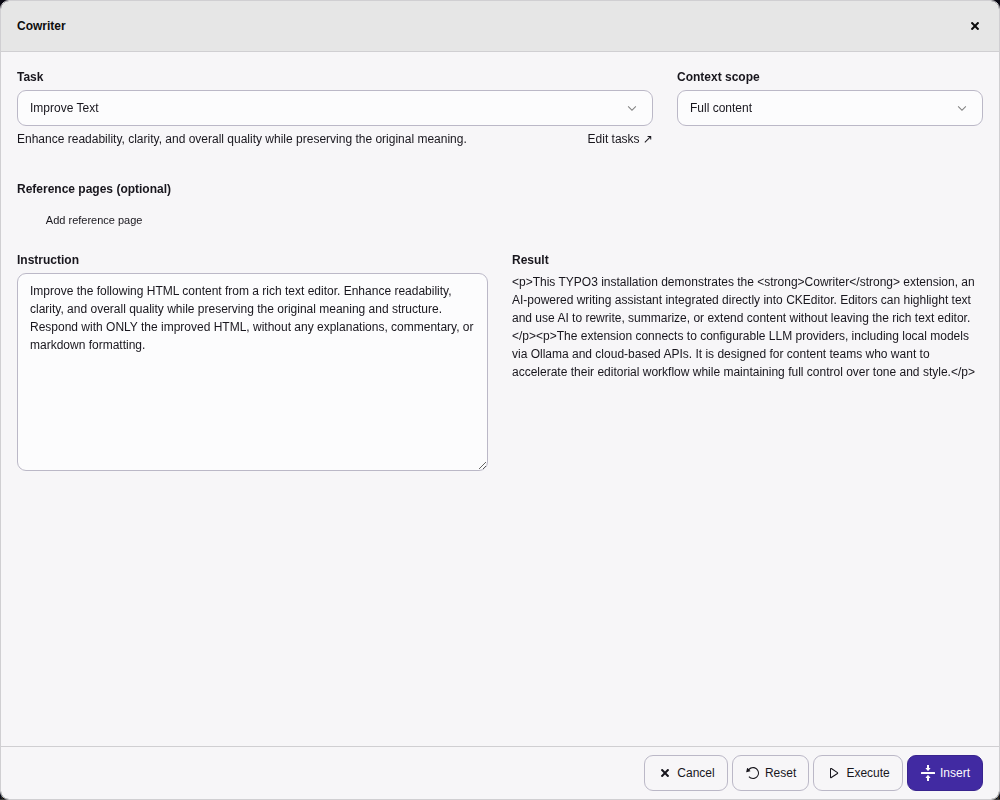
Cowriter dialog in TYPO3 v14 backend

The Cowriter dialog with task selection, context scope, instruction, and result preview in the TYPO3 v14 backend.


Introduction 

Learn what AI Cowriter does and how it can help you create content faster.

Installation 

How to install the extension via Composer.

Configuration 

Configure the LLM provider via nr-llm and RTE integration.

Usage 

How to use the AI Cowriter button in CKEditor.

API Reference 

AJAX endpoint documentation for developers.


Table of contents
Introduction 

What does it do? 

The AI Cowriter extension integrates multiple LLM providers directly into the TYPO3 CKEditor, allowing editors to generate content with the help of artificial intelligence. Using the nr-llm extension, it supports OpenAI, Anthropic Claude, Google Gemini, OpenRouter, Mistral, and Groq.

Did you ever wish to have a second person to work on a TYPO3 page together with you? This extension allows you to do exactly that. With the help of AI you can now work on a page together with a cowriter - a digital assistant that helps you to write your content.

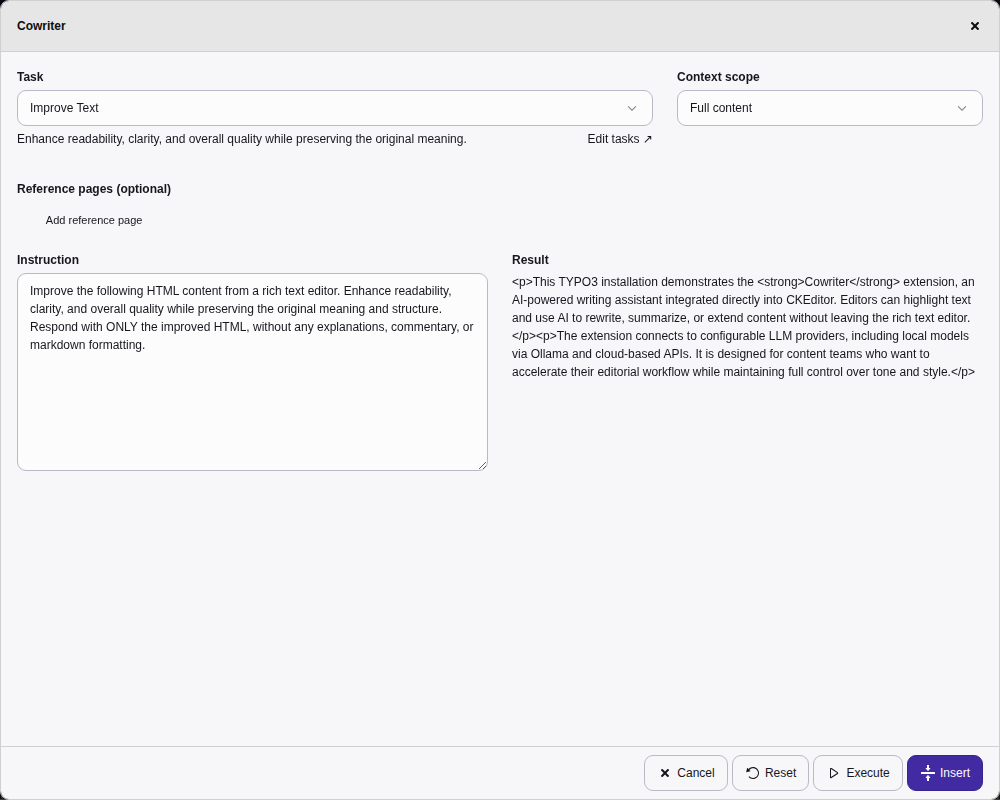
Cowriter task dialog in TYPO3 backend

The Cowriter dialog with task selection, context scope control, and additional instructions.

Features 

  • Task-based dialog: Select from predefined tasks (Improve, Summarize, Extend, Fix Grammar, Translate) with result preview before inserting
  • Inline translation: Translate selected text directly from a toolbar dropdown — supports 10 languages (German, English, French, Spanish, Italian, Dutch, Portuguese, Polish, Japanese, Chinese)
  • Alt text generation: Generate image alt text via LLM vision analysis
  • Prompt templates: Apply prompt template presets from the toolbar
  • CKEditor Integration: Four toolbar buttons for writing, translation, vision, and templates
  • Multi-Provider Support: Works with all LLM providers supported by nr-llm (OpenAI, Claude, Gemini, OpenRouter, Mistral, Groq)
  • Secure Backend Proxy: API keys never exposed to frontend — all requests proxied through TYPO3 backend
  • Context control: Choose between selected text or full content element
  • Ad-hoc instructions: Add custom instructions per request
  • Rate limiting: 20 requests/minute per backend user
  • Streaming: Server-Sent Events for real-time completions
  • XSS Protection: All LLM output is HTML-escaped for defense in depth
  • Support for TYPO3 v13.4 and v14
  • Compatible with PHP 8.2 — 8.5

Requirements 

  • TYPO3 v13.4 or v14
  • PHP 8.2 or higher
  • nr-llm extension (for LLM provider configuration)
  • CKEditor (rte_ckeditor) extension

Installation 

The extension is installed via Composer only.

Composer installation 

Install via Composer (the nr-llm dependency is installed automatically):

composer require netresearch/t3-cowriter
Copied!

After installation, activate the extensions in the TYPO3 Extension Manager or via CLI:

vendor/bin/typo3 extension:activate nr_llm
vendor/bin/typo3 extension:activate t3_cowriter
Copied!

Version matrix 

Extension TYPO3 PHP
3.x 13.4 - 14 8.2 - 8.5
2.x 12.4 8.2 - 8.4
1.x 11.5 7.4 - 8.1

Migration to 3.x 

Version 3.0.0 introduces significant architectural changes:

  1. Install nr-llm extension: The LLM provider abstraction is now handled by the separate nr-llm extension.
  2. Configure providers in nr-llm: API keys and provider settings are now managed through the nr-llm configuration.
  3. Remove old configuration: The old apiKey and model settings in the t3_cowriter extension are no longer used.

Benefits of the new architecture:

  • Supports multiple LLM providers (OpenAI, Claude, Gemini, OpenRouter, Mistral, Groq)
  • API keys are securely stored on the server (not exposed to frontend)
  • Centralized LLM configuration for all extensions

Configuration 

LLM provider setup 

The Cowriter extension uses the nr-llm extension for LLM provider configuration. Configure your preferred provider in the nrllm:configuration-backend-module.

Supported providers 

  • OpenAI - GPT-5.x series, o-series reasoning models
  • Anthropic Claude - Claude 4.5 Opus, Sonnet, Haiku
  • Google Gemini - Gemini 3 Pro, Flash
  • OpenRouter - Access to 100+ models from multiple providers
  • Mistral - Mistral Large, Medium, and open models
  • Groq - Ultra-fast inference with Llama, Mixtral

Configuration steps 

  1. Navigate to Admin Tools > LLM Management
  2. Add a provider (e.g., OpenAI with your API key)
  3. Create a model configuration
  4. Create an LLM configuration and set it as default

RTE configuration 

There are two ways to configure the CKEditor integration:

Option 1: Using static PageTSconfig 

If you don't have a custom RTE configuration, include the static PageTSconfig:

  1. Go to your root page
  2. Open Page Properties > Resources
  3. Add the static PageTSconfig from t3_cowriter
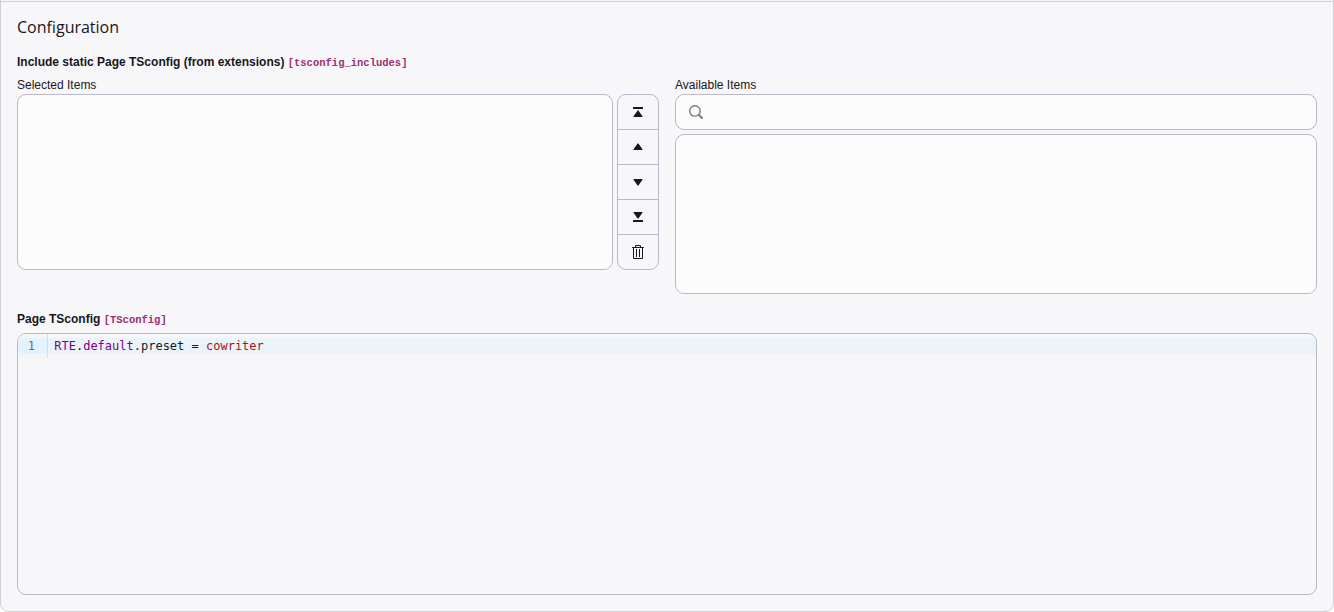
Page TSconfig configuration in TYPO3 v14

The Page TSconfig field with RTE.default.preset = cowriter.

Option 2: Custom RTE configuration 

If you have your own RTE configuration file (your_ext/Configuration/RTE/YourConfig.yaml), add the Cowriter module:

editor:
  config:
    importModules:
      - { module: '@netresearch/t3_cowriter/cowriter', exports: ['Cowriter'] }
    toolbar:
      items:
        - cowriter
        - cowriterVision
        - cowriterTranslate
        - cowriterTemplates
Copied!

The four toolbar items are:

cowriter
Main dialog — task-based content generation with preview
cowriterVision
Generate image alt text via LLM vision analysis
cowriterTranslate
Inline translation dropdown (10 languages)
cowriterTemplates
Open the Cowriter dialog with a task pre-selected

Task configuration 

The Cowriter dialog shows tasks from the nr-llm extension with category = 'content'. Default tasks (Improve, Summarize, Extend, Fix Grammar, Translate EN/DE) are seeded during installation.

Adding custom tasks 

  1. Navigate to Admin Tools > LLM Management
  2. Create a new task record with category = 'content'
  3. Set a descriptive name and identifier
  4. Write a prompt template using {{input}} as the placeholder for user content
Example prompt template
Rewrite the following text in a more engaging tone, suitable for
a marketing audience. Output ONLY the rewritten text without
explanations.

{{input}}
Copied!

Rate limiting 

The Cowriter enforces a rate limit of 20 requests per minute per backend user. When the limit is exceeded, the API returns HTTP 429 with a Retry-After header.

Security considerations 

The Cowriter extension routes all LLM requests through the TYPO3 backend, ensuring that:

  • API keys are never exposed to the frontend
  • All requests are authenticated via TYPO3's backend session
  • Error conditions are logged for debugging

Troubleshooting 

Translation not working 

If the translate button shows "Translation failed", check:

  1. An LLM provider is configured and marked as default in Admin Tools > LLM Management
  2. The provider's API key is valid and not expired
  3. The provider supports the translation feature
  4. Check the TYPO3 system log for detailed error messages

No tasks in dropdown 

If the Tasks dropdown shows "No tasks configured":

  1. Navigate to Admin Tools > LLM Management > Tasks
  2. Create at least one task with category = 'content'
  3. Make sure the task record is not hidden or deleted
  4. Reload the page in the browser to refresh the task list

API key rejected 

If you see "The LLM provider rejected the API key":

  1. Check the provider configuration in the LLM module
  2. Verify the API key is correct and has not been revoked
  3. Some providers require specific permissions or billing setup

Rate limit exceeded 

The Cowriter allows 20 requests per minute per backend user. If you hit the limit, wait a moment and try again. The Retry-After response header indicates when the limit resets.

Usage 

Using the AI Cowriter 

Once the extension is installed and configured:

  1. Open any content element with a rich text field in the TYPO3 backend
  2. You will see a new AI Cowriter button in the CKEditor toolbar
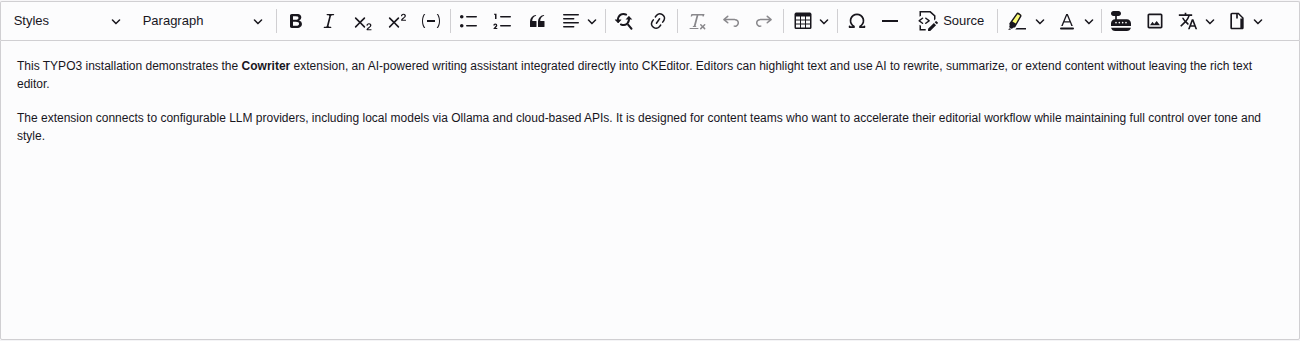
CKEditor toolbar with Cowriter button

The Cowriter button appears at the right end of the CKEditor toolbar.

  1. Optionally select the text you want to process (or leave empty to use the full content element)
  2. Click the Cowriter button — a dialog opens

Task-based dialog 

Cowriter task dialog

The Cowriter dialog with task selection, context scope, and additional instructions.

The Cowriter dialog lets you choose what to do with your content:

Task selection
Choose from predefined tasks like "Improve Text", "Summarize", "Extend / Elaborate", "Fix Grammar & Spelling", or translations. Each task has a description shown below the dropdown. You can also select "Custom instruction" to write a freeform prompt.
Context scope

Control how much context the AI receives:

  • Selection — only the highlighted text (pre-selected when you have a selection)
  • Full content — the entire editor content
  • Content element — the full tt_content record
  • Page content — all content on the current page
  • Parent page / Grandparent page — include ancestor page content for broader context

Options that require a record context (Content element and above) are disabled when the record cannot be detected.

Reference pages (optional)
Add pages whose content should be included as reference material. Search by title or UID, and specify a relation label (e.g., "style guide", "reference material").
Additional instructions (optional)
Add ad-hoc rules for the current request, e.g., "Write in formal tone" or "Keep sentences short".
Execute and preview

Click Execute to send the request to the LLM. The result appears in a preview area with model and token usage info. You can then:

  • Click Insert to replace the content in the editor
  • Click Reset to clear the result and adjust settings
  • Click Execute again to refine the result (the previous output becomes the new input)
  • Click Cancel to discard

Available tasks 

Tasks are configured in the nr-llm extension (tx_nrllm_task table) with category = 'content'. The following default tasks are provided:

Task Description
Improve Text Enhance readability and quality while preserving meaning
Summarize Create a concise summary of the content
Extend / Elaborate Add depth, detail, and examples
Fix Grammar & Spelling Correct grammar and spelling with minimal changes
Translate to English Translate content to English
Translate to German Translate content to German

Inline translation 

The Translate dropdown in the CKEditor toolbar lets you translate selected text without opening the full dialog.

  1. Select the text you want to translate
  2. Click the Translate button (globe icon) in the toolbar
  3. Choose the target language from the dropdown
  4. A notification confirms the translation is in progress
  5. The selected text is replaced with the translation

Supported languages:

  • German, English, French, Spanish, Italian
  • Dutch, Portuguese, Polish, Japanese, Chinese

The translation uses the default LLM configuration from the nr-llm extension. Administrators can optionally pass a configuration parameter via the API to route translations through a specific LLM provider (e.g. DeepL or a dedicated translation model).

Alt text generation 

The Vision button (image icon) generates alt text for images using LLM vision analysis.

  1. Click on an image in the editor to select it
  2. Click the Vision button in the toolbar
  3. A notification confirms the analysis is in progress
  4. The alt text is set on the image automatically

Tasks shortcut 

The Tasks dropdown (document icon) lets you open the Cowriter dialog with a specific task pre-selected, skipping the task selection step.

  1. Click the Tasks button (document icon) in the toolbar
  2. Select a task from the dropdown (tasks are loaded from nr-llm)
  3. The Cowriter dialog opens with the chosen task pre-selected
  4. Review, optionally adjust instructions, and execute

Tasks are loaded once when you first open the dropdown and cached for the duration of the editing session. If you create new tasks in the LLM module, reload the page to see them in the dropdown.

Model override 

You can override the default model for a specific prompt by using the #cw: prefix followed by the model identifier:

#cw:gpt-5.2-thinking Write a detailed technical analysis of our API architecture
Copied!

The model name must match a model available in your configured LLM provider. Valid model names follow the pattern: alphanumeric characters, hyphens, underscores, dots, colons, and forward slashes.

API Reference 

The Cowriter extension exposes several AJAX endpoints under /typo3/ajax/cowriter/. All endpoints require an authenticated backend session.

Common response format 

All endpoints return JSON with a success boolean. On error, an error string describes the problem.

Rate limit headers are included on every response:

  • X-RateLimit-Limit — maximum requests per window
  • X-RateLimit-Remaining — requests remaining in current window
  • Retry-After — seconds until reset (only on HTTP 429)

Completion endpoints 

POST /cowriter/complete 

Generate a completion from a prompt using the default or specified LLM configuration.

Request body:

{
    "prompt": "Write an introduction about TYPO3",
    "configuration": "openai-default"
}
Copied!

Response (200):

{
    "success": true,
    "content": "TYPO3 is a powerful...",
    "model": "gpt-5.2",
    "finishReason": "stop",
    "wasTruncated": false,
    "wasFiltered": false,
    "usage": {
        "promptTokens": 50,
        "completionTokens": 120,
        "totalTokens": 170
    }
}
Copied!

POST /cowriter/stream 

Stream a completion via Server-Sent Events (SSE). Same request format as /cowriter/complete.

Returns text/event-stream with JSON chunks:

data: {"content": "TYPO3 ", "done": false}
data: {"content": "is a ", "done": false}
data: {"content": "powerful...", "done": true, "model": "gpt-5.2"}
Copied!

POST /cowriter/task-execute 

Execute a predefined task with context assembly.

Request body:

{
    "taskIdentifier": "improve-text",
    "instruction": "Improve this text",
    "context": "<p>Current editor content</p>",
    "contextScope": "content_element",
    "configuration": "openai-default",
    "referencePages": [
        {"pid": 42, "relation": "style guide"}
    ]
}
Copied!

Translation 

POST /cowriter/translate 

Translate text to a target language.

Request body:

{
    "text": "Hello world",
    "targetLanguage": "de",
    "formality": "formal",
    "domain": "technical",
    "configuration": "claude-fast"
}
Copied!

formality defaults to "default", domain defaults to "general". configuration is optional.

Response (200):

{
    "success": true,
    "translation": "Hallo Welt",
    "sourceLanguage": "en",
    "confidence": 0.95,
    "usage": {
        "promptTokens": 30,
        "completionTokens": 10,
        "totalTokens": 40
    }
}
Copied!

Vision / Alt text 

POST /cowriter/vision 

Analyze an image and generate descriptive alt text.

Request body:

{
    "imageUrl": "https://example.com/photo.jpg",
    "prompt": "Generate a concise, descriptive alt text for this image."
}
Copied!

The prompt defaults to a standard alt text generation prompt if omitted.

Response (200):

{
    "success": true,
    "altText": "A red bicycle parked against a brick wall",
    "model": "gpt-5.2",
    "confidence": 0.92,
    "usage": {
        "promptTokens": 200,
        "completionTokens": 15,
        "totalTokens": 215
    }
}
Copied!

Templates 

GET /cowriter/templates 

List available prompt templates (tasks with category = 'content').

Response (200):

{
    "success": true,
    "templates": [
        {
            "identifier": "improve-text",
            "name": "Improve Text",
            "description": "Enhance readability and quality",
            "category": "content"
        }
    ]
}
Copied!

Tool calling 

POST /cowriter/tools 

Execute an LLM request with tool calling capabilities.

Request body:

{
    "prompt": "Find all headings in the content",
    "tools": ["query_content"]
}
Copied!

tools is an optional array of tool names to enable. If omitted, all available tools are enabled.

Response (200):

{
    "success": true,
    "content": "I found 3 headings...",
    "toolCalls": [],
    "finishReason": "stop",
    "usage": {
        "promptTokens": 100,
        "completionTokens": 50,
        "totalTokens": 150
    }
}
Copied!

Configurations 

GET /cowriter/configurations 

List active LLM configurations available for selection.

Response (200):

{
    "success": true,
    "configurations": [
        {
            "identifier": "openai-default",
            "name": "OpenAI GPT-5.2",
            "isDefault": true
        }
    ]
}
Copied!

Error responses 

All endpoints use standard HTTP status codes:

  • 400 — Invalid JSON, missing required fields, or fields exceeding maximum length (32 KB)
  • 429 — Rate limit exceeded (includes Retry-After header)
  • 500 — LLM service error
{
    "success": false,
    "error": "Missing or empty text parameter."
}
Copied!