Site Generator 

Extension key

site_generator

Version

master

Language

en

Description

Site generator/tree model duplicator backend wizard

Keywords

backend, site generation, tree duplication, site factory

Copyright

2020

Author

Florian Rival

Email

florian.typo3@oktopuce.fr

Website

https://www.oktopuce.fr

License

Open Content License available from www.opencontent.org/opl.shtml

Rendered

Fri, 07 Nov 2025 09:17:55 +0000

With this extension, you can very easily create websites or duplicate tree, it will automatically create associated BE/FE groups, create directories with associated files mount, add domain name and site configuration, update TypoScript configuration (folders/pages ID and TCEMAIN.clearCacheCmd), update slugs. Based on State Design Pattern, it is highly customizable : you can remove unnecessary states and add your own states to fit your own needs.

Table of Contents
Introduction 

What does it do? 

This extension provide an easy way to create mini-websites or duplicate a tree in the backend. For this purpose, the extension uses a model that you defined according to your own needs which can be tailored through forms.

Once the model is duplicated, the extension will automatically :

  • create associated BE/FE groups
  • set access group for created tree
  • create directories and files mount
  • add domain name
  • create site configuration
  • update TypoScript configuration (folders/pages ID and TCEMAIN.clearCacheCmd)
  • update slugs for URL rewriting

What a model is ? 

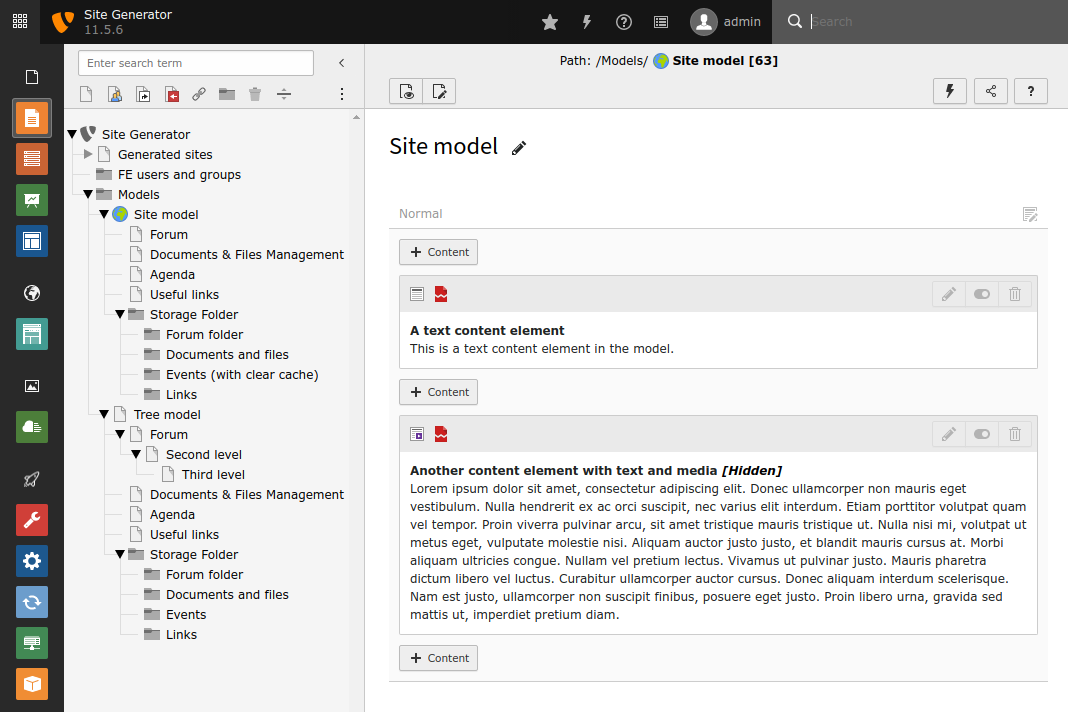
A model is a dedicated parts of TYPO3 tree with pages, content elements, plugins, templates.

You can use as many models as you want.

Sample model

Screenshots 

Start the wizard 

Start the wizard

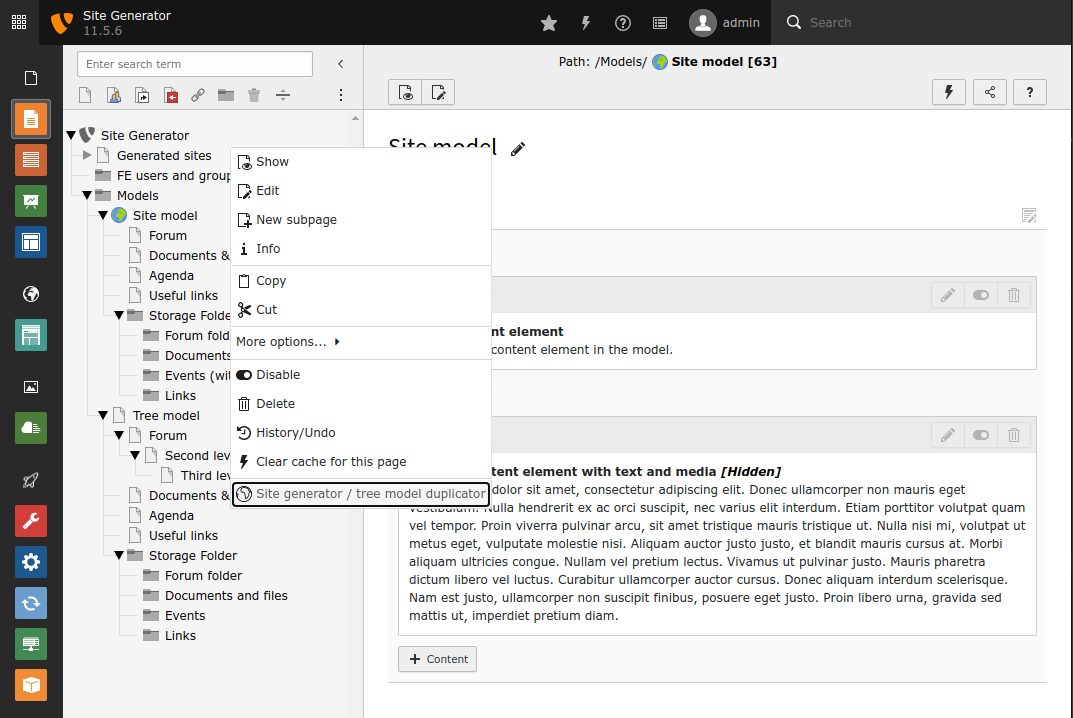
Start the site generator wizard

Right click on a page specified by extension configuration to start the site generation process

Fill mandatory data 

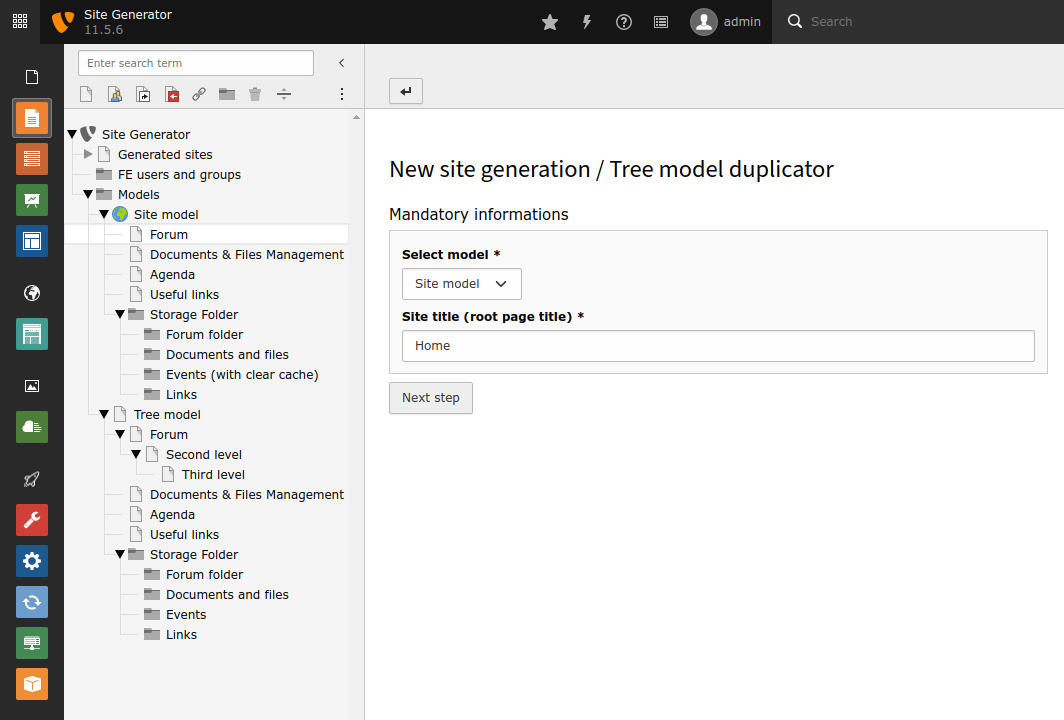
First form

Set the mandatory data

Select the model (if required) and set first page title

Fill optional data 

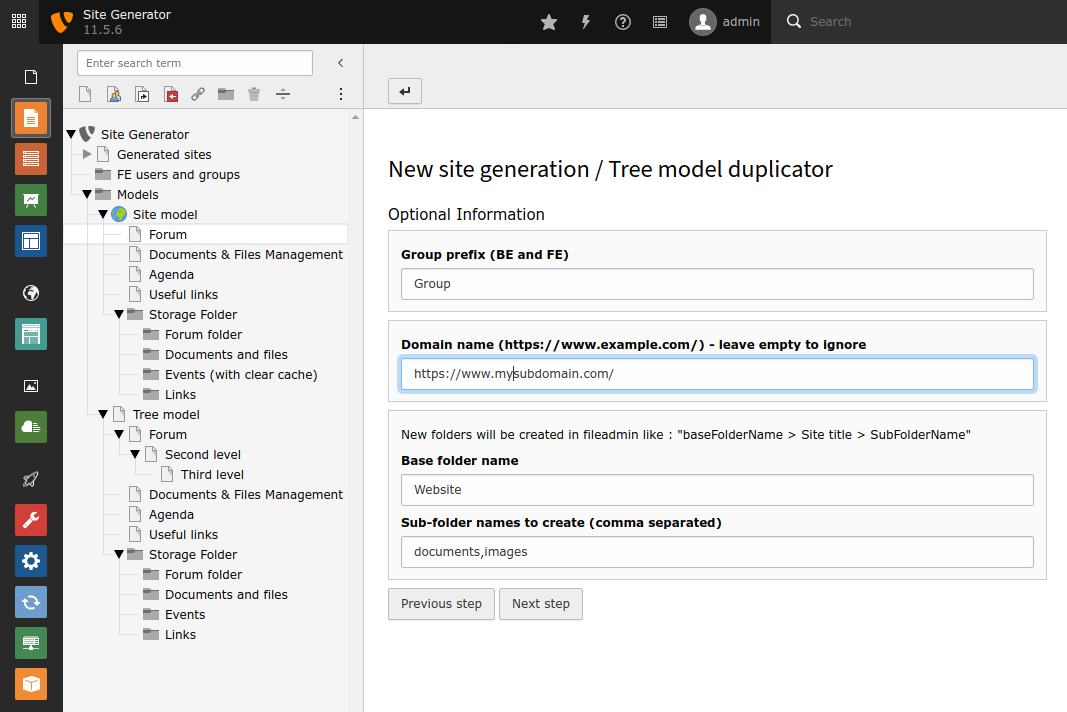
Second form

Set the optional data

Set optional data (this step can be bypass with extension configuration)

Generation finished 

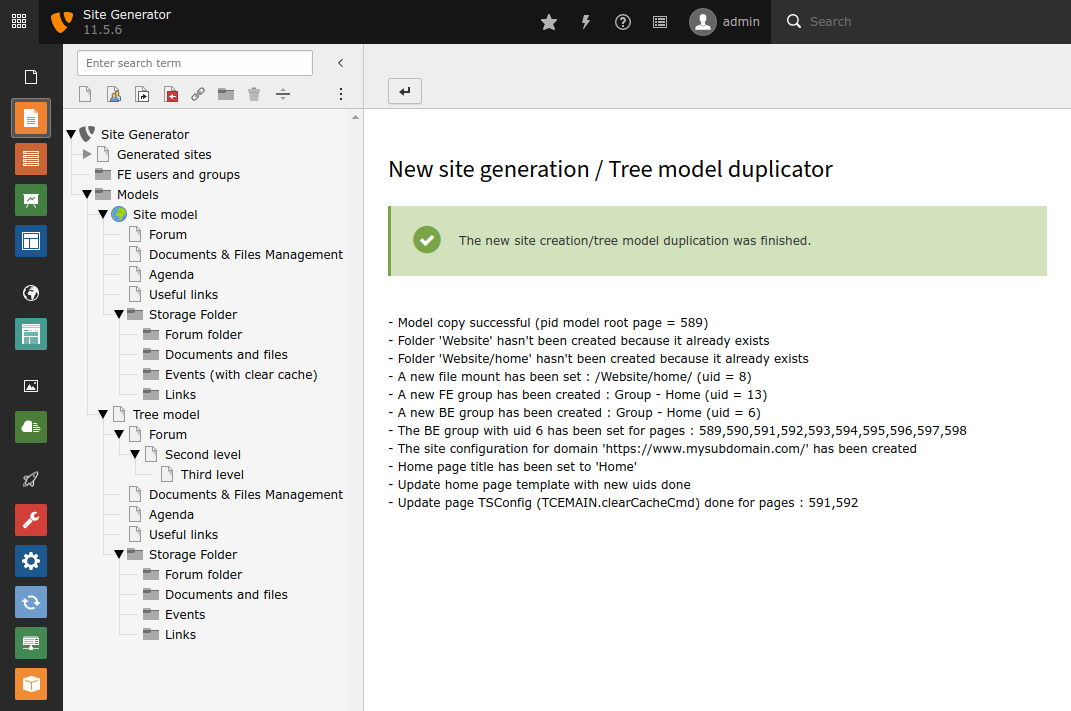
Generation finished

Display a résumé of all steps

When the generation is finished, a résumé of all states is displayed

Need Support? 

If you need a feature which is not yet implemented, feel free to contact me!

Development 

If you need a freelance developer for site_generator customization or for other developments, I'll be happy to exchange with you.

Installation 

Composer based instance 

If you base your TYPO3 instance on a modern composer based installation, just require the package via composer:

composer require oktopuce/site-generator
Copied!

Then go to the backend extension manager and load the extension in "Installed Extensions".

TYPO3 download based instance 

The extension needs to be installed as any other extension of TYPO3 CMS:

  1. Switch to the module “Extension Manager”.
  2. Get the extension

    1. Get it from the Extension Manager: Press the “Retrieve/Update” button and search for the extension key site_generator and import the extension from the repository.
    2. Get it from typo3.org: You can always get current version from http://typo3.org/extensions/repository/view/site_generator/current/ by downloading either the t3x or zip version. Upload the file afterwards in the Extension Manager.
  3. The Extension Manager offers some basic configuration which is explained here.

Latest version from git 

You can get the latest version from git by using the git command:

git clone https://github.com/Oktopuce/site_generator.git
Copied!

For administrators 

Target group: Developers, Integrators

Minimal setup 

  1. Install the extension
  2. Create your model and a root page where sites can be generated
  3. Within Extension Manager configuration, set 'Models Pid' and 'Sites Pid'
  4. If FE group creation is needed :

    • Create a folder page for FE group creation
    • Set FE group folder pid in TypoScript Constants : pidFeGroup
  5. Then you can call the wizard on 'Sites Pid' pages

Set pidFeGroup in TypoScript Constants :

module.tx_sitegenerator {
    settings {
        siteGenerator {
            wizard {
                pidFeGroup = xxx
            }
        }
    }
}
Copied!

If you only need Tree Duplication, you can change TypoScript Setup like this :

module.tx_sitegenerator {
    settings {
        siteGenerator {
            wizard {
                steps >
                steps {
                    10 = Oktopuce\SiteGenerator\Wizard\StateCopyModelSite
                    20 = Oktopuce\SiteGenerator\Wizard\StateUpdateHomePage
                    30 = Oktopuce\SiteGenerator\Wizard\StateUpdateTemplateHP
                    40 = Oktopuce\SiteGenerator\Wizard\StateUpdatePageTs
                    50 = Oktopuce\SiteGenerator\Wizard\StateUpdateSlugs
                }
            }
        }
    }
}
Copied!

Configuration 

Those chapters describes how the extension can be configured

TypoScript 

Here you can find the module configuration available in TypoScript.

Any setting needs to be prefixed with module.tx_sitegenerator.settings.siteGenerator.wizard.

formDto 

Property
formDto
Data type
string
Default
Oktopuce\SiteGenerator\Dto\SiteGeneratorDto
Description
Class name for DTO (Data Transfer Object) used for data exchange between form and wizard

pidFeGroup 

Property
pidFeGroup
Data type
integer
Default
0
Description
Page Id for FE group creation - should be a folder - if set to 0, no FE group will be created

storageUid 

Property
storageUid
Data type
integer
Default
1
Description
Storage uid used for folder creation (0 = no folder creation, 1 = default storage - i.e. fileadmin)

hideHomePage 

Property
hideHomePage
Data type
boolean
Default
0
Description
Set this to '1' if you want to set home page as hidden
.. New::

Since version 3.1 TypoScript configuration (setup only) can also be overridden with Page TSConfig

Extension Manager 

Some general settings can be configured in the Extension Manager. If you need to configure those, switch to the module Settings > Extension Configuration and select the extension "site_generator".

The settings are divided into several tabs and described here in detail:

Properties 

Property Tab Default
onlyOneFormPage basic false
commonMountPointUid basic  
modelsPid basic  
sitesPid basic  
homePageTitle label Home
groupPrefix label Group
baseFolderName folder Website
subFolderNames folder documents, images
groupMods access lists web_layout,web_ViewpageView,web_list,file_FilelistList,user_setup
tablesSelect access lists pages,sys_file,sys_file_metadata,sys_file_reference,tt_content
tablesModify access lists pages,sys_file,sys_file_metadata,sys_file_reference,tt_content
explicitAllowdeny access lists tt_content:CType:media:ALLOW,tt_content:CType:textteaser:ALLOW,tt_content:CType:text:ALLOW,tt_content:CType:textpic:ALLOW,tt_content:CType:image:ALLOW,tt_content:CType:textmedia:ALLOW
siteIdentifierPrefix site configuration siteGenerator-
langTitle site configuration English
locale site configuration en_US.UTF-8
iso-639-1 site configuration en
navigationTitle site configuration English
hreflang site configuration en-US
direction site configuration ltr
flag site configuration en-us-gb

Property details 

onlyOneFormPage 

By default there are two configuration pages - one for mandatory data and another one for optional data - to set wizard data. Set this to true if you need only one configuration page.

commonMountPointUid 

Here you can set the uid of a commun mount point for all sites, this mount point will then be available for each duplicated tree.

modelsPid 

Models page uids used for news site generation. You can have several model pids separated with comma.

sitesPid 

Pages uid where sites can be created, use comma for multiple values. The site generator wizard will only be available on that pages.

homePageTitle 

Define here the title used for the home page of each subsite - can be overridden in wizard form.

groupPrefix 

If set when a new FE or BE group is created, the group title will be prepended with this string - can be overridden in wizard form.

baseFolderName 

This is the name of the base folder used for each subsite mount point - can be overridden in wizard form.

subFolderNames 

The names of the sub-folders to create inside "baseFolderName/site_title/" - comma separated, can be overridden in wizard form.

groupMods 

List of allowed modules for BE group (comma separated)

tablesSelect 

Listing of tables that can be select for BE group (comma separated)

tablesModify 

List of tables that can be modified for BE group (comma separated)

explicitAllowdeny 

Set tt_content allowed CType for BE group (comma separated)

siteIdentifierPrefix 

The prefix used for site identifier in site configuration

langTitle 

The language title (ex : English)

locale 

Locale used for localized date and currency formats. E.g. "de_DE" or "en_US.UTF-8".

iso-639-1 

Two letters of ISO 639-1 code of the language, sample : en, fr

hreflang 

The language tag defined by RFC 1766 / 3066. Used within for "lang" and "hreflang" attributes, sample : en-US, fr-FR

direction 

The language direction for "dir" attribute : empty (none), ltr or rtl

flag 

The language flag icon, sample : en-us-gb, fr

Site configuration 

Since version 3.2.0 you can override all extension configuration setting with site configuration.

To override the configuration, you must modify the site configuration file config.yaml - property names are the same as extension configuration.

Overriding extension configuration with site configuration 

Add a siteGenerator section with any settings that need to be overridden.

config/sites/<identifier>/config.yaml
rootPageId: 12
base: 'https://example.org/'
websiteTitle: Example
siteGenerator:
  modelsPid: 61,71
  commonMountPointUid: 8
  homePageTitle: The page title overloaded
  onlyOneFormPage: 0
Copied!

Model 

The site generator wizard is based on models, models are dedicated parts of TYPO3 tree with pages, content elements, plugins, templates.

Update TypoScript constant in Home Page template 

The model home page template could have many TypoScript constants defined for pages, tt_content, custom tables, etc.

You can add some comments in the model constant template in order to give some directives for the mapping between old uid and new uid. You can also defined your own directives, have a look at event listener.

Sample 

plugin.tx_myplugin {
  settings {
      # Nothing specified : assume it's a page ID
      pidFeGroup = 12

      # Exclude the following line from mapping : works for all tables
      # ext=SiteGenerator; action=exclude
      storageUid = 69

      # Search for 'tt_content' in MappingArray
      # ext=SiteGenerator; table=tt_content
      someContentElements = 29,30

      # Map all values in the string and exclude some of them
      # ext=SiteGenerator; table=tt_content; action=mapInString; ignoreUids=29,30
      multipleCeWithIgnore := addToList(28,29,30)

      # For custom action you must used the event UpdateTemplateHPEvent
      # ext=SiteGenerator; action=customAction; parameters=custom parameters
      forACustomAction = 515,516
  }
}
Copied!

The available directives are :

Directive

Description

Sample

Mandatory

ext

Must be set in order to get other directives

ext=SiteGenerator

Yes

table

The table name used for the mapping, if not set default is 'tables'

table=tt_content

No

action

There are three actions available, exclude : exclude the row - mapInList : map values in a list like "1,2,3" or addToList(4,6,7,48) - mapInString map values in a string like "temp.link = t3://page?uid=54&my=param&will=get&added=here"

action=mapInList

No

ignoreUids

List of uids to ignore - comma separated

ignoreUids=777,888

No

Page TSConfig 

Since version 3.1 TypoScript configuration (setup only) can also be overridden with Page TSConfig.

The configuration set with Page TSConfig will be merged with default configuration and default values will be overridden.

Sample 

module.tx_sitegenerator {
    settings {
        siteGenerator {
            wizard {
                 # Remove all steps
                 steps.clear = 1
                 steps {
                    10 = Oktopuce\SiteGenerator\Wizard\StateCopyModelSite
                    20 = Oktopuce\SiteGenerator\Wizard\StateUpdateHomePage
                    30 = Oktopuce\SiteGenerator\Wizard\StateUpdateTemplateHP
                    40 = Oktopuce\SiteGenerator\Wizard\StateUpdatePageTs
                    50 = Oktopuce\SiteGenerator\Wizard\StateUpdateSlugs
                }
                formDto = Oktopuce\SiteGeneratorCustomized\Dto\SiteGeneratorDto
            }
        }
    }
}
Copied!

You can also override the backend templates with Page TSConfig :

templates.oktopuce/site-generator.templateRootPaths = oktopuce/site-generator:../site_generator_customized/Resources/Private/OtherTemplates
Copied!

Developer Corner 

Target group: Developers

The site_generator extension is highly customizable, this chapter describes the basics of the extension and explain how to extend it in order to fit your own needs :

  • add customs states
  • add specific data to forms
  • change wizard steps

The site_generator wizard is based on State Design Pattern :

SiteGeneratorDtoStateBaseSiteGeneratorWizardsetNextWizardState()StateBase currentStateBaseDto siteDataprotected dataStateCopyModelSiteprocess($context:SiteGeneratorWizard)StateCreateFileMountprocess($context:SiteGeneratorWizard)StateCreateFolderprocess($context:SiteGeneratorWizard)StateCreateFeGroupprocess($context:SiteGeneratorWizard)States comes from TypoScript SetupData Transfer Object From forms wizardcurrentState

The wizard get states from TypoScript Setup and form data through SiteGeneraorDto.

For full customization, I suggest to create your own extension, this is how it is suppose to be in following section, the tree structure looks like this :

.
├── Classes
│   ├── Dto
│   │   └── SiteGeneratorDto.php
│   ├── EventListener
│   │   ├── VariablesForFirstView.php
│   │   └── VariablesForSecondView.php
│   └── Wizard
│       └── StateCreateFeGroup.php
├── Configuration
│   └── Services.yml
├── composer.json
├── ext_emconf.php
├── ext_localconf.php
├── ext_typoscript_constants.typoscript
├── ext_typoscript_setup.typoscript
└── Resources
    └── Private
        └── Partials
             ├── FirstStepForm.html
             └── SecondStepForm.html
Copied!

File details 

TypoScript 

Configure you extension in order to use your own forms and customize the wizard states.

ext_typoscript_constants.typoscript 

module.tx_sitegenerator {
    settings {
        siteGenerator {
            wizard {
                // Custom form DTO
                formDto = Oktopuce\SiteGeneratorCustomized\Dto\SiteGeneratorDto
                // Pid for FE group creation
                pidFeGroup = 20
                // Base FE group UID
                baseFeGroupUid = 6
            }
        }
    }
}
Copied!

ext_typoscript_setup.typoscript 

# Clear all default states and set new Wizard steps
module.tx_sitegenerator.settings.siteGenerator.wizard.steps >
module.tx_sitegenerator {
    settings {
        siteGenerator {
            wizard {
                steps {
                    10 = Oktopuce\SiteGenerator\Wizard\StateCopyModelSite
                    20 = Oktopuce\SiteGeneratorCustomized\Wizard\StateCreateFeGroup
                    30 = Oktopuce\SiteGenerator\Wizard\StateUpdateHomePage
                    40 = Oktopuce\SiteGenerator\Wizard\StateUpdateTemplateHP
                    50 = Oktopuce\SiteGenerator\Wizard\StateUpdatePageTs
                    60 = Oktopuce\SiteGenerator\Wizard\StateUpdateSlugs
                }
                baseFeGroupUid = {$module.tx_sitegenerator.settings.siteGenerator.wizard.baseFeGroupUid}
            }
        }
    }
}
Copied!
20 = Oktopuce\SiteGeneratorCustomized\Wizard\StateCreateFeGroup
Copied!

Data Transfer Object 

In the DTO we define all data required in the forms, the wizard will automatically affect form's data to the DTO.

declare(strict_types=1);

namespace Oktopuce\SiteGeneratorCustomized\Dto;

class SiteGeneratorDto extends \Oktopuce\SiteGenerator\Dto\SiteGeneratorDto
{

   /**
   * My customized data from form
   *
   * @var string
   */
   protected $customizedData = '';

   /**
   * FE User
   *
   * @var int
   */
   protected $feUser = 0;

   /**
   * CustomizedData
   *
   * @param string $customizedData
   * @return void
   */
   public function setCustomizedData(string $customizedData): void
   {
      $this->customizedData = $customizedData;
   }

   /**
   * Get customizedData
   *
   * @return string
   */
   public function getCustomizedData(): string
   {
      return $this->customizedData;
   }

   /**
   * FeUser
   *
   * @param int $feUser
   * @return void
   */
   public function setFeUser(int $feUser): void
   {
      $this->feUser = $feUser;
   }

   /**
   * Get feUser
   *
   * @return int
   */
   public function getFeUser(): int
   {
      return $this->feUser;
   }
}
Copied!

DTO can extend class SiteGeneratorDto or BaseDto :

class SiteGeneratorDto extends \Oktopuce\SiteGenerator\Dto\SiteGeneratorDto
Copied!
class SiteGeneratorDto extends \Oktopuce\SiteGenerator\Dto\BaseDto
Copied!

Event listener (PSR-14 Events) 

The are three event dispatchers used in the extension, two of them are used to assign data to the Fluid Template forms and the third one is used to customize mapping of home page constants with custom directives.

Event Description
BeforeRenderingFirstStepViewEvent Assign data to first form
BeforeRenderingSecondStepViewEvent Assign data to second form
UpdateTemplateHPEvent Custom directives for constants in home page template

Implementing an event listener in your extension 

If you need to provide an event listener in your extension, you have to :

  • register the listener in Configuration/Services.yaml
  • create an event listener class

Configuration/Services.yaml 

Register event listener as follow ...

services:
   Oktopuce\SiteGeneratorCustomized\EventListener\VariablesForFirstView:
      tags:
         - name: event.listener
         identifier: 'customizeFirstStep'
         event: Oktopuce\SiteGenerator\Wizard\Event\BeforeRenderingFirstStepViewEvent

   Oktopuce\SiteGeneratorCustomized\EventListener\VariablesForSecondView:
      tags:
         - name: event.listener
         identifier: 'customizeSecondtStep'
         event: Oktopuce\SiteGenerator\Wizard\Event\BeforeRenderingSecondStepViewEvent

   Oktopuce\SiteGeneratorCustomized\EventListener\UpdateTemplateHP:
      tags:
         - name: event.listener
           identifier: 'updateTemplateHP'
           event: Oktopuce\SiteGenerator\Wizard\Event\UpdateTemplateHPEvent
Copied!

Classes/EventListener/VariablesForFirstView.php 

... and assign needed variables in the listener with event dispatcher method addViewVariables(array $variables);

declare(strict_types=1);

namespace Oktopuce\SiteGeneratorCustomized\EventListener;

use TYPO3\CMS\Extbase\Persistence\QueryInterface;
use TYPO3\CMS\Extbase\Persistence\Generic\Typo3QuerySettings;
use TYPO3\CMS\Extbase\Domain\Repository\FrontendUserRepository;
use Oktopuce\SiteGenerator\Wizard\Event\BeforeRenderingFirstStepViewEvent;

class VariablesForFirstView
{
   /**
   * @var FrontendUserRepository
   */
   protected $frontendUserRepository = null;

   /**
   * @var Typo3QuerySettings
   */
   protected $typo3QuerySettings = null;

   /**
   * Class constructor
   *
   * @param PageRenderer $pageRenderer
   * @param Typo3QuerySettings $typo3QuerySettings
   */
   public function __construct(FrontendUserRepository $frontendUserRepository, Typo3QuerySettings $typo3QuerySettings)
   {
      $this->frontendUserRepository = $frontendUserRepository;
      $this->typo3QuerySettings = $typo3QuerySettings;
   }

   /**
   * __invoke
   *
   * @param  array $viewVariables
   * @return void
   */
   public function __invoke(BeforeRenderingFirstStepViewEvent $event): void
   {
      $this->typo3QuerySettings->setRespectStoragePage(false);
      $this->frontendUserRepository->setDefaultOrderings([
            'name' => QueryInterface::ORDER_ASCENDING
      ]);
      $this->frontendUserRepository->setDefaultQuerySettings($this->typo3QuerySettings);

      $feUsers = $this->frontendUserRepository->findAll();

      $event->addViewVariables(['feUsers' => $feUsers]);
   }
}
Copied!

In this example, we assigned feUsers variable to first Fluid Template form.

Custom directives for constants in home page template 

Sample customize directives for TypoScript constants mapping with some TypoScript directives in home page model template.

TypoScript constants in home page model template 

plugin.tx_myplugin {
  settings {
      # ext=SiteGenerator; action=customAction; parameters=custom parameters
      forACustomAction = 515,516
  }
}
Copied!

Classes/EventListener/UpdateTemplateHP.php 

declare(strict_types=1);

namespace Oktopuce\SiteGeneratorCustomized\EventListener;

use Oktopuce\SiteGenerator\Wizard\Event\UpdateTemplateHPEvent;

class UpdateTemplateHP
{
    /**
     * __invoke
     *
     * @param UpdateTemplateHPEvent $event
     * @return void
     */
    public function __invoke(UpdateTemplateHPEvent $event): void
    {
        $action = $event->getAction();
        if ($action == 'customAction') {
            $parameters = $event->getParameters();
            $value = $event->getValue();
            $dataMapping = $event->getFilteredMapping();
            $updatedValue = "params = $parameters - value = $value - dataMapping = " . implode(',', $dataMapping);

            $event->setUpdatedValue($updatedValue);
        }
    }
}
Copied!

Templates 

There are two templates used by the wizard, the first one is used for mandatory data, the second one for optional data. You can specified in Extension configuration that you want to use only the first template.

Customized your templates 

In order to use your own templates, you have to create a new file in you extension:

<your_extension_name>Configuration/page.tsconfig

with this content :

templates.oktopuce/site-generator.templateRootPaths = oktopuce/site-generator:../<your_extension_name>/Resources/Private
Copied!

replace <your_extension_name> with your own extension.

Partials/FirstStepForm.html 

First form used for mandatory data, copy/paste Fluid Template from site_generator extension and add your custom data. Here is a sample with custom data added in our DTO : customizedData & feUser

<div class="row">
    <div class="form-group col-xs-12 col-md-4">
        <label class="t3js-formengine-label">Cusomized data *</label>
        <div class="form-control-clearable">
            <f:form.textfield property="customizedData" value="{siteDto.customizedData}" required="1"
                              class="form-control t3js-clearable hasDefaultValue t3js-charcounter-initialized" />
        </div>
    </div>
</div>
<div class="row">
    <div class="form-group col-xs-12 col-md-6">
        <label class="t3js-formengine-label">Select FE user *</label>
        <div class="form-control-clearable">
            <f:form.select property="feUser" value="{siteDto.feUser}" options="{feUsers}"
                           optionValueField="uid" optionLabelField="name"
                           class="form-control form-control-adapt form-select" />
        </div>
    </div>
</div>
Copied!

Partials/SecondStepForm.html 

Second form used for optional data.

Wizard 

In Wizard folder we add all our custom states for the wizard, in this example we add a custom state for FE user generation.

All states are declared in TypoScript Setup for the wizard to know about them.

declare(strict_types=1);

namespace Oktopuce\SiteGeneratorCustomized\Wizard;

use TYPO3\CMS\Core\Utility\GeneralUtility;
use TYPO3\CMS\Core\Log\LogLevel;
use TYPO3\CMS\Core\DataHandling\DataHandler;
use Oktopuce\SiteGenerator\Wizard\SiteGeneratorWizard;
use Oktopuce\SiteGenerator\Wizard\SiteGeneratorStateInterface;
use Oktopuce\SiteGenerator\Wizard\StateBase;
use Oktopuce\SiteGeneratorCustomized\Dto\SiteGeneratorDto;

/**
* StateCreateFeGroup
*/
class StateCreateFeGroup extends StateBase implements SiteGeneratorStateInterface
{
   /**
   * Create FE user group
   *
   * @param SiteGeneratorWizard $context
   * @return void
   */
   public function process(SiteGeneratorWizard $context): void
   {
      $settings = $context->getSettings();

      // Create FE group
      $groupId = $this->createFeGroup($context->getSiteData(), (int)$settings['siteGenerator']['wizard']['pidFeGroup'], (int)$settings['siteGenerator']['wizard']['baseFeGroupUid']);
      $context->getSiteData()->setFeGroupId($groupId);
   }

   /**
   * Create FE group
   *
   * @param SiteGeneratorDto $siteData New site data
   * @param int $pidFeGroup Pid for FE group creation
   * @param int $baseFeGroupUid Base Workgroup UID
   * @throws \Exception
   *
   * @return int The uid of the group created
   */
   protected function createFeGroup(SiteGeneratorDto $siteData, int $pidFeGroup, int $baseFeGroupUid): int
   {
      // Create a new FE group with specific subgroup
      $data = [];
      $newUniqueId = 'NEW' . uniqid();
      $groupName = $siteData->getCustomizedData() . ' - ' . $siteData->getTitle();
      $data['fe_groups'][$newUniqueId] = [
            'pid' => $pidFeGroup,
            'title' => $groupName,
            'subgroup' => $baseFeGroupUid
      ];

      /* @var $tce DataHandler */
      $tce = GeneralUtility::makeInstance(DataHandler::class);
      $tce->start($data, []);
      $tce->process_datamap();

      // Retrieve uid of user group created
      $groupId = $tce->substNEWwithIDs[$newUniqueId];

      if ($groupId > 0) {
            $this->log(LogLevel::NOTICE, 'Create FE group successful (uid = ' . $groupId);
            $siteData->addMessage($this->translate('generate.success.feGroupCreated', [$groupName, $groupId]));
      }
      else {
            $this->log(LogLevel::ERROR, 'Create FE group error');
            throw new \Exception($this->translate('wizard.feGroup.error'));
      }

      return ($groupId);
   }
}
Copied!

Change log 

v3.2.7 

2025-11-07 [BUGFIX] Fix site configuration generation with TYPO V13 (Commit 20c4ebb by Florian RIVAL)
Copied!

v3.2.6 

2025-10-17 [TASK] Patch to skip DataHandler operations on be_groups table (Commit f7d320c by Florian RIVAL)
Copied!

v3.2.5 

2025-03-07 [TASK] Apply rector, fractor and php-cs-fixer recommendations (Commit 5a6a67f by Florian RIVAL)
Copied!

v3.2.4 

2025-01-23 [TASK] Apply php-cs-fixer recommendations (commit: ea998f9 by Florian RIVAL)
2025-01-23 [TASK] Apply rector recommendations (commit: edea9c2 by Florian RIVAL)
2025-01-23 [TASK] Use StringUtility::getUniqueId to ge   nerate ID (commit: 27b4fe5 by Florian RIVAL)
Copied!

V3.2.3 

2025-01-21 [BUGFIX] Correct filemount path (commit: efed4ef by Florian RIVAL)
2025-01-20 [TASK] Disable limits (memory_limit and max_execution_time) (commit: abccb03 by Florian RIVAL)
Copied!

V3.2.2 

2024-10-23 [TASK] Add the availability to override sitePid with site configuration (commit: f85faa0 by Florian RIVAL)
Copied!

V3.2.1 

2024-10-04 [TASK] Change version number for TER (commit: 970ecd5 by Florian RIVAL)
Copied!

V3.2.0 

2024-10-03 [FEATURE][DOC] Override extension configuration with site configuration (Commit beccc73 by Florian RIVAL)
2024-09-20 [TASK] Migration to TYPO3 V13 (Commit 0d01bce by Florian RIVAL)
Copied!

V3.1.1 

2024-05-16 [FEATURE][DOC] FIX-21 Make mapInList also work with functions (Thanks to Stig Nørgaard Færch) (commit: 54db0d2)
2024-05-16 [BUGFIX][DOC] FIX-22 Manage multiline with same constant key - with and without condition for example (Thanks to Stig Nørgaard Færch) (commit: e4f5d6f)
2024-05-16 [BUGFIX][DOC] FIX-20 Manage ":=" for TypoScript update (Thanks to Stig Nørgaard Færch) (commit: c4de908)
2024-05-16 [BUGFIX][DOC] FIX-24 Allow module access for non-admin users (commit: a0e3954)
Copied!

V3.1.0 

2023-11-10 [TASK] Add Page TsConfig configuration (commit: e69cb2e)
Copied!

V3.0.0 

2023-10-27 16:31:54 [DOC] Update documentation for version 3 (commit: 4664b06)
2023-10-27 13:18:19 [TASK] Use extbase ViewHelpers in Fluid Templates (commit: 53a81d5)
2023-10-19 17:59:14 [TASK] Migration to TYPO3 V12 (commit: 76789ea)
2023-09-08 16:07:41 [TASK] Upgrade with rector TYPO3 V11 & PHP 8.1 (commit: 46fa03c)
Copied!

V2.0.1 

2024-05-16 [FEATURE][DOC] FIX-21 Make mapInList also work with functions (Thanks to Stig Nørgaard Færch) (commit: d7e014e)
2024-05-16 [BUGFIX][DOC] FIX-22 Manage multiline with same constant key - with and without condition for example (Thanks to Stig Nørgaard Færch) (commit: e4f5d6f)
2024-05-16 [BUGFIX][DOC] FIX-20 Manage ":=" for TypoScript update (Thanks to Stig Nørgaard Færch) (commit: c4de908)
2024-05-16 [BUGFIX][DOC] FIX-24 Allow module access for non-admin users (commit: a0e3954)
2023-11-10 [TASK] Add Page TsConfig configuration (commit: e69cb2e)
2023-10-27 [DOC] Update documentation for version 3 (commit: 972f72c)
2023-10-27 [TASK] Use extbase ViewHelpers in Fluid Templates (commit: 53a81d5)
2023-10-19 [TASK] Migration to TYPO3 V12 (commit: 76789ea)
2023-09-08 [TASK] Upgrade with rector TYPO3 V11 & PHP 8.1 (commit: 46fa03c)
2022-01-05 [TASK] Make settings available in fluid (commit: 3857c19)
2022-02-15 [DOCS] Update documentation for constant mapping (commit: 4ba56f2)
2022-02-15 [TASK] Add new feature test cases for constants mapping in home page template (commit: b470a47)
2022-02-15 [DOCS] Update documentation for new features and according to TYPO3 Extension Award Team feedback (commit: a2fcb27)
2022-02-15 [FEATURE] Manage directives for constants mapping customization in home page template (commit: 3f8c0ee)
2022-02-15 [TASK] Add types, type hint, optimisation, dependency injections and correct typo (commit: 4776cdc)
2022-02-02 [TASK] Upgrade typo3/cms-core to version 11.5.0 because of vulnerabilities in version less than 11.5.0 (commit: 1b1ad76)
2022-02-01 [TASK] Manage all data from mappingArrayMerge so that custom extensions can use them (commit: 4f8306b)
2022-02-01 [BUGFIX] Update of clearCacheCmd in page TSConfig (commit: 283e216)
2022-01-28 [BUGFIX] Fix warning with PHP V8 (commit: 38087fe)
2022-01-28 [TASK] Remove unused property (commit: 2d94acb)
2021-09-24 [DOCS] Update documentation (commit: b399656)
2021-09-23 [TASK] Add new supported versions (commit: 04b6637)
2021-09-23 [TASK] Add missing message (commit: 424c814)
2021-09-23 [TASK] Set unit test (commit: a22ff1c)
2021-09-23 [TASK] Use new event dispatcher instead of signal slot (commit: 5fdfaf2)
2021-09-23 [TASK] Set type hint and cast for strict_types (commit: 520198c)
2021-09-23 [TASK] Use symfony dependency injection (commit: c4b34d2)
2021-09-06 [TASK] Set lang configuration for site (commit: fa99441)
2021-09-06 [BUGFIX] Correct bug if there is no TS on home page (commit: 526bf72)
2021-09-06 [TASK] Declare strict_types (commit: ad4d12d)
2021-09-06 [TASK] V11 migration tasks (commit: 37fbf59)
2021-09-03 [TASK] Add version 11 (commit: 49da7dd)
2021-09-03 [TASK] Prepare V1 migration (commit: 1ed975a)
Copied!

This list has been created by using git log $(git describe --tags --abbrev=0)..HEAD --abbrev-commit --pretty='%ad %s (Commit %h by %an)' --date=short.

Upgrade to version V2 

Use type hint with wizard custom state 

Description 

The SiteGeneratorStateInterface() signature have changed to use type hint.

Impact 

A PHP error will be thrown if you don't update the custom steps of your extension.

Migration 

Just change the process() method signature of your custom steps from :

public function process(SiteGeneratorWizard $context)
Copied!

to :

public function process(SiteGeneratorWizard $context): void
Copied!

Replace signal/slot with PSR-14 events 

Description 

Within the File Abstraction Layer, all "Signals" of Extbase's SignalSlot dispatcher have been migrated to PSR-14 events.

For this reason, all FAL-related Signals have been migrated to PSR-14 event listeners which are prioritized as the first listener to be executed when an Event is fired.

More informations at Deprecation: #89577 - FAL SignalSlot handling migrated to PSR-14 events.

Impact 

Signal slot used in previous version have been removed and won't work anymore.

Migration 

Use new PSR-14 events as a replacement for old signal/slot.

Remove signal slot dispatchers registered in ext_localconf.php.

Replace your old slots with new event listener as described in Event listener.

Upgrade to version V3 

Update Fluid Template 

Description 

Backend view are now created with moduleTemplateFactory() method instead of StandaloneView and use of JavaScript ES6 modules instead of AMD modules.

Impact 

Template paths are no longer initialized from TypoScript but from Page TsConfig and Fluid Templates need some changes in content and path.

Migration 

Create a file <your_extension_name>Configuration/page.tsconfig with this content :

templates.oktopuce/site-generator.templateRootPaths = oktopuce/site-generator:../<your_extension_name>/Resources/Private
Copied!

replace <your_extension_name> with your own extension.

remove templateRootPath, partialRootPath and layoutRootPath path from: <your_extension_name>/ext_typoscript_constants.typoscript (they are no more needed).

and move your custom templates from <your_extension_name>/Resources/Private/Templates/SiteGenerator to <your_extension_name>/Resources/Private/Templates

In your customized Fluid Templates change:

<f:layout name="Default" />

...

<f:section name="content">
   ...
</f:section>
Copied!

with:

<f:layout name="Module" />

<f:section name="Before">
    <f:be.pageRenderer includeJavaScriptModules="{
        0: '@typo3/backend/context-menu.js',
        1: '@oktopuce/site-generator/site-generator-form.js'
    }"/>
</f:section>

...

<f:section name="Content">
   ...
</f:section>
Copied!

Use the wizard for non-admin users 

Description 

Since TYPO3 version 12 the way to call the wizard from page tree has been modified and need some access rights for non-admin users.

Impact 

If you don't add access rights for the module you will have a message "No module access".

Migration 

In the "Access Rights" panel for user or for user group, check the "Web > Site generator / tree model duplicator [tx_wizard_sitegenerator]" to allow this module for user.

Known Problems 

No known problem till now