1_FORGE – Rek.ai 

Extension key

one_forge_rekai

Package name

one-forge/rek-ai

Version

main

Language

en

Author

1_FORGE

License

This extension is published under the GNU General Public License v2.0 or later.

Rendered

Mon, 11 May 2026 08:46:54 +0000


A TYPO3 extension that integrates the Rek.ai content recommendation service into your TYPO3 website. It automatically injects the Rek.ai script into your page headers and provides a configurable content element for displaying personalised content recommendations.


A quick overview of what this extension does and why you might want to use it.

How to install the extension via Composer or the TYPO3 Extension Manager.

How to configure the extension — extension settings, script URL, and TypoScript.

How to use the Rek.ai Recommendations content element in the backend.

Architecture overview, API reference, and extension points for developers.

A record of all notable changes to this extension.
Introduction 

What does it do? 

The 1_FORGE – Rek.ai extension integrates the Rek.ai content recommendation service into your TYPO3 website. Rek.ai is a Swedish SaaS platform that analyses visitor behaviour in real time and serves personalised content recommendations — helping you increase page views, dwell time, and reader engagement without any tracking cookies.

The extension provides four complementary integration points:

  1. Global script injection — the Rek.ai JavaScript is automatically added to every frontend page via a PageRenderer hook, so no TypoScript or manual template changes are required once it is configured. An optional Non CSS Version mode disables Rek.ai's built-in inline CSS.
  2. Autocomplete — the Rek.ai autocomplete library can be loaded and initialised automatically. Three modes are available: disabled, default (selector-based, with generated initialisation script), and custom (editor-provided JavaScript block).
  3. Recommendations content element — a dedicated backend content element (CType rekai_recommendations) lets editors place a personalised recommendations widget anywhere in the page layout. Editors have full control over the number of results, the render style, header text, and the scope of pages that Rek.ai considers as candidates — including selecting specific pages directly.
  4. Questions and Answers content element — a second content element (CType rekai_qna) renders a Rek.ai Q&A widget. Editors can configure the number of results, the branch scope, tag filters, and link behaviour.

Screenshots 

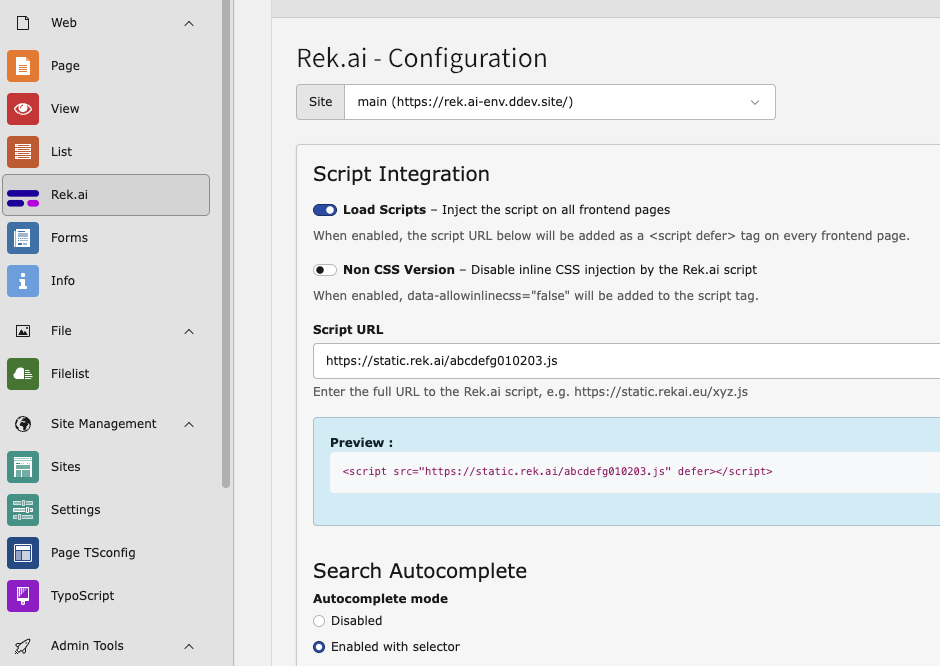
The Rek.ai backend configuration module

The backend configuration module under Site > Rek.ai.

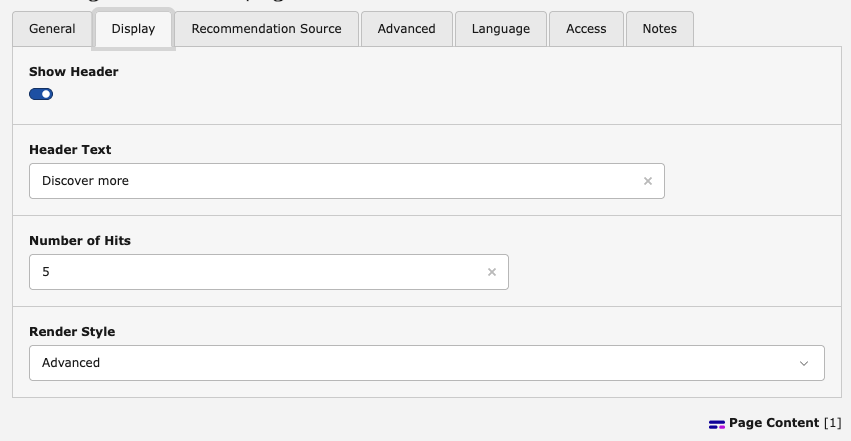
The Rek.ai Recommendations content element in the backend form

The Rek.ai Recommendations content element — Display tab.

Requirements 

TYPO3
Version 12.4 LTS – 13.4 LTS
PHP
8.1 or later
Rek.ai account
A valid Rek.ai account and a script URL provided by Rek.ai (e.g. https://static.rekai.se/xyz.js).

Credits 

Developed and maintained by 1_FORGE.

Feedback & Bug Reports 

Please use the issue tracker of the extension's source repository to report bugs or request features.

Installation 

Installation via Extension Manager (TER) 

  1. Open Admin Tools > Extensions in the TYPO3 backend.
  2. Switch to the Get Extensions tab.
  3. Search for one_forge_rekai and click Import and Install.
  4. Activate the extension using the toggle in the extension list.
  5. Run Admin Tools > Maintenance > Analyze Database Structure to apply the new database columns.

Include the TypoScript template 

The extension ships a TypoScript setup file that registers the rekai_recommendations content element renderer. It is auto-imported via ExtensionManagementUtility::addTypoScriptSetup() in ext_localconf.php, so no manual template inclusion is required.

If you prefer to include it explicitly (e.g. in a site package), add the following to your TypoScript setup:

@import 'EXT:one_forge_rekai/Configuration/TypoScript/setup.typoscript'
Copied!

Next steps 

After installation, proceed to Configuration to enter your Rek.ai script URL and enable script injection.

Configuration 

Backend Configuration Module 

The primary way to configure this extension is through the dedicated backend module located at Site > Rek.ai. It is accessible to administrators only.

Configuration is per TYPO3 site. When the TYPO3 installation contains more than one site, a site selector dropdown appears at the top of the module. Select the site you want to configure before making changes — each site stores its own independent set of values in config/sites/<identifier>/settings.yaml under the one_forge_rekai key.

The Rek.ai backend configuration module

The Rek.ai configuration module.

The module is divided into two sections: Script Integration and Autocomplete.

Script Integration 

Load Scripts 

Type
Boolean (toggle)
Default
Disabled

When enabled, the Rek.ai JavaScript is injected as a <script defer> tag into the <head> of every rendered frontend page. The tag is only added when both this toggle is on and a valid Script URL is configured.

Non CSS Version 

Type
Boolean (toggle)
Default
Disabled

When enabled, the data-allowinlinecss="false" attribute is added to the Rek.ai <script> tag. This instructs the Rek.ai script to skip its built-in inline CSS, which is useful when the site provides its own styling for Rek.ai widgets.

Script URL 

Type
URL string
Default
(empty)
Example
https://static.rekai.se/xyz.js

The full URL to the Rek.ai JavaScript file. This URL is provided by Rek.ai when you create or configure a site in the Rek.ai dashboard. The module validates that the value is a well-formed URL before saving; "Load Scripts" cannot be enabled without a valid URL.

After saving, the module shows a preview of the tag that will be injected:

<script src="https://static.rekai.se/xyz.js" defer></script>
Copied!

With Non CSS Version enabled:

<script src="https://static.rekai.se/xyz.js" data-allowinlinecss="false" defer></script>
Copied!

Autocomplete 

The extension can load and initialise the Rek.ai autocomplete library automatically. All autocomplete settings are managed in the same backend module.

Autocomplete Mode 

Type
Select (integer)
Options
0 – Disabled (default)
1 – Enabled with selector
2 – Enabled with custom script

Controls whether the autocomplete feature is active and how it is initialised.

  • Disabled — no autocomplete library is loaded.
  • Enabled with selector — the autocomplete library (rekai_autocomplete.min.js) is loaded and the extension generates an initialisation script automatically based on the settings below. A preview of the generated script is shown in the module.
  • Enabled with custom script — the autocomplete library is loaded and the content of Custom autocomplete script is injected verbatim as an inline <script> block.

Autocomplete Selector 

Type
String (CSS selector)
Default
#searchform-input
Applies to
Mode 1 only

The CSS selector for the search input field that autocomplete should attach to.

Open on Click 

Type
Boolean (toggle)
Default
Enabled
Applies to
Mode 1 only

When enabled, selecting an autocomplete suggestion navigates to that result's URL immediately.

Use Current Language 

Type
Boolean (toggle)
Default
Enabled
Applies to
Mode 1 only

When enabled, the autocomplete request is restricted to content in the current page language (using the ISO language code resolved from the active TYPO3 site language).

Number of Results 

Type
Integer
Default
5
Applies to
Mode 1 only

The maximum number of autocomplete suggestions to display.

Custom Autocomplete Script 

Type
Text (JavaScript)
Applies to
Mode 2 only

A full custom JavaScript block that is injected as-is into every frontend page when autocomplete mode 2 is active. Use this when you need full control over the autocomplete initialisation that the generated script (mode 1) does not provide.

Site Settings Storage 

All values configured in the backend module are stored per site in config/sites/<identifier>/settings.yaml under the one_forge_rekai key. The file is created automatically on first save if it does not already exist.

Example config/sites/my-site/settings.yaml:

one_forge_rekai:
  loadScripts: true
  scriptUrl: 'https://static.rekai.se/xyz.js'
  nonCssVersion: false
  autocompleteMode: 1
  autocompleteSelector: '#searchform-input'
  autocompleteOpenOnClick: true
  autocompleteUseCurrentLanguage: true
  autocompleteNumberOfResults: 5
  autocompleteCustomScript: ''
Copied!

Each site in a multi-site TYPO3 installation maintains its own independent configuration file. Values are read and written by OneForgeRekAiServiceRekAiConfigurationService via TYPO3CMSCoreSiteSiteSettingsService and TYPO3CMSCoreSiteSiteSettingsFactory.

TypoScript Reference 

The extension auto-imports the following TypoScript setup, which registers both content element rendering chains:

tt_content.rekai_recommendations = FLUIDTEMPLATE
tt_content.rekai_recommendations {
    templateName = RekaiRecommendations

    templateRootPaths {
        10 = EXT:one_forge_rekai/Resources/Private/Templates/Content/
    }

    dataProcessing {
        10 = OneForge\RekAi\DataProcessing\RekaiSettingsProcessor
    }
}

tt_content.rekai_qna = FLUIDTEMPLATE
tt_content.rekai_qna {
    templateName = RekaiQna

    templateRootPaths {
        10 = EXT:one_forge_rekai/Resources/Private/Templates/Content/
    }

    dataProcessing {
        10 = OneForge\RekAi\DataProcessing\RekaiSettingsProcessor
    }
}
Copied!

dataProcessing.10 (RekaiSettingsProcessor) passes the extension configuration array as the Fluid variable {rekaiSettings} to both templates. It also resolves any selected page UIDs to their URL slugs so they can be passed as data-subtree attributes.

Rendered HTML output 

Recommendations element — attributes vary by field values:

<div class="rek-prediction"
     data-headertext="Discover more"
     data-nrofhits="5"
     data-renderstyle="pills">
</div>
Copied!

With a specific page subtree selected:

<div class="rek-prediction"
     data-nrofhits="5"
     data-renderstyle="list"
     data-listcols="2"
     data-subtree="/news/,/blog/">
</div>
Copied!

Q&A element:

<div class="rek-prediction"
     data-entitytype="rekai-qna"
     data-nrofhits="10"
     data-userootpath="true">
</div>
Copied!

The Rek.ai JavaScript (loaded via the <script> in <head>) finds all elements with the class rek-prediction and populates them with the appropriate content.

For Editors 

The extension provides two content elements, both available in the Special Elements group of the TYPO3 content element wizard.

The "Rek.ai Recommendations" Content Element 

The Rek.ai Recommendations content element (internal CType: rekai_recommendations) renders a personalised content recommendations widget. Add it to any page column using the standard TYPO3 content element wizard.

Content Element Tabs 

General (tab) 

The standard TYPO3 general tab. The Header field (if shown) is part of the default TYPO3 header palette and is independent of the Rek.ai widget header described below.

Display (tab) 

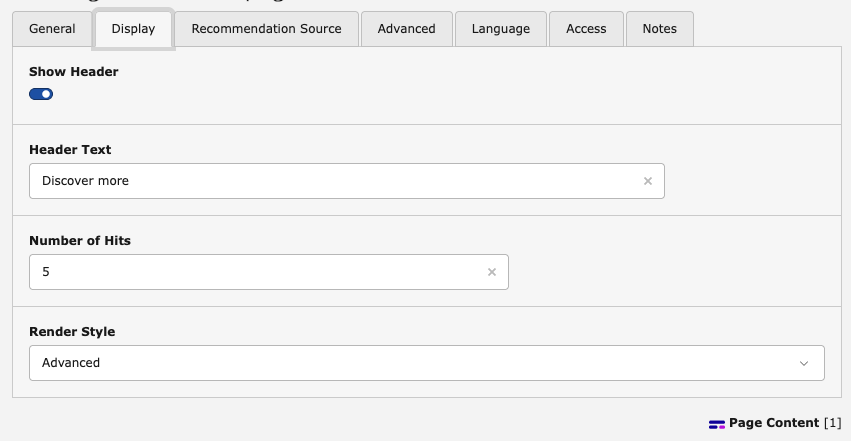
The Display tab of the Rek.ai Recommendations content element

Display settings for the recommendations widget.

Show Header
Toggle (on by default). When enabled, the widget displays a header above the recommendations list.
Header Text
(only visible when Show Header is on) The text displayed as a header above the recommendations. Defaults to Discover more.
Number of Hits
How many recommendation links the widget should display. Accepts a value between 1 and 20. Default: 5.
Hit Title Max Length
Maximum number of characters rendered for each recommendation link title. Accepts a value between 1 and 99. Default: 20. Maps to the data-titlemaxlength attribute.
Render Style

Controls the visual layout of the recommendations:

Pills
Displays recommendations as pill-shaped badges (default).
List
Displays recommendations as a multi-column list. The number of columns is controlled by Number of Columns (see below).
Advanced
Uses Rek.ai's advanced rendering mode. Refer to the Rek.ai documentation for details.
Number of Columns
(only visible when Render Style is set to List ) Number of columns in the list layout. Accepts a value between 1 and 6. Default: 2.

Recommendation Source (tab) 

These settings control which pages Rek.ai considers as recommendation candidates.

Recommendation Source

Defines the scope of pages passed to Rek.ai:

Current page (default)
No explicit root path is set; Rek.ai uses its own default scope.
Use only subpages of the current page
Limits recommendations to the direct or indirect children of the current page (data-userootpath="true").
Use subpages from a specific level
Limits recommendations to subpages starting from a specific page tree level (data-userootpath="true" + data-rootpathlevel). The Root Path Level and Select Subtree Pages fields appear when this option is selected.
Root Path Level
(only visible when Recommendation Source is set to Use subpages from a specific level ) The tree level (1–10) from which subpages are used as the recommendation pool.
Select Subtree Pages
(only visible when Recommendation Source is set to Use subpages from a specific level ) Optional multi-page selector. When pages are selected, their URL slugs are passed to Rek.ai as a data-subtree attribute (comma-separated), further narrowing the subtree scope.
Exclude child nodes of the starting point
When enabled, only the pages directly at the root path level are included; their children are excluded.

Advanced (tab) 

Extra Attributes

Arbitrary HTML data attributes added verbatim to the <div class="rek-prediction"> element. Use this to pass custom configuration to the Rek.ai script that is not covered by the standard fields.

Example value: data-foo="bar" data-baz="qux"

Resulting HTML 

Based on the editor settings, the extension renders a <div> element with data-* attributes that the Rek.ai script reads to configure the widget. For example:

<div class="rek-prediction"
     data-headertext="You might also like"
     data-nrofhits="4"
     data-renderstyle="list"
     data-listcols="3"
     data-userootpath="true"
     data-rootpathlevel="2">
</div>
Copied!

With Use specific pages selected:

<div class="rek-prediction"
     data-nrofhits="5"
     data-renderstyle="pills"
     data-subtree="/news/,/blog/articles/">
</div>
Copied!

The "Rek.ai Questions and Answers" Content Element 

The Rek.ai Questions and Answers content element (internal CType: rekai_qna) renders a Rek.ai Q&A widget that displays relevant questions and answers sourced from your content. Add it to any page column using the standard TYPO3 content element wizard.

Content Element Tabs 

General (tab) 

The standard TYPO3 general tab.

Options (tab) 

Number of Hits
How many Q&A items to display. Use 0 for no limit. Default: 0.
Branch Mode

Controls which pages are used as the Q&A source:

None (default)
No branch restriction; Rek.ai uses its own default scope.
Current branch
Restricts Q&A results to the branch of the current page (equivalent to data-userootpath="true").
Specific pages
Allows selecting one or more pages directly. Requires the Specific pages field. The selected pages' URL slugs are passed as data-subtree.
Current page only
Returns only questions whose answer is on the current page (data-currentpagequestions="true").
Specific Pages
(only visible when Branch Mode is set to Specific pages ) A multi-page selector. The selected pages' URL slugs are passed to Rek.ai as a data-subtree attribute (comma-separated).
Tags
Optional comma-separated list of tags. Only Q&A items that match at least one of the specified tags are shown.
Hide link to answer page if same page
When enabled, the link to the answer page is hidden if the answer is located on the page where the widget is placed.
Hide link to answer page
When enabled, no link to the answer page is rendered regardless of whether it is the current page.
Disable highlighting
When enabled, Rek.ai's keyword highlighting in answers is turned off.

Resulting HTML 

The extension renders a <div> element with the data-entitytype="rekai-qna" attribute so that the Rek.ai script identifies it as a Q&A widget. For example:

<div class="rek-prediction"
     data-entitytype="rekai-qna"
     data-nrofhits="10"
     data-userootpath="true">
</div>
Copied!

With Specific pages selected and tag filtering:

<div class="rek-prediction"
     data-entitytype="rekai-qna"
     data-subtree="/faq/,/support/"
     data-tags="returns,shipping">
</div>
Copied!

For Developers 

Architecture Overview 

The extension follows standard TYPO3 12/13 patterns: PSR-4 autoloading, Symfony DI with autowiring, attribute-based backend controller registration, and Fluid templates.

Classes/
├── Controller/Backend/
│   └── ConfigurationController.php   # Backend module controller
├── DataProcessing/
│   └── RekaiSettingsProcessor.php    # Fluid data processor
├── Hook/
│   └── PageRendererHook.php          # PageRenderer pre-process hook
└── Service/
    └── RekAiConfigurationService.php # Read/write extension configuration
Copied!

RekAiConfigurationService 

OneForgeRekAiServiceRekAiConfigurationService is the central service for reading and writing the extension configuration. Configuration is per site and stored in config/sites/<identifier>/settings.yaml. The service is available via dependency injection.

Public API 

use OneForge\RekAi\Service\RekAiConfigurationService;
use TYPO3\CMS\Core\Site\Entity\Site;

// Via constructor injection (recommended)
public function __construct(
    private readonly RekAiConfigurationService $rekAiConfigService,
) {}
Copied!

All read methods require the concrete TYPO3CMSCoreSiteEntitySite object (not SiteInterface or NullSite). Obtain it from the current frontend request via $request->getAttribute('site') or from SiteFinder in backend contexts.

Methods

getConfigurationForSite(Site $site): array
Returns the full configuration array for the given site, merged with defaults. Keys: loadScripts, scriptUrl, nonCssVersion, autocompleteMode, autocompleteSelector, autocompleteOpenOnClick, autocompleteUseCurrentLanguage, autocompleteNumberOfResults, autocompleteCustomScript.
isScriptLoadingEnabled(Site $site): bool
Returns true when the loadScripts flag is enabled for the site.
isNonCssVersion(Site $site): bool
Returns true when the nonCssVersion flag is enabled for the site.
getConfiguredScriptUrl(Site $site): string
Returns the configured script URL as a trimmed string, or an empty string if not set.
isValidScriptUrl(string $scriptUrl): bool
Returns true when the given string is a non-empty, well-formed URL (uses filter_var($url, FILTER_VALIDATE_URL)). Stateless — no site parameter needed.
getAutocompleteMode(Site $site): int
Returns the autocomplete mode (0, 1, or 2) for the site.
getAutocompleteSelector(Site $site): string
Returns the CSS selector string for autocomplete mode 1.
isAutocompleteOpenOnClick(Site $site): bool
Returns true when the open-on-click behaviour is enabled.
isAutocompleteUseCurrentLanguage(Site $site): bool
Returns true when language filtering is enabled.
getAutocompleteNumberOfResults(Site $site): int
Returns the configured maximum number of autocomplete suggestions.
getAutocompleteCustomScript(Site $site): string
Returns the raw custom autocomplete script for mode 2.
buildAutocompleteInitScript(Site $site): string
Generates and returns the full autocomplete initialisation <script> block for the site. Returns an empty string when autocomplete mode is 0.
saveConfiguration(Site $site, bool $loadScripts, string $scriptUrl, bool $nonCssVersion, int $mode, string $selector, string $customScript, bool $openOnClick, bool $useCurrentLanguage, int $numberOfResults): void
Persists all values to the site's settings.yaml via SiteSettingsService::writeSettings(), which also flushes the TYPO3 code cache so the new values take effect immediately.

PageRendererHook 

OneForgeRekAiHookPageRendererHook is registered via ext_localconf.php as a render-preProcess hook on t3lib_pagerenderer:

$GLOBALS['TYPO3_CONF_VARS']['SC_OPTIONS']
    ['t3lib/class.t3lib_pagerenderer.php']['render-preProcess'][]
    = \OneForge\RekAi\Hook\PageRendererHook::class . '->addRekAiScript';
Copied!

The hook's addRekAiScript() method:

  1. Reads the current site from $GLOBALS['TYPO3_REQUEST']->getAttribute('site').
  2. Returns early if the attribute is not a concrete Site instance (e.g. CLI or backend context).
  3. Reads the configuration for that site via RekAiConfigurationService.
  4. Returns early if loadScripts is disabled or scriptUrl is empty.
  5. Otherwise calls PageRenderer::addHeaderData() with:

    <script src="https://static.rekai.se/xyz.js" defer></script>
    Copied!

The src attribute is escaped with htmlspecialchars().

RekaiSettingsProcessor 

OneForgeRekAiDataProcessingRekaiSettingsProcessor implements TYPO3CMSFrontendContentObjectDataProcessorInterface. It is configured in the TypoScript rendering chain for both tt_content.rekai_recommendations and tt_content.rekai_qna:

dataProcessing {
    10 = OneForge\RekAi\DataProcessing\RekaiSettingsProcessor
}
Copied!

The processor reads the full extension configuration for the current site and assigns it as the Fluid variable {rekaiSettings}. Both frontend templates use {rekaiSettings.loadScripts} to guard their widget output. The processor also resolves any selected page UIDs in the tx_rekai_subtree_pages / tx_rekai_qna_subtree_pages group fields to URL slugs, storing the result in data.tx_rekai_subtree / data.tx_rekai_qna_subtree respectively.

ConfigurationController 

OneForgeRekAiControllerBackendConfigurationController handles both GET and POST requests for the backend module. It is registered with the #[AsBackendController] attribute and resolves through Symfony DI.

Site resolution — the active site is determined from the rekaiSite key in the POST body (hidden form field) or GET query parameter, falling back to the first site returned by SiteFinder::getAllSites(). URLs for site switching are built via BackendUriBuilder::buildUriFromRoute() so they survive TYPO3's backend routing.

GET – renders the form pre-populated with the configuration of the resolved site. When more than one TYPO3 site exists, a site selector dropdown is shown above the form.

POST – validates input (URL must be valid when loadScripts is checked), saves the configuration for the resolved site via RekAiConfigurationService::saveConfiguration(), queues a flash message, and redirects (PRG pattern) back to the module URL for the same site.

The controller uses ModuleTemplateFactory to create a ModuleTemplate and returns ModuleTemplate::renderResponse('Backend/Configuration/Index').

TCA & Database Schema 

The extension extends tt_content with the following columns:

rekai_recommendations

Column Type Description
tx_rekai_show_header tinyint(1) Toggle: show widget header (default 1)
tx_rekai_headertext varchar(255) Text displayed above the recommendations list
tx_rekai_titlemaxlength int(11) Maximum characters for each recommendation title (1–99, default 20)
tx_rekai_nrofhits int(11) Number of recommendation links to render (1–20, default 5)
tx_rekai_renderstyle varchar(20) Layout style: pills, list, or advanced
tx_rekai_listcols int(11) Number of columns for the list render style (1–6, default 2)
tx_rekai_rootpath_mode varchar(20) Scope of candidate pages: '', subpages, or level
tx_rekai_rootpathlevel int(11) Tree level for the level root path mode (1–10, default 1)
tx_rekai_subtree_pages text Page UIDs (serialised group field) resolved to URL slugs at render time; passed as data-subtree
tx_rekai_excludechildnodes tinyint(1) Exclude children of the root path entry point (default 0)
tx_rekai_extra_attributes text Raw HTML data-attribute string appended verbatim to the widget <div>

rekai_qna

Column Type Description
tx_rekai_qna_branch_mode varchar(20) Q&A scope: '' (none), current, subtree, or currentpage
tx_rekai_qna_subtree_pages text Page UIDs resolved to URL slugs; passed as data-subtree when branch mode is subtree
tx_rekai_qna_nrofhits int(11) Maximum Q&A items to display (0 = no limit, default 0)
tx_rekai_qna_tags varchar(255) Comma-separated tag filter; passed as data-tags
tx_rekai_qna_hide_answer_link_same tinyint(1) Hide the answer link when the answer is on the current page (default 0)
tx_rekai_qna_hide_answer_link tinyint(1) Always hide the link to the answer page (default 0)
tx_rekai_qna_disable_highlight tinyint(1) Disable Rek.ai keyword highlighting in answers (default 0)

Dependency Injection 

Configuration/Services.yaml enables autowiring and autoconfiguration for all classes under the OneForge\RekAi\ namespace. The backend controller is explicitly declared public: true so TYPO3's backend routing can resolve it from the container:

services:
  _defaults:
    autowire: true
    autoconfigure: true
    public: false

  OneForge\RekAi\:
    resource: '../Classes/*'

  OneForge\RekAi\Controller\Backend\ConfigurationController:
    public: true

  OneForge\RekAi\Hook\PageRendererHook:
    public: true
Copied!

Extending the Extension 

Custom data attributes 

If the Rek.ai widget requires additional data-* attributes that are not covered by the standard TCA fields, use the Extra Attributes field on the content element (see Advanced (tab)) without touching the extension code.

Custom templates 

Override the Fluid template by adding a higher-priority path in your site package's TypoScript:

tt_content.rekai_recommendations.templateRootPaths {
    20 = EXT:my_site_package/Resources/Private/Templates/Content/
}
Copied!

Place your custom RekaiRecommendations.html in that directory.

Custom data processor 

To pass additional variables to the Fluid template, chain your own data processor after the built-in one:

tt_content.rekai_recommendations.dataProcessing {
    20 = Vendor\MyExtension\DataProcessing\MyProcessor
}
Copied!

Changelog 

1.3.0 

Release date: 11.05.2026

Features

  • TYPO3 14.x compatibility — the extension now supports TYPO3 14.x in addition to 12.4 and 13.4.

1.2.1 

Release date: 04.05.2026

Bug fixes

  • Fixed a typo in the TCA column key for the Render Style field: it was registered as tx_rekai_recnderstyle instead of tx_rekai_renderstyle, which caused the field to be invisible in the backend form under the Display tab of the Rek.ai Recommendations content element.

1.2.0 

Release date: 29.04.2026

Features

  • Per-site configuration — extension settings are now stored independently for each TYPO3 site in config/sites/<identifier>/settings.yaml under the one_forge_rekai key. Previously all sites shared a single global configuration in config/system/settings.php.
  • Site selector dropdown in the backend module: when a TYPO3 installation contains more than one site, a selector appears above the form so administrators can configure each site individually without leaving the module.

Breaking changes

  • All public methods of RekAiConfigurationService now require a TYPO3CMSCoreSiteEntitySite argument. Custom code calling the service directly must be updated to pass the relevant site object.

1.1.0 

Release date: 08.04.2026

Features

  • Backend module — Non CSS Version toggle: adds data-allowinlinecss="false" to the injected <script> tag, allowing sites to provide their own styling for Rek.ai widgets instead of using the built-in inline CSS.
  • Autocomplete integration in the backend module: three modes are available — disabled, default selector-based (with generated initialisation script and live preview), and custom (editor-provided JavaScript block). Supports configurable selector, open-on-click behaviour, current-language filtering, and number of results.
  • New ``rekai_qna`` content element (Rek.ai Questions and Answers): renders a <div class="rek-prediction" data-entitytype="rekai-qna"> widget. Supports branch-mode scoping (none / current branch / specific pages / current page only), tag filtering, and configurable link and highlight behaviour.
  • ``rekai_recommendations`` content element — new Use specific pages source mode: editors can select individual pages directly as the recommendation source. Selected page UIDs are resolved to URL slugs and passed as data-subtree to the Rek.ai script.

1.0.0 

Release date: 23.03.2026

Initial release.

Features

  • Backend configuration module under Site > Rek.ai to manage the Rek.ai script URL and the global script injection toggle.
  • PageRendererHook that injects the Rek.ai <script defer> tag into every frontend page when enabled.
  • rekai_recommendations content element with configurable display options (render style, number of hits, header text) and recommendation source scoping (current page, subpages, page tree level).
  • RekAiConfigurationService for reading and writing extension configuration.
  • RekaiSettingsProcessor data processor for passing extension settings to Fluid templates.
  • Compatible with TYPO3 12.0–13.x and PHP 8.1+.