
Configuration
Site settings
Since version 2.0, all global settings are managed per site.
TYPO3 13 / 14 — manage values through the Settings editor. Open Site Management > Sites, then on the site card click the gear icon (Site-Einstellungen bearbeiten):
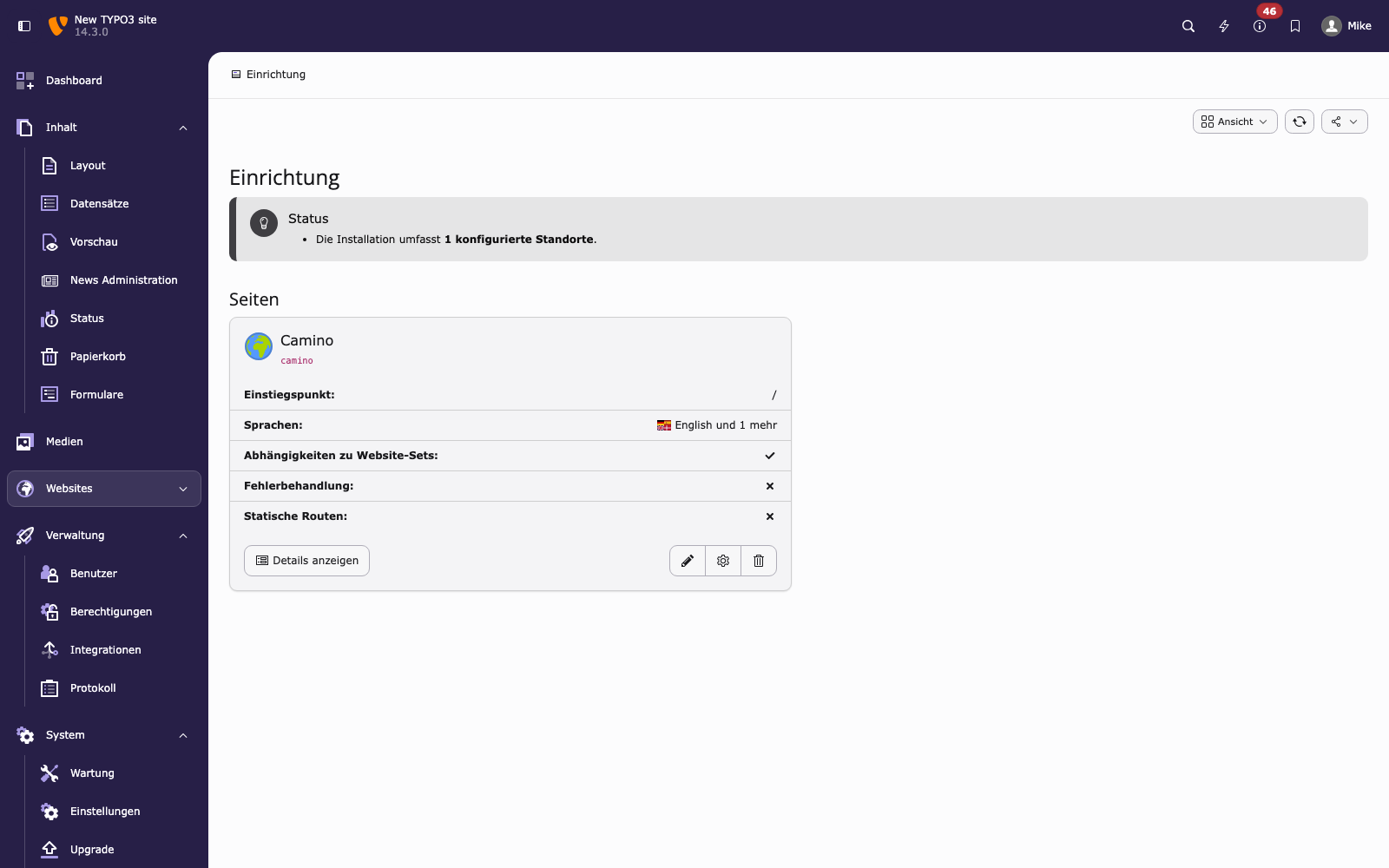
Site Management module. The gear icon opens the Settings editor.
In the Settings editor, expand the Rek.ai group on the left to access Basic, Autocomplete and Advanced:
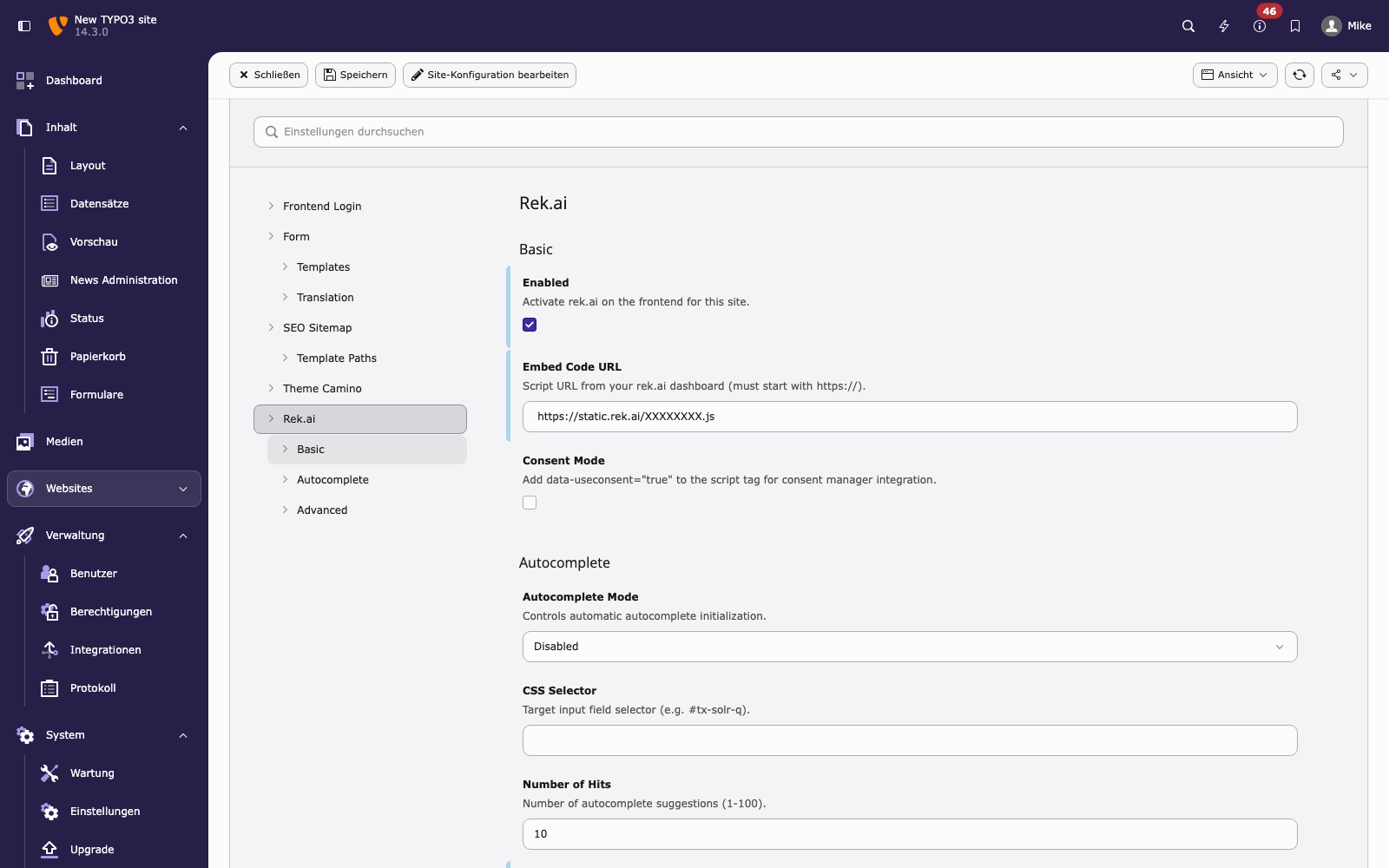
Settings editor — Rek.ai → Basic.
Values are stored in config/sites/<identifier>/settings.yaml under
the flat rekai namespace (one entry per dotted key).
TYPO3 12 — the Settings editor does not exist. Write the values
directly into config/sites/<identifier>/config.yaml under
settings.rekai as a nested tree (see Example below). The
extension reads from this location automatically when the TYPO3 13+
SiteSettings API is unavailable.
Changed in version 2.0
Removed the global Extension Configuration. All settings are now
per-site. On TYPO3 13/14 via the pluswerk/rekai Site Set; on
TYPO3 12 via manual YAML under settings.rekai.
General
| Setting | Type | Description |
|---|---|---|
rekai.enabled | boolean | Master switch. Disabling this prevents the rek.ai script from being
injected on any page of this site. Default: false. |
rekai.embedCode | string | HTTPS URL to the rek.ai client script (e.g.
https://cdn.rek.ai/YOUR_PROJECT/s.js). Must start with https://. |
rekai.consentMode | boolean | Adds data-useconsent="true" to the script tag, enabling rek.ai's
built-in consent handling. Default: false. |
Autocomplete
| Setting | Type | Description |
|---|---|---|
rekai.autocomplete.mode | select | disabled — no autocomplete. auto — rek.ai initializes
autocomplete automatically. manual — you call
rekai_autocomplete() yourself. Default: disabled. |
rekai.autocomplete.selector | string | CSS selector targeting the search input field, e.g.
#tx-solr-search-q. Required when mode is auto or manual. |
rekai.autocomplete.nrOfHits | integer | Number of autocomplete suggestions shown (1–100). Default: 10. |
rekai.autocomplete.navigateOnClick | boolean | If enabled, the browser navigates to the result URL when a suggestion
is clicked. Default: false. |
rekai.autocomplete.useCurrentLang | boolean | Passes the current TYPO3 page language to rek.ai autocomplete for
language-filtered suggestions. Default: false. |
Advanced / Test mode
| Setting | Type | Description |
|---|---|---|
rekai.advanced.testMode | boolean | Enables test mode. In this mode no visitor data is tracked, and
window.rek_blocksaveview = true is injected. Also active for
logged-in backend users regardless of this setting. Default: false. |
rekai.advanced.useMockData | boolean | Replaces live rek.ai data with synthetic mock data for local
development. Default: false. |
rekai.advanced.projectId | string | Your rek.ai project ID. Required in test mode. |
rekai.advanced.secretKey | string | Your rek.ai API secret key. Required in test mode. |
Example
TYPO3 13 / 14 — flat keys in settings.yaml (written by the editor
or by hand):
rekai.enabled: true
rekai.embedCode: 'https://cdn.rek.ai/PROJECT/s.js'
rekai.consentMode: true
rekai.autocomplete.mode: auto
rekai.autocomplete.selector: '#tx-solr-q'
rekai.autocomplete.nrOfHits: 10
rekai.autocomplete.navigateOnClick: true
rekai.autocomplete.useCurrentLang: true
rekai.advanced.testMode: falseTYPO3 12 — nested tree in config.yaml under settings.rekai:
settings:
  rekai:
    enabled: true
    embedCode: 'https://cdn.rek.ai/PROJECT/s.js'
    consentMode: true
    autocomplete:
      mode: auto
      selector: '#tx-solr-q'
      nrOfHits: 10
      navigateOnClick: true
      useCurrentLang: true
    advanced:
testMode: falseContent element FlexForm settings
Each content element exposes additional settings through a FlexForm panel visible in the backend. See Editor Guide for field descriptions.
Validation behaviour
If the extension is enabled but rekai.embedCode is not a valid HTTPS URL,
the rek.ai script is silently not injected. No error is thrown.
Migration from 1.x
Before 2.0, settings were stored globally in Admin Tools > Settings > Extension Configuration > rekai. Move your existing values into the site settings:
| 1.x Extension Configuration key | 2.0 Site Setting key |
|---|---|
isEnabled | rekai.enabled |
embedCode | rekai.embedCode |
consentMode | rekai.consentMode |
autocompleteMode | rekai.autocomplete.mode |
autocompleteSelector | rekai.autocomplete.selector |
autocompleteNrOfHits | rekai.autocomplete.nrOfHits |
autocompleteNavigateOnClick | rekai.autocomplete.navigateOnClick |
autocompleteUseCurrentLang | rekai.autocomplete.useCurrentLang |
testMode | rekai.advanced.testMode |
useMockData | rekai.advanced.useMockData |
projectId | rekai.advanced.projectId |
secretKey | rekai.advanced.secretKey |